What's inside
- Key Takeaways
- Quick Picks
- How Did We Choose These Picks?
- Which Coolers Deserve a Detailed Look?
- What About the Four Honourable Mentions?
- Air or Liquid — Which Suits Your Build?
- How Do You Check Fit Before Ordering?
- Comparison Table
- What Mistakes Do Cooler Buyers Keep Making?
- How Should You Install and Tune a New Cooler?
- How Does Cooler Choice Change Everyday Feel?
- What Should You Know About Fan Control and Noise Tuning?
- What Does a Cooler Sound Like From Your Chair?
- Does the Season Change Your Answer?
- Final Recommendation
- Frequently Asked Questions
- Related Guides
As an Amazon Associate I earn from qualifying purchases. This post may contain affiliate links at no extra cost to you.
gizmoverdict.com is reader-supported. When you buy through links on our site, we may earn an affiliate commission.
Where to buy: Every linked cooler below is sold through Amazon, and each product name in this guide takes you to that model’s current listing, where you can confirm socket support, included mounting hardware and stock before you order. If a listing shows a different revision than the one described here, trust the listing’s own specification tab over any roundup, including this one.
Choosing among the best 10 cpu coolers sounds like a simple shopping task until you open your case and start measuring. A cooler is the one component that has to satisfy three different judges at once: the processor, which wants heat moved away quickly; the motherboard and memory, which want physical room to exist; and you, sitting a metre away, who wants all of that to happen without a constant hum. The ten coolers in this guide were picked because each one answers those three judges in a different balance, and the right answer depends far more on your case, your chip and your tolerance for noise than on any single ranking.
Six of the ten are fully linked picks with verified listings: five large air coolers and one 360mm liquid cooler that represents the all-in-one side of the market. The remaining four are honourable mentions covered in prose, because they deserve a place in the conversation even though we are not linking them here. Between them they cover the whole realistic spread, from a compact single-tower cooler that has been a default recommendation for years to a dual-tower flagship that is taller than some graphics cards are long.
One warning before the list itself. You will see wattage figures attached to coolers all over the internet, and some manufacturers print very large numbers on their boxes. Those figures are each maker’s own claim, produced under that maker’s own test conditions, and there is no shared measuring standard behind them. Treat them the way you would treat a car’s claimed top speed: interesting, roughly indicative of intent, and a poor way to rank two products against each other. What actually decides whether a cooler suits you is fit, fan behaviour, mounting quality and whether its cooling style matches how your processor really works.
Key Takeaways
- Measure your case’s cooler clearance before falling for any dual-tower flagship; the tallest pick here stands 168mm, and that single number rules it in or out.
- Air and liquid are not a hierarchy. A good dual-tower air cooler and a 360mm radiator solve the same problem with different failure modes, different noise shapes and very different installation effort.
- The Hyper 212 Black II remains the sensible floor of this list: modest, proven and easy to live with, provided your chip’s heat output is equally modest.
- A status display, like the one on the AK620 Digital, changes nothing about heat transfer; buy it because you enjoy glancing at readouts through a glass panel, not because it cools better.
- Four honourable mentions — the NH-U12A, Phantom Spirit 120 SE, Fuma 3 and Titan 360 RX — are covered in prose after the main six, and for some builds one of them is honestly the better fit.
Quick Picks
| Pick | Badge | Why it earns its place |
|---|---|---|
| Noctua NH-D15 G2 | Flagship air | The dual-tower reference point for buyers who want maximum air cooling and minimum fuss for years at a time. |
| Thermalright Peerless Assassin 120 SE | Value dual tower | Six heatpipes and twin fans at a friendlier size, for builders who want big-tower behaviour without flagship ceremony. |
| be quiet! Dark Rock Pro 6 | Quiet flagship | Seven heatpipes and a semi-passive mode aimed squarely at people who build silent rooms, not just silent PCs. |
| AK620 Digital | Display pick | A dual-tower cooler with a status screen on top, for glass-panel builds where the readout is part of the point. |
| Cooler Master Hyper 212 Black II | Everyday default | The four-heatpipe single tower that still makes sense for mid-range chips and first builds. |
| ARCTIC Liquid Freezer III Pro 360 | Liquid option | A 360mm radiator with a pump-mounted VRM fan, for hot flagship chips in cases with room to breathe. |
Beyond these six, keep four more names in mind. The Noctua NH-U12A squeezes serious cooling into a single 120mm-class tower. The Thermalright Phantom Spirit 120 SE is the newer sibling in the same family as our value pick. The Scythe Fuma 3 trades a little outright size for a shape that plays nicely with tall memory. The Corsair iCUE Link Titan 360 RX is the ecosystem liquid cooler, and it gets a full linked treatment in our 360mm guide. Each receives an honest prose assessment later in this article.
How Did We Choose These Picks?
We started from the question a builder actually asks, which is not “which cooler is best” but “which cooler will not embarrass me in eighteen months”. That filters out anything with a mounting system that fights you, anything whose fans become the loudest part of the machine under ordinary loads, and anything that only fits a narrow slice of sockets. Every linked pick here covers current Intel and AMD platforms in its listing, because a cooler that cannot follow you to your next motherboard is a worse purchase than its cooling alone suggests.
Physical honesty came next. We favoured coolers whose published dimensions let you plan a build on paper: tower height, fan size, heatpipe count and radiator length are all stated in the listings we drew from, and where a number matters to fit we repeat it in the mini spec list under each pick. We deliberately avoided repeating laboratory temperature figures from around the web. Those numbers depend on the test bench, the ambient room, the case and the exact chip sample, and copying them into a buying guide lends them a precision they never earned.
Finally, we spread the list across philosophies rather than crowning variations of one idea. Two of the six chase silence as a primary goal. One chases value. One chases information and looks. One is the humble all-rounder. One is liquid. If your build does not resemble any of those six intentions, the honourable mentions probably contain your answer, and the buying-guide sections after the reviews explain how to tell.
Which Coolers Deserve a Detailed Look?

Noctua NH-D15 G2 — Flagship air
The NH-D15 G2 is what happens when a company spends a decade refining one idea instead of chasing new ones. It is a dual-tower air cooler with eight heatpipes and two large fans working across two fin stacks, and its job in this list is simple: it is the air cooler against which the others are measured. If your case can accept its 168mm height and your memory is not exceptionally tall, this is the cooler you buy when you want to install something once and then stop thinking about processor temperatures as a category of worry.
What owners tend to praise, and what the design genuinely supports, is the mounting system and the completeness of the box. Noctua’s brackets have a reputation for going together in the order the instructions promise, with clear socket coverage for current Intel and AMD platforms, and that matters more than it sounds. A cooler of this size exerts real leverage on a motherboard; a bracket that spreads that load properly and installs without a third hand is not a luxury feature, it is the difference between a calm Saturday build and a stressful one. Plan the installation order, though: fit memory and any awkward motherboard cables before the towers go on, because once this cooler is seated, the space around the socket becomes its territory.
Noise character is the other reason it leads the list. Large fans turning slowly move air with a lower, softer sound than small fans spinning hard, and in ordinary desktop work the G2’s fans can loaf along at speeds where the rest of the room is louder. Under a sustained rendering or compiling load it becomes audible, as every cooler on this page does, but the sound stays in the register of moving air rather than bearing whine. If you record audio, stream, or simply share a room with the machine, that character is worth as much as raw cooling headroom.
- Format: dual-tower air cooler
- Height: 168mm — confirm case clearance first
- Heatpipes: 8
- Fans: two large PWM fans across twin fin stacks
- Sockets: current Intel and AMD platforms per listing
Strengths
- Enormous passive fin area means the fans rarely need to work hard in everyday use.
- Mounting hardware and instructions are the most confidence-inspiring in this roundup.
- Built for longevity: no pump, no coolant, nothing to age except two replaceable fans.
Trade-offs
- At 168mm tall it simply will not fit a meaningful share of smaller cases.
- Its bulk can crowd the top PCIe slot area and tall memory on some boards.
- You pay flagship money for a cooler with no lighting and no display of any kind.
Best for: high-end air-cooled builds in roomy cases, owned by people who value quiet and permanence over spectacle. Not suited for: compact cases, very tall RGB memory kits, or anyone who needs the first expansion slot fully accessible.

Thermalright Peerless Assassin 120 SE — Value dual tower
The Peerless Assassin 120 SE is the cooler that made a lot of expensive rivals uncomfortable. It takes the same basic architecture as the flagship above — two towers, six heatpipes, a 120mm fan in front and another in the middle — and delivers it in a package that asks far less of your wallet and a little less of your case. Its fans are rated up to 1550 RPM, a sensible ceiling that tells you the design expects airflow through dense fins rather than brute fan speed to do the work.
In a real build, the experience is closer to the flagships than the price gap implies. The twin-tower layout gives it genuine headroom for modern mid-range and upper-mid-range processors, the kind that spike hard during game loading, shader compilation and Windows updates, then settle. Where you notice the savings is in the finishing details: the fan clips, the top cover and the general ceremony of unboxing are functional rather than delightful, and the mounting process rewards patience. Read the bracket orientation twice before you commit, because with value hardware the instructions carry more of the burden that premium brands shift onto tool-less cleverness.
Clearance behaviour is its quiet superpower. A dual tower built around 120mm fans is narrower in its demands than the 140mm-class flagships, and while you should still check memory height against the front fan — which can usually be slid upward a few millimetres to clear a tall stick, at the cost of total cooler height — the Assassin is the dual tower most likely to fit the build you already own. For anyone upgrading from a stock cooler or an ageing single tower, this is the step that changes the machine’s character: load noise drops, boost behaviour steadies, and the processor stops being the reason the fans surge.
- Format: dual-tower air cooler
- Heatpipes: 6, with AGHP technology per listing
- Fans: two 120mm PWM, up to 1550 RPM
- Sockets: AMD AM4/AM5 and Intel LGA 1700/115x per listing
- Profile: slimmer than 140mm-class dual towers
Strengths
- Dual-tower cooling headroom at a genuinely approachable cost of entry.
- 120mm fan layout is kinder to memory and case clearance than bigger rivals.
- Fan speed ceiling is modest, which keeps its worst-case noise civilised.
Trade-offs
- Fit and finish are workmanlike rather than premium, especially the fan clips.
- Front fan may need raising over tall memory, which adds height back.
- Instructions assume a builder who has mounted a tower cooler before.
Best for: value-focused builders who want flagship-style headroom for gaming and productivity chips. Not suited for: buyers who want a luxury unboxing, or the absolute hottest processors run at sustained full load in warm rooms.
be quiet! Dark Rock Pro 6 — Quiet flagship
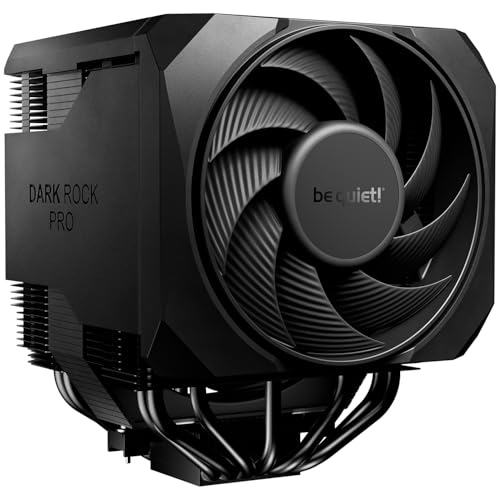
be quiet! names its products after its priority, and the Dark Rock Pro 6 is engineered around that promise: seven heatpipes, two PWM fans from the company’s Silent Wings line, and a semi-passive mode in which the fans can rest entirely when the processor is idling or doing light work. In a quiet room, a stopped fan is a different experience from a slow one. Web browsing, writing and reading can happen in something close to actual silence, with the cooler waking up only when the work does.
The design language matches the intent. This is a blacked-out, squared-off tower cooler that looks like studio equipment rather than gaming merchandise, and the listing makes a point of RAM and VRM clearance compatibility, which signals that the fin stacks have been shaped with real motherboards in mind rather than drawn as perfect rectangles. That shaping matters in practice: the components around a modern socket — memory slots, VRM heatsinks, the top M.2 cover — are all taller than they used to be, and a cooler designed with cut-outs and offsets saves you the miserable discovery phase of a build.
Choose it with clear eyes about its nature. A silence-first flagship tunes its fan behaviour conservatively, which suits processors that work in bursts and rooms where noise carries. If your workload is an eight-hour render on the hottest consumer chip you could buy, in summer, the semi-passive party trick is irrelevant and you are simply buying a very good, very composed dual tower — which is still a defensible purchase, but go in knowing which of its talents you are actually paying for. The maker’s wattage figure on the box is, as with every brand here, their own claim under their own conditions; judge this cooler by its fans, its fins and its manners.
- Format: dual-tower air cooler
- Heatpipes: 7
- Fans: two Silent Wings PWM fans
- Special mode: semi-passive operation at light load
- Design focus: RAM and VRM clearance, all-black finish
Strengths
- Semi-passive mode delivers genuine silence during light desktop work.
- Fan quality and tuning are the centre of the design, not an afterthought.
- Shaped fin stacks show real respect for crowded modern motherboards.
Trade-offs
- Silence tuning means it concedes the last slice of cooling aggression to rivals.
- The dark, monolithic styling disappears in a showcase build — a plus or minus by taste.
- Flagship pricing buys manners and finish more than raw specification drama.
Best for: quiet-room builds, home studios, and anyone whose PC shares space with conversation or recording. Not suited for: maximum-load marathon workloads where fan behaviour should be aggressive above all else.

AK620 Digital — Display pick
Some builders want their hardware to report back. The AK620 Digital takes a professional dual-tower heatsink — six copper heatpipes, two quiet 120mm fans — and puts a status display screen on top of it, so processor temperature and load information sit visibly on the cooler itself. In a case with a glass side panel, that screen becomes the thing your eye goes to, and for the build-as-furniture crowd that is a legitimate feature, not a gimmick to apologise for.
Strip the screen away mentally and judge what remains, because that is what you will own for the next several years. What remains is a conventional, sensibly proportioned dual tower of the modern school: enough heatpipe count and fin area for strong mainstream and upper-mainstream processors, dual fans in the push arrangement this class settled on, and compatibility across current Intel and AMD sockets. That is a sound foundation. The display is a layer on top of a cooler that had to be competent first, and it is — this is not a weak heatsink wearing a costume.
The honest caveats are about the layer, not the foundation. A display needs data, which means software, which means one more background utility wanting to live on your machine and one more thing to configure after a Windows reinstall. Screens also age differently from aluminium: a heatsink is effectively immortal, while a small display is an electronic component with a finite life. Neither point should scare off the buyer this cooler is for. Just buy it because the readout delights you every time you glance sideways, not because you believe it changes a single degree of cooling — it does not, and the guide that tells you otherwise is selling something.
- Format: dual-tower air cooler with status display
- Heatpipes: 6 copper heatpipes
- Fans: two 120mm, tuned for quiet operation per listing
- Display: top-mounted screen for system status readouts
- Sockets: current Intel and AMD platforms per listing
Strengths
- The readout is genuinely useful for spotting a runaway process at a glance.
- Underneath the screen sits a properly specified dual-tower heatsink.
- It gives a glass-panel build a focal point that is information, not just light.
Trade-offs
- Display features depend on companion software staying installed and updated.
- The screen is one more electronic part in a product category famous for having none.
- In a closed, windowless case you are paying for a feature nobody will ever see.
Best for: showcase builds and tinkerers who like watching their machine’s vital signs. Not suited for: windowless cases, minimalists, or anyone who resents background utilities.

Cooler Master Hyper 212 Black II — Everyday default
Every category has a product that becomes the answer people give without thinking, and for CPU air cooling that product has been the Hyper 212 in its various generations. This Black II version carries the formula forward: four heatpipes in a single tower, one 120mm PWM fan, an all-black finish that suits modern builds, and a listing that covers AMD AM5/AM4 and Intel LGA1851/1700 — meaning the old faithful has kept pace with current sockets rather than surviving as a legacy-only part.
Its role in a list that also contains flagship dual towers needs stating plainly. The Hyper 212 is not competing with the NH-D15 G2; it is competing with the cooler that came free in the processor’s box, and against that rival it is transformative. For a mid-range gaming chip, a family PC, a home server or a first build where the budget needs to reach the graphics card intact, four heatpipes and a proper tower move heat away with an ease that small downdraft stock coolers cannot approach, and they do it at a noise level that stops being a topic of conversation.
Installation is where its years of refinement show. The bracket system on current versions is a long way from the fiddly original that forum posts of a decade ago complained about, and the cooler’s modest size means you install it without planning the whole build around its bulk — memory goes in whenever you like, the top slot stays reachable, and a later graphics card swap does not require removing the cooler first. Buy it knowing its ceiling: pair it with a genuinely hot flagship processor running sustained all-core work and you are asking a compact tower to do a flagship’s job. Within its class, though, it remains the pick we would hand a friend building their first PC.
- Format: single-tower air cooler
- Heatpipes: 4
- Fan: one 120mm PWM
- Sockets: AMD AM5/AM4, Intel LGA1851/1700 per listing
- Finish: blacked-out top and fan for modern builds
Strengths
- The easiest install and the fewest clearance worries in this entire guide.
- Current-socket support keeps a classic design relevant for new builds.
- Transforms a mid-range chip’s noise behaviour compared with bundled coolers.
Trade-offs
- Four heatpipes set a real ceiling; hot flagship chips will lean on it hard.
- A single fan means no redundancy and less fin coverage at high load.
- It will look undersized next to the dual towers in a large showcase case.
Best for: first builds, mid-range gaming PCs, office machines and upgrades from stock cooling. Not suited for: flagship processors under sustained all-core loads, or silent-room perfectionists.

ARCTIC Liquid Freezer III Pro 360 — Liquid option
The Liquid Freezer III Pro 360 is this list’s representative from the other church. Instead of fins above the socket, it puts a compact pump block on the processor and moves the heat through tubes to a 360mm radiator carrying three 120mm fans, which you mount where your case allows — usually the top or the front. The listing covers LGA1851, LGA1700, AM4 and AM5, so it speaks to current builds on both platforms, and ARCTIC’s signature detail is a small fan built into the pump housing that blows air over the motherboard’s voltage regulation area, a spot that tower coolers used to ventilate as a side effect and that liquid cooling otherwise leaves in still air.
That VRM fan deserves its paragraph because it is a real engineering answer to a real problem. Motherboard power delivery runs warm under sustained processor load, and boards are designed assuming some incidental airflow around the socket. A big air cooler provides it accidentally; a bare pump block provides none. Building the airflow back into the pump housing shows a manufacturer thinking about the system rather than the benchmark. It is the kind of detail that separates this AIO from prettier rivals that treat the block as jewellery.
Liquid ownership, though, is a different contract from air ownership. You gain a clear socket area, unobstructed memory slots and cooling capacity that scales with radiator size. You accept a pump as a moving part with a finite life, coolant that very slowly permeates through tubing over the years, and an installation that involves radiator screws, tube routing and checking that your graphics card and the radiator are not competing for the same cubic centimetres. None of that makes liquid a bad choice — for a hot flagship chip in a case designed for radiators, it is the right choice. It makes it a considered one, and this ARCTIC is the considered buyer’s version: function first, lighting modest, price of entry sane for its size class.
- Format: 360mm all-in-one liquid cooler
- Radiator fans: three 120mm
- Pump detail: integrated VRM fan in the pump housing
- Sockets: Intel LGA1851/1700, AMD AM4/AM5 per listing
- Mounting: top or front radiator position, case permitting
Strengths
- Pump-mounted VRM fan restores airflow that liquid cooling usually removes.
- Socket area stays completely clear for tall memory and easy access.
- 360mm radiator gives sustained-load headroom beyond compact air towers.
Trade-offs
- Your case must genuinely fit a 360mm radiator plus its fans — many cannot.
- Pump and coolant make this a component with a service life, unlike an air tower.
- Installation takes longer and punishes poor tube routing with kinks and strain.
Best for: hot flagship processors in radiator-ready cases, and builders who want a clear socket. Not suited for: small cases, set-and-forget decade-long builds, or anyone uncomfortable with liquid inside a PC.
What About the Four Honourable Mentions?
The Noctua NH-U12A earns its prose place by defying the assumption that serious air cooling requires two towers. It concentrates Noctua’s best fan and fin work into a single 120mm-class tower, and for builders whose cases refuse the NH-D15 G2’s height or whose memory refuses its width, the U12A is the traditional escape hatch — most of the flagship experience, in a footprint that behaves. If the G2 is the cooler you buy with a tape measure’s blessing, the U12A is the one you buy when the tape measure says no but your standards have not moved.
The Thermalright Phantom Spirit 120 SE is the sibling to watch. It follows the Peerless Assassin in Thermalright’s dual-tower line with an extra heatpipe in the design and the same value-first philosophy, and in many builds the choice between the two comes down to which listing is in front of you on the day. We linked the Assassin because its listing anchored this guide’s research; the Spirit is in no way a consolation prize, and a builder who picks it has understood the category perfectly well.
Scythe’s Fuma 3 takes a different route to the same destination, shaping its twin towers with an offset that keeps clear of memory slots — a design that acknowledges the most common dual-tower complaint and engineers around it. Scythe’s fans have their own following among quiet-PC builders, and the Fuma 3 is the pick for someone whose tall RGB memory is non-negotiable and whose case still wants dual-tower cooling.
Finally, the Corsair iCUE Link Titan 360 RX represents the ecosystem end of liquid cooling: a 360mm AIO built around Corsair’s single-cable Link system, where fans daisy-chain with tidy connectors and the whole loop reports into one software suite. It is the right idea for a builder already committed to that ecosystem and the wrong one for a minimalist who counts background applications. It receives a full linked review in our dedicated 360mm cooler guide, where it belongs; here it stands as the reminder that at 360mm, you are choosing a platform as much as a cooler.
Air or Liquid — Which Suits Your Build?
Start with failure modes, because that is where the two families truly differ. An air cooler fails slowly and visibly: a fan bearing gets rough over years, you hear it, you replace a fan, life continues. The heatsink itself cannot leak, dry out or wear in any way that matters. A liquid cooler fails differently — the pump is a mechanical part spinning whenever the PC runs, and when it eventually stops, cooling stops with it, usually announced by a temperature spike rather than a noise you noticed in time. Modern AIOs are reliable and warranties are real, but the shapes of risk are not the same, and a PC that must run unattended for years leans air.
Then consider where the heat goes. A tower cooler dumps processor heat into the case’s internal air, trusting your case fans to escort it out. A radiator mounted as exhaust does the escort work itself, which is why liquid often flatters graphics card temperatures in compact, airflow-poor cases — and why a front-mounted radiator, blowing warmed air inward, can do the opposite. Neither family is universally kinder to the rest of the system; it depends on the case you own and where its vents are. This is also why copying a cooler recommendation from a build in a different case is such a reliable way to be disappointed.
Noise has a shape, too. Air coolers make fan noise, full stop, and good ones make it low and smooth. Liquid adds a pump note underneath — usually faint, occasionally a hum or gurgle that a particular mounting orientation makes worse. Silence obsessives often land on big air for exactly this reason: there is only one kind of sound to tune away. Builders chasing the lowest possible processor temperatures under sustained load, in a case built for radiators, land on 360mm liquid for the mirror-image reason. Both are reasoning correctly from different priorities.
How Do You Check Fit Before Ordering?
Measure three things and write them down. First, case clearance: your case manual states a maximum cooler height, and the tallest pick here needs 168mm of it — measure from the processor’s surface if you are improvising, and leave a small margin rather than planning to close the panel against the heatpipes. Second, memory height: standard desktop sticks are short, decorative RGB sticks are not, and a front fan that must ride up over tall memory adds that much to the cooler’s effective height. Third, for liquid, radiator space: a 360mm radiator needs three adjacent 120mm fan positions plus room for the radiator’s own thickness and its end tanks, and “the case has three fan mounts” is not the same statement as “a radiator fits there” once a long graphics card enters the picture.
While the case is open, look at the neighbourhood of the socket. Note the height of the VRM heatsinks, whether an M.2 cover sits tall beside the slot, and how close the first PCIe slot is. Then read your chosen cooler’s listing for its clearance statements and any offset design, the way the Dark Rock Pro 6 advertises RAM and VRM compatibility. Five minutes with a ruler and a listing page prevents the specific heartbreak of a cooler that is perfect in every way except the one millimetre that mattered.
Comparison Table
| Cooler | Type | Defining trait | Watch out for |
|---|---|---|---|
| Noctua NH-D15 G2 | Dual-tower air | Eight heatpipes and the class benchmark for quiet headroom | 168mm height and memory clearance |
| Thermalright Peerless Assassin 120 SE | Dual-tower air | Six heatpipes, twin 120mm fans, value-first execution | Front fan may ride up over tall RAM |
| be quiet! Dark Rock Pro 6 | Dual-tower air | Semi-passive mode and silence-tuned Silent Wings fans | Conservative tuning under marathon loads |
| AK620 Digital | Dual-tower air | Status display on the tower top | Needs software; invisible in closed cases |
| Cooler Master Hyper 212 Black II | Single-tower air | Four heatpipes, one fan, zero drama | Ceiling reached by hot flagship chips |
| ARCTIC Liquid Freezer III Pro 360 | 360mm liquid | Pump housing carries its own VRM fan | Case must fit the radiator; pump has a service life |
What Mistakes Do Cooler Buyers Keep Making?
The classic mistake is buying by reputation alone and discovering fit at installation time. Coolers are the most physically opinionated components in a PC; a graphics card either reaches its slot or the build was never attempted, but a cooler can be 95 percent installed when the last millimetre refuses. Measure first, order second, and treat any guide — this one included — as a shortlist to verify against your case manual rather than a guarantee.
Next comes paste theatre. Builders agonise over exotic thermal compounds and application patterns while mounting the cooler with uneven screw pressure, which matters more. Tighten mounting screws gradually in a cross pattern, use a pea-to-grain-sized amount of the included paste unless the manufacturer directs otherwise, and resist remounting repeatedly to check the spread — every remount without fresh paste makes things worse, not better. The included paste in any of these boxes is entirely adequate; technique is the variable.
Fan curves are the third quiet failure. A great cooler left on a motherboard’s aggressive default profile will surge and settle audibly all day, teaching its owner that the cooler is “loud” when the curve is. Spend ten minutes setting a gentle ramp with a delay, so brief processor spikes do not spin the fans up at all. Most modern chips spike constantly and briefly; a cooler allowed to ignore the spikes sounds half as busy while cooling the same.
Finally, do not buy cooling for the processor you fantasise about upgrading to someday at the expense of the build on your desk. Oversizing within reason is harmless — a big tower on a modest chip is merely quiet — but overspending is not, and a cooler that blocks your memory upgrade or your next graphics card has taxed the future it was supposedly bought for.
How Should You Install and Tune a New Cooler?
Work in a deliberate order. With the motherboard outside the case if the build allows it, fit the processor, then the cooler’s backplate and brackets, then memory — memory before the tower, always, because tower coolers annex the space above the slots. Apply paste, seat the heatsink, and tighten in small alternating turns so pressure spreads evenly. Only then route the fan cable to the CPU_FAN header, checking the manual if your board separates CPU and pump headers, as liquid owners must.
Once the machine posts, enter the BIOS and set the fan control to PWM mode for these fans, then choose or shape a curve that stays calm through the temperature range of desktop work and ramps firmly only where sustained load lives. Run something heavy for fifteen minutes — a game, an export, a compile — and listen from your chair, not with your head inside the case. Tune from the chair. The machine’s audience sits where you sit, and a curve that pleases a listener at desk distance is the entire point of buying a good cooler.
For the liquid pick, add two habits. Mount the radiator so the pump is not the highest point of the loop, which keeps air bubbles in the radiator’s end tank rather than in the pump. And after the first week, glance at temperatures under a familiar load once more; a loop that needed its radiator reseated or a connector pushed home announces itself early, while the build is still fresh in your mind.
How Does Cooler Choice Change Everyday Feel?
Benchmarks talk about peak load, but you live with a PC at partial load: forty browser tabs, a chat application, a game launcher updating itself in the background, a video call with screen sharing. In that territory the cooler’s job is not heroics but invisibility, and the differences between these six picks show up as behaviour rather than numbers. A large dual tower has so much fin area that its fans can treat a browser session as a rounding error, holding one low speed through the whole afternoon. A compact single tower works closer to its middle range, so its fan responds more often — not loudly, but noticeably, the way you notice a refrigerator in a quiet kitchen.
Modern processors complicate this by boosting opportunistically. Given thermal room, a current chip will raise its clocks for seconds at a time whenever work appears, which means the processor under a big cooler does not merely run cooler at full load; it often feels faintly snappier all day, because the cooler absorbs those bursts without drama and the chip keeps volunteering for them. The effect is real but easy to oversell — it will not transform an old machine, and it does not double anything. It is the difference between a system that always seems willing and one that occasionally seems to think first.
There is also a housekeeping dimension. Towers collect dust on their leading fins and fan blades, and a dual tower collects it across two stacks; a ten-minute cleaning with a soft brush and short bursts of air, twice a year, keeps any of these coolers performing as reviewed. Liquid radiators collect dust faster when mounted as intakes, and their fins are denser, so the liquid owner trades socket accessibility for a slightly more committed cleaning ritual. None of this should decide the purchase, but the buyer who hates maintenance should know the air tower forgives neglect best: it loses performance gracefully, over months, in a way you will hear returning only gradually.
Resale and reuse round out the everyday picture. Air coolers travel between builds beautifully — the heatsink does not care what year it is, and manufacturers sell mounting kits for new sockets — so a flagship tower bought today can plausibly cool three processors across a decade. That is part of why the G2 and its honourable-mention sibling the U12A hold their appeal among patient builders. An AIO’s clock is always ticking, however gently, so its reuse horizon is the warranty period plus your optimism. Factor that honestly and the apparent price gap between the big air coolers and the 360mm liquid pick narrows considerably over a ten-year view.
What Should You Know About Fan Control and Noise Tuning?
Every cooler in this guide uses PWM fans, meaning the motherboard controls their speed precisely through the four-pin header, and the curve you set matters as much as the fan you bought. The most useful curve for most people is boring on purpose: a flat, low speed from idle up to the temperatures of ordinary work, a steady climb through the gaming range, and full speed reserved for temperatures you only see under genuine sustained load. Add a few seconds of ramp delay if your BIOS offers it, so the fans ignore the processor’s constant brief spikes. Set this once, in the first week, and the cooler you experience for years is the tuned one, not the default one.
Dual-fan towers add one refinement: the two fans need not share one curve, but they should not fight. Running the middle fan slightly ahead of the front fan is a trick some builders swear by; running them identically is simpler and works nearly as well. What matters is avoiding a setup where one fan races while the other idles, which produces an odd pulsing note. If your motherboard offers only one CPU header, the splitters included with these coolers exist precisely so both fans follow a single instruction.
Pump control is the liquid equivalent. The Liquid Freezer’s pump wants a steady, healthy speed rather than a dramatic curve, and its radiator fans should take their orders from processor temperature while the pump stays composed. If you hear gurgling in the first day, it is usually trapped air finding its level — a reason to check radiator orientation, with the tubes and tank arranged so air settles away from the pump, rather than a reason to panic. Give a new loop a week of ordinary use before judging its voice; most quiet down as the air migrates to where it belongs.
What Does a Cooler Sound Like From Your Chair?
Specifications measure fans on open benches; you will listen to yours through a case, across a desk, in a room with its own sounds. That distance changes the ranking in ways no chart captures. A cooler whose noise is a low, steady wash of air disappears beneath a game’s soundtrack and a room’s ordinary life, while a cooler with a faint high note — a bearing tone, a blade-pass whistle against a dense fin stack — can be audible at half the measured volume, because human hearing hunts tones and ignores weather. This is why experienced builders talk about noise character before noise quantity, and why the picks in this guide were described by the sound they make, not merely by how much of it there is.
Distance and placement are your free tools. A PC under a desk sounds quieter than the same PC on it; a PC against a wall gains a reflective accomplice that throws fan noise back into the room. Before blaming a cooler, experiment with the machine’s posture — a few centimetres from the wall, feet on something soft rather than a hollow desk surface that drums. The dual towers in this list, with their large slow fans, benefit most from decent placement because their sound is already the easy kind; the compact Hyper 212, working a little harder, benefits most from a curve that keeps it out of its upper range during the hours you sit closest.
And give any new installation a week before its final judgement. Fan bearings settle, thermal paste completes its first heat cycles, and your own ear calibrates to the machine’s new voice. Owners routinely report that a cooler “got quieter” in its first month when what actually happened is that the whole system — hardware, curve and listener — finished negotiating. Judge at the end of that negotiation, from your chair, during the work you actually do.
Does the Season Change Your Answer?
A cooler bought in a cool month meets its real examiner in summer, when room temperature climbs and every degree of ambient becomes a degree the heatsink cannot argue with. Builds with generous headroom — the dual towers and the 360 in this list — absorb the season as a slightly busier fan curve. Builds sized exactly to a winter workload discover in July that exact was optimistic. If you are choosing in spring for a machine that works hardest in August, in a room without air conditioning, buy the headroom now and let the fans loaf in winter; the reverse purchase, made in a heatwave panic, is how good money follows bad planning. The season is part of the specification, and it is the only part nobody prints on a box.
Final Recommendation
If your case swallows it and your memory allows it, the NH-D15 G2 is the cooler this list would install in its own machine: the most complete air-cooling package here, bought once and forgotten. The Peerless Assassin 120 SE is the pick we would defend in any argument about value, and the Dark Rock Pro 6 is the one for rooms where silence is a feature of the house, not just the PC. Choose the AK620 Digital with your eyes open and a glass panel ready, the Hyper 212 Black II for the honest mid-range build, and the Liquid Freezer III Pro 360 when your processor and case both point at liquid. Among the honourable mentions, the U12A and Fuma 3 solve clearance problems the flagships create, and the Phantom Spirit and Titan 360 RX reward buyers already leaning their way. Measure your case tonight, pick the cooler whose compromises you will never notice, and let the loudest thing in your next build be the game itself.
Frequently Asked Questions
Is a dual-tower cooler always better than a single tower?
It has more fin area and usually a second fan, so its ceiling is higher — but a ceiling only matters if your processor reaches it. A mid-range chip under a good single tower runs quietly and boosts fully, and the dual tower’s extra capacity sits unused. Match the cooler to the chip’s real heat, not to the biggest shape that fits.
Do manufacturer wattage ratings let me compare coolers?
No. Each brand derives its figure under its own conditions, so the numbers are not a shared scale. Use them as a rough statement of intent — a cooler claiming a large figure is built for hot chips — and make your actual decision on size, fans, fit and the workload you run.
Will a 360mm AIO always beat the big air coolers here?
Not automatically. Radiator placement, case airflow and fan tuning move results around, and a flagship dual tower in a well-ventilated case is a formidable opponent. Liquid’s clearest wins are sustained loads in cases designed for radiators and builds that need the socket area empty.
How long should an air cooler last compared with an AIO?
An air heatsink has no wear mechanism that matters; fans are its only consumable and they are replaceable. An AIO adds a pump and slowly permeating coolant, so plan on it as a component with a service life measured in years rather than a permanent fixture. Both outlast their sockets if you keep the mounting kits.
Does the AK620 Digital’s screen improve cooling?
No — it reports on the system rather than changing it. Its value is awareness and appearance: spotting a temperature climb or a busy processor without opening software. Judge the cooler underneath on its six heatpipes and dual fans, which are properly competitive.
What paste should I use, and how much?
The paste included with any cooler in this guide is fine. Use a small pea-sized amount at the centre of the heat spreader unless the instructions say otherwise, mount with even cross-pattern pressure, and leave it alone. Remounting to inspect the spread causes more problems than any paste choice solves.
Related Guides
Keep researching with our companion coverage: best 360mm cpu coolers for a deeper liquid and large-format comparison, best 240mm aio cpu coolers if your case cannot take a 360mm radiator, and best 120mm cpu air coolers for the compact single-tower class in full.
Related guides
- Best Direct Thermal Printers: Shipping-Label Machines and Professional Label Systems
- Best 4K UHD HDR HDMI Extenders: 4K60, Long-Run and 4K120 Kits Compared
- Best 25–35 Inch Monitors With Lowest Display Lag: An Honest Ranking Without Invented Numbers
- Best Enterprise SATA SSDs: Endurance Classes, Power-Loss Protection and Fleet Sense


