What's inside
- Key Takeaways
- Quick Picks
- How Did We Compare Combinations Rather Than Tablets?
- What Separates a Detachable From a Tablet Wearing a Keyboard Case?
- How Do the Six Combinations Compare at the Till and on the Desk?
- Which System Can Actually Replace Your Laptop?
- How Do You Test a Two-in-One Before You Commit?
- How Does the Weight of a Combination Really Behave?
- What About Pens and Handwriting Across These Six?
- How Long Will a Combination Stay a Good Machine?
- Which Shortcuts Do Sellers Take With the Words Two-in-One?
- What Does Ownership Feel Like After the First Month?
- Final Recommendation
- Frequently Asked Questions
- Related Guides
As an Amazon Associate I earn from qualifying purchases. This post may contain affiliate links at no extra cost to you.
gizmoverdict.com is reader-supported. When you buy through links on our site, we may earn an affiliate commission.
Where to buy: Six machines are linked below from the verified pool, and every one of them needs a sentence of small print honoured in its review: on most, the keyboard that makes the whole idea work is a separate purchase, and the two that bundle more are praised for it by name.
The phrase two-in-one promises a small miracle: one device that is a tablet when you are reading on the sofa and a laptop when the email turns serious. The best 2 and 1 tablets deliver something close to that miracle, but the shelf hides two very different species under one label, and telling them apart is the entire skill of buying in this category. The first species is the true detachable — a tablet designed from the first sketch around a keyboard that clips on, lines up, and turns it into a coherent little computer, usually with a kickstand doing the structural work. The second species is a fine tablet plus a keyboard case bought afterwards: capable, often cheaper, but an arrangement rather than a design.
Neither species is a fraud. The arrangement suits plenty of people, especially where the tablet’s own ecosystem is the main attraction and typing is an occasional guest. But the price gap between the species is smaller than the marketing implies once the keyboard case is added to the tablet’s ticket, and the experience gap — balance on a lap, hinge behaviour, trackpad quality, the way the whole thing packs into a bag — is larger than the photographs suggest. This guide therefore reviews all six picks as combinations, not as tablets: what the pair costs together, how the pair behaves on a train table and a knee, and which half of the pair you are really buying.
Software draws the second dividing line. Two picks run full Windows and can be your only computer without apology. The rest run tablet systems — iPadOS and Android — whose multitasking has improved enormously and whose limits now appear in specific places: particular desktop programs, particular file workflows, particular habits formed over years on a laptop. Which side of that line you belong on is a question about your software list, not about anyone’s brand loyalty, and the reviews below keep returning to it because it decides satisfaction more reliably than any benchmark.
Key Takeaways
- A true detachable is designed around its keyboard; a tablet with a keyboard case is an arrangement, and the difference shows on laps and train tables.
- Always price the combination: on four of these six picks the keyboard is a separate purchase that belongs in the headline comparison.
- The two Windows picks can replace a laptop outright; the iPadOS and Android picks replace it for most people, with named exceptions.
- Trackpad quality and balance, not processor speed, are what owners praise or curse after six months of two-in-one life.
- The Galaxy and OnePlus entries earn their places as tablet-first combinations; the Surfaces remain the keyboard-first reference points.
Quick Picks
| Pick | Badge | Why it earns its place |
|---|---|---|
| Microsoft Surface Pro 11 (13-inch) | The detachable benchmark | The machine the category is measured against, a Windows tablet whose keyboard cover and kickstand were designed as one idea, keyboard sold separately. |
| Microsoft Surface Go 3 (10.5-inch) | The miniature detachable | The same Surface idea at travel size, device only in this listing, for writers whose laptop duties are light and whose bags are small. |
| Apple iPad Air 11-inch (M4) with Magic Keyboard | The premium tablet-first combo | An M4 iPad Air paired with Apple’s cantilevered Magic Keyboard, the most polished arrangement here and priced like it once combined. |
| Samsung Galaxy Tab S10+ 12.4-inch | The AMOLED combination | A large, gorgeous Android tablet whose Book Cover Keyboard is sold separately, with a desktop mode waiting when the pair reaches a desk. |
| Lenovo Idea Tab Pro Gen 2 13-inch with Pen and Folio | The bundled-extras contender | A thirteen-inch Lenovo that arrives with pen and folio in the package, softening the combination arithmetic that complicates its rivals. |
| OnePlus Pad 3 13.2-inch (International) | The power-first pairing — international version | Flagship-grade performance in a big tablet, sold here as the international version, with its keyboard an accessory to budget for separately. |
How Did We Compare Combinations Rather Than Tablets?
The method was to refuse the tablet-only framing that shops prefer. Every pick was assessed as the pair a buyer actually lives with: combined cost with the keyboard the maker intends, combined weight in a bag, and combined behaviour in the three postures two-in-one owners actually use — propped on a desk, balanced on a lap, and stripped back to a bare slate for reading. A pick could not win on its screen alone, because in this category the screen is only ever half the product the owner carries home.
Typing quality received the scrutiny usually reserved for processors. Key travel, deck flex, the size and honesty of the trackpad, backlighting for dim rooms, and the angle range the stand allows were weighed for each combination, because these are the details that decide whether the laptop half of the promise survives contact with a real working day. Combinations that wobble, bounce or force a desk were marked down however fine their tablets were, and combinations whose keyboards could not be bought at all at the time of checking were treated as broken promises rather than pending ones.
The final lens was software honesty. Each pick’s system was matched against the work two-in-one buyers typically bring: documents and mail, certainly, but also the specific desktop applications, browser extensions, file habits and peripheral expectations that tablet systems still handle differently. Where a pick’s system would force a workaround, the review says so in its own section rather than in a footnote, because a two-in-one bought to replace a laptop deserves to be interrogated like a laptop.
What Separates a Detachable From a Tablet Wearing a Keyboard Case?
Pick both up and the difference announces itself in the hands. A detachable’s keyboard was engineered with the tablet: the connector aligns without fumbling, the cover’s weight is accounted for in the balance, and the kickstand’s angles were chosen for typing as much as for viewing. The combination feels like one object with two moods. A tablet in a keyboard case feels like two objects cooperating — the case adds bulk at the hinge, the balance tips backward on a lap because the engineering budget went into the slate, and the whole assembly is thicker in the bag than either species’ brochure admits.
The gap narrows every year, and the iPad combination in this guide is the proof: Apple’s Magic Keyboard holds the tablet on a cantilevered arm that genuinely works on a knee, with a trackpad good enough to forget. But notice what that proof costs — the accessory that closes the gap is a premium object priced accordingly, which restores the detachable’s argument at the till. The honest summary is that design integration can be bought afterwards, at roughly the price of having bought it in the first place. Readers should therefore compare combinations at their true combined totals and stop letting the tablet-only ticket frame the contest.

Microsoft Surface Pro 11 (13-inch) — The detachable benchmark
This is the reference point the rest of the guide is measured against, because the Surface Pro is the machine that defined the detachable idea and has had the most generations to refine it. The tablet half brings a thirteen-inch screen, a Snapdragon X Plus processor and a kickstand that holds its angle with a watchmaker’s confidence. The keyboard half — sold separately, and this guide will keep saying so — attaches magnetically, offers a proper trackpad, and turns the slate into something you can genuinely work on all day. Together they remain the most coherent expression of two-in-one on sale: not the cheapest combination here, but the one whose halves were unmistakably born together.
Windows is the combination’s other half, and it is what separates this pick from the tablet-first rivals. The full desktop system means the software question disappears: the programs a laptop runs, this runs, with the ARM processor’s one caveat about elderly or niche utilities that deserve a check if your work depends on something obscure. Multitasking is the real desktop kind, windows overlapping on a big screen, files living in folders you control, peripherals behaving as they do on any PC. For a buyer replacing a laptop rather than complementing one, that absence of asterisks is the product.
Its weaknesses are the familiar Surface pair. The combination’s true price only appears after the keyboard joins the basket, and adding a pen for note-takers lifts it again. And on a lap, even this benchmark wobbles more than a clamshell laptop, because a kickstand concentrates its support in a narrow strip — train tables and desks are its natural habitat, knees are a compromise it manages rather than masters. Buyers whose work is desk-anchored will never notice. Buyers who type on their legs for hours should test the posture before committing, here and on every pick in this guide.
At a glance:
- Display: 13-inch touchscreen with kickstand built into the tablet
- System: Windows 11 in full, desktop applications included
- Keyboard: Surface keyboard cover, sold separately from this listing
- Processor: Snapdragon X Plus; check elderly niche software for ARM fit
- Postures: superb on desks, serviceable on laps, slate for reading
Strengths
- The most integrated tablet-and-keyboard design in the category
- A real desktop operating system with no application asterisks for most users
- Kickstand and cover ecosystem refined over many generations
Trade-offs
- Keyboard and pen are separate purchases atop the tablet price
- Lap typing still trails a conventional laptop for stability
- ARM chip asks a compatibility question of obscure legacy programs
Best for: laptop replacers who work at desks and tables and want one Windows machine that sheds its keyboard for reading and notes.
Not suited for: lap typists, and anyone whose budget only works if the keyboard were included — it is not, on this listing or most rivals.

Microsoft Surface Go 3 (10.5-inch) — The miniature detachable
The Go 3 asks what happens when the detachable idea is shrunk to the size of a hardback novel, and the answer is the most portable true two-in-one in this guide. The listing is for the device only, in the configuration with an Intel Core i3, eight gigabytes of memory and 128 gigabytes of storage — the specification worth buying — and its type cover, as with its bigger sibling, is a separate purchase that belongs in any honest total. What the combination delivers at the end of that arithmetic is a real Windows computer that disappears into small bags, handbags and coat-adjacent carry in a way no other pick here can imitate.
Smallness writes the rest of the review. The keyboard is snug — full-time touch-typists with large hands will feel the compression in the shoulders by the end of a long document — and the screen shows one document comfortably rather than two usefully. The processor handles writing, mail, browsing and calls with willingness and handles ambition with patience. None of this is a criticism of the machine so much as a description of its physics: the Go is a writer’s and traveller’s tool, a second computer or a light-duty only computer, and within that definition it has no real rival in this line-up.
Where it surprises is how complete the small package feels. The kickstand makes it a natural video-call and kitchen-counter device, Windows keeps it a genuine PC for the odd task that defeats tablet systems, and the accessory covers remain widely available. Buyers should simply refuse to ask it the flagship questions. If your working day is documents, notes and communication, the Go combination may be the smartest money in this guide. If your day involves large spreadsheets, many simultaneous applications or creative heavy lifting, its bigger sibling exists precisely for you, and no affection for small things should talk you out of it.
At a glance:
- Display: 10.5-inch touchscreen, kickstand built in
- System: Windows 11 in full on this Intel configuration
- Keyboard: type cover sold separately; listing is device only
- Processor: Intel Core i3 with 8GB memory and 128GB storage here
- Postures: excels in small spaces, trays, counters and commutes
Strengths
- A genuine Windows detachable at a size nothing else here matches
- Disappears into bags that reject every other pick in this guide
- Kickstand versatility makes it a natural calls-and-counter machine
Trade-offs
- Compact keyboard crowds large hands on long documents
- Modest power defines it as a light-duty or second computer
- Screen shows one document well rather than two usefully
Best for: travellers, students and writers whose work is words, mail and calls, and who prize the smallest real computer over the strongest.
Not suited for: anyone replacing a hard-working main laptop, or running heavy applications through long multitasking days.
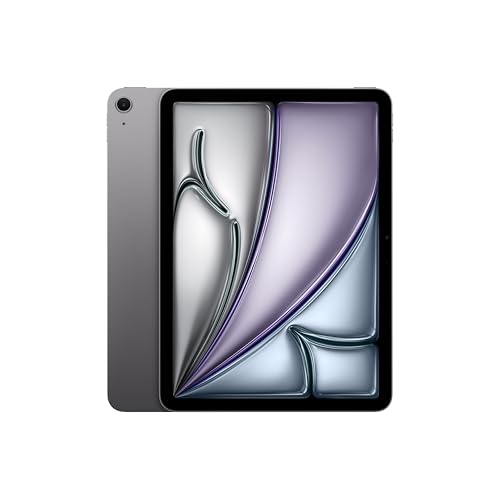
Apple iPad Air 11-inch (M4) with Magic Keyboard — The premium tablet-first combo
Let the framing be exact: the linked listing is the iPad Air itself, an eleven-inch tablet with Apple’s M4 chip running iPadOS, and the combination this review judges pairs it with the Magic Keyboard designed for it — a separate, premium purchase. That honesty matters because the pair, bought together, costs flagship-laptop money, and deserves flagship scrutiny. What the money buys is the most polished tablet-first combination in the guide: a cantilevered keyboard that floats the iPad at a natural angle, a trackpad that feels borrowed from a MacBook, backlit keys, and a hinge stiff enough to make lap typing a realistic posture rather than a balancing act.
As a tablet, the Air is close to untouchable in its class: performance from the M4 that will not be the bottleneck for years, a superb screen, the deepest bench of tablet applications in existence, and pencil support that artists and annotators rate as the standard. As a laptop, the honest answer is that iPadOS now handles the centre of most people’s work — documents, mail, web applications, communication, light creative projects — with real competence, and its limits live at the edges: particular desktop programs with no equivalent, particular file and window habits, particular professional workflows. The combination is a laptop replacement precisely to the extent that your work avoids those edges.
The combination’s other compromises are physical and financial. Together, tablet and Magic Keyboard weigh about what a slim laptop weighs, so the portability argument must be made on versatility — the slate you can detach and hold — rather than on lightness. The keyboard offers no function row in some configurations and one typing angle philosophy rather than a kickstand’s range. And the ecosystem’s excellence is a walled garden that suits its residents beautifully. For the reader whose life already lives in Apple’s applications, this is the two-in-one to beat. For the reader whose life lives in Windows programs, no polish here changes the answer, and the Surfaces above are waiting.
At a glance:
- Display: 11-inch iPad Air screen; M4 chip performance
- System: iPadOS — not macOS, and not a desktop system
- Keyboard: Magic Keyboard for iPad Air, a separate premium purchase
- Pen: Apple Pencil supported, sold separately
- Postures: cantilever design makes lap typing genuinely workable
Strengths
- Tablet performance and app catalogue that lead the entire guide
- The best trackpad and typing feel among the tablet-first combinations
- A lap-friendly design that narrows the detachable gap honestly
Trade-offs
- Combined price reaches serious laptop territory once paired
- iPadOS still walls off specific desktop programs and workflows
- Pair weighs like a laptop; versatility, not lightness, is the gain
Best for: Apple-ecosystem users whose work fits iPadOS and who want the finest tablet that also types beautifully when asked.
Not suited for: buyers dependent on specific Windows or desktop software, for whom the Surfaces are the honest recommendation.

Samsung Galaxy Tab S10+ 12.4-inch — The AMOLED combination
The S10+ begins from the opposite end of the category: a magnificent tablet first, a computer second. Its 12.4-inch AMOLED screen is the visual event of this guide — deep blacks, rich colour, the panel that makes films and photographs look like the reason screens were invented — and at 256 gigabytes in this listing it carries the most internal storage of any pick here. Samsung’s Book Cover Keyboard, the accessory that completes the two-in-one claim, is sold separately, and this review judges the combination with that cost acknowledged rather than footnoted. The S Pen, by contrast, comes in the box, and note-takers should register that asymmetry: Samsung bundles the pen and charges for the keyboard; Microsoft does roughly the reverse of the buyer’s hopes on both counts.
Paired, the combination’s personality is desk-leaning. Samsung’s desktop-style mode stretches the big screen across windows in a way that feels genuinely productive with a keyboard and especially with an external monitor, and Android’s application catalogue covers communication, documents and creative work for most owners. The cover keyboard itself is the combination’s softer half — slimmer and less authoritative under the fingers than the Surface or Magic keyboards, with a kickstand-style rear that prefers desks to laps. None of this prevents real work; all of it shapes where the work feels best done.
Choose this combination for the screen and the pen and the Android ecosystem, and it will reward you daily. Its performance is flagship grade, its build is slim and handsome, and its tablet life — media, reading, drawing, notes — is arguably the richest in the guide. Choose it expecting a Surface-style typing instrument and the keyboard cover will feel like the supporting act it is. That ordering of expectations, tablet greatness first and typing competence second, is the difference between owners who love this machine and owners who feel misled by the phrase two-in-one.
At a glance:
- Display: 12.4-inch AMOLED, the visual standout of the guide
- System: Android with Samsung’s desktop-style DeX mode
- Storage: 256GB in this listing, the most internal space here
- Keyboard: Book Cover Keyboard sold separately; S Pen included
- Postures: desk-leaning combination, glorious as a bare slate
Strengths
- A screen that makes every other panel here look slightly apologetic
- Pen included for notes and drawing from the first day
- Desktop mode and monitor support stretch the combination at a desk
Trade-offs
- Keyboard cover is the least authoritative typing surface in this guide
- The keyboard’s cost arrives separately from the tablet’s ticket
- Lap balance trails the true detachables and the Magic Keyboard
Best for: media lovers, drawers and note-takers who want a spectacular Android tablet that can dress up for desk work when required.
Not suited for: writers who type for hours daily and need the keyboard half to be the star of the combination.

Lenovo Idea Tab Pro Gen 2 13-inch with Pen and Folio — The bundled-extras contender
Lenovo’s entry attacks the combination problem from the accountant’s side: the package arrives with a pen and a folio included, which immediately changes the arithmetic that makes its rivals’ totals swell at the accessories page. The tablet itself is a thirteen-inch machine aimed at work and study, with the screen size to show documents side by side and the pen ready for annotation without a second transaction. Its two-in-one claim rests on pairing that folio-and-pen foundation with a keyboard — and buyers should confirm exactly which keyboard arrangement a given offer describes, because in this corner of the market the word folio covers both simple covers and keyboard-bearing designs, and the difference is the whole category.
That need for care is this pick’s defining caution, and it is worth stating without varnish: the Idea Tab Pro’s value story is excellent when the box contains what your workflow needs, and merely good when a separate keyboard purchase still waits beyond it. Read the listing’s contents line the way you would read a contract. Where the bundle is complete, the combination is formidable — a big, pen-ready Android tablet with desktop-leaning software touches, competent performance for documents and media, and a total cost that undercuts the premium pairs in this guide while feeling less like a compromise than the arithmetic suggests.
In daily character it sits between the M-series value slates and the Samsung’s flagship theatre: a serious, slightly utilitarian machine whose pleasures are competence and completeness rather than glamour. Students annotating lecture slides, professionals marking up documents, and households wanting one large tablet that can present, note and occasionally type will find its balance congenial. It will not out-type the Surface, out-screen the Samsung or out-polish the iPad combination, and it does not pretend to. It out-bundles them, and for a defined set of buyers that is the contest that matters.
At a glance:
- Display: 13-inch panel sized for side-by-side documents
- System: Android with Lenovo’s work-and-study software touches
- Included: pen and folio in the package — verify the keyboard arrangement
- Storage: generous internal capacity for documents and media
- Postures: folio-based standing, best on desks and tables
Strengths
- Pen and folio included, softening the usual accessories bill
- A big screen that suits documents, slides and split views
- Undercuts the premium combinations while feeling complete
Trade-offs
- Keyboard provision needs careful reading of the exact offer
- Typing hardware, where separate, lacks the leaders’ refinement
- Brand software support runs shorter than Samsung’s or Apple’s
Best for: students and document workers who want pen, folio and a large screen in one transaction, and who will verify the keyboard story first.
Not suited for: shoppers who want a guaranteed premium typing deck without reading any small print at all.

OnePlus Pad 3 13.2-inch (International Version) — The power-first pairing — international version
The final pick is labelled as plainly as it will be judged: this listing is the international version of the OnePlus Pad 3, a 13.2-inch tablet built around flagship-grade performance, and regional details such as bundled chargers, warranty handling and software services deserve a buyer’s check before purchase, as they do with any international listing. What justifies its place in a two-in-one guide is the combination it enables — a big, fast slate with a keyboard accessory sold separately — and the sheer headroom of the tablet half, which out-powers several laptops that readers of this guide may be replacing.
Performance is the personality here. The Pad 3’s processor and generous memory configuration make multitasking feel unhurried in a way mid-tier Android tablets cannot imitate: split screens stay fluid, large documents scroll without complaint, and games run at settings that embarrass the category. OnePlus’s software has developed a genuinely thoughtful approach to the big screen, with multitasking gestures and window handling that treat 13.2 inches as a workspace rather than a stretched phone. Paired with its keyboard, the combination is the Android power user’s answer to the Surface — with the standing caveat that Android, however well dressed, still is not Windows, and the desktop-program question must be answered before the performance seduces anyone.
Its compromises are the international listing’s paperwork and the ecosystem’s thinner accessory shelf: cases, keyboards and pens exist, but without the everything-everywhere depth of Apple’s or Samsung’s catalogues, and the keyboard’s availability should be confirmed at the same time as the tablet’s, not discovered afterwards. Software update commitments, while improving, also trail the longest in this guide. For the buyer who has done those checks and wants maximum Android performance in a combination that can work at a desk, this is the exciting pick. For the buyer who wants the paperwork to be someone else’s problem, the Samsung offers a calmer route to a similar desk.
At a glance:
- Display: 13.2-inch panel, the largest Android screen in this guide
- System: Android with OnePlus multitasking software
- Version: international listing — check charger, warranty and services
- Keyboard: accessory sold separately; confirm availability when ordering
- Performance: flagship-grade chip and memory for heavy multitasking
Strengths
- Raw speed that shames several laptops this guide might replace
- Big-screen multitasking software that treats the panel as a workspace
- A combination ceiling higher than any Android rival here
Trade-offs
- International version paperwork needs verifying before purchase
- Accessory shelf is thinner than Samsung’s or Apple’s
- Update commitment is not the longest in this line-up
Best for: Android power users who have checked the regional details and want flagship performance in their two-in-one combination.
Not suited for: shoppers chasing domestic warranty simplicity and a vast accessory catalogue without asking any questions.
How Do the Six Combinations Compare at the Till and on the Desk?
| Combination | System | Keyboard situation | Lap behaviour | Honest summary |
|---|---|---|---|---|
| Surface Pro 11 + cover | Windows 11 | Sold separately | Serviceable | The true detachable benchmark |
| Surface Go 3 + cover | Windows 11 | Sold separately | Light but snug | The travel-size real computer |
| iPad Air M4 + Magic Keyboard | iPadOS | Separate, premium | Genuinely good | The polished tablet-first pair |
| Galaxy Tab S10+ + Book Cover Keyboard | Android | Sold separately; pen included | Desk-leaning | The screen-led combination |
| Idea Tab Pro Gen 2 + folio | Android | Pen and folio included; verify keyboard | Desk-leaning | The bundle-led contender |
| OnePlus Pad 3 + keyboard | Android | Sold separately; international listing | Desk-leaning | The power-led pairing |
Notice, too, what the table refuses to rank: a single winner. The combinations divide by operating system before they divide by quality, and a reader’s software list eliminates half the table before any typing test begins. What remains after that elimination is a genuinely close contest decided by hands and habits — the size of your fingers on a Go keyboard, your tolerance for a cover keyboard’s flex, your household’s existing chargers and applications. Guides that crown one two-in-one for everyone are selling certainty the category does not contain; this one would rather hand you the tests that crown the right one for you.
The keyboard-situation column is the one to read twice, because it is where the category’s advertised prices quietly part company with reality. Only the Lenovo arrives with meaningful extras in the box, and even there the keyboard arrangement wants verifying. Every other combination in this guide is a two-transaction purchase, and the second transaction ranges from reasonable to startling. None of that makes the combinations bad value — the Surface and iPad pairs justify their totals in daily use — but a comparison made on tablet prices alone is a comparison rigged in favour of whoever hides the keyboard best.
Which System Can Actually Replace Your Laptop?
Make the decision with a list, not a feeling. Write down the programs and services your working week actually touches, then walk the list down each system in this guide. Windows ends the exercise immediately: the list simply works, modulo the ARM check on the big Surface for anything elderly or obscure, and the Go’s modest processor for anything heavy. That is why the two Surfaces remain the default recommendation for anyone whose two-in-one must be their only computer — not brand inertia, but the absence of homework.
iPadOS passes most modern lists and fails specific items loudly. Web-based work, documents, communication, mainstream creative tools and an enormous app catalogue cover the centre of most people’s computing, and the Air’s hardware will never be the excuse. The failures cluster around particular professional programs, particular ways of handling files and windows, and peripherals or extensions a workflow quietly depends on. Android’s answer rhymes: superb for communication, media, documents and browser work, with desktop modes that stretch surprisingly far at a desk, and the same species of edge-case failures. The mature conclusion is that most people can replace their laptop with any pick here — and the word most is doing enough work in that sentence to justify the list exercise before money moves. Do the exercise on paper, in an actual list, because the program that disqualifies a system is reliably the one nobody remembers until the third week of ownership, when the return window has closed and the workaround era has begun.
How Do You Test a Two-in-One Before You Commit?
Spend your trial period on postures and keyboards rather than benchmarks. Type a long document on your lap in the chair you actually work in, and notice whether the combination’s balance makes your wrists do the holding. Work at a kitchen table, a desk and, if your life includes them, a train or café surface, because kickstand depth and hinge behaviour reveal themselves differently on each. Detach and reattach the keyboard twenty times across the week; the connection you fumble on day two will annoy you on day two hundred. Carry the combination in your real bag on your real commute, because combined weight and thickness are specifications no photograph conveys.
Then interrogate the software with your worst file, not your easiest: the biggest spreadsheet, the document with the awkward formatting, the web tool your work depends on, the peripheral you plug in without thinking. Two-in-ones fail in the particulars, and the particulars are personal. Finally, price the whole combination again at the end of the trial — tablet, keyboard, pen if your work wants one, case — and compare that honest total against the ordinary laptop you would otherwise buy. The category wins when the versatility justifies the total, and it is allowed to lose when it does not. A returned two-in-one is a successful test, not a failed purchase.
How Does the Weight of a Combination Really Behave?
Brochure weights describe the tablet alone, but shoulders experience the combination plus its charger, and the honest totals reorder this line-up in instructive ways. The Go combination remains the featherweight by a distance, the only pairing here that rivals a paperback-plus-notebook carry. The Surface Pro and iPad combinations converge near slim-laptop territory once their keyboards join, which surprises buyers who compared tablet weights in the shop. The big Android slates with their covers land in the same neighbourhood, their larger screens quietly taxing the bag despite svelte individual figures.
Distribution matters as much as the total. A detachable’s weight sits high and behind the keyboard when carried assembled, and in a backpack the combination rides as one rigid slab that either fits a laptop sleeve or fights it. Several owners end up carrying the halves separately — slate in a padded pocket, cover flat against books — which is a legitimate strategy the category’s photography never shows. The chargers deserve a line too: the Windows picks share the USB-C charging world with modern laptops, while proprietary or regional arrangements, including on international listings, can add a brick and a cable that the brochure weight never met.
The practical test is embarrassingly simple: assemble the exact combination you intend to buy, put it in your actual bag with your actual charger, and carry it through one ordinary day before the return window closes. Two-in-ones are bought for movement, and movement is the one specification that cannot be reviewed on your behalf. Every pick in this guide has a constituency that finds its carry delightful and a constituency that finds it faintly annoying, and the difference is almost never the grams — it is the fit between the slab and the life it has to fit into.
What About Pens and Handwriting Across These Six?
For many buyers the pen is the quiet reason the category exists, because handwriting is where a tablet stops imitating a laptop and starts surpassing it. The Surfaces pair with their maker’s pen for notes, sketching and marking up documents in the full Windows environment, which means handwritten work lives beside desktop files without conversion rituals. The Galaxy includes its S Pen outright, the most generous arrangement here, and Samsung’s note software is the most practised on the Android side. The Idea Tab Pro’s bundled pen makes the same argument at its price, provided the box contents check this guide keeps recommending.
The iPad combination’s pen story is the connoisseur’s: Apple Pencil support on the Air is the benchmark for drawing responsiveness and for the creative applications built around it, but the pencil is another separate purchase atop an already premium combination, and the total deserves the same clear-eyed arithmetic as the keyboard. The OnePlus supports pen input within a thinner accessory ecosystem, adequate for notes and annotation, less convincing as an artist’s platform. Readers whose two-in-one exists mainly for handwriting should rank the picks by pen first and keyboard second — an ordering the marketing, obsessed with typing, rarely suggests.
There is also a posture truth pens expose: handwriting wants the slate flat or at a shallow angle, detached or folded back, and combinations differ in how gracefully they get there. Kickstand designs lay back obligingly; cantilever keyboards must be removed, which is quick but adds a loose accessory to manage mid-meeting. None of this is decisive alone. Together with the software list and the lap test, though, it completes the honest picture of a category whose whole promise is adapting to the moment — and whose failures are always failures of adaptation, never of specifications.
How Long Will a Combination Stay a Good Machine?
Longevity in this category has two clocks, and they rarely agree. The tablet’s clock is set by its processor, its maker’s update policy and its battery; the keyboard’s clock is set by hinges, connectors and the availability of a replacement cover when the original wears. A combination dies when either clock runs out, which is why the accessory shelves of Apple, Microsoft and Samsung matter beyond convenience — a five-year-old Surface or iPad can be re-keyboarded from stock, while an orphaned combination whose cover is discontinued becomes a slate with memories. Buyers planning long ownership should weigh that shelf depth as a specification.
Update policies draw the software map. Apple’s support horizons are the longest in this guide, Microsoft’s Windows machines benefit from the platform’s broad support culture, and Samsung has stretched its Android commitments toward the leaders, while Lenovo and OnePlus trail by a margin that matters only to owners keeping machines beyond the middle years. Batteries are the shared fate: every pick here will lose endurance gradually, and none offers a trivially replaceable pack, so the combination’s fifth year will involve more chargers in more rooms regardless of brand. None of this argues against the category; it argues for buying the combination whose ecosystem will still answer the phone in year four.
Which Shortcuts Do Sellers Take With the Words Two-in-One?
The label itself is the first shortcut: it is applied to anything that has ever been photographed near a keyboard. The second is the hero image showing a combination whose keyboard is a separate purchase, captioned with the tablet-only price in the largest type the page allows. The third is the specification sheet that lists the tablet’s weight alone in a category where the combination’s weight is the one your shoulder will learn. None of these practices is unique to one brand — every maker in this guide has a marketing department — and the defence is the habit this guide has repeated: combinations, totals, postures.
A subtler shortcut is the compatibility whisper, where a listing implies laptop replacement without naming the software question at all. Tablet systems are superb and improving, but the implication that the question does not exist serves the seller, not the buyer with one essential desktop program. The last shortcut is regional: international versions, like the OnePlus pick here, are legitimate products whose paperwork differs, and listings that glide past charger, warranty and service differences are hoping the price will do the gliding for them. Read those lines, as this guide has labelled them, and the international pick becomes an informed bargain rather than a surprise.
What Does Ownership Feel Like After the First Month?
The honeymoon of a two-in-one is the versatility tour: notes in a meeting, a film on a train, a document finished at a kitchen table, and the machine shape-shifting through all of it. The marriage that follows is made of smaller things. It is the keyboard that either still delights your fingers in month six or has quietly taught you to postpone long writing to another device. It is the battery that either fits your day or has colonised your bag with a charger. It is the hinge, connector and cover either ageing invisibly or announcing every week of use. Reviews can measure the honeymoon; the marriage is predicted by the unglamorous details this guide has kept returning to — trackpads, balance, accessory shelves, update policies.
Owners also develop a primary posture, and it is rarely the one they predicted. Some discover their detachable lives docked at a desk ninety percent of its life, which retrospectively argues they bought a small computer with a detachable party trick. Others find the slate never reattaches, living as a pure tablet with an expensive cover in a drawer. Neither outcome is a failure if the work gets done happily, but both suggest the cheaper or simpler machine that would have served as well. The trial-period exercises earlier in this guide exist to surface your primary posture while returns are still painless, and they are worth the mild embarrassment of performing them deliberately.
The owners who report the deepest satisfaction share a trait: they bought the combination for a named, recurring journey — the commute, the site visits, the lecture circuit, the sofa-to-desk migration of a hybrid worker — and the machine’s versatility maps onto that journey like a key. Vague versatility, bought for an imagined life, satisfies vaguely. If you can name the journey, this category will serve you better than any other in computing. If you cannot, a good tablet or a good laptop, honestly chosen, may be the two-in-one’s superior.
Final Recommendation
If the two-in-one must be your computer, buy a detachable and be done: the Surface Pro 11 for desk-anchored power and screen, the Surface Go 3 for the travelling light-duty version of the same idea. If the tablet is the point and typing is the supporting act, buy the combination whose tablet you love most — the iPad Air with its Magic Keyboard for polish and applications, the Galaxy S10+ for its screen and pen, the Idea Tab Pro for its bundle, the OnePlus for its speed — and buy the keyboard at the same time, at the true combined total, with your software list already checked.
The miracle the category promises is real but conditional, and the condition is honesty about which half of the pair your life will actually use — choose for that half first, let the other half be the bonus, and the machine you carry will feel less like a compromise than either a tablet or a laptop ever did alone. That feeling, earned honestly through the arithmetic and the posture tests, is the closest thing this category has to a guarantee — and it is available on every row of the table above, to the buyer who matched the combination to the journey before matching it to the budget.
Frequently Asked Questions
Is a two-in-one as good as a separate tablet and laptop?
It is better than either at being carried, and slightly worse than each at being itself. The tablet half is heavier than a pure slate because it houses a computer; the laptop half balances worse than a clamshell because its weight lives behind the screen. What you buy with those compromises is one device, one charger, one set of files and a working life that flows between postures without syncing. Owners who travel, commute or move between rooms daily tend to call that the best trade in computing; desk-anchored owners with heavy workloads often prefer the separate pair.
Why is the keyboard so often sold separately?
Partly honest modularity — not every tablet buyer types — and partly price presentation, since a tablet-only ticket looks gentler in an advertisement than the combination’s true total. Makers also sell multiple keyboard tiers, from simple covers to the Magic Keyboard’s cantilevered engineering, and bundling one would force a choice on buyers who want another. The practice is defensible; the buyer’s defence is arithmetic. This guide has priced every pick as a combination for exactly that reason, and you should do the same in the shop.
Can the iPad Air with a Magic Keyboard replace a MacBook?
For a large share of users, yes — the hardware is faster than many laptops, the keyboard and trackpad are excellent, and iPadOS covers documents, communication, web work and mainstream creative tools. The exceptions are specific: software that exists only on desktop systems, certain file and window workflows, and professional pipelines built on desktop assumptions. The test is your own program list. If nothing on it is desktop-only, the combination is a legitimate laptop replacement with a detachable tablet as its party trick; if one essential program is, no keyboard can fix that. It is also worth checking the peripherals on that list — printers, scanners, docks and specialist controllers — because a workflow can pass the software test and still stumble over the one USB device that the tablet system handles awkwardly or not at all.
What does DeX or desktop mode actually add on the Android picks?
A windowed, taskbar-style environment that appears when the tablet meets a keyboard and especially an external monitor: overlapping windows, a desktop-like file view, and applications arranged the way a computer arranges them. It makes the Galaxy and its Android peers genuinely productive at a desk rather than merely usable, and for document, browser and communication work it closes much of the gap to a laptop. It does not change the underlying application catalogue, so the desktop-program question still applies — the mode dresses Android for the desk without turning it into Windows.
Are international-version tablets a risky buy?
They are a paperwork purchase rather than a product risk: the hardware is the same machine, but charger plugs, warranty routing and some regional services can differ from a domestic listing, and returns may travel further. The OnePlus pick in this guide is labelled international in its heading, table and review for that reason. Bought from a seller who states those details clearly, an international version can be a sensible saving. Bought from a listing that hides them behind a low price, it is a surprise with a delivery date.
Which pick suits a student best?
It depends on the course, which is the honest version of every student answer. Text-based subjects — essays, reading, notes, communication — are served beautifully by the Surface Go 3’s portability, the Idea Tab Pro’s bundled pen, or the iPad combination’s polish. Courses with specialist software point firmly at the Windows detachables, and the full-size Surface Pro if the software is demanding. The pattern to copy is the software-list exercise from this guide: the syllabus, not the showroom, decides.
One last discipline, whatever you choose: order the keyboard in the same week as the tablet, even if the budget argues for delay. A two-in-one evaluated without its keyboard is a promise evaluated without its evidence, and the return window for the tablet will not wait for the accessory to arrive. Owners who meet both halves together, in the same fortnight, make the keep-or-return decision with the full combination in hand — which is the only version of the decision that has ever meant anything in this category, or indeed in any category where the accessory is half the product and the headline price is only half the story.
Related Guides
Neighbouring shelves worth a look before the final decision include the 128-gigabyte tablets compared across every system, our survey of tablets at the four-hundred-dollar level and the docking stations that turn Windows tablets into desk computers.
Related guides
- Best Canon Point and Shoot Digital Cameras: PowerShot Picks From Pocket Compacts to Travel Zooms
- Best Balancing Stabilizers for Mirrorless Cameras: Payload, Balancing and Native Vertical Shooting
- Best Basic Phones Camera Buyers Can Trust: Flip Phones and Simple Handsets That Still Take a Photograph
- Best Sony Full Frame Cameras for Astrophotography: Sensitivity vs Resolution


