What's inside
- Key Takeaways
- Quick Picks
- How Did We Choose These Bluetooth 2.1 Systems?
- Why Is True Bluetooth 2.1 So Rare, and Does the Wire Matter?
- How Do You Place a Subwoofer in a Small Room Without Booming?
- What Should You Check Before Assuming a 2.1 System Streams?
- How Does Bluetooth Sound Quality Compare With a Cable Here?
- Which Room and Desk Layouts Suit a 2.1 Layout Best?
- How Do You Set Up a Bluetooth 2.1 System, Step by Step?
- Comparison Table
- What Are the Most Common Mistakes When Buying a Bluetooth 2.1 System?
- Final Recommendation
- Frequently Asked Questions
- Related Guides
As an Amazon Associate I earn from qualifying purchases. This post may contain affiliate links at no extra cost to you.
gizmoverdict.com is reader-supported. When you buy through links on our site, we may earn an affiliate commission.
Where to buy: Three of the six systems below carry links to listings verified against this site’s product pool. One of those three — the Logitech Z623 — has no Bluetooth at all, and it is labelled that way in the table, in its review and in the comparison chart, because it sits here as the wired benchmark the wireless sets have to beat. The remaining three picks are covered in prose only, with the reason for each missing link stated openly.
Anyone searching for the best 2.1 Bluetooth speakers quickly runs into an awkward truth about this corner of the audio market: the category barely exists. Walk through the desktop speaker ranges of the big brands and nearly every 2.1 system — two small satellites plus a separate subwoofer — connects by cable. Bluetooth turns up constantly on single-box portable speakers and on 2.0 bookshelf pairs, yet manufacturers have been oddly reluctant to build it into subwoofer systems, perhaps because a desk system sits close to its source anyway and a wire costs them nothing in convenience points. The result is a shortlist where honesty matters more than length. Rather than padding this guide with wired sets dressed up as wireless, we have separated the genuine Bluetooth 2.1 systems from the wired reference points and from the discontinued names that search results keep resurrecting.
That separation changes how you should shop. If wireless playback from a phone or laptop is the whole reason for the purchase, only part of this list is even eligible, and your decision narrows to questions of subwoofer size, control style and how the satellites behave at low volume late at night. If, on the other hand, you arrived here simply wanting strong desktop sound and assumed Bluetooth came as standard, the wired benchmark in this guide may actually serve you better: no pairing, no codec delay, no battery-style compromises, and a subwoofer with a long track record. Neither answer is wrong. What would be wrong is buying a wired system while believing it streams, which happens more often than retailers care to admit, because product pages for cable-only sets frequently sit one search result away from their wireless cousins and borrow their imagery.
One more distinction is worth drawing before the picks. In a true Bluetooth 2.1 system, the wireless link runs between your source and the main unit; the satellites and subwoofer still connect to each other with cables in almost every design sold today. Fully wireless satellites with a wireless subwoofer belong to soundbar territory and home theatre kits, not to the desktop 2.1 format covered here. So expect a cable-free path from laptop to system, not a cable-free desk.
Key Takeaways
- Genuine Bluetooth 2.1 desktop systems are rare; two of the six picks below stream wirelessly, and every other pick is labelled with its real connection type.
- The Logitech Z407 is the straightforward wireless answer, pairing Bluetooth with a wireless control dial that suits desks where the subwoofer hides out of reach.
- Edifier’s S351DB is the current model in its line — the direct successor to the discontinued S350DB — and adds aptX support over Bluetooth 5.1 alongside optical and coaxial inputs.
- The Logitech Z623 carries no Bluetooth whatsoever; it appears strictly as the wired performance benchmark, clearly flagged at every mention.
- Satellites and subwoofers stay wired to each other in every system here — Bluetooth replaces only the run from your computer or phone to the main unit.
- For video and gaming, a wired input still beats any Bluetooth link for lip sync, so even the wireless picks earn their keep through their cable inputs too.
Quick Picks
| Pick | Badge | Why it is here |
|---|---|---|
| Logitech Z407 | True Bluetooth, best all-round | Streams wirelessly, answers to a puck-style dial you can keep beside the keyboard, and keeps a wired input for delay-free viewing. |
| Edifier S351DB | True Bluetooth, hi-fi leanings | Bluetooth 5.1 with aptX, wooden satellite cabinets and digital inputs make it the audiophile-leaning wireless 2.1 set. |
| Logitech Z623 | No Bluetooth — wired benchmark | THX-certified cable-only system included so you can judge what giving up wireless actually buys in raw output. |
| Edifier S350DB (original) | Prose only — superseded model | The set that defined this niche has no current verified listing; its successor above is the one to buy. |
| Harman Kardon SoundSticks (Bluetooth editions) | Prose only — design-led class | Transparent sculptural speakers with wireless editions in the range, covered without a link because no listing was verified for this guide. |
| Generic no-brand 2.1 Bluetooth desktop sets | Prose only — buy with caution | Marketplace own-label systems promise wireless 2.1 sound cheaply; the class is discussed honestly rather than endorsed blindly. |
How Did We Choose These Bluetooth 2.1 Systems?
The first filter was the hardest and the simplest: does the system actually receive Bluetooth audio? Marketing language blurs this constantly. A system described as working “with Bluetooth devices” may merely include a 3.5mm cable for plugging into a phone. A system with a USB port may play files from a stick rather than stream. We counted only designs where the manufacturer builds a Bluetooth receiver into the unit itself, and we demoted everything else to benchmark or prose status with its connection type spelled out. That single rule is why this guide looks different from most roundups of its kind, which quietly mix wired and wireless sets and let the reader discover the truth after delivery.
Sound architecture came next. A 2.1 layout lives or dies by its crossover: the point where the subwoofer hands over to the satellites decides whether male voices sound chesty, whether basslines smear across the desk, and whether the system can play quietly without the low end vanishing. We favoured systems with sensible, fixed crossovers tuned by the maker over sets advertising exaggerated wattage with tiny satellite drivers. Subwoofer placement flexibility mattered too, because a downward- or side-firing box under a desk behaves very differently from a front-firing unit on a shelf.
Controls formed the third filter, and Bluetooth systems rise or fall on them. When the source is a phone across the room, reaching under the desk to twist a knob on the subwoofer defeats the purpose of going wireless. Systems that put volume — and ideally bass — on a remote, a desktop dial or an app scored heavily. The fourth filter was the wired fallback: every wireless pick here also accepts a cable, because Bluetooth latency, while fine for music, still trails a wire for films and fast games. Finally, we checked listing status through the site’s verified pool, which is why one famous name below is prose-only: its current model replaced it, and pretending otherwise would send readers hunting for stock that no longer exists through the checked channel.
Budgeting for this category has one peculiarity: the money mostly buys the subwoofer. Satellites at this level are variations on a theme, but subwoofer cabinets, amplifiers and drivers separate the satisfying systems from the hollow ones, and the difference is audible within a minute of listening. If you are stretching from a cheaper set, the step up shows first in how the system behaves at low volume — whether bass stays present in a late-evening film instead of disappearing until the action starts. Keep a little of the budget back for the unglamorous extras, too: a longer cable for the satellite that sits further away, a small stand to lift a tweeter to ear height, or a surge protector for a system that will live plugged in for years.
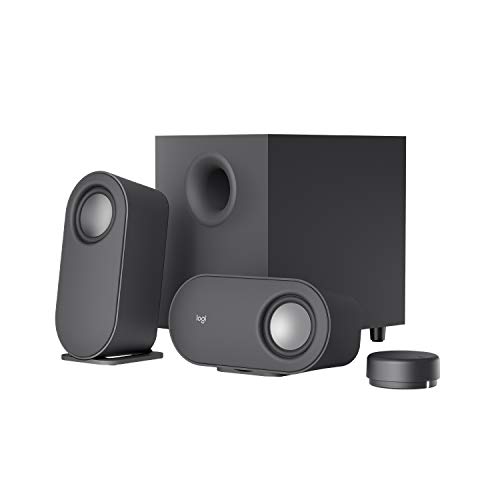
Logitech Z407 — True Bluetooth, best all-round
The Z407 is what most people pictured when they typed the search that led here: a compact subwoofer, two small satellites, and a Bluetooth receiver that lets a laptop, tablet or phone play through the system without a cable crossing the desk. Logitech positions it as a computer speaker set first, and that focus shows in the details. The satellites are small enough to flank a monitor without crowding a mouse mat, the subwoofer is sized for under-desk duty rather than home theatre drama, and the whole system is voiced for nearfield listening — the distance between a chair and a screen — rather than for filling a hall.
Its most distinctive piece of hardware is the wireless control dial, a smooth puck that sits on the desk and handles volume, play and pause, and pairing. Because the dial talks to the system wirelessly, the subwoofer can live wherever it sounds best instead of wherever your hand can reach, which quietly solves the oldest annoyance in 2.1 ownership. Bluetooth pairing itself is unglamorous in the best way: the system behaves like a normal Bluetooth audio destination, reconnecting to a remembered laptop without ceremony. When latency matters — a film with tight dialogue, a rhythm game — the wired input is there, and switching sources is a button press rather than a cable swap behind the monitor.
Sonically, the Z407 plays the nearfield game well. The subwoofer adds genuine weight to kick drums and film effects without the one-note thump that plagues bargain sets, provided you resist turning its level past the point where it integrates. The satellites keep voices clear at the low volumes used for evening listening, which is where small systems often fall apart into either muffle or hiss. Push it toward party volume in a large room and you will find its limits — this is a desk system with a desk-sized amplifier — but within its intended territory it is balanced, tidy and easy to live with. For the buyer who wants Bluetooth 2.1 without caveats, this is the pick the rest of the guide is measured against.
Day-to-day ownership details round out the picture. The satellites sit stably on small feet and angle their output toward a seated listener rather than firing flat across the desk, which helps stereo imaging at close range: instruments in a well-mixed recording take up positions between the speakers instead of clumping in the middle. Cable lengths are planned for a monitor-centred layout, with the subwoofer expected within easy reach of the desk rather than across the room. The dial’s battery lasts long enough to be forgotten between charges, and because it also handles pairing duties, a visiting laptop can be connected without crawling under the desk to find a button on the subwoofer — a small mercy that owners mention often. Firmware is not part of the ownership story here, which many will count as a virtue: the system does what it did on day one, every day.
- Format: 2.1 desktop system, two satellites plus subwoofer
- Wireless: Bluetooth receiver built in; wireless control dial included
- Inputs: Bluetooth and wired analogue input for the computer
- Controls: desktop dial for volume and playback; bass adjustment on the system
- Positioning: nearfield desk use, small rooms
Strengths
- The control puck frees the subwoofer to sit where it sounds best, not where your hand reaches.
- Pairing and reconnection behave like a mainstream Bluetooth speaker, with no adapter or dongle involved.
- Voices stay intelligible at the modest volumes most desk listening actually uses.
Trade-offs
- Absolute output is desk-scale; a big living room will expose the ceiling quickly.
- The satellites still cable back to the subwoofer, so cable tidying is reduced, not eliminated.
- No digital optical input, which limits its usefulness as a television system.
Best for: laptop and desktop users who stream from phones as often as they listen through the computer. Not suited for: anyone planning to run a television as the main source or fill a large open-plan space.

Edifier S351DB — True Bluetooth, hi-fi leanings
Edifier built its reputation on bookshelf speakers that borrow hi-fi habits — real wooden cabinets, proper tweeters, remote controls — and the S351DB applies that formula to a 2.1 layout with Bluetooth 5.1 and aptX on board. A naming point needs stating plainly, because listings and older reviews blur it: the S351DB is the current model and the direct successor to the S350DB. The earlier set no longer has a verified listing through the channel used for this guide, so if you see the two names treated as interchangeable elsewhere, read carefully — the S351DB is the one in production, and it is the one linked here.
The hardware reflects its ambitions. The satellites are larger than typical computer speakers, with cabinets that give midrange notes some body, and the subwoofer is a substantial wooden box rather than a plastic afterthought. Around the back and on the remote you will find the input spread of a small hi-fi system: Bluetooth for streaming, optical and coaxial digital inputs for a television or console, and analogue for everything else. aptX support matters for listeners whose phones or computers transmit it, trimming Bluetooth’s usual softness on cymbals and acoustic guitar. A remote control covers volume, bass, treble and source switching from the chair, which makes the S351DB the one pick here that can genuinely moonlight as a small-room television system.
That versatility shapes its sound. Where the Logitech sets are tuned for the desk, the Edifier is tuned for the room: fuller midrange, a subwoofer that reaches lower, and enough headroom to score a film at a distance of a few metres. The trade is footprint. The satellites want stands or a generous desk, the subwoofer wants floor space, and the whole system asks to be placed deliberately rather than dropped into gaps. Buyers with the room for it get the most complete Bluetooth 2.1 package in this guide; buyers with a cramped study desk should look at the smaller Logitech above and be honest about the space they actually have.
Living with the S351DB underlines how much of its value sits outside the Bluetooth headline. The optical input wakes the television use case properly: dialogue gains a centre-weighted solidity that television speakers never approach, and the subwoofer supplies the low rumble of weather, engines and scores without swallowing speech. Treble adjustment on the remote is more useful than it sounds, softening bright streaming mixes late at night. The satellites reward being raised toward ear level, on stands or shelves, and they keep their composure at volumes where smaller desk speakers start to shout. Owners upgrading from the original S350DB will find the layout familiar and the Bluetooth behaviour improved, which is exactly what a successor should offer: continuity where it worked, revision where it dated.
- Format: 2.1 system, bookshelf-style satellites plus wooden subwoofer
- Wireless: Bluetooth 5.1 with aptX
- Inputs: Bluetooth, optical, coaxial and analogue
- Controls: full remote for volume, bass, treble and source
- Lineage: current model, direct successor to the Edifier S350DB
Strengths
- Digital inputs let it serve a television as happily as a computer, rare in this format.
- Cabinet size pays off in midrange body that small plastic satellites cannot fake.
- The remote makes subwoofer level a from-the-chair adjustment, not a floor-level chore.
Trade-offs
- It is physically the largest system in this guide and overwhelms small desks.
- Setup rewards patience: placement and bass level need dialling in room by room.
- Nearfield listeners at arm’s length may find its presentation bigger than the job requires.
Best for: listeners who want one 2.1 system to cover desk listening and small-room television duty. Not suited for: tiny desks, or buyers who want the smallest possible satellites beside a laptop.
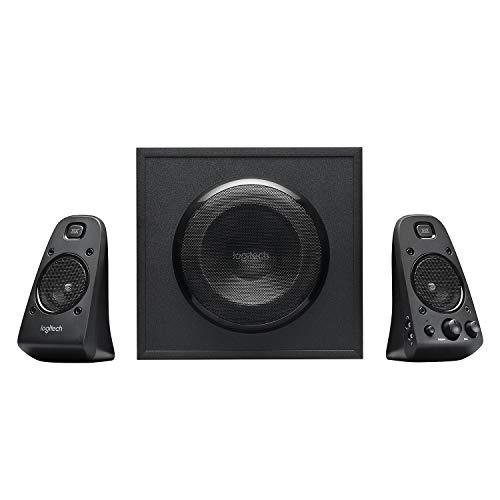
Logitech Z623 — No Bluetooth — wired benchmark
Read this heading twice before going any further: the Z623 has no Bluetooth. It does not stream, pair or appear in your phone’s device list. It is included in a guide about Bluetooth 2.1 speakers for one transparent reason — it is the long-running wired reference in this class, THX-certified and rated at 400 watts peak in its verified listing title, and any reader weighing a wireless set deserves to see exactly what the cable-only alternative offers for similar money and desk space. Everywhere the Z623 appears in this guide, that absence is labelled rather than softened.
What the wire buys is output and certainty. The Z623’s subwoofer is a serious box by desktop standards, and the system plays louder, lower and cleaner at high volume than either Bluetooth pick above. There is no pairing to fail, no codec compressing the signal, no perceptible delay between a film’s picture and its sound, and no dependence on a phone staying in range. Controls sit on the right satellite — volume and bass within arm’s reach — and the inputs are analogue, aimed at a computer, a console or anything with a headphone socket. For a fixed desk that never moves, those are real advantages, and generations of buyers have chosen this system precisely because it does one job without negotiation.
The honest comparison, then, is about lifestyle rather than quality. Choose the Z623 and your phone stays a phone: music from it reaches the speakers only through a cable, and the subwoofer’s position is dictated partly by where its control satellite’s lead reaches. Choose a Bluetooth set and you accept slightly less muscle in exchange for streaming freedom. Neither is a trap — unless you buy the Z623 believing it streams. If you take one thing from this section, take that: wired benchmark, excellent at being wired, and not a Bluetooth speaker in any sense.
Ownership of the Z623 is a study in set-and-forget audio. Once the subwoofer is placed and its level matched to the satellites — a five-minute task with a familiar song — there is nothing to configure, update or troubleshoot for years. Games benefit most from its character: explosions carry physical weight, engines have a growl that small systems approximate, and because the signal path is a plain cable, what you see and what you hear arrive together. Music listeners get a fun, forward presentation rather than a forensic one. The system’s age shows only in its connections and its styling, both firmly from the wired era, and in a market that keeps adding features, there is something refreshing about a product whose entire manual could fit on a postcard.
- Format: 2.1 desktop system, THX certified
- Wireless: none — no Bluetooth receiver fitted
- Power note: 400W peak figure as stated in the verified listing title
- Inputs: analogue connections for computer and console sources
- Controls: volume and bass on the right satellite
Strengths
- The strongest low-end punch and clean volume in this guide, with no wireless link in the chain.
- Zero pairing friction and zero audio delay — it simply plays when the source plays.
- A long production run means placement and setup advice is easy to find and well tested.
Trade-offs
- No Bluetooth at all — phones and tablets need a physical cable, every time.
- The subwoofer is bulky, and its placement is partly governed by cable lengths.
- Analogue-only inputs rule out a clean digital connection from a television.
Best for: fixed-desk listeners who value output and simplicity over streaming. Not suited for: anyone whose main source is a phone, or who came here specifically for wireless playback.
Edifier S350DB (original) — Prose only — superseded model
The S350DB deserves its prose-only place because it effectively created the modern Bluetooth 2.1 niche: a wooden-subwoofer system with aptX streaming, digital inputs and a remote, launched when most desktop 2.1 sets still assumed a cable and nothing else. Owners praised exactly the balance its successor preserves — hi-fi manners, room-filling output, desk-system convenience — and second-hand examples still circulate. It is covered here so that readers who meet the name in older reviews understand its status, not because we can point you to a verified new listing: through the pool checked for this guide, the S350DB has been replaced by the S351DB linked above.
If you encounter an S350DB for sale, treat it as a used-market purchase and inspect it like one. Check the remote, because replacements are awkward; check the subwoofer’s driver surround for age; and confirm the Bluetooth pairs with a modern phone before money changes hands. Priced keenly and working fully, it remains a satisfying system. Priced close to its successor, it makes little sense, since the newer model brings a warranty and a current listing. This is the recurring pattern with discontinued audio gear: the product can be good while the purchase is still wrong.
Judging a used S350DB fairly means separating the design from the individual example in front of you. The design was strong enough to anchor Edifier’s 2.1 line for years and to justify a direct successor rather than a replacement concept. Individual examples, though, have lived lives: subwoofers used as footrests, remotes lost and replaced with phone apps that half-work, Bluetooth modules paired with hundreds of devices. Ask for a demonstration with your own phone and a track you know, listen at low volume for crackle from the volume control, and check that the bass control still changes the sound smoothly. An example that passes those tests is a bargain with a known ceiling; one that fails any of them is a project, and projects are only fun when priced like projects.
- Format: 2.1 system with wooden subwoofer and bookshelf satellites
- Wireless: Bluetooth with aptX (original model)
- Status: discontinued through the verified channel; successor is the S351DB
- Inputs: digital and analogue alongside Bluetooth
- Buying route: second-hand only, inspect before paying
Strengths
- The original template for hi-fi-style Bluetooth 2.1, and still a coherent design.
- Used prices can undercut the successor by a useful margin when condition is good.
- Digital inputs keep it relevant for television use in a small room.
Trade-offs
- No verified new listing exists in this guide’s pool, so no link is offered.
- Used examples carry used risks: tired remotes, ageing drivers, unknown history.
- Support and spares will only get scarcer as the successor takes over.
Best for: confident second-hand buyers who find a clean, fully working example cheaply. Not suited for: anyone who wants a warranty, an easy return, or the current model.
Harman Kardon SoundSticks (Bluetooth editions) — Prose only — design-led class
Few speaker systems are recognisable from across a room, and the SoundSticks are the exception: transparent satellites like laboratory glassware, a clear-domed subwoofer, and a design history that put earlier versions into museum collections. Later editions of the line added Bluetooth, which is why the family belongs in this guide — a genuine 2.1 streaming system, but one bought as much for how it looks on a desk as for how it sounds. No listing for the Bluetooth editions was verified in this guide’s pool, so the SoundSticks are discussed in prose, without a link and without invented availability.
The sound has always been better than the novelty styling suggests. The satellites handle detail sweetly, the subwoofer is voiced for integration rather than theatrics, and the system suits the design-conscious desk or studio where a black plastic box would look like a mistake. The compromises are practical ones. The controls on some editions are touch-sensitive and minimal, the clear cabinets show dust and cable runs mercilessly, and output is tuned for a room’s near corner rather than a party. Availability has also come and gone across generations, so the sensible advice is to admire the design, verify the exact edition and its Bluetooth support before buying anywhere, and never assume a listing for one generation describes another.
The SoundSticks also make an interesting case study in how speaker priorities differ. Most systems in this guide are bought to disappear — small black boxes doing a job. The SoundSticks are bought to be looked at, and their sound tuning follows that brief: pleasant, detailed and scaled to accompany a workspace rather than dominate a room. In a design studio, a boutique counter or a carefully styled home office, that trade is rational, and the Bluetooth editions remove the one cable that most spoiled the sculpture. The clear subwoofer dome even turns placement into a visual decision as much as an acoustic one. None of that makes the system a bargain or a powerhouse; it makes it a deliberate purchase for a particular kind of desk, which is why it is covered here with admiration and without a link.
- Format: 2.1 system, transparent satellites and domed subwoofer
- Wireless: Bluetooth on later editions — confirm the exact generation before buying
- Status: no verified listing in this guide’s pool; prose coverage only
- Character: design-led, nearfield and small-room orientation
- Controls: minimal, edition-dependent
Strengths
- Unmatched desk presence — the rare speaker system people display on purpose.
- Refined, detail-friendly sound that suits acoustic and vocal material.
- Bluetooth editions make it a legitimate member of this category, not a styling exercise.
Trade-offs
- Generation differences are significant, and listings often blur them together.
- Clear cabinets advertise every fingerprint, dust mote and untidy cable.
- Maximum volume is modest next to the muscular wired benchmark above.
Best for: style-led desks and studios where the speakers are part of the room’s look. Not suited for: buyers who want the loudest system available or dislike verifying model generations.
Generic no-brand 2.1 Bluetooth desktop sets — Prose only — buy with caution
Search any large marketplace for this category and the results fill with unbranded or own-label 2.1 sets promising Bluetooth, glowing lights and implausible wattage at prices far below the named systems above. They are real products and they do, mostly, stream — which is precisely why they need a prose-only discussion rather than either a link or a dismissal. Quality control varies enormously between batches of the same listing, published specifications are frequently decorative, and the Bluetooth implementation can be an afterthought with audible hiss at idle. We did not verify any specific model in this class through the pool, so none is named as a pick with a link.
There is a legitimate buyer for these sets: someone furnishing a spare room, a workshop or a child’s first desk, where loss or damage would sting less and expectations are modest. If that is you, buy through a channel with painless returns, test the set on day one at the volumes you will actually use, listen for hiss with nothing playing, and check that the subwoofer’s output can be turned down — many cannot, which makes evening listening a negotiation with the neighbours. Treat the purchase as a lottery ticket with a returns policy, not as a cheaper route to the Logitech or Edifier experience, and the class can serve you honestly.
One more honest note about this class: its best use is often temporary in a good way. A student kitting out a first room, a family adding sound to a homework desk, a workshop needing radio and podcasts while hands are busy — in each case the generic set does a job the named systems would be wasted on, and if it survives a couple of years it has earned its keep. The failures happen when the same set is bought as the main listening system for a decade, a role its drivers, amplifier and controls were never built to fill. Match the ambition to the budget and the class behaves; ask it to punch far above its weight and disappointment is scheduled in advance. When in doubt, save toward the verified systems above — the gap in price is real, but so is the gap in what arrives.
- Format: 2.1 desktop sets from unbranded and own-label makers
- Wireless: Bluetooth fitted, implementation quality varies widely
- Status: no specific model verified in this guide’s pool
- Character: lowest-cost route into the category
- Buying route: only with a strong returns policy
Strengths
- The cheapest way to put wireless 2.1 sound on a secondary desk.
- Many include lights and extra inputs that younger users genuinely enjoy.
- Small footprints suit shelves and workbenches where space is tight.
Trade-offs
- Idle hiss, fixed bass levels and optimistic specifications are common.
- Two examples of the same listing can sound noticeably different.
- After-sales support ranges from minimal to nonexistent.
Best for: low-stakes secondary spaces bought with returns protection. Not suited for: a main desk, critical listening, or anyone who hates sending things back.
It is also worth deciding, before the box arrives, where the system will draw its everyday listening from. A household that casts everything from one shared tablet needs pairing to be painless for several people, including guests, and should favour systems whose pairing mode is reachable without a manual. A single-user desk can tolerate a quirkier routine in exchange for sound. Think, too, about standby behaviour: systems that wake when the computer wakes save a daily button press, while systems that sleep aggressively can clip the first second of a notification sound or a call alert. None of these details appear in headline specifications, yet together they decide whether a speaker feels like furniture or like another device demanding management. The picks above were chosen partly because their daily manners match their sound — they start quickly, reconnect predictably and stay quiet when nothing is playing.
Why Is True Bluetooth 2.1 So Rare, and Does the Wire Matter?
The scarcity has a mundane explanation. A portable Bluetooth speaker must be wireless to exist at all, so every design budget includes the receiver. A desktop 2.1 system sits within a cable’s length of a computer that is already plugged into the wall, so manufacturers historically treated Bluetooth as a cost to cut rather than a feature to sell. The rise of laptops with fewer ports, and of phones as primary music sources, is slowly changing that maths, which is why the genuine wireless entries in this guide are relatively recent designs while the wired benchmark has been on sale, in essence, for many years.
Whether the wire matters depends on your sources. A listener whose music lives on a phone and whose laptop arrives and leaves the desk daily will feel a cable as a daily tax. A listener with a fixed desktop tower gains almost nothing from Bluetooth and loses a little fidelity and all latency advantages by using it. Most households sit between those poles, which is why the strongest picks here are bilingual: Bluetooth for casual streaming, a cable for films and games. Judge any system that offers only one of the two against how you genuinely listen, not how the product page imagines you do.
How Do You Place a Subwoofer in a Small Room Without Booming?
Start with the subwoofer on the floor, near the wall behind or beside the desk, but not jammed into a corner — corners amplify low frequencies unevenly and are the fastest route to boom. Play something with a walking bassline and move the box in small steps, listening from your chair rather than from beside the subwoofer, because the only seat that matters is yours. If the bass thickens, pull the box a hand’s width into the room; if it thins, nudge it back. Keep soft furnishings, boxes and laundry baskets off it: anything resting on the cabinet will eventually buzz along.
Then set the level properly, which most owners never do. Begin with the subwoofer volume at its lowest, raise it slowly until the low end just fills out the satellites, and stop — the correct setting is the one where you notice the subwoofer only when it is switched off. Bluetooth sources complicate this slightly because phone volume and system volume multiply together; set the phone near its upper range and control listening level from the system, which keeps the signal healthy and the noise floor down. Recheck after a week: ears adjust, and most systems sound better with the bass a notch lower than first impressions suggested.
What Should You Check Before Assuming a 2.1 System Streams?
Read the input list, not the headline. A Bluetooth system will name Bluetooth among its connections, usually with a version number; a wired system will list auxiliary, RCA or USB audio and nothing wireless. Be suspicious of phrases like “works with Bluetooth devices” unaccompanied by a pairing button in the product photographs — every genuine Bluetooth system has a visible way to pair, whether a button, a dial position or a remote key. Check the control layout too: if volume lives only on a satellite, the system was designed around a desk within arm’s reach, whatever the marketing implies.
Finally, check what the Bluetooth is for. A small number of systems use a wireless link for a control dial or a subwoofer while still requiring a cable for audio — a legitimate design, but not streaming. The Z407’s dial, for instance, is a control link, and the set also receives audio over Bluetooth; other products blur that line. Two minutes with the manual, which every reputable maker publishes, settles the question definitively and is cheaper than a return.
How Does Bluetooth Sound Quality Compare With a Cable Here?
Modern Bluetooth audio is far better than its early reputation, and in a desktop 2.1 system the limiting factor is rarely the codec. Small satellites and compact subwoofers reach their own limits — cabinet size, driver excursion, amplifier headroom — well before a decent Bluetooth link becomes the bottleneck for casual listening. Where differences do appear is at the edges: the finest cymbal shimmer, the deepest bass control, and the absolute noise floor at very low volume, where a wired input stays silent and a wireless link may add a whisper of hiss. aptX, fitted to the Edifier pick, narrows the detail gap for sources that support it.
Latency is the more practical divide. Bluetooth introduces a delay measured in fractions of a second; music does not care, video platforms often compensate, and games notice. That is why this guide treats the wired input on a Bluetooth system as a feature rather than a fallback for emergencies. The listener who streams playlists all afternoon, then plugs in for a film or a gaming session, gets the best of both designs from a single purchase — and the listener who never plugs in loses nothing but a little theoretical fidelity they were unlikely to miss at a desk.
Which Room and Desk Layouts Suit a 2.1 Layout Best?
The 2.1 format shines where a full surround system cannot go: a study, a bedroom, a small living room corner, a shared flat where the television shares space with a desk. Its satellites ask for roughly ear-level placement either side of the screen, a metre or so apart for a desk and wider for a television, and its subwoofer asks for floor space near a wall. Rooms with hard floors and bare walls will make any of these systems sound brighter and boomier than the same system in a furnished room, so a rug and soft furnishings are acoustic upgrades that cost nothing if you already own them.
Desk depth matters more than desk width. Shallow desks push satellites close to the wall behind them, which reinforces bass unevenly and narrows the stereo image; pulling the whole layout a few centimetres forward is a free improvement. Monitor arms help too, freeing the surface so satellites can sit at the correct height instead of wherever the stand allows. Finally, think about who else hears the system: subwoofers transmit through floors, and a Bluetooth set streaming late-night films in a flat will make friends or enemies of the neighbours depending on how thoughtfully its bass level is set.
How Do You Set Up a Bluetooth 2.1 System, Step by Step?
Begin with placement before power. Put the satellites where they will live, the subwoofer on the floor near the desk, and only then run the cables between them, keeping power leads away from audio leads where the layout allows. Connect the subwoofer to the mains, switch on, and pair the Bluetooth source first — before wiring the computer — because hearing the system work wirelessly confirms the whole chain in one step. Play a familiar voice recording: speech exposes crossover problems and channel swaps faster than music does. If the stereo image feels reversed when a sound pans on screen, swap the satellite connections and listen again.
Next, wire the computer input and compare the same track through both paths, setting levels so the volumes roughly match; this makes later source-switching painless. Set the subwoofer level using the method from the placement section — up from zero until the low end just fills out — then mark the dial position with a sliver of tape if the control has no markings, because knobs get knocked during cleaning. Finally, walk through the failure drills while everything is new: how to re-pair after a phone update, how to switch sources, and where the manual lives. Five minutes of rehearsal saves the evening the system first refuses to connect before a film.
One last check concerns volume staging between devices. Leave the speaker system’s volume at a healthy middle setting and let the source device ride a few steps below its maximum; this keeps Bluetooth’s digital volume from starving the signal. If your computer offers separate application volumes, normalise them now rather than during a call. The setup is finished when every source you own can play, pause and change volume without you touching anything under the desk.
Parents setting up a shared family desk, and anyone whose computer doubles as the household television, should also weigh how the system behaves at the extremes of its volume dial. The best-behaved sets stay composed when a game trailer suddenly shouts, and stay clear when a grandparent’s video call whispers; both qualities come from amplifier headroom and sensible limiters rather than from any feature with a badge. It is one more reason this guide favours established designs over newcomers with longer feature lists.
Comparison Table
| System | Bluetooth? | Other inputs | Control style | Best setting |
|---|---|---|---|---|
| Logitech Z407 | Yes — audio streaming | Wired analogue | Wireless desktop dial | Everyday desk, mixed sources |
| Edifier S351DB | Yes — 5.1 with aptX | Optical, coaxial, analogue | Full remote | Desk plus small-room television |
| Logitech Z623 | No — wired only | Analogue | Knobs on right satellite | Fixed desk, maximum output |
| Edifier S350DB (original) | Yes — with aptX | Optical, coaxial, analogue | Remote | Used-market alternative to its successor |
| Harman Kardon SoundSticks (Bluetooth editions) | Yes, on later editions | Analogue | Minimal, edition-dependent | Design-led desks and studios |
| Generic no-brand 2.1 Bluetooth sets | Yes, quality varies | Varies by listing | Varies by listing | Spare rooms and workshops |
What Are the Most Common Mistakes When Buying a Bluetooth 2.1 System?
The costliest mistake is the one this guide opened with: buying a wired system in the belief that it streams. It happens through blurred search results, borrowed product photography and wishful reading, and it is entirely avoidable by checking the input list. The second mistake is expecting the whole system to be wireless. Buyers imagine satellites floating free, then discover the cables between components and feel cheated by a limitation every desktop 2.1 design shares. The third is judging by wattage claims, which are measured so inconsistently across brands that the numbers function as decoration; cabinet size, driver quality and crossover tuning predict sound far better.
Fourth comes subwoofer placement by convenience — the box goes in the only gap, usually a corner, and the owner then blames the system for boom that placement caused. Fifth is forgetting the second source: a system bought for a computer gets pressed into television duty, and the absence of an optical input or a remote suddenly matters. And sixth, buyers overlook the successor problem — discontinued favourites like the S350DB linger in old reviews and marketplace listings long after production ends, so checking that a model is current is part of checking that it is good.
Final Recommendation
Most readers should start with the Logitech Z407: it is a genuine Bluetooth 2.1 system, its dial makes daily use pleasant, and its wired input covers the moments when wireless delay would intrude. Readers with more space and a television to serve should step up to the Edifier S351DB, remembering that it — not the older S350DB — is the model in production. The Logitech Z623 remains a superb wired system and a poor Bluetooth one, since it has none; buy it with open eyes and it will not disappoint. The SoundSticks reward design lovers who verify the edition, and the generic class rewards only those who protect themselves with returns. In a category this small, the winning move is simply to buy the connection type you actually need — and for the reader whose evenings alternate between a laptop film and a phone playlist, the Z407’s dial will be resting beside the keyboard, ready for both, long after the novelty of wireless has faded into routine.
Frequently Asked Questions
Can a Bluetooth 2.1 system connect to two devices at once?
Most desktop systems remember several paired devices but play from one at a time, switching when you pause the first source and play from the second. True simultaneous multipoint remains uncommon in this format, so households sharing a system should expect a small handover ritual rather than seamless mixing.
Will Bluetooth delay spoil films and games?
For music, delay is irrelevant. For video, many phones and computers compensate automatically, but fast games can still feel a step behind. That is why every linked pick here also accepts a cable: stream casually, wire up when timing matters, and the compromise disappears.
Is the Edifier S351DB just a renamed S350DB?
No. The S351DB is the successor model that replaced the S350DB in Edifier’s line, with Bluetooth 5.1 among its updates. The older set no longer has a verified listing through the channel checked for this guide, so the newer model is the one linked and recommended.
Why is a speaker with no Bluetooth in a Bluetooth guide?
Because readers deserve the benchmark in plain sight. The Logitech Z623 is the wired reference for this class, labelled as having no Bluetooth in the table, its review and the comparison chart, so nobody can mistake its inclusion for a claim that it streams.
Do the satellites in these systems work wirelessly too?
No. In desktop 2.1 design, Bluetooth carries audio from your source to the main unit; the satellites and subwoofer connect to each other by cable. Fully wireless speaker layouts belong to soundbar and home theatre formats, not to the systems in this guide.
What does aptX actually change?
aptX is a Bluetooth codec that, when both the source and the speaker support it, preserves more fine detail than the standard codec, most noticeably on cymbals, strings and acoustic recordings. It is a refinement rather than a transformation, and it does nothing for a source device that cannot transmit it.
How long should a system like this last?
Powered desktop speakers routinely serve for many years because they contain no batteries to wear out; the parts that age are the controls, the cable insulation and, in wireless models, the relevance of their Bluetooth version — which changes slowly enough that a system bought today will still pair with phones for a long time. Dust is the quiet enemy: keep the subwoofer’s driver and the satellites’ grilles clean, give the amplifier air space rather than burying it under papers, and the electronics will usually outlast the computer they are attached to. When a system does fail, it is most often a single component — a dial, a cable, a remote — so check the simple parts before replacing the whole set.
Related Guides
Readers comparing formats may also find our coverage of best 2.1 computer speakers useful for the wider wired field, our roundup of best 2.1 speakers for room-by-room advice, and our guide to best Logitech 2.1 speakers for a single-brand shortlist.


