Our Top Picks
 TP-Link AC600 USB WiFi Adapter for Desktop PCAC600, WiFi 52.28 x 0.71 x 6.83 inches0.04 poundsCheck on Amazon
 Rydocyee WiFi Antenna PC Bluetooth AntennaAntenna 2 Pack - RP-SMA Male0.4 x 0.4 x 4.5 inches0.02 poundsCheck on Amazon


What's inside
- A small part that decides how a desktop hears the room
- RP-SMA and SMA: the connector question that stops beginners cold
- Dual-band and tri-band coverage: matching the antenna to the spectrum
- Gain, decibels, and the shape of sensitivity
- Magnetic bases and extension cables: buying altitude and clear air
- PCIe cards, motherboard wireless, and USB adapters compared
- Counting antennas: streams, chains, and what the numbers mean
- Placement: where the antenna stands decides what it hears
- Antenna shapes on the market and what each shape is for
- Diagnosing a weak link before spending anything
- A shortlist method and the myths to leave behind
- Special situations: mesh homes, rentals, and far-flung rooms
- Check prices on Amazon
- When the honest answer is a different upgrade entirely
As an Amazon Associate I earn from qualifying purchases. This post may contain affiliate links at no extra cost to you.
Reader note: a handful of outbound links on this page are referral links, meaning the site can receive a commission after a qualifying purchase, while the amount you pay remains exactly what it would have been otherwise.
A small part that decides how a desktop hears the room
People blame a slow desktop connection on the router, the broadband line, or the wireless card itself, yet the humble antenna screwed onto the back panel quietly shapes every one of those conversations. An antenna is the only part of the radio chain that physically touches the air, collecting incoming energy and launching outgoing energy into the room. Everything upstream, from chipset firmware to driver settings, works with whatever signal that metal and plastic element manages to gather. When the gathered signal arrives weak and ragged, clever electronics can only polish a poor starting point.
Desktop machines suffer a particular handicap that laptops and phones escape. A tower usually lives under a desk, behind a monitor, or tucked against a wall, because that is where cables reach and floor space allows. Its antennas, if they attach directly to the rear bracket, end up centimetres from a large steel enclosure that blocks and reflects radio waves. The router, meanwhile, might sit two rooms away behind brick, timber, and a tangle of household metal. That geometry, more than any headline specification, explains why a desktop can crawl while a phone beside the keyboard flies.
Swapping antennas is attractive because it is one of the few wireless upgrades that needs no new card, no driver hunt, and no change to the network itself. A better element, or simply the same element lifted into clearer air on a cabled base, can transform the quality of a link without touching anything else. The trick lies in matching connector, frequency coverage, and radiation pattern to the hardware already installed. Guessing wrong produces an antenna that either refuses to attach, ignores a band the card needs, or concentrates its sensitivity in entirely the wrong direction.
This guide walks through each decision in the order a careful buyer meets them. Connector identification comes first, because nothing else matters if the threads and centre contact disagree. Band coverage follows, since a desktop card may speak on two or three separate frequency ranges. Gain and directionality come next, translated from catalogue language into plain geometry. Bases, extension cables, card formats, stream counts, and placement round out the picture, ending with a practical checklist for narrowing a shortlist.
RP-SMA and SMA: the connector question that stops beginners cold
Nearly every replaceable desktop Wi-Fi antenna sold today terminates in one of two threaded fittings that look almost identical in a product photograph. SMA, short for SubMiniature version A, has been a radio staple for decades across test gear, receivers, and networking hardware. Its close cousin RP-SMA, where RP signals reverse polarity, dominates consumer wireless equipment almost completely. The two share thread dimensions, shell diameter, and general proportions, which is precisely why confusion between them causes so many disappointed unboxings.
Reverse polarity refers to the centre contact, not to any electrical trickery in the signal path. On a conventional SMA plug, a slender pin protrudes from the centre, and the matching jack presents a receptive socket. The RP-SMA arrangement swaps those roles while keeping the outer threaded shell exactly where experience says it should be. An RP-SMA plug therefore carries a socket in its middle, and the equipment-side RP-SMA jack carries the pin. Two fittings can thus look compatible, thread partway together in a loose and wobbly fashion, and still make no centre connection at all.
That silent failure mode deserves emphasis, because a radio connected through an open centre contact does not always stop working entirely. Capacitive coupling across a tiny gap can pass a whisper of signal, especially over short distances, so the machine may associate with the network and report a feeble link. Owners frequently report hunting phantom driver faults for days before discovering that the antenna was never truly connected. Checking the centre contact with eyes and fingertips takes ten seconds and prevents that entire detour.
Identification starts with the equipment side, since the card or motherboard dictates what the antenna must be. Look at the gold fitting on the rear bracket of the wireless card, or on the small bulkhead connectors emerging from a motherboard rear panel. If a fine pin stands in the centre of the jack, the antenna needs an RP-SMA plug with a centre socket, which covers the overwhelming majority of desktop wireless gear. If instead the jack shows a dark hole awaiting a pin, the fitting follows the plain SMA convention found on much radio and instrumentation hardware.
Antenna listings do not always make this distinction easy to confirm. Photographs may show the fitting from an angle that hides the centre contact, and descriptions occasionally use SMA loosely as a family name rather than a precise variant. Careful sellers state RP-SMA explicitly, show a straight-on view of the connector face, or name desktop wireless cards among intended applications. When a listing stays vague, choosing a competitor whose photography answers the question is wiser than gambling on a return. Adapters between the two standards exist, though each adapter adds loss, length, and another joint that can loosen.
Thread engagement offers a final tactile confirmation once parts are in hand. A correct pairing spins smoothly for several turns, seats firmly without force, and leaves no visible gap at the shoulder. Finger tight is the correct finish; tools invite cracked solder joints on the card bracket and distorted connector shells. Anyone who must push, tilt, or cross-thread a fitting should stop and re-examine the centre contacts before proceeding. Radio connectors reward patience and punish enthusiasm in roughly equal measure.
Miniature pigtails hiding inside the machine
Between the card radio and those rear-panel fittings sits a detail many upgraders never see. Miniature coaxial pigtails, often using tiny snap-on board connectors, route signals from the wireless module to the bulkhead jacks on the bracket or case. Laptops rely on the same miniature family internally, which explains why some antenna kits advertise compatibility across both worlds. For desktop purposes the pigtail matters mainly when a fitting feels loose at the case rather than at the antenna. A rotating bulkhead jack usually means its internal nut or pigtail has worked free, and tightening the antenna harder will not cure that.
Motherboard-integrated wireless adds one more variation worth knowing before ordering. Boards that bundle Wi-Fi frequently ship with a cabled antenna block rather than loose sticks, because the rear panel crowds many ports into little space. Those bundled blocks still terminate in the same RP-SMA family threads in most cases, so aftermarket antennas generally attach without drama. Confirming the thread style in the board manual takes a moment and settles the question before any money moves.
Dual-band and tri-band coverage: matching the antenna to the spectrum
Wi-Fi speaks in several distinct frequency neighbourhoods, and an antenna hears only the neighbourhoods its dimensions were designed around. The long-serving 2.4 gigahertz band travels far and bends obligingly around obstacles, though it shares space with a crowd of other household emitters. Its 5 gigahertz neighbour offers far more room and supports the wide channels that modern speed grades depend upon, at the cost of shorter reach through walls. Newer equipment adds a 6 gigahertz territory with pristine, sparsely populated channels for suitably equipped cards and routers.
A dual-band antenna contains internal structures tuned for the two older ranges, letting one physical stick serve whichever band the card selects moment by moment. Tri-band designs extend that internal arrangement to include the 6 gigahertz range as well. Nothing about the connector or the outward shape necessarily reveals which arrangement hides inside the plastic. Two antennas standing side by side on a desk can look like twins while covering entirely different slices of spectrum.
Mismatch consequences run in one painful direction. Fitting an older dual-band antenna to a tri-band card leaves the newest radio chain whispering into an element that barely responds at its frequency. The card still works on its remaining bands, so the owner may never notice the missing capability without deliberately checking which band a connection uses. Anyone pairing antennas with a recent card should therefore read the card specification first and treat band coverage as a hard filter, not a preference. Shoppers comparing access points for those older two ranges will find our roundup filed under best 2 band wifi routers a useful companion read.
The reverse pairing carries no penalty worth worrying about. A tri-band antenna on a dual-band card simply leaves its highest structure idle, ready if the card changes later. That headroom sometimes justifies choosing the broader antenna when a machine upgrade already sits on the horizon. Prices and availability aside, extra coverage harms nothing electrically, because an unused resonance does not disturb the working ones in any meaningful way.
Marketing language muddies this topic with elastic vocabulary. Phrases like full-band or all-frequency appear on packaging for antennas whose fine print quietly stops at 5 gigahertz. Trustworthy listings state each supported range in gigahertz, band by band, rather than hiding behind adjectives. A specification that names 2.4, 5, and 6 gigahertz separately gives the buyer something checkable against the card documentation. Vague superlatives give nothing but decoration.
Why the oldest band still earns its place
Enthusiasm for the faster ranges sometimes tempts owners to dismiss 2.4 gigahertz entirely, which misreads how home networks actually behave. Smart plugs, older printers, and many embedded gadgets speak only on that band, and a desktop administering them benefits from hearing it well. Distance favours the lower frequency too: a workshop, garage, or garden office link often survives on 2.4 after the higher bands have faded below usability. An antenna that slighted the old band to flatter the new ones would trade real resilience for brochure sparkle.
Channel width interacts with band choice in ways antenna shoppers rarely consider. Wide channels on 5 and 6 gigahertz deliver headline throughput only when the received signal stays comfortably strong across the whole width. A marginal link forces the radio to retreat toward narrower, slower modes regardless of what the box promised. Improving the antenna raises the signal quality that those wide modes feed on, which is why an antenna swap can unlock speed that no settings page could. Raw proximity to the router remains the other lever, and no antenna fully substitutes for it.
Households planning a faster access point can sanity-check the wired side of the equation in parallel, since a gigabit-class router behind a weak desktop link wastes its potential; the models gathered at best 1 gb routers illustrate the tier where a good antenna starts paying for itself. The antenna decision and the router decision meet at the negotiated link rate, and both deserve the same care.
Gain, decibels, and the shape of sensitivity
Antenna gain, printed on packaging as a number followed by dBi, causes more misunderstanding than any other line in the specification. Gain does not mean amplification. A passive stick contains no powered circuitry and cannot create energy; it can only redistribute the energy it receives or transmits, favouring some directions over others. The dBi figure compares that favoured direction against a theoretical antenna radiating equally in all directions, a reference shape called isotropic.
Picture the difference between a bare light bulb and the same bulb inside a reflector torch. Total light stays constant, yet the torch throws a brighter beam forward by accepting darkness behind it. Antennas obey the same conservation. A modest-gain desktop stick spreads its pattern broadly, roughly like a doughnut centred on the vertical element, hearing routers above, below, and around it with similar ease. A high-gain stick flattens that doughnut into a thinner disc, reaching farther horizontally while growing deaf toward steep angles above and below.
Whether flattening helps depends entirely on the vertical geography between desktop and router. Machines and access points sharing one floor suit a flatter pattern beautifully, because the useful signal travels sideways rather than diagonally. A desktop in a basement beneath a router on the second storey presents the opposite geometry, and an aggressive high-gain stick may aim its thinnest, weakest direction precisely at the router. Owners in multi-storey homes frequently report that a supposedly stronger antenna performed worse than the stubby original, and pattern geometry usually explains the disappointment.
Catalogue gain figures deserve a measured scepticism for another reason. Some listings quote the best figure achieved on any single band, while the other band trails far behind. Others present numbers measured under laboratory conditions that a plastic housing and a lossy hinge will never reproduce on a desk. Comparing gain between two honest manufacturers remains useful; treating a lone inflated number as destiny does not. A stated figure paired with a published radiation pattern or a per-band breakdown signals a maker willing to be checked.
Dual-band antennas complicate the picture further because one number rarely describes both ranges honestly. The longer internal element serving 2.4 gigahertz and the shorter structures serving higher bands produce different patterns by physical necessity. A stick might offer gentle, broad coverage down low and a noticeably flatter disc up high. Reading both figures, when a maker publishes them, tells the buyer far more than any averaged headline. When only one figure appears, assuming it flatters the stronger band is a safe working rule.
Omnidirectional convenience versus directional focus
Most desktop antennas radiate omnidirectionally in the horizontal plane, meaning they neither know nor care where the router sits around the compass. That indifference suits homes where the access point might move, where several mesh nodes compete for the card attention, or where reflections off walls contribute much of the received energy. The antenna gathers from every azimuth and lets the radio sort out the resulting mixture.
Directional designs take the opposite bargain, concentrating sensitivity into a wedge aimed at a known target. Panel and yagi styles borrowed from point-to-point links can punch a desktop signal across a long, obstructed path that defeats ordinary sticks. The cost is aim: rotate the desk, move the router, or misjudge the bearing, and performance falls off a cliff rather than a slope. Directional antennas also complicate multi-stream operation, because several elements must maintain their aim and spacing together.
For the typical home office, omnidirectional sticks on movable bases remain the pragmatic default. They forgive rearranged furniture, visiting relatives with competing devices, and the slow migration of routers from shelf to shelf. Directional hardware earns consideration when the path is fixed, long, and chronically weak, and when the owner accepts the fiddliness of aiming. Renters and anyone in a shared house, where the router location answers to other people, should value forgiveness over peak focus.
Magnetic bases and extension cables: buying altitude and clear air
The single most effective antenna upgrade for many desktops involves no new radiating element at all. A cabled base relocates the existing antennas away from the steel tower, lifting them onto the desk surface or the top of the case where radio waves travel unimpeded. The base typically carries a magnet in its foot, gripping a case panel or any steel surface firmly enough to resist cable tugs and passing elbows. That relocation alone can matter more than any gain figure printed on a box.
Steel enclosures harm antennas through two mechanisms at once. First, the case wall physically blocks signals arriving from behind the machine, carving a shadow into the coverage pattern. Second, a radiating element pressed close to a large conductive surface detunes, its carefully chosen dimensions disturbed by the neighbouring metal. Moving the element even thirty centimetres into open air relieves both problems simultaneously. Owners frequently report that a base transformed a link they had blamed on distance, when the true culprit was the tower shadowing its own antennas.
Extension cables exact a toll for that freedom, measured in signal lost along the cable run. Coaxial cable attenuates higher frequencies faster than lower ones, so the 5 and 6 gigahertz bands pay more per metre than 2.4 gigahertz does. The thin, flexible cable bundled with many bases is chosen for tidiness rather than minimal loss, and its appetite grows with length. A short run that lifts antennas onto the desk usually repays its toll many times over through better placement. A long run snaking across a room to reach a distant perch may hand back every advantage it promised.
Cable discipline therefore matters as much as cable choice. Keep the run as short as the furniture allows, avoid coiling surplus length into a tight bundle behind the machine, and never pinch the cable in a desk drawer or door hinge. Sharp bends and crushed sections alter the cable internal geometry and add loss at exactly the frequencies least able to afford it. Routing along a wall with gentle curves preserves both the cable and the signal it carries.
Magnetism introduces its own small cautions. A magnetic foot belongs on the case exterior, a steel shelf, or a supplied metal plate, not directly against storage drives or a monitor panel. Modern solid-state storage shrugs off such fields, yet keeping the base a sensible distance from other equipment costs nothing. The magnet also tempts owners to park the base on top of the tower, which works well when the tower sits in the open and poorly when a desk hutch roofs it in. Height helps only when the space above stays genuinely clear.
One base, several sticks: bundled antenna blocks
Many cabled solutions gather two or three antennas into a single shared block with one cable bundle leaving its rear. Shared blocks enforce sensible spacing between elements, which multi-stream radios quietly depend upon, and they reduce desk clutter to one object instead of a small forest. The compromise is aim: the whole block rotates as a unit, so individual elements cannot be angled independently. For most desks that compromise is painless, because vertical elements in a row serve a same-floor router perfectly well.
Separate sticks on individual bases offer the opposite trade. Each antenna can stand where its own signal fares best, perhaps one on the desk and another atop a bookshelf, at the price of more cables to route and more objects to knock. Enthusiasts hunting the last increment of link quality sometimes prefer that freedom. Everyone else generally finds the shared block tidier, sturdier, and close enough in performance that the difference vanishes into daily variation.
Replacement sticks without any base still have their place in the ecosystem. A machine standing in the open, on a desk rather than under it, may need nothing more than a taller element with a hinge that clears neighbouring ports. Hinged sticks also solve a mundane mechanical problem: the rear bracket crowds antennas against display cables and USB plugs, and an elbow joint lets the element stand vertical instead of leaning. Judging a stick by whether its hinge holds position matters, because a drooping antenna slowly rotates its polarisation away from the router and bleeds signal all day.
PCIe cards, motherboard wireless, and USB adapters compared
The antenna conversation changes shape depending on which radio it serves, and desktops offer three distinct hosts. An internal card on the PCIe bus remains the enthusiast default, pairing a proper chipset with two or three bulkhead fittings on its rear bracket. Motherboard-integrated wireless delivers similar radio hardware with the fittings moved to the rear input-output panel and a bundled antenna block in the box. USB adapters plug into a port and keep everything self-contained, antennas included, inside a thumb-sized housing.
Only the first two hosts welcome antenna upgrades in any meaningful sense. Their standard threaded fittings accept the entire aftermarket ecosystem of sticks, bases, and blocks without adapters or improvisation. The card or board maker chose that connector family precisely so owners could relocate or replace the radiating elements. Anyone intending to experiment with antennas should weigh that openness heavily when selecting the radio itself.
USB adapters sit at the opposite pole of flexibility. Their antennas are usually fixed, folding, or entirely internal, and the few models with threaded fittings hide them behind proprietary shells. The adapter also lives wherever the port lives, frequently at the back of the same steel tower that shadows card antennas, unless an extension dock intervenes. For a quick rescue of a machine with no wireless at all, an adapter is painless and entirely adequate. For a permanent desktop installation expected to perform, its ceiling sits noticeably lower.
Chipset capability threads through this comparison as a quiet limiting factor. An older card cannot speak newer protocols or wider channels no matter how splendid its antennas become, because the radio itself sets the vocabulary of the conversation. Conversely, a modern card strangled by antennas trapped behind a case performs like its ancestors. Balanced upgrades consider both halves together, and readers weighing older long-range gear against current expectations may find context in the survey at best 11ac long range routers, where an earlier protocol generation shows its strengths and its age. The antenna budget deserves spending only after confirming the card behind it merits the help.
Heat, brackets, and other physical realities of internal cards
Internal cards introduce mechanical details that antenna shoppers overlook until installation day. Low-profile brackets suit small-form-factor cases but crowd the fittings closer together, limiting how fat an antenna base can be before neighbours collide. Full-height brackets space fittings generously and accept nearly anything. Measuring the gap between fittings on an existing card takes seconds and prevents ordering sticks whose barrels cannot physically coexist.
Heat plays a smaller but real role. Powerful wireless cards run warm under sustained load, and their antennas share the rear exhaust neighbourhood with graphics hardware. Nothing about ordinary antenna materials objects to that warmth, yet cables routed carelessly across exhaust vents trap heat the machine needs to shed. Tidy routing along the case edge keeps both airflow and signal paths clear, a rare case of one good habit serving two masters.
Bluetooth deserves a footnote in this section because many desktop cards combine both radios on one module. The Bluetooth link often shares an antenna path or uses one of the same fittings, so swapping antennas can change Bluetooth behaviour alongside Wi-Fi. Owners whose wireless peripherals stutter after an antenna change should check whether the new elements cover the 2.4 gigahertz range Bluetooth inhabits. A Wi-Fi-only antenna that slighted that band can leave a keyboard or headset oddly short of reach.
Counting antennas: streams, chains, and what the numbers mean
Desktop wireless hardware advertises stream counts in a compact notation, and antenna requirements follow directly from that arithmetic. A card described as 2×2 maintains two independent radio chains, each expecting its own antenna, and can exchange two spatial streams with a cooperative router. A 3×3 or 4×4 design multiplies the chains and the fittings alike. The streams are not marketing garnish; they are parallel conversations that multiply throughput when conditions allow them to stay distinct.
Distinctness is the operative word, and antennas provide it through separation and orientation. Two elements standing parallel and close together hear nearly identical versions of the same signal, giving the radio little extra to work with. Spacing the elements apart, or tilting one away from the other, decorrelates their received signals and lets the stream mathematics earn its keep. Bundled blocks and bases arrange that spacing by design, which is one reason they outperform a cluster of sticks jammed shoulder to shoulder on a bracket.
Running fewer antennas than the card provides fittings for is possible in a narrow technical sense and unwise in every practical one. An unterminated chain can behave unpredictably, firmware may reduce the whole radio to a lowest-common-denominator mode, and the missing element usually served a band or a Bluetooth path as well. Antenna sets should therefore match the fitting count exactly. A two-fitting card wants a pair, a three-fitting card wants a trio, and mixing a splendid new stick with a tired original invites lopsided behaviour between chains.
Router capability completes the stream equation from the other side of the link. A four-stream desktop card talking to a two-stream router negotiates two streams, because both ends must agree on the conversation format. Extra antennas on the desktop still help through diversity, giving the radio alternative views of the incoming signal to combine intelligently. Shoppers planning both ends of a link together can compare multi-band router families in the collection at best 5g routers for a sense of how stream counts scale across price tiers, though cellular terminology there differs from desktop usage. The desktop antenna count should mirror its own card first and the router second.
Diversity: the quiet benefit beyond headline speed
Even when extra streams never materialise, multiple antennas buy resilience through a technique older than Wi-Fi itself. Radio signals bounce around rooms, arriving at the antenna by several paths that reinforce or cancel one another unpredictably. Two separated elements rarely sit in a cancellation null at the same moment, so the radio can favour whichever view is healthier instant by instant. That is why a second antenna often stabilises a link, smoothing the dropouts during video calls, before it raises any benchmark figure.
Owners frequently report exactly that pattern in ownership feedback: fewer frozen frames and retransmission stalls after moving to a properly spaced pair, even where peak throughput barely moved. Stability is a legitimate upgrade goal in its own right, particularly for desktops used in meetings, lectures, and competitive play. Judging an antenna change solely by a single speed measurement misses the steadiness that daily work actually feels.
Placement: where the antenna stands decides what it hears
Placement advice for desktop antennas reduces to a handful of physical principles applied with common sense. Height helps, because signals travelling above furniture encounter fewer absorbers and reflectors than signals skimming the floor. Clearance helps, because every nearby surface, especially metal, distorts the pattern the designer intended. Distance from noise helps, because the desktop environment hums with interference from power supplies, drives, monitors, and the tangle of cables behind the machine.
Start with the simplest experiment available: raise the antennas into the open on their base and count the difference before buying anything further. A base perched on the desk, roughly at monitor height, escapes the under-desk cavity where so many towers suffocate. Moving the base along the desk edge toward the router side of the room can help further, provided cables reach without strain. Small movements matter at these wavelengths; shifting an element by a hand span sometimes crosses from a dead spot into a healthy one.
Orientation deserves deliberate attention rather than habit. Most home routers radiate from vertical antennas, and matching that polarisation on the desktop end aligns the two systems for maximum transfer. Sticks screwed directly to a rear bracket often end up tilted by cable pressure or neighbouring plugs, quietly mismatching polarisation all day. Setting elements upright, parallel to the router antennas, is free performance that owners leave uncollected surprisingly often. Where a router uses internal antennas with mixed orientations, a slight spread between desktop elements hedges the bet.
Metal avoidance extends beyond the computer case itself. Filing cabinets, radiator panels, steel shelving, and even the foil backing of some insulation boards all carve shadows into coverage. An antenna base magnetically attached to a filing cabinet has technically risen higher while placing itself against a reflector that warps its pattern. A wooden shelf or the top of the desk usually serves better than a metal perch, despite the magnet preference for steel. The supplied adhesive metal plate in many kits exists precisely to reconcile that tension on non-metal surfaces.
Reading the room like a radio engineer
Imagining the straight line between antenna and router, then counting what that line pierces, predicts link quality with embarrassing accuracy. Each plasterboard wall trims the signal modestly, brick and concrete trim it firmly, and a bathroom tiled over metal lath can nearly end the conversation. A placement that shortens the pierced list, even by moving the base to the doorway side of the desk, beats a costlier antenna enduring the original path. Renters who cannot move the router can still move their own end of the line.
Interference sources reward the same spatial thinking. Microwave ovens leak energy into the 2.4 gigahertz band while heating lunch, baby monitors and older cordless phones crowd nearby channels, and neighbouring networks in apartment blocks overlap everything. Raising the antenna above a monitor power brick or away from a USB hub reduces the local share of that noise. When the higher bands are available, their relative emptiness often outweighs their shorter reach, and a well-placed dual-band antenna lets the card choose that quieter neighbourhood freely.
Finally, placement is not a one-time ceremony. Furniture moves, routers get replaced, and a desk that worked beautifully in one room migrates to another. Revisiting antenna position after any such change takes minutes and occasionally recovers performance that seemed lost to ageing hardware. Treat the antenna as furniture with opinions, and rearrange it whenever the room changes around it.
Antenna shapes on the market and what each shape is for
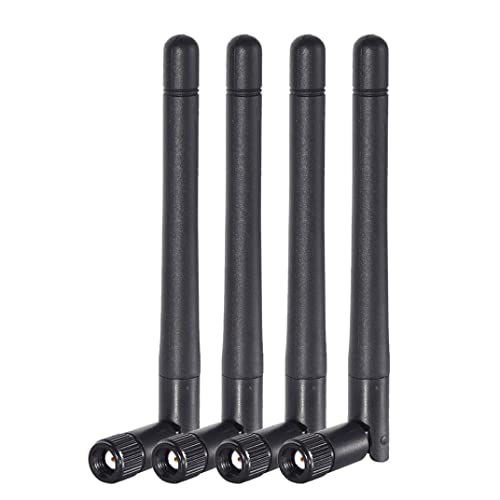
The classic desktop stick, affectionately nicknamed after its rubbery coating, remains the default for good reason. Inside the hinged housing sit one or more tuned elements, folded or sleeved to fit bands into a short length. Such sticks balance coverage, durability, and indifference to aim, and they survive being knocked by knees and cleaning cloths without complaint. For a machine already standing in reasonable air, a quality stick in the correct connector and bands is frequently the whole answer.
Paddle antennas flatten the housing into a blade that can be angled with unusual precision. The blade shape suits owners who enjoy fine adjustment, because small rotations produce repeatable changes in the link. Paddles also pack neatly against a bracket where cylindrical sticks collide with neighbouring cables. Their weakness is the same adjustability: a blade knocked askew stays askew, quietly taxing the connection until someone notices.
Tall whips extend the concept upward, trading desk tidiness for a longer radiating structure and often a flatter, farther-reaching pattern. On a same-floor path toward a distant router, that trade can be exactly right. In a small room with the router nearby, the extra length buys nothing and the extra leverage on the connector invites damage when the tower gets moved. Length is a tool for distance, not a virtue in isolation.
Compact stubs occupy the opposite end of the shelf, chosen when space behind the machine is brutally limited or the machine travels between sites. Their patterns are broad and their reach modest, yet a stub in open air still outperforms a grand antenna trapped behind steel. Media-centre machines inside ventilated cabinets often rely on stubs paired with a short cabled base that peeks above the cabinet line. Judging stubs by the standards of full-size sticks misses the constrained jobs they exist to solve.
Some kits bundle antennas with a fresh card, and those bundles deserve a calmer evaluation than aftermarket marketing suggests. The included elements are matched to the card bands by the same engineering team, which removes connector and coverage guesswork entirely. Their limitation is usually the base cable length or the absence of a base altogether, not the radiating design. Owners can keep bundled sticks as spares even after upgrading to a cabled block, because a known-good spare shortens every future troubleshooting session.
Diagnosing a weak link before spending anything
Methodical diagnosis protects the antenna budget from problems that antennas cannot fix. Begin by confirming the machine negotiates the band and protocol its hardware advertises, since a card stuck on a legacy mode points toward drivers or settings rather than physics. Operating systems expose the negotiated link rate and band in their network details, and those two numbers frame every later decision. A healthy rate that fluctuates wildly suggests interference or placement trouble; a rate capped suspiciously low suggests configuration.
Location experiments come next, and they cost nothing but patience. Temporarily moving the whole desktop into the router room, undignified as that feels, establishes the best link the card can achieve. If performance blooms there, the radio is innocent and the path through the house is the problem, which placement or a base may solve. If performance stays miserable beside the router, suspicion shifts to the card, its drivers, or a damaged antenna with a broken internal joint.
Swapping antennas between fittings offers another free clue on multi-chain cards. A fault that follows one particular stick from fitting to fitting indicts that stick, while a fault loyal to one fitting points at the card or its pigtail. Bent centre contacts, cracked housings, and hinges gone floppy all appear in ownership reports as causes of links that degraded mysteriously over months. Antennas are mechanical objects living behind warm machines, and they age like mechanical objects do.
Software-side checks round out the sequence before money moves. Current drivers from the chipset maker, rather than whatever the operating system installed years ago, occasionally transform a card reputation overnight. Router firmware and channel selection matter symmetrically, because an access point camped on a congested channel handicaps every antenna downstream. A desktop that performs well at midnight and poorly at dinner time is describing neighbourhood congestion, not failing hardware. Antennas gather the environment as it is; they cannot repeal rush hour.
Interpreting signal numbers without superstition
Signal strength readouts, usually expressed as a negative number in dBm, reward interpretation rather than worship. Values closer to zero indicate stronger reception, and the scale is logarithmic, so a modest numerical improvement represents a substantial physical gain. A change that lifts a reading by several points while stabilising its jitter has genuinely improved the link, even if a speed check that day stays flat. Throughput also depends on the router, the broadband line, and the server at the far end, none of which the antenna controls.
Consistency across a day tells a truer story than any single snapshot. A link that holds its negotiated rate through the evening peak, keeps latency steady during calls, and stops renegotiating downward has improved where it matters. Owners frequently report judging antenna changes by feel across a working week, and that instinct aligns with how radio conditions actually vary. One triumphant benchmark at dawn proves little about a network at dusk.
A shortlist method and the myths to leave behind
Narrowing the market becomes manageable once the hard filters are applied in sequence. Connector first: RP-SMA for the overwhelming majority of desktop cards, confirmed by inspecting the centre contact rather than trusting a listing headline. Bands second: dual-band coverage as the floor, tri-band whenever the card speaks 6 gigahertz or soon will. Count third: a full set matching the fittings on the card, never a single glamorous stick asked to serve a multi-chain radio alone.
Format comes fourth, decided by where the machine lives. Towers trapped under desks or inside furniture argue for a cabled magnetic base before any exotic element enters the discussion. Machines standing openly on desks can start with quality sticks and add a base later if the room demands it. Cable length, hinge sturdiness, and honest per-band specifications separate finalists at this stage far better than decorative gain claims.
Myth one claims that the highest gain figure always wins, and the pattern geometry discussed earlier dismantles it. Gain borrowed from vertical coverage helps only when the router shares the desktop horizontal plane. Myth two insists that more antennas than the card has chains will somehow stack extra speed, when unterminated or duplicated elements add nothing the radio can use. Myth three treats every adapter and extension as harmless, ignoring the measurable toll each joint and cable metre collects at the higher bands.
Myth four blames antennas for congestion that belongs to the neighbourhood spectrum. When thirty networks overlap on the same channels, a better antenna hears the argument more clearly without quieting it. Moving bands, adjusting channels, or relocating the router addresses that class of problem at its root. Myth five expects an antenna to rescue a card two protocol generations behind the router, a mismatch no radiating element can negotiate away.
Expectations set correctly, an antenna upgrade remains one of the most satisfying small projects in home computing. The parts are inexpensive compared with a new card, installation takes minutes, and the result announces itself in the daily texture of the connection. Dropped calls firm up, large transfers stop sagging when someone closes a door, and the machine finally performs like the network around it always could. Few upgrades repay so little effort so visibly.
Care during installation is brief but worth stating plainly. Power the machine down before threading fittings, support the bracket with one hand while tightening with the other, and route base cables clear of exhaust fans and chair castors. After booting, confirm the negotiated band and rate, then live with the arrangement through a full day of ordinary use before judging it. Radio improvements declare themselves across varied conditions, not in the first eager minute.
For the desktop owner staring at a card full of unfamiliar fittings and a shelf of near-identical sticks, the path forward is simply this: match the connector by eye, cover every band the card owns, give each chain its own element, and stand the whole set in clear, high, unhurried air.
Special situations: mesh homes, rentals, and far-flung rooms
Mesh networks change the placement calculus in a way that flatters desktop antennas. With several nodes scattered through the home, the card chooses among multiple possible partners, and an antenna with broad, even coverage can hear whichever node currently offers the cleanest path. Directional experiments make less sense here, because the best target may change when a node reboots or a housemate unplugs one to vacuum behind the sofa. Owners frequently report that simply raising a base into open air let a desktop migrate from a distant primary router to a nearer satellite, with stability improving overnight.
Rental homes impose constraints that antenna choice can quietly absorb. Drilling for cable runs or mounting external hardware may be forbidden, yet a magnetic base on a bookshelf involves no landlord negotiations at all. When the router belongs to the household rather than the desktop owner, improving the receiving end is often the only lever available. A renter who cannot move the access point an inch can still move an antenna a metre, and at these wavelengths a metre is a meaningful distance.
Garden offices, converted garages, and workshop desktops stretch home networking to its honest limits. Distance, exterior walls, and sometimes a stretch of open yard separate such machines from the router, and every decibel of antenna sense starts to count. Longer elements, carefully aimed where the design allows aim, and bases raised to window height all earn their keep on those paths. Where the gap defeats indoor hardware entirely, the honest answer may be a dedicated outdoor link rather than an ever-larger desk antenna, and recognising that boundary saves money and weekends.
Thick-walled older houses present a subtler version of the same problem indoors. Stone, brick, and foil-backed plasterboard turn each room into a partial radio enclosure, so the desktop may sit barely eight metres from the router yet behind three hostile boundaries. In those homes the lower band often carries the working connection while the faster bands flicker, and an antenna with genuinely strong 2.4 gigahertz coverage matters more than fashionable specifications suggest. Placement near the doorway, borrowing the corridor as a waveguide of sorts, regularly outperforms placement against the far wall.
Shared student houses and busy family homes add a human layer of interference. Networks multiply, devices swarm, and the router migrates according to whoever last complained. A forgiving omnidirectional setup on a movable base adapts to that churn without demanding a fresh optimisation after every rearrangement. Keeping the original bundled antennas in a drawer completes the resilience plan, since a borrowed or broken stick can be swapped back in seconds. Small households with stable layouts can afford fussier hardware; chaotic ones should buy adaptability first.
Seasoned owners also keep notes, unfashionable as that sounds. Recording which base position, orientation, and band the card preferred in each room turns future moves into a lookup rather than a fresh investigation. A phone photograph of a successful arrangement captures in seconds what memory will blur within a month. When a link degrades after some household change, those notes separate coincidence from cause with unusual speed.
So the buying decision resolves into fit, coverage, count, and freedom to stand in good air, and a desktop granted all four usually stops being the machine everyone apologises for during calls.
Check prices on Amazon
Live listings for the shortlist in this guide are pulled from Amazon below, so prices and availability are always current at the moment you look.

When the honest answer is a different upgrade entirely
Intellectual honesty requires admitting the cases where no antenna, however well chosen, will rescue a desktop connection. A card limited to elderly protocols will negotiate elderly speeds beneath the finest radiating element ever moulded. A router failing under the load of a crowded household will disappoint every client equally, antennas included. Broadband trouble upstream of the router wears a convincing disguise as wireless weakness until a wired comparison exposes it.
The wired comparison deserves a permanent place in every troubleshooting ritual. Connecting the desktop by cable for one evening, however untidy the temporary run, divides the world of possible faults cleanly in half. If the misery persists on the cable, the antenna conversation can stop and attention belongs elsewhere entirely. If the cable restores joy, the wireless path stands convicted, and antenna work proceeds with justified confidence.
Powerline adapters, mesh satellites with wired backhaul, and a simple cable run each compete with antenna spending in that convicted-wireless scenario. Sometimes the satellite placed in the desktop room, feeding the machine by a short cable, outperforms any antenna pointed across the house. Sometimes the antenna wins on simplicity, cost of effort, and the absence of new boxes to configure. Comparing those routes soberly, rather than buying parts in hope, marks the difference between a hobby and a habit.
None of that diminishes the antenna itself, which remains the cheapest variable in the entire chain to change and the easiest to reverse. A base can move back, a stick can return to its drawer, and nothing about the experiment scars the machine or the network. That reversibility makes antenna work the correct first experiment even when it might not be the final answer. Start where the risk is smallest, measure honestly, and escalate only when the evidence demands it.
And when the evidence does point at the antenna, as it so often does for a tower exiled beneath a desk, the reward is a machine that finally hears its own home clearly, on every band its card was built to speak.
Keep the packaging, the spare originals, and a note of the fitting style somewhere the next upgrade will find them, because future-you, crouched behind a warm tower with a phone torch in hand, will be grateful for every shortcut present-you bothered to leave behind.
Choose the antenna that fits, covers, and stands tall, and the quiet desktop in the corner becomes the most reliable listener in the house.