Our Top Picks
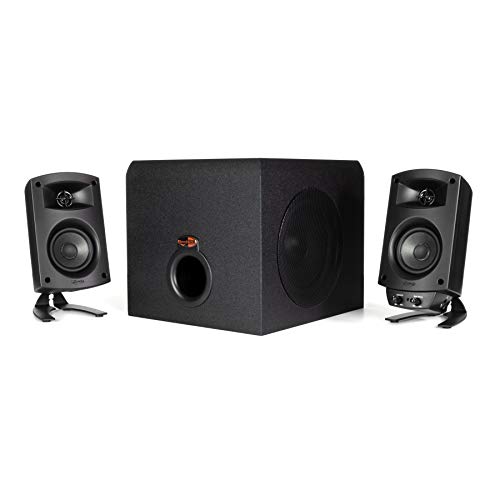
 Klipsch ProMedia 2.1 THX Certified Computer Speaker System3-piece5.67 x 4.2 x 8.5 inches2.1 poundsCheck on Amazon
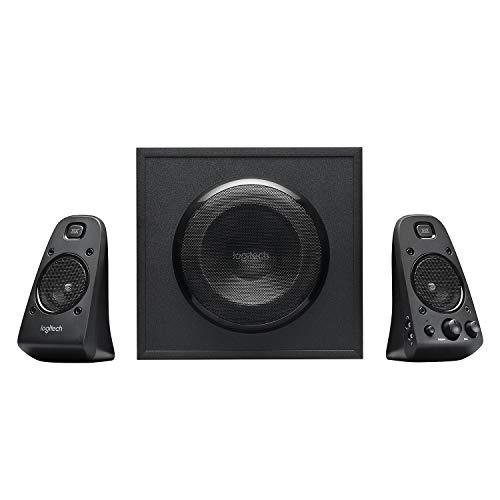 Logitech Z623 2.1 Speaker System with Subwoofer17.31 x 11.87 x 12.25 inches21.32 poundsCheck on Amazon
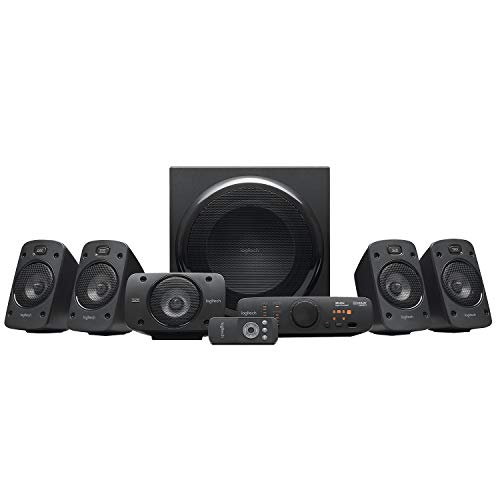 Logitech Z906 5.1 Surround Sound Speaker System6.5" x 3.9" x 3.7"15.2 x 17 x 17.3 inches33.1 poundsCheck on Amazon
What's inside
- What THX Certified actually means for computer speakers
- How our research narrowed the list to five
- The five THX systems at a glance
- Klipsch ProMedia 2.1 THX Certified Computer Speaker System (Black)
- Logitech Z625 2.1 Speaker System with Subwoofer, THX Certified, 400W
- Logitech Z623 2.1 Speaker System with Subwoofer, THX Certified, 400W
- Logitech Z906 5.1 Surround Sound Speaker System, THX Certified
- Razer Nommo Pro: THX Certified Premium Audio with Dolby Virtual Surround Sound
- 2.1 or 5.1: choosing the right THX shape for your room
- Placement and setup guidance that applies to every system here
- Frequently asked questions
- Check prices on Amazon
- Final verdict
As an Amazon Associate I earn from qualifying purchases. This post may contain affiliate links at no extra cost to you.
Most desktop speakers ask you to trust a wattage number and a product photo. THX computer speakers ask you to trust something different: an independent certification that sits in the product name itself. That distinction is the whole point of this guide. Every system covered here carries THX Certified in its official product title, which narrows a crowded category down to a short, verifiable list. Instead of comparing dozens of near-identical 2.1 sets with inflated claims, our research focused on the small group of desktop and PC-friendly systems that have actually earned that certification and still make sense to buy for a desk, a small room, or a media corner built around a computer.
The five systems in this guide cover a surprisingly wide range. At one end are classic 2.1 setups with two satellite speakers and a separate subwoofer, the format that defined serious computer audio for years. At the other end is a full 5.1 surround system that happens to work beautifully with a PC but is really a small home theater in a box. In between sits a gaming-focused premium system with virtual surround, an illuminated control pod, and lighting, built specifically for a PC gaming desk. That spread matters, because THX certification alone does not tell you which shape of system fits your room, your desk space, or the way you actually listen.
This guide is organized to help you decide on shape first and brand second. We explain what THX Certified means in plain language, without inventing thresholds that THX does not publish for shoppers in a simple headline number. We then walk through each of the five systems on its own terms, using only the details given in its official product title and widely understood facts about the THX program and about speaker formats in general. Where a title gives a power figure, a decoding feature, or an input, we discuss that figure in context. Where a title does not give a detail, we do not fill the gap with a guessed specification. That restraint is deliberate, and it is also useful, because it keeps the comparison honest.
One relationship needs to be clear from the start. The Logitech Z625 and the Logitech Z623 are close relatives, not two completely unrelated designs. Both are Logitech 2.1 systems with a subwoofer, both are THX Certified, and both carry the same headline figures in their titles: 400W peak power and 200W RMS. The Z625 is the later, more connected positioning of that platform, and its title explicitly adds an optical input for computers, TVs, and gaming. The Z623 is the earlier expression of the same idea, framed in its title around immersive music, movies, and gaming without that optical mention. Treating them as successive takes on one proven platform, rather than pretending they are strangers, will help you choose between them sensibly and understand why both still appear in searches for THX desktop audio.
What THX Certified actually means for computer speakers
THX is best known from cinemas, but the underlying idea travels well to a desk. THX sets performance standards for audio equipment and certifies products that meet those standards through its own evaluation process. For loudspeakers, the concern is not a single flashy attribute. It is the overall ability of a system to reproduce sound accurately and at satisfying levels without falling apart into distortion, imbalance, or a thin, strained presentation when the volume rises or a demanding scene arrives. A certified desktop system is therefore making a broader promise than a non-certified system with a similar shape: that its performance has been checked against an external benchmark, not only described by its own maker.
It is equally important to say what THX Certified does not mean. It does not mean every certified system sounds identical. A compact 2.1 Klipsch system, a Logitech 2.1 system, a Logitech 5.1 surround system, and a Razer gaming system can all carry the certification while presenting sound in noticeably different ways, with different channel counts, different connectivity, and different intended rooms. Certification is a floor for performance, not a single house sound. It also does not replace basic fit checks. A certified 5.1 system still needs space for five speakers and a subwoofer, and a certified 2.1 system still needs a sensible spot for its subwoofer if you want the low end to support the satellites rather than overwhelm them.
Finally, keep certification in perspective alongside format. THX tells you a system met a standard. Format tells you what that system can physically do. A 2.1 system creates a stereo image with subwoofer support. A 5.1 system adds a center channel and rear surround channels for true multichannel placement of sound. A virtual surround gaming system uses processing to widen the perceived field from a stereo pair. Those are different tools. The rest of this guide keeps returning to that distinction, because choosing the right tool matters more than collecting the badge alone.
How our research narrowed the list to five
Our research started with a strict rule that is visible in every heading in this guide: THX had to be in the product title itself. That rule excluded many good speakers, and that was intentional. Plenty of capable desktop speakers exist without THX certification, and plenty of home theater speakers carry THX credentials without being sensible computer speakers. The overlap, systems positioned for computer use with THX in the name, is small. Five systems met the brief cleanly and represent the realistic choices a shopper will actually encounter when searching on this exact term.
Within that short list, we checked the titles carefully for the facts a buyer can rely on without guesswork: channel configuration, whether a subwoofer is included or described, any stated peak and RMS power, any named decoding such as Dolby Digital or DTS, any named input such as optical, and any distinctive hardware such as a control pod. We then organized the guide around the questions those facts raise. If a system is 5.1, the relevant question is room and placement. If a system is 2.1 with optical input, the relevant question is how many sources you need to connect. If a system is gaming focused with Chroma lighting and virtual surround, the relevant question is whether those desk-specific features matter to you more than true rear channels.
The five THX systems at a glance
The Klipsch ProMedia 2.1 THX Certified Computer Speaker System, in black, is the classic of the group: a long-established 2.1 desktop formula from a loudspeaker brand, built around two satellites and a subwoofer for computer use. The Logitech Z625 is a 2.1 system with subwoofer, THX Certified, rated in its title at 400W peak and 200W RMS, with optical input broadening its reach across computers, TVs, and gaming. The Logitech Z623 shares that 2.1, THX, 400W peak and 200W RMS foundation, positioned for immersive music, movies, and gaming. The Logitech Z906 steps up to 5.1 surround, THX Certified, at 1000W peak and 500W RMS, with Dolby Digital and DTS decoding for a home theater style experience that also suits a PC media setup. The Razer Nommo Pro brings a gaming lens: THX Certified premium audio, Dolby Virtual Surround Sound, an LED illuminated control pod, a downward firing subwoofer, and Powered Chroma, made for PC gaming speakers duty.
Read that overview as a map, not a verdict. If you want the simplest serious desk upgrade, you are looking at the three 2.1 systems. If you want real surround channels, only the Z906 in this list provides them. If you want a gaming desk centerpiece with virtual surround and lighting integration, only the Nommo Pro is built around that brief. The detailed sections that follow unpack each of those statements so you can test them against your own setup.
Klipsch ProMedia 2.1 THX Certified Computer Speaker System (Black)
The Klipsch ProMedia 2.1 holds a particular place in desktop audio. Long before compact soundbars and USB speakers became the default add-on for a laptop, the ProMedia formula showed what a computer desk could sound like when a proper loudspeaker company treated the desk as a real listening position. The name tells you the essentials without embellishment: it is a 2.1 computer speaker system, it is THX Certified, it comes from Klipsch, and this version is finished in black. Two satellite speakers handle the stereo image at ear level, and a separate subwoofer handles the low frequencies that small desktop cabinets simply cannot reproduce on their own.
Who this system fits best
This is the natural starting point for a listener who wants a straightforward, music-friendly desk system without surround channels, lighting ecosystems, or a large control unit taking over the workspace. If your day moves between focused work with music, streaming video, and occasional gaming, and your priority is a balanced stereo presentation from a proven platform, the ProMedia 2.1 speaks directly to that brief. Its appeal is not novelty. Its appeal is maturity: a format refined around nearfield listening, where you sit close, the satellites are a short distance away, and clarity at modest volume matters as much as impact at higher volume.
Sound character and everyday use
In a 2.1 system, the handoff between satellites and subwoofer shapes everything. Done well, voices sit clearly in the satellites, instruments have separation in the stereo field, and the subwoofer adds weight underneath without calling attention to its location under or beside the desk. That is the experience this class of Klipsch system is built to deliver, and THX certification supports confidence that the overall balance has been held to an external standard. For music, that means you can follow lyrics, dialogue, and detail without pushing the volume to compensate for a thin presentation. For film and television watched at a desk or in a small room, it means effects gain foundation without needing five speakers around you.
Trade-offs to accept
The limits are the limits of the format and the positioning. This is a stereo system, so it will not place a sound effect behind you the way a true surround system can, and it does not claim virtual surround processing in its title. Its title also does not highlight optical input or multichannel decoding, so buyers whose main need is connecting several sources, including a TV and a console alongside a PC, should compare that aspect carefully against the Logitech Z625 below, whose title makes optical input a headline feature. None of that diminishes the ProMedia for a PC-centered desk. It simply defines its lane: focused, certified stereo with subwoofer support, from a speaker specialist.
Choose the ProMedia 2.1 if you want the classic THX desktop experience in its purest form, you listen mostly from one seat at a desk, and you prefer a system whose reputation rests on loudspeaker fundamentals rather than added effects. Skip it, or at least compare further, if true surround, optical connectivity, or gaming desk lighting are central to your plan.
Logitech Z625 2.1 Speaker System with Subwoofer, THX Certified, 400W
The Logitech Z625 takes the proven Logitech 2.1 THX platform and positions it for a desk that is no longer only a desk. Its full title is unusually informative, and it is worth reading closely: a 2.1 speaker system with subwoofer, THX Certified, at 400W, described further as 400W peak power and 200W RMS, with THX-certified sound and optical input for computers, TVs, and gaming. In one line, Logitech tells you the format, the certification, the power framing, the key extra input, and the three use cases it has in mind. That breadth is the Z625 story.
Why optical input changes the conversation
An optical input matters because modern desks often serve several sources. A PC might be the main machine, but a TV or monitor with an optical output, or a game console, may share the same space and the same speakers. With optical in the title, the Z625 signals that it expects that multi-source life and is ready for it without reducing everything to a single computer connection. For a small media setup in a bedroom, studio apartment, or office den, that flexibility can be the difference between one speaker system that handles everything and a tangle of adapters and compromises.
If you are comparing Logitech options specifically, our guide to the best 2 1 logitech speakers category is a useful companion, because the differences between closely related Logitech 2.1 models often come down to exactly this kind of connectivity and positioning detail rather than a wholesale change in format or power.
Power figures, explained calmly
The title gives two power numbers, and they should not be confused. Peak power, here 400W, describes a maximum under short burst conditions. RMS power, here 200W, is the more useful figure for understanding sustained output capability, because it reflects continuous power handling rather than an instant peak. Neither number alone tells you exactly how a system will sound in your room, since speaker sensitivity, placement, and room size all shape the result. Together, in a THX Certified system, they indicate a 2.1 platform with substantial headroom for a desktop and small-room role, well beyond what built-in monitor speakers or small USB speakers can offer. The sensible takeaway is not that more watts automatically mean better sound. It is that this system is built to stay composed when music swells, a game moment hits, or a film scene turns demanding at the volume levels a desk and nearby seating actually use.
Who should choose the Z625
Choose the Z625 if your setup spans a computer plus at least one other source, especially a TV, and you want one THX Certified 2.1 system to cover music, movies, and gaming without stepping up to a full surround installation. It suits a desk against a wall in a small living space, a gaming station that doubles as a streaming station, or a secondary media room where five speakers would be excessive but built-in TV sound feels inadequate. Its subwoofer gives film and game low end a proper foundation, while the satellite pair keeps the footprint desk friendly.
The trade-off is the same honest limit as any 2.1 system: surround information will be presented in stereo, not from discrete rear channels. If your seating and room allow proper surround placement and that immersion is your top priority, the Z906 further down this guide is the system designed for that job. If your room does not allow it, the Z625 does not ask you to pretend otherwise. It offers certified stereo with real low-end support and broader connectivity, which for many buyers is the smarter, cleaner solution.
Logitech Z623 2.1 Speaker System with Subwoofer, THX Certified, 400W
The Logitech Z623 is the earlier, foundational expression of the Logitech 2.1 THX idea that the Z625 later extended. Its title mirrors its sibling in the fundamentals: a 2.1 speaker system with subwoofer, THX Certified, at 400W, spelled out as 400W peak power and 200W RMS, with THX-certified sound for immersive music, movies, and gaming. Same channel count, same certification, same headline power framing. That overlap is not a mistake in this guide and it is not a reason to dismiss either model. It is the key to understanding both.
The Z623 and Z625 relationship, stated plainly
Think of the Z623 as the original platform statement and the Z625 as the successor positioning that keeps the platform and widens the source compatibility, most visibly by naming optical input in its title. Shoppers sometimes assume that two model numbers with identical power figures must hide a large performance gap, or conversely that they are literally the same product with a new label. Neither extreme is a helpful way to read these titles. The responsible reading, and the one our research uses, is that these are two generations or positionings of one closely related Logitech 2.1 THX platform, differentiated in presentation and connectivity emphasis, notably the Z625 optical input, rather than two unrelated designs competing by coincidence.
What the Z623 does well
Within its lane, the Z623 proposition is clean. Stereo satellites plus a subwoofer is the right physical answer for most desks, because it respects how people actually sit and listen at a computer: centered, close, and facing a screen. Music gains a stereo image and low-end weight that small all-in-one speakers cannot provide. Movies gain dialogue clarity from proper left and right speakers at ear height and impact from the subwoofer. Games gain directional cues in the stereo field and a sense of scale during larger moments. THX certification ties those expectations to an external standard, which is especially reassuring in a category where unbranded 2.1 sets often promise theater sound with no verification at all.
When to pass it by
Pass by the Z623 if optical connectivity to a TV or console is a requirement rather than a nice extra, if you want the later model positioning, or if a particular used or older listing raises questions about condition that a newer purchase would avoid. Also pass by any 2.1 system, including this one, if your honest priority is discrete surround. No amount of power or certification turns two satellites and a subwoofer into five correctly placed channels, and buyers who understand that distinction before purchasing are far more satisfied afterward.
In short, the Z623 remains in this guide because the platform it represents earned its place in THX desktop history and still matches a real buying need. It is the classic Logitech take on certified 2.1, with the Z625 standing as its more connected successor rather than its replacement in every possible circumstance.
Logitech Z906 5.1 Surround Sound Speaker System, THX Certified
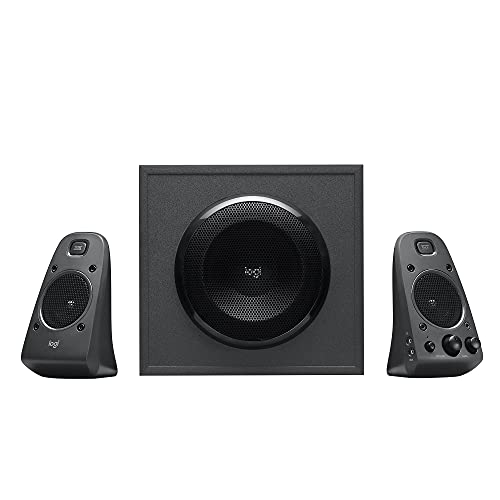
The Logitech Z906 changes the scale of the conversation. This is not a pair of desk satellites with help from a subwoofer. It is a 5.1 surround sound speaker system, THX Certified, rated in its title at 1000W peak power and 500W RMS, with Dolby Digital and DTS decoding for immersive home theater sound. Five speakers plus a subwoofer, true multichannel decoding, and power figures roughly two and a half times the Logitech 2.1 models above place it in a different class. It belongs in this guide because a PC can be an excellent surround source, and many computer rooms are also media rooms, but it should be considered as a surround system first and a desktop accessory second.
What 5.1 gives you that 2.1 cannot
A 5.1 layout adds a center speaker and two surround speakers to the left, right, and subwoofer foundation. The center channel anchors dialogue to the screen, which helps clarity when a film mix gets busy. The surround channels place effects, ambience, and game audio behind or beside the listening position, creating a sense of envelopment that stereo, however good, cannot physically replicate. For movies mastered in surround and games that support multichannel output, that placement is not a gimmick. It is information in the mix arriving from the direction the creators intended.
That is why readers planning a dedicated media corner should also explore the broader best 5 1 computer speakers options alongside this THX-specific list, to confirm that a surround layout, rather than a simpler stereo layout, matches their room and seating before committing to the extra speakers and cabling.
Decoding and power, in context
The title names Dolby Digital and DTS decoding, and that naming matters. It means the system is designed to accept and decode the multichannel formats long used for film and television surround sound, rather than merely accepting a stereo signal and spreading it across extra speakers. For a PC connected as a media source, or a setup that also includes other home theater sources, that decoding support is central to getting genuine surround rather than an approximation. As with the 2.1 models, read the power figures with the peak and RMS distinction in mind: 1000W peak describes burst capability, 500W RMS is the sustained figure, and both together signal a system built to fill a room, not only a desk, while staying composed during demanding passages.
Room, placement, and honesty about fit
The Z906 rewards a room that can accommodate it and punishes, in wasted potential, a room that cannot. You need a sensible place for a center speaker at the screen, front left and right speakers spaced for a stereo and surround front stage, surround speakers positioned to the sides or behind the main seat, and a subwoofer spot that supports the whole layout. Cable runs need thought. Seating needs a defined main position. None of this is difficult in a dedicated media room, a living room built around a PC or TV, or a gaming room with a fixed chair. All of it is friction in a temporary desk setup, a shared bedroom, or a workspace that moves often.
Choose the Z906 if surround immersion is the goal, your room supports proper placement, and your sources include surround content you actually watch or play. It is the only system in this guide that delivers discrete 5.1 from this THX list, and for the right room that makes it not merely an option but the obvious one. Choose a 2.1 system instead if your listening is desk centered, your room is small or shared, or you know rear speakers would end up in a closet. A correctly placed 2.1 system will always outperform a badly placed 5.1 system, and the Z906 deserves to be bought by someone who can let it do its job properly.
Razer Nommo Pro: THX Certified Premium Audio with Dolby Virtual Surround Sound
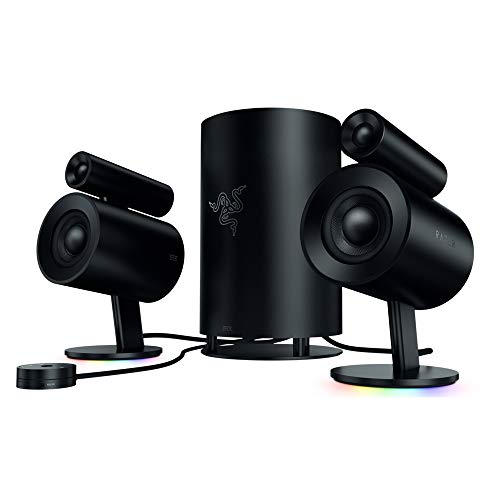
The Razer Nommo Pro approaches THX desktop audio from the gaming desk outward. Its title reads like a gaming brief: THX Certified premium audio, Dolby Virtual Surround Sound, an LED illuminated control pod, a downward firing subwoofer, Powered Chroma, and an explicit designation as PC gaming speakers. Where the Klipsch system emphasizes loudspeaker tradition and the Logitech 2.1 systems emphasize versatile certified power, the Nommo Pro emphasizes the experience of sitting at a gaming PC: processing that widens the sound field, a control pod within reach, a subwoofer designed to fire downward, and lighting that can belong to a wider Razer Chroma setup.
Virtual surround, explained without hype
Dolby Virtual Surround Sound in this context means processing that aims to create a wider, more enveloping perception of space from the speaker configuration in front of you, rather than discrete sound arriving from physical rear speakers. That distinction should be stated clearly, because virtual and true surround solve the same desire, immersion, by different means. True surround, as in the Z906, places speakers around you. Virtual surround uses processing to suggest space and direction from front speakers, which suits a desk where rear speakers are impractical and the listener sits in a consistent, close position. For a single gaming seat at a fixed desk, that trade can make a great deal of sense. The listener is always in the sweet spot that virtual processing is designed around.
The control pod and downward firing subwoofer
Two hardware details in the title deserve attention because they affect daily use, not only sound. An LED illuminated control pod puts control at the desk surface, within arm reach, with illumination that keeps it visible in the low light many gaming setups favor. Reaching a pod is a different experience from reaching around a satellite or relying entirely on software controls, and for frequent volume adjustments during play, calls, and media playback, that convenience compounds over months of use. A downward firing subwoofer, meanwhile, uses the floor as part of its presentation, spreading low frequencies from beneath the desk area. Placement still matters, as it does for every subwoofer in this guide, but the downward firing design is a deliberate choice for a desk and floor environment rather than a bookshelf.
Chroma and the gaming desk ecosystem
Powered Chroma will either matter to you a lot or not at all, and both reactions are reasonable. If your desk already includes Razer Chroma lighting across a keyboard, mouse, or other accessories, speakers that participate in that ecosystem complete a visual setup you have intentionally built, and that cohesion has real value in a space you look at every day. If you have no Chroma devices and no interest in lighting, the feature is neutral: it neither improves nor harms the core proposition of THX Certified premium audio with virtual surround, but it should not be the reason you buy the system. Buy the Nommo Pro for its gaming-focused audio brief and desk integration, and treat Chroma as a welcome bonus if your setup already speaks that language.
Choose the Nommo Pro if you are building a dedicated PC gaming station, you sit in one main position, you value virtual surround processing over adding physical rear speakers, and a control pod and lighting integration fit how you use your desk. Look elsewhere in this guide if you need true multichannel decoding for a home theater layout, optical input as a headline requirement for a TV, or the simplest possible stereo system with no gaming ecosystem features. The Nommo Pro knows exactly what desk it was designed for, and it serves that desk with a clarity of purpose the other four systems do not attempt in the same way.
2.1 or 5.1: choosing the right THX shape for your room
Format should be decided before model. Start with your seating. If almost all listening happens in one chair at one desk, a 2.1 system aligns its stereo image and subwoofer support with that chair, and you will hear it as intended almost every time you sit down. If listening happens on a sofa facing a screen, with films and games as the main event, a 5.1 system aligns its center and surround channels with that sofa, and the extra speakers earn their space. Mismatching format and seating is the most common and most avoidable mistake in this category, more costly than choosing between two good brands in the correct format.
Next, consider your content honestly. Music is overwhelmingly stereo, so a 2.1 system presents it natively, with the subwoofer extending the low end. Most video streaming includes stereo and, for many films and series, surround mixes that a 5.1 system can use fully and a 2.1 system will present as a stereo downmix. Games span both worlds, from stereo-focused titles to productions with rich multichannel sound. A useful exercise is to list the three things you will play most in the next year and note their likely format. That short list usually points clearly to 2.1 or 5.1 without any further debate. Readers still weighing the stereo route will find the wider best 2 1 speakers landscape helpful for confirming that a subwoofer-backed stereo pair, rather than surround, is the proportionate answer for their room.
Then consider the room itself, without optimism. Measure where rear or side surround speakers would actually go, not where they would go in an ideal renovation. Check whether stands or mounts are realistic, whether cables can run without crossing walkways, and whether other people who share the space will accept speakers in those positions permanently. If the honest answer is no, decide for 2.1 and invest your attention in placing it well. If the answer is yes, the Z906 becomes a serious and rewarding candidate. Room honesty at this stage prevents the familiar outcome of a surround system gradually collapsing into a front-only system with its rear speakers disconnected.
Finally, count your sources. A PC-only desk simplifies connectivity and favors any of the systems here on audio grounds alone. A PC plus TV plus console setup elevates the importance of inputs and decoding, which pushes attention toward the Z625 optical positioning for stereo or the Z906 decoding for surround. A PC gaming station with an existing lighting and accessory ecosystem elevates desk integration, which is the Nommo Pro home ground. Format, content, room, and sources: answer those four in order, and the five systems in this guide sort themselves into a short list of one or two.
Placement and setup guidance that applies to every system here
Good placement improves a certified system. Poor placement undermines it. For any 2.1 system in this guide, place the two satellites at roughly equal distance from your main seat, angled toward that seat, with the tweeters as close to ear height as your desk allows. Keep the spacing wide enough to create a genuine stereo image, wider than the monitor edges where possible, but not so wide that the center of the image, where voices live, feels hollow. Symmetry matters more than exotic tweaks: equal distances, equal angles, and a clear path from each satellite to your ears will do more than any accessory.
Subwoofer placement deserves patience. A subwoofer under a desk, in a corner, or against a wall will sound different in each spot, because nearby surfaces reinforce low frequencies. Corner placement tends to increase perceived bass weight, which can flatter a small system or overwhelm a small room depending on your taste and the content. A position along a wall near the desk often gives a more balanced result. Wherever you place it, leave the driver and any ports the clearance the design expects, avoid enclosing it tightly in furniture, and judge the result from your actual seat with familiar music and a familiar film scene rather than from beside the subwoofer itself.
For the Z906 in a 5.1 layout, extend the same symmetry discipline around the room. The center speaker belongs at the screen, aimed at the main seat, because dialogue anchoring is its job. Front left and right should form a stage with the center, not crowd it. Surround speakers belong to the sides or behind the main seat according to the layout you can achieve consistently, aimed toward the listening area. Take time with channel balance from the main seat, since a surround system with one channel too prominent stops sounding like a space and starts sounding like separate speakers taking turns.
Frequently asked questions
Are THX computer speakers worth it over ordinary desktop speakers?
For buyers who care about verified performance rather than headline claims, yes, the certification has real value as a filter. It will not choose your format for you, and it does not erase differences in tuning or features, but it narrows the field to systems that have met an external standard. If your budget and desk point to a simple stereo upgrade, a certified 2.1 system is a more confident purchase than an uncertified set with similar styling and louder promises.
Can a 5.1 THX system work well on a desk?
It can, when the desk is part of a fixed media setup with room for a center speaker and correctly placed surrounds, as with the Z906 in this guide. In a small or temporary workspace, those extra channels usually become a burden rather than a benefit. Shoppers in that position should compare this list with the wider best 5 1 speakers category only after confirming their room can support surround placement at all.
Which system here is best for music?
Music favors the 2.1 systems, because most recordings are stereo and a well-placed satellite pair with a subwoofer presents them natively. The Klipsch ProMedia 2.1 suits a speaker-first desk, while the Z625 and Z623 suit buyers who want the Logitech platform and its power framing. The Nommo Pro also handles music at a gaming desk well within its broader gaming brief.
Check prices on Amazon
Live listings for the shortlist in this guide are pulled from Amazon below, so prices and availability are always current at the moment you look.
Final verdict
There is no single winner here, and that is the honest result of our research. Pick the Klipsch ProMedia 2.1 for the classic certified stereo desk, the Z625 for certified 2.1 with optical reach across PC, TV, and gaming, or the Z623 for the original Logitech expression of that same platform. Pick the Z906 when true 5.1 surround, Dolby Digital and DTS decoding, and room-filling scale are the goal, and pick the Razer Nommo Pro when a PC gaming station with virtual surround, a control pod, and Chroma is the desk you are building. Decide format first, place the system carefully, and THX certification will do the rest of the work it was designed to do: give you confidence that the system you chose has met a standard beyond its own marketing.
As an Amazon Associate, GizmoVerdict earns from qualifying purchases made through links in this guide, at no additional cost to you.