What's inside
- Key Takeaways
- Quick Picks
- How We Chose These Picks
- How Does Hardware Encryption on a Drive Actually Work?
- What Threats Does a Hardware-Encrypted Drive Actually Answer?
- How Do the Six Password Protected Picks Compare Side by Side?
- How Do You Put a Secure Portable Drive Into Service Properly?
- Which Mistakes Undermine a Secure Drive Purchase?
- Final Recommendation
- Frequently Asked Questions
- Related Guides
As an Amazon Associate I earn from qualifying purchases. This post may contain affiliate links at no extra cost to you.
gizmoverdict.com is reader-supported. When you buy through links on our site, we may earn an affiliate commission.
Where to buy: each drive below links to its Amazon listing from the Quick Picks table and again from its detailed review. These are hardware-encrypted portable drives unlocked by a PIN on the device itself, so check the listing for capacity and model line, and note which security claims each title actually makes — this guide repeats only the claims printed there, and flags the rest for verification with the maker.
The best password protected hard drives solve a problem software encryption cannot: the drive that leaves the building. A hardware-encrypted portable drive carries its protection in its own electronics — unlocked by a PIN entered on the device, encrypted whether the computer it meets is trusted or not, and indifferent to operating systems because the unlocking happens before the computer is involved. The six picks here come from the two specialist makers who define this niche, Apricorn and iStorage, and they divide into drives whose titles state their encryption credentials in full and drives whose titles say almost nothing, leaving the specification to the maker’s documentation.
That division shapes this whole guide, and it matters more in this category than in any other in this batch. A security purchase is a purchase of claims — validated encryption, a stated standard, a certified design — and a claim that is not in writing is a claim you do not own. So the Apricorn Fortress picks, whose titles print a FIPS 140-2 Level 2 validation and 256-bit encryption, can be recommended on their paperwork; the iStorage picks, whose titles give capacity and colour and little else, are recommended as members of a specialist security line whose exact credentials each buyer must confirm in iStorage’s documentation before trusting them with regulated data. No drive in this roundup — or anywhere — makes data absolutely safe, and this guide will not pretend otherwise: what these devices do is move the risk from trivially easy to genuinely difficult, which is the honest promise of the category.
Key Takeaways
- Hardware-encrypted drives unlock on the device itself, so protection travels with the drive and works with any computer, without software.
- The two Apricorn Aegis Padlock Fortress titles state the strongest paperwork here: FIPS 140-2 Level 2 validated and 256-bit encrypted.
- The Apricorn Aegis Padlock title states 256-bit AES XTS hardware encryption, without a FIPS claim in the title.
- The three iStorage diskAshur titles state capacity and model generation only — encryption standard and certifications must be verified with iStorage documentation.
- Capacity choice is simple in this niche: every pick is 1TB except the 2TB Fortress, so the decision is credentials first, size second.
Quick Picks
| Pick | Badge | Why it is here |
|---|---|---|
| Apricorn 1TB Aegis Padlock Fortress FIPS 140-2 Level 2 Validated 256-Bit Encrypted USB 3.0 | Validated, 1TB | FIPS 140-2 Level 2 validation and 256-bit encryption stated in the title, at the standard capacity. |
| Apricorn 2TB Aegis Padlock Fortress FIPS 140-2 Level 2 Validated 256-Bit Encrypted USB 3.0 | Validated, 2TB | The same stated validation with double the room, for archives that travel whole. |
| Apricorn 1TB Aegis Padlock USB 3.0 256-bit AES XTS Hardware Encrypted Portable External | AES XTS stated | Hardware encryption with the mode named — AES XTS — in a portable external design. |
| iStorage diskAshur2 HDD 1TB Black | diskAshur2, black | iStorage’s second-generation secure drive line at 1TB, in the sober finish. |
| iStorage diskAshur PRO2 HDD 1TB | PRO2 tier | The professional tier of the diskAshur family at the standard capacity. |
| iStorage diskAshur3 HDD 1TB Red | Newest generation, red | The third-generation diskAshur in the finish that is hardest to leave behind in a meeting room. |
How We Chose These Picks
We limited the field to drives whose protection is a property of the hardware — encryption performed by the drive’s own electronics, unlocked by credentials entered on the device — because that architecture is what makes a drive genuinely password protected rather than merely accompanied by software. Software-encrypted portables were excluded: their protection evaporates on machines without the software, and their security story depends on the host in ways this category exists to avoid.
Within that architecture, we weighted stated credentials above all. A FIPS validation printed in a title is a claim a buyer can file; an encryption mode named in a title is a specification a buyer can compare. The three Apricorn listings supply those in writing. The iStorage listings supply almost nothing in writing, and we include them because the diskAshur line is one of the category’s two defining families — but their reviews are written in the grammar of verification, directing each buyer to confirm the exact standard and certifications in iStorage’s documentation for the specific model. In a security category, that distinction is not a footnote; it is the review.
We also considered the buyer’s two characteristic contexts, because they pull the shortlist in different directions. The regulated professional needs credentials that survive an audit, which elevates the Fortress pair and the documentation-verified iStorage tiers. The independent professional needs genuine protection without a compliance audience, which elevates the stated-mechanism Padlock and whichever diskAshur generation their documentation check confirms. A roundup that served only one context would mislead the other, so the recommendations below are written per obligation rather than as a single league table.
Capacity was deliberately not a filter. Five of the six picks are 1TB and one is 2TB, because secure portables are bought per job — a dataset, a client archive, a field kit — rather than as bulk storage. The guide therefore treats the 2TB Fortress as a capacity variant of a credentials decision, not as a separate class of product.
How Does Hardware Encryption on a Drive Actually Work?
The drive contains its own security electronics. Data written to the platters passes through an encryption engine and is stored scrambled; the key that unscrambles it is released only when the correct PIN is entered on the drive’s own keypad, before the computer even sees a volume. Unplug the drive and the key is gone from reach; plug it into a different machine — any operating system, a machine with no special software at all — and the same PIN ritual applies. The computer is a bystander to the security, which is precisely the point.
There is a subtle fourth property worth naming: the security is inspectable. A software scheme’s protection is a claim about code the buyer cannot see, running on a machine the buyer does not control. A hardware drive’s protection is a physical ritual the buyer performs — keypad, PIN, mounted volume — and rituals can be witnessed, taught and audited in a way that background processes cannot. For organisations that must demonstrate their handling of data to clients and regulators, that demonstrability is not a soft benefit; it is frequently the reason the purchase is approved at all.
This architecture buys three properties software cannot match. It is platform-independent, so the same drive serves a mixed fleet of machines. It resists the casual attacks that defeat software locks, because there is no host-side password file to harvest. And it makes the drive’s locked state physical: a found or stolen unit presents its thief with a keypad and an encrypted platter, not a login screen with a guest account. None of that makes the data invulnerable — a forgotten PIN is as final as a thief’s failure, and determined, resourced attackers are a different conversation — but it relocates everyday risk to where it belongs.
What does a FIPS 140-2 Level 2 validation actually certify?
Certification language deserves a buyer’s scepticism in general, because the market is full of phrases engineered to sound like credentials — designed to a standard, compliant with a standard, built in the spirit of a standard. A validation is different in kind: it names a programme, a level and a laboratory process that either happened or did not. When comparing titles in this category, put weight only on the phrasing that could be checked against a certificate listing, and treat every softer phrase as marketing until the maker’s documentation promotes it. That single habit will sort most secure-drive listings more reliably than any benchmark.
FIPS 140-2 is the United States government’s cryptographic module standard, and a Level 2 validation means an accredited laboratory has tested the module and the rating adds physical tamper-evidence and identity-based authentication requirements beyond the basic cryptographic checks of Level 1. When the Apricorn Fortress titles print that validation, they are claiming a specific, externally examined credential — the strongest paperwork in this roundup. Many organisations’ compliance rules name FIPS-validated modules explicitly, which makes the Fortress pair the default shortlist wherever data travels under regulation. Where a title does not print the validation, this guide does not infer it: the iStorage reviews direct buyers to the maker’s documentation to establish what each diskAshur model carries.
How should a team share one secure drive without sharing away its security?
Shared drives are where good categories meet untidy reality. A team archive that travels between colleagues needs a PIN that more than one person knows, and every additional holder dilutes the accountability the PIN exists to create. The workable compromise is procedural: a small, named holder list recorded with the asset, a PIN change whenever the list changes, and a rule that the drive’s contents are working copies of records held elsewhere — so the shared unit is a courier, never the archive of record. Makers in this category provide administrative arrangements of various kinds, defined in their documentation; whatever the model offers, the policy around it is the owner’s to write, and writing it is the difference between a shared drive and an uncontrolled one.
What should a PIN policy for a portable drive look like?
Length and unpredictability both matter, within whatever format the specific model accepts — its documentation defines the rules, and the policy should use the full allowance rather than the minimum. A longer code drawn from unrelated words or digits resists the casual guessing that a short, meaningful code invites, and the keypad ritual takes only seconds longer. Rotate the code when the holder changes, when the drive has been out of sight, or when it has simply been in service long enough that too many rooms have seen it typed.
Treat the drive’s PIN with the seriousness of the data behind it. Choose a code that is not written on the case, not shared beyond the people whose job requires it, and not reused from a building alarm or a luggage lock. Decide, before the drive enters service, who holds the administrator role where the model provides one, what happens when a colleague leaves, and how the data is backed up elsewhere — because a secure drive with a forgotten PIN and no other copy has protected the data from its owner as faithfully as from any thief. Security planning that ignores the owner’s own failure modes is only half a plan, and the lost-PIN scenario is the most common real-world loss in this entire category.

Apricorn 1TB Aegis Padlock Fortress FIPS 140-2 Level 2 Validated 256-Bit Encrypted USB 3.0 — Validated, 1TB
The Fortress name is Apricorn’s flagship claim, and the title carries the paperwork to justify it: FIPS 140-2 Level 2 validated, 256-bit encrypted, USB 3.0, in a 1TB portable drive from the Aegis Padlock line. For the professional whose data travels under a compliance regime — legal files, financial records, health-adjacent material, client data of any regulated flavour — this is the roundup’s most straightforward purchase, because the credential the regime asks for is printed in the product’s own name.
The Aegis Padlock concept is the category in miniature: a keypad on the drive, a PIN known to its keeper, encryption handled by the hardware. The Fortress tier wraps that concept in the validated module, which matters in the two places security purchases are actually judged — the audit, where the paperwork is produced, and the incident, where the question is whether reasonable protection was in place. A drive whose title answers both questions before it is even unboxed earns its flagship position honestly.
One terabyte is the working size of this niche: a client matter, a project archive, a field dataset. Data that outgrows it has the 2TB sibling below; data that fits should not pay for empty encrypted space, because in this category capacity is the cheap axis and credentials are the expensive one — and this drive’s credentials are the point.
Deployment rhythm suits this drive as well. A validated unit can be issued to a new team member with nothing but the PIN policy and a five-minute briefing, because there is no software to install, no licence to activate and no machine-specific setup to document. Organisations that issue drives the way they issue keys — logged, numbered, recalled when a role changes — will find the Fortress’s self-contained design fits that discipline exactly, and the validation gives the asset register a credential column that fills itself in.
- Capacity: 1TB (stated in the listing title)
- Validation: FIPS 140-2 Level 2 validated (stated in the listing title)
- Encryption: 256-bit (stated in the listing title)
- Interface: USB 3.0 (stated in the listing title)
- Line: Aegis Padlock Fortress (stated in the listing title)
Strengths:
- The strongest stated credential in the roundup: an externally validated cryptographic module.
- Hardware encryption and on-device unlocking, independent of any host software.
- Apricorn’s specialist focus: secure drives are the company’s whole business.
Trade-offs:
- One terabyte is the ceiling unless the buyer steps to the 2TB Fortress.
- Validated hardware carries a premium over ordinary portable drives of the same size.
- A forgotten PIN threatens the data as surely as any thief would.
Best for: regulated data that travels — client files, financial records, audit material — where a FIPS-validated module must be shown on paper. Not suited for: casual backup duty, where the validation premium buys protection the data never required.

Apricorn 2TB Aegis Padlock Fortress FIPS 140-2 Level 2 Validated 256-Bit Encrypted USB 3.0 — Validated, 2TB
Everything said for the 1TB Fortress applies here with one variable changed, and the variable is the archive’s size. Two terabytes of validated, hardware-encrypted storage suits the dataset that travels whole: the complete client history, the full project vault, the imaging archive that cannot be split across two drives without breaking its own chain of custody. The title repeats the credentials exactly — FIPS 140-2 Level 2 validated, 256-bit encrypted, USB 3.0 — because in this tier the credentials are the product and the capacity is the option.
There is a risk-arithmetic footnote to the larger size that honest guidance should include: one 2TB drive concentrates twice the data behind one PIN, one keypad and one act of carelessness. Organisations that split archives across two 1TB units are not being quaint; they are diversifying physical risk. The 2TB Fortress is the right buy when the workflow genuinely moves as one body of data — and an indulgence worth questioning when it merely saves carrying a second drive.
For the buyer who has already decided on the Fortress tier, then, the choice between this and its sibling is a workflow question, not a security one: the validation, the encryption strength and the interface are identical in the titles. Measure the travelling dataset, add its growth across the drive’s service life, and let that arithmetic — not a preference for the bigger number — make the decision.
Travel posture deserves one more thought at this size. A 2TB archive drive tends to become a fixture — carried daily, kept in the same bag, treated as furniture — and familiarity is the enemy of the care this tier deserves. Owners of this Fortress should build the rituals that keep a high-value drive treated as one: the same pocket, the same end-of-day check, the same rule that it never stays in a car. The encryption handles the thief; only habit handles the owner.
- Capacity: 2TB (stated in the listing title)
- Validation: FIPS 140-2 Level 2 validated (stated in the listing title)
- Encryption: 256-bit (stated in the listing title)
- Interface: USB 3.0 (stated in the listing title)
- Line: Aegis Padlock Fortress (stated in the listing title)
Strengths:
- Full Fortress validation at double the standard secure-portable capacity.
- Keeps a whole archive under one chain of custody and one PIN regime.
- Identical stated credentials to the 1TB model — no specification ambiguity.
Trade-offs:
- Concentrates more data behind a single device and a single PIN.
- The largest premium in the roundup, as capacity and validation compound.
- Oversized for datasets that fit comfortably in the 1TB sibling.
Best for: a complete archive or client vault that must travel as one validated, encrypted body of data. Not suited for: a small travelling dataset, where the 1TB Fortress provides identical stated credentials with less concentration of risk.

Apricorn 1TB Aegis Padlock USB 3.0 256-bit AES XTS Hardware Encrypted Portable External — AES XTS stated
The original Aegis Padlock makes a different paperwork argument from its Fortress siblings: instead of a validation, its title names the mechanism — 256-bit AES XTS hardware encryption, in a portable external USB 3.0 drive. XTS is the mode of AES designed for storage encryption, and naming it signals a maker speaking to informed buyers. For the professional whose requirement is strong, stated, hardware encryption without a compliance regime demanding a validated module, this is the roundup’s value point in the Apricorn line.
The distinction between this drive and the Fortress pair is worth stating plainly, because it is the distinction the whole category turns on: mechanism versus certification. This Padlock tells you how it encrypts; the Fortress tells you who examined the encryption. Many real-world duties need only the first. A freelancer carrying client work, a photographer carrying unreleased material, a consultant carrying a practice’s files — their obligation is reasonable, genuine protection, and a stated AES XTS hardware engine answers it completely.
What the title does not claim is equally clear: no FIPS validation is printed, so where a regulator or client contract names validated modules, this drive should not be treated as interchangeable with the Fortress. That is not a defect; it is a boundary, and Apricorn’s own line structure draws it deliberately. Buy the boundary your paperwork actually requires.
Longevity is a quiet argument for this model. The Aegis Padlock design has been in service for years across exactly the professions it targets, which means its habits — the keypad ritual, the unlock behaviour, the platform independence — are documented by a long tail of real deployments rather than by a launch brochure. Where the data matters more than novelty, that history reads as the specification that cannot be printed in the title — and rightly so.
- Capacity: 1TB (stated in the listing title)
- Encryption: 256-bit AES XTS, hardware encrypted (stated in the listing title)
- Interface: USB 3.0 (stated in the listing title)
- Format: portable external hard drive (stated in the listing title)
- FIPS validation: Not stated in the listing title — verify with Apricorn documentation
Strengths:
- Encryption mode named in the title — a specification an informed buyer can evaluate.
- Hardware encryption with on-device unlocking, no host software involved.
- The Apricorn line’s accessible entry for duties without a validation mandate.
Trade-offs:
- No FIPS validation claimed in the title, unlike the Fortress pair.
- One terabyte only in this listing, with no larger sibling in the roundup.
- Buyers under compliance regimes must step up the line rather than assume equivalence.
Best for: professional data in transit where strong stated hardware encryption is the requirement and no validated-module mandate applies. Not suited for: a compliance file that must show FIPS validation, where only the Fortress titles in this list answer in writing.

iStorage diskAshur2 HDD 1TB Black — diskAshur2, black
The diskAshur2 represents the other house in this two-house category: iStorage, a maker whose entire catalogue is secure storage, and whose drive names carry the Ashur lineage that corporate IT departments have bought for years. This listing’s title, however, is a study in restraint — diskAshur2, HDD, 1TB, black — and this guide’s discipline requires the review to be equally restrained about what can be claimed from it: the encryption standard, the keypad specification and any certifications are not stated in the title, and each must be confirmed in iStorage’s documentation for this model before the drive is trusted with data whose protection must be demonstrated.
That restraint should not be misread as a verdict against the drive. iStorage publishes full specifications for its models, and the diskAshur family’s entire reason for existing is hardware-encrypted, PIN-unlocked portability of exactly the kind this roundup covers. The point is procedural: in a security purchase, the documentation is part of the product, and a buyer of this listing should read iStorage’s page for the diskAshur2 the way a Fortress buyer reads the validation in the title — as the credential itself.
The black finish and the second-generation positioning place this as the sober, fleet-friendly option in the iStorage half of the list: the drive an organisation standardises on, issues with a PIN policy, and records in an asset register. Buyers choosing between it and the PRO2 below are choosing a tier within one maker’s line, and iStorage’s documentation — which distinguishes the tiers precisely — is the right place to make that call.
Fleet buyers should also weigh the training surface. A drive whose entire user interface is a keypad and a PIN can be taught in one demonstration and supported with one paragraph of policy, across every operating system the organisation runs. That teachability is a security property in disguise — controls people understand are controls people actually use — and it is shared by every pick in this roundup, whatever their paperwork differences.
- Capacity: 1TB (stated in the listing title)
- Line: iStorage diskAshur2 HDD (stated in the listing title)
- Finish: Black (stated in the listing title)
- Encryption standard: Not stated in the listing title — verify with iStorage documentation
- Certifications: Not stated in the listing title — verify with iStorage documentation
Strengths:
- From a specialist maker whose whole catalogue is secure storage.
- The sober, standardisable option in the diskAshur family for issued fleets.
- Second-generation line with a long corporate installed base behind the name.
Trade-offs:
- The title states no encryption standard, so specification work is mandatory.
- Compliance buyers must establish certifications from documentation, not the listing.
- One terabyte, in a roundup where that is the norm rather than the exception.
Best for: an organisation standardising on the diskAshur line, buying with iStorage’s documentation open and a PIN policy ready. Not suited for: a purchase that must be justified from the listing alone, where the Apricorn titles state their credentials outright.
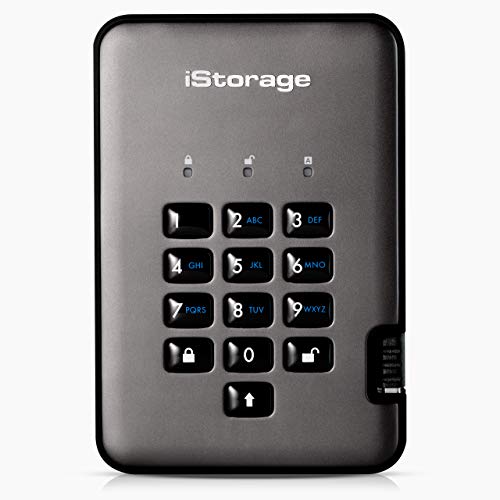
iStorage diskAshur PRO2 HDD 1TB — PRO2 tier
The PRO2 is the diskAshur family’s professional tier, and its listing title is, if anything, terser than its sibling’s: a name, a technology, a capacity. Everything that distinguishes a Pro tier — the depth of its security specification, its certifications, its management features — lives in iStorage’s documentation rather than in the title, and this review follows the same rule as the diskAshur2’s: the drive is recommended as a member of a specialist security line whose exact credentials the buyer confirms with the maker before regulated data is committed to it.
Professional tiers in this category generally justify themselves through some combination of stronger stated certifications, more rigorous physical construction and administrative features for managed fleets — but this guide will not assign specific ones to the PRO2 from general knowledge, because assigning unstated security features is exactly how security purchases go wrong. What can be said from the listing is that iStorage positions this model above the standard diskAshur2, and a buyer comparing the two should let the maker’s own tier documentation arbitrate.
For the solo professional, the honest question is whether a Pro tier’s documented extras intersect their actual duties: a compliance file to satisfy, a fleet to administer, a client contract that names requirements. Where they do, this is the iStorage pick. Where they do not, the standard diskAshur2 — verified the same way — covers the same fundamental job, and the Apricorn line offers its stated-credential alternative.
There is a procurement pattern this tier suits particularly well: the documented exception. Organisations whose standard issue is the ordinary diskAshur2 often keep a small number of Pro-tier units for the assignments with named requirements — the audit engagement, the litigation support, the client whose contract specifies professional-grade handling. Buying the tier for those assignments, from the maker’s documentation, is a defensible line item in a way that buying it for everyone, on a hunch, is not.
- Capacity: 1TB (stated in the listing title)
- Line: iStorage diskAshur PRO2 HDD (stated in the listing title)
- Tier: PRO2, the professional tier of the diskAshur family (stated in the listing title)
- Encryption standard: Not stated in the listing title — verify with iStorage documentation
- Certifications: Not stated in the listing title — verify with iStorage documentation
Strengths:
- The professional tier of a specialist secure-storage maker’s defining line.
- Suited to managed, documented deployments where tier paperwork matters.
- Shares the diskAshur family’s PIN-on-device, hardware-encrypted architecture.
Trade-offs:
- Nothing about its security specification can be confirmed from the title.
- Tier advantages must be established from iStorage documentation to be worth paying for.
- Solo users without compliance or fleet needs may find the standard tier sufficient.
Best for: a professional or fleet deployment inside the iStorage ecosystem, specified from the maker’s tier documentation. Not suited for: a purchase that must show its credential at the point of sale, where the Fortress titles print theirs.

iStorage diskAshur3 HDD 1TB Red — Newest generation, red
The diskAshur3 is the newest generation in this roundup, and it arrives in red — a finish with a practical argument behind the personality: a red drive is conspicuous in a meeting room, visible in a bag check, and hard to walk away from a desk still plugged in. In a category where the most common security incident is not an attack but an owner leaving the drive behind, conspicuousness is a genuine, if modest, security feature, and this listing is the only one here that offers it.
The title otherwise follows the iStorage pattern of restraint: generation, technology, capacity, colour. The encryption standard and certifications of the third generation are iStorage-documentation questions, and the same verification discipline applies — a newer generation invites assumptions about improved specifications, and this guide declines to make them. Buyers should read what the diskAshur3 actually claims from its maker, particularly if a compliance file will ever need to quote it.
As the family’s latest line, this is the natural iStorage choice for a fresh standardisation — the model a fleet will be able to keep buying — while the diskAshur2 and PRO2 serve estates already committed to those generations. Generation loyalty in secure drives is a real operational consideration: PIN policies, spares and user training all standardise more cheaply on one generation, and the newest is where a new standard should start.
The red finish invites one more honest observation: it will divide a procurement meeting. Some organisations will see a visibility feature; others will see a device that advertises the presence of protected data. Both readings are correct in different threat models, which is why the finish is a decision rather than a default. Owners whose risk is forgetfulness should embrace the red; owners whose risk is attention should take the black diskAshur2 and accept the discipline of checking for it.
- Capacity: 1TB (stated in the listing title)
- Line: iStorage diskAshur3 HDD (stated in the listing title)
- Finish: Red (stated in the listing title)
- Encryption standard: Not stated in the listing title — verify with iStorage documentation
- Certifications: Not stated in the listing title — verify with iStorage documentation
Strengths:
- Newest diskAshur generation — the natural foundation for a fresh fleet standard.
- Red finish is genuinely harder to leave behind or overlook in a bag check.
- Specialist maker’s hardware-encrypted, PIN-on-device architecture.
Trade-offs:
- Security specifications require the same iStorage documentation verification as its siblings.
- A conspicuous finish cuts both ways for owners who prefer their data invisible.
- Estates standardised on earlier diskAshur generations face a mixed-fleet choice.
Best for: a new iStorage standardisation, or a solo professional whose greatest realistic risk is leaving the drive on a conference table. Not suited for: an owner who wants the device to attract no attention whatsoever in transit.
What Threats Does a Hardware-Encrypted Drive Actually Answer?
A note on scope before the threats themselves: this section describes what the category is for, in general terms that apply to both houses’ architectures. It does not extend any individual model’s claims — a specific drive answers specific threats to the extent its own documented specification says so, which returns the reader, one final time, to the verification habit this guide has applied to the iStorage titles throughout. General category confidence plus model-specific paperwork is the complete basis for a sound purchase; either half alone is insufficient.
Start with the incident that dominates the real statistics: loss. Drives are left in taxis, meeting rooms, hire cars and the pockets of coats sent to be cleaned. Against loss, hardware encryption is close to a complete answer — the finder acquires a locked object whose contents are scrambled, and the owner’s incident report can state truthfully that the data was encrypted on a dedicated device. Most data-protection regimes treat that fact as the difference between a breach and an embarrassment, which is why this category is bought by compliance departments as often as by engineers.
Theft with intent is the second threat, and the answer is strong but graded. A thief who steals a bag for its resale value meets a drive that cannot be casually opened, wiped by ordinary means into usefulness with the data intact, or mined for the files it visibly carried. That defeats the realistic thief. The unrealistic one — funded, patient, targeting this specific data — belongs to a threat model that should be designed by security professionals, and this guide says so in the FAQ rather than dressing a portable drive as a fortress against nations.
The third threat is the owner’s own environment: the shared office, the borrowed laptop, the client machine of unknown hygiene. Because unlocking happens on the drive and encryption in its electronics, the data’s protection does not depend on the host’s trustworthiness in the way software schemes do. A consultant can work from a client’s computer all week while the drive keeps its own counsel — and at week’s end the PIN, not the client’s IT department, decides who reads the archive next.
Why a keypad, rather than a fingerprint or an app?
The keypad carries one more operational advantage that field workers discover quickly: it works in the rain, in a server room, on a train, with the drive balanced on a knee — anywhere a number can be typed on physical buttons without a screen to unlock first or a sensor to keep clean. Categories are sometimes chosen by spec sheets and sometimes by afternoons, and this one’s endurance across decades of field use suggests the afternoons voted early and often.
Each unlocking method carries a philosophy. An app makes the drive a citizen of one ecosystem and fails on machines where it cannot be installed. A fingerprint reader is convenient and personal, but it binds the drive to enrolled fingers and raises its own questions about spares, injuries and shared duty. A physical keypad with a PIN is the oldest interface in this roundup and the most portable idea in it: it works with gloves off and eyes up, it can be delegated under policy, changed on suspicion, and taught in a sentence. Both houses in this category built their lines on that philosophy, and the field record of issued fleets suggests the philosophy ages well.
How Do the Six Password Protected Picks Compare Side by Side?
| Drive | Capacity | Stated in title | Role |
|---|---|---|---|
| Apricorn Fortress (B00E6J2QMG) | 1TB | FIPS 140-2 Level 2 validated, 256-bit encrypted, USB 3.0 | Validated standard size |
| Apricorn Fortress (B00NTQGZNS) | 2TB | FIPS 140-2 Level 2 validated, 256-bit encrypted, USB 3.0 | Validated archive size |
| Apricorn Padlock (B007JGB0EI) | 1TB | 256-bit AES XTS hardware encryption, USB 3.0 | Mechanism-stated value |
| iStorage diskAshur2 (B071XVJB1F) | 1TB | Model line and finish | Fleet-standard iStorage |
| iStorage diskAshur PRO2 (B07P7YZ9LC) | 1TB | Model line and tier | Professional iStorage tier |
| iStorage diskAshur3 (B0D9W2Y9YS) | 1TB | Model line, generation and finish | Newest iStorage generation |
Notice what the table does not contain: a speed column, a design column, a column for anything that usually sells a portable drive. That absence is the category’s honesty. Once a drive’s job is to be trusted, the buying conversation narrows to credentials, capacity and the maker’s specialisation, and every pick here was chosen inside that narrower conversation. Shoppers arriving from ordinary portable-drive shopping should let the table retrain their eye: in this aisle, the most important specification is the one that can be quoted to an auditor.
The table’s stated-in-title column is the review in miniature. The Apricorn rows can be specified from the page; the iStorage rows must be specified from the maker’s documentation, and neither fact is a verdict on the hardware. It is a verdict on shopping method: security drives are bought on credentials, and credentials live wherever the maker printed them. Understanding that makes shopping both houses a confident exercise; missing it leads to over-trusting a terse title or under-trusting a good drive for the wrong reason.
How Do You Put a Secure Portable Drive Into Service Properly?
Photograph the drive’s label into the asset record while you are at it. When a unit is lost, the first questions from any insurer, client or compliance officer concern exactly which model, which capacity and which credential was on the missing device, and a photograph answers in seconds what memory answers in apologies.
Inventory the drive like the asset it is. Record its model, capacity and credential in the same register used for laptops and keys, note the holder’s name against it, and schedule the register entry to be revisited when the holder’s role changes. Secure drives fail organisationally far more often than they fail electronically — issued and forgotten, held by departed staff, PINs known to people whose need ended years ago — and a register entry with a review date is the entire cure.
Begin before the data moves. Read the maker’s documentation for the exact model — for the iStorage picks this is where the security specification gets confirmed; for every pick it is where the PIN setup, administrator options and reset behaviour are defined. Set the PIN at a desk, not in a taxi, and record the recovery arrangements in the organisation’s own secure records, never on the drive’s case or its pouch.
Decide the data’s second home at the same sitting. A hardware-encrypted drive is a single point of total loss by design — that is what makes it secure — so anything irreplaceable on it must exist somewhere else under equally deliberate protection. The backup conversation feels like it undermines the purchase; in fact it completes it, because the drive’s job is to protect data in transit, and transit is exactly where physical loss happens.
Write the loss procedure while the drive is still in its box. It fits on an index card: who is notified, in what order; what the incident record states about the data and its protection; whether the PIN gets changed on sibling drives that shared it; and where the second copy lives so work can continue. Organisations that write this card in advance discover that a lost drive is an afternoon of administration. Organisations that improvise it discover the difference between having encryption and having a security posture — the drive supplies the first, and only the owner’s preparation supplies the second.
Then rehearse the routine: plug in, enter the PIN, confirm the volume mounts, copy a test file, unmount cleanly, and repeat on a second machine of a different kind if the drive will serve a mixed fleet. The on-device unlocking should prove itself boring before the drive carries anything that matters. Finally, brief whoever will carry it — where it travels, what happens if it is lost, who gets called — because the incident procedure is part of the security, and the time to write it is before the incident.
Which Mistakes Undermine a Secure Drive Purchase?
A sixth mistake is buying one drive for two incompatible duties — the regulated archive and the family’s photo shuttle — and letting the laxer duty erode the stricter one’s discipline. Secure drives are cheap enough, relative to the data they guard, that duties should be separated by device: one unit, one obligation, one PIN regime. The household that mixes duties ends up with a compliance drive whose PIN is known to everyone and written in a kitchen drawer, which is to say, with no compliance drive at all.
The first is buying the category and skipping the credentials — choosing a drive whose title states nothing, for data whose protection must later be demonstrated, and discovering the gap during an audit. The second is the opposite vanity: paying for a validated tier for data that needed only honest encryption, and starving the backup budget to do it. Third is PIN negligence: factory defaults left in place, codes shared across a team, codes written on cases. Fourth is treating encryption as invincibility and carrying data that should never travel at all. The fifth is the quietest: no second copy, so that the drive’s admirable security eventually protects the data from its owner permanently.
Final Recommendation
A closing observation on value: in this category the premium over an ordinary portable drive is not buying storage, and it should never be justified as storage. It is buying the incident that does not escalate — the lost unit that stays a lost unit, the audit question with a printed answer, the client whose trust survives your worst afternoon. Priced against any one of those outcomes, the difference between these drives and their unprotected cousins is the smallest line in the story, and it is why the recommendations below are organised by obligation rather than by capacity or cost.
Let the paperwork decide. Where a validated module must be shown, the Apricorn Fortress pair are the only picks whose titles carry that credential — the 1TB for ordinary travelling datasets, the 2TB for archives that move whole. Where strong hardware encryption is the requirement without a validation mandate, the Aegis Padlock’s stated AES XTS engine is the roundup’s honest value. The iStorage diskAshur line earns its place through specialisation and fleet pedigree, with the generation choice — standard, PRO2 or the new diskAshur3 — made from iStorage’s own documentation rather than from these listings. Buy the credential your data’s obligations actually name, set the PIN like you mean it, keep a second copy somewhere safer than a bag — and a lost drive becomes a report to file, not a disaster to confess.
Frequently Asked Questions
What happens if the PIN is forgotten?
On hardware-encrypted drives of this kind, a forgotten PIN generally means the data is unrecoverable by design — that finality is the security working as intended, because any recovery back door available to the owner would be available to a thief. Makers provide reset procedures that return the drive to service wiped, which restores the hardware but not the contents. This is why the guide insists on a second copy of anything irreplaceable and on recording PIN arrangements in proper organisational records at setup time.
Do these drives need software on each computer?
No — that is the defining convenience of the architecture shared by both houses in this roundup. Unlocking happens on the drive’s own keypad, and the encryption is performed by the drive’s electronics, so the mounted volume appears to the computer as an ordinary external drive. The same unit can serve different operating systems across a working week without drivers or companion applications, which is precisely why this category exists for field work and mixed fleets.
Is a FIPS-validated drive always the right choice?
Only where validation is actually required — by a regulator, a client contract or an organisational policy — or where the audit trail matters as much as the encryption. The Fortress titles state that credential and carry its premium; the Aegis Padlock states a strong encryption mechanism without the validation, which fully answers duties that ask for genuine protection rather than certified paperwork. Matching the credential to the obligation, rather than maximising credentials reflexively, is the professional purchase.
Can a stolen drive’s data be read by removing the disk inside?
The data on the platters is stored encrypted by the drive’s electronics, so the raw media holds scrambled content rather than files — that is the core protection this category sells, and it is why hardware encryption defeats the casual and moderately equipped thief. This guide makes no absolute claims beyond that: sufficiently resourced attackers are a threat model for specialists to assess, and data whose loss would be catastrophic deserves a protection plan designed by one, with these drives as a component rather than the whole answer.
Why do the iStorage reviews keep asking for documentation checks?
Because the three diskAshur titles state model, capacity and finish — and nothing about encryption standard or certification. In most categories that terseness would be a minor inconvenience; in a security category it is the whole ballgame, because the credential is the product. iStorage publishes the specifications for each model, and confirming them there takes minutes. The reviews point at that step rather than borrowing claims from the family’s general reputation, which is the only honest way to write about a security device.
Is 1TB enough for a secure portable drive?
For the jobs these drives are bought to do — a client matter, a project archive, a field dataset, a travelling working set — one terabyte is the category’s standard size for a reason, and five of these six picks share it. The exception proves the rule: the 2TB Fortress exists for archives that must travel as one body of data. Where travelling data routinely exceeds a terabyte, examine whether it should travel at all before simply enlarging the drive, because the safest dataset is often the one that stayed home.
Can these drives be used for ordinary backup as well?
They can, with one structural caution: an encrypted drive is a demanding backup target because its protection depends on a PIN surviving in somebody’s memory or records for as long as the backup must remain readable. Backups are opened rarely and urgently, often by a different person than the one who wrote them, which is the worst possible audience for a secret. Use these drives for transport and working copies, where their protection is exercised weekly, and give long-term backup a scheme whose recovery path is documented for the whole organisation.
What should I check on the listing before ordering?
Three things, in order. First, that the model in the listing is the model whose documentation you read — secure-drive lines contain generations and tiers with similar names, as the three diskAshur entries here demonstrate. Second, that the capacity matches the dataset with room for its growth across the drive’s service. Third, for the Apricorn picks, that the credential in the title is the credential your obligation names — validation for the Fortress pair, the AES XTS mechanism for the Padlock. A minute spent aligning listing, documentation and obligation prevents the only expensive mistake this category offers: the right drive for a requirement it does not actually meet.
Related Guides
Continue with our roundup of portable drives for field work, the guide to encrypting backups at home and in the office, and our picks for rugged external drives for travel.


