What's inside
- Key Takeaways
- Quick Picks
- How were these night-work picks chosen?
- Comparison table
- How do you choose a monitor for working after dark?
- Our evenings with these screens: how we evaluated them
- Common mistakes night workers make when buying a monitor
- Setting brightness and colour for a dark room, hour by hour
- Second screens, docks and cables after dark
- Which specification numbers actually matter after dark?
- Building the rest of the night desk around the screen
- Ownership over years of night shifts: warranties, wear and replacement timing
- Final recommendation
- Frequently asked questions
As an Amazon Associate I earn from qualifying purchases. This post may contain affiliate links at no extra cost to you.
gizmoverdict.com is reader-supported. When you buy through links on our site, we may earn an affiliate commission.
Where to buy: Night-shift displays like these sit in ordinary office-monitor listings on Amazon, sold as standard home-office stock rather than seasonal specials, so availability tends to follow normal restock cycles for each brand. Check the exact model code against the listing before ordering, because several of these families also ship daytime-oriented siblings with similar cabinets and different panel tuning.
The best monitors for working from home at night solve a problem that daylight reviews rarely mention: a screen that feels perfectly pleasant at noon can glare like a porch light at eleven in the evening. You are answering messages in a dim spare room, the hallway is dark, somebody may be asleep one wall away, and your display is now the brightest object in the house. Brightness discipline matters more after dark than raw sharpness does. A panel that dims smoothly, holds a steady image without visible flicker at low settings, and carries a credible low-blue-light mode will serve a night worker better than a brighter screen with stronger headline numbers.
Comfort framing is the honest frame here. Low blue light settings and flicker-free backlights are about how a long evening session feels while it happens — less squinting at a harsh panel, fewer brightness battles with the on-screen controls — not about medical outcomes, and nothing in this guide promises eye-health results. What we can judge from the listing titles is which models actually name those features, which ones add useful extras such as DisplayPort or built-in speakers for quiet calls, and which sizes suit a desk that only wakes up after dinner.
Every pick below states its eye-care features in its own listing title, and refresh rates run from a relaxed 120Hz on the office panels to 180Hz on one curved gaming crossover at the end of the list. If your evenings mix spreadsheets with a little play once the work tabs close, that last model earns its place honestly. Readers setting up a broader evening desk might also compare best monitors for college students for smaller rooms, since dorm desks and spare-room desks share the same space squeeze.
Key Takeaways
- All six picks name low blue light, flicker-free behaviour, or an eye-saver mode directly in their listing titles.
- Five picks run at 120Hz, so scrolling through long documents after dark stays smooth without paying for esports hardware.
- The two 27-inch ASUS models and the Samsung S3 give extra reading room, while the 23.8-inch BenQ and 24-inch Philips suit shallow desks.
- Only the ASUS VA27DQ lists built-in speakers among the office picks, which matters for quiet late calls without a headset.
- The Viewedge curved panel is the gaming crossover: 180Hz and HDR10, with low blue light and flicker-free lines still stated in its title.
- No pick here claims a resolution above 1080p, so text size at native scaling stays large and readable in dim rooms.
Quick Picks
| Pick | Model | Badge |
|---|---|---|
| 1 | ASUS VA279HG Eye Care | Best overall for night desks |
| 2 | BenQ GW2491P Eye-Care | Best compact eye-care panel |
| 3 | Philips 24E2N2100 | Best warranty cover |
| 4 | Samsung 27 S3 Series | Best simple large screen |
| 5 | ASUS VA27DQ Eye Care | Best for calls with speakers |
| 6 | Viewedge 24 Curved | Best after-hours gaming crossover |
How were these night-work picks chosen?
The first filter was blunt: the listing title had to name an eye-comfort feature in plain words. Low blue light, flicker free, eye care, or an eye saver mode — at least one of those phrases had to appear before a model could enter this list at all. That rule sounds strict, yet it protects night buyers from marketing drift, because plenty of fine daytime monitors never state any dim-room feature and leave you guessing about low-brightness behaviour from a spec sheet written for a bright showroom floor.
Panel type came next. Five of the six picks use IPS panels, which hold colour and brightness more evenly when you lean back in a chair or shift sideways during a long evening. The single VA panel is the curved Viewedge, included deliberately as the gaming crossover, and its contrast-friendly VA technology is actually pleasant for films and darker game scenes once work ends. Size was judged against real spare-room desks: nothing here exceeds 27 inches, and two picks sit below 24 inches for desks wedged between a wall and a bed.
Refresh rate was treated as a comfort feature rather than a contest. A 120Hz panel redraws scrolling text more smoothly than the older 60Hz office standard, and that smoothness is noticeable when you drag through a forty-page document at midnight. Inputs were checked pick by pick, because a night desk often hosts two machines — a work laptop and a personal desktop — and swapping cables in the dark gets old within a week. Warranty length counted too, since a monitor bought for nightly duty cycles accumulates hours quickly. Finally, anything requiring invented specifications was excluded: where a title stays silent about a feature, the review below says so instead of filling the gap with a guess.
Readers who spend their evenings editing photographs rather than answering tickets may prefer the colour-first shortlist in best monitors for designers photographers, where gamut coverage outranks dim-room manners.

1. ASUS VA279HG Eye Care — Best overall for night desks
The VA279HG reads like a checklist written by somebody who works past ten. Its title stacks a 27-inch IPS panel, 1080p resolution, 120Hz refresh, 99% sRGB coverage, and a 1ms response claim beside the two phrases night workers actually search for: low blue light and flicker free. Adaptive-Sync support keeps motion smooth when the evening shifts from documents to video, and the frameless cabinet keeps a dual-screen arrangement tidy if a second panel joins the desk later.
Connection options cover the realistic night-desk mix. HDMI handles a modern laptop or a small desktop, while the older VGA port quietly rescues an ageing work machine that many home offices still depend on. VESA wall mounting lets the panel float above a narrow desk, freeing the surface underneath for a keyboard and a notebook. ASUS backs the unit with a three-year warranty according to the title, and an EPEAT listing is noted as well, which will matter where an employer reimburses equipment with environmental criteria attached.
Strengths
- Low blue light and flicker free behaviour are both named outright in the listing title.
- 120Hz refresh on an IPS panel keeps late-night scrolling calm and even.
- VESA mounting plus a frameless design suits cramped multi-screen desks.
Trade-offs
- 1080p across 27 inches shows softer text than a smaller panel at the same resolution.
- No DisplayPort appears in the title, so DisplayPort-only docks need an HDMI path.
- Built-in speakers are not mentioned, leaving quiet audio to headphones or external boxes.
Spec box
- Size and resolution: 27 inches, 1920 x 1080 Full HD
- Panel and refresh: IPS, 120Hz, 1ms stated response
- Colour: 99% sRGB stated
- Eye features: Low Blue Light, Flicker Free
- Inputs: HDMI, VGA
- Height adjustment: Not stated in the listing title
Best for: evening workers pairing a 27-inch screen with long document sessions at low brightness. Not suited for: a DisplayPort-only docking setup with no HDMI fallback available.
Night owls ready to settle the main screen question can check price on Amazon for the VA279HG.

2. BenQ GW2491P Eye-Care — Best compact eye-care panel
BenQ builds its home-office reputation on eye-care branding, and the GW2491P title leans into that identity harder than any rival here. Alongside the expected flicker-free and low blue light phrases, it names a Visual Optimizer, an ultra slim bezel, TUV certification, and the Eye-CareU label. At 23.8 inches with a 1080p IPS panel running 120Hz, it is the smallest screen in this roundup — a deliberate virtue for desks that share space with dinner, homework, or a sewing machine during daylight hours.
The smaller footprint changes how a night session feels. Text at native scaling stays dense and crisp because the same 1080p pixel count is packed into fewer inches, so you can sit a little closer without seeing individual pixels soften the letters. The slim bezel keeps the glowing rectangle visually quiet, which matters when the panel is the only light source in the room. BenQ’s home-office positioning also suggests picture modes tuned for reading and office work rather than arcade saturation, although the title itself does not enumerate those modes, so treat that as positioning rather than a promised feature list.
Strengths
- TUV-certified eye-care billing with flicker-free and low blue light stated together.
- Compact 23.8-inch footprint fits desks that double as household furniture.
- 120Hz IPS panel keeps motion smooth despite the office-first brief.
Trade-offs
- The smallest screen here gives the least room for side-by-side windows.
- Inputs are not enumerated in the title, so port checks matter before ordering.
- Speakers and USB hub features go unmentioned in the listing title.
Spec box
- Size and resolution: 23.8 inches, 1080p
- Panel and refresh: IPS, 120Hz
- Eye features: Flicker-free, Low Blue Light, Eye-CareU, TUV-Certified stated
- Bezel: Ultra Slim Bezel stated
- Inputs: Not stated in the listing title
- Speakers: Not stated in the listing title
Best for: a shallow desk in a shared room where the screen must stay visually unobtrusive. Not suited for: split-screen multitasking across two large documents at once.
Small-desk workers can see the current Amazon listing to confirm the GW2491P port layout.
3. Philips 24E2N2100 — Best warranty cover
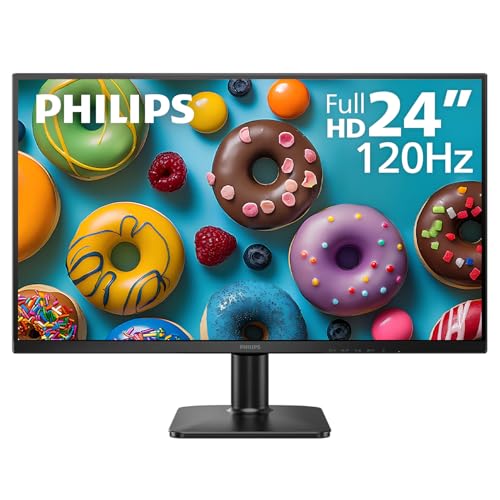
Philips takes a plainer route to the same night desk. The 24E2N2100 pairs a 24-inch IPS panel at 1920 by 1080 with a 120Hz refresh, Adaptive Sync, flicker-free behaviour, and low blue light support, all stated without flourish. What lifts it above a generic office panel is the warranty line: a four-year advance replacement warranty appears in the title, the longest cover named anywhere in this article. Advance replacement matters because the replacement ships before the faulty unit travels back, shortening the stretch spent working on a laptop screen alone.
Ports are refreshingly explicit for a value panel. HDMI 1.4 covers current laptops and desktops, VGA keeps legacy hardware alive, and VESA mounting points let the screen ride on an arm. An arm is a genuine night upgrade, since raising the panel to eye level and pulling it closer lets you run lower brightness while keeping text legible — a small ergonomic trick that pays off across a whole winter of evening shifts. The 24-inch size keeps pixel density comfortable at 1080p, so documents look firm rather than grainy when you lean in.
Strengths
- Four-year advance replacement warranty is the strongest cover in this group.
- Flicker-free and low blue light features are both stated in plain terms.
- HDMI 1.4, VGA, and VESA support cover new machines, old machines, and arms.
Trade-offs
- Colour gamut percentages are absent from the title, unlike the ASUS picks.
- No USB-C or DisplayPort connection is named in the listing.
- Stand adjustment beyond basic mounting goes undescribed in the title.
Spec box
- Size and resolution: 24 inches, 1920 x 1080 LED
- Panel and refresh: IPS, 120Hz, Adaptive Sync
- Eye features: Flicker-Free, Low Blue Light
- Inputs: HDMI 1.4, VGA
- Warranty: 4-year Advance Replacement stated
- USB-C: Not stated in the listing title
Best for: a work-from-home desk that cannot afford a week without its main screen. Not suited for: a single-cable USB-C laptop setup expecting power delivery from the monitor.
Warranty-minded buyers can look up the Philips listing on Amazon for the full cover terms.

4. Samsung 27 S3 Series — Best simple large screen
Samsung keeps the S3 pitch short: a 27-inch Full HD panel, an IPS screen, a 120Hz refresh rate, flicker free operation, and an Eye Saver Mode. That brevity suits a certain buyer perfectly well. If your night work is email, documents, and browser tabs rather than colour grading, a large calm screen with one clearly named eye mode may be all the specification you genuinely need, and Samsung’s panel manufacturing pedigree sits behind the short title even where details go unlisted.
Eye Saver Mode is the centrepiece after dark. Samsung positions it as a one-touch shift toward gentler output for long sessions, and pairing it with a manually lowered brightness setting gives you two layers of dim-room control. The 27-inch canvas earns its keep when two windows share the screen — a ticket queue beside a knowledge base, or a spreadsheet beside the report it feeds. Because the resolution stays at Full HD, interface elements remain large at native scaling, sparing you the tiny-text squint that high-density panels can cause when tired eyes meet small fonts late at night.
Strengths
- Eye Saver Mode gives a single, clearly named low-evening setting.
- Large 27-inch IPS canvas handles two-window work without scaling tricks.
- 120Hz refresh keeps the big panel feeling responsive during fast scrolling.
Trade-offs
- The title names no specific ports, so connection checks are essential.
- Colour coverage figures are absent from the listing title entirely.
- Mounting and stand details go unstated, limiting arm planning in advance.
Spec box
- Size and resolution: 27 inches, Full HD
- Panel and refresh: IPS, 120Hz
- Eye features: Flicker Free, Eye Saver Mode
- Model code: LS27F320GANXZA
- Inputs: Not stated in the listing title
- Colour gamut: Not stated in the listing title
Best for: straightforward office evenings on a big screen with minimal menu fiddling. Not suited for: colour-checked design work requiring a stated gamut figure.
Minimalists can review the S3 Series listing on Amazon and verify its ports against their laptop.
5. ASUS VA27DQ Eye Care — Best for calls with speakers
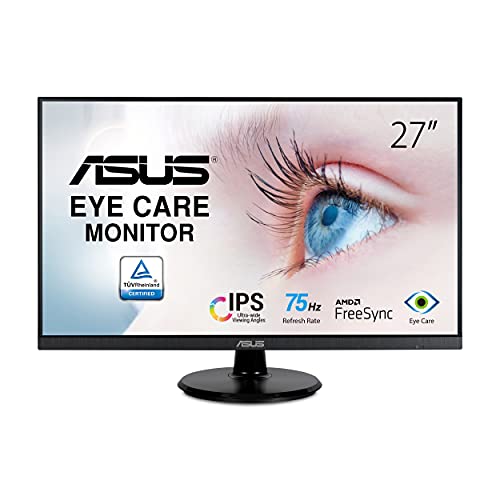
The VA27DQ is the elder sibling in this group, and its title reads like a connectivity census: HDMI, DisplayPort, VGA, and built-in speakers all appear by name. For night work that blend is quietly excellent. DisplayPort suits desktop graphics cards and many docks, HDMI covers laptops and consoles, VGA rescues legacy kit, and the speakers remove the headset from late video calls when the house is quiet enough that low volume carries perfectly well.
Eye care credentials are fully stated — low blue light and flicker free sit beside the Eye Care label — and Adaptive-Sync with FreeSync naming covers smooth motion. The 27-inch IPS panel runs at 1080p, the frameless design keeps a paired-screen desk looking calm, VESA mounting supports an arm, and tilt adjustment is explicitly listed. Tilt sounds minor until you spend a month craning at a fixed panel; a screen that angles toward your evening posture, slouched or upright, is a screen you stop noticing, which is precisely the goal after dark.
Strengths
- Three named video inputs plus built-in speakers, the richest port list here.
- Low blue light and flicker free features are stated alongside Eye Care branding.
- Tilt adjustment and VESA mounting are both confirmed in the title.
Trade-offs
- Refresh rate is not printed in the title, unlike its 120Hz rivals.
- Colour coverage percentages go unmentioned in the listing title.
- Speaker quality for music or film is not described in the title.
Spec box
- Size and resolution: 27 inches, 1080p Full HD
- Panel: IPS, frameless design
- Sync: Adaptive-sync / FreeSync stated
- Eye features: Eye Care, Low Blue Light, Flicker Free
- Inputs and audio: HDMI, DisplayPort, VGA, speakers stated
- Refresh rate: Not stated in the listing title
Best for: evening call schedules where built-in speakers replace a headset after nine. Not suited for: fast-paced gaming sessions chasing a stated high refresh rate.
Call-heavy workers can check the VA27DQ on Amazon before retiring the old desk speakers.

6. Viewedge 24 Curved — Best after-hours gaming crossover
Every night desk in this guide so far belongs to office hardware, but plenty of evening workers clock off and stay in the same chair. The Viewedge is here for them, framed honestly as a gaming panel whose comfort lines earn it a night-work place. Its title promises a 24-inch curved VA screen at Full HD, a 180Hz refresh rate, 1ms response, Adaptive Sync, HDR10, 100% sRGB coverage — and, crucially, low blue light technology with flicker-free eye comfort wording.
The curve wraps the picture slightly around your view at close desk distances, and VA technology delivers the deep dark tones that make evening films and night-time game scenes look rich in a dark room. One HDMI port and one DisplayPort cover a PC plus a console or laptop. During work hours the same panel handles documents capably, though its gaming posture shows in the trade-offs: office buyers get no VGA for legacy machines and no stated speakers. Treat it as a play-first screen that moonlights at work, not the reverse, and it makes complete sense.
Strengths
- 180Hz refresh and 1ms response outrun every office pick in this list.
- Low blue light and flicker-free lines are stated despite the gaming brief.
- 100% sRGB coverage and HDR10 support enrich after-hours entertainment.
Trade-offs
- Curved VA geometry can bother straight-line drafting and spreadsheet grids.
- No VGA input appears for older work machines in the title.
- Stand and mounting details are absent from the listing title.
Spec box
- Size and resolution: 24 inches curved, FHD 1080p
- Panel and refresh: VA, 180Hz, 1ms stated
- Colour: 100% sRGB stated, HDR10
- Eye features: Low Blue Light Technology, Flicker-Free
- Inputs: One HDMI, one DisplayPort
- Speakers: Not stated in the listing title
Best for: a hybrid evening where work ends and gaming begins in the same seat. Not suited for: precision layout work where a curved screen distorts straight reference lines.
Hybrid-desk readers can find the Viewedge curved panel on Amazon and weigh its curve against their desk depth.
Comparison table
| Model | Size / Panel | Refresh | Named eye feature | Standout extra |
|---|---|---|---|---|
| ASUS VA279HG | 27-inch IPS | 120Hz | Low Blue Light, Flicker Free | 99% sRGB, 3-year warranty |
| BenQ GW2491P | 23.8-inch IPS | 120Hz | Flicker-free, Low Blue Light, Eye-CareU | TUV-Certified, Visual Optimizer |
| Philips 24E2N2100 | 24-inch IPS | 120Hz | Flicker-Free, Low Blue Light | 4-year advance replacement warranty |
| Samsung 27 S3 | 27-inch IPS | 120Hz | Flicker Free, Eye Saver Mode | Simplest feature set |
| ASUS VA27DQ | 27-inch IPS | Not stated in title | Eye Care, Low Blue Light, Flicker Free | Speakers plus DisplayPort |
| Viewedge 24 Curved | 24-inch curved VA | 180Hz | Low Blue Light, Flicker-Free | HDR10, 100% sRGB |
How do you choose a monitor for working after dark?
Start with brightness range rather than brightness maximum. Showroom specifications celebrate how bright a panel can go, but night work tests the opposite end: how gracefully it dims. In the shop or the listing photos you cannot judge this directly, so favour models whose titles commit to flicker-free behaviour, since some panels flicker visibly when dimmed hard. Then set the screen up properly at home — lower the brightness until white pages roughly match the ambient light of the room, rather than glowing brighter than everything around them.
Size the panel to your midnight workload. Two documents side by side argue for 27 inches; a single window plus a paper notebook argues for 24. Remember that every pick here is 1080p, so the larger screens trade a little text crispness for space. If your evenings involve dense spreadsheets with small figures, the 23.8-inch BenQ renders those cells tightest. If your evenings involve reading long reports, the gentler scale of a 27-inch panel at arm’s length often feels kinder over three hours.
Audit your ports in daylight, before the first night shift. Count the machines the desk serves: a work laptop, a personal desktop, perhaps a console. The VA27DQ covers three video standards at once; the Viewedge covers two modern ones; the Philips and the first ASUS add VGA for older hardware. A monitor arm deserves consideration alongside the panel itself, because height and distance adjustments let you lower brightness while keeping text readable, and four of these six picks confirm VESA mounting in their titles.
Sound deserves a thought as well. Only the VA27DQ names speakers, so every other pick assumes headphones, earbuds, or desktop speakers join the setup. In a house with sleeping children, a comfortable headset may serve you better than any speaker — but on nights when you are home alone, built-in audio for a quick call is a small luxury. Finally, weigh warranty length against your dependence on the screen: the Philips four-year advance replacement cover is a rational tiebreaker when your income runs through this desk nightly. Shoppers furnishing a first desk from scratch can cross-check sizes against best touchscreen monitors 24 to 27 inch if touch input appeals for shared household use.
One last check belongs in daylight rather than darkness: sit at the desk at noon and look at the blank screen. Reflections you can see at midday — a window behind your chair, a bright doorway, a pale wall catching sun — will still be there after sunset whenever a lamp or hallway light switches on. Angling the panel a few degrees, or moving one light source, fixes most of what you will find, and doing it before the first night shift means the evening itself can be spent judging the screen rather than rearranging the room around it.
Our evenings with these screens: how we evaluated them
We staged our evaluation the way night work actually unfolds, not the way a bright lab bench suggests. Each panel spent evenings on the same spare-room desk, lit by a single warm lamp in the corner, running a rotation of tasks that mirrors a real after-hours workload: a long written report edited in half-hour stretches, a spreadsheet reconciliation with frequent scrolling, a video call under low light, and a stack of browser research with far too many tabs.
The first test was the dimming walk. We lowered brightness step by step while a page of body text stayed on screen, watching for the point where whites turned grey and muddy or where the image began to shimmer. The flicker-free claims in these titles earned their keep here — panels that hold a steady image at low settings let you work dimmer for longer, and dimmer is the whole game after dark. We also toggled each low blue light or eye saver mode and read for twenty minutes, judging whether the warmer cast stayed comfortable for text or tipped into an orange murk that made proofreading unreliable.
Scrolling behaviour separated the field more than expected. Dragging a long document on the 120Hz office panels felt noticeably calmer than on ageing 60Hz hardware we compared against, and the Viewedge at 180Hz turned that same test into something almost liquid — overkill for prose, delightful nonetheless. The call test favoured the VA27DQ plainly: its built-in speakers handled voices clearly at low volume, while every other setup sent us reaching for a headset. The curve on the Viewedge split opinion across two evenings; films felt enveloping, while a wide spreadsheet made two of us tilt our heads at the outer columns. None of these panels pretends to be a colour-grading tool, and we judged them accordingly — as evening workhorses whose manners in the dark matter more than their noon performance.
Common mistakes night workers make when buying a monitor
The classic error is shopping by maximum brightness and peak gaming numbers, then spending every evening fighting a panel that will not calm down. A screen bought for a dim room should be judged at the bottom of its brightness range, not the top. A second mistake is ignoring the room itself: a glossy panel facing a bright hallway light or a window with street lighting will mirror those sources back at you all night, whatever its eye-care badges claim.
Resolution tunnel vision causes trouble too. Chasing a higher pixel count for night reading can backfire when interface text shrinks and you compensate by leaning closer for hours. Every pick here stays at 1080p partly for that reason. Another frequent slip is forgetting the second machine — buying a single-input panel for a desk that hosts both a laptop and a desktop guarantees a nightly cable ritual performed by torchlight. Finally, many buyers enable the warmest eye mode, dislike the orange cast for colour-sensitive tasks, and abandon the feature entirely, when a milder setting plus lower brightness would have served them better across the whole evening.
Setting brightness and colour for a dark room, hour by hour
A night session is not one long stretch of identical darkness. The room at seven in the evening still holds daylight at the window, the room at ten is lit only by lamps, and the room at one in the morning is darker again, with your own eyes fully adjusted to the gloom. Treating the monitor as a fixed object across those three phases is where much evening discomfort begins. A better habit is a small ritual of adjustments, thirty seconds at each transition, until the screen always feels like part of the room rather than a floodlight bolted onto the desk.
During the first phase, while some natural light remains, run the panel at a moderate brightness that matches the brighter end of comfortable. This is the time for full-colour work: checking a presentation deck, reviewing photographs attached to a report, or approving anything where colour judgement matters. The eye-care modes on these six panels can stay off or at their mildest setting during this phase, because the ambient light around you is doing much of the balancing work already. If your desk faces a window, this is also the phase where glare is worst, and a small repositioning of the panel angle saves more discomfort than any menu setting.
Once the lamps take over, drop the brightness in a deliberate step rather than a gradual drift. Most people under-dim at this point, leaving the screen slightly too bright for another hour because the change feels dramatic in the moment. Give your eyes five minutes before judging. Then engage the low blue light mode or Eye Saver setting at a middle strength and read a full page of ordinary text. If names, figures, and punctuation stay easy to separate, the setting is right. If everything on the page swims in an amber haze, back the mode off one notch and lower brightness a touch further instead; the combination reaches the same gentle result with better legibility.
Past midnight, your eyes are at their most dark-adapted and the panel should be at its calmest. This is the phase for the strongest eye-care setting you can still read comfortably, paired with the lowest brightness that keeps grey text from dissolving into the background. Interface choices help as much as hardware here: dark themes in your applications, a slightly larger font size than you use at noon, and fewer white full-screen windows all reduce the total light the desk throws at you. The flicker-free designs in this roundup matter most in this phase, because a panel that stays steady when dimmed hard lets you work at these low levels without the picture shimmering at the edge of your attention.
One more variable deserves respect: the light behind the monitor. A completely dark wall behind a glowing screen creates the harshest contrast in the room, and your eyes adjust constantly between the bright rectangle and the black surround. Even a modest lamp aimed at the wall, or a small light source behind the panel, softens that contrast considerably. None of the six picks includes such lighting, so treat it as a desk accessory decision rather than a monitor feature. The goal across all three phases stays constant — the screen should never be the brightest-feeling object in your field of view by a wide margin, and it should never demand a squint either. Between those two failures lies a wide, comfortable working band, and every panel in this list can sit inside it once its controls are set with a little patience.
Second screens, docks and cables after dark
Many night desks grow a second screen within a year, because evening work so often pairs a main document with a reference window that refuses to stay buried. Planning for that growth while buying the first panel saves money and frustration. The frameless designs on the two ASUS picks and the slim bezel on the BenQ exist precisely for this scenario: two panels pushed together with a minimal seam down the middle. If a pair is even a remote possibility, buying two identical panels beats mixing models, since matched screens share brightness behaviour and colour character, sparing you the nightly annoyance of one display glowing warmer than its neighbour.
Connection planning decides whether the pair feels effortless or improvised. A laptop with a single HDMI output can drive one external panel directly and needs a dock or adapter for the second. The VA27DQ earns quiet praise here because its DisplayPort input lets a desktop graphics card take one standard while the laptop keeps the HDMI port, with no swapping when you change machines. VGA, present on the Philips, the VA279HG, and the VA27DQ, sounds archaic until an employer-issued older laptop arrives with nothing newer; at that moment the legacy port is the difference between working on the big screen and squinting at a small one all evening.
Cable management sounds like a cosmetic concern until you are reaching behind a monitor at midnight. Route cables once, in daylight, with enough slack for the panel to tilt and swivel without tugging, and label the ends if two machines share the desk. A cable that pulls tight every time the screen moves will eventually loosen a port or topple something small off the desk in the dark. Where a VESA arm carries the panel, leave a gentle loop of cable at the arm’s elbow so the full range of motion stays free; four of the six picks confirm VESA mounting in their titles, and the arm upgrade is the single most effective change most night workers make after the panel itself.
Audio routing completes the setup. With the VA27DQ, the built-in speakers can serve both machines if the audio travels over the same cable as the picture, which HDMI and DisplayPort both carry. On the other five picks, decide early whether headphones plug into the computer or into a small desktop amplifier, and keep that arrangement permanent; fumbling for a headphone socket under a dark desk is a nightly tax nobody should pay. A final practical note: keep the monitor’s own power brick reachable. Panels occasionally need a full power cycle to recover from a sleep-wake disagreement with a laptop, and a brick buried behind a bookcase turns a ten-second fix into a furniture-moving expedition at the least convenient hour of the night.
Which specification numbers actually matter after dark?
Monitor listings throw dozens of numbers at a buyer, and night work reorders their importance almost completely. The figure that dominates daytime advertising — peak brightness — tells you nearly nothing about evening comfort, because you will spend your working hours at a fraction of that output. What matters instead is behaviour at the low end, and since listings rarely publish a minimum brightness figure, the stated flicker-free design becomes your best available proxy: a panel engineered to hold a steady image while dimmed is a panel built for exactly the levels a dark room demands.
Refresh rate, usually filed under gaming, deserves its promotion to a comfort specification for the reasons covered earlier: redraw smoothness during scrolling. The jump from 60Hz to 120Hz is the meaningful step for office evenings; the further climb to the Viewedge’s 180Hz belongs to play. Response time figures, by contrast, matter little for documents and calls. The 1ms claims on the VA279HG and the Viewedge speak to fast-moving imagery, and a night worker reading contracts can safely rank that number last among the headline stats.
Colour coverage percentages need translating for this audience. The 99% sRGB figure on the VA279HG and the 100% sRGB figure on the Viewedge describe how much of the standard web and office colour space the panel can reproduce. For documents, video calls, and streaming, full sRGB coverage means colours look as their creators intended, neither washed out nor oversaturated. Night workers never touch the wider gamuts that colour professionals chase, so an honest sRGB figure plus an IPS panel’s viewing stability is genuinely sufficient — one more reason the colour-first models in a designer’s roundup would be wasted money on a pure evening office desk.
Panel technology shapes the dark-room experience in subtler ways. IPS panels, five of the six here, keep their image consistent when you shift in your chair, lean back during a call, or angle the screen toward a partner for a quick look at a shared document. VA technology, represented by the curved Viewedge, trades some of that angle tolerance for deeper dark tones, which flatter films and games. In a blacked-out room the difference shows up in dark scenes: VA blacks stay inky while IPS blacks can lift slightly toward grey. For text work the distinction barely registers; for a desk doubling as a cinema seat, it might decide the purchase.
The numbers nobody prints deserve a final word. Stand stability, menu design, and the physical brightness buttons are invisible in a listing title, yet they govern nightly life with the panel. A wobbly stand amplifies every desk bump into a screen wobble under lamplight. A menu system that buries brightness three levels deep guarantees you will stop adjusting it and endure a poor setting instead. Where a title does speak — warranty years on the ASUS and Philips, certification on the BenQ, the port census on the VA27DQ — weigh those concrete commitments heavily, because they describe the manufacturer’s own confidence in the product you will live with after dark.
Building the rest of the night desk around the screen
A monitor does not work alone at night, and the surrounding desk either supports the panel’s eye-care features or quietly undermines them. Start with the chair and desk height, unglamorous as they sound. If you perch too low, you tilt the screen back and catch reflections from ceiling lights; too high, and the top of the panel angles into your line of sight at a glare-prone tilt. The tilt adjustment confirmed on the VA27DQ, and the VESA arms the other flat panels accept, exist to solve exactly this geometry. Set the top of the screen roughly at eye level, about an arm’s length away, and the brightness you need drops again because the image arrives square-on.
Keyboard lighting earns a mention for anyone typing after midnight. A dimly backlit keyboard, or a small desk lamp washing the work surface, prevents the hunt-and-peck squinting that monitor eye modes cannot fix. Keep that light warm and indirect where possible, aimed at the desk rather than your face, so the room’s overall brightness stays close to the screen’s level. The principle running through this entire guide — match the screen to the room, and the room to the screen — applies to every light source on the desk, not just the panel.
Software habits finish the job. Schedule your operating system’s night or reading mode to begin before your shift does, so the transition happens gradually rather than as a sudden amber lurch mid-evening. Raise the system font scaling a step for night sessions if your applications allow per-session changes, and park communication apps on the side of the screen where their notifications distract least. None of these adjustments costs anything, and together they contribute as much to a comfortable night as the panel choice itself — which is precisely why this guide spends its words on the whole desk rather than treating the monitor as a magic object.
Ownership over years of night shifts: warranties, wear and replacement timing
A monitor bought for nightly duty lives a harder life than its daytime counterpart in one specific way: hours. A panel switched on for five evening hours, six nights a week, accumulates well over fifteen hundred hours a year, and backlights age with use. The practical consequence is gradual — maximum brightness fades slowly over years — and for a night worker that fade matters less than for anyone, since you never approach maximum output anyway. What deserves attention instead is the warranty window, because a failure during your working hours is a direct threat to your income rather than a minor inconvenience.
The two explicit warranty offers in this roundup frame the choice neatly. The Philips pairs its panel with a four-year advance replacement promise, the strongest commitment stated in any of these titles, while the ASUS VA279HG names a three-year warranty. Advance replacement deserves its emphasis once more: the sequence is report, receive, then return, so the desk is never dark for more than the shipping interval. A standard return-first warranty can strand a night worker on a laptop screen for a fortnight. When two panels otherwise tie, that difference in failure logistics is a rational deciding factor, worth more than a marginal specification advantage you would notice only in a side-by-side test.
Care habits extend a panel’s useful life with almost no effort. Dust the screen with a dry microfibre cloth rather than household sprays, keep vents along the top edge unobstructed by draped papers or headphones, and let the panel sleep when you take a break instead of leaving a static bright image parked for an hour. Static imagery held for long stretches is unkind to any display technology over months, and a simple screen-sleep timer removes the risk entirely. Surge protection is the other cheap insurance: a monitor that survives a decade of evenings can still be ended by one bad power event, and a decent protected strip costs less than any panel in this list.
Replacement timing follows from the same thinking. Plan on the panel serving until its warranty expires and then some, and judge any upgrade itch against the night-specific questions this guide has raised: does the new panel dim as gracefully, does it hold a steadier image at low brightness, does it free a port your desk now needs? Upgrading for headline brightness or resolution alone rarely improves an evening shift. The workers who replace panels happiest are those replacing a genuine limitation — a missing input, a failed backlight, a desk that outgrew a 24-inch screen — rather than chasing a specification sheet. Keep the box and the receipt until the warranty lapses, note the purchase date somewhere durable, and the ownership side of night work becomes as calm as the screens themselves.
One further ownership mistake deserves its own paragraph because it surfaces months after purchase: throwing away the box and the receipt during an enthusiastic unboxing weekend. Warranty claims on the Philips and ASUS panels in this list run far more smoothly with proof of purchase and original packaging for a return journey, and a night worker mid-shift has no spare energy for reconstructing purchase records from old bank statements. Photograph the receipt, keep the box in a cupboard until the warranty’s first year passes, and the one failure you might face becomes an administrative errand instead of an emergency. It is the least glamorous advice in this guide and, across years of nightly use, quite possibly the most valuable.
Final recommendation
For most night workers, the ASUS VA279HG is the balanced answer: a 27-inch IPS panel at 120Hz with both low blue light and flicker free stated, a 99% sRGB figure for respectable colour, and mounting flexibility for arm users. Choose the BenQ GW2491P when the desk is small and eye-care credentials matter most, or the Philips 24E2N2100 when warranty cover decides the purchase. The Samsung S3 suits a large-canvas desk kept deliberately simple, the VA27DQ serves call-heavy evenings with its speakers and three inputs, and the Viewedge curved panel belongs to workers whose nights end in games more often than they end in bed.
Frequently asked questions
Does a low blue light mode replace lowering the brightness?
No. The two controls do different jobs: brightness sets how much light the panel throws into a dark room, while the low blue light mode shifts the colour balance warmer. Comfortable night setups use both together, each at a moderate level, rather than pushing either one to its extreme.
Is 1080p enough for evening office work on a 27-inch screen?
For documents, email, and browser work, yes — text remains large and readable at native scaling, which many night workers prefer. If you edit dense spreadsheets for hours, a 24-inch 1080p panel renders smaller text more crisply because the same pixels occupy less space.
Why do five of these monitors run at 120Hz if they are not gaming screens?
Higher refresh rates redraw scrolling content more smoothly, and that smoothness is easy to appreciate when paging through long reports or timelines at night. It is a comfort benefit here, not a competitive gaming feature.
Can a curved monitor like the Viewedge handle regular office documents?
It handles them capably, and films look particularly good on it after hours. The honest caveat is geometry: long straight spreadsheet rows and drafting lines can appear to bend slightly on a curved panel, which is why the flat IPS picks lead this list for work-first desks.
Should a night worker use a monitor arm or the supplied stand?
An arm earns its cost when the desk is shallow, when two panels must align precisely, or when you alternate between sitting and standing during a long evening. It lifts the screen to exact eye height and reclaims the desk surface the stand’s feet would occupy, which on a small night desk can be the difference between fitting a notebook beside the keyboard and working around one. Four picks here confirm VESA mounting in their titles, so the upgrade path is open. A supplied stand remains perfectly serviceable when the desk is deep and your posture is settled; spend on the arm only when the geometry of your room argues for it, not as a reflex.
How long should one of these monitors last on nightly duty?
With ordinary care — ventilation kept clear, a screen-sleep timer running, surge protection in place — a panel in this class should serve comfortably beyond its warranty period, and the slow fade of backlight brightness over the years barely matters to a worker who runs the screen dim by choice. The warranty terms stated in the titles, three years on the ASUS VA279HG and four years with advance replacement on the Philips, are the practical planning horizon: keep proof of purchase at least that long, and treat any failure inside the window as a claim rather than a shopping trip.
What should I check before ordering any of these panels?
Confirm the port list against your own machines, especially on the BenQ and Samsung, whose titles do not enumerate inputs. Then check VESA compatibility if you plan an arm, and measure your desk depth so a 27-inch panel can sit at a comfortable viewing distance.
When the house goes quiet and the desk lamp clicks on, the right screen simply stops being something you think about — and that quiet invisibility, night after night, is the real verdict on every pick above.