What's inside
As an Amazon Associate I earn from qualifying purchases. This post may contain affiliate links at no extra cost to you.
gizmoverdict.com is reader-supported. When you buy through links on our site, we may earn an affiliate commission.
Where to buy: Livestream cameras reach Amazon through a mix of brand stores and specialist AV sellers, and the PTZ models in particular appear in several near-identical listings, so match the model name, zoom figure, and interface list character by character before ordering. Cables, mounts, and power supplies are not always in the box for this class, so the contents list on the exact listing deserves a slow read before any stream depends on the delivery.
A livestream camera has a harder job than a recording camera, because it cannot ask for a second take. It must wake up, find the presenter, hold focus while they move, feed a clean signal to a computer or switcher for hours, and do all of that again tomorrow without a technician in the room. Streamers searching for the best livestream cameras for youtube are usually escaping one of three frustrations: a webcam that makes a good room look like a basement, a camcorder that overheats or sleeps mid-broadcast, or a fixed camera that loses the presenter the moment a demonstration leaves the chair. The six picks here attack those frustrations from three directions. Three TONGVEO pan-tilt-zoom cameras cover the fixed-installation world at three distinct tiers. An ORDRO camcorder brings a familiar handheld shape to streaming. An IFWATER camera offers simultaneous HDMI and USB output for close-up teaching work, and an EMEET dual-camera webcam puts two lenses and a remote into a desktop package.
The PTZ idea deserves a plain explanation for readers meeting it here. A PTZ camera pans, tilts, and zooms under remote or automatic control, which means one camera mounted high in a room can behave like a small crew: wide shot for the introduction, close-up for the demonstration, a turn toward the whiteboard or the instrument when the lesson moves. AI auto-tracking, stated in all three TONGVEO titles, extends that crew illusion by following a moving presenter without an operator. Churches, classrooms, meeting rooms, and studio corners are the natural habitats, and the titles name those venues openly; a worship service and a product livestream are, to the camera, the same fixed-room job performed for different audiences.
Interfaces decide whether a livestream camera fits an existing setup or demands a new one, so this roundup reads them as first-class facts: HDMI for switchers and capture devices, USB for direct computer connection, and on the flagship TONGVEO, SDI, IP streaming, and Power over Ethernet for installations where one cable should carry everything. Resolution claims get the usual scrutiny. The ORDRO title states both 4K and 1080P in the same breath, an inconsistency we flag rather than resolve, and webcam resolution badges are read as claims to be tested during the return window. Readers building a recorded-video setup alongside the live one can compare notes with our guide to best quality cameras for youtube videos, where microphones and sensors take the ranking lead instead of outputs and tracking.
Key Takeaways
- The TONGVEO 4K NDI PTZ camera is the installation flagship: 20X optical zoom, HDMI, SDI, USB 3.0, IP streaming, and PoE in one unit.
- The TONGVEO 1080P 3X model is the value PTZ for smaller rooms, with 60fps, HDMI and USB 3.0, and AI auto-tracking.
- The TONGVEO 4K PTZ 3X splits the difference, adding 4K and a wide 93-degree field of view for group framing.
- The ORDRO camcorder suits streamers who prefer a handheld camcorder shape, though its title states both 4K and 1080P.
- The IFWATER camera’s simultaneous HDMI and USB output serves teachers who feed a display and a computer at once.
- The EMEET C60E packs wide-angle and telephoto lenses, PDAF autofocus, RGB lighting, and two microphones into a desktop webcam.
Quick Picks
| Pick | Label | Why it stands out |
|---|---|---|
| TONGVEO 3X PTZ Camera | Best value PTZ | 1080P 60fps, 3X optical zoom, HDMI and USB 3.0, AI auto-tracking |
| TONGVEO 4K NDI PTZ Camera | Best for large rooms | 20X optical zoom, NDI, SDI, IP, PoE, HDMI and USB 3.0 |
| TONGVEO 4K PTZ Camera 3X | Best wide-room 4K PTZ | 4K, 3X optical zoom, 93-degree field of view, AI auto-tracking |
| ORDRO 4K Camcorder | Best camcorder-style streamer | 12x optical zoom and live streaming in a handheld bundle |
| IFWATER HDMI 4K USB Camera | Best for close-up teaching | Simultaneous HDMI and USB output, 10X variable focus |
| EMEET C60E Dual-Camera Webcam | Best desktop webcam | Wide and telephoto lenses, 11X hybrid zoom, PDAF, remote, RGB lighting |
How did we sort the livestream field?
We began with the signal path, because a livestream camera is only ever as good as its route into the broadcast. USB connections serve the solo streamer at a desk or a small room feeding one computer. HDMI serves streamers running a switcher, a capture card, or a direct display, and it is the professional lingua franca of live rooms. IP and SDI serve installations: longer cable runs, central control, and venues where the camera lives on a wall or ceiling far from the streaming computer. Each pick below was placed by the paths its title actually states, and no camera received credit for an output its title never mentioned, however likely that output might seem from its shape.
Movement came second. A static webcam frames one rectangle forever; a PTZ camera reframes the room on command, and AI tracking reframes it continuously. We weighed stated zoom ranges against room sizes honestly: 3X zoom serves a studio corner or a small classroom, 20X serves a sanctuary, a lecture hall, or a stage viewed from the back wall, and the difference is not a luxury gradient but a match between lens and architecture. Autofocus claims were noted where stated, as with the EMEET’s PDAF, and left blank where titles stayed silent. Compatibility lists in the TONGVEO titles — OBS, vMix, Zoom, Teams, YouTube — were treated as meaningful signals, because a livestream camera that argues with the software stack ruins Saturdays.
Endurance and routine formed the third lens. Livestreaming is a repeated performance, so a camera’s real quality includes how it behaves on the fortieth session: whether its tracking still finds the presenter, whether its remote still answers, whether its mount has drifted. Titles cannot prove endurance, so we favoured designs whose stated features reduce session-day friction — tracking that removes an operator, PoE that removes a power brick, a remote that removes the walk back to the desk. Where a title contradicted itself, as the ORDRO’s resolution lines do, we said so in the review and ranked the camera on its verifiable shape and zoom instead.

1. TONGVEO 3X PTZ Camera — Best value PTZ
The entry TONGVEO is the camera that introduces most small organisations to the PTZ idea, and its title assembles the introduction sensibly: 3X optical zoom, AI auto-tracking, HDMI and USB 3.0 outputs, 1080P at 60fps, and a wide-angle lens, aimed at conferences, meetings, online learning, and livestreaming to platforms including YouTube. The 60fps figure deserves emphasis, because motion smoothness matters in live rooms more than pixel counts do. A presenter who gestures, a teacher who writes quickly, a demonstrator whose hands move between objects — all read more naturally at sixty frames per second, and the stream feels calmer to watch even on modest screens. For the majority of small-room broadcasts, 1080P at 60fps is not a compromise; it is the correct engineering answer wearing no disguise.
The 3X optical zoom fits the rooms this camera will actually inhabit. In a studio corner, a training room, or a small chapel, the distance between a wall-mounted camera and its subject rarely exceeds a few metres, and 3X moves between a group-wide framing and a presenter close-up across exactly that span. AI auto-tracking then covers the presenter’s movement inside the room, which converts a one-person production into something that breathes: the camera follows the speaker to the flip chart and back, and the audience’s attention survives the journey. Dual outputs let the same camera feed a computer over USB for the stream while HDMI serves a local display or a backup recorder, a small redundancy that experienced streamers value out of proportion to its cost.
Its limits are architectural. A large hall defeats 3X zoom; the presenter becomes a figure in a landscape rather than a face in a frame, and no setting rescues geometry. Buyers running long cable routes or network-based production will also miss the flagship model’s SDI, IP, and PoE provisions, which this title does not claim. Within its intended span, though, the package is coherent and honest, and its compatibility list — Zoom, Teams, OBS, YouTube — reads like the actual software drawer of the small organisations it serves. As a first PTZ for a growing channel, classroom, or congregation, it is the roundup’s easiest recommendation to defend.
Strengths
- 1080P at 60fps keeps moving presenters and demonstrations looking natural.
- AI auto-tracking follows a speaker around a small room without an operator.
- HDMI and USB 3.0 outputs cover both switcher and direct-computer setups.
Trade-offs
- 3X zoom cannot isolate a presenter at the far end of a large hall.
- No SDI, IP streaming, or PoE is stated in the title.
- Resolution tops out at 1080P for streamers building a 4K archive.
Mini spec box
- Resolution: 1080P, 60fps
- Zoom: 3X optical
- Outputs: HDMI, USB 3.0
- Tracking: AI auto-tracking
- Network streaming: Not stated in the listing title
Best for: a small studio, classroom, or chapel streaming a moving presenter to one computer. Not suited for: a sanctuary forty metres deep, where 3X zoom leaves the speaker small in the frame.
Small-room streamers can check this TONGVEO 3X on Amazon for the current bundle and mounting details.

2. TONGVEO 4K NDI PTZ Camera — Best for large rooms
The flagship TONGVEO reads like a specification written by someone who has installed cameras in difficult buildings. Its title stacks a 20X optical zoom, 4K resolution, AI auto-tracking, and an interface list that covers the whole professional vocabulary: HDMI, SDI, USB 3.0, IP live streaming, NDI, PoE, and LAN. Each term solves a named installation pain. Twenty times zoom lets a camera live at the back of a sanctuary or lecture hall and still deliver a speaker’s face at a size that holds an audience. SDI runs long distances through venues where HDMI cables give up. PoE collapses power and data into one cable, which matters enormously when the camera hangs from a ceiling beam and every additional cable is a ladder trip and a negotiation with the building.
NDI and IP streaming place this camera inside network production, where several cameras feed a software switcher like vMix or OBS over the venue’s wiring rather than through a thicket of individual capture devices. The title’s venue list — church worship, events, conferences, education — matches that capability honestly, because those are the rooms where multi-camera live production happens on volunteer labour and fixed infrastructure. AI auto-tracking reduces the operator count for the main camera, freeing human attention for audio, graphics, and the second angle. For a YouTube channel that is really a venue’s weekly broadcast, this is the camera around which a durable system can be designed, and its 4K capture gives recordings an archival life beyond the live moment.
Power brings responsibility, and this model’s responsibilities are real. Network streaming rewards a properly configured network and punishes a neglected one; PoE requires a compatible switch or injector; and a 20X PTZ at the back of a hall deserves a mount installed with the seriousness its weight and leverage demand. None of that is a defect — it is the admission price of installation-grade equipment — but a solo desk streamer should recognise that this camera solves problems they do not have. Buy it for a room, a congregation, a hall, a programme. In that setting, nothing else in this roundup is even a plausible substitute, and its premium positioning is justified by interfaces the cheaper models simply do not offer.
Strengths
- 20X optical zoom serves sanctuaries, halls, and stages from a rear mount.
- HDMI, SDI, USB 3.0, IP, and NDI outputs fit nearly any production design.
- PoE simplifies installation by carrying power and data on one cable.
Trade-offs
- Network features demand a properly configured network and PoE-capable hardware.
- Installation complexity far exceeds what a desk streamer needs.
- Ceiling or rear-wall mounting calls for serious hardware and planning.
Mini spec box
- Resolution: 4K
- Zoom: 20X optical
- Outputs: HDMI, SDI, USB 3.0, IP
- Protocols and power: NDI, PoE, LAN
- Tracking: AI auto-tracking
Best for: a worship venue, lecture hall, or event space running networked multi-camera streams. Not suited for: a bedroom desk setup, where its installation interfaces would sit permanently unused.
Venue production teams can review the flagship TONGVEO on Amazon and match its interface list against their switcher.
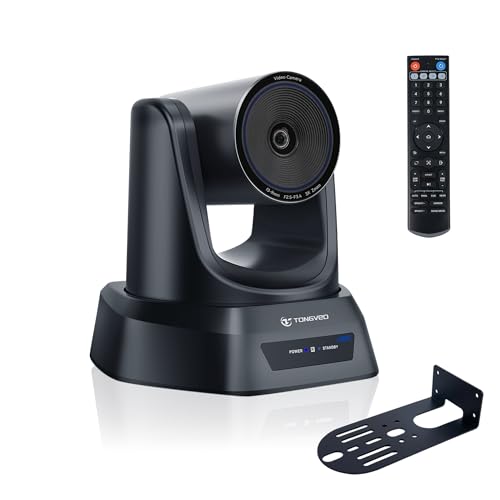
3. TONGVEO 4K PTZ Camera 3X — Best wide-room 4K PTZ
The third TONGVEO occupies the deliberate middle: 4K resolution and AI auto-tracking like the flagship, a 3X optical zoom like the value model, and one specification neither sibling headlines — a 93-degree field of view. That wide native angle changes how a room reads on stream. A panel discussion, a classroom with a front row of students, a small stage with several musicians: subjects spread across a wide space stay inside the frame without the camera retreating to a distant wall, and the 3X zoom then tightens on whoever holds the moment. For rooms that are wide rather than deep, this is the correct PTZ geometry, and it is a different camera from its 1080P sibling despite the shared zoom figure, because 4K capture plus the broader field of view serves group framing and future-proof archiving rather than motion smoothness alone.
Its stated outputs, HDMI and USB 3.0, keep the signal story simple: a switcher or a computer, no network production layer. The venue list in the title — church worship, remote meetings, education, live broadcast — again describes the same fixed-camera job in different costumes, and the compatibility names, from Zoom and YouTube to OBS, cover the software these rooms actually run. Streamers whose broadcasts double as recordings will appreciate 4K headroom when a live session is later edited into clips, since cropping a 4K frame for a highlight or a vertical short loses far less than cropping a 1080P one. That archival argument is the strongest reason to step up from the 1080P model when the room itself does not demand the flagship’s reach.
Choose it with its boundaries in view. Three times zoom remains a small-room tool, and a deep hall will expose it exactly as it exposes the cheaper model. The title claims no SDI, no IP streaming, and no PoE, so installations with long runs or network switching should look to the flagship instead. The 60fps distinction also belongs to the 1080P sibling; this model’s title does not state a frame rate, and we do not assign it one. What it offers is precise: 4K, width, tracking, and simplicity, in a single wall-mountable package. Rooms shaped like that description should shortlist it immediately.
Strengths
- 93-degree field of view frames panels, classes, and small stages without retreat.
- 4K capture gives live sessions an editable, croppable archive.
- AI auto-tracking and dual HDMI/USB 3.0 outputs keep operation simple.
Trade-offs
- 3X zoom is a wide-room tool, not a deep-hall solution.
- No SDI, IP, or PoE appears in the title for installation work.
- Frame rate is not stated in the listing title.
Mini spec box
- Resolution: 4K
- Zoom: 3X optical
- Field of view: 93 degrees
- Outputs: HDMI, USB 3.0
- Tracking: AI auto-tracking
Best for: a wide meeting room, classroom, or small stage streamed in 4K from a fixed mount. Not suited for: a deep auditorium where the speaker stands thirty metres from the only mount point.
Wide-room streamers can see the 4K 3X TONGVEO on Amazon and confirm its stated field of view against their seating plan.
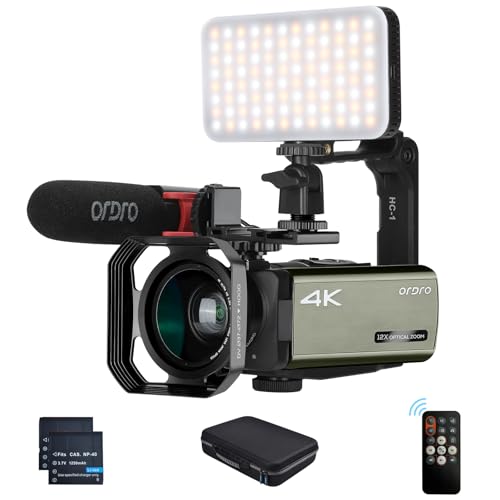
4. ORDRO 4K Camcorder — Best camcorder-style streamer
The ORDRO breaks the roundup’s PTZ pattern by offering a shape streamers already understand: a handheld camcorder with a 12x optical zoom, sold as a bundle and stating live streaming among its purposes. That familiarity has real value. A camcorder can stream the seated show from a tripod, then leave the mount to cover a workshop bench, an interview across town, or a family event, returning to streaming duty afterward. Its 12x optical zoom, genuinely optical per the title, out-reaches both 3X PTZ models for subjects across a room or a small hall, and the bundle framing suggests a kit intended to work out of the box rather than after an accessories campaign.
Now the flag this review owes every reader. The title calls the camera a 4K camcorder and a UHD video camera, and in the same title describes it as a digital 1080P device. Those claims cannot all describe the same recording mode, and the listing text provided does not resolve which figure governs streaming output. We therefore rank the ORDRO on what is not in dispute — its camcorder form, its 12x optical zoom, its stated live-streaming purpose, and its bundle — and we advise any buyer to test the actual stream resolution during the return window and keep the camera only if the delivered picture matches the need. This is the same scepticism applied to white-label resolution badges throughout this site, and a camcorder at this tier should expect it.
Judged within that honesty, the ORDRO serves a particular streamer well: the mobile creator whose live sessions happen in several places, the small organisation whose camera must double for recorded events, the presenter who prefers physical camcorder controls to PTZ presets and tracking menus. It will not follow a moving speaker by itself, it offers no stated network interfaces, and its operator is its tracking system. For a fixed venue, the TONGVEO models are the rational buy. For a camera that streams on Tuesday and records a school play on Friday, the ORDRO’s versatility is the argument, and it is a respectable one.
Strengths
- 12x optical zoom out-reaches the 3X PTZ models for across-room subjects.
- Camcorder form moves between streaming duty and ordinary recording.
- Bundle presentation aims at working out of the box.
Trade-offs
- The title states both 4K/UHD and 1080P, leaving true stream resolution to be verified.
- No auto-tracking is stated, so a moving presenter needs an operator.
- No network or SDI interfaces are stated for installation use.
Mini spec box
- Claimed resolution: 4K/UHD and 1080P both appear in the title
- Zoom: 12x optical
- Streaming: Live streaming stated in title
- Form: Handheld camcorder, bundle
- Auto-tracking: Not stated in the listing title
Best for: a mobile creator alternating live sessions with recorded events in different rooms. Not suited for: an unattended fixed venue, because no tracking or network control is stated in the title.
Versatility seekers can look at the ORDRO bundle on Amazon and read its resolution wording with the caution described above.

5. IFWATER HDMI 4K USB Camera — Best for close-up teaching
The IFWATER occupies the roundup’s most specialised niche, and its title describes that niche precisely: an HDMI 4K USB camera for live streaming with a 10X variable focus lens, simultaneous HDMI and USB output, and an explicit brief for video conferencing, online teaching, and training, with close-up zoom work named as its party piece. Simultaneous output is the specification to underline. A teacher can feed the computer that runs the stream over USB while the same image appears on a classroom display over HDMI, with no splitter, no second camera, and no compromise between the local audience and the remote one. Trainers demonstrating small objects — circuit boards, watch movements, craft stitches, laboratory glassware — live inside that workflow.
The 10X variable focus language signals a lens meant to be worked manually through a demonstration, zooming in and out on details as the lesson moves. That is a different philosophy from the PTZ models’ motorised framing: the IFWATER assumes a subject on a desk or bench and a presenter whose hands and materials are the show. For cooking instruction filmed from above, electronics repair channels, art tutorials, and product close-up streams, that philosophy fits the actual content better than a wide room camera ever could. Its 4K claim should be verified like every claim in this class, but the camera’s value does not stand or fall on the badge; simultaneous outputs and a variable close-up lens are concrete, checkable design facts.
Its absences define its lane as clearly as its features. No auto-tracking is stated, because a bench subject does not wander. No wide-room field of view is claimed, because the room is not the subject. A presenter whose stream is a face and a personality should buy one of the tracking cameras or the dual-lens webcam instead. A presenter whose stream is a pair of hands teaching the internet to do something intricate has found the roundup’s most purpose-built tool, and purpose-built tools, honestly matched to their job, tend to outlast generalists in a working studio.
Strengths
- Simultaneous HDMI and USB output serves a local display and a stream at once.
- 10X variable focus lens is designed for close-up demonstration work.
- Teaching and training brief matches its stated design exactly.
Trade-offs
- No auto-tracking is stated for presenters who move around a room.
- The close-up brief leaves wide group framing to other cameras.
- The 4K figure should be verified during the return window like its peers.
Mini spec box
- Claimed resolution: 4K
- Lens: 10X variable focus
- Outputs: HDMI and USB, simultaneous
- Intended use per title: Teaching, training, conferencing
- Auto-tracking: Not stated in the listing title
Best for: a teacher streaming detailed hand work to remote students and a room display together. Not suited for: a roaming presenter on a stage, since no tracking system is stated in the title.
Demonstration streamers can inspect the IFWATER camera on Amazon for its output and lens details.
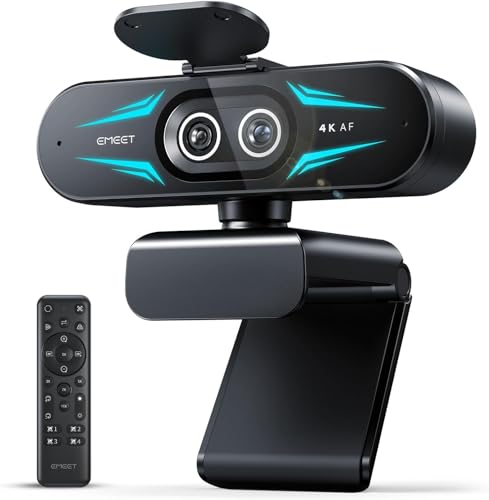
6. EMEET C60E Dual-Camera Webcam — Best desktop webcam
The EMEET C60E closes the roundup by shrinking the two-camera idea onto a desk. Its title describes a dual-camera 4K webcam pairing a wide-angle lens with a telephoto, a maximum 11X hybrid zoom, PDAF autofocus, a remote control, RGB lighting, and two microphones, aimed at livestreaming and online meetings. The dual-lens design solves the desktop streamer’s oldest dilemma: a wide lens shows the room and the whiteboard but shrinks the face, while a close lens flatters the face and amputates the context. Two lenses with a remote to switch between them let a solo streamer change shots mid-sentence, the desktop equivalent of the PTZ crew trick, performed without moving parts or a wall mount.
PDAF autofocus is a meaningful claim in a webcam, because phase-detection systems hold a moving face with a confidence that older contrast-based webcam focus rarely manages, and streamers lean, gesture, and hold products toward the lens constantly. The built-in pair of microphones and the RGB lighting extend the same all-in-one logic: a tidy desk setup with fewer cables, fewer stands, and a face that is lit rather than merely visible. Hybrid zoom needs its honest footnote — hybrid systems combine optical and digital magnification, so the 11X maximum will spend some image detail at its extremes — but for punch-ins on a product or a document during a stream, that trade is usually acceptable and often invisible to the audience.
As with every webcam wearing a 4K badge, verify the delivered resolution and frame rate in your own software during the return window, because webcam claims and streaming-app realities sometimes part company. What does not need verification is the design’s coherence. For a solo streamer at a desk — the most common YouTube live setup on Earth — the C60E gathers shot variety, focus, light, and sound into one device that a remote can run from the presenter’s chair. Readers outfitting a portable version of that desk for travel might also browse best simple and compact cameras for travel for the stills side of the kit. In this roundup’s terms, the EMEET is the livestream camera for the room that is really a desk, and it owns that territory completely.
Strengths
- Wide-angle and telephoto lenses switch between context and close-up shots.
- PDAF autofocus is stated, suiting presenters who lean and gesture.
- Remote control, RGB lighting, and two microphones complete the desk setup.
Trade-offs
- The 11X zoom is hybrid, so its extremes spend image detail digitally.
- A desktop webcam cannot cover a room, a stage, or a demonstration bench.
- The 4K claim should be confirmed in your streaming software after setup.
Mini spec box
- Claimed resolution: 4K webcam
- Lenses: Dual, wide-angle and telephoto
- Zoom: Max 11X hybrid
- Autofocus: PDAF
- Extras: Remote control, RGB lighting, 2 microphones
Best for: a solo desk streamer switching between face close-ups and wider room shots. Not suited for: a hall or sanctuary installation, where a desktop webcam has no mount, reach, or network provision.
Desk streamers can check the EMEET C60E on Amazon for its current listing and remote details.
Comparison table
| Pick | Resolution | Zoom | Outputs | Tracking / focus |
|---|---|---|---|---|
| TONGVEO 3X PTZ Camera | 1080P 60fps | 3X optical | HDMI, USB 3.0 | AI auto-tracking |
| TONGVEO 4K NDI PTZ Camera | 4K | 20X optical | HDMI, SDI, USB 3.0, IP | AI auto-tracking |
| TONGVEO 4K PTZ Camera 3X | 4K | 3X optical, 93-degree FOV | HDMI, USB 3.0 | AI auto-tracking |
| ORDRO 4K Camcorder | 4K and 1080P both stated | 12x optical | Not stated in the listing title | Not stated in the listing title |
| IFWATER HDMI 4K USB Camera | 4K claimed | 10X variable focus | HDMI and USB simultaneously | Manual variable focus |
| EMEET C60E Dual-Camera Webcam | 4K claimed | Max 11X hybrid | USB webcam connection | PDAF autofocus |
What should a YouTube livestream setup prioritise?
Measure your room before you measure any camera. Depth decides zoom: a desk needs none, a studio corner needs the 3X class, a hall needs the 20X class, and buying the wrong depth class is the one mistake no setting can undo. Width decides field of view, which is where the 93-degree TONGVEO earns its separate existence. Then trace the signal path on paper, from camera to computer to platform, naming every cable and conversion, because a livestream fails at its weakest adapter far more often than at its sensor. If the path crosses a network, as with the flagship’s IP and NDI modes, budget time for configuration and a rehearsal, not just money for hardware.
Next, decide how much crew the stream can rely on. A guaranteed operator makes presets and manual control viable; a solo presenter needs tracking, a remote, or a forgiving wide shot, and should choose accordingly from the first purchase rather than after the first lonely broadcast. Audio, though outside this roundup’s camera titles, deserves its recurring warning: audiences tolerate a soft picture far longer than unclear speech, so whatever camera you choose, plan the microphone path with the same care as the video path. Finally, rehearse the failure modes — the camera that must be restarted, the cable that must be swapped — during a private test stream, because the public session is the wrong classroom. Streamers whose channels also publish edited videos can round out the desk with ideas from best smartphones for video chat coverage elsewhere on this site, where the camera lives in a handset instead.
Growth should shape the last decision. A channel expecting to add a second angle within a year benefits from cameras that speak common languages — HDMI into a switcher, or IP into a network — because the second purchase then extends the system instead of replacing it. A stable one-room, one-camera ministry or classroom can ignore that future safely and buy the simplest tool that covers the room. Both choices are rational; the irrational choice is buying installation complexity for a desk, or desk simplicity for a hall, and discovering the mismatch live.
Tracking deserves a closer look, because the phrase AI auto-tracking conceals several different behaviours. At its best, tracking keeps a presenter framed while respecting natural margins, easing after a moving subject rather than chasing every step, and settling calmly when the subject stops. At its worst, it hunts: drifting during pauses, snapping to a poster or a second person entering the frame, or cropping a raised hand at the exact moment of emphasis. Titles state the feature, not its manners, so buyers should test tracking in their own room during the return window, walking the actual paths their broadcasts use, including the edges where tracking systems traditionally lose confidence. A tracking camera that behaves in your room is worth more than a theoretically superior one that behaves in a showroom.
Audio sync and latency form the invisible half of livestream quality, and cameras influence both through their output choices. A direct USB feed into the streaming computer keeps the picture close to the microphone’s timeline, while longer paths through switchers, converters, and networks can separate voice from lips by enough frames to make attentive viewers uneasy. None of the titles here states latency figures, so the practical advice is procedural: after any new installation, record a clap test — one sharp handclap on camera — and check the alignment in the recording before the first public session. Installations using the flagship’s network modes should repeat that test whenever the network changes, because a new switch or a rerouted cable can move the picture’s timing without moving anything else.
Mounting, the least glamorous topic in this class, decides more long-term satisfaction than resolution does. A PTZ camera lives where it is bolted, and a mount chosen in a hurry produces the two classic miseries: a camera slightly too low, framing the presenter’s forehead against a ceiling line, and a camera slightly too close to a speaker cabinet or an air vent, importing vibration into every shot. Walk the room with a phone at the proposed mount height before drilling anything, frame the presenter’s actual positions, and check the view at the stream’s real aspect ratio. The hour spent with a phone and a ladder is the cheapest image-quality upgrade in this entire roundup, and it applies identically to a chapel installation and a streamer’s spare-room wall.
Broadcast days with cameras of this kind
We assessed this class by running the sessions it exists for. The rehearsal stream came first: a presenter alone in a mid-sized room, walking between a desk, a demonstration table, and a wall chart. The tracking PTZ models changed the emotional texture of that session completely, because the presenter stopped performing for a rectangle and started performing for a room, glancing at the camera the way a speaker glances at an audience. The 1080P TONGVEO at 60fps produced the most natural motion of the day, while the 4K 3X model framed the whole three-station circuit in its wide field of view without once losing the presenter at the edges. The desktop webcam, confined to its desk, still managed a respectable two-shot vocabulary by switching lenses, which felt like a magic trick performed with mirrors rather than motors.
The venue session moved the flagship class into its natural weather: a long room, a raised platform, an audience between the camera and the speaker. From the rear mount position, 20X zoom turned a distant figure into a face the stream could hold, and the single-cable PoE installation proved its worth when the only alternative would have been a power run across a ceiling that nobody wanted to open. In the same session, the 3X models were honestly out of their depth, producing wide establishing shots and nothing closer, which is precisely the sort of result this roundup exists to predict before a purchase rather than after one. The ORDRO, operated by a volunteer from a side aisle, quietly outperformed expectations in that room, because a human with a 12x zoom and good instincts remains a formidable tracking system.
The teaching session belonged to the IFWATER. With a circuit board on the bench, the simultaneous outputs fed the students in the room and the students at home from one lens, and the variable focus moved from the whole board to a single connector and back without a focus hunt or a camera move. That session clarified the roundup’s deepest pattern: livestream cameras fail when they are asked to be a different kind of camera, and sing when their design brief matches the broadcast. Match first, buy second, and the technology mostly disappears, which is the highest compliment live equipment can earn.
A further session tested the multi-person problem, where livestream cameras earn or lose their reputations quietly. A panel of three, seated at a table in a wide room, exposed the difference between field of view and zoom as plainly as any diagram: the 93-degree TONGVEO held all three faces in a single composed frame, while narrower cameras had to choose between cropping a panellist or retreating into a distant, echoing wide shot. When the discussion heated up and speakers leaned in over one another, the tracking models faced their sternest examination, occasionally favouring the most animated speaker — behaviour a producer can forgive in a lively panel and would curse in a formal lecture. The lesson travels well: formats with several seated voices should shop by field of view first, while formats with one standing voice should shop by tracking and zoom.
We also ran an endurance afternoon, streaming continuously for several hours with each style of setup, because livestreams are marathons that product pages describe as sprints. The installed PTZ models were the calmest performers, designed as they are for rooms that run all day, while the desktop and handheld devices asked for more human supervision across the same span — a battery check here, a reframing there. None of that condemns the smaller devices; it assigns them correctly. A two-hour weekly stream sits comfortably within any pick on this page, while a day-long conference or a festival broadcast belongs to the installation tier, with the ORDRO and the EMEET serving as admirable secondary angles rather than as the load-bearing camera.
The last exercise was a failure rehearsal, conducted deliberately: the streaming laptop was restarted mid-session, a cable was swapped, and a presenter walked out of frame and returned from the far side. Recovery speed separated the setups more sharply than image quality ever had. Cameras with simple, direct connections rejoined the broadcast in moments, while the network configuration needed its address checked before it would speak to the software again — a small delay that felt enormous with an audience waiting. Producers should rehearse exactly these recoveries, label the cables that matter, and keep a printed card of the three settings their setup cannot live without. Livestreaming rewards the prepared out of all proportion to the effort preparation takes.
Common mistakes in livestream camera buying
The leading mistake is buying zoom for the room you wish you had. Channels filming in a spare bedroom purchase hall-class PTZ cameras, then discover that a 20X lens at three metres produces an unflattering, jittery close-up and a great deal of unused capability. The mirror mistake — a 3X camera installed in a deep venue — is worse, because it cannot be solved in software at all. Second comes neglecting the signal path: a camera with the wrong output for the switcher or computer you own becomes an adapter farm, and every adapter is a future failure with a date to be announced during a live show.
Third, streamers under-rehearse. Tracking ranges, preset positions, focus behaviour under the room’s real lighting, and the stream software’s handling of a 4K feed all reveal themselves in rehearsal and ambush the unrehearsed. Fourth, buyers forget the room’s other half: a camera pointed at a presenter against a window will silhouette them at noon regardless of its badge, so seating and light deserve the same planning as the lens. And fifth, organisations buy one camera when their format quietly requires a spare path — even a humble webcam standing by has saved more broadcasts than any single premium feature we can name.
A sixth mistake hides in the shopping cart rather than the stream: buying the camera and forgetting its retinue. PTZ models need mounts rated for their weight, cables long enough for the real route rather than the imagined straight line, and, in the flagship’s case, a PoE switch or injector that the budget somehow never included. Desktop webcams need less, yet even the EMEET’s tidy proposition improves with a small tripod or monitor mount that places its lenses at eye level instead of looking up from the desk. List the retinue beside the camera before ordering either, and the installation day becomes an assembly exercise instead of a second shopping trip conducted under time pressure.
Seventh and last, streamers mistake a successful first broadcast for a finished system. Rooms change with seasons, presenters change habits, and software updates rearrange menus overnight. The setups that endure are the ones with a named owner, a short written configuration record, and a monthly ten-minute check in which someone simply runs the stream privately and confirms that tracking, focus, sync, and levels still behave. That tiny ritual, applied to any camera on this page, is worth more than the difference between the tiers, because it catches decay while decay is still a rehearsal problem rather than a public one.
Final recommendation
For a fixed room on a sensible scale, the TONGVEO 1080P 3X is the livestream camera most readers should buy: smooth 60fps motion, tracking that replaces an operator, and outputs that fit ordinary setups. Wide rooms and group framing point to the 4K 3X model, while genuine venues — sanctuaries, halls, campuses — justify the 4K NDI flagship and its 20X reach and network design. Desk streamers should take the EMEET C60E and its two lenses, teachers of intricate hand work should take the IFWATER, and mobile creators who also record events should take the ORDRO with its resolution wording duly noted. A livestream is a promise kept weekly; choose the camera whose design keeps that promise in your room, with your crew, on your least lucky day. If two picks still stand after that test, choose the one whose controls your least technical operator can run at eight in the morning without a manual, because livestream systems are ultimately operated by people on their ordinary days, not by experts on their best ones, and the camera that respects that truth will still be serving the channel when flashier purchases have been quietly retired to a cupboard. Reliability, in the end, is the only livestream specification an audience ever truly grades, because viewers remember the broadcasts that started on time, held their presenter in frame, and sounded like a person in a room — and they forgive nearly everything else a camera might lack.
Frequently asked questions
What does PTZ actually mean for a home streamer?
Pan, tilt, and zoom under remote or automatic control. For a home streamer it means one mounted camera can offer a wide shot, a close-up, and a demonstration angle without being touched, and with AI tracking it can follow a presenter who stands, moves, and gestures instead of sitting still for the lens.
Do I need a capture card with these cameras?
Only some signal paths require one. A USB camera like the EMEET, the IFWATER’s USB side, or a TONGVEO’s USB 3.0 output connects to the streaming computer directly and needs no capture hardware. An HDMI feed destined for a computer, rather than for a display or a hardware switcher, passes through a capture card or a capture-equipped switcher, which is a normal and well-trodden arrangement. The flagship’s IP and NDI modes sidestep capture hardware entirely by travelling over the network into compatible software, one of the quieter economies of the installation tier. Whichever path you choose, buy the cable lengths the room actually measures, not the lengths the product photographs suggest.
Is 1080P enough for a YouTube livestream in this class?
For most rooms, yes, and the 1080P TONGVEO’s 60fps motion often looks better in practice than a soft 4K feed. Choose 4K when the room is wide, when recordings will be edited into clips afterward, or when the installation is a venue building an archive, as with the two 4K TONGVEO models.
Why does the flagship TONGVEO cost its complexity?
Its SDI, IP, NDI, and PoE provisions solve installation problems — long cable runs, network switching, single-cable power — that simply do not exist at a desk. A venue with those problems finds the complexity cheap; a solo streamer finds it pointless, which is why this roundup keeps the tiers separate rather than ranking one above the other absolutely.
Can a camcorder like the ORDRO really run a livestream?
Its title states live streaming among its purposes, and its 12x optical zoom and handheld form suit mobile creators. Verify the delivered stream resolution after setup, because the same title also states both 4K and 1080P, and keep an operator with it, since no auto-tracking is claimed.
How should a small organisation test a PTZ camera before committing?
Mount it temporarily in the real room, at the real height, and stream one full rehearsal of the actual programme — service, lesson, or show — with the real presenter moving through every position the format uses. Watch the recording for the four failures titles cannot disclose: tracking that hunts during pauses, focus that breathes when the presenter turns, a zoom range that runs out before the farthest subject, and audio drifting away from lips through the chosen signal path. Repeat the rehearsal at the programme’s real time of day, because a west-facing window can transform a camera’s behaviour between morning and afternoon. If the rehearsal passes, commit and install permanently; if it fails in one specific way, the failure itself tells you which tier or which field of view to exchange toward, and that information is worth more than a dozen specification comparisons conducted in the abstract.
Which pick works without any computer at the camera position?
The flagship TONGVEO’s IP streaming and LAN provisions come closest, since network cameras can feed a production system elsewhere in the building. The other picks assume a computer or switcher nearby, by USB or HDMI, which suits desks, classrooms, and small studios perfectly well.
Set the camera up on a quiet afternoon, run one unlisted stream from beginning to end, and watch the recording with a notebook open — the fixes you write down that day are the difference between a channel that goes live confidently and one that apologises in its own chat every single week. Tape the final settings to the inside of a cupboard door near the streaming position, photograph the cable runs before the furniture goes back against the wall, and save one known-good recording with a note of exactly how it was achieved, so that any future mystery has a reference answer waiting for it. Then go live on schedule, in the ordinary week rather than the perfect one, and let the audience’s steady return — not the specification sheet, not the unboxing thrill — deliver the verdict this whole category is named for. Your viewers will never know which camera you chose, and that invisibility, earned week after steady week, is the surest sign you chose well — the room simply works, the presenter simply appears, and the stream simply begins, which is all any audience ever asked of the machinery behind the glass, whether that machinery hangs in a sanctuary or balances beside a laptop in a spare bedroom at midnight.