What's inside
- Key Takeaways
- Quick Picks
- How Were These Six Chosen for Novelists?
- Why Do Keyboards Decide This Category?
- Drafting Devices Versus Laptops: An Honest Accounting
- What Screen Size and Surface Suit Reading Your Own Prose?
- How Should a Writer Read Battery Claims?
- Which Device Fits the Way You Actually Write?
- How Do the Six Compare for a Writing Life?
- How Does the Two-Stage Workflow Work in Real Life?
- What Does a Writer’s Desk Do to the Body Over a Novel?
- How Do You Build a Writing Setup That Protects the Draft?
- What Mistakes Do Novelists Make When Choosing a Writing Laptop?
- Which Platform Serves a Novelist’s Software Life Best?
- Final Recommendation
- Frequently Asked Questions
- Related Guides
As an Amazon Associate I earn from qualifying purchases. This post may contain affiliate links at no extra cost to you.
gizmoverdict.com is reader-supported. When you buy through links on our site, we may earn an affiliate commission.
Where to buy: The six listings below link to the current Amazon pages for these devices. One warning belongs at the very top of this guide: two of the six picks are not laptops at all. The Freewrite Traveler and the Freewrite Alpha are dedicated drafting devices — single-purpose word processors with no apps, no browser and no editing suite — included deliberately, and explained honestly, in a guide otherwise about laptops.
The best laptops for novel writing are not the most powerful laptops, and that is what makes this category so pleasant to shop in. A novel is, computationally, nothing: a text file that would embarrass a spreadsheet. What a novel demands is endurance — yours. The machine that helps you finish a book is the one whose keyboard you can type on for three hours without your hands filing a complaint, whose battery stops rationing your sessions in gardens and trains, whose screen does not glare your eyes tired by chapter nine, and whose weight does not punish you for carrying your manuscript everywhere the writing might happen. Novelists do not need a faster computer. They need a computer that disappears.
That is also why the two Freewrite devices belong here, stated plainly rather than smuggled in. A growing number of writers draft on machines that can do nothing else — no notifications, no research tabs, no quick check of anything — and then edit on a real computer later. That is a legitimate, even shrewd, workflow, and this guide treats it as a first-class option with its limitations printed on the label: these devices draft, sync and nothing more. The four true laptops in the guide cover the writers who draft and edit in one place. Between the two philosophies, every novelist reading this can find their machine — but nobody should buy a Freewrite believing a laptop is coming, or a laptop believing it will enforce discipline it cannot.
Key Takeaways
- Two picks — the Freewrite Traveler and Freewrite Alpha — are dedicated drafting devices, not laptops: no apps, no browser, no editing tools, by design.
- For the four true laptops, the criteria that matter are keyboard quality, battery endurance, carry weight and screen glare — not processing power, which every pick has in surplus for text.
- The LG gram Pro models are the weight miracles of this guide: full-size screens at 2.97 and 3.30 pounds respectively, per their listings, with claimed battery life beyond a full writing day.
- The MacBook Air 13 is the balanced default for drafting and editing in one machine; the Dell XPS 13 is its Windows counterpart with a brighter 3K screen.
- Drafting and editing are different jobs. The happiest novelists in this guide’s readership will match the device to the job they actually struggle with — starting, or finishing.
Quick Picks
| Pick | Badge | Why it earns its place |
|---|---|---|
| Freewrite Traveler | Best for drafting anywhere | An E Ink drafting device that folds into a bag and writes for weeks between charges — nothing on it but your manuscript. |
| Freewrite Alpha | Best dedicated desk drafter | A backlit LCD drafting machine with a full-size mechanical keyboard, for writers who draft at a desk and edit elsewhere. |
| LG gram Pro 16 | Best full laptop for long manuscripts | A 16-inch touch laptop weighing 2.97 pounds with 32GB of memory, a 2TB drive and battery claims up to 28.5 hours. |
| LG gram Pro 17 | Best big-screen writing desk | Seventeen inches of writing canvas at 3.30 pounds — the screen of a desktop replacement with the carry of an ultraportable. |
| Apple MacBook Air 13 M5 | Best all-round writing laptop | The balanced default: fine keyboard, silent body, strong battery and the full editing ecosystem in one light machine. |
| Dell XPS 13 | Best compact Windows option | A 13.4-inch 3K screen rated at 500 nits, 16GB of memory and Windows 11 Pro in an ultra-thin body. |
How Were These Six Chosen for Novelists?
We weighted the criteria in the order a writing session experiences them. The keyboard came first, because it is the only part of the machine the novelist touches continuously; a keyboard that fights you taxes every sentence, and the tax compounds across ninety thousand words. Battery came second, because the freedom to write where the writing wants to happen — the garden, the train, the café without the good sockets — is a creative feature disguised as a specification. Weight came third for the same reason: a manuscript should be carryable to the places that refill it. Screen character came fourth, judged for long-session comfort: glare behaviour, brightness and size for a page of text at a readable measure.
One more criterion was applied quietly throughout: the machine’s manners. A writing laptop should be silent or near it, cool on the lap, and free of the little lights and noises that colonise attention. The fanless Air passes this test by construction; the gram Pros and XPS pass it in text work, where their processors are barely awake; the Freewrites pass it absolutely, having nothing to make noise with. It sounds like a small thing until you have tried to hear a shy sentence over a fan. The history of literature is not short of masterpieces written on dreadful machines, but nobody’s draft was ever improved by the computer interrupting it.
Processing power was deliberately weighted last, and the guide is comfortable saying so.
Every device here handles text, research and editing software without effort; the laptops’ memory and storage figures matter only as they serve the manuscript’s ecosystem — research archives, backups, the editing and typesetting tools of the finishing stages. We also insisted on honesty about the category’s split personality. Drafting devices and laptops are not better and worse versions of one thing; they are different instruments, and the selection keeps them clearly labelled so that a reader can choose the philosophy before choosing the product. A guide that blurred that line to make its table tidier would fail the exact reader it claims to serve — the one deciding how they will actually write their book.
Why Do Keyboards Decide This Category?
Type the same paragraph on three keyboards and your hands will file three different reports. Key travel, the force needed to register a press, the spacing between keys and the stability of each keycap all shape the rhythm of prose in ways writers feel without articulating: too little travel and your fingers bottom out ten thousand times a day; too much flex and the board feels like it is thinking about your sentence before committing to it. Novelists are the extreme case of keyboard use — sustained, high-volume, often at speed, frequently while tired — and a keyboard that is merely fine for email can be genuinely costly at novel volume. This is why the Freewrite Alpha’s full-size mechanical keyboard is a headline feature rather than a quirk, and why the laptops here come from lines with strong keyboard reputations.
Writers should also interrogate the keyboard’s quiet qualities: the sound it makes in a shared room at midnight, the feel of the space bar under a tired thumb, whether the backlight — where fitted — can dim to a murmur rather than a floodlight. These are the details that decide whether a machine is invited into the writer’s most productive hours, which are often the household’s sleeping ones. A novel accumulates in those hours more often than in the bright scheduled ones, and the machine that behaves itself in the dark earns a loyalty no benchmark can measure.
The practical test is personal; nobody can run it on your behalf.
If you can, type on a candidate machine for ten uninterrupted minutes — not a spec sheet’s worth of pecking, but a real page of your actual draft — and notice your error rate and your shoulders. Writers who cannot test in person should buy with a return window and run that page test in the first week. Layout details matter at volume too: the placement of the keys you use constantly, the size of the space bar’s neighbours, whether the function row behaves itself. A novel is long enough that a small daily irritation becomes a large total one; the keyboard is where that arithmetic lives.
Drafting Devices Versus Laptops: An Honest Accounting
The case for a dedicated drafting device is the case against the modern laptop’s abundance. Every application on a laptop is a door out of the manuscript, and the doors are labelled with your weaknesses: research that becomes browsing, a quick fact-check that becomes an hour, notifications from a life that does not know you are in chapter twelve. A Freewrite removes the doors. It offers a screen, a keyboard and your words, with Wi-Fi sync quietly backing the draft up to the cloud. Writers who know their enemy is distraction — who have measured it in lost months — find that subtraction worth real money, and the devices’ extraordinary battery life, measured in weeks of writing rather than hours, extends the same philosophy to power: nothing to manage, nothing to feed, just the draft.
The accounting must also list what these devices cannot do, because the list is long and some buyers will find their deal-breaker on it. There is no editing suite: no structural reordering of chapters beyond the basics, no tracked changes from your editor, no comments to resolve. There are no research tabs, no reference PDFs open beside the draft, no dictionary beyond what you carry in your head, no typesetting, no submission formatting, no email to send the manuscript from. The workflow a Freewrite implies is therefore two-staged by necessity: draft on the device, then move to a real computer for revision, editing and everything after. Writers who revise as they go — who cannot draft forward without reaching back — will find that wall immediately and should buy a laptop. Writers who draft in a forward rush and revise in a separate season will find the wall is the point.
What Screen Size and Surface Suit Reading Your Own Prose?
Writers read differently from other computer users: they read their own sentences, slowly, suspiciously, looking for the wrong word. That reading has physical requirements. The text must sit at a comfortable size without the writer leaning in — a habit that becomes a headache by the second hour — and the screen must not throw the room back at the reader. This is where the guide’s screens divide by character rather than quality. The E Ink of the Traveler is the extreme of readability: no glare worth mentioning, no glow, a page that behaves like paper in a bright garden. The XPS 13 fights glare with force, its 500-nit panel keeping contrast in sunlit rooms. The gram Pros offer size, which is its own readability — a page displayed large is a page the eyes can patrol without strain — and the Air’s Liquid Retina sits in the balanced middle, bright and calm in ordinary rooms.
Size also shapes revision style in a way worth choosing deliberately, and writers who have only ever revised on a small screen often do not know which temperament they have until a large one shows them the other way of seeing a chapter whole, with its seams and repetitions visible at a glance in the way a tailor sees a garment rather than a stitch.
A 13-inch screen shows you a page; a 17-inch screen shows you a spread — draft and outline, chapter and notes, the paragraph and the scene it lives in. Writers who revise structurally, moving blocks and watching the whole, work measurably differently on the big canvas, and the gram Pro 17’s improbable lightness exists for them. Writers who revise linearly, sentence by sentence from the top, gain little from acreage and may prefer the small machines’ intimacy. Neither style is the serious one; they are temperaments. Buy the screen your temperament reads best on, and set the text size generously the day the machine arrives — your eyes are the only truly non-replaceable hardware in this entire guide.
How Should a Writer Read Battery Claims?
With respect and with a discount, the way you would read a blurb on a book jacket — written by someone who wants you to buy the thing, pointing at something real, and best verified against the experience of your own first fortnight with the machine in your actual writing places.
When LG’s listings claim up to 28.5 hours for the gram Pro 16 and up to 26.5 for the 17, those figures come from standardised tests run at modest brightness on light workloads — and writing, happily, is a light workload, so these machines genuinely are long-legged for a novelist in a way they would not be for a video editor. The honest translation is not a number but a behaviour: a full day of writing, and then another outing, without the charger becoming part of the ritual. The Freewrites play a different sport entirely, with E Ink and LCD drafting devices sipping power across days and weeks of sessions; for them the battery effectively leaves the list of things a writer manages.
The practical discipline is the same whatever you buy. Learn your machine’s real endurance in your real conditions during the first fortnight — brightness where you like it, your applications open, your cafés and trains — and plan around the measured truth rather than the box. Writers are unusually well placed to benefit from battery honesty, because writing sessions are long and location-flexible: the difference between a machine that must be plugged in by lunch and one that forgets the socket exists is the difference between writing where the desk is and writing where the chapter wants to be written. That is a creative specification, and it is why this guide weighs battery second only to the keyboard.
Which Device Fits the Way You Actually Write?
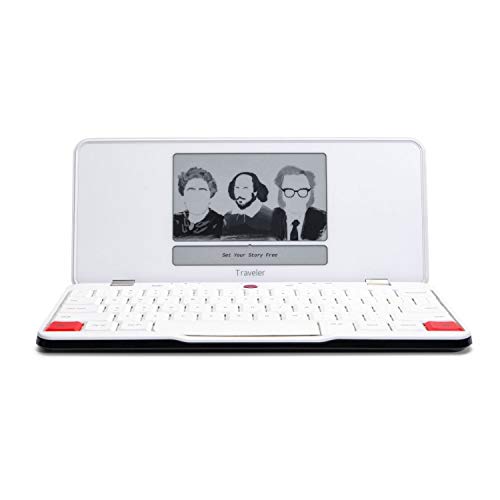
Freewrite Traveler — Best for drafting anywhere
The Traveler is the drafting philosophy made portable. Per its listing, it is a lightweight, folding word processor with an E Ink screen, Wi-Fi cloud sync and a battery life measured for writers on the move — and that E Ink screen is the experience in a phrase. It reads like paper, shrugs off sunlight that would defeat a laptop display, and asks almost nothing of the battery, which is why the device can live in a bag for weeks as a standing invitation to write. The keyboard is compact, fitted to the folding body, and the whole instrument is designed around one gesture: open it, and the last sentence you wrote is waiting, with nothing else competing for the moment.
There is a subtler pleasure in the Traveler that owners mention and spec sheets cannot: it changes the emotional weather of drafting. A laptop carries the whole of your digital life into every session, including its urgencies; the Traveler carries only the book. Opening it feels less like sitting down at a computer and more like opening a notebook that happens to remember everything. Writers who struggle to begin — whose enemy is the blank first five minutes rather than the wandering third hour — often find that a device with exactly one door, opening directly onto the last sentence, lowers the threshold of starting to something they can clear daily. That is not a specification. It is, for the right writer, the entire product.
Buy it for drafting in motion — trains, parks, the twenty minutes before an appointment —
and for the writer whose laptop has become a machine for everything except writing. Do not buy it as your only writing computer unless your editing genuinely happens elsewhere, because the limitations catalogued earlier apply in full: revision, research and submission all live on another device. Its honest comparison is not the laptops below but the notebook and pen, and against paper it wins on sync, backup and the ability to search your own draft. Against a laptop it wins only on focus — but for the writer who needs focus more than features, that single win is the whole argument.
- Display: E Ink digital screen, sunlight-readable
- Function: dedicated word processor for drafting — not a general-purpose computer
- Sync: Wi-Fi cloud sync for drafts
- Battery: long life for writers on the move, per the listing
- Body: lightweight and portable, folding design
Strengths
- Total absence of distraction: no apps, no browser, no notifications — only the manuscript.
- E Ink reads like paper in any light and sips power, so the device is always ready.
- Cloud sync quietly protects the draft without any backup ritual from the writer.
Trade-offs
- It cannot edit, research, format or submit — a real computer is still required for those stages.
- The compact keyboard suits drafting bursts; marathon typists may prefer the Alpha’s full-size board.
- Its price buys subtraction, which only makes sense if subtraction is what you need.
Best for: writers whose drafts die by distraction and who write in scattered places and moments.
Not suited for: writers who revise as they draft and need the full toolkit in one device.

Freewrite Alpha — Best dedicated desk drafter
The Alpha takes the same subtraction philosophy and aims it at the desk. Its listing highlights a full-size mechanical keyboard and a backlit LCD display — the two specifications that define its personality. The mechanical keyboard is the argument: deep, deliberate, satisfying keystrokes that reward long sessions and make the physical act of drafting feel like the craft it is. The backlit LCD keeps the screen readable in the dim rooms writers favour, without the paper-like quality of E Ink but with instant refresh as you type and scroll. Wi-Fi backup protects the work in the background, and the battery is built for long stretches between charges.
Choose between the two Freewrites by posture. The Traveler belongs to the bag and the journey; the Alpha belongs to the desk, the lamp and the daily thousand words written in the same chair. Its limitations are the family limitations — no editing suite, no research, no applications — and they should be read as the product working as designed rather than as omissions. Writers with an existing laptop for revision will find the Alpha the more comfortable drafting partner of the two; writers buying their first and only machine should keep reading into the laptop sections, because a novel needs an editing home as surely as it needs a drafting one.
- Display: backlit LCD
- Keyboard: full-size mechanical keyboard
- Function: dedicated distraction-free word processor — not a general-purpose computer
- Backup: Wi-Fi backup for drafts
- Battery: long life per the listing
Strengths
- The mechanical keyboard makes high-volume drafting a physical pleasure rather than a chore.
- Backlit screen suits the dim, late writing hours its owners actually keep.
- The same total focus as the Traveler, in a desk-shaped body.
Trade-offs
- Editing, research and formatting still require a separate computer.
- The LCD lacks E Ink’s sunlight readability and paper feel for outdoor drafting.
- Desk-shaped by design — it will not displace the Traveler for writing in motion.
Best for: desk-based drafters who want mechanical-keyboard comfort and zero distraction during writing hours.
Not suited for: writers needing one device for drafting, revising and submitting the whole book.
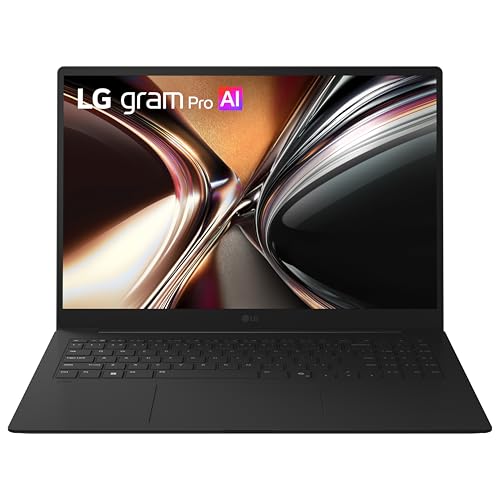
LG gram Pro 16 — Best full laptop for long manuscripts
The gram Pro 16 performs the category’s favourite magic trick: a 16-inch touchscreen laptop that weighs 2.97 pounds and measures 0.6 inches thin, per its listing — figures that would flatter a 13-inch machine. LG pairs that body with an Intel Core Ultra 7 355 processor, 32GB of memory, a 2TB SSD, Thunderbolt 4 and a battery claim of up to 28.5 hours. For a novelist, translate the specification: a large page on screen, a research archive with room to grow for a decade, memory that will never once be the reason a session stutters, and a machine light enough that taking the manuscript to the library, the garden or another country costs no deliberation at all.
Consider the research-heavy novelist specifically, because this machine seems built from their complaints. Historical fiction, the deeply reported contemporary novel, the fantasy epic with its invented archive — these books accumulate reference libraries, timelines, maps, interview recordings and a decade of false starts, and they ask the laptop to hold all of it open beside the draft. The gram Pro 16’s combination of a large screen, 32GB of memory and 2TB of storage is the only specification in this guide that never once answers that ask with a negotiation. Add that it does so at under three pounds — the weight of the research library it replaces — and its position at the serious end of the guide explains itself.
The honest caveats are about claims and about delicacy of purpose.
Battery figures like 28.5 hours are the manufacturer’s best-case numbers, and a writer should expect a full, generous day rather than a literal day-plus — which still outclasses most laptops a novelist will meet. The vast storage and memory are, for text, luxurious overkill; they earn their place across a writing life that includes research libraries, audio interviews, and the eventual second and third books. If your writing is one manuscript and a browser, this machine is more than you need. If your writing is a practice — with archives, drafts of drafts and years ahead — the gram Pro 16 is the laptop in this guide most likely to still feel new when the third novel starts.
- Display: 16-inch touch
- Processor: Intel Core Ultra 7 355
- Memory and storage: 32GB RAM, 2TB SSD
- Body: 0.6 inches thin, 2.97 pounds per the listing
- Battery and ports: up to 28.5 hours claimed, Thunderbolt 4
Strengths
- A 16-inch writing canvas at a weight most 13-inch laptops would accept gladly.
- 2TB of storage and 32GB of memory remove every capacity question for a writing lifetime.
- Battery claims point to full writing days away from sockets, even discounted realistically.
Trade-offs
- Its specification is luxurious for text — light users pay for headroom they will not visit.
- Manufacturer battery figures are best-case; plan on a generous day, not a day and a half.
- Sixteen inches still needs a proper bag, however little it weighs.
Best for: committed novelists building a long-term writing practice with deep research archives.
Not suited for: first-draft minimalists who would be happier spending less and carrying the Traveler.

LG gram Pro 17 — Best big-screen writing desk
Seventeen inches is the screen size writers fantasise about and portability usually forbids — but the gram Pro 17 weighs 3.30 pounds at 0.57 inches thin, per its listing, which rewrites the negotiation entirely. Its specification pairs an Intel Core Ultra 7 355 with 16GB of memory, a 1TB SSD, Thunderbolt 4 and a battery claim of up to 26.5 hours. On a desk, that screen holds a manuscript page at a comfortable measure with research, notes or an outline visible alongside — the two-pane working style that structural editing loves — while the machine remains light enough to move between desk, table and reading chair without the usual desktop-replacement grunt.
Its natural habitat is the writer who stays in one home but moves within it: desk for drafting, armchair for reading the draft aloud, kitchen table for the morning pages. The 16GB of memory is the specification to note against its 16-inch sibling’s 32GB — entirely sufficient for writing and editing, less archival in spirit — and the same best-case caution applies to the battery claim. Writers whose books live at one address and whose eyes appreciate a large, calm page will find this the most inviting screen in the guide; writers who truly travel should let the smaller machines argue first.
- Display: 17-inch touch
- Processor: Intel Core Ultra 7 355
- Memory and storage: 16GB RAM, 1TB SSD
- Body: 0.57 inches thin, 3.30 pounds per the listing
- Battery and ports: up to 26.5 hours claimed, Thunderbolt 4
Strengths
- The largest writing canvas in the guide, at a weight that defies its size.
- Side-by-side draft and outline viewing suits structural revision beautifully.
- Home-mobile: light enough to follow the writing around the house all day.
Trade-offs
- 16GB of memory where its sibling offers 32GB — ample for writing, less archival.
- Its footprint needs a real desk or table; café corners and train trays are not its friends.
- Battery claims are best-case figures, to be read as a long day rather than a literal count.
Best for: home-based novelists who want a desktop-sized page without desktop weight or tethering.
Not suited for: writers who draft in transit and need a machine for small spaces and constant motion.

Apple MacBook Air 13 M5 — Best all-round writing laptop
If the guide had to choose one machine for the novelist who has not yet decided what kind of writer they are, it would be this one. The listing specifies a 13.6-inch Liquid Retina display, the M5 chip, 16GB of unified memory and a 512GB SSD in a fanless body — and the writing experience those numbers produce is one of calm competence. The keyboard suits long sessions, the silence suits thinking, the battery suits the café and the garden, and the software ecosystem covers the whole arc of a book: drafting in your chosen writing app, research in the browser, structural revision, tracked changes from an editor, typesetting and submission, all without changing machines.
Its position in this guide is the balanced centre, and its trade-offs are the centre’s usual ones. It cannot match the gram Pros’ screen size or storage, and it cannot match the Freewrites’ enforced focus — the doors out of the manuscript all exist here, and discipline must come from the writer or from software settings rather than from the hardware. The 12MP camera and Touch ID serve the modern writer’s side-life of calls and courses. For the novelist who drafts and edits in one place, on one machine, and wants that machine to be good at everything a book requires and excellent at disappearing during the work, the Air is the recommendation that needs the fewest footnotes.
- Display: 13.6-inch Liquid Retina
- Processor: Apple M5 chip
- Memory and storage: 16GB unified memory, 512GB SSD
- Camera and security: 12MP Center Stage camera, Touch ID
- Wireless: Wi-Fi 7
Strengths
- Covers the entire life of a book — draft, research, revision, submission — in one silent machine.
- Keyboard, screen and battery are all long-session quality without any single compromise dominating.
- Light enough that the manuscript genuinely goes everywhere the writer does.
Trade-offs
- No hardware-enforced focus: the distractions are all present and must be managed by habit or settings.
- Smaller screen and storage than the gram Pro models for writers with big archives.
- Fixed configuration at purchase, as with all of Apple’s line.
Best for: novelists who draft and edit on one machine and want the balanced, footnote-free choice.
Not suited for: writers who know distraction is their enemy and need it removed by hardware, not willpower.

Dell XPS 13 — Best compact Windows option
The XPS 13 is the Windows answer to the Air’s question, with one specification that jumps off its listing: a 13.4-inch 3K touchscreen rated at 500 nits. Brightness is a writing feature more than writers realise — it is what lets a screen hold its contrast in a sunlit room, a conservatory or a bright café, the places where manuscripts get written outside the study. Dell pairs that panel with an Intel Core 5 320 processor, 16GB of LPDDR5 memory, a 512GB SSD, a backlit keyboard and Windows 11 Pro, in an ultra-thin, light body with Wi-Fi 7. For the novelist committed to the Windows ecosystem — its writing software, its file habits, its familiarity — this is the compact machine that asks for no apologies.
Read its specification with a writer’s priorities and it coheres: memory at the comfortable level for drafting plus research, storage enough for manuscripts and their archives, a screen that fights glare with brightness rather than with a matte finish. Its compromises are the compact class’s: the smallest canvas in the guide alongside the Air, ports and physical presence traded away for thinness, and a processor tier chosen for efficiency rather than for the (irrelevant, for text) thrill of speed. A novelist who writes in bright places, travels light and lives in Windows will find it precisely aimed. A novelist who edits structurally with three panes open should look at the gram Pro 17’s acreage first.
- Display: 13.4-inch 3K touchscreen, 500 nits per the listing
- Processor: Intel Core 5 320
- Memory and storage: 16GB LPDDR5, 512GB SSD
- Keyboard and wireless: backlit keyboard, Wi-Fi 7
- Operating system: Windows 11 Pro
Strengths
- The 500-nit 3K screen keeps text crisp and contrasty in the bright places writers actually sit.
- 16GB of memory and Windows 11 Pro cover drafting, research and the full editing chain.
- Ultra-thin, light body disappears into a bag like the Air’s does.
Trade-offs
- The compact screen crowds multi-pane revision work.
- Efficiency-tier processor is right for text but offers no headroom theatre for other hobbies.
- Thinness always costs ports; check your accessory habits against its connections.
Best for: Windows-committed novelists who write in bright rooms and travel light.
Not suited for: structural editors who want the largest possible canvas for rearranging a manuscript.
How Do the Six Compare for a Writing Life?
| Device | Type | Screen | Decisive trait |
|---|---|---|---|
| Freewrite Traveler | Drafting device | E Ink | Focus and sunlight drafting, anywhere |
| Freewrite Alpha | Drafting device | Backlit LCD | Mechanical keyboard, desk focus |
| LG gram Pro 16 | Laptop | 16-inch touch | 2.97 lb with 32GB and 2TB |
| LG gram Pro 17 | Laptop | 17-inch touch | The home writing canvas |
| MacBook Air 13 M5 | Laptop | 13.6-inch Liquid Retina | The balanced all-rounder |
| Dell XPS 13 | Laptop | 13.4-inch 3K, 500 nits | Bright-room Windows compact |
Notice also what the table cannot show: the cost of companionship. Each laptop here implies an ecosystem of chargers, cases and possibly a dock; each Freewrite implies the continued existence of a computer somewhere in your life for stage two. A writer with a functioning older laptop already owns the second stage, which makes a drafting device a complete purchase. A writer with no computer at all should read the Freewrite prices as partial — the honest total includes the editing machine still to come, even if that machine is a modest one bought later.
The Type column is the one to read first.
Everything else in this guide is refinement; that column is philosophy. Decide whether your book needs a machine that can do everything or a machine that can do one thing, and the table narrows itself to a shortlist of two or three before specifications are even consulted.
How Does the Two-Stage Workflow Work in Real Life?
Since two of this guide’s picks only make sense inside a two-stage workflow, the workflow deserves a walkthrough rather than a slogan. Stage one is drafting: words produced forward, ideally daily, on the device that protects attention — the Traveler in the bag, the Alpha on the desk. The draft syncs to the cloud as you go, so the words exist in two places before you have done anything deliberate. Stage two begins when a draft, or a solid stretch of one, is ready for judgement: you open it on the laptop, where the screen is bigger, the tools are real, and the work changes character from production to revision — restructuring, cutting, polishing, and eventually the formal stages of editing and submission.
The writers who thrive in this system share one habit: they do not smuggle stage-two work into stage one. The drafting device stays a drafting device, and the itch to revise yesterday’s chapter instead of writing today’s is recognised as the procrastination it usually is. The writers who fail in it are those who needed the stages interleaved — who genuinely compose by revising — and for them the honest purchase is a laptop alone, where the whole book can live in one place. Neither group is more disciplined than the other; they are differently wired, and the guide’s insistence on naming the Freewrites as non-laptops is really an insistence on knowing which group you are in before money changes hands. If you are unsure, you are probably in the laptop group — buy the laptop, and let a drafting device be a later, informed luxury.
What Does a Writer’s Desk Do to the Body Over a Novel?
A novel is an endurance event conducted sitting down, over months, in the same few chairs, and the laptop is only part of the posture equation that decides whether the body files its complaints in chapter three or in chapter thirty. Screen height matters across ninety thousand words: a laptop flat on a desk angles the gaze downward for months, which necks and shoulders eventually invoice. Writers who work at one desk should consider the humble riser or a stack of the very books they admire, lifting the screen and pairing it with an external keyboard — a purchase that also lets a beloved keyboard serve a laptop whose own board is merely good. The gram Pro 17’s big screen forgives more posture sins than most, simply by being readable from further back, while the small machines reward the riser treatment most.
Light is the other slow variable. The backlit keyboards across these picks — the Alpha’s, the XPS 13’s — exist for the dim rooms writers drift into at night, and the screen brightness habits from the earlier section apply doubly after dark: a screen far brighter than the room will tire eyes that a matched brightness would spare. None of this is medical advice, and this guide offers none; it is the accumulated folk wisdom of people who type for a living, which says that the writer who sets the desk up once, properly, writes more than the writer who negotiates with discomfort daily. Your future chapters are a stakeholder in your chair, your lamp and the height of your screen, whether they know it or not.
How Do You Build a Writing Setup That Protects the Draft?
Whatever device you choose, the manuscript’s safety is a system, not a feature. On the Freewrites, the cloud sync does the quiet work — but confirm, in the first week, that drafts are actually arriving in your account, because a sync you have never inspected is a hope rather than a backup. On the laptops, turn on the cloud backup or versioned sync your ecosystem offers, and add one deliberate habit: at the end of each writing week, export or copy the manuscript somewhere separate, dated, and never edited. Novelists lose work to overwritten files and corrupted documents more often than to stolen laptops, and a chain of dated copies is the difference between an anecdote and a catastrophe.
Backups deserve one escalation of seriousness, because manuscripts are irreplaceable in a way spreadsheets are not. The rule professionals use is three copies, in at least two kinds of place, with one of them outside the building. The cloud sync in this guide covers two of those almost automatically; the third — a dated copy on a drive that lives elsewhere, refreshed monthly — is the one writers skip and the one that survives fires, floods and theft. Set it up in the same first week, while the manuscript is young and the habit is cheap. A book that exists in three places can survive anything except its author stopping, and stopping is the one failure this guide cannot help with.
Then set the machine up for the work itself.
Choose your writing software before the draft grows teeth — migrating a half-written novel between applications is a miserable afternoon — and learn its three essential behaviours early: how it backs up, how it counts and displays your progress, and how it exports a clean manuscript. Set the screen’s night and brightness behaviour so evening sessions do not strain your eyes, enlarge the text to a size your future self will thank you for, and silence the notifications your device allows you to silence. On a laptop, that last step is manual and worth the ten minutes; on a Freewrite, it is the product. Either way, the goal of setup week is a machine that, from the second week onward, asks nothing of you but the next sentence.
What Mistakes Do Novelists Make When Choosing a Writing Laptop?
The most common is buying processing power for a text file — paying for a gaming-class machine whose fans will narrate every quiet scene and whose weight will keep the manuscript at home. The second is the reverse vanity: choosing the thinnest, prettiest ultraportable without typing a real page on it, then discovering at chapter twenty that its keyboard taxes every paragraph. The third is buying a drafting device in a flush of discipline enthusiasm without reckoning honestly with the editing stage; the Freewrite sections of this guide exist to make that reckoning happen before the purchase, not after.
Another mistake is treating the writing machine as a seasonal purchase — buying in a burst of January resolve, with specifications chosen for the writer one hopes to become by spring. Buy for the writer you already are on an ordinary Tuesday: your real session length, your real locations, your real relationship with distraction. The novelist who writes forty minutes on trains needs the Traveler or the Air; the one who writes four hours at a desk needs the Alpha or the gram 17; the one who has not written in a year needs, honestly, the cheapest adequate machine and a daily appointment, because no specification in this guide manufactures a habit. Hardware can protect a practice. It cannot substitute for one, and the writers who finish books are the ones who know which of the two they are buying.
A fourth mistake is neglecting the backup question until the first scare,
which for some writers is also the last scare their manuscript survives. A fifth is shopping by screen size alone — bigger is better only if the machine still travels to where you write, and the gram Pros’ weights are in this guide precisely because they break that old trade. And the last is waiting for the perfect machine to begin. Every device here, including the floor of the category, writes a novel perfectly well in the hands of someone who sits down. The best laptop for novel writing is ultimately the one that is open in front of you tomorrow morning.
Which Platform Serves a Novelist’s Software Life Best?
Beneath the hardware sits a quieter decision: where your writing applications live. The dedicated writing tools — the project-based applications that hold scenes, research and notes in one binder — exist across macOS and Windows alike, as do the humble word processors in which plenty of novels are still written, so no pick in this guide locks a novelist out of a mainstream tool. The differences appear at the edges of a writing life. Some older or niche applications favour one platform; some agents and publishers exchange files in formats both handle identically; dictation and accessibility tools have their own platform personalities. A writer with an established software habit should treat that habit as a specification — list the applications the book actually depends on, confirm each one’s home, and let the list arbitrate between the Air and the XPS 13 rather than relitigating taste.
The Freewrites stand outside this question entirely, which is either their purity or their poverty depending on the day. They run no applications, and their drafts emerge as plain documents ready for whichever platform receives them. That neutrality is a genuine argument for the two-stage writer: the drafting device never becomes obsolete in software terms, because there is barely any software in it to age. A Traveler bought today will draft identically in five years, while the laptops around it pass through operating-system generations. Longevity of that kind — boring, total, unbothered — suits an instrument whose entire job is to be opened and written on.
Final Recommendation
Decide first whether your obstacle is distraction or capability, and be honest in the way writers are trained to be honest about their characters, because the machine cannot fix a diagnosis you refuse to make, and the wrong purchase in this category is almost always a correct machine answering a mis-stated problem:
If it is distraction, the Freewrite Alpha will guard your desk hours and the Traveler will guard everywhere else — bought knowingly, as drafting instruments that hand the book to a computer for its second half. If it is capability, the MacBook Air is the balanced default, the XPS 13 its bright-screened Windows counterpart, and the two gram Pros the choices for writers who want a large page without a heavy bag, the 16 for the road and the 17 for the house. Type a real page on your finalist before committing if you possibly can. Then close this guide, open the manuscript, and let the machine disappear — that disappearance, sustained over months, is what you actually bought.
Frequently Asked Questions
Can I really not edit on a Freewrite?
You can write, review your text and make the small corrections drafting allows, and your drafts sync to the cloud for real work. What the devices deliberately lack is the editing environment: structural tools, tracked changes, comments, formatting and submission preparation. Plan on a computer — even a modest one — for revision and everything after the first draft.
How much storage does a novelist actually need?
Manuscripts themselves are tiny — a lifetime of drafts fits in a corner of any drive here. Storage becomes relevant through the ecosystem around the books: research archives, scanned sources, audio interviews and backups of everything. That is why the gram Pro 16’s 2TB is framed as a writing-lifetime provision rather than a manuscript requirement, and why 512GB serves a text-focused writer comfortably.
Is a touchscreen useful for writing?
For the prose itself, rarely — writers live on keyboards. Touch earns its keep around the prose: scrolling a draft to read it, annotating, working with research material. Both gram Pros and the XPS 13 include it as a convenience. Do not pay a premium for touch as a writing feature; accept it gladly as a reading and revising one.
Which of these is best for writing in cafés and trains?
For pure drafting, the Traveler — it is built for exactly that and its E Ink screen laughs at window glare. Among the laptops, the Air and the XPS 13 are the travellers: light, compact and long-legged on battery. The gram Pro 16 joins them on weight despite its size, provided your bag accepts a 16-inch footprint.
Do I need special writing software, or is a word processor enough?
Plenty of novels are written entirely in an ordinary word processor, and the machine does not care. Dedicated writing applications earn their users through organisation — scenes, notes and research in one project — rather than through any magic in the typing. Choose the tool whose structure matches how your mind holds a book, and choose it early; the device in this guide will run any of them.
How long will one of these machines last a writer?
Writing is among the gentlest workloads a computer can be given, so longevity here is measured in comfort rather than survival. The laptops’ memory and storage give them years of headroom for text work; the drafting devices, having almost no software to age, may outlast everything else in this guide. Batteries are the honest wear item — expect any laptop’s endurance to soften gradually across years of daily charging.
I write poetry and short fiction as well. Does this guide still apply?
Almost entirely. Shorter forms reduce the storage and structural-editing arguments and increase the value of the always-ready drafting devices — a poem’s first draft and a Traveler’s E Ink screen are natural companions. The keyboard and glare criteria, if anything, matter more to writers who work in intense short bursts.
Related Guides
A writing life touches neighbouring machines more often than writers expect. If you narrate your own audiobook or stream readings, the encoding-focused picks in best laptops for live streaming video are the relevant shelf. Writers who illustrate their own work or edit photography for covers will find the colour-first reasoning of best laptops for amateur photography directly transferable, and the many teachers writing novels after school hours may recognise their evenings in best laptops for school teachers.
Related guides
- Best 1440p 165Hz Monitors: One Native 165Hz Pick, Three 180Hz Upgrades, an Overclock Headline and a 160Hz Ultrawide
- Best 13×19 Professional Printers
- Best 3rd Party MacBook Chargers: 96W-Class Alternatives, the 100W Cable Rule, and the Apple Benchmark
- Best Built PC: Six Prebuilt Gaming PCs Judged on Parts, Power and Upgrades


