What's inside
- Key Takeaways
- Quick Picks
- How Did We Choose the Best Graphics Cards for an Intel Core i7-8700K Coffee Lake Build?
- How Do the Six Picks Compare Side by Side?
- What Should an 8700K Owner Check Before Choosing a Card?
- How Do You Swap a Graphics Card in a Coffee Lake System Safely?
- Which Mistakes Do 8700K Owners Make When Upgrading?
- How Long Will a Card From This List Keep an 8700K System Relevant?
- Final Recommendation
- Which Resolution Makes Sense for This Processor and These Cards?
- How Should Settings Be Chosen Once the New Card Is In?
- What Else in an 8700K Build Deserves Attention During the Upgrade?
- Frequently Asked Questions
- Related Guides
As an Amazon Associate I earn from qualifying purchases. This post may contain affiliate links at no extra cost to you.
gizmoverdict.com is reader-supported. When you buy through links on our site, we may earn an affiliate commission.
Where to buy: All six cards below come from this site’s verified product pool, sold through Amazon by their board partners — Gigabyte, EVGA, XFX and ASUS. Check the memory figure in the listing title before ordering, because two of these picks carry 8GB and four carry 12GB, and that difference matters more for this processor than any clock speed printed on the box.
The search for the best graphics cards for intel core i7 8700k coffee lake systems starts from an unusual place: the processor is not the weak point most sellers assume it is. The 8700K arrived in late 2017 as Intel’s first six-core mainstream flagship, with twelve threads, a high single-core clock for its era, and an unlocked multiplier that many owners used to hold all-core speeds well beyond stock. Paired with a Z370 or Z390 board, it still feeds a modern midrange graphics card honestly at 1080p and 1440p, especially in the GPU-heavy single-player titles that dominate most libraries. What it cannot do is keep a flagship card busy in every game, and it sits on a PCIe 3.0 platform, so the sensible money goes to the tier where the card, not the CPU, decides the frame rate.
That framing shapes the whole shortlist. Every pick here is a midrange card from the RTX 30, RTX 40, RX 6000 or RX 7000 generations — hardware the 8700K can drive without the pairing feeling lopsided. Two carry 12GB of memory on the NVIDIA side, one AMD card carries 12GB, and the three 8GB cards are included deliberately for owners whose monitors and games do not punish a smaller frame buffer. Nothing here needs a platform change, a new motherboard, or a move to DDR5. The upgrade is a card swap, a driver cleanup, and an honest check of the power supply that has been sitting in the case since the Coffee Lake build was new.
One platform detail deserves attention before any names: the 8700K’s chipset offers PCIe 3.0, and two of the cards below connect through an eight-lane link. On a PCIe 4.0 board that link is quick; on a 3.0 board it runs at half the per-lane speed. In most games the practical difference is small, but in a handful of titles that stream assets heavily it can show. The reviews below flag which cards use the narrower link so the trade-off is a choice, not a surprise after the card is installed.
Key Takeaways
- The 8700K still pairs honestly with midrange cards; flagship tiers are where this six-core chip starts leaving performance unused in CPU-limited games.
- Memory splits this list cleanly — the 12GB picks suit 1440p and texture-heavy games, while the 8GB picks fit 1080p play and tighter budgets.
- Coffee Lake boards run PCIe 3.0, so cards with an eight-lane link deserve a second look before they go in the basket.
- An ageing power supply is the most common failure point in an 8700K-era build; wattage and connector checks come before the card choice.
- Both RTX 3060 picks carry the same GPU and 12GB of memory, so their contest is decided by cooler size and case fit, not silicon.
Quick Picks
| Pick | Badge | Why it earns the slot |
|---|---|---|
| Gigabyte Radeon RX 7600 Gaming OC 8G | Best RDNA 3 pick | A current-generation AMD card with a triple-fan cooler that suits long sessions in a warm Coffee Lake case. |
| Gigabyte GeForce RTX 4060 WINDFORCE OC 8G | Best for DLSS and efficiency | The newest NVIDIA silicon here, sipping power while adding frame generation for supported games. |
| Gigabyte GeForce RTX 3060 Gaming OC 12G | Best 12GB all-rounder | Twelve gigabytes behind a three-fan cooler makes this the relaxed 1440p choice of the six. |
| EVGA GeForce RTX 3060 XC Gaming 12GB | Best compact 12GB card | The same 3060 and memory as the Gigabyte, in a shorter dual-fan body for smaller cases. |
| XFX Speedster SWFT210 Radeon RX 7600 | Best straightforward AMD value | A no-frills RDNA 3 card whose three DisplayPorts suit a multi-monitor desk. |
| ASUS Dual Radeon RX 6750 XT OC Edition 12GB | Strongest raster pick | The fastest traditional rendering hardware here, with 12GB and a compact dual-fan design. |
How Did We Choose the Best Graphics Cards for an Intel Core i7-8700K Coffee Lake Build?
The first filter was generational sanity. Cards older than the 8700K itself would waste the upgrade, and current flagships would spend much of their capacity waiting on a six-core processor from 2017 in the games where the CPU sets the ceiling. The middle band — RTX 3060 and 4060 class NVIDIA cards, RX 6750 XT and RX 7600 class AMD cards — is where this processor and a new card meet as equals, so the pool was read with that band in mind and every pick sits inside it.
The second filter was memory. An 8700K system being upgraded today is usually being kept for several more years, and the frame buffer is the specification that ages fastest. Twelve-gigabyte cards were favoured where the pool offered them, but 8GB cards were kept for the large group of owners playing at 1080p, where the smaller buffer is a reasonable economy rather than a compromise that shows on screen.
The pool also had to answer for availability of knowledge, not just hardware. Every pick here is a card with a documented specification sheet, a known cooler design and a service history that owners have written about extensively. In a new platform build, an obscure card is a small risk; in a seven-year-old machine being kept alive deliberately, an obscure card is a risk stacked on top of every other ageing component. Mainstream partner models from Gigabyte, EVGA, XFX and ASUS keep the upgrade boring in the best sense — every question an installer might have at midnight has already been asked and answered somewhere.
Finally, each card was checked against the realities of an older build: physical length against mid-tower cases from the Coffee Lake period, cooler design against cases with modest airflow, and power draw against supplies that may be seven or eight years old. A card that demands a case or PSU replacement on top of its own cost is a different purchase from a card swap, and the picks below are all card swaps.

Gigabyte Radeon RX 7600 Gaming OC 8G — Best RDNA 3 pick
The RX 7600 is AMD’s RDNA 3 entry point, and in an 8700K system it lands in a comfortable place: modern enough to support current drivers and features for years, modest enough that the processor is rarely the reason a game slows down. Gigabyte’s Gaming OC version wraps it in the company’s three-fan WINDFORCE cooler, which is generously sized for a card of this class. In a Coffee Lake-era case, where front intake was often an afterthought, that extra cooler headroom is worth more than a small factory overclock — the card can hold its boost behaviour quietly instead of trading noise for temperature.
The honest limitation is the 8GB frame buffer, and it should be weighed in the context of the monitor already on the desk. At 1080p, and at 1440p with texture settings chosen sensibly, 8GB remains workable in the great majority of current releases. Where it pinches is the specific combination of 1440p, maximum texture packs and ray tracing, and an owner aiming there should look at the 12GB picks further down instead. The second caveat is the eight-lane PCIe connection: on the 8700K’s PCIe 3.0 board the link runs at 3.0 speeds, which costs a little in asset-streaming-heavy titles. It does not disqualify the card; it simply belongs in the decision.
Day to day, the ownership experience is undemanding. The card asks for one supplementary power lead, its fans stop at idle in the manner of modern WINDFORCE designs, and its video outputs cover the usual mix of one HDMI and several DisplayPorts found on cards of this class — the title confirms the cooler and memory rather than the port count, so check the bracket photograph on the listing if a specific port matters. For an owner stepping up from a GTX 10-series card, the jump in supported features is as noticeable as the jump in speed: modern media encode, current driver branches, and a warranty that starts now rather than in 2018.
- Memory: 8GB GDDR6 (title figure)
- Cooler: 3X WINDFORCE fans, as the title describes the card
- Architecture: AMD RDNA 3 class (RX 7600)
- PCIe link width: the listing title does not state the lane count — confirm the x8 connection in Gigabyte’s documentation before pairing with this platform
- Supplementary power connector: absent from the title — verify the required connector in Gigabyte documentation against the fitted power supply
Strengths
- Current RDNA 3 architecture with a long driver-support runway ahead of it.
- Triple-fan cooler is oversized for the GPU’s heat, which suits older cases.
- A natural performance match for the 8700K at 1080p and sensible 1440p settings.
Trade-offs
- 8GB of memory is the ceiling that texture-heavy 1440p play will find first.
- The eight-lane link runs at PCIe 3.0 speed on Coffee Lake boards.
- Three-fan length needs a case measurement before ordering.
Best for: an 8700K system gaming at 1080p, or 1440p with texture settings kept one notch below maximum.
Not suited for: a 1440p high-refresh setup built around maximum textures and ray tracing, where the 8GB buffer and PCIe 3.0 x8 link both press at once.

Gigabyte GeForce RTX 4060 WINDFORCE OC 8G — Best for DLSS and efficiency
The RTX 4060 is the newest architecture in this line-up, and its appeal for an older build is efficiency as much as speed. It draws modest power for its performance level, which is kind to an ageing power supply and produces little heat for an older case to clear. Gigabyte’s WINDFORCE OC version keeps the design simple: two fans, a compact body, and a factory overclock. In a Coffee Lake machine that has been running warm for years, a card that adds performance while reducing the thermal load compared with the card it replaces is a genuinely pleasant upgrade.
The feature that separates the 4060 from the 3060 picks below is DLSS with frame generation, available in supported titles. On a system where the processor occasionally sets the ceiling, frame generation needs a caveat: it builds frames from GPU-rendered ones and works best when the base frame rate is already healthy, so it is a smoothing tool rather than a rescue for a struggling game. The 8GB buffer carries the same discussion as the RX 7600 above, and this card also uses an eight-lane PCIe link, so the PCIe 3.0 note from the introduction applies here in full.
There is also a longevity argument that suits this platform. An 8700K machine is, by definition, a machine its owner maintains rather than replaces, and the 4060’s architecture is the one in this list that will receive new feature support the longest. Its media engine handles modern video codecs for recording and streaming, which matters to the growing number of older-system owners who capture gameplay or run a small stream from the same PC they play on. None of that rescues a game the processor cannot feed, but it does mean the card will still feel current when the rest of the build is finally retired around it.
- Memory: 8GB across a 128-bit interface, per the title
- Cooler: a pair of WINDFORCE fans
- Architecture: NVIDIA RTX 40 series (RTX 4060), with DLSS frame generation support in compatible games
- PCIe link width: the title is silent on lane count — check Gigabyte’s specification page for the x8 connection before installing on a Coffee Lake board
- Supplementary power connector: absent from the listing title — confirm the connector requirement in Gigabyte documentation
Strengths
- Low power draw for its class, easing the load on an older power supply.
- Frame generation in supported games smooths motion the raw raster rate cannot.
- Short dual-fan body fits the mid-tower cases most 8700K builds still use.
Trade-offs
- 8GB of memory, with the same 1440p texture ceiling as every 8GB pick here.
- Eight-lane PCIe link on a 3.0 board is a small but real compromise.
- Raw rendering pace sits close to the cheaper previous-generation picks.
Best for: an 8700K build with a modest or ageing power supply, playing supported titles where DLSS features are available.
Not suited for: a texture-maximal 1440p library on a PCIe 3.0 board, where the 8GB buffer and the x8 link combine into the wrong specification sheet.
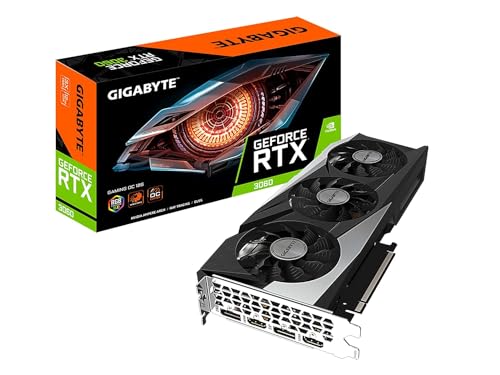
Gigabyte GeForce RTX 3060 Gaming OC 12G (REV2.0) — Best 12GB all-rounder
If one card in this list could be handed to an 8700K owner without asking any questions first, it is this one. The RTX 3060’s 12GB frame buffer was generous when the card launched and reads even better now, because the games that strain 8GB cards at 1440p are exactly the games an upgraded Coffee Lake system will be asked to run. Gigabyte’s Gaming OC trim adds a three-fan WINDFORCE cooler and a factory overclock, and the full-width PCIe link means the 8700K’s PCIe 3.0 board gives up nothing in connection speed — a quiet advantage over the two newer eight-lane cards above.
The trade is raw pace. In traditional rendering the 3060 sits behind the RX 6750 XT at the bottom of this list, and its ray tracing, while present and usable with DLSS at 1080p, is first-generation hardware doing a job that newer chips do more gracefully. What the card offers instead is balance: no memory anxiety, no lane-width footnote, a cooler with headroom, and DLSS upscaling to lean on when a title is heavy. For a processor of the 8700K’s vintage, balance is usually the correct answer, because the system’s ceiling is set by whichever part is weakest — and with 12GB fitted, it is rarely the card’s memory.
Consider also how this card behaves across the whole library rather than in one headline title. The 3060 generation is old enough that its behaviour in thousands of games is thoroughly documented, its drivers are mature, and its quirks are known quantities — a real virtue in a machine that cannot afford surprises. Owners who mod games, run texture packs, or keep several demanding titles installed will feel the 12GB buffer working quietly in the background of all of them. It is the least dramatic pick in the guide and, for a seven-year-old platform being given a second life, the least dramatic pick is frequently the correct one.
- Memory: 12GB GDDR6 — the headline figure in the title
- Cooler: three WINDFORCE fans
- Revision: REV2.0, printed in the title itself
- Architecture: NVIDIA RTX 30 series (RTX 3060), with DLSS upscaling support
- Supplementary power connector: the title does not give the connector — verify it in Gigabyte documentation and check the power supply has that lead free
Strengths
- 12GB of memory removes the texture ceiling that limits the 8GB picks.
- Full-width PCIe connection, so a PCIe 3.0 board loses nothing.
- Triple-fan cooler keeps noise down during long sessions.
Trade-offs
- Raw frame rates trail the RX 6750 XT pick in traditional rendering.
- Ray tracing is usable rather than strong, even with upscaling helping.
- The three-fan card is long; compact cases need a measurement first.
Best for: a 1440p-leaning 8700K system that will be kept for years, where memory headroom matters more than the last increment of frame rate.
Not suited for: a small-form-factor case that cannot take a three-fan card’s length, or a build chasing the highest raw raster pace this processor can use.
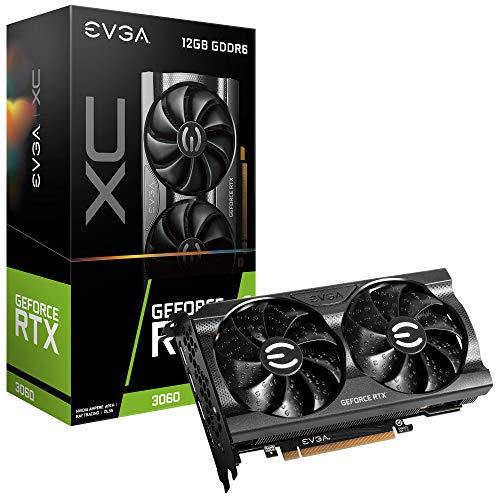
EVGA GeForce RTX 3060 XC Gaming 12GB — Best compact 12GB card
This EVGA card and the Gigabyte above are the same proposition at the silicon level — an RTX 3060 with 12GB of GDDR6 — wearing different coolers, and the comparison is the most instructive one in the guide. The XC Gaming uses two fans and a notably shorter body with a metal backplate, aimed at the smaller cases that a flagship-length card cannot enter. Many 8700K systems live in exactly those cases: compact mid-towers and a generation of small-form-factor builds that were popular when Coffee Lake was new. For them, this is the 12GB pick that actually fits.
Two fans moving the same heat as three means each fan works harder, so under sustained load the XC runs a little warmer or a little louder than its triple-fan sibling, depending on the fan curve chosen. That is the whole cost of the shorter body, and for most owners it is a fair exchange. EVGA’s position deserves a plain note: the company withdrew from the graphics card market after the RTX 30 generation, so this is a card from a closed chapter of its catalogue. Judge it on the hardware in hand — a well-regarded cooler design and the same GPU and memory as the Gigabyte — rather than on any expectation of a successor model.
The XC also makes a tidy second-hand-proof argument in reverse: because it is a known, standard design with a backplate and no exotic fittings, it drops into awkward spaces other cards cannot — behind a front-mounted radiator, above a bottom-mounted power supply shroud, in the short graphics bays of older small-form-factor cases. Owners of the popular compact cases from the Coffee Lake period should measure their bay and compare it with this card before assuming 12GB is out of reach. In many of those cases, this is the only 12GB card in the guide that fits without removing something else first.
- Memory: 12GB GDDR6, the figure the title leads with
- Cooler: two fans over a metal backplate
- Model code: 12G-P5-3657-KR, taken from the title
- Architecture: NVIDIA RTX 30 series (RTX 3060), with DLSS upscaling support
- Card length: not given in the listing title — measure the case and compare against EVGA’s published dimension before ordering
Strengths
- The full 12GB buffer in a body short enough for compact cases.
- Metal backplate adds rigidity in a card that may be moved between builds.
- Identical GPU and memory to the triple-fan pick, so nothing is lost in specification.
Trade-offs
- Two fans work harder than three, so sustained loads run warmer or louder.
- EVGA no longer makes graphics cards, so this is a previous-generation catalogue model.
- No factory length in the title means the case check is the buyer’s homework.
Best for: a compact 8700K case that needs 12GB of memory and cannot swallow a three-fan card.
Not suited for: a large, quiet-focused build where a triple-fan cooler would run the same GPU at lower noise for the same money class.

XFX Speedster SWFT210 Radeon RX 7600 — Best straightforward AMD value
XFX builds its Speedster line around a simple promise — the GPU, a competent cooler, and no money spent on decoration — and the SWFT210 version of the RX 7600 is the plainest route into RDNA 3 on this list. Against the Gigabyte RX 7600 at the top, the silicon and the 8GB memory are the same; the differences are in the cooler design, the clock tune and the outputs. XFX specifies HDMI with three DisplayPorts, a layout that suits the multi-monitor desks common in home offices, where an 8700K machine often doubles as a work computer by day.
Everything said about the RX 7600 as a match for this processor applies here unchanged: strong at 1080p, capable at 1440p with texture discipline, an 8GB ceiling in the heaviest texture loads, and an eight-lane PCIe link that runs at 3.0 speed on Coffee Lake boards. The choice between this card and the Gigabyte is therefore not about the GPU at all. It is about which cooler behaviour and which output layout fit the machine in front of you, and about which partner’s design you prefer in the case window. That is a healthy kind of choice — the kind where neither answer is wrong.
XFX’s support materials and board design also tend toward the serviceable: the Speedster cooler uses a straightforward shroud and standard fans, and the card avoids proprietary connectors or lighting systems that complicate a build. In an older machine that gets opened once a year for dust and little else, that plainness is a feature. The card’s job in this guide is to be the RDNA 3 option with the fewest asterisks attached to the purchase itself — no length drama, no output shortage, no decoration budget — and on those terms it succeeds completely.
- Memory: 8GB GDDR6, per the title’s own wording
- Outputs: one HDMI and three DisplayPorts, per the title
- Architecture: AMD RDNA 3 (RX 7600), as stated in the listing title
- Cooler: Speedster SWFT210 dual-fan class design — fan count is not spelled out in the title, so confirm on XFX’s product page if cooler size matters
- Supplementary power connector: not named in the listing title — check XFX documentation against the fitted supply
Strengths
- Three DisplayPorts make multi-monitor desks easy to cable.
- Undecorated design spends the budget on the card itself.
- Same RDNA 3 silicon and memory as the other RX 7600 pick.
Trade-offs
- The 8GB buffer carries the same 1440p texture ceiling as its Gigabyte twin.
- Eight-lane PCIe link, with the same PCIe 3.0 consideration on this platform.
- Fewer title-stated details than some rivals, so the XFX page needs a read first.
Best for: an 8700K desk running two or three monitors, gaming at 1080p after working hours.
Not suited for: a single-monitor 1440p build pushing maximum textures, where the 12GB picks remove a limit this card cannot.

ASUS Dual AMD Radeon RX 6750 XT OC Edition 12GB — Strongest raster pick
The RX 6750 XT is the most powerful traditional-rendering GPU in this guide, and it earns its place by answering the question the other picks raise: how much card can an 8700K actually use? In GPU-bound games — high resolutions, heavy shaders, modest CPU load — the answer is all of it. The 6750 XT’s RDNA 2 silicon with 12GB of memory will stretch further at 1440p than anything else here, and in titles where the processor is not the constraint, this is the fastest card on the page. ASUS packages it in the Dual line, a two-fan design that keeps the length manageable despite the GPU’s appetite.
The costs are power and heat. This card asks the most of the power supply of any pick in the guide, and an 8700K-era PSU that has already served seven years deserves a wattage and connector check before this box is opened — the guide’s how-to section covers that check step by step. It also predates the current generation’s efficiency gains, so it warms a case more than the RTX 4060 does while working. Neither point is a defect; they are the terms of buying the strongest raster performance this processor can still exploit, and owners with a healthy PSU and a ventilated case should take the deal.
It is worth being precise about where this card’s advantage shows, because it is not everywhere. In a CPU-limited esports title at 1080p, the 6750 XT and the RX 7600 will produce results closer than their specifications suggest, because the 8700K is drawing the ceiling for both. Push the resolution to 1440p, load a modern single-player world, and the gap opens in the 6750 XT’s favour and keeps opening as settings rise. Owners whose libraries lean toward the second kind of game are buying real, visible headroom here; owners in the first camp should save the difference and take one of the cooler, quieter picks above.
- Memory: 12GB GDDR6, the capacity named in the title
- Edition: OC Edition, as the title labels it
- Architecture: AMD RDNA 2, as stated in the listing title
- Cooler: ASUS Dual dual-fan design — the title names the Dual line; fan details beyond that belong to ASUS’s specification page
- Supplementary power connectors: the title omits them — this class of card commonly needs more than one lead, so verify the exact requirement in ASUS documentation
Strengths
- Fastest traditional rendering in the guide, with 12GB behind it.
- Full-width PCIe connection suits the PCIe 3.0 platform without a footnote.
- Dual-fan body is shorter than most cards of this performance class.
Trade-offs
- Highest power draw here; an old supply may rule it out on its own.
- RDNA 2 ray tracing trails the NVIDIA picks in this list.
- More heat for an older case to exhaust than any other pick.
Best for: a 1440p-focused 8700K build with a healthy, name-brand power supply and a case that breathes well.
Not suited for: a build whose power supply is the original budget unit from 2017, or a quiet small case where this card’s heat has nowhere to go.
How Do the Six Picks Compare Side by Side?
| Card | Memory | Generation | Cooler | Notable point for an 8700K build |
|---|---|---|---|---|
| Gigabyte RX 7600 Gaming OC | 8GB GDDR6 | RDNA 3 | Triple-fan | Oversized cooler, eight-lane link |
| Gigabyte RTX 4060 WINDFORCE OC | 8GB GDDR6 | RTX 40 series | Dual-fan | Lowest power draw, frame generation |
| Gigabyte RTX 3060 Gaming OC 12G | 12GB GDDR6 | RTX 30 series | Triple-fan | Full-width link, most memory headroom |
| EVGA RTX 3060 XC Gaming | 12GB GDDR6 | RTX 30 series | Dual-fan, backplate | Shortest route to 12GB |
| XFX SWFT210 RX 7600 | 8GB GDDR6 | RDNA 3 | Speedster design | Three DisplayPorts for multi-monitor desks |
| ASUS Dual RX 6750 XT OC | 12GB GDDR6 | RDNA 2 | Dual-fan | Strongest raster pace, highest power draw |
Read the table as two decisions stacked. The first is memory: 12GB rows are the keep-it-for-years rows, 8GB rows are the spend-less-now rows, and the monitor’s resolution should settle it. The second decision is character — efficiency from the 4060, calm balance from the 3060 pair, current architecture from the 7600 pair, or outright pace from the 6750 XT with a power bill to match.
What Should an 8700K Owner Check Before Choosing a Card?
Start with the monitor, because it decides the memory question. A 1080p screen at 60–144Hz is served honestly by every card here, and the 8GB picks stop being a compromise at that resolution. A 1440p screen changes the arithmetic: texture settings in current games are written assuming larger buffers, and the 12GB trio earns its premium in exactly that setting. An ultrawide or 4K television used as a display pushes further still, and there the honest advice is to take the strongest card the processor can feed — the RX 6750 XT — while accepting that some CPU-limited titles will not scale with it.
Next, look inside the case before looking at any product page. Measure the clearance from the PCIe bracket to the first obstruction — a drive cage, a front radiator, a cable bundle — and write the number down. Then read the power supply’s label: its wattage, its age, and which supplementary PCIe leads it actually has. The RTX 4060 was included partly as the answer for builds where that label is discouraging; the RX 6750 XT was included for builds where it is not. Neither card can be chosen sensibly until the label has been read.
Finally, think about which games set the pace. Esports titles and older engines are often limited by the processor long before the card, and for those libraries a midrange pick delivers nearly everything the platform can show. Big single-player releases are the opposite — they lean on the GPU — and they are where the stronger picks justify themselves. An honest hour spent sorting the library into those two piles is worth more than any benchmark chart, because it tells you which half of this list your machine will actually use.
How Do You Swap a Graphics Card in a Coffee Lake System Safely?
Begin with the drivers, while the old card is still installed and working. Download the new card’s driver package from AMD or NVIDIA, and download a display driver removal utility if the swap crosses brands — moving between AMD and NVIDIA without clearing the old driver is the single most common cause of a miserable first evening with a new card. Then shut down, switch the power supply off at its own rocker, and unplug it. Press the case power button once with the machine unplugged to drain residual charge.
Open the case and photograph the existing cabling before touching anything; the photo is the map for putting it back. Release the PCIe slot latch at the rear of the slot — on many Z370 and Z390 boards it is a small plastic tab that needs a gentle push with a fingertip or a pen — remove the bracket screws, and lift the old card straight out. Seat the new card with firm, even pressure until the latch clicks, refit the bracket screws, and connect the supplementary power leads the new card requires, checking each connector is fully home. A connector that looks seated but is not is the classic cause of a black screen on first boot.
Before the first game, spend two minutes in the driver control panel. Confirm the display’s refresh rate is set to the panel’s maximum rather than a default 60Hz, check that the colour output format suits the monitor, and set the power management mode to a normal or adaptive setting rather than a maximum-performance lock, which would keep clocks raised at the desktop for no benefit. These are small settings with an outsized effect on how the upgrade feels, and they are routinely missed because the card appears to work without them.
Close up, reconnect, and boot first with the monitor plugged into the new card, not the motherboard. Install the driver package downloaded earlier, reboot once more, and then verify the pairing properly: open a familiar game, confirm the resolution and refresh rate are what the monitor supports, and watch temperatures for the first session. On an 8700K system, also confirm in the BIOS that the primary display output is set to the PCIe slot rather than the integrated graphics — a setting that has silently redirected more than one upgrade’s first boot to a blank screen.
Which Mistakes Do 8700K Owners Make When Upgrading?
The most expensive mistake is buying for the processor’s reputation instead of its reality — ordering a flagship card because the 8700K was a flagship in 2017. In CPU-limited games the extra card sits underused, and the money would have served better as the midrange card plus the monitor or SSD the system actually needed. The second mistake is the mirror image: assuming the chip is finished and pairing it with a card so weak that the GPU becomes the ceiling in everything. The six picks here exist to mark the band between those two errors.
Case clearance causes the loud ones — loud in the sense of a card that physically will not enter the case it was bought for, discovered with the side panel off and the old card already sold. Graphics cards have grown longer and thicker across the generations covered here, and a case bought for a GTX 10-series card cannot be assumed to swallow a three-fan RTX 3060 or the ASUS Dual. The measurement takes a minute with a tape; the return takes a fortnight. Measure, and also check thickness against the slot below, since a card that covers a slot the owner uses for a capture card or a sound card has not really fitted at all.
Power supplies cause the quiet failures. A supply that ran a GTX 1070 for seven years may have tired capacitors, missing leads, or a wattage that the RX 6750 XT will find optimistic. Replacing a PSU alongside the card is not an admission of defeat; it is often the difference between a stable upgrade and a machine that reboots under load in a way that gets blamed on the card. The third recurring mistake is skipping the driver cleanup on a brand-crossing swap, then diagnosing the resulting stutter as a hardware fault. Twenty minutes of preparation prevents the entire genre of problem.
How Long Will a Card From This List Keep an 8700K System Relevant?
Realistically, several more years of mainstream play, and the reason is the shape of game development rather than any single specification. The current console generation sets the baseline that most multi-platform games are built around, and that baseline sits below every card in this guide. A PC that clears it with memory to spare — the 12GB picks especially — tends to stay on the right side of minimum requirements for the life of that console cycle, with settings rather than playability becoming the negotiation. The 8GB cards will meet that negotiation sooner, at the texture setting first, which is a gentler decline than falling below a requirement outright.
Driver support is the other half of relevance, and it favours the newer architectures in the list. The RTX 4060 and RX 7600 cards sit on current driver branches that will receive game-day optimisations the longest; the RTX 3060 and RX 6750 XT generations are mature and still fully supported, but they are further along their support timelines. For a platform that has already lasted since 2017, either horizon is respectable — the question is whether the owner expects this card to be the 8700K’s last, or merely its next. If it is the last, buy the memory and the newer architecture. If it is the next, the balanced 3060 picks leave budget for whatever follows.
Final Recommendation
For most 8700K systems, the Gigabyte RTX 3060 Gaming OC 12G is the recommendation that needs the fewest conditions: the memory will not be the reason a game asks for lower settings, the link runs at full width on a PCIe 3.0 board, and the cooler suits the cases these builds live in. Owners of compact cases should take the EVGA XC version of the same GPU and memory instead, and owners with a strong power supply and a 1440p monitor should step up to the ASUS RX 6750 XT for the fastest rendering this processor can still use. The two RX 7600 cards and the RTX 4060 are the right answers where the budget is tighter or the power supply is older — each is a modern card the 8700K can drive without apology. A Coffee Lake flagship paired with the right midrange card is not a system on its last legs; it is a system that has stopped paying for performance it cannot use, and that is a good place for a PC to be.
Which Resolution Makes Sense for This Processor and These Cards?
Resolution is where the pairing either sings or strains, and it is worth treating each tier separately. At 1080p, every card in this guide is comfortably at home, and the differences between them narrow because the processor begins to set the pace in lighter engines. That narrowing is useful information: it means a 1080p owner can buy on cooler, memory and price class rather than on raw pace, and lose almost nothing on screen. High-refresh 1080p play is the one exception, where the stronger cards hold high frame rates more consistently in demanding titles even if the averages look close.
At 1440p the field spreads out and the guide’s ordering starts to matter. The RX 6750 XT pulls clear in GPU-heavy games, the two RTX 3060 cards trade a little pace for the calm of 12GB, and the 8GB cards remain credible with texture settings managed deliberately. This is the resolution the 8700K was, in hindsight, built to grow into: high enough to shift the workload onto the card, low enough that a midrange card still renders it natively without leaning on upscaling in every title.
At 4K, honesty is required. None of these cards is a native 4K gaming card in modern titles, and the processor is not the reason — the GPUs themselves are. With DLSS or FSR upscaling from a lower internal resolution, several of them produce a perfectly enjoyable 4K television experience in less demanding games, and owners who game on a TV should read the HDMI-focused guidance elsewhere on this site alongside this guide. But a primary target of a 4K monitor and current releases means shopping in a different tier of card, on a platform conversation that starts with the processor rather than ending with it.
How Should Settings Be Chosen Once the New Card Is In?
The first session with a new card in an old system should be a calibration exercise, not a victory lap. Start from the game’s own recommended preset, then change one family of settings at a time. Textures are the setting the memory decision was about: on the 12GB cards, set them high and leave them; on the 8GB cards, high is still the right starting point at 1080p, with a step down reserved for the specific title that stutters when areas load. Shadows and volumetric effects are GPU-costly and visually negotiable, so they are the first dials to reach for when a scene runs heavy. Ray tracing deserves a separate decision per game — on the RTX picks, pair it with DLSS from the start rather than judging it at native resolution.
Upscaling is the tool that makes a midrange card in a 2017 system feel modern, and it deserves deliberate use. DLSS on the NVIDIA picks and FSR on the AMD picks both render below the panel’s resolution and reconstruct the image, trading a small amount of sharpness in motion for a large amount of frame rate. At 1440p the quality modes are the sweet spot; at 1080p, stay at the highest quality setting or native rendering, because the reconstruction has less information to work with. Frame generation, available on the RTX 4060, belongs on top of an already-smooth base rate — treat it as polish, not as the foundation.
Finally, cap the frame rate sensibly. A frame rate limiter set a few frames below the monitor’s maximum keeps a variable-refresh display in its comfort zone and stops the card rendering frames the panel cannot show, which saves heat and noise in a case that may not shed either easily. On an 8700K system there is a second benefit: a cap stops the processor chasing frame rates it can only reach unevenly, and an even frame time graph feels smoother than a higher average delivered in bursts.
What Else in an 8700K Build Deserves Attention During the Upgrade?
The graphics card is rarely the only ageing component, and the hour with the case open is the cheapest maintenance window the machine will get. Dust filters and heatsink fins on a seven-year-old build can hold a surprising amount of felt; clearing them improves the new card’s temperatures as surely as a better cooler would. Case fans of that vintage may also have slowed or grown noisy, and a single new intake fan is a modest spend that benefits every component, not just the card.
System memory is worth a look at the same time. Many Coffee Lake builds shipped with 16GB of RAM, which remains serviceable, but a matched 32GB kit is one of the few upgrades that helps the processor-limited titles a new card cannot. Storage tells a similar story: a game library still living on a mechanical hard drive will load slowly no matter which card renders it, and modern titles increasingly assume solid-state storage. Neither upgrade is required for the cards in this guide to work — but both attack limits the card cannot, and an owner planning to keep the platform should know where those limits live.
The monitor itself is the last item on the list, and sometimes the first that should have been bought. A 1080p 60Hz panel from the original build will hide much of what any of these six cards can do; a modern high-refresh or 1440p display reveals it. That is not an argument to buy everything at once — it is an argument for sequencing. The card first, because it lifts every title today; the display next, because it raises the ceiling the card then fills.
Frequently Asked Questions
Will an 8700K hold back a modern graphics card?
In some games, yes, and the honest answer depends on the genre. GPU-heavy single-player titles at 1440p will use everything the midrange cards in this guide offer. Lightweight competitive titles and older engines often become processor-limited first, which is why this guide caps its ambition at the midrange: beyond it, the card increasingly waits on the CPU, and the extra spend stops appearing on screen.
Is 8GB of memory enough for an 8700K gaming PC?
At 1080p, for the great majority of current games, yes — the 8GB picks here were chosen with that resolution in mind. It is also worth separating two kinds of memory pressure that are often confused: a game can be limited by how much texture data it wants resident at once, which settings control directly, or by moment-to-moment streaming as new areas load, which shows as stutter rather than a settings warning. The first kind is managed by choosing high instead of ultra textures and losing very little visually. The second is rarer, appears in a handful of demanding releases, and is the real argument for the larger buffer. At 1440p the answer narrows: most titles still run well, but the heaviest texture settings in the newest releases are written for larger buffers, and the 12GB picks remove that negotiation entirely. The monitor, not the processor, should make this decision.
Does PCIe 3.0 on Coffee Lake boards reduce a new card’s performance?
A full-width card loses very little, because sixteen lanes of PCIe 3.0 still move data quickly enough for this class of GPU. The eight-lane cards — the RX 7600 pair and the RTX 4060 — give up more, since their link runs at half per-lane speed compared with a PCIe 4.0 board. In practice the effect is small in most games and occasionally visible in asset-streaming-heavy ones, which is why the reviews flag it rather than hide it.
Should the power supply be replaced at the same time as the card?
Read its label first. A quality supply of adequate wattage with the right supplementary leads can stay, whatever its age. A budget unit from the original build, a supply with missing connectors, or one that has started causing shutdowns should be replaced with the card — particularly before fitting the RX 6750 XT, the thirstiest pick here. The RTX 4060 is the gentlest option if the supply must stay.
A further question owners ask is whether the old card should be kept as a spare, and for this platform the answer is often yes. An 8700K system with its graphics card removed still has integrated graphics on the processor for basic display output, which makes troubleshooting easy, but a known-good spare card turns a suspected GPU fault into a five-minute test instead of a week of guesswork. Keep the old card in its box if it still works; the shelf space is cheaper than the diagnostic certainty is valuable.
Is a platform upgrade to a newer processor a better spend than a new card?
It is a much larger spend: a new processor means a new motherboard and, on current platforms, new memory as well. If the games played are GPU-bound — most single-player titles at 1440p are — the card swap in this guide delivers the visible improvement for a fraction of that outlay. The platform change becomes the right answer when the games played are the processor-limited kind, and no card can fix that from below.
One last habit separates a good upgrade from a frustrating one: keep notes. Record the card fitted, the driver version installed, the power leads used and the date, in a file stored with the machine’s other documents. An 8700K system has already outlived the memory of its original build choices, and the next person to open the case — often the same owner, three years later — will be grateful the information exists. Upgrades on a long-lived platform are a chain, and each link should make the next one easier to choose.
Related Guides
Owners weighing the wider upgrade path may also find our guide to graphics cards for older Intel platforms useful, alongside the roundup of compact graphics cards for small cases and the explanation of PCIe generations and lane widths referenced throughout this article. Each of those guides assumes a machine worth maintaining rather than replacing, which is precisely the spirit in which the six cards above were chosen for this processor and its remaining years of service ahead, however the owner decides to sequence the rest of the machine’s gradual, deliberate renewal over the seasons still to come.


