What's inside
- Where to Buy, and What a PlayStation 5 Actually Asks of a Screen
- Key Takeaways
- Quick Picks
- How We Chose These Picks
- Which Numbers in a Gaming Specification Actually Change How a Game Feels?
- How Do the Six Compare Side by Side?
- What Happens When the Household Adds a Second Machine?
- Why Does the Room Matter as Much as the Refresh Rate?
- How Do Performance and Quality Modes Change What the Panel Must Do?
- How Do You Set Up a PS5 and Its Screen on the First Night?
- Which Mistakes Do Console Buyers Make With a New Screen?
- What Should a Player Look for in the Console’s Own Output Screen?
- How Should a Player Think About the Next Five Years of the Console?
- Final Recommendation
- Frequently Asked Questions
- Related Guides
As an Amazon Associate I earn from qualifying purchases. This post may contain affiliate links at no extra cost to you.
gizmoverdict.com is reader-supported. When you buy through links on our site, we may earn an affiliate commission.
Where to Buy, and What a PlayStation 5 Actually Asks of a Screen
All six televisions below are sold through Amazon, and they were shortlisted for one machine: the best gaming tvs for playstation 5 are the ones that respect what the console is trying to do. A PS5 renders fast, colourful, high-contrast images and asks the screen to keep up without smearing them, delaying them or flattening their HDR. The specifications that decide that experience are refresh headroom, variable refresh behaviour, input lag in game mode, HDR handling and the sheer quality of the panel underneath — in roughly that order, and with an honesty rule attached.
The honesty rule matters because gaming specifications are the most inflated in the television industry. This guide claims HDMI 2.1 bandwidth, 4K at 120Hz and VRR only where a verified listing title states the underlying facts or where the model’s published design is well established, and it records the rest as not stated in the spec boxes, with an instruction to verify with the maker’s documentation. Two titles here speak directly to gaming — Sony’s BRAVIA 7 names PS5 features outright, and the Hisense and TCL titles state their high native refresh rates — while the OLED picks carry the panel virtues that made them the console generation’s default recommendation. Read the spec boxes as this guide’s sworn testimony: what is printed there is what could be verified.
Sizes run from 55 to 65 inches because that is where serious console play lives: large enough for split-screen and spectacle, close enough for a chair-and-controller setup, and dense enough at 4K that the console’s rendering resolves into detail rather than pixels. Every pick also has to survive its second life as a television — films, streaming, sport — because a PS5 household rarely owns a screen for one purpose, and this guide ranks accordingly.
One scope note before the rankings: this guide judges screens for the standard PS5 experience as the console defines it, and it treats accessories — headsets, racing wheels, fighting sticks — as their own purchases with their own guides. The television’s contribution to all of them is the same foundation: a fast, honest, well-connected panel. Get that foundation right and every peripheral you add later inherits the benefit; get it wrong and no peripheral can refund it.
Key Takeaways
- Sony’s BRAVIA 7 is the pick whose verified title names PS5 features directly, alongside its XR Backlight Master Drive Mini-LED panel.
- High native refresh is stated in writing for the Hisense U6 Pro and E7 Cinema (144Hz) and the TCL QM6K (144Hz); where a title is silent on gaming bandwidth, the spec boxes say not stated rather than assuming.
- The two OLED picks — LG’s C4 and Samsung’s S90H — bring per-pixel response and contrast that no backlit panel matches, the qualities fast games feel most.
- HDMI 2.1, 4K120 and VRR claims in this guide follow the pool’s discipline: asserted only when the title or the model’s published design supports them, otherwise recorded as not stated.
- Input lag and game-mode behaviour should be verified per model in the maker’s documentation, because they vary by picture preset as much as by panel.
- Every pick doubles as a strong film and streaming television, because a console screen that only games is a screen half used.
Quick Picks
| Pick | Badge | Why it is here |
|---|---|---|
| Sony BRAVIA 7 Mini-LED 55-Inch | Made for the console | The title says PS5 Features in so many words, on a Mini-LED panel with Sony’s XR Backlight Master Drive. |
| LG C4 OLED evo 55-Inch | The OLED benchmark | The C-series formula at 55 inches: instant pixel response and perfect blacks for the games that live in the dark. |
| Samsung S90H OLED 55-Inch | Glare Free game room | An OLED whose title states Glare Free, for console corners that share the room with windows. |
| TCL QM6K Mini-LED 65-Inch | Big-screen 144Hz value | A 65-inch Mini-LED whose title states 144Hz and premium gaming positioning at a friendlier tier. |
| Hisense U6 Pro 55-Inch | 144Hz with glare defence | Native 144Hz and a Glare-Free claim in the same title, on a Mini-LED Fire TV for bright dens. |
| Hisense E7 Cinema 55-Inch | Cinema-leaning gamer | A 144Hz Mini-LED Fire TV whose Cinema name signals the film half of its double life. |
How We Chose These Picks
Verification shaped this list more than any other in the batch, because gaming claims are where listings exaggerate most freely. Each pick had to resolve to a clean listing, and each gaming-relevant fact in the spec boxes had to trace to the verified title or to the model’s published design. Refresh rates printed in titles — 144Hz on the TCL and both Hisense models — are quoted as printed. Features a title does not mention are not smuggled in from a sibling model’s reputation; the box records the silence and points to the maker’s documentation, which is where a buyer should confirm port bandwidth and lag figures before money moves.
Beyond the paperwork, the judging weighted the felt experience of play. Response and motion clarity first, because a racing game at speed exposes a slow panel in seconds. HDR handling second, because the PS5’s showcase titles are graded for impact and a screen that clips or dulls them wastes the console. Game-mode integrity third: the best sets keep their picture processing virtues when the console connects, rather than stripping the image to a bare, ugly low-lag mode. And the second life always counted — every pick had to be a television a household would enjoy on the nights the controller stays in its drawer.
Sony’s presence deserves a note on synergy. The BRAVIA line’s PS5 features, named in the BRAVIA 7’s title, reflect a maker that also builds the console: automatic picture configuration and tone mapping tuned for the machine are real conveniences. They are weighed here as conveniences, not magic — the OLED picks answer with panel physics, and the Mini-LED value picks with refresh rates stated in black and white.
One more selection rule protected this list from the commonest gaming-guide error: treating last generation’s model as this year’s because the name survived. Model years turn over quietly in television ranges, ports and panels change beneath familiar badges, and a recommendation is only worth the listing it points to. Every pick here was verified as the model its title describes, in the size its title states, on the day this guide was assembled — and the buyer who re-checks that alignment at purchase time, size against size and year against year, will never be the cautionary tale in someone else’s review.
Which Numbers in a Gaming Specification Actually Change How a Game Feels?
Refresh rate is the headline, and it is real: a panel that can display more frames per second shows motion with a clarity a 60Hz screen cannot imitate, in camera pans, racing lines and fast lateral movement. The PS5’s catalogue uses high-frame-rate performance modes selectively, so a 120Hz-class panel is headroom rather than a constant feast — but headroom is exactly what a screen bought for a console generation should carry. Variable refresh matters alongside it, smoothing the frame-rate dips that open-world games produce, so a stutter becomes a gentle slowdown instead of a tear or a judder.
Input lag is the invisible number, felt rather than seen: the delay between a thumb’s movement and the screen’s answer. In game mode, modern sets from these ranges keep that delay low enough that only competitive players on timing-critical titles will ever brush against it; outside game mode, heavy processing can multiply it, which is why the first setup step in this guide’s how-to section is always the same. Response time completes the trio — OLED’s pixels change state almost instantly, so fast motion stays clean without the ghosting trails that slower LCD transitions leave behind.
HDR is the fourth number and the least numeric: what matters is not a peak figure but how the panel maps the console’s HDR calibration to its own brightness. A set that tone-maps gracefully keeps detail in a sunlit skybox and in a cave on the same screen; a set that clips turns one of them into a white or black slab. The PS5’s own HDR setup screens, run carefully per the maker’s instructions, are the buyer’s best tool here — they exist precisely because this handshake varies by panel.
Colour depth and chroma handling sit beneath the headline numbers, quietly deciding whether gradients band and whether fine coloured detail — a racing livery’s pinstripes, a map’s legend — survives the journey from console to glass. Full-bandwidth connections exist to carry the console’s richest output without compromise, which circles back to this guide’s central discipline: the chain from console port to panel is one system, and its weakest link, whether a limited port mode or an elderly cable, sets the ceiling for everything the panel could have shown you.

Sony BRAVIA 7 Mini-LED 55-Inch — Made for the console
Only one title in this guide says the quiet part aloud: PS5 Features, printed in the BRAVIA 7’s verified listing beside its XR Processor, Dolby Vision and Atmos, and XR Backlight Master Drive. That phrase names Sony’s console-aware behaviours — the television recognising the PlayStation, configuring its picture for it, and tone-mapping HDR with the console’s own output in mind. For a household that wants the handshake between console and screen to simply happen, correctly, every time, the BRAVIA 7 is the shortest route.
The panel underneath is a Mini-LED QLED driven by that Backlight Master Drive, Sony’s local-dimming system named for its heritage in studio mastering monitors. In play, that translates to bright, controlled highlights — a sun glinting off a racing circuit, a spell effect in a dark arena — with blooming kept on a short leash, and in film it gives the set a second life as a genuinely cinematic 55-inch screen. Sony’s XR processing keeps upscaling and motion in the house style: measured, film-respecting, and kind to the streaming services the household watches between sessions.
The verification discipline applies to this pick as to all: the title states PS5 features and the Mini-LED specification, and buyers should confirm the precise port bandwidth and gaming figures for this model in Sony’s documentation, where they are published, rather than from this guide’s enthusiasm. What can be said without paperwork is the lived proposition — a bright, disciplined panel, a maker’s own console features, and processing that flatters everything else the household watches. That is a complete gaming television, not a monitor with pretensions.
- Panel: 55-inch Mini LED QLED, 4K HDR per the listing title
- Console features: PS5 Features stated in the listing title
- Backlight: XR Backlight Master Drive per the listing title
- Processing: XR Processor with AI technology per the listing title
- HDR and audio: Dolby Vision and Atmos per the listing title
- HDMI 2.1 / 4K120 / VRR detail: verify the published figures with the maker’s documentation
Strengths
- PS5 features stated in the listing itself, not inferred from the badge.
- Master Drive dimming gives Mini-LED highlights unusual discipline in dark game scenes.
- Sony processing makes the non-gaming half of its life equally strong.
Trade-offs
- Mini-LED response and blacks cannot match the OLED pair’s per-pixel purity.
- Exact gaming bandwidth figures require a documentation check before purchase.
- Viewing angles narrow off-centre in the usual backlit pattern.
Best for: PS5 households that want the console and the screen to configure each other.
Not suited for: players who demand OLED’s instantaneous pixel response above all.
There is a multiplayer courtesy embedded in this pick worth naming. Sony’s console features extend to the practical business of a household where the television changes hands between a film, a broadcast and the PS5 across one evening: the screen recognises the console’s arrival and rearranges itself, which quietly abolishes the most common gaming-TV friction of all — the player digging through picture menus while everyone else waits. Small mercies compound across a console generation, and BRAVIA owners tend to mention this one first.

LG C4 OLED evo 55-Inch — The OLED benchmark
The C4 is the television this console generation grew up with: LG’s C-series OLED evo, here at 55 inches in its 2024 OLED55C4PUA form, with the listing’s plain description of a 4K processor, a flat screen and the Magic Remote. Its gaming reputation rests on panel physics rather than on a feature list. OLED pixels switch almost instantly, so motion in a fast game stays clean at the pixel level; they switch off completely, so a horror game’s darkness is genuinely dark; and they hold that behaviour across wide seating angles, so a friend on the side chair plays the same game you do.
LG’s gaming interface culture is the other half of the C-series’ fame — a game dashboard tradition that puts the relevant settings a button away rather than a menu deep. This guide follows its discipline here as everywhere: the C4’s published design as a gaming-focused OLED is well established, and buyers should still confirm the exact port and refresh specifications for this model and size in LG’s documentation, because those figures are the ones a purchase should rest on. What needs no paperwork is the felt experience reported by a generation of owners: responsive, inky, calm.
As a television, the 55-inch C4 carries the evo panel’s improved brightness over earlier C generations, LG’s neutral, calibrator-friendly picture tuning, and a size that suits both a living-room wall and a serious desk-adjacent gaming corner. If one pick here is the safe answer — the screen a player buys when they want the argument to end — it is this one, and its presence at 55 inches rather than a giant size is a reminder that gaming rewards proximity and pixel quality over sheer acreage.
- Panel: 55-inch OLED evo, 4K, flat screen per the listing title
- Model identity: OLED55C4PUA, 2024, per the listing title
- Remote: Magic Remote included per the listing title
- Processing: AI-powered features with Alexa Built-in per the listing title
- Gaming bandwidth detail: verify the published figures with the maker’s documentation
- HDR format list: verify the full list with the maker’s documentation
Strengths
- Instant pixel response keeps fast motion free of ghosting trails.
- Perfect blacks give dark games an atmosphere backlit panels approximate.
- Wide angles keep co-op and spectating seats in the same picture.
Trade-offs
- Full-screen brightness trails the Mini-LED picks in sunlit rooms.
- Static HUD elements during marathon sessions deserve the panel-care habits OLED asks for.
- Exact gaming specifications should be confirmed in LG’s documentation for this size.
Best for: players who grade a screen by response and darkness first.
Not suited for: glass-walled rooms where the console corner cannot escape daylight.
Long sessions reveal the C4’s other kindness: eye comfort in the dark. A panel that can render a night scene at genuinely low luminance, without a backlight’s floor of grey, lets a player keep room lights off and screen brightness honest through an evening without the fatigue that a glowing LCD rectangle imposes. Partner that with sensible use of the set’s panel-care routines and a varied diet of content, and the ownership story stays as calm as the picture. Benchmarks are rarely kind; this one is, in both senses.

Samsung S90H OLED 55-Inch — Glare Free game room
The S90H answers a specific player’s problem: the gaming corner that shares a room with windows. Its verified title states Glare Free alongside Real Black and Real Color on a 55-inch OLED panel, with Samsung Vision AI, OLED HDR+ and the NQ4 AI Gen3 Processor. In practice that means an OLED’s response and contrast wearing a finish that diffuses the lamp and the window out of the picture — the combination a bright game room has been waiting for someone to sell at 55 inches.
Samsung’s OLED picture character leans vivid, with colour saturation that flatters stylised games and animation especially, and its depth processing gives scenes a staged quality that many players prefer to neutrality. The honest format note from elsewhere in this batch applies unchanged: Samsung backs HDR10+ rather than Dolby Vision, so a household whose film library leans on Dolby Vision should weigh that in the set’s second life, while its life as a PS5 screen — where the console’s HDR is its own conversation — is unaffected.
As with the C4, this guide asserts the gaming virtues that follow from the panel and the published design of Samsung’s OLED line, and leaves port-by-port bandwidth figures to the maker’s documentation, where a careful buyer confirms them. The S90H’s claim on this list is narrower and stronger than a spec sheet: it is the OLED for the room that cannot be darkened, and for players in converted living rooms, spare corners and shared spaces, that is the claim that decides purchases.
- Panel: 55-inch OLED, 4K, 2026 model per the listing title
- Reflection handling: Glare Free stated in the listing title
- Picture: OLED HDR+, Real Black and Real Color per the listing title
- Processing: NQ4 AI Gen3 Processor, Samsung Vision AI per the listing title
- Voice: Alexa Built-in per the listing title
- Gaming bandwidth detail: verify the published figures with the maker’s documentation
Strengths
- A stated Glare Free finish on an OLED panel solves the bright game room directly.
- Saturated colour flatters stylised and animated games.
- OLED response and blacks keep fast, dark titles honest.
Trade-offs
- No Dolby Vision for the film half of its life.
- Port and refresh specifics belong in a documentation check, not in this title.
- Vivid default modes need the accurate preset chosen deliberately.
Best for: PS5 corners in rooms that stay bright while you play.
Not suited for: Dolby Vision film collectors choosing a single shared screen.
Shared flats and family rooms supply the S90H’s natural audience. These are the rooms where the television cannot be relocated for one person’s hobby, where the curtains belong to everyone’s evening and not to the player’s raid schedule. A screen that brings its own glare defence to that negotiation — stated in its title, engineered into its surface — lets the gaming corner exist without annexing the room. That social fitness, as much as its panel, is why the S90H holds a place that a technically identical glossy OLED could not.

TCL QM6K Mini-LED 65-Inch — Big-screen 144Hz value
The QM6K is the guide’s big-screen value argument, and its title does the arguing in numbers: a 65-inch QLED Mini-LED with 144Hz stated outright, plus IMAX Enhanced, HDR10, Dolby Vision and Dolby Atmos, and a premium gaming positioning in the maker’s own words. A 144Hz native panel at 65 inches, at the QM6 tier’s friendlier end of the market, changes what a console household can expect for its money — headroom for high-frame-rate modes and motion clarity that 60Hz panels at this size simply do not offer.
Mini-LED backlighting gives the QM6K its second gaming virtue: brightness with dimming discipline. Bright game worlds — a midday circuit, a snowy open world — hold their punch in a normally lit room, while darker scenes stay respectable thanks to the local dimming that defines the QM line. It will not match an OLED’s pixel-level darkness, and side-by-side in a cave the difference shows; in the lit rooms where most consoles live, the TCL’s balance of size, refresh and output is the pragmatic player’s equation.
TCL’s Google TV platform keeps the second life simple, and the maker’s gaming positioning in the title — premium gaming, in its words — tells buyers the set was specified with consoles in the room, not as an afterthought. Confirm the port-level detail in TCL’s documentation as this guide advises for every pick, and what remains is the strongest size-per-specification proposition on this page.
- Panel: 65-inch QLED Mini LED, 4K HDR per the listing title
- Refresh stated in the title: 144Hz
- Gaming positioning: premium gaming per the listing title
- HDR and audio: IMAX Enhanced, HDR10, Dolby Vision, Dolby Atmos per the listing title
- Brightness description in the title: high brightness
- Port bandwidth detail: verify the published figures with the maker’s documentation
Strengths
- A stated 144Hz panel at 65 inches, at a value tier.
- Mini-LED brightness keeps daytime play vivid without a darkened room.
- Dolby Vision support covers the film library the OLED Samsung skips.
Trade-offs
- Dark-room blacks sit behind the OLED picks, with some halo on extremes.
- Viewing angles narrow toward the room’s edges.
- Port-level gaming figures should be confirmed in the maker’s documentation.
Best for: players who want a big screen and a stated high-refresh panel without flagship pricing.
Not suited for: darkness-purist players who game only in blackout conditions.
Spectacle genres make the QM6K’s case most vividly. Open-world games spend their budgets on scale — weather rolling over a valley, a city lit at dusk — and scale is what 65 inches sells. At this size the console’s draw distance stops being a specification and becomes a view, while the stated 144Hz panel keeps the camera’s swing across that view clean. Players graduating from a small monitor or an elderly 55-inch set will feel the upgrade in their shoulders, literally relaxing into a picture they no longer lean toward.
Hisense U6 Pro 55-Inch — 144Hz with glare defence
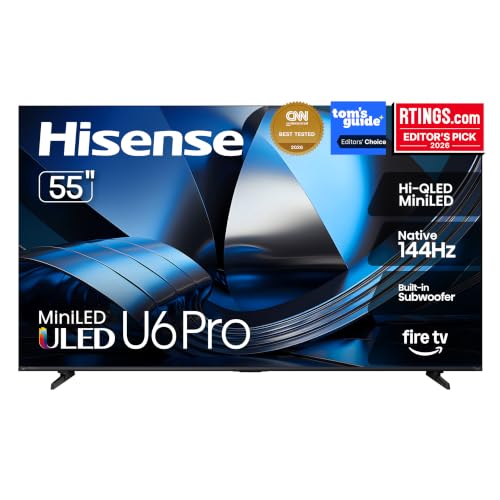
The U6 Pro’s verified title is the most gaming-literate in this guide: a 55-inch Mini-LED ULED Fire TV with Hi-QLED colour, a native 144Hz panel, Motion Rate 480 in the maker’s motion terminology, Dolby Vision IQ and Atmos, HDR10+ — and, unusually for a gaming set, Glare-Free stated right in the title. That combination describes a screen specified for the room gaming actually happens in: a den or bedroom with a window, a lamp and a console, where refresh rate and reflection control are worth as much as each other.
The 2026 U6 Pro positioning — an AI gaming smart TV in the maker’s framing — puts its processing where players feel it: motion handling for fast titles, picture intelligence for the mixed diet of games, streams and sport that a 55-inch den screen serves. Fire TV as the platform suits households already inside Amazon’s ecosystem, with the convenience that implies for voice control and app continuity.
Verification notes follow the house rule: the 144Hz and Glare-Free claims are the title’s own, quoted as such, while port bandwidth and lag figures belong to Hisense’s documentation. What the title alone establishes is a rare alignment — a value-tier Mini-LED that states its refresh rate and its glare defence in the same breath, aimed at the bright small room that the flagship OLEDs serve only at flagship effort.
- Panel: 55-inch Mini-LED ULED, 4K UHD HDR per the listing title
- Refresh stated in the title: native 144Hz, Motion Rate 480
- Reflection handling: Glare-Free stated in the listing title
- HDR: Dolby Vision IQ, Atmos, HDR10+ per the listing title
- Platform: Fire TV, Alexa+ per the listing title
- Port bandwidth and lag figures: verify with the maker’s documentation
Strengths
- Native 144Hz and a stated Glare-Free finish in one value-tier package.
- Dolby Vision IQ adapts HDR to the bright rooms this set is built for.
- Fire TV integration suits Amazon-centred households.
Trade-offs
- Mini-LED blacks and response trail the OLED pair in dark play.
- Fire TV’s promoted interface is a matter of household taste.
- Gaming port specifics require the documentation check this guide keeps recommending.
Best for: bright dens where one 55-inch screen must game hard and shrug off windows.
Not suited for: dark-room players who want per-pixel blacks above convenience.
Consider the den this set will actually inhabit: a desk in the corner, a bookshelf, one window with a blind that has not closed properly since spring. The U6 Pro was specified for that room by people who appear to have visited it. Its brightness holds the picture together at midday, its finish breaks the window’s reflection into a haze the eye can ignore, and its refresh rate keeps the evening’s gaming crisp after the same screen has spent the day on streams and sport. Versatility at 55 inches rarely arrives this well documented.

Hisense E7 Cinema 55-Inch — Cinema-leaning gamer
The E7 Cinema closes the list with a name that admits its double life. Its verified title states a 55-inch Hi-QLED Mini-LED Fire TV with a native 144Hz panel, AI Picture processing, Dolby Vision IQ and Atmos, full-array local dimming, HDR10+ Adaptive and MEMC motion handling. Read as a gaming specification, the 144Hz panel and the dimming array do the heavy lifting; read as a cinema specification, the HDR breadth and the maker’s Cinema branding describe a set tuned to flatter films on the nights the console rests.
That balance is the E7’s argument against its own sibling above. The U6 Pro states the glare defence and the gaming-forward positioning; the E7 states the cinema lineage and the adaptive HDR, with HDR10+ Adaptive adjusting to the room in the same spirit as Dolby Vision IQ. A household that games seriously but loves film equally — the commonest household of all, whatever the forums suggest — may find the E7’s priorities match its evenings more closely.
House discipline applies one final time: the refresh figure is the title’s, quoted as printed, and port-level gaming specifications belong to Hisense’s documentation. Judged on what its listing establishes, the E7 Cinema is the list’s diplomat — a stated high-refresh panel for the console, a stated cinema intent for the sofa, and a 55-inch size that keeps both lives in the same comfortable room.
- Panel: 55-inch Hi-QLED Mini-LED, 4K UHD per the listing title
- Refresh stated in the title: native 144Hz
- Dimming: FALD (full-array local dimming) per the listing title
- HDR: Dolby Vision IQ, Atmos, HDR10+ Adaptive, MEMC per the listing title
- Platform: Fire TV, Alexa+ per the listing title
- Port bandwidth and lag figures: verify with the maker’s documentation
Strengths
- A stated 144Hz panel paired with an explicitly cinema-leaning tuning.
- Adaptive HDR formats suit rooms whose light changes across the evening.
- Full-array dimming keeps dark film scenes respectable after gaming hours.
Trade-offs
- No glare treatment is stated in its title, unlike its U6 Pro sibling.
- Backlit response cannot match OLED at the pixel level.
- Its dual focus means dedicated gamers may prefer the U6 Pro’s stated brief.
Best for: households split evenly between game nights and film nights.
Not suited for: players who want a screen that thinks only about gaming.
There is a budget-of-attention argument for the E7 as well. A household with one screen and two religions — the console and the cinema — usually ends up optimising for whichever shouts loudest, and resenting the other. The E7’s specification refuses the choice in writing: high refresh for the games, adaptive HDR and dimming for the films, a name that promises the second life rather than apologising for it. Buyers tired of apologising to one half of their household will recognise the diplomacy as the feature it is.
How Do the Six Compare Side by Side?
| Model | Panel | Size | Stated gaming evidence | Character |
|---|---|---|---|---|
| Sony BRAVIA 7 | Mini-LED | 55-inch | PS5 Features in title | Console-synergy flagship |
| LG C4 | OLED evo | 55-inch | Verify in documentation | Response and blacks benchmark |
| Samsung S90H | OLED | 55-inch | Verify in documentation | Glare Free bright-room OLED |
| TCL QM6K | Mini-LED | 65-inch | 144Hz in title | Big-screen value |
| Hisense U6 Pro | Mini-LED | 55-inch | Native 144Hz, Glare-Free in title | Bright-den all-rounder |
| Hisense E7 Cinema | Mini-LED | 55-inch | Native 144Hz in title | Cinema-leaning gamer |
What Happens When the Household Adds a Second Machine?
Few gaming rooms stay single-console for long. A PC arrives, a second console follows, a streaming box claims a port, and suddenly the television’s port count and its per-input memory become the household’s peace treaty. Screens that remember separate picture settings per input — game mode here, film mode there — spare their owners a nightly renegotiation, and buyers planning a multi-machine corner should verify that behaviour and the full-bandwidth port count in the maker’s documentation with the same care they give the panel. The picks in this guide come from ranges where such multi-device life is the design assumption, but the exact port map is a per-model fact, and this guide’s refrain applies: confirm it in writing.
Cable discipline scales with the same growth. Label both ends of every lead, keep the console’s full-bandwidth cable the shortest and best in the rack, and resist the bargain bin of unbranded leads whose failures present exactly like panel faults. More gaming televisions have been returned for cable sins than for any defect of their screens, and the owners who label their wiring are the ones whose setups survive a house move, a new soundbar and a curious toddler with their settings intact.
Why Does the Room Matter as Much as the Refresh Rate?
Players shop for panels and play in rooms, and the room keeps voting. A glossy screen in a bright den spends its life fighting a window reflection that no refresh rate can outrun; a dim panel in a sunlit room flattens the HDR the console worked to render; a screen placed too high or too far turns the finest pixel response into an ergonomic complaint by the second hour. The picks in this guide were therefore read against rooms as much as against specifications — hence a stated Glare Free OLED, a stated Glare-Free Mini-LED, and sizes chosen for the distances real chairs sit at.
Seating distance deserves the player’s particular honesty. Competitive and immersive play both happen close — closer than film viewing — because the eye wants the game’s detail and the hands want the screen inside the same attention. At those distances, 55 inches at 4K is a density luxury, and 65 inches is an immersion choice that asks the room for a little more depth. Measure the chair-to-screen distance you will actually keep, not the one in the furniture catalogue, and let it arbitrate between the 55-inch majority of this list and the TCL’s bigger canvas.
Light control, finally, is the cheapest gaming upgrade in this entire guide. A blackout blind for one window, a lamp moved behind the seating, a door left closed against the hallway’s glare — each buys picture quality that a tier of panel pricing would envy. Do the room first, then the screen, and the screen you buy will be graded on its merits instead of its circumstances.
How Do Performance and Quality Modes Change What the Panel Must Do?
Modern PS5 titles routinely offer a choice: a performance mode that pursues higher frame rates, and a quality mode that spends the budget on resolution and effects at a steadier thirty or forty frames. The screen’s job differs by mode. Performance modes reward refresh headroom and variable refresh, turning the panel’s stated 120Hz-class or 144Hz capability into visible smoothness. Quality modes reward HDR handling, dimming discipline and raw panel quality, because a locked lower frame rate throws the burden onto each individual frame’s beauty. A complete gaming television serves both philosophies, which is why this guide pairs refresh-stated Mini-LEDs with response-perfect OLEDs rather than crowning one approach.
The practical advice is to audition both modes on any pick you are courting. A racing title’s performance mode will grade motion; a flagship adventure’s quality mode will grade tone mapping and shadow detail; and the same television can win one test and merely pass the other. Players who live in one mode should weight accordingly — the refresh-stated picks for the performance loyalist, the OLEDs and the BRAVIA 7 for the quality-mode devotee — and players who switch by title should buy the balance, which is the honest centre of this list.
Audio latency belongs in this section too, as the mode nobody auditions. A soundbar or receiver in the chain can delay the game’s audio against its picture, and the television’s passthrough settings decide whether the two stay married. Check the eARC and passthrough configuration for the gaming input during setup week, while a rhythm game or a dialogue-heavy cutscene can still grade your work honestly.
How Do You Set Up a PS5 and Its Screen on the First Night?
Begin with the cable and the port, because more gaming televisions are betrayed by their wiring than by their panels. Use the cable that came with the console, connect it to the port the maker designates for full-bandwidth signals, and enable that input’s enhanced format setting in the television’s menu — many sets ship each port in a compatibility mode that quietly limits what the console can send. Then let the television’s game mode engage, automatically or by hand, and confirm it has: the difference in responsiveness is the first thing your thumbs will grade.
While the menus are open, name the input. Every platform in this guide lets you label a port, and a screen that calls the console by its name saves the household a small daily friction and prevents the classic error of a guest switching to the wrong source and concluding the machine is broken. Setup is a chain of such small mercies; the first night is when they are all within reach at once.
Run the console’s own HDR calibration screens next, slowly, in the room’s real lighting, and resist the urge to make the test symbols barely visible by guesswork — follow the on-screen instruction literally, because the console and the television are negotiating a tone map that every game will inherit. Set the television’s game preset to its accurate variant if one is offered, temper any motion interpolation the preset leaves on, and check a dark game and a bright one before declaring victory. Finish with the unglamorous settings: automatic low-latency switching on, eco brightness limits off for the gaming input, and the console’s output information screen read once, carefully, to confirm the handshake you intended is the handshake you got.
Give the setup a week before judging it, and judge it with your library rather than with test patterns. Old favourites are the honest examiners: the racer whose corners your thumbs know blind, the adventure whose opening vista you have seen on three screens. If those feel newly alive — quicker, deeper, steadier — the pairing is right, and the settings should then be left alone with a discipline most players find harder than any boss fight. Fiddling is the tax on a good setup; a week of restraint is how you stop paying it.
Which Mistakes Do Console Buyers Make With a New Screen?
The first is buying a specification the console cannot use, or refusing one it can: read what the PS5 actually outputs, then match the panel to it, rather than shopping for the largest number on the box. The second is plugging the console into the wrong port or leaving the right port in its limited mode, then reviewing the television harshly for a wiring decision. The third is judging game mode by a showroom’s vivid preset, which is precisely the mode no careful player uses.
An eighth mistake is quieter and sadder: buying the screen for the player you were five years ago. Genres change, eyes change, the household’s centre of gravity moves from midnight sessions to family evenings, and a television chosen for a ghost will serve the living imperfectly. The picks above were described against present-tense lives for exactly this reason — read them against yours, as it is this year, and the right one tends to introduce itself.
Fourth, buyers skip the console’s HDR calibration and blame the panel for a handshake they never completed. Fifth, they place a glossy screen opposite a window and call the reflections a panel defect. Sixth, they forget the second life: a screen bought purely for gaming that disappoints on film night will be resented by the whole household, which is why every pick in this guide had to pass as a television before it was allowed to pass as a gaming display.
Seventh, they chase a monitor’s habits in a television’s body — sitting a 65-inch screen at desk distance and wondering why the experience fatigues — or the reverse, parking a 55-inch screen across a hall-sized room and calling its detail underwhelming. The console does not care about your furniture, but your eyes do, and the picks above were sized for the distances their buyers actually keep. Match the distance first and the rest of the specification falls into its proper, smaller place.
What Should a Player Look for in the Console’s Own Output Screen?
The PS5 keeps an information page that reports exactly what it is sending and what the television has told it the screen can accept — resolution, refresh behaviour, HDR format, colour depth. That page is the buyer’s lie detector, and it should be read on day one and after every change of cable, port or soundbar arrangement. If the page reports a lesser mode than the pairing should support, the fault lives in the chain — a limited port setting, an elderly cable, a receiver passing through yesterday’s standard — and the fix is almost always a menu, not a purchase.
Keep a note of the page’s healthy state, photographed on a phone, because future troubleshooting then has a baseline. When a firmware update, a new device or a helpful relative’s rearrangement quietly demotes the connection six months later, the photograph turns an evening of suspicion into a five-minute restoration. Gaming setups are systems, and systems reward the owner who writes down what working looked like.
How Should a Player Think About the Next Five Years of the Console?
A television bought for a PS5 is really bought for the console’s whole arc: the launch-era catalogue already behind us, the mature years ahead when developers squeeze the hardware hardest, and the late-generation masterpieces that historically define a machine. Those late titles are the argument for headroom — higher frame-rate modes, more ambitious HDR, heavier worlds — and for buying the panel a tier above the minimum the current catalogue demands. Every pick in this guide was chosen with that arc in mind, which is why stated refresh rates and console-specific features weigh so heavily in the ordering.
Firmware is the other half of the future. Consoles and televisions both evolve by update across a generation: features arrive, handshakes improve, tone mapping is refined. A set from a range with an active update culture — and all six makers here maintain one — ages more gracefully than its specification suggests. Keep the television’s firmware current, re-run the console’s HDR calibration after any major update on either side, and the pairing you set up in week one will keep quietly improving instead of quietly drifting apart.
Final Recommendation
Let the room and the library referee. A PS5-first household that wants the console and screen to speak the same language takes the Sony BRAVIA 7. A player who grades by response and darkness takes the LG C4; the same player in a bright room takes the Samsung S90H. A big-screen household on a value brief takes the TCL QM6K, a bright den takes the Hisense U6 Pro, and a household split between games and films takes the E7 Cinema. Verify the port figures in the maker’s documentation, wire the console like you mean it, and any of the six will make the machine look like the generational leap it was sold as.
One closing thought for the player still torn between two finalists: choose the screen whose weakness your room hides. The OLED’s modest brightness disappears in a curtained den; the Mini-LED’s haloing disappears in a lit room; the value pick’s documentation homework disappears after one careful evening. Weaknesses that a room conceals are not weaknesses at all, and the player who shops that way ends up with a setup that feels, night after night, less like a compromise and more like a conspiracy between the console, the screen and the chair — which is all a gaming television was ever supposed to be.
Frequently Asked Questions
Do I need HDMI 2.1 for a PS5?
For the console’s high-frame-rate modes at 4K, full-bandwidth connections are the enabling technology, which is why this guide treats port specification as a verify-before-buying item in each maker’s documentation rather than asserting figures the listing titles do not state. At 60Hz the console is far less demanding, and every pick here serves that life comfortably. If a seller’s page promises a specific port configuration that the maker’s own documentation does not repeat, believe the documentation — it is the document the warranty will eventually be read from on the one single day when it truly matters the very most.
Is 120Hz or higher worth it if most games run at 60 frames per second?
Yes, as headroom. Performance modes in major titles increasingly offer higher frame rates, variable refresh smooths the dips in the rest, and a panel bought today should serve the whole console generation. The titles that state 144Hz in this guide are selling exactly that headroom in writing. Think of it as buying the second half of the generation in advance: the games that will use the headroom have not all been announced yet, and the screen that waits for them will not need replacing when they arrive.
OLED or Mini-LED for a gaming room?
OLED for response, blacks and angles in a room whose light you control; Mini-LED for brightness and ease in a room you cannot or will not darken. The S90H and U6 Pro exist for the large middle ground, carrying stated glare defences into rooms that defeat a standard glossy panel. Genre helps the decision too: horror, stealth and cinematic adventures vote OLED with their darkness, while bright racers, sports titles and animated worlds are gloriously indifferent to the panel war and simply enjoy whichever screen is bigger, brighter or closer. Your library, honestly inventoried on a Sunday afternoon, will usually settle the argument before the specifications finish speaking at all.
What should I check during the first week of PS5 play on a new TV?
Confirm the console’s output information matches the mode you intended, play one dark title and one fast title from your usual seat, and check for reflections at your usual playing hour. Then watch a film. A screen that passes all four has earned its place; a screen that fails one has told you exactly which setting, cable or curtain to fix. Keep the maker’s documentation for the port figures you verified, filed with the receipt, because the day a second console or a soundbar joins the rack, that page becomes the map of what your screen promised you on the very first day it arrived home.
Does screen size matter for competitive play?
At these sizes, proximity matters more than diagonal. A 55-inch screen at a close, desk-like distance fills the view like a larger one across a room, with better pixel density for fine detail. Choose the size your seating distance flatters, and let the panel’s response do the competitive work. Players who compete seriously often end up closer and smaller than the room’s film watchers, and a household negotiating both habits should let the gaming chair’s tape measure speak first, since it is the less forgiving of the two. Your neck, consulted after an hour, will confirm the measurement better than any chart.
Related Guides
Keep reading with our flagship survey of 4K televisions ranked on picture quality alone, the bright-room guide to glare control and wide viewing angles, and our desk-focused roundup of small 4K screens that double as PC monitors.
Related guides
- Best 1080p IP Cameras: PoE Domes, Turrets, Bullets and a PTZ That Earn Their Cable
- Best 43 1080p TVs: Why 43 Inches Went 4K — and Where True Full HD Survives
- Best Doorbell Cameras No Subscription: Local Storage Picks, and the Ring/Blink Truth
- Best AC Powered Wireless Security Cameras: Wi-Fi Data, Mains Power, Zero Sleep


