Our Top Picks
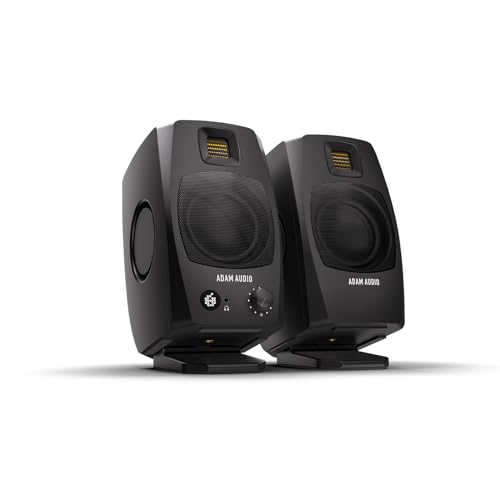 ADAM Audio D3V Active Desktop Studio Monitor Speakers8.507.88 x 4.5 x 9.5 inches7.89 poundsCheck on Amazon
 IK Multimedia iLoud Micro Monitor 50 watt Portable5.31 x 3.54 x 7.09 inches3.8 poundsCheck on Amazon
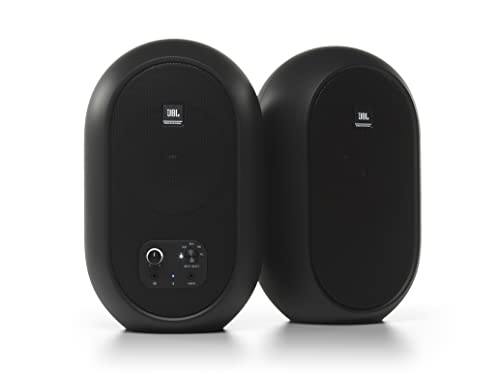 JBL Professional 1 Series 104-BT Compact Desktop Reference9.004.88 x 6.02 x 9.72 inches1 poundsCheck on Amazon

What's inside
- What compact really means in a nearfield monitor
- Reading frequency response figures without being misled
- Front port or rear port, and the wall behind your desk
- Power, headroom and what wattage figures actually promise
- Tweeters, waveguides and the shape of the sweet spot
- Balanced and unbalanced connections, explained for a desk setup
- Accuracy at low volume, where most home mixing happens
- Placement geometry that costs nothing and changes everything
- Minimal acoustic treatment for a room that stays a bedroom
- Room controls and DSP: the rear panel as part of the design
- The main model families, class by class
- Adding a subwoofer later without ruining the balance
- Gain staging and daily workflow with an interface
- Translation: judging a monitor by where mixes end up
- Common buying mistakes with small monitors
- Care, longevity and living with the speakers
- A shortlist logic for three kinds of small room
- Check prices on Amazon
- Disclosure and how this guide was assembled
As an Amazon Associate I earn from qualifying purchases. This post may contain affiliate links at no extra cost to you.
A compact studio monitor earns its place by telling the truth at close range, in a room that was never built for recording. Most small bedrooms, spare rooms and desk corners share the same constraints: a short listening distance, a wall close behind the speakers, neighbours on the other side of thin plaster, and a desk surface that reflects sound straight back at the ears. A large monitor in that setting is not automatically more accurate. Its woofer needs distance to integrate with the tweeter, its cabinet excites more low frequency energy than the room can absorb, and its output tempts the listener into levels that make every judgement about balance unreliable. The small nearfield, used within its limits, solves a different and more honest problem.
This guide works through the decisions that actually separate one small monitor from another: woofer diameter between three and five inches, the shape and honesty of the published frequency response, whether the bass reflex port fires forward or backward, amplifier power and headroom, balanced and unbalanced wiring, and behaviour at the quiet levels most home producers use after dark. It draws on specifications published by the manufacturer for each design discussed, on established acoustics for small rooms, and on the comparison below rather than on impressions gathered at showroom volume. Nothing here requires a treated studio. It does require placing the speakers with care and knowing which compromises a small cabinet cannot escape.
What compact really means in a nearfield monitor
Manufacturers use compact loosely, so a working definition helps. In this guide the term covers powered two way monitors with a woofer between three and five inches, a cabinet shallow enough to sit on a desk or a short stand, and a recommended listening distance roughly between seventy centimetres and one and a half metres. That distance matters more than any single specification. At one metre, the direct sound from the drivers reaches the ears well before most reflections, the stereo image locks into focus, and modest output is plenty. Move the same speaker three metres away in a living room and its small woofer runs out of travel, its amplifier clips earlier, and the room takes over the low frequencies entirely.
Nearfield listening began in commercial studios as a corrective habit. Engineers who mixed on large soffit mounted mains would check balances on small speakers placed on the meter bridge, close enough that the console and the near wall mattered less than the recording itself. The domestic version of that habit is simply more realistic for most people now. A pair of five inch monitors on a desk, aligned to ear height, fed from an audio interface at sensible gain, gives a repeatable reference that headphones alone cannot provide, because it preserves how sounds combine in air and how panning decisions occupy physical space between two points.
Cabinet volume is the hidden variable behind woofer size. Air inside the enclosure acts as a spring that the woofer works against, and a deeper, better braced box generally supports cleaner low frequency output than a shallow plastic shell of similar driver diameter. Two monitors can both claim a five inch woofer while differing noticeably in weight, depth and low end composure. Published dimensions and mass, printed on every specification sheet, are worth reading alongside the driver size, because they reveal how much enclosure the designer had to work with and whether the product was built primarily for a desk or for a shelf in a lifestyle photograph.
- Three inch designs prioritise footprint and speech clarity, accept the steepest low frequency roll off, and suit editing, podcast dialogue and video work.
- Three and a half inch designs add a little cabinet volume and bass weight while staying easy to place on crowded desks.
- Four inch designs often bring better amplifiers and room controls, narrowing the gap to larger models at close range.
- Five inch designs deliver the most usable low frequency information of the group and remain the default starting point for music production at home.
Reading frequency response figures without being misled
Every monitor specification sheet quotes a frequency range, and few numbers in audio are quoted so inconsistently. One brand prints the range within a tolerance of three decibels, another prints the points where output has fallen by ten decibels, and a third prints an anechoic figure beside a separate in room estimate. A speaker listed as reaching forty five hertz at minus ten decibels may produce less audible bass than a rival listed at fifty eight hertz within a tight three decibel window. The tolerance is the story. Without it, the two end numbers describe marketing ambition rather than acoustic behaviour, and comparing ranges across brands becomes meaningless arithmetic.
The Yamaha HS5 illustrates a comparatively transparent approach, with a published response from fifty four hertz to thirty kilohertz and a crossover at two kilohertz between its five inch cone and one inch dome. The JBL 305P MkII quotes forty nine hertz to twenty kilohertz with a wider tolerance and relies on a slipstream port and an image control waveguide to shape its presentation. The Genelec 8010A, smaller than both, states sixty seven hertz to twenty five kilohertz within two decibels, an unusually strict window that explains why its low end sounds modest on paper yet orderly in practice. Reading the tolerance first and the extremes second reverses the usual shopping habit and produces far better shortlists.
Flatness through the midrange deserves more attention than extension at either extreme. Vocals, guitars, snare drums and most melodic instruments live between roughly three hundred hertz and four kilohertz, and a monitor that stays even through that span lets a mix translate to earbuds, cars and televisions with fewer surprises. Small peaks near the crossover region, often visible on independent measurement graphs, can push voices forward or pull them back in ways that encourage wrong equalisation decisions. A gentle, broad response trend is easier to learn and to compensate for mentally than a jagged one with impressive headline figures, which is why experienced engineers often keep modest speakers for years once their ears have mapped every quirk.
Low frequency roll off in a compact cabinet follows physics rather than fashion. A three inch woofer in a sealed or ported box of a few litres cannot reproduce forty hertz at useful level without enormous excursion, distortion and port noise. Designers therefore protect the driver with a high pass slope and accept that kick drum fundamentals and deep synth notes will be suggested by their harmonics instead of reproduced in full. That suggestion is psychoacoustically convincing at close range, which is why small monitors remain musically satisfying, but a mix decision about sub bass content made on them is an inference. Checking that region on headphones, or later through a subwoofer, closes the gap honestly.
Front port or rear port, and the wall behind your desk
Bass reflex loading uses a tuned tube or slot to extend low frequency output from a small enclosure, and the position of that opening changes how the speaker behaves near boundaries. A rear ported cabinet, such as the Yamaha HS series, needs clear air behind it. Placed almost touching a wall, the port output couples with the boundary, low frequencies swell unevenly, and in extreme cases the airflow becomes audible as chuffing on bass heavy passages. Manufacturers of rear ported designs commonly recommend at least twenty to thirty centimetres of clearance, a distance many desks pushed against a wall simply cannot offer without pulling the whole workstation forward.
Front ported designs move the opening beside the woofer, where its output joins the direct sound and placement against a wall becomes far less punishing. The KRK Rokit Generation Five range uses a front firing slot, as do the small Kali Audio LP-UNF and the Presonus Eris desktop lines, and each is marketed partly on that flexibility. Front porting is not free of compromise: the slot occupies baffle area, its output can carry midrange leakage if the tuning is careless, and at very high levels a small front port can still generate turbulence. For a desk that must stand flush to a wall, though, the practical advantage outweighs those caveats in most rooms.
Boundary reinforcement deserves a number. Every nearby surface adds low frequency energy, with a speaker close to one wall gaining roughly three decibels in the bass region and a corner placement gaining considerably more. Compact monitors include boundary compensation switches precisely because designers expect these placements. Yamaha labels the control Room Control and offers attenuation steps for the low shelf, Adam Audio provides desktop and position filters on the rear panel of the T5V, and Genelec builds a tabletop dip and bass tilt into its small models. Using those switches is not an admission of failure. It is the intended second half of the design, completing in the room what the factory could only begin in an anechoic chamber.
Side walls and the desk itself count as boundaries too. A monitor pushed into the corner of an L shaped desk reflects energy off two planes and the desktop simultaneously, producing a thickened lower midrange that no equaliser setting fully untangles. Centring the pair on the desk, keeping equal distance from side walls, and lifting the cabinets on foam pads or short stands so the tweeters aim at ear level removes most of that congestion before any electronic correction is considered. Symmetry is the cheapest acoustic upgrade available, because the brain judges stereo accuracy by comparing left and right arrivals, and an asymmetric placement guarantees that comparison starts out distorted.
Power, headroom and what wattage figures actually promise
Amplifier ratings in compact monitors are usually quoted per speaker as a combined figure for both internal amplifiers, and the split between woofer and tweeter tells the more useful story. The Yamaha HS5 totals seventy watts, divided as forty five for the low frequency driver and twenty five for the tweeter. The JBL 305P MkII uses two forty one watt class D amplifiers for eighty two watts in total. The Adam Audio T5V reaches seventy watts across its woofer and tweeter amplifiers. These are broadly similar budgets of power, and at a one metre listening distance each produces clean peaks well beyond comfortable domestic levels. Wattage alone, detached from sensitivity and maximum sound pressure level, ranks almost nothing.
Maximum output figures, quoted in decibels at one metre, allow fairer comparison. Small three inch designs typically peak a little above one hundred decibels per pair at close range, while competent five inch models reach several decibels higher with lower distortion at a given level. Headroom matters less for average loudness than for transients: a snare hit or a plucked bass note demands brief power far above the programme average, and an amplifier near its limit rounds those peaks off, subtly compressing the very dynamics a mix engineer is trying to judge. Choosing a monitor that works comfortably at seventy five to eighty decibels at the listening position, with capacity in reserve, protects those transients and extends the life of the drivers.
Readers comparing raw amplifier claims across categories may also find our overview of best 100 watt studio monitors useful, since larger designs spend their power budget differently and illustrate why a watt figure means little without cabinet size and sensitivity beside it. Class D amplification dominates this segment now because it runs cool inside sealed cabinets, draws modest current, and packs substantial output into a small chassis. Its arrival removed the old trade off between compact enclosures and adequate power, and it explains why modern three inch monitors can fill a small room convincingly where their predecessors sounded strained and thin at similar size.
- Bi amplification gives each driver its own amplifier and an active crossover before the power stages, reducing intermodulation compared with a single amplifier and a passive network.
- Limiters in many powered designs guard against clipping damage, although regular reliance on them signals that the speakers are undersized for the room or the level.
- Standby draw and auto wake functions vary between brands and matter for desks that stay powered around the clock.
- Heat from class AB designs such as some older desktop models can be noticeable in summer and argues for ventilation space behind the cabinet.
Tweeters, waveguides and the shape of the sweet spot
High frequency drivers in this class divide into domes of silk, metal or composite material, ribbon and folded motion designs, and the small horns or waveguides that control their dispersion. Adam Audio builds its reputation on the U-ART accelerated ribbon tweeter in the T5V, which extends response toward twenty five kilohertz and presents detail with a character many listeners describe as open rather than sharp. Yamaha voices the HS5 with a one inch dome that keeps the upper midrange deliberately plainspoken, continuing a house approach inherited from the NS-10 era, where an unflattering midrange was the point rather than a flaw. Neither approach is universally correct; each trains the ear differently and rewards a period of familiarisation before judgement.
Waveguide geometry quietly determines how forgiving a monitor feels during a long session. JBL shapes the tweeter output of the 305P MkII with a broad waveguide derived from its larger mastering monitors, widening the horizontal listening window so that small head movements do not collapse the stereo image. Genelec machines its small cabinets with a directivity control waveguide that blends woofer and tweeter output into a coherent wavefront, which is one reason the tiny 8010A maintains focus on a cluttered desk between a screen and a stack of drives. Narrow dispersion can sound precise at a fixed position yet punishing across a shared desk, so households where two people listen together should weigh dispersion width as seriously as response flatness.
Coaxial designs attack the integration problem from another direction by placing the tweeter at the centre of the woofer, so both sources occupy nearly the same point in space. Kali Audio applies this idea in its compact LP-UNF with a concentric driver arrangement, and the benefit at very short distances is real: vertical head movement changes the tonal balance far less than with vertically separated drivers, and a single speaker used for dialogue editing stays intelligible off axis. The trade off is engineering complexity inside a crowded cone area, but for editors working within arm’s reach of the screen, coaxial geometry solves the exact problem their posture creates.
Balanced and unbalanced connections, explained for a desk setup
Most compact monitors offer a combination of balanced XLR or quarter inch TRS inputs and an unbalanced RCA or 3.5 millimetre input, and the distinction is electrical rather than snobbish. A balanced connection carries the signal on two opposed conductors inside a shield, so interference picked up along the cable run arrives identically on both and is cancelled at the receiving input. Over the short distances of a desktop the benefit is modest but real, particularly near computer power supplies, LED lighting dimmers and the thicket of switching adapters behind a typical desk, all of which radiate the buzz and hash that unbalanced wiring collects faithfully.
An audio interface with balanced outputs is therefore the natural partner for monitors in this class, and gain staging between the two deserves a moment of care. Set the monitor input sensitivity so that the interface operates in the middle of its output range at normal listening level, rather than running the interface near maximum into speakers turned almost fully down, or the reverse. Either extreme wastes resolution or invites noise. Many small monitors provide a stepped or continuous level control on the rear panel, and a few desktop oriented models add a front volume knob shared across the pair, which suits video editors who ride level constantly and dislike reaching behind cabinets.
The choice of source feeding the monitors matters as much as the cable standard, and readers assembling a chain from scratch will find the signal path clearer after reviewing best sound cards for studio recording, where output level, driver stability and conversion quality are compared for the devices that typically sit between a computer and a pair of powered speakers. A headphone output pressed into service as a monitor feed works in an emergency, but its low output level, shared volume with the headphone socket and occasional channel imbalance at low settings make it a compromise to retire once a dedicated interface is in place.
Bluetooth appears on several desktop monitors, including versions of the Presonus Eris line and the Mackie CR series, and it serves casual listening well. For production work its latency complicates playing software instruments and its codecs alter the signal in ways that vary between phones and computers, so a wired feed should remain the reference path even when wireless convenience is available. Similarly, USB inputs on a handful of compact designs bypass the computer sound hardware entirely and can be the cleanest option in an electrically noisy office, provided the monitor internal conversion is competent and the operating system recognises the device without extra drivers.
- XLR connectors latch, resist accidental removal and remain the studio standard for balanced runs of any length.
- TRS quarter inch carries the same balanced signal in a smaller footprint and shares sockets with unbalanced TS plugs on many combo inputs.
- RCA suits consumer sources and turntables through a phono stage, accepting higher noise risk on long runs.
- 3.5 millimetre aux inputs on the front of desktop models are handy for a phone check of how a mix survives a small speaker feed.
Accuracy at low volume, where most home mixing happens
Human hearing does not stay flat as level falls. The equal loudness research associated with Fletcher and Munson, later refined into ISO 226, shows that sensitivity to deep bass and extreme treble drops sharply at quiet levels while the midrange remains comparatively audible. A mix balanced at sixty five decibels therefore seems bass light when later played loudly, and the inexperienced response is to add low end that a fuller level would reveal as excess. Compact monitors cannot repeal this physiology, but designs with well behaved response at low excursion, low self noise and smooth level controls make quiet work far more trustworthy than designs that only compose themselves when driven hard.
Self noise is the specification nobody advertises and everybody hears at midnight. Amplifier hiss audible from the listening position indicates gain staging trouble or an intrinsically noisy design, and in a small room at low volume it masks reverb tails, fades and the dither noise floor of quiet recordings. Genelec and Neumann publish unusually disciplined noise figures for their small models, and the Kali LP-UNF was engineered with near silent idle behaviour as an explicit goal for desktop use. Before blaming a speaker, though, raise the source level and lower the monitor gain: hiss that falls with that change originates upstream, while hiss that stays constant belongs to the monitor amplifier itself.
Loudness compensation features, borrowed from hi-fi, appear occasionally in desktop audio and should be treated with caution for production. A control that boosts bass and treble at low settings can make casual listening more satisfying, and for editing dialogue or arranging parts it does little harm. For final balance decisions it inserts a moving target between the recording and the ear. The safer discipline is to check each mix briefly at two or three levels, note how the vocal sits against the accompaniment at the quietest one, and accept that a balance which survives level changes is usually the balance that survives different playback systems in the outside world.
Placement geometry that costs nothing and changes everything
The classic nearfield arrangement places the two monitors and the listener at the corners of an equilateral triangle, with tweeters at ear height and cabinets angled inward so their axes cross slightly behind the head. In a compact room the triangle side often lands between eighty centimetres and one point two metres, and small deviations matter less than symmetry and height. A tweeter firing at chest level tilts the perceived balance toward dullness, encourages compensating brightness in every mix, and narrows the vertical window in which the two drivers sum correctly. Raising a small monitor on a stack of books as a temporary measure will demonstrate the effect within a minute of listening.
Distance from the front wall shapes the bass response through a phenomenon often called speaker boundary interference. The reflection from the wall behind the speaker rejoins the direct output and cancels a band whose centre depends on the gap: a larger gap pushes the cancellation lower, a smaller one pushes it into the lower midrange where it thins voices and bass guitars. Compact monitors soften the dilemma because their natural low frequency roll off reduces the energy available to cancel, and their supplied boundary switches trim the reinforcement that remains. Experimenting with gaps of ten, twenty and forty centimetres while listening to a familiar recording usually finds a position where the bass sounds least hollow, and that position is worth marking with tape.
Decoupling the cabinet from the desk addresses a different artefact. A powered monitor bolted acoustically to a wooden desktop turns the whole surface into a sounding board, adding a boxy emphasis around the lower midrange and smearing transients with delayed energy. Foam isolation pads, short desktop stands and purpose built decouplers all break that mechanical path, and the improvement is most obvious on speech, where consonants sharpen, and on acoustic guitar, where body resonance separates from string attack. Readers shortlisting the smallest cabinets for tight desks will find a useful companion comparison in best 3 inch monitor speakers, which concentrates on models built for exactly that footprint.
Screens complicate placement in ways older studio advice never anticipated. A large display between the monitors reflects high frequencies, blocks the direct path if the cabinets sit too low, and tempts the speakers outward until the stereo triangle widens beyond coherence. Keeping the top of the screen at or below tweeter height, or raising the monitors on stands behind the desk so they fire over the display, preserves the geometry. Ultrawide displays push speakers especially far apart, and in that situation a slightly narrower triangle with stronger toe in usually images better than a wide pair aimed straight ahead at the side walls.
Minimal acoustic treatment for a room that stays a bedroom
Treatment advice for compact setups should begin with what the room already owns. A bed, a rug, curtains and a bookshelf full of uneven spines absorb and scatter a surprising amount of midrange and high frequency energy, which is why many spare room studios sound acceptable with no purchased panels at all. The remaining problems concentrate at the first reflection points on the side walls and ceiling, where a bare surface returns a strong, early copy of the direct sound that blurs imaging and combs the frequency response. Two modest absorptive panels at those points, or even heavy cushions placed temporarily during a session, tame the effect without converting the room into a facility.
Bass behaves differently and resists cheap fixes. In a small room, standing waves set by the dimensions create seats where low notes boom and seats where they vanish, and thin foam does almost nothing at those wavelengths. Corner placement of bulky soft furnishings helps slightly, moving the listening position out of the worst null helps more, and keeping monitor bass output modest helps most of all, which loops back to the central argument for compact speakers in compact rooms. Accepting a lighter low end at the mix position, then verifying sub bass content on headphones, is a rational workflow rather than a defeat, and many released records have been balanced under exactly that arrangement.
Measurement microphones and room correction software have dropped into domestic reach and can genuinely help a compact setup, provided their role is understood. Software such as the DSP built into the Neumann KH 80 DSP or the room adaptation in Genelec small models adjusts the monitor output for boundary and broad room effects below a few hundred hertz, where correction works reliably. Above that region, aggressive correction chases reflections that change with every head movement and can leave the direct sound worse than it started. Used with restraint, limited to broad low frequency adjustments and verified by ear on familiar recordings, correction is a legitimate final step after placement and furnishings have done the heavy lifting.
Room controls and DSP: the rear panel as part of the design
Nearly every compact monitor carries some form of tonal adjustment, and the differences between implementations reveal how seriously each maker treats small room deployment. Simple designs offer a high frequency trim and a bass switch with one or two positions. More thorough designs, including the Adam Audio T5V with its U-ART tweeter level and low shelf options, the Yamaha HS5 with Room Control and High Trim, and the DSP based Neumann KH 80 with app driven alignment, allow the response to be shaped in smaller, better targeted steps. The correct setting is the one that makes familiar reference recordings sound unremarkable, because an unremarkable reference means the monitor has stopped imposing a character that mixes must then fight.
Desktop specific filters deserve separate attention. A monitor sitting on a reflective desk receives a broad boost centred in the lower midrange from the surface immediately in front of it, and several manufacturers provide a dedicated desktop attenuation setting distinct from the wall boundary control. Kali Audio builds boundary settings into the LP-UNF labelled for desk and wall positions, and Genelec provides a tabletop dip on the 8010A and 8020D. Engaging the wrong compensation, or stacking desk and wall corrections that overlap, can hollow out the sound as surely as ignoring the problem, so change one control at a time and live with each change across several recordings before reaching for the next switch.
The main model families, class by class
Three inch designs for editing and dialogue
The Genelec 8010A anchors the smallest class with an aluminium enclosure, fifty watts of total amplification split evenly between drivers, and a response that begins rolling off where its size dictates yet stays composed at levels that would distress lesser desktop speakers. The IK Multimedia iLoud Micro takes a different route, pairing two small enclosures with DSP managed bass extension, Bluetooth and a carry friendly build aimed at producers who move between rooms. The ADAM Audio D3V, a recent entrant with 3.5 inch woofers and USB-C audio, targets the desk directly with front facing controls and a headphone socket. All three concede deep bass openly and repay the concession with clarity on voice and acoustic instruments.
Three and a half inch designs for crowded desks
The Presonus Eris 3.5 built its following on straightforward connectivity, front panel volume and headphone output, and acoustic tuning controls unusual at its level. The Mackie CR3.5 trades some neutrality for a friendlier presentation and a tone control that suits mixed media work. Edifier and similar multimedia brands occupy the edge of this category, and the dividing line is intent: a studio monitor aims for a level response that exposes imbalance, while a multimedia speaker aims for pleasantness that forgives it. For podcast production, video editing and songwriting sketches, the 3.5 inch class hits a practical sweet spot of size, vocal intelligibility and placement tolerance that larger cabinets cannot match on a shallow desk.
Four inch designs as the middle path
Four inch monitors historically sat in the shadow of their five inch siblings, yet several current designs argue the size deserves centre stage in small rooms. The Yamaha HS3 and HS4 bring the HS voicing down to desktop scale with a shared amplifier arrangement in one cabinet feeding the second. The Kali LP-UNF uses a four and a half inch concentric driver, boundary tuned DSP profiles and USB plus Bluetooth inputs to build a self contained desk system. The Neumann KH 80 DSP, at four inches, competes on measurement discipline rather than features, with a sealed cabinet, DSP alignment and a response flatness that larger rivals struggle to equal. For a listener seated eighty centimetres away, these designs often deliver the most coherent picture of the whole group.
Five inch designs for full music production
The five inch class remains the default recommendation for anyone mixing music at home, and its leading models differ mainly in voicing philosophy. The Yamaha HS5 presents a lean low end and a forthright midrange that punishes muddy arrangements. The JBL 305P MkII counters with a warmer low register, a wide sweet spot and a presentation that flatters long sessions. The Adam Audio T5V extends both frequency extremes and resolves reverb detail with unusual clarity for its class, while the KRK Rokit 5 G5 offers DSP room tuning, three voicing modes and a front port that suits wall adjacent desks. The Kali LP-6, slightly above this size class, is frequently cross shopped and shows how quickly low frequency authority grows with cabinet volume. Choosing among them is a matter of room, placement and taste in midrange presentation, not of finding a single correct answer.
Anyone narrowing this class further should compare the shortlist against best 5 monitor speakers, which gathers the five inch category on its own and separates the designs that favour analytical midrange honesty from those tuned for longer, less fatiguing sessions at moderate level. Cross reading the two comparisons also clarifies a recurring pattern: the monitors that measure most evenly are not always the ones individual listeners prefer for writing and arranging, where a touch of warmth can keep rough ideas sounding encouraging enough to finish.
Adding a subwoofer later without ruining the balance
A subwoofer is the obvious answer to the low frequency limits of a compact pair, and also the easiest way to make a small room sound worse. The benefit is genuine: relieving three to five inch woofers of the lowest octave reduces their excursion, lowers distortion through the midrange they still handle, and lets the system reproduce kick and bass fundamentals at honest level. The risk is equally genuine, because a single subwoofer in a small room excites standing waves efficiently, and a crossover set by guesswork leaves either a hole where the monitors hand over or a hump where both sources overlap. Patience and measurement, even informal measurement with a phone application and slow sine sweeps, separate a successful integration from an expensive rumble generator.
Placement of the subwoofer follows different rules from the monitors. It does not need a stereo position or ear height, but its distance from walls and from the listening seat changes its output dramatically, and the corner that produces the most bass usually produces the least even bass. Several compact systems anticipate the pairing: Kali, KRK, Yamaha and Presonus each sell matching subwoofers with crossovers designed around their small monitors, and using the matched unit removes much of the guesswork about filter slopes and phase alignment. A phase control, or a simple polarity check with a familiar bass heavy recording, confirms whether the subwoofer reinforces the monitors at the crossover or quietly cancels them, a fault that leaves the system sounding thinner with the subwoofer switched on than off.
For many home producers the honest sequence is monitors first, room arrangement second, subwoofer last, if at all. Apartment walls transmit low frequencies with enthusiasm, and a system that extends to thirty hertz will be heard by neighbours who never noticed the compact pair on its own. Evening work at low volume gains little from a subwoofer anyway, since hearing sensitivity to deep bass falls away at quiet levels regardless of what the system can produce. Treat the subwoofer as a tool for specific sessions, checking low end decisions on a mix, rather than as a permanent fixture that every balance must survive.
Gain staging and daily workflow with an interface
A compact monitor system performs at its best when every gain stage in the chain does a moderate share of the work. The digital audio workstation master should sit below clipping with headroom preserved for rendering, the interface monitor output should operate in its comfortable middle range, and the speaker input trims should be set once, marked, and then left alone. This discipline keeps the noise floor low, keeps the volume control in the region where its channel tracking is most accurate, and makes the listening level repeatable from session to session, which matters more than most equipment differences because the ear judges balance relative to the level it has adapted to.
Repeatable level deserves a practical anchor. Many engineers align their monitoring so that a pink noise reference at a defined digital level produces a measured sound pressure in the region of seventy three to seventy nine decibels, C weighted and slow, at the listening position for small rooms, lower than the eighty three decibel figure used in larger film and studio spaces. A phone application is accurate enough to establish a personal reference within a decibel or two. Marking that position on the interface volume control with a strip of tape converts an abstract number into a habit: balances are decided at the reference level, checked quietly, checked briefly louder, and then left alone.
Mono checking remains the most underused feature in home studios. Collapsing a mix to a single speaker, or to mono across both, exposes phase problems between stereo microphone pairs, reveals whether the vocal survives without stereo width to support it, and shows whether the bass content stays coherent when left and right low frequencies sum. Compact monitors make the exercise easy because a single small cabinet on the desk centre serves as a convincing mono reference and, incidentally, as a rough simulation of how the mix will behave on the small single speakers built into phones, tablets and smart displays, where a growing share of listening now happens.
Translation: judging a monitor by where mixes end up
The point of a studio monitor is not how it sounds in isolation but where it leads the material played through it. A pair that makes every recording sound lush will provoke lean, dry mixes; a pair that sounds thin and relentless will provoke mixes that turn bloated on ordinary systems. This is why the familiar advice to learn a monitor outweighs the search for a perfect one. Living with a compact pair for several months, mixing on it, hearing the results in a car, on earbuds and through a television, and adjusting habits accordingly builds a mental correction curve that no specification sheet can supply and that transfers, with a short relearning period, when the speakers eventually change.
Reference recordings accelerate that learning. A handful of professionally mixed tracks, known intimately and spanning the genres being produced, should be played at the start of sessions and after any change to placement, room controls or cabling. If the references still sound as remembered, the system is stable and the session can proceed. If a familiar vocal suddenly seems buried or a known bass line swells, something in the room or the chain has shifted, and fixing that shift matters more than any decision taken while it persists. Keeping the reference list short and constant is deliberate: variety is for listening pleasure, consistency is for calibration.
Headphones belong in this workflow as a complement rather than a rival. They reveal low frequency content the small cabinets omit, expose edits and noise that speakers at low volume conceal, and offer a completely different perspective on reverb and stereo placement. They also exaggerate width, hide how elements combine in a room and fatigue the ears in their own way. Alternating between compact monitors at moderate level and a trusted headphone for detail checks gives the home producer two flawed references whose flaws point in opposite directions, which is the closest thing to accuracy that a small room and a sensible budget can reasonably provide.
Common buying mistakes with small monitors
The most frequent error is buying by woofer size alone, as if diameter were a grade. A well engineered four inch monitor on stands at the correct height will outperform a mediocre five inch model stranded on a desk behind a screen, every session, without exception. The second error is ignoring the rear panel: a speaker with no boundary compensation, placed against a wall because the room allows nothing else, carries a built in bass emphasis that its owner will fight in every mix. The third error is buying a single monitor to start, intending to add the second later, when stereo imaging is the entire reason for the purchase and production runs of small models change often enough that an exact match may be difficult to source a year later.
Connectivity oversights cause quieter regrets. A pair bought for a computer desk may lack the unbalanced input needed for a turntable or a games console, forcing adapters and ground loop troubleshooting that a glance at the input panel would have prevented. Conversely, a multimedia oriented pair may offer every consumer input imaginable while omitting the balanced sockets an interface expects. Listing every source in the room before ordering, including the phone that will inevitably be plugged in for a quick reference check, takes five minutes and prevents the slow accumulation of splitters and hum eliminators that otherwise colonises the back of a desk.
Expectations about bass cause the deepest disappointment, usually because demonstration videos and showroom listening involve levels and programme material chosen to flatter small cabinets. A compact monitor reproducing electronic music with sub bass content will always be reporting on that content indirectly, through harmonics and through the behaviour of its limiter. Buyers who accept that bargain in advance tend to keep their speakers for years; buyers who expect a five inch woofer to behave like a floorstanding system tend to cycle through models, blaming each in turn for a law of physics none of them broke. The mature purchase is the one whose compromises were chosen deliberately, with eyes open about which frequencies the room will simply have to imagine.
Care, longevity and living with the speakers
Powered monitors ask little in the way of maintenance, but a few habits extend their working life considerably. Dust drawn to tweeter domes and ribbon elements should be removed with air rather than fingers, since a dented dome or a creased ribbon changes dispersion permanently. Cabinets kept away from radiators and direct sun hold their finish and their driver surrounds longer, and the foam or rubber surrounds of small woofers in particular harden with heat and age, gradually raising the low frequency roll off. Leaving powered monitors switched on permanently is common in studios, yet in a home the auto standby offered by many current designs trims heat, energy use and the faint idle hiss that can intrude on a quiet room at night.
Cables deserve occasional attention as well. Balanced leads that run behind a desk get pinched by monitor arms, chewed by chair castors and bent at angles their connectors were never designed for, and the resulting intermittent crackle is routinely misdiagnosed as a failing amplifier. Rerouting with a little slack, and keeping power cables loosely separated from signal cables where the run allows, prevents most of it. When a fault does appear, swapping left and right cables at the interface end isolates whether the problem follows the cable, the source channel or the speaker, a two minute procedure that should precede any thought of repair or replacement.
A shortlist logic for three kinds of small room
For the editor cutting dialogue and video at a shallow desk, the priorities run toward speech intelligibility, silent idle behaviour, front facing controls and a footprint that leaves room for a keyboard and a control surface. A three inch or 3.5 inch design with a front port, or a coaxial four inch model, fits that brief best, and deep bass extension is not merely unnecessary but counterproductive, since it excites the room during long spoken word sessions and adds nothing to decisions about edits, levels and noise reduction. Money saved on woofer size is better spent on isolation pads and a decent interface with a smooth monitor controller.
For the songwriter and producer working in a bedroom, the five inch class with boundary compensation and balanced inputs remains the balanced choice, placed on stands or pads, pulled as far from the wall as the room tolerates, and supported by headphones for sub bass verification. Within that class the decision narrows to voicing: a leaner, mid forward presentation for those who mix dense arrangements and need clutter exposed, or a warmer, wider presentation for those writing over long sessions who value encouragement and low fatigue. Either direction succeeds if the placement is symmetrical and the listening level stays disciplined.
For the listener who mixes occasionally but mostly wants honest playback for music, film and games in one system, a four or five inch pair with an unbalanced input alongside the balanced one, a front port for wall adjacent placement and a mild loudness friendly voicing offers the most forgiving compromise. Such a system will still reveal a bad recording, which is the point of buying a monitor rather than a party speaker, but it will not punish every imperfect source in the library. Adding the matched subwoofer later, integrated carefully and used at modest level, completes a setup that a small room can genuinely support.
Check prices on Amazon
Live listings for the shortlist in this guide are pulled from Amazon below, so prices and availability are always current at the moment you look.


Disclosure and how this guide was assembled
Some links in this guide are affiliate links, and purchases made through them may earn a commission that supports the site at no additional expense to the reader. That arrangement does not decide which models are discussed: the selection above follows published specifications, documented features and the acoustic principles set out in the earlier sections, and models appear whether or not any retail programme covers them. Readers should treat the commission as a reason to double check the reasoning in this guide against manufacturer documentation, which is freely available for every product named and which remains the final authority on any figure quoted here.
Specifications in this article come from documentation released by the respective manufacturers and from widely adopted references on room acoustics and human hearing, including the equal loudness contours standardised in ISO 226. Where brands quote figures under different conditions, the article says so rather than forcing a false equivalence, and readers comparing shortlists should prefer the tolerance, measurement distance and weighting attached to a figure over the figure itself. Prices and street availability change constantly and are therefore deliberately absent; the technical relationships described here will still hold when they do.
Choose the smallest monitor that honestly covers the music you make, place it with unusual care, and let a year of familiar recordings teach you the rest.
Related guides
- Best 25–35 Inch Monitors With Lowest Display Lag: An Honest Ranking Without Invented Numbers
- Best 1440p 165Hz Monitors: One Native 165Hz Pick, Three 180Hz Upgrades, an Overclock Headline and a 160Hz Ultrawide
- Best 24 Inch Monitors
- Best Monitors for Gaming and Programming: One Screen for the Workday and the Win


