What's inside
- Key Takeaways
- Quick Picks
- How Did We Choose Watches for iPhone Owners?
- Why Did Wear OS and the iPhone Part Ways?
- The Best Android Smartwatches for iOS, Name by Name
- Comparison Table
- What Do iPhone Owners Actually Lose With a Third-Party Watch?
- What Mistakes Do iPhone Owners Make in This Category?
- How Should an iPhone Owner Set Up a Cross-Platform Watch?
- What If You Switch Phones Later?
- How Does the Same Watch Behave Differently on iPhone and Android?
- Garmin or Fitbit: Which Ecosystem Suits an iPhone Owner?
- How Should a Mixed Household Buy?
- What About Older Wear OS Watches That Once Worked With iOS?
- Why Is Battery Life the Cross-Platform Trump Card?
- What Can These Watches Not Do for Music and Payments on iOS?
- What Should You Check in the Shop Before Committing?
- When Should an iPhone Owner Just Buy Apple’s Watch Instead?
- Can a Cross-Platform Watch Look at Home Beside an iPhone?
- How Long Will a Cross-Platform Watch Stay Supported?
- What Does the First Week on an iPhone Owner’s Wrist Feel Like?
- Final Recommendation
- Frequently Asked Questions
- Related Guides
As an Amazon Associate I earn from qualifying purchases. This post may contain affiliate links at no extra cost to you.
gizmoverdict.com is reader-supported. When you buy through links on our site, we may earn an affiliate commission.
Where to buy: Four picks below link to verified listings for watches that genuinely work with an iPhone — the honest core of any list of the best Android smartwatches for iOS. Two further picks — Samsung’s Galaxy Watch 7 and Google’s Pixel Watch 3 — appear only under the label “Android-only — NOT for iPhone”, in every table, heading and mention, because they are the watches iPhone owners most often buy by mistake. They carry links so you can see exactly which products to avoid; do not buy them for an iPhone.
Here is the fact this entire guide exists to deliver, stated before anything is sold to you: the best Android smartwatches for iPhone users are not Wear OS watches, because Wear OS no longer pairs with iPhones at all. Current Galaxy Watches and Pixel Watches will not connect to an iPhone — not with reduced features, not with a workaround app, not at all. Older readers may remember a brief era when a Wear OS app for iOS existed in limited form; that era is over, and any listing, video or well-meaning friend suggesting otherwise is working from old information. If you own an iPhone and buy a Galaxy Watch 7, you have bought a handsome paperweight that tells the time.
So what should an iPhone owner who likes the Android-watch idea actually buy? The watches in this guide that work: cross-platform models from Garmin, Fitbit and Amazfit, which pair with iPhones through their own apps and deliver the things most people want from the category — notifications, activity and sleep tracking, exercise recording, days of battery — without asking you to change your phone. They are not Wear OS, and this guide will not pretend they are; they are something arguably better suited to an iPhone household, because they were designed from the start to serve two masters.
One honest boundary before the picks: only one watch fully integrates with an iPhone the way iPhone owners dream of, and it is made by Apple. Cross-platform watches on iOS receive notifications but cannot reply to iMessages, cannot summon Siri, and live slightly outside the phone’s inner circle. This guide’s picks are the best of the genuinely available alternatives — for Android-leaning taste, for fitness depth Apple does not offer, for battery life Apple cannot match — chosen with that boundary stated rather than smoothed over.
Key Takeaways
- Wear OS does not pair with iPhones. The Galaxy Watch 7 and Pixel Watch 3 in this guide are labelled “Android-only — NOT for iPhone” everywhere they appear.
- The watches that do work with iPhones run their own systems: Garmin, Fitbit and Amazfit models pairing through their makers’ iOS apps.
- The Garmin Venu 3 is the premium cross-platform pick, with the deepest fitness toolkit and battery life measured in weeks.
- Fitbit’s Versa 4 and Sense 2 bring the friendliest activity and sleep software to iOS, with some deeper analysis behind a subscription.
- The Amazfit Bip 5 is the budget cross-platform pick, with GPS, calling and a big screen for a fraction of flagship money.
- On iOS, all third-party watches are read-only for messages — if replying from the wrist is essential, only an Apple Watch does it.
Quick Picks
| Pick | Badge | Why it is here |
|---|---|---|
| Garmin Venu 3 | Best cross-platform overall | A premium fitness smartwatch that treats iPhone and Android owners as equals, with stamina no Wear OS watch approaches. |
| Fitbit Versa 4 | Best for friendly fitness | Fitbit’s approachable activity and sleep software in a slim watch that pairs happily with an iPhone. |
| Fitbit Sense 2 | Best for stress and wellness depth | Fitbit’s flagship health watch, adding richer wellness sensing to the same iPhone-friendly platform. |
| Amazfit Bip 5 | Best budget cross-platform | GPS, Bluetooth calling and a 1.9-inch screen at budget money, working with iPhones through the Zepp app. |
| Samsung Galaxy Watch 7 40mm | Android-only — NOT for iPhone | A superb Wear OS watch that cannot pair with an iPhone in any way. Listed so you can recognise and avoid it. |
| Google Pixel Watch 3 45mm | Android-only — NOT for iPhone | A beautiful Wear OS watch that requires an Android phone. Listed so you can recognise and avoid it. |
How Did We Choose Watches for iPhone Owners?
The first test was binary and eliminated most of the famous names: the watch must pair with a current iPhone through a maintained iOS app, with notifications, activity sync and firmware updates all flowing. That test is why two of the six slots in this guide are warnings rather than recommendations. The second test weighed what iPhone owners specifically gain from leaving Apple’s ecosystem: fitness depth, battery endurance, a different design language, or a gentler price. A pick had to win on at least one of those axes clearly enough to justify living outside the walled garden’s inner circle.
The third test was candour about the iOS experience itself. Cross-platform watches are not identical twins on the two systems — message replies, quick actions and some integrations are Android-side privileges — so each pick below states what its iPhone life actually looks like, not what its Android life looks like in the advertisements. Health features are treated throughout as general wellness tools: these watches show activity, sleep and stress patterns for everyday insight, and nothing here is presented as a medical instrument.
Why Did Wear OS and the iPhone Part Ways?
The short history matters because so much stale advice survives from it. Years ago, Google’s watch platform maintained an iOS companion app that offered a reduced experience — notifications and basic functions — and a generation of articles was written describing it. The platform then changed direction: modern Wear OS, the version on every current Galaxy and Pixel watch, is built around an Android phone, and the iOS bridge was retired. Sellers’ pages, forum posts and even some manufacturers’ older documentation still echo the earlier arrangement, which is precisely how iPhone owners end up holding unpairable watches.
The practical rule could not be simpler. If a watch runs Wear OS — Samsung Galaxy Watch 4 and later, all Pixel Watches, and their contemporaries — it needs an Android phone, permanently. If a watch runs its maker’s own system — Garmin, Fitbit, Amazfit, and a handful of others — check its app, and you will usually find iOS welcomed. This guide is organised around that rule, and its two warning picks exist because the rule is violated in shopping carts every single day.
It is worth adding what did not change, because iPhone owners sometimes assume the whole Android-adjacent world closed to them at once. The cross-platform brands never depended on that retired bridge: Garmin, Fitbit and Amazfit each maintain their own iOS apps as core products, updated alongside their Android counterparts, because their customers live on both platforms and always have. The parting of Wear OS and iOS was one platform’s decision, not the category’s — and the four working picks in this guide are the proof, shipping today with iPhone support as a headline feature rather than a legacy footnote.
The Best Android Smartwatches for iOS, Name by Name

Garmin Venu 3 — Best cross-platform overall
The Venu 3 is the watch this guide would hand to an iPhone owner who said “just give me the best one that works”. Garmin builds its own system, pairs through the Garmin Connect app on iOS, and treats the iPhone as a first-class citizen rather than a tolerated guest: notifications arrive, activities sync, the ecosystem of Garmin’s training and wellness tools opens in full. The Venu is Garmin’s lifestyle flagship — a bright AMOLED screen in a 45mm case, smartwatch manners over a sports watch’s heart — and its battery endurance, measured in weeks of ordinary use rather than days, quietly humiliates every Wear OS device ever made.
Its fitness depth is the deepest in this guide by a distance: structured training support, recovery insight, sleep analysis and a breadth of sport modes that serve the genuinely athletic, all presented as wellness guidance rather than medical claims. What an iPhone owner gives up versus an Apple Watch is the inner-circle integration — no message replies, no Siri, notifications you read and dismiss rather than act on. What they gain is a watch that crosses platforms with them if they ever switch phones, that charges on a geological timescale, and that takes their exercise more seriously than any other pick here. For the sporty iPhone owner, it is not a compromise at all.
- Case: 45mm, AMOLED display
- Platform: Garmin’s own system, Garmin Connect app on iOS and Android
- iPhone life: full notifications and sync; no message replies, as with all third-party watches
- Battery character: weeks class, the guide’s endurance leader among full smartwatches
- Focus: fitness and training depth with smartwatch polish
Strengths
- Complete feature equality between iPhone and Android owners — rare and valuable.
- Fitness and training tools a clear class above the other cross-platform picks.
- Battery life that turns charging into a monthly errand.
Trade-offs
- A premium position in Garmin’s range — this is not the budget door.
- No iMessage replies or Siri, the standing third-party limits on iOS.
- Garmin Connect’s data richness can overwhelm a casual first-time owner.
Best for: athletic iPhone owners and anyone who may switch phone platforms later. Not suited for: buyers who need to reply to messages from the wrist.
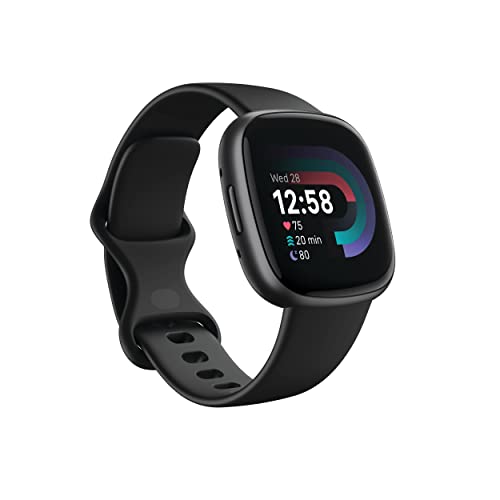
Fitbit Versa 4 — Best for friendly fitness
The Versa 4 is the cross-platform pick for the iPhone owner whose interest is health habits rather than athletic performance. Fitbit’s software remains the industry’s kindest translator of activity and sleep data — goals phrased as encouragement, trends explained rather than dumped — and it works on iOS with the same personality it has on Android, because Fitbit has always lived on both sides of the fence. The watch itself is slim, light and comfortable enough to wear through the night, which matters because its sleep tracking is the main event.
Life on iOS is honest and slightly reduced, as it is for every third-party watch: notifications arrive in full and can be dismissed, but replies are not available, and the quick-action layer Apple reserves for its own watch stays reserved. Some of Fitbit’s deeper analysis also sits behind the Premium subscription, a running cost to weigh against the Versa’s gentle hardware price. None of this prevents the Versa 4 from being the most liveable fitness companion in this guide for a non-athlete — it asks little, explains much, and never makes its owner feel behind in a training plan they never signed up for.
- Platform: Fitbit OS, Fitbit app on iOS and Android
- Form: slim, light case suited to overnight wear
- iPhone life: notifications in full; replies unavailable on iOS
- Note: some advanced app insights require Fitbit Premium
- Focus: everyday activity, sleep and wellness habits
Strengths
- The friendliest activity and sleep software an iPhone owner can buy outside Apple.
- Comfortable enough for the all-night wear its best features require.
- A gentle price position for the depth of platform behind it.
Trade-offs
- Premium subscription gates part of the app’s deeper analysis.
- No message replies on iOS — reading and dismissing only.
- A thin third-party app catalogue; this is a fitness watch first.
Best for: iPhone owners building healthier routines who value guidance over gadgetry. Not suited for: athletes wanting training depth, or wrist-reply devotees.

Fitbit Sense 2 — Best for stress and wellness depth
The Sense 2 is Fitbit’s flagship health watch, and its speciality is the dimension the other picks treat lightly: stress and recovery as everyday wellness signals. It builds on the Versa’s friendly foundation with more advanced sensing aimed at how your body is coping — the kind of continuous, passive awareness that owners describe as the watch noticing their week before they do. Presented properly, as this guide presents it, that is wellness insight for reflection and habit-building, not diagnosis, and Fitbit’s app frames it in exactly that spirit.
For the iPhone owner, the Sense 2 offers something the Apple ecosystem oddly underserves: a watch whose entire design purpose is calm. Its interface is deliberately quieter than a Galaxy’s, its notifications arrive without the app-drawer temptation, and its battery lasts days rather than the nightly rhythm of more computer-like watches. The shared Fitbit caveats apply — Premium holds some depth, iOS replies are unavailable — and the Sense 2 sits above the Versa in Fitbit’s range, so the buyer should want its wellness specialism specifically. Those who do rarely go back: it is the connoisseur’s cross-platform pick.
- Platform: Fitbit OS, Fitbit app on iOS and Android
- Position: Fitbit’s flagship health watch
- Specialism: stress and recovery awareness for everyday wellness
- iPhone life: full notifications and sync; no message replies
- Note: some advanced insights sit behind Fitbit Premium
Strengths
- The deepest stress and wellness toolkit available to an iPhone owner outside Apple.
- A calm, focused interface that resists becoming another distracting screen.
- Multi-day battery in a slim, night-friendly case.
Trade-offs
- Costs more than the Versa 4 for a specialism not every buyer needs.
- The same Premium gating and iOS reply limits as its sibling.
- Training tools are lighter than Garmin’s for serious athletes.
Best for: iPhone owners interested in stress, sleep and recovery patterns. Not suited for: bargain hunters, or athletes needing structured training.

Amazfit Bip 5 — Best budget cross-platform
The Bip 5 proves that “works with iPhone” does not have to mean “costs like an Apple Watch”. Through the Zepp app on iOS it delivers the complete budget-smartwatch formula — a 1.9-inch screen, built-in GPS for phone-free exercise recording, Bluetooth calling, Alexa, and battery life stretching comfortably beyond a week — to iPhone owners at the friendliest position in this guide. Its data lives in Zepp rather than Apple Health’s inner circle, though it can share with Apple’s ecosystem in the ways Zepp supports, and for most owners the app becomes simply where their activity history lives.
The iOS-specific notes are the standard ones, stated plainly: notifications arrive and can be read and dismissed, replies are not part of the iPhone arrangement, and call handling through the watch works within the limits Apple sets for third-party devices. What surprises new owners is how little of daily value those limits actually remove. Steps, sleep, workouts, weather, timers, alarms, a week between charges — the substance of smartwatch ownership survives the crossing intact, and it survives at a price that makes the Bip 5 the natural first cross-platform watch for an iPhone household testing whether the category suits them at all.
- Display: 1.9-inch screen
- Platform: Amazfit’s system, Zepp app on iOS and Android
- Location: built-in GPS; calls via Bluetooth; Alexa built in
- iPhone life: notifications readable; replies unavailable on iOS
- Battery character: beyond a week in typical use
Strengths
- The complete cross-platform experience at the guide’s friendliest position.
- GPS and calling hardware that rivals in this guide charge far more for.
- Week-plus battery that makes the nightly-charge question disappear.
Trade-offs
- A large case that smaller wrists will find assertive.
- Zepp’s data presentation is generous but busier than Fitbit’s.
- No message replies on iPhone, like every third-party watch here.
Best for: iPhone owners wanting maximum watch for minimum commitment. Not suited for: buyers who want their data inside Apple’s own health app above all.

Samsung Galaxy Watch 7 40mm — Android-only — NOT for iPhone
Android-only — NOT for iPhone. This watch is included so that you can put a face to the warning. The Galaxy Watch 7 is an excellent Wear OS smartwatch: fast, bright, deeply integrated with Android phones, and the default recommendation in this site’s Android guide. It also cannot pair with an iPhone — not partially, not through any app, not with features reduced. An iPhone owner who buys it will be able to charge it, admire it and return it, and nothing else. If a listing, advertisement or marketplace bundle has suggested it for your iPhone, that suggestion is wrong, and this entry exists to outrank it in your memory.
Android-only — NOT for iPhone: the label applies at every position in this guide — the Quick Picks table, the comparison below, and here — because the mistake it prevents is expensive and common. Who should buy the Watch 7? Android owners, especially Samsung phone owners, for whom it is genuinely superb. Who should not? Anyone whose phone runs iOS, anyone buying a gift for an iPhone owner, and anyone planning to switch to iPhone soon. If your household is mixed, buy one of the four cross-platform picks above for the iPhone user and let the Android user enjoy this watch with a clear conscience.
- Compatibility: Android phones only — Android-only — NOT for iPhone
- Platform: Wear OS, which requires an Android phone to set up and use
- iPhone pairing: impossible; no companion app, no workaround
- Role in this guide: a labelled warning, not a recommendation for iPhone owners
- If you own an iPhone: choose the Garmin, Fitbit or Amazfit picks above instead
Strengths
- For Android owners, the most complete Wear OS watch of its generation.
- Superb screen, performance and phone integration — on Android.
- Its excellence is exactly why iPhone owners keep trying to buy it.
Trade-offs
- Android-only — NOT for iPhone: it cannot be set up with an iPhone at all.
- Even Android owners face a daily charging rhythm.
- Some of its health features additionally require a Samsung phone.
Best for: Android and especially Samsung phone owners. Not suited for: iPhone owners under any circumstances — Android-only — NOT for iPhone.

Google Pixel Watch 3 45mm — Android-only — NOT for iPhone
Android-only — NOT for iPhone. The Pixel Watch 3 is the second warning, and in some ways the sadder one, because its domed-glass beauty is precisely what tempts iPhone owners in shop windows. It is a lovely object and a capable Wear OS watch with Fitbit’s fitness software inside — for Android phones. For an iPhone it is inert: Google’s watch requires an Android phone for setup and ongoing use, offers no iOS companion path, and will not so much as sync the time from your iPhone. Beauty is not compatibility, and this entry’s whole purpose is to separate the two before a purchase does it for you.
Android-only — NOT for iPhone: note the irony this guide must handle carefully — the Pixel Watch contains Fitbit technology, and Fitbit’s own watches in this guide work beautifully with iPhones, yet the Pixel Watch itself does not, because it is a Wear OS device and the platform decides. iPhone owners who love the Pixel’s Fitbit heart should buy the Versa 4 or Sense 2 above, which deliver that same software soul in bodies that will actually pair with their phones. Android owners, meanwhile, may buy the Pixel Watch 3 with this guide’s blessing from its Android coverage — just never as a gift for the iPhone user in their life.
- Compatibility: Android phones only — Android-only — NOT for iPhone
- Platform: Wear OS with Fitbit software, set up through an Android phone
- iPhone pairing: impossible; the Fitbit inside does not change the platform rule
- Role in this guide: a labelled warning, not a recommendation for iPhone owners
- iPhone alternative with the same Fitbit soul: Versa 4 or Sense 2 above
Strengths
- The most beautiful hardware in the Wear OS world — for Android owners.
- Fitbit fitness software woven into a full smartwatch platform.
- A larger 45mm canvas that earlier Pixel generations lacked.
Trade-offs
- Android-only — NOT for iPhone: no setup, sync or pairing with iOS exists.
- Daily charging, as with all Wear OS watches.
- Its design appeal actively endangers iPhone owners who shop by looks.
Best for: Android owners who prize design. Not suited for: iPhone owners under any circumstances — Android-only — NOT for iPhone.
Comparison Table
| Pick | Works with iPhone? | Platform | Battery character | Character |
|---|---|---|---|---|
| Garmin Venu 3 | Yes, fully | Garmin system | Weeks class | Premium fitness depth |
| Fitbit Versa 4 | Yes | Fitbit OS | Several days | Friendly activity and sleep |
| Fitbit Sense 2 | Yes | Fitbit OS | Several days | Stress and wellness focus |
| Amazfit Bip 5 | Yes | Amazfit system | Beyond a week | Budget all-rounder |
| Galaxy Watch 7 40mm | No — Android-only — NOT for iPhone | Wear OS | Daily class | Warning pick |
| Pixel Watch 3 45mm | No — Android-only — NOT for iPhone | Wear OS | Daily class | Warning pick |
What Do iPhone Owners Actually Lose With a Third-Party Watch?
Precision helps here, because the losses are specific rather than total. You lose message replies: iMessages and texts can be read on every cross-platform pick and answered on none of them. You lose Siri and the deep hooks into Apple’s own apps — the watch will not become a remote for the phone’s inner life. You lose the seamlessness of setup and unlock tricks that Apple’s own watch performs. And you lose nothing else of substance: notifications, calls alerts, activity, sleep, exercise with GPS, weather, timers, alarms, music controls and days of battery all survive, and on the Garmin and Amazfit picks the battery does not merely survive, it triumphs.
Set against the gains, many iPhone owners find the exchange fair. There is a demographic footnote worth adding: a striking share of cross-platform owners arrived here not by rejecting Apple’s watch but by never being offered a reason to leave their fitness platform of five years’ standing. Data history is a loyalty programme no one designed — your sleep records, your training logs, your streaks live in Garmin’s or Fitbit’s account, and they argue, silently and effectively, for staying. Sellers of platform watches know this, which is why their switching offers grow more generous every year. Garmin’s training depth exceeds anything in Apple’s standard offering for the committed athlete. Fitbit’s sleep and stress presentation speaks a kinder language. The Bip 5 delivers the category’s essentials for a small fraction of the flagship outlay. The buyers who regret crossing are almost never those who weighed these lists; they are the ones who assumed a Galaxy Watch would somehow work, which is why this guide’s two loudest entries are warnings.
What Mistakes Do iPhone Owners Make in This Category?
The catastrophic mistake is buying Wear OS — Galaxy Watch or Pixel Watch — on the strength of an outdated article, a marketplace title stuffed with both brand names, or a shop assistant’s optimism. Check the platform, not the advertisement: if it runs Wear OS, it needs Android. The second mistake is subtler: buying a cross-platform watch while secretly expecting Apple Watch behaviour, then resenting the absent replies that were never promised. The third is gifting across the fence — an Android-enthusiast partner buying the iPhone owner a Galaxy Watch is a love language that requires a returns label.
A fourth mistake deserves naming because it wastes the good picks: failing to install and grant the companion app properly. Cross-platform watches live or die by their iOS app permissions — notifications, background refresh, location for exercise — and an owner who taps “don’t allow” through setup will conclude the watch is broken when it is merely muted. Give the Garmin, Fitbit or Zepp app its permissions, let it run in the background, and the watch you bought is the watch you get.
How Should an iPhone Owner Set Up a Cross-Platform Watch?
Install the maker’s app before the watch comes out of its box — Garmin Connect, Fitbit or Zepp — and create the account at leisure rather than at the pairing screen. When the watch arrives, pair from inside that app, not from the iPhone’s Bluetooth menu, and grant the permissions the app requests with an understanding of what each buys: notifications access is the watch’s voice, background refresh is its reliability, location is its exercise map. Then choose your notification list with a cold heart. The iPhone sends what you permit, and a cross-platform watch buzzing for every app will be silenced within the week, taking its usefulness with it.
Finish with the two integrations owners forget. Connect the app to Apple Health if you want your activity to live alongside your other records — each platform here offers a bridge of some form — and set up the watch’s own alarms and timers, which work independently of the phone and become the features owners quietly love most. Wear it overnight from the first night; the sleep data is a large part of what you bought, and the first week’s graphs, however strange the new object feels, are the baseline every later insight is measured against. Finally, bookmark the maker’s support page for your exact model on the phone itself. The one time you will need it — a pairing hiccup after a system update, most likely — you will need it quickly, and finding it in advance is the sort of dull foresight that separates owners who glide from owners who forum-post at midnight.
What If You Switch Phones Later?
Here the cross-platform picks reveal their strategic charm. A Garmin, Fitbit or Amazfit bought in an iPhone year follows you to an Android year without replacement — the same watch, the same app family, your history intact in your account. The reverse journey is equally painless. Owners who know their next phone is undecided are, whether they realise it or not, the exact audience for this guide’s four working picks, and the exact audience most endangered by its two warnings, because a Galaxy or Pixel watch bought today becomes a paperweight on the day the iPhone arrives.
The Apple Watch, for completeness, makes the opposite bet: supreme integration now, total incompatibility later. None of this makes one philosophy right — households settled in Apple’s world for a decade gain nothing by hedging — but the buyer whose contract, employer or curiosity might move them across the fence should hear the asymmetry stated once, clearly, before choosing which ecosystem’s watch to marry.
How Does the Same Watch Behave Differently on iPhone and Android?
Owners who switch platforms with a cross-platform watch — one of this guide’s recommended manoeuvres — deserve a map of what changes. On Android, the Amazfit and Fitbit picks gain message replies in supported apps, richer quick actions on notifications, and in Amazfit’s case a slightly deeper integration with the phone’s own assistants and call handling. On iPhone, the same watches become read-and-dismiss devices for messages, lean entirely on their own apps for settings and history, and route everything through Apple’s permission gates. The tracking core — steps, sleep, exercise, heart rate — does not change at all, which is why the switch is survivable: the substance is platform-blind, the garnish is not.
Garmin is the most even-handed of the three, because its ecosystem was built for athletes who regard phones as interchangeable data pipes; Garmin Connect looks and behaves nearly identically on both systems, and its owners report the least platform friction in the category. Fitbit is close behind, with the Premium question following you across the fence unchanged. Amazfit’s Zepp is the most variable, its Android side a touch more capable in replies and integrations. None of these differences should decide a purchase for a settled household — but for the genuinely undecided, Garmin’s neutrality is a legitimate point in the Venu 3’s already strong column.
Garmin or Fitbit: Which Ecosystem Suits an iPhone Owner?
The two ecosystems answer different hungers. Garmin is the record-keeper’s paradise: deep history, training structure, recovery logic, an app that assumes you will still be exercising in five years and keeps the receipts. Its data philosophy is abundance — everything measured, everything browsable — and its subscription posture is correspondingly light, with the core experience complete without one. Fitbit is the coach’s voice: fewer raw tables, more interpretation, goals framed as encouragement, and a social layer of challenges and friends that has motivated more sedentary people than any training plan ever written. Its depth, however, partly rents itself back to you through Premium.
An iPhone owner choosing between them should choose by temperament, not by specification. The self-driven exerciser who loves a graph will thrive in Garmin Connect and suffocate slightly in Fitbit’s kindness. The habit-builder who needs a nudge written in sentences will thrive in Fitbit and drown slightly in Garmin’s abundance. Both apps live happily on iOS, both watches in this guide will serve for years, and the wrong choice is rarely catastrophic — but the right one feels, within a month, less like software and more like a person who knows you.
How Should a Mixed Household Buy?
Plenty of homes contain both flags, and their watch-buying has a logic of its own. The cleanest strategy is cross-platform for everyone: Garmin, Fitbit or Amazfit on every wrist means chargers, apps and knowledge are shared, gifts are never platform-locked, and the household’s collective activity history lives in comparable places. Families who compete on steps — more households than admit it — need the same ecosystem far more than they need any individual’s perfect watch, because a challenge split across two apps is no challenge at all.
The alternative strategy is platform watches for the settled and cross-platform for the mobile: the committed Android partner takes the Galaxy Watch 7 in its full glory — Android-only — NOT for iPhone, but glorious on the right wrist — while the iPhone partner takes a Venu or a Versa, and the teenager whose next phone is unknowable takes the Bip 5 and its options. What the mixed household must never do is buy by bundle, bulk or assumption. Every watch in the basket should be matched to the phone in its owner’s pocket today, with the warnings in this guide checked twice at the till.
What About Older Wear OS Watches That Once Worked With iOS?
A genuinely confusing corner deserves its own paragraph, because second-hand listings exploit it. Some older Wear OS watches — models from the era when Google maintained an iOS companion app — could once be paired with iPhones in a limited way, and their listings still say so. That support has ended: the apps have been retired, the pairing path no longer functions as those listings describe, and a buyer relying on them inherits an orphan. The same caution applies to old stock of transitional models whose boxes boast iPhone compatibility from a software world that no longer exists.
The safe rule for the second-hand market is the same as for the new one, with the burden of proof raised. If the watch runs Wear OS, assume Android-only regardless of what any listing claims, and treat contrary claims as a prompt to verify directly with the maker’s current support pages. If the watch is Garmin, Fitbit or Amazfit, verify that its app still supports your iPhone’s current system version — cross-platform brands maintain their apps for years, but a decade-old tracker can still be orphaned by a modern phone. In this category, nostalgia is a purchasing risk, and the current-generation picks in this guide are current for a reason.
Why Is Battery Life the Cross-Platform Trump Card?
Ask iPhone owners who crossed over what they mention first, and it is rarely the fitness software. It is the battery. Apple’s own watch and every Wear OS device live on a daily rhythm, while this guide’s working picks live on a weekly one — the Bip 5 beyond a week, the Venu 3 in the weeks class, the Fitbits at several days. For the traveller, the camper, the forgetful and the simply busy, that difference is not a specification but a change in the device’s personality: from something you maintain to something that maintains itself. Sleep tracking, notably, becomes effortless when the watch never needs the night to charge.
The honest accounting must add that this stamina is bought with capability — none of these watches runs a phone-class app store, and their screens and processors are deliberately modest. But the iPhone owner reading this guide has already accepted a version of that bargain by looking beyond Apple’s wall, and within it, stamina is the dividend that pays out every single day. It is also the feature most likely to convert the sceptical: a watch that is simply always alive, always counting, always there, earns a trust that cleverer, deader watches never do.
What Can These Watches Not Do for Music and Payments on iOS?
Two services deserve explicit treatment because buyers assume them. Music: the cross-platform picks can control the iPhone’s playback — pause, skip, volume — from the wrist, which covers most real needs, and Garmin’s Venu line can additionally carry its own music for phone-free runs with earbuds. What none of them does is join Apple’s own music ecosystem from the inside; the integration is a remote control, not a residence. Payments: contactless payment from third-party watches on iOS depends on each maker’s own payment service and its bank support in your country — Garmin and Fitbit have both offered such services — and availability varies enough that a buyer for whom wrist payment is essential should verify their specific bank before, not after, the purchase.
Neither limit is a trick, but both are the kind of detail that marketing blurs into a general glow of capability. This guide’s standard is narrower and more useful: name the exact shape of each limit, in the pick where it applies, so the buyer’s expectations arrive at the same address as the watch. An iPhone owner who knows the music is a remote and the payment needs a bank check is an owner who will still be happy in month six.
What Should You Check in the Shop Before Committing?
Three checks, in order. First, the platform check, which this guide has made its refrain: if the watch runs Wear OS, walk away from it as an iPhone owner, whatever the display card promises. Second, the app check: find the maker’s app in the App Store on your own iPhone, confirm it is current and well-maintained, and read its recent reviews filtered for your phone model — the app is half the product, and its store page is the one place its health cannot be disguised. Third, the wrist check: these cross-platform cases wear differently from Apple’s, the Venu’s 45mm presence and the Bip’s big rectangle especially, and five minutes on your own wrist predicts a year of comfort better than any review.
Buyers ordering unseen can approximate the same diligence. Measure your wrist, compare case dimensions honestly rather than hopefully, confirm the returns policy before the discount seduces you, and keep the packaging until the watch has survived a week of your real life — paired, permitted, worn overnight, exercised in. The cross-platform category rewards this care disproportionately, because its one catastrophic error, the Wear OS mistake, is entirely preventable at the checking stage and entirely unfixable afterwards.
When Should an iPhone Owner Just Buy Apple’s Watch Instead?
This guide sells cross-platform watches, and its credibility depends on answering this question without flinching. Buy Apple’s watch if message replies from the wrist are central to your day; if you live inside Apple’s services and want the watch woven through them; if the tightest possible pairing, setup and support matter more than battery or fitness specialisation; or if you simply love the object. On those criteria Apple’s watch is not merely competitive with this guide’s picks, it is untouchable, and pretending otherwise to protect a theme would be the same species of dishonesty as a listing that calls a Galaxy Watch iPhone-friendly.
Buy from this guide instead if your priorities are the ones Apple underserves: battery life in weeks, Garmin’s training depth, Fitbit’s stress and sleep kindness, Amazfit’s budget generosity, or the freedom to change phone platforms without changing watches. The two lists rarely overlap in one person, which is why the category boundary is so clean in practice. Know which list is yours — really yours, from your last month of behaviour rather than your aspirations — and the choice between Apple’s wall and this guide’s open field makes itself.
Can a Cross-Platform Watch Look at Home Beside an iPhone?
A fair aesthetic anxiety deserves a fair answer: yes, and sometimes better than the native option. The Venu 3’s round AMOLED case reads as a classic sports watch and pairs visually with anything; the Sense 2’s softened rectangle is discreet in a way that suits smaller wrists and formal cuffs; even the big-screened Bip 5 wears its rectangle honestly, like the tool it is. Straps complete the assimilation — every pick here accepts widely available replacements, and a leather or woven band transforms a fitness device into an accessory that an iPhone’s design language would approve of.
What cross-platform watches will not do is match the iPhone’s ecosystem of cases, finishes and band systems that Apple has spent a decade cultivating. Owners who treat the watch as jewellery first and instrument second are, again, Apple’s natural customers. Owners who treat it as an instrument that should also look respectable will find this guide’s picks entirely presentable — and will enjoy the quiet distinction of a wrist that does not match every other wrist in the room.
How Long Will a Cross-Platform Watch Stay Supported?
Longevity is where the open field quietly outperforms the walls. Garmin supports its watches and its Connect platform across long spans, because its customers keep devices for years and its app serves a decade of models at once; a Venu bought today joins an ecosystem with a demonstrated memory. Fitbit’s platform carries a similar inheritance, with accounts and history surviving multiple watch generations. Amazfit’s Zepp, shared across its whole line, gives even its budget models a maintained home. Against that, platform watches age on their makers’ phone-like schedules — respectable, but finite in a way the cross-platform world is not.
The buyer’s translation is simple: a cross-platform watch’s useful life is set by its battery and its app’s maintenance, both of which favour the patient brands in this guide. Keep the firmware updated, replace the strap when it tires, rinse the case after summer, and the watch you buy for this iPhone may well still be counting steps beside its successor. That durability is the final answer to the integration you give up — you trade a little closeness today for a watch that refuses to become obsolete tomorrow.
There is one maintenance habit specific to the iPhone pairing worth adopting from day one: after each major iOS update, open the companion app once and confirm the watch still syncs before you need it to. Apple’s system updates occasionally reset background permissions or Bluetooth relationships, and a thirty-second check on update day prevents the slow confusion of a watch that silently stopped syncing sometime last week. Owners who build this tiny ritual report that cross-platform life feels indistinguishable from native — which, allowing for the reply button that will never appear, is very nearly true.
What Does the First Week on an iPhone Owner’s Wrist Feel Like?
Day one is configuration and mild suspicion: the app asks its permissions, the watch learns your stride, and every notification feels like an interruption because none of your filtering instincts have formed yet. By day three the filtering has happened — you have silenced the noisy apps, kept the human ones, and begun glancing at your wrist in meetings with the practised neutrality of a long-term owner. The phone starts staying in pockets and bags for whole afternoons, which most owners name, in retrospect, as the moment the purchase justified itself.
By the end of the first week the data has its first story to tell: a sleep pattern you suspected, confirmed in graphs; a step count that explains the tired Fridays; a resting trend worth watching across the month. Owners of the Garmin find the story detailed to the point of homework; Fitbit owners find it summarised like a friend’s advice; Bip owners find it plentiful and free. None of them has replied to a message from the wrist, and — this is the week’s real lesson — almost none of them has missed it. The catastrophe the warnings guard against is not the cross-platform life, which is genuinely good; it is buying the wrong platform entirely, which is why the two labelled warnings in this guide shout while everything else merely speaks.
Final Recommendation
If you own an iPhone and want the fullest watch that will actually work with it, buy the Garmin Venu 3 and enjoy its weeks of battery and genuine fitness depth. Choose the Versa 4 for Fitbit’s friendly guidance at a gentler position, the Sense 2 if stress and recovery are your real interest, and the Bip 5 if the budget is the argument and you want it settled generously. And hold the guide’s central fact in front of every listing you meet from now on: the Galaxy Watch 7 and Pixel Watch 3 are Android-only — NOT for iPhone — however beautiful, however discounted, however confidently a marketplace title implies otherwise, because the most expensive smartwatch an iPhone owner can buy is the one that will never pair.
Frequently Asked Questions
Can a Galaxy Watch work with an iPhone at all?
No. Current Galaxy Watches run Wear OS, which requires an Android phone for setup and use, and Samsung offers no iOS companion path. This is not a reduced-features situation; the watch cannot be paired, synced or meaningfully used with an iPhone. The Galaxy Watch 7 in this guide is labelled “Android-only — NOT for iPhone” at every appearance for exactly this reason.
Does the Pixel Watch work with iPhone because it contains Fitbit?
No, and the confusion is understandable. The Pixel Watch uses Fitbit’s fitness software, but it is a Wear OS device, and the platform — not the fitness layer — decides compatibility. Fitbit’s own watches, the Versa 4 and Sense 2 in this guide, run Fitbit’s system and pair with iPhones happily. Same software soul, different platform, opposite answer.
What is the best Android-style watch for an iPhone owner on a budget?
The Amazfit Bip 5. It pairs with iPhones through the Zepp app and delivers GPS, calling, a big screen and week-plus battery at the friendliest position in this guide. Its iPhone limits are the universal third-party ones — no message replies — rather than anything specific to its price, which is what makes it such a strong answer.
Can I reply to iMessages on any of these watches?
No. Apple reserves message replies to its own watch. Every cross-platform pick here — Garmin, Fitbit, Amazfit — can display your messages in full on iOS and let you dismiss them, but answering requires the iPhone itself. Buyers for whom wrist replies are the entire point should buy an Apple Watch; this guide exists for everyone whose priorities lie elsewhere.
Will a Garmin work if I later switch to Android?
Yes — that portability is one of the strongest arguments for the cross-platform picks. Garmin, Fitbit and Amazfit watches pair with both phone platforms through the same app families, and your activity history lives in your account rather than in the phone. The watches that strand you on a switch are the platform watches: Wear OS on one side, Apple’s on the other.
Are the health features on these watches medical-grade?
No, and this guide treats them accordingly. The Garmin, Fitbit and Amazfit picks track activity, sleep, heart rate and stress patterns for general wellness — useful for spotting trends in your own habits and deciding to walk more or sleep earlier. They are consumer wellness tools, not diagnostic instruments, and any health concern deserves a professional rather than a wrist.
Related Guides
For the other side of the fence, read our guide to the best Android smartwatches for Android owners, our picks of smartwatches that pair best with Samsung phones, and our round-up of the best and cheapest smartwatches across both phone platforms.
Related guides
- Best Canon Point and Shoot Digital Cameras: PowerShot Picks From Pocket Compacts to Travel Zooms
- Best Balancing Stabilizers for Mirrorless Cameras: Payload, Balancing and Native Vertical Shooting
- Best Basic Phones Camera Buyers Can Trust: Flip Phones and Simple Handsets That Still Take a Photograph
- Best Sony Full Frame Cameras for Astrophotography: Sensitivity vs Resolution


