What's inside
- Key Takeaways
- Quick Picks
- How Did We Police the Budget Frame?
- Smartwatch or Fitness Tracker: Which Shape Suits You?
- The Best Android Smartwatches and Fitness Trackers Under $100, Examined One at a Time
- Comparison Table
- What Does the Money Actually Buy at Each Step?
- What Mistakes Do Budget Buyers Make Most Often?
- How Should You Set Up a Budget Tracker for Honest Data?
- How Long Will a Watch at This Level Stay Useful?
- How Do Budget Watches Handle Workouts and Swimming?
- How Does Battery Life Really Compare Across the Six?
- Is This the Right Budget for a Child’s or a Parent’s First Tracker?
- What Does “Free” Software Actually Cost Over Three Years?
- How Should You Read a Budget Listing Like a Sceptic?
- Do Straps, Sizes and Comfort Matter More at This Price?
- When Is the Smart Time to Buy Inside This Frame?
- How Do Notifications and Replies Behave at This Level?
- What Happens When You Change Phones?
- What Does the First Month With a Budget Tracker Teach You?
- Final Recommendation
- Frequently Asked Questions
- Related Guides
As an Amazon Associate I earn from qualifying purchases. This post may contain affiliate links at no extra cost to you.
gizmoverdict.com is reader-supported. When you buy through links on our site, we may earn an affiliate commission.
Where to buy: Five picks below link to listings verified in this site’s product pool. Two of them — the Fitbit Versa 4 and the Samsung Galaxy Watch FE — are labelled honestly wherever they appear as sitting at or beyond the budget frame in this guide’s title, because a buying guide that hides that fact is not guiding anyone. The sixth pick is prose-only by design.
The best Android smartwatches and fitness trackers under $100 live inside a promise and a problem. The promise is the budget frame itself: a hundred dollars, give or take the way these things drift, is where wrist technology stops being a toy and starts being a tool. The problem is that no price in this category sits still — models slide in and out of the frame with every promotion — so this guide prints no prices at all. Instead, each pick is placed by its position: which watches live comfortably inside the frame as their natural home, which ones visit it, and which two are included, clearly labelled, because they are the nearest honest step beyond it for buyers whose needs point that way.
The shape of the field is simple once you see it. Amazfit owns the natural interior of this budget: three generations of the Bip line, all verified in the pool, offering big screens, GPS on two of them, and battery life that embarrasses watches costing four times more. Fitbit’s Versa 4 hovers at the frame’s edge with the finest fitness software in the class. Samsung’s Galaxy Watch FE is the cheapest genuine Wear OS watch in the pool, usually found beyond the frame, included because “I want real apps” is the request this budget hears most. And beneath them all, the slim fitness band remains the right answer for a certain kind of wrist, represented here in prose.
One clarification before the picks: “Android” in this guide means watches and trackers that partner with Android phones. Some picks also befriend iPhones, and each pick says which phones it accepts, because at this end of the market a compatibility surprise is the most expensive mistake available — it costs the entire purchase.
Everything in this guide is discussed as general fitness and wellness equipment — step, sleep and heart-rate tracking for everyday insight into your own habits. None of it is a medical device, none of it diagnoses anything, and the guide’s enthusiasm for the data is enthusiasm for trends you can act on with walks and bedtimes, not numbers to worry over.
Key Takeaways
- The Amazfit Bip line is the natural inhabitant of this budget frame: the Bip 5, Bip 5 Unity and Bip 6 all live here, with GPS and week-plus battery life.
- No prices are printed, because prices in this tier move weekly; each pick is placed by its position in its maker’s range instead.
- The Fitbit Versa 4 sits at or beyond the frame’s edge and is labelled so; it buys the best fitness software in the class.
- The Galaxy Watch FE is the cheapest true Wear OS watch in the pool and usually sits beyond the frame; it is the pick for buyers who want real apps.
- A slim fitness band, covered in prose, still beats every watch here for sleep comfort and for wrists that hate bulk.
- At this budget, the companion app is half the product — Zepp gives data freely, Fitbit reserves some depth for a subscription.
Quick Picks
| Pick | Badge | Why it is here |
|---|---|---|
| Amazfit Bip 5 | Best all-round in the frame | Built-in GPS, Bluetooth calling and Alexa on a big screen, with battery life that runs past a week. |
| Amazfit Bip 5 Unity | Lowest position in the frame | The same big-screen formula minus GPS and calling, rated at 11 days of battery in its listing. |
| Amazfit Bip 6 | Best screen in the frame | The newest Bip brings a 1.97-inch AMOLED display and GPS for buyers keeping a watch for years. |
| Fitbit Versa 4 | At or beyond the frame — labelled | Fitbit’s fitness-first watch, with the class’s kindest software and iPhone compatibility as its premium. |
| Samsung Galaxy Watch FE | Beyond the frame — cheapest Wear OS in pool | A genuine app platform watch for buyers willing to step past the budget for real smartwatch abilities. |
| Slim fitness bands of the Fitbit Inspire type (prose-only) | The band alternative | No pool listing; covered in prose because for sleep-first, bulk-hating buyers a band still beats a watch. |
How Did We Police the Budget Frame?
The method was positional rather than numerical. Each candidate was placed within its own maker’s range — entry model, mid-line, previous generation — and within the pool’s verified listings, and the guide describes that placement in words instead of printing a price that would rot. Models whose natural home is inside the frame form the core three. Models whose home is at or past its edge are included only when they answer a request the core cannot — Fitbit’s software, Wear OS’s apps — and they carry their label in the title of their section, the table above and the comparison, so no reader can mistake the geography.
Everything also had to pass the same floor tests as any guide on this site: a real brand with a maintained app, credible activity and sleep tracking for general wellness, a screen readable outdoors, and phone compatibility stated without fog. Two categories were refused entry. Renewed flagships, however tempting their arithmetic, were left out because their prices and condition swing too widely to police a budget frame honestly. And the no-name tier was refused for the reason it always is: a tracker whose app may not survive the year is not under any budget, it is outside the market’s ground floor.
A final methodological note, because readers deserve it: positions in this guide describe where a model sits in ordinary trading, not where a one-day promotion might drag it. If you find a labelled outsider visiting the frame during a sale, the guide’s labels have done their work rather than failed — you know exactly what the watch is, what it usually costs its owners in position terms, and what you would be gaining. Buy the visitor cheerfully if the visit is real; just do not mistake the visit for the address, or budget next year’s replacement on the same luck.
Smartwatch or Fitness Tracker: Which Shape Suits You?
The keyword itself asks the question by naming both, and the answer is mostly about what you will do at 7 a.m. A smartwatch shape — every Amazfit, Fitbit Versa and Galaxy here — gives you a screen big enough to read a message, glance at a map or check the weather properly, at the cost of a presence on the wrist that slim sleepers and small wrists notice. A band shape gives you the same step, sleep and heart-rate story in a sliver of plastic you forget you are wearing, at the cost of squinting at anything longer than a number. Neither is the budget version of the other; they are different tools that happen to share sensors.
The deciding habits are concrete. If you will answer notifications from your wrist, run with music controls, or read anything longer than a distance readout, buy the watch shape. If you will wear the device twenty-three hours a day, care chiefly about sleep and daily movement, and charge it rarely enough to forget where the cable lives, buy the band shape. The tragedy purchases in this category are nearly all shape mistakes — excellent devices worn for a fortnight and abandoned because the wrist rejected the silhouette, not the software.
There is a hybrid answer some households land on, and it deserves a sentence: the watch for the day and the band for the night, bought across two seasons rather than one basket. It sounds indulgent until the arithmetic appears — both devices together can sit inside a single flagship’s territory — and until the sleep data improves dramatically because the night device was designed to be forgotten. This guide will not pretend it is the budget answer, but for the reader whose sleep is the whole point and whose days are already watched, it is the honest luxury the frame makes possible.
The Best Android Smartwatches and Fitness Trackers Under $100, Examined One at a Time

Amazfit Bip 5 — Best all-round in the frame
If the budget frame has a centre, the Bip 5 is standing on it. The formula reads like a refusal to accept that this money means compromise: a 1.9-inch screen large enough for honest notifications, built-in GPS so runs and rides record themselves without a phone, Bluetooth calling through a speaker and microphone in the case, and Alexa answering questions about timers and weather. Around those headlines, the everyday wellness machinery — activity, sleep, heart rate, stress estimates — runs inside Amazfit’s Zepp app, which gives its data away freely and keeps years of history browsable.
What elevates the Bip 5 from specification to recommendation is stamina. Owners measure its battery in weeks of ordinary life rather than in hours of anxiety, and that single trait changes the ownership experience more than any other in this guide: the watch is simply always there, on the wrist, working, including through the holidays and long weekends when chargers get forgotten. Its compromises are the platform’s, not the model’s — Amazfit’s app catalogue is a shelf where Wear OS has a library — and its case is large on small wrists. Within the frame, though, it is the pick against which the others must argue, and most of them lose.
- Display: 1.9-inch screen
- Location: built-in GPS
- Calls: Bluetooth calling; Alexa built in
- Battery character: comfortably beyond a week in typical use
- Phones: Android and iPhone via the Zepp app
Strengths
- The most complete feature set whose natural home is inside this budget.
- Phone-free GPS exercise tracking, still rare at this level.
- Battery life that removes charging from your weekly planning entirely.
Trade-offs
- A large case that slim wrists and formal cuffs will notice.
- Third-party apps are Amazfit’s modest catalogue, not a full store.
- Replying to messages is limited compared with a Wear OS watch.
Best for: the majority of buyers in this budget, especially runners and walkers. Not suited for: app-hungry buyers, or very small wrists.

Amazfit Bip 5 Unity — Lowest position in the frame
The Unity is the Bip 5 after a honest interrogation: which parts would a phone-carrying owner never miss? Its answers — built-in GPS and Bluetooth calling — are exactly what it removes, and what remains is the same 1.9-inch screen, the same Zepp app with the same free data, and a battery the listing rates at 11 days. Location still tracks through the phone’s GPS, so a walk with the handset in your pocket maps perfectly well; it is only the phone-free run that the Unity declines to record.
This is the pick for the buyer whose budget discipline is real rather than rhetorical. Students, second-watch buyers, parents equipping a teenager, anyone outfitting a whole family’s wrists at once — the Unity’s lower position multiplies across those purchases while its omissions barely register in lives lived with a phone always present. It is also, quietly, the most forgiving first smartwatch in the guide: nothing about it demands new habits, and its fortnight-long indifference to its charger suits owners who would kill a daily-charge watch by neglect within a month.
- Display: 1.9-inch screen
- Battery: rated up to 11 days in the listing
- Location: connected GPS through your phone
- Calls: alerts only, no wrist conversations
- Phones: Android and iPhone via the Zepp app
Strengths
- The deepest position inside the frame of any full-screen watch here.
- Identical app, data and history to its pricier siblings.
- Battery endurance that forgives forgetful owners completely.
Trade-offs
- No phone-free route recording — runners must carry the handset.
- No calling from the wrist in any form.
- Materials and finish are plainly functional rather than decorative.
Best for: phone-always-present buyers, students, teenagers and bulk family purchases. Not suited for: phone-free exercisers.

Amazfit Bip 6 — Best screen in the frame
The Bip 6 spends its generational budget on the one component you look at all day. Its 1.97-inch AMOLED screen renders watch faces with the deep blacks and outdoor legibility that lesser panels cannot approach, and on a device whose entire interface is glances, that difference compounds across every hour of ownership. GPS is built in, the Zepp environment carries over, and the battery remains in the family’s long-distance tradition, so the upgrade story is refinement rather than reinvention — which is precisely what a mature budget line should offer.
Its position in the frame is the highest of the three Amazfits, and the guide places it accordingly: still a natural inhabitant of this budget by the standards of its class, but the one to choose for quality rather than for thrift. The buyer it suits is the keeper — someone who wears a watch until it dies and would rather the screen delight them in year three than save a little in week one. The buyer it does not suit is the Bip 5’s natural owner, for whom the older model’s completeness at a lower position is the smarter arithmetic. Both Amazfits being right is not a contradiction; it is a range doing its job.
- Display: 1.97-inch AMOLED screen
- Location: built-in GPS
- Generation: the Bip line’s current model
- Battery character: multi-day, in the family tradition
- Phones: Android and iPhone via the Zepp app
Strengths
- AMOLED legibility that leads this entire guide, indoors and out.
- The longest software runway of the Amazfit trio, as the current generation.
- Retains GPS and the family’s stamina while refining the display.
Trade-offs
- The highest Amazfit position in the frame — thrift points elsewhere.
- Bip 5 owners gain a screen, not a new category of ability.
- Still outside the Wear OS app ecosystem, like all its siblings.
Best for: long-term keepers who read their watch outdoors constantly. Not suited for: buyers minimising spend above all else.
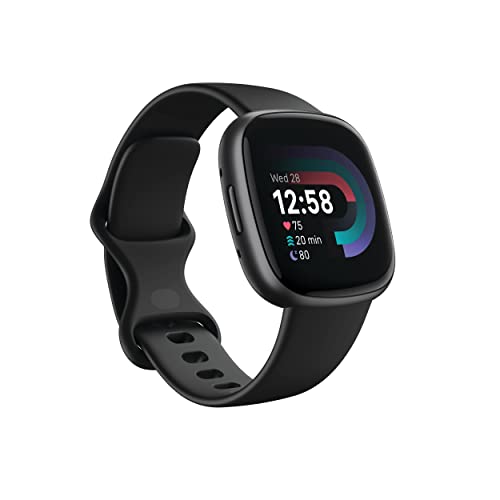
Fitbit Versa 4 — At or beyond the frame, labelled
The Versa 4 appears in this guide with its geography stated in its heading, its table row and here again: it lives at the edge of the budget frame and frequently beyond it, and it earns the exception on software. Fitbit’s activity and sleep presentation remains the most humane in the business — numbers translated into encouragement, trends explained in sentences, goals that feel coached rather than counted — and for the large class of buyers whose real goal is a healthier routine rather than a cleverer wrist, that software is worth more than any hardware feature in this guide. The watch itself is slim, light, comfortable overnight, and friendly to iPhones as well as Android phones.
The debits are equally specific. Some of Fitbit’s deeper analysis lives behind the Premium subscription, so the true cost of the full Versa experience includes a monthly line the Amazfits never present. Its own operating system carries a thin catalogue of third-party apps, and buyers dreaming of wrist-based maps and music stores should look at the Samsung pick instead. Judged as a fitness watch with smart features, bought with its frame position understood, the Versa 4 is excellent. Judged as a bargain, it is not one, and this guide will not call it one.
- Platform: Fitbit OS with the Fitbit app
- Position: at or beyond this guide’s budget frame — stated openly
- Focus: activity, sleep and everyday wellness, presented kindly
- Phones: Android and iPhone
- Note: some advanced app analysis sits behind Fitbit Premium
Strengths
- The most approachable fitness and sleep software in this guide.
- Slim and light enough for genuinely comfortable all-night wear.
- Works with iPhones, which the Samsung pick cannot do.
Trade-offs
- Its natural price position is at or past the frame’s edge.
- Premium subscription gates part of the app’s deeper insight.
- A small third-party app catalogue beside Wear OS.
Best for: fitness-first buyers who value guidance over gadgets, on either phone platform. Not suited for: strict frame-keepers or app collectors.

Samsung Galaxy Watch FE — Beyond the frame, the Wear OS door
The FE’s label is the longest in this guide because its story needs it: this is the cheapest genuine Wear OS watch in the verified pool, and its home is usually beyond the budget frame, so it is included as a signposted step up rather than a resident. What the step buys is categorical. Wear OS brings the Play Store to your wrist — real apps for maps, music, messages and payments — and turns the watch from a tracker that notifies into a small computer that acts. No Amazfit at any position in the frame can offer that, because the difference is the platform, not the price.
The platform’s taxes apply in full. Charging is a daily-to-two-day rhythm, sleep tracking must be scheduled around it, a few Samsung health features reserve themselves for Galaxy phones, and iPhones are refused entirely. A buyer should therefore climb to the FE only with a named reason — a specific app, wrist payments, proper message replies — rather than a vague sense that more expensive must mean better. For the buyer with the reason, the FE is the correct first Wear OS watch and the end of this guide’s road. For everyone else, the frame’s residents do more of what matters for less.
- Case: 40mm, Bluetooth model in this listing
- Platform: Wear OS, with the Play Store on the wrist
- Position: beyond the budget frame — the pool’s cheapest Wear OS watch
- Phones: Android only, happiest with Galaxy handsets
- Battery character: daily class, the platform’s standing tax
Strengths
- A real app platform, unavailable at any price inside the Amazfit frame.
- Samsung’s build, screen and software polish at its entry position.
- The natural upgrade path for buyers who outgrow a tracker.
Trade-offs
- Usually priced beyond this guide’s frame — the label is the warning.
- Daily charging beside the Amazfits’ weekly rhythm is a lifestyle change.
- No iPhone support, and some features prefer Galaxy phones.
Best for: Android owners with a specific app or payment reason to want Wear OS. Not suited for: frame-strict budgets, iPhone owners, charge-haters.
Slim Fitness Bands of the Fitbit Inspire Type — The band alternative (prose-only)
The final pick has no link because the verified pool holds no listing for this class, and it is included because leaving it out would make the guide less true. The slim fitness band — the Fitbit Inspire line is its best-known example — strips the wrist device to its essence: a narrow tracker counting steps, sleep, heart rate and exercise minutes, worn so lightly that owners forget it through showers, sleeps and weeks. Battery life stretches toward the double-digit days, and the whole device costs its owner less attention than any watch in this guide asks.
Who should choose a band over every linked pick? The sleep devotee, for whom overnight comfort is the entire purchase. The minimalist, who wants the data without the screen’s demands. The second-device buyer, who owns a beautiful mechanical watch for the day and wants a tracker for the night and the gym. What the band refuses is equally clear: messages are headlines at best, there are no calls, no apps, no maps, and exercise routes need the phone along. If those refusals read as relief rather than loss, the band is your pick — source it from a reputable listing, since this guide cannot verify one for you here.
- Listing status: none in the verified pool — covered in prose only
- Form: narrow band, worn almost unnoticed
- Focus: steps, sleep, heart rate and exercise minutes
- Battery character: toward the longest in this guide
- Phones: the type generally supports Android and iPhone via its app
Strengths
- The most comfortable overnight wear of anything discussed here.
- Minimal attention demanded: no apps, no calls, no daily decisions.
- Long battery life and a silhouette that suits every wrist.
Trade-offs
- No verified listing in this pool, so sourcing care falls to the buyer.
- Notifications are glances, not conversations.
- No built-in GPS or app platform of any kind.
Best for: sleep-first minimalists and mechanical-watch owners wanting a night tracker. Not suited for: anyone who wants their wrist to do things.
Comparison Table
| Pick | Frame position | GPS | Platform | Phones |
|---|---|---|---|---|
| Amazfit Bip 5 | Inside, central | Built in | Zepp ecosystem | Android and iPhone |
| Amazfit Bip 5 Unity | Inside, lowest | Via phone | Zepp ecosystem | Android and iPhone |
| Amazfit Bip 6 | Inside, upper | Built in | Zepp ecosystem | Android and iPhone |
| Fitbit Versa 4 | At or beyond — labelled | Built in | Fitbit OS | Android and iPhone |
| Galaxy Watch FE | Beyond — labelled | Built in | Wear OS | Android only |
| Slim bands (Inspire type) | Inside, typically | Via phone | Maker’s app | Generally both |
What Does the Money Actually Buy at Each Step?
Read the frame as a ladder and each rung purchases something nameable. The first rung, the Unity’s territory, buys the complete tracking skeleton: screen, sensors, notifications, app, history. The next rung buys independence from the phone — GPS of its own, a voice on calls — which is the Bip 5’s argument. The rung above buys sensory quality, the AMOLED screen of the Bip 6, which pays out in glances rather than features. Beyond the frame, the money changes category: the Versa buys software kindness and subscription depth, the FE buys an entire platform. Buyers get in trouble when they climb expecting one rung’s goods from another’s price — paying for screen and resenting the missing store, or paying for the platform and resenting the charger.
The ladder also explains why this guide refuses to name a single winner. A household equipping three teenagers should stand on the first rung without a flicker of doubt. A solitary runner should stand on the second. A keeper of devices stands on the third. The frame is not a ranking; it is a map, and the labelled exceptions at its edge are there so that the two most common reasons to leave the map — software and platform — are priced into your thinking before a listing page prices them into your basket.
What Mistakes Do Budget Buyers Make Most Often?
Chasing a headline discount is the first. In this tier, permanent promotions make percentage claims meaningless; a watch is well bought when its position in its maker’s range is low for what it does, not when a banner screams. The second mistake is buying the platform dream on a tracker budget — expecting app-store behaviour from a Zepp or Fitbit device — or its mirror, paying Wear OS money and then resenting the nightly charger that the platform always required. The third is forgetting the phone check: the FE is a bargain only in Android households, full stop.
The fourth mistake is quieter and sadder: buying for an exercise life you do not lead. GPS matters to the runner you are, not the runner of your intentions, and the Unity has saved more honest money than any other pick here by declining to charge phone-carriers for a satellite radio they never use. Audit your last month before your next purchase — where the phone was, what the wrist did, when charging happened — and let that evidence, rather than aspiration, choose the rung.
How Should You Set Up a Budget Tracker for Honest Data?
The first evening decides whether your graphs mean anything by spring. Wear the watch on your non-dominant wrist if you can bear it, snug enough that the sensor keeps contact through movement but loose enough to forget — a band cranked tight reads pulse beautifully and gets removed by Friday, which reads nothing at all. Tell the app the truth about yourself: age, height, weight and stride assumptions feed every calorie and distance estimate it will ever produce, and flattering inputs manufacture flattering fictions. Turn on the notifications you will act on and silence the rest, because a budget watch that buzzes for everything trains its owner to ignore it, and an ignored tracker tracks an empty wrist.
Then give the device a calibration week. Walk one route whose distance you know and compare; wear it through three ordinary nights before reading anything into sleep stages; note the battery’s real rhythm against your routine rather than the listing’s optimism. By the second week you will know the three things that matter — whether the numbers are consistent, whether the comfort survives your life, and whether the charging fits it — and you will know them while returns are still painless. Budget devices reward this diligence exactly as much as flagships do; the only difference is that the stakes of skipping it are a wasted season instead of a wasted fortune. Keep the box, the receipt and the charging cable coiled neatly until the fortnight ends, not from pessimism but because a calm buyer with options makes better decisions than an owner negotiating with a drawer.
How Long Will a Watch at This Level Stay Useful?
The hardware will outlast the software, and planning should follow that order. A Bip-class watch’s case, screen and battery will typically serve three or four years; its usefulness depends on Amazfit continuing to maintain the Zepp app against new phone systems, which its shared-across-generations model makes likely. Fitbit’s platform carries the same logic with a longer pedigree. The FE, as a Wear OS device, receives platform updates on Samsung’s schedule and ages more like a phone — gracefully for years, then suddenly.
The buyer’s defence is to purchase the current or recent generation, which all six picks represent, and to treat the device as a three-year companion in the budget maths. Spread across three years, even the labelled step-ups beyond the frame cost less per month than the subscriptions many owners forget they carry — a perspective that settles the Unity-versus-Bip-6 argument for many households more honestly than any feature table. When the end comes, it usually arrives as an app that no longer syncs with a new phone, and the correct response is to climb one rung, not to abandon the wrist.
How Do Budget Watches Handle Workouts and Swimming?
For the exercise most people actually do — walking, running, cycling, gym sessions, pool lengths — the residents of this frame are fully equipped. The GPS Amazfits record outdoor routes independently, the Versa tracks with Fitbit’s well-tested exercise modes, and even the phone-dependent Unity logs a carried-phone ride accurately. Sport mode lists at this level run long, but the honest reader should translate them: a mode is mostly a label, a data screen and a place in your history, and the twentieth mode matters far less than whether the first five record cleanly and sync without drama. By that test, every linked pick passes.
Swimming deserves its usual translation of the ratings. These watches carry water resistance suitable for the pool, and owners swim in them routinely; what the ratings do not bless is hot water, soap, sauna steam or the high-velocity water of diving and jet skis, all of which attack seals regardless of the number on the box. Rinse after salt water, dry before charging, and a budget watch will survive seasons of lengths. What it will not give the serious swimmer is the deep stroke analytics of a dedicated sport watch — but that swimmer was never shopping inside this frame, and pretending otherwise would help nobody.
How Does Battery Life Really Compare Across the Six?
Battery is the axis on which this guide’s picks differ most violently, and the pattern inverts price. The band, doing least, lasts longest — toward a fortnight. The Amazfits follow at a week and well beyond, the Unity’s listing claiming 11 days and its siblings living in the same neighbourhood of endurance. The Versa occupies the middle ground at several days. The FE, doing most, lasts a day or so. There is no engineering scandal in this table; it is the direct price of computation, brightness and radios, charged nightly or weekly according to what the watch attempts.
The practical consequence is that battery should be chosen like a feature, not discovered like a flaw. An owner who travels for work, camps, or simply knows their own forgetfulness should weight the Amazfit end of the table heavily, because a dead smartwatch tracks nothing and notifies less. An owner with a settled desk-and-bed routine can treat the FE’s rhythm as free. What nobody should do is buy the platform watch while privately expecting the tracker watch’s stamina — that specific disappointment accounts for more returns in this category than every hardware fault combined.
Is This the Right Budget for a Child’s or a Parent’s First Tracker?
It is the natural budget for both, with different picks for each. For a child or teenager, the Unity’s formula is close to ideal: inexpensive enough that loss is a lesson rather than a disaster, durable in the ways school life tests, and free of the calling and app features that turn a tracker into a distraction negotiation. Its data gives a parent a gentle window on activity and sleep without handing the child a tiny phone. For an older parent beginning to track walks and rest, the calculus flips toward legibility and kindness: the Bip 6’s AMOLED screen reads easily in bright kitchens and gardens, and the Versa’s software speaks in sentences rather than statistics.
Two cautions travel with both gifts. Set the device up with its owner rather than for them, because the app account, the phone pairing and the notification choices are personal, and a tracker configured by someone else tends to be worn by no one. And keep the health framing honest and light: these are wellness companions that show activity and sleep patterns, not medical monitors, and presenting them as gifts of encouragement rather than instruments of surveillance is the difference between a watch that gets worn and one that gets discussed.
What Does “Free” Software Actually Cost Over Three Years?
The quiet arithmetic of this category is that the watch is the cheap part. Fitbit’s Premium, for the owner who wants the Versa’s full depth, accumulates across three years into a sum rivalling the watch itself — not a reason to refuse it, but a reason to count it. Zepp’s model is the opposite: the data is free, and Amazfit earns its money at the till, which is why the Bip line’s total cost of ownership stays so close to its sticker. Wear OS splits the difference, free at the core with optional app subscriptions sprinkled at the edges, each individually small and collectively worth an annual glance.
None of this makes one ecosystem wicked and another virtuous; subscriptions fund the software kindness that Versa owners praise, and free software is a competitive weapon Amazfit wields deliberately. The buyer’s job is simply to price the whole marriage rather than the wedding. A watch inside the frame plus three years of the depth you actually use can cost more than a watch beyond the frame with everything included — the kind of sentence that sounds paradoxical until the first renewal notice arrives, and obvious forever after.
How Should You Read a Budget Listing Like a Sceptic?
Listings in this tier are written to be skimmed, and the sceptic’s skill is knowing which lines carry information. Battery claims are tested under the maker’s gentlest conditions — screen dim, features rationed — so treat every figure as a ceiling and look for the pattern across owners rather than the promise on the page; the picks here were chosen partly because their real-world endurance is consistently reported near their claims. Water resistance deserves the same discounting described earlier: a rating is a laboratory fact, not a lifestyle permission. And feature lists should be read for absences — a budget watch that does not name its GPS type is telling you it borrows the phone’s, exactly as the Unity does openly and lesser listings do silently.
Reviews need the same treatment. Weight the complaints that repeat across many owners — a strap that irritates, an app that drops sync — over the solitary catastrophe and the suspicious rapture alike. Check the date of what you read, because these watches improve by software and a furious review from launch month may describe a device that no longer exists. Above all, compare like with like inside the frame: a Bip judged against a flagship will always read as plastic, and a flagship judged on battery against a Bip will always read as broken. The frame is the fair court, which is why this guide was built inside it.
Do Straps, Sizes and Comfort Matter More at This Price?
They matter more, because comfort is the feature with no software fix. The Bip family’s large cases are the frame’s standing example: the big screen is a genuine pleasure for reading and a genuine presence on a slim wrist, and both halves of that sentence decide purchases. If you can, hold the watch or its dimensions against your wrist before ordering — case width against wrist width, honestly compared, predicts satisfaction better than any review. The Versa’s slimness and the band’s near-invisibility exist in this guide precisely because a meaningful minority of wrists will reject the big-screen formula no matter how good its value arithmetic looks.
Straps are the budget owner’s secret customisation department. The popular lines here use widely available strap fittings, so a scratchy stock band can become fabric in summer, silicone for sport and something smarter for evenings, each for the price of a coffee. Skin irritation, the silent killer of tracker habits, is usually a strap problem — trapped sweat under silicone — solved by a breathable woven band rather than by abandoning the watch. Budget for one alternative strap in the purchase and the comfort question largely answers itself.
When Is the Smart Time to Buy Inside This Frame?
The category has a rhythm a patient buyer can use. New generations push their predecessors down the range, which is why the Bip 5’s position is so comfortable right now — maturity plus a successor equals value. Seasonal promotions move the edge cases most: the Versa and the FE are the picks whose frame membership fluctuates, so a buyer set on either gains by watching for the moments they visit the frame rather than assuming they live there. The residents — the Amazfits — move less dramatically, and waiting for their perfect week usually saves little against the cost of a season spent untracked.
The counterweight is that a tracker only pays you back while you wear it. A buyer who delays a sensible purchase for months in pursuit of a marginal promotion has spent the one currency the device exists to improve, which is time inside healthier habits. The frame’s honest advice is therefore boring and correct: buy the resident picks when you are ready to wear them, buy the edge picks when their visits coincide with your readiness, and never let a countdown timer on a listing page make a three-year decision in four minutes.
How Do Notifications and Replies Behave at This Level?
Receiving is solved; replying is rationed, and knowing the ration prevents the commonest disappointment in the frame. Every linked pick delivers notifications from the apps you choose, promptly and readably, and lets you dismiss them from the wrist — for most owners, that is ninety percent of the smartwatch experience, fully present at this budget. Replies are where platforms diverge: on Android, the Amazfits offer quick canned responses in supported apps, the Versa similar conveniences, and the FE — the platform watch — the full keyboard, voice and suggestion treatment. On iPhone, the Amazfits and Versa become read-only for messages, an Apple policy rather than a maker’s choice, and buyers should hear it before rather than after.
Calls follow the same gradient. The Bip 5 and Bip 6 class of device can hold a wrist conversation through Bluetooth; the Unity alerts and leaves the talking to the phone; the band shows a name and vibrates with admirable discretion. None of these arrangements is a defect — they are the rungs of the ladder made audible — but a buyer whose work is calls, whose hands are routinely full, gloved or wet, should weight the calling models heavily, because for that owner the feature is not a garnish but the main course the budget happens to serve.
What Happens When You Change Phones?
Sooner or later the phone changes, and the frame’s watches handle the migration with differing grace. The Amazfits and the Versa tie your history to your account in their apps, so a new phone — Android or iPhone — inherits your records when you sign in, and the watch re-pairs in minutes. The FE’s history lives in Samsung’s world and moves happily between Android phones, but the watch itself cannot follow you to an iPhone at all, which makes it the one pick whose purchase is also a small bet on your next handset’s operating system.
The practical advice is to think one phone ahead. A buyer already eyeing a platform switch should favour the cross-platform picks, whose apps exist on both sides of the fence. A buyer settled in Android gains nothing by insuring against a switch they will never make, and the FE’s platform advantages are real. Either way, export or screenshot anything precious before a migration, keep the old phone alive until the new pairing is proven, and remember that the watch is the accessory in this relationship — the account is the asset, and it is portable precisely to the extent its maker designed it to be.
What Does the First Month With a Budget Tracker Teach You?
Week one is novelty: the wrist buzzes, you glance, you forgive the device its learning curve and your own. The data from this week should be read as weather rather than climate — sleep disturbed by the strangeness of a new object on the wrist, activity inflated by the urge to test it. Owners who judge a tracker by its first seven days are reviewing their own excitement, and the honest guides say so because the disappointment curve of this category is mostly a novelty curve misread.
Weeks two and three are where the device either becomes furniture for the body — unnoticed, habitual, quietly accumulating truth — or begins its migration toward the drawer. The signs are mundane: whether you reach for the charger without resentment on the rhythm the watch demands, whether the morning glance at sleep and steps has become part of dressing, whether the strap still feels like yours at hour fourteen. The picks in this frame were chosen to pass this fortnight: their batteries forgive, their apps reward the glance, their straps can be changed when skin objects. A tracker that fails the fortnight fails entirely, whatever its specifications promised.
By week four the relationship settles into its long form, and the surprises are pleasant ones. The data starts answering questions you actually asked — whether the evening walk is lengthening, whether Sunday sleep debt is real, whether the new job’s stairs show up in the trend. Owners discover the feature they bought is not the feature they love; the GPS runner falls for sleep graphs, the notification buyer becomes a step zealot. That discovery is the true product this budget sells, and it is why the guide insists on brands whose apps will still be developing that relationship next year. The watch is the subscription you pay for once; the habit is the dividend.
One last piece of frame discipline, offered because it saves more money than any pick: decide your rung before you open a single listing page. Marketplace design exists to walk you upward — a little more for the screen, a little more for the platform, a subscription at the end — and it works on everyone, including the people who write guides. A buyer who arrives knowing whether they are a Unity buyer, a Bip 5 buyer or an FE buyer shops the frame; a buyer who arrives undecided gets shopped by it. The ladder is short, the rungs are labelled, and the view from the right one is genuinely good.
Final Recommendation
Stand in the frame and buy the Bip 5 unless your habits argue otherwise: it is the complete budget watch, GPS and calling included, with stamina to spare. Drop to the Unity if the phone never leaves your side and the lowest position is the point; rise to the Bip 6 if the screen and the longer horizon justify the frame’s upper rung. Step beyond the frame only with your eyes open and your reason named — the Versa 4 for Fitbit’s kindness, labelled at or past the edge, and the FE for Wear OS itself, labelled beyond it as the pool’s cheapest true platform watch. And if your wrist wants data without a device demanding attention, honour the band. The frame rewards buyers who know which rung is theirs, and punishes only the ones who shop by banner — so buy the position, not the promotion, and this budget will treat you better than budgets usually do.
Frequently Asked Questions
Can a watch in this budget really include GPS?
Yes. The Bip 5 and Bip 6 carry built-in GPS as residents of this frame, recording runs and rides without a phone. The Unity omits it to reach its lower position, borrowing the phone’s location instead. GPS at this level was a flagship talking point not long ago; its presence here is the clearest sign of how far the budget tier has travelled.
Why are no exact prices listed for an “under $100” guide?
Because in this tier a printed price is a lie on a timer. Promotions move these models in and out of the frame weekly, sometimes daily, so the guide describes each pick’s stable position — resident of the frame, at its edge, or beyond it — and labels the exceptions openly. The links show the live figure at the only moment it matters: when you are deciding.
Is the Galaxy Watch FE worth stepping beyond the budget for?
Only for a named reason. If you want specific Wear OS apps, wrist payments or full message replies, the FE is the pool’s cheapest route to a genuine platform and the step is justified. If your needs are tracking, notifications and stamina, the Amazfits inside the frame serve you better for less, and the FE’s daily charging becomes a tax on a benefit you never use.
Does the Fitbit Versa 4 need a subscription?
No, but the full experience leans on one. The Versa 4 tracks activity, sleep and exercise without charge, and the Fitbit app’s core presentation is free. Some deeper analysis — the more interpretive health insights — sits behind Fitbit Premium. Budget honestly: the watch plus optional subscription is the Versa’s true cost of ownership, unlike the Amazfits, whose app gives its data away.
Should I choose a band instead of a watch?
If your priorities are sleep comfort, minimal presence and long battery, yes — the prose-only band pick exists for exactly that reader. Bands give up readable messages, calls, GPS and apps to achieve their lightness. Buyers who glance at notifications all day will feel the loss; buyers who check an app over coffee will not miss a thing.
Will these watches work with an iPhone?
The Amazfits and the Versa 4 will, through their own apps, with some reply features limited on iOS. The Galaxy Watch FE will not pair with an iPhone at all. Compatibility in this guide is stated per pick rather than per brand, because the answer changes model by model and a wrong assumption costs the whole purchase.
Related Guides
Read on with our guide to the best and cheapest smartwatches overall, our platform briefing on the best Android smartwatches, and our advice for choosing a smartwatch to pair with a Samsung phone.


