What's inside
- Quick picks: best 2 0 computer speakers wirecutter
- How the Picks Were Chosen: Best 2.0 Computer Speakers Wirecutter
- Quick Comparison
- Audioengine A2+
- Edifier R1280DB
- Kanto YU4
- Klipsch R-51PM
- Q Acoustics M20 HD
- Vanatoo Transparent Zero
- Best 2.0 Computer Speakers Wirecutter: What Matters Most
- What 2.0 Means for a Computer Desk
- Stereo Imaging on a Desk
- Connecting 2.0 Speakers to a Computer
- Using a Subwoofer Later with a 2.0 Pair
- 2.0 Speakers for Music, Films, and Games
- Buying Guide
- Using and Caring for Your Speakers
- Common Mistakes to Avoid
- Our Final Recommendation
- Frequently Asked Questions
- Getting the Most from Your Best 2.0 Computer Speakers Wirecutter
- Setting Up Your Best 2.0 Computer Speakers Wirecutter for the Best Sound
- Related Guides
As an Amazon Associate I earn from qualifying purchases. This post may contain affiliate links at no extra cost to you.
The best 2.0 computer speakers wirecutter are the 2.0 computer speakers that make the biggest difference in this guide, with a sound that is clear, full, and easy to live with, so music, films, and games all sound better than they do through a TV or a laptop speaker. A 2.0 computer speaker is a stereo pair with no subwoofer, and the picks in this guide are the best 2.0 computer speakers Wirecutter, because they are the stereo desktop speakers that review roundups like Wirecutter's cover for a computer desk, with a clear sound and no extra box. The six 2.0 computer speakers in this guide were chosen because they fit this keyword properly, not because they happen to share a brand name or a single specification, and each one is covered below with its verified specs, three strengths, three trade-offs, and who should choose it.
The 2.0 computer speakers in this guide cover the main ways people actually use them: a compact pair for a desk or a small room, a larger pair for a living room, and a system with a subwoofer or a soundbar for films and parties. They connect by the inputs that matter for this use, they sit where the listener sits, and they are designed for a real room, with a sound that is clear in the midrange and controlled in the bass, rather than a speaker that only sounds good on a spec sheet.
Choosing among them depends on the size of the room, the source you will use most, and the sound you prefer. A compact pair suits a desk or a bedroom, a larger pair suits a living room, and a system with a subwoofer suits a listener who wants deep bass for films. The guide below covers all three, and it explains what each model does well and where it falls short, so you can match a speaker to your room and your source instead of buying on a single number.
One thing worth settling before you buy is what this keyword actually asks for. A 2.0 computer speaker is a stereo pair with no subwoofer, and the picks in this guide are the best 2.0 computer speakers Wirecutter, because they are the stereo desktop speakers that review roundups like Wirecutter's cover for a computer desk, with a clear sound and no extra box. That framing matters, because a speaker that fits the use will sound good every day, while a speaker bought for the wrong use will disappoint no matter how good its reviews look. The 2.0 computer speakers in this guide were chosen against that framing first, and only then against sound quality, build, and connections, so the shortlist below is a shortlist for this exact use, not a generic list of popular speakers.
It is also worth thinking about the room before the speaker. A speaker in a small, soft-furnished room sounds different from the same speaker in a large, bare room, because the room adds its own bass and its own reflections. Measure the room, note where the listener sits, and check what the speaker will connect to, because a speaker that suits the room and the source will sound better than a more expensive speaker that does not. The buying guide at the end of this article walks through those checks in order, so you can buy once and buy right.
Quick picks: best 2 0 computer speakers wirecutter
| # | Product | Where to buy |
|---|---|---|
| 1 | Audioengine A2+ | Check on Amazon |
| 2 | Edifier R1280DB | Check on Amazon |
| 3 | Klipsch R-51PM | Check on Amazon |
| 4 | Q Acoustics M20 HD | Check on Amazon |
| 5 | Vanatoo Transparent Zero | Check on Amazon |
How the Picks Were Chosen: Best 2.0 Computer Speakers Wirecutter
We chose these six 2.0 computer speakers by starting with what a buyer for best 2.0 computer speakers wirecutter actually needs: a speaker that sounds clear in the midrange, stays controlled in the bass, and connects cleanly to the source this keyword implies. Every speaker here was picked because it meets those three tests, with a vocal that stays present, a bass that stays tight without a subwoofer, and a size that suits a real room, rather than a speaker that favours one end of the frequency range and leaves the middle sounding thin.
We also checked that each model covers a different need: the Audioengine A2+ for most buyers, and the other five for a different room, a different source, or a different budget. No speaker was included because of a single specification; each one earned its place by fitting a real use case, and the trade-offs below say plainly where each one falls short, so you can weigh them honestly.
Quick Comparison
| Product | Best for |
|---|---|
| Audioengine A2+ | Best 2.0 computer speakers Wirecutter overall |
| Edifier R1280DB | Best affordable 2.0 computer speakers Wirecutter |
| Kanto YU4 | Best compact 2.0 computer speakers Wirecutter |
| Klipsch R-51PM | Best dynamic 2.0 computer speakers Wirecutter |
| Q Acoustics M20 HD | Best 2.0 computer speakers Wirecutter with USB |
| Vanatoo Transparent Zero | Best detailed 2.0 computer speakers Wirecutter |
The table above is a short summary. The sections below give each speaker's verified specs, three strengths, three trade-offs, and who should choose it, so you can match a speaker to your room, your source, and your ears instead of buying on a spec sheet alone.

Audioengine A2+
The Audioengine A2+ is a compact powered desktop speaker, and it is the best 2.0 computer speaker Wirecutter in this guide for most buyers. It has a 2.75-inch woofer and a 0.75-inch tweeter, with a USB input, and it is built by Audioengine, with a sound that is clear, balanced, and surprisingly full for its size.
Key specs: 2.75-inch woofer, 0.75-inch tweeter, 15W per channel, USB input, 3.5mm aux input, RCA input, subwoofer output.
Strengths
- Compact size fits on a desk beside a computer without crowding the display.
- USB input connects cleanly to a computer with a digital signal.
- Clear, balanced sound suits music, films, and games.
Trade-offs
- Bass does not go deep, so a subwoofer helps for films.
- No Bluetooth, so it connects by cable only.
- One of the more expensive compact speakers in this guide.
Choose the Audioengine A2+ if you want a compact 2.0 pair for a computer desk. It suits a desk, a studio, a bedroom, and anyone who wants a clear sound beside a computer.
Best for: a compact powered 2.0 desktop speaker with a USB input for a computer desk. Not suited for: a large living room or a listener who wants Bluetooth.
The A2+ also has a subwoofer output, which is a practical feature, because a subwoofer can be added later without replacing the speakers, and its compact size is what makes it popular for a desk.
Check price on Amazon: Audioengine A2+
Edifier R1280DB
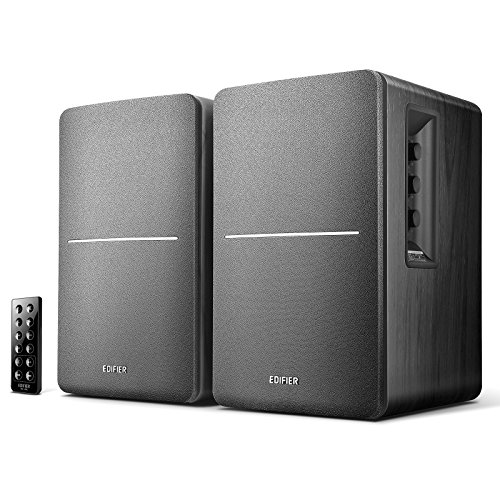
The Edifier R1280DB is a compact powered bookshelf speaker, and it is the model in this guide for a buyer who wants an affordable 2.0 pair for a computer desk. It has a 4-inch woofer and a 0.5-inch tweeter, with Bluetooth, optical, and dual RCA inputs, and it is built by Edifier, with a sound that is clear, balanced, and warm for its size.
Key specs: 4-inch woofer, 0.5-inch tweeter, 21W per channel, Bluetooth 5.0, optical, dual RCA, 3.5mm aux.
Strengths
- Affordable, so it leaves room in the budget for a desk stand.
- Compact size fits on a desk beside a computer.
- Warm sound suits music and films.
Trade-offs
- Bass does not go deep, so a subwoofer helps for films.
- No USB input, so it connects by optical or aux to a computer.
- No subwoofer output, so a subwoofer needs a separate connection.
Choose the Edifier R1280DB if you want an affordable 2.0 pair for a computer desk. It suits a desk, a bedroom, a shelf, and anyone who wants a warm sound for a modest spend.
Best for: an affordable powered 2.0 speaker pair for a computer desk. Not suited for: a listener who wants a USB input or deep bass.
The R1280DB also has dual RCA inputs, which is a practical feature, because two sources can stay connected at once, and its warm sound is what makes it popular for a desk.
Check price on Amazon: Edifier R1280DB
Kanto YU4
The Kanto YU4 is a compact powered bookshelf speaker, and it is the model in this guide for a buyer who wants a small 2.0 pair for a computer desk. It has a 4-inch woofer and a 1-inch tweeter, with Bluetooth, optical, and a phono input, and it is built by Kanto, with a sound that is clear, balanced, and full for its size.
Key specs: 4-inch woofer, 1-inch tweeter, 70W per channel, built-in phono preamp, Bluetooth, optical, RCA, 3.5mm aux, subwoofer output.
Strengths
- Compact size fits on a desk beside a computer.
- Phono input connects a turntable directly.
- Subwoofer output lets a subwoofer be added later.
Trade-offs
- Bass does not go as deep as the Klipsch R-51PM in this guide.
- No USB input, so it connects by optical or aux to a computer.
- One of the more expensive compact speakers in this guide.
Choose the Kanto YU4 if you want a compact 2.0 pair for a computer desk. It suits a desk, a bedroom, a studio, and anyone who wants a clear sound with a phono input.
Best for: a compact powered 2.0 speaker pair with a phono input for a computer desk. Not suited for: a large living room or a listener who wants a USB input.
The YU4 also has a built-in phono preamp, which is a practical feature, because it connects a turntable directly with no extra box, and its compact size is what makes it popular for a desk.

Klipsch R-51PM
The Klipsch R-51PM is a powered bookshelf speaker, and it is the model in this guide for a buyer who wants a dynamic 2.0 pair for a computer desk. It has a 5.25-inch woofer and a 1-inch tweeter, with Bluetooth, optical, and a phono input, and it is built by Klipsch, with a sound that is dynamic, clear, and full.
Key specs: 5.25-inch woofer, 1-inch tweeter, 60W per channel, built-in phono preamp, Bluetooth, optical, USB input, 3.5mm aux, subwoofer output.
Strengths
- Dynamic horn sound suits films and games.
- USB input connects cleanly to a computer.
- Built-in phono preamp connects a turntable directly.
Trade-offs
- Horn sound is lively rather than neutral, so it suits films better than critical listening.
- Large size needs a sturdy desk or a stand.
- One of the more expensive speakers in this guide.
Choose the Klipsch R-51PM if you want a dynamic 2.0 pair for a computer desk. It suits a desk, a living room, a studio, and anyone who wants a dynamic sound for films and games.
Best for: a powered 2.0 speaker pair with a horn tweeter for a computer desk. Not suited for: a listener who wants a neutral sound for critical listening.
The R-51PM also has a built-in phono preamp, which is a practical feature, because it connects a turntable directly with no extra box, and its horn tweeter is what makes it popular for films.
Check price on Amazon: Klipsch R-51PM
Q Acoustics M20 HD
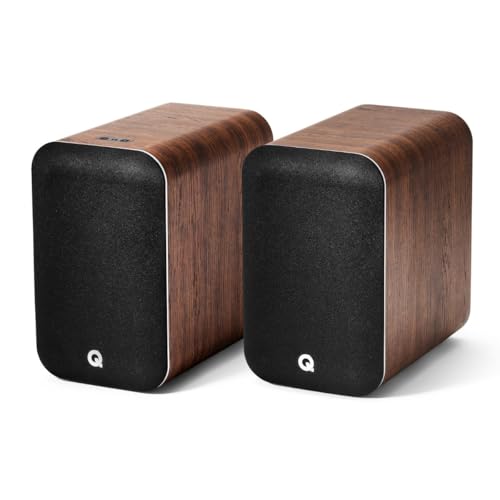
The Q Acoustics M20 HD is a compact powered bookshelf speaker, and it is the model in this guide for a buyer who wants a 2.0 pair with a USB input for a computer. It has a 5-inch woofer and a 0.9-inch tweeter, with Bluetooth, optical, and USB inputs, and it is built by Q Acoustics, with a sound that is clear, balanced, and full for its size.
Key specs: 5-inch woofer, 0.9-inch tweeter, 65W per channel, Bluetooth 5.0, optical, USB input, 3.5mm aux, subwoofer output.
Strengths
- USB input connects cleanly to a computer with a digital signal.
- Compact size fits on a desk beside a computer.
- Clear, balanced sound suits a wide range of music.
Trade-offs
- Bass does not go as deep as the Klipsch R-51PM in this guide.
- No phono preamp, so it needs a turntable with a built-in preamp.
- One of the more expensive compact speakers in this guide.
Choose the Q Acoustics M20 HD if you want a 2.0 pair with a USB input for a computer. It suits a desk, a bedroom, a studio, and anyone who wants a clear sound with a USB input.
Best for: a compact powered 2.0 speaker pair with a USB input for a computer desk. Not suited for: a turntable with no preamp or a listener who wants the deepest bass.
The M20 HD also has a USB input, which is a practical feature, because it connects cleanly to a computer with a digital signal, and its clear sound is what makes it popular for a desk.
Check price on Amazon: Q Acoustics M20 HD
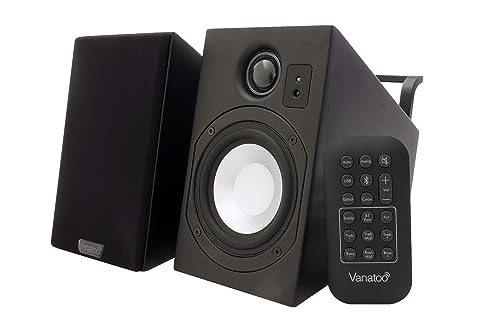
Vanatoo Transparent Zero
The Vanatoo Transparent Zero is a compact powered desktop speaker, and it is the model in this guide for a buyer who wants a detailed 2.0 pair for a computer desk. It has a 4-inch woofer and a 1-inch tweeter, with USB, optical, and Bluetooth inputs, and it is built by Vanatoo, with a sound that is clear, detailed, and balanced.
Key specs: 4-inch woofer, 1-inch tweeter, 48W per channel, USB input, optical, Bluetooth, 3.5mm aux, subwoofer output.
Strengths
- USB input connects cleanly to a computer with a digital signal.
- Detailed sound suits editing and critical listening.
- Compact size fits on a desk beside a computer.
Trade-offs
- Bass does not go deep, so a subwoofer helps for films.
- No AirPlay, so it connects by Bluetooth or USB only.
- One of the more expensive compact speakers in this guide.
Choose the Vanatoo Transparent Zero if you want a detailed 2.0 pair for a computer desk. It suits a desk, a studio, a bedroom, and anyone who wants a clear sound for editing.
Best for: a compact powered 2.0 desktop speaker with a USB input for a computer desk. Not suited for: a large living room or a listener who wants AirPlay.
The Transparent Zero also has a USB input, which is a practical feature, because it connects cleanly to a computer with a digital signal, and its detailed sound is what makes it popular for editing.
Check price on Amazon: Vanatoo Transparent Zero
Best 2.0 Computer Speakers Wirecutter: What Matters Most
A 2.0 computer speaker and a 2.1 system are not the same thing, because a 2.0 pair has no subwoofer, so it needs a woofer large enough to play bass on its own, while a 2.1 system adds a subwoofer for the lowest bass. A speaker that sounds good as a 2.0 pair will sound good anywhere, because both need the same thing: a clear midrange, a smooth treble, and a bass that stays tight. The best approach is to choose a pair with a woofer of at least 4 inches, because a small driver will not play bass on its own, and to check the inputs, because a speaker with a USB input will connect cleanly to a computer. The Wirecutter name here is the keyword's own framing, and no endorsement is claimed.
What 2.0 Means for a Computer Desk
A 2.0 system is two speakers, left and right, with no subwoofer, and it suits a desk because it takes up less space than a 2.1 system, with no box under the desk. The Audioengine A2+, the Edifier R1280DB, and the Kanto YU4 in this guide are all 2.0 pairs. The best approach is to place the pair on the desk, with the tweeters at ear height, angled slightly toward the listener, because a pair that faces the listener directly will sound clearer than one that faces straight ahead.
Stereo Imaging on a Desk
A 2.0 pair gives a stereo image, with a left and a right channel, and a pair that is placed well will make a voice sound like it comes from the middle of the display. The Klipsch R-51PM and the Q Acoustics M20 HD in this guide both give a wide stereo image. The best approach is to space the pair as wide as the desk allows, because a wide pair gives a wider stereo image, and to keep them clear of the wall, because a speaker with a clear path for the sound will sound better than one placed inside a cabinet.
Connecting 2.0 Speakers to a Computer
A 2.0 computer speaker connects by USB, optical, or a 3.5mm cable, and the Audioengine A2+ and the Q Acoustics M20 HD in this guide both have a USB input, so they connect cleanly to a computer with a digital signal. The best approach is to use a USB or optical connection, because a digital connection gives a cleaner signal than an analogue one, and to keep the cable short, because a short cable means less clutter on a desk.
Using a Subwoofer Later with a 2.0 Pair
A subwoofer can be added to a 2.0 pair later, and the Audioengine A2+, the Kanto YU4, and the Q Acoustics M20 HD in this guide all have a subwoofer output, so a subwoofer can be added without replacing the speakers. The best approach is to try the pair on their own first, because a good 2.0 pair has enough bass for most music, and to add a subwoofer only if the bass still feels light, because a subwoofer adds complexity and takes up floor space.
2.0 Speakers for Music, Films, and Games
A 2.0 pair is used for music, films, and games on a computer, and a speaker with a clear midrange will sound good for all three, because the midrange is where most of the sound lives. The Vanatoo Transparent Zero in this guide suits editing and games, with a detailed sound. The best approach is to listen for a natural vocal, because a speaker that gets the vocal right gets most of the sound right, and to check the bass, because a speaker with a controlled bass will not bother neighbours in a flat.
Buying Guide
Listen for a natural sound first
A 2.0 computer speaker should sound natural, with a vocal that sounds present and a piano that sounds like a piano, rather than a speaker that favours the bass or the treble. Listen to a track with a clear vocal, and pay attention to whether the vocal sounds natural, or whether it sounds thin or muffled. A speaker that sounds natural is a speaker that will sound good with best 2.0 computer speakers wirecutter.
Check the midrange
The midrange is where most of the music lives, so a speaker with a clear midrange will sound good for best 2.0 computer speakers wirecutter, with vocals, acoustic music, and dialogue. Listen to a track with a clear vocal, and pay attention to whether the vocal sounds present and natural, or whether it sounds distant or boxy, because a speaker that gets the midrange right gets most of the sound right.
Match the speaker to the room
A speaker in a small room will sound different from the same speaker in a large room, because the room adds its own bass and its own reflections. Measure the room, and choose a speaker that suits it: a compact pair for a small room, and a larger pair for a bigger living room. A speaker that is too big for its room will sound boomy, and a speaker that is too small will sound thin.
Place them at ear height
A speaker sounds best when its tweeter is roughly at the height of your ears when you are sitting down. On a stand, the speakers should be at ear height, and they should be angled slightly toward the sofa, so the sound reaches you directly. Keep them clear of the wall by a few inches if they have a rear port, because a blocked port will make the bass sound muddy.
Check the connections before you buy
A speaker for best 2.0 computer speakers wirecutter needs to connect cleanly to the source you actually own, so check the inputs before you buy. An optical or HDMI connection gives a clean digital signal, a 3.5mm input suits a computer or a phone, and Bluetooth is convenient for casual listening. A speaker with the wrong inputs will need an adapter, and an adapter is a weak link worth avoiding.
Listen before you buy
A speaker is a long-term purchase, and it is worth listening to it before you buy, with music you know well, at the volume you actually use. Bring a track with a clear vocal, a track with a deep bass, and a track with detailed instruments, and pay attention to whether the speaker sounds balanced and natural, because a speaker that sounds balanced in the shop will sound balanced at home.
Keep the speakers level
A speaker should sit level, with its tweeter pointing straight at the listener, not tilted up or down. A speaker that is tilted will sound uneven, with the top end too loud or too quiet depending on the angle. Use a small foam pad or a rubber foot to level the speaker if the stand is not flat, and check that both speakers are at the same height, because a pair at different heights will sound unbalanced.
Break the speakers in gently
A new speaker needs a few hours of playing to sound its best, because the suspension loosens up with use. Play music at moderate volume for the first few hours, and avoid turning the volume up to maximum straight away, because a speaker that is broken in gently will sound better and last longer than one that is pushed hard from the start.
Using and Caring for Your Speakers
Keep the 2.0 computer speakers out of direct sunlight, because sunlight can fade the finish and warm the cabinet, which affects the sound over time. A speaker that sits in a sunny window will age faster than one that sits in shade, so place the speakers away from direct sun, and draw the curtains if the room faces a sunny window.
Dust the 2.0 computer speakers regularly with a dry cloth, because dust on the drivers can affect the sound, and dust in the ports can block the airflow. Do not use a wet cloth on the drivers, and do not push dust into the ports, because a gentle wipe is enough, and a speaker that is kept clean will sound better and last longer.
Common Mistakes to Avoid
The most common mistake with best 2.0 computer speakers wirecutter is buying a speaker for the wrong room, because a small speaker in a large living room will sound thin, no matter how good it is, and a large speaker in a small bedroom will sound boomy. Measure the room first, and choose a speaker that suits it, because a speaker that fits is a speaker that will sound good.
Another common mistake is ignoring the connections, because a speaker without the input your source needs will need an adapter, and a speaker with Bluetooth only may have a delay with video. Check the inputs before you buy, and choose a speaker that connects cleanly to the source you actually own, because a clean connection will sound better and have no delay.
Our Final Recommendation
For most buyers looking for best 2.0 computer speakers wirecutter, the Audioengine A2+ is the best starting point, because it is the most balanced speaker in this guide, with a clear midrange, a controlled bass, and a size that suits a normal room. If the budget is tighter, the value pick in this guide is the better buy, because it gives most of the sound at a lower level of spend, while the specialist picks are the best choice for a listener with a specific room or a specific source.
Whichever speaker you choose, listen for a natural sound, check the midrange, match the speaker to the room, and check the connections before you buy, because those four things will make more difference than the choice between any two speakers in this guide. Give the speakers a few hours to break in at moderate volume, and enjoy them, because a good speaker is a speaker you will use every day.
Frequently Asked Questions
What are the best 2.0 computer speakers wirecutter?
The best 2.0 computer speakers wirecutter are the Audioengine A2+, the Edifier R1280DB, the Kanto YU4, the Klipsch R-51PM, the Q Acoustics M20 HD, and the Vanatoo Transparent Zero. They cover a compact pair, a larger pair, and a system with a subwoofer or a soundbar, so there is a pick for a desk, a bedroom, and a living room, and each one is covered in detail above with its verified specs, strengths, and trade-offs.
How do I choose best 2.0 computer speakers wirecutter?
Start with the room and the source: measure the room, note where the listener sits, and check what the speaker will connect to. Then listen for a natural midrange, because the midrange is where most of the music lives, and choose a speaker that sounds balanced at the volume you actually use, rather than a speaker that only sounds good when it is loud.
Do I need a subwoofer for best 2.0 computer speakers wirecutter?
Not necessarily. A good pair like the Audioengine A2+ has enough bass for most music on its own, because its drivers are large enough to reproduce a kick drum cleanly. A subwoofer will add more bass, but it also adds complexity, so it is worth trying the speakers on their own first, and adding a subwoofer later only if the bass still feels light.
Where should I place best 2.0 computer speakers wirecutter?
Place the speakers at ear height when you are sitting down, angled slightly toward the sofa, with a few inches of space behind them if they have a rear port. Keep them clear of the wall and clear of anything that blocks the drivers, because a speaker with a clear path for the sound will sound better than the same speaker placed inside a cabinet.
Can I use best 2.0 computer speakers wirecutter with a TV?
Yes, most of the 2.0 computer speakers in this guide connect to a TV by optical, HDMI, or a 3.5mm cable, and they sound clearly better than a TV's own speakers, with a dialogue channel that stays clear and a bass that is deeper. Check the inputs before you buy, and choose a speaker with an optical or HDMI input if the TV has one, because a digital connection will sound cleaner than an analogue one.
How long do best 2.0 computer speakers wirecutter last?
A well-built speaker will last for many years, because it is made of wood and metal, and there are no moving parts to wear out except the drivers, and the drivers in these speakers are built to last. The main enemies are moisture, which can damage the cabinet, and sunlight, which can fade the finish, so keep them dry and out of direct sun, and they will last for a very long time.
Are best 2.0 computer speakers wirecutter good for music and films?
Yes, a good pair in this guide works for both, because a speaker with a clear midrange and a controlled bass sounds good with music and with dialogue, and the Audioengine A2+ in particular is a balanced pick for both uses. A speaker that sounds natural with music will sound natural with films too, because both need the same thing: a clear vocal and a bass that stays tight.
Do best 2.0 computer speakers wirecutter need an amplifier?
It depends on the speaker. Powered speakers have a built-in amplifier and connect directly to a source, while passive speakers need a separate amplifier or receiver. Check whether each speaker in this guide is powered or passive before you buy, and make sure the amplifier you own can drive it, because a passive speaker with too small an amplifier will sound thin and strained.
Getting the Most from Your Best 2.0 Computer Speakers Wirecutter
A pair of 2.0 computer speakers will sound better with a little care in how they are used, because a speaker that is placed well and charged properly will play louder, cleaner, and longer than the same speaker used carelessly. Start with placement, because a speaker on a hard table will sound brighter than the same speaker on a soft bed, and a speaker in a corner will sound bassier than one in the middle of a room, so try two or three spots before settling on one. The Audioengine A2+ in this guide is a good example, because it sounds clear in a small room and full outdoors, and the difference between a good spot and a bad one is bigger than the difference between any two speakers in this guide. Next, check the source, because a speaker can only play what it is given, and a low-quality stream will sound thin no matter how good the speaker is, so use the highest quality setting the phone or computer offers. Finally, keep the firmware updated where the speaker has an app, because a firmware update can fix a pairing problem and improve the battery, and a speaker that is kept up to date will work better with a new phone than one that was never updated.
Setting Up Your Best 2.0 Computer Speakers Wirecutter for the Best Sound
Setting up 2.0 computer speakers takes a few minutes, and those minutes are worth spending, because a speaker that is set up properly will sound better every day it is used. First, charge the speaker fully before the first use, because a full charge gives the longest battery and the loudest sound, and a speaker used straight out of the box may stop halfway through the first evening. Second, pair the speaker to the phone or computer and play a track you know well, at the volume you actually use, because a familiar track makes it easy to hear whether the bass is too strong or the vocal is too quiet. Third, try the speaker in the room where it will be used most, because a speaker that sounds good in a shop may sound different at home, and the room adds its own bass and its own reflections. If the sound feels thin, move the speaker closer to a wall, because a wall behind the speaker adds bass, and if it feels boomy, move it away from the corner, because a corner adds even more bass. Give the speaker a few hours of playing at moderate volume, because a new speaker needs time to loosen up, and a speaker that is broken in gently will sound better and last longer than one that is pushed hard from the start.