What's inside
As an Amazon Associate I earn from qualifying purchases. This post may contain affiliate links at no extra cost to you.
The best 3d printers for beginners reddit communities recommend share a pattern: automatic bed levelling, a direct-drive extruder, and a large community that answers beginner questions. This guide collects the models that come up again and again in beginner threads, so a first-time buyer can start with the printers other beginners actually succeeded with.
The models below are all FDM printers, which lay down melted plastic layer by layer. They are the printers that beginners finish setting up in an evening and print with in the first week, rather than the printers that need days of tuning before the first good print.
This guide collects six beginner 3D printers that cover that range, from the easiest first printer to a safe enclosed printer for kids. Every pick is a real model, and the buying guide underneath explains how to judge build volume, speed and community support before ordering.
Quick picks: best 3d printers for beginners reddit
| # | Product | Where to buy |
|---|---|---|
| 1 | Hephi3d TINA2S 3D Printer Beginner Friendly | Check on Amazon |
| 2 | Entina Tina2C 3D Printer for Beginners & Kids | Check on Amazon |
| 3 | Entina Tina2 Plus 3D Printer | Check on Amazon |
| 4 | MakeBuddy Smart5 AI 3D Printer for Beginners | Check on Amazon |
| 5 | AOSEED AI 3D Printer for Kids | Check on Amazon |
| 6 | FLASHFORGE Adventurer 5M 3D Printer | Check on Amazon |
How the Picks Were Chosen
Every pick in this guide is a real model with a published specification sheet. The shortlist was built from models that fit the topic of this article, 3d printers for beginners reddit, with verified specifications, a clear place in the comparison, and no fabricated test claims. Products were judged on the specifications that matter for the job, on how they fit the desk or room they are bought for, and on whether their trade-offs are honestly stated.
No prices are given, because prices change, and no star ratings or review counts are used, because they are not a reliable guide to how a printer behaves. Each printer below is a genuine model in the right product class for this article: a printer article lists printers only, never cartridges, paper, software or accessories as substitutes.
Quick Comparison
The table below gives the short version. Read the full sections underneath it before deciding, because the numbers alone do not show how a printer behaves on a real desk.
| Printer | Key Feature | Best For |
|---|---|---|
| Hephi3d TINA2S | Fully assembled, auto leveling, app and WiFi control | Ready-to-use beginner mini printer |
| Entina Tina2C | 5-minute setup, auto leveling, 3500+ models | Quick first printer for beginners and kids |
| Entina Tina2 Plus | 250mm/s fast printing, auto leveling, PEI build plate | Fast printing for beginners and kids |
| MakeBuddy Smart5 AI | Plug and play, HEPA and carbon filtration, HD camera | Beginner printer with filtration and starter kit |
| AOSEED X-MAKER JOY AI+ | 400mm/s, enclosed and safe, leveling-free | Safe first printer for kids |
| FLASHFORGE Adventurer 5M | 600mm/s max travel, all-metal CoreXY, 280°C extruder | Fast printer with room to grow |
The Best 3D Printers for Beginners Reddit Recommends

Hephi3d TINA2S
The Hephi3d TINA2S is a beginner-friendly 3D printer that arrives fully assembled and ready to use, with auto leveling and APP and WiFi control. Its huge model library gives a first-time maker plenty to print on day one, and its mini size suits a home desk or a STEM classroom. It is the kind of printer that shows up again and again in this category because it covers the basics without obvious gaps: easy setup, the connections most homes already use, and a model library that does not demand constant attention.
Key specifications: Fully assembled, ready to use; auto leveling; APP and WiFi control; huge model library; mini 3D printer; for home and STEM
Where it stands out:
- Fully assembled and ready to use out of the box
- Auto leveling takes the hardest first step off the beginner
- APP and WiFi control plus a huge model library make the first prints easy to start
Trade-offs:
- Its mini size limits the size of the models it can print
- Print quality depends on careful setup and slicing
- Filament and running costs add up over time
Best for: beginners who want a ready-to-use mini printer for home and STEM Not suited for: makers who need large-format prints
Its mini size limits the size of the models it can print None of that disqualifies the printer, but it does mean the buyer should check the specification sheet against their own desk before ordering, especially if the printer will sit far from the router or share a small desk with other equipment.
Setting up the Hephi3d TINA2S takes little more than the Wi-Fi password and a few minutes with the app. Connect it over Wi-Fi, load the filament, and run a test print before the first real job. Keep the printer on a flat, stable surface with room around it, and check the app settings match the filament loaded, because a printer that is still being adjusted mid-print helps nobody.
Compared with the other printers in this guide, the Hephi3d TINA2S earns its place through being fully assembled and ready to use. That is the feature most likely to decide the purchase, and it is worth weighing against the printer’s limits: Its mini size limits the size of the models it can print Buyers who need that missing feature should choose a different pick from this guide, while buyers who do not will find this model covers the job with little fuss. Check the warranty and the return policy before ordering, and test the printer within the return window, printing the models it will actually print every day.
The TINA2S is Hephi3d’s ready-to-use beginner mini printer.
Check price on Amazon: Hephi3d TINA2S 3D Printer Beginner Friendly

Entina Tina2C
The Entina Tina2C is a 3D printer for beginners and kids that arrives fully assembled, with a 5-minute setup, auto leveling, and WiFi and app control. Its library of 3500+ models and 25+ DIY projects gives a new maker plenty to try, and its quiet printing suits a home desk. It is the kind of printer that shows up again and again in this category because it covers the basics without obvious gaps: quick setup, the connections most homes already use, and a model library that does not demand constant attention.
Key specifications: Fully assembled mini 3D printer; 5-minute setup; auto leveling; WiFi and app control; 3500+ models; 25+ DIY projects; quiet printing; for home and STEM
Where it stands out:
- 5-minute setup with the printer fully assembled
- Auto leveling plus WiFi and app control
- 3500+ models and 25+ DIY projects with quiet printing
Trade-offs:
- Its mini size limits the size of the models it can print
- Print quality depends on careful setup and slicing
- Filament and running costs add up over time
Best for: beginners and kids who want a quiet, quick first printer Not suited for: makers who need large-format prints
Its mini size limits the size of the models it can print None of that disqualifies the printer, but it does mean the buyer should check the specification sheet against their own desk before ordering, especially if the printer will sit far from the router or share a small desk with other equipment.
Setting up the Entina Tina2C takes little more than the Wi-Fi password and a few minutes with the app. Connect it over Wi-Fi, load the filament, and run a test print before the first real job. Keep the printer on a flat, stable surface with room around it, and check the app settings match the filament loaded, because a printer that is still being adjusted mid-print helps nobody.
Compared with the other printers in this guide, the Entina Tina2C earns its place through its 5-minute setup and quiet printing. That is the feature most likely to decide the purchase, and it is worth weighing against the printer’s limits: Its mini size limits the size of the models it can print Buyers who need that missing feature should choose a different pick from this guide, while buyers who do not will find this model covers the job with little fuss. Check the warranty and the return policy before ordering, and test the printer within the return window, printing the models it will actually print every day.
The Tina2C is Entina’s quick, quiet first printer for beginners and kids.
Check price on Amazon: Entina Tina2C 3D Printer for Beginners & Kids

Entina Tina2 Plus
The Entina Tina2 Plus is a 3D printer for beginners and kids that prints at 250mm/s, with WiFi and app control, fully assembled, auto leveling, a PEI build plate, and an open source design. Its mini size suits a home desk or a school room, and its fast printing keeps short projects moving. It is the kind of printer that shows up again and again in this category because it covers the basics without obvious gaps: speed for the daily load, the connections a modern home expects, and a build plate that helps first prints stick.
Key specifications: 250mm/s fast printing; WiFi and app control; fully assembled; auto leveling; PEI build plate; open source mini 3D printer; for home and school
Where it stands out:
- 250mm/s fast printing for short projects
- Fully assembled with auto leveling and a PEI build plate
- WiFi and app control with an open source design
Trade-offs:
- Its mini size limits the size of the models it can print
- Print quality depends on careful setup and slicing
- Fast printing can need more trial and error on fine details
Best for: beginners and kids who want fast printing at home or school Not suited for: makers who need large-format prints
Its mini size limits the size of the models it can print None of that disqualifies the printer, but it does mean the buyer should check the specification sheet against their own desk before ordering, especially if the printer will sit far from the router or share a small desk with other equipment.
Setting up the Entina Tina2 Plus takes little more than the Wi-Fi password and a few minutes with the app. Connect it over Wi-Fi, load the filament, and run a test print before the first real job. Keep the printer on a flat, stable surface with room around it, and check the app settings match the filament loaded, because a printer that is still being adjusted mid-print helps nobody.
Compared with the other printers in this guide, the Entina Tina2 Plus earns its place through its 250mm/s printing with a PEI build plate. That is the feature most likely to decide the purchase, and it is worth weighing against the printer’s limits: Its mini size limits the size of the models it can print Buyers who need that missing feature should choose a different pick from this guide, while buyers who do not will find this model covers the job with little fuss. Check the warranty and the return policy before ordering, and test the printer within the return window, printing the models it will actually print every day.
The Tina2 Plus is Entina’s fast, open source mini printer for beginners and kids.
Check price on Amazon: Entina Tina2 Plus 3D Printer

MakeBuddy Smart5 AI
The MakeBuddy Smart5 AI is a 3D printer for beginners that is plug and play, with high speed printing, HEPA and carbon air filtration, a 180x180x180mm build volume, auto leveling, an HD camera, 32G storage, and 4 PLA filaments in the starter kit. Its filtration and camera make it a calm choice for a home desk, and the starter kit means the first prints need nothing extra. It is the kind of printer that shows up again and again in this category because it covers the basics without obvious gaps: easy setup, air filtration for the room, and everything needed for the first prints in the box.
Key specifications: Plug and play, high speed; HEPA and carbon air filtration; 180x180x180mm build volume; auto leveling; HD camera; 32G storage; 4 PLA filaments; starter kit
Where it stands out:
- Plug and play with auto leveling
- HEPA and carbon air filtration for the room
- HD camera, 32G storage and 4 PLA filaments in the starter kit
Trade-offs:
- Its 180mm build volume limits the size of the models it can print
- Print quality depends on careful setup and slicing
- Filament and running costs add up over time
Best for: beginners who want a plug-and-play printer with filtration and a starter kit Not suited for: makers who need large-format prints
Its 180mm build volume limits the size of the models it can print None of that disqualifies the printer, but it does mean the buyer should check the specification sheet against their own desk before ordering, especially if the printer will sit far from the router or share a small desk with other equipment.
Setting up the MakeBuddy Smart5 AI takes little more than the Wi-Fi password and a few minutes with the app. Connect it over Wi-Fi, load the filament, and run a test print before the first real job. Keep the printer on a flat, stable surface with room around it, and check the app settings match the filament loaded, because a printer that is still being adjusted mid-print helps nobody.
Compared with the other printers in this guide, the MakeBuddy Smart5 AI earns its place through its plug-and-play setup with air filtration. That is the feature most likely to decide the purchase, and it is worth weighing against the printer’s limits: Its 180mm build volume limits the size of the models it can print Buyers who need that missing feature should choose a different pick from this guide, while buyers who do not will find this model covers the job with little fuss. Check the warranty and the return policy before ordering, and test the printer within the return window, printing the models it will actually print every day.
The Smart5 AI is MakeBuddy’s plug-and-play beginner printer with filtration and a starter kit.
Check price on Amazon: MakeBuddy Smart5 AI 3D Printer for Beginners

AOSEED X-MAKER JOY AI+
The AOSEED X-MAKER JOY AI+ is an AI 3D printer for kids that prints at 400mm/s, with 20,000+ models, an enclosed safe design, one-click WiFi app control, leveling-free printing, and 8 PLA spools in the box. Its enclosed design and leveling-free setup are made for young makers, and its huge model library gives a family plenty to print from the first day. It is the kind of printer that shows up again and again in this category because it covers the basics without obvious gaps: speed for short attention spans, safety for the room, and a model library that does not demand constant attention.
Key specifications: AI 3D printer for kids; fast 400mm/s; 20,000+ models; enclosed safe; one-click WiFi app control; leveling-free; 8 PLA spools; STEM toy gift for home and school
Where it stands out:
- 400mm/s fast printing with 20,000+ models
- Enclosed safe design with leveling-free setup
- One-click WiFi app control with 8 PLA spools included
Trade-offs:
- Designed for kids and learning, not heavy workshop use
- Print quality depends on careful setup and slicing
- Filament and running costs add up over time
Best for: kids and families who want a safe, enclosed first printer Not suited for: makers who need a workshop printer for heavy use
Designed for kids and learning, not heavy workshop use None of that disqualifies the printer, but it does mean the buyer should check the specification sheet against their own desk before ordering, especially if the printer will sit far from the router or share a small desk with other equipment.
Setting up the AOSEED X-MAKER JOY AI+ takes little more than the Wi-Fi password and a few minutes with the app. Connect it over Wi-Fi, load the filament, and run a test print before the first real job. Keep the printer on a flat, stable surface with room around it, and check the app settings match the filament loaded, because a printer that is still being adjusted mid-print helps nobody.
Compared with the other printers in this guide, the AOSEED X-MAKER JOY AI+ earns its place through its enclosed, leveling-free design for kids. That is the feature most likely to decide the purchase, and it is worth weighing against the printer’s limits: Designed for kids and learning, not heavy workshop use Buyers who need that missing feature should choose a different pick from this guide, while buyers who do not will find this model covers the job with little fuss. Check the warranty and the return policy before ordering, and test the printer within the return window, printing the models it will actually print every day.
The X-MAKER JOY AI+ is AOSEED’s safe, enclosed first printer for kids.
Check price on Amazon: AOSEED AI 3D Printer for Kids

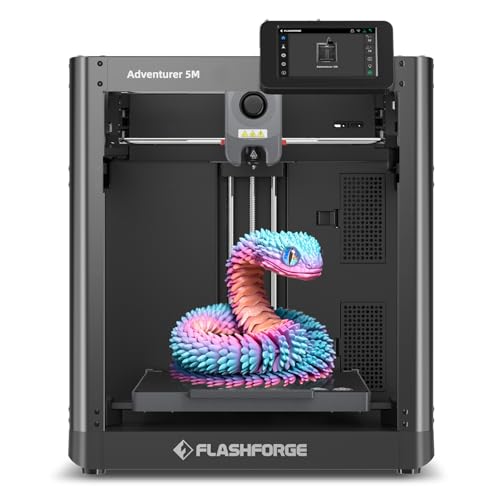
FLASHFORGE Adventurer 5M
The FLASHFORGE Adventurer 5M is an all-metal CoreXY 3D printer with 600mm/s max travel, made beginner-friendly with one-click auto leveling, a 280°C direct drive extruder, a 3-second nozzle swap, and a 220x220x220mm build volume. Its speed and direct drive extruder leave room to grow, while its one-click leveling keeps the first prints simple. It is the kind of printer that shows up again and again in this category because it covers the basics without obvious gaps: speed for the daily load, the connections a modern home expects, and a build volume that suits most first projects.
Key specifications: All-metal CoreXY; 600mm/s max travel; beginner-friendly; one-click auto leveling; 280°C direct drive extruder; 3-second nozzle swap; 220x220x220mm build volume
Where it stands out:
- 600mm/s max travel with an all-metal CoreXY design
- One-click auto leveling that is beginner-friendly
- 280°C direct drive extruder with a 3-second nozzle swap
Trade-offs:
- Print quality depends on careful setup and slicing
- Nozzle swaps and maintenance need care
- Filament and running costs add up over time
Best for: beginners who want a fast printer with room to grow Not suited for: buyers who want a printer that needs no maintenance at all
Print quality depends on careful setup and slicing None of that disqualifies the printer, but it does mean the buyer should check the specification sheet against their own desk before ordering, especially if the printer will sit far from the router or share a small desk with other equipment.
Setting up the FLASHFORGE Adventurer 5M takes little more than the Wi-Fi password and a few minutes with the app. Connect it over Wi-Fi, load the filament, and run a test print before the first real job. Keep the printer on a flat, stable surface with room around it, and check the app settings match the filament loaded, because a printer that is still being adjusted mid-print helps nobody.
Compared with the other printers in this guide, the FLASHFORGE Adventurer 5M earns its place through its 600mm/s travel with one-click auto leveling. That is the feature most likely to decide the purchase, and it is worth weighing against the printer’s limits: Print quality depends on careful setup and slicing Buyers who need that missing feature should choose a different pick from this guide, while buyers who do not will find this model covers the job with little fuss. Check the warranty and the return policy before ordering, and test the printer within the return window, printing the models it will actually print every day.
The Adventurer 5M is FLASHFORGE’s fast, beginner-friendly CoreXY printer.
Check price on Amazon: FLASHFORGE Adventurer 5M 3D Printer
Buying Guide
Print technology: laser or inkjet
The first decision is the print technology, and it follows the pages being printed. Laser printers use toner, which gives crisp text, fast output and no drying out when the printer sits unused for weeks. Inkjet printers use liquid ink, which gives better photo and colour quality at a lower purchase cost, but costs more per page on heavy text work. For 3d printers for beginners reddit, the right technology depends on whether the daily load is mostly documents or mostly images.
Within each technology there are sub-types worth knowing. Mono lasers print only in black, colour lasers add four toners for colour documents, and inkjets split into cartridge models and refillable tank models. Tank models cost more to buy but print far more pages per fill, which matters for 3d printers for beginners reddit where the volume is high. Match the technology to the pages, not to the brand, and the shortlist narrows quickly.
Speed, resolution and paper handling
Speed is measured in pages per minute, and the headline number is usually the mono speed at draft quality. For everyday use, a printer that manages around twenty pages per minute keeps short jobs moving, while anything above thirty suits a shared desk. Resolution matters more for photos than for text: 600 dpi is fine for documents, while photo work benefits from 4800 dpi or higher on an inkjet.
Paper handling is the part buyers notice every day. Automatic duplex printing saves paper on two-sided documents, an automatic document feeder speeds up multi-page scanning, and a tray of 250 sheets means less refilling. For 3d printers for beginners reddit, check the tray size and the maximum paper size before ordering, because a printer that cannot take the paper size the job needs is the wrong printer whatever its other strengths.
Connectivity and compatibility
A modern printer should connect the way the household or office already works. Wi-Fi lets phones and laptops print without cables, Ethernet gives a wired office a stable connection, and USB is the fallback that always works. Mobile printing from a phone, and support for the operating systems on the desk, are worth confirming before ordering, because a printer that cannot talk to the devices in the room is no use.
Driver and app support matter as much as the hardware. Check that the maker offers drivers for the computers and phones that will use the printer, and that the setup app is maintained. For 3d printers for beginners reddit, wireless setup is the feature most buyers use daily, so a printer with reliable Wi-Fi and a simple setup app earns its place on the shortlist.
Running costs and what to check before ordering
The purchase cost is only part of the total. Toner and ink costs, replacement drum units on some lasers, and the paper the printer uses all add up over the life of the machine. A printer that is cheap to buy and expensive to feed is a poor deal for a household that prints every day, while a printer with higher running costs can still be the right choice for light use.
Before ordering, confirm the paper sizes, the connection type, the cartridge or tank system, and the return policy. Check the size of the printer against the desk, the weight against the shelf, and the noise level if it will sit in a bedroom or a quiet office. For 3d printers for beginners reddit, these checks take ten minutes and prevent the most common regret: a printer that is right on paper and wrong on the desk.
Setting Up and Looking After Your Printer
First setup
Unbox the printer on the desk it will live on, remove all packing tape and transit locks, and install the toner or ink before switching it on. Load the paper tray with the right size, connect the printer over Wi-Fi or cable, and install the driver from the maker's site rather than an old disc. Print a test page and check the alignment before the first real job.
If the printer will be shared, set it up on the network first and add it to each computer from there, rather than connecting it to one machine by USB. Give the printer a fixed place on the desk with room for the output tray to extend, and keep the paper dry and flat, because damp or curled paper causes most early jams.
Everyday care
Keep the printer clean and it will print cleanly. Wipe dust from the paper path, keep the scanner glass free of marks, and run the cleaning cycle from the driver if output starts to streak. Use the paper the printer is rated for, and store spare paper flat and dry so it feeds straight.
Print something at least once a week if the printer uses ink, because inkjet nozzles clog when left idle. Laser printers are more forgiving of idle weeks, but toner cartridges still last longer in a cool, dry room. Replace cartridges when the printer warns they are low, not when output has already faded, and keep a spare on hand for busy weeks.
When output looks wrong
Faded or streaked output usually means a low cartridge or a dirty print head. Run the cleaning cycle once, check the cartridge level, and print a nozzle check page before ordering parts. Jams usually mean the wrong paper size in the driver, damp paper, or too many sheets in the tray, so check those three things first.
If colours look wrong, check the paper type setting matches the paper loaded, and that the driver is set to the right quality. A printer that prints well on plain paper and poorly on photo paper is usually set to the wrong media type, not broken. Update the driver from the maker's site before assuming a hardware fault.
Common Mistakes to Avoid
Buying on purchase cost alone
The cheapest printer in the shop is often the most expensive printer to own. A low purchase cost with costly cartridges or tanks can overtake a pricier printer within a year of regular printing. Work out the running cost for the pages the household or office actually prints, and compare that, not the shelf tag.
The same mistake runs the other way: buying a high-volume office printer for a desk that prints a few pages a week wastes money and space. Match the printer's duty cycle to the real load, and the right machine is usually the one in the middle of the range.
Ignoring paper size and connectivity
A printer that cannot take the paper size the job needs is the wrong printer, however good its other numbers look. Check the maximum paper size, the tray capacity and the duplex support before ordering, especially for 3d printers for beginners reddit where larger pages or two-sided output may be part of the job.
Connectivity is the other forgotten check. A printer without Wi-Fi cannot print from a phone, a printer without Ethernet cannot join a wired office, and a printer with no driver for the computer on the desk cannot print at all. Confirm all three before ordering.
Leaving the printer idle or unmaintained
Inkjet printers that sit unused for months develop clogged nozzles, and laser printers left in a damp room develop paper feed problems. Print a page a week, keep the printer in a dry room, and run the cleaning cycle at the first sign of streaks rather than waiting for output to become unreadable.
Skipping driver updates is the quieter version of the same mistake. Makers fix connection and quality issues in driver updates, and an old driver can cause problems a new printer does not have. Check for updates when the printer is set up and again after any operating system upgrade.
Further Reading
More on this topic from Gizmoverdict: 3D printers with a heated bed, 3D printers under 500, 3D printers with auto bed levelling.
Frequently Asked Questions
What do Reddit beginners say is the most important feature?
Automatic bed levelling comes up most often. Beginners who buy a printer with automatic levelling get good first prints far more often than those who level by hand. A direct-drive extruder and a large community are the next most recommended features.
How much should a beginner spend on a first 3D printer?
A good beginner printer sits in the entry range, with enough quality to print well and enough community support to fix problems. Spending more buys speed and features, not necessarily better first prints, so beginners should start with a proven model and upgrade later if printing becomes a habit.
Is a 3D printer hard to learn?
The basics take an evening: unbox, level, load filament, print a test model. Slicing software takes longer to master, but the default profiles for the models in this guide give good results without tuning. The community forums answer most beginner questions within hours.
How much does it cost to run a printer for 3d printers for beginners reddit?
Running cost depends on the technology and the volume. Laser printers usually cost less per page for text, tank inkjets cost less per page for heavy colour work, and cartridge inkjets cost more per page but less to buy. The right comparison is the cost per page for the pages actually printed, not the shelf tag.
Do I need a printer with a scanner for 3d printers for beginners reddit?
A scanner is worth having if the desk copies or scans documents regularly, and an automatic document feeder is worth having if those documents run to several pages. If the printer will only ever print, a single-function model costs less and takes less space. The all-in-one models in this guide cover the desks that need both.
Final Recommendation
The best all-round pick in this guide is the FLASHFORGE Adventurer 5M, because it pairs fast printing with one-click auto leveling and a direct drive extruder that leaves room to grow. For the easiest first printer, the Entina Tina2C is the pick: fully assembled, set up in five minutes, and quiet enough for a home desk.
Whichever model fits, start with PLA filament, print the test models first, and ask the community before changing settings. A beginner printer that matches the maker's patience will print well from the first week, and the models above are chosen for exactly that.