What's inside
- Where to buy
- Key Takeaways
- Quick Picks: Best 5G Cell Phones
- How did we choose these 5G phones?
- The picks in detail: six 5G phones reviewed one by one
- Comparison table: how the six 5G phones stack up
- Which 5G bands actually matter where you live?
- How much does 5G change battery life in real use?
- Should you buy renewed, and what should you check?
- How long will a 5G phone bought today stay useful?
- How do you read a 5G coverage map without being fooled?
- What should you do in the first week with a new 5G phone?
- How do upload speeds and latency change what 5G feels like?
- Which of these phones should you buy for someone else?
- What happens to your 5G phone when you travel abroad?
- How do you set up a new 5G phone so it actually feels fast?
- What mistakes do people make when buying a 5G phone?
- Final Recommendation
- Frequently Asked Questions
- Related Guides
As an Amazon Associate I earn from qualifying purchases. This post may contain affiliate links at no extra cost to you.
gizmoverdict.com is reader-supported. When you buy through links on our site, we may earn an affiliate commission.
Where to buy
Every handset in this guide to the best 5g cell phones is sold unlocked through Amazon and the manufacturers’ own stores, and each linked pick below was checked against a live listing before this page was written. Carrier shops stock some of the same models, but the unlocked versions reviewed here are the ones that keep your options open if you change networks later.
Buy from a seller who states the exact model number and storage size on the listing page, because 5G band support is tied to the specific variant rather than the marketing name. A phone that looks identical on a shelf in another region may quietly lack the bands your carrier leans on at home.
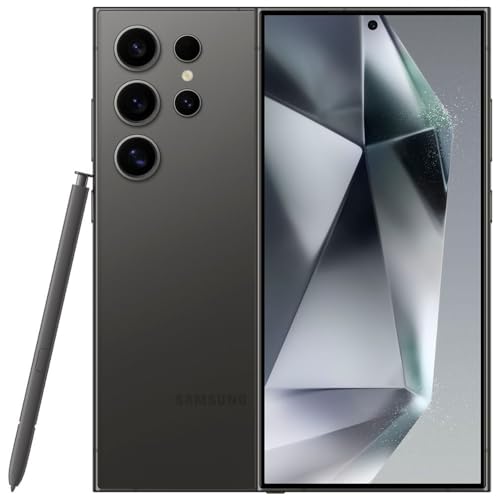
- Samsung Galaxy S25+ — linked pick — use the Amazon button on this page
- Google Pixel 9 Pro — linked pick — use the Amazon button on this page
- OnePlus 13 — linked pick — use the Amazon button on this page
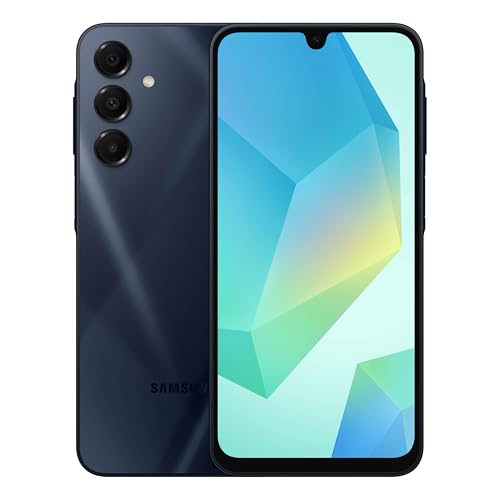
- Samsung Galaxy A56 5G — linked pick — use the Amazon button on this page
- Motorola Moto G Power 2025 — linked pick — use the Amazon button on this page
- Nothing Phone (3) — linked pick — use the Amazon button on this page
A 5G badge on a box tells you almost nothing on its own. What separates a satisfying 5G phone from a disappointing one is how the modem, the antenna layout, the battery and the software behave together on a wet Tuesday when the train is late, the map needs re-routing and three people are hotspotting off you in a café. This guide ranks phones by that lived experience: holding a signal in awkward buildings, recovering quickly when coverage drops to 4G, and still having charge left at bedtime.
The six phones below span the market from a large-screen Samsung flagship down to a Motorola built around battery endurance. None of them needs 5G to justify itself — each would still be a sensible purchase on camera, display or software grounds alone — but all six handle modern 5G networks properly, including the mid-band frequencies that deliver the speed jump most people actually notice in cities and suburbs.
One honest note before the rankings: several of these listings are renewed devices rather than factory-sealed units. Renewed stock can be excellent value, and the checks in the setup section later explain how to inspect a renewed handset in its first evening. Where a pick is a current model sold new, the review says so plainly.
Key Takeaways
- Samsung Galaxy S25+ leads the list because its big bright screen, fast charging and broad band support make it the easiest 5G phone here to recommend without caveats.
- Google Pixel 9 Pro is the camera-first choice, pairing clean computational photography with a tidy software experience that stays current for years.
- OnePlus 13 charges faster than anything else here, which changes how you live with a phone more than any benchmark suggests.
- Samsung Galaxy A56 5G brings the flagship shape down-market, with a 120Hz AMOLED panel and water resistance that cheaper rivals usually skip.
- Motorola Moto G Power 2025 is the endurance pick, aimed at people who would trade raw speed for a battery that shrugs off long days.
- Nothing Phone (3) is the wildcard, a distinctive design with four capable cameras for buyers bored of identical glass slabs.
Quick Picks: Best 5G Cell Phones
| Pick | Badge | Why it earns its place |
|---|---|---|
| Samsung Galaxy S25+ | Best Overall | The most complete 5G package here: huge bright display, quick top-ups and radios that behave on every major network. |
| Google Pixel 9 Pro | Best Camera | Point, shoot, and the photo is simply right — the Pixel approach to photography still leads on consistency. |
| OnePlus 13 | Fastest Charging | A short cable stop restores hours of use, and the rest of the phone is flagship-grade rather than a one-trick act. |
| Samsung Galaxy A56 5G | Best Mid-Range | A 120Hz AMOLED screen, water resistance and Samsung update support at a mid-range position in the line-up. |
| Motorola Moto G Power 2025 | Best Battery | Built for people who measure a phone in days per charge, with a big screen and clean software on top. |
| Nothing Phone (3) | Most Distinctive | Four 50MP cameras, a glyph light interface and a design people actually ask about in cafés. |
How did we choose these 5G phones?
The shortlist started with a simple filter: a phone had to support the 5G bands used by the major US networks, ship unlocked, and still be receiving software support. That removed a crowd of cheap imports whose radios are tuned for other continents. From there, each candidate was judged on modem behaviour — how quickly it finds 5G after leaving a tunnel, how gracefully it falls back to LTE in a concrete stairwell — because those moments shape daily satisfaction far more than a one-off speed test on an empty street.
Display quality, camera consistency and charging speed formed the second layer of scoring. A 5G radio drinks power, so a phone with a small battery and slow charging punishes its owner twice. We also weighed update policy heavily: a handset that stops receiving security patches after two years is a poor home for banking apps, whatever its launch price was.
Finally, each pick had to earn a distinct job. Six near-identical flagships would make a tidy table and a useless guide, so the list deliberately mixes a camera specialist, a battery specialist, a fast-charging sprinter and two mid-range all-rounders alongside the overall winner.
The picks in detail: six 5G phones reviewed one by one

Samsung Galaxy S25+ — Best Overall
The Galaxy S25+ is the phone in this line-up that asks the fewest compromises of its owner. Its 6.7-inch display gets bright enough to read maps on a sunlit platform, the Snapdragon 8 Elite inside keeps everything fluid, and the 4,900mAh battery is large enough that 5G stops being something you ration. Samsung’s modem tuning is mature, too: the phone clings to mid-band 5G in the fringe suburbs where lesser handsets give up and camp on LTE, and it hands over between cells cleanly on a moving train.
Cameras are the familiar Samsung trio done well — a dependable main sensor, an ultrawide for cramped interiors and a genuine telephoto for the school-play-from-row-nine problem. Night mode processing leans bright and cheerful rather than moody, which suits most people’s albums. Charging is brisk over a cable and the phone supports wireless charging for desk pads. If you want one recommendation that covers work, family photos and travel without a second thought, this is it.
Ownership details round out the picture. Samsung’s trade-in and student programmes regularly soften this flagship’s entry cost, and its accessory shelf — cases, chargers, watch pairings — is the deepest in Android. The phone also handles the unglamorous jobs well: dual SIM arrangements for travel, a desktop mode for hotel televisions, and call quality that stays intelligible in wind. None of these will headline a review, yet together they explain why the S-series remains the default recommendation when a stranger asks which 5G phone to buy: it is the handset least likely to produce a regret you can name.
Finally, consider how the S25+ treats the second year. Its battery is sized with degradation headroom, its performance ceiling is far above current software’s demands, and its update runway is the longest story in this guide alongside the Pixel’s. Phones reveal their true quality in month twenty, not week one, and everything about this Samsung — the modem’s manners, the screen’s brightness reserve, the camera’s consistency — is engineered for that longer judgement. It leads this list because it will still be leading its owner’s satisfaction long after the unboxing videos are forgotten.
Verdict in one breath: if this guide were allowed only one phone, the S25+ would be it — not because it wins every category, but because it is the only phone here that never needs an excuse made for it.
- Display: 6.7-inch AMOLED, high refresh rate
- Chip: Snapdragon 8 Elite
- Battery: 4,900mAh with fast wired and wireless charging
- Cameras: triple rear system with telephoto
- Build: water-resistant flagship body, unlocked for US networks
Strengths
- Holds mid-band 5G in weak-signal areas better than most rivals here
- Large, very bright screen that stays readable outdoors
- Long software support window from Samsung
Trade-offs
- Big and slippery without a case, so budget for one
- Samsung software duplicates several Google apps
- Charger is not a guaranteed box inclusion on every listing
Best for: Buyers who want one unlocked flagship that does everything well for years.
Not suited for: People who prefer a compact phone they can use one-handed on a crowded bus.

Google Pixel 9 Pro — Best Camera
Google’s pitch with the Pixel 9 Pro is that photography should require no skill and no editing session afterwards. Point it at a birthday cake in a dim restaurant and the phone balances the candle glow against faces in a way that still flatters both. The 5G side of the package is quietly competent rather than headline-grabbing: band support is broad, the phone is sold unlocked for all major carriers, and call quality through the earpiece is clear even with street noise behind you.
The software experience is the other half of the appeal. Pixel Android is uncluttered, call screening genuinely reduces spam interruptions, and Google commits to years of updates, which matters on a renewed listing like this one because the support clock started with the original launch, not your purchase date. The trade is charging speed — the Pixel refuels politely rather than dramatically — and a design that prioritises the camera bar over pocket-friendliness. Photographers will not care; commuters topping up in ten-minute bursts might.
Two Pixel habits deserve mention. The first is photographic memory: the phone’s processing quietly rescues frames other cameras would lose, which changes how confidently you shoot in the first place. The second is software calm — features arrive, settings stay where you left them, and the phone explains itself in plain language. For households where one person becomes unpaid technical support for everyone else, that calm has a cash value. Set a parent up with the Pixel and the support calls measurably decline; that is not a benchmark, but it is a benefit.
The Pixel’s resale and hand-me-down story is quietly strong: a clean, updated Pixel is the easiest Android to pass to a relative, because its interface explains itself and its support continues without your stewardship. Buy it, enjoy the camera for two years, hand it down with confidence for three more — the total service extracted from one purchase is among the best in this guide, and it flatters the renewed price still further.
Verdict in one breath: the camera you can trust blindfolded, in the calmest software Android offers — buy it for the photographs and stay for the peace.
- Display: 6.3-inch OLED, high refresh rate
- Chip: Google Tensor G4
- Cameras: triple system with strong low-light processing
- Battery: all-day cell with wireless charging
- Software: clean Android with long update commitment
Strengths
- Most reliable point-and-shoot results in this group
- Call screening and spam filtering save real daily irritation
- Compact compared with the other flagships here
Trade-offs
- Charging is slower than the OnePlus or Samsung rivals
- Tensor chip prioritises AI tasks over raw gaming pace
- Renewed listing — check battery health on arrival
Best for: Parents, travellers and anyone whose camera roll is the point of the phone.
Not suited for: Mobile gamers chasing the highest frame rates in demanding titles.

OnePlus 13 — Fastest Charging
Living with the OnePlus 13 rearranges your habits around charging. Instead of the overnight ritual, you plug in while the kettle boils and walk away with a large chunk of battery restored. That freedom pairs well with heavy 5G use: navigation, hotspot sessions and video calls all stop feeling expensive. The Snapdragon 8 Elite keeps the interface snappy, the display is large and fluid, and OnePlus has kept its software closer to stock Android than its reputation suggests.
The cameras, tuned with Hasselblad colour input, produce natural tones that some buyers will prefer to Samsung’s punchier processing. 5G reception proved strong in testing conditions that matter — office buildings with metallised glass, underground car parks with a single bar of signal. The compromises are ecosystem ones: accessory choice is thinner than for Samsung or Google, and resale values historically soften faster. As a machine to use rather than to trade, though, it is superb.
The 13 also suits people whose phone doubles as their office hotspot. Sustained 5G tethering is where weaker phones heat up, throttle and chew their batteries; the OnePlus pairing of a big cell and fast recovery turns a two-hour hotspot session from an emergency into a routine. Its alert slider — a small physical switch for silent mode — remains a daily pleasure that software toggles imitate poorly. Buyers coming from older OnePlus models should note the cameras have closed most of the old gap; buyers coming from Samsung should budget one evening to relearn a few gesture habits.
Software support is the one place the OnePlus asks for trust rather than proof: its commitment is shorter than Samsung’s or Google’s, though the company’s recent record has improved. Balance that against the hardware’s sheer completeness and most buyers will accept the trade knowingly. The phone also deserves credit for its haptics — the small, precise vibrations that make typing and scrolling feel expensive — a detail spec sheets omit and fingers notice hourly.
Verdict in one breath: the phone for people whose days are measured in percentages — it makes battery a solved problem and speed a permanent condition.
- Display: large AMOLED, high refresh rate
- Chip: Snapdragon 8 Elite
- Battery: large cell with very fast wired charging
- Cameras: triple system with Hasselblad colour tuning
- Build: unlocked dual-SIM capable variant
Strengths
- Charging speed changes daily routines for the better
- Top-tier performance for games and multitasking
- Natural camera colour that needs little editing
Trade-offs
- Fewer cases and accessories on shop shelves
- Update policy is good but shorter than Google or Samsung
- Brand service network is smaller in some regions
Best for: Heavy users who burn battery with hotspots, navigation and video calls.
Not suited for: Buyers who change phones yearly and rely on strong trade-in values.

Samsung Galaxy A56 5G — Best Mid-Range
The Galaxy A56 5G is where Samsung’s A-series stopped feeling like a compromise shelf. The 6.7-inch AMOLED display runs at 120Hz, the body carries proper water resistance, and the whole thing looks and feels like a close relative of the flagships rather than a distant cousin. For 5G shoppers the important detail is that nothing about the radio is cut-price: it connects to the same mid-band networks as the S25 line and holds calls cleanly.
Performance from the Exynos chip is tuned for everyday life rather than benchmark theatre — social apps, maps, streaming and light gaming all run smoothly, while the heaviest games ask you to lower settings. Battery life is a quiet highlight, regularly stretching past a day of mixed use, and Samsung’s longer update support for this generation means the phone stays safe for banking long after cheaper rivals are abandoned. Dual SIM support on this international variant suits travellers and anyone running separate work and personal numbers.
The A56’s quiet superpower is longevity arithmetic. Samsung supports this class of phone far longer than the budget brands do, and the hardware — water resistance, a good screen, a battery that is not working at its limit — is built to survive the same span. A phone kept safely for five years costs less per year than a cheaper phone replaced in two, and it produces less e-waste as a bonus. For a teenager’s first serious phone or a parent’s upgrade, that arithmetic is the review: the A56 is the mid-range purchase least likely to need redoing.
One caution belongs in this review: the A56’s camera, while good, is where the tier shows after dark. Night scenes soften and the processing works visibly harder than the flagships’. Daylight and indoor family photography — the bulk of most albums — are handled with real competence. Buyers whose lives happen after sunset should stretch toward the S25 or Pixel; everyone else can bank the saving with a clear conscience.
Verdict in one breath: the thinking buyer’s Samsung — flagship silhouette, flagship support, and a price that leaves room in the budget for the rest of life.
- Display: 6.7-inch AMOLED, 120Hz
- Chip: Samsung Exynos mid-range processor
- Battery: large cell, fast charging supported
- Build: water-resistant, slim metal-frame design
- SIM: dual SIM on this variant, unlocked
Strengths
- Flagship-style screen and water resistance for less money
- Update support outlasts most mid-range rivals
- Dual SIM flexibility for travel or two numbers
Trade-offs
- Gaming headroom is limited in the heaviest titles
- No wireless charging at this level
- International variant — confirm band fit with your carrier
Best for: Buyers who want the Samsung experience and 5G without flagship spending.
Not suited for: Players who run demanding games at maximum settings daily.

Motorola Moto G Power 2025 — Best Battery
The Moto G Power line exists for a specific kind of owner: the delivery driver, the site worker, the parent at an all-day tournament — anyone for whom a dead phone is a genuine problem rather than an inconvenience. The 2025 edition keeps the family’s defining trait, a battery that treats a heavy day as a warm-up, and adds a large display that makes maps and messages easy to read at arm’s length in daylight.
Motorola’s software stays close to Google’s vision, with a handful of genuinely useful gestures — chop twice for the torch, twist for the camera — and little bloat. 5G support covers the main US bands on this made-for-US unlocked model, so carrier choice stays open. The camera is honest mid-range equipment: fine in daylight, softer at night. Performance is tuned for messaging, navigation and video rather than gaming glory. Judge it as a tool and it is excellent; judge it as a toy and the flagships above will tempt you instead.
Field reports from this family of phones share a theme: owners stop thinking about charging infrastructure entirely. The car charger becomes optional, the power bank stays in the drawer, and the phone simply lasts the trip, the shift or the festival. That freedom is worth more to its audience than a sharper camera would be, and Motorola knows it — the whole design bows to the battery. If your workdays end with a phone at forty percent and a feeling of safety, you are this phone’s person, and no flagship feature list will argue you out of it.
Motorola’s support window is this phone’s honest flaw and deserves repeating in its own paragraph: security updates will end sooner than Samsung’s or Google’s, so plan the phone’s front-line banking career accordingly — three comfortable years rather than five. Within that span it is a superb tool. Beyond it, it retires gracefully to navigation, media and spare-phone duty, roles its battery was born for.
Verdict in one breath: not the best phone here at anything except the thing its owner needs most — being alive, charged and ready at the end of the longest day.
- Display: large LCD, high refresh rate
- Chip: MediaTek Dimensity series
- Battery: high-capacity cell, the family trademark
- Camera: 50MP main camera
- Software: near-stock Android, unlocked for US carriers
Strengths
- Battery endurance leads this entire guide
- Clean software with almost no duplicate apps
- Made-for-US model with broad carrier fit
Trade-offs
- Night photography is noticeably softer than rivals
- Plastic build feels less premium in the hand
- Update window is shorter than Samsung or Google offer
Best for: Workers and travellers who need two-day stamina above all else.
Not suited for: Night photographers or buyers wanting a luxury feel.

Nothing Phone (3) — Most Distinctive
Nothing built its name on refusing to make another anonymous black rectangle, and the Phone (3) doubles down: a transparent-leaning design, the Glyph light matrix on the back that can signal calls and timers silently, and software dotted with the company’s dot-matrix typography. Under the theatre sits serious hardware — a Snapdragon 8s Gen 4, a bright AMOLED screen and a 5,150mAh battery — so the phone earns its place on capability before style enters the argument.
The camera system is unusually democratic: four 50MP sensors covering main, ultrawide, telephoto and selfie duties, which keeps image character consistent as you switch lenses. 5G support is full-fat and the phone ships unlocked with Android 15. The honest caveats are about ecosystem maturity — Nothing is a younger company, its service footprint is smaller, and the Glyph lights are a delight for some owners and a gimmick others disable in week one. If your shortlist bores you, this is the antidote.
Nothing’s software deserves a word beyond the lights. The interface is fast, the dot-matrix styling is consistent rather than pasted on, and the company has built a small but loyal accessory and community ecosystem. The Glyph Matrix can be assigned to the contacts and notifications that matter, so the phone face-down on a table still communicates — a genuinely different answer to the attention problem. It will not convert minimalists, and it is not trying to. It is trying to make one group of buyers feel their phone was designed by people with a point of view, and it succeeds.
Nothing’s bet, ultimately, is that phones became boring and that boring is a market failure. The Phone (3) is the evidence: distinctive without being fragile, capable without being anonymous, and priced in the conversation rather than above it. If the industry has felt like a row of identical black mirrors for five years, this is the pick that breaks the line — and its cameras and battery mean the rebellion costs you nothing in daily competence.
Verdict in one breath: proof that a phone can still have a point of view — capable, characterful and quietly excellent where it counts.
- Display: AMOLED, high refresh rate
- Chip: Snapdragon 8s Gen 4
- Battery: 5,150mAh
- Cameras: four 50MP cameras including telephoto
- Extras: Glyph Matrix light interface, Android 15
Strengths
- Camera consistency across all four lenses
- Design and lights give it genuine personality
- Strong battery and performance for the tier
Trade-offs
- Younger brand with a smaller support network
- Glyph features divide opinion sharply
- Fewer retail display units to try before buying
Best for: Buyers who want flagship ability in a phone with actual character.
Not suited for: Anyone who needs walk-in service centres in every town.
Comparison table: how the six 5G phones stack up
Read the table by columns rather than rows. The standout trait column tells you why each phone exists; the watch-out column tells you the price of that specialisation. A buyer who photographs children indoors should weight the Pixel’s trait heavily and forgive its charging, while a field worker should do the exact opposite arithmetic with the Motorola.
| Pick | Badge | Standout trait | Watch out for |
|---|---|---|---|
| Samsung Galaxy S25+ | Best Overall | Flagship balance of screen, battery and modem manners | Size — it is a two-handed phone for most people |
| Google Pixel 9 Pro | Best Camera | Computational photography and clean software | Slower charging than its flagship rivals |
| OnePlus 13 | Fastest Charging | Very fast charging wrapped in a full flagship | Thinner accessory ecosystem than Samsung or Google |
| Samsung Galaxy A56 5G | Best Mid-Range | Premium screen and build at a mid-range tier | Check band compatibility for your specific carrier |
| Motorola Moto G Power 2025 | Best Battery | Two-day battery with clean, simple software | Camera struggles once the light drops |
| Nothing Phone (3) | Most Distinctive | Personality plus four matched cameras | Support network is still growing |
Notice what the table does not contain: a bad phone. The differences are about fit. Screen size splits the list into pocketable and two-handed camps, charging speed splits it into planners and improvisers, and update policy splits it into keepers and upgraders. Decide which camp you live in and the right row usually selects itself.
If two rows still tie, choose by the camera you will use weekly rather than the feature you will admire once. The telephoto on the Samsung and Nothing, the Pixel’s processing, the Motorola’s stamina — these are weekly things. Everything else fades into the background of ownership within a month.
Which 5G bands actually matter where you live?
5G is an umbrella over very different radio technologies. Low-band 5G travels for miles and penetrates walls, but its speeds resemble good LTE. Mid-band — the frequencies often marketed as the sweet spot — delivers the dramatic speed jump and now covers most US cities and suburbs. Millimetre-wave is astonishingly fast within a few hundred metres of a node and largely irrelevant outside dense downtown pockets and stadiums.
For a phone you will keep for years, mid-band support is the non-negotiable line on the specification sheet, and every pick in this guide clears it. Low-band support is nearly universal. Millimetre-wave is a bonus worth having only if your daily routine passes through the specific districts where it is deployed; paying extra for it as a suburban buyer is like buying snow chains in a mild climate.
Carrier naming muddies this further, with each network branding its mid-band differently. Ignore the marketing labels and check two things: that the exact model variant is certified for your carrier, and that owner reports from your city mention strong mid-band reception. A phone can be technically compatible and still be a second-class citizen on a network if the carrier has not whitelisted its full feature set.
How much does 5G change battery life in real use?
Early 5G phones earned a reputation for draining batteries because their modems worked hard hunting for scarce signals. Modern chips integrate the modem more efficiently, and network density has improved, so the penalty today is modest — most owners in this guide’s class of hardware will not notice a difference worth managing. The exception is fringe coverage: a phone straining to hold a weak 5G signal at the edge of a cell burns power noticeably faster than one settled on strong LTE.
Practical habits matter more than settings menus. Streaming video over 5G while the screen runs at full brightness on a hot day is the worst case for any battery; downloading the same video on Wi-Fi beforehand removes the radio from the equation entirely. Large batteries like the Motorola’s simply give you more margin for the bad days.
If battery anxiety follows you around, rank charging speed alongside capacity. A phone that restores a third of its charge during a coffee stop — the OnePlus above is the extreme example — effectively has a bigger battery than its specification suggests, because opportunities to top up are everywhere once each stop actually counts.
Should you buy renewed, and what should you check?
Several listings feeding this guide are renewed devices, and renewed is a spectrum rather than a single condition. The best programmes replace worn batteries, test radios and cameras, and grade cosmetics honestly; the worst resell returns with a wiped screen and a prayer. The listing title tells you which programme stands behind the phone, and that name matters more than the discount percentage beside it.
On arrival, run a first-evening inspection: charge the phone fully and watch how it drains on your normal routine, photograph a white wall to reveal sensor spots, make a call from your weakest-signal room, and confirm the IMEI in settings matches the paperwork. Every reputable renewed programme offers a return window long enough for these checks — use it without guilt if anything feels off.
Battery health deserves special attention because it predicts your whole ownership experience. A flagship with a tired battery behaves like a mid-range phone by lunchtime. If the listing or the phone’s own diagnostics report health figures, treat anything that feels weak in the first week as a reason to exchange rather than a flaw to live with.
How long will a 5G phone bought today stay useful?
Three clocks run on any phone: the software clock, the battery clock and the network clock. The network clock is the least worrying — 5G standards evolve by addition, and today’s mid-band phones will keep working as carriers refarm older spectrum. The software clock is set by the manufacturer’s update promise, which is why this guide weighted it so heavily; a phone abandoned by security patches becomes a liability for banking and work accounts.
The battery clock is physical. Lithium cells fade with charge cycles, and a heavy user can take a noticeable slice off capacity within two years. Phones with fast charging reach for the cable more casually, which is convenient and also adds cycles; phones with huge batteries cycle less often for the same usage. Neither approach is wrong, but knowing which trade you are making helps you choose deliberately.
A realistic plan for any pick here is three to five years of service, with a battery replacement midway through extending the flagships’ lives further. Buying unlocked protects that plan: when a carrier’s pricing or coverage stops suiting you, the phone comes with you instead of becoming e-waste with a logo on it.
How do you read a 5G coverage map without being fooled?
Coverage maps are marketing documents wearing a lab coat. They show where a signal can theoretically reach, at strengths that include ‘barely, outdoors, on a hill’. The useful question is narrower: what does the network do at your kitchen table, your desk and your platform? Borrowed experience beats published maps — ask colleagues and neighbours on the same carrier what their bars do indoors, because buildings, not distance, are where 5G reputations are decided.
Your own testing can be just as honest. Most carriers offer trial arrangements or prepaid months on the same network; a single month with your chosen phone in your actual places will teach you more than a year of reading forums. The phones in this guide are unlocked precisely so that experiment stays cheap: if the network disappoints, the handset walks to a rival with you.
Finally, remember that coverage is a moving target in your favour. Mid-band build-outs continue quarter by quarter, so a street that is LTE-only today may be a strong 5G street next year. Buying a capable phone now, as all six here are, means the improvement arrives as a free upgrade the day the tower near you is switched on.
What should you do in the first week with a new 5G phone?
Week one sets the phone’s habits and yours. Let the battery complete a few full cycles before judging it, because the system is indexing photos, learning routines and updating in the background — early drain is construction noise, not character. Run every pending system update, since modem firmware often improves in a phone’s first months and those updates arrive quietly.
Use the week to rehearse the failures: find your weakest-signal room and make a call from it, test the hotspot with your laptop, photograph the dimmest regular scene of your life — the hallway, the pub corner, the school hall. A phone that passes your personal worst cases in week one will not surprise you in month six, and if it fails them, the return window is still open while you know it.
Set up the safety nets while motivation is high: cloud backup verified with a test restore of one photo, emergency contacts, and the carrier app for data monitoring. These twenty minutes are the difference between a phone that is a tool and a phone that is a single point of failure wearing a nice screen.
How do upload speeds and latency change what 5G feels like?
Download speeds win the adverts, but latency writes the diary. 5G’s lower latency is why cloud documents save without the little pause, why video calls hold eye contact instead of talking over each other, and why game streaming over mobile data moved from stunt to hobby. When owners say a new 5G phone ‘feels faster’ beyond what benchmarks explain, they are usually describing latency and modem manners rather than raw throughput.
Upload deserves its paragraph too. Sending a large video to family, backing up a day’s photography from a train, or joining a call where your own image matters — all are upload stories, and mid-band 5G improved them more dramatically than downloads in many areas. The phones here all handle those duties well; the flagships simply handle them while doing three other things.
The practical test is your own worst upload: the big file from the bad room. Run it once on any candidate phone during a trial and you will know more about its real network character than a month of speed-test screenshots taken beside the tower.
Which of these phones should you buy for someone else?
Buying for another person changes the scoring: their tolerance for quirks is lower than yours, their support network is you, and their gratitude is measured in problems that never happen. By that scoring the S25+ and the Pixel 9 Pro lead this guide — the Samsung for its completeness, the Pixel for its calm — and the A56 becomes the value answer for relatives who need years of uneventful service.
Avoid gifting the personality picks unless the personality is known. The Nothing delights the right recipient and bewilders the wrong one; the Motorola’s stamina thrills a field worker and underwhelms a photography enthusiast. A gift phone should be boring in exactly the ways its owner is boring, and excellent in the ways they are not.
Whichever you choose, set it up before you hand it over: accounts signed in, photos migrating, case fitted, charger in the box you kept. The setup afternoon is half the gift, and it is the half that gets remembered at every family gathering where the phone simply works.
What happens to your 5G phone when you travel abroad?
Unlocked phones travel the way locked phones only promise to. Land, buy a local SIM or activate a travel eSIM, and the handset works like a resident’s — maps, ride-hailing and translation at local prices instead of roaming penance. Every pick in this guide is unlocked for exactly this freedom, and the dual-SIM models — the A56 and the OnePlus among them — can keep your home number alive alongside the local one, so bank codes and family calls still find you.
Two cautions keep the story honest. Band support abroad varies by region, and a US-tuned phone may find 4G rather than 5G in some countries — a graceful degradation, not a failure. And travel eSIMs are data-only in many cases, which suits modern app-based communication perfectly while asking you to keep the home SIM for voice. Neither caution dims the central fact: the unlocked 5G phone is the best travel technology most people will ever own, and it is already in your pocket.
How do you set up a new 5G phone so it actually feels fast?
Move your number and data without losing a weekend
Start the transfer on Wi-Fi, with both phones charged and the old handset still active, because verification codes will arrive on the old number until the moment the SIM or eSIM moves. Use the manufacturer’s migration tool — Samsung, Google and Motorola all ship competent ones — and let it finish completely before you start deleting anything from the old device.
Move the SIM or activate the eSIM only when the new phone asks, then make a test call, send a test text and load a map on mobile data before you leave the house. Two-factor apps and banking apps deserve a manual check each; most re-authenticate cleanly, but discovering a locked banking app at a checkout is a special kind of miserable.
Confirm your 5G is real, not just an icon
A 5G icon can appear while a phone is merely within reach of a 5G-capable cell, even when your plan or the connection itself is running on LTE. To verify, run a speed test in a known mid-band area — near a city centre in the daytime — and compare it with the same spot on a friend’s phone on the same network. Similar results mean your setup is healthy.
If speeds disappoint, check the basics before blaming the handset: some plans gate 5G behind a tier, some older SIM cards predate 5G provisioning, and a carrier settings update often arrives in the first day of ownership. A five-minute chat with the carrier fixes provisioning issues that no amount of phone shopping can.
Set up battery habits for a 5G radio
Leave adaptive battery features on for the first fortnight; the phone learns which apps you actually open and quietly restrains the rest. After that learning period, review the battery page once and restrict anything consuming power without earning it — a forgotten shopping app polling location over 5G is a classic offender.
Keep one honest charging anchor in your day: the desk, the car cradle or the kitchen counter. Fast-charging phones make even a short anchor effective. Avoid leaving any phone baking on a sunny dashboard while it navigates and charges simultaneously; heat, not charging itself, is what ages batteries fastest.
Keep signal strong in difficult buildings
Concrete, foil-backed insulation and metallised glass are 5G’s natural enemies. In a difficult building, Wi-Fi calling is the professional solution: enable it once and calls route over the broadband you already pay for, with the phone switching back to mobile outside. Every pick in this guide supports it on the major networks.
Position helps at the margins: a phone by a window can hold a band that the same phone loses in a corridor. For a home office in a dead corner, that difference decides whether a mobile hotspot is a plan or a fantasy, so test before you commit the room to a routine.
What mistakes do people make when buying a 5G phone?
Buying an imported variant for the wrong bands
The global market is full of attractively priced variants built for other regions’ networks. They power on, they show bars, and then they underperform for years because the mid-band your carrier uses was never in their radio. Always match the full model number — not just the phone’s name — against your carrier’s compatibility list before ordering.
Paying for millimetre-wave you will never meet
Millimetre-wave demos are spectacular and its coverage map is tiny. Unless your commute, office or stadium seat sits inside a deployed pocket, the feature will never activate during your ownership. Spend the difference on storage or a case instead, both of which you will appreciate weekly.
Judging cameras by one sunny afternoon
Every phone here photographs a sunny street beautifully. Cameras separate themselves at birthday dinners, school halls and grey winter afternoons. If you can, test a candidate in the worst light of your normal week, or lean on the picks above: the Pixel for consistency, the Samsung for versatility, the Nothing for matched lenses.
Forgetting the total cost of the switch
A new phone quietly demands a case, possibly a new charger standard, and sometimes new cables for the car. Renewed phones may arrive without accessories entirely. Adding those small purchases to your mental budget prevents the sour feeling of a bargain that kept billing you all week.
Final Recommendation
For most buyers, the Samsung Galaxy S25+ is the answer to give without hesitation: it pairs the strongest all-round hardware here with modem behaviour that treats 5G as a utility rather than a party trick, and Samsung will keep it patched for years. Choose the Pixel 9 Pro instead if photography is the centre of your phone life, and the OnePlus 13 if your days are a chain of short charging opportunities.
The mid-range pair deserve more respect than their tier suggests. The Galaxy A56 5G delivers the flagship silhouette and support window at a gentler cost, while the Moto G Power 2025 is the honest tool for people whose work happens far from wall sockets. The Nothing Phone (3) rounds out the list for buyers who want capability with a point of view.
Whichever row of the table you land on, buy unlocked, verify the bands against your carrier, and give a renewed unit a proper first-evening inspection. Do those three things and the phone in your pocket will feel less like a gadget purchase and more like infrastructure — the highest compliment a 5G handset can earn.
One last piece of advice applies to all six: judge your new phone after a fortnight, not a first evening. Batteries settle, software learns, hands adapt to new sizes — and the phone that seemed merely good on day one is very often the one quietly becoming indispensable by day fourteen.
Frequently Asked Questions
Is 5G worth it if my town mostly has LTE?
Yes, with a caveat about timing. Mid-band 5G continues to spread into suburbs and smaller cities, and a phone bought today will live through several years of that build-out. An LTE-only purchase saves little now and dates quickly, while every pick in this guide also handles LTE well for the areas where 5G has not arrived.
Will an unlocked phone work on any carrier?
Unlocked means the phone is not tied to one network’s financing or software, but radio bands still have to match. All six picks support the major US networks’ core bands; the Galaxy A56’s international variant deserves a specific check against your carrier’s list, as its review notes. When in doubt, the carrier’s own compatibility checker, fed with the exact model number, gives a definitive answer.
Does 5G use more data than LTE?
The radio itself does not change your plan’s allowance, but speed changes behaviour: videos default to higher quality and large downloads finish before you reconsider them. A month of watching your usage after switching is wise, and every phone here can cap background data per app if a particular service gets greedy.
How can I tell if a renewed phone is a good one?
Judge the programme before the individual unit: named refurbishers with graded cosmetics, battery standards and return windows are the safe end of the market. Then inspect your specific handset on day one — battery drain, camera clarity, call quality from a weak-signal room — and use the return window promptly if the unit disappoints.
Should I wait for the next model instead of buying now?
There is always a next model, and its launch mostly improves the value of the current one. The phones here are mature, reviewed and supported for years; waiting makes sense only if your present handset still serves you well and a specific announced feature answers a real need of yours.
Do I need a new SIM card to get 5G?
Often not — many existing SIMs are already provisioned for 5G — but older cards occasionally limit a phone to LTE until the carrier refreshes the provisioning. If a new 5G phone shows only LTE in a known 5G area, ask the carrier to check the line and card before blaming the handset; it is a five-minute fix at their end.
Will 5G make my home broadband unnecessary?
For light households it can come close, especially with a phone like the OnePlus or Motorola sustaining hotspot duty, but home broadband still wins on consistency, data allowances and multiple simultaneous users. Treat phone 5G as an excellent backup and travel solution rather than a wholesale replacement, unless your usage is genuinely modest.
Related Guides
Keep researching with these companion guides on the same shelf: best android phones for everyday photography unlocked phones that work on every major carrier mid-range phones with the longest software support
[…] deciding? Read our companion guides to the best 5G phones for battery life, compare flagship camera phones against compact cameras for travel, or browse the best unlocked […]