What's inside
- Key Takeaways
- Quick Picks
- How Did We Choose These Budget Desk Systems?
- What Is the Real Difference Between 2.0 and 2.1 at a Desk?
- How Much Do Connections Matter on a Computer Speaker?
- The Six Systems in Detail
- How Do the Six Systems Compare at a Glance?
- How Should Desk Speakers Be Set Up for the Best Sound?
- What Mistakes Do Budget Desk Speaker Buyers Make?
- Which System Suits Gaming, Films, Calls and Music Best?
- Why Does the Desk Itself Change How Speakers Sound?
- What Role Do These Speakers Play Across a Working Day?
- How Should a Shared Room or a Thin Wall Change the Choice?
- What Does the Upgrade Path Look Like From Each Pick?
- How Can a Buyer Judge Speakers Without a Showroom?
- What Should Be Checked on the Listing Before Ordering?
- How Do Wired and Wireless Feeds Compare at a Desk?
- Can Budget Speakers Serve a Small Room, Not Just a Desk?
- What Separates a Good Budget System From a Disappointing One?
- How Should the Money Inside This Bracket Be Prioritised?
- What Happens When the Computer Changes?
- Why Do Voices Matter More Than Bass in Desk Speaker Judgement?
- How Do the Picks Handle a Second Screen, a Console and a Crowded Desk?
- Final Recommendation
- Frequently Asked Questions
- Related Guides
As an Amazon Associate I earn from qualifying purchases. This post may contain affiliate links at no extra cost to you.
gizmoverdict.com is reader-supported. When you buy through links on our site, we may earn an affiliate commission.
Where to buy: Each system below links to its own Amazon listing; check the listing’s connection list against your computer’s ports before ordering.
The search for the best pc speakers under 100 dollars lands in the most honest corner of the audio market. This is the budget bracket where a desk stops sounding like a laptop’s apology and starts sounding like a place a person might enjoy spending eight hours — and it is a bracket with a clear internal geography. At one end sit tiny USB-powered pairs that ask nothing of a desk but two corners and a port. In the middle live 2.0 systems with Bluetooth and proper controls. At the ambitious end stand 2.1 systems with a subwoofer under the desk, borrowing the architecture of far pricier setups. The six picks in this guide map that whole geography, and none of them is a mistake — they are answers to different desks.
A note on the money, because this category invites sloppy claims. Prices in this bracket move with promotions and revisions, so this guide deliberately positions each system by its tier inside the bracket — entry, mid-bracket, top-of-bracket — rather than stamping a figure on it. What can be said truthfully is what the tiers buy: the entry tier buys clarity and convenience, the middle buys connections and control, and the top buys a subwoofer, headroom and the physical low end that small satellites cannot counterfeit. A shopper who knows which of those three purchases they are making will choose well among the six.
What unites the picks is a refusal of the two classic budget traps. None is a novelty speaker dressed as a deal, and none spends its budget on lights while starving its drivers — the one gaming-flavoured model here earns its place on sound and connections, with its styling as a bonus. Every pick is a real stereo system from a maker with a track record in computer audio: three generations of one beloved pebble-shaped line, a THX-certified veteran, a modern wireless-control 2.1, and a compact gaming 2.0 with surprising connections.
Key Takeaways
- The bracket divides by architecture: USB-powered 2.0 pairs for simplicity, Bluetooth 2.0 systems for flexibility, and 2.1 systems with a subwoofer for full-range sound.
- Creative’s Pebble family appears three times because it defines the entry tier — the original 2.0, the Plus with a down-firing subwoofer, and the V3 with USB-C audio and Bluetooth.
- The Klipsch ProMedia 2.1 is the bracket’s veteran heavyweight, carrying THX certification in its listing title and a long reputation for desk-shaking headroom.
- The Logitech Z407 answers with modern manners: Bluetooth, a subwoofer, and a wireless control dial that lives on the desk.
- Edifier’s G2000 closes the list as the compact gaming 2.0 — 32W in its listing title, with connections aimed at PCs, laptops and consoles alike.
Quick Picks
| Pick | Badge | Why it earns its place |
|---|---|---|
| Creative Pebble 2.0 | Best simple starter | Two angled spheres, one USB plug for power, and a leap in clarity over any laptop’s built-in sound. |
| Creative Pebble Plus 2.1 | Best small-footprint 2.1 | The Pebble idea completed by a down-firing subwoofer, still powered entirely from a USB port. |
| Creative Pebble V3 | Best modern desk pair | USB-C digital audio plus Bluetooth 5.0 in the same pebble form, for laptops that live on one cable. |
| Klipsch ProMedia 2.1 | Best for power | A THX-certified 2.1 institution whose subwoofer and headroom still set the bracket’s ceiling for impact. |
| Logitech Z407 | Best wireless control | Bluetooth streaming, a proper subwoofer, and a puck dial that makes volume a physical pleasure again. |
| Edifier G2000 | Best compact gaming 2.0 | Small cabinets, 32W per its title, and a connection set that welcomes PC, laptop and console in turn. |
How Did We Choose These Budget Desk Systems?
Selection started from architecture, because in this bracket the shape of the system matters more than any single specification. A desk buyer is really choosing among three machines: the minimalist pair that runs from a USB port, the flexible pair that also speaks Bluetooth, and the three-piece system that trades a floor footprint for real bass. The shortlist holds all three shapes in credible forms, at several tiers, so that the comparison below is between philosophies rather than between near-identical boxes.
Claims stay close to the listing titles. Where a title states a fact — the ProMedia’s THX certification, the G2000’s 32W, the Pebble Plus’s down-firing subwoofer — the guide builds on it. Where a title is silent, the discussion stays qualitative: these are budget systems judged on clarity, balance and behaviour at desk distances, not on invented measurements. Price positioning is likewise kept qualitative throughout, describing each model’s station inside the bracket instead of asserting a checked figure for it.
What Is the Real Difference Between 2.0 and 2.1 at a Desk?
The numbers describe boxes: 2.0 is two speakers, 2.1 is two speakers and a subwoofer. The listening difference is about which octaves exist. A compact 2.0 pair reproduces voices, most instruments and the whole world of calls, videos and casual listening with complete conviction, because human speech and most music live in the range small drivers handle well. What it cannot do is the bottom octave — the film explosion, the electronic kick, the orchestral floor — and it does not pretend otherwise, which keeps its sound honest and tidy.
A subwoofer changes the system’s centre of gravity. Freed from attempting bass they cannot make, the small satellites stay cleaner in the midrange, while the subwoofer — usually on the floor, where its work is felt as much as heard — supplies the weight. The cost is logistics: another box, another cable run, a floor footprint, and a volume balance between sub and satellites that needs setting once and then leaving alone. Desks that host films, games and bass-led music gain the most; desks devoted to calls, writing and spoken word gain the least, and for those desks the tidier 2.0 systems in this guide are not a compromise but the correct answer.
How Much Do Connections Matter on a Computer Speaker?
More than the spec sheet suggests, because a desk speaker’s connections decide its daily friction. USB audio is the serene option: one cable carries sound digitally from the computer, volume behaves predictably, and the analogue noise that haunts cheap headphone outputs never enters the room. Several picks here are USB-powered as well as USB-fed in spirit — the Pebble family above all — which reduces the whole installation to a single plug and a pair of angled spheres. The analogue 3.5 mm route remains universal and simple, at the mercy of the computer’s own output quality.
Bluetooth adds the second device every desk actually has: the phone. A Bluetooth pair lets a podcast migrate from pocket to desk speakers without a cable, and takes the laptop’s place when the laptop is closed. The Z407 and the Pebble V3 build their appeal on that flexibility, while the G2000’s connection set courts the multi-device desk — computer, laptop and console sharing one pair of speakers. The right question is not which connection is best in the abstract, but which devices will honestly ask this desk for sound across a week; the answer names the pick.
The Six Systems in Detail
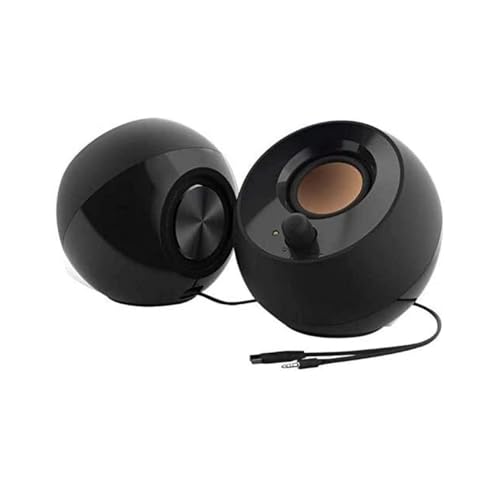
Creative Pebble 2.0 — Best simple starter
The original Pebble is the budget desk speaker reduced to its essence: two small spheres, angled upward toward the listener’s ears, powered from a USB port and fed by a single audio cable. Its listing title calls it a USB desktop stereo speaker for PC and laptop, and that plain description hides a small design triumph — the angled drivers solve the oldest problem in computer audio, speakers firing at the user’s chest, by aiming the sound where the ears are. The result, at desk distance, is startlingly clear for the tier: voices separate from backgrounds, video dialogue lands, and music gains the stereo width that laptop speakers physically cannot produce.
Expectations should be set by physics and then pleasantly met. Bass is present as rhythm rather than as weight; the Pebble tells you what the bass line is doing without shaking anything. For calls, study, writing, video and the enormous middle of everyday listening, that balance is not a limitation but a fit. The single-knob control keeps operation to one gesture, the footprint keeps a crowded desk credible, and the whole installation takes less time than the meeting it was bought for. As the first step up from built-in sound, nothing in this bracket is easier to recommend or harder to regret.
- Format: 2.0 stereo pair, spherical angled cabinets
- Power: USB-powered, per its desktop USB brief
- Feed: analogue audio connection from the computer
- Controls: single volume knob on the speaker
- Desk footprint: minimal — two small spheres
Strengths
- Angled drivers aim sound at the listener instead of the desk edge
- One-plug USB power keeps installation and cable clutter near zero
- Clarity with voices far beyond any built-in laptop output
Trade-offs
- Bass is informative rather than physical — no subwoofer, no illusions
- No Bluetooth; the phone stays on its own speaker
- Volume ceiling suits a desk, not a room
Best for: a first upgrade from laptop sound, on a desk devoted to work and video. Not suited for: film nights or bass-led music as the main event.
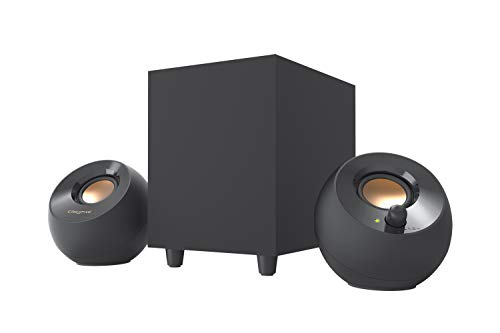
Creative Pebble Plus 2.1 — Best small-footprint 2.1
The Pebble Plus answers the original’s one honest limitation by adding the missing box: a down-firing subwoofer, named as such in its listing title, that sits on the floor or a low shelf and fires its output downward into the room. The satellites remain the same angled spheres, still USB-powered — a small marvel of economy, a full 2.1 system running from a computer’s USB port — while the subwoofer quietly changes the character of everything played. Films gain floor, games gain weather, and music gains the bottom octave that tells a kick drum from a suggestion.
The balance to strike is the subwoofer’s level, and the Plus rewards a conservative hand: set where it supports rather than announces itself, the system sounds like one instrument instead of two. Desk by desk, this is the pick that converts sceptics — people who believed computer speakers were a solved, mediocre category — because the leap from the plain Pebble to the Plus is the leap from hearing a soundtrack to feeling its edges. It remains a desk system, with a desk’s volume ceiling and a subwoofer sized for nearfield generosity rather than cinema violence, but within those borders it is the most complete small system in this guide.
- Format: 2.1 — two angled satellites plus a subwoofer
- Subwoofer: down-firing design, per the listing title
- Power: USB-powered system, satellites and sub together
- Feed: analogue audio connection from the computer
- Footprint: small on the desk, one modest box on the floor
Strengths
- Real low end joins the Pebble clarity, completing film and game sound
- Entire 2.1 system runs from USB power — no wall wart hunting
- Satellites keep the same tiny, angled desk presence as the 2.0 model
Trade-offs
- Subwoofer level needs one careful setting session to blend
- Still no wireless input for the phone
- Floor space for the sub is a real cost in a cramped room
Best for: a desk that splits its life between work, films and games. Not suited for: a minimalist desk that refuses floor boxes on principle.

Creative Pebble V3 — Best modern desk pair
The V3 is the Pebble grown into the USB-C era. Its listing title names USB-C desktop speakers with Bluetooth 5.0, and those two phrases describe the modern laptop desk precisely: one digital cable from a current laptop carries the audio cleanly, while Bluetooth stands ready for the phone, the tablet or the laptop that would rather not be tethered today. The pebble form and its upward angle remain — Creative evidently concluded, correctly, that the geometry was already right — while the internals and the connection panel step forward a generation.
In use, the V3 is the most flexible 2.0 pair here. USB-C audio sidesteps the variable quality of analogue outputs and behaves impeccably with volume controls; Bluetooth turns the desk into the room’s speaker when the computer sleeps. Sound keeps the family character — clear, nearfield-tuned, honest about its bass limits — with a little more refinement in the delivery. For a desk built around a modern laptop, a dock and a phone in constant rotation, the V3 is the pick that requires the fewest apologies and the fewest cables, and its mid-bracket station buys exactly that polish rather than a bigger box.
- Format: 2.0 stereo pair, pebble-form angled cabinets
- Audio feed: USB-C digital audio, per the listing title
- Wireless: Bluetooth 5.0, per the listing title
- Power: USB-powered design in the Pebble tradition
- Desk fit: modern laptop setups, single-cable desks
Strengths
- USB-C digital feed gives clean, predictable sound from current laptops
- Bluetooth adds the phone and tablet without a cable swap
- The proven angled form keeps voices aimed at the listener
Trade-offs
- Older computers may need an adapter for the USB-C feed
- Still a 2.0 system — deep bass remains outside its brief
- Mid-bracket positioning buys polish, not more power
Best for: a current laptop desk that rotates between computer and phone audio. Not suited for: a legacy desktop with no USB-C and no wish to adapt.

Klipsch ProMedia 2.1 — Best for power
Some products review well; the ProMedia 2.1 has simply outlived every rival’s product cycle. Its listing title carries THX certification, and the system behind that badge is a 2.1 built with unusual seriousness for the bracket: horn-loaded satellites in the Klipsch tradition, a substantial side-firing subwoofer, and amplification with headroom that embarrasses most of the category. At a desk it does not sound like a computer accessory. It sounds like a small hi-fi that happens to take its orders from a PC, with dynamics — the swing between a whisper and an explosion — that budget systems usually compress into politeness.
That power asks for a little respect in setup. The subwoofer is a real piece of furniture by desk standards, the satellites want placement at ear height to show their imaging, and the system’s volume ceiling exceeds what shared walls forgive. Controls live on a satellite pod in the classic manner, wired and immediate. Nothing about the ProMedia chases modern wireless convenience; it is an analogue-fed monument to doing one thing thoroughly. For the desk that games hard, screens films and plays music at genuine volume, it remains the bracket’s ceiling — the system the others are measured against when impact is the criterion.
- Format: 2.1 — two horn-loaded satellites plus a subwoofer
- Certification: THX Certified, per the listing title
- Feed: analogue connection from the computer
- Controls: wired control pod with volume and subwoofer level
- Character: high headroom, dynamic, room-capable by desk standards
Strengths
- The most powerful, dynamic sound in this bracket, full stop
- Subwoofer weight gives films and games genuine physical presence
- A proven design with a very long track record at desks
Trade-offs
- No Bluetooth or USB audio — analogue only, proudly
- The largest footprint here, subwoofer included
- Its ceiling is wasted on a calls-and-writing desk
Best for: a gaming and film desk that plays at real volume. Not suited for: a tidy minimal desk or a wireless-first setup.
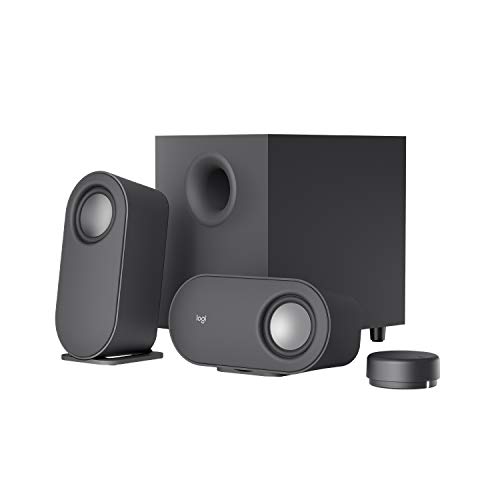
Logitech Z407 — Best wireless control
The Z407’s signature object is not a speaker at all — it is the wireless control dial, a puck that sits on the desk and turns volume back into a physical pleasure. Its listing title names Bluetooth computer speakers with a subwoofer and wireless control, and the combination describes a system designed for how desks are actually used in this decade: the computer feeds it by cable or Bluetooth, the phone joins by Bluetooth, and the puck governs everything without a settings window, a function key or a reach behind a satellite. Small design mercy, daily dividends.
Sound follows the modern Logitech recipe: a down-firing subwoofer supplies the foundation, the compact satellites handle clarity, and the balance aims for an immersive, enjoyable presentation across games, video and music rather than a studio-flat one. The satellites can sit upright or lay flatter to fit monitor-side spaces, a flexibility crowded desks appreciate. Against the ProMedia, the Z407 trades raw ceiling for manners and connectivity; against the Pebbles, it trades minimalism for bass and the puck. For the mixed-use desk — work calls by day, streaming by evening, phone always in rotation — it is the most current-feeling system in the bracket.
- Format: 2.1 — two satellites plus a subwoofer
- Wireless: Bluetooth streaming, per the listing title
- Control: wireless dial for volume and playback, per the listing title
- Wired feed: analogue connection available for the computer
- Satellite placement: upright or laid-back positioning
Strengths
- The wireless puck makes volume adjustment effortless and precise
- Bluetooth covers the phone without disturbing the computer’s setup
- Subwoofer foundation suits games, films and music alike
Trade-offs
- The puck is one more object to keep track of on a busy desk
- Maximum output sits below the ProMedia’s heavyweight ceiling
- Tuning favours enjoyment over analytical flatness
Best for: a mixed work-and-play desk that lives on Bluetooth as much as cable. Not suited for: a power-first gaming rig chasing maximum impact.
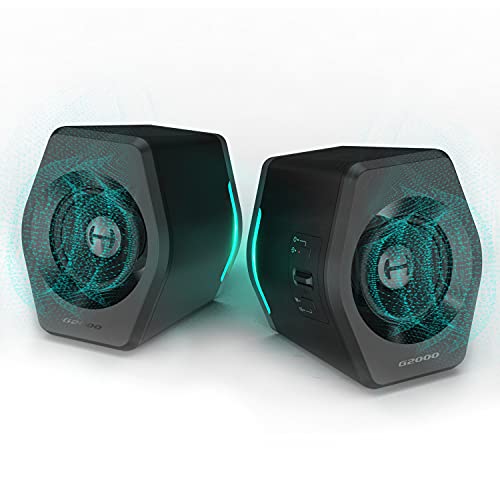
Edifier G2000 — Best compact gaming 2.0
The G2000 packs a gaming brief into cabinets small enough for a monitor’s shadow. Its listing title states 32W and names PC, laptop, Mac and desktop among its targets, and the model behind the title is a 2.0 pair with a connection set wider than its size suggests — wired feeds for computers and consoles, Bluetooth for the phone — wrapped in a design that acknowledges gamers exist without shouting about it. The sound is tuned for the nearfield battlefield: effects locate cleanly, dialogue stays intelligible under action, and music holds together at the close distances a gaming desk imposes.
As a 2.0 system it shares the architecture’s honesty about bass — present, punchy within its limits, and uninterested in faking the floor-shaking octave. What it adds over the Pebble family is intent: this is a pair designed for a desk where a console also lives, where sources rotate, and where the speakers’ look is allowed a little theatre. Its compactness is the strategic point — gaming desks accumulate monitors, keyboards with opinions and controllers, and the G2000 asks for less of that contested territory than any rival here while giving up less sound than its size promises.
- Format: 2.0 stereo pair, compact gaming cabinets
- Power figure: 32W, as stated in the listing title
- Targets named in the title: PC, laptop, Mac and desktop computers
- Connections: wired feeds plus Bluetooth for rotating sources
- Desk fit: crowded gaming and study desks
Strengths
- Small footprint survives even a heavily equipped gaming desk
- Connection variety welcomes console, computer and phone in turn
- Nearfield tuning keeps game dialogue and effects clearly placed
Trade-offs
- No subwoofer — deep effects are rendered, not felt
- Gaming styling will not suit every office desk’s dress code
- Output is desk-scaled; it will not double as a room system
Best for: a compact gaming desk with several sources and little spare space. Not suited for: a film-first setup that wants subwoofer weight.
How Do the Six Systems Compare at a Glance?
| System | Shape | Feeds | Standout trait | Tier character |
|---|---|---|---|---|
| Creative Pebble 2.0 | 2.0 | Analogue, USB power | Angled spheres, one-plug setup | Entry |
| Creative Pebble Plus | 2.1 | Analogue, USB power | Down-firing sub on USB power | Lower-mid |
| Creative Pebble V3 | 2.0 | USB-C audio, Bluetooth 5.0 | Digital feed in the pebble form | Mid |
| Klipsch ProMedia 2.1 | 2.1 | Analogue | THX-certified impact and headroom | Top of bracket |
| Logitech Z407 | 2.1 | Bluetooth, analogue | Wireless control dial | Upper-mid |
| Edifier G2000 | 2.0 | Wired feeds, Bluetooth | 32W compact gaming pair | Mid |
The table’s lesson is that this bracket rewards choosing a shape before choosing a brand. Decide whether a subwoofer belongs in the room, decide which devices must connect, and the six collapse into one or two finalists whose differences a single evening of listening would settle.
How Should Desk Speakers Be Set Up for the Best Sound?
Geometry first: the two satellites and the listener’s head should form a rough triangle, with the speakers angled inward so their axes cross near the listener rather than firing straight ahead past the monitor. Height matters as much — tweeters near ear level, achieved with stands, books or the Pebbles’ built-in upward tilt — because a speaker aimed at the chest loses its detail on the way up. Keep the pair symmetric around the screen; a lopsided layout drags the stereo image with it and no balance control fully repairs the geometry.
Cable dressing is the unphotogenic final step. Route the satellite leads behind the monitor rather than across the writing surface, coil the spare length of the subwoofer lead rather than leaving it in a footwell tangle, and keep power cables separated from audio leads where the layout allows, since a season of small hums and crackles often traces back to a cable marriage arranged in haste. A desk system installed once, neatly, tends to be left alone for years — which is the highest compliment a budget setup can earn.
Subwoofers, where present, want the floor and a little experimentation. A corner loads the room and fattens the output, sometimes usefully, sometimes into bloat; a position along the wall near the desk usually blends best. Set the subwoofer’s level by music with a known bass line, turning it down until it disappears as a separate box and only the foundation remains — the classic test is that removing it should feel like something went missing, not like something stopped shouting. Finally, set the computer’s own output sensibly, neither whispering into the speakers’ maximum nor blasting at full scale into their minimum, and let the speakers’ own control do the daily work.
What Mistakes Do Budget Desk Speaker Buyers Make?
The first is buying by wattage arithmetic, comparing headline numbers that different makers measure differently, when the honest differences at a desk are clarity, balance and connections. The second is expecting a 2.0 pair to produce cinema bass and returning a good system for failing at physics. The third is the mirror error: buying the heavyweight 2.1 for a desk that hosts video calls, then living with a subwoofer at murmur level and satellites at a fraction of their design — the right system idling is worse than the right-sized system working. Fourth is ignoring the desk itself: speakers wedged behind a monitor, one satellite in a cubby, a subwoofer sealed inside a cabinet. And the fifth is forgetting the phone, ordering an analogue-only system for a desk where half the audio arrives from a pocket, and spending a year plugging and unplugging a cable that Bluetooth would have retired.
Which System Suits Gaming, Films, Calls and Music Best?
Each workload crowns a different pick, which is why this bracket stays interesting. Games split by appetite: competitive play values the G2000’s placement clarity and small footprint, while cinematic gaming belongs to the ProMedia’s dynamics or the Z407’s foundation. Films are subwoofer territory — Pebble Plus for the small desk, Z407 for the modern one, ProMedia for the committed. Calls and spoken word are the purest desk test, and there the simple pairs shine: the Pebble 2.0 and V3 put voices exactly where the ears are, with nothing to adjust and nothing to go wrong. Music divides by genre in the usual way, bass-led libraries pulling toward the 2.1 systems and acoustic ones toward whichever pair the desk can place best — a reminder that in this bracket, placement quality beats catalogue order with unusual consistency.
Why Does the Desk Itself Change How Speakers Sound?
A desk is an acoustic instrument whether its owner tunes it or not. The hard surface reflects sound upward into the direct path, which is why two identical pairs can sound tidy on one desk and splashy on another — glass and bare laminate reflect more, wood and a desk mat reflect less, and a pair of foam pads or small stands under the speakers calms the effect for very little money. The monitor participates too: a large screen between the speakers is a reflective wall at the centre of the image, and pulling the pair slightly forward of the screen’s plane, or widening them just beyond its edges, returns the centre of the stereo picture to the listener.
Clutter has a quieter effect. Books, mugs and hardware crowd the nearfield and scatter it, which no listener consciously hears and every listener unconsciously tires of. The compact picks — the Pebbles and the G2000 — suffer least because their working distance is short and their aim is high; the larger satellites ask for a clear run at the listener’s ears and repay it. None of this requires a treated room or a measuring microphone. It requires ten minutes, a tape measure, and the willingness to move a speaker six inches and listen again — the highest-value ritual in all of budget audio.
What Role Do These Speakers Play Across a Working Day?
Trace a desk’s audio across twelve hours and the specification that matters reveals itself: it is not peak anything, it is the absence of friction at every transition. The morning call needs voices forward and a volume control within reach. The focus hours need background music that stays coherent at low level, where lesser systems thin into tin. The lunch video needs dialogue that survives a kettle. The evening game or film needs whatever drama the architecture can honestly supply. A system that handles all four without a settings dive, a re-pairing or a cable swap has earned its desk territory, and that is why the picks divide by lifestyle rather than by laboratory rank.
The Bluetooth models shave the most transitions, because the phone joins and leaves without ceremony; the USB-fed V3 shaves the computer side of the day to a single cable; the ProMedia declines to shave anything and instead makes the evening session an event the day was pointing toward. There is no universal winner in that trade, only desks whose days differ — which is, for the last time in this guide, the entire argument.
How Should a Shared Room or a Thin Wall Change the Choice?
Desk speakers rarely perform for an audience of one in a sealed room. Dormitories, shared flats and home offices off a family hallway all impose a neighbour clause on the purchase, and the clause favours control over power. A system whose low end can be trimmed at a dedicated subwoofer knob — the ProMedia’s pod, the Z407’s dial ecosystem — can be tuned down for the evening without losing its balance, while a small 2.0 pair sidesteps the negotiation entirely by having no floor-shaking register to apologise for. The Pebble systems’ nearfield focus is a genuine social feature here: sound concentrated at the desk is sound that travels least through the wall behind it.
Headphone households should think about the partnership rather than the rivalry. Desk speakers and headphones divide the day by courtesy — speakers while the room is one’s own, headphones when it is borrowed — and a speaker system with an accessible volume control makes the switching graceful. None of the picks here complicates that arrangement, but the Bluetooth models add a wrinkle worth enjoying: the phone can stay paired to the desk speakers while the computer wears the headphones, so a call on one device never hijacks the other’s audio mid-sentence.
What Does the Upgrade Path Look Like From Each Pick?
Budget systems earn loyalty when they leave a door open. The Pebble 2.0’s door is lateral: it retires gracefully to a kitchen counter, a workshop or a second desk when the main desk graduates, because a speaker that simple is useful everywhere. The Pebble Plus teaches its owner the 2.1 habit, and its natural successor is a weightier 2.1 — the ProMedia’s territory — with the Plus inherited by a younger desk. The V3’s owner has bought into convenience and tends to upgrade within it, toward larger powered speakers with the same digital manners. The ProMedia and the Z407 are the bracket’s terminal points in different directions — power and polish respectively — and owners leaving them usually leave the category altogether, toward bookshelf systems in another guide’s price country.
The G2000’s path runs through the desk around it: its owner upgrades the monitor, the chair, the machine, and keeps the compact pair because space, not sound, is the binding constraint. That is a respectable destiny. A speaker that survives three computers has amortised itself beyond argument, and several picks here — the veteran ProMedia above all — built their reputations on exactly that longevity.
How Can a Buyer Judge Speakers Without a Showroom?
The honest method is a home trial with familiar material. Choose three recordings known by heart — one voice-led, one dense, one quiet — and play them at the volume the desk will actually use, from the chair the listener actually sits in. Judge clarity of the voice first, because it predicts satisfaction with calls, video and most music; judge the stereo image second, by whether instruments hold separate places; judge bass last and by proportion rather than by force. A system that wins on the first two and behaves on the third will still be pleasing in month six, when novelty has stopped voting.
Two traps distort home judgement. Loudness masquerades as quality in the first minute, so comparisons should be level-matched by ear as closely as patience allows. And the first evening’s settings are rarely the final ones — subwoofer levels especially deserve a week of small corrections before any verdict. A system given that week, in its real position with its real sources, is almost never returned; judged from a doorstep demo at maximum volume, good speakers get returned regularly.
What Should Be Checked on the Listing Before Ordering?
Budget lines live long lives and quiet revisions, so the listing itself is the final authority on three practical points. Confirm the connection set against the actual computer: a USB-C feed is a blessing on a current laptop and an adapter errand on an older desktop, and an analogue-only system needs a headphone output that some slim machines have deleted. Confirm the power arrangement — USB-powered systems want a port that stays awake, and a port on an unpowered hub may not be that port. And confirm the dimensions, satellite and subwoofer alike, against the desk and the floor beneath it; the ProMedia’s subwoofer in particular is a piece of furniture that should be measured for, not discovered.
Cable lengths deserve the same thirty seconds. Satellites that must flank a wide monitor need their leads to reach without tension, and a subwoofer placed where the sound wants it may not be where the cable prefers. None of these checks is glamorous, and together they prevent nearly every return this category generates — because the returns are almost never about sound. They are about a port that did not exist, a box that did not fit, and a cable that came up two inches short of a decision made by a tape measure that stayed in the drawer.
How Do Wired and Wireless Feeds Compare at a Desk?
The wired feed is the reference for a reason: it is immediate, private to the machine, and immune to the small negotiations wireless audio conducts with a crowded room. Its costs are tethering and, on the analogue route, dependence on the computer’s own output stage — a noisy headphone socket will faithfully deliver its noise to honest speakers. USB audio escapes that dependence by taking the digital signal and converting it inside the speaker’s own electronics, which is why the V3’s single cable feels like a generational step rather than a connector change.
Bluetooth’s costs are a whisper of latency and the occasional re-pairing; its dividend is the second device. For video and games played through the computer’s own feed, latency is a non-issue because the wired path carries them; for the phone’s podcast at lunch, Bluetooth’s convenience is total and its latency irrelevant. The mature desk therefore runs both, each where it is strong — which is precisely the arrangement the Z407 and the V3 were designed around, and the arrangement the analogue veterans decline in favour of doing the wired half supremely well.
Can Budget Speakers Serve a Small Room, Not Just a Desk?
Within limits that honesty should state plainly. The 2.1 systems — the ProMedia first, the Z407 after it — can carry a small bedroom or a studio flat’s entertainment corner credibly, because their subwoofers give them a room-scale foundation and their satellites project further than their size suggests. The 2.0 pairs are nearfield instruments: across a room their clarity survives but their presence thins, and asking them to host a gathering is asking outside the design. When desk and room are the same square metres — the studio flat, the dormitory — the 2.1 picks deserve heavy weighting, while a separate living-room system lets the desk picks be desk picks and the difference stay in the pocket.
Television duty follows the same logic. A small TV in a bedroom gains enormously from any of the 2.1 systems or the G2000’s clarity, connected by whatever feed the set and the speakers share; a main living-room television deserves the larger powered speakers covered in this site’s music guides. Categories are tools, not fences — but the fence posts exist where the physics put them.
What Separates a Good Budget System From a Disappointing One?
Not the driver count and not the headline wattage, but three behaviours. First, grace at low volume: a good system keeps voices full and music shaped at the levels desks actually use, while a disappointing one only assembles itself when loud. Second, silence when idle: budget electronics announce themselves with hiss at the listening position, and a system that hisses through every pause will be switched off, then unplugged, then replaced. The picks here come from makers whose budget lines are quiet at the desk — an unglamorous virtue that owners notice daily. Third, control sanity: a volume control that is reachable, proportional and remembered between sessions sounds like nothing at all, and it is the difference between a tool and an appliance with opinions.
Build honesty runs underneath all three. Cabinets that do not buzz at their favourite frequency, cables that survive being moved, knobs that do not scratchle within the year — the veteran designs in this guide earned their production runs by passing these tests at scale, and the newer picks come from the same few makers for the same reason. In the budget bracket, the brand’s boring reliability is not a premium feature. It is the feature.
How Should the Money Inside This Bracket Be Prioritised?
Inside a fixed budget bracket, the order of spending matters more than the total. The first claim on the money is architecture — the subwoofer question — because no later adjustment adds a box the system does not have. The second claim is the feed: a desk built on a current laptop gains more from the V3’s clean digital connection than from any marginal driver improvement, and a desk with three rotating sources gains more from the G2000’s or the Z407’s connection manners than from raw output. The third claim is headroom, valuable exactly in proportion to how loudly the desk honestly plays. What the money should never buy in this bracket is decoration ahead of drivers, nor a specification the desk cannot use — a truth the six picks honour by spending their tiers on subwoofers, feeds and amplification, in that order.
Saving money inside the bracket is equally rational when the desk’s life is simple. A calls-and-writing desk served by the entry Pebble is not under-equipped; it is correctly equipped, and the unspent difference buys the chair, the lamp or the records. The bracket’s generosity is that every tier inside it contains a right answer for somebody — the skill is refusing to buy a higher tier’s answer to a question one’s own desk never asks.
What Happens When the Computer Changes?
Desks outlive computers, and speaker systems meet a new machine every few years. The analogue-fed picks shrug the transition off entirely — a headphone output is a headphone output across decades. The USB-powered Pebbles ask only for a living port. The V3’s USB-C feed, exotic a product cycle ago, is now the default shape of a laptop side, so its bet on the connector has already been settled by the industry. Bluetooth models treat a new computer as a new pairing and a five-minute ceremony. The practical conclusion is that none of the six is a hostage to the machine it was bought for, which quietly justifies buying the better tier when the desk’s habits call for it: the speakers will serve the next computer, and probably the one after that.
The one migration worth planning is the operating system’s volume behaviour, which differs in how it hands control to USB and Bluetooth devices. A week-one habit — learning whether the keyboard keys, the speaker’s knob or the wireless puck owns the level — prevents the small daily friction of three controls arguing. Owners who settle that hierarchy once, and set the other controls to sensible fixed positions, report the system thereafter feels like furniture: present, silent about itself, and used without thought.
Why Do Voices Matter More Than Bass in Desk Speaker Judgement?
Because the desk’s day is made of voices. Calls, meetings, lectures, videos, podcasts, game dialogue, the sung line in a chorus — the material that fills working hours lives in the midrange, and a system that renders that band clearly and without fatigue wins the week regardless of its low-end drama. Bass is the weekend specification: thrilling, demonstrable, and absent from most of the material most desks play. This is why the guide’s simplest pick, the original Pebble, can be recommended without a blush to a professional whose films happen elsewhere — its voice clarity per unit of desk space is the bracket’s best bargain — and why the 2.1 systems must justify themselves on the material that actually uses them. Buy for the voices, audition the bass, and the desk will thank you at hour nine of an ordinary Tuesday.
How Do the Picks Handle a Second Screen, a Console and a Crowded Desk?
Modern desks accumulate geometry problems. A second monitor widens the span the satellites must cover, and pairs with short fixed cables or tiny cabinets — the Pebble family, the G2000 — adapt best, tucking into the gaps a dual-screen rig leaves. A console joining the desk asks for either an analogue feed it can share through the monitor’s output or a speaker with doors to spare, which is the G2000’s home ground and the Z407’s Bluetooth can cover the phone-shaped remainder. The heavyweight ProMedia solves the crowded desk by seniority: its satellites and subwoofer claim their territory first and the rest of the desk arranges itself around them, a solution that works beautifully in a dedicated room and selfishly in a shared one. None of these negotiations appears on a specification sheet, and all of them decide whether a good system becomes a kept system.
Final Recommendation
Start from the desk, and the bracket resolves itself. The work desk that wants one plug and no decisions should take the original Pebble 2.0; the same desk with films and games in its evenings should add the down-firing subwoofer and take the Pebble Plus. A modern laptop desk belongs to the Pebble V3 and its USB-C feed, while the desk that treats its computer as an entertainment centre should choose between the Z407’s wireless manners and the ProMedia’s certified muscle — manners for the mixed household, muscle for the dedicated rig. The crowded gaming desk takes the G2000 and spends the saved space on a bigger monitor. Every pick here sits inside the same budget bracket, yet they are six different answers; the right one is simply the answer whose shape matches the life already happening at that desk.
Frequently Asked Questions
Are USB-powered speakers loud enough for a desk?
At desk distance, yes — the Pebble systems in this guide are built for exactly that geometry and reach well beyond comfortable nearfield levels. USB power limits absolute output, which matters across a room and barely matters across a desk. Listeners planning to fill a room should look at the mains-powered 2.1 systems instead.
Is a subwoofer worth it for computer speakers?
For films, games and bass-led music, it transforms the system — the satellites stay cleaner and the low end becomes physical. For calls, writing and spoken word, it adds a floor box and a setting to manage for benefits the material never uses. The workload decides, not the price tier.
Can these speakers connect to a phone?
The Bluetooth models can — the Pebble V3, the Z407 and the G2000 all welcome a phone wirelessly. The analogue-only systems, the original Pebble pair and the ProMedia, keep their relationship with the computer exclusive unless an adapter joins the chain.
What does THX certification on the ProMedia actually mean?
It means the system was tested against THX’s performance standards for its class — output, distortion and frequency behaviour among them — rather than merely described by its maker. On a long-running design like the ProMedia 2.1, the badge in its listing title is one reason the model keeps its flagship-of-the-bracket reputation.
Will a 2.0 pair sound thin for music?
It will sound honest. A good 2.0 pair renders the bass line’s notes and rhythm faithfully while leaving the physical weight to larger architectures; acoustic, vocal and most pop libraries lose surprisingly little. Listeners whose libraries lean on electronic and hip-hop low end should start their shortlist at the 2.1 systems and save the experiment.
Can I use these speakers with a games console?
Yes, through the routes the desk already has: many monitors pass console audio out through a headphone socket that any analogue-fed pick can take, and models with several inputs, the G2000 above all, are designed to welcome a console more directly. Check the console’s and the monitor’s outputs against the speaker’s input list on the listing before ordering.
Do I need a sound card or DAC for these speakers?
Almost never at this level. USB-fed models like the Pebble V3 handle the conversion inside the speaker, and the analogue models are voiced to flatter ordinary computer outputs. A noisy or failing headphone socket is the exception that justifies an external DAC — and the cheaper cure is usually choosing a USB-fed speaker instead.
How long do budget desk speakers last?
Years, typically — the category has no batteries to fade and few moving parts beyond the drivers themselves. The long service of designs like the ProMedia shows the pattern: a well-chosen desk system usually outlives the computer it was bought for, and moves to the next desk without ceremony.
Related Guides
Desk audio connects naturally to bookshelf speakers for music listening, to the room beyond the desk in speakers for a whole house, and to the workstation itself in building a better home-office setup.


