What's inside
As an Amazon Associate I earn from qualifying purchases. This post may contain affiliate links at no extra cost to you.
gizmoverdict.com is reader-supported. When you buy through links on our site, we may earn an affiliate commission.
Where to buy: Movie tablets for children are bought against deadlines — the long drive, the flight, the rainy week at the caravan — so this guide sticks to Amazon listings in the United States that a parent can order tonight and set up tomorrow. Five of the six picks are ten-inch class screens and one is a seven-inch traveller, and most arrive with their case already fitted or included, which matters because the case is not an accessory in this category; it is half the product. Download the films before the journey, whichever pick you choose, because no tablet in this guide carries a SIM slot and the motorway does not care about your streaming plans.
The search for the best kids tablets for watching movies sounds simple until a parent watches a child actually watch a movie. The screen is held at odd angles, shared with a sibling, propped against a cereal box, carried to a den and abandoned mid-film for a snack. Brightness that seemed fine in the shop glares in a dark car; a battery that promised a day dies over the Pennines; a film that streamed beautifully at home was never downloaded and the motorway has no signal. The picks below were chosen against that reality rather than against a specification chart, and the reviews keep returning to the four things that decide a child’s cinema: the screen, the battery, the case and the downloads.
Size is the first fork. Ten inches is the shared-cinema size, big enough for two children on one sofa and for subtitles a new reader can follow. Seven inches is the personal size, light enough for small hands to hold through a whole film and small enough to vanish into a handbag. This guide offers five of the former and one of the latter, and the honest advice is that households with siblings usually end at ten inches while only children who travel constantly end at seven — with many families eventually owning one of each, the big screen at home and the little one in the car.
Parental controls run through every listing here, and for a movie tablet they do a specific job: they decide the library. A film tablet is really a film collection with a screen attached, and the controls are how a parent curates that collection by age, sets the viewing hours and keeps the tablet a cinema rather than a doorway to the whole internet. Every pick names its controls or its kid-space environment in the title, and the reviews treat the setup of those controls as part of the purchase, because a movie tablet handed over unconfigured is a promise the parent will spend the journey renegotiating.
There is a household-economics point worth making early, because it shapes the whole list. A kids movie tablet is one of the few technology purchases whose success is measured in adult peace: the quiet car, the unbroken film night, the flight survived without incident. That is why this guide is unembarrassed about ranking cases, straps and stated batteries alongside screens, and why a modest tablet that is always charged and always stocked will outperform a superior tablet that is neither. Parents are not buying pixels. They are buying the version of the journey where the film starts on time — and every criterion below is secretly that criterion, wearing a specification’s clothes.
Key Takeaways
- Five picks are ten-inch class screens for shared viewing; the PRITOM 7 inch is the lightweight personal traveller.
- The Amazon Kids Tablet 8 brings the curated Amazon kids library and an Aquatic slim hard case for ages six to twelve.
- The Android 15 Kids Tablet 10.1 states dual-band Wi-Fi and Google Kid Space, the most complete controls description here.
- The VOLENTEX is the only pick whose title states its battery: 6000mAh.
- Both PRITOM models are distinct — a 10-inch with a lanyard and HD IPS display, and a 7-inch with kids software pre-installed.
- No pick has a SIM slot, so downloaded films are the whole strategy for journeys.
Quick Picks
| Pick | Tablet | Badge |
|---|---|---|
| 1 | Amazon Kids Tablet 8 | Best overall movie tablet |
| 2 | EDDBNi Kids Tablet 10 Inch | Best Android 15 newcomer |
| 3 | Android 15 Kids Tablet 10.1 Inch | Best for controls and Wi-Fi |
| 4 | PRITOM 10 Inch Kids Tablet | Best with lanyard included |
| 5 | VOLENTEX 10 Inch Kids Tablet | Best stated battery |
| 6 | PRITOM 7 Inch Kids Tablet | Best travel size |
How were these picks chosen?
Screen first, because a movie tablet is a screen with a battery attached. We favoured the ten-inch class for shared viewing and treated resolution claims carefully: where a title states an HD IPS display we say so, and where it does not, the review declines to upgrade the picture by imagination. A child’s film is mostly animation with bold colour, which forgives modest panels, but dialogue scenes in a dark car forgive nothing, and viewing angles decide whether the sibling at the edge sees the film or a grey ghost of it.
Battery came second, and it is the category’s most evasive specification: only one of six titles states a capacity. Rather than invent figures, the reviews mark the silence and the guide sections teach the workaround — brightness discipline, downloads over streaming, a car charger in the glovebox — because a parent who plans for an unstated battery is never ambushed by it. Cases came third, and here the titles are generous: nearly every pick bundles one, and the reviews distinguish the slim hard case from the chunky toddler armour, since they protect against different childhoods.
Controls and content complete the criteria. A curated library aboard from day one, as the Amazon pick offers, competes against the open Android picks’ freedom to install anything, and neither is automatically right: the walled garden serves the parent who wants curation done, the open garden serves the parent with an existing collection of apps and films. Storage threads through all of it, because a downloaded film library is measured in gigabytes and the 64GB that recurs across this list is the difference between six films and sixteen.
Sound, the forgotten criterion, closes the list. A film tablet’s speakers serve the sofa, where two children listen together without headphones, and serve nobody on a train, where headphones are citizenship. Titles in this category rarely describe speakers, and none here makes an audio claim worth ranking on — so the reviews treat sound as a listing-page question and the guide treats headphones as part of the purchase. A parent who budgets the headphones with the tablet, sized for the child’s head and paired before the journey, has quietly solved the audio half of the cinema while the rest of the carriage solves nothing at all.

1. Amazon Kids Tablet 8 — Best overall movie tablet
The Amazon Kids Tablet 8 leads this guide on the strength of its library. The title promises books, apps and videos for STEM and hobbies, with popular school apps addable for homework, aimed at ages six to twelve — and for a movie tablet, that included video library is the product. A child whose tablet arrives with a curated cinema aboard starts watching on day one, inside boundaries a parent set once, rather than starting with an empty screen and a negotiation. The Aquatic slim hard case in the box completes the package for the older child this model targets.
Eight inches is the interesting size decision here, between the seven-inch travellers and the ten-inch sofas. For a single child it is arguably the sweet spot: large enough that a film feels like a film, small enough to hold one-handed in a car seat and to slip into a school bag for the homework half of its life. Two children can share it at a pinch on a train table, though the ten-inch picks below serve that scene better, and the review’s verdict line says so plainly.
The slim hard case suits the six-to-twelve audience honestly. Older children reject chunky toddler armour as babyish, and a case they refuse is a case in a drawer; the slim shell protects against scratches, bag knocks and modest drops while keeping the tablet looking like equipment rather than a toy. Parents of the dramatically drop-prone should still consider a heavier aftermarket case, because an eight-inch screen replacement is not a trivial bill.
What the title withholds — storage, memory, battery figures — the review records without filling. Amazon’s ecosystem carries the proposition regardless: the library, the controls tradition and the school-app bridge make this the pick for the household that wants the cinema curated and the setup short. In a category full of anonymous hardware, the known library is the luxury, and it is priced like one compared with the value picks below.
The homework bridge deserves a second paragraph, because it changes how the tablet is used across a week. A movie tablet that also carries the school apps stops being a weekend device and becomes the child’s main screen, which raises the stakes on its controls and its case alike — and the Amazon environment is built for exactly that dual citizenship, with the parent’s dashboard governing both the cinema and the classroom. Families who prefer the film tablet to stay a film tablet, uncontaminated by homework, should choose from the open picks below and keep the roles separate; families who want one screen to rule the school bag will find this pick’s argument grows stronger the longer the term runs.
Strengths
- Included books, apps and videos — a cinema library from day one
- Eight-inch size balances film presence against one-handed holding
- Aquatic slim hard case included for the six-to-twelve audience
Trade-offs
- Smaller than the ten-inch picks for two-child sharing
- Storage and battery figures are absent from the title
- Slim case gives less drop protection than chunky toddler cases
- Class: Kids movie tablet
- Screen: 8 inches
- Ages: 6-12
- Included: Books, apps and videos; Aquatic slim hard case
- Storage; Battery: Not stated in the listing title
Best for: a six-to-twelve-year-old whose film library should arrive curated and ready.
Not suited for: two siblings sharing every film, where the ten-inch screens serve better.
Parents who want the library settled can check price on Amazon for the cased eight-inch model.

2. EDDBNi Kids Tablet 10 Inch — Best Android 15 newcomer
The EDDBNi represents the open-Android route at its most straightforward: a ten-inch kids tablet running Android 15, with a case, a quad-core processor, 64GB of storage, dual cameras and parental controls. Nothing in that list is exotic, and that is the point — this is the large shared screen for the family that already knows which apps and film services it uses and simply needs a cased, controlled, current-Android slab to run them on.
Android 15 is its freshest claim. A current system version means the family’s streaming apps install without compatibility warnings and keep updating for years, which in the kids category translates directly into films that still play when the child is three years older. The ten-inch size serves the sofa-sharing scene this guide keeps returning to, and 64GB holds a sensible downloaded library for the journeys where streaming cannot follow.
The title’s silences are the value category’s usual ones: no screen resolution, no battery figure, no memory number. The review’s position is the guide’s standing one — a parent should expect a competent HD-class picture rather than a specified one, plan charging around a car adapter, and treat the listing page’s fuller text as the place where those questions get their answers. The dual cameras, meanwhile, serve the video calls to grandparents that punctuate a child’s film day, front for faces and rear for showing the cat.
Educational tablets is the title’s closing phrase, and the honest reading is content-neutral: the hardware will run the family’s chosen learning apps as happily as its films, inside the parental controls the title names. For the household that wants one big screen to do both jobs without a walled garden’s walls, the EDDBNi is the plain, current, sensibly sized answer.
There is a fairness point to make about plainness. A tablet like this one lives or dies by the family’s existing subscriptions, and for the household already paying for two streaming services and a shelf of apps, a neutral screen that runs all of them is worth more than a curated library that duplicates half the spend. The EDDBNi’s case and controls keep it a children’s device in handling while its Android stays a general device in capability, and that combination — child-proofed shell, grown-up software freedom — is precisely the brief many parents write without knowing a product matches it. This one does, in blue-collar fashion, without a single exotic claim in its title.
Strengths
- Android 15, a current system for years of app support
- Ten-inch screen sized for sibling sharing
- Case and parental controls both named in the title
Trade-offs
- Screen resolution is absent from the title
- Battery capacity is absent from the title
- Memory figure is absent from the title
- Screen: 10 inches
- System: Android 15
- Storage: 64GB
- Processor: Quad core
- Cameras: Dual
- Resolution; Battery; RAM: Not stated in the listing title
Best for: a family wanting a big open-Android screen for its existing film apps.
Not suited for: a purchase requiring the screen resolution guaranteed in writing before ordering.
Open-Android families can check price on Amazon for the cased ten-inch configuration.

3. Android 15 Kids Tablet 10.1 Inch — Best for controls and Wi-Fi
This unbranded 10.1-inch pick writes the most complete controls sentence in the guide: built-in parental controls with Google Kid Space installed. Kid Space is the detail that matters, because it is a known environment — a curated home screen a child cannot wander out of, with the parent’s choices governing apps, videos and time. For the movie use case specifically, it converts the tablet into a cinema with a locked projection booth: the films the parent approved, at the hours the parent set, and nothing else a small finger can find.
The connectivity line is equally complete: 2.4G and 5G dual-band Wi-Fi, the only title here that spells out both bands. At home that means the tablet can join the faster band for smooth streaming away from the router’s room; the octa-core processor and the stated 21GB of memory with 64GB of storage complete a specification that reads generously for the class. The case is included, in blue, and the age framing starts at three years, the joint-youngest entry point in this guide.
Generous figures deserve the guide’s customary care. A 21GB memory number in this segment typically blends physical and extended memory, and the honest expectation is a responsive tablet for films and apps rather than a workstation. What is not in doubt is the shape of the proposition: the biggest screen in this list by a whisker, the named kid environment, dual-band wireless and a case, aimed from age three upward. For the parent whose first question is always “and how do I control it?”, this listing answers in its title.
The unbranded caveat stands, as it does for its value siblings: support is a conversation with a listing rather than a company. The pilot discipline of this batch’s other guides translates here into a simpler household version — set up Kid Space fully on the first evening, download the journey library, and run one ordinary weekend before the tablet is relied upon for the long trip. A weekend is enough to learn any tablet’s character, and this one’s character, on paper, is the most parent-complete in the set.
Kid Space also changes the handover to other adults, a benefit parents feel at the first babysat evening. A tablet locked into its child environment can be handed to a grandparent or a sitter with one sentence of instruction — “it only does what it shows” — because the environment itself enforces the household’s rules in the household’s absence. Open tablets handed over raw require a briefing; this one carries its briefing in its software. For families whose children’s screen time is supervised by a rotating cast of kind adults, that self-explaining quality is not a convenience but the feature on which the whole arrangement stands.
Strengths
- Google Kid Space installed, a known curated environment
- Dual-band Wi-Fi stated, unique in this guide
- 10.1-inch screen with case included, from age three
Trade-offs
- Unbranded listing — support runs through the seller
- Battery capacity is absent from the title
- Memory figure blends physical and extended memory in this segment’s usual arithmetic
- Screen: 10.1 inches
- System: Android 15
- Memory and storage: 21GB stated, 64GB
- Controls: Built-in parental controls, Google Kid Space
- Wi-Fi: 2.4G and 5G dual-band
- Battery: Not stated in the listing title
Best for: a parent whose first priority is a locked-down, curated viewing environment.
Not suited for: support expectations that require a named brand’s help line behind the purchase.
Control-first parents can check price on Amazon for the blue cased model.

4. PRITOM 10 Inch Kids Tablet — Best with lanyard included
The first of this guide’s two PRITOM models — keep them distinct, because the brand sells a seven-inch sibling reviewed last — is a ten-inch Android tablet with 64GB of storage, an HD IPS display, Wi-Fi, dual cameras, parental controls and one accessory no rival mentions: a lanyard. That strap is a small sentence in the title and a large idea in practice. A tablet on a lanyard can be carried by a child without being gripped by a child, hung on a hook in the caravan, worn on the walk to the park café — and, crucially, it is harder to leave behind, because it is attached to its owner.
The HD IPS display is the screen claim the movie parent most wants to read, because IPS is the viewing-angle technology: the child at the edge of the shared sofa sees the same colours as the child in the middle. Combined with the ten-inch size, it makes this the sharing pick of the value group, the tablet two siblings prop on a cushion between them for the evening film. The pink finish will divide households along familiar lines, and the review notes it without adjudicating.
Toddler tablet is the title’s own phrase, and it calibrates expectations correctly: this is a first-big-screen device for young children, with controls for the parents and a strap for the drops. Storage of 64GB matches the class norm for a downloaded library. What the title omits — battery, memory, Android version — joins the guide’s familiar list of listing-page questions, and the lanyard does not excuse them; it simply means the tablet that survives the questions will also survive the carrying.
Between the two PRITOMs, the choice is a size philosophy. This ten-inch is the household cinema, shared and stationary-ish, its lanyard for the journeys between rooms and vehicles. The seven-inch below is the personal traveller. A family that buys the big one first usually discovers the small one’s niche by the second long journey, and the brand’s shared habits make the pair easy to run together.
The lanyard deserves a final, practical examination, because straps on electronics live or die by their attachment. A parent should test the lanyard’s anchor on the first evening — a firm tug, a swing over a soft floor — and teach the child the rule that the strap is for carrying, not for swinging. Taught early, the habit converts the most losable object in the child’s kit into the least lost: it comes home from the park because it never left the child’s person. Few accessories in this entire batch of guides offer so much behavioural return for so little hardware, and the PRITOM’s designers deserve credit for including the obvious thing its rivals all omitted.
Strengths
- Lanyard included — carrying and loss prevention in one strap
- HD IPS display for wide shared viewing angles
- Ten-inch size with 64GB for a downloaded film library
Trade-offs
- Pink finish only, per the title
- Battery and memory figures are absent from the title
- Android version is absent from the title
- Screen: 10 inches, HD IPS
- Storage: 64GB
- Cameras: Dual
- Controls: Parental control
- Included: Lanyard
- Battery; RAM; Android version: Not stated in the listing title
Best for: siblings sharing films, with a strap to keep the cinema attached to its owner.
Not suited for: a colour-neutral gift brief, since the stated finish is pink.
Sharing households can check price on Amazon for the lanyard bundle.
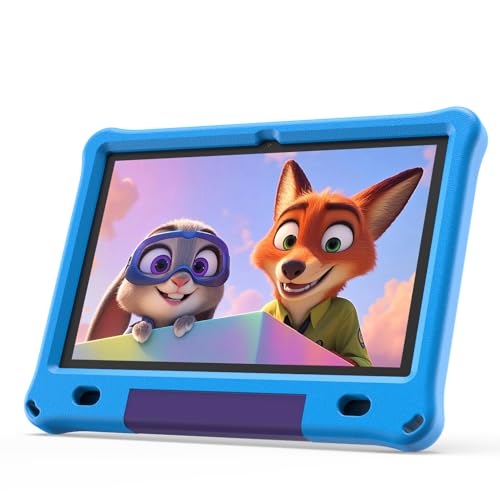
5. VOLENTEX 10 Inch Kids Tablet — Best stated battery
The VOLENTEX earns its badge by doing what five rivals decline to do: stating its battery. The 6000mAh figure in its title gives a parent something to plan around, and in a category where the journey is the use case, a plannable battery is worth real money. Around that number sits a complete value specification: a ten-inch Android 15 tablet with a case, 6GB of memory, 64GB of storage, parental controls, educational games pre-installed, dual cameras and Bluetooth, in blue, for ages three to twelve — the widest stated span in this guide.
Six thousand milliamp hours deserves translation into journeys. It is a solid mid-size reservoir for a ten-inch screen: a full film with brightness managed, a second shorter one behind it, and the in-car charger as the bridge for the genuinely long hauls. The figure does not make this a marathon machine, and the review will not pretend otherwise; it makes it the only pick whose endurance a parent can reason about before ordering, which in this guide’s honesty economy is a distinction with real value.
The pre-installed educational games repeat the class pattern of a tablet that works from the box, and the age span of three to twelve suggests the manufacturer expects the controls to be re-tuned as the child grows — the same graduation the guide recommended for its other wide-span picks. Android 15 keeps the streaming apps current across that whole span, which is how a tablet bought for a four-year-old can still be the film screen at ten.
Bluetooth, mentioned here and rarely in rival titles, is the quiet enabler of the shared-silence journey: wireless headphones paired per child, the film audible to its audience and to nobody else in the car. Parents who have survived a cartoon soundtrack at motorway volume will read that single word in the title with feeling. The VOLENTEX, in sum, is the specification-honest pick of the value group — the one that numbers its battery, dates its system and spans its audience widest.
Honesty about the number cuts the other way too, and the review should model it: 6000mAh in a ten-inch tablet is adequate, not heroic, and a parent planning a six-hour rail journey should still pack the charger and brief the child on the brightness slider. What the stated figure buys is the ability to have that plan at all. Every rival in this guide asks the parent to guess the most journey-critical number on the device; the VOLENTEX simply answers. In a market that rewards adjectives, a number is a form of respect, and families planning real journeys feel the difference before the train has left the station.
Strengths
- 6000mAh battery stated — the only plannable endurance figure here
- Ages three to twelve, the widest stated span in the guide
- Bluetooth stated for wireless headphone pairing
Trade-offs
- Screen resolution is absent from the title
- 6GB of memory is the modest end of the ten-inch group
- Brand support runs through the listing rather than a household name
- Screen: 10 inches
- System: Android 15
- Memory and storage: 6GB, 64GB
- Battery: 6000mAh
- Ages: 3-12
- Resolution: Not stated in the listing title
Best for: journey planning, where a stated battery beats a promised one.
Not suited for: a screen-quality-first purchase, with resolution unconfirmed by the title.
Planners can check price on Amazon for the blue cased configuration.
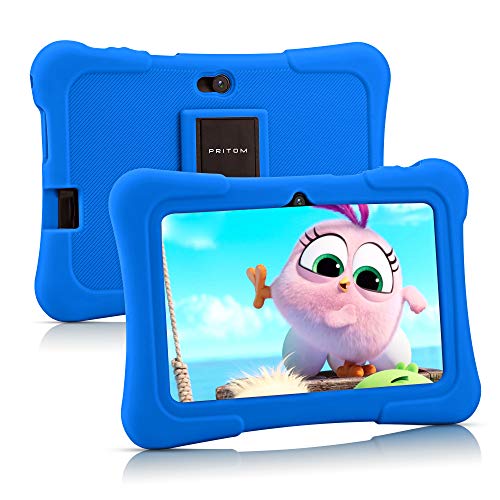
6. PRITOM 7 Inch Kids Tablet — Best travel size
The second PRITOM — the seven-inch, distinct from its ten-inch sibling above in size, software and purpose — closes the list as the traveller. Its title promises kids software pre-installed, parental controls, pre-loaded kids apps and games, YouTube Kids, a kids-tablet case and 32GB of storage in blue. Everything in that sentence is about readiness: this is the tablet that comes out of the box already a children’s device, small enough for the smallest hands in the guide and light enough to be the one that actually gets packed.
Seven inches changes the sociology of viewing. This is not a sharing screen; it is a personal cinema, held close, watched alone with headphones in a car seat or a departure lounge. For the only child, the frequent flyer, the grandparent visit where the tablet rides in a coat pocket, that intimacy is the correct design. The pre-installed software means the cinema is stocked before the parent has created a single account, and YouTube Kids aboard gives the streaming half of the library a fenced place to live.
The 32GB of storage is the honest limit: a handful of downloaded films, rotated with discipline, rather than a library. Families should treat the rotation as a ritual — the Friday download session where the weekend’s films are chosen — because a small tablet managed cheerfully beats a large one managed resentfully. The case is the kids-tablet kind, built for drops, and at this size and price class a drop is a story rather than a claim.
Set the two PRITOMs side by side and the brand’s logic is plain: one brand, two sizes, the same parental-control philosophy. Buy the seven for the child who travels and watches alone; buy the ten for the sofa. Households that eventually own both will find the little one in the car and the big one in the living room, each in its niche, neither pretending to the other’s job — which is the most that can be asked of any pair of screens.
One more virtue of the small preloaded tablet deserves recording: it is the giftable one. A grandparent buying for a grandchild faces the setup problem in its purest form — no knowledge of the household’s accounts, no wish to impose subscriptions, a need for the box to delight on opening. A seven-inch tablet with its software aboard, its case fitted and its controls ready for a parent to tune later that evening is the only pick in this guide that fully survives being bought by someone outside the household. That is a narrow virtue, but birthdays are narrow occasions, and this tablet was clearly designed with them in mind.
Strengths
- Kids software and apps pre-installed, ready from the box
- Seven-inch size suits small hands and coat-pocket travel
- YouTube Kids aboard inside parental controls
Trade-offs
- 32GB holds a rotated handful of films, not a library
- Seven inches is a solo screen, small for siblings
- Battery and memory figures are absent from the title
- Screen: 7 inches
- Storage: 32GB
- Software: Kids software, apps and games pre-installed
- Case: Kids-tablet case included
- Battery; RAM: Not stated in the listing title
Best for: the travelling child who watches alone, with everything pre-installed.
Not suited for: a two-child film night, where seven inches crowds both viewers.
Travelling families can check price on Amazon for the preloaded blue model.
Comparison table
| Tablet | Screen | Storage | Controls / library | Battery |
|---|---|---|---|---|
| Amazon Kids Tablet 8 | 8 inches | Not stated in the title | Books, apps and videos included | Not stated in the title |
| EDDBNi Kids Tablet 10 | 10 inches | 64GB | Parental controls | Not stated in the title |
| Android 15 Kids Tablet 10.1 | 10.1 inches | 64GB | Controls plus Google Kid Space | Not stated in the title |
| PRITOM 10 Inch | 10 inches, HD IPS | 64GB | Parental control | Not stated in the title |
| VOLENTEX 10 Inch | 10 inches | 64GB | Parental control, games pre-installed | 6000mAh |
| PRITOM 7 Inch | 7 inches | 32GB | Parental control, software pre-installed | Not stated in the title |
How do you choose a kids tablet for watching movies?
Choose by the audience arrangement first. Count the children who will watch together, honestly, on the longest regular journey or the typical film night. One child points to the personal sizes — the Amazon eight-inch or the PRITOM seven-inch — while two or more point firmly at ten inches, where the EDDBNi, the Kid Space model, the PRITOM ten and the VOLENTEX divide by controls, battery honesty and included extras. A screen shared by siblings who must crane is a screen that generates arguments at exactly the moment the film was meant to prevent them.
Downloads are the second decision, and they are a discipline rather than a feature. None of these tablets connects beyond Wi-Fi, so the journey library is whatever was loaded at home. Build the ritual: the night before travel, connect, download, and test-play the first minute of each film with the tablet in aeroplane mode. That ninety-second test has saved more journeys than any specification in this guide. Storage sets the library’s size — 64GB for a generous rotation, 32GB for a curated handful — and parents who understand that arithmetic in advance never meet the “film won’t play” moment at altitude. Families whose journeys cross genuinely dead country may also browse our guide to best android tablets with sim for the connected shelf, accepting that those models trade away the kids cases and controls.
Controls come third, and the choice is between curation done for you and curation done by you. Amazon’s library and Google Kid Space represent the done-for-you school, at the price of their walls; the open Android picks hand the parent the keys and the responsibility together. Neither school survives neglect: whichever environment you choose, spend the first evening inside it, setting ages, hours and approvals, because a movie tablet’s controls configured in the departure lounge are configured too late.
Headphones deserve their own choosing paragraph, because they are the accessory that changes the social contract of the back seat. With headphones, each child inhabits a private cinema and the driver inhabits a quiet car; without them, every passenger shares every soundtrack. Fit matters more than fidelity for children — a pair that stays on a small head at motorway vibration, with a cable or a pairing that survives being sat on. Where a title states Bluetooth, as the VOLENTEX does, wireless pairing is promised in writing; where it does not, assume the wired jack and pack a splitter for the sharing scenario. Either way, test the arrangement at home, because a headphone negotiation at seventy miles per hour is a negotiation nobody wins.
Finally, buy the journey kit with the tablet: the car charger, the headphones sized for children, the case upgrade if the bundled one is slim and the child is mighty. The tablet is the cinema’s projector, but the kit is what makes the cinema open on time, in the back seat, at the moment the motorway begins.
Brightness management is the skill that ties the choosing together, because it trades the two scarcest journey resources — visibility and battery — against each other in real time. Teach it as a household rule rather than discovering it per trip: full brightness for the sunlit hour, half for the shaded afternoon, low for the evening film in a dark car or a dim cottage. A child old enough to hold the tablet is old enough to learn the slider, and the lesson pays for itself on every journey in minutes of extra film. Parents of the youngest viewers should set the level themselves at each handover, since a screen left at maximum since breakfast is the commonest single cause of the dead-by-teatime tablet that this category is famous for.
Resolution honesty is the last choosing note, and it cuts in the parent’s favour for once. Children’s films — animation especially — are forgiving content: bold shapes, saturated colour, movement that reads at modest sharpness. A title that states HD, like the PRITOM ten-inch, promises a defined floor; titles that stay silent are not thereby exposed as poor, merely unmeasured. The wiser test for this category is the shared-viewing one: seat two children at the sofa’s ends and judge the edge seat’s picture, because the film night fails at the edges long before it fails at the centre. Any pick in this guide passes the centre test; the IPS pick passes the edge test in writing.
Film night and the back seat: our evaluation scenarios
We assessed these tablets in the three theatres they will actually play. The first is the Friday film night, lights low, two children and one bowl of popcorn. Here the ten-inch IPS of the PRITOM and the big screens of its class earn their size, because the child on the cushion’s edge is a critic with a perfect right to see the colours properly. The Amazon eight-inch plays this theatre well for a single child, its curated library removing the twenty-minute browse that eats the evening, and the controls’ viewing hours end the night without a negotiation — the cinema closes itself.
The second theatre is the back seat at motorway speed, the hardest room in childhood cinema. Sunlight through the rear window fights every screen; the VOLENTEX’s stated battery becomes the planning anchor; the PRITOM seven-inch, held close and shaded by small hands, outperforms its size; and the downloaded library — tested in aeroplane mode the night before — is the difference between a film and a silence where a film was promised. Headphones transform this theatre entirely, and the VOLENTEX’s stated Bluetooth is the one title here that promises the pairing in writing.
The third theatre is the grandparents’ house and the holiday cottage, where the Wi-Fi password is a rumour and the tablet must entertain from its own storage and library. The pre-installed picks — the little PRITOM, the VOLENTEX’s games, the Amazon library — justify themselves completely in this theatre, while the open tablets depend on what the parent remembered to load. Across all three rooms, the pattern of this guide repeats: the winners are not the sharpest screens but the stocked, cased, charged ones. Parents equipping a whole family space rather than a single child may find the same logic at room scale in our guide to best tablets for churches, where halls face the identical problem of screens that must simply work when the audience arrives.
A fourth theatre deserves a scene: the sick day, when the tablet is nurse, cinema and company for a child marooned on the sofa under a blanket. Here the curated libraries and the pre-installed picks perform their kindest work — no decisions demanded of a feverish audience, the favourites two taps away, the viewing hours relaxed by a parent who understands that today’s rules are mercifully suspended. The tablet that handles the sick day gracefully, charged from its usual corner and stocked with the comfort films, has earned a place in the household that no benchmark measures. It is worth noticing that every pick in this guide can play that role; the difference is only ever in how much preparation the adult had to do before the thermometer came out.
Common mistakes when buying a kids movie tablet
The first mistake is buying the screen and forgetting the library: a beautiful tablet with nothing downloaded is a mirror on a plane. The second is its twin, streaming optimism — the assumption that venue Wi-Fi, motorway signal or a parent’s hotspot will carry a two-hour film, an assumption that fails in every tunnel, valley and cottage in the country. Downloads are the strategy; streaming is the garnish.
Third, parents under-size the screen for the sibling reality, buying a personal tablet for a two-child household and refereeing the geometry of sharing for years. Fourth, the controls get configured eventually, which in practice means after the first unsuitable thumbnail, the first accidental purchase screen, the first 3 a.m. viewing. Fifth, the case is treated as packaging: the slim case kept on a tablet whose owner throws it, or the chunky case resented by a ten-year-old until it is removed and the screen meets the playground. Match the armour to the child, not to the photograph.
Sixth, nobody packs the charger that matches the journey. A tablet charged at home and dead by the return leg teaches the family that the device is unreliable, when the device was fine and the logistics were not. The car charger and the power bank are part of the cinema, and they belong in the same bag, every time, by rule rather than by memory.
Seventh, the library never gets curated after the first month. Children outgrow films the way they outgrow shoes, and a tablet still stocked with a four-year-old’s favourites at age seven becomes a tablet that is “boring” — a verdict on the library misread as a verdict on the hardware. A ten-minute monthly refresh, deleting the outgrown and adding the new enthusiasms, keeps any pick in this guide feeling current for years. Eighth, siblings get one profile between them, so the older child’s downloads crowd the younger’s home screen and the controls serve neither. Every environment here supports separating the audience; the separation is an evening’s work that pays out on every single journey.
Ninth, the tablet gets bought in December and judged by Christmas standards forever — the one week when it is charged nightly, stocked lovingly and supervised constantly. The honest test is the February test: whether the download ritual, the charging corner and the library refresh have survived contact with ordinary life. Families who build the habits in the calm of January own a cinema that still opens in August; families who rely on festive enthusiasm own a screen that is flat by half-term. Every pick in this guide is capable of the August standard. The variable is never the tablet, and this guide’s recurring insistence on rituals, corners and checklists is simply the February test, written down in advance.
Final recommendation
For most families the Amazon Kids Tablet 8 is the safest first cinema: the library aboard, the case included, the size that suits one child everywhere. Sibling households should go straight to ten inches — the Kid Space model for the control-minded, the PRITOM ten for shared viewing angles and its lanyard, the VOLENTEX for the stated battery and the widest age span, the EDDBNi for plain current-Android competence. The PRITOM seven is the specialist to add when travel becomes the dominant theatre. Whichever screen you choose, stock it the night before and case it for the child who owns it — and households whose young viewers also need a voice as well as a cinema should read best tablets for autistic, where the dedicated communication class is explained alongside these mainstream machines.
Family film duty moves from the sofa to the motorway in our guide to the best tablets for movies on road trips, where battery life and offline downloads matter more than raw resolution.
Frequently asked questions
What size tablet is best for a child watching films?
Ten inches for sharing and for film nights at home; seven or eight inches for a child watching alone on journeys. The middle eight-inch Amazon pick is the compromise that does both jobs adequately, which is why it leads this guide for single-child households. Age sharpens the answer at the edges: the youngest viewers hold the seven-inch most securely and drop it most forgivingly, while a ten-year-old given a seven-inch screen will feel the cinema has shrunk. Buy for the child of the next two years, not the child of the last photograph, and the size will still be right when the sequel comes out.
Can these tablets stream films on a journey?
Only where Wi-Fi exists, since none of the six has a SIM slot. The reliable method is downloading: load the films at home, test them in aeroplane mode, and treat any streaming en route as a bonus rather than the plan. The test matters more than the download, because licences, half-finished files and apps that demand a fresh sign-in all reveal themselves in aeroplane mode at the kitchen table — where they are funny — rather than at thirty thousand feet, where they are not.
How many films fit on 64GB?
A generous rotation — comfortably into double figures at standard definition, fewer at the highest quality settings, alongside the apps and games. The 32GB PRITOM seven holds a curated handful, which suits its travel role when the library is refreshed before each trip. The arithmetic that matters is per-film rather than per-gigabyte: measure your child’s favourites once, learn that an animated feature is a known weight and a live-action epic is another, and the library plan writes itself. Parents who do that sum once, on the first download night, never again stand in a departure lounge doing storage mathematics while a gate closes.
Are the parental controls enough on their own?
They are the fence, and fences need a gatekeeper’s first evening: set the age level, the viewing hours and the approved apps before the first handover. Configured properly, the controls on every pick here keep the tablet a cinema; left at defaults, they are a suggestion. The evening’s work has a checklist shape — one profile per child, downloads permitted only from the approved library, purchases behind the parent’s code, and the browser either fenced or absent — and it ends with the parent handing the tablet over already boring in all the right ways. Children accept boundaries set before the first film far more gracefully than boundaries invented after the third, which is the whole case for configuring on day one rather than day thirty.
Do these tablets work for school apps as well as films?
Several are explicitly positioned to. The Amazon pick’s title promises that popular school apps can be added for homework, and the open Android picks will run whatever the school specifies, inside the same parental controls. A family buying one screen for both jobs should favour the eight-inch and ten-inch models, whose size serves documents as well as films.
Which pick is toughest for a young child?
The cased value picks are built for the drop-prone years, and the little PRITOM’s kids-tablet case and low replacement cost make its drops the cheapest stories. The Amazon’s slim hard case suits its older six-to-twelve audience rather than the throwing years.
A child’s cinema is a small promise made by an adult — the film will start, the battery will last, the story will finish — and the tablets above, stocked and cased and charged, are how that promise gets kept in the back seat, on the sofa and in the cottage with no password. Keep the promise for a whole summer of journeys and the tablet stops being a purchase at all; it becomes part of how the family travels, as unremarkable and as essential as the bag of snacks in the footwell and the blanket that lives permanently on the back seat.


