What's inside
- Key Takeaways
- Quick Picks
- How Did We Choose These Picks?
- What Does a Reversible Layout Actually Involve?
- How Do You Plan a Mirrored Build on Paper Before Touching a Screwdriver?
- What Happens to Cable Management When a Case Is Mirrored?
- How Do the Six Compare on Layout Evidence?
- What Should a Reversed Build’s First Week Look Like?
- How Do You Verify a Layout Claim Before Buying?
- Which Desks Actually Need the Right Side, and Which Only Think They Do?
- What Mistakes Do Right-Side Shoppers Keep Making?
- Final Recommendation
- Frequently Asked Questions
- Related Guides
As an Amazon Associate I earn from qualifying purchases. This post may contain affiliate links at no extra cost to you.
gizmoverdict.com is reader-supported. When you buy through links on our site, we may earn an affiliate commission.
Where to buy: The six cases below link to listings from this site’s verified pool. No prices and no star ratings appear in this guide, and — as the opening section explains at the length the subject deserves — layout claims are made only where a listing title supports them. In this category that restraint is not a stylistic choice; it is the difference between a guide and a rumour.
Begin with the truth, because the best pc cases right side panel search deserves it in the first paragraph: a case that genuinely presents its window on the right side — motherboard inverted, components displayed to the right of the desk rather than the left — is a genuinely rare product. The industry standardised on the left-side window decades ago, and nearly every glass case ever sold assumes the machine sits to the user’s right with its interior facing left. A right-side presentation means either a case engineered with a reversible layout, one that can be rebuilt in a mirrored configuration, or a specialised inverted design. In this entire verified pool of six plausible candidates, exactly one listing title claims that capability: the Lian Li O11D EVO XL, with its reversible layout. The other five are excellent panoramic and airflow cases whose titles say nothing about right-side panels at all, and they are presented here as exactly that — with the gap labelled, and with guidance on how to verify layout before any of them is bought for a right-side purpose.
Why does the right side matter enough to search for? Because desks have two ends. A machine that must live on the left of the monitor — against a wall, away from a window’s glare, beside the room’s only power and network points — shows its windowed side to the wall and its plain back panel to the room in a conventional case. The build’s owner paid for glass, lighting and tidy cabling, and the room gets a steel slab. A reversible case solves that geometry honestly. Everything else in this guide flows from that single problem: one documented answer, five beautiful non-answers that may still suit readers whose desks can be rearranged, and a verification method that protects everyone else.
Key Takeaways
- Only one pick documents a reversible layout in its title — the Lian Li O11D EVO XL — making it the sole case here that can be recommended for a right-side panel build on listing evidence.
- The other five picks, including three further Lian Li O11 models, the MONTECH XR and the NZXT H5 Flow, state nothing about panel side or reversibility; each is flagged not stated rather than assumed invertible.
- Panoramic glass and right-side presentation are different features: the O11 Vision Compact, O11D Mini V2 and MONTECH XR sell wraparound views in the standard orientation.
- Radiator figures from the titles: the EVO XL speaks of 3x420mm support and the O11D EVO RGB of a 420mm radiator — showcase-class cooling in the standard layout.
- Verifying a layout claim means finding the word reversible, inverted or right-side in the maker’s own documentation for the exact model — photographs of mirrored builds are not evidence, since images are easily flipped.
Quick Picks
| Pick | Badge | Why it earns its place |
|---|---|---|
| LIAN LI O11D EVO XL Black E-ATX Full Tower | The documented reversible | The pool’s only title claiming a reversible layout, in an E-ATX full tower with 3x420mm radiator support — the right-side answer. |
| LIAN LI O11D EVO RGB Black E-ATX Case | Reversibility unconfirmed | An E-ATX O11 with a 420mm radiator brief and RGB finish; its title never claims a reversible layout, so verify with Lian Li before planning one. |
| Lian Li O11 Vision Compact ATX PC Case, Back-Connect | Panoramic standard | A back-connect panoramic showcase in the standard orientation — superb glass, no right-side claim in its title. |
| Lian Li O11D Mini V2 Compact ATX Mid-Tower, No Fans | The compact O11 | The O11 idea at mid-tower scale, sold without fans; panel side and reversibility are unstated in its title. |
| MONTECH XR Panoramic ATX Gaming PC Case | Panoramic value | A panoramic ATX gaming case with three ARGB PWM fans fitted — the glass is the story, in the conventional orientation. |
| NZXT H5 Flow | The airflow alternative | A well-known airflow-first case listed under its bare name; nothing in its title addresses panel side at all. |
How Did We Choose These Picks?
The pool for this keyword was assembled the way the wider internet assembles it: one genuinely reversible flagship surrounded by panoramic cases that merely photograph as if they might be. Rather than quietly promoting the neighbours, the selection kept all six and sorted them by evidence. The EVO XL leads because its title carries the category’s defining claim. The remaining five were retained because they are what a right-side shopper will actually be offered by every search engine and marketplace — and a guide that pretends they do not exist leaves the reader alone with the marketing. Here, each is described for what it verifiably is, with its layout status printed in its spec box.
The method generalises, and it is worth stating once, plainly: for layout features, the maker’s manual is the only trustworthy source, because reversibility is a property of screw holes, panel mounts and cable routes that no photograph can certify. Every pick below therefore ends in one of two states — documented, or verify — and the verification questions are spelled out so a reader can resolve any of them in one visit to the maker’s site.
What Does a Reversible Layout Actually Involve?
A reversible case is really two cases sharing one set of panels. The interior can be assembled in the standard orientation — motherboard tray on the right of the chassis as viewed from the front, window on the left — or dismantled and rebuilt mirrored, with the tray and window exchanged. Doing this properly requires the chassis to be symmetric where it counts: mounting points on both sides, panels that fit either flank, a front that reads correctly in both lives, and cable routes that survive the mirror. It is a significant engineering commitment, which is why so few cases offer it and why the claim, when genuine, appears in the product’s title and documentation rather than in forum folklore.
The build experience differs from a normal assembly in kind, not just in difficulty. Components mount in mirrored positions, so instructions written for the standard layout must be mentally flipped; the graphics card ends up above the processor rather than below it in an inverted build, which changes cable lengths, cooler clearances and the way a liquid loop wants to run. None of this is forbidding — the EVO XL’s documentation walks it — but a reversible build is a deliberate project, best planned on paper in its mirrored form rather than improvised mid-assembly with a standard-layout video playing.
There is also a thermal footnote worth knowing before the mirror is chosen. Inverting a build turns its airflow assumptions upside down: heat still rises, but the components have exchanged heights. A layout that placed the radiator as top exhaust in standard form may need rethinking when the case is flipped, and fan curves tuned for one orientation should be re-measured in the other. None of this argues against reversing; it argues for treating the reversed machine as a new build that happens to reuse the same parts, with its own testing hour at the end.

LIAN LI O11D EVO XL Black E-ATX Full Tower Case — The documented reversible
Everything in this guide orbits the EVO XL, because its title carries the two facts that define the category’s summit: a reversible layout, and an E-ATX full tower scale with support described as 3x420mm radiators. The reversible claim is the headline — this is the case that can be built in the standard orientation today and rebuilt mirrored tomorrow, presenting its interior through the right side when the desk demands it. For a buyer seeking a right-side panel build on documented evidence rather than on hope, the search that began this guide ends here, and the remaining sections exist to explain why the alternatives do not follow it.
The scale deserves equal attention, because reversibility at full tower size is a different proposition from a compact party trick. An E-ATX board, flagship cards, and radiator capacity counted in three 420mm units describe a machine with no compromises left to make — the kind of build whose owner reasonably expects the case to solve the desk-geometry problem rather than be replaced by it. The O11 line’s dual-chamber architecture, with the power supply and cabling held behind the motherboard tray, is what makes the mirror practical: the display side stays clean in both orientations, because the mess was never on it.
Ownership of a reversible flagship has a rhythm worth picturing. The first build is usually standard, assembled from familiar instructions; the reversal, when the room changes or curiosity wins, is a weekend project with the manual open, every panel and bracket re-seated in its mirrored home. Builders describe the second assembly as easier than the first — the case is known, the parts are known — and the result is a machine that looks deliberately new. That second life is the EVO XL’s real product: not a layout, but the right to change it.
The cautions are those of any flagship. Full tower dimensions and E-ATX reach demand floor or desk space in quantity; the radiator capacity invites a liquid budget to match; and a reversible build should be planned in its final orientation from the start, because cable lengths chosen for one mirror can fall short in the other. None of this diminishes the pick. It defines its buyer: a builder whose machine is a long-term fixture and whose room, not whose case, gets the final vote on which side the glass belongs.
- Layout: reversible layout, stated in the listing title
- Format: E-ATX full tower, stated in the listing title
- Radiator support: 3x420mm, stated in the listing title
- Colour: black, stated in the listing title
- Model: O11D EVO XL (O11DEXL-X), stated in the listing title
Strengths
- The only documented reversible layout in the pool — the right-side requirement answered in the title.
- Full tower E-ATX scale with showcase-class radiator capacity in either orientation.
- Dual-chamber cleanliness keeps the display side composed whichever way the case is built.
Trade-offs
- Flagship size and cost of entry, with a liquid budget invited by its radiator capacity.
- A mirrored build must be planned as its own project, cables and loop included.
- Most builders will reverse it once, if ever — the flexibility is insurance as much as feature.
Best for: a builder seeking a documented reversible case for a right-side presentation at full tower scale. Not suited for: a builder requiring a compact case or a simple standard build with no layout ambitions.

LIAN LI O11D EVO RGB Black E-ATX Case — Reversibility unconfirmed
The O11D EVO RGB is the pick most likely to be mis-sold by the wider internet, so its treatment here is deliberately exact. Its title describes an E-ATX case with a 420mm radiator brief and an RGB finish — a panoramic Lian Li showcase of the first rank. What the title does not contain is any claim of a reversible layout. The EVO name invites assumptions, since the line’s flagship above does carry the feature, but features are not inherited by surname in this guide: the EVO RGB’s layout status is not stated, and a reader planning a right-side build must confirm it in Lian Li’s documentation for this exact model before the case enters that plan.
Judged on its documented merits, the case needs no borrowed glory. E-ATX support and a 420mm radiator figure place it in the same showcase tier as its XL sibling for standard-orientation builds, and the RGB designation signals the lighting-forward presentation the O11 audience buys the line for. A builder whose desk keeps the machine on the conventional side — the majority of desks, in fairness — loses nothing by choosing this model over the flagship, and gains whatever the smaller footprint and the lighting emphasis offer their particular build.
The verification errand, for the right-side reader, has a precise shape. Lian Li’s page and manual for the O11D EVO RGB will either use the words reversible or inverted, with instructions, or they will not. If they do, this pick joins the flagship as a documented answer and the choice between them becomes one of size and lighting. If they do not, no quantity of family resemblance changes the answer, and the honest options are the EVO XL or a rearranged desk. That binary clarity is the healthiest thing in this whole category.
There is a general lesson folded into this pick about how case lines are marketed. A flagship feature creates a halo, and the halo is allowed to drift across siblings in photographs, videos and marketplace copy until the feature feels standard. The defence is unglamorous and total: read the exact model’s documentation. This guide applies that defence to every pick, but the EVO RGB is where it matters most, because it is where a reasonable reader is most likely to be misled by a reasonable assumption.
- Format: E-ATX case, stated in the listing title
- Radiator: 420mm radiator support, stated in the listing title
- Finish: RGB model, black, stated in the listing title
- Reversible layout: Not stated in the listing title — verify with Lian Li documentation
- Right-side panel configuration: Not stated in the listing title — verify with Lian Li documentation
Strengths
- Showcase-tier E-ATX platform with a stated 420mm radiator brief.
- The O11 line’s panoramic presentation with lighting as a first-class feature.
- For standard-orientation desks, everything the flagship offers in spirit.
Trade-offs
- Reversibility is unclaimed in the title; assuming it from the family name is the category’s classic error.
- Right-side shoppers face a documentation gate before this case can be shortlisted.
- Large E-ATX proportions remain a commitment of space.
Best for: a builder seeking an E-ATX panoramic showcase for a standard-orientation desk, or one who verifies reversibility with Lian Li first. Not suited for: a builder requiring a right-side layout guaranteed by the listing itself.

Lian Li O11 Vision Compact ATX PC Case, Back-Connect, Black — Panoramic standard
The O11 Vision Compact is the purest expression of the panoramic idea in this pool: an ATX case in black, built around uninterrupted glass, with back-connect motherboard support stated in its title. Back-connect is the detail to dwell on, because it explains where this design’s priorities lie. Routing the board’s connectors to its rear face lets the visible interior shed nearly every cable, so the panoramic glass shows components and light rather than wiring. It is a standard-orientation masterpiece — the window exactly where convention puts it — and its title makes no claim whatsoever about reversing that arrangement.
For the right-side reader, the Vision Compact therefore plays a specific role: it is the temptation to resist or to reframe. If the desk can move, this case’s cable-free interior is arguably the most beautiful object in the guide, and rearranging furniture around it is a legitimate decision. If the desk cannot move, no quantity of glass compensates for facing the wrong way, and the documented reversible flagship is the answer instead. What the Vision Compact must never be is purchased on a guess that its panels might swap — its title does not say so, and panoramic pillars and back-connect routing are exactly the features most likely to be orientation-specific in their engineering.
The compact designation also deserves its fair reading. Within the O11 family, compact is relative — this remains an ATX showcase — but the Vision’s proportions trim the flagship’s sprawl while keeping the wraparound glass that defines the line’s look. For a standard desk with a standard orientation, it may be the best-judged size in the whole pool: large enough for serious hardware, small enough to sit on the desk it displays to.
Ownership pleasures here are contemplative ones. A back-connect build is assembled slowly, with the cable invisibility treated as a craft goal, and the finished machine rewards the patience every day through glass that shows nothing it should not. Readers who recognise themselves in that description, and whose rooms cooperate with the standard layout, will find this the most satisfying pick in the guide — with the single, clearly labelled condition about panel side understood from the start.
- Format: ATX case, compact O11 Vision model, stated in the listing title
- Motherboard support: back-connect, stated in the listing title
- Colour: black, stated in the listing title
- Reversible layout: Not stated in the listing title — verify with Lian Li documentation
- Right-side panel configuration: Not stated in the listing title — verify with Lian Li documentation
Strengths
- Back-connect support produces the cleanest visible interior in the guide.
- Panoramic glass in a comparatively compact ATX footprint.
- The O11 line’s finish and documentation depth behind it.
Trade-offs
- No right-side or reversible claim exists in the title to build a plan on.
- Back-connect requires a compatible motherboard, narrowing the parts list.
- Its beauty is orientation-locked to the conventional desk arrangement.
Best for: a builder seeking a cable-free panoramic showcase in the standard orientation with a back-connect board. Not suited for: a builder requiring any documented right-side panel capability.
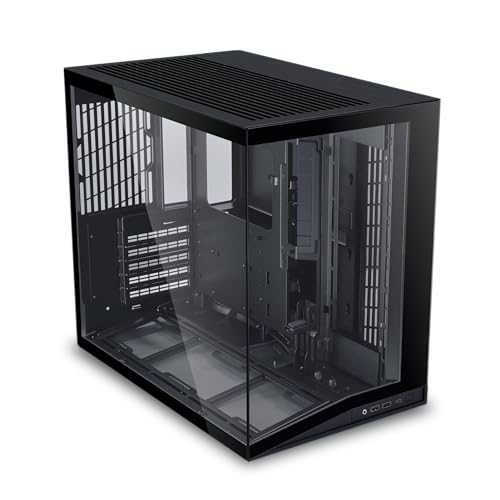
Lian Li O11D Mini V2 Compact ATX Mid-Tower PC Case, Black, No Fans — The compact O11
The O11D Mini V2 shrinks the family’s idea to a compact ATX mid-tower and says so with refreshing bluntness, adding the two words spec sheets often bury: no fans. That honesty about contents is the pick’s character. The case arrives as a shell for a builder who already owns fans, prefers to choose their own, or is transplanting a build wholesale — a common pattern at this size, where the machine is often a re-housing of existing hardware rather than a from-scratch assembly. Its title, like its Vision sibling’s, is silent on reversibility and panel side, and it is classified accordingly: a fine standard-orientation case, not a documented right-side answer.
Size is the argument for the Mini within this family. The flagship EVO XL is a floor-standing commitment; the Mini V2 is a desk object, and for the standard-orientation majority that difference decides purchases more often than any radiator figure. Compact ATX keeps the mainstream board, so the re-housing pattern works without a platform change — board, card and storage move across, fans follow from the old case or a chosen set, and the O11’s dual-chamber tidiness upgrades the presentation of hardware that was previously hidden in a plain tower.
The no-fans condition cuts both ways and should be priced honestly. A builder with a fan drawer saves the cost of bundled units they would have replaced; a builder starting empty must add a fan set to the real total before comparing this case against fan-included rivals like the MONTECH below. Neither is a catch — the title declares it in plain words — but comparisons made on case price alone will mislead until the fans are counted.
For the right-side shopper, the Mini V2’s role mirrors the Vision’s, at smaller scale: verify with Lian Li if the heart is set on it, rearrange the desk if it is not, and never assume. Its own merits — compact O11 design, mainstream platform, honest contents — are quite sufficient to justify its place in the guide on the standard side of the room.
- Format: compact ATX mid-tower, stated in the listing title
- Fans: none included, stated in the listing title
- Colour: black, stated in the listing title
- Reversible layout: Not stated in the listing title — verify with Lian Li documentation
- Radiator and card clearances: Not stated in the listing title — verify with Lian Li documentation
Strengths
- The O11 design language at a desk-friendly mid-tower scale.
- Honest no-fans packaging suits builders re-housing existing hardware.
- Compact ATX keeps the mainstream board at the build’s centre.
Trade-offs
- Fans are a separate purchase for anyone starting from empty.
- No layout claim of any kind appears in the title.
- Compact interiors ask the usual care with card and cooler sizes.
Best for: a builder seeking a compact O11 for a standard-orientation re-housing project with fans already owned. Not suited for: a builder requiring a documented reversible layout or a fan-complete case out of the box.

MONTECH XR Panoramic ATX Gaming PC Case, Mid Tower, 3 ARGB PWM Fans, Black — Panoramic value
The MONTECH XR brings the panoramic format to its most accessible expression in this pool: an ATX gaming mid tower in black with three ARGB PWM fans included, stated in the title. Where the Lian Li picks sell glass as architecture, the XR sells it as a complete, ready-to-light package — case, fans and wraparound view in one purchase. Its title contains no syllable about reversing the layout, and so it takes its place here as the value standard-orientation showcase: the case a right-side shopper should buy only after deciding the desk can accommodate convention, or after MONTECH’s documentation surprises everyone.
The included fans deserve more than a passing nod, because they complete the product in a way the O11D Mini V2’s honest emptiness deliberately does not. Three PWM fans under motherboard control give the build its airflow and its lighting from the first boot, matched in style and connector, with no second order required. For a first showcase build, that completeness is worth a great deal of money in avoided mistakes — the fan hub not bought, the mismatched lighting not discovered at midnight — and it is the XR’s strongest argument in any company.
Panoramic at this level also carries a democratising point worth making. The wraparound glass look began at flagship prices, and its arrival in a fan-included mid tower means the display build is no longer a luxury format. A reader whose budget was never going to reach the O11 flagships can still have the room-facing machine they pictured — in the standard orientation. That qualification is the whole story of this guide in miniature: the panoramic half of the dream is now affordable, while the right-side half remains a documented flagship feature, and confusing the two halves is how disappointed purchases happen.
MONTECH’s documentation is where any remaining questions live — radiator support, card clearance, and the layout question above all. The XR’s title has already given the buyer more working information than most in this pool, fans included; what it has not given, this guide will not lend it.
- Format: ATX gaming mid tower, stated in the listing title
- Panels: panoramic design, stated in the listing title
- Fans: 3 ARGB PWM fans included, stated in the listing title
- Colour: black, stated in the listing title
- Reversible layout: Not stated in the listing title — verify with MONTECH documentation
Strengths
- Fans included and matched — the most complete out-of-box showcase here.
- Panoramic glass at the accessible end of the format’s range.
- PWM control keeps the lighting build quiet-mannered at idle.
Trade-offs
- No right-side or reversible claim exists in the title.
- Cooling expansion figures await the documentation.
- Its value story tempts right-side shoppers toward an orientation compromise they may regret.
Best for: a builder seeking a fan-complete panoramic gaming case for a conventional desk arrangement. Not suited for: a builder requiring a documented right-side panel layout above all else.

NZXT H5 Flow — The airflow alternative
The H5 Flow closes the guide as the representative of a different philosophy entirely, listed under its bare name with no specification in the title at all. NZXT’s H5 line is known to the wider market as an airflow-first design — the Flow in the name is the product’s whole argument — but this guide’s discipline applies to reputations as strictly as to layouts: the title states a brand and a model, and every functional detail, panel configuration included, belongs to NZXT’s documentation. What can be said is why an airflow case belongs in a right-side conversation at all: because some readers who arrive searching for a panel discover, on reflection, that their real problem is a hot, loud machine, and the panel was only the presumed answer.
That reframing is worth a paragraph of respect. Desk geometry problems have two solutions — move the window, or stop needing it. A case whose appeal is thermal rather than visual can sit on either side of a desk with its dignity intact, its plain side to the room and its temperatures excellent, and for a performance-first builder that may be the genuinely correct purchase. The H5 Flow’s presence in the pool, whatever its documentation reveals about its panels, is a useful reminder that not every build is a display build, and that the right-side search sometimes ends by dissolving rather than by being answered.
For the reader who does need the window on the right, the H5’s path is the same as the other four alternatives: NZXT’s manual for the exact model, searched for layout language, before any plan is built on it. Nothing in the listing supports a claim, and none is made. What the pick offers on the evidence is a well-known name in the airflow category and a clean decision — verify, reframe, or choose the documented flagship above.
There is a fitting symmetry in ending the six here. The guide began with the pool’s single documented reversible case and ends with its most completely undocumented one, and the distance between those two listings is exactly the distance a careful buyer travels with documentation in hand. Every pick between them has been an exercise in reading what is written rather than what is wished — the only skill this category truly rewards.
- Product identity: NZXT H5 Flow, stated in the listing title
- Panel configuration: Not stated in the listing title — verify with NZXT documentation
- Reversible layout: Not stated in the listing title — verify with NZXT documentation
- Fan and radiator provision: Not stated in the listing title — verify with NZXT documentation
- Dimensions and board support: Not stated in the listing title — verify with NZXT documentation
Strengths
- An airflow-first name that reframes the purchase for performance-led builders.
- Orientation-agnostic appeal: a thermal case works on either side of a desk.
- A major maker’s documentation and support ecosystem behind the model.
Trade-offs
- The listing states nothing at all — every fact requires the documentation step.
- Display builders will find its priorities run opposite to the panoramic picks.
- No right-side evidence exists at listing level.
Best for: a builder seeking an airflow-led case from a major maker, researched through NZXT’s documentation. Not suited for: a builder requiring a documented right-side panel configuration from the listing.
How Do You Plan a Mirrored Build on Paper Before Touching a Screwdriver?
Draw the finished machine as the room will see it, in its reversed orientation, and work backwards from that drawing. Note where the graphics card will sit relative to the processor — inverted builds commonly place the card above the board’s centre line — and trace every cable in the new geometry: the supply’s runs from the hidden chamber, the front panel’s leads, the display cables’ exit path toward a monitor that now stands on the case’s other side. Distances that were generous in the standard build can come up short in the mirror, and a cable inventory made on paper, measured against the case’s documented interior, is the difference between a planned reversal and an interrupted one.
Cooling gets its own page of the plan. Decide the radiator’s home in the reversed case from the maker’s supported positions, not from where it lived before the flip, and re-derive the fan directions for a machine whose top and bottom have exchanged components. Heat’s behaviour has not changed — it rises, indifferent to fashion — but the hardware’s arrangement around that fact has, and the builders who re-plan rather than assume are the ones whose reversed machines run as coolly as their standard ones did.
Finally, schedule the reversal as its own build day, with the standard machine photographed from every angle before a single screw turns. Those photographs are the undo button: if the mirrored assembly fights back, the original configuration can be restored exactly, and nothing about the attempt becomes permanent until it has succeeded. Reversibility is a feature of the case, but reversibility of the decision is a feature of the process, and the careful builder arranges for both.
What Happens to Cable Management When a Case Is Mirrored?
Dual-chamber design, the O11 family’s signature, turns out to be the mirrored build’s best friend, and the reason is worth understanding. In a conventional tower, cables live in the same volume as the components, tucked behind the tray by habit and hope; mirror the layout and every one of those habits must be relearned in reverse. In a dual-chamber case, the cables live in their own volume behind the board, and that volume’s job does not change when the display side swaps — the runs are re-dressed, but the architecture of hiding them survives the flip intact. This is a large part of why credible reversible cases cluster in the dual-chamber flagship class: the engineering that makes reversal presentable was already there, selling tidiness.
The visible side, meanwhile, gains a second chance at perfection. Every builder’s first assembly contains small regrets — a cable that crosses where it should run parallel, a lead a centimetre too visible — and a reversal is a sanctioned opportunity to correct them all with experience’s hindsight. Owners of reversible flagships often report that the mirrored build is the tidier of the two for exactly this reason, and that the case’s second life looks more deliberate than its first. A feature bought for desk geometry ends up paying a craftsmanship dividend, which may be the most pleasant surprise in this entire category.
How Do the Six Compare on Layout Evidence?
| Case | Class from title | Reversible / right-side in title | Documented headline feature |
|---|---|---|---|
| Lian Li O11D EVO XL | E-ATX full tower | Yes — reversible layout | 3x420mm radiator support |
| Lian Li O11D EVO RGB | E-ATX | Not stated | 420mm radiator, RGB finish |
| Lian Li O11 Vision Compact | ATX | Not stated | Back-connect motherboard support |
| Lian Li O11D Mini V2 | Compact ATX mid tower | Not stated | Sold without fans |
| MONTECH XR | ATX mid tower | Not stated | Panoramic glass, 3 ARGB PWM fans |
| NZXT H5 Flow | Not stated | Not stated | Model name only |
One yes in a column of six: the table is the guide’s thesis in its starkest form. It does not say the five are bad cases — several are superb at their actual jobs — it says the right-side feature is rare, documented once, and not transferable by resemblance. A reader who absorbs that single row of contrast has understood everything the category can teach before a purchase is made.
What Should a Reversed Build’s First Week Look Like?
Treat the mirrored machine as a new build for testing purposes, because thermally and mechanically it is one. Run the same hour of loads the standard build once faced, with the panels on and the case in its final position, and compare temperatures component by component against the figures recorded before the flip. Differences are information: a card running warmer in its new height is telling you the airflow plan needs the revision the planning section anticipated, and the first week is when such revisions are still pleasant to make.
Listen, too. A reversed case moves its fans and its vents relative to the room’s surfaces, and a machine that was inaudible against one wall can present a new note against another. Fan curves tuned for the old orientation deserve re-tuning rather than inheritance. None of this is a burden peculiar to reversible cases — it is the ordinary diligence of any serious build — but the flip resets the clock on it, and the owners who observe the reset are the ones whose second-orientation machines behave as if they had only ever been built one way.
How Do You Verify a Layout Claim Before Buying?
Use the maker’s own materials for the exact model, and search them for the operative words: reversible, inverted, right-side, mirrored. A genuine reversible case documents the process — which panels move, which brackets relocate, what the finished orientations look like in the maker’s own diagrams. Sellers’ photographs prove nothing, because a mirrored image is one click in any editor, and community builds prove only that one owner succeeded once, possibly with modifications the post does not emphasise. The manual is the contract; everything else is advertising.
While the manual is open, verify the mirrored build’s working details, not just its existence. Cable lengths and routes change sides; the graphics card’s position relative to the processor inverts, which affects cooler and loop planning; front panel connections and any display or lighting features may sit differently. A case that reverses its panels but strands the build’s cabling is a partial answer, and the time to discover the partiality is in the documentation, not at the desk with the machine in pieces.
Finally, if the exact model fails the test, let it fail cleanly. The alternatives are honest ones: the documented EVO XL, a desk rearrangement that gives a standard case its proper side, or an airflow-led case like the H5 Flow whose appeal does not depend on a window at all. What the evidence does not offer is a fourth option in which an undocumented case is hung on hope — and a guide that pretended otherwise would be selling the hope, not the case.
Which Desks Actually Need the Right Side, and Which Only Think They Do?
The genuine cases share a pattern: the desk’s position is fixed by something stronger than preference. A wall on the right and open room on the left; a window whose glare dictates the monitor’s place; power and network points installed on one side by an electrician rather than by taste; a corner desk whose long arm runs left. In each, the machine’s home is non-negotiable, and a standard case would spend its life showing the room its back. Those are the desks the EVO XL was engineered for, and their owners recognise themselves instantly in this description.
The other pattern is softer: the machine could go on either side, but the left is where the owner first pictured it, or where a photograph online placed it. For those desks, the honest advice is to let the picture go. The panoramic five in this guide exist in glorious variety precisely because the standard orientation is the industry’s centre of gravity, and a buyer freed from the right-side requirement gains choice, fans included, at every level. Deciding which pattern describes your room — constraint or preference — is the cheapest step in this entire purchase, and it should be taken before a single listing is opened.
What Mistakes Do Right-Side Shoppers Keep Making?
The signature mistake is inheritance by surname: assuming the O11D EVO RGB reverses because the EVO XL does, or that any dual-chamber panoramic case must surely flip. The second is trusting photographs, including the mirrored product renders that marketplaces occasionally publish by accident or enthusiasm. The third is buying the panoramic case for a left-side desk and planning to simply turn it around — a standard case rotated shows its rear or its plain flank, not its window, a geometry error that sounds impossible until the box is open on the floor.
Two subtler mistakes follow. Builders reverse a case without re-planning the loop and cables, then discover the mirrored interior’s distances at assembly. And shoppers overlook the simplest solution of all — moving the desk’s layout instead of the case’s — rejecting a furniture change that costs nothing in favour of a case compromise that costs a flagship. The room and the case should be negotiated together, with the evidence about each kept as clear as this guide has tried to keep it.
Final Recommendation
For a genuine right-side build, the recommendation is singular because the evidence is: the Lian Li O11D EVO XL, the one case in this pool whose title documents a reversible layout, at a scale that makes the feature feel inevitable rather than improvised. Every other pick is recommended for what it actually is — the EVO RGB and Vision Compact as panoramic showcases for conventional desks, the O11D Mini V2 as the compact re-housing shell, the MONTECH XR as the fan-complete value in wraparound glass, and the NZXT H5 Flow as the airflow-led reframe — each with its layout status stated rather than wished away. The right side of the desk is a real place, and it deserves a case that was engineered to face it; until more makers document that engineering, the honest shortlist for this search has one name at the top and five clearly labelled alternatives beneath it.
A closing word about expectations, because this category attracts a particular kind of disappointment that better information prevents entirely. A right-side build will not feel exotic once assembled; it will feel inevitable, the machine simply facing the way the room always wanted. That quiet rightness is the feature’s true reward — not novelty, but the permanent absence of a small daily wrongness, the window turned to the wall, that no specification sheet can photograph. Buy the documented case, plan the mirror on paper, and the reward compounds silently for the life of the machine.
Frequently Asked Questions
Can I just turn a normal glass case around to face the other way?
No — rotating a standard case turns its rear or its plain side toward the room, not its window. The window’s side is fixed by the motherboard tray’s position inside the chassis. The only genuine routes to a right-side presentation are a documented reversible or inverted layout, as claimed for the O11D EVO XL in this guide, or a case specifically designed with its window on the right, which is rarer still.
Does the O11D EVO RGB reverse like the EVO XL?
Its listing title does not say so, and this guide treats that silence as the answer until Lian Li’s documentation for the exact model says otherwise. Family resemblance is not a specification. If the maker’s manual for the EVO RGB documents a reversible or inverted configuration, the case joins the flagship as a verified option; if it does not, no photograph or forum thread should be allowed to overrule the manual.
Why are right-side panel cases so rare?
Because the industry standardised on one orientation early — tray on one side, window on the other — and every accessory, desk and photograph since has reinforced it. Reversibility costs real engineering: symmetric mounting, panels that fit both flanks, documentation for two builds. Most makers spend that effort elsewhere, which is why the feature survives mainly at the flagship end of ranges like Lian Li’s O11 line, and why verifying it matters more than assuming it.
Does reversing a case void anything or wear it out?
A case designed for reversal is designed for the operation itself — the panels, brackets and mounts involved are the ones the maker intends to be moved, and following the manual’s sequence is ordinary use, not modification. The practical wear points are the mundane ones of any rebuild: screws and their threads, panel edges, cable connectors flexed once too often. Work slowly, keep the removed hardware organised by step, and a reversible case can change its mind more than once across its life without complaint. What wears a case out is not reversal but haste, and haste is the one accessory no flagship includes.
What should I check in a reversible case’s manual before buying?
Four things: that the reversible or inverted configuration is described for the exact model, which parts move and which are fixed, how cable routing and front connections behave in the mirrored build, and whether cooling layouts — radiator positions especially — are supported in both orientations. A manual that answers all four describes a designed feature. A manual silent on any of them describes a project the buyer will be finishing alone.
Are panoramic cases the same as right-side cases?
No, and the confusion between them is this category’s engine of disappointment. Panoramic describes how much glass a case has — wraparound panels, pillar-free corners, a view from several angles. Right-side describes where the primary window sits relative to the desk. A panoramic case in the standard orientation, like the Vision Compact or MONTECH XR here, still presents its interior to the conventional side; its extra glass widens the view without moving it. Only a documented reversible or inverted layout moves the presentation to the right, which is why the two vocabularies must never be allowed to substitute for each other at purchase time.
If no case fits my desk’s left side, what else can I do?
Change the geometry instead of the case. Move the machine to the desk’s other end if cables and walls allow, place a standard case on the floor to the right of the desk with its window facing the room, or choose an airflow-led case whose appeal does not depend on a window at all, as the H5 Flow represents here. Several readers who begin this search end with one of those answers, and there is no failure in it — the goal was a room that works, not a specification matched for its own sake.
Related Guides
Layout decided, the rest of the showcase build has its own reading. Builders committing to the flagship route can continue with dual-chamber cases for clean builds for the architecture behind the O11 line, those still choosing a presentation style should compare panoramic glass cases for showcase PCs, and readers whose desk geometry started this search may find compact cases for small desk setups a simpler resolution to the same problem.
Whichever of those doors the build walks through, keep the maker’s manual for the chosen case within reach until the machine has survived its first month in the new orientation; the questions of week three are never the ones the listing answered, and the manual remains the only document that was written by someone who knew the answers.
And if the month passes without a single question arising, that too is the manual’s success — the best documentation is the kind a builder reads once, follows completely, and never needs to argue with again, because every bracket, panel and cable in the mirrored machine sits exactly where its maker always intended it to sit.
That is the standard the five alternatives should be held to as well, each in its own orientation: a case used exactly as its documentation describes is a case that will be enjoyed for years, whichever side of the desk it finally calls home, and whatever the room around it asks of it next.


