What's inside
- Key Takeaways
- Quick Picks
- How Did We Choose These Picks?
- What Do TBW and DWPD Actually Promise?
- How Do the Six Compare Side by Side?
- How Much Do You Actually Write in a Day?
- What Actually Happens as an SSD Ages?
- How Should You Set Up a Drive You Intend to Keep?
- Does Endurance Matter Differently in a Laptop, a Desktop and a NAS?
- What Mistakes Shorten an SSD’s Life?
- How Do Warranties, MTBF and Recovery Services Fit Together?
- Final Recommendation
- Frequently Asked Questions
- Related Guides
As an Amazon Associate I earn from qualifying purchases. This post may contain affiliate links at no extra cost to you.
gizmoverdict.com is reader-supported. When you buy through links on our site, we may earn an affiliate commission.
Where to buy: Each of the six drives below links to its Amazon listing from the Quick Picks table and again from its detailed section. Endurance figures quoted in this article come from the listing titles themselves; where a title gives no number, the spec box says so, and the manufacturer’s documentation for the exact model code is the place to confirm it before a purchase that depends on the figure.
The best long lasting ssds are not necessarily the fastest drives on the shelf, and this roundup refuses to pretend otherwise. Longevity in solid-state storage is a measurable thing — terabytes written, drive writes per day, rated operating hours, warranty length — and it is distributed very unevenly across the market. A gaming drive built for burst speed may carry a modest endurance rating, while an unglamorous enterprise drive built for a server rack may be rated to absorb more writing in a year than a home machine produces in a decade. Knowing which kind of drive your workload actually punishes is the whole subject of the next several pages.
The six picks divide by how their longevity is established. Four of them publish hard numbers in their listing titles: Gigabyte’s AI TOP 100E states an almost absurd 109,500 TBW and 58 drive writes per day; Seagate’s FireCuda 530 and 530R state 1,275 TBW and 1,100 TBW respectively; Samsung’s 870 EVO in 4TB states 2,400 TBW and a five-year term. The other two — Western Digital’s WD Red SA500 NAS drive and Kingston’s enterprise DC600M — state no endurance figure in their titles at all, and earn their places a different way: by belonging to product classes, NAS and enterprise mixed-use, whose entire design brief is sustained, years-long service. This article keeps those two kinds of evidence separate and labelled, because confusing a class reputation with a published rating is how buyers get misled.
It is also worth saying early what long-lasting does not mean. No SSD is immortal, no rating excuses the absence of backups, and a drive rated for enormous writes can still fail early for electrical reasons no specification covers. Endurance ratings describe how much writing the flash is warranted to absorb; they are a budget for a known wear mechanism, not a prophecy. Everything in this roundup follows from that sentence: the figures are quoted exactly where titles provide them, the silences are labelled where they do not, and the buying advice is organised around your measured habit rather than around the largest number on the page. Spend the budget knowingly, keep the drive’s health where you can see it a few times a year, and these drives will outlast the machines around them — which is the only definition of long-lasting that has ever mattered.
Key Takeaways
- Endurance is stated in TBW or drive writes per day — and only four of these six titles state it, which the spec boxes flag honestly.
- Gigabyte’s AI TOP 100E is in a class of its own on paper: 58 DWPD and 109,500 TBW for AI-style write punishment.
- Seagate’s FireCuda 530 pair gaming speed with four-figure TBW ratings and Rescue Services.
- Samsung’s 870 EVO 4TB states 2,400 TBW and five years — the strongest published SATA figures here.
- The WD Red SA500 and Kingston DC600M argue longevity by class: NAS duty and enterprise mixed-use respectively.
- Match the rating to your measured writing habit; most home workloads use a small fraction of even a modest rating.
Quick Picks
| Pick | Badge | Why it earns its place |
|---|---|---|
| Gigabyte AI TOP 100E 1TB | Endurance champion | 58 DWPD and 109,500 TBW in the title — built for AI workloads that write relentlessly. |
| Seagate FireCuda 530 1TB | Fast and durable | Up to 7,300MB/s with 1,275 TBW and 1.8M hours MTBF stated in the title. |
| Seagate FireCuda 530R 1TB | Heatsink endurance pick | Up to 7,400MB/s, 1,100 TBW and a factory heatsink for sustained work in tight machines. |
| WD Red SA500 NAS 2TB | NAS-class SATA | A 2TB SATA drive from Western Digital’s NAS line, built for always-on array duty. |
| Kingston DC600M 960GB | Enterprise mixed-use | A data-centre SATA drive whose mixed-use enterprise class is its longevity argument. |
| Samsung 870 EVO 4TB | SATA longevity leader | 2,400 TBW and a five-year term stated in the title, in a 2.5-inch SATA shell. |
How Did We Choose These Picks?
We began with a rule that shaped the whole list: a pick could argue its longevity in exactly two ways, and the article would always say which. The first way is a number in the listing title — TBW, drive writes per day, MTBF hours, a warranty term — quoted exactly as printed. The second way is membership of a product class designed for endurance duty: NAS drives built for always-on arrays, enterprise drives built for mixed-use server work. Class membership is real evidence, but it is softer evidence, so wherever a pick relies on it, the spec box records the endurance figure as not stated in the title, and the prose argues the class case openly instead of smuggling in a number.
We also required the six to cover the realistic shapes a longevity buyer shops among: M.2 NVMe for modern machines, 2.5-inch SATA for the enormous installed base of older systems and NAS enclosures, and capacities from just under a terabyte to four. A list of six identical M.2 sticks would have been tidier and much less useful. Longevity wears many shapes in real homes and studios, and a roundup that ignores the SATA half of the world would fail the readers who need endurance most, because their machines are the oldest. Finally, we excluded drives whose only longevity claim was marketing language with neither a figure nor a class behind it. In a roundup about lasting, the evidence standard is the product.
What Do TBW and DWPD Actually Promise?
TBW — terabytes written — is the total volume of data a drive is rated to accept over its warranted life. Write less than that figure and the flash wear mechanism the rating describes should not be what kills the drive. DWPD — drive writes per day — expresses the same budget as a daily habit: a 1TB drive rated at 1 DWPD is warranted for writing its entire capacity every day across its warranty term. The two measures convert into each other through capacity and warranty length, which is why a modest TBW on a small drive can represent a tougher daily rating than a large TBW on a huge one.
MTBF, also quoted in two titles here, is a different animal: a statistical estimate of operating hours between failures across a population of drives, useful for comparing product classes and nearly useless for predicting any individual drive’s fate. Read it as a sign of the engineering tier, not as a countdown clock. The five-year term in the Samsung title and the DWPD in the Gigabyte title are the opposite kind of statement — specific, bounded, and attached to a single product you can actually buy — and this roundup weights them accordingly whenever it compares claims. And none of these figures touches the failures that actually orphan data most often — controller faults, power events, accidents — which is why the backup sermon appears in this article more than once.

Gigabyte AI TOP 100E 1TB — Endurance champion
Every roundup has one pick that makes the others look modest, and here it is not close. The AI TOP 100E’s title states 58 drive writes per day and 109,500 TBW for a 1TB drive — figures that belong to a different conversation from consumer storage altogether. To feel what they mean, translate them into habit: writing the drive’s full capacity fifty-eight times a day, every day, across its rated life. No home workload does this. The workload that does is the one in the product’s name — AI development, where training runs, checkpointing and dataset shuffling write with a relentlessness that consumes ordinary drives as a consumable.
The title explains part of how Gigabyte gets there: a design described as 75% over-provisioned, built on a larger pool of NAND than the 1TB you can use, so wear is spread across far more flash than the capacity suggests, with 1GB of LPDDR4 cache and speeds up to 7200MB/s on a PCIe Gen4 x4 interface. Over-provisioning on this scale is an enterprise trick, and its presence in a retail M.2 stick tells you exactly which shelf this product wandered in from. It is not a drive that happens to be durable; durability is the architecture.
Who should actually buy it? The developer running local model experiments whose scratch drive is rewritten constantly. The workstation chewing through simulation output. The small lab that has already killed a consumer drive and done the maths on downtime. For those buyers the AI TOP 100E is not an extravagance but an insurance policy with a specification sheet. For a gaming library or a boot drive, its endurance will simply never be touched — you would be paying for a rating your workload cannot spend, which is not a criticism of the drive, only of the match.
One practical note: a drive bought for write punishment should be monitored like one. Whatever tool you favour, watch the percentage-used indicator the controller reports, and let the enormous rating inform — not replace — a backup routine. Even a drive warranted for a hundred thousand terabytes can be defeated by a spilled coffee, and its data will not care how impressive the TBW figure was.
There is also a systems point worth making about over-provisioning, because it explains why this drive’s usable capacity is the honest part of its design. Flash that the user cannot touch is not waste; it is the working surface the controller uses to shuffle data, retire worn blocks and keep write speeds level when the visible terabyte is nearly full. Consumer drives reserve a little of this space. The AI TOP 100E reserves a territory. That is why its behaviour under the exact conditions that make ordinary drives stumble — nearly full, written constantly — is the product’s real headline, with the TBW figure simply its most quotable expression.
- Capacity: 1TB
- Form factor: M.2 2280, PCIe Gen4 x4 NVMe
- Endurance: 58 DWPD and 109,500 TBW, per the listing title
- Read speed: up to 7200MB/s, per the listing title
- Design note: 75% over-provisioned NAND design and 1GB LPDDR4 cache, per the listing title
- Warranty term: Not stated in the listing title — verify with Gigabyte documentation
Strengths
- An endurance rating so far beyond consumer norms that write-heavy roles stop being a concern.
- Over-provisioning also steadies sustained-write behaviour, the hidden half of the endurance story.
- Gen4 speed means the durability never asks you to accept a slow drive as the price.
Trade-offs
- Most buyers will use a tiny fraction of the rating, making it poor value for ordinary duty.
- Its natural roles are specialised; as a games drive it is a racehorse pulling a cart.
- The title states no warranty term, so the rated life must be confirmed in Gigabyte’s documentation.
Best for: the developer or lab seeking a scratch and training drive whose daily writing would consume consumer SSDs. Not suited for: ordinary boot or library duty, where the rating is money spent on a budget never used.
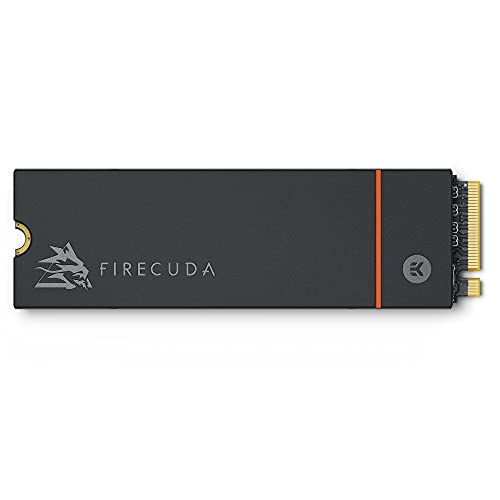
Seagate FireCuda 530 1TB — Fast and durable
The FireCuda 530 built its reputation on refusing the usual trade: it is a flagship-speed Gen4 drive — up to 7300MB/s in the title — that also publishes an endurance figure, 1,275 TBW, far above the gaming-drive norm, alongside a 1.8 million hour MTBF and 3D TLC NAND. That combination is why this drive keeps appearing in two different conversations at once: the fastest drive for a console or gaming PC, and the drive a creator chooses when the same machine also ingests and exports footage all week. Speed got it noticed; the TBW figure is what makes it a longevity pick rather than merely a quick one.
This particular listing is the heatsink variant, which matters for its most famous home: the PlayStation 5, whose expansion bay wants a heatsinked drive and rewards one with sustained performance during long installs. In a desktop, the same heatsink keeps the controller composed through back-to-back transfers. Either way, the drive’s character is consistency under load — the quality that separates drives that benchmark beautifully from drives that still feel fast during the third hour of a working day.
Judge the endurance figure against a realistic habit and its generosity becomes clear. A creator writing 100GB of footage and exports daily — a heavy home workload by any standard — would take well over three decades to spend 1,275 TBW. The rating is therefore not a limit to manage but a margin to forget about, and that forgettability is precisely what a long-lasting pick should sell. What the figure does not cover, Seagate partly answers with the Rescue Services named in the title: a data-recovery safety net that acknowledges drives can fail for reasons endurance ratings never described.
As a purchase, the FireCuda 530 suits the machine that must be both games console and workhorse, or the single-drive laptop whose owner cannot add a second disk for scratch work. It asks a flagship-tier commitment inside this roundup, and returns a drive whose speed and stamina are both documented in its own title rather than asserted by reviewers.
One more angle deserves air, because it decides real purchases: noise and heat shape where a drive can live. A heatsinked Gen4 stick in a console sits in a machine already designed around airflow over that bay, and the pairing is harmonious. The same drive in a fanless mini-PC deserves a second thought, not because it will fail, but because sustained transfers in a sealed box are where thermal design earns or loses its keep. Longevity, in the end, is a property of a system — drive, airflow, workload, power — and the FireCuda’s published figures give that system a stronger foundation than most.
- Capacity: 1TB
- Form factor: M.2, PCIe Gen4 x4 NVMe 1.4, heatsink fitted
- Endurance: 1,275 TBW and 1.8M MTBF, per the listing title
- Read speed: up to 7300MB/s, per the listing title
- NAND: 3D TLC NAND, per the listing title
- Extras: Rescue Services, per the listing title
Strengths
- Pairs near-flagship Gen4 speed with an endurance figure several times the gaming norm.
- The heatsink variant suits console expansion and tight, warm M.2 bays equally well.
- Rescue Services add a recovery path that pure specification sheets never provide.
Trade-offs
- The heatsink can foul laptop bays with tight clearances; measure before assuming it fits.
- It sits at the committed end of this roundup’s pricing territory.
- Owners of Gen3-only machines will pay for headroom their slot cannot release.
Best for: the console-and-desk setup seeking one drive that covers expansion, gaming and daily creative writing alike. Not suited for: slim laptops with no heatsink clearance or SATA-era machines.

Seagate FireCuda 530R 1TB — Heatsink endurance pick
The 530R is Seagate’s endurance-forward retelling of the 530 story. Its title states up to 7400MB/s, 1,100 TBW, a 1.8M MTBF and Rescue Services, with a heatsink fitted as standard — a specification aimed at machines that work their storage continuously rather than in bursts. The R’s positioning leans toward creators and workstation duty, where the pattern of life is long writes, large projects and a drive that is expected to behave identically in month eighteen to how it behaved in week one.
Compare it honestly with its sibling above. The 530R’s TBW figure is slightly lower than the 530’s, its headline speed a touch higher, and its heatsink and service bundle are pitched at professional rather than console homes — though nothing prevents it serving in a console that accepts it. Choosing between the two is less about which is better than about which story matches your machine: the 530 for the games-led double life, the 530R for the work-led one. Both publish their endurance, which already puts them ahead of most performance drives that ask to be trusted on reputation.
In service, the qualities that matter are the unphotogenic ones. A video editor’s drive does not fail dramatically; it degrades the day — a timeline that stutters during a long export, a cache that cannot keep up with a multicam project. Drives in this tier earn their place by removing those small frictions and keeping them removed, and the combination of a real TBW rating, a fitted heatsink and a recovery service describes a product designed around exactly that anxiety.
It is also a sensible single-drive answer for a compact workstation or a creator laptop with one M.2 slot, where boot drive, project drive and scratch drive are the same piece of hardware by necessity. In that forced triple role, endurance stops being an abstract specification and becomes the difference between a machine that ages gracefully and one that needs its storage replaced mid-life.
The 530R also rewards a moment’s reflection on what Rescue Services signify. A manufacturer that bundles professional data recovery is pricing the real-world failure distribution into the product — acknowledging that even well-rated drives meet accidents, and that the value at risk is the data, not the hardware. For a working creator whose drive holds a client’s project, that acknowledgement may be worth as much as a few hundred extra TBW. It certainly distinguishes a longevity product from a merely fast one: the fast one sells you speed, the longevity one also sells you a plan for the bad day.
- Capacity: 1TB
- Form factor: M.2, PCIe Gen4 x4 NVMe 1.4, heatsink fitted
- Endurance: 1,100 TBW and 1.8M MTBF, per the listing title
- Read speed: up to 7400MB/s, per the listing title
- NAND type: Not stated in the listing title — verify with Seagate documentation
- Extras: Rescue Services, per the listing title
Strengths
- A four-figure TBW rating and fitted heatsink aimed squarely at sustained professional work.
- The fastest headline speed in this roundup, so endurance never feels like a downgrade.
- Rescue Services soften the one risk endurance figures cannot address.
Trade-offs
- Its TBW sits slightly below the sibling 530’s figure, despite the work-focused pitch.
- The title leaves NAND type unstated, which specification-led buyers will need to verify.
- Heatsink clearance rules it out of the slimmest ultrabook bays.
Best for: a buyer seeking a work-led Gen4 drive whose endurance is printed on its own listing. Not suited for: ultrathin laptops without heatsink room, or roles where its rating will never be approached.

WD Red SA500 NAS 2TB — NAS-class SATA
This pick argues its longevity the second way: by class. The WD Red SA500 belongs to Western Digital’s NAS line, and its title — 2TB, 3D NAND, SATA III, 2.5-inch 7mm, up to 560 MB/s — states no endurance figure at all. What it states is a job. Red drives are built for network-attached storage: enclosures that run around the clock, serve several users, vibrate gently in multi-drive bays and treat storage as infrastructure rather than as a component. A drive designed for that life is designed, in every layer from firmware behaviour to error handling, to keep going for years without being thought about.
The setting explains the specification choices. NAS arrays value steady throughput and graceful behaviour under constant light load over headline speed, which SATA’s ceiling supplies amply; they value capacity, which the 2TB size serves; and they value drives that play well in mirrored or parity sets, where one member’s odd behaviour can degrade the whole array. The SA500’s 2.5-inch form also fits the growing class of compact, SSD-only NAS enclosures built for quiet rooms — a home office NAS that cannot be heard is a NAS that stays switched on, which is rather the point.
Honesty requires the counterweight. Because the title publishes no TBW, an owner whose NAS writes exceptionally hard — constant surveillance recording to SSD, a download cache rewritten daily — should confirm the rating in Western Digital’s documentation before committing a whole array to it. Class reputation is evidence, not a number, and this roundup’s rule is that the difference stays visible. For the ordinary home and small-office array, though, the class argument is strong: this is storage sold for always-on service, bought by people whose alternative is a failed drive letter at an inconvenient hour.
It also makes a thoughtful single-drive pick outside a NAS: a home server, a media box, a backup target that lives powered for years. In those roles the same NAS brief — endurance-minded, always-on, unglamorous — is exactly what longevity means in practice.
Consider, too, the economics of the array it will usually join. A NAS is bought once and populated with drives expected to serve until the enclosure itself is obsolete; a drive that fails early costs not only its replacement but an array rebuild, hours of degraded redundancy, and the small but real risk carried by any rebuild. NAS-class drives are priced against that whole bill, not against the sticker of a desktop SSD. Judged on the total cost of staying reliably online for five years, the SA500’s proposition is coherent in a way a spec-sheet comparison never quite captures.
- Capacity: 2TB
- Form factor: 2.5-inch 7mm, SATA III 6 Gb/s
- Read speed: up to 560 MB/s, per the listing title
- NAND: 3D NAND, per the listing title
- Endurance (TBW): Not stated in the listing title — verify with Western Digital documentation
- Intended class: NAS, per the product line named in the listing title
Strengths
- Purpose-built for always-on NAS service, the environment where longevity is tested hardest.
- 2TB of SATA capacity suits arrays and compact SSD-only enclosures alike.
- NAS-class behaviour prioritises steady, predictable service over benchmark peaks.
Trade-offs
- No endurance figure in the title; write-heavy array buyers must verify before purchase.
- SATA speed is a ceiling desktop NVMe owners will feel in large transfers.
- Its talents are wasted as a games drive, where cheaper consumer picks do the same job.
Best for: the always-on home or small-office array seeking NAS-class SATA storage with a service-first brief. Not suited for: a performance desktop role, or an array whose write load demands a published rating first.

Kingston DC600M 960GB — Enterprise mixed-use
The DC600M is the most quietly serious drive in this roundup. Kingston’s title is almost aggressively plain — Enterprise 960G DC600M, Mixed-Use, 2.5-inch SATA — with no speed figure, no endurance figure, no adjectives doing any lifting. That plainness is itself a signal about the intended reader: data-centre and workstation buyers shopping by model code and datasheet rather than by headline. The longevity argument here is the class, stated in two words. Mixed-use is an enterprise endurance category, describing drives built for a balanced diet of reads and writes sustained across a service life in servers that are never switched off.
Enterprise SATA drives earn their keep through behaviours consumer listings rarely mention: consistent performance when the drive is nearly full, firmware tuned for predictable latency under mixed load, and design priorities that favour not corrupting data over winning a benchmark. The 960GB capacity — the enterprise convention of rating usable space with headroom already reserved — reflects the same philosophy: some of the flash you cannot see is working on the drive’s longevity and consistency full-time.
For a home or small-studio buyer, the DC600M makes sense in specific, recognisable roles: the workstation that hosts virtual machines, the small server in a cupboard, the always-on machine whose storage must simply never become the story. It is equally honest to name where it does not belong — a gaming build will find it unremarkable, and a laptop upgrader will get more visible joy from a consumer drive at the same capacity class. Enterprise hardware rewards enterprise-shaped problems.
And the standing caveat applies with full force: this title states no TBW, no DWPD, no speed. The DC600M’s real figures live in Kingston’s documentation for the model code SEDC600M/960G, and anyone purchasing on the strength of a number should read them there before ordering. This article’s claim for the drive is deliberately narrower and, we think, still persuasive: its class exists because longevity is a purchasable engineering property, and this is that class’s representative in the pool.
There is a secondary market lesson here as well. Enterprise SATA drives like this one flow into small studios, homelabs and refurbished workstations in large numbers precisely because their first owners — server operators — retire them on schedule rather than on failure. Buying the class new, as this listing offers, buys that same engineering without the unknown history. For the homelab builder assembling a Proxmox host or a file server from deliberate parts, that combination of enterprise manners and a fresh start is the DC600M’s whole appeal, and it does not need a single headline number to make the case.
- Capacity: 960GB
- Form factor: 2.5-inch SATA
- Class: Enterprise, mixed-use, per the listing title
- Model code: SEDC600M/960G, per the listing title
- Speed figures: Not stated in the listing title — verify with Kingston documentation
- Endurance (TBW/DWPD): Not stated in the listing title — verify with Kingston documentation
Strengths
- Enterprise mixed-use design brief: sustained balanced workloads across a long service life.
- Consistency-oriented engineering suits servers, virtualisation hosts and always-on machines.
- Capacity rated with enterprise headroom, reflecting a longevity-first flash layout.
Trade-offs
- The title publishes nothing numeric; every figure requires a documentation check.
- Consumer machines will not feel its virtues, which are about behaviour under load, not speed.
- 960GB is an enterprise sizing that can look odd beside consumer 1TB marketing.
Best for: the server, host or always-on workstation seeking enterprise-class SATA endurance by design. Not suited for: gaming builds or any purchase that needs its numbers from the listing alone.

Samsung 870 EVO 4TB — SATA longevity leader
If the DC600M argues by class, the big 870 EVO argues by arithmetic. Its title states the figures plainly: SATA III, read and write ceilings of 560MB/s and 530MB/s, 2,400 TBW, and a five-year term — the strongest published endurance package available in a consumer 2.5-inch SATA drive, wrapped around a 4TB capacity that changes what the rating means in practice. A large TBW spread across a large drive describes a machine that can absorb heavy daily writing for years; this is the SATA drive for the user whose workload is real but whose machine has no M.2 slot, or whose NAS and enclosures speak SATA only.
Capacity is doing quiet work in this pick. Four terabytes of SSD was a data-centre luxury not long ago; as a single-drive archive for a photographer’s working library, a video project’s live storage, or a home server’s entire collection, it removes the juggling that wears both drives and patience. Larger drives also wear more gracefully in one specific way: with more flash to spread writes across and more free space in typical use, the drive spends its life further from the full-and-struggling condition that ages smaller SSDs fastest.
The 870 EVO family’s maturity strengthens the case. This is among the most widely deployed SATA lines in the world, its behaviour documented across years of service in laptops, desktops and enclosures. Longevity is partly a prediction problem, and no prediction is better than a long public track record. Combined with the published 2,400 TBW and five-year term, the EVO 4TB is the pick for a buyer seeking the endurance conversation finished — numbers on the listing, years on the warranty, and a drive that asks nothing further.
Its limits are the interface’s limits. In a modern desktop with a free Gen4 slot, an NVMe pick will move large files several times faster, and no endurance figure changes that. The EVO’s kingdom is the enormous world of SATA-shaped machines and enclosures, and within that kingdom it is close to a definitive answer.
It is worth pausing on the five-year term, because warranty length is the one longevity figure a buyer can actually enforce. A TBW figure describes engineering; a warranty describes a promise, with a returns process attached. Five years at this capacity, from a maker with Samsung’s service infrastructure, converts the abstract idea of a long-lasting drive into a dated commitment you can hold. When the term and the TBW point the same way — as they do here — a buyer can stop researching and start planning the machine around the drive, which is what a flagship SATA pick is for.
- Capacity: 4TB
- Form factor: 2.5-inch 7mm, SATA III 6 Gb/s
- Speeds: 560MB/s read and 530MB/s write maximum, per the listing title
- Endurance: 2,400 TBW, per the listing title
- Warranty term: 5 years, per the listing title
- NAND: V-NAND, per the listing title
Strengths
- The strongest stated endurance of any SATA pick here, with the term printed beside it.
- 4TB capacity removes storage juggling and keeps the drive far from full in typical use.
- A long, widely documented service record backs the paper figures with history.
Trade-offs
- SATA’s ceiling is firm: large transfers cannot approach NVMe pace.
- It is the premium SATA commitment in this roundup, priced by its capacity and rating.
- Compact machines with M.2-only storage cannot use its 2.5-inch form.
Best for: a buyer seeking maximum stated SATA endurance and capacity for a workhorse machine or enclosure. Not suited for: M.2-only laptops, or desktops where transfer speed outranks stamina.
How Do the Six Compare Side by Side?
| Drive | Form | Endurance evidence | Natural role |
|---|---|---|---|
| Gigabyte AI TOP 100E 1TB | M.2 2280 Gen4 | 58 DWPD, 109,500 TBW — stated | AI and scratch drives written relentlessly |
| Seagate FireCuda 530 1TB | M.2 Gen4, heatsink | 1,275 TBW, 1.8M MTBF — stated | Console and gaming machines that also create |
| Seagate FireCuda 530R 1TB | M.2 Gen4, heatsink | 1,100 TBW, 1.8M MTBF — stated | Creator and workstation single-drive duty |
| WD Red SA500 2TB | 2.5-inch SATA | Not stated — NAS class | Always-on home and office arrays |
| Kingston DC600M 960GB | 2.5-inch SATA | Not stated — enterprise mixed-use class | Servers, hosts, cupboard machines |
| Samsung 870 EVO 4TB | 2.5-inch SATA | 2,400 TBW, 5 years — stated | Big SATA archives and workhorse desktops |
The table’s middle column is the roundup in miniature. Four drives publish their stamina; two testify through their class. Neither column is a trick — but they ask different things of you. A stated figure can be compared, converted into years against your measured writing, and held against a warranty. A class claim asks you to trust the design brief of a product family, which for NAS and enterprise lines is a brief written by buyers far more demanding than most of us. Choose the kind of evidence you are comfortable standing behind.
How Much Do You Actually Write in a Day?
Before any endurance figure can guide a purchase, it has to meet your real writing habit, and most people have never measured theirs. Your drive’s management utility reports total host writes; divide that figure by the months the drive has been installed and you have the only number in this discussion that is truly yours. The results surprise in both directions. A typical office and browsing machine often writes less in a day than a single game install. A creator exporting video, a developer compiling large projects, or a machine hosting virtual disks can write in an afternoon what the office machine writes in a season.
Now set your figure against the ratings. A drive warranted for 1,100 TBW, written at a heavy home rate of 40GB a day, has a paper lifespan measured in decades; the same drive under a genuine 500GB-a-day production habit is a three-to-six-year component and should be budgeted as one. Neither answer is a problem — both are simply planning. Getting hurt, in this market, means never having done this division — overspending on stamina that could not be used, or underspending and meeting the limit mid-project. Ten minutes with your current drive’s counters prevents both errors, and it converts the marketing numbers in this roundup into a personal forecast.
What Actually Happens as an SSD Ages?
Flash wears at the level of the individual cell. Each write cycle stresses the insulation that traps a cell’s charge, and after enough cycles the cell can no longer hold its state reliably. Everything in endurance engineering is a response to that single fact: spreading writes evenly across all cells so none is punished disproportionately, reserving spare blocks to retire the ones that tire first, and rating the whole arrangement in TBW so a buyer can budget the wear. This is why two habits dominate a drive’s real lifespan. Total volume written decides how much of the budget is spent, and the drive’s fullness decides how efficiently the remainder is used — a nearly full drive must shuffle data more for every write, spending wear faster than the same drive with room to breathe.
The symptoms of an ageing drive are usually gradual rather than dramatic: writes that slow as spare blocks dwindle, a health percentage in the manufacturer’s utility ticking downward, occasionally a retreat into read-only behaviour at the very end. Modern controllers report this wear honestly through their health indicators, which is why the monitoring habit matters. A drive watched quarterly gives its owner a forecast; a drive ignored gives them a surprise. The picks in this roundup differ in how much budget they start with, but all of them report their spending the same way — through tools that take a minute to check and repay that minute for years.
How Should You Set Up a Drive You Intend to Keep?
Longevity is partly bought and partly configured. On installation day, update the drive’s firmware before your data moves in, because early firmware revisions are where controller quirks live. Leave a sensible margin of free space — a tenth of the drive is a good household rule — and resist the temptation to fill a new terabyte simply because it exists. Make sure the machine’s power is clean: a failing power supply and a cheap, unstable one are both drive hazards that no TBW rating contemplates. In a laptop, that means a healthy battery and the maker’s charger where possible; in a desktop, a power supply from a reputable line.
Then set the two recurring habits. First, a backup routine that runs without your remembering it — scheduled, automatic, and tested once by actually restoring a file. Second, a quarterly health check: open the drive utility, note the percentage used and the total writes, and file the number away. Four readings a year turn your next purchase from a guess into the measured decision this article keeps recommending. Keep those readings somewhere durable — a note in the same backup the routine protects is fitting — because a single reading is a snapshot, while a year of readings is a trend, and trends are what purchasing decisions should be made from. The habit costs perhaps ten minutes a year in total. None of this is technical heroism. It is the ordinary care that lets an endurance rating become an actual lifespan, rather than a number a drive was capable of in a life nobody gave it.
Does Endurance Matter Differently in a Laptop, a Desktop and a NAS?
The same TBW figure means different things in different chassis, because the chassis decides the workload’s shape. In a laptop, the drive is usually the only storage, so it absorbs everything — operating system churn, browser caches, downloads, the owner’s whole digital life — but the total volume stays modest, and heat is the more realistic enemy. That is why the heatsink question and the single-drive triple role recur in the laptop-shaped picks above. In a desktop, roles can be separated: a modest boot drive here, a scratch drive there, and endurance money spent precisely where the writing happens. The desktop is where a drive like the AI TOP 100E makes its cleanest sense, because the machine lets you aim it.
In a NAS, the arithmetic changes again. The array writes around the clock — synchronising, indexing, recording, serving — and it writes across several drives at once, so one member’s endurance is a property of the whole system’s reliability. NAS buyers also replace drives reluctantly and in sets, which stretches service lives and makes the class argument behind the SA500 and the enterprise manners of the DC600M more valuable than any single benchmark. Read the six picks through your chassis first: the right drive in the wrong box is still the wrong drive.
What Mistakes Shorten an SSD’s Life?
The first is treating any drive, however rated, as a backup. Endurance describes resistance to wear; it says nothing about theft, fire, controller failure or the coffee incident, and data that exists once exists provisionally. The second mistake is running a drive permanently full: flash needs free blocks to work with, and a brim-full SSD writes harder, slower and less gracefully than the same drive with a margin. The third is ignoring heat in compact machines — a heatsink variant exists in this very roundup because sustained writing in a sealed bay is a thermal event, and chronic heat is unkind to electronics of every kind.
The fourth mistake is subtler: buying endurance for a workload that does not write, while starving the workload that does. Game libraries are mostly read; scratch disks, caches, ingest drives and virtual-machine hosts are mostly written. Households and studios often own both roles and fund them backwards, putting the premium drive in the games machine and the bargain drive under the render queue. Audit the roles before the receipts. Finally, remember that firmware updates and a sane power supply are longevity measures too — unglamorous, cheap, and responsible for more saved drives than any specification on a box.
How Do Warranties, MTBF and Recovery Services Fit Together?
Buyers often meet these three ideas as a blur of reassurance, but they protect against different things and it pays to separate them. The warranty is a contract about the hardware: within its term and its TBW budget, a failed drive is replaced. It says nothing about your data, and its value depends on the maker’s service machinery being easy to deal with — one reason established brands recur throughout this roundup. The TBW figure is the wear budget inside that contract; exceed it early and the contract may lapse even inside the calendar term, which is why heavy writers should read both numbers together rather than admiring either alone.
MTBF is neither a contract nor a budget. It is a population statistic — an estimate, across many drives, of average operating hours between failures — and its proper use is comparing the engineering tier of product families. A 1.8 million hour figure does not promise your drive eighteen decades; it tells you the family was designed and tested to a professional standard. Treat it as a credential, not a countdown.
Recovery services, bundled with the two Seagate picks here, address the remaining gap: the failure that happens anyway. Professional recovery is expensive and uncertain, and a bundled service converts it from a desperate purchase into a planned option. It will never be as good as a backup — recovery attempts fail, and drives sometimes arrive too damaged — but as the third layer behind a sensible warranty and an honest wear budget, it completes a picture of longevity that is really about risk management. The drive lasts; the warranty stands behind the drive; the service stands behind the data. Once you understand which layer you are paying for, a specification sheet will never confuse you again.
Final Recommendation
Start from your writing habit, not from the biggest number. If your work genuinely writes a drive hard every day — AI experiments, scratch duty, constant ingest — the Gigabyte AI TOP 100E’s published 58 DWPD stands alone in this list, and the Seagate pair bring four-figure TBW ratings to machines that also need speed. If your machine speaks SATA, the Samsung 870 EVO 4TB finishes the argument with 2,400 TBW and five years in print. And if your storage lives in an always-on enclosure or a small server, the WD Red SA500 and Kingston DC600M offer the class-based stamina those roles were invented around. A closing observation from years of watching storage purchases age: the drives people are happiest with in year five are rarely the ones that won the launch-day comparison. They are the ones whose owners understood the job, bought the evidence that matched it, and then stopped thinking about storage entirely. Every pick on this page is capable of delivering that amnesia to the right machine. Measure your writes, match the evidence to the role, keep your backups — and the drive you choose today should still be an unremarkable, working part of your setup on the day the machine around it is retired.
Frequently Asked Questions
Does a high TBW rating mean a drive will not fail?
No. TBW covers one wear mechanism — flash exhaustion from writing — and covers it as a warranted budget, not a guarantee. Drives can fail early for electronic or accidental reasons regardless of rating, which is why two picks here bundle recovery services and why backups remain non-negotiable.
How do DWPD and TBW relate to each other?
DWPD is the daily expression of the same budget: capacity multiplied by DWPD, multiplied across the warranty term, approximates the TBW. A small drive with a high DWPD can therefore be a tougher daily proposition than a large drive with a bigger TBW headline, which is why the AI TOP 100E’s 58 DWPD is such an extreme figure.
Is a NAS or enterprise drive wasted in an ordinary PC?
Not wasted, but often unappreciated. The SA500 and DC600M trade headline excitement for behaviour under constant, mixed load — virtues an ordinary desktop rarely tests. They shine in machines that run continuously; in a games PC their talents mostly go unobserved.
Why do two spec boxes here list endurance as not stated?
Because those listing titles genuinely do not print a figure, and this article only claims what a title states. Both drives argue longevity through their product class instead, and their manufacturers’ documentation carries the exact ratings for buyers whose decision needs the number itself.
Should I replace a drive when it reaches its TBW rating?
Plan around it rather than panic at it. Reaching the rating means the warranted wear budget is spent; the drive typically continues working, but it has left the territory its maker stands behind. For data that matters, that is the moment to migrate calmly to a successor — on your schedule, not the drive’s.
My drive’s health percentage is falling. How fast is too fast?
Compare the fall against the calendar and your workload rather than against zero. A scratch drive that spends a few percent a month is doing its job and should be budgeted a replacement year; a boot drive losing percentage at that rate is telling you something unusual is writing to it — a runaway log, a misconfigured cache — and the cause is worth finding. The percentage is a gauge, and gauges reward owners who glance at them.
Is it worth paying for endurance in a machine I may replace in three years?
Only if the drive will outlive the machine in your plans — moved into the next build, demoted to an enclosure, handed down. Endurance you neither use nor reuse is a donation. But note that several picks here pair their stamina with speed or capacity you will use immediately, so the endurance is not always a separate purchase; sometimes it simply arrives with the drive your other needs already chose.
Related Guides
Endurance is one axis of a storage decision; the others are covered nearby. Our roundup of TLC SSDs and the NAND most modern drives use explains the flash beneath these ratings, while the best SSDs in the under-100-dollars 1TB class covers the budget end of capacity. For machines with the smallest slots, see our guide to small 2230 SSDs for handhelds and ultrabooks.


