What's inside
- Key Takeaways
- Quick Picks
- How were these picks chosen?
- Comparison table
- Living with these monitors across a church year
- Reading the tools: waveform, peaking, histograms and LUTs for volunteers
- How do you choose a production monitor for a church team?
- A Sunday with these monitors, hour by hour
- Common mistakes when equipping a church production team
- Light, the sanctuary’s own variable
- Building the production cupboard in the right order
- Final recommendation
- Care, labelling and the volunteer-proof setup
- Training a volunteer on a production monitor in one rehearsal
- Frequently asked questions
As an Amazon Associate I earn from qualifying purchases. This post may contain affiliate links at no extra cost to you.
gizmoverdict.com is reader-supported. When you buy through links on our site, we may earn an affiliate commission.
Where to buy: Production monitors come from video-equipment dealers and the makers’ marketplace storefronts rather than television retailers, and the distinction matters when comparing listings. Check the exact model suffix carefully, since field-monitor families reuse names across sizes and brightness tiers, and confirm which battery plates and accessories a given listing includes before assuming the kit in the photograph is the kit in the box.
Anyone searching for the best video monitors for church work should hear the correction first, because it redirects the whole purchase: the screens in this guide are production monitors. They are the field and broadcast displays a livestream or recording ministry uses to see what its cameras see, judge focus, check exposure and confirm framing before the service reaches a single viewer at home. They are not sanctuary display televisions for lyrics and liturgy, and they are not cameras. A PTZ camera, a switcher and a production monitor are three separate purchases in one signal chain, and no pick below impersonates the other two.
That correction is liberating once accepted. A production monitor is judged by entirely different virtues from a congregation-facing screen: brightness that survives stage lighting, monitoring tools such as waveforms, histograms, focus assist and 3D LUT support, inputs that speak both HDMI and SDI, and sizes that split between camera-top field units and larger director’s desks. The six picks below, four compact field monitors from FEELWORLD and VILTROX and two 21.5-inch broadcast screens from FEELWORLD and SEETEC, cover a volunteer team’s whole sightline from the camera position to the production desk.
Church production has a particular character that shapes these judgements. The operators are usually volunteers, the budget is usually donated, the lighting swings between a dim prayer and a fully lit worship band, and the service cannot pause because a monitor was misread. Equipment that earns its place here is equipment that tells the truth quickly, in the hands of a willing amateur, at the moment the truth matters.
Key Takeaways
- These are production monitors for the camera and livestream team, not sanctuary televisions and not cameras.
- Field units from 6 to 7 inches dominate the list, built for camera-top duty with focus peaking, waveforms and LUT support.
- Brightness spans 450 nits on the FEELWORLD FW703 to a stated 2000 nits on the VILTROX DC-X3, a range that maps directly onto stage-lighting conditions.
- Two 21.5-inch broadcast monitors at a stated 1000 nits serve the director’s desk with dual SDI and HDMI loops on the SEETEC.
- SDI appears on the FW703, both VILTROX models, the FEELWORLD SC6 and both broadcast desks, matching how church video chains are actually wired.
- Battery ecosystems matter: the VILTROX DC-L2 names an F550 battery and the FEELWORLD SC6 ships with an F750 battery bag in its title.
Quick Picks
| Pick | Model | Badge |
|---|---|---|
| 1 | FEELWORLD FW703 7″ Field Monitor | Best established camera-top starter |
| 2 | FEELWORLD FVM215 21.5″ Broadcast Monitor | Best director’s desk screen |
| 3 | VILTROX DC-L2 6″ Camera Monitor | Best touch field monitor with battery |
| 4 | VILTROX DC-X3 6″ Camera Monitor | Best brightness for harsh stage light |
| 5 | FEELWORLD SC6 6″ Field Monitor | Best field kit with battery included |
| 6 | SEETEC WPC215 21.5″ Carry-On Broadcast Monitor | Best portable broadcast desk |
The table’s shape, small screens for cameras, large screens for the desk, mirrors the signal chain of a typical church production: a volunteer at each camera judging focus on a field monitor, and a director at the back reading the whole service on a broadcast display. Teams building the audio side of the same ministry will find the picture-monitoring logic extended in best monitors for audio postproduction, where programme screens serve the sound desk.
How were these picks chosen?
The first test was class honesty. Every pick had to be a genuine production monitor, with monitoring tools or broadcast connections in its title, rather than a consumer screen wearing a costume. Focus assist, waveform and histogram displays, 3D LUT support and SDI connections are the vocabulary of that class, and each pick below speaks at least part of it. Sanctuary televisions, projectors and cameras were excluded by design, however excellent they may be at their own jobs.
Brightness formed the second test, read strictly from the titles. Stage environments punish dim field monitors: a screen that reads beautifully in a dark studio can vanish under worship lighting or through a sunlit window behind the camera position. The stated figures here, 450, 600, 1000, 1500 and 2000 nits across the range, let a team match the monitor to its actual light rather than to a showroom. Where a title gave no figure, as with the VILTROX DC-L2’s resolution line, the spec box records the gap.
Inputs came third, with a bias toward SDI. Churches inherit equipment across decades of donations and upgrades, and a monitor accepting both HDMI from newer cameras and 3G-SDI from the installed base protects that inheritance. Loop outputs mattered for the desk monitors, since the production position often passes its feed onward to recording or streaming hardware.
Finally, the human factor weighed heavily. Volunteer operation rewards touch interfaces, clear assist tools and kits that arrive with batteries and bags rather than shopping lists. The FEELWORLD SC6’s titled battery bag and the VILTROX DC-L2’s named battery compatibility speak directly to a team that sets up on Sunday morning with whatever the cupboard holds.
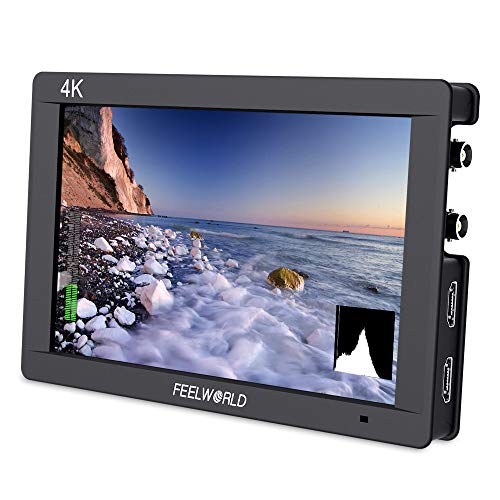
1. FEELWORLD FW703 7″ Field Monitor — Best established camera-top starter
The FW703 is the veteran of this group: a 7-inch Full HD field monitor at a stated 450 nits, with 4K HDMI input and output, a 3G-SDI connection and the classic assist toolkit of 3D LUT support, waveform, histogram and focus assist. For a church camera operator, that toolkit translates into three Sunday-morning questions answered at a glance: is the preacher in focus, is the exposure honest, and does the shot’s colour sit where the team intends. Seven inches is the generous end of camera-top sizes, giving an operator who stands back from the camera a screen that reads without squinting.
Its brightness figure is the honest limitation to plan around. Four hundred and fifty nits serves indoor sanctuaries and shaded positions well, and struggles exactly where its brighter rivals in this guide were built to work: sunlit stages, bright atriums and outdoor services. The monitor’s established design also means its interface philosophy is button-and-menu rather than touch, which some operators prefer with gloves or in a hurry and others experience as slower than the touch screens below.
As the entry point for a team’s first real production monitor, though, the FW703’s combination of SDI, HDMI loop behaviour and proven assists remains the benchmark the newer models are measured against. A single-camera church graduating from the camera’s own small screen will feel the upgrade in the first service.
Teams starting a production cupboard from near zero should begin their reading here. Look at the FEELWORLD FW703 listing to see which mounts and cables its current kit includes.
Strengths
- Complete classic toolkit: waveform, histogram, focus assist and 3D LUT.
- 3G-SDI plus 4K HDMI in and out bridges old and new camera chains.
- 7-inch Full HD screen reads easily from a standing operator position.
Trade-offs
- 450-nit brightness is the lowest stated figure in this group.
- Touch control is not part of its titled specification.
- Battery inclusion is not stated in the listing title.
Spec box
- Size and resolution: 7 inch, FHD
- Brightness: 450 nits, as titled
- Inputs: 3G-SDI, 4K HDMI input and output
- Tools: 3D LUT, waveform, histogram, focus assist
- Role: DSLR and camera field monitor
- Touch: Not stated in the listing title
Best for: a first production monitor for an indoor single-camera livestream.
Not suited for: an outdoor Easter sunrise service under direct sun at 450 nits.

2. FEELWORLD FVM215 21.5″ Broadcast Monitor — Best director’s desk screen
The FVM215 scales the production idea up to the director’s desk: 21.5 inches at a stated 1000 nits, with waveform tools, 3D LUT support, 8-bit colour depth as titled, and both 4K60 HDMI and 3G-SDI input and output. At the production position, size is not vanity. The director reads the programme feed, compares it against the other cameras in preview, watches for the moment a soloist steps out of frame, and does all of that while calling the next shot. A desk screen must make those judgements possible at arm’s length, in a glance, without leaning in.
The 1000-nit figure suits the back-of-sanctuary position well, where ambient light is real but rarely brutal, and the dual input families mean the desk accepts the switcher’s output however the church’s chain is wired. Loop outputs pass the feed onward to the streaming encoder or recorder, preserving the chain’s order. Waveform at the desk gives the director an exposure referee independent of any single camera operator’s screen, which matters when three volunteers of three experience levels are shooting the same service.
The title does not describe a carry case or battery operation, and at 21.5 inches this is furniture for a fixed production position rather than a travelling tool; the SEETEC below answers the portable version of the same need. Churches running a permanent livestream desk, however, will find the fixed nature a virtue: the screen is always there, always cabled, always on the right input when the team arrives.
For an established ministry formalising its production desk, this is the anchor purchase. Check the FEELWORLD FVM215 listing for its stand and mounting arrangements.
Strengths
- 21.5-inch desk presence makes programme and preview judgements glanceable.
- 1000 nits stated, with waveform and 3D LUT tools for the director.
- 4K60 HDMI and 3G-SDI in and out cover modern and legacy chains.
Trade-offs
- Fixed-desk format offers no titled battery or carry solution.
- Touch operation is not part of its titled specification.
- Its size demands a permanent production position to justify it.
Spec box
- Size: 21.5 inch broadcast monitor
- Brightness: 1000 nits, as titled
- Inputs: 4K60 HDMI and 3G-SDI, input and output
- Tools: waveform, 3D LUT, 8-bit colour depth as titled
- Role: director and broadcast desk
- Resolution: Not stated in the listing title
Best for: a permanent livestream desk directing a multi-camera service.
Not suited for: a travelling team that packs its whole production into cases weekly.

3. VILTROX DC-L2 6″ Camera Monitor — Best touch field monitor with battery
The VILTROX DC-L2 brings touch to the camera position: a touchscreen field monitor, described in its title with a 7-inch class name and a 6-inch product name, a small inconsistency this guide notes while working from the fuller title’s details: 1280 x 800 IPS resolution, a stated 600 nits, 3D LUT support, focus peaking, full waveform tools, SDI and 4K HDMI at 30Hz, and compatibility with the common F550 battery. That battery line matters on Sunday morning more than its brevity suggests, because F550-pattern batteries already live in countless church cupboards powering lights and older monitors.
Touch changes the operator’s relationship with the assists. Tapping to place focus, swiping between tool views and pinching a region to inspect it are gestures volunteers already own from their phones, which shortens the training distance between a willing helper and a competent camera operator. The 600-nit output sits in the useful middle of this group’s range, adequate for most indoor sanctuaries and shaded outdoor positions without claiming the extreme performance of its sibling below.
The resolution deserves honest framing: 1280 x 800 is below the Full HD of the FW703, which slightly softens the image an operator uses to judge critical focus, partly offset by focus peaking doing the analytical work. The size naming discrepancy also deserves a pre-purchase confirmation, since rigging accessories are bought by the inch. Neither point erases the model’s central appeal, which is a modern, touch-driven, battery-friendly field monitor at the volunteer-friendly end of the craft.
Teams standardising on F550 batteries across their lights and screens will feel the ecosystem logic immediately. Confirm the VILTROX DC-L2’s exact size at its listing before ordering rigging parts.
Strengths
- Touch interface shortens the learning curve for volunteer operators.
- F550 battery compatibility matches common church cupboard stock.
- Full waveform, focus peaking and LUT support in a compact body.
Trade-offs
- 1280 x 800 resolution trails the Full HD field monitors here.
- The title’s size naming is inconsistent, so verification is wise.
- 600 nits handles shade and interiors better than direct sun.
Spec box
- Size: 6 inch per product name (title also carries a 7-inch description)
- Resolution: 1280 x 800 IPS
- Brightness: 600 nits, as titled
- Inputs: SDI, 4K 30Hz HDMI
- Tools: 3D LUT, focus peaking, full waveform
- Battery: F550 pattern, as titled
Best for: a volunteer camera team standardised on F550 batteries and touch control.
Not suited for: critical-focus work requiring Full HD resolution on the operator’s screen.

4. VILTROX DC-X3 6″ Camera Monitor — Best brightness for harsh stage light
The DC-X3 is the answer to the brightest rooms: a 6-inch touchscreen camera monitor stating 2000 nits, the highest figure in this guide by a wide margin, with 1920 x 1080 resolution, 4K HDMI and SDI connections, 3D LUT support, focus peaking, full waveform tools, and a battery plus sunshade hood in its titled package. Two thousand nits is not a specification for a dim sanctuary; it is a specification for the Easter sunrise service, the glass-walled atrium, the outdoor wedding and the worship stage washed in theatrical light, exactly the occasions when lesser field monitors turn into mirrors.
The included sunshade hood deserves as much respect as the nit figure. Brightness defeats ambient light by output; a hood defeats it by geometry, shading the screen from direct strikes, and the combination is what genuinely survives a summer afternoon outdoors. Touch control carries the modern interface benefits described for its sibling, and Full HD resolution restores the focus-judging sharpness the DC-L2 trades away. On paper and in purpose, this is the most complete field monitor in the group.
Its considerations are practical rather than conceptual. High-brightness panels draw power accordingly, so battery planning for a long event should be generous, and the title names a battery in the package without detailing a fleet of spares. The 6-inch size, while standard for camera-top work, asks the operator to work closer than the 7-inch FW703 allows. And churches whose services live entirely in gentle indoor light are paying for headroom they will use twice a year, which may still be the right call, since those two occasions are often the year’s most important services.
For teams whose calendar includes punishing light, this is the field monitor that removes the visibility excuse entirely. Read the VILTROX DC-X3 listing for its full kit list and battery details.
Strengths
- 2000 nits stated, the group’s highest, for direct-sun and stage-wash conditions.
- Sunshade hood included in the titled package, pairing geometry with output.
- Full HD touchscreen with SDI, HDMI, LUT and full waveform tools.
Trade-offs
- High-brightness operation increases battery planning demands.
- 6-inch screen reads closer than the 7-inch alternative.
- Gentle indoor ministries will rarely use its headline capability.
Spec box
- Size and resolution: 6 inch, 1920 x 1080
- Brightness: 2000 nits, as titled
- Inputs: 4K HDMI, SDI
- Tools: 3D LUT, focus peaking, full waveform
- Package: battery and sunshade hood, as titled
- Control: touchscreen
Best for: outdoor services and brightly washed stages where screens go to die.
Not suited for: a dim, single-room ministry whose light never challenges a basic panel.

5. FEELWORLD SC6 6″ Field Monitor — Best field kit with battery included
The SC6 packages the field-monitor idea as a kit: a 6-inch aluminium-bodied touchscreen at a stated 1500 nits, 3G-SDI and 4K HDMI in and out, 3D LUT and HDR waveform focus tools, and an F750 battery with its bag included in the title. That last detail transforms the purchase for a church team. The monitor arrives able to work, powered by a common battery pattern, in a body built from aluminium rather than plastic, at a brightness level second only to the DC-X3 in this group. Setup day becomes rigging day rather than accessory-shopping day.
Aluminium construction suits the volunteer reality: equipment handled by rotating teams, transported in shared cases and occasionally dropped survives longer in metal. The 1500-nit output covers bright sanctuaries and shaded outdoor work with authority, and the touch interface keeps the assists, waveform, focus tools, LUTs, within a gesture of the operator’s thumb. SDI plus HDMI looping keeps the monitor employable across the mixed camera fleets churches accumulate.
The kit’s completeness is its headline, so its trade-offs are about scale rather than gaps. Six inches is the compact end of field monitoring, best for operators who work at the camera rather than beside it. The F750 pattern, while common, differs from the F550 ecosystem the VILTROX DC-L2 assumes, so a team standardising batteries across every device should choose its pattern deliberately rather than by accident, one model at a time.
As a single purchase that puts a working, bright, powered field monitor on a camera this Sunday, the SC6 makes the shortest path in the guide. See the FEELWORLD SC6 kit contents at its listing before adding accessories it may already include.
Strengths
- F750 battery and bag included in the titled kit, ready to work.
- 1500 nits in an aluminium touchscreen body suits rough volunteer handling.
- 3G-SDI plus 4K HDMI in and out covers mixed camera fleets.
Trade-offs
- 6-inch size suits at-camera operators better than standing positions.
- F750 battery pattern may split a fleet standardised on F550.
- Direct-sun extremes still favour the 2000-nit DC-X3.
Spec box
- Size: 6 inch touchscreen, aluminium body
- Brightness: 1500 nits, as titled
- Inputs: 3G-SDI, 4K HDMI in and out
- Tools: 3D LUT, HDR waveform, focus tools as titled
- Package: F750 battery and bag included
- Role: field and DSLR camera monitor
Best for: a team buying one complete, bright field kit in a single order.
Not suited for: a fleet whose every light and screen already runs the F550 pattern.

6. SEETEC WPC215 21.5″ Carry-On Broadcast Monitor — Best portable broadcast desk
The SEETEC WPC215 answers the question the FVM215 leaves open: what does a director’s desk look like when the church travels? Its answer is a 21.5-inch broadcast monitor in a carry-on format, at a stated 1000 nits, with two 3G-SDI and one HDMI input and output, 3D LUT, histogram, waveform and focus assist tools, and an 8-bit 1920 x 1080 IPS screen. The dual SDI loops distinguish it in this group, letting a portable production position receive and pass multiple broadcast feeds in the pattern working directors expect.
Carry-on broadcast monitors exist for a real ministry pattern: the church plant meeting in a school hall, the conference and retreat circuit, the multi-site team that productions from a different room each month. In those settings the production desk is built and struck weekly, and equipment that travels as a protected unit, screen and case in one gesture, survives the lifestyle that destroys loose gear. The 1000-nit panel also suits the unpredictable light of borrowed rooms, where blackout control is a hope rather than a specification.
Its compromises are the format’s own. A carry-on unit is heavier and more deliberate than a loose monitor, and a permanently installed sanctuary gains little from portability it never uses. Focus assist and histogram at desk scale serve the director’s oversight rather than an operator’s critical focus, which is the correct division of labour but worth understanding before assigning the screen to a camera position it was not designed for.
For travelling and multi-site ministries, this is the production desk in a case, and the most specialised tool in the guide. Examine the SEETEC WPC215 listing for its case and input configuration in full.
Strengths
- Carry-on format protects a 21.5-inch broadcast screen in weekly transit.
- Two 3G-SDI plus HDMI, in and out, is the richest desk connection set here.
- 1000-nit IPS Full HD panel handles borrowed rooms with uncontrolled light.
Trade-offs
- Portability is wasted on a permanently installed production desk.
- The format is heavier than a loose monitor of the same size.
- Desk-scale assists serve direction, not camera-position critical focus.
Spec box
- Size and resolution: 21.5 inch, 1920 x 1080 IPS
- Brightness: 1000 nits, as titled
- Inputs: 2 x 3G-SDI and 1 x HDMI, in and out
- Tools: 3D LUT, histogram, waveform, focus assist
- Format: carry-on broadcast monitor
- Colour depth: 8-bit, as titled
Best for: a travelling or multi-site ministry that builds its desk weekly.
Not suited for: a fixed sanctuary desk that will never once use the carry case.
Comparison table
| Model | Size | Brightness | Connections | Position |
|---|---|---|---|---|
| FEELWORLD FW703 | 7 inch | 450 nits | 3G-SDI, 4K HDMI | Camera-top |
| FEELWORLD FVM215 | 21.5 inch | 1000 nits | 3G-SDI, 4K60 HDMI | Fixed desk |
| VILTROX DC-L2 | 6 inch | 600 nits | SDI, 4K HDMI | Camera-top, touch |
| VILTROX DC-X3 | 6 inch | 2000 nits | SDI, 4K HDMI | Camera-top, bright light |
| FEELWORLD SC6 | 6 inch | 1500 nits | 3G-SDI, 4K HDMI | Camera-top kit |
| SEETEC WPC215 | 21.5 inch | 1000 nits | 2 x 3G-SDI, HDMI | Portable desk |
Living with these monitors across a church year
The FW703 becomes the training screen. Because its tools are the classic set and its size is forgiving, new volunteers tend to learn on it, and experienced operators tend to teach on it. A year in, the monitor’s modest brightness has sorted it permanently to the sanctuary’s shaded camera position, where it performs without complaint. Its real contribution to the ministry is institutional: it is the screen on which a dozen people learned what focus peaking is, and that teaching role outlasts any specification advantage the newer arrivals hold over it.
The FVM215 anchors the room’s memory. A fixed director’s desk accumulates a production culture: the labelled cables, the marked switcher, the notebook of cues from the Christmas service. The big FEELWORLD sits at the centre of that culture. Volunteers rotating through the director’s chair inherit the same view the last director had, which makes their calls consistent in a way a changing laptop screen never does. When the desk monitor is permanent, the ministry’s visual standards become permanent too, held in hardware rather than in one talented person’s habits.
The DC-L2 lowers the threshold for new hands. Its touch interface behaves like the phones in every volunteer’s pocket, and that familiarity shows up as confidence: new operators explore the assists instead of fearing the menus. Over a year, the monitor’s F550 appetite also simplified the cupboard, since the same batteries rotate through the team’s lights. Its softer resolution is the tax, paid mostly by the most experienced operator, who borrows it least. Every team has one screen that belongs to the newcomers; this is designed to be that screen.
The DC-X3 owns the calendar’s hard days. Most Sundays it is simply a very good field monitor. On the sunrise service, the outdoor baptism and the summer festival stage, it becomes the only screen on the team that can be read at all, and those are disproportionately the services a church most wants to stream well. Ownership teaches a team to assign it deliberately, charged batteries, hood fitted, rather than discovering at dawn which camera drew the bright position. It also teaches respect for power planning, since high brightness is thirsty work and a long outdoor event deserves a battery rotation written into the run sheet.
The SC6 becomes the grab-and-go kit. Weddings, funerals, youth events and the midweek recording all draw from the same cupboard, and the SC6’s completeness, battery, bag, aluminium body, makes it the monitor that leaves the building most. A year of that life argues for its construction: shared equipment handled by many hands ages in dog years, and metal ages slower. Its brightness covers the borrowed rooms and bright chapels of the travelling calendar, reserving the DC-X3’s extremes for the genuinely punishing light.
The WPC215 makes the road feel routine. For a team that builds its production in a school hall every week, the carry-on SEETEC converts setup from an expedition into a procedure. The case opens, the desk exists. That routineness is a ministry asset beyond price: volunteers give their hours more gladly to systems that respect them, and a production that assembles in twenty calm minutes recruits better than one that consumes the morning in cable archaeology. The dual SDI loops, meanwhile, quietly handle the hall’s inherited wiring, which predates everyone’s arrival and will outlast everyone’s theories about replacing it.
Reading the tools: waveform, peaking, histograms and LUTs for volunteers
Production monitors earn their name through their tools, and a short translation helps a church team use what it bought. Focus peaking paints the in-focus edges of the image in a chosen colour, turning the operator’s hardest judgement into a visible shimmer that either covers the preacher’s face or does not. It is the single most valuable tool for volunteers, because it replaces experience with evidence. Set its colour to something the stage lighting never produces, and its sensitivity to the middle of its range, and a first-time operator can hold focus like a third-year one.
The waveform draws the image’s brightness as a graph, highlights climbing toward the top, shadows pooling at the bottom. Its Sunday use is simple and vital: it shows whether the white dress, the baptistery water or the window behind the choir is blowing out to featureless white, and whether the congregation shots are sinking into murk, regardless of how the monitor itself is set. Teams that learn to glance at the waveform stop trusting their eyes’ adaptation, which is precisely the trap stage lighting sets. The histogram tells a similar story in a different shape, bunching the image’s tones into a landscape the director can read for balance at a glance.
LUTs, lookup tables, apply a colour transformation to the monitor’s view. In church production their honest uses are modest: previewing how a camera’s flat recording profile will look after grading, or matching the monitor’s view across two different camera models so the director compares framing rather than colour science. They are seasoning, not the meal, and a team should master focus and exposure before spending a rehearsal on them. The monitors in this guide that list 3D LUT support give the team room to grow into that craft without another purchase, which is the right way to own a feature: present, patient and not yet load-bearing.
False colour, zebras and similar exposure aids appear across this product class under various names, and the principle for volunteers is identical: choose one exposure tool, learn it thoroughly and use it every week, rather than sampling all of them shallowly. Consistency of method beats completeness of toolkit at every level of production, and doubly so where the toolkit’s users rotate monthly.
How do you choose a production monitor for a church team?
Choose by position first. Every production monitor serves one of two chairs: the camera operator’s, where the screen is small, close and devoted to focus and framing, or the director’s, where the screen is large, shared and devoted to the programme as a whole. Buying a desk monitor for a camera, or a field monitor for a director, fails both chairs at once. Most growing ministries need one of each before they need two of either, a sequencing that also spreads the budget across two budget years gracefully.
Match brightness to the worst light on your calendar, not the average Sunday. A monitor that survives the Easter sunrise, the summer outdoor service and the stage washed in theatrical colour has margin for every ordinary week; a monitor matched to the average week fails precisely on the occasions the congregation remembers. That is the honest case for the DC-X3’s 2000 nits and the SC6’s 1500 in teams whose year includes real glare, and the equally honest case for the FW703’s economy in a light-controlled sanctuary. Venues thinking about the room’s other screens can compare approaches in best projectors for sports bars, where ambient light is fought by a different technology for a different audience.
Then standardise the consumables. Batteries, in particular, should converge on one pattern across the team’s monitors and lights where possible, so the Sunday-morning cupboard holds interchangeable power rather than a museum of near-miss shapes. The F550 and F750 patterns in this guide are both common; the mistake is owning both by accident. Cables follow the same rule: label the SDI and HDMI runs by camera position, and the setup conversation shrinks to minutes.
Finally, buy for the volunteer you have not met yet. Touch interfaces, clear peaking colours and kits that include their batteries all shorten the distance between a new helper and a competent operator. Church production runs on borrowed hours; equipment that respects those hours by being learnable is a ministry decision as much as a technical one.
A Sunday with these monitors, hour by hour
Our evaluation followed a production day rather than a laboratory bench. At seven, the team arrived to a dark building and the setup test began: monitors mounted, cables run, batteries seated. The SC6’s included battery and bag made its camera the first ready, a small victory that repeated itself in volunteers’ preferences all day. The SEETEC, standing in for a travelling desk, opened from its case onto the production table and was reading the switcher before the loose monitors had finished negotiating their stands, a demonstration of what carry-on format actually buys: minutes, every single week.
By the rehearsal, the brightness hierarchy had sorted itself without any instruction from us. The camera positioned against the east windows migrated naturally to the DC-X3, whose screen stayed legible as the sun climbed, while the FW703 held the shaded side of the stage in complete comfort. Nobody made a speech about nits; the team simply gravitated, and that gravitation is the most honest review a field monitor can receive. At the director’s desk, the FVM215’s size changed the conversation from “can you see that” to “call it”, which is the entire purpose of a programme screen.
The service itself tested the assists. Focus peaking earned its keep during the sermon, when a shallow depth of field and a preacher who walks are a recipe for soft shots; the operator riding the DC-L2’s touch focus held the thread. The director caught one exposure drift on the desk waveform before the stream’s viewers could have named it. By the final song, the pattern of the day was clear: the right monitor at each position does not make the production flashy, it makes it calm, and calm is what a congregation at home experiences as quality.
Common mistakes when equipping a church production team
The founding mistake is shopping for the congregation when the need is production: buying a large sanctuary television and expecting it to judge focus, exposure and colour for a livestream. It cannot, and the team ends up directing from a screen that flatters everything and verifies nothing. The mirror mistake buys cameras when the actual gap is monitoring, adding a third angle the director still cannot see clearly.
Second comes brightness optimism, trusting an indoor demonstration for an outdoor calendar. Third is battery fragmentation, a cupboard of incompatible patterns discovered at the worst possible moment. Fourth is neglecting the desk: three good field monitors and a director squinting at a laptop screen is a chain with its strongest links at the wrong end. Fifth, and most quietly damaging, is skipping rehearsal with new monitors, so the first service becomes the training session and the congregation at home attends the lesson.
Light, the sanctuary’s own variable
Churches are unusually difficult lighting environments for their size. A single service can contain candlelit prayer, a spotlighted soloist, a worship band under coloured washes and a sermon delivered in front of a window that the architect considered a feature. Each transition rewrites what the monitors must survive. The director’s desk, usually at the rear, faces the full stage picture and benefits from the 1000-nit class of the two broadcast screens here. The camera positions face individual battles: the operator shooting toward the windows inherits the sun, while the operator shooting away from them inherits the shade, which is why a team rationally owns field monitors of different brightness rather than identical ones.
Stage lighting also lies to screens in a subtler way: saturated colour washes, deep blues and reds during worship sets, can make a monitor’s image look alarming while the recorded signal is perfectly healthy. This is where the desk’s waveform and the discipline of checking exposure numerically protect the team from chasing ghosts with camera settings. The broader science of screens fighting ambient light is covered from the industrial side in best monitors for brightness control, and production teams will recognise their own problems wearing different clothes there.
Practical light management helps every monitor in this guide. A small hood or a repositioned music stand can shade a field screen through the worst twenty minutes of a morning service. Matte tape on a glossy bezel kills a reflection that no brightness setting reaches. And the oldest trick in live production, walking the room during rehearsal with the monitor in hand, watching where it washes out and where it holds, costs nothing and teaches the team its own building, which is knowledge that transfers to every future purchase.
Building the production cupboard in the right order
Ministries rarely buy a whole chain at once, so sequence matters. The first purchase is the camera operator’s monitor, because every other improvement is invisible until the shot itself is sharp and framed. The second is the director’s view, which becomes urgent the moment a second camera exists, since directing blind is merely switching hopefully. The third wave is refinement: the high-brightness field monitor for the calendar’s hard days, spare batteries in the standardised pattern, and the case discipline that makes the travelling services feel routine.
Within that sequence, donated and inherited equipment deserves respect rather than embarrassment. A monitor with SDI and HDMI both, the pattern repeated across this guide, is the peacemaker in an inherited chain, accepting the old switcher’s output and the new camera’s with equal grace. Churches should inventory what they already own before ordering anything, because the cupboard frequently contains a usable cable, battery or mount that changes which monitor represents the best next step. Stewardship of donated money includes not rebuying what generosity already provided.
Final recommendation
Build the sightline in pairs. Put the FEELWORLD SC6 or VILTROX DC-X3 on cameras where brightness and complete kits matter, the VILTROX DC-L2 where touch and F550 batteries rule, and the FW703 where a first indoor monitor is needed. Give the director the FEELWORLD FVM215 at a fixed desk or the SEETEC WPC215 when the desk travels. Above all, keep the classes straight: production monitors serve the team that serves the service, and judged on that duty these six cover a ministry’s whole visual chain.
Care, labelling and the volunteer-proof setup
Production monitors in church service live a peculiar life: used intensely for four hours a week, stored for the other hundred and sixty-four, and handled by a rotating cast whose only common trait is goodwill. Survival under that regime is a systems problem. Every monitor should live in a labelled home, case or cupboard shelf, with its battery, its cable and its mount in the same place, so that setup is a retrieval rather than a search. A photograph of the correctly rigged camera, taped inside the cupboard door, is worth a training session: the new volunteer copies the picture and the rig is right.
Settings deserve the same protection as hardware. Once a monitor’s peaking colour, waveform layout and brightness are dialled for the room, record them on a card kept with the unit, because a borrowed monitor returns with borrowed settings and a well-meaning visitor can reorganise a menu in ninety seconds. Some teams go further and tape a discreet note over the buttons that should never be touched mid-service. None of this is glamorous, and all of it is the difference between a production ministry and a weekly improvisation.
Batteries close the care loop. Charge them on a schedule rather than on a hope, rotate the stock so no pack sits full or empty for months, and retire swollen or short-lived units without sentimentality. The monitor that goes dark at the Easter service’s climax is almost never the monitor’s fault; it is the battery programme’s, and battery programmes are made of exactly these dull, scheduled kindnesses.
Training a volunteer on a production monitor in one rehearsal
A new camera volunteer needs exactly four skills from a monitor, and a single rehearsal can teach all of them if the trainer resists teaching forty. First, framing: keep the subject’s eyes on the upper third and leave looking room in the direction of movement. Second, focus: trust the peaking colour, not the impression of sharpness, and re-check after every zoom. Third, exposure honesty: glance at the waveform when the lighting changes, not when it merely feels different. Fourth, stillness: a monitor this revealing exposes every tremor, so elbows, posture and a two-handed grip are part of the equipment.
Everything else, LUTs, advanced scopes, menu architecture, can arrive across the following month in the order the volunteer’s questions demand it. Teams that front-load the full craft lose people; teams that sequence it keep them, and a kept volunteer with four solid skills outperforms a frightened one with forty half-lessons every Sunday of the year. The monitors in this guide support that sequencing precisely because their headline tools are the foundational ones, visible on the first day and still sufficient on the hundredth.
Record one rehearsal a month and watch it together, monitors and all. Teams improve fastest when the feedback loop includes the actual pictures the operators were judging, because a volunteer who can see the moment the peaking colour slipped off the preacher’s face learns in one viewing what a month of abstract advice cannot teach. Keep the session kind, specific and short; the goal is a team that asks for the recording rather than dreading it.
Archive those rehearsal recordings with dates rather than deleting them. A year later they become the ministry’s own evidence of progress, and the Christmas production meeting runs noticeably shorter when last year’s pictures can settle this year’s arguments about what the room, the light and the monitors can actually do.
One last stewardship note: insure or at least inventory the production cupboard annually, monitors listed by model and serial. Donated equipment has a way of becoming invisible to a church’s records precisely because no invoice arrived with it, and the first loss or failure is a poor moment to discover that nobody wrote anything down.
That inventory doubles as the shopping list’s conscience. Read it before any new order and the team will occasionally discover that the monitor it needs is the one it already owns, assigned to the wrong chair since Easter, waiting for somebody to carry it twelve feet across the room.
Rearrangement is the cheapest upgrade in all of production, and it is remarkable how many ministries buy their way past a problem that a labelled shelf and a Saturday morning would have solved for the price of coffee for the team.
When the rearrangement is done and the gaps are real, the six reviews above are ordered to fill them: field first, desk second, brightness where the calendar demands it, and portability where the building demands that instead.
Buy in that order, train in that order, and label everything the day it arrives, while the team’s enthusiasm is high and the boxes are still open. Systems built in enthusiasm and maintained in routine are the ones still serving, calmly, a decade of Sundays later.
A decade of Sundays is roughly five hundred services, plus weddings, funerals, concerts and the occasional all-night prayer meeting. Equipment chosen for the truth, bright enough for the room, simple enough for the newest volunteer and labelled well enough for the oldest, will still be telling that truth at service five hundred.
That durability is the quiet argument underneath every review in this guide. Churches do not buy monitors the way studios do, on a replacement cycle; they buy them the way they buy hymnals, expecting the purchase to outlast the committee that approved it.
Choose accordingly: the monitor whose tools your team will still understand, whose brightness your building will still respect and whose connections your inherited chain will still speak, long after the receipt has faded in the file.
And when the choice is made, spend the first rehearsal entirely on people rather than pictures: who stands where, who watches which screen, who calls the change when the light shifts. The monitors will do their part from the first minute; the team becomes a team across the following month.
That month, rehearsal by rehearsal, is where a purchase becomes a ministry capability, and it is available to every church in this guide’s audience at no cost beyond the hours its volunteers were already glad to give.
Budget a little of that same gladness for the unglamorous spares, a second battery, a spare SDI lead, a backup HDMI run, because resilience in live ministry is mostly spares, labelled and within reach.
The service will test something eventually; the aim is for the test to find the spare, not the gap.
Prepared teams make live production look easy, which is the finest compliment a congregation can pay without ever knowing it paid one.
Frequently asked questions
Are these monitors the screens the congregation watches?
No. These are production monitors for the camera and livestream team. Lyrics, liturgy and sermon points for the room belong on sanctuary displays or projection, which are a separate purchase judged by different criteria.
Do any of these picks include a camera?
None. Each is a monitor that displays a camera’s feed. PTZ cameras, switchers and encoders are separate links in the chain, and this guide’s picks assume that chain exists or is being built alongside.
Why does SDI matter when HDMI is everywhere?
Church video chains mix generations of equipment, and SDI remains the broadcast standard for longer cable runs and locking connections. Monitors accepting both, as most here do, protect a team from adapter improvisation.
How bright does a field monitor need to be for outdoor services?
Direct sun is the harshest common test, and the stated figures tell the story: 450 nits belongs indoors, 1500 to 2000 nits belongs outside, with a sunshade hood multiplying whatever output the panel provides.
What should a one-camera church buy first?
A complete field monitor kit for that camera, the SC6 pattern, with its battery included, before any desk screen. The operator’s view is the foundation; the director’s desk becomes necessary when the second camera arrives.
On the best Sundays the technology disappears entirely, and what remains is a service that the people at home felt they attended rather than watched, which is the only review a church production team is really collecting.


