What's inside
- Key Takeaways
- Quick Picks
- How Did We Choose Phones for a Camera-and-Calls Brief?
- Which Phones Suit a Camera, Calls and Texts Brief?
- How Do the Six Picks Compare Side by Side?
- What Makes a Phone Good at Calls and Texts Specifically?
- How Do You Set Up One of These Phones for a Simple Life?
- Which Mistakes Do Shoppers Make With Simple-Brief Phones?
- What Does a Photograph-First Week Look Like on These Phones?
- How Do You Get Better Photographs From a Modest Camera?
- What Should Happen to the Old Phone and the Old Plan?
- How Do Samsung and Motorola Handle the Everyday Differently?
- What About Group Chats, Video Calls and Staying in Touch?
- How Long Will a Phone Bought for This Brief Stay Pleasant?
- How Much Storage Does a Camera-and-Texts Phone Honestly Need?
- Which Accessories Actually Suit a Phone for This Brief?
- How Should You Test the Phone During Its First Week?
- What If the Phone Is a Gift for Somebody Else?
- Final Recommendation
- Frequently Asked Questions
- Related Guides
As an Amazon Associate I earn from qualifying purchases. This post may contain affiliate links at no extra cost to you.
gizmoverdict.com is reader-supported. When you buy through links on our site, we may earn an affiliate commission.
Where to buy: all six handsets link to their Amazon listings from the Quick Picks table and again from their detailed sections. Motorola sells several model years under similar names, so check the year and the memory figure on the listing page before ordering.
The best smartphones for camera and talk text only answer a narrower brief than most roundups, and that narrowness is their charm. The reader behind this search does not want a gaming rig, a video studio or a status object. The job description reads: take good photographs, handle calls clearly, send texts without friction, and stay out of the way the rest of the time. Judged against that brief, a phone does not need the fastest processor on the market — it needs a camera that behaves, a screen that reads well, enough storage for a photo library, and call quality that never becomes a story in itself.
One clarification belongs at the front, because guides in this corner sometimes blur it: every pick in this set is sold unlocked. There is no carrier-locked prepaid handset hiding in the list, no model tied to a single discount network’s SIM. Each title states unlocked status and, in Motorola’s case, that the phone is made for US use. That freedom shapes the recommendations — these are phones to pair with the plan you already have, or the one you choose next, rather than phones that choose a plan for you.
Camera honesty matters here too. Five of the six titles state a 50MP main camera; Samsung’s Galaxy A17 instead describes a “high-res camera” without printing a megapixel figure, and this guide repeats Samsung’s wording rather than inventing a number. Megapixels, in any case, are the beginning of the camera conversation, not the end — lens quality, processing and plain ease of use decide whether the family photograph comes out well, and the sections below weigh those things in qualitative terms, because that is what the listings support.
Our Top Picks
Key Takeaways
- All six picks are unlocked, so each pairs with a carrier plan chosen separately — no pick is tied to one network’s prepaid service.
- Five titles state a 50MP main camera; the Galaxy A17’s title says high-res camera without a megapixel figure, and this guide keeps that wording.
- The Moto G Stylus carries the largest storage here at 256GB, plus a built-in stylus for annotating the photos it takes.
- The Galaxy A17 adds a large AMOLED screen, expandable storage and a US manufacturer warranty stated in its title.
- For a calls-texts-photos brief, storage and screen readability matter more than benchmark speed.
- Model years matter with Motorola: the set spans the Moto G Play, the 2025 Moto G and Moto G Power and Stylus, and a 2026 Moto g.
Quick Picks
| Pick | Badge | Why it earns its place |
|---|---|---|
| Samsung Galaxy A17 5G | AMOLED screen | A large AMOLED display, expandable storage and a stated US warranty on a 128GB 5G handset. |
| Motorola Moto G Stylus (2025) | Most storage | 256GB, 8GB of RAM and a 50MP camera, with a stylus for marking up shots and notes. |
| Motorola Moto G Power (2025) | Endurance name | The Power line’s battery-first brief, with 8/128GB memory and storage and a 50MP camera. |
| Motorola Moto G Play LTE | Simple and light | A 4/64GB handset with a 50MP camera for readers whose brief stops at calls, texts and snapshots. |
| Moto G (2025) | Balanced middle | 128GB of storage with a 50MP camera in the range’s straightforward centre. |
| Motorola Moto g (2026) | Newest model year | The latest Moto g in the set, 4/128GB with a 50MP camera in a Pantone Slipstream finish. |
How Did We Choose Phones for a Camera-and-Calls Brief?
The filter started with the brief itself. A phone for camera, talk and text only should be judged on the quality of those three experiences and on the supporting cast — storage for the photographs, a screen that makes texts and galleries pleasant, battery manners that survive a day of ordinary use — rather than on gaming frame rates or video specifications. Every candidate was read against that standard, and phones whose titles led with unrelated party tricks fell away.
Unlocked status acted as the second filter, applied strictly. The resulting set carries no carrier lock at all, which simplifies the advice considerably: pick the handset, keep or choose the plan, and the two decisions stay separate. Motorola’s “Made for US” wording appears across its titles and matters for network fit, since it signals the variant built for US carriers rather than an international model with a patchier band story.
The third pass balanced the set across storage and model years. The six titles span 64GB to 256GB and several Moto generations, which lets the guide speak honestly about the trade a reader makes at each step: more storage and RAM for a growing photo library, or a simpler, lighter handset for a genuinely minimal brief. Samsung’s A17 stands as the non-Motorola counterpoint, bringing an AMOLED screen and expandable storage to a table otherwise dominated by one maker’s range.
Which Phones Suit a Camera, Calls and Texts Brief?

Samsung Galaxy A17 5G — AMOLED screen
The Galaxy A17 is the screen-led pick of the six. Its title leads with a large AMOLED display, and for a brief built on photographs and messages that emphasis is well placed: AMOLED panels render photos with deep contrast and make text crisp and comfortable at the sizes older eyes prefer. The camera is described by Samsung as high-res without a printed megapixel count in the title, so this guide describes it the same way and judges the phone as a photographic all-rounder rather than a numbers entry.
The supporting details are practical ones. Storage starts at 128GB and is expandable, which quietly solves the photo-library problem for years; charging is described as super fast; the design is called durable; and the title states a one-year US manufacturer warranty, a line none of the Motorola titles match. Circle to Search appears in the title as a convenience feature for identifying and looking things up from the screen. As the only Samsung in the set, the A17 also brings Samsung’s familiar interface, which counts for plenty when the phone is replacing an older Galaxy and its owner wants the new handset to feel like home from the first evening.
- Display: Large AMOLED, per the listing title
- Camera: High-res camera — megapixel figure not stated in the listing title
- Storage: 128GB, expandable
- Warranty: 1-year US manufacturer warranty, stated in the title
- Network position: 5G, unlocked
- Extra feature: Circle to Search, per the title
Strengths
- AMOLED screen flatters both photographs and everyday reading.
- Expandable storage removes the photo-library ceiling.
- Stated US warranty adds ownership reassurance.
Trade-offs
- Camera megapixels are not stated in the title, unlike the 50MP rivals.
- Samsung’s interface carries more preloaded software than Motorola’s.
- No stylus, for readers who like annotating by pen.
Best for: photo-and-message use wanting the best screen and expandable storage.
Not suited for: readers who shop cameras by megapixel figures alone.

Motorola Moto G Stylus (2025) — Most storage
The Moto G Stylus is the roomiest phone in this set — 8GB of RAM and 256GB of storage behind a 50MP camera — and for the camera-and-calls brief that storage is the headline. A photo library grows quietly: a few hundred shots a year becomes a few thousand across a phone’s life, joined by videos of grandchildren, scanned documents and the screenshots everybody accumulates. On 256GB, that growth is a non-event. On smaller phones it becomes a monthly chore, which is why this model sits near the top of the guide despite its party trick being a pen.
The stylus itself turns out to suit the brief better than expected. It annotates photographs before they are sent — circling the shelf label, arrowing the grandchild in the group shot — and it makes texting and note-taking gentler for hands that find fingertip typing imprecise. The Pantone Surf The Web finish gives the phone a friendlier face than the usual black slab. Performance with 8GB of RAM is the smoothest in this Motorola group, which matters not for games but for the camera opening promptly when a moment arrives; a slow camera misses the photograph entirely, whatever its megapixel count says.
- Camera: 50MP, stated in the listing title
- Memory and storage: 8GB RAM, 256GB storage
- Distinguishing feature: Built-in stylus
- Network position: Unlocked, made for US
- Model year: 2025
- Finish: Pantone Surf The Web
Strengths
- 256GB swallows years of photographs without housekeeping.
- Stylus annotation suits sharing and marking up images.
- 8GB of RAM keeps the camera and messages feeling prompt.
Trade-offs
- The stylus is one more small thing to keep track of.
- Storage this generous is wasted on a truly minimal user.
- A larger handset than the Play below.
Best for: a growing photo library and pen-friendly messaging.
Not suited for: the smallest possible phone or the simplest possible brief.

Motorola Moto G Power (2025) — Endurance name
Moto G Power is a line with a promise in its name: battery life first. Motorola has built the Power models around multi-day endurance for years, and while this guide does not quote a capacity figure the title does not print, the 2025 edition’s positioning is clear enough — 8GB of RAM, 128GB of storage and a 50MP camera on the endurance branch of the family tree. For a calls-and-camera brief, endurance is not a luxury. It is the difference between a phone that is ready when the photograph or the important call arrives and one that is hunting for a charger.
The rest of the package mirrors the Stylus minus the pen: the same memory and storage class, the same stated camera figure, in a Leaf Green finish. Readers who take many photographs away from home — gardeners recording a season, walkers documenting a route, grandparents on a day out — will feel the benefit in the least dramatic way possible, by never thinking about the battery at all. That invisibility is the Power line’s whole argument, and for this brief it is a strong one.
- Camera: 50MP, stated in the listing title
- Memory and storage: 8GB RAM, 128GB storage
- Line positioning: Power — battery-led model in the Moto G family
- Network position: Unlocked, made for US
- Model year: 2025
- Finish: Leaf Green
Strengths
- Battery-first design suits days away from a charger.
- 128GB is a comfortable size for a photo library.
- 8GB of RAM matches the Stylus for everyday smoothness.
Trade-offs
- No stylus for annotation or pen input.
- Battery capacity is not printed in the title to compare directly.
- Half the storage of the Stylus at a similar family position.
Best for: long days out with the camera, away from chargers.
Not suited for: pen input, or the largest possible photo archive.

Motorola Moto G Play LTE — Simple and light
The Moto G Play is the minimalist’s pick, and it should be read with respect for what it leaves out. The title lists LTE rather than 5G, 4GB of RAM and 64GB of storage, and a 50MP camera — the same stated camera figure as its bigger siblings. For a brief that genuinely stops at calls, texts and snapshots, that specification is not a compromise at all. It is the brief, matched exactly, in a Sapphire Blue handset that asks little of its owner in learning or in upkeep.
The honest limits follow from the memory figures. Sixty-four gigabytes holds a sensible photo collection but not an ever-growing one, and 4GB of RAM gives the phone a calmer pace when several apps are open. A reader whose camera use is occasional — the birthday, the holiday, the dog doing something absurd — will never brush against those limits. A reader who photographs daily should step up to the 128GB models. Within its lane, the Play is the set’s clearest example of paying only for the job described, and there is real elegance in that.
- Camera: 50MP, stated in the listing title
- Memory and storage: 4GB RAM, 64GB storage
- Connectivity: LTE, per the title
- Network position: Unlocked, made for US
- Finish: Sapphire Blue
- 5G: Not stated in the listing title — the title specifies LTE
Strengths
- Same stated 50MP camera figure as the larger models.
- Simple specification matched tightly to a minimal brief.
- Unlocked, so the plan stays a separate choice.
Trade-offs
- LTE rather than 5G connectivity.
- 64GB fills under a keen photographer.
- 4GB of RAM enforces a one-thing-at-a-time rhythm.
Best for: a light user whose camera comes out on occasions.
Not suited for: daily photography or a large media library.

Moto G (2025) — Balanced middle
The plain Moto G of 2025 is the centre of the range and reads like it: 4GB of RAM, 128GB of storage, a 50MP camera, unlocked and made for US use, in Forest Gray. If the Play is the brief pared down and the Stylus is the brief with room to grow, this model is the brief at its natural size. The storage doubles the Play’s — the single upgrade that matters most for photographs — while the RAM stays at the calmer figure, keeping the phone’s character unhurried and its positioning honest.
That balance suits a particular reader precisely: the one who photographs regularly but moderately, texts constantly, calls daily, and replaces a phone every few years rather than collecting features. The 128GB library space means photographs can accumulate across a full ownership without the deletion rituals smaller phones impose, and the camera figure matches every other Motorola here. Nothing in the title reaches for a headline, and that is the headline — this is the set’s default recommendation for the brief as stated, the phone against which the others are variations.
- Camera: 50MP, stated in the listing title
- Memory and storage: 4GB RAM, 128GB storage
- Network position: Unlocked, made for US
- Model year: 2025
- Finish: Forest Gray
- Stylus: Not stated in the listing title — verify with Motorola documentation
Strengths
- 128GB storage at the range’s straightforward centre.
- Stated 50MP camera matches the rest of the family.
- No feature tax for tools the brief never uses.
Trade-offs
- 4GB of RAM, where the Stylus and Power carry 8GB.
- No stylus and no endurance branding to lean on.
- Unremarkable finish and specification by design.
Best for: the brief exactly as stated — camera, calls and texts, in balance.
Not suited for: heavy multitasking or pen-based notes.
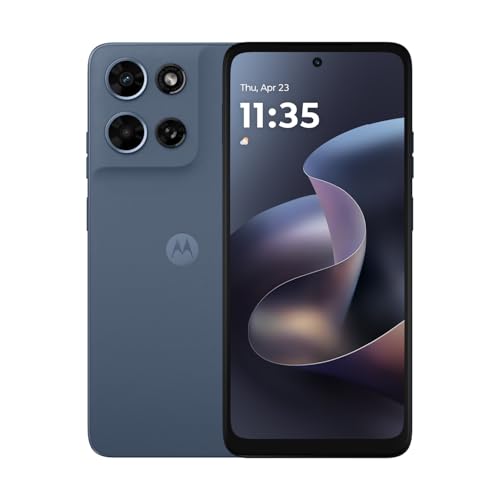
Motorola Moto g (2026) — Newest model year
The 2026 Moto g closes the set as its newest model year, with a specification that echoes the 2025 Moto G — 4GB of RAM, 128GB of storage, a 50MP camera, unlocked and made for US — in a Pantone Slipstream finish. The value of the newest year in a range like this is rarely a dramatic feature; it is time. A later model year generally means a longer runway of software support ahead of it and a fresher battery off the shelf, and for a phone bought to serve quietly for years, that runway is a genuine part of the purchase.
Read against its 2025 sibling, the choice becomes a matter of temperament. The specification parity means the photograph, the call and the text will feel much the same on either handset. The 2026 model simply starts its life later. Readers who keep phones until they stop, rather than until they bore, should weight that freshness heavily; readers who replace on a shorter cycle can take the 2025 model’s identical-looking sheet without a qualm. Either way, the family resemblance is the point — Motorola’s centre holds steady, and the newest edition holds it a little longer.
- Camera: 50MP, stated in the listing title
- Memory and storage: 4GB RAM, 128GB storage
- Network position: Unlocked, made for US
- Model year: 2026
- Finish: Pantone Slipstream
- Battery capacity: Not stated in the listing title — verify with Motorola documentation
Strengths
- Newest model year in the set, with the longest support runway ahead.
- 128GB storage suits a steadily growing photo library.
- Familiar Moto G balance of camera, calls and texts.
Trade-offs
- Specification closely mirrors the 2025 Moto G.
- 4GB of RAM remains the family’s calmer tier.
- No stylus or expandable-storage claim in the title.
Best for: a long-keeping owner who values the freshest model year.
Not suited for: readers wanting a clear hardware leap over the 2025 model.
How Do the Six Picks Compare Side by Side?
| Pick | Camera per title | Storage | RAM | Defining trait |
|---|---|---|---|---|
| Samsung Galaxy A17 5G | High-res (figure not stated) | 128GB, expandable | Not stated in title | Large AMOLED screen |
| Moto G Stylus (2025) | 50MP | 256GB | 8GB | Stylus, most storage |
| Moto G Power (2025) | 50MP | 128GB | 8GB | Battery-led Power line |
| Moto G Play LTE | 50MP | 64GB | 4GB | Simplest specification |
| Moto G (2025) | 50MP | 128GB | 4GB | Range’s balanced centre |
| Moto g (2026) | 50MP | 128GB | 4GB | Newest model year |
What Makes a Phone Good at Calls and Texts Specifically?
Call quality is a chain, and the phone is only one link. The earpiece must be loud and clear enough for a kitchen with a kettle on; the microphones must carry a voice faithfully from a windy pavement; the radio must hold a signal in the weak corners of a house. None of these qualities appears in a listing title, which is why this guide treats them qualitatively and why the return window matters: make the first week’s calls from the places calls actually happen — the garden, the car, the far bedroom — and judge the phone there, not in a silent showroom of the mind.
Texting quality is mostly software and screen. A keyboard that predicts gently, corrects conservatively and never fights its user will be loved daily; one that rewrites names and mangles punctuation will be cursed daily, at exactly the same hardware speed. Motorola’s near-stock Android is generally a calm place to type, and Samsung’s interface offers larger default touches that some hands prefer. Font size settings deserve an early visit on any of these phones: raising text a notch transforms reading comfort for many owners and costs nothing but a minute in the settings.
The camera half of the brief has its own practical chain. The best camera here is the one that opens fast, focuses without hunting, and produces a pleasing photograph without a settings expedition. Fifty-megapixel sensors across the Motorola set are binned down to sensible file sizes in ordinary use, which is a feature for this brief: photographs that share quickly by text and store modestly. Shoot in daylight where possible, tap the subject to focus, and hold still for a breath after pressing — three habits that improve results on every phone in this guide more than any specification difference between them.
How Do You Set Up One of These Phones for a Simple Life?
Setup for this brief is an exercise in subtraction. Begin by choosing the handful of apps the phone is actually for — calls, messages, camera, photos, perhaps maps and a browser — and arrange exactly those on the home screen, large and unhurried. Everything else can live in the app drawer, present but not shouting. Turn off the notifications that do not correspond to a human being trying to reach the owner, and the phone’s character changes within a day: it becomes a tool that speaks when spoken to.
Then set the camera up for success. Choose the default photo mode and leave it there, switch on the grid if it helps composition, and set photos to back up over Wi-Fi so the library survives the phone. On the Galaxy A17, confirm the expandable storage is set to receive photographs if a card is fitted. On the Moto G Stylus, spend five minutes with the pen’s quick-note gesture, since it becomes the household’s shopping-list surface surprisingly fast.
Finish with the call settings: a ringtone that can actually be heard, voicemail set up and tested, favourite contacts starred so they bypass silent modes where the owner wants that, and the emergency contact recorded. A phone bought for camera, talk and text earns its keep in these small fidelities, and an hour spent arranging them pays out every single day the handset is carried.
Which Mistakes Do Shoppers Make With Simple-Brief Phones?
The first mistake is overbuying against a brief the shopper themselves wrote. A reader who needs photographs, calls and texts does not need the flagship tier, and the money saved is real. The second mistake is the mirror image: underbuying storage. Photographs accumulate silently, and the 64GB Play is a fine phone until the month it is not — readers who photograph weekly should start at 128GB and save themselves the deletion rituals.
The third mistake is assuming locked and unlocked are details. They are the decision. Every pick here is unlocked, but the wider market is full of similar-looking handsets tied to one carrier’s prepaid shelf, and a phone bought for an existing plan must be free to join it. Fourth, do not judge the camera by the megapixel line alone: Samsung’s title does not even print one, and the photograph in the hand — lit well, held steady — owes more to the moment than to the sensor’s arithmetic. Finally, model years blur in the Moto G family; check the year in the title, because a 2025 and a 2026 handset are cousins, not twins.
What Does a Photograph-First Week Look Like on These Phones?
Imagine the week the brief describes. Monday’s photograph is a whiteboard after a meeting, taken on the Moto G (2025), texted to a colleague before the lift arrives. Wednesday’s is a garden in low sun on the Power, the phone still comfortably charged from the weekend. Friday brings the group photograph at a family table — the Stylus’s pen circling the new baby before the shot is forwarded — and Sunday closes with the A17’s AMOLED screen passing the week’s gallery hand to hand at lunch, the pictures looking rich enough to argue over who took the best one.
None of those moments needed a flagship. They needed a camera that opened promptly, a battery that was not a concern, a screen that flattered the result and a text thread that carried it away. That is the whole argument of this set, repeated six ways: the brief is modest, and modest briefs, honestly served, produce the most contented phone owners in the market.
How Do You Get Better Photographs From a Modest Camera?
The gap between a disappointing snapshot and a keeper is rarely the sensor. It is light, steadiness and a moment’s patience, and all three are free. Start with light: a subject facing a window, a group moved two steps out of a doorway’s shadow, a garden photographed in the morning rather than under a noon glare. Phone cameras of this class reward good light generously and punish bad light honestly, so the photographer who arranges the light first has already taken the best photograph available in that room.
Steadiness comes next. Brace the phone against a doorframe, a table edge or your own chest; hold it with both hands; and keep holding for a breath after the shutter press, because the photograph is gathered in that fraction of a second after the tap. Night and indoor shots benefit most, but even daylight portraits sharpen noticeably when the hands stop travelling. A two-second timer, unfashionable as it sounds, is a tripod substitute hiding in plain sight: set it, rest the phone on a shelf, and let the group arrange itself.
Composition asks for the least equipment and returns the most. Move closer instead of zooming — digital zoom on phones of this class spends resolution the photograph cannot spare. Put the horizon level, using the grid the camera settings offer. Take two frames of any group, because somebody always blinks in the first. And wipe the lens before the important shot: a pocket-carried phone wears a film of lint and fingerprint that softens every photograph equally, and a single wipe on a shirt is the highest-value upgrade in this entire guide.
Finally, treat the photograph as the start of the errand rather than the end. These phones are bought to send pictures, so learn the two sharing paths the household actually uses — the text thread and the family group chat — and practise sending at full quality where the app allows a choice. A photograph that arrives compressed to a smudge teaches the sender nothing except disappointment; the same photograph sent well becomes the reason the phone was bought. Keep the originals backed up over Wi-Fi, delete the duplicates monthly, and the modest camera becomes, in practice, a thoroughly satisfying one.
What Should Happen to the Old Phone and the Old Plan?
A new handset for a simple brief usually replaces an old one, and the transition deserves the same calm as the purchase. Because every pick here is unlocked, the plan question is refreshingly plain: the existing SIM and number can move across in most cases, keeping the account, the refill rhythm and the number the family already knows. Check the SIM size the new phone takes — modern handsets use nano SIMs, and a carrier shop will swap an older, larger SIM without drama — and confirm the carrier’s compatibility checker smiles on the exact model before the old phone is switched off for the last time.
The old phone then has three honourable futures. It can become the house phone: a Wi-Fi handset by the landline’s old spot, running the family group chat, the doorbell app and the recipe screen’s duties. It can be passed down, reset and re-homed to a relative whose brief is lighter still. Or it can be wiped, recycled or traded through the maker’s scheme, its materials returned to the stream. What it should not do is retire into a drawer still signed into accounts, still holding photographs, still quietly syncing — an untidy ending that a ten-minute reset prevents entirely.
Data deserves one careful pass before any of that. Photographs first: confirm the backup has actually landed, by opening the library on a computer and looking, rather than trusting a progress bar remembered from last month. Contacts second, messages third — accept that some message history will start fresh, and screenshot the threads that genuinely matter. Then sign out, remove the SIM and any memory card, and only then run the factory reset. Done in that order, the change of phones is an afternoon’s mild administration instead of a month of small discoveries.
How Do Samsung and Motorola Handle the Everyday Differently?
Five of these six phones share a maker, so the Samsung-versus-Motorola contrast organises the whole set. Motorola’s software stays close to Google’s stock Android: clean screens, few duplicate apps, gestures like the wrist-twist that opens the camera — a gesture that sounds like a gimmick until the day it catches a photograph a fumble would have missed. For a brief built on calls, texts and photographs, that restraint is a daily pleasure. The phone feels like a tool rather than a shopping channel, and owners migrating from an older Moto will find everything where memory expects it.
Samsung’s One UI takes the opposite philosophy and defends it well: more features, larger touches, deeper settings, and an ecosystem that reaches from the phone to the television and the tablet on the same account. Text can be made very large without breaking layouts, which matters to this brief’s readers, and Samsung’s gallery and sharing tools are polished from years of refinement. The cost is a busier first week — more prompts, more preloaded arrivals, more settings worth a decision — after which the phone settles into the same quiet service as its rivals.
Neither philosophy wins in the abstract; the household’s history decides. A family already inside Samsung’s world will find the A17’s continuity worth its busier setup, and its expandable storage and AMOLED screen are objective points in its favour regardless. A household starting fresh, or leaving a cluttered old handset behind with relief, will likely prefer Motorola’s calm. The photograph, the call and the text — the brief’s three citizens — are served honourably by both, which is precisely why this guide ranks the supporting details, storage and screens above brand loyalty.
What About Group Chats, Video Calls and Staying in Touch?
The brief says talk and text, and in a modern family those words mostly mean the group chat and the video call. Group messaging asks little of hardware and much of setup: the right app, the notifications tuned so the family thread is audible and the shopping alerts are not, and a keyboard large enough to enjoy. Every phone here handles that duty; the differences are ergonomic. The A17’s big AMOLED makes a long thread easy reading, the Stylus’s pen turns replies into annotated photographs when words run out, and the Play’s simplicity keeps the whole business unintimidating for a relative new to smartphones.
Video calling raises the bar slightly, because it spends battery, data and the front camera’s modest talents all at once. Position matters more than specification: a window in front of the caller rather than behind, the phone propped at eye level on a stack of books, and the room’s light on the face instead of the ceiling. Any of these six will carry a perfectly warm Sunday call arranged that way, and will carry a miserable one arranged badly, which is a useful reminder that the brief’s quality lives as much in habits as in handsets. A phone stand costing very little is, for a video-calling household, a more transformative accessory than a model upgrade.
Sharing photographs inside those chats deserves one caution about size. Messaging apps compress what they carry, and a treasured photograph deserves a second, full-quality path — an album link, an email, or the shared library the backup service maintains. Teach the household both paths during setup week: the quick smudged copy for the joke of the moment, the proper copy for the photograph that will be printed at Christmas. The distinction sounds fussy and proves, within a month, to be the difference between a family archive and a family rumour of one.
How Long Will a Phone Bought for This Brief Stay Pleasant?
Longevity for a simple brief is measured in friction, not in benchmarks. A phone stays pleasant while the camera opens promptly, the battery reaches bedtime, the storage warning stays silent and the apps the household actually uses continue to run. On those measures, the set divides predictably: the 8GB-RAM Stylus and Power have the most headroom, the 128GB models have the storage runway, and the 64GB Play will meet its first friction earliest — not because it is badly made, but because its brief was sized tightly from the start.
Owners can stretch every one of these phones with three habits. Keep a fifth of the storage empty, because full phones slow down in ways that feel like age but are really congestion. Replace the battery rather than the phone when endurance fades, where the maker’s service network makes that practical — Samsung’s stated US warranty culture is relevant here. And resist the reflexive install: every app added is a small tax on battery, storage and attention, and a brief this clear deserves a home screen that stays as disciplined in year three as it was in week one.
Model year plays its part too, which is the 2026 Moto g’s quiet argument. Software support runs forward from a model’s launch, so the newest handset in the set carries the longest runway of updates and app compatibility ahead of it. For a reader who replaces a phone when it stops, rather than when fashion calls, that runway may outweigh every other line in the comparison table. The pleasant life of a simple phone is mostly a matter of choosing the runway and the storage correctly at the start, then leaving the phone alone to do its three jobs well.
How Much Storage Does a Camera-and-Texts Phone Honestly Need?
Storage is the one specification in this set that cannot be negotiated with later, so it deserves arithmetic instead of vibes. A photograph from these cameras occupies a few megabytes; a minute of video, far more. A modest habit — a dozen photographs a week, a short video a month — fills roughly ten gigabytes a year once apps, messages with their accumulated pictures, and the system itself have taken their share. On that arithmetic the 64GB Play serves about three comfortable years, the 128GB models serve six or more, and the Stylus’s 256GB effectively removes the question from the ownership entirely.
Real households, of course, rarely run at the modest habit. The grandparent who discovers video calls and begins saving every clip, the gardener photographing a full season daily, the parent whose phone becomes the family’s default camera — each doubles or triples the modest estimate without noticing. That is why this guide keeps steering regular photographers to 128GB as the honest floor: not because 64GB is a bad phone, but because storage regret arrives slowly, silently, and always at the moment a photograph matters. The A17’s expandable storage is the one escape hatch in the set, turning a card into a second library for photographs and leaving the internal store for apps and messages.
RAM plays a smaller, supporting role. The 8GB models hold the camera, the messages and the browser open together without reloading, which makes the everyday feel prompt; the 4GB models ask the owner to proceed one thing at a time. For this brief, that difference is a texture rather than a failure — texts and photographs do not expire while an app reloads — but readers who move quickly between camera and chat all day will feel the 8GB phones’ smoothness as a genuine quality-of-life gain, and should weight it accordingly.
Which Accessories Actually Suit a Phone for This Brief?
The case comes first, chosen for grip rather than armour. Phones for this brief live in kitchens, gardens and coat pockets, and their characteristic accident is the short drop onto a hard floor while being fished out one-handed. A case with a textured edge and a raised lip around the screen prevents most of those stories, and a bright colour prevents the other classic loss — the black phone invisible on the black sofa. Screen protectors in a multipack cover the scratches of a handbag’s keys and a pocket’s coins, and they are cheap enough that replacing one should never feel like an event.
A stand is the second accessory, and for video-calling households it outranks everything else on this page. Propping the phone at eye level transforms the Sunday call from a arm-aching obligation into a conversation, and the same stand serves the kitchen timer, the recipe video and the photograph slideshow at lunch. A long charging cable is third: the brief’s phones are used from sofas and bedsides, and a cable that reaches comfortably removes the nightly crouch behind furniture. None of these items costs much; together they shape daily life with the phone more than any single specification in the comparison table.
What not to buy deserves a sentence too. Elaborate camera lens attachments promise transformations they rarely deliver on phones of this class, and they complicate the simple point-and-shoot rhythm the brief depends on. Bulky waterproof cases duplicate protection these owners seldom need. The discipline of the brief — camera, calls, texts — extends to the accessory drawer: a case, a stand, a cable, and the restraint to stop there.
How Should You Test the Phone During Its First Week?
The return window is the honest review period, and a brief this specific can be tested completely inside it. Day one belongs to calls: ring the phone from the garden, the car and the far end of the house, and have the household’s most honest critic judge the voice at both ends. A phone that sounds thin from the garden will sound thin for years, and it is far better to learn that in week one than to adapt around it forever. Check the ringtone’s volume in the room where the phone will actually live, with the television on and the kettle boiling, because that is the acoustic competition it must beat.
Day two belongs to the camera, tested on the subjects the brief actually names. Photograph the family member who never sits still, the dog, the document that needs sending, the garden in evening light. Then send each photograph through the real channels — the text thread, the group chat — and look at what arrives, not just what was taken. This end-to-end test is the one that matters, and it is where habits like the lens wipe and the steady brace prove their worth on the owner’s own subjects rather than on a reviewer’s test chart.
The rest of the week belongs to rhythm. Text at the kitchen table and from the sofa; notice whether the keyboard pleases or provokes. Watch the battery across two ordinary days rather than one anxious one. Move through the photograph library and back up a day’s shots over Wi-Fi, confirming the copies land. By the seventh day the phone will have shown its true character for this brief — prompt or patient, generous or tight, calm or fussy — and the decision to keep it can rest on evidence instead of hope, which is all any guide can honestly ask.
What If the Phone Is a Gift for Somebody Else?
Many phones in this category are bought by one person for another — an adult child for a parent, a partner for a partner — and the gift changes the correct choice in two ways. First, familiarity outranks novelty: a recipient who has used Samsung for a decade should receive the A17, and a household of Motorola users should stay with Motorola, because the kindest feature a gift phone can have is not needing to be learned. Second, the giver inherits the setup, and should embrace that duty fully: accounts signed in, contacts moved, text enlarged, favourites starred, the old number’s fate decided, and a patient first evening spent placing test calls and sending test photographs together.
Leave the gift phone simpler than your own. Resist installing the apps you love; install the three the recipient asked for and let the rest wait for requests. Write the charger location, the unlock code’s hiding place and your own number on a card that lives in the case. A gift phone succeeds when the giver becomes unnecessary within a fortnight, and every choice in this guide — unlocked freedom, generous storage, calm software — serves that quiet goal. Schedule the follow-up call a week later anyway, not to fix anything, but to hear the small victories reported first-hand: the first photograph sent unassisted, the first video call completed, the first text typed without a sigh. Those reports are the real review of the purchase, and they almost always praise the setup more than the specification. If something small does need fixing on that call — a ringtone too quiet, a font a shade too small — fix it together by voice, slowly, and let the recipient’s fingers do the tapping, so the lesson stays in the hands that will use it daily. That patience, repeated across the first fortnight, is worth more than any extended warranty sold beside the till, and it costs nothing but an evening. Keep the old phone charged in a drawer for that fortnight as well, so any forgotten photograph or contact can be rescued without ceremony while the new handset settles into its role and its owner stops reaching, out of habit, for the drawer.
Final Recommendation
Take the Moto G (2025) as the centre of gravity: 128GB, a stated 50MP camera, no wasted motion. Step up to the Stylus for its 256GB and its pen, or to the Power for its endurance-first design; step sideways to the Galaxy A17 for the AMOLED screen, expandable storage and the stated warranty; step down to the Play only if the brief is truly minimal; and take the 2026 Moto g when the longest support runway matters most. Whichever leaves with you, it arrives unlocked and ready for photographs, conversations and messages — a quiet phone for a clear brief, chosen on the evidence of its own title.
Frequently Asked Questions
Are all six phones really unlocked?
Yes, per their listing titles. The Motorolas state unlocked and made for US, and the Galaxy A17 is sold as an unlocked US model. None of the six is a carrier-locked prepaid handset, so each can be paired with a plan from the carrier of your choice, subject to that carrier’s usual compatibility check.
Why does the Samsung not list a megapixel figure?
Because its title describes a high-res camera without printing a number, and this guide repeats only what titles state. A missing figure is not a verdict on the camera; it is a reminder that megapixels are one ingredient among lenses, processing and handling, and that the photograph in the hand is the real test.
Which pick holds the most photographs?
The Moto G Stylus, with 256GB of storage. The Galaxy A17 answers differently, with 128GB plus expandable storage, so its ceiling depends on the card fitted. The 128GB Motorolas sit comfortably in the middle, and the 64GB Play suits occasional photography rather than a daily habit.
Is LTE enough, or should the phone have 5G?
For calls, texts and photographs, LTE carries the brief comfortably, which is why the Moto G Play remains a rational pick. 5G adds headroom for busy areas and longer ownership, and most of this set includes it. The deciding factor should be local coverage quality rather than the badge itself.
Does the stylus on the Moto G Stylus need charging?
Motorola’s stylus is a passive pen stored in the phone, in the tradition of the line; it is drawn out and used directly for notes, navigation and annotating photographs. It carries no battery of its own to manage, which suits the simple brief this guide is built around.
Do these phones take good photos at night?
They take honest ones. Indoor and evening photographs benefit from the habits in this guide — brace the phone, give the subject light where you can, hold still a breath after the tap — and the results will please a family thread even if they would not win a photography prize. For the photograph that matters most, move the moment toward the light rather than asking the camera to defeat the dark.
Can photographs be printed from these phones?
Yes. A 50MP-class sensor, and Samsung’s high-res camera, produce files with ample resolution for ordinary prints, provided the photograph was taken steadily and sent or transferred at full quality rather than through a compressing chat app. Keep the originals backed up, and print from the original file for the sharpest result.
Which phone is best for an older relative?
The Galaxy A17’s large AMOLED screen and Samsung’s familiar interface make it an easy recommendation, while the Moto G Play’s simplicity suits a relative whose use stops at calls, texts and occasional photographs. In both cases, set text size, favourites and notifications up before handing the phone over — the setup matters as much as the model.
Related Guides
Readers weighing these handsets against neighbouring categories may also find value in our guide to simple smartphones chosen for older users, the roundup of rugged phones with stated durability ratings, and our look at leftover flagship phones still on sale.
Related guides
- Best Basic Phones Camera Buyers Can Trust: Flip Phones and Simple Handsets That Still Take a Photograph
- Best Sony Full Frame Cameras for Astrophotography: Sensitivity vs Resolution
- Best Affordable Android Tablets: Five True Android Slates and One Fire OS Specialist, Clearly Labelled
- Best 400 FPS High Speed Cameras: The Honest Truth About Burst Slow Motion


