What's inside
- Key Takeaways
- Quick Picks
- How Did We Sort the Best Graphics Cards That Don’t Need Extra Power?
- How Do the Six Cards Compare?
- What Should Be Checked in the Host Machine Before Ordering?
- Which Machines Benefit Most From a Slot-Powered Card?
- How Does Slot Power Shape Settings and Expectations?
- How Is a Slot-Powered Card Installed in a Prebuilt Desktop?
- Which Mistakes Ruin a Slot-Powered Upgrade?
- What Happens After Installation: Drivers, Displays and First Checks
- Final Recommendation
- Frequently Asked Questions
- Related Guides
As an Amazon Associate I earn from qualifying purchases. This post may contain affiliate links at no extra cost to you.
gizmoverdict.com is reader-supported. When you buy through links on our site, we may earn an affiliate commission.
Where to buy: All six cards below sit in this site’s verified pool and are sold on Amazon by MSI, XFX, ASRock, ASUS and Maxsun. Before ordering, read the note in each review about power: five of these designs belong to the class of card that runs entirely from the PCIe slot, and one listing leaves its connector unstated in its title, so its review says exactly that rather than guessing.
The best graphics cards that don t need extra power exist to solve a specific and very common problem: a computer whose power supply has no spare PCIe power lead, or no capacity behind one. That describes most prebuilt office desktops, many small-form-factor machines, a generation of home-theatre PCs, and the second-hand workstation towers that hobbyists love to convert into living-room or emulation machines. In all of them, the traditional graphics card upgrade path is blocked not by the slot — the slot is there — but by the wiring. A slot-powered card removes the block entirely, because the PCIe slot itself supplies up to 75 watts, and an entire class of GPUs has been designed to live inside that envelope.
This guide’s six picks are that class, gathered in one place: two Radeon RX 6400 cards, an Intel Arc A380, a GeForce GT 1030, a low-profile RTX 3050 6GB, and a GeForce GTX 1650 whose listing needs a careful sentence of its own. They range from basic display adapters for extra monitors to genuine 1080p gaming cards, and the reviews sort them by what each is actually for — because in this category, buying more card than the machine’s purpose needs is as much a mistake as buying one the slot cannot feed. Every pick is also physically small, most in low-profile or ITX form, which is no coincidence: the machines that lack power leads are usually the machines that lack space too.
One discipline governs the whole article, and it is worth stating at the top. A card is only described here as needing no extra power when its design belongs to the slot-powered class — the GT 1030, the RX 6400, the 6GB RTX 3050 in its low-power form, and the Arc A380 are all built to that envelope — and when its listing title does not contradict that by naming a supplementary connector. Where a title is silent and the model family spans both kinds of design, the review marks the point as not stated and tells the reader where to verify it. In a category bought specifically for its wiring, a guessed answer is worse than no answer.
Key Takeaways
- The PCIe slot supplies up to 75W, and every pick here except one is designed to live entirely within that allowance.
- The RTX 3050 6GB low-profile card is the strongest gaming option that asks for no power lead at all.
- The GTX 1650 listing’s title does not state its power arrangement, and that model family exists in both forms — its review flags the check to make.
- Slot power is only half the fit: low-profile brackets and single-slot widths decide whether these cards enter small cases.
- Prebuilt desktops are the natural home of this category — measure the slot area and confirm the supply’s wattage rating before ordering.
Quick Picks
| Pick | Badge | Why it earns the slot |
|---|---|---|
| MSI Gaming RTX 3050 LP 6G OC | Best slot-powered gaming card | Real RTX rendering and 6GB of memory in a low-profile card fed by the slot alone. |
| XFX Speedster SWFT105 Radeon RX 6400 | Best compact AMD pick | RDNA 2 gaming at 1080p in a small single-fan design with no power lead required. |
| ASRock Radeon RX 6400 Challenger ITX 4GB | Best ITX alternative | The same slot-powered GPU in ASRock’s short Challenger ITX body for tight cases. |
| ASUS GeForce GT 1030 2GB GDDR5 | Best for extra displays | The classic low-power card for adding monitors and modern outputs to an older desktop. |
| ASRock Intel Arc A380 Challenger ITX 6GB OC | Best media and AV1 pick | Six gigabytes and Intel’s media engine, in a slot-powered ITX card for HTPC duty. |
| Maxsun GeForce GTX 1650 4GB GDDR6 | Strongest raster, with a check | GTX 1650 pace and GDDR6 memory; verify this listing’s power arrangement before relying on it. |
How Did We Sort the Best Graphics Cards That Don’t Need Extra Power?
The first sort was by power design, and it was done by class rather than by hope. The GPUs in this category divide cleanly into those engineered for the 75-watt slot envelope — the GT 1030 at the modest end, the RX 6400 and Arc A380 in the middle, the 6GB RTX 3050 as the envelope’s current ceiling — and those whose families straddle the line. The GTX 1650 is the famous straddler: the original design is a 75-watt card, but GDDR6 versions from various partners exist both with and without a supplementary connector. That is why the Maxsun pick carries its flag in the table above. Its silicon belongs in this guide; its specific listing must be verified, and the review explains how in one step.
The second sort was by purpose, because slot-powered cards serve at least three different masters. There is the display card, bought to give an old desktop more or newer monitor outputs. There is the media card, bought for a home-theatre PC’s video decode. And there is the gaming card, bought to turn a prebuilt tower into a 1080p machine without touching its power supply. Each pick below is labelled with its master, and the guide resists the temptation to rank them on one ladder — the GT 1030 is not a failed gaming card, it is a successful display card, and judged in its own job it may be the best purchase on the page.
Physical fit was the third sort. Low-profile height, bracket inclusion, slot width and length were all weighed, because the target machines — slim office desktops, small HTPC cases, compact prebuilts — reject cards on millimetres. Where a listing title confirms the form factor, the review says so; where it does not, the review says that too, and the how-to section gives the measurements to take before any box is opened.

MSI Gaming RTX 3050 LP 6G OC — Best slot-powered gaming card
This is the card that changed what the slot-powered category can claim. The 6GB version of the RTX 3050 was designed down to a power envelope the PCIe slot alone can supply, and MSI’s LP version packages it as a low-profile card — which means the strongest no-extra-power gaming hardware available also fits the slim desktops that need it most. In a converted office tower, this card delivers genuine modern gaming: RTX architecture, DLSS upscaling, 6GB of GDDR6 memory, and enough pace for 1080p play across a wide library, all without opening the power supply question at all. For the owner of a prebuilt machine who was told a real upgrade was impossible, this is the rebuttal in a box.
MSI’s specification in the title gives a boost clock figure and the 96-bit memory interface, and both deserve a calm reading. The narrower interface is part of how this version fits its power envelope, and at 1080p — the resolution this card is for — it is a reasonable trade that DLSS further softens. The low-profile body uses a compact cooler that works harder than a full-height card’s would, so in a cramped slim case the card appreciates whatever airflow the chassis can give it; that is a case consideration, not a card defect. The OC in the name signals a factory tune within the same power envelope, not an exception to it.
Set against the rest of the list, this is the pick for the reader whose question is gaming first and wiring second. It costs more than the display-class cards below because it does more, and it should be bought by the person who will actually use the difference — the prebuilt owner building a 1080p games machine. The person who needs two more monitors should keep scrolling; the person who needs frame rates should stop here.
There is a resale and reuse argument quietly attached to this card as well. Because it fits slim cases, needs no lead and carries a current feature set, it is the easiest card in the guide to move onward — into a child’s first PC, a spare room machine, a media box that later wants light gaming. Cards bought for a wiring problem usually die with that problem; this one is capable enough, and shaped conveniently enough, to have a second assignment waiting. That does not change what it does on day one, but it lengthens the value of the purchase considerably.
- Memory: 6GB, on a 96-bit interface, per the title
- Boost clock: 1492 MHz, as the title states
- Power design: the 6GB RTX 3050 LP belongs to the slot-powered class — no supplementary lead is part of its design, and the title names no connector
- Form factor: LP denotes low profile in MSI’s naming — confirm the low-profile bracket is in the box against MSI’s listing details if a slim case is the destination
- Architecture: NVIDIA RTX 30 series, with DLSS upscaling
Strengths
- The most gaming performance available without a power lead, full stop.
- 6GB of memory, the largest buffer among the true slot-powered picks.
- Low-profile body fits the slim prebuilts that need it most.
Trade-offs
- The 96-bit interface is the design’s compromise for its power envelope.
- Compact cooler appreciates case airflow more than a full-height card would.
- Costs gaming-card money; overkill for display-only duty.
Best for: a slim or prebuilt desktop being converted into a 1080p gaming machine whose power supply has no PCIe lead to give.
Not suited for: a 1440p monitor target, where the card’s power envelope — not its wiring — becomes the ceiling on settings.
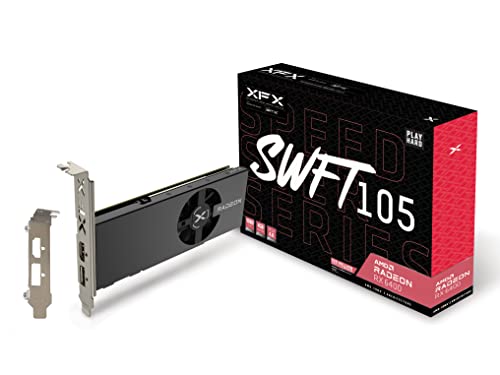
XFX Speedster SWFT105 Radeon RX 6400 — Best compact AMD pick
The RX 6400 is AMD’s answer to the same problem, built on RDNA 2 and trimmed precisely to the slot’s power envelope. XFX’s SWFT105 version is a small, single-fan card that disappears into a slim case and asks nothing of the power supply, while still being a real gaming GPU: 1080p play in a wide range of titles, at settings the integrated graphics of the host machine could not approach. For the owner of a compact AMD or Intel prebuilt who wants games rather than just displays, this and its ASRock twin below are the natural shortlist of two.
Two characteristics of the RX 6400 design should be understood before buying, because both are consequences of its slot-powered brief. Its PCIe link is four lanes wide, which on an older PCIe 3.0 machine narrows the connection further — in practice this costs a little performance in some titles, and it is the honest price of the design’s efficiency. And its media encode hardware is minimal compared with larger Radeons, so a machine whose main job is recording or streaming gameplay should look to the Arc A380’s media engine or the RTX 3050 instead. Neither point dims the card’s central virtue: it games, from the slot, in a small box.
Against the ASRock Challenger ITX version of the same GPU, the choice is the usual partner choice — cooler design, dimensions, and which output arrangement the title and listing describe. XFX’s Speedster styling is plain and the card is built to be installed and forgotten, which in a converted office machine is a compliment. Buyers choosing between the two RX 6400s should measure their case, glance at each card’s stated outputs, and pick the one that fits; the silicon will not separate them.
Expectations should be set by resolution and vintage rather than by the newest releases alone. The back catalogue is where this card shines brightest — the enormous library of games from the last decade, esports titles, and indie releases all run with room to spare — while the newest, heaviest launches ask for the texture and shadow adjustments the review has already described. A converted office machine playing that library at 1080p is not a compromised games PC; it is a well-matched one, and the RX 6400 is the component that makes the match.
- Memory: 4GB GDDR6, as the title states
- Power design: the RX 6400 is a slot-powered GPU by design; the title names no supplementary connector
- Architecture: AMD RDNA 2, named in the title
- Cooler: SWFT105 compact design — fan count is XFX’s page detail if it matters to the build
- PCIe link: this GPU class uses a narrow link — on a PCIe 3.0 host the effect is worth knowing about, and XFX’s specification carries the figure
Strengths
- Genuine 1080p gaming from slot power alone, in a tiny body.
- RDNA 2 efficiency keeps heat trivial for a small case to clear.
- Plain, serviceable Speedster design with nothing decorative to pay for.
Trade-offs
- Four-lane PCIe link costs a little on older PCIe 3.0 hosts.
- Minimal media encode hardware — not the streamer’s pick.
- 4GB of memory means texture discipline in the newest titles.
Best for: a compact prebuilt or slim desktop that needs real 1080p gaming and has no power lead or space to spare.
Not suited for: a gameplay-recording or streaming setup, where this GPU’s trimmed media hardware is the wrong tool for the job.

ASRock Radeon RX 6400 Challenger ITX 4GB — Best ITX alternative
ASRock’s Challenger ITX take on the RX 6400 exists for the smallest end of the market: mini-ITX cases, slim desktops with a single short slot, and home-theatre enclosures where a full-length card is a physical impossibility. The title gives its boost clock figure, and the ITX in the name is the specification that matters — a short board, a compact cooler, and the same slot-powered RDNA 2 silicon as the XFX card above. Everything said there about the GPU applies here unchanged: honest 1080p gaming, a four-lane link to be aware of on older hosts, 4GB of memory to be managed with texture settings, and no power lead anywhere in the design.
Why list two versions of one GPU in a six-card guide? Because in this category, fit is a feature on equal footing with frame rates, and the two cards do not fit the same machines. The Challenger ITX’s short body enters enclosures the XFX cannot, and for the owner of such an enclosure the comparison is not between two RX 6400s — it is between this card and no upgrade at all. Guides that pretend otherwise, ranking by silicon alone, fail exactly the readers this category serves.
The practical advice mirrors the XFX review with the emphasis shifted: measure first, and measure the length as carefully as the height. Slim cases often provide a low-profile slot in a bay sized for half-length cards, and the Challenger line is built to that bay. Confirm the bracket arrangement for the target case from ASRock’s listing details, since slim desktops need the low-profile bracket where a standard tower does not, and then install with confidence — the wiring, at least, will ask nothing of anybody.
The Challenger ITX also makes a thoughtful choice for a machine that shares a room with people. Small coolers on hard-working cards can whine; a card whose GPU sips from a 75-watt envelope simply does not generate the heat that forces a small fan into its shrill register during ordinary play. In a living-room enclosure or a bedroom PC, that acoustic modesty is part of the specification in practice, whatever the sheet says, and it is a reason this modest card gets chosen over technically stronger hardware that a bigger case would be needed to civilise.
- Memory: 4GB, per the title
- Boost clock: 2321 MHz, as the title states
- Power design: slot-powered RX 6400 class; no supplementary connector is named in the title or the design
- Architecture: AMD RDNA 2, named in the title
- Form factor: Challenger ITX short-body design — exact length and bracket contents are ASRock’s listing details to confirm
Strengths
- Shortest route to real gaming in mini-ITX and slim enclosures.
- Same slot-powered silicon as the other RX 6400, with nothing asked of the supply.
- Stated boost clock in the title, no specification hunting required.
Trade-offs
- Shares the RX 6400’s narrow-link and media-encode compromises.
- 4GB buffer needs texture discipline in current releases.
- Bracket arrangement must be confirmed for slim-case duty.
Best for: a mini-ITX or slim home-theatre enclosure whose slot bay is short as well as low, needing 1080p gaming from slot power.
Not suited for: a full-size tower with room and leads available, where larger cards deliver more for the same slot.

ASUS GeForce GT 1030 2GB GDDR5 — Best for extra displays
The GT 1030 is the elder statesman of this category and still its clearest answer to a particular question: how does an old desktop drive modern monitors? Its 2GB of GDDR5 — and the memory type matters, because slower DDR4 versions of this GPU also exist and this ASUS card is the GDDR5 one the title describes — gives it enough pace for desktop work, video playback and light older gaming, while its tiny power draw from the slot makes it compatible with effectively every machine that has a PCIe slot and a supply still capable of turning on. Thousands of these cards live in office machines doing exactly one job, driving a second or third display, and doing it silently for years.
Judged as a gaming card it would be a poor recommendation in this company, and the review will not pretend otherwise: the RTX 3050 and the RX 6400s above are several times its capability. But most GT 1030s are not bought to game. They are bought because a motherboard’s outputs are the wrong type, or too few, or because a home-theatre PC needs a modern HDMI connection its integrated graphics lack. For those jobs the card’s virtues are its smallness, its cool running, and the maturity of a design every operating system recognises without drama.
ASUS’s version is a standard, compact implementation, and the buying check is the one the introduction flagged: confirm the GDDR5 in the title — it is there — and confirm the outputs on the listing match the monitors on the desk. For several high-resolution displays, the pixels should be counted honestly; this card drives ordinary office and media displays happily, and asks to be excused from multi-4K duty, which belongs to the stronger picks.
Its longevity in this role is a matter of record rather than promise: the GT 1030 has been the standard answer to the extra-display problem for years, which means every operating system, every remote-desktop tool and every piece of office software a buyer is likely to run already knows exactly what it is. In a work machine, that invisibility is the product. The card is bought to make a monitor light up and then to be forgotten, and no other pick in this guide is as thoroughly proven at being forgotten.
- Memory: 2GB GDDR5, as the title states — the faster memory type for this GPU
- Power design: the GT 1030 is a low-draw slot-powered card by design; the title names no connector because the design uses none
- Architecture: NVIDIA GeForce GT 10 series
- Outputs: check the listing’s bracket photograph against the desk’s monitors — port mix is the deciding detail for this pick
- Form factor: compact ASUS design; bracket and height details sit in the listing for slim-case buyers
Strengths
- Runs from the slot in effectively any desktop with a free PCIe slot.
- GDDR5 version, the one worth buying of the two memory variants.
- A mature, quiet, set-and-forget design for display duty.
Trade-offs
- Gaming pace is a fraction of the stronger picks in this guide.
- 2GB of memory is for desktops and video, not modern textures.
- Output mix must be matched to the monitors by hand.
Best for: an older desktop that needs modern monitor outputs or an extra display, with no gaming ambition beyond the light and the old.
Not suited for: a 1080p gaming conversion, where its pace — not its power draw — is the disqualifying specification.

ASRock Intel Arc A380 Challenger ITX 6GB OC — Best media and AV1 pick
Intel’s Arc A380 is the interesting outsider of the slot-powered class: a modern GPU from the third maker, in ASRock’s Challenger ITX body, with 6GB of memory and a media engine that is this card’s headline act. The A380’s video hardware handles decode and encode duties — including AV1, the codec the streaming era is standardising on — that the other small cards here either trim or omit. In a home-theatre PC or a small living-room machine, that makes this the pick for the owner whose graphics work is video first: smooth high-resolution playback, capable transcoding for a media library, and light gaming on the side.
The gaming side deserves a calibrated sentence. The A380 plays 1080p games respectably, and Intel’s driver work since launch has steadily improved its consistency in older titles, but it sits behind the RTX 3050 in this guide for pure gaming and roughly alongside the RX 6400 class with a larger buffer. Its 6GB is genuinely useful for textures, and its ITX body and slot-powered design keep the installation as simple as the RX 6400s’. Buyers whose evenings are video with occasional games will find the balance right; buyers whose evenings are games with occasional video should take the MSI card at the top.
One platform note belongs in this review: Arc cards are happiest in systems new enough to offer Resizable BAR support in the BIOS, where their performance is as designed; in a much older host without it, the card works but gives up some pace. That is worth a BIOS check for the owner of an ageing prebuilt, and it is the kind of detail this category — old machines, new cards — turns on. The title confirms the card’s clock figure and PCIe 4.0 interface; the host’s firmware setting is the buyer’s half of the bargain.
The A380 also points at where this whole category is heading. A third GPU maker competing in the slot-powered space, with modern media hardware as its spearhead, gives the prebuilt-and-small-case audience something it has rarely had: a choice driven by features rather than by which of two catalogues has a card in stock. For media duty today the choice is already real. A buyer building a small machine around video — a streamer box, a transcoding server with a display, a living-room PC — should weigh this card first and let the gaming-first reader take the MSI at the top of the page.
- Memory: 6GB GDDR6 on a 96-bit interface, per the title
- GPU clock: 2250 MHz, as the title states
- Power design: the A380 Challenger ITX belongs to the slot-powered class; the title names no supplementary connector
- Interface: PCIe 4.0, per the title — a PCIe 3.0 host still runs the card, at that slot’s speed
- Media: AV1-capable Intel media engine — the feature this pick is bought for
Strengths
- Best media hardware in the guide, including AV1 support.
- 6GB of memory, more than the RX 6400 pair, in an ITX body.
- Slot-powered and small, like everything else here.
Trade-offs
- Wants Resizable BAR in the host BIOS for its designed performance.
- Pure gaming pace sits behind the RTX 3050 pick.
- Driver maturity in older games, while much improved, is the youngest here.
Best for: a home-theatre or living-room PC whose first job is video — playback and transcoding — with light 1080p gaming alongside.
Not suited for: a pre-Resizable-BAR legacy host bought purely for games, where the card cannot show its designed pace and the MSI pick asks fewer questions.

Maxsun GeForce GTX 1650 4GB GDDR6 — Strongest raster, with a check
The GTX 1650 has been the default recommendation for no-fuss 1080p gaming for years, and on raw rendering it is the strongest traditional GPU in this guide after the RTX 3050 — with GDDR6 memory, as this Maxsun listing’s title confirms, rather than the slower GDDR5 of the original release. It is included here with the most carefully worded review in the article, because the GTX 1650 family is exactly the case this guide’s opening discipline was written for: the design began life as a 75-watt slot-powered card, and many GDDR6 partner versions remain so, but some partner models add a supplementary power connector. This listing’s title does not state which arrangement this card uses.
So the honest position is this: the power arrangement of this specific card is not stated in its listing title, and it must be verified — in Maxsun’s documentation for the model, or from the connector visible in the listing’s photographs — before it is bought for a machine with no lead to give. If the check confirms the slot-powered version, this is a superb pick: proven silicon, GDDR6 pace, 4GB of memory, and a compact 128-bit design that has powered a generation of budget builds. If the check shows a connector, the card simply belongs to a different guide, and the five picks above remain.
The verification itself takes less time than reading this review did. The listing’s photographs show the card’s top edge, where a supplementary connector either is or is not; Maxsun’s documentation for the model states the requirement in its specification table; and owner discussions of this specific card are plentiful, because the GTX 1650 is one of the most-owned GPUs of its era. Spending those five minutes converts this pick from a question mark into either the guide’s best traditional value or a clean pass — and both outcomes are the guide working as intended.
Why include a pick that carries homework? Because excluding the GTX 1650 from a no-extra-power guide would mislead in the opposite direction — most versions of this GPU are exactly what the category promises, and a reader who finds a verified slot-powered example has found one of the best. The guide’s job is to mark the verification clearly, not to pretend the question does not exist. Maxsun’s implementation is a compact dual-purpose design; beyond the power check, confirm the outputs against the desk’s monitors from the listing, as with every card here.
- Memory: 4GB GDDR6 on a 128-bit interface, per the title
- Power arrangement: not stated in the listing title — the GTX 1650 family exists in slot-powered and connector versions; verify this model in Maxsun documentation before relying on slot power
- Architecture: NVIDIA GeForce GTX 16 series
- Intended use in the title: gaming PC graphics, per Maxsun’s own description
- Outputs: confirm the port mix from the listing against the monitors in use
Strengths
- Proven 1080p gaming silicon with the faster GDDR6 memory.
- The slot-powered versions of this GPU are category-defining hardware.
- Compact design suits the small cases this guide serves.
Trade-offs
- This listing’s power arrangement is unstated and must be verified first.
- 4GB of memory, with the usual texture discipline for new titles.
- An older architecture — no DLSS, where the RTX 3050 pick offers it.
Best for: a 1080p gaming conversion where the buyer has verified, from Maxsun’s documentation or the listing photographs, that this card is the slot-powered version.
Not suited for: a purchase that cannot include that verification step — a machine with no power lead cannot gamble on an unstated connector.
How Do the Six Cards Compare?
| Card | Memory | Power position | Form | Primary job |
|---|---|---|---|---|
| MSI RTX 3050 LP 6G OC | 6GB | Slot-powered class | Low profile | Gaming |
| XFX RX 6400 SWFT105 | 4GB GDDR6 | Slot-powered class | Compact | Gaming |
| ASRock RX 6400 Challenger ITX | 4GB | Slot-powered class | ITX short body | Gaming in tiny cases |
| ASUS GT 1030 | 2GB GDDR5 | Slot-powered class | Compact | Displays and desktop |
| ASRock Arc A380 Challenger ITX | 6GB GDDR6 | Slot-powered class | ITX short body | Media and light gaming |
| Maxsun GTX 1650 | 4GB GDDR6 | Not stated in title — verify | Compact | Gaming, once verified |
The table is the guide in miniature: five cards whose power design is a property of their class, and one whose power design is a question to answer before purchase. Read down the final column first — the job defines the shortlist — and only then compare memory and pace within the job. A display card and a gaming card in this category are not rivals; they are different tools that happen to share a power envelope.
What Should Be Checked in the Host Machine Before Ordering?
Start with the slot itself. The machine needs a free PCIe x16 physical slot — most prebuilts have one, but some slim models offer only a low-profile bay or a slot obstructed by the power supply’s housing, and a two-minute look inside settles it. Note the slot’s neighbourhood: a card that is two slots thick needs the neighbouring space empty, and several of these small cards are single-slot or low-profile designs precisely because their hosts cannot offer more. Measure the bay’s length and height, and write both numbers down before opening any product page.
Next, the power supply’s rating — not its leads this time, since these cards need none, but its total wattage and health. Slot power is still power: a very small or failing supply in an old office machine may struggle with any addition, and a supply that has begun causing shutdowns should be replaced on its own merits before it is asked to feed a new card. In a healthy machine of ordinary specification, every card in this guide is a trivial load; the check exists for the machines at the margins, which are common in this category’s audience.
Finally, the firmware and the outputs. Check whether the BIOS offers Resizable BAR if the Arc A380 is the target, since that card’s designed performance assumes it. Confirm the machine’s existing display outputs against the card’s, so the new card actually adds what the desk needs. And confirm the operating system’s driver support for the chosen card — all six are current enough for modern Windows, but a machine running something older for a specific reason deserves the check before, not after, the box arrives.
Which Machines Benefit Most From a Slot-Powered Card?
The converted prebuilt is the emblematic case: a Dell, HP or Lenovo tower from a few years ago, bought for office work or retired from it, with a perfectly good processor, a proprietary power supply with no PCIe lead, and an owner who has discovered games. A slot-powered card turns that machine into a 1080p games PC for the cost of the card alone, and the RTX 3050 LP and RX 6400 picks exist for exactly this transformation. Thousands of these conversions happen every year, and they succeed or fail on the two checks this guide repeats — the bay’s dimensions and, where the model family straddles the line, the specific card’s power design.
The home-theatre PC is the second case, and its priorities are inverted: silence and video first, gaming second. A card in a living-room enclosure must be small, cool and quiet, and its media engine matters more than its frame rates. The Arc A380’s AV1 hardware and the GT 1030’s proven playback manners serve this room from opposite ends of the budget, and both draw so little power that the small supplies fitted to media cases never notice them. The third case is the second monitor problem in its many forms — the workstation that needs another display, the trading desk, the designer’s reference screen — where the GT 1030’s entire career has been spent.
There is a fourth, quieter case worth naming: the machine that must not be modified. A leased PC, a family computer whose owner is not the buyer, a work machine with a warranty its owner will not risk — in all of these, an upgrade that touches nothing but the slot, and can be removed leaving no trace, is the only upgrade available. Slot-powered cards are the reversible upgrade, and reversibility is sometimes the deciding specification of all.
How Does Slot Power Shape Settings and Expectations?
A 75-watt envelope is a design discipline, and the games played on these cards should be set with it in mind. The working resolution is 1080p; at that size, the RTX 3050 pick runs a wide library at high settings, the RX 6400 pair and the A380 at medium-to-high with textures managed, and the GTX 1650 — once verified — in the same company. Upscaling is the category’s best friend: DLSS on the NVIDIA cards and FSR on the AMD and Intel ones recover smoothness at a small cost in image softness, and at 1080p the quality modes should be the first tried before any setting is lowered.
Texture settings deserve the specific note the memory figures demand. The 6GB cards have room for high textures in most titles; the 4GB cards ask for medium in the newest releases and reward the adjustment with steadier frame delivery; the GT 1030’s 2GB is a desktop and video allowance, and games run on it should be the older and lighter kind its pace suits anyway. None of this is a hardship unique to this category — it is the ordinary negotiation between a card and a library — but it is a negotiation the buyer should enter knowing the numbers, and the numbers are printed in every review above.
How Is a Slot-Powered Card Installed in a Prebuilt Desktop?
The installation is the simplest in all of graphics hardware, which is the category’s founding virtue. Shut the machine down, unplug it, and open the case. Remove the blanking plate behind the slot the card will occupy — slim cases sometimes use a low-profile plate arrangement, and if the card ships with both brackets, fit the one that matches the case before the card goes in, using the screws from the bracket it replaces. Seat the card in the slot with even pressure until it is fully home, secure the bracket screw, and close the case. There are no power leads to route, because there is nothing to connect them to.
Connect the monitor to the new card rather than the motherboard, then boot and install the current driver from the GPU maker’s site — AMD, NVIDIA or Intel as the pick dictates. In the BIOS of a prebuilt, confirm the primary display is set to the PCIe slot if the machine wakes with a dark screen; some office firmware defaults stubbornly to integrated graphics until told otherwise. Then verify the mundane things that are easy to skip: the display is running at its full refresh rate, the resolution is native, and a short video or game runs without complaint while the card warms up.
One closing habit suits this category especially: keep the removed blanking plates and the spare bracket in a labelled bag inside the case or with the machine’s documents. These small machines change roles over their lives — office desktop, media box, first gaming PC — and the card fitted today may move to another host tomorrow. The parts that make it fit elsewhere are worth the thirty seconds it takes to keep them.
Which Mistakes Ruin a Slot-Powered Upgrade?
The first is assuming the category rather than checking the card — buying a model whose family is usually slot-powered without confirming the specific version, which is why the GTX 1650 review in this guide is written the way it is. The second is its mirror: replacing a power supply unnecessarily, at real cost and effort, to feed a card that never needed a lead. Both errors come from treating power as a guess, and both are cured by the same habit of reading the specific model’s documentation.
Fit mistakes follow. A full-height card ordered for a slim desktop, a two-slot card for a one-slot bay, a long card for a short enclosure — this category’s machines forgive none of them, and the tape measure is the entire prevention. A related error is overlooking the bracket in the box. Low-profile cards serve two case heights, and the bracket fitted at the factory is not always the one the target machine needs; discovering that the slim bracket was included but left in the packaging — or not included and never checked — turns a ten-minute installation into a parts hunt. Read the listing’s contents for the chosen card, confirm the bracket the case requires is among them, and keep whichever bracket goes unused with the machine’s papers rather than in a drawer of anonymous metal.
The third recurring error is purpose drift: a display card bought for gaming, or a gaming card bought for a media PC whose real need was the Arc’s AV1 engine. The jobs in this guide are labelled precisely so the card can be matched to the work before the money moves.
What Happens After Installation: Drivers, Displays and First Checks
The first boot deserves a deliberate ten minutes. Windows will usually light the display on a basic driver, which proves the card is seated and alive but nothing more; install the current driver from the GPU maker’s own site before judging anything, because the basic driver’s performance is a fraction of the card’s real behaviour and has sent more than one buyer to a returns desk in error. After the driver, set the display’s refresh rate to the panel’s actual maximum in the operating system’s display settings — a step that is skipped constantly, and that leaves a high-refresh monitor idling at a default rate while its owner wonders what the upgrade bought.
Then test the card at its actual job. The gaming picks should run the library’s most demanding regular title for twenty minutes, long enough for the small cooler to reach its working temperature and for any power or seating problem to announce itself; a fault that appears only under sustained load is still a fault found early, while the box and receipt are to hand. The display and media picks should be tested at theirs — every monitor connected at once, the highest-resolution video in the library played end to end — because a cable or port mismatch discovered on installation day is a nuisance, and the same discovery a month later is a grievance.
Keep the packaging until those tests pass, and keep the machine’s original configuration in mind as the fallback: a slot-powered card can be removed in two minutes and the machine restored exactly, which is this category’s final kindness. Upgrades that can be undone are upgrades that can be attempted without anxiety, and for the owners of the modest, lead-less machines this guide serves, that may be the most valuable property of all.
Final Recommendation
For gaming, the MSI RTX 3050 LP 6G OC is the headline recommendation — the strongest card that asks nothing of a power supply, in the low-profile form the neediest machines require. The two RX 6400 cards are its AMD counterparts, chosen between on case dimensions, and the ASRock Arc A380 is the media machine’s pick, where its video engine outranks raw gaming pace. The ASUS GT 1030 remains the right small answer to a display problem, and the Maxsun GTX 1650 joins the list the moment its power arrangement is verified as slot-powered. What unites the six is a refusal to treat a missing power lead as the end of a machine’s useful life — for the prebuilt on the desk and the slim box under the television, the slot was never the limit, and with the right card it still is not.
Frequently Asked Questions
How much power does a PCIe slot actually provide?
The PCIe specification allows a graphics card to draw up to 75 watts through the slot connector itself, and the cards in this guide — with the one flagged exception pending verification — are designed to operate entirely within that allowance. That is why they need no supplementary lead: the slot is not a workaround or a hack, it is a designed power source, and an entire class of GPUs is engineered around it.
Can a slot-powered card really play modern games?
Yes, within the resolution the class is built for. The RTX 3050 6GB at the top of this guide is a genuine 1080p gaming card with DLSS, and the RX 6400 pair and Arc A380 play the same resolution at adjusted settings. What the class cannot do is reach beyond its power envelope — 1440p high-refresh and 4K gaming belong to cards with power leads, and no slot-powered design pretends otherwise.
Why does the GTX 1650 review refuse to confirm its power arrangement?
Because the GTX 1650 family genuinely exists in both forms: the original design is slot-powered, and partner GDDR6 models are sold both with and without a supplementary connector. This Maxsun listing’s title does not state which form this card takes, so the guide marks it as not stated and points to the two reliable checks — the maker’s documentation and the connector visible in listing photographs — rather than printing a guess as a fact.
Is a used, larger card a better buy than a new slot-powered one?
Only if the machine can feed and fit it, which is the entire question this category answers. A second-hand card with a power lead is no bargain in a prebuilt with no lead to offer, and the saving evaporates the moment a replacement power supply — sometimes a proprietary one, at proprietary prices — joins the basket. Where the host machine does have the lead, the space and the wattage, the wider market is open and this guide’s constraint no longer applies. The slot-powered premium is paid for certainty in the machines that need it, and in those machines it is not really a premium at all.
Will one of these cards work in a slim office desktop?
That is the use case the category exists for, subject to two measurements: the bay must accept the card’s height, which is why low-profile and ITX picks dominate this list, and the slot area must be free. Confirm the low-profile bracket is supplied for the specific card chosen, check the power supply is healthy, and the installation itself is the simplest in PC hardware — there is not even a cable to connect.
Can these cards run from a laptop or a mini PC with an external enclosure?
Only where the enclosure itself provides a standard PCIe slot and its own power — and in that arrangement the enclosure’s supply usually offers leads anyway, which dissolves the category’s premise. These six cards are aimed at ordinary desktops, slim towers and media enclosures with an internal slot. A laptop without such an enclosure has no slot to offer, and no card in this guide can change that; the honest answer for a laptop is that its graphics are the ones it shipped with.
Does the host machine’s PCIe version matter for these cards?
A little, in specific cases. All six cards work in older PCIe slots, but the RX 6400’s narrow four-lane link gives up some performance on a PCIe 3.0 host compared with a 4.0 one, and the Arc A380 wants Resizable BAR enabled for its designed pace. Neither effect prevents an upgrade; both are worth knowing before choosing between otherwise equal picks for an older machine.
Related Guides
Readers converting a prebuilt may also find our guide to low-profile graphics cards helpful, along with the roundup of graphics cards for home-theatre PCs and the checklist for upgrading a prebuilt desktop that covers the measurements this guide asks for. Together they treat the small, lead-less machine not as a problem to apologise for but as a platform with its own upgrade path — which, on the evidence of the six cards above, it has demonstrably had all along, waiting only for the right card to be chosen with the care this category genuinely deserves from every buyer, on every listing, without exception or shortcut of any kind.


