What's inside
- Key Takeaways
- Quick Picks
- How Did We Choose These Picks?
- What Does Field Audio Recording Actually Ask of a Card?
- SDHC or SDXC: What Do the Two Standards Mean for This Recorder?
- How Should You Think About Redundancy When One Card Holds the Session?
- How Do the Six Cards Stack Up Against Each Other?
- How Much Capacity Does a Recording Session Really Need?
- How Should You Prepare and Handle Cards for Field Sessions?
- How Should a Session Move from Card to Archive?
- What Mistakes Do DR-60DmkII Owners Make with Memory Cards?
- Final Recommendation
- Frequently Asked Questions
- Related Guides
As an Amazon Associate I earn from qualifying purchases. This post may contain affiliate links at no extra cost to you.
gizmoverdict.com is reader-supported. When you buy through links on our site, we may earn an affiliate commission.
Where to buy: the six cards below are all full-size SD cards sold through their Amazon listings, linked from the Quick Picks table and again in each detailed review. Buy from the listing for the exact capacity named here, because most of these card families are also sold in other sizes under near-identical names, and a field recorder is the wrong place to discover you ordered the small one.
The best sd cards for tascam dr 60dmkii start from a fact about the recorder itself: the DR-60DmkII belongs to the UHS-I generation of field audio recorders. It was designed when UHS-I was the working standard for SD media, and its card slot speaks that language — which means the buying question is not how to feed it the fastest card on the market, but how to give it reliable, honestly rated UHS-I media in capacities its file system handles gracefully, from makers whose flash will not falter in the middle of a wedding vow or a once-only interview answer. Audio recording makes modest demands on bandwidth and heavy demands on trustworthiness: a four-track WAV session at high resolution writes steadily rather than quickly, and the failure that matters is never a slow card — it is a card that stops, corrupts, or turns out to hold less than its label promised.
This roundup therefore spans an unusual range on purpose. At one end sit modern 128GB UHS-I cards from SanDisk and Lexar with high stated read speeds that make offloading a day’s takes painless. At the other end sit an 8GB Transcend and a 2GB SLC card — small, unfashionable, and genuinely useful to owners of a recorder from this era, for reasons the detailed reviews explain. Between them sits a 64GB SanDisk that may be the single most sensible purchase of the six. All six are full-size SD, all six suit the recorder’s slot, and every figure quoted comes from the listing titles themselves.
Key Takeaways
- The DR-60DmkII is a UHS-I-era recorder: buy good UHS-I media and ignore UHS-II cards entirely, since the slot cannot use their extra contacts.
- For audio, sustained reliability outranks headline speed — a recorder writes steadily for hours, and a card that falters once ruins the take that mattered.
- The 64GB and 128GB cards here are the working sweet spot for long field days; the tiny 8GB and 2GB cards earn their place as firmware, backup and short-session media.
- Stated read speed still matters, but at the other end of the day: it decides how fast a card full of takes moves onto a computer.
- Format cards in the recorder before a session, and never let a session’s only copy ride home on the card alone when a laptop is within reach.
Quick Picks
| Pick | Badge | Why it earns its place |
|---|---|---|
| Transcend 8GB SDC300S SDHC | Best small session card | An 8GB UHS-I SDHC card with a Class 10 rating — modest capacity that suits short sessions and recorders of this generation perfectly. |
| SanDisk 128GB Extreme PRO SD | Fastest offloads | 128GB of UHS-I storage with read speeds stated up to 250MB/s, so a long day’s multitrack takes copy off in minutes. |
| Lexar 128GB SILVER SD | Best rated all-rounder | 225MB/s stated reads with V30 and U3 markings printed in the title, at the same roomy 128GB capacity. |
| SanDisk 128GB Extreme SD | Strong second 128GB option | Reads stated up to 230MB/s from SanDisk’s Extreme line, for recordists who want capacity and pace without the PRO premium. |
| SanDisk 64GB Extreme PRO SD | Best everyday working card | 64GB with reads up to 200MB/s — the size most field days actually fill, in SanDisk’s top SD line. |
| INDMEM 2GB SD SLC | Best utility and backup card | A tiny 2GB Class 4 card built on SLC flash, ideal for firmware duties, emergency spares and very short recordings. |
How Did We Choose These Picks?
We chose for the recorder’s real working life. A DR-60DmkII typically rides under a camera or on a rig, recording production audio in WAV or BWF while its owner thinks about pictures, not media. Its card requirements are therefore a study in steadiness: the card must sustain a continuous, unglamorous write for as long as the session lasts, behave predictably when nearly full, and survive being swapped, pocketed and offloaded hundreds of times. Bandwidth beyond the UHS-I envelope buys nothing in the recorder, so no UHS-II card appears here; where a card’s virtues are speed-related, they are read-side virtues that pay off at the offload stage.
Every figure in this article — capacity, stated read speed, class markings — is taken from the pool listing titles, and where a title is silent, the spec boxes say so rather than borrowing numbers from a sibling product. We deliberately included two very small cards, because owners of recorders from this period consistently report a practical truth: modest-capacity, simply organised media is what this generation of hardware was tuned around, and a small card dedicated to a single session is a legitimate professional pattern, not a compromise. The six split into three working cards (64GB and the two working 128GB options plus the second SanDisk 128GB), one speed-led flagship, and two small specialists — a spread that mirrors how these recorders are actually used.
We also weighted brand accountability heavily. A field recorder’s card holds work that cannot be re-performed; interviews, ceremonies and performances happen once. SanDisk, Lexar and Transcend are established flash houses with reputations to lose, and the one lesser-known name in the list, INDMEM, is included for a narrow utility role where its SLC construction — not its badge — is the argument.
What Does Field Audio Recording Actually Ask of a Card?
Less speed, more stamina. Even a multitrack session at the recorder’s highest resolution writes data at a rate that a competent Class 10 card from a decade ago could sustain; the DR-60DmkII’s demands were calibrated to UHS-I media of its era, and every card in this roundup meets the interface on its own terms. What separates a good session card from a bad one is behaviour over time: whether the write pace stays level in hour three as it was in minute three, whether the card’s controller manages a nearly full card without hesitation, and whether the file that closes at the end of a long take opens cleanly on a computer afterwards. Those traits do not appear in listing titles, which is precisely why brand and product line do so much of the choosing here.
Capacity planning for audio surprises camera-minded buyers. Uncompressed audio is heavy but predictable: a stereo pair at high resolution consumes a steady, calculable ration of gigabytes per hour, and multitrack recording multiplies it by the track count. A 64GB card therefore represents many hours of typical field work, and 128GB stretches across the longest wedding day or documentary shift without a mid-session swap — and every avoided swap is an avoided chance to fumble a card into the grass or format the wrong one. The countervailing wisdom, also honoured in this list, is that smaller cards enforce a healthy discipline: one card per session, offloaded and backed up that night, keeps projects separated and losses bounded. Professionals argue both patterns sincerely; the roundup serves both.
Environment deserves its sentence too. Field recording happens in church halls and on hillsides, at winter weddings and summer festivals, and flash memory is broadly tolerant of the temperatures a recorder itself can work in — the practical enemy is condensation, not cold: a card and recorder brought from a freezing car into a warm hall should be given a few minutes in the bag before the session starts, and cards should never ride in a steamy bathroom-adjacent pocket between locations. These are small disciplines, but field audio is a craft of small disciplines, and the card is where their results are stored.
One further trait matters in the field and never appears on packaging: how a card behaves in a recorder that loses power. Batteries die on rigs. A card and file system that survive an abrupt stop with the last closed file intact — and a recorder that can recover the interrupted one — are worth more than any speed class. Formatting in the recorder, keeping contacts clean, and retiring cards that have ever thrown an error are the habits that make that survival routine rather than lucky.

Transcend 8GB SDC300S SDHC — Best small session card
There is a school of field recording that treats media the way film photographers treated rolls: one card, one session, offload tonight. This 8GB Transcend is that school’s card. The title identifies it as a UHS-I SDHC card in Transcend’s 300S line with a Class 10 rating and 1080p Full HD positioning — camera language, but the underlying profile, a modest-capacity card from an established flash maker with a mainstream speed rating, is exactly what a short audio session asks for. Eight gigabytes holds hours of stereo recording or a solid block of multitrack work, which describes a podcast session, a voice reel, an afternoon of interviews or a single ceremony far better than it describes a festival day.
Think of the working pattern it enables concretely. A podcast recordist books a ninety-minute sitting; the Transcend goes in freshly formatted, holds the sitting entire with room for the false starts and the post-interview chat that sometimes contains the best material, and comes out the same evening into a reader. The files land in the project folder, get backed up, and the card is formatted in the recorder before it returns to the case — a closed loop with no accumulation, no ambiguity about what lives where, and no possibility of a formatting accident erasing three projects at once, because the card never holds three projects. Multiplied across a working month, that loop is a filing system disguised as a memory card.
The small capacity is also a form of compatibility kindness. Recorders of the DR-60DmkII’s generation were built and tested in an era when SDHC cards of this size were the everyday medium, and their formatting and file handling around such cards is the most travelled path in their firmware. Owners who keep one of these as the card that lives in the recorder — always formatted, always ready for the unscheduled recording — tend to be the owners who never miss the moment that arrived without warning. Transcend’s long history in industrial and consumer flash makes it a steadier hand for that role than an anonymous card of the same size, and the price class of small cards makes keeping two or three in the bag an easy decision.
- Capacity: 8GB SDHC, full-size SD
- Interface: UHS-I, per the listing title
- Ratings in title: Class 10 (C10), 1080p Full HD
- Stated read speed: Not stated in the listing title — verify with Transcend documentation
- Stated write speed: Not stated in the listing title — verify with Transcend documentation
Strengths
- Session-sized capacity that enforces the offload-tonight discipline many recordists swear by.
- SDHC format and UHS-I interface sit squarely in the era this recorder was designed around.
- Cheap enough in its class to keep several in rotation, each labelled by project.
Trade-offs
- A long multitrack day will outgrow 8GB well before the light fails, so it cannot be the only card in the bag.
- The title states no read figure, so offload pace is unremarkable and unquantified by the listing itself.
- Small cards are the easiest to lose, and a session living on one demands prompt backup habits.
Best for: session-by-session recordists, podcasters and interviewers whose work arrives in bounded sittings. Not suited for: an all-day multitrack shoot, where its capacity ceiling arrives in the middle of the programme.

SanDisk 128GB Extreme PRO SD — Fastest offloads
If the Transcend is the session card, this is the expedition card: 128GB of SanDisk’s Extreme PRO line, UHS-I, with read speeds stated up to 250MB/s — the highest figure in this roundup. Inside the recorder, that read number is dormant; the recorder asks its own pace and the card complies. The number wakes up at the end of the day, when a card holding a festival’s worth of multitrack audio meets a fast reader and the copy that could have eaten an hour of your evening finishes while the kettle boils. For working recordists billing by the day, offload speed is turnaround speed, and turnaround is what clients actually feel.
The Extreme PRO name carries the other half of the argument: this is SanDisk’s professional tier, the line built for sustained professional abuse in cameras, and its controller behaviour under long, continuous writes is the reason the line exists. Audio’s write load is gentle by camera standards, which means a card engineered for far worse arrives at a recording session with margin to spare — margin that shows up as a write pace that does not sag as the card fills across a very long day. At 128GB, it also holds that whole day without a swap, keeping the recorder sealed and the recordist’s attention on the performance rather than the media. Buy it as the main card, and let smaller cards handle the odd jobs around it.
- Capacity: 128GB SD, full-size
- Interface: UHS-I, per the listing title
- Stated read speed: up to 250MB/s
- Stated write speed: Not stated in the listing title — verify with SanDisk documentation
- Speed class ratings: Not stated in the listing title — verify with SanDisk documentation
Strengths
- The roundup’s highest stated read speed turns the evening offload into a short errand.
- 128GB swallows the longest multitrack day in this recorder without a mid-session change.
- SanDisk’s professional line is built for sustained writes far heavier than audio will ever request.
Trade-offs
- You pay the PRO premium for read pace the recorder itself will never request during recording.
- A whole expedition on one card concentrates risk; it demands a same-night backup routine.
- The title prints no write figure, so its sustained pace rests on the line’s reputation rather than a listing promise.
Best for: working recordists on long multitrack days who offload to a deadline the same night. Not suited for: a hobbyist recording an hour a month, who would be paying expedition prices for a card that mostly sleeps.

Lexar 128GB SILVER SD — Best rated all-rounder
Lexar’s SILVER card is the pick for buyers who like their reassurance printed on the label. Its title states a 225MB/s read speed and carries V30 and U3 markings alongside its UHS-I interface and 4K positioning — the fullest set of ratings among the large cards here. Translated out of camera dialect, V30 promises a sustained write floor of the class used for serious video, which in audio terms is a guarantee with enormous headroom: a recorder writing multitrack WAV will never come within sight of troubling it, hour after hour, card full or card empty. That floor, more than any peak, is the number a field recordist should care about, and this is the large card here that prints one.
At 128GB it matches the SanDisk pair on room while undercutting neither on stated pace in any way that matters — 225MB/s reads keep offloads brisk, and the difference between its figure and the Extreme PRO’s is measured in seconds across a day’s media. The realistic choice between them is temperament and price on the day: the SanDisk sells a professional line’s reputation, the Lexar sells an explicit ratings sheet. Recordists who maintain a media log and like every card’s credentials documented will find this the most legible purchase in the roundup; it is also a natural main card for owners who split their work between this recorder and a camera, since its ratings speak fluently to both.
- Capacity: 128GB SD, full-size
- Interface: UHS-I, per the listing title
- Stated read speed: 225MB/s
- Stated write speed: Not stated in the listing title — verify with Lexar documentation (V30 rating in title)
- Ratings in title: V30, U3, 4K
Strengths
- A V30 floor printed in the title gives long sessions a guaranteed sustained-write promise.
- 225MB/s stated reads keep a full 128GB offload comfortably quick through a decent reader.
- The fullest ratings sheet of any large card here, for buyers who document their media.
Trade-offs
- Its peak write pace is not printed, only its floor — ample for audio, but a gap for the spec-curious.
- As with both 128GB SanDisks, a day this size on one card needs a backup habit to match.
- Owners loyal to a single brand’s ecosystem across cameras and recorders may prefer to stay in one family.
Best for: recordists who want a documented write floor and a big day’s capacity in one card. Not suited for: the one-card-per-session school, whose whole method depends on small media that forces nightly offloads.
SanDisk 128GB Extreme SD — Strong second 128GB option
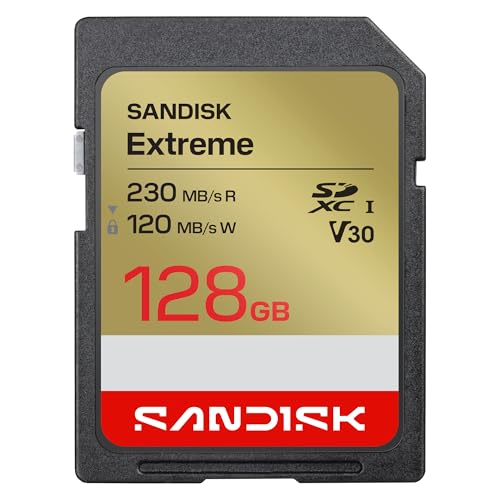
Every working kit benefits from a second main card, and SanDisk’s Extreme — one step below the PRO tier — is built for exactly that berth. The title states read speeds up to 230MB/s and a UHS-I interface at the same 128GB capacity as its PRO sibling. In the recorder the two cards are indistinguishable in duty; at the reader, this one’s stated pace sits a breath behind the flagship’s, a difference of moments across a full offload. What the Extreme line offers instead is SanDisk’s mainstream professional balance: a card from the same flash maker, in the line that equips more working cameras than any other, at a step down in price that buys the second card a kit should have anyway.
There is a rotation argument here that experienced recordists will recognise. Two 128GB cards alternated session by session age half as fast as one card used daily, give you a formatted spare the moment one card throws any kind of error, and let a finished session stay on its card, untouched, until the project is delivered and archived. Paired with the Extreme PRO as card A, this Extreme is card B in a system; bought alone, it is simply a large, quick, reputable card that covers the recorder’s needs with room to spare. Either way it is the roundup’s reminder that depth of kit beats height of spec for work that cannot be repeated.
- Capacity: 128GB SD, full-size
- Interface: UHS-I, per the listing title
- Stated read speed: up to 230MB/s
- Stated write speed: Not stated in the listing title — verify with SanDisk documentation
- Speed class ratings: Not stated in the listing title — verify with SanDisk documentation
Strengths
- Near-flagship stated read pace at a step below flagship pricing, from the same maker.
- The ideal second card in a two-card rotation alongside the Extreme PRO.
- 128GB capacity covers full multitrack days without troubling the recorder’s slot mid-session.
Trade-offs
- The title prints neither a write figure nor speed-class ratings, so its credentials are thinner on paper than the Lexar’s.
- Buying it as a sole card leaves the kit without the spare its own rotation argument recommends.
- Its advantages over the PRO are economic rather than technical, which spec-first buyers may find unsatisfying.
Best for: building a two-card working rotation, or a single large card at a gentler price than the flagship. Not suited for: a spec-sheet-first buying policy that requires every rating in print before money moves — the Lexar SILVER documents itself more fully.

SanDisk 64GB Extreme PRO SD — Best everyday working card
If we had to equip a DR-60DmkII owner with exactly one card and no further conversation, it would be this one. Sixty-four gigabytes is the size a typical field day actually fills: hours of multitrack audio with generous headroom, without the expedition sprawl of the 128GB tier. It carries the Extreme PRO badge, so the card doing your everyday work comes from SanDisk’s professional line, and its title states read speeds up to 200MB/s over a UHS-I interface — offloads of a normal day’s takes measured in a few minutes, through any competent modern reader.
Consider who this recorder serves in 2026 and the picture sharpens further. The DR-60DmkII’s owners are videographers who refuse camera audio, podcasters who outgrew USB interfaces, journalists with a decade of muscle memory in its menus. Their sessions are booked in hours, their turnaround is same-day or next-day, and their media budget is real but not lavish. A 64GB professional card matches that economy precisely: it is the size that gets bought twice — once, then again as the spare — without a wince, and a recorder fed by two alternating professional cards is a recorder whose media you simply stop worrying about, which is the highest state a piece of field kit can reach.
The case for 64GB as the working size is partly about rhythm. A card that fills in a day or two gets offloaded in a day or two; media cycles promptly, backups stay current, and no project lingers for weeks on a card still in service. The 128GB cards invite deferral — there is always room, so the offload can always wait — and deferred offloads are how unique recordings end up living dangerously. This card’s capacity quietly enforces the professional habit, while its line and stated pace remove every technical excuse for not keeping it. For students, journalists, wedding recordists and podcasters alike, this is the size and tier where the recorder’s working life is actually lived.
- Capacity: 64GB SD, full-size
- Interface: UHS-I, per the listing title
- Stated read speed: up to 200MB/s
- Stated write speed: Not stated in the listing title — verify with SanDisk documentation
- Speed class ratings: Not stated in the listing title — verify with SanDisk documentation
Strengths
- The capacity a normal field day fills, in SanDisk’s professional tier.
- Stated 200MB/s reads make the nightly offload a few minutes’ work.
- Its size encourages prompt backup cycles instead of letting sessions accumulate on one card.
Trade-offs
- The very longest multitrack days can still reach its ceiling before the programme ends.
- No write figure or class ratings are printed in the title; the PRO name carries that argument.
- Per-gigabyte it costs more than the larger Extreme, as smaller professional cards usually do.
Best for: the everyday working recordist whose sessions run to hours rather than expeditions. Not suited for: multi-day remote shoots without a laptop, where the 128GB tier’s sprawl earns its price in independence.

INDMEM 2GB SD SLC — Best utility and backup card
Two gigabytes, Class 4, and proud of it — this little card is in the roundup for reasons that have nothing to do with recording marathons. Its title names the trait that matters: SLC flash. Single-level-cell memory is the oldest, hardiest form of NAND, storing one bit per cell where modern high-capacity cards store three or four, and it endures far more write cycles and behaves with a simplicity that old firmware loves. A 2GB SLC card is the classic medium for the jobs around recording: holding a firmware update, serving as the emergency spare that lives in the recorder case for the day the main card is left in a reader at home, or capturing a short voice memo, a room tone, a single interview answer when anything larger would be ceremony.
There is a quieter argument for keeping one in the case: troubleshooting. When a recorder misbehaves — refusing to format, reporting errors, acting haunted — the first diagnostic question is whether the fault follows the card or stays with the machine. A known-good, utterly simple 2GB card answers that question in thirty seconds: format it, record a minute of room tone, play it back. If the little SLC card works, the recorder is innocent and the main card is the suspect; if it does not, you have learned something worth knowing before the next paying session rather than during it. Rental houses and repair benches keep such cards for exactly this purpose, and a working recordist’s case deserves the same trick.
Its limits are absolute and should be respected: Class 4 pace and two gigabytes make it a poor choice for a multitrack session of any length, and we would not stake a paying job’s audio on it as the primary card. But judged as a utility — the card you format without a thought, lend without anxiety, and keep precisely because tiny, tough, simple media still has work to do around a recorder of this vintage — it has no rival in this list. Owners of older Tascam recorders often keep exactly such a card for exactly these purposes; this is that card, bought new instead of excavated from a drawer of uncertain provenance.
- Capacity: 2GB SD, full-size, 1 pack
- Flash type: SLC, per the listing title
- Ratings in title: Class 4
- Stated read speed: Not stated in the listing title — verify with INDMEM documentation
- Stated write speed: Not stated in the listing title — verify with INDMEM documentation
Strengths
- SLC flash brings endurance and simplicity that suit firmware and utility duties perfectly.
- The emergency spare that costs little, weighs nothing and rescues the day a main card is forgotten.
- Tiny capacity makes it the card you can format freely, keeping risky experiments away from session media.
Trade-offs
- Two gigabytes and Class 4 pace rule it out as a primary card for any serious session.
- INDMEM lacks the field track record of the three big flash houses represented elsewhere here.
- It holds so little audio that using it for recording at all requires a deliberately short session plan.
Best for: firmware updates, emergency spares and very short captures kept in the recorder case. Not suited for: primary session duty of any length — its capacity and class are utility specifications, not recording specifications.
SDHC or SDXC: What Do the Two Standards Mean for This Recorder?
The six picks divide across a standards boundary that confuses buyers more than it should. Cards up to 32GB follow the SDHC standard and arrive formatted FAT32; larger cards follow SDXC and arrive formatted exFAT. Two of our picks — the 8GB Transcend and the 2GB INDMEM — are SDHC-generation media, while the 64GB and 128GB cards are SDXC. The recorder’s manual is the authority on which standards and capacities any given unit accepts, and firmware revisions over a product’s life can shift those answers, which is one more reason the small cards persist in working kits: an SDHC card of modest size is the closest thing to universally accepted media this generation of hardware knows.
The practical consequences show up in file handling. FAT32 carries a maximum single-file size that long continuous recordings can approach, and recorders of this era manage that ceiling by closing one file and opening the next in sequence — behaviour that is normal, documented and invisible in the edit, provided the card was formatted in the recorder and left to its own devices. exFAT removes that ceiling, which is part of why the larger cards suit marathon sessions. Neither standard is better in the abstract; they are simply the native tongues of different capacity eras, and the recorder was designed to converse with both. What it cannot converse with is a card formatted by a computer into something exotic, which is why the in-recorder format advice recurs throughout this guide.
There is also a purchasing consequence hiding in the standards split. Because SDHC tops out at 32GB, the small-card end of the market is crowded with old stock, obscure brands and outright counterfeits wearing famous labels — a 16GB card is cheap enough that few buyers scrutinise it, and that inattention is exactly what counterfeiters farm. Buying the Transcend or INDMEM through their normal listings, as linked here, is the whole defence. At the SDXC end, the equivalent trap is the implausibly cheap 128GB card; the SanDisk and Lexar picks here sit at honest prices for their class, and a listing offering the same capacity for a third of the money is selling a smaller card with a forged label, which a recorder will discover at the worst possible moment — usually around the point the real capacity runs out, mid-session.
How Should You Think About Redundancy When One Card Holds the Session?
The DR-60DmkII records to a single card, and that single fact should organise your entire media strategy. Unlike a camera rig recording to two slots, there is no simultaneous mirror: until the offload, the session exists exactly once, on one sliver of flash, in a bag that gets rained on and knocked off tables. Professional practice answers this in three layers. The first is card quality — the reason this roundup leans on SanDisk’s and Lexar’s professional lines for working cards. The second is rotation: never let a card accumulate multiple un-backed-up sessions, because each additional session multiplies what a single failure takes with it. The third is the speed of the offload ritual itself — the session is not safe when the record light stops; it is safe when two copies exist on two devices, and every hour between those moments is borrowed time.
The recorder’s own safety features deserve a mention in this context, because they address a different risk. Its safety-track recording mode writes a second, lower-level copy of the main inputs alongside the primary tracks, protecting against sudden loud passages clipping the main recording. That is insurance against level accidents, not media accidents — the safety track lives on the same card as everything else, and it slightly increases the write load the card carries, one more small argument for media with a documented sustained-write floor like the Lexar’s V30 rating. Treat the two protections as complements: the recorder guards the take against the performance, and your card discipline guards it against the hardware.
A final redundancy habit costs nothing and saves careers: the mid-session check. During a natural break, glance at the recorder’s display, confirm the recording counter is advancing and the card indicator shows the free space you expect. Once in a career, that glance catches a card that stopped writing twenty minutes ago while there is still programme left to save. Recordists who work alone, without a sound department watching meters, are their own safety system — and a ten-second check is the cheapest component of it.
How Do the Six Cards Stack Up Against Each Other?
| Card | Capacity | Stated read | Interface / class | Working role |
|---|---|---|---|---|
| Transcend SDC300S | 8GB | Not stated in title | UHS-I, Class 10 | One card per session |
| SanDisk Extreme PRO | 128GB | 250MB/s | UHS-I | Expedition main card |
| Lexar SILVER | 128GB | 225MB/s | UHS-I, V30, U3 | Rated all-rounder |
| SanDisk Extreme | 128GB | 230MB/s | UHS-I | Second card / rotation |
| SanDisk Extreme PRO 64GB | 64GB | 200MB/s | UHS-I | Everyday working card |
| INDMEM SLC | 2GB | Not stated in title | Class 4, SLC flash | Firmware and emergency spare |
The pattern to notice is that this recorder rewards a kit, not a card: a working size for daily sessions, a large card for expeditions, a small card for single sessions and a utility card for everything else. Most owners will buy two of these six and be equipped for years.
How Much Capacity Does a Recording Session Really Need?
Work backwards from your longest realistic day. Audio consumption is the most predictable in all of media: pick your recording format, multiply its hourly appetite by your track count and your hours, then add a third again for safety, retakes and the interview that runs long because it got interesting. Stereo field work at high resolution is measured in single-digit gigabytes for an afternoon; four-track production audio across a full wedding day climbs into the tens of gigabytes; a multi-day expedition without offload access is the only pattern that truly argues for stacking 128GB cards. Most owners, doing that arithmetic honestly, discover their real requirement sits at 64GB — which is why the everyday recommendation in this roundup sits there too.
Run the arithmetic once for a concrete case and the tiers sort themselves. A wedding recordist running four tracks through a ten-hour day, with the recorder rolling for perhaps six of those hours, lands in the region of a few tens of gigabytes — a 64GB card with margin, a 128GB card with sprawl. A documentary pair recording wild tracks and interviews across a weekend without a laptop doubles that and blesses the larger tier. A voice artist recording single-track sessions in a treated room uses less in a month than the wedding spends before lunch, and the 8GB session card is not a compromise for them at all but the correct tool, bought three at a time. The keyword in every case is honesty about the diary: the card should fit the bookings you have, with one tier of headroom for the bookings you hope for.
Two habits distort the arithmetic and are worth resisting. The first is buying for the theoretical maximum — the day you might record everything at once — and paying expedition prices for a card that spends its life a tenth full, while its very roominess tempts you to defer offloads. The second is the opposite romance: tiny cards as a purity discipline, which collapses the first time a ceremony runs long or an interviewee catches fire and talks for two hours. Capacity should follow the work you actually book. And whatever size you choose, leave the final slice of the card empty in practice: recorders and file systems alike behave best when a session ends before the card is brim-full, and the recordist who swaps early never loses the last file to a full-card stop.
How Should You Prepare and Handle Cards for Field Sessions?
Format every card in the recorder itself at the start of its working cycle, never on a computer, and never delete files piecemeal from a card you intend to keep recording on — selective deletion fragments the card’s free space, and a recorder writing one continuous file for hours prefers its storage in one clean run. Label physical cards with their role and rotation number using a fine marker on the label side; memory is not a media management system, and the day two identical cards hold two different weddings, labels are what stand between order and catastrophe. Keep cards in a hard case, not loose in a bag where contacts meet keys and coins, and keep that case in the same pocket of the kit bag every single time, so reaching for it mid-session is a reflex rather than a search.
During the session, treat the recorder’s warnings as final: a card error message ends that card’s day, permanently, however much capacity remains — swap, note the time, and deal with the suspect card at a desk, never by reformatting it in the field with the session still on it. Afterwards, offload before anything else, verify the copies play, and only then format the card for its next cycle. Maintain two copies of irreplaceable audio on separate devices before the card is wiped; a laptop copy and a portable drive copy is the field standard, and it is cheap insurance against the only loss in this work that cannot be repaired. Retire any card that has ever corrupted a file — mark it, demote it to utility duty alongside the little INDMEM, and never let it hold unique audio again.
How Should a Session Move from Card to Archive?
The offload is where the stated read speeds in this roundup finally earn their money, and it deserves the same discipline as the recording itself. Use a reader worthy of the cards: a modern USB reader that speaks UHS-I at full pace turns the Extreme PRO’s stated 250MB/s into a genuinely short copy, while a decade-old reader throttles every card in this list to the same dreary crawl and makes flagship media look pointless. Copy the card’s entire contents, folder structure and all, rather than cherry-picking the takes you remember — the take you forget is reliably the one the edit needs — and verify the copy by file count and total size before the card is formatted. Spot-play the longest file and the last file; corruption, when it exists, likes the ends of sessions.
Naming is the archive’s immune system. Rename the copied folder on arrival with the date, the project and the card’s rotation number, and keep a one-line log — a notebook, a text file, it does not matter — recording which card held which session and when it was cleared, and glance at that log before every format, because the format command itself will never ask whether you are sure. That log feels like bureaucracy on a quiet Tuesday and feels like salvation on the day a client asks for a take from three months ago, or a card reappears in a drawer and nobody knows whether its contents are safely archived or uniquely precious. Cards should never be formatted on suspicion; they are formatted when the log says their contents live in two other places.
Long-term, treat the recorder’s cards as a rotating fleet with a retirement age. Flash does not wear out on a schedule you can read from the label, but a card that has served hundreds of sessions has given its value, and professional media is cheap compared with professional regret. Retire working cards in descending order of trust: a card stepping down from main duty becomes the spare, the spare becomes utility media alongside the little SLC card, and anything that has ever thrown an error leaves the fleet entirely. The six picks in this roundup map onto that lifecycle neatly — buy the working tier well, and let time promote and demote cards through the roles rather than running one card into the ground.
What Mistakes Do DR-60DmkII Owners Make with Memory Cards?
The fashionable mistake is buying a UHS-II card for this recorder, seduced by enormous speed numbers that belong to a different interface generation; the DR-60DmkII’s UHS-I slot cannot use the second row of contacts, so the card performs as an ordinary UHS-I card at an extraordinary price. The timeless mistake is formatting on a computer because it was nearer, then meeting the recorder’s displeasure in the field. A third is deleting takes in-camera to make room, fragmenting the card mid-project; a fourth is running one beloved card for years past its first error message, on the theory that it has always been fine — right up to the session where it is not.
Finally, owners underestimate small cards and overestimate big ones. The little session and utility cards in this roundup get dismissed as relics, yet they prevent the two commonest field failures — no formatted spare, and nowhere safe to put a firmware file — while the giant card gets trusted as an archive, which no working card should ever be. Media is a consumable with a workflow, not a vault; the recordists who internalise that sentence keep their audio for decades.
Final Recommendation
Equip the recorder as a working system. The SanDisk Extreme PRO 64GB is the everyday heart of it — the right size, the professional line, offloads that never become an excuse — and most owners should start there. Add the Lexar SILVER 128GB when long multitrack days enter the diary, or the Extreme PRO 128GB when same-night turnaround makes offload pace a professional courtesy; keep the SanDisk Extreme as the rotation partner that lets finished sessions rest untouched. Honour the small end too: a Transcend 8GB for one-card-one-session work and the INDMEM 2GB SLC in the case for firmware and emergencies complete a kit that fears nothing the field offers. Buy the working card first, the spare second, and the expedition card when the diary demands it, and let the little cards handle the margins — that ordering, more than any single product above, is what keeps audio safe season after season. A recorder built for UHS-I media does not need exotic cards — it needs the right card for each job, formatted in the machine, backed up the same night, and trusted exactly as far as its record earns.
Frequently Asked Questions
Can the DR-60DmkII use a UHS-II card at all?
A UHS-II card physically fits and will run in its UHS-I compatibility mode, but the recorder gains nothing from it: its slot belongs to the UHS-I generation, so the card’s extra contacts and headline speeds go unused. Every pick in this roundup is a native UHS-I or earlier-generation card, which is the honest way to spend the money.
What is the best single card size for this recorder?
For most owners, 64GB — the size a full field day of multitrack audio fills without waste, in a professional line, at a working price. Owners regularly recording very long days without offload access should step up to the 128GB tier; owners working in short, bounded sessions can live happily at 8GB with a nightly offload habit.
Why would anyone buy a 2GB card today?
For the jobs around recording rather than recording itself: firmware updates, an emergency spare in the case, a card that can be formatted without a second thought. The INDMEM’s SLC flash is built for endurance and simplicity, and tiny media that old firmware handles gracefully remains genuinely useful around a recorder of this era.
Should I format the card in the recorder or on my computer?
In the recorder, every working cycle. The recorder formats to its own expectations, which prevents the recognition and write quirks that computer-formatted cards occasionally provoke, and a fresh in-recorder format gives long recordings one clean, unfragmented space to write into.
How many cards should a working kit carry?
At minimum, a main card, a formatted spare of working size, and a small utility card. Two working cards in rotation — the pattern the 128GB SanDisk pair suits — plus the little Transcend or INDMEM covers everything from a forgotten card to a card that errors mid-session, without ever staking unique audio on a single piece of flash.
Does a faster card improve recording quality?
No. The recorder writes the same WAV data regardless of the card, provided the card sustains the write — which every pick here does with wide margin. Card choice affects reliability, capacity, offload pace and workflow, never the sound of the recording itself.
My recorder shows a card error mid-session. What now?
Stop, swap to your formatted spare, and keep the session moving — the suspect card’s day is over. Do not format it in the field and do not keep recording onto it to see if the error returns. At a desk, attempt to copy its contents with a reader before anything else; data recovery, when needed, works on the card exactly as it was when the error occurred. Whatever the outcome, that card never holds unique audio again: demote it to utility duty or retire it outright.
Can I use the same cards in this recorder and in my camera?
Yes, and the Lexar SILVER in particular is credentialed for both worlds, but give the practice one rule: a card changes jobs only through a full offload and an in-device format in its new host. Cameras and recorders each write their own folder structures, and a card shuttling between them without formatting accumulates clutter that slows indexing and invites confusion about which files belong to which project. Rotation between devices is fine; casual sharing is where mistakes breed.
Related Guides
Continue with our guides to the best SD cards for field recorders and portable audio, how to manage media on a video shoot and the best memory cards for DSLR video.


