What's inside
- Key Takeaways
- Quick Picks
- How Did We Choose These Picks?
- What Does a High-Resolution Player Actually Ask of a Card?
- Which of These Cards Fits Your Library at a Glance?
- How Should You Size a Card for a Lossless Library?
- How Do You Load and Set Up a New Card Properly?
- How Do You Migrate When a Growing Library Outgrows Its Card?
- What Mistakes Do Audio Player Owners Make with Memory Cards?
- Does Card Speed Change the Listening Experience Day to Day?
- What Should You Know About microSD, Adapters and Player Slots?
- Final Recommendation
- Frequently Asked Questions
- Related Guides
As an Amazon Associate I earn from qualifying purchases. This post may contain affiliate links at no extra cost to you.
gizmoverdict.com is reader-supported. When you buy through links on our site, we may earn an affiliate commission.
Where to buy: each of the six cards below links to its Amazon listing from the Quick Picks table and again from its detailed review, and every card here ships with a full-size SD adapter in the box according to its listing title or belongs to a line sold with one, which matters when your desktop reader only takes full-size cards. Check the capacity printed on the listing before ordering, because several of these families are sold in many sizes under nearly identical names.
Choosing the best sd cards for high resolution audio player duty is a different exercise from choosing a card for a camera. A digital audio player does not write in furious bursts; it reads, steadily and for hours, and the moments where a card earns or loses your trust are the library scan after you load new albums, the gapless handoff between tracks, and the long sync session when you copy a few hundred gigabytes of FLAC files across in one sitting. Capacity is the headline decision, because a lossless library grows in a way a compressed one never did: a single ripped CD in FLAC commonly lands between three hundred and five hundred megabytes, a 24-bit/96kHz download can pass a gigabyte per album, and a DSD collection grows faster still. The six cards in this roundup span 256GB to 1TB, all microSDXC, all fast enough on paper that playback itself will never trouble them, and the real differences sit in sustained write behaviour during big copies, read speed during scans, and how much library each one swallows before you start pruning favourites.
One honest note before the picks: no memory card changes how music sounds. Bits arrive intact or the player reports an error; there is no warmth, width or detail hiding in one brand of flash over another. What a good card buys you is a library that scans quickly, albums that copy over in minutes rather than an evening, and storage that keeps working after years of being filled, emptied and filled again. Buy for those things and you will buy well.
Key Takeaways
- For a lossless library, capacity planning beats speed chasing: work out your collection’s size in gigabytes, double it for growth, and buy the card that swallows that number whole.
- Every pick here is microSDXC with a UHS-I interface, which matches the card slot fitted to the overwhelming majority of portable audio players.
- Read speed decides how long a full library rescan takes after a big sync; write speed decides how painful that sync was in the first place.
- The two 1TB SanDisk and Samsung cards at the top of this list exist for listeners whose FLAC and DSD shelves have outgrown half-terabyte storage.
- Format a fresh card inside the player itself before loading music, so the player’s own file system and folder expectations are satisfied from the first track.
Quick Picks
| Pick | Badge | Why it earns its place |
|---|---|---|
| SanDisk microSDXC Extreme Pro 1TB | Best for huge lossless libraries | A full terabyte with A2, V30 and U3 markings and stated 170MB/s reads and 90MB/s writes, so a lifetime of FLAC fits with headroom to spare. |
| SanDisk 1TB Extreme microSD | Fastest stated reads at 1TB | Also a terabyte, with read speeds stated up to 245MB/s for listeners who rescan and re-sync enormous collections often. |
| Samsung PRO Plus 1TB microSDXC | Best Samsung flagship option | Samsung’s top microSD line at the full 1TB size, with reads stated up to 180 MB/s and a bundled adapter for desktop transfers. |
| Samsung EVO Plus 512GB microSDXC | Best mid-size value | Half a terabyte at up to 160MB/s reads, which covers most listeners’ entire lossless shelves without paying for space they will never fill. |
| Lexar 512GB Silver Plus microSD | Quickest 512GB reader here | Stated 205MB/s reads and a V30 rating at the 512GB size, aimed at players whose owners swap and scan libraries frequently. |
| Lexar 256GB Silver GO microSD | Best compact starter card | 250MB/s stated reads in a 256GB card that suits a curated, favourites-only library rather than an entire archive. |
How Did We Choose These Picks?
We started from the way a high-resolution player actually uses its card. Playback of even a demanding DSD stream needs only a trickle of bandwidth compared with what any modern card delivers, so headline speed classes matter less here than they do for video. What we weighted instead was, first, usable capacity at honest price tiers; second, stated read speed, because a player rebuilding its database after a sync reads directory after directory; third, stated write speed or write-oriented ratings such as V30, because copying a library is a sustained write, not a sprint; and fourth, the practical extras in the listing title itself, such as an included adapter.
Every card below was cross-checked against its manufacturer’s listing data, and the only performance figures quoted anywhere in this article are the ones printed in those listing titles. Where a title stays silent about a figure — several of these cards do not state a write speed, for instance — the spec box says so plainly instead of borrowing a number from a sibling model. We also kept the field entirely microSDXC: full-size SD cards do not fit the players this guide serves, and 2TB cards were left aside because player support for them remains patchy enough that recommending one would be a gamble with your library.
Finally, we spread the six across three brands and three capacity tiers deliberately. A listener with a 200GB library and a listener archiving two terabytes of rips are not shopping for the same card, and a roundup that pretends otherwise helps neither of them.
What Does a High-Resolution Player Actually Ask of a Card?
Less than you might fear, and in different places than you might expect. Streaming audio is a gentle, sequential read: the player pulls a track into its buffer, plays it, and reaches for the next one. Even uncompressed high-resolution audio moves at rates a decade-old card could sustain. The demanding moments cluster elsewhere. A full library scan touches thousands of files and their metadata, and players that build their own database will read folder after folder as fast as the card allows. A sync session is a sustained write measured in tens or hundreds of gigabytes. And gapless playback of long classical works or live albums asks the card and the player’s buffer to cooperate without a stumble at track boundaries — a task any healthy card here handles, but one that a failing or counterfeit card fumbles audibly.
File system behaviour matters as much as silicon. Most players expect exFAT on cards above 32GB and will format a fresh card themselves if you let them; letting them is the wise move, because a player that formatted its own card rarely complains about it later. Folder depth and file naming also play a part: deeply nested folders and very long file names slow some players’ indexing regardless of card speed, so a tidy library on a mid-priced card often scans faster than a chaotic library on the fastest card in this list. Artwork deserves a thought too — embedding enormous cover images into every file inflates both library size and scan time, and several players handle a single folder-level image per album far more gracefully than huge embedded art repeated across twelve tracks.
There is also the question of how the card ages. A music card lives an unusual life: written nearly full, read constantly, rewritten in chunks as tastes change. Cards from the major flash makers — SanDisk, Samsung and Lexar all manufacture or tightly control their own supply — handle that cycle with wear-levelling controllers that spread writes across the card. Anonymous no-name cards are where libraries go to be corrupted quietly, which is why this roundup contains no unbranded picks at all.

SanDisk microSDXC Extreme Pro 1TB — Best for huge lossless libraries
This is the card for the listener who stopped counting albums some years ago. A terabyte of microSD storage holds roughly two thousand FLAC-ripped CDs at typical sizes, or several hundred 24-bit downloads, or a serious DSD shelf with room left over — and for many collectors it converts the card from a rotating selection into the whole archive, carried complete. The listing title carries an unusually full set of markings: A2 for application performance, V30 for video speed class, U3 for its UHS speed class, and stated read and write figures of 170MB/s and 90MB/s. For audio duty the write figure is the one you will feel: filling this card in bulk at the start, and topping it up afterwards, is a sustained-write job, and 90MB/s-class behaviour turns a full initial load into an hour-scale task rather than an overnight one, reader permitting.
There is a subtler pleasure to a card this size that only appears after a few months of ownership: you stop editing your taste to fit your storage. With a smaller card, every new acquisition forces a small negotiation — which albums leave to make room, which box set is worth its gigabytes — and those negotiations quietly steer listening toward the familiar. A terabyte removes the negotiation entirely. The discography you meant to explore, the live archive a friend pressed on you, the high-resolution reissue of an album you already own in two formats: all of it simply fits, and the player becomes a library you browse by curiosity rather than by quota. Owners consistently report that this, not any transfer benchmark, is what the big card actually bought them.
In daily use its A2 rating is the quiet asset. A2 speaks to how briskly a card handles many small random reads, and a player scanning a library of ten thousand tracks, pulling tags and artwork pointers from file after file, is doing exactly that kind of work. The result is a player that finishes its post-sync rescan while you are still making tea, and that opens long artist lists without the hesitation cheaper cards show. Nothing about this card is aimed at listeners with small libraries — its entire argument is capacity with flagship manners, and if your collection fits on a quarter of it, the money saved by stepping down buys a great deal of music instead.
- Capacity: 1TB microSDXC
- Stated read speed: up to 170MB/s (R170 in the listing title)
- Stated write speed: up to 90MB/s (W90 in the listing title)
- Ratings in title: A2, V30, U3
- Adapter: included, per the listing title
- Interface: Not stated in the listing title — verify with SanDisk documentation
Strengths
- The whole archive travels: a terabyte ends the ritual of choosing which albums earn a place before a trip.
- Both read and write speeds are stated in the title, so the big initial library load is a known quantity rather than a hope.
- A2 behaviour suits the tag-and-index workload a player throws at a card after every sync.
Trade-offs
- You pay flagship money for capacity that only genuinely large lossless collections will ever occupy.
- Filling a terabyte through a slow USB reader still takes patience; the card cannot fix a bottleneck upstream of it.
- Putting an entire library on one card raises the stakes of losing it, so a home backup copy stops being optional.
Best for: collectors whose FLAC, high-resolution download and DSD shelves together run well past half a terabyte. Not suited for: a 60GB favourites library, where this card’s capacity — and its price — would sit permanently three-quarters empty.
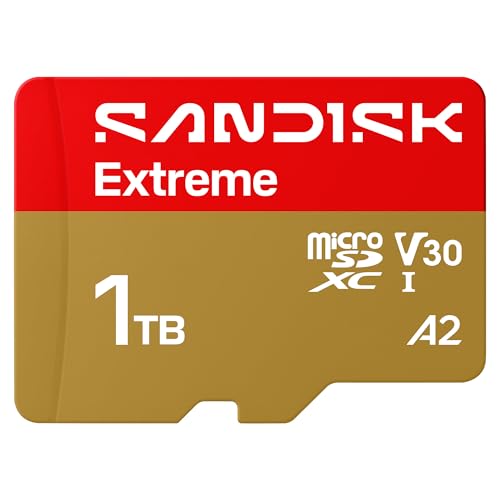
SanDisk 1TB Extreme microSD — Fastest stated reads at 1TB
SanDisk’s second terabyte card in this roundup takes a different emphasis from its Extreme Pro sibling: the listing title leads with read speeds up to 245MB/s, the highest stated figure among the 1TB picks here. In a player, reads at that level are capped by the player’s own UHS-I slot long before the card is the limit — but the card also lives a second life in your desktop reader, and that is where a fast stated read speed repays you: pulling a backup of the full library back to a computer, or verifying a fresh copy, moves at the pace the title promises when the reader keeps up. For listeners who treat the card as the working copy and the computer as the archive, that direction of travel matters as much as the sync going the other way.
The title does not state a write speed for this card, and we will not invent one; its spec box below records that honestly. In practice the Extreme line sits high in SanDisk’s range and bulk copies are brisk, but the disciplined way to choose between this card and the Extreme Pro above is by which stated figures match your habits: documented writes for heavy loaders, documented reads for heavy restorers and re-scanners. Either way you end with a terabyte that swallows a serious collection whole, from a maker whose flash and controllers are its own.
- Capacity: 1TB microSDXC (microSD format, per the listing title)
- Stated read speed: up to 245MB/s
- Stated write speed: Not stated in the listing title — verify with SanDisk documentation
- Adapter: included, per the listing title
- Speed class ratings: Not stated in the listing title — verify with SanDisk documentation
Strengths
- The strongest stated read figure of any 1TB pick in this roundup, which shows up every time the library moves back to a computer.
- Terabyte capacity with the same whole-archive freedom as the flagship pick above it.
- The included adapter keeps older full-size-SD readers in service for desktop transfers.
Trade-offs
- Its write speed is not stated in the title, so a buyer planning one enormous initial load is working from the family’s reputation rather than a printed figure.
- Inside the player, its read advantage over UHS-I rivals is mostly theoretical, since the slot sets the ceiling.
- As with any single-card archive, loss or failure without a backup means the whole library travels into trouble at once.
Best for: terabyte-scale collectors who frequently pull the library back to a computer for backup, editing or re-tagging. Not suited for: a listener who loads music once a year and never restores — the stated read speed would rarely get a chance to earn its keep.

Samsung PRO Plus 1TB microSDXC — Best Samsung flagship option
Samsung’s PRO Plus is the flagship of a line that has spent years as the default recommendation in phones and cameras, and at 1TB it brings the same proposition to a music player: the entire collection, on one card, from the company that manufactured the flash inside it. The title states read speeds up to 180 MB/s and confirms the card arrives with an adapter. That read figure sits between the two SanDisk terabyte cards in stated terms, and in a UHS-I player slot all three are effectively peers; the honest reasons to choose this one are a preference for Samsung’s ecosystem and tools, a good price on the day you shop, or simple brand trust earned from cards you already own.
What the PRO Plus line has historically sold is consistency — sustained behaviour that stays close to its headline numbers across a long copy rather than collapsing after the first few gigabytes — and a music library load is precisely a long copy. We make no claim the title does not support about its write speed, which the listing leaves unstated; but a flagship card whose stated read speed is 180 MB/s and whose family is built for cameras recording continuously is a rational home for a library you intend to keep for years. If your player, phone and camera cards are already Samsung, there is also a small ergonomic pleasure in one brand’s adapters and readers serving everything you own.
- Capacity: 1TB microSDXC
- Stated read speed: up to 180 MB/s
- Stated write speed: Not stated in the listing title — verify with Samsung documentation
- Adapter: included, per the listing title
- Speed class ratings: Not stated in the listing title — verify with Samsung documentation
Strengths
- A full terabyte from the flash manufacturer itself, in its flagship microSD line.
- Stated 180 MB/s reads keep library rescans and computer-side restores moving briskly.
- Adapter in the box, so the same card serves the player and a full-size desktop reader without extra purchases.
Trade-offs
- The title states no write figure, so the pace of the first full-library load is not something the listing itself guarantees.
- Terabyte pricing applies here just as it does to the SanDisk pair; smaller libraries subsidise space they never use.
- Listeners who want every rating printed on the tin — A2, V30 and the rest — will find this title quieter than the Extreme Pro’s.
Best for: Samsung-loyal listeners with a library that has outgrown 512GB and shows no sign of slowing down. Not suited for: a player whose slot or firmware caps recognised capacity below a terabyte — check the player’s manual before spending at this size.

Samsung EVO Plus 512GB microSDXC — Best mid-size value
Most lossless libraries, measured honestly, live between 150GB and 400GB — a few hundred ripped albums, a shelf of high-resolution downloads, room for the collection to keep growing at the pace most people actually buy music. The EVO Plus at 512GB is sized exactly for that listener, and its title states read speeds up to 160MB/s with an SD adaptor included. EVO is Samsung’s mainstream line rather than its flagship, and for audio duty that positioning costs you almost nothing: playback asks so little of a card that the gap between this and the PRO Plus only surfaces during the biggest sync sessions and the deepest rescans, and even there it surfaces in seconds, not minutes.
It also happens to be the card we would hand to a first-time high-resolution player owner who asks what to buy alongside the device. New owners consistently overestimate how exotic their storage needs are, imagining exotic speed requirements, when the reality of the first year is a few hundred albums and a great deal of delighted listening. The EVO Plus absorbs that year without a murmur and the year after it, and its mainstream positioning means replacing or duplicating it later — one for the player, one holding a mirror of the library in a drawer — stays a modest purchase rather than a flagship commitment. Two of these, used as working card and backup, are a more resilient system than one expensive card used alone.
There is a budgeting argument here that deserves to be made plainly. The step from 512GB to 1TB is the most expensive step on this page, and it buys nothing at all for a library that peaks at 300GB — no speed in the player, no longevity worth naming, just empty sectors. The EVO Plus redirects that money toward music, which is the point of the exercise. Buy this card, load everything you own, and if the day comes when it genuinely fills, the library will have doubled on your watch and the upgrade will have earned itself.
- Capacity: 512GB microSDXC
- Stated read speed: up to 160MB/s
- Stated write speed: Not stated in the listing title — verify with Samsung documentation
- Adapter: SD adaptor included, per the listing title
- Speed class ratings: Not stated in the listing title — verify with Samsung documentation
Strengths
- The capacity tier that matches the real size of most lossless collections, at a mainstream rather than flagship price.
- Stated reads of 160MB/s are comfortably beyond anything a player’s slot will request during scans.
- Samsung-made flash in the line most phone and camera owners already know how to buy without anxiety.
Trade-offs
- A collector ripping an entire CD wall in one determined month can outgrow 512GB faster than expected.
- No write speed is stated in the title, so the biggest single sync is timed by experience rather than by a printed number.
- It lacks the top-tier ratings printed on the Extreme Pro’s title, for listeners who like their reassurance itemised.
Best for: the typical lossless listener whose library measures in the low hundreds of gigabytes and grows at a human pace. Not suited for: an archivist digitising thousands of discs, who should start at a terabyte and skip the intermediate step entirely.

Lexar 512GB Silver Plus microSD — Quickest 512GB reader here
Lexar’s Silver Plus makes its case at the same 512GB capacity as the EVO Plus, but with a stated read speed of 205MB/s — the fastest printed figure in this capacity tier — alongside a V30 rating and a UHS-I interface, both named in the title. The 4K mention in its title is camera language, yet the underlying trait, sustained UHS-I throughput with a video-class floor, translates directly into the two jobs a music card actually sweats: the bulk copy and the full rescan. Owners who rotate libraries — loading a genre a month, or maintaining seasonal selections on a player they also use daily — will feel this card’s pace more than owners who load once and listen for a year.
The V30 marking deserves a word of translation for audio buyers, because it is the one rating here that promises something about writes: a V30 card guarantees a minimum sustained write speed suitable for 30MB/s-class video recording. The title does not print a peak write figure, and we do not supply one, but a guaranteed floor is arguably more useful information for a three-hundred-gigabyte sync than a peak the card touches only when empty and cool. Between this and the Samsung at the same size, the choice is refreshingly concrete: Samsung’s ecosystem and adaptor in the box, or Lexar’s higher stated read ceiling and an explicit write floor.
- Capacity: 512GB microSD
- Stated read speed: 205MB/s
- Stated write speed: Not stated in the listing title — verify with Lexar documentation (V30 rating in title)
- Ratings in title: V30, UHS-I interface, 4K
- Adapter: Not stated in the listing title — verify with Lexar documentation
Strengths
- The highest stated read speed at the 512GB tier in this roundup, at 205MB/s.
- A V30 rating in the title gives sync sessions a guaranteed write floor rather than only a peak promise.
- UHS-I interface named outright, matching the slot in effectively every portable player on sale.
Trade-offs
- The title does not mention an included adapter, so owners of full-size-only readers should confirm what is in the box.
- Its speed advantage narrows inside the player itself, where the host slot — not the card — sets the pace.
- 512GB remains 512GB: fast reloading does not change the arithmetic for a library bigger than the card.
Best for: listeners who re-sync and rotate a mid-size library often enough that transfer pace is a weekly experience, not an annual one. Not suited for: set-and-forget owners whose card is written once — they pay for transfer speed they will use a single time.

Lexar 256GB Silver GO microSD — Best compact starter card
Not every player carries an archive. The second player that lives in a gym bag, the travel player loaded with favourites, the first high-resolution player bought to test whether lossless listening earns a permanent place in a life — these want a card that is quick, reputable and sensibly sized, and the Silver GO’s title offers 250MB/s stated reads with 4K, V30 and UHS-I markings at 256GB. That read figure is the highest printed anywhere in this roundup, and while a player’s slot will not use all of it, desktop-side handling of a 256GB library — copying on, backing up, reorganising — is where a small fast card feels genuinely luxurious: the whole library moves in a coffee break.
Two hundred and fifty-six gigabytes is a real library, not a token: five hundred or more FLAC albums, chosen rather than accumulated. For the curated listener that is not a limitation but a description of how they already listen. The discipline this card demands is simply honesty about trajectory — if your shelves are visibly swelling and a ripping project looms, buy the 512GB tier now and save a migration. If your listening is a stable set of beloved records, this is the card that fits the life you actually have, from a flash brand with decades in the business.
- Capacity: 256GB microSD
- Stated read speed: 250MB/s
- Stated write speed: Not stated in the listing title — verify with Lexar documentation (V30 rating in title)
- Ratings in title: 4K, V30, UHS-I
- Adapter: Not stated in the listing title — verify with Lexar documentation
Strengths
- The fastest stated read speed in this entire roundup, in the smallest and most affordable capacity here.
- V30 and UHS-I markings printed in the title give both a write floor and slot compatibility at a glance.
- A curated 256GB library transfers so quickly that reorganising it stops feeling like a chore.
Trade-offs
- The first card in this list that a growing lossless collection can genuinely outgrow within a year or two.
- No adapter is mentioned in the title, which may matter to owners whose computer reader takes full-size cards only.
- DSD-heavy listeners will find 256GB disappears startlingly fast, since DSD albums are several times the size of CD rips.
Best for: curated listeners, second players and travel kits, where the library is a chosen few hundred albums. Not suited for: a large physical collection mid-digitisation — the migration to a bigger card is already visible from here.
Which of These Cards Fits Your Library at a Glance?
| Card | Capacity | Stated read | Stated write | Notable title markings |
|---|---|---|---|---|
| SanDisk Extreme Pro | 1TB | 170MB/s | 90MB/s | A2, V30, U3, adapter included |
| SanDisk Extreme | 1TB | 245MB/s | Not stated in title | Adapter included |
| Samsung PRO Plus | 1TB | 180 MB/s | Not stated in title | Adapter included |
| Samsung EVO Plus | 512GB | 160MB/s | Not stated in title | SD adaptor included |
| Lexar Silver Plus | 512GB | 205MB/s | Not stated in title | V30, UHS-I, 4K |
| Lexar Silver GO | 256GB | 250MB/s | Not stated in title | V30, UHS-I, 4K |
Read the table the way a player would: the capacity column decides what fits, and everything else decides how the chores around listening feel. Notice how many write cells say “not stated” — that is the honest state of these listings, and it is why the V30 markings on the Lexar pair and the Extreme Pro carry weight: a rated floor tells you more about a long sync than an absent peak.
How Should You Size a Card for a Lossless Library?
Start by measuring, not guessing. Point your computer at the folder that holds your music and read its size; then ask how fast it has grown over the past two years, because that growth rate, not today’s total, is what the card must survive. A practical rule is to buy for twice the library you have: a 180GB collection belongs on a 512GB card, a 450GB collection on a terabyte. The doubling is not waste — players index more happily with free space in reserve, cards wear more evenly when they are not run permanently at the brim, and a library with headroom absorbs a new box set or a ripping weekend without an emergency eviction of albums you love.
Format explains most sizing surprises. The same album occupies wildly different space depending on how it was stored: a CD ripped to FLAC might take 350MB, the 24-bit/96kHz download version over a gigabyte, and a DSD version several gigabytes. Listeners migrating from compressed files routinely underestimate their future library by a factor of three, because every re-acquisition arrives in a bigger coat. If your plans include re-buying favourites in high-resolution editions, size the card for the library those plans produce, not the one on your drive today. Conversely, a stable collection of standard-resolution rips that has not grown in years is a known quantity, and sizing tightly to it — the EVO Plus tier — is not false economy but accurate shopping.
One more measurement habit separates satisfied buyers from repeat buyers: weigh the library by file count as well as by gigabytes. A card decision made purely on capacity can still disappoint if the player’s indexing struggles with an enormous track count, and knowing that your library holds nine thousand files rather than merely “about 300GB” tells you to value the small-file behaviour discussed earlier. Both numbers live in the same properties window on your computer; read them together and the right tier usually names itself.
Also count what else shares the card. Some players record, some store firmware files and playlists alongside music, and many listeners keep a spoken-word or podcast folder on the same card. Those tenants are small individually and meaningful collectively on a 256GB card. And keep one copy of everything somewhere else regardless of size: the card in a portable player lives a riskier life than a drive in a drawer, travelling in pockets and bags, and the terabyte cards in this roundup make a backup discipline more important, not less, because more of your musical life rides on a single sliver of plastic.
How Do You Load and Set Up a New Card Properly?
Begin with the player, not the computer. Insert the blank card, find the format command in the player’s settings, and let the player prepare its own card; this guarantees the file system variant and any folder structure the firmware expects, and it eliminates the most common cause of a new card being ignored or misread. Only then connect the player or move the card to a desktop reader for the big copy. Copy in one organised pass, keeping the folder structure you intend to live with — artist, then album, is the arrangement most players’ browsers reward — and resist tidying mid-copy, because a half-moved library confuses both you and the player’s database.
When the copy finishes, let the first scan complete without interruption, even if it takes a while; interrupting an initial database build is how libraries end up with phantom missing albums. Then spot-check the edges: play the first and last album you copied, skip through a gapless live recording across a track boundary, and confirm artwork appears where you expect it. Keep file names and folder names reasonably short, and standardise on one artwork approach, and keep a simple text note in the library folder recording the date of the copy and the card it went to, so future you can reconstruct what happened without guesswork — a single cover image per album folder is the arrangement that gives most players the least trouble. Finally, label the card’s role somewhere outside the player: a note in your backup drive saying which card holds the working library and when it was last mirrored will save real grief on the day something goes wrong.
How Do You Migrate When a Growing Library Outgrows Its Card?
It happens to nearly everyone who starts with a modest card and a serious record habit: one day the sync fails for want of space, and the library must move house. Done well, the migration is an afternoon’s background task. Copy the old card’s entire contents to a folder on a computer — everything, including hidden player databases and playlist files if your player keeps them there — then format the new card inside the player, and copy the folder across in one pass. Resist the temptation to reorganise during the move; a migration that also renames ten thousand files is two projects wearing one coat, and when something sounds wrong afterwards you will not know which project to blame. Reorganise next month, from a position of stability.
Playlists deserve a specific check, because they are the fragile cargo. Some players store playlists as files referencing paths on the card; if the new card preserves the same folder structure, those references survive intact, while a tidied structure silently orphans every entry. After the move, open two or three cherished playlists before you open anything else, and confirm they play end to end. Favourites and ratings kept inside the player’s internal memory travel with the player and need no action; those kept on the card travel with the copy you made, provided you copied the player’s own folders along with the music — one more reason the first step is to copy everything, not just the folders with audio in their names.
Keep the old card, loaded, for a month after the migration. It is simultaneously your backup and your retreat position: if the new card misbehaves in week two, the old library goes back in the slot and the music never stops while you sort the problem out. After that month of probation, the old card can be demoted to second-player duty, camera service or the drawer of spares. Listeners who follow this pattern stop fearing the capacity ceiling, because outgrowing a card becomes a scheduled errand rather than a small emergency — and choosing a first card one tier larger, the recurring advice of this guide, is simply the strategy of scheduling that errand as late as possible.
What Mistakes Do Audio Player Owners Make with Memory Cards?
The classic error is buying capacity by optimism: sizing for the library as it stands, with a ripping project already planned, and meeting the card’s ceiling within the year. The second is chasing read speed as though it were sound quality — paying flagship premiums for figures the player’s UHS-I slot cannot use, while the same money would have bought the capacity that actually changes daily life. A third mistake is treating the card as the only copy. Players get lost, sat on and left in hotel rooms; a library that exists only inside one is a library on loan from luck.
Handling errors follow close behind. Yanking a card mid-write corrupts file systems quietly, and the damage often surfaces weeks later as a track that stops mid-play. Copying music through a bargain-bin reader that overheats and drops the connection produces the same class of wound. And buying suspiciously cheap high-capacity cards from unknown sellers remains the single most reliable way to acquire a card that reports a terabyte and holds a fraction of it — every pick in this roundup comes from the three brands that make their own reputations in flash, bought through their normal listings, which is the whole defence.
Does Card Speed Change the Listening Experience Day to Day?
Once music is playing, no — and it is worth understanding why, because it protects you from overspending. A player buffers audio ahead of playback, reading the file in chunks rather than note by note, so even a modest card keeps the buffer full with enormous margin. The moments speed touches your actual day are transitional ones: the wait after you press the power button on a player that rescans on boot, the scroll through a long album list while the player fetches index data, the search that combs ten thousand sets of tags. These are interface moments, measured in seconds, and they are governed as much by the player’s processor and firmware as by the card. A quick card in a slow player still waits; the card removes its own share of the delay and cannot remove the player’s.
Where card behaviour genuinely shapes the experience is reliability over years. A music card is filled close to capacity and then read for thousands of hours, a duty cycle closer to a tiny archive drive than to a camera card that is emptied nightly. Flash wears on writes rather than reads, so a listen-heavy, write-light life is kind to a card — but the writes that do happen arrive as enormous sync sessions, and a controller that manages wear evenly across a nearly-full card is doing real work on your behalf. This is the practical difference between the branded cards in this roundup and the anonymous alternatives: not today’s benchmark, but the probability that the library still verifies, track by track, three winters from now. Listeners who have watched a cheap card silently scramble a folder of irreplaceable live recordings do not need that argument made twice.
Temperature and handling play their small parts too. A card copying for an hour in a warm reader runs hot, and sustained-write figures assume reasonable conditions; giving a long sync ventilation and a reader that does not cook its media is a cheap form of insurance. Inside the player, heat is a non-issue at audio data rates. What does matter is the humble contact surface: a card swapped between player, adapter and reader weekly accumulates wear on its contacts, and seating a card cleanly rather than forcing it at an angle is the sort of unglamorous care that decides whether a slot still grips the card in year five.
What Should You Know About microSD, Adapters and Player Slots?
Every pick here is a microSD card, because that is the format portable players take; the full-size SD adapters bundled with several of them exist purely to serve desktop readers and laptops whose slots are full-size. An adapter is a passive pass-through — it changes the card’s shape, not its speed — so a card that feels slow in an adapter is telling you something about the reader or the connection, not about the adapter’s electronics, of which there are essentially none. If transfers crawl, test the card in the player over its own cable and in a second reader before blaming the card; more sync misery traces back to elderly USB readers than to any flash in this roundup.
Capacity standards hide one trap worth naming. Cards above 32GB follow the SDXC standard and are formatted exFAT by default, which every modern player expects; the very old players that cap at SDHC and 32GB are now firmly in vintage territory, but if your high-resolution player is an early model, its manual’s maximum card size is a hard fact that outranks any recommendation here, including ours. Firmware updates sometimes raise those ceilings, so a player that refused a large card in 2019 may accept it today. Checking the maker’s support page for your exact model takes five minutes and is the cheapest research in this entire guide — cheaper by far than returning a terabyte card that a beloved older player simply cannot address.
Finally, treat the adapter as a consumable. Adapters are dropped, sat on and left in readers in other cities; a card whose only adapter is missing is not broken, but the small friction of borrowing one each sync is how libraries stop being backed up. The picks that include an adapter in the box start you with a spare ecosystem; owners of the Lexar pair, whose titles do not mention one, may already own several from earlier cards, since adapters accumulate in drawers like charging cables. Any standard microSD-to-SD adapter serves any of these cards — there is no brand pairing to respect.
Final Recommendation
Match the card to the library’s trajectory
and the decision makes itself. If your collection already presses against half a terabyte, the SanDisk Extreme Pro 1TB is the complete answer, with stated writes for the big load and A2 manners for the scans that follow; the SanDisk Extreme and Samsung PRO Plus at the same size serve readers who restore and reorganise from a computer often, or who simply trust Samsung’s flash. The Samsung EVO Plus 512GB is the card most listeners should actually buy — it fits the library most people own, at a mainstream price — while the Lexar Silver Plus rewards those who re-sync constantly, and the Silver GO equips a curated travel library beautifully. For the listener whose entire musical life is finally going portable in one card, the Extreme Pro is where this guide points first, because a library carried whole, and scanned without complaint, is the entire pleasure these players exist to give.
Frequently Asked Questions
Will a faster card make my music sound better?
No. Digital playback either delivers the file’s data correctly or the player reports an error; there is no analogue-style gradation for a card to improve. Speed changes how fast libraries scan, copy and back up. Spend on capacity and reliability first, and let speed be the tiebreaker between cards that otherwise fit.
Does my player need a UHS-II card?
Portable audio players are built around UHS-I slots, and every card in this roundup is UHS-I or, where the title leaves the interface unstated, a mainstream card aimed at that class of device. A UHS-II card would fall back to UHS-I behaviour in such a slot anyway, so there is nothing to gain by seeking one out for a player.
How many albums fit on 512GB, really?
At roughly 350MB for a typical FLAC CD rip, 512GB holds well over a thousand albums; at a gigabyte or more for 24-bit/96kHz downloads, it holds several hundred. Mixed libraries land between those poles. Measure your own folder before buying — ten minutes with a file manager replaces all estimates, including ours.
Should I format the card in the player or the computer?
In the player, at least the first time. The player formats to the file system and layout its firmware prefers, which prevents the recognition and scanning quirks that computer-formatted cards occasionally trigger. Afterwards, ordinary copying from a computer is fine; just avoid reformatting elsewhere unless the player asks for it.
Is it safe to keep my only copy of rare recordings on the card?
It is not safe to keep your only copy of anything on a single small removable card that travels in a pocket. Mirror the library to a computer or drive at home, and treat the card as the portable working copy. The bigger the card, the more this matters — a lost terabyte card is a lost archive.
Why does my player’s library scan take so long on a big card?
Scan time scales with file count and metadata work, not just gigabytes: ten thousand tracks with embedded artwork ask more of the player than five hundred long albums of the same total size. Tidy folders, one artwork image per album and a card with strong small-file behaviour — the A2-marked Extreme Pro is the pick here aimed at exactly that — all shorten the wait.
Can I use the same card in my player and my phone or camera?
You can, and many listeners rotate one card between a player and a phone, but expect friction: each device may add its own folders, and a camera will want to format a card it claims. The arrangement works best when the card’s home is the player and visits elsewhere are read-only — copying music off, never letting another device reorganise or reformat it. If a camera or phone does reformat the card, your copied backup at home is what turns that accident into an inconvenience instead of a loss.
How full should I let the card get before upgrading?
Treat roughly ninety percent as the practical ceiling. Beyond it, sync sessions start failing on box sets, the player’s database has little room to breathe, and every addition becomes an eviction decision. When the library crosses that line, migrate using the steps in this guide while the move is still a choice — a card at ninety-five percent with a new acquisition waiting is how rushed, error-prone copies happen.
Related Guides
Keep exploring storage and portable audio with our guides to the best microSD cards for action cameras, how to choose storage for a portable music setup and the best cards for handheld gaming consoles.


