What's inside
- Key Takeaways
- Quick Picks
- How Did We Choose These Inexpensive Extenders?
- What Does “Inexpensive” Honestly Buy in an Extender — and What Does It Refuse to Buy?
- Which Rooms in a Real House Belong to Which Tier?
- What Should You Check in the First Week Before the Return Window Closes?
- How Do the Six Compare Side by Side?
- How Do You Set Up an Inexpensive Extender So It Actually Works?
- What Mistakes Do Budget Extender Buyers Keep Making?
- Final Recommendation
- Frequently Asked Questions
- Related Guides
As an Amazon Associate I earn from qualifying purchases. This post may contain affiliate links at no extra cost to you.
gizmoverdict.com is reader-supported. When you buy through links on our site, we may earn an affiliate commission.
Where to buy: Each product in this roundup was drawn from the site’s checked pool for the category, and every entry carries a link to the listing where it is sold. At the inexpensive end of the market, listings change contents and revisions frequently, so read the listing’s own description carefully before ordering — what ships matters more than what the product family once was.
The best inexpensive wi fi extenders are bought with a suspicion that deserves respect: that the cheap version of a thing is often the expensive version bought twice. Extenders are the rare category where that suspicion is only half right. A modest extender, honestly matched to a modest job — the garage camera, the guest room, the smart speaker in the kitchen, the doorbell at the far end of the hall — can serve for years without its owner ever discovering its ceiling. The false economy in this category is not buying cheap; it is buying cheap for the wrong room, and then buying again for the right one.
So this roundup is organised by job rather than by price ladder, and it prints no prices at all — deliberately. Prices at this end of the market move constantly, vary by seller, and would tell you less than the architecture does. What separates these six is legible and stable: single-band versus dual-band design, an Ethernet-free wall plug versus a unit with external antennas, a famous long-running model versus a bare listing. Learn to read those differences and you can price the value yourself on the day you buy, in whatever the market is doing that week.
The cast is the value end of three familiar houses. TP-Link contributes three: two single-band N300 units and one dual-band AC750 with two external antennas named in its title. NETGEAR contributes its long-running Nighthawk EX3700, with up to 1,000 square feet and 750 Mbps stated in its title. D-Link contributes two: an AC750 mesh plug-in wall unit, and one listing whose title gives the brand and very little else — a pick this guide includes with its eyes open and its caveats printed in full, because at this end of the market, learning to evaluate a thin listing is itself a buying skill.
Key Takeaways
- Inexpensive extenders fail by mismatch, not by cheapness: a single-band N300 unit is a perfectly good servant for smart devices and guest rooms, and a poor master for a work-from-home desk.
- Dual-band is the one upgrade that reliably matters at this level — the AC750 picks can serve devices on 5GHz locally while the single-band picks cannot.
- External antennas, named in the TP-Link RE205’s title, are worth real money in weak-signal spots because antenna position is half of what an extender is.
- The NETGEAR EX3700’s long production life is a value feature in itself: a fully known quantity with no surprises left in it.
- One listing in this roundup states almost nothing beyond its brand; its entry teaches how to verify a thin listing rather than pretending the facts exist.
Quick Picks
| Pick | Badge | Why it is here |
|---|---|---|
| TP-Link N300 WiFi Extender RE105 | Best simple plug-in | A single-band N300 signal booster for the smart-device long tail — cameras, speakers, plugs — in a home’s weak corners. |
| TP-Link AC750 Wi-Fi Range Extender RE205 | Best dual-band value | Dual-band AC750 repeating with two external antennas in its title — the most complete inexpensive package here. |
| TP-Link N300 WiFi Extender TL-WA855RE | Best proven N300 | The long-serving N300 unit whose title states coverage up to 800 sq. ft. — the known quantity of the single-band lane. |
| NETGEAR Nighthawk WiFi Extender EX3700 | Best proven all-rounder | Title figures of up to 1,000 sq ft and 750 Mbps from NETGEAR’s enduring entry-level Nighthawk extender. |
| D-Link WiFi Range Extender | Verify-first pick | A D-Link extender whose listing title states the brand alone — included with a full guide to checking what it actually is before buying. |
| D-Link DAP-1530-US AC750 Mesh Plug-In Extender | Best mesh-mannered value | An AC750 dual-band mesh plug-in wall booster, for a one-name network feel at the inexpensive end. |
How Did We Choose These Inexpensive Extenders?
The first screen was job coverage. The inexpensive end of the extender market serves four recurring jobs — feeding the smart-device long tail, rescuing a guest or spare room, stretching coverage to a garage or garden-adjacent space, and giving one light-use desk a workable connection — and the pool was built so each job has at least one honestly matched pick, rather than six versions of the same wall plug ranked by trivia.
The second screen was architecture, because at this level architecture is destiny. Single-band N300 units and dual-band AC750 units look similar on a shelf and behave like different species in a home: the dual-band picks can converse with nearby devices on 5GHz while relaying, the single-band picks hold one conversation on one band. Neither is a defect; both are definitions. The entries below state which species each pick is, in the first lines, because an inexpensive purchase made with the species in view is rarely regretted.
The third screen was verifiability. Where a listing title states a figure — 800 square feet, 1,000 square feet, 750 Mbps, two external antennas — the guide prints it and labels it as the maker’s claim. Where a title states almost nothing, as one here famously does, the guide refuses to furnish the gap from imagination and instead turns the entry into a verification exercise. That discipline is worth more at the inexpensive end than anywhere else in networking, because thin listings cluster exactly where the prices are thinnest.
Finally, no pick was admitted on cheapness alone. Every unit here comes from a manufacturer with a real support presence, because an extender is infrastructure — it will be troubleshooted at midnight, by someone tired — and the difference between a documented product and an anonymous one is the difference between a fixable problem and a replacement purchase.
What Does “Inexpensive” Honestly Buy in an Extender — and What Does It Refuse to Buy?
It buys reach, honestly delivered. Every pick on this page will take a router’s network and make it usable in a place it previously was not, and for a large class of devices that is the entire requirement. Smart plugs, cameras, speakers, thermostats, doorbells and the whole quiet long tail of the connected home ask for presence, not pace: a steady, modest connection they can hold all day. A single-band extender sited well gives them exactly that, and will be thanked with years of invisibility.
It buys less well when the room’s demands grow a clock. Video calls, cloud work, game downloads and large uploads all notice the difference between a single-band relay and a dual-band one, and notice it more at the evening peak when the neighbourhood’s air is busy. This is not snobbery about standards; it is the arithmetic of one radio holding every conversation in turn. The inexpensive buyer’s most valuable skill is therefore prophecy: knowing whether the spare room is a spare room forever, or a home office in waiting. Buy for the room’s future and the cheap extender is a bargain; buy for its present and repurchase later, and it was the expensive one all along.
It also buys a particular kind of insurance that expensive gear cannot: replaceability without grief. A household that loses a flagship extender to a lightning strike or a toddler has a bad week; a household that loses an inexpensive one has a minor errand. In homes with volatile power, curious children or a dog with opinions about hallway objects, that replaceability is a rational design criterion, and it belongs in the value calculation beside the radios.
What inexpensive refuses to buy, at any of these six, is exemption from placement. A flagship extender in the wrong outlet loses to a budget extender in the right one, and the budget end forgives bad placement least of all, because its radios have the least margin to waste. The survey in this guide’s setup section is therefore not a premium ritual — it is the mechanism by which an inexpensive purchase becomes a sufficient one. Spend the walk, save the upgrade.
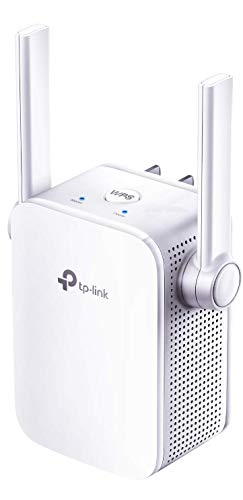
TP-Link N300 WiFi Extender RE105 — Best simple plug-in
The RE105 is the purest expression of the inexpensive extender idea: an N300 single-band signal booster from TP-Link, described in its title with the unpretentious phrase “for Home.” Its design centre is the wall plug in the weak corner — the hallway where the camera drops, the utility room where the smart washer sulks, the far bedroom where a speaker stutters — and its proposition is that a large share of home networking misery is caused by devices that need almost nothing, in places that get almost nothing.
Single-band N300 needs its honest translation, because it defines both the pick’s virtue and its border. One band, the 2.4GHz band — the travelling band, the one that reaches — and a class figure from the Wi-Fi generation before dual-band became the default. For the long tail of smart devices, which overwhelmingly live on 2.4GHz and sip data, this is not a limitation at all; it is a specification matched to its clientele with unusual precision. For a laptop on a video call, the same specification is a ceiling that will be met within the hour.
The RE105 therefore asks its buyer one question, and rewards an honest answer: is this room’s population things, or is it people working? Things — buy it, site it where the router’s signal is still respectable, and forget it for years. People working — walk one entry down to the dual-band picks, where the same money’s neighbourhood buys a fundamentally roomier architecture. This guide’s respect for the RE105 is genuine precisely because its border is so clearly drawn.
A last virtue belongs to its simplicity: there is very little to configure and therefore very little to misconfigure. In homes where the network’s administrator is reluctant, absent or fourteen, a booster that joins the network and gets on with it has a social value no benchmark records. Not every purchase should require a household’s most technical member to be present, and this one does not.
There is one more population this unit serves quietly well: the rental and the short tenancy. A tenant who cannot run cable, cannot replace the router and may leave within the year needs exactly this shape of solution — inexpensive, plug-in, portable to the next address, and adequate for the devices that make a rental feel connected. The RE105 will serve three successive flats without complaint, and its total cost of ownership across those years is the kind of arithmetic the inexpensive lane exists to make possible.
- Mode: WiFi extender / signal booster (repeater)
- Wireless class: N300 single-band, per the listing title
- Band: 2.4GHz implied by the N300 class — verify with TP-Link documentation
- Ethernet port provision: Not stated in the listing title — verify with TP-Link documentation
- Coverage figure: Not stated in the listing title — verify with TP-Link documentation
Strengths
- Specification precisely matched to the smart-device long tail it serves
- Simple setup with almost nothing to misconfigure
- TP-Link’s support and documentation behind a budget purchase
Trade-offs
- Single-band design is a hard ceiling for calls, work and downloads
- No 5GHz local service for the devices nearest it
- Coverage and port details sit outside the title and need verification
Best for: a weak corner populated by smart devices — cameras, speakers, plugs — that need presence rather than pace. Not suited for: a desk where video calls happen daily; the dual-band picks below exist for that room.

TP-Link AC750 Wi-Fi Range Extender RE205 — Best dual-band value
If one pick in this roundup deserves the phrase “the inexpensive extender to buy when you can only buy one,” it is the RE205. Its title states the two facts that matter most at this level in a single line: AC750 dual-band repeating, and two external antennas. The first puts it a species above the single-band picks — able to relay and to serve local devices across both bands. The second gives its owner the oldest and cheapest performance tool in radio: antennas that can be positioned and aimed.
External antennas deserve their paragraph, because at the weak edge of a home they are worth more than class figures. A signal arriving faintly is a signal whose direction matters, and adjustable antennas let the owner hunt for the orientation that hears the router best and serves the room best, rather than accepting whatever compromise a sealed plastic shell decided in a factory. In the doorway between coverage and no coverage — the exact territory inexpensive extenders are bought for — that adjustability routinely decides whether the installation works at all.
The AC750 class is the value lane’s honest ceiling and should be bought as such. It will run a far room’s streaming, browsing and calls with room to spare on a normal evening, and it will not pretend to be a workstation’s dream or a gaming den’s equal. Within those borders, the RE205 is the most complete inexpensive package in this roundup: dual-band architecture, aimable antennas, and a major maker’s documentation behind it.
Cross-shoppers weighing it against the D-Link DAP-1530 below are choosing between two philosophies at the same class: visible antennas and classic repeater manners here, mesh behaviour and a sealed plug-in form there. Households whose dead zone sits at the edge of audibility should choose the antennas; households whose pain is the two-network shuffle should choose the mesh manners. Both are inexpensive; they are inexpensive in different currencies.
Owners of older houses should note a specific sympathy between this unit and their walls. Thick plaster, brick partitions and the long floor plans of pre-war construction all produce the faint, directional signal pattern that aimable antennas address — the router audible in one corner of the room and absent in another. In such a house the RE205’s hunt for orientation is not fiddling; it is the main engineering act of the installation, and it routinely outperforms the sealed units’ take-it-or-leave-it radiation.
- Mode: dual-band Wi-Fi range extender (repeater)
- Wireless class: AC750, per the listing title
- Antennas: two external antennas, stated in the listing title
- Ethernet port provision: Not stated in the listing title — verify with TP-Link documentation
- Coverage figure: Not stated in the listing title — verify with TP-Link documentation
Strengths
- Dual-band architecture serves local devices on 5GHz as well as relaying
- Two external antennas can be aimed — a genuine edge-of-coverage advantage
- The most complete package at the inexpensive end of this roundup
Trade-offs
- AC750 class still caps a demanding desk’s ambitions
- Visible antennas are a look not every hallway wants
- Port and coverage specifics require verification beyond the title
Best for: a far room at the edge of the router’s audibility, where aimable antennas and dual-band service both earn their keep. Not suited for: a latency-critical gaming setup — no inexpensive repeater is, and this room deserves a cable conversation instead.

TP-Link N300 WiFi Extender TL-WA855RE — Best proven N300
The TL-WA855RE is one of the longest-serving inexpensive extenders in the market’s history, an N300 unit whose title adds the one figure its sibling above does not state: coverage up to 800 square feet. That figure, read correctly, is the product’s autobiography. It describes a modest territory — a flat’s far half, a floor’s weak end, a cottage — served by a modest radio, and the model’s extraordinary longevity says that modest bargain has been kept in an enormous number of real homes.
Comparing it with the RE105 is this roundup’s lesson in how to read a mature product family. Both are TP-Link N300 single-band boosters; the differences are of vintage, stated claims and production history rather than of kind. The TL-WA855RE’s case is the case of the known: years of units in the field, every behaviour documented by the crowd, no revision of its character left to surprise anyone. In the inexpensive lane, where the buyer’s scarcest resource is often confidence rather than money, that knownness is a feature with real weight.
The 800-square-foot claim needs the guide’s standing translation, applied gently because the figure is modest to begin with. In open construction, a well-sited unit can serve a territory of that order; through masonry, foil insulation and the other usual suspects, expect less, and let the survey — not the box — set the expectation. What the figure usefully communicates is intent: this is a small-territory instrument, and a buyer with a large house and three dead zones should read it as the product honestly declining the job.
Its border is the same one drawn for the RE105, and it is drawn in the same place: things, yes; a working person’s whole day, no. Within that border, the TL-WA855RE might be the most defensible purchase on this entire page — the cheapest adequate answer to a defined, modest problem, from a maker who will still answer for it in five years.
There is a generational honesty to admire in this model’s persistence. It was designed when the far room’s population was a laptop and a phone, and the smart-home wave has since filled that room with a dozen quiet clients that suit its band and its patience even better than its original clientele did. Products occasionally become more appropriate with age as the world moves toward them; the humble single-band booster, built for presence over pace, is one of them, and its sales longevity is the market noticing.
- Mode: WiFi range extender / signal booster (repeater)
- Wireless class: N300 single-band, per the listing title
- Coverage figure in title: up to 800 sq. ft.
- Ethernet port provision: Not stated in the listing title — verify with TP-Link documentation
- Antenna arrangement: Not stated in the listing title — verify with TP-Link documentation
Strengths
- Years of production — among the most thoroughly known extenders sold
- Stated coverage figure honestly sizes it for a modest territory
- The cheapest adequate answer to a small, defined coverage problem
Trade-offs
- Single-band ceiling, shared with the RE105: fine for things, wrong for a workday
- Coverage claim assumes kind construction and a good site
- Long production runs can span revisions — confirm what the listing ships
Best for: a small home or flat with one weak end and a population of ordinary devices. Not suited for: a large house with several dead zones — the stated figure itself declines that job, and mesh is the honest destination.
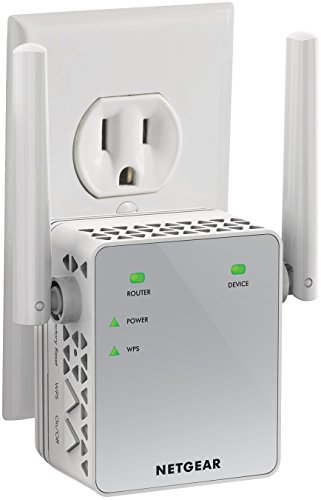
NETGEAR Nighthawk WiFi Extender EX3700 — Best proven all-rounder
The EX3700 brings the Nighthawk name to the inexpensive lane, and its title carries the roundup’s most complete set of stated figures in this class: coverage up to 1,000 square feet, and a 750 Mbps class. It has been NETGEAR’s entry-level answer for years, and like the TL-WA855RE it sells partly on the strength of a record — a model whose behaviour in real hallways is a matter of public knowledge, wearing a badge from the market’s other great house.
Its figures place it a step above the single-band picks in ambition: the 750 Mbps class is a combined dual-band-era figure, and the coverage claim is the largest stated in this roundup. Read with the usual discipline — ideal conditions, kind walls — they describe the top of the inexpensive lane rather than a promise, and the EX3700’s real distinction is the combination of those ambitions with Nighthawk-line polish in setup and presentation. For a household that finds TP-Link’s budget line plain, this is the same money’s neighbourhood spent in the other house’s style.
The honest generational note: this is a design from an earlier moment, and its ceiling is the inexpensive lane’s ceiling regardless of the badge. A device-dense modern far room at the evening peak will find that ceiling, as it would find the RE205’s. What the EX3700 offers instead is the most mainstream version of the inexpensive extender ever sold — the one a neighbour has, the one every forum has seen, the one whose every oddity has a published remedy.
Buyers choosing between this and the RE205 are choosing the roundup’s two philosophies of value: stated figures and a famous name’s polish here, external antennas and a newer position in its maker’s line there. If the dead zone is faint and directional, antennas win arguments that badges cannot. If the dead zone is ordinary and the household values the mainstream, the EX3700 is the mainstream, and there is no shame — and much sense — in buying exactly that.
Gift and hand-me-down buyers form a quiet constituency for this model, and their logic is sound. An EX3700 given to a parent, a student or a first flat arrives with a name the recipient can search, instructions the internet has memorised, and behaviour no one has to guess at. In the inexpensive lane, where the recipient’s technical confidence is often the real constraint, a famous model is a form of documentation — and documentation, as this guide keeps arguing, is half the product.
- Mode: Nighthawk WiFi extender (repeater)
- Coverage figure in title: up to 1,000 sq ft
- Class figure in title: 750 Mbps
- Wireless band detail: Not stated in the listing title — verify with NETGEAR documentation
- Ethernet port provision: Not stated in the listing title — verify with NETGEAR documentation
Strengths
- The most complete stated figures in this roundup’s class
- Nighthawk-line polish and a long, public track record
- The mainstream inexpensive extender — every behaviour has a known remedy
Trade-offs
- Earlier-era design with the inexpensive lane’s usual ceiling
- Coverage and class figures are ideal-condition claims
- Band and port specifics need verification in NETGEAR’s documentation
Best for: a household wanting the proven, mainstream inexpensive extender for one ordinary dead zone. Not suited for: a faint, directional dead spot at the property’s edge — the RE205’s aimable antennas argue that case better.

D-Link WiFi Range Extender — Verify-first pick
This entry is different, and the difference is the lesson. The verified listing title for this D-Link extender states the brand and essentially nothing else — no class, no band, no coverage figure, no port. This guide includes the pick because the pool assigned it and because the situation it represents is one every inexpensive-lane shopper will meet: a recognised maker’s product behind a listing too thin to judge. What follows is not a review of unknown facts but a method for handling exactly this shelf.
The method has three steps, and they generalise to every thin listing in the category. First, establish the model: the listing’s own detail section, the manufacturer’s catalogue and the product’s documentation will identify what this unit actually is — its class, its bands, its intended territory — and a purchase made before that identification is a purchase of a lottery ticket. Second, establish the revision and contents being shipped, because long-lived budget models change inside while their listings stand still. Third, weigh the price of your uncertainty honestly: a thin listing from a real maker, verified into a known model, can be a legitimate bargain; the same listing bought unverified is a gamble wearing a brand’s coat.
Why would a guide include such a pick at all, beside rivals whose facts are printed in full? Because the inexpensive lane is where thin listings live, and a roundup that pretended otherwise would abandon its readers at the exact shelf where guidance matters most. D-Link is a genuine networking house with a long history in this category; the uncertainty here is the listing’s, not the maker’s. Treat the entry as this guide treats it — as a verify-first candidate whose value can only be settled at the listing, by the method above — and it earns its place as the roundup’s honesty exercise.
What this guide will not do is furnish the missing facts from the brand’s general reputation. To print a class or a band for this unit would be to invent the very precision the entry exists to warn against. If the verification comes back showing a dual-band unit in good standing, it competes with the RE205 and the DAP-1530 on their turf; if it shows a single-band unit, it competes with the N300 pair. Either way, the buyer who verifies knows which competition they have entered — and that knowledge, at this end of the market, is most of the product.
A word about what verification cannot do, so the method is not oversold: it identifies the product, but it cannot identify the individual unit’s condition, and at the inexpensive end, condition is a real variable — remaining stock, returns recirculated, units of different ages sharing a listing. Read the seller’s terms with the same care as the model’s specifications, and treat a price that seems to contradict the verified model’s standing as information rather than luck. The method’s promise is narrower and sufficient: you will know what you are buying, which is the precondition of every good purchase in this lane.
- Maker: D-Link, per the listing title
- Product type: WiFi range extender, per the pool’s verified categorisation
- Wireless class: Not stated in the listing title — verify with D-Link documentation
- Bands: Not stated in the listing title — verify with D-Link documentation
- Coverage figure: Not stated in the listing title — verify with D-Link documentation
Strengths
- A genuine networking maker’s product in the inexpensive lane
- Can represent real value when the listing is verified into a known model
- Its entry doubles as the method for judging any thin listing in this category
Trade-offs
- The listing title alone cannot tell you what the unit is — verification is mandatory
- Revision and contents must be confirmed before the purchase means anything
- Every rival here can be judged from its title; this one cannot
Best for: a careful buyer willing to identify the exact model at the listing before spending. Not suited for: a one-click purchase made on the brand’s name alone — that is precisely the habit this entry exists to break.

D-Link DAP-1530-US AC750 Mesh Plug-In Extender — Best mesh-mannered value
The DAP-1530 closes the list with the inexpensive lane’s other philosophy made concrete: an AC750 dual-band signal booster in a plug-in wall form, with mesh in its title. Where the RE205 spends its value on antennas, this unit spends its on manners — the mesh-style, single-network experience that makes an extended house feel like one home rather than a router’s territory plus an annex with its own name and its own moods.
That makes it the natural rival to the RE205 for the dual-band value crown, and the choice between them is the roundup’s cleanest fork. Dead zone at the edge of audibility, signal arriving from a known direction: the RE205’s antennas. Dead zone of ordinary depth, in a house whose occupants roam and whose devices cling: the DAP-1530’s mesh behaviour. Neither answer is more advanced; they are answers to different complaints, and the survey tells you which complaint is yours.
The plug-in wall form carries its usual honest trade. It installs in minutes, shows nothing, and lives exactly where the halfway rule so often wants a unit — a hallway outlet. It also lives at outlet height, hostage to outlet placement, behind whatever furniture the room eventually pushes against the wall. D-Link’s long history in this category counts in its favour here: the plug-in booster is a form the house has made for years, and the model arrives with a real maker’s documentation behind a budget purchase, which this guide has already argued is half the product at this level.
For the household whose network pain is behavioural — the phone that will not let go of the router, the laptop manually re-joined at the desk, the two network names nobody can explain to guests — this is the inexpensive pick aimed at the actual pain. Radios rescue rooms; manners rescue households, and at this end of the market, getting both problems distinguished before buying is worth more than any single specification on the page.
One household type should shortlist this unit immediately: the one whose router and extender will be administered by different generations. Mesh manners and a sealed plug-in form minimise the number of decisions any administrator must make or remake — no antennas to knock askew, no second network name to explain to a grandparent, no settings archaeology after a power cut. In the inexpensive lane, where support is a family’s internal affair, that administrative lightness is a genuine specification.
- Mode: AC750 mesh plug-in wall signal booster / range extender
- Wireless class: AC750 dual band, per the listing title
- Form: plug-in wall unit, per the listing title
- Model: DAP-1530-US, per the listing title
- Coverage figure: Not stated in the listing title — verify with D-Link documentation
Strengths
- Mesh manners give a one-network feel at the inexpensive end
- Dual-band AC750 service for the far room’s ordinary workload
- Plug-in form installs in minutes and disappears into a hallway
Trade-offs
- No external antennas to aim at a faint, directional signal
- Outlet height and outlet placement govern its position
- Coverage figure is not stated in the title — expectations must come from the survey
Best for: a roaming household whose pain is the two-network shuffle, cured at the value end. Not suited for: the faintest edge-of-range dead spot — the RE205’s antennas were designed for that argument.
Which Rooms in a Real House Belong to Which Tier?
Walk the house room by room and the tiers assign themselves. The garage and the garden-facing rooms: single-band territory, populated by openers, cameras and a speaker, all of them patient. The guest room and the spare room: single-band on weekdays, dual-band on the weekends when a visiting relative tries to work from the bed — a genuinely hard call that the household’s hospitality habits must settle. The kitchen and the family room’s far corner: dual-band, because televisions and tablets gather there and the evening peak is real. The home office, in any of its forms — desk in a bedroom, converted closet, barn studio: dual-band at the minimum, and a serious conversation about a cable at the honest maximum.
The exercise matters because inexpensive purchases are usually made for “the house” in the abstract, and houses do not use Wi-Fi — rooms do, at specific hours, for specific work. A buyer who has named the room, its population and its peak hour has done nine-tenths of the selection before opening a single listing. The remaining tenth is brand temperament and the day’s prices, which is exactly the proportion those things deserve.
One room deserves a special warning: the room that is about to change. The nursery becomes a study; the spare room becomes the office the month a job goes remote; the garage becomes a workshop with a streaming habit. Inexpensive extenders are bought for the house as it is and live in the house as it becomes, so the buyer with a foreseeable change on the calendar should buy one tier above the present need — the single case where this guide recommends spending ahead of the room.
What Should You Check in the First Week Before the Return Window Closes?
An inexpensive extender earns a structured first week, because its failure modes are all detectable early and its return window is not. Day one: the survey-driven placement, tested with the room’s real workload at the real worst hour, not with a midday speed test that flatters everything. If the room fails that audit, move the unit before judging it — one outlet closer to the router cures more installations than any setting in any menu.
Midweek: the roaming audit, if the household roams. Walk the boundary between router and extender territory on a call, twice, at a natural pace. Note where devices cling and where they hand over, and if the behaviour is bad, try the other naming arrangement — same name versus second name — while the experiment is still free. Also check the quiet citizens: the camera, the doorbell and the plug that live nearest the extender should all be present and reporting, because an extender re-siting can adopt or orphan them silently.
End of week: the honesty audit. Ask whether the room is actually served — calls held, streams steady, devices present — and whether the household has stopped thinking about the network in that room. That disappearance of attention is the product working. If instead the room has become a topic, the mismatch is real, and the return window is the cheapest exit the category offers: take it, move one tier in the direction the evidence points, and count the week as tuition rather than loss.
How Do the Six Compare Side by Side?
| Pick | Architecture | Class | Stated figure in title | Choose it when |
|---|---|---|---|---|
| TP-Link RE105 | Single-band booster | N300 | None stated | The weak corner holds things, not workers |
| TP-Link RE205 | Dual-band, external antennas | AC750 | Two external antennas | The signal is faint and directional |
| TP-Link TL-WA855RE | Single-band booster | N300 | Up to 800 sq. ft. | You want the longest-proven N300 |
| NETGEAR EX3700 | Nighthawk extender | 750 Mbps class | Up to 1,000 sq ft | You want the mainstream name and record |
| D-Link extender | To be verified at listing | Not stated in title | None stated | You will verify the model before buying |
| D-Link DAP-1530 | Dual-band mesh plug-in | AC750 | Mesh plug-in form | The pain is roaming, not reach |
One column the table cannot carry is time. The two N300 veterans and the EX3700 have each been sold for years, which means their listings aggregate an unusual amount of public experience; the newer arrivals carry less history and correspondingly more uncertainty per purchase. At the inexpensive end, where the absolute sums are small, that uncertainty is a legitimate thing to spend a little extra to avoid — which is why the proven picks anchor this roundup and the verify-first pick is taught as a method rather than merely listed as a product.
The table’s spine is the architecture column. Price will fluctuate and listings will revise, but single-band versus dual-band, antennas versus manners, proven versus verify-first — those are the durable facts of this lane, and they are the ones worth deciding on.
How Do You Set Up an Inexpensive Extender So It Actually Works?
The procedure costs nothing and is worth more than the difference between any two picks on this page. First, survey: carry a phone on a call from the router toward the dead room, and mark where the call first degrades and where it was last flawless. The extender belongs near the flawless mark — halfway by signal, which is rarely halfway by floor plan. An inexpensive extender placed inside the dead zone will repeat the dead zone, faithfully and at low cost, and its owner will blame the price for a placement error.
Second, configure beside the router, where conditions are perfect, then relocate. Give the unit its network, choose the single-name arrangement if the model offers it, and only then carry it to the surveyed outlet. Third, aim what can be aimed: on the RE205, spend real minutes on antenna orientation, testing the room after each adjustment, because at the edge of coverage those minutes are the installation. On plug-in units, resist the hidden outlet behind the sofa; a visible hallway socket at the surveyed point is the correct address even when it is less tidy.
One more placement resource costs nothing and is chronically overlooked: the router’s own position. If the router can be moved even a few feet — out of the cabinet, off the floor, away from the metal appliance it currently hugs — the dead zone the extender must cure may shrink by a room, and an inexpensive unit’s whole career changes with it. Always spend the router’s free feet before spending money on the extender’s paid ones; the two adjustments compound, and the first is free.
Finally, audit at the worst hour with the room’s real workload, and write down what won — which outlet, which orientation, which name. Inexpensive extenders get unplugged, moved and factory-reset more than any other networking gear, because nobody treats them as infrastructure. The household that documents the installation treats its budget extender like infrastructure, and gets infrastructure behaviour out of it for years.
What Mistakes Do Budget Extender Buyers Keep Making?
The first is buying the single-band unit for the working room. The saving is real and the regret is scheduled: the first full week of video calls from that desk will spend it. Read the architecture column before the price column — the species of the extender decides which rooms it can serve, and no discount changes a species.
The second is the reverse snobbery: assuming the inexpensive lane cannot contain a correct purchase, and overspending on a flagship for a garage camera. Headroom that no device will ever request is not quality; it is waste wearing a spec sheet. The picks here exist because the modest jobs are real jobs, and a correctly matched N300 serving a smart plug for six years is a better purchase than a flagship doing the same work at a multiple of the commitment.
A fourth mistake is chaining two inexpensive extenders to reach a room neither could serve alone, on the theory that two cheap relays equal one good system. They equal a slower, stranger network: each relay compounds the single-band arithmetic, and the far room ends up covered in name and starved in fact. One dual-band unit at the right outlet, or an honest step up to mesh, beats the daisy chain at the same total commitment — the chain is the one arrangement in this guide with no constituency at all.
The third is buying the listing instead of the product — the habit the D-Link entry exists to break. At this end of the market, listings are thin, revisions drift, and brand names get asked to carry weight that only a verified model can carry. Two minutes of verification is the cheapest performance upgrade in the entire category, and it is available on every purchase, including the five whose titles did state their facts.
Final Recommendation
Decide by the room, and the lane will decide itself. A weak corner full of smart devices: the RE105, or the TL-WA855RE where a proven record and a stated territory are worth having. A far room at the edge of audibility: the RE205, whose antennas are the inexpensive lane’s one true range tool. A household tired of two network names: the DAP-1530 and its mesh manners. A buyer who wants the mainstream and its public record: the EX3700. And a buyer facing a thin listing: verify first, by the method in the D-Link entry, and let the verified model choose its own rivals. Spend the survey before you spend anything else — because at this end of the market, the difference between the cheap extender that serves for years and the one bought twice is almost never the extender, and almost always the afternoon its owner did or did not spend placing it.
Frequently Asked Questions
Is a single-band N300 extender ever the right buy?
Yes — for the large population of devices that need presence rather than pace. Cameras, speakers, plugs, thermostats and doorbells live on the 2.4GHz band and sip data; a well-sited N300 unit serves them for years. It becomes the wrong buy when a person works in the room: video calls, large downloads and cloud tools meet its ceiling quickly. The question is never the extender’s quality but the room’s population.
Why does this guide print no prices for an “inexpensive” roundup?
Because at this end of the market, printed prices rot faster than any other fact on the page — they vary by seller, season and stock, and a figure quoted here would mislead within weeks. The durable content of “inexpensive” is architectural: which species each unit is, what its stated claims are, and which jobs it can honestly do. Judge the day’s prices at the listings, with the architecture already understood, and the value judgement will be yours and current.
What is the one upgrade worth paying for at this level?
Dual-band. Moving from a single-band N300 design to a dual-band AC750 design changes the species of the product: the extender can serve nearby devices on 5GHz while relaying on both bands, and the far room’s ceiling rises from “things” to “people working moderately.” Beyond that step, the inexpensive lane’s returns diminish quickly — antennas help in directional cases, mesh manners help roaming households, and everything else is refinement.
Are the coverage figures on these boxes believable?
As ambitions under kind conditions, yes; as promises for your house, no. The stated figures here — up to 800 square feet, up to 1,000 square feet — assume open construction and a good site. Masonry, metal and foil-backed insulation all tax them heavily. Use the figures to understand each product’s intended territory, then let your own survey, walked with a phone, set the real expectation.
Can an inexpensive extender handle a home office?
A light one, with the right pick. Judge “light” by the calendar rather than the job title: a desk used for calls and documents on weekdays, idle on weekends, is a lighter load than a hobbyist’s gaming corner used nightly, whatever the payslips say. The extender serves hours and habits, not professions. A dual-band unit — the RE205 or the DAP-1530 — sited well will carry a day of calls, documents and browsing respectably. A heavy one — constant large uploads, multiple simultaneous video streams, latency-critical work — exceeds the lane’s honest ceiling, and the money is better spent one tier up or, better, on a cable to that desk. The lane’s virtue is adequacy; asking it for excellence is how inexpensive purchases become expensive ones.
Two rooms need help. Should I buy two inexpensive extenders?
Only if the rooms fail in the same direction from one good relay point, or if each can be served by its own unit repeating the router directly without overlapping the other. Two rooms failing in opposite directions, served by relays that can hear each other, is the daisy-chain pattern this guide warns against in its mistakes section. Price a small mesh kit before committing to the second extender; at the point where a household needs two relays, the mesh system’s coordinated design usually wins on behaviour for a comparable total commitment.
How long should an inexpensive extender last?
Years, if it is matched to its job and sited once, well. These are simple devices with few failure modes, and the long production histories of the TL-WA855RE and EX3700 exist because units stay in service. The commonest cause of early replacement is not failure but mismatch — a unit bought for the wrong room being retired for the right one — which is a purchasing error, not a product lifespan, and the one this guide most hopes to prevent.
Related Guides
For the placement method in full, read how to place a Wi-Fi extender for maximum range; households discovering their problem is bigger than one room should compare when a mesh system beats a cheap extender, and anyone weighing the next tier up will find mid-range WiFi 6 extenders worth the step useful.