What's inside
- Where to buy
- Key Takeaways
- Quick Picks
- How did we choose these two-cartridge printers?
- Which of the best 2 cartridge printers fits your actual printing life?
- Why is the two-cartridge class shrinking?
- How do you work out whether two cartridges suit your household?
- How do you keep a two-cartridge printer’s costs under control?
- What really happens inside a tri-colour cartridge?
- Who is the two-cartridge printer genuinely perfect for?
- What about compatible and refilled cartridges?
- How do you set up a two-cartridge printer for a relative who lives elsewhere?
- What is the environmental ledger of the two-cartridge design?
- How long will a two-cartridge printer last?
- How do two-cartridge printers handle photographs, honestly?
- What should you buy alongside a two-cartridge printer?
- How does the class serve students and shared houses?
- What changes when a two-cartridge household starts working from home?
- How do you troubleshoot the class’s three classic complaints?
- How should you read a two-cartridge printer’s box in the shop?
- What is the kindest way to retire a two-cartridge printer?
- Comparison table
- What mistakes do two-cartridge printer buyers keep making?
- Final Recommendation
- Frequently Asked Questions
- Related Guides
As an Amazon Associate I earn from qualifying purchases. This post may contain affiliate links at no extra cost to you.
gizmoverdict.com is reader-supported. When you buy through links on our site, we may earn an affiliate commission.
Where to buy
A transparency note that shapes this whole guide: the classic two-cartridge printer — one black cartridge, one tri-colour cartridge, nothing else to manage — is a shrinking class, sold increasingly through general retailers, marketplace listings and remaining stock rather than the verified listings our pool tracks. Four of the six picks below are therefore covered in prose only, so you can search them by exact model name wherever you prefer to shop. The final two picks are linked, verified listings — and they are labelled, repeatedly and without embarrassment, as what they are: the nearest modern alternatives (a single-toner laser and a tank inkjet) for readers who discover, somewhere in these pages, that the two-cartridge idea matters more to them than the two-cartridge hardware.
Why do people still search for the best 2 cartridge printers in a market pushing tanks, lasers and subscriptions at them? Because the proposition was always seductive: a cheap printer, two cartridges to understand, no ecosystem, no bottles to pour, no plan to manage, and a machine a person could plausibly understand completely within ten minutes of opening the box — a virtue whose value rises every year the rest of the printer market spends inventing new complications to sell relief from. One cartridge runs dry, you replace that cartridge. The catch — and it is a large one, examined honestly below — is that the tri-colour cartridge welds cyan, magenta and yellow into a single unit, so when one colour empties, the cartridge is finished even if the other two colours are full. This guide explains that arithmetic without flinching, picks the best surviving examples of the class for the people it genuinely suits, and shows the exit doors for everyone else.
Key Takeaways
- A two-cartridge printer trades low purchase cost for high per-page cost; it suits genuinely light, occasional printing and punishes anything resembling volume.
- The tri-colour cartridge is the class’s original sin: one exhausted colour retires the whole cartridge, however much of the other colours remains.
- Canon’s PIXMA MG3620 and TS3522 and HP’s ENVY and DeskJet lines are the class’s surviving mainstream names — buy them with ink costs understood, not discovered.
- If your printing is mostly black text, the linked Brother HL-L2405W mono laser replaces the two-cartridge compromise with a single toner and none of the colour waste.
- If your printing is colour but regular, the linked Epson EcoTank Photo ET-8500 shows where the market went: separate refillable tanks for every colour, refilled independently.
Quick Picks
| Pick | Badge | What recommends it |
|---|---|---|
| Canon PIXMA MG3620 | The class archetype (prose-only) | The two-cartridge all-in-one in its most familiar form: black plus tri-colour FINE cartridges, scanning aboard. |
| HP ENVY 6055e | Modern two-cartridge AIO (prose-only) | HP’s cartridge pair in a current-styled all-in-one, with the subscription-ink question every buyer must answer consciously. |
| Canon PIXMA TS3522 | Budget two-cartridge (prose-only) | The simplest current Canon expression of the idea, for the lightest-duty households. |
| HP DeskJet 2755e | Compact two-cartridge (prose-only) | A small-footprint DeskJet for occasional colour in tight spaces and tighter budgets. |
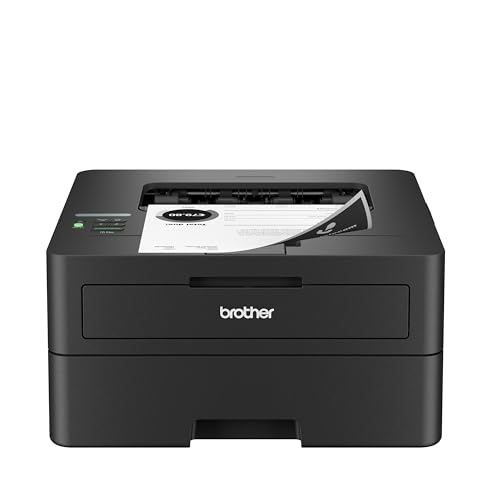
| Brother HL-L2405W | Linked alternative: mono laser | Not a cartridge inkjet at all — one toner, black only, for readers whose “two cartridges” really meant “simple”. |
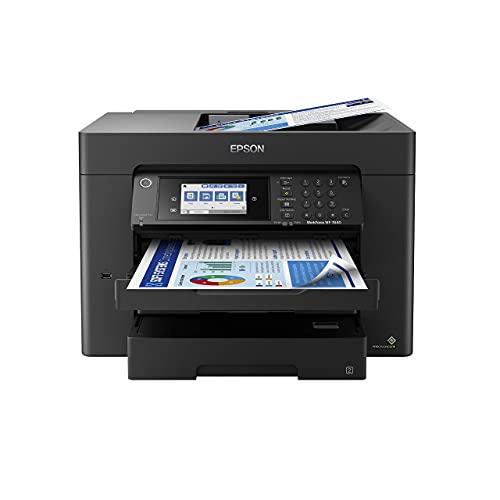
| Epson EcoTank Photo ET-8500 | Linked alternative: tank colour | Not two cartridges either — refillable tanks per colour, for colour printing that happens every week. |
How did we choose these two-cartridge printers?
The entry rule was the definition itself: a pick had to run on exactly two ink cartridges — one black, one tri-colour — because that constraint is the entire subject, and because a guide that quietly admitted three-cartridge machines would have stopped being about the thing its readers searched for. Within it, we favoured the models with the longest market presence and the widest cartridge availability, since a two-cartridge printer whose cartridges vanish from shelves is a paperweight with a power cord. We also looked at what surrounds the ink system: whether scanning is included (for most households it should be), how the machine behaves after months idle on a shelf, and how honestly each maker’s ecosystem treats the owner — cartridge pricing structures and subscription programmes are part of a product, and this guide treats them as such.
The two linked alternatives were chosen against a stricter test than “good printer”. Each had to answer the need that most often hides inside a two-cartridge search: simplicity for text, in the Brother’s case, and freedom from cartridge anxiety for colour printing, in the Epson’s. They are labelled as alternatives in every table and heading where they appear, because a guide that quietly redefined its own keyword would be cheating its readers in a small, deniable, corrosive way in the precise way this class’s marketing has cheated them for years on end — by letting a simple promise conceal a complicated long-term cost.
Which of the best 2 cartridge printers fits your actual printing life?
Canon PIXMA MG3620 — The class archetype (prose-only)
If the two-cartridge printer has a definitive form, this is close to it. The MG3620 is an all-in-one — print, scan, copy — running Canon’s FINE cartridge pair: one black cartridge for text, one tri-colour cartridge for everything chromatic. It has been sold for years in enormous numbers, which cuts both ways in its favour: cartridges are stocked everywhere printer ink is sold, advice and drivers exist for every operating system you own, and the machine’s habits are so well documented by its vast owner base that any problem you meet has been met before, in public, with a solution attached.
Its virtues are the class’s virtues in their purest state. The printer itself is inexpensive in the way that makes it a rational purchase for a dorm room, a first flat, or a household that prints boarding passes, school forms and the occasional photograph. Its vices are equally pure. The tri-colour cartridge will, at some point, report itself empty because one colour has gone, and you will hold a cartridge still containing two colours’ worth of ink and feel the class’s founding compromise in your hand. Canon’s cartridge pricing means a household that prints weekly colour will spend the printer’s purchase price on ink again and again across a year. Buy the MG3620 for light duty with open eyes and it is a perfectly honourable tool; buy it for a home business and it will educate you expensively.
- Type: two-cartridge all-in-one
- Ink system: Canon FINE pair — a black cartridge beside a tri-colour one
- Functions: print, scan, copy
- Availability: long-running model — search by exact name
- Audience: light, occasional household printing
Strengths
- The simplest ink system ever sold: two slots, no ambiguity
- Cartridges available virtually everywhere
- Enormous owner base means every problem has a public answer
Trade-offs
- Tri-colour waste is structural, not a defect you can avoid
- Per-page colour cost is among the highest in home printing
- Light-duty build expects light-duty use
Best for: occasional printing in homes, dorms and first flats. Not suited for: weekly colour volume or any kind of production work.
HP ENVY 6055e — Modern two-cartridge AIO (prose-only)
The ENVY 6055e is what the two-cartridge idea looks like after a decade of product design: a smooth, furniture-friendly all-in-one whose two HP cartridges — black and tri-colour — sit inside a machine that wants to be operated from a phone and judged as an appliance. As an object it is the most pleasant in this guide; as an ink system it is the same bargain as the Canon, wearing better tailoring. Print quality for documents and casual photos is entirely respectable, scanning is aboard, and the whole experience is engineered to feel effortless right up to the moment the cartridge conversation begins.
That conversation, with HP’s current models, includes the subscription question, and this guide insists you have it deliberately rather than by default. HP’s ink subscription can suit a predictable, steady printing household — cartridges arriving before they empty has a real convenience value — but it converts printing into a metered service with plan arithmetic to manage, which is the opposite of why many people search for a two-cartridge printer in the first place. The 6055e can be run on ordinary purchased cartridges; decide which relationship you want before the first setup screen decides for you. With that decided consciously, the ENVY is the class’s most civilised member — same economics as its rivals, better manners.
- Type: two-cartridge all-in-one
- Ink system: HP cartridge pair, black plus tri-colour
- Functions: print, scan, copy
- Ecosystem note: subscription ink offered — opt in or out consciously
- Audience: design-conscious light-duty households
Strengths
- The class’s most appliance-like, phone-friendly experience
- Respectable document and casual photo output
- Tidy design that survives being left out in a room
Trade-offs
- Tri-colour economics unchanged beneath the polish
- Subscription ink is a decision that should not happen by accident
- Cartridge pricing follows HP’s premium pattern
Best for: light-duty households that value design and phone-first operation. Not suited for: anyone whose printing volume would make a subscription plan a second rent.
Canon PIXMA TS3522 — Budget two-cartridge (prose-only)
The TS3522 is the two-cartridge idea at its most distilled: a compact all-in-one, the same black-plus-tri-colour FINE cartridge arrangement as its MG sibling, and a purchase price that regularly makes it the cheapest credible printer on a retailer’s shelf. For a specific and common life situation — a student, a temporary home, a relative who needs “a printer” for forms and the odd photograph — that distillation is exactly right, and this guide refuses to sneer at it. A tool matched to a small job is not a bad tool.
The matching must be honest, though. Everything said about the MG3620’s ink economics applies here with interest, because the households most tempted by the lowest shelf price are often those least able to enjoy the cartridge prices that follow. The TS3522 also asks little of its owner in return for its compromises: setup is simple, the footprint is small, and its light-duty construction is adequate for the duty it advertises. Think of it as the class’s honest minimum — the floor below which a printer stops being a printer — and buy it when your printing life genuinely fits inside that minimum.
- Type: compact two-cartridge all-in-one
- Ink system: the same FINE black-and-tri-colour pairing as its MG sibling
- Functions: print, scan, copy
- Position: the class’s budget floor
- Audience: students and minimal printing needs
Strengths
- Among the lowest entry prices of any credible all-in-one
- Small footprint suits desks that are also everything else
- Same widely stocked Canon cartridges as its siblings
Trade-offs
- Ink cost per page will dwarf the purchase price quickly
- Construction and speed are strictly light-duty
- No headroom for a printing life that grows
Best for: the lightest genuine printing needs on the tightest budget. Not suited for: families, home offices or photo habits of any size.
HP DeskJet 2755e — Compact two-cartridge (prose-only)
The DeskJet 2755e is HP’s expression of the same minimum the TS3522 represents, in HP’s design language: a small all-in-one running a black and a tri-colour cartridge, aimed at households whose printing is occasional and whose space is not. DeskJets have introduced more households to home printing than any other line in history, and the 2755e carries that inheritance competently — documents come out clean, casual colour is cheerful, and the machine asks for almost nothing in attention or room.
Its section in this guide can be shorter than the others because its story is the class’s story, told plainly: the economics live in the cartridges, the subscription offer will appear during setup and deserves the same conscious decision described under the ENVY, and the machine’s happiness is directly proportional to the lightness of its workload. Where the DeskJet earns its separate place is availability and familiarity — it is the two-cartridge printer most likely to be on the shelf, today, in the shop you are already standing in, and for a buyer whose old printer died the night before a deadline, that mundane virtue has decided more purchases than any review ever written.
- Type: compact two-cartridge all-in-one
- Ink system: two HP cartridges — black for text, tri-colour for everything else
- Functions: print, scan, copy
- Position: HP’s budget DeskJet expression
- Audience: occasional printing, urgent replacements
Strengths
- Shelf availability that beats every rival here
- Compact and undemanding to set up and live with
- Clean documents and cheerful casual colour
Trade-offs
- The class’s cartridge economics, unsoftened
- Subscription prompts require a deliberate answer
- Strictly occasional-duty hardware
Best for: an urgent, inexpensive printer for occasional household jobs. Not suited for: steady colour printing or cost-sensitive volume.

Brother HL-L2405W — Linked alternative: mono laser
Now the first exit door, clearly labelled. The HL-L2405W is not a two-cartridge inkjet; it is a monochrome laser printer that runs on a single toner cartridge and prints only in black. It appears in this guide because a large share of two-cartridge searches are really searches for simplicity by people whose printing is overwhelmingly text — forms, letters, schoolwork, invoices, the paperwork of a household. For that reader, the laser is not a compromise but a revelation: no colour cartridge to waste, no ink to dry out between uses, toner that waits patiently for months and prints the day you return, and a per-page cost structure that makes the two-cartridge class look like a toll road.
What you surrender is colour itself, and occasionally scanning — this Brother is a printer, full stop, in the listing our pool verified. If your household’s colour needs are truly occasional, the grown-up arrangement many families land on is this laser for the ninety percent, plus a copy shop or a relative’s colour printer for the remainder, and the arithmetic of that arrangement beats a tri-colour cartridge with embarrassing ease. Read the two-cartridge picks above again after this section and ask which machine your actual last fifty printed pages belonged to. The Brother is in this guide because, for many readers, that question answers itself.
- Type: monochrome laser printer — NOT a cartridge inkjet
- Consumable: a single toner cartridge, black only
- Functions: print only, wireless per the listing
- Availability: linked, verified listing
- Audience: text-dominant households seeking simplicity
Strengths
- One consumable, no colour waste, no dried-out ink
- Toner waits months between uses without complaint
- Running costs that undercut the entire two-cartridge class
Trade-offs
- Black only — no colour, ever, from this machine
- No scanning or copying aboard
- Photographs are simply not its language
Best for: households whose printing is text with rare exceptions. Not suited for: any colour need that is weekly or cherished.

Epson EcoTank Photo ET-8500 — Linked alternative: tank colour
The second exit door leads to where the market actually went. The ET-8500 is a supertank all-in-one: instead of two cartridges, it carries refillable reservoirs — a separate tank for each ink colour, refilled from bottles, each colour replaced only when that colour is genuinely gone. Hold it against the two-cartridge idea and the contrast is the whole lesson of this guide. The tri-colour cartridge exists to make manufacturing and shelf-stocking simple; the tank system exists to make the owner’s arithmetic simple, and the difference shows up every time a single colour runs dry and only that colour needs attention.
This particular tank machine is the photo-oriented member of Epson’s family, a close relative of the wide-format ET-8550 in our other guides, printing at standard sizes with a photo colour set and scanning aboard. It costs more upfront than any two-cartridge pick here — you are buying its ink economy in advance — and it rewards exactly the reader the two-cartridge class punishes: the household that prints colour every week, photographs included. If your honest page count is colour and regular, the ET-8500 is not an upsell; it is the machine your search was looking for before the two-cartridge shelf price distracted it. If your printing is genuinely rare, stay with the picks above and spend the difference on something you will use more than a printer.
- Type: supertank colour all-in-one — NOT a two-cartridge printer
- Ink system: individual refillable tanks per colour
- Functions: print, scan, copy
- Availability: linked, verified listing
- Audience: regular colour and photo printing
Strengths
- Each colour refilled separately — the tri-colour waste problem, abolished
- Photo-capable output with household running costs
- Tank levels visible at a glance, no surprise empty cartridge
Trade-offs
- Upfront cost far above the two-cartridge class
- Overkill for genuinely occasional printing
- Refilling, while tidy, is a small hands-on ceremony
Best for: weekly colour printing households and photo-printing families. Not suited for: the rare-printing reader the two-cartridge class honestly serves.
Why is the two-cartridge class shrinking?
Because its economics stopped making sense to everyone except the people selling cartridges. For the manufacturers, the class was a razor-and-blades masterpiece: printers sold near cost, cartridges carrying the profit, and the tri-colour design quietly maximising blade consumption by retiring two colours every time the third ran out. For owners, the arithmetic only worked while printing stayed rare. Three forces broke the truce. Tank printers proved that buyers would happily pay more upfront to escape cartridge pricing, and their success embarrassed the old model in public. Laser printers colonised the text-printing home office during the remote-work years. And subscription ink split the remaining cartridge loyalists into those who accepted metering and those who resented it loudly enough to leave.
The class survives — the four prose picks above are real, stocked and bought daily — because its entry price remains unmatched and its simplicity remains genuine. But it survives as a niche for the lightest duty, and every year the definition of “light” narrows. A guide that presented it as the default home choice in this market would be nostalgia dressed as advice. The honest framing is the one this guide uses: a legitimate tool for a specific, shrinking job, with its alternatives standing in plain sight.
How do you work out whether two cartridges suit your household?
Count, do not guess. Look at your last three months of printing — or estimate it from paper, the way archaeologists estimate a household from its rubbish: how many sheets left the house’s paper stack, and what fraction carried colour? If the answer is a few dozen sheets, mostly black, with colour appearing for a school project and a holiday photograph, you are the two-cartridge class’s ideal citizen and its economics will never seriously bite you. If the answer involves reams, weekly colour, or anything a business depends on, the class will charge you for the education this guide is trying to give you free.
Then ask the drying question, because it cuts the opposite way. Inkjet cartridges dislike idleness: months between prints invite clogged nozzles and cleaning cycles that spend the ink you were saving. A household that prints twice a year may find even a two-cartridge machine fussy, and should look hard at the laser pick, whose toner is indifferent to neglect. The sweet spot for the class is narrow but real — regular enough to keep the ink moving, light enough to keep the cartridge bill trivial — and the households inside it are genuinely well served by the picks above.
How do you keep a two-cartridge printer’s costs under control?
Print in draft or grayscale for anything internal — drafts, directions, documents you will annotate and discard — and reserve full colour for output that leaves the house. Set the printer’s default to black-only so colour is a decision rather than an accident; a surprising share of tri-colour cartridges die printing web pages whose colour nobody wanted. When the printer reports a colour empty, check what you actually print before replacing on the spot: many machines will continue printing black happily with a tired colour cartridge aboard, and households that print mostly text can stretch that arrangement far longer than the warning lights imply.
Buy cartridges like a sceptic. The genuine-versus-compatible debate has honest partisans on both sides; what is not debatable is that a leaking or unrecognised cheap cartridge costs more than it saves, so if you experiment, do it with one cartridge and a retailer who accepts returns. XL or high-yield versions of the same cartridges, where offered, almost always beat the standard size on cost per page and suit even light users, because ink does not expire on any schedule that matters here. And keep the printer printing something small every couple of weeks — the cheapest cartridge conservation programme ever devised is simply not letting the ink sit still long enough to become a cleaning bill.
What really happens inside a tri-colour cartridge?
Understanding the enemy — if economy is the battle — helps. Inside the tri-colour cartridge sit three small ink reservoirs feeding one shared print head, and the printer tracks their levels by estimation rather than by dipstick, which is why a cartridge can declare itself finished while a determined owner suspects ink remains. The estimation errs cautious, because a head that fires dry can damage itself, and that caution is the manufacturer’s honest reason for retirements that feel premature. Some of the waste householders curse is therefore engineering prudence rather than pure conspiracy — though the distinction is cold comfort at the checkout, and the structural fact remains: three colours share one fate, and the thirstiest colour sets the household’s ink calendar.
Which colour is thirstiest surprises people. Cyan drains early in homes that print photographs of holidays and skies; magenta goes first in households printing children’s artwork and party invitations; yellow quietly serves in almost every colour mix and in the composite blacks discussed in the questions below. There is no household-neutral answer, which is precisely the design’s flaw: whatever your life prints most of, the tri-colour cartridge converts it into a whole-cartridge replacement. Individual-colour systems — the tank pick in this guide, and every serious photo printer — exist as the market’s long, slow apology for that sentence.
Who is the two-cartridge printer genuinely perfect for?
Name the citizens of the class’s sweet spot, because they are numerous and ill-served by guides that only sneer. The grandparent who prints photographs grandchildren email, a recipe now and then, and a form when the council demands one: their cartridge lasts a season, its replacement is a single comprehensible purchase, and a tank system’s bottles would be an unwelcome chemistry set. The student in a one-year room, whose printing ends at graduation: buying ink economy for a future they will not inhabit is its own waste. The second home, the holiday let, the clubhouse office used six weekends a year: places where a printer must simply exist, cheaply, and be replaceable without ceremony when it eventually sulks.
And the technophobe of any age, a citizen this industry forgets at its peril. Two slots, two cartridges, no apps required in principle, no subscription arithmetic, no bottles: for a person whose relationship with technology is wary, the two-cartridge printer’s legibility is a feature no cost-per-page chart captures. The right advice for that reader is a pick from the top of this guide, a spare cartridge bought at the same time, and this guide’s cost-control section read aloud once. Everyone deserves a printer whose workings they can hold in their head, and this class, whatever its economics, remains the easiest printer in the world to understand.
What about compatible and refilled cartridges?
The honest answer is “it varies, and the variance is the point”. Reputable third-party cartridges for these long-running Canon and HP models can work perfectly and save meaningfully; anonymous ones can leak, misreport levels, produce washed colour or be rejected by a printer whose firmware has opinions about its supplies. The manufacturers, for their part, design the ecosystem to favour their own cartridges and say so in the language of quality and warranty. A household’s rational strategy is experimental but controlled: try one reputable compatible cartridge when the stakes are low, judge its output against the genuine article on a photograph you know well, and never conduct the experiment the night before a deadline.
Refilling — injecting ink into a spent cartridge — sits at the far end of the same spectrum: cheapest in cash, richest in mess and uncertainty, and hard on the shared print head that these cartridges carry and wear. For the tri-colour design it carries an extra futility, since you may be refilling two healthy colours to rescue one empty one, into a head that has already lived a cartridge’s life. This guide’s position is boring and defensible: genuine or reputable high-yield cartridges for anything you care about, experiments only where failure is cheap, and if the whole topic makes you tired, that tiredness is data — it is the feeling the tank and laser picks exist to cure.
How do you set up a two-cartridge printer for a relative who lives elsewhere?
This quiet use case deserves its own passage, because half the class’s sales are probably one adult child buying for a parent. Choose the archetype, not the experiment: the MG3620 or its shelf equivalent, whose cartridges any local shop stocks. Set it up completely before you leave — drivers on their computer, the printer joined to their Wi-Fi, a test page printed — and then do the three things that prevent the midnight phone call. Set black-only as the default. Tape a note inside the lid naming the exact cartridge models, in large print. And leave a spare of each cartridge in the drawer beneath, because the difference between a minor errand and a small crisis, for an older person with a form due, is whether the replacement is already in the house.
Finally, schedule the printer into your visits. Run a colour page while the kettle boils; it keeps the nozzles honest and shows you the levels before they become someone else’s emergency. This is unglamorous, familial engineering, and it is the context in which the two-cartridge printer most clearly remains the right answer: not the cheapest per page, but the cheapest per unit of worry, which is the currency these purchases are actually made in.
What is the environmental ledger of the two-cartridge design?
It is fair to ask, and the answer is genuinely two-sided. Against the class: a tri-colour cartridge retired with two colours remaining is plastic, electronics and ink discarded together, and a household printing steadily generates that waste at a rhythm no recycling programme fully redeems — the makers’ cartridge return schemes help and should be used, but they process a problem the design itself manufactures. For the class: the printers themselves are small, light and materially modest, and a household that prints rarely and keeps one for a decade may impose less total burden than the same household cycling through larger machines bought for economies it never used. Scale, as everywhere in this guide, is the arbiter: the lighter your printing, the greener the simple machine looks; the heavier it gets, the more the tank’s refillable years and the laser’s single long-lived toner argue for themselves.
The most defensible household policy is behavioural rather than tribal. Print what you mean to print, proof on screen first, keep the machine until it truly dies rather than until it merely dates, return every spent cartridge through whatever scheme its maker runs, and choose the next machine from your counted pages rather than from anyone’s ideology — including this paragraph’s.
How long will a two-cartridge printer last?
Longer than its reputation, if its workload stays in the class’s lane. These are simple machines with few moving ambitions, and the archetypes in this guide routinely serve light households for many years; what usually ends them is not mechanical death but ecosystem drift — a new computer the old drivers greet coldly, a cartridge line quietly discontinued, a Wi-Fi standard that leaves the printer behind. That is one more argument for the long-running models chosen here: their cartridges and drivers persist because their installed base is enormous, and in budget hardware, popularity is the most reliable form of future-proofing ever sold.
Care is minimal and mostly consists of the regular small printing already recommended, a dust-free shelf, and not moving the machine with cartridges sloshing mid-journey if you can help it. When a two-cartridge printer finally does retire, its replacement decision should be made from the household’s current counted pages rather than from habit — the family that bought one for a student’s homework may now be a family printing a business’s invoices, and loyalty to a class is not a virtue this guide recognises.
How do two-cartridge printers handle photographs, honestly?
Cheerfully, at snapshot scale, with limits that appear exactly when a photograph starts to matter. On proper photo paper, with the driver’s photo settings chosen, the Canon and HP picks produce 4×6 and 5×7 prints that families genuinely enjoy — colour is lively, faces are kind, and the print’s job at that size is memory rather than scrutiny. Enlarge, and the four-ink ceiling (black plus three colours sharing one cartridge’s modest reservoirs) shows: skies step rather than graduate, deep shadows simplify, and the ink cost of each large attempt turns experimentation into expenditure. The class’s photo printing is therefore best understood as a convenience feature — the ability to print a photograph now, at home, at small size — rather than a photographic capability.
Households should set their expectations by that sentence and choose accordingly. If photographs are a garnish on a document life, the two-cartridge picks garnish pleasantly. If photographs are a practice, you have wandered into the wrong guide on purpose-built evidence: the tank pick closing this article exists, photo-first, precisely for you, and our wide-format guides will happily take it from there.
What should you buy alongside a two-cartridge printer?
One spare of each cartridge, bought the same day, as insurance discussed earlier — the class’s emergencies are always cartridge emergencies, and they always occur at 9 p.m. A ream of decent everyday paper, because thin bargain paper jams and feathers in any inkjet and gets blamed on the printer. A small pack of photo paper if photographs are part of the plan, so the first photo is printed on a surface that flatters it rather than on copier stock that libels it. And nothing else. The two-cartridge proposition collapses under accessories; its entire dignity is that a household can be printing within the hour, with a drawer containing two spare cartridges and a clear conscience.
How does the class serve students and shared houses?
Student printing has a rhythm no other household matches: nothing for weeks, then forty pages the night before a deadline, in a house where the printer’s ownership is communally vague. The two-cartridge machines survive this rhythm better than their economics suggest, because the costs, while high per page, land on small absolute numbers of pages — and because a printer that any housemate can understand and re-ink without a house meeting has a social durability that thriftier, fussier machines lack. The failure mode to guard is the deadline-night empty cartridge, which the spare-in-the-drawer rule exists to prevent; shared houses should treat that spare as part of the rent.
There is also a fairness technology available here that students underuse: the printer’s own page counts and the household’s paper stack make consumption visible, and houses that simply split cartridge purchases in rotation report fewer grievances than houses that split them by attempted accounting. Keep it simple, keep a spare, and the humble two-cartridge box will outlast several tenancies — as, anecdotally and repeatedly, it does.
What changes when a two-cartridge household starts working from home?
Everything, and usually within a month. Home working converts printing from an event into a utility: contracts, returns labels, notes, forms, the daily paper sediment of a job. Page counts climb past the class’s sweet spot almost without the household noticing, because each individual job still feels occasional. The cartridge calendar compresses from seasons to weeks, and the arithmetic this guide opened with stops being theoretical. This is the single most common story behind a two-cartridge printer being replaced in anger, and it is avoidable in both directions — the working household that counts its pages early can move to the laser or tank pick while the little inkjet is still loved, redeploying it to the light duty it was born for rather than retiring it as a villain.
Treat a change in working pattern as a printer event, the way a new baby or a new business is. Re-count the pages, re-read the household’s answer, and let the machines migrate to the jobs they fit. Printers, unlike most technology, do not demand to be your only one.
How do you troubleshoot the class’s three classic complaints?
First, “it says the cartridge is empty but I just replaced it.” Check the cartridge is the exact model the lid names, that its contacts are clean and its tape fully removed, and that it clicked home with conviction; if a compatible cartridge is involved, reseating and a printer restart resolve a surprising share of rejections, and the remainder is the compatibility lottery described earlier making its scheduled appearance. Second, “the colours look wrong.” Run the machine’s own nozzle check before anything else: a missing colour band identifies a clogged or genuinely empty channel, and the cleaning cycle — used once, then re-checked — is the correct tool, while repeated cleanings are just ink leaving by another door.
Third, “it prints blank pages after sitting for months.” That is dried ink at the head, the class’s signature neglect injury. A cleaning cycle or two may restore it; parking the printer somewhere dust-free and printing a small colour page every fortnight prevents the sequel. Notice what all three complaints share: none is really about the printer’s printing. They are about cartridges, contacts and time — the class’s true subjects — and a household that learns these three answers owns ninety percent of two-cartridge wisdom.
How should you read a two-cartridge printer’s box in the shop?
The box will tell you the printer’s price-equivalent virtues loudly and its ink arithmetic quietly, so read it backwards: cartridges first. Find the cartridge model numbers and check their shelf prices and high-yield versions in the same shop, because that thirty-second detour converts the purchase from a guess into a decision. Note whether the box’s page-yield claims describe the cartridges included in the box — starter cartridges in this class are frequently part-filled, a legal and universal practice that nonetheless ambushes buyers who budgeted from the standard cartridge’s numbers. Then read the printer’s own claims last, in the calm knowledge that every machine on the shelf prints adequately and the differences that will matter in year two are standing in the ink aisle.
If a salesperson steers you by the printer’s discount alone, you now know more about the transaction than the pitch assumes. The discount is real and the cartridges are realer. Buy the combination knowingly and the class holds no ambush for you at all.
What is the kindest way to retire a two-cartridge printer?
Pass it down the ladder of duties before passing it out of the house. A machine outgrown by a home office is a perfect first printer for a teenager, a spare for the household’s second desk, or a donation to the community hall whose printing is measured in pages per month. Include its cartridge numbers written down and any spares you hold; a donated printer without its ink information is a riddle, not a gift. Only when no lighter duty exists anywhere in its orbit should it go to electronics recycling — through the maker’s or retailer’s scheme where one runs — with its last cartridges returned the same way.
This ladder is, in miniature, the philosophy of the whole guide: machines are rarely bad, only mismatched, and the two-cartridge printer mismatched in a busy house becomes perfectly matched in a quiet one. Sell or give it with its story told honestly and someone else’s household gets the exact tool this article has been describing — simple, legible, and right-sized for a gentle printing life.
Comparison table
| Printer | System | Functions | Availability | Choose it when |
|---|---|---|---|---|
| Canon PIXMA MG3620 | Black + tri-colour cartridges | Print, scan, copy | Prose-only — search by name | You want the archetypal simple all-in-one |
| HP ENVY 6055e | Black + tri-colour cartridges | Print, scan, copy | Prose-only — search by name | Design and phone-first use matter |
| Canon PIXMA TS3522 | Black + tri-colour cartridges | Print, scan, copy | Prose-only — search by name | The budget is the brief |
| HP DeskJet 2755e | Black + tri-colour cartridges | Print, scan, copy | Prose-only — search by name | You need a printer today, occasionally |
| Brother HL-L2405W | Single toner (alternative) | Print only | Linked | Your printing is text and your patience is finite |
| Epson EcoTank Photo ET-8500 | Refillable tanks (alternative) | Print, scan, copy | Linked | Colour printing is a weekly habit |
What mistakes do two-cartridge printer buyers keep making?
The founding mistake is comparing printers by shelf price in a class where the shelf price is the smallest number in the relationship. Two machines can sit a few notes apart in the shop and a few hundred apart across two years of cartridges; the class’s entire history is contained in that sentence. The second mistake is its mirror image — reading a guide like this one, panicking about ink, and buying a tank printer for a household that prints eleven pages a year, which is its own waste wearing a halo. Match the machine to the counted pages, in both directions.
The third mistake is letting setup make your subscription decision, covered under the ENVY but worth repeating as a general law of modern printers: the screen that offers effortless ink forever appears when you are least inclined to read terms, and the decision deserves a kettle’s worth of deliberation. The fourth is stockpiling standard-size cartridges on sale while ignoring the high-yield versions that would have served better. And the fifth, saddest mistake is blaming the printer for the class: an MG3620 worked exactly as designed in every household that ever cursed its cartridge bill. The design is the bill. Choose it knowingly and it stops being a grievance and becomes a price you agreed to.
Final Recommendation
If your counted printing life is light, occasional and colour-sprinkled, buy the class without shame and without apology to anyone’s spreadsheet: the MG3620 for the archetype, the ENVY 6055e for the polish, the TS3522 or DeskJet 2755e when budget or urgency leads, each of them a rational purchase for the household this guide has described at the length the decision deserves. If your pages are mostly text, walk through the Brother’s exit door and enjoy the silence of a single toner that asks nothing of you for months at a time. If colour is weekly, the ET-8500’s tanks are the grown-up version of the simplicity you came looking for — separate colours, visible levels, nothing retired before its time. The best 2 cartridge printers are honest tools for a narrow job — the trick, as with most tools, is refusing to ask them for a wider one. Count your pages, choose the machine that matches the count rather than the shelf’s loudest discount, keep a spare cartridge in the drawer, and this unfashionable little class will do exactly what it promised on the day the whole industry was built on promises considerably larger and considerably less examined.
Frequently Asked Questions
What does “2 cartridge” actually mean?
The printer uses exactly two ink units: one black cartridge for text and monochrome work, and one tri-colour cartridge containing cyan, magenta and yellow together. Every printer in the top half of this guide follows that pattern, and the two linked alternatives at its end are present precisely because they break it in instructive ways. It is the simplest colour ink system sold, and its simplicity and its waste both flow from that tri-colour design.
Why does my colour cartridge run out when I barely print colour?
Three reasons conspire, and understanding them converts a mystery that feels like theft into a set of behaviours you can partly manage. Printers use colour ink in maintenance cycles to keep nozzles healthy; many “black” documents are printed as composite black mixed from colours unless you force grayscale; and one heavily used colour — often cyan, from skies and links — can empty the tri-colour cartridge while its partners remain. Setting black-only defaults and printing regularly in small amounts both help.
Are XL cartridges worth it in this class?
Generally yes, even for light users, because the premium for the larger cartridge is small beside the ink it adds, and the replacement it postpones is the class’s least favourite errand. High-yield versions carry more ink for a modest premium, so cost per page falls and replacement frequency drops. Ink does not spoil on household timescales, so the usual argument against buying capacity — waste — rarely applies.
Can I print if one cartridge is empty?
Often, partially — enough to finish the form, the letter or the homework that cannot wait for a shopping trip, which is usually all a household asks of the feature. Many models will continue black printing with an empty or removed colour cartridge, sometimes after acknowledging warnings, and most will not print colour without both cartridges healthy. Behaviour varies by maker and model, so treat it as a grace period for finishing text work, not a strategy.
Is a subscription ink plan a good deal for two-cartridge printers?
It depends entirely on whether your printing is steady and predictable — the plan is a smoothing mechanism, and smoothing only helps a household whose usage actually resembles a smooth line rather than a cliff edge followed by silence. A household printing a consistent number of pages monthly can find the convenience genuine; a household with spiky, rare printing is paying rent on ink it does not use. Decide from your counted pages, not from the setup screen’s enthusiasm.
When should I give up on the two-cartridge idea entirely?
When any of three things become true: your colour printing turns weekly, your text printing turns voluminous, or you find yourself thinking about cartridges more than once a season — the third being the most reliable signal of all, because a printer that occupies its owner’s thoughts has already failed at the simplicity that justified it. At that point the laser and tank alternatives in this guide stop being alternatives and become the answer, and the two-cartridge machine retires to the relative, student or spare room where its economics make sense again.
Do two-cartridge printers work well over Wi-Fi?
The current models in this guide are wireless household appliances and behave as such: setup through the maker’s app, printing from phones and laptops, the occasional mysterious offline episode cured by a restart of the printer, the router or, in stubborn cases, the household’s patience followed by both devices in sequence. Keep the printer within honest range of the router — through one wall rather than three — and its wireless life is as calm as any printer’s, which is to say calm enough and occasionally theatrical.
What paper should I use for everyday printing?
A standard bright office paper of ordinary weight serves every document need in this class; save photo paper for photographs and heavier stock for the rare document that must impress a landlord, an examiner or a future employer. Bargain paper so thin it curls off the tray causes more jams and more printer-blaming than any other household variable, and upgrading the paper is the cheapest printer upgrade in this entire guide.
Related Guides
Keep exploring with our guides to tank printers that end cartridge anxiety for good, the best two-tray laser printers for home offices and how to cut your home printing costs without buying anything.