What's inside
- Where to buy
- Key Takeaways
- Quick Picks
- How did we choose these professional 13×19 printers?
- Which of the best 13 x 19 professional printers deserves your studio desk?
- Dye or pigment — how should a professional actually decide?
- How do you build a 13×19 workflow that stays consistent?
- What should you know about paper handling at 13×19?
- How do professionals think about print permanence without inventing numbers?
- How do editions and repeatability work at this level?
- How should a studio light the place where prints are judged?
- When should a professional still send work to a lab?
- What does a professional printing setup include beyond the printer?
- How do you price and present 13×19 prints for clients?
- How do you audition a professional printer before committing?
- What separates a professional result from an amateur one at 13×19?
- How do these printers handle the business of a working week?
- What maintenance do professional machines expect?
- Can a 13×19 printer anchor a small print-selling business?
- How do paper costs shape professional choices at 13×19?
- Comparison table
- What mistakes do professional-printer buyers keep making?
- Final Recommendation
- Frequently Asked Questions
- Related Guides
As an Amazon Associate I earn from qualifying purchases. This post may contain affiliate links at no extra cost to you.
gizmoverdict.com is reader-supported. When you buy through links on our site, we may earn an affiliate commission.
Where to buy
Two printers in this guide are linked to verified Amazon US listings — Epson’s EcoTank Photo ET-8550 and Canon’s PIXMA PRO-200S — and can be ordered the ordinary way. The other four are professional photographic instruments that most buyers purchase through dedicated photo retailers, where paper advice, profile support and warranty handling for pro gear are part of the transaction; those picks are covered in prose only, with no link, rather than sending you to a listing we have not verified. Professional printers are also frequently sold in bundle and seasonal configurations, so wherever you buy, confirm exactly which ink set ships in the box.
Ask a room of photographers about the best 13 x 19 professional printers and the argument starts before the question ends, because 13×19 — Super B, the largest sheet the desktop class handles — is where home printing stops being a convenience and becomes a practice. A 13×19 print is a gallery candidate, a client deliverable, a portfolio’s closing statement. The machines that make it divide along one great fault line: dye ink versus pigment ink, with a newer third path — the photo tank printer — redrawing the economics underneath both. This guide walks the fault line honestly, names two linked machines you can buy today and four professional benchmarks you should know by name, and refuses to invent longevity figures or laboratory numbers that no honest guide can promise for your papers, your light and your walls.
Key Takeaways
- The Canon PIXMA PRO-200S is the dye-ink benchmark in this class: eight colours, glossy depth and saturation that pigment machines admire from across the room.
- Epson’s EcoTank Photo ET-8550 is the economics revolution — a 13×19 photo printer fed from bottles, which turns proofing from a budget decision into a working method.
- Pigment machines — Epson’s SureColor P700 and P900, Canon’s imagePROGRAF PRO-300 — own matte, fine-art and black-and-white work, and are the professional default for prints that must behave on cotton papers.
- Dye versus pigment is a paper question, not a quality ranking: glossy and luster favour dye, matte and textured fine-art favour pigment, and your paper shelf should choose your printer.
- Epson’s Expression Photo HD XP-15000 remains the wide-gamut dye alternative worth knowing for colour-saturated work on a simpler chassis.
Quick Picks
| Pick | Badge | Why it is here |
|---|---|---|
| Canon PIXMA PRO-200S | Dye-ink benchmark | An eight-colour dye printer devoted entirely to photographs, with the gloss and gradation the class is judged by. |
| Epson EcoTank Photo ET-8550 | Proofing economics, solved | Tank-fed 13×19 photo printing plus scanning, for professionals who proof constantly and exhibit selectively. |
| Epson SureColor P700 | Pigment for 13×19 (prose-only) | The matte and fine-art specialist with dedicated black channels for each paper family. |
| Epson SureColor P900 | Larger-format sibling (prose-only) | A 17-inch pigment printer included for professionals whose 13×19 work is growing toward bigger sheets. |
| Canon imagePROGRAF PRO-300 | Canon’s pigment answer (prose-only) | A pigment system with a chroma optimiser coat for gloss work, aimed at the same fine-art desk as the P700. |
| Epson Expression Photo HD XP-15000 | Wide-gamut dye alternative (prose-only) | A six-colour dye machine with extra red and grey inks, in a comparatively compact 13×19 body. |
How did we choose these professional 13×19 printers?
Professional, in this guide, is a working definition rather than a compliment: the printer must be built to produce saleable or exhibitable 13×19 prints repeatedly, with colour control that survives scrutiny — proper paper profiles, a driver that respects them, and an ink system designed for photographs rather than adapted from documents. Every pick clears that bar. Beneath it, we organised the field by ink philosophy, because that is how professionals actually choose: the paper comes first, the ink that serves the paper comes second, and the badge on the lid comes a distant third.
We also weighted the ownership realities of pro work. A professional printer is a production tool, so we considered how each machine handles being fed expensive sheets daily — rear and front feed paths for thick media, roll support where it exists, the discipline of its driver software — and how its ink system behaves across a working year: the cartridge machines’ predictable swap-and-go rhythm against the tank machine’s refill economy. Two linked picks anchor the guide in what can be bought through our verified pool today; the prose picks are the class’s reference points, included because a professional buyer deserves the whole map, not just the shops on one street.
One deliberate omission of numbers: this guide prints no permanence ratings in years and no laboratory gamut figures. Display life depends on the specific paper, the glazing, and the light in a particular room, and any single figure would be a promise we cannot keep on a stranger’s behalf. The qualitative differences between dye and pigment behaviour are real, consistent and described as such below; the calendar is yours to manage with sensible framing and placement.
Which of the best 13 x 19 professional printers deserves your studio desk?

Canon PIXMA PRO-200S — Dye-ink benchmark
Every class has a machine that defines its centre of gravity, and among 13×19 dye printers the PRO-200S holds that position. Its eight-colour dye system is tuned for the things dye does better than any rival technology: continuous glossy depth, saturated colour that stays clean rather than muddy, and skin tones that graduate the way skin actually does. Wedding and portrait photographers — the professionals who print faces at this size for money — gravitate to dye for exactly those skin tones, and the PRO-200S is the current, orderable expression of that preference, a focused print-only machine with a wide, low body that slides into a studio’s working surface rather than dominating it.
Professional honesty about dye belongs in its own section rather than a footnote. Dye prints ask for sensible display: behind glass or in albums, away from punishing light, they serve their owners well; they are not the choice for unglazed prints in bright, uncontrolled spaces, and this guide will not attach a number of years to any of it. What dye gives in return is immediacy — prints that look finished the moment they dry, on the glossy and luster papers most clients actually request. The PRO-200S’s cartridge running costs are the class’s familiar tax, felt most by high-volume proofers; for a practice built on finals — the prints that leave the studio in sleeves — it remains the benchmark against which the other five picks must argue their case.
- Type: dedicated 13×19 photo printer
- Ink system: 8-colour dye cartridges per the listing
- Functions: print only, professionally focused
- Best media: glossy and luster photo papers
- Audience: portrait, wedding and colour-first photographers
Strengths
- Glossy depth and saturation that set the class standard
- Skin-tone gradation that portrait professionals trust
- Simple, focused machine with no office hardware aboard
Trade-offs
- Cartridge costs accumulate for high-volume proofing
- Dye asks for glazed or album display to show its best longevity
- Matte fine-art papers are not its home ground
Best for: professionals whose deliverables are glossy or luster prints of people and colour. Not suited for: matte fine-art practices or unglazed display in harsh light.

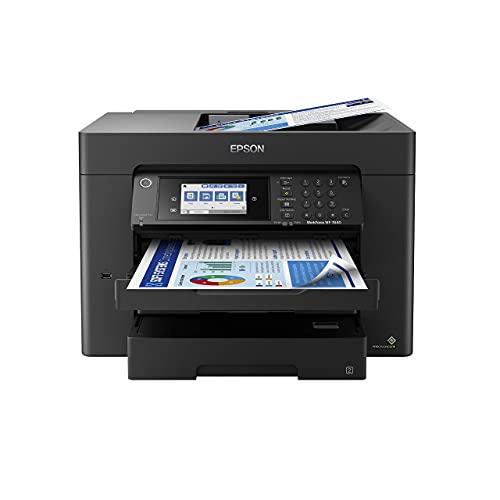
Epson EcoTank Photo ET-8550 — Proofing economics, solved
The ET-8550’s professional significance is easy to miss if you judge it as a slightly large all-in-one. Judge it instead as the machine that changed what a working photographer can afford to do. A 13×19 practice runs on proofs — test prints, portfolio drafts, the image lived-with for a week before the final — and cartridge economics rationed those proofs for decades. A tank-fed photo printer with a proper multi-colour photo ink set abolishes the rationing. Its owners proof at full size, which is the only proof that tells the truth, and arrive at finals with a certainty that cartridge-era photographers bought with either money or anxiety.
As a tool it is complete rather than exotic: wide-format printing to 13×19, scanning for the hybrid analogue-digital workflow, and a paper path that handles photo media with the respect the class requires. Its dye-based inks place it on the glossy side of the fault line, alongside the PRO-200S, and the comparison between them is the professional’s real decision in this guide: the Canon is the more single-minded photographic instrument, the Epson the more economical and versatile practice-builder. Studios that print for clients daily increasingly choose the Epson’s economics and keep a pigment machine for fine-art orders — a two-machine answer this guide returns to in the workflow section below.
- Type: wide-format photo all-in-one
- Maximum size: 13×19 per the listing
- Ink system: refillable EcoTank bottles, photo colour set
- Functions: print, scan, copy
- Audience: high-proofing photographers and hybrid studios
Strengths
- Full-size proofing becomes an everyday method, not a luxury
- Photo-grade output with tank running costs
- Scanning completes the print-from-anything studio loop
Trade-offs
- Dye inks share the family’s display considerations
- All-in-one body is larger than the dedicated printers
- Matte and cotton papers belong to the pigment picks below
Best for: working photographers who proof constantly and print finals on glossy-family papers. Not suited for: fine-art matte practices — pair it with, or choose, a pigment machine.
Epson SureColor P700 — Pigment for 13×19 (prose-only)
The P700 is the professional default for the other side of the fault line. Its pigment ink set runs to many channels, including separate black inks optimised for matte and for glossy media, so the machine never compromises a cotton-rag print with a black designed for resin-coated paper — a detail that sounds like brochure copy until you have seen a matte black-and-white print from a machine that treats black as one ink among many. On matte and fine-art papers the P700 produces the deep, quiet, surface-rich prints that galleries and serious amateurs mean when they say “fine art”, and its sheet and roll handling for thick media is engineered rather than tolerated.
It is covered in prose because professional pigment printers are ordinarily bought where professional advice lives — photo retailers who will talk you through media profiles and paper choices, and whose support relationship continues after the sale. The ownership character is deliberate: pigment printing rewards profile discipline, paper knowledge and patience, and returns prints whose matte depth dye cannot imitate. If your practice is landscapes on cotton paper, monochrome work, or editions for sale into collectors’ hands, the P700 is not one option among six; it is the centre of the map, and the dye machines are the alternatives that must justify themselves.
- Type: dedicated fine-art pigment printer
- Maximum size: 13×19 class
- Ink system: multi-channel pigment with matte and photo blacks
- Media: sheet and roll fine-art papers
- Audience: matte, monochrome and edition-printing practices
Strengths
- Matte and fine-art depth beyond dye’s reach
- Dedicated blacks give monochrome real neutrality
- Media handling built for thick, valuable sheets
Trade-offs
- Premium instrument sold through specialist channels
- Demands profile and paper discipline from its owner
- Glossy work carries pigment’s surface character
Best for: fine-art, matte and black-and-white professionals printing at 13×19. Not suited for: glossy client work or casual, profile-free printing.
Epson SureColor P900 — Larger-format sibling (prose-only)
The P900 earns its place in a 13×19 guide as the horizon line. It is Epson’s 17-inch pigment printer — the P700’s larger sibling, sharing its ink philosophy and its fine-art intent while accepting wider sheets and rolls. Why include a bigger machine in a guide to this size? Because professional practices grow toward their printer’s ceiling. A photographer whose 13×19 editions begin selling will meet clients asking for the same image larger, and the P900 is the step that keeps those sales in-house, on the same ink set and the same paper knowledge, rather than sending the file and the margin to a lab.
Bought today purely for 13×19, it is more machine than the brief requires — larger, costlier, and hungrier for desk and paper storage. Bought as a three-year decision by a practice already selling prints, it is the rational member of this list, and its presence here is a planning prompt disguised as a product pick. Like the P700 it is a specialist-channel purchase, covered in prose, and like the P700 it rewards the profile-disciplined owner with matte and monochrome work of the first order. Consider it the guide’s acknowledgement that “professional” describes a trajectory, not a moment.
- Type: dedicated fine-art pigment printer, 17-inch class
- Maximum size: beyond 13×19 — wider sheets and rolls
- Ink system: multi-channel pigment, sibling of the P700’s
- Media: sheet and roll fine-art papers
- Audience: growing practices selling beyond 13×19
Strengths
- Headroom for larger editions on the same ink philosophy
- Fine-art and monochrome quality matching the P700’s
- Keeps growing print sales inside your own studio
Trade-offs
- Oversized and over-specified for a strict 13×19 brief
- Larger footprint and paper inventory to house
- Specialist purchase, in prose here by design
Best for: professionals whose print sales are outgrowing 13×19. Not suited for: a buyer whose work will stay at this size — the P700 serves them better.
Canon imagePROGRAF PRO-300 — Canon’s pigment answer (prose-only)
Canon’s pigment entry in this class answers the P700 point for point, then adds one flourish of its own: alongside its multi-channel pigment set, the PRO-300 carries a chroma optimiser — a clear coating pass that evens out gloss on resin-coated papers, reducing the patchy reflections that pigment prints on glossy media can show. It is Canon acknowledging pigment’s traditional weakness and engineering at it directly, and for photographers who want pigment’s matte behaviour without entirely surrendering glossy work, that flourish is a genuine argument rather than a garnish.
The PRO-300’s character otherwise mirrors its rival’s: deliberate, profile-driven, aimed at matte and fine-art papers, sold through the professional photo channel and therefore described here without a link. Canon-loyal studios value its colour handling and its place in a Canon workflow from capture to print. Choosing between it and the P700 usually comes down to paper trials — print your signature image on your signature paper on both, if a retailer will allow it, and let the sheets vote. At this level of the market, brand debates are settled by cotton and light, not by specification tables.
- Type: dedicated pigment photo printer, 13×19 class
- Ink system: multi-channel pigment plus chroma optimiser
- Media: matte, fine-art and glossy photo papers
- Channel: professional photo retailers
- Audience: Canon-workflow fine-art photographers
Strengths
- Chroma optimiser civilises pigment on glossy papers
- Matte and fine-art depth comparable to its Epson rival
- Natural fit for Canon-centric studios
Trade-offs
- Specialist-channel purchase, no verified link here
- Same profile discipline pigment always demands
- Cartridge running costs at professional levels
Best for: fine-art photographers in a Canon workflow who also print glossy. Not suited for: high-volume proofing on a budget — that is the ET-8550’s sermon.
Epson Expression Photo HD XP-15000 — Wide-gamut dye alternative (prose-only)
The XP-15000 is the connoisseur’s footnote in the dye family: a six-colour system that spends its extra channels on a red and a grey, widening the reproducible colour range in the saturated reds and oranges where product, food and autumn-landscape photographers live, and smoothing the tonal steps in between. It does all this in a body notably more compact than the professional dye flagship above, which made it a favourite second printer — the studio’s colour specialist, kept for the work its gamut flatters.
Its inclusion is partly historical honesty: availability has thinned as the model has aged, and it is covered in prose as a machine to seek knowingly rather than stumble upon. Cartridge costs apply, the dye display considerations apply, and its driver expects the same paper discipline as any photographic printer. But for a colour-saturated practice that finds the PRO-200S more printer than it needs, the XP-15000’s gamut-per-desk-inch remains a distinctive bargain, and a guide to this class that omitted it would be tidier and less true.
- Type: dedicated dye photo printer, 13×19 class
- Ink system: six colours including red and grey
- Body: comparatively compact for the class
- Best media: glossy and luster papers, saturated subjects
- Status: ageing model — seek through specialists
Strengths
- Extra red widens gamut where saturated work needs it
- Grey ink smooths tonal transitions noticeably
- Smaller footprint than the professional flagships
Trade-offs
- Ageing availability; buy knowingly, not casually
- Cartridge economics as with all dye rivals here
- Fewer professional support resources than current models
Best for: colour-saturated photographers wanting wide gamut in less space. Not suited for: buyers who need current-model support and easy sourcing.
Dye or pigment — how should a professional actually decide?
Decide with paper in your hands, not with adjectives. List the three papers your practice truly uses — not the papers you admire in other people’s portfolios, the ones in your storage box right now. If the list runs glossy, luster and more glossy, dye is your technology and the argument is over: dye’s colour sits inside those coatings with a depth and cleanliness pigment politely envies. If the list runs matte, cotton rag and textured art papers, pigment is equally unarguable, because dye sinks into uncoated surfaces and loses the very saturation that is its birthright, while pigment rests on the surface and keeps its counsel and its depth. Mixed lists are the only hard case, and the honest answers are the two-machine studio — tank dye for proofing and glossy finals, pigment for fine art — or the PRO-300’s optimiser-assisted attempt to straddle the line.
Two secondary factors deserve their say. Black-and-white work leans pigment, because dedicated matte and photo blacks plus many grey-friendly channels produce neutral monochrome with less colour cast to chase. And client expectations lean dye more often than artists admit: the glossy print a client frames for a hallway is dye’s home fixture, while the matte print a collector buys is pigment’s. Professionals who know which room their prints will live in rarely agonise over this choice; the agony belongs to those choosing in the abstract, and the cure is a paper sample pack and one honest afternoon.
How do you build a 13×19 workflow that stays consistent?
Consistency is the professional’s real product, and it is built from boring decisions made once. Fix your paper set and refuse novelty for a season. Fix your profiles — the paper maker’s for each sheet, applied the same way every time. Fix your viewing light where prints are judged, because a print approved under a warm desk lamp will be re-judged by a client’s cool hallway and found different. And fix your notes: a line per print recording file, paper, profile and any adjustment, so that the edition’s twentieth copy can match its first without archaeology. None of this is glamorous, and all of it is what separates a practice from a hobby with expensive paper.
The tank printer has quietly rewritten one part of this workflow: the test print. When a full-size proof costs little, the rational workflow proofs at full size, early and often, and the consistency described above is achieved by looking rather than by hoping. Cartridge and pigment practices achieve the same end by discipline — smaller proofs, soft-proofing skill, notes from previous sessions. Neither culture is superior; they are different economies producing the same virtue. Choose the machine whose economy matches the temperament you actually have, because a workflow you abandon by February produces no consistency at all.
What should you know about paper handling at 13×19?
A 13×19 sheet is large enough to have opinions. It curls, it catches corners, it sags in an output tray, and on expensive fine-art stock each of those behaviours has a price attached. The professional machines earn their designation partly here: straight or near-straight paths for thick media, front or rear manual feeds that accept a sheet without bending it around rollers designed for office paper, and drivers that understand media thickness rather than merely tolerating it. When you audition a printer — in a retailer’s demo room or through its first week at home — feed it your thickest, most valuable paper early, while returns are still a conversation rather than a dispute.
Handling discipline belongs to the owner as much as the machine. Cotton papers shed fibres that coat sensors and rollers, so the fine-art practice includes a brush-down habit and an occasional pass with a plain sheet to clear the path. Sheets should be de-curled or stored flat long enough to forget the roll, handled by edges, and loaded singly even when the tray invites a stack — at this size and price, the stack is a false economy that scuffs surfaces. The printers in this guide will treat your paper as well as your habits allow; at 13×19, the partnership is genuinely fifty-fifty.
How do professionals think about print permanence without inventing numbers?
Carefully, and in terms of conditions rather than calendars. The honest professional vocabulary is comparative: pigment systems carry the stronger reputation for display stability, dye systems have improved across generations and behave well behind glass, and both are at the mercy of the actual environment — sunlight through a window will defeat any ink in this guide, while a shaded wall with UV-filtering glazing is gentle to all of them. What a professional owes a client is not a number of years but a set of instructions: frame behind glass, hang away from direct sun, keep humidity ordinary. Prints sold with that guidance, on the ink system matched to their paper, have a service record no honest guide needs to inflate.
For your own archive, the calculus inverts usefully: the file is the permanent object, and the print is its finest current expression. Keep masters backed up, keep your per-print notes, and any of these machines can re-express the work decades from now on whatever paper then exists. That framing frees the dye-versus-pigment decision from its most anxious mythology and returns it to the question this guide keeps asking: which ink makes your papers look the way your work deserves, in the rooms where it will actually hang?
How do editions and repeatability work at this level?
An edition — a numbered run of identical prints from one image — is where a desktop printer either becomes a professional instrument or reveals itself as a gifted amateur. Repeatability is the whole game: copy twelve must match copy one in colour, density and surface, across days and ink changes. Every printer shortlisted here can do it, but only inside a disciplined system: the same paper batch where possible, profiles locked, driver settings recorded, and a reference print from the edition’s first session kept in the dark as the standard every later copy is compared against, in the same light, at the same distance. Professionals keep that reference print in a sleeve labelled like evidence, because memory is the least colour-managed device in any studio.
Ink changes deserve their own sentence in an edition’s life. A cartridge swap mid-edition is routine on the dye and pigment machines and should not shift output visibly if the system is healthy; the tank machine’s refills are similarly uneventful when done with the maker’s inks. What does shift output is paper — a new batch of the same named paper can carry a slightly different coating character — which is why edition printers buy paper for a whole edition at once and store it flat and together. These are small, unglamorous fidelities, and they are exactly what a collector is paying for when a numbered print costs more than a poster.
How should a studio light the place where prints are judged?
More print arguments are caused by light than by printers. A studio that judges proofs under a warm household bulb, a cool north window and a phone torch on successive days is running three different quality departments and wondering why they disagree. The professional fix is a single, consistent viewing arrangement: one lamp or booth, of a daylight character, at a fixed distance, where every proof is assessed and every edition copy compared. It does not need to be elaborate; it needs to be the same. Beside that lamp, keep the two most useful objects in print-making — a grey card’s worth of neutral surroundings, so colour judgments are not bullied by a coloured wall, and a magnifier, because 13×19 flaws announce themselves at reading distance first.
Then, deliberately, break your own rule once per image: carry the near-final proof to the kind of light it will live in — the client’s hallway, the gallery’s spots, the café’s windows — and look at it there before the edition is struck. Studio light is for consistency; destination light is for truth. The photographers whose prints disappoint least are the ones who schedule both inspections and refuse to skip the second because the first went well.
When should a professional still send work to a lab?
Owning a 13×19 printer does not retire the lab; it redefines its job. Sizes beyond your machine, papers your machine cannot feed, metallic and exotic media, and overflow during a deadline crunch are all legitimate lab work, and a good lab relationship is a professional asset rather than an admission. The in-house machine’s territory is control and iteration: the proofing ladder, the edition, the client who needs a replacement print this week in exactly the studio’s colour. Practices that thrive tend to draw that boundary clearly and revisit it yearly, because both sides of it keep moving — labs add services, printers like the ones in this guide add capability, and last year’s obvious answer has a way of expiring quietly.
There is a client-facing dimension too. Some buyers equate lab printing with seriousness and home printing with hobby, and part of professional maturity is not caring: the print on the wall is the argument, and a P700 edition on cotton paper wins it against a lab’s generic output more often than the snobbery expects. Know your machine completely, present the work impeccably, and the question of whose roof the printer sits under stops arising.
What does a professional printing setup include beyond the printer?
The printer is the loudest purchase and not the only one. A flat, clean work surface large enough to receive a 13×19 sheet without improvisation is infrastructure, not furniture. A rotary trimmer rated for the size turns borders and test strips into a pleasure instead of a wrestling match, and a stock of sleeves, boards and tubes in the right dimensions converts finished prints into deliverable products the day they dry. Storage deserves equal billing: a flat file or portfolio boxes where editions wait in the dark, because a print stored leaning is a print slowly becoming a scroll.
The digital side has its own kit. A calibrated monitor has already been recommended in these pages and is repeated here because studios keep trying to skip it. Backups of master files — plural, in more than one place — are the archive that makes every print replaceable, and a simple logbook, paper or digital, ties each physical print to the file version and settings that made it. Add a small stock of your core papers bought ahead, so a deadline never meets an empty shelf, and the setup is complete: nothing exotic, everything deliberate, and a total supporting cast that costs less than the printer it makes professional.
How do you price and present 13×19 prints for clients?
Pricing is a craft topic disguised as arithmetic, and this guide offers structure rather than figures. Your price must silently contain the failures: the proof sheets, the mis-fed fine-art page, the edition copy that met a dusty roller — professional pricing that ignores spoilage is a slow donation. It must contain time at its honest rate, because a profiled, proofed, inspected print is an hour of a practice’s life, not a button press. And it should contain the presentation — sleeve, board, the careful flat package — because clients experience the packaging as part of the object’s value before the frame ever opens.
Presentation extends to language. Tell the client how to hang and light the print, which ink family made it and why that suits its paper, and how to handle it — by the edges, out of the sun, behind glass where advised. That conversation, delivered with the print, is what separates a professional deliverable from a large sheet of paper, and it costs nothing but knowledge you already have from guides like this one. Studios report that clients who receive it reorder more and handle prints better, which is the entire economics of a print practice in one sentence.
How do you audition a professional printer before committing?
Bring your own hardest file. Retailers who serve this market expect it: a photograph with deep shadows that must not block, a skin tone that must not drift, a saturated passage that tests the gamut, ideally with a matte and a glossy candidate paper in mind. Print it on the machines you are deciding between, on your papers if they allow it, and judge the sheets in consistent light — then, crucially, take the sheets home. Studio light flatters and strangenesses hide; a print that still pleases on your wall after a week of passing it has passed the only audition that predicts ownership.
Ask the unglamorous questions while you are there. How does the machine feed your thickest paper, and can you watch it do so? What does the retailer themselves use for their display prints, and why? What do they see returned, and for what reasons? The answers map the ownership experience more honestly than any specification, and a retailer who answers them well has just demonstrated the support relationship that is half the reason these machines are sold through their channel. The linked machines in this guide can be auditioned the domestic way — order, test within the return window with your own papers, and judge by the same standard.
What separates a professional result from an amateur one at 13×19?
Less than the marketing suggests, and more than the hopeful assume. The hardware gap has narrowed to the point where a disciplined owner of the ET-8550 produces prints that hang comfortably beside a P700’s in the papers each favours. What separates the results is the system around the machine: files prepared for print rather than merely exported, papers chosen rather than inherited, profiles applied rather than approximated, light judged rather than accepted. Professional, at this size, is a description of attention. The machines in this guide are the ones that repay that attention at the highest rate — every one of them will produce a mediocre print for an owner in a hurry, and every one will produce a remarkable one for an owner who slows down.
That is, in the end, the buying advice. Choose the printer whose demands match the attention you enjoy giving. The pigment machines demand the most and return the most on matte paper; the dye benchmark demands less and dazzles sooner; the tank machine forgives the most experiments and therefore teaches the fastest. Your temperament is a specification too, and at 13×19 it may be the deciding one.
How do these printers handle the business of a working week?
Imagine the class in service, because specifications flatten what schedules reveal. Monday is proofing day in a portrait studio: the tank machine earns its shelf, turning the weekend’s sessions into full-size candidates that the photographer edits against paper rather than hope. Wednesday is delivery day, and the dye benchmark prints the finals — the framed hallway pieces, the album’s large pages — with the gloss clients expect when they unwrap them. Thursday, the fine-art practice down the road feeds cotton sheets one at a time into its pigment machine, slowly, in an order dictated by an edition list, and no one in that room would trade its pace for speed because the sheets themselves are the inventory.
The weekend belongs to the machines’ other personality: the portfolio review, the club competition entry, the print made purely to see whether an image deserves to exist at this size. Professional equipment that only earns on weekdays is half-bought; the 13×19 class justifies itself in studios precisely because its owners use it for judgment as well as for delivery. Read the picks above against your own week — which days resemble yours, and which machine is standing in them — and the shortlist usually shortens itself.
What maintenance do professional machines expect?
Respectful regularity. Nozzle checks before important runs rather than after a ruined sheet; the maker’s cleaning cycle when the check demands it and not as a nervous habit, since cleaning spends the ink you are trying to save; a paper path kept clear of the fibre dust that fine-art papers shed; and a cover or a closed room for idle stretches in dusty buildings. Pigment systems add one discipline — gentle cartridge agitation where the maker recommends it, because pigment settles by nature — and tank systems add another, which is simply to keep printing, since moving ink is healthy ink.
Keep a maintenance page in the studio log: dates of cleanings, cartridge or bottle changes, any feed behaviour worth remembering. When a machine eventually misbehaves, that page turns a support conversation from folklore into evidence, and retailers in the professional channel respond to evidence with a seriousness that guesswork never earns. The printers shortlisted here are built for years of this treatment; what they cannot survive is neglect punctuated by panic, which is a maintenance strategy only in the sense that ignoring a roof is a weather strategy.
Can a 13×19 printer anchor a small print-selling business?
Yes, and many such businesses run on exactly the machines in this guide. The economics work because the desktop class removed the two historic barriers: the cost of the machine itself has fallen to the level of a good lens, and the tank and cartridge systems let a seller match ink cost to order flow rather than to a press schedule. What the business actually sells is not square inches but trust — consistent colour, honest papers, careful packaging, delivery when promised — and the printer’s role is to never be the reason any of those fail. Sellers who last choose boring reliability within their ink family over exotic capability, keep a spare set of inks always, and maintain the lab relationship described earlier as overflow insurance.
The growth path is written into this guide’s own list. Start on the machine your papers demand; add the other ink family when orders justify it; step to the P900’s width when clients ask for larger more often than they ask for anything else. Each step is funded by the previous one’s sales, which is the healthiest expansion pattern a print business can have. The sellers who struggle are usually those who bought the ceiling first and spent their first year feeding a machine their order book had not grown into — a mistake this guide’s P900 section flags in advance, kindly but clearly.
How do paper costs shape professional choices at 13×19?
At this size, paper is a co-author of every financial decision. A box of fine-art cotton sheets costs enough that a mis-feed is a line item, which is why the professional machines’ careful single-sheet paths matter economically and not just aesthetically, and why experienced printers proof an image on a mid-priced luster or matte before committing it to the signature cotton stock. The proofing ladder from the dye and tank world applies inside pigment practice too — it simply climbs from cheaper rungs. Studios that track their true cost per finished print, spoilage included, consistently discover that paper discipline saves more than ink shopping ever did.
Buying paper is its own skill. Buy for the edition or the season, from the same batch where consistency matters; store it flat, sealed, in the room where it will be printed; and resist the sample-pack temptation beyond the audition stage, because a shelf of twelve papers is a shelf of twelve profiles, twelve behaviours and twelve ways to be surprised at a deadline. The professionals whose work looks effortlessly consistent are running an unglamorous paper monoculture backstage, and this guide recommends joining them: two papers you know completely will outsell and out-please six papers you know approximately.
Comparison table
| Printer | Ink philosophy | Max size | Availability | Choose it when |
|---|---|---|---|---|
| Canon PIXMA PRO-200S | 8-colour dye | 13×19 | Linked | Glossy finals and portrait work are your practice |
| Epson EcoTank Photo ET-8550 | Tank dye, photo set | 13×19 | Linked | Proofing volume decides your economics |
| Epson SureColor P700 | Multi-channel pigment | 13×19 | Prose-only — photo retailers | Matte, fine-art and monochrome define your work |
| Epson SureColor P900 | Multi-channel pigment | 17-inch class | Prose-only — photo retailers | Your editions are outgrowing 13×19 |
| Canon imagePROGRAF PRO-300 | Pigment + chroma optimiser | 13×19 | Prose-only — photo retailers | You want pigment that also behaves on gloss |
| Epson XP-15000 | 6-colour dye with red and grey | 13×19 | Prose-only — seek knowingly | Saturated colour in a compact body |
What mistakes do professional-printer buyers keep making?
The defining mistake is choosing by ink ideology instead of by paper. Photographers absorb a forum consensus — pigment is serious, dye is not, or the reverse — and buy against their own paper shelf, then spend years wondering why their prints look like apologies. The machines in this guide are all professional; the unprofessional act is mismatching one to your media. The second mistake is underestimating the driver’s importance: at this level, output quality lives as much in profiles and media settings as in hardware, and the buyer who never opens the advanced settings owns an expensive printer running at a fraction of its education.
The third mistake is buying the P900’s headroom for a practice that has not yet sold a 13×19 — ambition is not a paper size, and the smaller machine mastered beats the larger machine resented. The fourth is neglecting the unglamorous supplies: at 13×19, a warped sheet, a dusty path or a humid storage box will waste more money in a year than the price difference between any two picks here. Professional printing is a craft of small fidelities, and the buyers who thrive are the ones who find that sentence encouraging rather than exhausting.
Final Recommendation
Let your paper shelf vote first. If it votes glossy and luster, the PRO-200S is the class’s dye benchmark and the simplest professional decision in this guide; if it also demands economy across hundreds of proofs, the ET-8550’s tank system is the working photographer’s emancipation, and the two together make a formidable studio. If the shelf votes matte and cotton, the P700 is the professional centre of gravity, the PRO-300 its Canon-flavoured rival with a gloss trick of its own, and the P900 the considered step for practices already selling past this size. The XP-15000 remains the colour specialist’s keepsake. A 13×19 print is the largest promise a desktop can keep — choose the machine that keeps it on the papers you love, and your walls will make the argument better than this guide can.
Frequently Asked Questions
Is 13×19 the same as Super B or A3+?
Effectively, yes — 13×19 inches travels under the names Super B and A3+ in different catalogues and regions, and paper sold under any of those labels is the stock this entire class of printer was built around. When ordering paper, match the exact dimensions your printer’s driver lists, because near neighbours in this size family are close enough to cause confusion and different enough to spoil a borderless print.
Which ink is better for black-and-white prints?
Pigment systems hold the advantage for most monochrome workers, thanks to dedicated black inks for matte and glossy media and the neutral greys their many channels can mix without leaning on colour inks that can tint a shadow green or magenta under the wrong light. A dye machine can produce beautiful black-and-white on glossy paper, but neutrality on matte papers is where pigment’s design intent shows.
Can one printer really serve both glossy and matte work?
Yes, with compromises that may or may not matter to you, and the way to find out is to print your own most demanding image both ways — a glossy portrait and a matte landscape, say — and live with the sheets for a week before deciding that the compromise is either invisible or intolerable. The PRO-300’s chroma optimiser exists precisely to narrow pigment’s glossy gap, and modern dye handles matte better than its ancestors did. Perfectionists run two machines; most professionals choose the ink that serves their main paper and accept good-enough on the other.
Why are several picks not linked for purchase?
Professional pigment printers are primarily sold and supported through photo retailers, and our links are limited to listings verified through our pool at the time of writing, which for this class means the two dye machines that anchor the guide’s shopping advice. The prose coverage gives you the full professional map; a good photo retailer adds paper and profile guidance that is genuinely part of these products.
How often should a professional printer be used to stay healthy?
Regularly is the honest answer — ink systems of both families dislike long idleness, and a small print each week or two keeps nozzles and mechanisms in working order. Studios with seasonal rhythms build the habit into the calendar, printing test and portfolio work during quiet weeks specifically so that the busy weeks never begin with a cleaning cycle and a prayer. A printer bought for quarterly use will spend its owner’s patience on cleaning cycles; match the machine to a rhythm you will actually keep.
Do I need a colour-calibrated monitor with a 13×19 printer?
For professional consistency, it is the highest-value accessory you can buy — more valuable than a tier of printer, because it removes the single largest source of print-to-print surprise, which is a screen that has been lying to you in a consistent, correctable way. An uncalibrated screen makes every print a negotiation; a calibrated one, with paper profiles applied, makes the printer’s output predictable, and predictability is what clients are paying for.
Is a 13×19 printer worth it if I mostly share photos online?
Only if the printing itself is part of the point — if holding the photograph, framing it and living with it at full size is a pleasure you already suspect you are missing. A 13×19 machine will not improve a social feed; it serves walls, portfolios and clients. Many photographers buy one precisely to give their work a life beyond the feed — and discover the discipline of printing improves the photographs they share online too — but as a pure accessory to screen sharing, it is money spent on the wrong room of the house.
What file resolution do I need for a good 13×19 print?
More than a phone screenshot and less than folklore demands — and far less than the anxiety this question causes in photographers who have not yet printed their own files at this size. A well-exposed file from a modern camera, printed with a sensible workflow, holds up at 13×19 at normal viewing distances; photographers routinely print files that specification anxiety would forbid, and the wall acquits them. Judge a test print of your own file rather than a chart — your camera, your subjects and your distances are the data that matter.
Related Guides
Related reading: our guides to the best 11×17 photo printers, fine-art papers and how to choose among them and building a home print studio that stays consistent.