What's inside
- Where to Buy, and What “Affordable” Should Actually Get You
- Key Takeaways
- Quick Picks
- How Did We Choose These Picks?
- What Does 5G Actually Change on a Budget Phone?
- The Best 5G Affordable Phones, Examined Closely One by One
- Does Size Still Matter? A Note on Hands, Pockets and One-Handed Use
- How Do the Six Compare Side by Side?
- What Can Cameras at This Level Really Do?
- Which 5G Bands and Network Details Should You Check Before Ordering?
- Why Does the Update Policy Matter More Than the Processor?
- How Should You Set Up a New Budget Phone in the First Hour?
- Renewed, Refurbished or New: How Should You Read the Listing?
- What Accessories and Hidden Costs Belong in the Budget?
- What Mistakes Do Buyers of Cheap 5G Phones Keep Making?
- How Do These Phones Cope With Everyday Apps, Games and Video Calls?
- Which Pick Fits Which Person? Six Honest Scenarios
- What Does Three Years of Ownership Actually Look Like?
- How Can You Make Any of These Phones Last Longer Between Charges?
- When Is the Smartest Time to Buy, and What Is Your Old Phone Worth?
- Final Recommendation
- Frequently Asked Questions
- Related Guides
As an Amazon Associate I earn from qualifying purchases. This post may contain affiliate links at no extra cost to you.
gizmoverdict.com is reader-supported. When you buy through links on our site, we may earn an affiliate commission.
Where to Buy, and What “Affordable” Should Actually Get You
The best 5g affordable phones used to involve a compromise so obvious you could spot it across a shop floor: a dim screen, a camera that smeared anything moving, and software support that ended before your contract did. That bargain has quietly collapsed. Every phone in this guide connects to modern 5G networks, carries a bright high-refresh display, and shoots photographs you would happily send to family without apologising first. What separates them now is not whether they are good enough, but which kind of good suits the way you actually live with a phone.
All six picks are sold unlocked through Amazon and major electronics retailers, and several listings are renewed devices, which simply means a previous owner returned or traded the handset and it has been inspected and resold. Renewed stock is one honest route to a better phone for less money, provided you buy from a listing with a clear returns policy and check the battery health description before ordering. Carrier shops stock some of these models too, though the unlocked versions reviewed here free you from instalment plans and let you move between networks when a better tariff appears.
One habit protects every buyer in this price band: decide which single feature you refuse to compromise on before you look at anything else. A grandparent who video-calls grandchildren needs a decent front camera and loud speakers more than raw speed. A delivery driver needs battery endurance and a screen readable in daylight. A student needs storage and a headphone-friendly design for long library sessions. The ranking below rewards balance, but the detailed sections are written so you can promote whichever pick matches your own non-negotiable.
It is also worth naming what this guide deliberately leaves out. Folding phones, gaming handsets with shoulder triggers, and ruggedised bricks built for building sites all have their audiences, but they answer different questions. The six phones below answer the most common one we hear: what should an ordinary person, spending ordinary money, carry for the next three years without regret? Every section that follows — the camera discussion, the network checks, the ownership notes — exists to make sure the answer fits your household rather than a reviewer’s benchmark table, because a phone is not bought for the day it arrives but for the thousand days after.
Key Takeaways
- The Galaxy A16 5G is the safest pair of hands here: a large AMOLED screen, expandable storage and Samsung’s long update runway make it the default recommendation for most people.
- Photography is the Pixel 8a’s party trick, and nothing else at this level touches its colour science or its calm handling of dim restaurants and birthday candles.
- Battery anxiety simply evaporates with the Moto G Power 5G 2024, a phone built around a cell that shrugs off two-day weekends.
- Every pick supports sub-6GHz 5G on the major networks, but the TCL 50 XL is a T-Mobile-only handset, so check the badge before falling for its huge display.
- Expandable microSD storage appears on the Samsung and Motorola picks, which matters more over three years of photos than a slightly faster chip does.
Quick Picks
| Pick | Badge | Why it earns its place |
|---|---|---|
| Samsung Galaxy A16 5G | Best Overall | A big, smooth AMOLED panel, a card slot and years of updates wrap the fewest compromises into one handset. |
| Google Pixel 8a | Best Camera | Google’s processing turns rushed, badly lit snapshots into keepers that rival phones costing far more. |
| Samsung Galaxy A35 5G | Best Display | A premium-feeling glass body and a bright 120Hz screen make streaming and scrolling feel a class above. |
| Motorola Moto G Power 5G 2024 | Best Battery Life | Endurance is the whole point: this is the phone for people who charge on Monday and think again on Wednesday. |
| Samsung Galaxy A25 | Best for Media Fans | Stereo speakers and a vivid screen turn train journeys into cinema time without draining the wallet. |
| TCL 50 XL 5G | Best Big-Screen Value | The largest canvas in the group, tuned for readers and streamers on T-Mobile who want maximum inches per pound. |
How Did We Choose These Picks?
We started with a long list of every unlocked handset that pairs genuine 5G radios with a price an ordinary household would call sensible, then cut anything with a screen we would not want to read on, a processor that already stutters in the settings menu, or an update policy that abandons the buyer within two years. Carrier-locked bargains were excluded unless, like the TCL, the lock is declared openly in the badge so nobody is surprised.
From there, each survivor had to win at least one real-world job outright. A phone that is merely fine at everything rarely survives contact with a family’s actual week, so we looked for a champion camera, a champion battery, a champion screen. We also weighed the unglamorous details that decide whether a cheap phone feels cheap by month six: whether the fingerprint reader sits where your thumb lands, whether the manufacturer sells cases you can actually find, and whether the software arrives without a drawer full of duplicate apps.
Finally, we sanity-checked availability. Affordable phones churn through listings quickly, and a recommendation nobody can buy is just trivia. The six below were all obtainable through mainstream channels at the time of writing, in new or clearly labelled renewed condition, with storage and colour options that do not require detective work to locate.
What Does 5G Actually Change on a Budget Phone?
Honest answer: less than the advertising suggests, and more than the cynics admit. In a city centre with strong coverage, downloads of large apps and offline playlists finish noticeably faster, and video calls hold their quality when a train carriage fills up and everyone reaches for the same congested 4G cell. At home on Wi-Fi, which is where most phones spend most evenings, 5G changes nothing at all.
The subtler benefit is longevity. Networks are steadily refarming spectrum toward 5G, and a handset bought today will still be in a pocket or a kitchen drawer in 2029. Choosing a 5G model now is less about this month’s speed test and more about not owning the phone that becomes the bottleneck later. Every pick here supports the sub-6GHz bands that carry the overwhelming majority of real-world 5G traffic; the ultra-fast millimetre-wave variant remains a flagship luxury with coverage so patchy that skipping it costs most people nothing.
There is one trade to keep in mind. A 5G radio working hard in a weak-signal area drinks battery faster than 4G would, because the phone keeps negotiating with a distant tower. If you live somewhere rural where 5G coverage is a rumour, the battery champions lower down this list will serve you better than the speed merchants, and every model here lets you restrict the radio to 4G in settings when you would rather have the hours.
The Best 5G Affordable Phones, Examined Closely One by One

Samsung Galaxy A16 5G — Best Overall
The A16 5G is what happens when a manufacturer stops treating its cheapest 5G phone as an apology. The 6.7-inch AMOLED display is the headline: deep blacks, colours that stay accurate rather than cartoonish, and a 90Hz refresh rate that makes the everyday flick through messages feel greased rather than dragged. Held beside older budget handsets with washed-out LCD panels, it looks like a phone from a different price conversation entirely, and that matters because the screen is the part of a phone you experience every single minute you use it.
Life with the A16 settles into an easy rhythm. Samsung’s software is the most familiar flavour of Android for anyone arriving from another Galaxy, the side-mounted fingerprint reader doubles as the power button exactly where a thumb rests, and the microSD slot quietly removes the storage panic that ruins other cheap phones by their second year. Performance from the efficient chipset is tuned for messaging, maps, banking and social feeds rather than gaming glory, and it delivers those without the little freezes that make a budget phone feel like a compromise. The camera takes cheerful, shareable photographs in daylight, leaning on Samsung’s processing to keep faces bright and skies blue.
- Display: 6.7-inch AMOLED, 90Hz refresh
- Storage: 128GB with microSD expansion
- Connectivity: 5G, USB-C, side fingerprint reader
- Build: slim plastic body with water-resistant design touches
Strengths
- The screen embarrasses rivals: rich contrast makes films and photos look expensive.
- Samsung’s update commitment stretches years beyond what most budget phones promise.
- A card slot means your photo library can grow without a new phone.
Trade-offs
- Charging is merely adequate; a full top-up is an overnight job, not a coffee break.
- The camera softens noticeably once the light drops in the evening.
- Plastic construction keeps weight down but never feels luxurious in the hand.
Best for: first-time smartphone buyers, parents outfitting teenagers, and anyone who wants one sensible phone that simply covers everything. Not suited for: keen mobile gamers or photographers who shoot mostly after dark.

Google Pixel 8a — Best Camera
Hand the Pixel 8a to someone at a family gathering and a pattern emerges within minutes: they take the group photograph. Google’s computational photography remains the closest thing to a cheat code in this class, rescuing shots that other phones fumble — a wriggling toddler under yellow kitchen lighting, a sunset through a café window, a dog that refuses to pose. The 64-megapixel main camera is competent hardware, but the software behind it, deciding which of several frames holds the sharpest eyes and the truest skin tones, is what turns snapshots into prints.
Beyond the camera, the 8a is the thinking person’s compact option. Its 6.1-inch display keeps the phone genuinely one-handable, a rarity worth celebrating if your other hand usually holds a child, a lead or a shopping bag. Google’s clean software brings genuinely useful intelligence — call screening that filters the spam before it rings, transcription that turns rambling voice notes into searchable text — and the seven-year update horizon announced for this generation means the phone ages on your schedule, not the manufacturer’s. The trade is storage: with no card slot, heavy photographers should treat cloud backup as part of the purchase.
- Display: 6.1-inch OLED, 120Hz refresh
- Camera: 64MP main with optical stabilisation, ultrawide companion
- Storage: 128GB fixed, cloud-first design
- Extras: wireless charging, IP67 sealing, long update support
Strengths
- Photographs that embarrass phones costing twice as much, especially of people.
- Compact, comfortable size with a bright and fluid screen.
- Clean software with clever call and dictation features baked in.
Trade-offs
- No microSD slot, so the 128GB ceiling is a real ceiling.
- Charging speeds trail the Motorola and Samsung rivals here.
- The design is plain, and the bezels date it beside slimmer rivals.
Best for: people who hand their phone to a stranger for the group picture and expect it to come back with everybody sharp, smiling and properly lit. Not suited for: media hoarders who keep hundreds of gigabytes of video on-device.

Samsung Galaxy A35 5G — Best Display
Pick up the A35 and the first surprise is how grown-up it feels. A glass back — still a novelty at this level — gives it the cool, dense heft of a flagship, and the 6.6-inch Super AMOLED screen runs at a full 120Hz with the brightness to stay legible on a sunlit platform. This is the pick for people who read, stream and scroll for hours and can feel the difference a good panel makes in their eyes by evening. Samsung’s Vision Booster tuning adjusts contrast as ambient light changes, so a drama stays watchable when you step off a train into daylight.
The rest of the package is deliberately well-rounded rather than flashy. The main camera carries optical stabilisation, which steadies handheld video of school plays and stabilises dusk photographs better than software alone manages. An IP67 rating means rain and kitchen splashes stop being emergencies. Performance sits a clear step above the A16, with the headroom to keep maps, music and messages juggling without complaint, and the same generous Samsung update policy protects the investment. It asks a little more money than its sibling, and the honest summary is that you can see and feel where every bit of it went.
- Display: 6.6-inch Super AMOLED, 120Hz, high outdoor brightness
- Camera: 50MP main with optical image stabilisation
- Storage: 128GB with microSD expansion
- Build: glass back, IP67 dust and water resistance
Strengths
- The most premium-feeling handset in this line-up, in hand and on screen.
- Stabilised camera handles video and low light with unusual composure.
- Proper water resistance brings flagship peace of mind to a budget buy.
Trade-offs
- Glass looks lovely and shows fingerprints like a forensic exhibit.
- It is the heaviest-feeling Samsung here despite the mid-size screen.
- No wireless charging, which some switchers from older flagships will miss.
Best for: streamers, readers and commuters who live on their screen and notice quality. Not suited for: buyers counting every last penny, who should take the A16 instead.

Motorola Moto G Power 5G 2024 — Best Battery Life
Motorola’s Power line has one job and this generation does it with conviction. The 5,000mAh battery is paired with an efficient processor and a sensible 120Hz LCD that sips rather than gulps, and the result is a phone that treats a single charge as a two-day arrangement for ordinary use. Couriers, festival-goers, carers doing long shifts and anyone who has ever watched a battery percentage fall during a motorway delay will understand the appeal instantly: this is the handset you stop thinking about, and a phone you stop thinking about is a phone doing its job.
Motorola’s software deserves credit for staying out of the way. The interface is close to stock Android with a handful of genuinely handy gestures — chop twice for the torch, twist for the camera — and very little bloatware competing for your attention. The 6.7-inch screen is spacious and smooth, the speakers are serviceable for podcasts in the kitchen, and the microSD slot plus a proper headphone jack keep the old, practical virtues alive. The camera is the honest compromise: perfectly pleasant in daylight, unremarkable after dark, and clearly where the money was saved to pay for that battery.
- Display: 6.7-inch LCD, 120Hz refresh
- Battery: 5,000mAh, tuned for multi-day light use
- Storage: 128GB with microSD expansion
- Extras: 3.5mm headphone jack, near-stock Android, gesture shortcuts
Strengths
- Endurance that changes habits: charge when convenient, not when desperate.
- Clean software with useful gestures and minimal clutter.
- Headphone jack and card slot keep cheap accessories relevant.
Trade-offs
- The LCD cannot match the contrast of the Samsung AMOLED screens here.
- Night photography is the weakest in this group.
- Motorola’s update window is shorter than Samsung’s or Google’s.
Best for: shift workers, travellers, outdoor jobs and anyone allergic to carrying a power bank. Not suited for: photography enthusiasts or buyers who keep phones for five-plus years.

Samsung Galaxy A25 — Best for Media Fans
The A25 makes a specific, persuasive argument: your phone is your television now, so it should sound like one. Stereo speakers — still not guaranteed at this level — spread dialogue and music across the room instead of piping everything through one tinny slot at the bottom, and paired with the 6.5-inch Super AMOLED screen at 120Hz, the combination turns a commute into something approaching a private screening. Football highlights gain atmosphere, podcasts gain clarity at low volume, and video calls stop sounding like they originate underwater.
Underneath the entertainment brief sits a sensible Samsung. The Exynos-powered performance handles everyday multitasking cleanly, the 50-megapixel main camera is a reliable daylight companion, and the software support stretches comfortably into the future. A headphone jack survives here too, which the media crowd will appreciate on long flights where Bluetooth buds die at the worst moment. It sits between the A16 and A35 in Samsung’s ladder, and its identity is clear: pay a little more than the minimum, get the speakers and screen that make media the main event.
- Display: 6.5-inch Super AMOLED, 120Hz refresh
- Audio: stereo speakers, 3.5mm headphone jack
- Storage: 128GB with microSD expansion
- Camera: 50MP main with optical stabilisation
Strengths
- Stereo sound transforms video, games and calls alike.
- Bright, fluid AMOLED panel at a gentle price.
- Keeps both the card slot and the headphone jack.
Trade-offs
- The teardrop notch looks dated beside punch-hole rivals.
- Plastic frame lacks the A35’s glass-backed polish.
- Ultrawide camera is present but distinctly an afterthought.
Best for: commuters, students and streamers who consume more than they create. Not suited for: design purists bothered by a notch, or heavy gamers chasing frame rates.
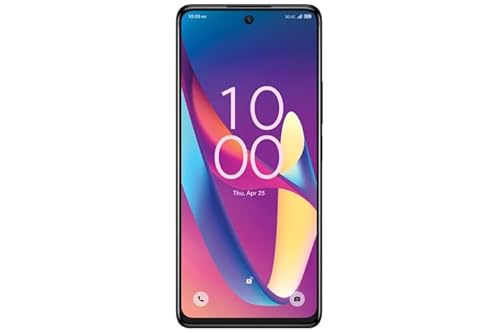
TCL 50 XL 5G — Best Big-Screen Value
TCL builds televisions, and the 50 XL reads like a TV maker’s idea of a phone: start with the biggest screen the budget allows and work backwards. The 6.78-inch panel runs at 120Hz with a matte-leaning finish that tames reflections, making it a genuinely pleasant surface for long reads, split-screen multitasking and subtitled dramas on the sofa. For older eyes or anyone who enlarges text and watches icons shrink into uselessness on smaller phones, the extra canvas is not a luxury; it is the feature.
The caveat is printed in its name: this listing is built for T-Mobile and its network family in the United States, so it is a recommendation with a postcode. On that network it is a lot of phone — a 5,010mAh battery, a 50-megapixel camera that handles daylight scenes capably, and TCL’s NXTVISION tuning that borrows the company’s display expertise to keep colours natural. Off that network it is simply not your phone, and we would rather say so in the pick itself than in a footnote. Treat it as the specialist option: enormous screen, tiny outlay, one network.
- Display: 6.78-inch FHD+, 120Hz refresh
- Battery: 5,010mAh
- Network: T-Mobile and its MVNOs only
- Storage: 128GB with microSD expansion
Strengths
- The roomiest screen here, kind to large text and split-screen work.
- Display tuning from a TV manufacturer shows in natural colour.
- Generous battery backs up the big panel properly.
Trade-offs
- Locked to one network family; useless as an unlocked traveller.
- Software support and resale value trail the big brands.
- Its size is a two-handed commitment in smaller pockets.
Best for: T-Mobile households wanting maximum screen for reading and streaming. Not suited for: anyone on another network, frequent travellers, or small-handed users.
Does Size Still Matter? A Note on Hands, Pockets and One-Handed Use
Five of these six phones are large, because the market has decided that screens grow and hands adapt. Mostly they do — but not everyone’s. The Pixel 8a is the deliberate exception in this line-up, and its presence is an argument that compactness is a feature with real daily value: it reaches the far corner of the screen with a thumb, sits in a jeans pocket without announcing itself, and can be used on a crowded bus with one hand while the other holds a rail, a bag or a small person’s hand. Anyone who has fumbled a big phone over a hard floor understands that drop risk is a specification too, just one that never appears in a table.
At the other end, the TCL’s 6.78 inches and the A16’s 6.7 make their own case. Larger text without scrolling, photographs that grandparents can actually see, split-screen that fits two usable apps rather than two keyholes — for media and readability, size is kindness. The middle of the range, where the A35, A25 and Moto G Power sit, is the compromise most people settle into happily. Our advice is unglamorous: if you can, hold the size class before you buy, even if it means handling a display model of a different phone with the same dimensions. Five minutes in the hand predicts five years of comfort better than any review, including this one.
How Do the Six Compare Side by Side?
| Phone | Screen | Storage | Standout trait | Watch out for |
|---|---|---|---|---|
| Galaxy A16 5G | 6.7-inch AMOLED, 90Hz | 128GB + microSD | All-round balance | Slow charging |
| Pixel 8a | 6.1-inch OLED, 120Hz | 128GB fixed | Camera intelligence | No card slot |
| Galaxy A35 5G | 6.6-inch AMOLED, 120Hz | 128GB + microSD | Premium feel, IP67 | Fingerprint-magnet glass |
| Moto G Power 5G 2024 | 6.7-inch LCD, 120Hz | 128GB + microSD | Two-day battery | Weak night photos |
| Galaxy A25 | 6.5-inch AMOLED, 120Hz | 128GB + microSD | Stereo speakers | Dated notch design |
| TCL 50 XL 5G | 6.78-inch LCD, 120Hz | 128GB + microSD | Biggest display | T-Mobile only |
Read the table as a map of personalities rather than a league table. The A16 and A35 bookend Samsung’s approach — value first versus feel first — while the Pixel argues that software can outrank hardware. Motorola and TCL both chase practical virtues, endurance and size respectively, that the bigger brands treat as footnotes. Nobody here is the wrong phone; each is the wrong phone for somebody, which is why the detailed verdicts above name who should walk away as clearly as who should buy.
What Can Cameras at This Level Really Do?
Camera marketing at the budget end leans on megapixel counts, so let us translate. A 50-megapixel sensor in daylight typically combines its pixels into a bright 12-megapixel photograph, and the honest differences between these six phones show up in three situations: movement, darkness and faces. Movement is where optical stabilisation earns its keep — the A35 and A25 steady the lens physically, so a child’s sprint across a garden stays recognisable rather than impressionistic. Darkness is where processing earns its keep, and it is why the Pixel 8a, with merely good hardware and superb software, out-shoots everything else here once the sun goes down.
Faces are the tiebreaker most buyers actually care about, because the camera roll of a family phone is ninety percent people. Samsung’s processing favours bright, slightly saturated skin tones that look cheerful on a phone screen; Google aims for accuracy across a wider range of complexions and lighting, which is why its portraits survive being printed. Neither is wrong. What we would steer you away from is judging any of these phones by their ultrawide or macro cameras: at this level those extra lenses are seasoning, not the meal, and the main camera’s quality decides whether you keep the photograph.
Video follows the same pattern. All six record competent 1080p footage, stabilised well enough for birthdays and holiday clips, and none will trouble a dedicated camera for deliberate filmmaking. If video matters disproportionately — a teenager documenting skateboarding, a grandparent filming recitals from the back row — the stabilised Samsung models and the Pixel’s processing give you the steadiest, cleanest results, and a simple habit helps all of them: wipe the lens on your shirt before recording, because pocket lint degrades more budget footage than any sensor limitation.
Which 5G Bands and Network Details Should You Check Before Ordering?
Buried in every listing is a band list, and two minutes with it prevents the most avoidable disappointment in phone buying. In the United States, the workhorse 5G bands are the low and mid frequencies — n71, n41, n77 and their relatives — which balance range and speed. Every unlocked pick here covers the mainstream set for the big three networks, which is why they can be recommended without an asterisk. The asterisk belongs to phones imported from other regions, whose band lists may omit exactly the frequency your local tower uses; a phone can be a superb bargain in its home market and a 4G-only device in yours.
Dual SIM support, physical or eSIM, is the second detail worth thirty seconds. Several Samsung models here accept two lines, which suits anyone separating work from personal calls or keeping a home number alive while travelling with a local data SIM. The Pixel leans on eSIM, elegant where carriers support it and mildly annoying where they do not. None of this is glamorous, but network compatibility is the one specification that cannot be fixed with a case, an update or optimism, so it earns its check before money moves.
Why Does the Update Policy Matter More Than the Processor?
Ask owners of four-year-old phones what frustrates them and few will say the chip. They will describe an app that no longer installs, a banking service that demands a newer security patch, a browser warning them away from pages. Processors age gracefully because everyday tasks plateaued years ago; software support ends abruptly, on a date the manufacturer chose at launch. That asymmetry is why this guide keeps returning to update windows, and why the Samsung and Google picks carry a structural advantage that no benchmark captures.
There is a financial side too. A phone supported for longer holds resale and hand-me-down value: it can go to a teenager, a parent or a drawer as a trustworthy spare, rather than becoming e-waste with a good screen. When you compare a slightly cheaper handset with two years of patches against one with five, you are not comparing prices so much as cost per year of safe service — and by that measure the apparent bargain often finishes second.
How Should You Set Up a New Budget Phone in the First Hour?
Start before the old phone goes anywhere near a drawer. Back up photographs, messages and two-factor codes, then let the new handset’s transfer tool do the heavy lifting over Wi-Fi with both phones plugged in; cable transfers are faster, but Wi-Fi is gentler on ageing batteries. During setup, decline the optional extras — duplicate browsers, sponsored games, trial subscriptions — because every one of them becomes a notification you will be dismissing in March.
Next, spend ten minutes on the settings that shape daily life. Set the screen timeout to a minute, turn on adaptive brightness, and choose your refresh rate: the highest setting looks best, but dropping to standard on the Motorola or TCL buys real battery hours. Register two fingerprints per thumb if the reader allows it, add your face unlock as a backup, and record the phone’s IMEI somewhere outside the phone itself. Then arrange the home screen for the life you have: the five apps you open daily on the first row, everything else in the drawer, and widgets only where they answer a question at a glance, like the next train or the weather at pickup time.
Finally, protect the purchase. A slim case and a tempered-glass protector cost little against a screen replacement, and budget phones deserve the same armour as flagships because their owners keep them longer. Turn on Find My Device, set a backup schedule for photographs, and diarise a six-monthly tidy: delete the duplicate downloads, clear the cached video apps, and let the microSD card — if you fitted one — absorb the camera roll before storage warnings begin.
Renewed, Refurbished or New: How Should You Read the Listing?
Several picks in this guide are easiest to find as renewed devices, and the word deserves unpacking because it covers a spectrum. At the trustworthy end sits the manufacturer- or retailer-certified programme: the phone has been inspected against a checklist, faulty parts replaced, battery verified against a minimum health threshold, and the sale backed by a warranty and a returns window. At the other end sits the anonymous marketplace listing with three stock photographs and a prayer. The phones themselves may be identical; the protection around the purchase is not, and the protection is what you are paying the small premium for.
Reading a renewed listing well takes four checks. First, the grade: excellent, very good and good usually describe cosmetics, not function, so a lower grade with a strong warranty beats a pristine claim with none. Second, the battery statement: any seller unwilling to commit to a minimum battery health is telling you something. Third, what is in the box: renewed phones often ship with a cable but no charger, which is a small extra cost worth knowing before the parcel arrives. Fourth, the network statement: confirm the handset is unlocked or matched to your carrier in writing on the listing, not in a chat message afterwards. Do those four things and renewed becomes what it should be — the route by which last year’s excellent phone becomes this year’s sensible one.
What Accessories and Hidden Costs Belong in the Budget?
The handset price is the beginning of the bill, not the end of it. A protective case and screen protector are close to mandatory, because budget phones are kept longer and dropped just as often as flagships. A charger may not be in the box at all — Samsung and Google have largely stopped including one — so factor in a decent USB-C brick, ideally one that supports the faster charging standards your chosen phone accepts, since a weak charger makes a fast-charging phone charge slowly. If your pick lacks a headphone jack and your life involves wired audio, a small USB-C adapter or an inexpensive set of Bluetooth buds joins the list.
Storage can add cost too. The card-slot phones accept microSD cards that are genuinely cheap for the space they add, which is one more reason they anchor this guide; the Pixel’s fixed storage pushes heavy users toward a cloud subscription instead, a small monthly cost that is fair value for automatic backup but should be counted honestly. Finally, consider insurance or a protection plan with clear eyes: for a phone at this level, a good case plus the money saved by skipping the plan usually wins, unless the owner is a teenager with a documented history of screen destruction, in which case the maths changes and so does our sympathy.
What Mistakes Do Buyers of Cheap 5G Phones Keep Making?
The classic error is buying last year’s storage. A phone with too little internal space does not fail dramatically; it fails by inches, refusing an update here, offloading an app there, until the owner hates a handset that was fine in every other way. Every pick in this guide starts at 128GB for a reason, and the card slots on five of the six exist to stretch that further. The second error is chasing the longest specification list instead of the longest support window: a phone that receives security patches for years is safer for banking and worth more at resale than one with a marginally faster chip and abandonment scheduled.
Third, buyers forget to check their own network. The TCL in this guide is excellent — on T-Mobile. Elsewhere it is an expensive paperweight, and the same logic applies to any carrier-specific bargain found while comparison shopping. Fourth, people skip the renewed listings entirely or, worse, buy renewed without reading the condition grading. A graded, warrantied renewed phone from a reputable seller is one of the smartest buys in this whole category; an ungraded one from an anonymous marketplace account is a lottery ticket. Read the grading, keep the returns window in mind, and the value is real.
How Do These Phones Cope With Everyday Apps, Games and Video Calls?
Synthetic benchmarks make budget phones sound breathless, but the lived experience is calmer. Messaging, email, maps, banking, social feeds and web browsing — the workload that fills ninety percent of most people’s screen time — run smoothly on all six picks, with the A35 and Pixel 8a holding a small but noticeable edge in how quickly apps reopen after being pushed aside. Where the cheaper handsets ask for patience is in the seams: a heavy game installing while photographs upload, a video call running while navigation recalculates. None of them collapse; they simply queue, briefly, where a flagship would not.
Video calling deserves a specific word because it is the task families actually judge. Front cameras across the group are adequate in daylight and soft in lamplight, and the Pixel’s processing again flatters its user most. More important than the sensor is the speaker: a call taken on the A25’s stereo speakers or the TCL’s large frame is a conversation, while the same call on a single bottom-firing speaker in a noisy kitchen is an exercise in lip-reading. If the phone is destined for a grandparent, prioritise volume and screen size over every other specification in this guide, and set the font large before you hand it over.
Gaming sits between the two. The popular, well-optimised titles that dominate the charts — the puzzlers, racers and battlers designed to run on everything — play happily across the group at moderate settings. The showcase titles built to humble flagships will run, but with reduced detail and warmth in the hand after twenty minutes. For a child or a casual player that is a perfectly good outcome; for someone whose hobby is genuinely mobile gaming, it is the clearest reason in this entire guide to save toward a different category of phone.
Which Pick Fits Which Person? Six Honest Scenarios
Abstract rankings dissolve on contact with real households, so here is the shortlist translated into people. The new parent, awake at 3 a.m. and photographing a sleeping baby in near darkness, belongs with the Pixel 8a; its camera forgives the light and its size forgives one-handed operation with a bottle in the other hand. The district nurse, the courier, the site worker — anyone whose day is measured in miles rather than meetings — belongs with the Moto G Power, because a phone that dies at 4 p.m. is not a tool but a liability, and its rugged practicality suits gloves, vans and rain.
The student furnishing a life on a loan should take the A25: stereo speakers for the shared kitchen, a jack for the cheap wired earbuds that never need charging, and a screen that makes lecture recordings and late-night streaming equally painless. The retiree upgrading from a beloved but wheezing older Galaxy will feel most at home with the A16, where everything sits where Samsung has always put it, only faster and on a far better screen. The design-conscious buyer who winces at plastic should stretch to the A35 and enjoy the glass back and water resistance daily. And the T-Mobile household kitting out a teenager, or a grandparent who reads everything in large print, will find the TCL’s enormous canvas the kindest option of all.
What Does Three Years of Ownership Actually Look Like?
Year one is easy for every phone here: everything is fast, the battery is fresh, the case is new. The differences arrive in year two, when the camera roll passes ten thousand photographs and the homescreen carries the sediment of two jobs, two schools or one growing family. This is where the microSD models breathe — move the media, keep the internal storage under eighty percent full, and the phone stays responsive — while fixed-storage owners must become curators, offloading to cloud or computer on a schedule. It is also when the first battery ageing appears; the Moto G Power’s oversized cell degrades into merely excellent endurance, while slimmer phones begin asking for a mid-afternoon top-up.
Year three separates the supported from the stranded. The Samsung and Google handsets are still receiving security patches and the occasional feature, still safe for banking, still worth handing down. Shorter-support rivals are not suddenly useless — they make fine media players, sat-navs and spare handsets — but their role in handling money and identity should wind down. Planning for that arc at purchase time, rather than discovering it, is the difference between a phone that feels like a bargain for three years and one that feels like a false economy in the third.
How Can You Make Any of These Phones Last Longer Between Charges?
Battery life is partly hardware and partly habit, and the habits transfer to whichever pick you choose. The screen is the hungriest component, so adaptive brightness plus a one-minute timeout quietly outperforms any battery-saver mode. The 5G radio is the second lever: in a strong-signal city it is efficient, but in a fringe area the phone burns power hunting, and switching the preferred network to 4G for a long rural day is a legitimate, reversible choice. Background apps are the third: social and video apps that refresh constantly cost more than their screen time suggests, and Android’s battery settings will name the offenders honestly if you look once a month.
Charging habits shape the long game. Batteries age fastest when held at extremes, so the overnight charge to full is fine for convenience but the occasional unplug at eighty or ninety percent, when you remember, is a small kindness that compounds. Heat is the other enemy: a phone left navigating on a sun-baked dashboard ages its battery in a single summer faster than a year of ordinary use, so shade and a vent mount are genuine battery accessories. None of this requires obsession. It simply recognises that on a phone you plan to keep for three or four years, the battery is the component most likely to decide when the story ends — and a few light habits can postpone that ending considerably.
When Is the Smartest Time to Buy, and What Is Your Old Phone Worth?
Budget phones follow a gentler price rhythm than flagships, but a rhythm exists. New Galaxy A-series models typically arrive in the first part of the year, which makes the outgoing generation — often identical in the ways that matter — the value play of the spring. Motorola’s G line refreshes on its own cycle, and the renewed listings for Pixels deepen noticeably a few months after each autumn launch, when early upgraders trade in. None of this requires spreadsheet devotion; it simply means that if your current phone still works, a few weeks of patience around a launch window often buys the same handset for less, or the newer one for the same.
The old phone in your drawer is part of the equation too. A handset in working order with a clean screen has trade-in or resale value that quietly upgrades your budget — sometimes enough to turn the A16 decision into an A35 decision. Even where the value is small, passing a supported phone to a family member or a local refurbishment scheme beats the drawer, both practically and environmentally. Wipe it properly first: sign out of accounts, remove the memory card, then factory reset, in that order, so your photographs and logins do not travel with it. The best affordable phone purchase, in the end, is the one where the whole household’s devices end up one step better than they started.
Final Recommendation
Most readers should buy the Galaxy A16 5G and stop deliberating: it pairs the screen, storage flexibility and software longevity that matter over years, at the gentlest price in this group. Choose the Pixel 8a instead if photographs of people are your phone’s main job, the Moto G Power if your working day makes charging a logistical problem, and the A35 if you simply want the budget phone that does not feel like one. The A25 serves the streamers, the TCL serves T-Mobile’s big-screen faithful, and each is a deliberate, defensible choice rather than a consolation prize. Affordable 5G has matured into a category where the smart move is no longer finding the least-bad phone, but naming the one good habit — camera, battery, screen or sound — you want your next three years of pocket technology to protect. Buy for the life you actually lead, keep the receipt and the returns window in mind for the first fortnight, and the phone you choose from this page should quietly become the least interesting, most dependable object you own.
Frequently Asked Questions
Will these phones work on any network?
Five of the six are sold unlocked and work across the major carriers’ 5G networks, though it is always worth confirming band support with a smaller regional carrier. The exception is the TCL 50 XL, which is built specifically for T-Mobile and networks that run on its infrastructure.
Is a renewed phone a risky purchase?
Not inherently. A renewed handset from a graded, returns-backed listing has been inspected and tested, and it is how several models in this guide reach their most attractive prices. Check the condition grade, battery description and return terms, and avoid listings that will not state them.
How much storage do I genuinely need?
For most people, 128GB with the option of a microSD card covers years of photographs, messages and a healthy app library. If you shoot lots of video or keep big games installed, favour the card-slot models and move media to the card quarterly.
Does 5G drain the battery faster?
It can in weak-signal areas, where the radio works harder to hold a connection. In normal coverage the difference is modest, and every phone here lets you limit the radio to 4G if you would rather trade speed for endurance on a long day away from a charger.
How long will a budget 5G phone stay secure?
It depends on the brand’s update policy, which is why this guide weighted it heavily. The Samsung and Google picks carry multi-year security commitments, while Motorola and TCL support shorter windows — a real consideration if you bank or work on the device.
Can these phones handle mobile gaming?
Everyday titles, puzzle games and most popular multiplayer games at sensible settings run fine across the group. Sustained sessions of the most demanding 3D games will heat the slimmer phones and shorten battery life, so keen gamers should look at the A35 or Pixel 8a first.
Should I buy last year’s model instead of a current one?
Often, yes. The previous generation of a Galaxy A phone or a Pixel a-series handset usually keeps the same screen quality and camera character, and renewed or discounted stock makes it the value sweet spot. Just check the remaining update window, because support clocks start at launch, not at your purchase date.
Do I need a special plan to use 5G on these phones?
Most mainstream plans now include 5G access by default, but some older or ultra-basic tariffs are still provisioned for 4G only. If a new 5G phone shows only 4G after setup, check the SIM and plan with your carrier before blaming the handset — a SIM swap or plan refresh usually resolves it.
Are any of these phones suitable for a child’s first smartphone?
Yes — the A16 5G and Moto G Power are the usual family choices, the first for its long software support and familiar controls, the second for surviving long days away from a charger. Pair either with your platform’s family controls, a sturdy case and a frank conversation about screen time, and the hardware will do its part.
How do I check whether a cheap 5G phone supports my carrier’s bands?
Start with the exact model number, not the marketing name, because carriers and regions often get different variants of the same phone. Find that variant’s band list on the manufacturer’s specification page, then compare it with the 5G bands your carrier publishes for your area — the overlap that matters is the low- and mid-band coverage used for everyday service, since millimetre-wave support is rare at this price and only appears in dense city spots anyway. Most carriers also run an online compatibility checker that takes the phone’s IMEI once you have it. If a listing cannot tell you which variant it is selling, treat that as your answer and buy elsewhere.
Related Guides
Still deciding? Readers comparing handsets also found these guides useful: best 64gb android phones for a closer look at storage tiers, best affordable android phones with headphone jack if wired audio matters to you, and best 1440p android phones when you are ready to step up to a sharper screen.