What's inside
- Where to buy
- Key Takeaways
- Quick Picks
- How did we grade motherboards for a sixteen-core processor?
- Why does VRM quality dominate every other specification for this chip?
- How do the best motherboards for the Ryzen 9 3950X compare side by side?
- How should a 3950X workstation be cooled and configured once the board is chosen?
- Which mistakes do 3950X buyers make most often?
- What should the case and power supply contribute to a sixteen-core build?
- How should you validate a 3950X build before trusting it with real work?
- What do memory and storage planning look like at sixteen-core scale?
- Final Recommendation
- Frequently Asked Questions
- Why do so many 3950X systems live in second careers, and what does that mean for board choice?
- Related Guides
As an Amazon Associate I earn from qualifying purchases. This post may contain affiliate links at no extra cost to you.
gizmoverdict.com is reader-supported. When you buy through links on our site, we may earn an affiliate commission.
Where to buy
The best 3950x motherboards are not really a shopping list; they are a power-delivery exam that most AM4 boards were never designed to sit. The Ryzen 9 3950X packs sixteen Zen 2 cores into a socket whose ecosystem also contains humble four-core chips, and a motherboard cannot tell from the outside which master it will serve. Feed this processor from a board built for mainstream parts and it will not dramatically explode — modern boards protect themselves — it will do something worse for a workstation: it will quietly run its voltage regulators at the edge of their thermal envelope for hour after hour of rendering, compiling or encoding, ageing capacitors, heating the PCB around the socket, and eventually throttling or destabilising the very jobs the sixteen cores were bought to finish. So this guide grades every pick by one question first — how honestly can this board deliver sustained current to a 16-core chip? — and only then by the features printed on the box.
Two warnings frame everything below, and we will not soften either. First, the B450 board in this list is present because readers keep asking about it, and its section is a cautionary explanation rather than a recommendation: a 3950X can boot and even benchmark on modest boards, but sustained professional loads are a different contract, and this guide refuses to sign it on a budget VRM. Second, B550 and X570 are the chip’s natural habitats, yet even there the spread between a flagship-grade power stage and a mainstream one decides whether your render finishes at full speed in August or limps through it with the case side off and a desk fan apologising. Sixteen cores forgive nothing. They do, however, reward honesty lavishly: a board chosen for their real appetite turns this ageing flagship into the most dependable employee a small studio can hire, one that asks only for moving air and clean power and then works, at full pace, for as many hours as the job contains. Choose the board the way you would choose a power supply: by the load it must carry at hour six, not by the photograph on the listing.
Key Takeaways
- For a 16-core chip, the VRM is the motherboard: phase design, heatsink mass and airflow over the socket decide sustained performance.
- X570 and strong B550 boards are the safe habitats; modest B450 boards are a warning example, not a value pick, for this processor.
- A 3950X that boots on a weak board has proven nothing — the exam is a multi-hour all-core load in a warm room.
- Case airflow aimed at the socket area matters as much as the board’s own heatsinks; downdraft from a tower cooler helps neither by default.
- Memory ambition should stay modest: four densely populated sticks at aggressive speed fight the controller harder on a full workstation build.
- Precision Boost rewards cool, well-fed silicon, so board and cooling choices show up directly as sustained clock behaviour.
- Validate the finished build at hour three of a real job, not minute three of a benchmark, before deadlines depend on it.
Quick Picks
| Pick | Badge | Why it earns its place |
|---|---|---|
| Gigabyte X570 AORUS Elite | The X570 workhorse | A power stage built for the flagship generation, with chipset lanes for a storage-heavy workstation. |
| MSI MAG B550 Tomahawk WiFi | The B550 anchor | The calm, heatsinked B550 foundation we would hand a 3950X owner who renders daily. |
| ASUS ROG Strix B550-F Gaming WiFi II | The polished powerhouse | Strong delivery plus the firmware, audio and networking polish of the ROG tier. |
| Gigabyte B550 AORUS Elite AX V2 | The conditional value | Capable at stock settings with deliberate socket airflow — and we say exactly where its ceiling sits. |
| MSI B550 Gaming WiFi6E | The mainstream caution | A fair board for lighter 3950X duty cycles; sustained rendering pushes it past its comfort. |
| MSI B450 Tomahawk MAX | The warning label | Included to explain, in detail, why a beloved B450 board is the wrong foundation for sixteen cores. |
How did we grade motherboards for a sixteen-core processor?
Our grading began where the heat begins: the voltage regulator module. We looked at the class of power stage each board carries, the mass and finning of the heatsinks bolted over it, and the board’s reputation under sustained flagship loads, because a 3950X at full song draws current in a pattern closer to a small server than to a gaming desktop. Boards whose delivery was designed when 16-core AM4 chips were already on the roadmap started with credit; boards designed for the six and eight-core mainstream started with questions to answer. We then weighed the supporting cast that a workstation actually feels — M.2 provision for scratch and project drives, enough SATA for bulk storage, fan headers placed where a full case needs them, and a BIOS with sensible control over power limits and fan behaviour — while deliberately discounting decoration. Lighting ecosystems, in particular, earned nothing here. A board that glows beautifully while its regulators cook is a lamp with a socket attached.
We also graded honesty of fit. Two picks below are conditional, and their conditions are printed in their sections rather than in footnotes: stock power limits respected, airflow deliberately arranged over the socket, and workloads that are bursty rather than an unbroken eight-hour render queue. One pick is an outright warning. That structure is deliberate, because the search results for this processor are full of cheerful compatibility claims — the socket matches, the support list includes the chip, the purchase is therefore blessed — that collapse the distinction between supported and advisable. A support list answers whether a board may run a processor. This guide exists to answer whether it should, for how long, and doing what. Every linked board was verified in our pool with an official image, and no board appears here merely to fill a price rung.
Why does VRM quality dominate every other specification for this chip?
A voltage regulator does an unglamorous translation: it takes the power supply’s 12 volts and renders it down to the roughly one volt a processor core actually drinks, in currents that, multiplied across sixteen busy cores, become very large indeed. Every stage of that translation sheds heat in proportion to its inefficiency, and the components doing it sit in a tight neighbourhood beside the socket, often in the worst airflow postcode of the entire case — above the processor, behind the exhaust path, shadowed by a tower cooler that blows straight past them. On a six-core chip the arithmetic is forgiving and almost any heatsinked design coasts. On a 3950X running an overnight encode, the same neighbourhood becomes a slow oven: regulator temperatures climb for the first hour and keep climbing, the board’s protection systems begin negotiating clocks downward, and the workstation’s owner learns that the render which took four hours in spring takes five in summer for reasons no software update will explain.
It is worth pausing on why this problem stayed invisible during the platform’s youth. Reviewers benchmark in minutes, on open benches, in air-conditioned rooms — conditions that flatter every board equally and reveal none of this. The 3950X’s board hierarchy only declares itself in the unglamorous conditions of real ownership: a closed case, a warm room, a job that lasts as long as a working morning. That gap between test conditions and life conditions is why owner reports from render farms and video studios diverged so sharply from launch-week charts, and why this guide keeps returning to hour three as its unit of truth. A board recommendation for this processor that does not specify its load duration is not incomplete; it is answering a different question entirely.
Three defences exist, and good boards combine all of them. The first is electrical: more capable power stages, properly paralleled or teamed, each carrying a smaller share of the load and wasting less of it as heat. The second is thermal mass: real finned heatsinks with surface area, screwed down with thermal pads that actually contact the components, rather than the sculpted metal shells some boards wear as jewellery over bare regulators. The third is environmental, and it belongs to the builder rather than the board: air that moves across the socket region, whether from a top exhaust that draws past the heatsinks, a rear fan that does not leave the corner stagnant, or a cooler whose spill washes the area. When you read the picks below, read their VRM paragraphs as the review and everything else as the specification sheet — for this processor, that ordering is simply the truth about where failures and frustrations are born.
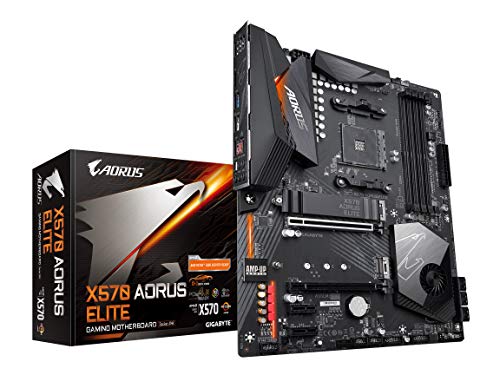
Gigabyte X570 AORUS Elite — The X570 workhorse
X570 was designed in the same breath as the 3950X, and this board carries that shared birthday in its bones. Its power delivery was specified against the flagship end of the Zen 2 range rather than retrofitted toward it, which shows in the only test this guide ultimately trusts: sustained all-core work without the slow thermal negotiation weaker boards begin. A workstation built on it can be pointed at a render queue in the morning and expected to hold its clocks until the queue is done, with the regulators warm rather than wounded. Gigabyte paired that delivery with the chipset’s other birthright — PCIe 4.0 lanes from both processor and chipset, feeding multiple fast M.2 drives without the lane-sharing compromises that make B550 storage layouts a puzzle. For a 3950X owner whose machine is a small production studio of scratch disks, project drives and archive SATA, that storage generosity is not a luxury; it is the daily texture of the job.
The ownership caveats are X570’s known ones, and they are manageable rather than mysterious. The chipset wears a small cooling fan, as its generation required; give its curve ten minutes in the BIOS so it idles silently, and it will repay you by never being thought about again. The board’s styling is restrained to the point of anonymity inside a closed workstation case, which its intended owner will count as a feature. Its BIOS flashback capability — updating firmware with no processor installed — is the sort of insurance that matters disproportionately on a platform this mature, where a board may arrive carrying firmware from any point in a long production life. What the AORUS Elite does not offer is onboard wireless on this variant, a genuine omission for a studio machine exiled to a room without Ethernet. Weigh that single gap against the strongest all-round delivery-and-storage case in this guide, and for the wired workstation it remains the first name we would write down.
- Socket / chipset: AM4 with AMD X570
- Size: ATX
- RAM: four DDR4 slots
- Power stance: flagship-generation delivery, suited to sustained 16-core loads
- Storage highlight: multiple M.2 with PCIe 4.0 from CPU and chipset
- Networking: wired Ethernet; no onboard WiFi on this variant
Strengths
- Power delivery conceived for the 3950X’s own generation and sustained loads.
- The most generous fast-storage wiring of any pick in this guide.
- CPU-free firmware flashing insures against old-stock BIOS surprises.
Trade-offs
- The chipset fan needs a curve adjustment to stay inaudible at idle.
- No onboard WiFi on this variant for cable-starved rooms.
- Its talents are wasted on bursty, light-duty use — cheaper boards exist for that.
Best for: wired workstations rendering or compiling for hours at a stretch. Not suited for: buyers who need onboard wireless without adding a card.

MSI MAG B550 Tomahawk WiFi — The B550 anchor
If X570’s chipset fan and storage maximalism are more than your build wants, the MAG B550 Tomahawk WiFi is where this guide’s recommendation lands for most 3950X owners. Its power delivery is the reason: MSI engineered this board’s VRM with flagship Zen 3 loads explicitly in mind, wrapped it in the extended finned heatsinks the Tomahawk name promises, and produced a B550 board that treats a sixteen-core chip as its design case rather than its stress case. Under sustained work it behaves with the calm this processor needs — no progressive clock sag, no regulator corner of the board becoming a hand-warmer — provided the case gives the socket region the moving air the buying-guide section below describes. Around that delivery sits a thoroughly modern board: PCIe 4.0 to the primary graphics and M.2 slots from the processor, onboard WiFi for the rooms Ethernet forgot, and a BIOS flashback button that keeps firmware maintenance independent of which processor is installed.
The B550 compromises, seen from a 3950X desk, are specific and survivable. Chipset lanes run at PCIe 3.0, so the second M.2 drive and additional expansion live a generation behind the primary devices — a distinction that matters to storage extremists and almost nobody else, since scratch and project drives on the CPU lanes run at full speed. There is no front-panel USB-C header surprise or missing fan header waiting to ambush a normal full build; MSI’s layout discipline is the quiet reason this board anchors so many recommendations. Where it concedes ground to the X570 pick is raw storage ceiling, and to the ROG pick below in audio and firmware frills. Where it concedes nothing is the central contract of this guide: feed sixteen cores properly, all day, without theatre. For a 3950X bought to work rather than to be admired, that contract is the review.
- Platform: AM4, AMD B550 chipset
- Format: full ATX
- Memory: 4x DDR4 DIMM slots
- Power stance: flagship-rated delivery with extended heatsinks
- Storage highlight: PCIe 4.0 primary M.2; chipset devices at PCIe 3.0
- Networking: onboard WiFi plus wired Ethernet
Strengths
- The B550 power delivery we trust most with sustained sixteen-core work.
- Heatsink design that treats regulator cooling as engineering, not styling.
- Onboard WiFi and flashback complete a no-asterisk workstation foundation.
Trade-offs
- Secondary storage lives on PCIe 3.0 chipset lanes.
- Plainer audio and trim than the ROG alternative below.
- Still demands real case airflow — no board cools its socket in a sealed box.
Best for: most 3950X owners building a dependable daily workstation. Not suited for: storage maximalists who need every M.2 slot at PCIe 4.0.

ASUS ROG Strix B550-F Gaming WiFi II — The polished powerhouse
The Strix F makes its case to the 3950X owner who works in two registers: the machine renders and compiles like a workstation, then stays on the desk for the evening as the household’s best-connected computer. Its power stages belong to the strong tier of B550 — teamed stages under substantial heatsinks, specified with flagship processors in the brief — and in sustained service it holds the same promise as the Tomahawk above: sixteen cores fed without the slow thermal retreat. Where it spends its premium is everything surrounding that promise. The BIOS is the friendliest place in this guide to manage a workstation’s manners, from fan curves that can be taught the difference between a render and a desktop idle to memory training that reports its failures in sentences rather than beeps. The audio section is properly engineered, the networking is current, and the II revision’s wireless is the generation a new router expects.
None of that polish excuses a builder from the platform’s physical truths, and the Strix’s own layout enforces one of them helpfully: its heatsinks are large enough that cooler clearance and top-fan placement deserve a tape measure before ordering an oversized tower cooler. The board’s second M.2 slot shares lanes in the usual B550 pattern, so a build planning two fast drives plus a capture card should read the manual’s sharing table before the parts arrive rather than after. And the ROG premium, as ever, buys experience rather than arithmetic — the Tomahawk feeds the same processor for less, and a sealed render node will never see what the extra money purchased. But a 3950X machine that is also its owner’s daily window on the world earns that premium back in a hundred small smoothnesses, and it does so without compromising the one specification this guide refuses to trade away.
- Chipset: AMD B550 on socket AM4
- Board size: ATX
- Memory: DDR4 — four DIMM slots
- Power stance: strong teamed delivery, flagship-rated
- Storage highlight: dual M.2 with documented lane sharing
- Networking: current-generation onboard WiFi plus Ethernet
Strengths
- Flagship-grade feeding wrapped in the class’s most civilised firmware.
- Audio and networking that suit a work-and-play flagship desk.
- Heatsink mass that keeps sustained loads uneventful.
Trade-offs
- The premium buys polish; a headless render node cannot spend it.
- Large heatsinks demand a clearance check with oversized coolers.
- Lane sharing on secondary slots requires reading before populating.
Best for: 3950X owners whose workstation doubles as the main household PC. Not suited for: sealed render nodes where firmware and audio polish go unseen.
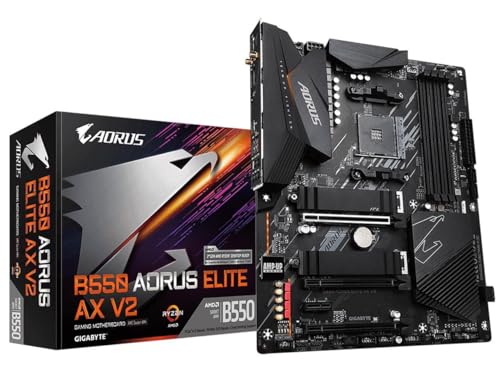
Gigabyte B550 AORUS Elite AX V2 — The conditional value
Here the guide’s tone changes on purpose, because this board’s relationship with a 3950X is conditional and the conditions are the content. The AORUS Elite AX V2 is a competent mainstream B550 board whose power delivery was sized for the six and eight-core heart of the market. A sixteen-core chip sits on its support list, and at stock power limits, in a case whose airflow deliberately washes the socket region, it will run a 3950X through ordinary mixed workloads — development, photo work, gaming with background tasks, short encodes — without incident. That sentence, however, carries three clauses, and a buyer who drops any of them is shopping for trouble: raise power limits or enable the more aggressive boost behaviours and the delivery leaves its design envelope; seal the socket corner away from moving air and regulator temperatures become the system’s ceiling; queue an unbroken day of rendering and you are asking a mainstream VRM to live a flagship’s life. Within its envelope it is honest value. Outside it, it is a slow lesson.
The frustrating part is that nothing about the board warns its owner at purchase time — the failure mode is not a crash on day one but a workstation that grows subtly slower and less stable across a summer. So our verdict is written for two specific readers. The first owns a 3950X whose work is genuinely bursty — a developer who compiles in minutes, a photographer whose exports are measured in moments — and whose budget would rather fund memory or storage; for that reader, with stock settings respected and a top exhaust fan doing deliberate duty, this board is a defensible economy. The second reader renders, encodes or simulates for hours; for that reader this pick is a false economy priced exactly one motherboard below the Tomahawk that should have been bought, and the price difference will be repaid in throttled jobs with interest. Know which reader you are before the price seduces you, because the board will not ask.
- Socket and chipset: AM4 / AMD B550
- Dimensions: ATX form factor
- RAM provision: four-slot DDR4
- Power stance: mainstream delivery — stock limits and socket airflow are conditions of use
- Storage highlight: PCIe 4.0 primary M.2 from the processor
- Networking: onboard WiFi (AX trim) plus wired Ethernet
Strengths
- Genuine savings for bursty, stock-settings 3950X workloads.
- Wireless included and Q-Flash Plus for CPU-free updates.
- Conventional layout that builds without surprises.
Trade-offs
- Sustained all-core rendering sits beyond its comfortable envelope.
- Requires deliberate airflow over the socket — not optional garnish.
- Raising power limits voids the logic of choosing it at all.
Best for: budget builders whose 3950X work arrives in bursts at stock settings. Not suited for: render, encode or simulation queues measured in hours.

MSI B550 Gaming WiFi6E — The mainstream caution
MSI’s B550 Gaming board with WiFi 6E sits a half-step below its Tomahawk sibling in the delivery hierarchy, and with a sixteen-core processor that half-step is the entire story. Its power stages are mainstream B550 fare — adequate for the processors the board was priced around, honest under a 3950X at stock limits for the mixed, interruptible work of a home office, and increasingly warm company when the chip is asked to hold all-core loads through a long afternoon. We include it because its wireless is genuinely the newest here and because some 3950X systems live gentle lives: the retired flagship repurposed as a family machine, the home-lab box whose containers idle more than they strive, the streaming PC whose sixteen cores are mostly a bragging right. For those duty cycles, buying Tomahawk-grade delivery is money parked in heatsinks that will never be warm. For a working render station, this board is where false economy begins, and its section in a less honest guide would not tell you so.
The rest of the board is pleasant modern MSI: a BIOS generations of builders learned on, memory support lists long enough to cover any sane DDR4 kit, and a layout that keeps the graphics slot breathing. The 6GHz wireless band is a real delight in a dense apartment building once a matching router is present, and for the repurposed-flagship scenario — a machine migrating to a room chosen for quiet rather than for cable runs — it may be the feature that decides the purchase. Let it decide only after the workload question is answered in writing, ideally by looking at your own last month of work: if the processor’s busy hours come in minutes, proceed with our blessing and a top exhaust fan; if they come in shifts, close this listing and reopen the Tomahawk’s. Sixteen cores are patient silicon. They will wait quietly on a shelf while you choose the board they actually need.
- Chipset / socket pairing: AMD B550, AM4
- Form factor: standard ATX
- Memory fitted: DDR4 across four slots
- Power stance: mainstream delivery — light and bursty 3950X duty only
- Storage highlight: dual M.2, PCIe 4.0 primary from the processor
- Networking: WiFi 6E onboard plus wired Ethernet
Strengths
- The newest wireless here, ideal for a relocated or repurposed system.
- Friendly BIOS and deep memory lists from MSI’s mainstream line.
- Sensible savings when the chip’s workload is genuinely gentle.
Trade-offs
- Sustained rendering outruns its delivery’s comfort zone.
- Its famous sibling above is the correct answer for working machines.
- 6GHz benefits require a WiFi 6E router to exist in the house.
Best for: gentle-duty or repurposed 3950X systems, especially on 6GHz networks. Not suited for: any 3950X that earns its living under sustained load.

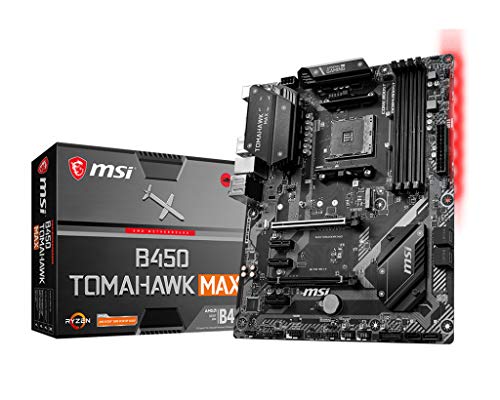
MSI B450 Tomahawk MAX — The warning label
We end the detailed picks with the board this guide exists, in part, to warn you about — not because it is a bad motherboard, but because it is a good one being asked the wrong question. The B450 Tomahawk MAX is a legend of the eight-core era: its delivery was generous for a Ryzen 7, its BIOS chip dodged the firmware squeeze, and its reputation is so warm that 3950X buyers keep arriving at it through the logic of “it handled the 2700X beautifully, and the support list includes my chip.” Both premises are true and the conclusion is still wrong. Sixteen Zen 2 cores under sustained load draw current in a different league from the processor this board was built around; its regulators, heatsinks and PCB were budgeted for that earlier league. The chip will install, the system will boot, benchmarks measured in minutes will complete, and the owner will post that it works — because in the short term it does. The bill arrives across weeks of long jobs: regulator heat soaking the socket neighbourhood, clocks negotiating downward mid-render, stability that degrades exactly when deadlines do not.
Is there any 3950X duty this board may honourably serve? A narrow one: a chip held at stock settings, in a case with strong direct airflow over the socket, doing light and interruptible work — a home server idling through services, a spare machine for office tasks — while its owner understands they own a compromise with a temperature. Even there, the honest advisor notes that a used strong B550 board usually costs little more and removes the asterisk entirely. What we will not do is what much of the internet does with this pairing: call it a budget hack. A hack implies the cleverness wins. Here the physics wins, slowly, in summer, during your longest job. If you already own this pairing, the kindest upgrades are airflow, stock limits and modest expectations. If you are buying today for a working 3950X, let this beloved board retire with the eight-core generation it served so well, and spend the small difference on a foundation that will not spend your render time apologising.
- Platform: AM4 with AMD B450
- Format: ATX
- RAM: DDR4 in four slots
- Power stance: eight-core-era delivery — NOT rated here for sustained 16-core work
- Storage highlight: single M.2 slot at PCIe 3.0
- Networking: wired Ethernet; no onboard WiFi
Strengths
- Superb board for the eight-core generation it was designed around.
- Large BIOS chip and mature firmware for its own era’s processors.
- Its section here may save a 3950X owner a summer of throttling.
Trade-offs
- Delivery predates the sixteen-core era and is outmatched by sustained loads.
- Support-list inclusion answers “may run”, never “should work all day”.
- Single M.2 slot and no wireless compound a workstation’s compromises.
Best for: almost nothing with this processor — light, stock, well-ventilated duty at most. Not suited for: sustained rendering, encoding, compiling or any deadline-driven 3950X work.
How do the best motherboards for the Ryzen 9 3950X compare side by side?
| Board | Delivery verdict | Storage | Wireless | Buy it when |
|---|---|---|---|---|
| Gigabyte X570 AORUS Elite | Flagship-generation — sustained loads welcome | Multiple M.2 at PCIe 4.0 | None | Storage and endurance both matter |
| MSI MAG B550 Tomahawk WiFi | Flagship-rated — sustained loads welcome | PCIe 4.0 primary M.2 | WiFi | You want the default correct answer |
| ASUS ROG Strix B550-F WiFi II | Strong — sustained loads welcome | Dual M.2, lane sharing | WiFi | Polish matters alongside power |
| Gigabyte B550 AORUS Elite AX V2 | Mainstream — conditions apply | PCIe 4.0 primary M.2 | WiFi | Work is bursty and settings stay stock |
| MSI B550 Gaming WiFi6E | Mainstream — gentle duty only | Dual M.2 | WiFi 6E | The chip is repurposed, not worked |
| MSI B450 Tomahawk MAX | Eight-core era — warning, not a pick | Single M.2 | None | Essentially never for this processor |
The middle column of that table is the most honest sentence in the AM4 marketplace. Every board listed can be photographed beside a 3950X box; only the top three can be trusted with its working life, and the distance between the third and fourth rows is not a price tier — it is the difference between a workstation and a worry. If your budget forces you into the conditional rows, let it do so with the conditions funded: the exhaust fan bought, the power limits left alone, the workload audited against your own calendar. A conditional board knowingly bought is a tool; the same board bought on a compatibility slogan is a trap with RGB headers. Pin this table where the build happens, and let its middle column argue with every discount the internet shows you.
How should a 3950X workstation be cooled and configured once the board is chosen?
Start with the air’s itinerary, because on this platform cooling is a route, not a pile of fans. Cool air should enter low and front, wash across the graphics card and drives, rise past the socket — and this is the step mainstream builds skip — actually move across the VRM heatsinks before leaving through the top and rear. A tower CPU cooler exhausts toward the rear and contributes almost nothing to the regulator neighbourhood directly above the socket, which is why a top-mounted exhaust fan, unglamorous and inexpensive, is the single most valuable cooling purchase a 3950X owner can make after the cooler itself. In the BIOS, teach the fans the truth about your workload: a curve keyed only to processor temperature will let the board’s hottest corner stew during GPU-heavy work that leaves the CPU modest, so where the firmware offers auxiliary sensor sources or a fixed sensible floor for the top exhaust, use them. Then verify under your real longest job, not a synthetic loop: run the render that represents your working life, watch clocks and temperatures at hour two rather than minute two, and treat any downward drift as a cooling design review rather than a silicon complaint.
Configuration discipline continues the same theme of respecting envelopes. Leave the processor’s power limits at their stock values unless your board sits in this guide’s top tier and your cooling has proven itself; the performance bought by raising them is small, hot and loud, while the stability spent is the workstation’s whole purpose. Memory deserves the same conservatism — a 3950X workstation typically wants capacity more than frequency, and a four-stick kit at a moderate, fully stable speed will out-deliver a fragile faster configuration every working day of the year, because the fastest memory setting is always the one that survives the eight-hour compile. Eco-mode and similar firmware leashes deserve an honest mention for the conditional-board owners: they trade a slice of peak throughput for a dramatically kinder current draw, and for a bursty workload the trade can convert a marginal board into a contented one. Finally, update the BIOS once, deliberately, before the build is commissioned — then freeze it. A working workstation is not a firmware hobby, and the mature AM4 platform rewards the owner who treats stability as a feature they already own.
Which mistakes do 3950X buyers make most often?
Before the catalogue of errors, one distinction deserves its own breath, because it organises all the others: the difference between a board that is compatible with this processor and a board that is appropriate for it is not marketing nuance — it is measured in amperes and degrees. Compatibility is a property of a support list, established once, in a lab, at the moment of validation. Appropriateness is a property of your workload, your room and your case, and it must be re-established by every buyer individually. Guides that blur the two sell boards; guides that separate them build workstations. Everything in the mistake list that follows is a story about a buyer who was sold the first property and needed the second.
The canonical mistake is reading a CPU support list as a recommendation, and it has a dozen children. One child buys the B450 board its reputation recommends and meets the physics this guide describes. Another buys a strong board and then starves it inside a sealed, sound-damped case chosen for silence, discovering that silence and sustained sixteen-core work are opposing specifications. A third spends the VRM budget on the processor’s retail box and a gaming-branded board chosen by its lighting, because the marketing photographs never show a thermal camera. A fourth populates all four memory slots with an aggressive kit and spends a month blaming the board for training failures that belong to ambition. And a fifth, subtlest of all, benchmarks the new build for ten triumphant minutes and never once tests hour three — the only hour this processor’s board choices are actually about. Every one of these mistakes is a failure of the same muscle: matching the purchase to the sustained, ordinary, unphotogenic reality of the work. Flex that muscle and the 3950X remains what it was at launch — one of the great workstation bargains of its platform, still earning its socket half a decade on.
What should the case and power supply contribute to a sixteen-core build?
The board does not work alone, and two supporting choices routinely decide whether a strong board gets to show it. The case first: a sixteen-core workstation wants a front that admits air as though it means it — mesh over sculpture — and a layout that gives the top of the motherboard an exhaust path rather than a decorative panel. Sound-damped cases have their place in this world, but that place is beside a board from this guide’s top tier and a workload that has been honestly classified; pairing a damped case with a conditional board stacks two compromises that multiply rather than add. Consider, too, where the finished machine will live. A workstation under a desk in a carpeted room inhales dust at floor level and exhausts into a wooden cave; the same machine on the desk breathes cleaner air and sheds heat into the room. Board thermals are case thermals are room thermals, and the chain is only as honest as its warmest link.
The power supply’s contribution is subtler and mostly about age and composure. Sixteen cores plus a workstation graphics card ask for clean, sustained delivery rather than headline wattage, and a quality supply of sensible capacity will provide it without drama. What deserves suspicion is the elderly unit carried across three builds on the logic that it still turns on: its capacitors have aged through every heat cycle the previous machines survived, its fan has outlived its quiet years, and its failure modes — ripple under load, drooping rails during transients — present exactly like motherboard instability, sending owners to replace the one component that was innocent. If the supply predates the processor, this build is its retirement party. A new board, a fresh supply and a validated memory kit give a 3950X something it rarely enjoyed even in its youth: a supporting cast with no alibis left to offer.
How should you validate a 3950X build before trusting it with real work?
A workstation earns trust through a protocol, not through a hopeful first week, and the protocol for this platform is specific. Begin with an hour of memory validation at the exact configuration you intend to keep — not at a relaxed fallback — because a 3950X build’s memory sins otherwise surface weeks later disguised as application crashes and corrupt exports. Follow with the longest real job your workload contains, run end to end while you log processor clocks and board temperatures at intervals; the numbers that matter are the ones at the job’s final quarter, when every heatsink in the case has reached its working temperature and the system has stopped benefiting from a cold start. A healthy build’s last fifteen minutes look like its first fifteen. A build whose clocks sag progressively, whose regulator readings climb without plateauing, or whose fans escalate in steps is telling you its envelope honestly, and the correct response is airflow and configuration changes now — while the build is still a project — rather than during the deadline week when the same behaviour becomes a crisis.
Then test the unglamorous failure paths a professional machine must survive. Sleep and wake it a dozen times across two days, because boards reveal their firmware manners in transitions rather than in steady states. Fill the storage you actually bought and confirm the lane-sharing behaviour matches the manual’s table rather than your assumption, especially with two M.2 drives and a full complement of SATA devices. Run one job while a large file copies between drives and a video call occupies the network, because a workstation’s real life is concurrent in ways benchmarks politely are not. None of this requires laboratory equipment — a system monitor, a notebook and the discipline to look at hour three rather than minute three will do. What it produces is the only specification that ever mattered for a sixteen-core machine: knowledge, earned before it was needed, of exactly where your particular build’s ceilings are and how much headroom your ordinary Tuesday leaves beneath them.
What do memory and storage planning look like at sixteen-core scale?
Sixteen cores change the arithmetic of everything attached to them, starting with memory. A processor that can run a compile, a container stack and a browser’s worth of documentation simultaneously will find the limits of a modest memory kit not in benchmarks but in behaviour — the swap file stirring during ordinary work, the virtual machine borrowing against the host’s comfort. This is why this guide keeps steering workstation buyers toward capacity with stability: a generous kit at a moderate speed, validated overnight, is a professional tool, while a small kit at a heroic speed is a gaming specification wearing a workstation’s clothes. Buyers populating all four slots should expect the platform to prefer gentler speeds with every slot filled, and should treat that preference as physics rather than as a defect to be argued with through voltage. The performance surrendered is theoretical; the stability purchased is the machine’s whole working character.
Storage follows the same logic of feeding the cores rather than decorating the specification sheet. A 3950X can ingest, process and write data at rates that make a single modest drive the bottleneck of an otherwise flagship build, so the sensible layout puts the operating system and active projects on the primary CPU-laned M.2 drive, scratch and cache on secondary storage where the workload benefits, and bulk archives on SATA drives whose cost per capacity remains unbeatable. X570’s broader PCIe 4.0 wiring flatters the extreme version of this layout, while B550’s primary-lane speed covers the version most owners actually build. Either way, the planning question is identical and worth asking before the board is ordered, because it decides between the chipsets more honestly than any feature list: how many fast drives will this machine genuinely juggle at once? Answer with your real projects rather than your ambitions, and the board choice — like so much else in this guide — makes itself.
Final Recommendation
Buy the MSI MAG B550 Tomahawk WiFi if you want this guide’s answer without its essays: flagship-rated feeding, modern storage, wireless included, no chipset fan, no conditions. Step to the X570 AORUS Elite when storage breadth rivals endurance in your priorities, and to the ROG Strix when the machine’s daily polish matters as much as its power. Enter the conditional rows only with your workload’s diary open and the conditions funded, and let the B450 legend rest. Sixteen cores were never the hard part of this purchase — AMD solved those years ago; the hard part is refusing to feed them through a foundation built for half their appetite, and a reader who finishes this page refusing exactly that has already made the decision the whole guide was written to produce. Keep the board’s corner of the case breathing, keep the settings at the values the silicon was promised, and this sixteen-core veteran will repay the respect with the only currency a workstation deals in: finished work, on time, without ever becoming the story of its own afternoon.
Frequently Asked Questions
Can a B450 motherboard really not handle a Ryzen 9 3950X?
It can hold one, boot one and benchmark one — the support list is not lying. What mainstream B450 power delivery cannot promise is the sustained contract: hours of all-core current in a warm room, repeated daily, without regulator heat becoming the system’s ceiling. That is why our B450 entry is written as a warning rather than a ban.
Is B550 or X570 the better chipset for a 3950X workstation?
Both host excellent boards. X570 offers PCIe 4.0 from the chipset as well as the processor, suiting storage-dense builds, at the cost of a small chipset fan. B550’s best boards feed the processor identically well and run simpler and quieter, with secondary storage a generation behind. Choose by storage appetite, not by fear.
Does a 3950X need liquid cooling on these boards?
No. A quality large air cooler handles the processor itself comfortably at stock settings. What needs planning is not the chip’s cooler but the board’s neighbourhood: moving air across the VRM heatsinks, usually via a top exhaust, matters more to sustained performance than the choice between air and liquid on the CPU.
Should I enable PBO or raise power limits for more performance?
Only on a top-tier board in this guide, with cooling already proven under your longest real job — and even then the gains are modest beside the heat and noise purchased. On the conditional boards, raising limits contradicts the entire basis on which they were chosen. Stock settings are this workstation’s professional configuration.
What temperatures should worry me around the socket during a long render?
Treat trend as more informative than any single number, because sensor placement varies between boards and no universal threshold survives contact with every model. A healthy system reaches a plateau — readings climb during the first portion of the job and then level as fans and heatsinks find equilibrium. The worrying pattern is a climb that never levels, or clocks that step downward in stages while temperatures hold, which is the signature of a delivery system rationing current to protect itself. If you see that pattern, the remedies in order are airflow over the socket, a check that heatsinks sit firmly with their protective films long removed, and a return to stock power limits — in that order, before any thought of replacing hardware.
How much memory should a 3950X build carry?
Capacity follows the workload: 32GB serves development and photo work, while rendering, virtualisation and large datasets justify 64GB or beyond. Favour a stable, moderate speed over an aggressive one, and remember that four populated slots train harder than two — stability is the workstation specification that outranks all others.
Why do so many 3950X systems live in second careers, and what does that mean for board choice?
Few processors of its era have enjoyed as many second acts as this one. A chip bought for a rendering desk becomes, five years on, a home-lab server virtualising a household’s services, a software developer’s compile box, a media machine whose sixteen threads transcode without breaking stride, or the heart of a workstation handed down to a student whose ambitions it still exceeds. Each second career re-weights the board decision in ways worth naming. The home-lab incarnation prizes stability at idle and remote manageability of manners — a board whose fans behave at low load and whose network connection never sulks after sleep. The hand-me-down workstation prizes the opposite end of the envelope, because its new owner’s workloads are unknown and possibly heavier than yours. And the media machine prizes quiet, which on this platform means a board whose delivery runs so far inside its comfort zone that its corner of the case never asks the fans for help. A buyer choosing today with even a guess about the machine’s second career can weight the picks accordingly — endurance boards age into every role gracefully, while conditional boards narrow the machine’s future to the gentlest of them.
There is a purchasing corollary hiding in that observation. Because the 3950X’s first owners were professionals, the boards that survive in quantity alongside it skew toward exactly the strong-delivery models this guide recommends — the platform’s twilight market is unusually rich in foundations that were specified properly the first time. A buyer assembling a 3950X system now, from a mixture of new-old stock and the used market, is therefore not condemned to the conditional rows of our table. Patience and the revision-checking habit will usually find a Tomahawk-class or X570 board at a price that makes the warning rows unnecessary. That may be the most practical sentence in this entire guide: with this processor, the correct board is rarely the expensive board — it is merely the honest one, and the market, for once, is full of them.
Related Guides
Keep planning the build with best motherboards for the Ryzen 7 2700X, best 400 series motherboards and what they can still run, and best all-glass PC cases and their airflow trade-offs.