What's inside
- Where to buy
- Key Takeaways
- Quick Picks
- How did we choose cases for a fifty-dollar full ATX shortlist?
- Which cases should a fifty-dollar full ATX builder consider?
- How do the six positions compare on budget honesty?
- What should a fifty-dollar case buyer check before anything else?
- How do you assemble a full ATX build inside a budget case gracefully?
- What mistakes do budget case buyers repeat most?
- When is stretching above fifty dollars the honest budget move?
- How does a budget case age across years of upgrades?
- Final Recommendation
- Frequently Asked Questions
- How do you read a budget case’s reviews without being misled?
- What does the fifty-dollar case teach about the whole budget build?
- Which accessories genuinely belong in a budget case budget?
- How does room reality change the right answer at this price?
- What should be salvaged when a budget build is eventually replaced?
- Why do some fifty-dollar builds run cooler than expensive ones?
- How should a first-time builder rehearse before the parts arrive?
- What separates a good cheap case from a bad one in the hand?
- Related Guides
As an Amazon Associate I earn from qualifying purchases. This post may contain affiliate links at no extra cost to you.
gizmoverdict.com is reader-supported. When you buy through links on our site, we may earn an affiliate commission.
Where to buy
This guide owes its readers a confession in the first paragraph, because the best $50 PC cases for full ATX builds are a scarcer species than the keyword hopes. The best $50 PC cases for full ATX motherboards exist as a class, sold by value brands in plain steel with acrylic or mesh fronts, but the verified pool assembled for this batch contains no case at that level: its cases are mid- and upper-tier designs from be quiet!, Fractal Design, Lian Li and Corsair. Two of them, the be quiet! Pure Base models, stand closest to the budget in spirit and are linked below with that label attached honestly. The other four positions are prose-only, describing the genuine budget classes a fifty-dollar shopper will actually meet, and how to judge them without a verified listing from us.
Why does the fifty-dollar full ATX case matter enough to deserve this candour? Because the case is where a budget build either protects its money or quietly wastes it. A cheap case that fits the board, moves enough air and does not slice its builder’s hands delivers ninety percent of what any case delivers. A cheap case that flexes, blocks its own fans and strands cables across the motherboard delivers a daily tax on every upgrade for years. The difference between those two outcomes is not visible in a product photograph, which is why this guide spends so much of its length on how to read a budget case’s specification and reviews like an engineer rather than like a hopeful.
Full ATX support is the keyword’s second demand, and it eliminates many of the cheapest cases outright, because the bargain basement is crowded with micro-ATX boxes wearing optimistic descriptions. A full ATX board needs the standoff pattern, the depth and the seven expansion slots of a proper ATX chassis, and a case that claims ATX support while crowding the board against the power supply shroud will punish every cable decision. Shoppers should treat the motherboard support line in a case’s specification as the first fact to verify, before fans, before glass, before anything that photographs well.
Key Takeaways
- No case in the verified pool sits at the fifty-dollar level, so the two linked be quiet! Pure Base models are labelled closest to the budget rather than dressed up as meeting it.
- Genuine budget full ATX cases exist as recognisable classes from value brands, covered here in prose with the checks their buyers must run personally.
- Motherboard support, fan provision and front-panel airflow matter more at this level than glass, lighting or brand prestige.
- A budget case should be judged on steel quality, included fans and cable room, in that order, because those three decide daily life with it.
- Spending slightly above the strict budget for a case with two included fans often costs less overall than adding fans to a cheaper shell.
Quick Picks
| Pick | Badge | Why it earns its place |
|---|---|---|
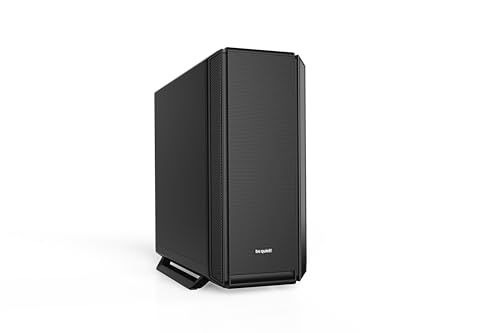
| be quiet! Pure Base 501 | Closest to the budget, linked | The pool’s most attainable serious case: an ATX midi tower with two 140mm PWM fans and be quiet!’s usual restraint. |
| be quiet! Pure Base 600 | The older value veteran, linked | An earlier Pure Base generation with two fans and sound-conscious panels, often the pool’s gentlest entry point. |
| Zalman S2 class | The true budget staple | Prose-only: the kind of acrylic-front ATX value case that genuinely inhabits the fifty-dollar neighbourhood in many markets. |
| Thermaltake Versa H21 class | The plain-steel workhorse | Prose-only: an unglamorous full ATX-capable tower class built for offices and first builds rather than photographs. |
| DIYPC Silence class | The quiet-budget attempt | Prose-only: value cases with sound-damped panels and ATX room, trading airflow headroom for calm. |
| Montech X3 Mesh class | The fan-bundle challenger | Prose-only: mesh-front value cases that compete by including several fans, changing the budget arithmetic entirely. |
How did we choose cases for a fifty-dollar full ATX shortlist?
The method began with a refusal: we would not relabel an upper-tier case as a budget case to fill a table. The pool was searched for anything at the keyword’s level and the search came back honest and empty, so the guide was rebuilt around that fact. Two linked positions went to the pool’s most attainable cases, the be quiet! Pure Base 501 and the older Pure Base 600, each described as closest to the budget in plain language a reader cannot misread. Four prose positions went to the budget classes that genuinely populate this price neighbourhood, drawn from the value brands whose cases define it, with each class’s typical strengths and failure modes described from the class’s known character rather than from an invented listing.
Selection within the budget classes followed the criteria a fifty-dollar buyer can actually verify. Motherboard support had to include full ATX explicitly in the class’s specification habit. Included fans counted heavily, because at this level a case arriving with two fans and a case arriving with one differ by a second purchase that erases their price gap. Front-panel design counted next, since a mesh or vented front separates a budget case that cools from one that merely encloses. Glass and lighting counted for almost nothing, not from puritanism but because at fifty dollars every decorative feature is paid for in steel thickness or fan count.
We also weighted the builder’s hands. Budget cases earn their reputation, good or bad, during assembly: the sharpness of their edges, the honesty of their standoff alignment, the room behind the motherboard tray for cables that a first-time builder routes imperfectly. Classes with a record of forgiving assembly were favoured in the prose positions, because the audience for a fifty-dollar case overlaps heavily with the audience building a first or second machine. A case that respects a beginner’s learning curve is worth more than its specification suggests, and a case that punishes it costs more than its price admits.
Finally, the guide kept the total-cost lens that budget shopping demands. A case is never bought alone; it is bought beside fans, possibly a fan splitter, occasionally an extension cable the short front-panel leads require. Positions below therefore discuss each class’s likely companion purchases openly. The cheapest case on a search page is frequently the third cheapest way to house a computer once its omissions are priced, and a guide that hides that arithmetic has not saved its reader anything worth having.
Which cases should a fifty-dollar full ATX builder consider?

be quiet! Pure Base 501 — Closest to the budget, linked
Let the label be exact: this case does not cost fifty dollars, and pretending otherwise would insult the reader this guide is for. It is the closest approach to that budget inside a verified pool of otherwise pricier cases, and it earns its link by showing what a modest step upward buys. The verified title describes an ATX midi tower in black with two 140mm PWM fans included, which already separates it from budget shells that arrive with one fan or none. be quiet!’s design language is restraint: clean panels, an interior laid out without theatre, and acoustics treated as a specification rather than an accident.
For a builder whose fifty-dollar ceiling is a preference rather than a law of physics, this is the case that argues for bending it. The included fans are genuinely useful rather than decorative, the PWM control lets a motherboard run them at civilised speeds, and the build quality removes the entire category of budget-case regret: no flexing panels, no misaligned standoffs, no front panel that detaches when a USB stick is pulled firmly. Whether that peace is worth the distance above the budget is a personal arithmetic, but it should be done with the fan maths included, because a fifty-dollar case plus two decent fans often lands within sight of this case’s territory while offering less case.
- Size and support: ATX midi tower, per the verified title
- Included fans: two 140mm PWM fans, per the title
- Character: restrained panels, acoustics-conscious design
- Budget status: closest to the budget in this pool, above the fifty-dollar level
Strengths
- Two quality PWM fans included, removing the commonest hidden cost of budget cases.
- be quiet! build discipline eliminates flex, rattle and alignment surprises during assembly.
- Acoustics-conscious panels suit a machine that will live in a bedroom or shared room.
Trade-offs
- It sits above the keyword’s budget, and no honest reading of its class changes that.
- Its restrained styling offers nothing to builders who want a lit showcase on the desk.
- A closed, quiet-first front design breathes less freely than a full mesh performance case.
Best for: budget builders willing to stretch once for fans, finish and quiet in a single purchase. Not suited for: a strict fifty-dollar ceiling, which the prose positions below exist to serve.

be quiet! Pure Base 600 — The older value veteran, linked
The Pure Base 600 represents an earlier generation of the same idea, and its presence in the pool is a small lesson in how case value actually works. Older designs from serious makers drift toward attainability as newer models take their place, while retaining the steel quality and fan provision that made them respectable at launch. Its verified title promises an ATX midi tower with two fans, in black, from the years when be quiet! was establishing the Pure Base formula of sound-conscious panels and unshowy interiors. A buyer who finds this generation stocked is looking at the pool’s other closest approach to the budget, achieved through age rather than through corner-cutting.
Generational age carries specific, checkable caveats rather than vague ones. Front-panel connectivity on a case of this vintage reflects its era’s expectations, so a builder who needs the newest front socket standards should read the listing’s port inventory carefully. Interior conventions have also evolved, particularly around shrouds and cable channels, and a builder spoiled by current designs may find the 600’s layout a step plainer. None of that diminishes its structural honesty. For a budget-conscious builder whose priorities are a solid ATX home, two included fans and quiet panels, an older serious case frequently outranks a newer flimsy one at the same money.
- Size and support: ATX midi tower, per the verified title
- Included fans: two fans, per the title
- Character: earlier Pure Base generation, sound-conscious panels
- Budget status: closest-to-budget territory through generational age
Strengths
- Serious-maker steel and finish at the attainable end of this pool’s range.
- Two included fans cover a basic build’s airflow without further purchases.
- Quiet-first panels suit shared rooms and bedroom desks as well as its newer sibling does.
Trade-offs
- Front-panel connectivity reflects an earlier era and must be checked against modern needs.
- Interior layout conventions are plainer than current designs offer.
- Stock of an older model can be inconsistent, so availability itself needs confirming.
Best for: patient buyers who value an older serious case over a newer flimsy one at similar money. Not suited for: builders who need the latest front-panel standards or guaranteed long-term stock.
Zalman S2 class — The true budget staple
Now the guide enters the territory the keyword actually describes. The Zalman S2 class, value ATX towers with acrylic or tempered side panels and vented fronts, is what fifty-dollar full ATX shopping genuinely looks like in most markets: a recognised budget brand, a specification that names ATX support plainly, one or two included fans, and a front panel whose vents do more for cooling than its styling suggests. We hold no verified listing for this class in the current pool, so the discussion stays in prose and the final checks belong to the buyer, but omitting the class would make the guide a fiction about a market that does not exist.
Judging this class well means knowing its tells. The specification to read first is the fan inventory, front and rear, because a single rear fan leaves the graphics card breathing recycled warmth. The second is the front panel’s actual openness, judged in photographs of the real product rather than renders, since some budget fronts are decorative plastic over nearly solid plastic. The third is the side panel material and its mounting, because acrylic scratches and thin glass on flexing frames both age badly. A member of this class that passes those three checks is a legitimate home for a budget gaming build, and thousands of such machines run happily inside them.
- Size and support: ATX mid-tower class, verify full ATX in the specific listing
- Fans: typically one to two included, count them before buying
- Panels: acrylic or glass side, vented front in the better examples
- Pool status: no checked listing, so this class is discussed in prose
Strengths
- Genuinely inhabits the fifty-dollar neighbourhood the keyword names.
- ATX room in a light, simple chassis that first-time builders find approachable.
- Vented-front examples cool a mainstream graphics card adequately with no additions.
Trade-offs
- Thin steel and basic cable room demand patience and modest expectations during assembly.
- Fan counts vary by listing and region, so the inventory must be confirmed each time.
- Acrylic panels scratch, and budget glass frames can flex if handled carelessly.
Best for: strict-budget gaming and family builds around a mainstream graphics card. Not suited for: heavy multi-fan cooling plans or builders who upgrade parts monthly.
Thermaltake Versa H21 class — The plain-steel workhorse
Some budget cases are built for living rooms and dorm desks; this class is built for everywhere else. The Versa H21 class of plain steel towers, with full ATX support and an exterior that makes no bid for attention, serves offices, workshops, schools and first builds whose owners measure a case by whether it disappears. Its prose-only status here reflects the pool, not the class’s legitimacy. These are among the most numerous ATX-capable budget towers ever sold, and their survival in catalogues across many years testifies to a specification that simply works at the price.
The workhorse class teaches a useful shopping lesson: at the bottom of the market, boring is a quality signal. A design that has remained in production accumulates fixes, its standoff positions are where builders expect them, and its review history is long enough to reveal whether a flaw is a pattern or an anecdote. Its limitations are the class’s usual ones, modest included airflow and cable space that rewards planning, plus front connectivity from a simpler era. For a machine that will be assembled once and run for years in a corner, those limitations barely register, and the money saved against prettier cases buys storage or memory that the owner touches daily.
- Size and support: full ATX-capable tower class, confirm in the listing
- Fans: basic provision, typically a single rear fan in the plainest examples
- Character: unstyled steel, production longevity, office-friendly
- Listing status here: prose coverage only, nothing verified in the pool
Strengths
- Long production history means known behaviour and abundant builder reports.
- Plain steel construction tolerates workshops, classrooms and moves between rooms.
- True budget pricing leaves money for components the owner actually feels.
Trade-offs
- Basic airflow provision may need one added front fan for a warm graphics card.
- Cable management space is minimal, so tidy routing requires deliberate planning.
- Front-panel connectivity and styling belong to a simpler period of case design.
Best for: office, school and first builds that value durability and price over presentation. Not suited for: showcase desks or cooling-hungry graphics cards without a fan addition.
DIYPC Silence class — The quiet-budget attempt
Budget and quiet are uneasy partners, which is what makes this class interesting. DIYPC’s Silence class applies the big makers’ formula, solid panels lined for sound absorption, a closed front with side ventilation, restrained fan speeds, inside an ATX-capable chassis priced for the value shelf. The attempt matters because the audience for a fifty-dollar case overlaps with the audience whose computer sleeps in the same room as its owner. A case that trades a few degrees for a calmer night is making a trade many budget builders would choose if it were offered honestly, and this class offers it at the keyword’s altitude.
Honesty about the trade is the class’s whole examination. Sound-damped cases breathe through narrower paths, so a high-heat graphics card under sustained load will run warmer and its fans will work harder, partially refunding the quiet that was purchased. The class suits mainstream parts, office machines and media builds beautifully, and suits a flagship graphics card poorly. Buyers should also verify the specific model’s ATX support and fan inventory, since value brands maintain wide catalogues whose near-identical names conceal different interiors. Judged on its intended ground, though, this class proves the budget shelf contains more ideas than mesh and glass.
- Size and support: ATX-capable class, verify the exact model before ordering
- Panels: solid, sound-damped, with side or edge ventilation
- Fans: modest count, chosen for calm rather than volume
- Pool status: absent from the verified set, treated in prose
Strengths
- Sound-damped panels bring bedroom-friendly manners to genuine budget pricing.
- Solid exterior ages gracefully and hides a modest interior from view.
- Mainstream office and media builds lose nothing to its airflow restraint.
Trade-offs
- Warm high-end graphics cards will run hotter and louder than in a mesh case.
- Value-brand catalogues demand exact-model verification of size and fans.
- Damping material adds weight that thin steel does not, surprising some buyers.
Best for: bedroom and shared-room machines with mainstream parts that value calm. Not suited for: sustained high-heat gaming loads or buyers unwilling to verify an exact model.
Montech X3 Mesh class — The fan-bundle challenger
The newest idea on the budget shelf is to compete on arithmetic. The Montech X3 Mesh class of value cases ships with a mesh front and several included fans, sometimes with fixed lighting, inside an ATX-capable mid-tower, at prices that make the fan maths of rival cases collapse. A shell with one fan at a lower price is not cheaper than this class once three fans are added to it, and the class’s rise has forced the whole budget segment to count fans as part of the product rather than as an accessory. It is prose-only here for the usual pool reason, and it may be the class a strict-budget reader should investigate first in their own market.
Its caveats are about fan quality and control rather than count. Fans bundled at this level may run at fixed speeds, connect through simple plugs rather than motherboard headers, and offer lighting that cannot be dimmed or synchronised, details that decide whether a six-fan case is a cooling bargain or a noise subscription. Reading the specific model’s fan specification, connector type and control method is therefore the entire examination. A version with motherboard-controlled fans is a genuinely modern budget case; a version with fixed-speed fans is a wind tunnel with a schedule. The class contains both, and the difference is printed, for buyers who look.
- Size and support: ATX mid-tower class, confirm full ATX in the listing
- Fans: several included behind a mesh front, the class’s defining offer
- Control: varies by model, from motherboard PWM to fixed-speed plugs
- Listing status here: no pool verification behind this class
Strengths
- Included fan count rewrites budget arithmetic in the buyer’s favour.
- Mesh front gives mainstream graphics cards genuinely easy breathing.
- Modern presentation satisfies desk-visible builds without a glass premium.
Trade-offs
- Fixed-speed fan versions can be louder than a two-fan quality case.
- Lighting on bundled fans may be fixed and impossible to subdue.
- Exact fan control details must be excavated from each model’s specification.
Best for: strict-budget gaming builds whose graphics card needs real airflow from day one. Not suited for: silence seekers, unless the specific model’s fans are motherboard-controlled.
How do the six positions compare on budget honesty?
| Case or class | Budget status | Fans included | Character |
|---|---|---|---|
| be quiet! Pure Base 501 | Closest in pool, above budget | Two 140mm PWM | Quiet, finished, linked |
| be quiet! Pure Base 600 | Closest in pool, above budget | Two | Older quiet veteran, linked |
| Zalman S2 class | True budget class | One to two, verify | Prose-only staple |
| Thermaltake Versa H21 class | True budget class | Basic, verify | Prose-only workhorse |
| DIYPC Silence class | True budget class | Modest, verify | Prose-only quiet attempt |
| Montech X3 Mesh class | True budget class | Several, verify control | Prose-only fan bundle |
Read this table as two guides sharing a page. The first two rows answer what a verified link can offer a reader willing to travel above the strict budget; the last four answer where the strict budget actually lives. Both answers are useful, and confusing them would be the only real failure available here. A reader’s ceiling decides which half of the table is theirs, and the sections above were written so that either half leaves with a workable plan and a checklist.
What should a fifty-dollar case buyer check before anything else?
Motherboard support first, in the manufacturer’s own specification, with the words ATX or full ATX present rather than implied by a photograph of a large-looking box. Measure the board you own against the case’s stated maximum if the board is an oversized variant, because some boards sold as ATX carry extra width that budget cases cannot swallow. Standoff count and positions follow from that support claim, and a case that provides them generously saves a first builder real grief. This check takes two minutes and eliminates the category’s cruellest surprise, a board that physically does not fit the home bought for it.
Graphics card length and cooler height come second, because budget cases are drawn tighter than their expensive cousins. The card’s length against the case’s stated clearance, with the front fan’s thickness considered, decides whether the build assembles or negotiates. Tower cooler height deserves the same respect; a tall cooler against a shallow case side is a classic budget-build collision. Both figures are printed by both makers, and comparing them at the ordering stage costs nothing, while discovering them at the assembly stage costs a return.
Fans and front panel form the third check, and they should be read together. Count the included fans, note their sizes and positions, then look at what stands in front of the intake fans: open mesh, honest vents or decorative plastic. That combination predicts the machine’s temperatures and noise more reliably than any marketing word in the listing. A budget case with two fans and an open front will out-cool a prettier case with three fans suffocating behind glass, a sentence that summarises half of budget case shopping by itself.
How do you assemble a full ATX build inside a budget case gracefully?
Begin by installing the power supply and routing its cables before the motherboard arrives, because budget cases offer the least room for retrospective cable work. Fit the I/O shield, confirm every standoff matches a hole in your board and no standoff stands anywhere else, then lower the board in with the memory and cooler already mounted if the case’s CPU cutout is small. Connect the front-panel leads while the graphics card is still in its box, since those small connectors hide behind a large card in tight interiors, and photograph the result for the day a lead works loose.
Cable discipline matters more as budgets shrink. Route each cable along an edge, use the tie points the case provides even when they are few, and keep the space in front of intake fans and beneath the graphics card as empty as the parts allow. A budget case forgives imperfect beauty; it does not forgive a cable nest parked in its only airway. Fit the graphics card last among the major parts, support it if it sags, and spin every fan by hand before closing the panel to catch a stray cable resting against a blade.
First power-on deserves a thermometer’s patience. Check that every fan turns, listen for the tick of a cable kiss, and watch temperatures through a few minutes of ordinary load before declaring the build finished. Budget cases vary more between individual examples than expensive ones do, so a five-minute verification is worth more here than anywhere. If one fan is dead or one panel rattles, the discovery belongs to the first evening, while returns are painless, not to the first month.
What mistakes do budget case buyers repeat most?
Buying by the photograph leads the list, because renders conceal steel thickness, fan counts and the difference between mesh and mesh-printed plastic. Second comes ignoring the included fans and discovering that the cheapest case plus two fans costs more than the case that was rejected as expensive. Third is forgetting the board’s size entirely and ordering a micro-ATX case for a full ATX board, a mistake the keyword itself warns against and buyers still make weekly. Each error is prevented by reading one specification line, which is the cheapest performance upgrade in the entire build.
A subtler mistake is spending the case budget on appearance while the machine’s actual heat goes unplanned. Glass and lighting photograph beautifully and cool nothing; a mesh front and a second fan photograph modestly and decide whether the graphics card keeps its boost on a summer evening. Budget buyers, of all buyers, cannot afford to purchase the same case twice, once for looks and once for function. The classes in this guide were ordered to make the functional choice first and let appearance argue for whatever money remains.
When is stretching above fifty dollars the honest budget move?
When the stretch buys fans, steel and quiet that would otherwise be purchased separately or suffered without. The two linked be quiet! cases make that argument concretely: their included PWM fans, finished interiors and damped manners replace several small purchases and several small regrets. The arithmetic should be done in full, case plus the fans a cheaper shell needs, plus the value of an assembly that does not fight back. If the totals converge, the better case is the budget choice wearing a disguise. If they do not converge in a given market, the prose classes above stand ready, and no reader should feel argued out of a ceiling their household set for good reasons.
There is also a longevity version of the argument. A case is the component most likely to survive into a second build, because boards and cards age faster than steel boxes do. A case bought slightly above budget and kept through two platforms costs less per build than a case bought at budget twice. That logic has limits, since a strict budget is strict precisely because the money does not exist, but for the reader whose ceiling is a guideline, the two-build horizon is the right frame for the decision.
How does a budget case age across years of upgrades?
The honest ones age invisibly, which is the goal. A budget case’s fans are its first wear item, and a case whose fans use standard sizes and connectors accepts replacements gracefully when a bearing begins to grumble in year three. Front dust accumulation is the second ageing factor, and here the budget shelf divides sharply: cases with removable front filters clean in minutes, while sealed fronts demand a vacuum and patience. Buyers in dusty homes, or homes with pets, should weight that difference heavily, because it is paid weekly rather than once.
Upgrade headroom writes the rest of the story. A budget case that accepted a mainstream card may refuse a flagship’s length or thickness at the next upgrade, and its airflow ceiling may arrive with the same card. None of that condemns the original purchase, provided the buyer understood the case as a one-platform home. The mistake is only in expecting a fifty-dollar shell to be a forever chassis. Judged as a first platform’s home, assembled well and cleaned occasionally, the better classes in this guide serve their full term without drama and retire with honour to a second machine or a relative’s desk.
Final Recommendation
If the fifty-dollar ceiling is firm, shop the prose classes with the checklist in hand: the Montech X3 Mesh class for airflow arithmetic, the Zalman S2 class for the classic budget staple, the Versa H21 class for plain durability and the DIYPC Silence class when the machine must sleep near its owner. If the ceiling can bend once, bend it toward the be quiet! Pure Base 501, whose included fans and finished build repay the stretch, or toward the older Pure Base 600 when its generation’s price is kind. Either way, let the specification lines for board support, fan count and front openness make the decision, and the case that arrives will be the rare budget purchase that never asks to be explained.
Frequently Asked Questions
Can a fifty-dollar case really fit a full ATX motherboard?
Yes, provided the case’s specification states ATX support explicitly. The budget shelf contains many genuine ATX-capable towers from value brands, alongside many micro-ATX cases whose listings blur the distinction. Verify the support line on the maker’s page and compare your board’s dimensions before ordering.
Why are the linked cases in this guide above the budget?
Because the verified pool for this batch contains no case at the fifty-dollar level, and relabelling a pricier case as a budget case would mislead the reader. The two be quiet! models are linked as the pool’s closest approach, labelled as such, while the true budget classes are covered in prose with personal verification steps.
How many fans should a budget ATX case include?
Two is the comfortable minimum for a gaming build, one drawing air in and one pushing it out. A case with a single fan can still work for office parts, but a graphics card under load deserves an added intake fan, whose cost belongs in the case’s true total when comparing options.
Is a mesh front worth choosing over tempered glass at this price?
For cooling, almost always. A mesh front lets intake fans breathe, which lowers temperatures and often lowers noise, since fans run slower for the same result. Glass suits low-heat builds and desks where appearance leads, provided at least side or top vents give the fans a path.
What is the most common hidden cost of a cheap case?
Fans, followed by the small indignities: a splitter cable when headers run short, an extension when a front lead cannot reach, and occasionally a replacement fan when a bundled one fails early. Pricing those possibilities before purchase turns the cheapest listing into an honest comparison.
Can a budget case be reused for a second build?
Often, yes, if its size, airflow and front connectivity still suit the new parts. Steel ages slowly; fans and front ports age faster. Inspect the fans, clean the filters and confirm the new graphics card’s length, and a good budget case can serve a second platform as faithfully as its first.
How do you read a budget case’s reviews without being misled?
Owner reviews of cheap cases contain gold and gravel in roughly equal measure, and the skill is separation. Look first for assembly reports that mention specific physical facts: whether standoffs aligned, whether a named graphics card fitted with room or with prayer, whether the front panel’s removal felt sturdy or sacrificial. Specifics survive exaggeration, because a reviewer inventing a story rarely invents millimetres. Reports that a case is simply great or simply trash, with no physical detail attached, tell you about a mood rather than a chassis, and should be weighted accordingly.
Photographs from owners are the second seam of gold. They reveal the gap between render and reality in front-panel openness, cable room behind the tray and the true colour of supposedly black steel under room light. A budget case whose owner photographs show tidy builds by ordinary people is a safer purchase than one whose only images are the manufacturer’s. Pay attention to what owners photograph repeatedly without comment, since recurring backgrounds, a fan added here, a cable rerouted there, often map the case’s real compromises more honestly than its critics do.
Finally, read the one-star reviews for patterns rather than verdicts. A single complaint about a cracked panel is shipping’s story as often as the maker’s. Five complaints across two years about the same front USB port failing is a design speaking. Budget cases live or die on such patterns, because their margins leave no room for a maker’s apology programme. The reader who learns to hear patterns in cheap-case reviews owns a skill that transfers to every later component, and it costs nothing but twenty unhurried minutes.
What does the fifty-dollar case teach about the whole budget build?
It teaches that a budget is a sequence of trades, not a single number. Money refused to the case reappears in the graphics card, where it is felt in every frame, or in storage, where it is felt in every loading screen. Money granted to the case reappears as quiet, cool operation and painless upgrades. Neither direction is virtuous in itself; the virtue is in making the trade deliberately, with the fan arithmetic and the two-build horizon in view. Builders who internalise that lesson at the case, the first component usually bought, tend to make every later trade in the same clear light.
The case also teaches respect for the unglamorous specification. Nobody brags about standoff alignment or cable tie points, yet those are the lines that decide whether a Saturday build finishes on Saturday. A shopper trained by this category to read specifications before admiring photographs becomes, quietly, a better buyer of motherboards, power supplies and everything else with a spec sheet. In that sense the fifty-dollar case is the cheapest education in the hobby, and its tuition is refunded the first time a checked figure prevents a return.
There is a social lesson too. Budget builds are often first builds, assembled with help from forums, friends and video guides, and the case is where a beginner’s confidence is won or lost. A forgiving case makes a careful beginner feel competent; a hostile one makes the same beginner feel clumsy at the exact moment the hobby is deciding whether to keep them. Recommending forgiving budget cases is therefore not charity. It is how the hobby grows its next generation of careful builders, one uncut hand at a time.
Which accessories genuinely belong in a budget case budget?
Very few, which is why each must justify itself. A single additional fan of decent quality is the most defensible accessory in the category, transforming a one-fan shell into a balanced system for less than the price difference between case tiers. A small pack of reusable cable ties follows, because budget cases provide few and a tidy interior is an airflow feature, not a vanity. A fan splitter or hub earns its place only when the motherboard’s headers genuinely run out, a fact the board’s manual settles in advance.
Beyond those three, the accessory list becomes a warning. Lighting strips, decorative cables and novelty brackets all draw from the same small purse as the graphics card, and at fifty-dollar altitude that purse has no slack for decoration. The discipline is not joyless; it is sequential. A machine that runs cool and quiet in a plain box can be dressed later, when the essentials are proven, with money that is then genuinely spare. A machine dressed first and cooled later usually stays louder and warmer than its owner intended, wearing its accessories like an apology.
Dust filters deserve a final mention as the accessory that is really maintenance. Homes with pets or carpets can justify a filter addition that a tiled apartment cannot, because the cost of unfiltered intake is paid in cleaning labour and slowly rising temperatures. Judge it by your floor, not by a reviewer’s. Budget wisdom is local that way: the right purchase in a farmhouse differs from the right purchase in a high-rise, and any guide pretending otherwise is selling a doctrine instead of describing a market.
How does room reality change the right answer at this price?
A case does not live in a catalogue; it lives under a desk in a particular room, and the room votes. A carpeted room argues for a case that lifts its intake off the floor or filters it seriously, and for placing the machine on a board or stand that costs almost nothing and saves the power supply’s fan a diet of fibres. A small room argues for quiet, because the machine’s noise has nowhere to go, which is where the damped prose class earns its hearing. A hot room argues for mesh above all other virtues, since no fan curve can repeal the temperature of the air being drawn in.
Shared rooms add a negotiation layer that specifications ignore. A case with bright fixed lighting in a bedroom shared with a partner is a domestic decision disguised as a component choice, and the subdued classes in this guide exist partly for that ballot. Likewise a case that must be moved for cleaning, LAN visits or seasonal rearrangement should be light enough and handle-friendly enough that moving it is not a two-person ceremony. Budget steel is often admirably light; damped and glass-heavy designs less so, and the difference matters on the tenth move more than the first.
Children and pets cast the final votes. A case at floor level in a house with toddlers needs a front panel that tolerates curious fingers and a power button that cannot be harvested by a passing knee, while a house with cats needs a top panel that does not invite a warm nap directly over the exhaust. None of these considerations appears in a single product listing, and all of them decide satisfaction more reliably than a tenth of a millimetre of steel. The budget buyer who lists their room’s facts beside the case’s facts is practising the same discipline this guide applied to fans and boards, extended to the whole life of the machine.
What should be salvaged when a budget build is eventually replaced?
Almost everything except the motherboard’s generation, which is the budget philosophy completing its circle. The case itself may house the next machine if its airflow and connectivity still fit, and even when it does not, it becomes the home of a server, a relative’s first computer or a workshop machine. Fans migrate, storage migrates, the power supply often migrates, and the habits migrate most valuably of all. A builder who began with a fifty-dollar case and a checklist usually ends, years later, as the person friends consult before ordering parts.
Salvage has one discipline worth naming: test parts as they are removed, label them with the date and the machine they served, and store them dry with their screws. The budget builder’s spares drawer is a small bank, and like a bank it pays out only on records. A fan of unknown provenance is clutter; a fan labelled with its size, connector and last known good machine is inventory. That distinction, learned at the cheapest end of the market, is worth more than many components the drawer will ever hold.
Why do some fifty-dollar builds run cooler than expensive ones?
Occasionally a visitor with a costly glass showcase watches a budget mesh build post lower temperatures and suspects a trick. There is none, only physics and humility. The budget machine’s parts are modest, so they generate modest heat; its front is open, so that heat leaves easily; and its owner, having read guides like this one, placed fans deliberately instead of decoratively. The expensive machine’s stronger parts generate more heat behind a prettier, tighter front, and its fans must work harder to achieve the same exhaust. Cooling is a ratio between heat made and air moved, and budget builds win the ratio more often than their owners expect.
The lesson generalises into a shopping principle: buy cooling as a system, not as a case feature. The case, the fans, the parts’ heat and the room form one equation, and money spent on any single term while ignoring the others buys disappointment at a discount. A fifty-dollar case inside a well-matched system is not a compromise at all. It is the visible part of a build whose owner understood the equation early, which is the closest thing this hobby has to a cheat code.
How should a first-time builder rehearse before the parts arrive?
Watch one complete build video in a similar case class, not for entertainment but for sequence: which parts enter in which order, where hands struggle, which cable is connected while access is still easy. Read the case’s manual from the maker’s site in the same sitting, particularly its standoff diagram and front-panel pin guide, because those two pages prevent the errors that fill support forums. Lay out a clean table, a small dish for screws and good light before the first box opens. None of this costs money, and together it converts a first build from an improvisation into a procedure.
Decide in advance what done looks like: cables routed along edges, every fan turning, temperatures checked, the side panel closed without force. A builder with that picture in mind notices a misrouted cable while it is still a thirty-second correction. A builder without it notices the same cable a month later, through a rattling panel, and pays an evening for the same thirty seconds. Budget building rewards forethought out of all proportion to its cost, because the parts themselves leave so little slack for recovery.
What separates a good cheap case from a bad one in the hand?
Pick it up, in a shop or on delivery, and the verdict begins before a screw turns. A good cheap case feels folded rather than cut: its edges are rolled or dressed, its panels meet without persuasion, and its doors open on hinges or thumbscrews that align the first time. A bad one announces itself through oil-can flex in the side panel, a front that detaches when a cable is tugged, and paint that powders at the screw holes. These are manufacturing disciplines, not materials luxuries, and their presence at fifty dollars is precisely what the recommended classes in this guide are known for.
The hand test extends to the small hardware. Screws that thread smoothly, standoffs that seat without cross-threading and a power button with a deliberate action all predict an assembly that respects its builder. None of these qualities photographs, which is why this guide keeps returning to owner reports and production longevity as evidence. A class that has sold for years to first-time builders has passed the hand test at scale, in public, with reviews. That record is the budget shopper’s substitute for the showroom, and it is a good one.
Trust that record, verify the three specification lines this guide has repeated, and a fifty-dollar case stops being a gamble and becomes what it should always have been: the sensible first chapter of a well-planned machine.
Keep its box through the first month, while returns are simple, and keep its spare screws forever, because budget cases and their screws have a way of being needed by exactly the friend who helped you build.
That small generosity, passing along a working spare and the knowledge attached to it, is how budget building culture renews itself.
Buy carefully, build calmly, and let the machine make the arguments from there.
It usually does, quietly and for years.
Start with the checklist, always.
Related Guides
Readers choosing the board that must fit these cases should start with our guide to B550 motherboards, and those whose budget bends toward cooling should compare the shapes in our guide to airflow-focused full tower cases.