What's inside
- Where to buy
- Key Takeaways
- Quick Picks
- How did we choose these B550 motherboards?
- Which B550 motherboard fits your Ryzen build?
- How do the six positions compare for an AM4 buyer?
- What should an AM4 buyer check before pairing a B550 board with a Ryzen chip?
- How do you bring a B550 build to life without firmware drama?
- What mistakes follow B550 buyers home most often?
- Why does B550 still make sense in the platform’s mature years?
- How does living with a B550 system feel across a few years?
- Final Recommendation
- Frequently Asked Questions
- Which Ryzen processors pair most naturally with each board tier here?
- How should a B550 buyer think about the second-hand AM4 market?
- What does a thoughtful B550 parts list look like beyond the board?
- How do B550 boards handle the living-room and small-desk roles?
- Why do support lists and manuals deserve more respect than reviews?
- What separates a B550 build that feels premium from one that merely is?
- Related Guides
As an Amazon Associate I earn from qualifying purchases. This post may contain affiliate links at no extra cost to you.
gizmoverdict.com is reader-supported. When you buy through links on our site, we may earn an affiliate commission.
Where to buy
Linked names below open Amazon listings that were checked through this site’s own product feed, and the best B550 motherboards begin from an enviable fact: AM4 refuses to die quietly. The best B550 motherboards serve a platform whose processors, from the Ryzen 5 5600 to the gaming-legend 5800X3D, remain genuinely competitive while their prices have settled into value territory. Four boards here carry verified listings spanning MSI, ASUS and Gigabyte, each stating its AM4 allegiance and DDR4 platform in its title. Two further positions are prose-only, describing board classes a B550 shopper will meet repeatedly and should understand before choosing.
B550 occupies the intelligent middle of the AM4 chipset range. It brought PCIe 4.0 to the primary graphics slot and the first NVMe position at prices far below the X570 flagship tier, and it did so without the chipset fan that X570 boards of the era carried and occasionally whined about. What it surrendered, compared with X570, is mostly relevant to builders stacking many high-speed devices: fewer general-purpose PCIe 4.0 lanes and a chipset uplink that rewards sensible storage planning. For a gaming or family machine with one graphics card and one or two fast drives, B550’s shape matches the workload so closely that the flagship premium buys specifications the desk never exercises.
The audience for this guide in late platform life divides into two camps with opposite regrets to avoid. Upgraders holding a Ryzen 3000 or 4000 chip and a DDR4 kit need a board whose firmware supports their processor today and a 5000-series chip tomorrow. Fresh builders assembling a value gaming PC around a discounted Ryzen 5 5600 or a 5800X3D need power delivery honest enough for those chips and networking modern enough to forget. Both camps should read the sections below with their processor model in hand, because on AM4 the board and chip negotiate support through firmware in a way Intel’s current platforms have made buyers forget.
Key Takeaways
- Four verified B550 boards anchor this list: two MSI designs, the ASUS ROG Strix B550-F Gaming WiFi II and Gigabyte’s B550 AORUS Elite AX V2.
- PCIe 4.0 reaches the graphics slot and primary storage on B550 with Ryzen 5000 processors, which is the performance feature that justifies the chipset.
- Wi-Fi 6E and 2.5 gigabit networking appear across the top picks, so connectivity should not force a compromise at this tier anymore.
- Firmware support decides AM4 happiness: a board must list your exact processor, and Flashback-style update features forgive many mismatches.
- The X570 position in this guide is prose context, not a B550 pick, included so shoppers understand what the flagship tier adds and costs.
Quick Picks
| Pick | Badge | Why it earns its place |
|---|---|---|
| MSI MAG B550 TOMAHAWK WIFI | The all-round anchor | Its verified title pairs Ryzen 5000 support with DDR4, PCIe 4.0, M.2 Gen4, Wi-Fi 6E and 2.5G LAN in one balanced ATX board. |
| ASUS ROG Strix B550-F Gaming WiFi II | The polished gaming board | PCIe 4.0, WiFi 6E, BIOS Flashback and ROG audio polish for builders who want the finished-article feel on AM4. |
| Gigabyte B550 AORUS Elite AX V2 | The Gigabyte route | An ATX AORUS board with wireless aboard, suited to builders standardising on Gigabyte’s BIOS and software ecosystem. |
| MSI B550 Gaming WIFI6E | The value Wi-Fi board | Its title promises Ryzen 5000 support, DDR4, PCIe 4.0 and Wi-Fi 6E at the friendlier end of this list’s pricing character. |
| ASUS TUF Gaming B550-PLUS WiFi II class | The durability-trim alternative | Prose-only, representing the TUF line’s military-styled component choices for builders who prize that branding and build. |
| Gigabyte X570 AORUS Elite class | The flagship context | Prose-only and explicitly not B550: the X570 tier, with PCIe 4.0 throughout, for builders whose device count outgrows B550’s lanes. |
How did we choose these B550 motherboards?
Every linked board below was required to prove three things in its verified listing title: the B550 chipset, the AM4 socket with named Ryzen generation support, and the DDR4 memory platform. That triple test sounds basic until marketplace search results are examined, where B450 boards, AM5 boards and Intel boards all drift into B550 queries wearing optimistic keywords. The titles reproduced in the companion sources file let any reader repeat the audit. Boards that passed were then sorted by the questions AM4 buyers actually ask: whether Wi-Fi is included, whether networking is current, whether the board’s firmware story is forgiving, and whether its power delivery suits the Ryzen tier it will most likely host.
We weighted firmware forgiveness more heavily than raw specification depth, a choice this platform’s age justifies. AM4 lived through several processor generations on one socket, which is its glory and its trap: a board manufactured early may need an update before it recognises a later chip. Features that let a board update without a compatible processor installed transform that trap into a formality, so their presence counts heavily in the ROG Strix board’s favour and their absence is noted where relevant. Buyers pairing a board and chip bought in the same week should still check the maker’s support list, a five-minute habit the how-to section below turns into a ritual.
Prose positions were chosen to map the decisions a B550 shopper genuinely faces rather than to pad the count. One represents the TUF alternative within ASUS’s own range, because buyers cross-shop ROG and TUF constantly and deserve the distinction drawn. The other represents X570, the chipset whose name appears in every B550 conversation as the road not taken, described honestly as a different chipset with a different lane budget. Neither carries a link here, and both are labelled so that no reader mistakes context for recommendation.
Finally, we favoured boards whose listings state networking plainly. In a platform’s mature years, the difference between a board that will be loved and one that will be tolerated often reduces to whether its wireless and wired connections match the house it lands in. Three of the four linked boards state Wi-Fi 6E in their titles and two state 2.5 gigabit Ethernet, which tells its own story about where this tier has arrived: yesterday’s flagship connectivity is today’s B550 baseline, and a buyer should not settle for less without a price reason.
Which B550 motherboard fits your Ryzen build?

MSI MAG B550 TOMAHAWK WIFI — The all-round anchor
The Tomahawk name has carried MSI’s mainstream hopes across several platforms, and this B550 edition’s verified title shows why the line persists. It names support for Ryzen 5000, 4000 and 3000 processors in one breath, which matters enormously on AM4, where a buyer’s chip may come from any of three generations. It continues with DDR4 headroom described in the listing’s fuller text, a PCIe 4.0 primary slot, an M.2 Gen4 position for fast storage, Wi-Fi 6E and 2.5 gigabit wired networking. Read as a whole, the title describes a board with no obvious apology to make, and that completeness is precisely what an anchor pick should offer a reader who wants one recommendation and no homework.
In a build, the Tomahawk’s balance expresses itself as an absence of second thoughts. Its power delivery is dimensioned for the Ryzen range’s serious tiers rather than its entry chips, its heatsinks look and feel like equipment rather than decoration, and its slot layout accommodates a large graphics card beside a second M.2 drive without negotiation. Owners upgrading from an early AM4 board will feel the generational tidiness most: modern networking in both forms, current storage speeds, and a BIOS whose support list spans the platform’s long life. It is rarely the cheapest board in a search result and rarely the most theatrical, and it is the one least likely to be replaced mid-platform by an owner who outgrew a corner that was cut.
- Chipset and socket: AMD B550, AM4, ATX
- Processors named in listing: Ryzen 5000, 4000 and 3000 series
- Memory: DDR4, with high-speed overclocking headroom per the listing text
- Networking: Wi-Fi 6E plus 2.5 gigabit Ethernet, per the title
Strengths
- Three Ryzen generations named in its own title make processor pairing unusually worry-free.
- Wi-Fi 6E and 2.5 gigabit wired networking arrive together, matching current routers and switches.
- MAG-series heatsinks and power design suit sustained loads from the stronger Ryzen tiers.
Trade-offs
- Its completeness prices it above the value end of B550, where simpler boards undercut it.
- Full ATX size excludes the compact cases that micro-ATX B550 boards happily enter.
- Buyers who need many simultaneous high-speed devices may still outgrow B550’s lane budget.
Best for: a one-board AM4 build around Ryzen 5000 that should serve for years without a weak point. Not suited for: micro-ATX cases, or builders stacking several PCIe 4.0 devices beyond the chipset’s design.

ASUS ROG Strix B550-F Gaming WiFi II — The polished gaming board
ASUS’s ROG Strix treatment of B550 aims at the builder who notices finish. The verified title lists PCIe 4.0, WiFi 6E and 2.5 gigabit LAN, then adds two details that reveal the board’s intended owner: BIOS Flashback, which lets the firmware be updated with little more than a power supply and a USB stick, and an addressable RGB header with Aura Sync, which speaks to windowed cases and coordinated lighting. Flashback deserves emphasis beyond its line length. On a multi-generation platform, the ability to update a board before a processor is even installed converts the scariest AM4 scenario, a new chip on old firmware, into a ten-minute preliminary.
The Strix also carries the audio and aesthetic investment its line is known for, which matters in proportion to how a machine is used. A gaming desktop that doubles as the household’s music and film source benefits audibly from a board whose analogue output was treated as a feature rather than a formality. Against that polish stand the usual ROG considerations: the price sits at the tier’s upper end, and some of it buys appearance. A buyer indifferent to lighting ecosystems and case windows pays for theatre here, while a buyer dressing a showcase build receives exactly the coherence they wanted, down to software that runs the whole machine’s glow from one panel.
- Chipset and socket: AMD B550, AM4, ATX
- Memory: DDR4
- Networking: WiFi 6E and 2.5 gigabit Ethernet, per the title
- Special features: BIOS Flashback and addressable RGB with Aura Sync, per the title
Strengths
- BIOS Flashback removes the borrowed-processor ritual from AM4 firmware updates entirely.
- ROG audio and finish suit gaming builds that double as the home’s entertainment source.
- Modern networking in both forms matches the Tomahawk pick feature for feature.
Trade-offs
- Upper-tier B550 pricing includes lighting and branding that invisible builds will never use.
- One HDMI output is named in its title, so integrated-graphics dual-screen hopes end quickly.
- Full ATX dimensions and gaming styling may clash with a deliberately plain office build.
Best for: gaming-focused AM4 builds that value firmware forgiveness and a polished, coordinated finish. Not suited for: budget-first builders or anyone counting display outputs for a dual-screen desk.
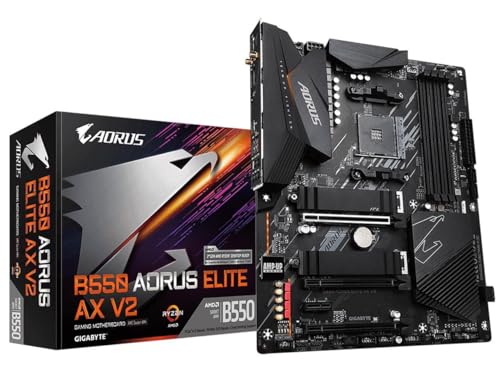
Gigabyte B550 AORUS Elite AX V2 — The Gigabyte route
Gigabyte’s entry is the board for the substantial population that simply prefers Gigabyte. The shortened verified title is terse, confirming the B550 chipset, AM4 socket and ATX size, with the AX in the model name signalling wireless networking in the maker’s naming convention. AORUS Elite sits in the middle of Gigabyte’s range, above the plainest boards and below the Master tier, a position that historically means sensible power delivery, real heatsinks and a BIOS that rewards familiarity. Builders whose last two machines ran Gigabyte boards will navigate this one’s firmware and software by muscle memory, an underrated form of compatibility.
The V2 in the name deserves respect rather than skimming. Revision suffixes on AM4 boards often mark component or firmware changes across a long production life, and support lists are maintained per revision. A buyer should therefore match the exact revision on Gigabyte’s support page when checking processor support, the same discipline this guide recommends everywhere but which matters doubly where a name carries a version. With that check done, the AORUS Elite V2 offers the standard B550 virtues, PCIe 4.0 for the primary slot and storage with Ryzen 5000, wrapped in the ecosystem its loyalists prefer. Loyalty of that kind is not irrational; it is accumulated fluency being spent wisely.
- Chipset and socket: AMD B550, AM4, ATX
- Memory: DDR4 platform
- Networking: wireless indicated by the AX designation
- Revision note: V2 suffix — match it exactly on the support list
Strengths
- Mid-tier AORUS specification with wireless aboard and full ATX room for expansion.
- Gigabyte loyalists keep their BIOS and software fluency moving to this board.
- B550’s PCIe 4.0 primary paths serve a Ryzen 5000 gaming build completely.
Trade-offs
- The shortened listing title leaves display and port details to be confirmed on Gigabyte’s page.
- Revision-specific support checking adds a step casual buyers may skip at their peril.
- It lacks a headline forgiveness feature as prominent as the ASUS board’s Flashback.
Best for: Gigabyte-fluent builders assembling a wireless AM4 gaming or family system. Not suited for: buyers who want every port and feature enumerated by the listing itself.

MSI B550 Gaming WIFI6E — The value Wi-Fi board
Not every good board needs a famous surname. This MSI board’s verified title is a plainspoken inventory: support for Ryzen 5000 series, 5000 G-series, 4000 G-series and 3000 series processors, DDR4 memory with overclocking headroom, a PCIe 4.0 slot, M.2 Gen4 storage and Wi-Fi 6E, with gigabit wired networking named at the end. For a value gaming build or a family machine, that inventory covers the entire practical checklist, and the explicit naming of G-series processors is a thoughtful touch, since those are the AM4 chips with integrated graphics that htpc and office builds depend on. A board that remembers the G-series in its title understands a real segment of its market.
The compromises live where a value board’s should. Wired networking is gigabit rather than the 2.5 gigabit found on the pricier picks, a difference most homes cannot yet perceive because their switches and internet plans speak gigabit themselves. The board’s presentation is plainer than the Tomahawk’s, and its power design is aimed at the mainstream Ryzen tiers rather than at sustained flagship abuse. Within those honest bounds, it may be the smartest purchase in this entire guide for a Ryzen 5 build: every feature the workload touches is present and current, and the savings against the anchor pick fund a larger drive or a better monitor, where they will be felt daily.
- Chipset and socket: AMD B550, AM4, ATX
- Processors named in listing: Ryzen 5000, 5000 G, 4000 G and 3000 series
- Memory: DDR4 with overclocking headroom, per the title
- Networking: Wi-Fi 6E plus gigabit Ethernet, per the title
Strengths
- Wi-Fi 6E at the value end of B550 removes the classic budget-board connectivity penalty.
- G-series processors named in the title suit integrated-graphics and home-theatre builds.
- PCIe 4.0 and M.2 Gen4 keep graphics and storage at full Ryzen 5000 speed.
Trade-offs
- Gigabit wired networking trails the 2.5 gigabit offered by pricier picks here.
- Plainer presentation and mainstream power design target value builds, not showcase ones.
- Flagship Ryzen chips under heavy sustained loads deserve the Tomahawk’s heavier hardware.
Best for: Ryzen 5 gaming builds and G-series family machines that want modern Wi-Fi without flagship pricing. Not suited for: sustained high-tier processor abuse or homes already wired for multi-gig networking.
ASUS TUF Gaming B550-PLUS WiFi II class — The durability-trim alternative
Within ASUS’s own catalogue, the TUF line is the ROG board’s plainer sibling, and B550 shoppers meet the TUF Gaming B550-PLUS WiFi II class constantly while comparing. We hold no verified listing for it in this batch’s pool, so it is discussed in prose: same chipset, same socket, a specification in the same neighbourhood as the Strix, differentiated by TUF’s durability branding, its component marketing and a generally keener price. Buyers cross-shopping the two ASUS lines should understand that the practical gap is smaller than the price gap, and is concentrated in audio investment, lighting ecosystem and finish rather than in whether a Ryzen 5000 chip runs well, which it does on both.
The prose treatment also serves as a warning about near-name shopping. ASUS’s B550 range contains several boards whose names differ by a suffix or a single word, and marketplace listings exploit that thicket mercilessly. Anyone pursuing the TUF class should verify the full name, the Wi-Fi inclusion and the revision against ASUS’s own page, exactly as this guide advises for the Gigabyte V2 board. The TUF class is a legitimate, often sensible alternative; it simply has not passed through this batch’s verification pool, and a guide that links only what it has checked must leave it unlinked even while acknowledging its place in the market’s geography.
- Chipset and socket: AMD B550, AM4, ATX in its common form
- Memory: DDR4 platform
- Positioning: durability-branded sibling to the ROG Strix line
- Pool status: unlinked in this batch, covered in prose
Strengths
- TUF pricing usually undercuts ROG while keeping the B550 essentials intact.
- Durability-focused component branding appeals to builders who keep machines for many years.
- Wi-Fi editions exist within the class for wireless households.
Trade-offs
- Audio and lighting investment trail the Strix board’s entertainment polish.
- Near-identical sibling names make listing verification essential before ordering.
- Without a checked listing here, stock and seller diligence rest with the buyer.
Best for: value-minded ASUS buyers who want B550 substance without ROG theatre. Not suited for: shoppers who prefer every recommendation to arrive with a verified link attached.
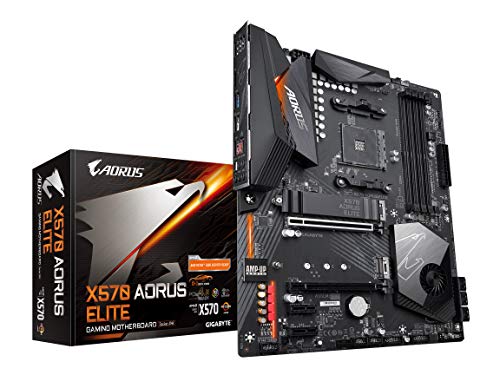
Gigabyte X570 AORUS Elite — The flagship context, honestly labelled
This pick carries a link and a confession together: it is not a B550 board. Its verified title names the X570 chipset, and it stands in this guide because every B550 shopper eventually asks what the flagship tier would have added. The answer is lanes. X570 spreads PCIe 4.0 beyond the primary slot and first drive, feeding additional fast storage and expansion devices at full speed, which serves builders with several NVMe drives, capture hardware or workstation habits. The AORUS Elite edition delivers that chipset in ATX form with DDR4, representing the tier in a comparatively restrained trim rather than at its most extravagant.
Why link a different chipset inside a B550 guide at all? Because the honest comparison is a purchase decision too, and sending a lane-hungry builder to a B550 board that will disappoint them serves nobody. The X570 route charges for its generosity in money and, on boards of its generation, sometimes in a small chipset fan whose existence should be checked in the specific model’s documentation. For the majority gaming workload, one graphics card and one or two drives, the linked B550 boards above remain the smarter spend. For the minority whose device census genuinely overflows B550, this board marks the correct direction, travelled knowingly.
- Chipset and socket: AMD X570, AM4, ATX — not B550
- Memory: DDR4, per the verified title
- Distinction: PCIe 4.0 across more of the board than B550 provides
- Role in this guide: flagship alternative for device-heavy builds
Strengths
- Chipset-wide PCIe 4.0 feeds multiple fast drives and cards without B550’s lane rationing.
- AORUS Elite trim keeps the flagship chipset comparatively attainable.
- Full AM4 processor breadth applies, as with the B550 boards above.
Trade-offs
- It answers a different keyword, and B550 shoppers with ordinary needs overpay here.
- X570 boards of this era may carry a chipset fan, worth confirming in the model’s documents.
- Its generation is older, so networking and ports may trail the newest B550 revisions.
Best for: AM4 builders whose storage and expansion census genuinely exceeds B550’s design. Not suited for: typical gaming builds, which the four B550 boards above serve for less.
How do the six positions compare for an AM4 buyer?
| Board | Chipset | Networking highlight | Character |
|---|---|---|---|
| MSI MAG B550 TOMAHAWK WIFI | B550 | Wi-Fi 6E + 2.5G LAN | Balanced anchor |
| ASUS ROG Strix B550-F Gaming WiFi II | B550 | WiFi 6E + 2.5Gb LAN | Polished, Flashback included |
| Gigabyte B550 AORUS Elite AX V2 | B550 | Wireless via AX | Gigabyte ecosystem route |
| MSI B550 Gaming WIFI6E | B550 | Wi-Fi 6E + gigabit LAN | Value with modern Wi-Fi |
| ASUS TUF B550-PLUS WiFi II class | B550 | Wi-Fi editions in class | Prose-only durability trim |
| Gigabyte X570 AORUS Elite | X570 | Per listing | Flagship lane budget |
The table’s most useful column is the one that is not printed: firmware temperament. Two of these boards make updating painless in different ways, all of them demand a support-list check, and the platform’s maturity means the information is complete and stable for every model here. AM4 shopping in its late era rewards the reader more than the gambler, because every fact needed is published and nothing is still being figured out by early adopters. That, as much as any specification, is the case for building on B550 now.
What should an AM4 buyer check before pairing a B550 board with a Ryzen chip?
Processor support comes first, and on AM4 it is a document rather than an assumption. Open the board maker’s CPU support list, find your exact processor model, and note the firmware version from which it is supported. Then consider the board’s likely firmware state and the update path available if it arrives older: a board with a processor-free update feature forgives the gap entirely, while a board without one may need a compatible chip installed temporarily. Sellers sometimes state the shipped firmware generation in the listing, and asking costs nothing. This single check prevents the platform’s most famous disappointment, a completed build that cannot start because its two main components have not yet been introduced.
Memory behaviour is the second check, and it is gentler than folklore suggests. B550 boards run DDR4 at sensible speeds with two sticks as the sweet spot for stability, and the board’s memory support list names kits tested at their rated profiles. Chasing extreme memory frequencies on AM4 buys little for gaming and occasionally buys instability, so a mainstream kit from the support list, installed in the slots the manual names, is the professional choice disguised as a boring one. Builders reusing a kit from an older AMD or Intel machine should confirm its voltage and profile expectations against that list before assuming a happy reunion.
Storage planning closes the trio. B550 gives its fastest lanes to the primary graphics slot and the first M.2 position, with additional devices sharing the chipset’s uplink, so a build with one fast system drive and bulk storage on SATA loses nothing at all. A build dreaming of three NVMe drives at full simultaneous speed is dreaming of X570, and should either revise the dream or follow the X570 position in this guide with open eyes. Matching the storage plan to the chipset’s actual shape, rather than to its headline, is the difference between a board that feels fast for years and one that feels like a compromise by spring.
How do you bring a B550 build to life without firmware drama?
Assemble the machine on the assumption that the first boot is a negotiation. Seat the processor with its corner marker aligned, mount the cooler, install memory in the manual’s named slots for a two-stick kit, and fit the graphics card unless your Ryzen carries a G suffix, because most AM4 processors have no graphics of their own and a monitor plugged into the board will stay dark for reasons that are not a fault. Connect the display to the graphics card’s outputs, a sentence that has saved more evenings than any other in AM4 building, and give the first boot time for memory training before concluding anything.
If the board does not recognise the processor, the firmware path decides whether the afternoon is saved. A Flashback-equipped board updates from a USB stick prepared on any other computer, following the maker’s instructions to the letter, including the file’s required name and the specific port the manual designates. A board without that feature needs a supported processor for the update, which is where a local shop or a friend’s older Ryzen earns gratitude. Either way, update deliberately, from the maker’s page for the exact model and revision, with the machine on reliable power.
After the operating system lands, install the chipset driver from AMD before the board maker’s utilities, enable the memory profile so the kit runs at its rated speed, and confirm storage and graphics are running at their expected link widths in the firmware or a system information tool. Those three confirmations, chipset driver, memory profile and link widths, separate a B550 build that merely works from one that works at the specification its owner paid for. Save a profile in the firmware once everything is verified, so a future experiment can be abandoned back to a known-good state in seconds.
What mistakes follow B550 buyers home most often?
Plugging the monitor into the motherboard with a non-G Ryzen processor fitted leads the catalogue, and it leads because the rear panel looks so convincingly ready. The ports are present; the graphics are not. Second comes assuming firmware compatibility across AM4’s long life without opening the support list, a mistake whose sting is entirely avoidable. Third is buying B550 for a storage empire it was not designed to hold, then blaming the chipset for lane arithmetic that its documentation stated plainly. Each mistake shares a shape: a reasonable assumption, unchecked, meeting a platform old enough to have documented the answer years ago.
A quieter error is overspending within the chipset. B550 boards span a wide price range, and the expensive end buys features, audio, lighting, extra headers, that a given build may never touch, while the cheap end occasionally skimps on the power delivery a strong Ryzen chip deserves. The discipline is to price the board against the processor it will host and the devices it will actually carry. A board costing a large fraction of a 5800X3D build while feeding one drive and one card has absorbed money that belonged to the monitor. A board saving a small sum beneath a flagship chip has risked the build’s stability to win a rounding error.
Why does B550 still make sense in the platform’s mature years?
Because maturity is a feature when the documentation is complete, the processors are discounted and the failure modes are all known and named. A B550 build assembled today benefits from years of firmware refinement, support lists that cover the entire AM4 story, and a second-hand market that can supply or absorb its parts gracefully. The platform will not receive tomorrow’s processors, and that finality is worth stating plainly, yet a machine built around a Ryzen 5 5600 or a 5800X3D performs today’s work and games at a level that makes the absence of an upgrade path feel theoretical for years. Buyers who need a computer rather than a platform hobby are exactly the buyers maturity serves.
There is also a sustainability argument that deserves its sentence. Extending AM4’s life with a B550 board keeps DDR4 kits, cases, coolers and power supplies in service, and pairs them with processors manufactured on a mature, efficient process. Not every reader shops with that ledger open, but those who do will find B550’s late era unusually congenial: high performance per unit of new material, achieved by refusing to discard the old material prematurely. The value boards in this guide, particularly the MSI Gaming WIFI6E, embody that arithmetic at its most persuasive.
How does living with a B550 system feel across a few years?
The first year is usually the graphics card’s story, since B550’s PCIe 4.0 primary slot welcomes upgrades without becoming the bottleneck, and a board bought for a midrange card can host a stronger one later without complaint. Storage grows next, and here the chipset’s shape asserts itself gently: a second M.2 drive is a fine addition, a third begins the lane conversation the buying sections described. Networking ages slowest of all, because Wi-Fi 6E and 2.5 gigabit wired connections were specified ahead of most homes’ infrastructure, so these boards tend to feel more current with each router upgrade rather than less.
By the third year, the ownership experience divides by the wisdom of the original firmware and memory choices. Systems built on the support list, with a mainstream memory kit at a sane profile, tend to be boring in the best way. Systems built on assumptions occasionally meet a new drive or a hand-me-down processor that reopens old questions. The boards themselves rarely fail the story; the documentation habits of their owners write it. That is why this guide has spent so many words on checking documents that take minutes to read. On a mature platform, diligence is the entire performance difference that remains available.
Final Recommendation
Choose the MSI MAG B550 TOMAHAWK WIFI if you want one board that answers every ordinary AM4 question well, or the ASUS ROG Strix B550-F Gaming WiFi II when firmware forgiveness and entertainment polish matter enough to pay for. Take the Gigabyte AORUS Elite AX V2 if your fluency lives in Gigabyte’s ecosystem, and take the MSI B550 Gaming WIFI6E when the budget should be steered toward the graphics card and monitor instead. Let the X570 position tempt you only with a device census in hand that proves its lanes will be used. Build any of them on the support list rather than on hope, and a B550 machine bought in the platform’s mature years will repay the care with the particular satisfaction of a system that was understood completely before it was ever switched on.
Frequently Asked Questions
Does B550 support the Ryzen 7 5800X3D?
Yes, B550 boards support it, subject to firmware: the chip arrived later in AM4’s life, so a board may need an update to recognise it. Check the maker’s support list for the exact firmware version required, and favour a board with a processor-free update feature if the shipped firmware is unknown.
Can I use a Ryzen processor without a graphics card on B550?
Only if the processor is a G-series model with integrated graphics, such as the ones the MSI Gaming WIFI6E’s title names. Most Ryzen 3000 and 5000 processors have no graphics output, so their builds need a graphics card and the monitor must connect to that card, not to the board.
What does B550 give up compared with X570?
Mainly PCIe 4.0 breadth. B550 provides it to the primary graphics slot and first storage position, while X570 extends it across more of the board for additional fast devices. For one graphics card and one or two drives, the practical difference is small; for several NVMe drives and cards, it is the whole story.
Is DDR4 fast enough for a B550 gaming build?
Yes. AM4 is a DDR4 platform throughout, and a mainstream kit from the board’s support list, run at its rated profile, feeds Ryzen 5000 gaming completely. Extreme memory speeds add cost and instability risk out of proportion to their gaming return on this platform.
Will a B550 board need a BIOS update for my processor?
It depends on the pairing’s ages. Chips contemporary with the board usually work immediately; later chips on earlier boards may need an update first. The support list for your exact board and revision states the required version, and that page should be consulted before the parts are ordered, not after the screen stays dark.
Does B550 make sense for a fresh build today?
For value gaming and family machines, yes: the processors are capable and keenly priced, the boards are refined, and every compatibility fact is documented. Buyers who prize a long future upgrade path should look at newer platforms instead, accepting their higher entry cost as the price of that openness.
Which Ryzen processors pair most naturally with each board tier here?
Pairing discipline on AM4 begins with the Ryzen 5 5600, the chip around which more B550 builds revolve than any other. Its six cores ask little of a board’s power delivery, so every board in this guide hosts it comfortably, and the choice among them can be made on networking, firmware features and price alone. The MSI Gaming WIFI6E exists for exactly this pairing, and pairing them feels like watching a lock accept its intended key. A 5600 build on the Tomahawk is not wrong, merely generous, buying headroom the chip will not spend.
The Ryzen 7 5700X and 5800X raise the board’s workload and narrow the sensible field toward the Tomahawk and Strix, whose power stages and heatsinks were drawn for sustained eight-core behaviour. These chips reward a decent cooler and a case that moves air, and they expose any board that was specified for gentler duty. Nothing in this tier requires X570, which is worth repeating because forum folklore often insists otherwise; it requires a B550 board from the honest half of the range, which is the half this guide’s linked picks occupy.
At the summit sits the 5800X3D, a gaming processor whose cache makes it faster in games than its clocks suggest and whose temperament is famously uncomplicated: it does not ask to be overclocked, and it asks its board mainly for clean power, current firmware and a competent cooler. The Strix’s Flashback feature earns a specific mention beside this chip, because the X3D arrived late enough that firmware gaps are a realistic scenario, and removing that risk before the processor is even unboxed is worth money to a buyer assembling alone at midnight.
The G-series processors write the final pairing chapter. A 5600G or 5700G on any of these boards creates a graphics-card-free machine whose rear display outputs finally matter, and whose memory choice matters doubly because integrated graphics borrow system memory bandwidth. Such builds are the quiet achievers of the AM4 world: office machines, family computers, media boxes that play light games respectably. They also explain why the value MSI board’s title bothers to name G-series support at all. Somewhere, a buyer building exactly that machine is reading titles at midnight too.
How should a B550 buyer think about the second-hand AM4 market?
AM4’s longevity created one of the healthiest used markets in PC history, and a B550 shopper stands adjacent to it whether they participate or not. Used processors are the market’s safest citizens, since chips rarely wear out, and a second-hand Ryzen can halve a build’s processor cost while a new B550 board provides warranty and known firmware behaviour. That hybrid strategy, new board and used chip, deserves explicit respect in a value guide. Its discipline is verification: buy the chip from a seller with returns, confirm its model markings on arrival, and have the board’s support list open during the first boot.
Used boards invert the risk. A second-hand B550 may arrive with bent pins in a header, a missing I/O shield, an outdated firmware and a history of mining-adjacent storage abuse that photographs do not reveal. None of that makes used boards a mistake; it makes them a purchase for buyers who enjoy verification and own the patience to test methodically. The price gap must be meaningful to justify the homework, because a new value board like the MSI Gaming WIFI6E compresses that gap from above. When the gap is small, new wins on warranty alone.
Memory is the used market’s easiest win after processors. DDR4 kits are abundant, durable and simple to test, and a kit from a board’s support list bought second-hand performs identically to the same kit bought new. The complete picture, then, is a spectrum of sensible mixtures rather than a doctrine: new board for certainty, used processor for savings, memory from wherever the support list is satisfied cheapest. B550 rewards that kind of unsentimental mixing more than any platform of its generation, because its documentation lets a buyer verify every mixture before committing to it.
What does a thoughtful B550 parts list look like beyond the board?
The cooler deserves first thought because AM4’s mounting is mature and the choices are endless. A mainstream tower air cooler suits every processor named in this guide except sustained flagship workloads, and it should be chosen for its mounting hardware’s sanity as much as its fin stack. Check its clearance against the chosen board’s memory slots and first expansion slot using the dimensions both makers publish. A cooler that shadows the memory slots makes the inevitable reseat or upgrade an exercise in grazed knuckles, a cost that never appears in thermal charts.
Storage should be bought in the order the chipset prefers: one strong NVMe drive in the primary position for the system and current games, bulk capacity on SATA or a second NVMe as the library grows. That order respects B550’s lane design instead of fighting it, and it postpones spending until the need is proven. A buyer who reverses the order, filling every slot on day one, usually discovers that the third drive’s speed was purchased for a workload that arrives twice a year.
The power supply and case close the list with their usual quiet importance. A quality supply sized with headroom for a future graphics card protects the whole platform’s stability, and its modular cables ease the micro decisions of cable routing that boards reward. The case should be chosen for airflow honesty rather than glass acreage, because B550 systems are often built to be fast and forgotten, and a forgotten machine inside a sealed box runs warm for years. None of these companions carries the keyword’s name, and all of them decide whether the board at the centre gets to demonstrate what it can do.
How do B550 boards handle the living-room and small-desk roles?
A B550 machine under a television is one of the platform’s most satisfying second acts. Paired with a G-series processor, it drives the screen from integrated graphics, plays media silently at idle and still holds a graphics slot in reserve if the household’s gaming ambitions grow. The boards in this guide are full ATX, which pushes the build toward a horizontal or generously sized case, and that physical fact should be faced at the planning stage rather than at the shelf. Within that constraint, the value MSI board’s explicit G-series welcome makes it the natural living-room candidate of the four linked picks.
Small desks pose a different question, because a full ATX system occupies real estate even when its performance is modest. Some households solve it with a case that stands vertically and disappears beside a monitor; others conclude honestly that a micro-ATX B550 board, outside this guide’s verified pool, fits their furniture better. Naming that boundary matters. A guide earns trust by admitting where its own shortlist stops fitting, and the ATX-only shape of this batch’s pool is such a boundary. The reader with a shallow shelf has been warned fairly, which is worth more than a forced recommendation.
Noise binds both roles together. A living-room or desk-side machine is judged by its idle manners, and B550’s fanless chipset design starts the build with an advantage its X570 ancestors had to engineer around. From there, fan curves set in the firmware, a cooler chosen for quiet at low speed, and a case that does not amplify vibration decide the result. The boards here all provide the header count and firmware controls the job needs. Owners who spend twenty minutes on fan curves during setup rarely think about noise again, which is the highest compliment a household computer can earn.
Why do support lists and manuals deserve more respect than reviews?
Reviews answer whether a board was good on a test bench in its launch season; support lists answer whether it will start with your processor tonight. On a young platform the review matters more, because the facts are still moving. On AM4 now, the facts have stopped moving, and the documents have become the most reliable literature in the category. A support list is also a maker’s continuing promise, updated across the platform’s life, and the care visible in its maintenance predicts the care behind firmware updates generally. Reading one takes minutes and generalises to every future platform the reader will ever buy.
Manuals repay the same respect with slot-sharing tables, header maps and the memory slot instructions that prevent the commonest assembly errors. The habit this guide keeps recommending, opening two documents before ordering, sounds like homework and functions like insurance. Its premium is a quarter of an hour. Its payout is a first boot that works, on a platform whose entire remaining risk is concentrated in mismatched assumptions. Few trades in computing are that favourable, and B550, precisely because it is mature, offers the trade in its purest form.
What separates a B550 build that feels premium from one that merely is?
Feel, in a desktop, is mostly latency and quiet: how quickly the machine wakes, how promptly a game level loads from the primary drive, how little the room hears any of it. B550’s contribution to feel is therefore concentrated in the primary storage path and in firmware settings that take minutes to arrange. A board from the honest half of this range, a strong NVMe drive in its first slot, memory at its rated profile and fan curves tuned once, produces a machine whose daily manners embarrass many nominally superior builds assembled carelessly. Premium, pursued this way, is a set of decisions rather than a price tier.
The reverse lesson is equally available. A flagship-flavoured B550 board surrounded by a slow drive, a memory kit left at fallback speed and fans at factory aggression feels ordinary in every interaction that matters. Owners sometimes misdiagnose that ordinariness as the chipset’s ceiling and begin shopping for a platform change, when the actual faults sit in a settings page and a storage choice. Before replacing a B550 system that feels tired, audit those two things. The platform’s mature documentation makes the audit easy, and its result is frequently a machine that feels new again for the cost of an afternoon.
Keep the board’s I/O shield, antenna pair and spare M.2 screws together in the box the board arrived in, stored where the machine’s next owner or next upgrade can find them. AM4 systems change hands and roles more than most, and the small parts are always the difference between a smooth handover and a week of small orders. A labelled envelope inside the case’s cable space works when the box itself must go.
Photograph the completed build’s cable routing before the side panel closes for the first time, too. B550 machines invite later drive and card additions, and a photograph of the original routing turns each addition into a guided exercise instead of an excavation.
Finally, write the installed firmware version and the date of the build on a note kept with that box. Future troubleshooting, whether yours or a technician’s, begins with those two facts, and memory is the least reliable storage medium in any household.
That small archive, box, note and photograph together, is the mature platform’s final lesson: the machine’s second decade of usefulness is decided by habits formed in its first week.
None of it requires talent, only the decision that this machine will be understood rather than merely assembled.
B550 rewards exactly that decision, which is a fitting epitaph for the platform whenever its long story finally closes.
Choose accordingly, and enjoy the build.
Related Guides
Intel’s counterpart value story is told in our guide to motherboards for 12th Gen Intel processors, and anyone speccing a small case for an AM4 build should continue to our guide to airflow-focused PC cases before ordering parts.