What's inside
- Key Takeaways
- Quick Picks
- How did we judge durability when no listing here carries a drop-test score?
- Hard case or soft bumper — which armour suits which childhood?
- Which of these six survives your household’s particular brand of chaos?
- What happens when siblings of different ages share one of these tablets?
- What household rules actually extend a children’s tablet’s life?
- What does durability cost in weight, bulk and grown-up looks?
- How should a parent approach controls and content on the first evening?
- When might a standard tablet in a rugged case be the wiser purchase instead?
- How do the six compare on protection, size and stated controls?
- Where do families go wrong when choosing a durable tablet for a child?
- How much do battery size and charging habits matter for a child’s tablet?
- Final Recommendation
- Frequently Asked Questions
- Related Guides
As an Amazon Associate I earn from qualifying purchases. This post may contain affiliate links at no extra cost to you.
gizmoverdict.com is reader-supported. When you buy through links on our site, we may earn an affiliate commission.
Where to buy: All six tablets below link to their Amazon listings, where the case design and age band are part of the product itself, so check the photos on the listing against the description here before ordering — with children’s tablets, the case is not an accessory, it is half the purchase.
Shopping for the best most durable tablets for children starts with a confession every parent learns eventually: children do not break tablets maliciously, they break them statistically. A tablet in a child’s life gets dropped from sofa height, sat on, carried by one corner, used as a tray, and left screen-down on gravel. Durability in this category is therefore not a laboratory rating — it is a physical system of case design, grip, weight and how the whole object behaves on the worst ordinary afternoon, not the best one. This guide judges six tablets on exactly that: what surrounds the screen, what the listing actually promises, and which controls a parent genuinely gets.
Two kinds of protection appear in these listings, and the difference matters more than any processor. Four of the six are Amazon’s kids tablets, split between slim hard cases for the 6-12 age band and soft bumpers for the 3-5 band — two different answers to two different kinds of childhood. The other two are Android tablets from smaller makers that bundle a case and lean on storage, battery size and, in one case, parental controls named right in the title. We will be precise about what each listing states and what it does not, because with children’s products the gap between marketing warmth and printed fact is where disappointment lives.
It helps to picture the actual week the tablet must survive. Monday it is carried to school or a grandparent’s house; Tuesday it is propped against a cereal box; Wednesday it slides off a sofa; Thursday it is fought over, gently, by siblings; Friday it goes in a car; the weekend adds a garden, a café and at least one moment face-down on something hard. Every pick in this guide was imagined inside that week rather than on a desk, and the rankings follow the week, not the benchmark.
A note on what this guide will not do: it will not promise that any tablet is unbreakable, because none is. It will not make claims about child development, eyesight or learning outcomes, because a product listing cannot support them and neither can we. What it can do — and what the reviews below do — is compare shells, bumpers, screen sizes, batteries and stated controls, so the tablet you hand over is the one whose physical design matches the child, the age band and the chaos level of your house.
Key Takeaways
- Case architecture is the durability story: soft bumpers suit the drop-heavy 3-5 years, slim hard cases suit the carried-everywhere 6-12 years.
- Amazon’s four picks divide cleanly by age band and size — 11-inch or 8-inch, older child or younger child — and the case changes with the band.
- The Android 16 kids tablet is the only pick whose title names parental controls and a Kids Space outright; read other listings for what they actually state.
- The ZZB’s micro SD support up to 1TB, as listed, answers the storage problem that children’s downloaded videos create.
- No tablet here is unbreakable; durability means surviving ordinary drops and knocks, not defying physics.
Quick Picks
How did we judge durability when no listing here carries a drop-test score?
By reading the physical evidence the listings actually provide. None of these six titles quotes a drop height, a military standard or an ingress rating, and we will not supply those numbers from imagination. What the titles do describe is the armour: a slim hard case on the older children’s Amazon models, a soft bumper on the younger children’s models, a bundled case on both Android tablets. Case architecture is a legitimate durability signal — it tells you where the maker expects the energy of a drop to go — and comparing architectures honestly is more useful than repeating a laboratory figure that was never printed.
We also weighed size and age band together, because durability is partly fit. A tablet a small child cannot grip securely will be dropped more often, whatever its case; an 8-inch tablet in a soft bumper is, in a four-year-old’s hands, a more durable system than an 11-inch slab in a harder shell. Conversely, an older child who carries a tablet to school, friends’ houses and car journeys needs the slimmer hard case that survives a bag full of books. Durability, judged properly, is the match between the object and the life, and that is how the reviews below are organised.
Finally, we separated stated controls from assumed ones. Only one listing — the Android 16 kids tablet — names parental controls in its title. The Amazon models are built around Amazon’s kids content bundle, which their titles describe in detail, and we discuss them on that basis. Where a control or feature is not stated, we say the listing does not state it, and we advise checking the full product page for the current software details, because children’s software changes faster than hardware does.
Hard case or soft bumper — which armour suits which childhood?
The soft bumper is the toddler technology: thick, forgiving material around the edges and corners, the places where dropped tablets actually strike. On the 3-5 Amazon models the bumper also serves as grip, giving small hands something substantial to hold, and its bulk is a feature — it keeps the screen recessed when the tablet lands face-down on a hard floor, and it makes the whole object easier to carry by any convenient edge. The cost is size and a certain toy-like presence that an image-conscious nine-year-old would reject on sight.
The slim hard case answers a different life. Older children drop tablets less theatrically but transport them more brutally — bags, lockers, car footwells, the bottom of a pile of schoolbooks. A hard shell resists the crush and scrape of that world, keeps the tablet slim enough to stay portable, and looks like equipment rather than a toy, which matters to its owner more than any specification. The Stellar Swirl and Aquatic designs on the 6-12 models exist because a case a child is proud of is a case that stays on, and a case that stays on is the only kind that protects anything.
One more physical detail separates good armour from decoration: what happens at the corners. Drops land on corners far more often than on flat edges, because a falling rectangle rotates, and the designs worth trusting visibly thicken at exactly those four points. When you study the listing photographs — and you should, since the case is half the purchase — look at the corners first and the colour second. A case that is merely a prettier back panel is a costume, and children can tell the difference only after the first fall.
The bundled cases on the two Android tablets sit between these philosophies, and their listings give fewer design details, so we treat them as general protection rather than a specialised system. The honest summary: match the armour to the failure mode. Drops from small hands want bumpers. Bags and travel want hard shells. And no case of any kind makes a screen immune to a direct strike on a sharp corner of furniture, which is why the last section of this guide talks about household rules as part of the durability system.
Which of these six survives your household’s particular brand of chaos?
Read the reviews by age band first and size second. The right case on the wrong-sized tablet is still the wrong tablet.

Amazon Kids Tablet 11 (newest model), Ages 6-12, Includes books, apps and videos for STEM and hobbies; add popular school apps to support homework; with Stellar Swirl slim hard case — Best for older children
This is the flagship of the Amazon half of the list: the 11-inch screen, the slim hard case in the Stellar Swirl design, and a content bundle pitched at the 6-12 band — books, apps and videos around STEM and hobbies, with the listing noting that popular school apps can be added to support homework. The physical proposition is a tablet that behaves like a school-age object: slim enough for a school bag, hard-shelled against the knocks of transport, and large enough that reading, video and homework apps all have room to breathe.
The durability logic here is transport logic. Children of this age rarely drop a tablet from standing height onto tile; they crush it gently, daily, in bags and piles, and a hard case is the right answer to that slow violence. The screen size cuts both ways — more to enjoy, more to expose — and the case staying on is the whole game, which is why the design matters: a case a ten-year-old finds embarrassing will be removed by Friday. Stellar Swirl is Amazon dressing protection as identity, and it is smarter than it looks.
What the listing does not do is print a drop rating or a battery figure, and we will not invent either. Judge this pick on its stated facts: newest-model Amazon kids hardware at 11 inches, a hard case, and a content bundle aimed squarely at its age band. For an older child whose tablet must survive the school run and still feel like a prize, it is the centre of this list.
One more scenario flatters this model: the long car journey and the holiday rental, where an older child’s tablet becomes the family’s entertainment officer. The big screen serves films for the back seat, the hard case survives being passed around and dropped between seats, and the school-apps support means the same device returns to homework duty on Monday without a personality change. Versatility across the week is this pick’s quiet strength.
- Age band: 6-12
- Screen: 11 inches
- Case: Stellar Swirl slim hard case
- Content: Books, apps and videos for STEM and hobbies
- School use: Popular school apps can be added, per the listing
Strengths
- Hard case matched to bag-and-travel durability.
- The largest screen among the Amazon kids picks here.
- Content bundle aimed at school-age interests, not toddler fare.
Trade-offs
- No drop rating or battery figure is printed in the listing.
- An 11-inch tablet is a lot for smaller children to carry.
- The hard case protects edges, not a direct screen strike.
Best for: school-age children whose tablet travels daily and must look the part.
Not suited for: toddlers, whose drops demand a soft bumper instead.
Parents comparing the two 11-inch Amazon models should check price on Amazon for this Stellar Swirl hard-case version, since the case is part of the product.

Amazon Kids Tablet 11 (newest model), Ages 3-5, Includes 1-year of Kids+ with early-learning books, apps and videos about letters, numbers, shapes and colors, and Paw Patrol Rescue soft bumper — Best for younger children
The younger sibling of the pick above shares the 11-inch screen and wraps it in the opposite philosophy: a Paw Patrol Rescue soft bumper, thick and forgiving, with a year of Kids+ included and content described as early-learning books, apps and videos about letters, numbers, shapes and colours. The bumper is the product here as much as the tablet is. For a three-to-five-year-old, drops are not accidents but a mode of transport, and the bumper’s job is to absorb that lifestyle at the corners and edges where tablets land.
The interesting question is size. Eleven inches is large for small hands, and the honest defence is that this tablet is mostly used stationary — propped at a table, held by a parent, shared between siblings — where the big screen serves group viewing and early-learning content better than a small one. Carried solo by a small child, its smaller 8-inch sibling below is the safer physical match. Choose this one when the tablet lives at home on surfaces, and the bumper’s bulk becomes pure advantage.
The included year of Kids+ deserves a plain reading: it is a content subscription bundled for the first year, described in the listing by its subjects, and families should note what happens when the year ends rather than discovering it. We make no claims here about learning outcomes — the listing describes content, and content is what we can verify. As a physical package for a younger child — big screen, soft armour, a year of material to watch and read — it is coherent and complete.
Siblings change this tablet’s arithmetic too. An 11-inch screen is the one two children can watch together without a custody dispute over inches, and in houses where one tablet serves two preschoolers in turns and together, the larger panel plus the bumper is a peacekeeping device as much as a screen. Solo portability suffers; household harmony gains. Know which problem your house actually has.
- Age band: 3-5
- Screen: 11 inches
- Case: Paw Patrol Rescue soft bumper
- Content: 1 year of Kids+ included
- Subjects named: Letters, numbers, shapes and colours
Strengths
- Soft bumper built for the drop frequency of the 3-5 years.
- A year of Kids+ content included from day one.
- Large screen suits shared and table-top viewing.
Trade-offs
- Big for a small child to carry unaided.
- The Kids+ bundle is a one-year inclusion, not a permanent one.
- Bumper bulk makes it the least bag-friendly pick here.
Best for: preschool children whose tablet lives at home on tables and sofas.
Not suited for: families wanting the smallest, lightest first tablet.
For a home-based younger child, check price on Amazon for the Paw Patrol Rescue bumper version and note the Kids+ year in the listing.

Amazon Kids Tablet 8 (newest model), Ages 6-12, Includes books, apps and videos for STEM and hobbies; add popular school apps to support homework; with Aquatic slim hard case — Best portable pick for older children
Take the first pick’s recipe and shrink it to 8 inches, and you get the tablet older children actually carry. The Aquatic slim hard case keeps the transport protection, the content bundle keeps the STEM-and-hobbies pitch with school apps addable for homework, and the smaller screen trades cinematic presence for genuine portability — this is the one that fits the smaller bag, the car door pocket, the hand of a seven-year-old on the move.
Durability at this size has a hidden ally: mass. A smaller, lighter tablet hits the ground with less energy than its 11-inch sibling and is easier to grip securely in the first place, so the hard case starts its shift with an easier job. The compromise is equally physical: an 8-inch screen shows less of a textbook page, less of a video, less of everything, and children who read or watch for long stretches at home may prefer the larger panel. As the travelling half of a two-tablet household, or the single tablet of a child whose life happens out of the house, it is the pragmatic champion of this list.
The Aquatic design, like the Stellar Swirl on the larger model, is doing protective work by being liked. Cases protect in proportion to the hours they spend on the tablet, and a design a child chooses is a design that stays. It is a small, unglamorous truth about children’s hardware, and Amazon clearly knows it.
Grandparents’ houses, clubs and after-school care are this model’s natural habitat — places where a tablet must be tough, portable and unmistakably the child’s own. The Aquatic case handles the identification as well as the impacts, a small mercy in rooms full of similar devices. A tablet that comes home again is a durable tablet in the only sense that finally matters.
- Age band: 6-12
- Screen: 8 inches
- Case: Aquatic slim hard case
- Content: Books, apps and videos for STEM and hobbies
- School use: Popular school apps can be added, per the listing
Strengths
- The most portable hard-case option for school-age children.
- Lighter drops mean gentler impacts for the case to absorb.
- Same content pitch as the 11-inch model, in a travel size.
Trade-offs
- An 8-inch screen is modest for long video sessions.
- Reading dense school material means more zooming and scrolling.
- Hard case still leaves the screen itself exposed to strikes.
Best for: older children whose tablet life happens in cars, bags and other people’s houses.
Not suited for: home-based viewers who would enjoy a bigger screen more.
Travelling families should check price on Amazon for the Aquatic hard-case 8-inch version, which is the configuration described here.

Amazon Kids Tablet 8 (newest model), Ages 3-5, Includes 1-year of Kids+ with early-learning books, apps and videos about letters, numbers, shapes and colors, and Mystic Mountain soft bumper — Best first tablet
If one product in this guide deserves the title of first tablet, it is this one: the 8-inch screen in the Mystic Mountain soft bumper, sized for the smallest hands in the list and armoured for the age band that drops things as a developmental stage. The smaller screen is easier to hold, easier to carry by its bumper, and easier to prop on a lap, and the included year of Kids+ supplies the early-learning books, apps and videos the listing describes — letters, numbers, shapes and colours — without a parent having to curate anything on day one.
The durability argument is the purest here. At this size and weight, with this much forgiving material around the edges, the whole system — grip, mass, bumper — works together, and the tablet’s worst ordinary afternoon, a tumble from a high chair or a sofa arm, is exactly the event it was designed around. We repeat the guide’s standing honesty: no case makes a tablet unbreakable, and a direct screen strike can defeat any bumper. But for the statistical reality of toddlerhood, this is the most completely considered physical package of the six.
Its limits are the limits of its mission. The screen is small for shared viewing, the content pitch is firmly preschool, and a child approaching six will outgrow the bumper’s toy-like presence before the hardware wears out. Buy it as a first tablet with a two-to-three-year job, and it is perfectly judged. Buy it expecting it to serve a nine-year-old, and the mismatch is yours, not the tablet’s.
It is also the pick most likely to be handed down. A first tablet bought at three and retired at six has a second life with a younger sibling, and a bumpered device that has absorbed three years of drops is a better inheritance than a pristine tablet nobody was allowed to touch. Durability, in a family, compounds across children — another reason the physical package matters more than the processor inside it.
- Age band: 3-5
- Screen: 8 inches
- Case: Mystic Mountain soft bumper
- Content: 1 year of Kids+ included
- Subjects named: Letters, numbers, shapes and colours
Strengths
- The best-matched grip, weight and armour for the youngest users.
- Included Kids+ year removes the day-one content problem.
- Small size suits laps, high chairs and small hands.
Trade-offs
- Small screen for family or sibling co-viewing.
- Preschool pitch means older children outgrow its style quickly.
- Bumper cannot protect against a direct strike on the glass.
Best for: a child’s very first tablet, bought for the toddler and preschool years.
Not suited for: children near the top of the age band who want a grown-up-looking device.
First-tablet shoppers can check price on Amazon for the Mystic Mountain bumper version, noting the included Kids+ year in the listing.
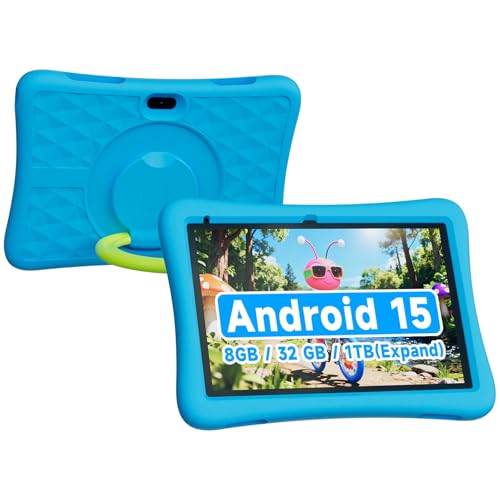
ZZB 10.1 Inch Android 15 Tablet for Kids with Case, 8GB (3+5 Extended) RAM + 32GB Storage (Supports 1TB Micro SD), 6000mAh Long Battery, Dual Cameras, Android Tablets Tablets for Kids — Best expandable storage
The ZZB steps outside the Amazon world and makes a specification argument: a 10.1-inch Android 15 tablet with a case included, 8GB of memory in the listing’s accounting — 3GB physical plus 5GB extended — 32GB of storage, and micro SD support up to 1TB. That last figure is the headline for families drowning in downloaded video, because children’s media habits are download habits: the same episodes, offline, forever. A card slot turns a modest 32GB tablet into a rolling library, and no other pick here offers that escape hatch.
The 6000mAh battery is described as long in the listing, and dual cameras serve the video calls and snapshot habits of family life. Now the honest cautions. The internal storage is the smallest here, so the card is not optional garnish but part of the plan. The listing does not describe its case’s design in the detail Amazon gives its bumpers and shells, so we credit it as included protection without inventing its architecture. And the title does not name parental control features; families for whom controls are the deciding factor should read the full listing’s software section carefully, or look at the next pick, whose title states them outright.
Judged as hardware value, the ZZB is the tinker’s pick: current Android, expandable everything, a case in the box, and a screen size between the Amazon pairs. It asks more setup of its household than the Amazon models do, and rewards it with freedom from one ecosystem’s walls.
The dual cameras deserve their honest sentence: they exist for video calls with grandparents and for the photographic experiments of childhood, not for anyone’s portfolio, and at this end of the market that is the correct priority. A children’s tablet is a communications device for a family before it is anything else, and the ZZB’s specification understands the assignment.
- Display: 10.1 inches
- System: Android 15
- Memory and storage: 8GB (3+5 extended), 32GB, micro SD up to 1TB as listed
- Battery: 6000mAh, described as long battery
- Case: Included, design not detailed in the title
Strengths
- Micro SD expansion solves the downloaded-video storage problem.
- Current Android 15 without a content ecosystem lock-in.
- Case included and a middle-ground 10.1-inch screen.
Trade-offs
- 32GB internal storage makes the memory card a necessity.
- Case design is not described in detail in the listing.
- Parental controls are not named in the listing title.
Best for: families with large offline video libraries and a spare memory card.
Not suited for: parents who want controls and content handled entirely for them.
Download-heavy households should check price on Amazon for the ZZB and price a micro SD card in the same basket, since the two belong together.

Android 16 Kids Tablet HD 10 Inch with Stylus & Case, 24GB RAM 64GB ROM 1TB — Best stated parental controls
This pick earns its badge in its own title: Parental Control and Kids Space are named outright, which makes it the one listing in this guide where a parent can see the control story before clicking. Around that headline sits a 10-inch HD tablet with a stylus and case included, Wi-Fi 6, Bluetooth 5.4, a 6000mAh battery, two cameras and an age pitch spanning 3-12. The memory figures in the title — 24GB of RAM alongside 64GB of storage with expansion to 1TB — follow the extended-memory accounting common in this corner of the market, so read them as the maker’s headline numbers and weight the 64GB of real storage more heavily in your decision.
The stylus is the interesting gamble. For drawing, tracing and the general scribbling of childhood it adds a dimension the Amazon picks do not offer, and the case keeps the whole kit together. The cautions mirror the ZZB’s: this is a smaller maker’s tablet, its case design is not detailed in the title, and the breadth of the 3-12 age pitch means the software setup matters enormously — a Kids Space configured for a four-year-old and one configured for an eleven-year-old are different machines wearing the same shell. The controls being stated is the point; using them thoughtfully is the parent’s part of the bargain.
As the non-Amazon alternative with its controls on the label, it fills a real gap in this list. Households that want Android openness, a pen for drawing, and parental controls they do not have to take on faith have exactly one address here, and this is it.
The wide age pitch cuts the other way as a virtue: one model can be reconfigured as the child grows, the Kids Space widening, the stylus moving from scribbles to sketches to handwritten practice. A tablet that can be re-aimed at seven and again at ten asks its household for setup effort instead of replacement money, and some families will prefer that bargain every time.
- Display: 10-inch HD
- Controls: Parental Control and Kids Space, as stated in the title
- Storage: 64GB, expansion to 1TB as listed
- Battery and radios: 6000mAh, Wi-Fi 6, Bluetooth 5.4
- Included: Stylus and case
Strengths
- Parental controls named in the listing, not left to assumption.
- Stylus included for drawing and tracing play.
- Modern Wi-Fi 6 and Bluetooth 5.4 connectivity.
Trade-offs
- Headline memory figures use extended accounting; storage is 64GB.
- Case design is not detailed in the listing title.
- The wide 3-12 pitch demands careful per-child setup.
Best for: parents who want stated controls, Android openness and a drawing pen in one box.
Not suited for: households preferring a fully curated content ecosystem from day one.
Control-first parents can check price on Amazon for this stylus-and-case version, and should read the listing’s Kids Space description in full before ordering.
What happens when siblings of different ages share one of these tablets?
Sharing is where the age bands stop being labels and start being tensions. A tablet set up for a four-year-old bores a nine-year-old; a tablet open to a nine-year-old’s world is not the device you hand a four-year-old. The practical answers are profiles where the software offers them, time-sliced ownership where it does not, and — the answer nobody wants to hear — a second tablet when the age gap is wide and the household’s peace is worth more than the saving. The 8-inch bumper model as the younger child’s own device, alongside an older sibling’s hard-case tablet, is a combination many families arrive at by experience.
Physically, sharing argues for the toughest armour in the house, because a shared tablet accumulates both children’s drop statistics and neither child’s sense of ownership. If one tablet must serve two childhoods, buy the case for the younger one’s chaos and the screen for the older one’s content, and accept the compromise as the price of peace. The comparison table above lays the six out in exactly those terms.
What household rules actually extend a children’s tablet’s life?
The case does the physics; the household does the statistics. The single most protective rule is a home base: a tablet that returns to one shelf or basket is a tablet that is not left on floors, sofas and stairs, the three landscapes where tablets meet shoes and sitting accidents. Second is the two-hands carry for younger children, a rule that sounds fussy and quietly halves the drop rate, because most toddler drops happen during one-handed transport by a corner. Third, keep the tablet out of the kitchen splash zone and the bath entirely unless it is in adult hands — none of these six listings claims water resistance, and we will not pretend otherwise.
Screen care deserves its thirty seconds as well. A microfibre cloth in the home base, a rule about sticky hands and snacks at the table rather than over the glass, and a case lip that keeps the screen off surfaces when it is set down face-first — these small arrangements keep the display readable and unscratched for years, and a scratched, smeared screen is its own kind of damage even when nothing has technically broken. A tablet that charges overnight in its home base starts every day full and is never dragged around by its cable, and cable-dragging is a drop mechanism nobody lists in a specification. Finally, revisit the setup as the child grows: the controls and content that fit a four-year-old chafe a seven-year-old, and a tablet that feels babyish gets its case removed and its rules ignored. Durability is a system that ages with its owner, and the families who treat it that way are the ones whose tablets survive to be handed down.
What does durability cost in weight, bulk and grown-up looks?
Protection is never free; it is paid for in millimetres and grams. A soft bumper turns a slim tablet into a chunky object, and that chunkiness is precisely the point for a four-year-old — but it also means the tablet will not slip into the slim places of adult life, and it announces itself as a toy in every room. The hard cases pay a smaller tax: a little thickness, a little weight, and a look that stays respectable in a school bag. The bundled cases on the Android pair sit in between, their exact tax unlisted, which is one more reason to study the listing photographs before ordering.
There is a subtler cost worth naming: a heavily armoured tablet teaches its owner that drops do not matter, and habits formed on a bumpered tablet follow the child to the first unarmoured device. Some families treat that as an argument for the slimmer case and stricter rules earlier; others treat the bumper years as a grace period and worry about habits later. Both positions are defensible. What is not defensible is pretending the trade-off does not exist. Choose the armour knowing what it costs in bulk and what it teaches in behaviour, and the tablet will fit the childhood you actually intend.
How should a parent approach controls and content on the first evening?
Before the child ever sees the tablet, ideally. The first evening is when the device’s character is set: which apps exist, what the home screen shows, whether purchases need an adult, and what happens at bedtime. On the Android 16 pick, that work happens inside the Parental Control and Kids Space features its title names. On the Amazon models, the content bundle described in the listing is the starting point, and the full product page carries the current detail of the surrounding controls. On the ZZB, allow more time, because the listing leaves the software story for you to assemble.
Three principles survive every platform. First, less content, chosen well, beats a flood: a home screen with a dozen loved things is calmer than a catalogue of thousands. Second, make the rules physical as well as digital — the home base, the charging shelf, the rooms where the tablet does not go — because a rule built into the house needs no password. Third, revisit the setup on birthdays. Controls are a fence that should move as the child grows, and a tablet whose fence never moves will eventually be climbed, case and all.
When might a standard tablet in a rugged case be the wiser purchase instead?
Fair question, and the honest answer is: for older children at the top of this guide’s age range, sometimes. A mainstream tablet in a serious third-party case offers a sharper screen and a longer software life, and a careful ten-year-old may need less armour than this category assumes. What that route gives up is the integrated design — the kids models here were shaped as systems, case and content and age band together, and the younger the child, the more that integration is worth. For the 3-5 years, we would not improvise; the bumper models exist because improvisation at that age ends in cracked glass. For a mature eleven-year-old, the improvised route is a legitimate rival, and this guide’s hard-case Amazon pick is the bridge between the two philosophies.
The deciding factor is not the child’s promise to be careful — every child promises, and gravity does not sign the agreement. It is the environment: the number of younger siblings, the hardness of the floors, the amount of travel, the presence of a staircase. Audit the environment honestly and the category chooses itself.
How do the six compare on protection, size and stated controls?
| Tablet | Age band | Screen | Protection | Controls as stated |
|---|---|---|---|---|
| Amazon Kids Tablet 11 (6-12) | 6-12 | 11 inches | Stellar Swirl slim hard case | Not named in the title |
| Amazon Kids Tablet 11 (3-5) | 3-5 | 11 inches | Paw Patrol Rescue soft bumper | Not named in the title |
| Amazon Kids Tablet 8 (6-12) | 6-12 | 8 inches | Aquatic slim hard case | Not named in the title |
| Amazon Kids Tablet 8 (3-5) | 3-5 | 8 inches | Mystic Mountain soft bumper | Not named in the title |
| ZZB 10.1 Inch Android 15 | Children, not banded in title | 10.1 inches | Case included, design not detailed | Not named in the title |
| Android 16 Kids Tablet | 3-12 | 10 inches HD | Case included, design not detailed | Parental Control and Kids Space stated |
Where do families go wrong when choosing a durable tablet for a child?
The most common error is buying the screen and treating the case as packaging. In this category the case is the durability, and the four Amazon models are really four case-and-content systems that happen to contain tablets. Choose the case philosophy first — bumper for droppers, hard shell for travellers — and let the screen size follow. Families who reverse that order end up with a beautiful large tablet in armour designed for a different childhood.
Second is age-band optimism: buying the 6-12 model for a four-year-old because they will grow into it, or the preschool bumper for a nearly-six-year-old who will resent it by Christmas. Children use the tablet they have now, at the age they are now, and the bands on these listings are honest guides rather than marketing fences. Third is assuming controls exist because the box says kids. Only one title here names parental controls; for the others, read the full listing’s software description and set the device up before it is handed over, not after the first surprise.
A further mistake is handing the tablet over before setting it up, on the theory that the child is only watching one video. The first session sets the norms — what exists on the device, where it lives in the house, when it sleeps — and norms set in a hurry are renegotiated daily. An hour of adult setup before the handover, especially on the models whose listings leave the software story open, is the cheapest durability and sanity upgrade in this entire guide.
The last mistake is expecting the hardware to do the whole job. A durable tablet in a house without a home base, a charging spot and a carry rule is a durable tablet being tested daily, and every test has a small chance of a cracked screen. The picks above survive ordinary childhood. The rules in the earlier section decide how ordinary childhood stays.
How much do battery size and charging habits matter for a child’s tablet?
More than the spec sheet suggests, because a child’s tablet is used in bursts scattered across a day rather than in one seated session, and it is usually discovered flat at the exact moment it was supposed to occupy a car journey. The two Android picks print 6000mAh batteries; the Amazon listings leave the figure unstated, so we compare what is printed and lean on habit for the rest. The habit that matters is the overnight charge at the home base, which turns battery size from a daily gamble into a travel specification.
There is also a durability angle to charging that rarely gets said aloud: a tablet charged in one safe place is a tablet that is not being dragged across rooms by its cable, tripped over, or yanked off a table by a passing toddler. Cable accidents are drop accidents with extra steps. Fix the charging spot, ideally where the tablet sleeps, and you have removed an entire category of falls before the case is ever tested.
Final Recommendation
Match the armour to the age and the answer is quick. For a first tablet in the toddler and preschool years, the 8-inch Amazon model in its Mystic Mountain bumper is the most completely considered package here, with its 11-inch Paw Patrol sibling for home-based shared viewing. For school-age children, the 11-inch Stellar Swirl hard case is the flagship and the 8-inch Aquatic the traveller. Outside the Amazon walls, the Android 16 tablet is the pick when stated parental controls and a stylus lead the brief, and the ZZB when expandable storage does. Buy the case your child’s life actually requires — and may the bumper meet the kitchen tiles so the screen never has to.
Frequently Asked Questions
Does a soft bumper or a hard case protect a tablet better?
Against different things. Think of the bumper as insurance against the fall and the hard case as insurance against the journey, and then ask which of those two your child’s tablet meets more often in a normal week. The answer is rarely close, and it points directly at one of the four Amazon models or, for the Android pair, at a careful look at the case photographs on the listing. A soft bumper absorbs drops at corners and edges, the toddler failure mode, and keeps the screen recessed in face-down landings. A hard case resists the crush, scrape and transport knocks of a school bag. Neither protects the glass against a direct strike on something sharp, which is why we describe both as protection systems rather than guarantees.
Are any of these tablets waterproof?
None of the six listings claims water resistance, so treat all of them as dry-land devices. If water is a genuine part of your child’s tablet life — poolside video, bath-time stories in adult hands — that requirement points away from this entire category toward a mainstream tablet with a printed ingress rating, and it is better to learn that from a guide than from a puddle. Splashes wiped off quickly are a normal part of family life, but baths, pools and drinks tipped directly over a screen are outside what any maker here has promised, and our recommendation follows the listings: keep them dry.
What does the included year of Kids+ actually mean on the younger Amazon models?
It means the content subscription described in the listing is part of the purchase rather than an immediate extra, which changes the first-year value of the younger Amazon models considerably when you compare them against tablets that arrive empty. The subscription itself — early-learning books, apps and videos on the subjects named — is included for the first year. Families should check the listing for what the arrangement becomes after that year, so the renewal is a decision rather than a surprise. We describe the content as the listing does and make no claims about learning outcomes.
Which pick gives a parent the clearest control story?
The Android 16 kids tablet, because its title names Parental Control and Kids Space directly. That transparency matters beyond convenience: a parent comparing six listings at midnight should not have to guess which products consider controls a headline feature and which treat them as fine print, and the makers who print their controls in the title are telling you something about their priorities. For the Amazon models and the ZZB, the listings emphasise content and hardware instead, so read their full product pages for the current control features before deciding — software details change faster than cases do.
Should you repair a cracked children’s tablet or replace it?
Run the household arithmetic rather than the emotional one. Include in that arithmetic the value of the content arrangements already made — the downloaded library, the configured profiles, the child’s familiarity with the device — because a replacement that restores the same setup in an evening is worth more than a repair that returns a stranger in a fortnight. A screen repair on a mainstream device can approach the cost of an entire children’s tablet from this list, and the repaired tablet returns to the same small hands and the same floors. Replacement with a model whose case matches the age band is often the more rational spend — and the cracked unit, repaired cheaply or not at all, sometimes survives as a supervised, stationary device. Let the drop statistics of your own house, not optimism, make the call.
Is a bigger screen or a smaller one safer in a young child’s hands?
Smaller, in the physical sense that matters here: an 8-inch tablet is easier to grip, lighter when it falls, and simpler to carry with two hands. There is a confidence effect as well — a child who can hold a tablet securely uses it more calmly, sets it down more deliberately, and drops it less in the first place, so the right size prevents the accidents the case would otherwise have to absorb. Fit is the first layer of durability, before any material is involved. Bigger screens earn their place for shared viewing at a table, where the tablet is mostly stationary and the bumper does the guarding. Match the size to where the tablet will actually be used.
Related Guides
A durable children’s tablet is one decision in a larger family technology picture. When the same child graduates to schoolwork, the homework guide looks at keyboards and pens with older students in mind, and parents choosing a shared family screen for films should compare the streaming roundup before doubling the children’s tablet into a television. Start with tablets selected for homework and school use, continue with the streaming-first tablet comparison, and if reading is the household’s main event, end with tablets balanced for ereading and browsing.
Related guides
- Best Balancing Stabilizers for Mirrorless Cameras: Payload, Balancing and Native Vertical Shooting
- Best Canon Point and Shoot Digital Cameras: PowerShot Picks From Pocket Compacts to Travel Zooms
- Best Basic Phones Camera Buyers Can Trust: Flip Phones and Simple Handsets That Still Take a Photograph
- Best Sony Full Frame Cameras for Astrophotography: Sensitivity vs Resolution


