What's inside
- Where to buy
- Key Takeaways
- Quick Picks
- What Did We Require Before a Camera Could Join This List?
- How Do the Best Webcams Remote Motor Pan Tilt Actually Move?
- Who Actually Needs a Camera That Follows Them?
- How Does the Tracking Decide Whom to Follow — and When Does It Guess Wrong?
- What Do Gestures, Voice and Presets Replace in Practice?
- How Do the Six Movers Stack Up Side by Side?
- Where Should a Tracking Camera Sit to Follow You Well?
- How Should You Budget for the Rest of a Moving-Presenter Setup?
- Which Buying Errors Turn a Tracking Camera Into a Regret?
- How Do You Rehearse a Session So the Camera Never Surprises You Live?
- Do These Cameras Earn Their Place in Recorded Content Too?
- Final Recommendation
- Frequently Asked Questions
- Related Guides
As an Amazon Associate I earn from qualifying purchases. This post may contain affiliate links at no extra cost to you.
gizmoverdict.com is reader-supported. When you buy through links on our site, we may earn an affiliate commission.
Where to buy
Every camera in this guide is sold through Amazon in the US, and the listings deserve one particular check before anything else: find the letters PTZ, or the words pan and tilt, and confirm they describe a motor. A camera that physically turns is a different machine from one that merely crops a wide sensor, and both kinds are marketed with the same vocabulary of movement. The six below were chosen because their titles claim real PTZ hardware or, in one honestly flagged case, a dual-lens tracking design whose movement claim needs the careful reading its review gives it.
The best webcams remote motor pan tilt exist for rooms where the person on camera refuses to sit still. The cooking instructor steps from counter to stove; the teacher works a whiteboard; the presenter paces because pacing is how they think; the fitness coach is, by definition, never in the chair. A fixed webcam handles these people by framing them small and distant, centred in a wide shot that wastes most of its resolution on the room. A motorised camera instead rides on a small gimbal, turning its head to keep the subject framed closely as they move, and the difference on the far end is the difference between watching a person and watching a room that occasionally contains one.
Two technologies hide inside this category and this guide separates them at every step. True pan/tilt is mechanical: motors rotate the lens assembly horizontally and vertically, so the full sensor always looks where you are. Digital pan/tilt is arithmetic: a fixed wide sensor crops a moving window out of its frame, which works until the crop runs out of resolution or out of frame edge. Several picks here combine a real gimbal with a digital zoom — the zoom is the crop, the movement is the motor — and one pick, the EMEET PIXY, takes a third route with two lenses and no PTZ claim in its title at all. Knowing which machine you are buying is the whole game, and the reviews play it openly.
Key Takeaways
- Motors are the point: five of the six picks claim PTZ hardware in their titles, meaning the lens itself turns to follow you.
- The OBSBOT Tiny 2 is the flagship mover — voice control, multi-mode AI tracking and the largest sensor in this guide on a two-axis gimbal.
- Its Tiny 2 Lite sibling keeps the 4K gimbal and gesture control while trimming the flagship extras.
- The Tiny SE trades resolution for speed: 1080p at up to 100 frames per second for fast-moving presenters and coaches.
- Insta360’s Link 2 pairs its PTZ head with an AI noise-cancelling microphone, answering the problem of a moving speaker’s voice as well as their image.
- NexiGo’s N990 (Gen 2) is the conference-room entry, with position presets and jacks for external microphones; the EMEET PIXY is the wireless dual-lens outlier whose title makes no PTZ claim, and its review says what that means.
Quick Picks
| Pick | Badge | Why it is here |
|---|---|---|
| OBSBOT Tiny 2 Lite | Best All-Round Mover | The 4K gimbal experience with gesture control, minus the flagship’s price of entry. |
| OBSBOT Tiny 2 | Best Flagship | Voice control, multi-mode tracking and a large sensor for presenters who live on camera. |
| OBSBOT Tiny SE | Best for Fast Movement | 1080p at 100fps on the same tracking gimbal idea, built for motion over resolution. |
| Insta360 Link 2 | Best Voice While Moving | PTZ tracking plus an AI noise-cancelling mic for speakers who wander from the desk. |
| NexiGo N990 (Gen 2) | Best for Meeting Rooms | Zoom Certified PTZ with position presets and external microphone jacks. |
| EMEET PIXY | Best Wireless Outlier | A dual-lens, wireless tracking camera — read its review for the honest movement caveat. |
What Did We Require Before a Camera Could Join This List?
The gate was mechanical honesty. A pick had to claim, in its own listing title, either PTZ hardware or a tracking system built around physical movement — or, in the PIXY’s case, present a tracking design different enough to deserve inclusion with its difference stated in plain language. Cameras whose only movement was a software crop on a fixed body were excluded no matter how fluid their marketing videos looked, because a crop cannot see around a corner, cannot look down at a desk and back up at a face, and quietly spends picture quality every time it zooms.
Inside the gate, we weighed the tracking itself. Following a seated speaker through small shifts is easy; the tests that separate these cameras are lateral walks across a room, turns away from the lens, exits and re-entries, and the moment a second person crosses the frame. We favoured systems that describe their tracking modes and controls in the listing — gesture control, voice control, presets — because a camera you can command mid-presentation, without walking back to the keyboard, is the difference between a tool and an interruption.
We also kept one eye on the unglamorous half of the specification: microphones, frame rates and sensor sizes. A camera that follows a moving speaker delivers that speaker’s voice from a changing distance, which is why the Link 2’s noise-cancelling microphone and the N990’s external mic jacks are not footnotes but central features for their intended rooms. Resolution was judged last and in context — the Tiny SE’s 1080p at 100fps is not a lesser specification than a 4K30 camera for a dance instructor; it is a different answer to a different question.
How Do the Best Webcams Remote Motor Pan Tilt Actually Move?
A PTZ webcam’s head sits on a two-axis gimbal: one motor rotates the body left and right — the pan — and a second tilts the lens up and down. The tracking software watches the incoming frame, locates the subject, and drives the motors to keep that subject composed, ideally centred with headroom. Because the lens physically turns, the sensor’s full resolution always faces the subject, and the view can travel far beyond what any fixed frame contains: a whiteboard six feet to the left is reached by turning, not by cropping, and the picture that arrives there is as sharp as the one at centre.
Digital pan and tilt imitate this inside a fixed wide image. The camera exposes a window of its sensor and slides that window as the subject moves. Within the middle of the frame the illusion is decent; at the edges it collapses, because the window cannot slide past the sensor’s border, and every step of digital zoom thins the resolution the window is drawn from. The honest summary is that digital movement is a framing convenience with a hard horizon, while motorised movement is a genuine change of viewpoint. Listings blur the two because both can be demonstrated in a ten-second video; the spec sheet, read for the word motor or the letters PTZ, separates them.
There is a third design in this guide, and it is neither: the EMEET PIXY carries two lenses and switches or blends between viewpoints as its tracking follows the subject. Dual-lens tracking can be quick and silent, with no motors to wear, but its range is bounded by where its lenses point rather than where a gimbal can turn. Its title, to EMEET’s credit, claims AI tracking and dual lenses and does not claim PTZ — which is why it appears here as the labelled outlier rather than as a quiet substitution. When a title does claim PTZ, as the other five do, the remaining question is how the movement is commanded, and that is where remotes, gestures, voice and presets divide the field.
Who Actually Needs a Camera That Follows Them?
More people than the streaming stereotype suggests, though not everyone who finds the idea appealing. The clearest cases are instructional: cooking, crafts, music lessons, fitness, repair walkthroughs — any format where the demonstrator’s hands and materials are the content and the chair is scenery. Teachers working a board are the second case; a tracking camera lets a lesson use the room’s full width instead of the narrow corridor a fixed frame allows. Presenters who think on their feet are the third, and hybrid workers who stand for calls are a growing fourth, since a standing desk with room to shift weight is far more comfortable when the camera absorbs the movement instead of framing it out.
The honest counter-case matters too. A seated worker in a conventional video meeting gains almost nothing from a gimbal; their fixed camera, well placed, will match the picture and beat the price. Tracking also introduces a new failure mode into calls that never had one — a camera hunting for a subject, or following the wrong person through a doorway, is more distracting than a static wide shot ever was. The technology earns its place where movement is the content. Where stillness is the content, it is an ornament, and ornaments on a work desk have a way of becoming regrets by the second month.
There is also a quieter beneficiary worth naming: the remote participant. Colleagues and students on the far end of a hybrid session consistently rate a followed, closely framed speaker as easier to follow and more present than a distant figure in a wide room shot, because human attention is wired for faces at conversational scale. A tracking camera in a meeting room or classroom is therefore not a vanity purchase for the speaker; it is an accessibility improvement for everyone watching, and in teaching contexts it can be the difference between a remote student who stays engaged for an hour and one who drifts to a second screen by minute twenty.
How Does the Tracking Decide Whom to Follow — and When Does It Guess Wrong?
Modern tracking cameras run a small vision model on the camera itself or through its companion software: detect a person, distinguish the head and shoulders from the room’s furniture, and keep that shape composed as it moves. The better systems in this guide add modes because “follow me” means different things in different rooms — a tight follow for a solo speaker, a wider hold for a demonstration, a whiteboard mode that tolerates the subject turning their back to write. Turning away is the classic stress test: a system tracking the face alone loses its subject at the board, while one tracking the whole body shape rides through the turn and is still framed correctly when the teacher faces the class again.
The wrong guesses are instructive. A second person entering the frame — a colleague delivering a document, a child crossing a home studio — can pull a naive tracker off its subject, which is why presenter-grade systems let you lock the subject or command the tracking explicitly. Posters and screens showing faces are another trap in real rooms, and mirrors are the third: a camera that discovers your reflection may prefer it, since the reflection is sometimes larger and better lit than you are. None of this is a defect unique to one brand; it is the physics of asking a lens to decide who matters. The mature way to use these cameras is to give the session a moment of choreography — clear the background of faces, close the door, lock the subject — after which the tracking in this guide’s picks is steady enough to forget about, which is the entire point.
Latency is the last invisible variable. When you move, the camera must see, decide and drive its motors, and any lag shows as the frame perpetually catching up, with the subject drifting toward the edge before being reeled back. High frame rates help twice here: the tracker gets fresher information more often, and the visible motion looks smoother while the correction happens. This is the deeper reason the Tiny SE’s 100fps and the OBSBOT pair’s 60fps belong in a movement guide rather than a resolution contest — in a tracking camera, frame rate is partly a steering specification.
What Do Gestures, Voice and Presets Replace in Practice?
They replace the walk back. Every command system in this guide exists because a presenter’s natural habitat is several feet from the keyboard, and a camera that needs the keyboard has quietly redefined the presenter’s habitat to “within reach of the desk”. Gestures are the universal solvent: they cost nothing, work silently — useful when a command should not interrupt the sentence being spoken — and are available on nearly every pick here. Their price is visibility; the camera must see the hand, clearly, in frame, which fails when your hands are holding the thing you are demonstrating.
Voice control, the Tiny 2’s distinction, removes the visibility requirement and adds a social one: the command is audible. In a live class that is usually fine — “track me” said aloud reads as stage management the audience forgives instantly — while in a quiet recording studio the spoken command must be edited out, a small recurring tax. Presets, the N990’s language, solve a different problem entirely: not commanding movement but abolishing it, by memorising the room’s important framings so the camera returns to them exactly, every time, without judgement calls. A boardroom does not want a camera that decides; it wants a camera that remembers.
Underneath all three sits the companion app, which is where framing offsets, tracking sensitivity and mode selection actually live. Judge a tracking camera partly by its app: if the settings that govern its behaviour are buried or absent, the hardware’s intelligence is capped by its interface. The presenters who get the most from this category are the ones who spend one unglamorous half-hour in the app before the first real session, tuning the follow speed and the frame tightness to their room — after which gestures, voice or presets become the only controls they touch for months.

OBSBOT Tiny 2 Lite — Best All-Round Mover
The Tiny 2 Lite is the distilled version of OBSBOT’s idea: a 4K webcam on an AI-tracking PTZ gimbal, with a 1/2-inch sensor, gesture control, 60 frames per second, HDR and built-in microphones. It keeps the machinery that defines the category — the two-axis head that turns to follow you — and trims the flagship’s more theatrical extras. For most people whose work involves moving while presenting, this is where the value in the OBSBOT line sits, because the tracking experience that justifies the purchase is fully present here.
Gesture control deserves explanation for anyone who has not used it. Presenting to a tracking camera means the keyboard is often several feet away, so the camera accepts commands from the frame itself: a raised hand gesture can start or stop the tracking, another can trigger zoom. It sounds like a parlour trick until the first time you are mid-demonstration, hands occupied, and the alternative is walking back to the desk to click. Sixty frames per second matters for the same audience — motion stays legible when you turn, gesture or cross the room, instead of smearing into the soft blur that 30fps gives fast movement.
The honest limitations are about scope rather than quality. The Lite’s tracking modes and intelligence are a step below the flagship’s multi-mode system described next, and anyone whose format involves multiple people trading places, or elaborate framing choreography, should read the Tiny 2’s review before settling. There is also no voice control here — gestures and the app carry the commanding. For the solo instructor, coach or presenter, though, the balance is right, and the sensible comparison is to check its Amazon price against the flagship on the same day, since the Lite’s appeal grows and shrinks with the gap between them.
- Video: 4K at 60fps, HDR
- Movement: AI-tracking PTZ gimbal, stated in the listing title
- Sensor: 1/2-inch
- Control: gesture control; handheld remote not stated in the listing title — verify on the listing if a physical remote matters to you
- Audio: built-in microphones
Strengths
- The full motorised tracking experience at the line’s friendlier tier.
- 60fps keeps a moving presenter sharp instead of smeared.
- Gesture commands free the presenter from returning to the keyboard mid-session.
Trade-offs
- No voice control — the flagship below holds that distinction.
- Tracking intelligence is a step simpler than the multi-mode flagship system.
- A gimbal camera still costs more than a fixed camera of similar resolution.
Best for: solo instructors, coaches and presenters whose sessions involve real movement across a room. Not suited for: a seated meeting desk where the chair never travels — the movement you are paying for would sit idle.

OBSBOT Tiny 2 — Best Flagship
The original Tiny 2 is the camera the Lite is distilled from, and its listing reads like a manifesto: 4K PTZ with voice control, multi-mode AI tracking, autofocus, a 1/1.5-inch sensor — the largest in this guide — gesture control, 60fps and HDR light correction. The sensor size is the quiet headline. A larger sensor gathers more light per pixel, which shows up as cleaner images in ordinary rooms that were never lit for broadcast, and as steadier exposure when you move between a bright window side and a dim corner of the same space — exactly the journey a tracking camera takes its subject on.
Voice control is the feature that separates it in daily use. Gestures work, but they require the camera to see your hand clearly and require you to remember a small sign language under pressure. Speaking a command — telling the camera to follow, to stop, to zoom — works with your hands full, your back turned to the desk, your attention on the class rather than the equipment. Multi-mode tracking extends the same thought: different subjects and formats want different following behaviour, and the Tiny 2’s system offers modes rather than a single personality, so a whiteboard lecture and a product demonstration are not forced through the same tracking logic.
None of this makes it the right purchase for a quiet life. The Tiny 2 is priced and built for people whose camera work is their work — daily streamers, professional trainers, teachers broadcasting to real audiences. Its microphones are built in and serviceable, though its natural pairing at this level is an external microphone, which the camera’s owner very likely already owns. If your sessions are recorded, monetised or reputational, the flagship premium is a business expense with a clear return; you can weigh that return against the going Amazon price for the Tiny 2, which fluctuates enough that checking before a planned purchase week is simply prudent.
- Video: 4K at 60fps, HDR light correction
- Movement: PTZ gimbal with multi-mode AI tracking and autofocus, per listing title
- Sensor: 1/1.5-inch
- Control: voice control and gesture control
- Audio: built-in microphones
Strengths
- The largest sensor here, and it shows in mixed, imperfect room light.
- Voice commands are the most natural way to run a camera you are performing for.
- Multiple tracking modes adapt the following behaviour to the format.
Trade-offs
- The flagship tier is priced for professionals, and casual users will not recoup it.
- Its abilities overlap heavily with the Lite for simple solo presenting.
- Built-in microphones remain the weakest link at this level — plan on external audio for serious work.
Best for: working streamers, trainers and teachers whose sessions are the product. Not suited for: occasional presenters, for whom the Lite delivers the same essential movement at a kinder tier.

OBSBOT Tiny SE — Best for Fast Movement
The Tiny SE makes the most interesting trade in this guide: it gives up 4K entirely and spends everything on speed. Its listing specifies 1080p at up to 100 frames per second, on the same AI-tracking PTZ concept, with a 1/2.8-inch sensor, gesture control, dual ISO and staggered HDR. Read that specification as a decision about what motion is for. At 100fps, a fast gesture, a dance step, a sparring demonstration or a quick turn at a workbench stays distinct frame to frame, where a 30fps camera renders the same movement as an impressionist suggestion.
Dual ISO and staggered HDR are the supporting cast for real rooms: they help the sensor hold detail when part of the frame is brightly lit and part is not, which is the permanent condition of gyms, studios and workshops with windows. The 1/2.8-inch sensor is smaller than its siblings’, and in dim rooms that will tell — the SE is built for spaces with light to spend, where its frame rate becomes the advantage. Gesture control carries over, which matters doubly for its audience: the fitness instructor mid-routine is the person least able to walk to a mouse.
The buyer this camera is not for is the resolution maximalist, and the review should say so without apology: if your content is a seated face and a slide deck, 1080p at 100fps buys you nothing a cheaper fixed camera lacks. But for movement-first formats — coaching, dance, martial arts, energetic product demos — the SE’s priorities are correctly ordered, and it is often the most affordable seat in the OBSBOT gimbal line. Its price on Amazon relative to the Lite is the comparison that decides it: when the two sit close, choose by whether your content moves fast or sits detailed.
- Video: 1080p at up to 100fps
- Movement: AI-tracking PTZ gimbal, stated in the listing title
- Sensor: 1/2.8-inch, dual ISO, staggered HDR
- Control: gesture control; voice control not stated in the listing title — verify on the listing if hands-free voice commands are essential
- Audio: built-in microphones (per product line; confirm configuration on the listing)
Strengths
- 100fps capture keeps genuinely fast movement legible and professional.
- The gimbal tracking remains fully motorised despite the friendlier tier.
- HDR handling suits bright, unevenly lit studios and gyms.
Trade-offs
- 1080p is the ceiling — no 4K headroom for cropping or future-proofing.
- The smaller sensor is less forgiving in dim rooms than the flagship’s.
- Its advantages vanish for seated, slide-based presenting.
Best for: fitness, dance and demonstration formats where the subject’s motion is the content. Not suited for: a dim home office or a talking-head desk, where its frame rate is wasted and its sensor is outclassed.

Insta360 Link 2 — Best Voice While Moving
Insta360’s Link 2 attacks the problem the other tracking cameras leave behind: when the speaker moves, the voice moves too. Its listing pairs a PTZ 4K camera on a 1/2-inch sensor with AI tracking, HDR, gesture control — and an AI noise-cancelling microphone. That microphone is not decoration. A presenter who walks away from a desk mic grows faint and roomy; a camera-mounted mic that travels with the framing, actively suppressing the room’s noise floor, keeps the voice forward even as the distance changes. For anyone who has watched back a webinar and heard themselves echoing from across the room, this is the specification that matters most on the page.
The camera half is fully competitive: 4K capture, HDR for rooms with windows, and a proper motorised PTZ head — Insta360’s design is a genuine gimbal, not a crop wearing the name. Gesture control handles the mid-session commands, and the listing’s roll of supported platforms — Zoom, Teams, Twitch and more — reflects its intended life across meetings and streams alike. Its tracking is built for the single presenter, following one subject smoothly rather than juggling a room.
Where the Link 2 asks for judgement is in its ecosystem feel: it rewards owners who use its app and modes, and its noise-cancelling audio, while excellent for a camera, still answers to physics — a presenter twenty feet away in a reverberant hall will sound like it, only clearer. Within a normal room, though, this is the most complete moving-speaker package in the guide. Those torn between it and the OBSBOT flagship should compare the two listings’ Amazon prices in the same sitting, because the contest between them is close enough that the week’s pricing often casts the deciding vote.
- Video: 4K, HDR
- Movement: PTZ gimbal with AI tracking, stated in the listing title
- Sensor: 1/2-inch
- Audio: AI noise-cancelling microphone — the guide’s strongest built-in audio claim
- Control: gesture control
Strengths
- Noise-cancelling audio designed for a speaker who changes distance from the camera.
- A true motorised gimbal with 4K and HDR for window-lit rooms.
- Equally at home in meetings and streams, per its platform list.
Trade-offs
- Its tracking centres on a single subject — multi-person formats are not its brief.
- The app-led experience asks a little more setup than a plug-and-present camera.
- Camera-mounted audio still loses to a worn lavalier for very large spaces.
Best for: webinar presenters, online teachers and streamers who move and speak in equal measure. Not suited for: panel discussions and group calls, where several voices share the frame and a room system serves better.

NexiGo N990 (Gen 2) — Best for Meeting Rooms
The N990 comes from the other end of the PTZ world: not the solo creator’s desk but the meeting room’s table. Its listing leads with Zoom certification and describes a 4K PTZ conference camera system with 5X digital zoom, a Sony Starvis sensor, position presets, dual stereo microphones and 3.5mm jacks for external microphones. Every element of that sentence is a meeting-room word. Presets mean the camera can be parked on memorised positions — the whiteboard, the head of the table, the speaker’s corner — and recalled rather than re-aimed. External mic jacks mean the room’s audio can grow beyond any built-in microphone’s reach.
The zoom needs its honest label, following this guide’s opening distinction: the 5X zoom here is digital, a crop into the 4K frame, while the pan and tilt are the camera’s PTZ movement. That combination is actually well judged for a conference room — the 4K sensor gives the crop something to spend, and reframing between a wide table shot and a single speaker is exactly the journey between movement and zoom that such a camera makes all day. The Starvis sensor family is built for low-light sensitivity, a quiet virtue in meeting rooms whose lighting was designed for people, not cameras.
This is not a creator’s camera and does not pretend to be: there is no gesture theatre, no streamer styling, and its natural home is mounted in a room rather than clipped to a laptop. Organisations equipping a huddle room or a small boardroom will find its certification and presets speak their language. Because business listings like this one move through different discount rhythms than consumer cameras, the practical step is to price it on Amazon against the cost of the fixed camera plus separate speakerphone it would replace — the comparison its value actually depends on.
- Video: 4K
- Movement: PTZ conference camera, per listing title; position presets for memorised framings
- Zoom: 5X digital zoom — a crop, distinct from the motorised movement
- Sensor: Sony Starvis
- Audio: dual stereo microphones, plus 3.5mm jacks for external microphones
- Certification: Zoom Certified, per listing title
Strengths
- Position presets turn recurring room setups into one-touch framings.
- External microphone jacks let the room’s audio scale past built-in limits.
- Zoom certification and a low-light-oriented sensor fit real meeting rooms.
Trade-offs
- The zoom is digital — reach is bought with resolution, as the spec box states.
- It is a room system, oversized in spirit for a personal laptop desk.
- No gesture or voice control theatre for solo creators.
Best for: huddle rooms and small boardrooms that host hybrid meetings daily. Not suited for: a streamer’s bedroom setup, where its room-system design and presets answer questions nobody there is asking.
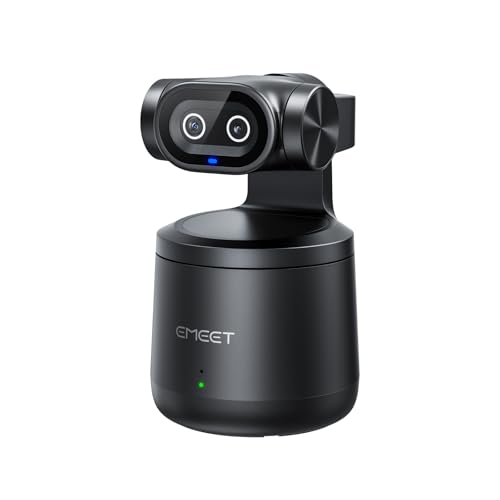
EMEET PIXY — Best Wireless Outlier
The PIXY is in this guide under a flag, and the flag is this: its listing title does not claim PTZ. What it claims is a wireless 4K dual-lens AI tracking streaming camera, with a 1/2.55-inch sensor, gesture control, multi-camera live capability and a built-in 48kHz microphone, with HDR. That is a genuinely different machine from the five gimbals above, and it earns its place by solving two problems they do not — cables and viewpoint switching — while being honest, in its own title, about not solving movement the motorised way.
Understand the design on its own terms. Two lenses give the camera more than one viewpoint of the room; the tracking follows the subject by working across those viewpoints rather than by rotating a head. The practical gains are silence, speed and the absence of moving parts, plus a wireless connection that frees the camera from the USB cable’s radius — a real liberation for a camera that might sit across a studio. Multi-camera live support points it at creators running more than one angle. The built-in microphone’s 48kHz specification is a genuine audio detail rarely printed on webcam listings at all.
The boundary is range and angle. A dual-lens system sees where its lenses see; it cannot turn to follow you into a part of the room outside its combined view the way a gimbal can, and it cannot tilt down to a desktop demonstration and back up with a motor’s freedom. Buyers whose movement is contained — a streaming desk, a defined performance area — may never touch that boundary. Buyers who roam a whole room will. This is the pick to research most carefully against your floor plan, and its Amazon listing is the place to verify how its tracking range is described before committing, since that description, not this guide’s general account, governs what the camera will actually do in your room.
- Video: 4K, HDR
- Movement: motorised pan/tilt — Not stated in the listing title — verify how its dual-lens AI tracking covers your space before buying
- Design: dual-lens, wireless connection
- Sensor: 1/2.55-inch
- Audio: built-in 48kHz microphone
- Control: gesture control; multi-camera live support
Strengths
- Wireless freedom removes the cable radius that tethers every other pick here.
- No motors means silent, instant viewpoint changes and nothing mechanical to wear.
- A specified 48kHz microphone shows unusual audio seriousness for the category.
Trade-offs
- No PTZ claim in the title — its tracking cannot turn beyond its lenses’ combined view.
- Whole-room roaming will find the edge of its coverage faster than a gimbal’s.
- Wireless links add a connection variable that USB cameras simply do not have.
Best for: streamers working a defined area who prize a cable-free, silent setup. Not suited for: instructors who traverse an entire room and need a lens that physically turns to follow them the whole way.
How Do the Six Movers Stack Up Side by Side?
| Pick | Video | Movement claimed in title | Control | Audio note |
|---|---|---|---|---|
| OBSBOT Tiny 2 Lite | 4K 60fps | AI-tracking PTZ | Gesture | Built-in microphones |
| OBSBOT Tiny 2 | 4K 60fps | PTZ, multi-mode AI tracking | Voice and gesture | Built-in microphones |
| OBSBOT Tiny SE | 1080p 100fps | AI-tracking PTZ | Gesture | Built-in microphones |
| Insta360 Link 2 | 4K | PTZ with AI tracking | Gesture | AI noise-cancelling mic |
| NexiGo N990 (Gen 2) | 4K | PTZ with position presets | Presets | Dual stereo mics, external jacks |
| EMEET PIXY | 4K | Dual-lens AI tracking — no PTZ claimed | Gesture | Built-in 48kHz mic |
One more pattern hides in the table’s rows: the two control styles divide by setting rather than by quality. Gesture and voice belong to performers mid-session, presets belong to rooms with recurring shapes, and neither is a lesser version of the other — they are answers to the question of who is free to give the camera an order at the moment the order is needed.
The table’s middle column is the one to trust your money to. Five titles claim motorised PTZ in so many words; one claims a dual-lens tracking design instead, and the difference between those claims is the difference between a camera that turns and a camera that switches. Everything else — resolution, frame rate, sensor — trades off within a shared understanding. That single column, honestly read, prevents the most expensive misunderstanding this category offers.
Where Should a Tracking Camera Sit to Follow You Well?
Placement decides whether tracking feels like a cameraman or a security guard. Start with height: the lens belongs near eye level for the position you occupy most, because a gimbal that must constantly tilt steeply down at you is spending its range on your furniture arrangement instead of your movement. A small tripod or a monitor-top perch that lifts the camera to standing eye height transforms a presenter’s experience of every camera in this guide. Then consider the arc: walk your actual route — desk to board, counter to stove — and check that nothing crosses between you and the camera’s post. Tracking survives a brief occlusion, a chair back, a passing colleague; it struggles with a bookshelf that hides you for three full seconds mid-route.
Light deserves the same walk. A route that carries you from a dim corner into a window’s glare tests exposure as much as motors, and the HDR claims in these listings exist for exactly that journey. Finally, rehearse the failure: every tracking camera occasionally locks onto the wrong shape — a coat stand has ended more than one presenter’s dignity. Learn your camera’s stop gesture or command before the first live session, not during it, and keep sessions that cannot tolerate a tracking hiccup — the recorded keynote, the assessed lesson — framed more conservatively, with the camera’s movement range narrowed to the zone you trust.
How Should You Budget for the Rest of a Moving-Presenter Setup?
The camera is the purchase that starts the spending, and planning the whole setup at once prevents the common sequence of delighted unboxing followed by three weeks of small disappointments. The first companion is light. A tracking camera roams the room’s existing illumination, and rooms lit for living rather than filming will punish that roaming — the corner you walk to is darker than the desk you left. A single panel light aimed at the performance area, or curtains managed so the window stops competing, does more for a moving presenter than any sensor upgrade. The HDR in these listings softens the problem; it does not repeal it.
The second companion is the microphone strategy, already flagged in the mistakes section because it is where moving setups most often fail: decide now whether the camera’s own audio (the Link 2’s noise-cancelling design being the strongest claim here) covers your distances, or whether a wireless lavalier joins the kit. The third is the perch — a tripod or stand that puts the camera at the right height in the right place, which for a presenter usually means not on the monitor at all but on its own support within the performance area. None of these companions is expensive beside the camera itself, and all three together cost less than the regret of returning a good camera for failures that were never the camera’s.
Which Buying Errors Turn a Tracking Camera Into a Regret?
The first is buying digital movement believing it is motorised — the error this guide opened with, and still the category’s most common. The second is subtler: buying tracking for a life that is seated. The gimbal’s cost, complexity and occasional hunting behaviour purchase nothing for a person whose meetings happen in a chair, and the money would have bought a better fixed camera, a better microphone and a light, with change. Movement must be a real feature of your sessions, not an aspiration, before it deserves a motor.
Third, people underestimate the audio geometry. They frame a beautiful tracking shot, walk fifteen feet from the camera, and discover their voice arriving thin and distant because the microphone walked nowhere. The Link 2’s noise-cancelling design and the N990’s external jacks exist because this problem is structural; everyone else should plan a wireless or worn microphone as part of the same purchase, not as an afterthought in month two. Fourth, owners forget the rest position: a tracking camera that ends every session staring at a wall or a ceiling teaches its owner to unplug it, and an unplugged camera follows nobody. Set the home position, use the presets where they exist, and let the machine’s manners match its abilities.
How Do You Rehearse a Session So the Camera Never Surprises You Live?
The rehearsal takes fifteen minutes and pays for itself the first time it prevents a public fumble. Record a private session — every platform offers a local recording or a meeting of one — and perform the whole geography of your real session at full energy: the walk to the board, the turn away, the demonstration with your hands full, the moment you step out for a prop and return. Then watch the recording the way your audience will, on the far end’s terms. You are looking for four things: whether the tracking’s speed matches your pace or lags a half-step behind it; whether the framing’s tightness flatters the content or crops the gesture you cared about; whether your voice survives the farthest point of the route; and whether the camera’s re-acquisition after your exit is graceful or a small panic.
Adjust one variable at a time in the app — follow speed, frame size, subject lock — and repeat only the segment that failed, not the whole rehearsal. Note especially the transitions: most tracking embarrassments happen not during steady movement but at its edges, the first step away from the desk and the return to the chair. If your format has a co-presenter or an interview segment, rehearse the hand-off too, standing together in frame so you learn whether your model widens politely or chooses between you. Fifteen minutes of this converts the camera from a gadget with opinions into an instrument you have already played once — and the live session becomes the second performance, which is always the calmer one.
Do These Cameras Earn Their Place in Recorded Content Too?
Yes, and for solo creators the recorded case may be stronger than the live one. A presenter recording a lesson, a course module or a demonstration video traditionally chooses between a static wide shot — safe, dull, and wasteful of resolution — and hiring the camera work out to a second human. A tracking gimbal is the third option: it produces the gentle reframing that keeps recorded instruction visually alive, following the demonstrator between bench and board while the recording software simply captures whatever the camera sends. The footage then needs no reframing pass in the editor, which for a creator publishing weekly is a real saving of hours, not a theoretical one.
Two cautions keep the advice honest. Recorded work is rewatched, so tracking quirks that a live audience forgives — a small hunt, a slightly late correction — become permanent and noticeable; the rehearsal discipline described above matters even more when the result is archived. And the highest-quality path for recording is sometimes the camera’s own higher-resolution mode feeding a local capture, rather than the compressed feed of a meeting app — worth testing with your model, since the difference between the two paths is visible in the finished video. Judged with those cautions, the gimbal cameras in this guide are recording instruments as much as meeting cameras, and for the solo teacher they may be the most economical crew ever assembled: one motor, no wages, endless patience.
Final Recommendation
Match the motor to the movement. The professional whose sessions are the product should take the OBSBOT Tiny 2 and its voice-controlled, large-sensor flagship system; the same brand’s Tiny 2 Lite carries the essential gimbal experience to everyone else who presents on their feet, and the Tiny SE reorders the priorities for coaches and performers whose content is speed itself. Insta360’s Link 2 is the presenter’s complete package where the voice matters as much as the framing, NexiGo’s N990 belongs in the meeting room its presets were built for, and the EMEET PIXY — bought with open eyes about its dual-lens design — frees a contained streaming space from cables entirely.
Whichever head turns for you, place it at eye height, walk its route before the audience arrives, and solve the moving-voice problem in the same purchase. Do that, and the camera stops being equipment you operate and becomes the quiet colleague who simply keeps you in frame — the colleague every solo presenter has always needed and, until these small gimbals arrived, could never hire. It is the rare upgrade that changes how a session feels from the inside, not just how it looks from the outside, and that difference compounds across every working week of the year.
Frequently Asked Questions
Is PTZ on a webcam really motorised, or is it just zooming?
On the five picks here whose titles claim PTZ, the pan and tilt are motorised — the head physically rotates. Zoom is a separate feature and is often digital, as the NexiGo N990’s listing states plainly with its 5X digital zoom. The confusion arises because other cameras elsewhere in the market offer only the digital crop while using movement language; checking whether the title claims PTZ hardware is the quickest way to tell which machine you are looking at.
Can a tracking camera follow two people at once?
It depends on the mode, and expectations should stay modest. Tracking systems are built around a primary subject; some can widen to hold two people in frame when they stand together, but two people moving independently in different directions will defeat any single-lens camera, motorised or not. For genuine two-person formats, frame wider and let the tracking rest, or treat the session as a two-camera problem.
Do these cameras work with Zoom, Teams and streaming software?
Yes — they present themselves to the computer as standard webcams, and the listings name the platforms directly: the Link 2 cites Zoom, Teams and Twitch among others, and the N990 carries Zoom certification. The tracking runs inside the camera, so the software on the computer simply receives a picture that happens to stay framed on you.
What happens when I walk out of the frame entirely?
Behaviour varies by model: most tracking cameras search briefly, then settle — some returning to a home position, others holding their last framing until you reappear and re-acquiring you then. Walking out mid-session is best treated as a scene change: pause the tracking with a gesture or command before you leave, and resume it when you are back, rather than asking the camera to improvise an empty room.
Is a remote control included, or do I use gestures and apps?
The listings in this guide emphasise gesture control, voice control on the Tiny 2, presets on the N990, and companion apps — handheld remotes are not the stated control method for these models, and several spec boxes above flag the remote as not stated in the title. If a physical remote is essential to your setup, verify its inclusion on the specific listing before ordering rather than assuming one rides in the box.
Will a gimbal camera wear out from all that turning?
Motors are moving parts and honesty requires saying they are the component with a finite mechanical life, unlike a fixed camera that can sit inert for a decade. In practice these gimbals are built for continuous session use and the motors move slowly under light loads. The practical advice is mundane: do not force the head by hand against its motors, and let the camera rest in its home position rather than fighting it into a bag while it is powered.
Related Guides
Movement is one specialism on a crowded camera shelf. If your desk instead needs a sign-in that recognises your face, the Windows Hello facial recognition webcams guide covers the infrared side of the category; presenters who stay seated but stream live should compare the best Twitch streaming webcams before choosing; and anyone fighting flat, dim video in a bright room can look at the ring light webcams that carry their own illumination with them.
Related guides
- Best 1440p 165Hz Monitors: One Native 165Hz Pick, Three 180Hz Upgrades, an Overclock Headline and a 160Hz Ultrawide
- Best 13×19 Professional Printers
- Best 3rd Party MacBook Chargers: 96W-Class Alternatives, the 100W Cable Rule, and the Apple Benchmark
- Best Built PC: Six Prebuilt Gaming PCs Judged on Parts, Power and Upgrades


