What's inside
- Key Takeaways
- Quick Picks: Six Downward-Looking Cameras Worth Your Desk
- How Did We Rank These Visualizers?
- Why Does a Webcam on an Arm Disappoint for Overhead Work?
- What Should You Film First to Learn an Overhead Camera’s Character?
- How Do You Keep Hands, Shadows and Reflections Out of the Story?
- When Does HDMI Output Change the Way You Present?
- How Much Desk Does an Overhead Rig Really Need?
- How Does the Overhead Camera Join a Two-Camera Recording Setup?
- What Changes When the Subject Is Food, Fabric or Circuit Boards?
- How Should a School Roll These Out to a Whole Department?
- The Six Best Webcams for Overhead Filming, Reviewed in Full
- How Do You Maintain Focus Discipline During a Long Demonstration?
- At a Glance: Comparing the Six Downward Specialists
- Which Overhead Filming Mistakes Ruin Otherwise Good Lessons?
- What Should Your First Month of Overhead Filming Teach You?
- Final Recommendation
- Frequently Asked Questions
- Related Guides
As an Amazon Associate I earn from qualifying purchases. This post may contain affiliate links at no extra cost to you.
gizmoverdict.com is reader-supported. When you buy through links on our site, we may earn an affiliate commission.
Where these are sold: every model below is listed on Amazon, so follow the link on any pick to confirm the cable set, software notes and current price on Amazon before ordering; document cameras travel under several regional bundle names, and the listing page is the authority on what lands in your parcel.
Anyone searching for the best webcams for overhead filming eventually collides with an awkward truth, and this guide will not hide it in the fine print: the tool that actually excels at filming a desk from above is not a webcam balanced on an arm. It is the document camera, sometimes called a visualizer — a camera on a purpose-built stand, lens pointing down, designed from the first sketch to watch hands, pages and objects instead of faces. All six picks below belong to that family. Webcam arms, goosenecks and tripod rigs appear in this article only as accessories, because an accessory cannot rescue a camera whose focus range, exposure logic and software were all tuned for a face at arm’s length.
The overhead shot itself has become a genre. Cooking channels film the chopping board, calligraphers film the nib, electronics channels film the circuit board, teachers film the worked equation, and crafters film the seam. Each genre punishes the same weaknesses: focus that drifts when a hand enters the frame, exposure that panics when a white page fills the view, a stand that trembles when the desk is nudged, and software that flips the image so text reads backwards to the audience. The six visualizers below were chosen against exactly those failures, judged on the sensor, zoom and connectivity claims their own listings make.
One more framing note before the shortlist. An overhead camera earns its place in a two-camera life: the face camera carries your personality, the overhead camera carries your evidence. If you film only one of those, buy for that one and ignore the rest. If you film both, the question becomes how gracefully the visualizer hands its picture to your recording or streaming software, how quickly it folds away when the desk must become a desk again, and whether it can work without a computer at all — a trick exactly one pick here performs over HDMI.
Key Takeaways
- The honest answer to this keyword is a category swap: document cameras, built to look down, beat any webcam perched on an arm for sustained overhead work.
- Eight megapixels is the shared sensor language of this pool — five of six listings state it — so the real separators are focus behaviour, lighting and how the picture reaches your screen.
- Only the IPEVO VZ-R promises a life without a computer, thanks to its HDMI mode for direct projection.
- Built-in illumination appears on the INSWAN, THUSTAND and PAKOTOO models, and on a desk the difference between lit and unlit paper is the difference between legible and guessed.
- Image inversion controls, named by the THUSTAND and PAKOTOO listings, decide whether your writing reads correctly to the audience or as a mirror puzzle.
- Portability splits the field: the DO-CAM folds for travel, while the desk-bound models trade that freedom for steadier, heavier stands.
Quick Picks: Six Downward-Looking Cameras Worth Your Desk
| Pick | Badge | Why it made the cut |
|---|---|---|
| IPEVO V4K Document Camera | The classroom standard | An 8MP USB visualizer with a long teaching pedigree across Mac, Windows and Chromebook, aimed at live demos and remote lessons. |
| IPEVO VZ-R HDMI/USB Document Camera | Works without a computer | Dual-mode output lets it feed a projector directly over HDMI or a computer over USB, a flexibility nothing else here matches. |
| IPEVO DO-CAM | The traveller | A portable, compact 8MP design in a Creator’s Edition finish, doubling as a webcam for calls between overhead sessions. |
| INSWAN INS-1 Document Camera | Light and microphone included | Built-in LED illumination and a microphone join its 8MP sensor and autofocus, covering a whole lesson from one device. |
| THUSTAND Document Camera | The folding all-rounder | LED light, autofocus and image invert in a body that folds, pitched at teachers moving between rooms. |
| PAKOTOO 8MP Document Camera | Big-sheet specialist | Sized in its listing for A3 and A4 work, with dual microphones, a three-level LED and inversion in both directions. |
How Did We Rank These Visualizers?
We started by disqualifying the wrong tool. Any ordinary webcam, however sharp, had to leave the table, because overhead filming is a posture before it is a specification: the lens must live above the page, parallel to it, hour after hour, without a clamp slowly surrendering to gravity. What remained was the document camera shelf, and within it we ranked by the claims each listing is willing to print. Sensor resolution first — the pool speaks almost uniformly of eight megapixels — then the mechanics of focus, then the path the picture takes to an audience.
Focus behaviour decided more places than resolution did. Overhead work constantly introduces hands, tools and turned pages into the frame, and each intrusion is a focus event. Models naming autofocus earned the benefit of the doubt for live demonstration, while the guidance sections below explain how to stage your movements so any system keeps up. Connectivity decided the rest: straight USB for the recording desk, HDMI-plus-USB for the presenter who faces a projector, and Chromebook compatibility — named by four listings — for the school deployments where these devices multiply fastest.
We also scored the unglamorous physics. A visualizer is a lever: a camera head held at the end of an arm above a desk. Weight in the base, stiffness in the joints and a fold that locks rather than flops decide whether the framing you set at nine o’clock still holds at noon. Listings rarely print such things, so where a title is silent the spec boxes below say so, and the reviews judge each model on its stated design intent — portable, classroom, dual-mode — rather than on invented measurements.
Why Does a Webcam on an Arm Disappoint for Overhead Work?
Begin with focus distance. A webcam’s optics and autofocus are tuned for a face between roughly half a metre and two metres away, upright, lit from the front. Lay that camera over a page and it works at the near edge of its competence, where small height changes — a thick book replacing a thin one, a hand rising with a component — demand refocusing the system was never eager to perform. A document camera’s lens and focus logic assume the page as their home territory, so those same movements are routine.
Exposure tells a similar story. Webcam metering protects faces, which means it protects mid-tones; fill the frame with a white worksheet and a face-tuned camera often greys the paper or blows it out while hunting for a skin tone that is not there. Visualizers are metered and white-balanced for paper, print and objects under a lamp, so text contrast — the entire point of the overhead shot — survives. Add the stand problem: arms clamp, sag and transmit every desk tremor directly into the frame, while a visualizer’s base sits in the shot’s own gravity, planted and boring in the best sense.
Software completes the mismatch. Overhead footage must often be rotated or mirrored to read correctly, enlarged in a chosen region, or frozen while the presenter talks. Document camera software treats those as first-class citizens; webcam software treats them as afterthoughts, when it offers them at all. None of this makes webcams bad — the previous guide in this series recommends six of them warmly for faces. It makes them specialists facing the wrong way, and overhead filming is a job that rewards the specialist facing down.
What Should You Film First to Learn an Overhead Camera’s Character?
Film handwriting. Nothing exposes a visualizer faster than a pen moving across lined paper: focus must track a small, fast, low-contrast target; exposure must hold the page white without erasing the lines; the frame must stay still while your writing hand leans on the desk. Ten minutes of worked equations or a lettered alphabet will teach you more about a model’s manners than a day of specifications. If the pen stays legible at your natural writing speed, the camera will handle slower crafts easily.
Film a glossy object second. A phone screen, a varnished box, a coin — anything that throws the lamp back at the lens. Overhead lighting geometry means reflections arrive exactly where your audience looks, and the remedies are learned, not bought: angle the object a few degrees, shift the lamp, dim the built-in light and borrow the room’s. Models with multi-level LED control, like the PAKOTOO’s three levels, give you one more remedy inside the camera itself, which is why that detail appears in its review rather than being waved past.
Film a two-handed task third — tying, assembling, kneading, soldering in pantomime. Two hands double the focus events, occlude the subject at the crucial moment and reveal whether the stand’s height keeps your forearms out of the frame’s edges. By the end of these three short films you will know your camera’s working distance, its patience and its blind spots, and you will stage real sessions around them instead of discovering them live in front of students.
How Do You Keep Hands, Shadows and Reflections Out of the Story?
Shadows are the overhead shot’s native defect: the light that lets the camera see is usually above, and your hands work between that light and the page. The cure is geometry. Place the main light off to the side opposite your writing hand, angled low enough to rake across the page rather than plunge straight down, and a hand’s shadow falls away from the nib instead of swallowing it. Built-in LEDs on the camera head help as fill — they travel with the lens and soften contrast — but a single desk lamp positioned with intent does the heavy lifting, and the reviews below note which models bring their own illumination to that partnership.
Hands themselves need choreography. Enter the frame from the bottom edge, work in the middle distance of the shot, and withdraw the way you came; hands that wander in from the sides drag focus and attention with them. Present objects by sliding them into the centre rather than dropping them from above, because a descending object triggers a focus chase and lands with a shadow. These are stage habits borrowed from puppeteers and close-up magicians, and they cost nothing, yet they separate the overhead channels that feel effortless from the ones that feel like surveillance footage of a desk.
Reflections surrender to angle and diffusion. Tilt glossy work a few degrees off parallel, soften the lamp with a sheet of baking parchment if it glares, and prefer the camera’s lower light levels when the subject shines. A matte practice board under your work kills the desk’s own sheen and gives exposure a calm, mid-toned anchor — the single cheapest quality upgrade in the entire overhead discipline.
When Does HDMI Output Change the Way You Present?
A USB visualizer speaks to a computer, and the computer speaks to the world — a fine chain for recording and streaming, where software intermediates everything anyway. HDMI cuts the computer out. The VZ-R’s dual-mode design can feed a projector or a large display directly, which transforms three situations. In a classroom with an unreliable shared laptop, the camera simply works. In a hall or workshop, a demonstrator can show a mechanism to two hundred people with no capture software between the lens and the screen. And in any room, the picture arrives without the compression and delay a conferencing app would impose on it.
The trade is that direct projection is a performance, not a recording: nothing is saved unless another device saves it. Presenters who both perform and publish therefore run the VZ-R in USB mode at the desk and HDMI mode on the road, which is exactly the dual life its listing describes. If your overhead work is entirely deskbound recording, that flexibility is a spare tyre you may never unstrap; if you teach in rooms you do not control, it is the difference between a demonstration and an apology.
How Much Desk Does an Overhead Rig Really Need?
Less than the photographs suggest, but more than the folded dimensions promise. The camera’s base claims a patch beside your work area, the work itself claims the centre, and your hands claim a margin around the work that must stay inside the frame’s comfortable zone. In practice a clear rectangle roughly the size of two open magazines serves most single-presenter filming, provided the lamp stands outside it and the face camera, if any, watches from beyond. The folding models — DO-CAM and THUSTAND — repay their design most in shared spaces, where the rig must vanish into a drawer between sessions; the heavier classroom models repay theirs on a dedicated desk, where being left set up is the entire point.
Height is the dimension newcomers misjudge. The camera must see the whole page, so its head rises well above the work, and anything tall nearby — a monitor on a stand, a shelf — starts to crowd the shot’s edges or the presenter’s elbows. Stage the rig, sit in your working position, and check the frame with your arms in their real places before recording anything precious. Overhead filming fails at the elbows more often than at the lens.
How Does the Overhead Camera Join a Two-Camera Recording Setup?
Most mature teaching channels run two pictures: the face that earns trust and the desk that delivers proof. Joining them gracefully is a workflow question before it is a hardware one. In recording software, the visualizer arrives as an ordinary USB video source alongside the face camera, and the craft lies in deciding how the audience travels between the two. Hard cuts suit brisk, edited lessons; a picture-in-picture layout, desk large and face small in a corner, suits live teaching, where the presenter’s reactions must stay visible while hands work. Every USB model in this guide can feed either arrangement, because to the software they are simply cameras that happen to look down.
Switching discipline matters more than switching technology. Announce the move — a word, a gesture toward the desk — before the picture changes, and return to the face for every conclusion, because audiences attach claims to people and evidence to desks. Teachers who cut to the page for a derivation and back to their face for the interpretation are using the two-camera grammar exactly as television learned it. The overhead camera’s job in that grammar is reliability: it must be framed, focused and lit before the lesson, because nobody can adjust a desk shot elegantly while also being watched in the corner of it.
Audio continuity stitches the cuts together. Whether narration comes from the face camera’s microphones, a desk model like the INS-1 or PAKOTOO with microphones of its own, or a separate recorder, keep one audio source across both pictures. A voice that changes character whenever the shot changes reminds the audience of the machinery, and machinery is the enemy of attention. Decide the audio chain once, write it into your setup notes, and let the cameras argue about pictures while the voice stays serenely above the dispute.
What Changes When the Subject Is Food, Fabric or Circuit Boards?
Paper is the overhead camera’s home turf, but the genre’s growth areas are messier. Food filming adds steam, which fogs a lens hung directly above a pan, and splashes, which a downward lens collects like a windshield. Angle the rig a few degrees off vertical, keep the camera head as high as the framing allows, and accept a slightly oblique view as the price of a clear one; the audience reads a steaming pan perfectly well from a respectful tilt, and the VZ-R’s projection mode has carried many a cookery demonstration to a live room on exactly that compromise.
Fabric and fibre work adds texture that exposure systems flatten. A raking side light — the same lamp placement recommended against hand shadows — reveals weave, stitch and nap, turning a flat rectangle of cloth into a landscape the audience can read. Dark fabrics on a dark desk defeat metering entirely, so lay a mid-toned mat beneath the work and let the camera meter against that calm anchor. Circuit boards add glare and microscopic detail: components shine, solder joints sparkle, and the useful shot is often a tight crop of a wide stage, which is where a sensor’s honest resolution and a steady base repay their cost, because digital enlargement magnifies tremor as faithfully as it magnifies the board.
Across all three subjects the staging rule from earlier survives: mark the capture area, rehearse the hand choreography, and film the ugly test first. Overhead filming rewards the presenter who treats the desk as a set — lit, marked and rehearsed — and punishes the one who treats it as a surface that happens to be under a camera.
How Should a School Roll These Out to a Whole Department?
Standardise ruthlessly. A department that buys three different models buys three sets of habits, three software behaviours and three conversations with the IT desk, while a department that settles on one — the V4K and INS-1 are the natural fleet candidates here, with their three-system compatibility — can train once and support forever. Write the one-page setup card: where the base sits, which cable, which switch corrects the image, which lamp position. Laminate it. Attach it to the camera’s base with the seriousness of a fire instruction.
Chromebook compatibility, named across four of these listings, is the fleet buyer’s quiet headline, because school laptop fleets run on it and a camera that needs a driver CD is a camera that stays in a cupboard. Plug-and-play behaviour, stated by the INSWAN, deserves the same weight. And plan the spares honestly: cables will be borrowed into oblivion and a folding hinge will eventually meet a careless bag, so a department of ten teaching rooms is really a purchase of eleven or twelve units, with the extras living where a technician can reach them in the four minutes between lessons.
The Six Best Webcams for Overhead Filming, Reviewed in Full

IPEVO V4K Document Camera — The classroom standard
The V4K is the model that made the modern USB visualizer ordinary, and its listing reads like a roll call of the places that ordinariness conquered: live demos, web conferencing, distance learning, remote teaching. An eight-megapixel sensor watches the page, a USB connection carries the picture, and compatibility spans Mac, Windows and Chromebook — the three operating systems a school or a wandering tutor actually meets. In green, per the listing, which matters more than it should: equipment that looks friendly gets used, and equipment that gets used gets justified.
Its character is that of a reliable appliance. There is no HDMI escape route and no built-in lamp in the title’s account, so the V4K assumes a lit room and a computer partner, and in exchange it asks very little of either. For the teacher whose overhead work is a daily lesson rather than a production — equations worked live, a textbook passage annotated, a leaf’s anatomy shown to a remote class — that assumption holds, and the camera disappears into the routine. Treat it as the reference point of this guide: every other pick justifies itself by adding something the V4K lacks, and most readers will find one of those additions, or its absence, decides their order. Details of the current revision live on the product page; look up the V4K on Amazon and check the price there if the reference point is the one you want.
- Sensor: 8MP, described in the listing as ultra high definition
- Connection: USB to computer
- Compatibility: Mac OS, Windows and Chromebook, per the listing
- Stated uses: live demo, web conferencing, distance learning, remote teaching
- Built-in light: Not stated in the listing title — verify with the maker’s documentation
- Direct display output: Not stated in the listing title — verify with the maker’s documentation
Strengths
- Compatibility across the three school operating systems removes the deployment gamble.
- A long classroom pedigree means tutorials, mounts and habits already exist around it.
- The concept is refreshingly single-purpose: point down, connect, teach.
Trade-offs
- No direct-to-projector mode, so a computer must always intermediate the picture.
- Room lighting carries the full exposure burden; a dim desk will show it.
- Teachers wanting a lamp and microphone inside the same device should read on.
Best for: the daily remote lesson and the school deployment that must simply work everywhere. Not suited for: a presenter who demonstrates to live rooms without a computer in the chain.
IPEVO VZ-R HDMI/USB Document Camera — Works without a computer
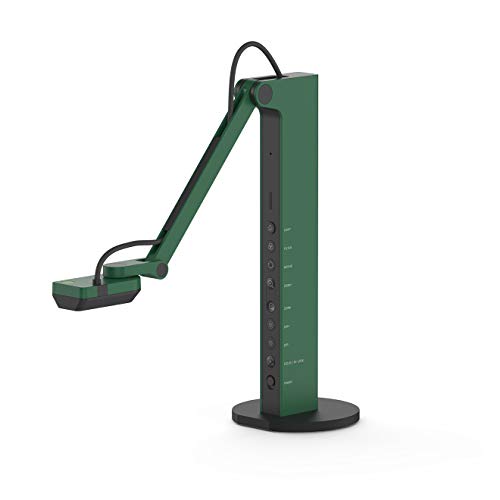
The VZ-R takes the V4K’s eight-megapixel foundation and adds the one capability that rearranges a presenter’s life: a second output. Its listing describes a dual-mode tool — HDMI for real-time projection, USB for the computer — that works with a computer and, crucially, without one. Plug it into a projector in a borrowed hall and the page appears on the wall; plug it into your desk machine and it records like any visualizer. That duality is not a luxury feature. It is insurance against every room whose laptop is locked, ancient or missing.
For creators, the HDMI path has a subtler gift: a clean, immediate confidence monitor. Even at a recording desk, feeding a nearby display directly shows the overhead shot at a size where focus errors and stray shadows announce themselves before the take, not after it. The model’s green livery and communication-tool positioning mark it as the professional sibling in the IPEVO family here, priced in complexity rather than in any claim this guide can verify. If your teaching life alternates between a home desk and other people’s rooms, this is the pick designed around your calendar; find the VZ-R on Amazon and confirm today’s price along with the cable set in the box.
- Sensor: 8MP, per the listing
- Outputs: HDMI and USB dual mode, per the listing
- Computer-free use: works with and without a computer, per the listing
- Stated uses: real-time projection, distance learning, web conferencing, video recording, live demos
- Built-in light: Not stated in the listing title — verify with the maker’s documentation
- Microphone: Not stated in the listing title — verify with the maker’s documentation
Strengths
- Direct projection removes the computer, the software and their failure modes from live demos.
- One device serves the recording desk and the borrowed hall equally.
- A direct display feed doubles as an honest, full-size confidence monitor at home.
Trade-offs
- Deskbound recorders pay for a projection talent they may never exercise.
- Projecting live means performing live; nothing is captured unless a second device captures it.
- The title stays silent on illumination, so a lamp remains your own responsibility.
Best for: travelling teachers, workshop leaders and anyone demonstrating in rooms they do not control. Not suited for: a purely deskbound recorder whose projector is a permanent hypothetical.

IPEVO DO-CAM — The traveller
The DO-CAM’s listing leads with two adjectives the rest of this guide cannot claim together: portable and compact. This Creator’s Edition of IPEVO’s folding camera treats the overhead shot as something you carry — to a client’s studio, a rented classroom, a kitchen table that becomes a set for the afternoon. Its eight-megapixel USB camera folds into a travel-friendly shape, then opens to look down at the work; between overhead sessions it moonlights, per the listing, as a webcam for conference calls and remote work, facing forward like any meeting camera.
That double life defines its ideal owner: the creator whose desk is wherever the week puts it. A calligraphy tutor teaching from two cities, a product demonstrator visiting clients, a homeschool parent whose classroom is the dining table — each gains a rig that packs away to nothing and still delivers a genuine downward view rather than an improvised phone-on-a-stack-of-books. The compromises travel with the concept: a light, folding structure asks for a steady desk and a gentle touch, and the title promises no lamp of its own. Judge it as luggage, not furniture, and it is the most coherent design here; view the DO-CAM listing on Amazon to check the price and its folded form.
- Sensor: 8MP ultra HD, per the listing
- Design: portable and compact, Creator’s Edition, per the listing
- Connection: USB camera
- Second role: webcam for conference calls, per the listing
- Stated uses: visual presentations, distance learning, remote work
- Built-in light: Not stated in the listing title — verify with the maker’s documentation
Strengths
- Folds into luggage, so the overhead studio exists wherever you unpack it.
- Faces forward for calls, sparing travellers a second camera entirely.
- Creator-focused edition signals attention to the recording, not just the classroom.
Trade-offs
- A folding traveller cannot match a planted base for tremor resistance on a lively desk.
- No illumination is promised, so evening sessions need a lamp in the bag too.
- Permanent-desk teachers gain little from portability they will use twice a year.
Best for: mobile tutors, visiting demonstrators and creators filming in borrowed spaces. Not suited for: a fixed studio desk where the rig should be planted once and forgotten.

INSWAN INS-1 Document Camera — Light and microphone included
INSWAN’s INS-1 reads its listing like a checklist of everything a lone teacher otherwise assembles from three purchases: an eight-megapixel document camera, a built-in LED light, a microphone, and autofocus, in a plug-and-play body that also answers to the name webcam. The integration is the argument. The LED sits where the lens sits, so the page is lit from the camera’s own viewpoint, flattening the shadow problem at its source; the microphone sits there too, close to the action, so narration over a demonstration arrives without a separate audio chain to sync or forget.
Compatibility spans Windows, Mac and Chromebook, and the stated territory — distance learning, live demo, online teaching — matches the V4K’s, which makes the INS-1 the natural comparison: same classroom brief, more of the kit folded in. Autofocus earns particular mention in overhead work, where a hand’s arrival is a focus event dozens of times per lesson, and a system that handles those events without a presenter’s intervention keeps the lesson’s rhythm unbroken. For a teacher building a one-device desk from nothing, this is the shortest path on the page; check what the INS-1 costs on Amazon today before assembling the three-device alternative.
- Sensor: 8MP, per the listing
- Illumination: built-in LED light, per the listing
- Audio: microphone built in, per the listing
- Focus: auto focus, per the listing
- Compatibility: Windows, Mac and Chromebook, per the listing
- Setup: plug and play, per the listing
Strengths
- Light, lens and microphone in one body collapses the beginner’s shopping list to a single line.
- Autofocus absorbs the constant small focus events that hands create.
- Camera-mounted light attacks page shadows from the lens’s own angle.
Trade-offs
- A built-in microphone near the desk hears page turns and pen taps as faithfully as voices.
- One LED is a fill, not a lighting design; dramatic or glossy work still needs a lamp’s help.
- No computer-free projection mode appears in its account of itself.
Best for: a teacher equipping a complete overhead desk in a single purchase. Not suited for: a presenter whose narration demands a microphone worn on the body, away from desk noise.

THUSTAND Document Camera — The folding all-rounder
THUSTAND’s visualizer gathers the practical middle of this category into one folding frame: an LED light for the page, autofocus for the hands, image invert for the audience’s sake, and compatibility across Mac, Windows and Chromebook. The invert feature deserves its sentence. Overhead footage is forever one wrong setting away from presenting text mirrored or upside down, and a camera that advertises inversion in its title is a camera whose maker has watched real teachers struggle; flipping the image inside the device beats correcting it in software while thirty students wait.
The fold matters to the same owner. Classrooms change by the hour, and a visualizer that folds travels between them in one hand, then stands up in the next room without a ceremony. Nothing in the listing claims a microphone or a projection mode, and the sensor’s resolution goes unstated in the title — the spec box below records that silence honestly — so the THUSTAND sells versatility of handling rather than imaging headlines. For the itinerant teacher inside one building, moving room to room with a laptop and a folding camera, that handling is the headline; see the THUSTAND camera on Amazon for its current price and folded dimensions.
- Illumination: LED light included, per the listing
- Focus: auto focus, per the listing
- Image controls: image invert named in the listing
- Design: folds for transport, per the listing
- Compatibility: Mac OS, Windows and Chromebook, per the listing
- Sensor resolution: Not stated in the listing title — verify with the maker’s documentation
Strengths
- Inversion handled in the device protects lessons from the mirrored-text embarrassment.
- A folding frame suits the room-to-room teaching day inside a school.
- Light and autofocus together cover the two most common overhead complaints.
Trade-offs
- The title withholds the sensor figure, so imaging expectations must stay modest until tested.
- No microphone is mentioned; narration needs the laptop’s audio or a separate mic.
- Jack-of-all-trades handling rarely matches a specialist at any single discipline.
Best for: teachers circulating between classrooms with their kit in one hand. Not suited for: a broadcaster who needs the audio chain and the camera to arrive as one device.

PAKOTOO 8MP Document Camera — Big-sheet specialist
The PAKOTOO announces its speciality in the dimensions of paper: built for A3 and A4 sizes, per its listing, which quietly makes it the wide-format entry in a field of letter-page cameras. An eight-megapixel sensor covers that larger stage, dual microphones listen from the camera, a three-level LED lets the presenter grade the light instead of merely switching it, and image inversion works in both directions — up and down, left and right — the fullest orientation control named anywhere in this pool.
Who films at A3? Art teachers with sketchbooks, architects with drawings, accountants with ledger sheets, calligraphers whose strokes outgrow a notebook, and any demonstrator whose subject is a spread rather than a page. For them the extra capture area is not a luxury but the frame itself, and the graded light matters because large sheets catch uneven illumination corner to corner. The dual microphones acknowledge that big work is often talked over from a standing position, further from the camera than a seated narrator. If your overhead subject has been cropped by every camera you have tried, this is the model whose listing starts from your problem; confirm the PAKOTOO’s price on Amazon and the sheet sizes it promises.
- Sensor: 8MP, per the listing
- Capture area: sized for A3 and A4, per the listing
- Audio: dual microphones, per the listing
- Illumination: 3-level LED light, per the listing
- Image controls: up-down and left-right inversion, per the listing
- Stated uses: distance teaching and learning, classroom work
Strengths
- A3 coverage frames spreads, sketchbooks and drawings that smaller stages crop.
- Three light levels give graded control over big, unevenly lit sheets.
- Full two-axis inversion straightens any mounting orientation.
Trade-offs
- A stage built for large paper is surplus furniture for notebook-sized lessons.
- Wide capture spreads the sensor’s pixels over more area, softening fine detail per inch.
- Standing narration through desk microphones still trails a worn microphone for clarity.
Best for: art, drafting and ledger work filmed at full spread. Not suited for: a notebook-and-pen tutor whose page never exceeds a paperback’s width.
How Do You Maintain Focus Discipline During a Long Demonstration?
Autofocus, where a model offers it, is a servant with opinions: it will chase the largest moving contrast in the frame, which during a demonstration is usually your hand, not your subject. The presenter’s counter-discipline is to move in two tempos — brisk when travelling between positions, slow when working — because systems settle during the slow passages and forgive the brisk ones. Park your hands at the frame’s edge while you talk through a concept, then bring them in deliberately when the work resumes; the audience experiences this as calm staging, and the focus system experiences it as mercy.
Depth helps too. Work as flat as the subject allows: a single sheet rather than a stack, a component laid down rather than held up, a book opened fully rather than propped. Every centimetre of height difference between the page and the object is a centimetre the focus must travel when attention shifts, and flat staging keeps those journeys short. Where height is unavoidable — a mechanism, a layered craft — introduce the tall object early, let the camera settle on it, and keep it in frame rather than ferrying it in and out like a prop in a farce.
Finally, rehearse the one moment every overhead genre shares: the reveal. The finished equation, the turned page, the completed stitch, the board lighting up. That moment is the screenshot your audience keeps, so stage it with clean hands, a still frame and a beat of silence. A camera can only record the reveal you give it, and the six above will each record a well-staged one faithfully.
At a Glance: Comparing the Six Downward Specialists
| Pick | Sensor as listed | Picture path | Light of its own | Signature trait |
|---|---|---|---|---|
| IPEVO V4K | 8MP | USB to computer | Not stated in the title | Three-system classroom compatibility |
| IPEVO VZ-R | 8MP | HDMI and USB | Not stated in the title | Projects with no computer attached |
| IPEVO DO-CAM | 8MP | USB to computer | Not stated in the title | Folds for travel; faces forward for calls |
| INSWAN INS-1 | 8MP | USB to computer | Built-in LED | Microphone and light inside one body |
| THUSTAND | Not stated in the title | USB to computer | LED light | Folding frame with image invert |
| PAKOTOO | 8MP | USB to computer | 3-level LED | A3 stage with dual microphones |
The table’s pattern is the category’s lesson: sensors have converged, so hands, lights and picture paths separate the field. Choose the row whose signature trait matches the room you actually film in, and the shared eight-megapixel foundation will carry the rest. Keep one honest caveat beside the table as you decide: a model whose title stays silent on a feature you care about is not necessarily missing that feature, but you should verify it in the maker’s documentation rather than discovering its absence after the parcel arrives and the first lesson is already scheduled.
Which Overhead Filming Mistakes Ruin Otherwise Good Lessons?
The classic failure is the mirrored page: the camera mounted for the presenter’s comfort, the image flipped for nobody, and a class copying reversed letterforms for ten minutes before someone speaks. Test the orientation with a page of real text before every new mounting arrangement, and prefer models whose inversion lives in the device, where a single switch fixes it mid-lesson.
The second failure is lighting the room instead of the page. Ceiling light that feels bright to your eyes arrives at the desk diluted and angled, and the camera reports the truth: grey paper, soft contrast, tired viewers. Bring one lamp close to the work, switch on the camera’s own LED where fitted, and judge the result on the recording, not from your chair.
The third failure is staging the demonstration at the frame’s edge, where lenses are weakest and hands enter like weather. Mark the capture area’s corners on a practice sheet, keep the important action inside them, and let unimportant materials live outside the tape. Overhead filming is theatre on a tabletop; the tape marks are your stage.
The fourth failure is buying the arm before the camera. Mounts, booms and goosenecks are accessories with a real but narrow role — an occasional top-down shot from a face camera you already own. A channel or a classroom that films overhead weekly deserves the purpose-built tool, and bolting accessories onto the wrong foundation costs more, in money and in patience, than the right foundation costs outright.
What Should Your First Month of Overhead Filming Teach You?
Week one usually humiliates the lighting. Creators discover that the room they judged bright is, to a downward lens, a cave with a ceiling bulb, and that paper under that bulb photographs the colour of weak tea. The fix is almost always the same lamp moved closer, and the lesson generalises: in overhead work, light is not ambience but evidence, and evidence must be brought near. Note the lamp’s final position in your setup record, because week two’s temptation is to tidy it away.
Week two exposes the choreography. Watching your own footage, you will see hands you do not remember making — the fidget that crosses the frame, the pen that taps during explanations, the left hand that drifts in to hold a page it does not need to hold. Each is a small theft of the audience’s attention, and each is curable by the stage habits described earlier: enter from the bottom, work in the middle, withdraw cleanly. By the end of the second week the theft rate falls, and the footage starts to look eerily calm, which is the overhead aesthetic doing its work.
Weeks three and four refine the library. You will learn which of your subjects the camera loves — most love print and punish gloss — and which framings your audience replays, because platform analytics quietly report the moments viewers revisit. Those replays are your curriculum speaking: the derivation rewatched, the technique re-examined. Give those moments more room in later lessons, stage them with the reveal discipline, and the channel’s craft compounds. The camera chosen from this guide becomes, by the end of the month, less a purchase than a habit with a lens — which is the moment overhead filming stops being a setup problem and starts being a voice.
Final Recommendation
Start from the room. A fixed classroom or home teaching desk is served by the V4K’s quiet universality, upgraded to the INS-1 when light and voice must come from the same device. A presenter who works other people’s rooms should carry the VZ-R for its computer-free projection or the DO-CAM for its folded discretion, while the room-to-room teacher inside one school will feel the THUSTAND was designed around their timetable. The PAKOTOO stands apart for wide work, the only frame here that begins at A3. Whichever arrives, film the handwriting test before the first real lesson, and let that footage confirm the choice. The overhead shot is a humble angle — a page, two hands, a voice — and the camera that honours it best is the one your audience forgets while they learn.
A closing word about second-hand temptation, because visualizers circulate widely on the used market as schools refresh their fleets. A used unit can be a bargain, but inspect the three wear points a listing photograph hides: the hinge or arm joint, which must hold a position against gravity without creeping; the cable near its strain reliefs, where classroom years fray insulation; and the lens itself, which must be free of the scratches that a thousand wipedown cleanings can carve into an unprotected element. Test any used camera with the handwriting exercise from earlier in this guide before the return window closes, and prefer a seller whose description names the model’s compatibility honestly. The new models ranked above exist precisely so that none of that detective work is necessary, yet a careful used purchase of a classroom standard remains a rational route for a department stretching a budget across many rooms.
Frequently Asked Questions
Can I just mount my regular webcam above the desk instead?
For an occasional shot, yes, with a stable arm and patience for focus and exposure compromises. For weekly overhead filming, the webcam’s face-tuned focus, metering and software fight you in every session, which is why this guide ranks purpose-built document cameras and treats arms as accessories.
Is eight megapixels enough for a full page of small print?
For a normally framed page delivered through conferencing or course software, the eight-megapixel sensors across this pool are the category’s working standard. Fine print at the frame’s edges is the first casualty of any system, so stage small text toward the centre and zoom the camera rather than cropping later.
Which pick works in a hall with only a projector?
The IPEVO VZ-R, whose HDMI mode projects directly with no computer in the chain. Every other pick here expects a computer between the camera and the audience, which is fine for recording and streaming but fatal in a laptop-less room.
Do I need a model with a built-in light?
Only if your desk lacks a lamp you can position near the work. Camera-mounted LEDs on the INSWAN, THUSTAND and PAKOTOO models excel as page fill and shadow softeners; a well-placed desk lamp can serve the other models to the same end.
Why does image inversion matter so much?
Because an overhead camera sees the page from the opposite side to its audience, and without inversion your writing can appear mirrored or upside down. Models naming inversion controls fix the orientation inside the device, which is faster and safer than correcting it in software mid-lesson.
What size work can the PAKOTOO actually frame?
Its listing sizes the stage for A3 and A4 sheets, making it the wide-format choice for sketchbooks, drawings and ledger spreads. Notebook-scale teachers gain nothing from that area and should prefer a more compact frame.
How high above the page should the camera sit?
High enough to frame the whole working area with a small margin, and no higher, because every extra centimetre shrinks the subject and invites the elbows problem described earlier. Set the height against your largest regular subject — a full sheet, an open book, a chopping board — and mark the joint’s position so a knocked rig can be restored to the tested framing in seconds.
Related Guides
For the face that pairs with these hands, best webcams for youtube and online courses ranks the presenter cameras. Dim rooms are their own problem, addressed in best ring light webcams. And when the overhead shot must travel to a meeting instead of a lesson, best conference webcams covers the boardroom end of the shelf.


