What's inside
- Quick Picks
- How We Chose
- Ink Tank or Laser: Which Running Costs Suit a School Year?
- What Makes a Printer Survive a Classroom?
- How Do You Set Up School Printing So September Goes Well?
- Should Every Classroom Have Its Own Printer?
- How Do You Budget a School Year’s Printing Without Surprises?
- Comparison Table
- Common Mistakes
- Final Recommendation
- FAQ
- Related Guides
As an Amazon Associate I earn from qualifying purchases. This post may contain affiliate links at no extra cost to you.
gizmoverdict.com is reader-supported. When you buy through links on our site, we may earn an affiliate commission.
Where to buy: all six printers below are sold on Amazon, and their listings state the school-relevant facts — ink system, rated speed where published, document feeders, duplex behaviour — so check the listing against the review before your school or district commits. Choosing the best printers for elementary schools is a different exercise from choosing for an office, because the elementary classroom is the most demanding print environment in ordinary life. Volume arrives in class sets — thirty copies of the same worksheet, times six classrooms, times every day of the school year. The operators are teachers with four minutes between lessons, parent volunteers, and occasionally a helpful eight-year-old. And the budget is the kind of budget where the ink line is read aloud in meetings.
The six picks divide into three philosophies. Two HP OfficeJet Pro colour inkjets bring office-grade completeness — print, scan, copy and fax — to the school office and the well-funded classroom. Two Epson EcoTank models make the running-cost argument in its purest form: refillable tanks whose ink economics were practically designed for class-set volume. One Brother monochrome laser stands as the durability-and-simplicity candidate, the machine for the worksheet mountain’s black-and-white bulk. And one Canon PIXMA all-in-one covers the small classroom’s everything-in-one-box needs, photo printing included, for the art-and-display side of elementary life.
Two ground rules govern the guide. First, no claims are made about child data or privacy features that a listing does not state — schools deserve better than invented assurances on that subject, and where a title is silent, the spec box says so. Second, paper, ink and toner are consumables, never picks; the machines are judged, and their appetites are discussed honestly as part of owning them.
Key Takeaways
- Class-set volume decides everything: judge these machines on cost per page and stamina, not on brochure colour.
- The Epson EcoTank ET-4850 and ET-4950 are the running-cost picks — cartridge-free, with ADFs and auto two-sided printing, rated up to 15.5 and 18 ppm respectively.
- The HP OfficeJet Pro 9135e and 8135e are the complete-office picks, with print, scan, copy and fax for the school office’s paperwork in both directions.
- The Brother MFC-L2820DW is the monochrome laser answer for the black-and-white worksheet bulk — compact, duplex, and simple enough for any staffroom.
- The Canon PIXMA TR8620a is the classroom all-rounder with a document feeder and photo capability for displays and projects.
- Buy for the operator you have: the best school printer is the one a busy teacher can run without a manual or a technician.
Quick Picks
| Pick | Badge | Why it earns its place |
|---|---|---|
| HP OfficeJet Pro 9135e | The school office flagship | A complete colour all-in-one — print, scan, copy and fax — with wireless and mobile printing for the front office. |
| HP OfficeJet Pro 8135e | The office sibling | The same complete function set in the 8135e, positioned by its listing for home and office duty alike. |
| Epson EcoTank ET-4850 | The classroom tank | Cartridge-free colour at up to 15.5 ppm with an ADF and auto two-sided printing, for class sets without cartridge dread. |
| Epson EcoTank ET-4950 | The faster tank | The EcoTank formula at up to 18 ppm — the quickest of the tank pair for the four-minute gap between lessons. |
| Brother MFC-L2820DW | The worksheet laser | A compact monochrome laser all-in-one with duplex, for the black-and-white bulk of school printing. |
| Canon PIXMA TR8620a | The classroom all-rounder | An all-in-one with a document feeder and photo printing, for the classroom’s mix of paperwork and display work. |
How We Chose
Cost per page at classroom volume was the first filter, and it eliminated an entire species: the cheap cartridge inkjet, whose purchase price is a down payment on the most expensive ink in the building. The survivors divide by how they keep the page cheap — the EcoTanks by refillable tanks, the Brother laser by toner economics, the HPs and the Canon by being complete machines whose cost is weighed against the several devices they replace. Every judgement below returns to the school year’s arithmetic: hundreds of pages a week, in colour more often than an office would print, on a budget that does not forgive surprises.
Operator-proofing came second. A school printer’s users include the confident and the terrified in roughly equal measure, and the machine is usually operated under time pressure by someone whose real job is twenty-six children. Listings were credited for the features that forgive: automatic document feeders that turn a stack of originals into copies without page-by-page attendance — stated by both Epsons and the Canon — automatic two-sided printing that needs no re-feeding ritual, and wireless connections that let a teacher print from the classroom laptop, the tablet trolley or the office desk without a pilgrimage.
Completeness was the third axis. A school office runs paper in both directions at a rate that surprises outsiders: permission slips out and back, reports, letters, forms for the district, copies for the file. Print, scan, copy and fax — the full set stated by the HPs and the Epsons — is not feature inflation in that environment; it is the job description. The Brother laser’s scan and copy, and the Canon’s full all-in-one set, were weighed on the same scale, with the Brother’s monochrome character treated as a deliberate specialisation rather than a lack.
Finally, honesty about claims. School technology attracts marketing aimed at anxieties, and this guide refuses to participate: no listing here was credited with child-safety, privacy or educational features its title does not state, and no educational outcome is promised for any machine. A printer prints. The judgements below concern how cheaply, how reliably and how forgivingly it does so in the hands of the people who actually staff a school.
One more filter was applied quietly throughout: every pick had to earn its place as a system citizen, not merely as a device. Schools do not buy printers one at a time in the way households do; they buy posts in a building-wide system, often several machines in a single order, and a pick that could not be assigned a clear post — office, classroom, staffroom, bedrock — did not survive the shortlist however impressive its listing read. The six below each hold a named post, and a school can assemble its whole system from this guide without a leftover machine looking for a job.
Ink Tank or Laser: Which Running Costs Suit a School Year?
Run the year in your head before choosing. September opens with a landslide — class lists, welcome packs, the first worksheets — and the rhythm never truly flattens: units change, assessments cycle, events demand programmes and displays, and June closes with reports. Across that arc, the tank machines make their argument in the simplest terms: the ink is bought in bottles, at a cost per page that lets a teacher print the colour version of the worksheet — the one where the diagram actually teaches — without a budget conversation. Schools that move from cartridges to tanks describe the change less as savings than as permission: colour stops being a rationed resource in the classroom.
The laser’s counter-argument is temperament. Toner does not dry, sulk or demand regular exercise; a laser that sits through the summer holiday wakes in September as if nothing happened, while any inkjet prefers a life of steady use and rewards the school that prints weekly — which, in fairness, is most schools during term. The Brother’s monochrome laser also wins the pure bulk contest: the thousand black-and-white worksheets that form the year’s bedrock are its home ground, at laser cost and laser pace. The sophisticated answer many schools land on is the pairing this guide’s line-up quietly suggests — a laser for the bedrock, a tank for the colour — each doing the work its economics flatter.
What neither answer excuses is the unexamined default: replacing whatever broke with whatever is cheapest this week. A school’s printing is a system with a yearly cost larger than any single machine, and the system’s design — which engine carries which work — is a decision worth one honest meeting. The figures that meeting needs are your own: last year’s page count, split by colour and black-and-white, and the consumables invoices that paid for them. Bring those, and the tank-versus-laser question mostly answers itself.
What Makes a Printer Survive a Classroom?
Forgiveness, in three forms. First, forgiveness of the operator: controls that make the common jobs — copy this stack, print from that laptop, scan to the office — achievable without a manual, because the person at the machine has a class returning in four minutes. Document feeders, stated on both Epsons and the Canon here, are forgiveness in hardware form: load the stack, press the button, teach. Second, forgiveness of the environment: classrooms are dusty with chalk and glitter, humid with drying paintings, and rearranged every term, and a school machine must tolerate being a piece of classroom furniture rather than a laboratory instrument. Compact, self-contained designs — the Brother laser is the type specimen — survive that life better than sprawling ones.
Third, forgiveness of the schedule. School printing is spiky: nothing for an hour, then a hundred pages in ten minutes because the assembly changed. Machines were favoured here for the stamina to absorb spikes without drama — rated speeds up to 18 ppm on the ET-4950, laser pace on the Brother, office-class completeness on the HPs — and for the capacity to be refilled with paper by any adult in the building without training. A printer that only one staff member understands is a single point of failure wearing a power cord, and schools, which run on cover and substitution, should buy against that risk as deliberately as they staff against it.
There is also the question of where the machine lives. The school office printer and the classroom printer are different jobs wearing one name: the office machine serves administration, confidentiality and volume; the classroom machine serves immediacy — the worksheet discovered missing at 8:55, the certificate for the child who finally read the hard book. This guide’s picks divide across those posts, and the reviews mark which post each machine is really applying for. Buying one machine for both posts is sometimes the budget’s decision, but it should be made knowingly.
How Do You Set Up School Printing So September Goes Well?
Install in August, and that sentence is the whole first lesson. A printer commissioned during the summer calm — connected, stocked, tested with the real September documents — becomes furniture by the time the children arrive; a printer installed in the first week of term becomes a saga. Use the calm to do the boring things: join the machine to the network the teachers actually use, load the drivers where they will be needed, print the test set of the year’s standard documents, and label the machine with its own name and the location of its spare ink or toner.
Stock like a school, not like an office. The consumables shelf should hold the year’s first term of ink or toner, paper by the case rather than the ream, and a printed card — taped to the wall, not filed — recording what the machine eats and where more lives. The September landslide consumes at a rate that shocks offices; the school that discovers its tank is empty in week two has misunderstood the assignment. The EcoTank pair’s refillable design makes the shelf cheap to keep honest, which is part of their school case that spec sheets understate.
Finally, teach the machine once, together. Fifteen minutes of a staff meeting — here is the printer, here is the feeder, here is two-sided, here is who to tell — prevents a year of whispered workarounds and heroic individual systems. Schools run on shared routines more than on equipment, and a printer absorbed into the routine in September is still serving in June, while the one that remained a mystery becomes the machine everyone walks past to use the other one.
Should Every Classroom Have Its Own Printer?
The temptation is real and the arithmetic is treacherous. A printer in every room promises immediacy — no corridor trips, no queue at the office machine — and multiplies everything else by the number of rooms: machines to stock, machines to fail, machines whose ink dries in the quiet room that prints least. Schools that have run both models tend to converge on the hub pattern this guide’s line-up supports: strong shared machines where volume concentrates — the office, the staffroom, the library — specified for stamina and cheap pages, rather than a diaspora of small machines each too weak for the landslide and too many to maintain.
The exceptions are genuine. Early-years classrooms, where an adult cannot leave the room, have a claim on immediacy that older year groups do not; a compact all-in-one like the Canon PIXMA in this guide, living in the room, serves that claim at sane cost. Distance argues too: the classroom at the far end of a long building pays a real tax on every shared trip. But let the exceptions be argued room by room, with the page counts in hand, rather than granted by a blanket policy written in a hopeful moment. In school printing, as in school everything, the blanket policy is where the money goes to be wasted evenly.
How Do You Budget a School Year’s Printing Without Surprises?
Start with the only honest unit: the page, counted. Before any machine is chosen, reconstruct last year — reams ordered, ink and toner invoices, the print-shop bill for the jobs that escaped the building — and divide by the school’s enrolment to get the number that governs everything, pages per pupil per year. That figure, multiplied by the candidate machines’ consumable costs, produces a forecast a business manager can defend in a meeting, which is where school printing budgets actually live. Guessing produces the other kind of meeting, the October one, and every adult who has attended it becomes a lifelong advocate of the August arithmetic.
Then budget the peaks, not the average. A school’s printing year is a mountain range — September’s landslide, the assessment ridges, the report-season plateau — and a system sized for the average week fails precisely when failure is most public. Capacity, spares and the second engine are not luxuries in that light; they are how the peaks are paid for in advance, at planned prices, instead of in emergency purchases at whatever the nearest shop charges a desperate school on a Monday morning. The fleet logic in this guide — posts, engines, a shelf stocked by the term — is simply peak budgeting expressed as hardware.
Finally, write the budget where the staff can see it. A school that tells its teachers, plainly, what the year’s printing envelope is and how the machines were chosen to fit it gets cooperation that no locked-down quota achieves: duplex used without resentment, colour used where it teaches, the bedrock routed to the laser because everyone understands why. Printing is one of the few school systems every adult touches daily, and shared understanding is the cheapest control ever devised. The machines in this guide were chosen to make that understanding easy to reach — their running costs can be explained in one sentence each, which in a staffroom is a genuine specification.

HP OfficeJet Pro 9135e — The school office flagship
HP’s listing for the 9135e is thorough in the OfficeJet manner: a colour inkjet all-in-one with wireless, print, scan, copy and fax, mobile compatibility and the HP Smart App, positioned for office use. Read that through a school secretary’s eyes and it describes the front office’s whole paper life. The morning’s letters home, printed. The signed form, scanned and filed. The district’s document, faxed in whichever century the district still inhabits. The parent at the desk with a phone and a form that needs printing now. A school office is an office with higher stakes and shorter tempers, and the flagship of HP’s line is specified for exactly that traffic.
The wireless and mobile pairing matters in a building where the “workstation” is wherever the adult is standing. Staff print from classroom laptops, from the tablet that lives on the office counter, from phones during the school fair — and a machine that accepts all of it without a cable or a ceremony is a machine that gets used instead of circumvented. Circumvention is the real enemy in school systems: every workaround is a personal printer, a home-printed stack, a shadow process that costs more than the system it avoids.
Its honest boundary is inkjet economics at true volume. The 9135e is a complete office machine, not a tank, and a school that routes its entire class-set landslide through it will feel cartridge costs in a way the EcoTank pair below are built to prevent. The flagship’s correct post is the office — administration, communication, the colour work that represents the school — with the classroom bulk carried by cheaper pages. Assigned that post, it is the most complete machine in this guide, and the office that runs on it will feel professionally equipped.
There is a representational duty on the office machine that classroom machines escape, and it is worth a paragraph. The school’s letters home, its reports, its documents to the district are the institution’s handwriting — the paper evidence by which parents and officials judge its competence before they meet its teachers. Colour that renders the school’s identity properly, pages that emerge complete and professional at the busiest hour, a machine that never makes the office apologise for its own correspondence: these are not vanities. The flagship’s completeness serves the school’s face to the world, and a school choosing its office machine is choosing, in part, how it will be read.
- Engine: colour inkjet, as listed
- Functions: print, scan, copy and fax, as listed
- Networking: wireless with mobile compatibility and HP Smart App, as listed
- Positioning stated by maker: office use
- Rated speed: Not stated in the listing title — verify with the maker’s documentation
- Ink system detail: Not stated in the listing title — verify with the maker’s documentation
Strengths
- Complete office function set for the front office’s two-way paper traffic
- Mobile and app printing suit a building where staff print from everywhere
- Flagship positioning brings the line’s most complete specification
Trade-offs
- Not a tank machine; class-set landslides belong on cheaper pages
- Speed unstated in the title, so landslide timing needs verification
- Its completeness is wasted if it is bought as a classroom-only machine
Best for: the school office — administration, parent communication and the documents that represent the school.
Not suited for: carrying an entire school’s worksheet volume on cartridge economics.
Front offices that run on paper in both directions should start with the 9135e — check its price on Amazon and confirm its rated speed in HP’s documentation.
HP OfficeJet Pro 8135e — The office sibling
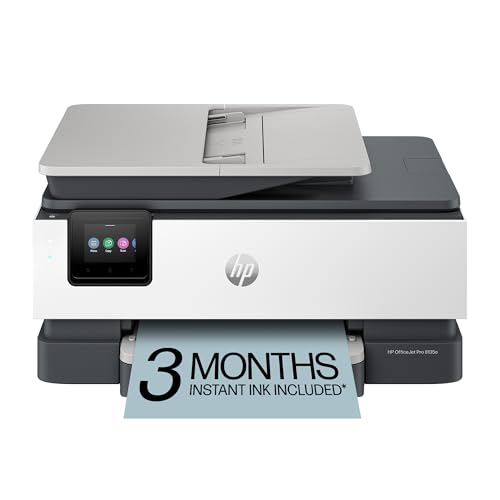
The 8135e’s listing mirrors its flagship sibling’s almost word for word — colour inkjet, wireless, all-in-one, print, scan, copy and fax, mobile compatibility, HP Smart App — with one telling difference in positioning: where the 9135e is pitched at office use, the 8135e’s title claims home and office duty alike. That dual citizenship is the review. This is the machine for the smaller school, the satellite office, the library or resource room whose printing is real but not relentless — a complete HP office skill set at the tier below the flagship, for the posts where the flagship would be ceremony.
Schools are full of such posts. The special education office with its confidential paperwork and modest volume. The satellite building that needs its own complete machine but not a flagship. The head teacher’s office, where letters of consequence are printed one at a time and scanned back signed. In each, the full function set matters — these are not print-only outposts — while the flagship’s extra headroom would sit unused. Buying the sibling for these posts is not economising; it is matching, and matching is what budgets are for.
As with its sibling, the listing states no speed, and the inkjet-at-volume caution applies in the same measure: route landslides to the tanks or the laser, and let the 8135e be the complete, connected, unhurried machine its positioning describes. Two HPs in one guide may look like duplication; in a school, where posts differ more than machines do, they are a reminder that the same completeness comes in sizes, and the size should follow the post.
Consider the satellite post in its hardest week: the resource room during assessment season, when individual plans, modified worksheets and confidential reports flow through one machine in a room whose door is closed for a reason. The 8135e’s completeness means that room never sends its sensitive paper travelling to a busier, more public machine — a workflow virtue with a safeguarding shadow that this guide notes carefully, as a matter of where documents are handled rather than any feature the listing claims. Machines shape the paths paper takes through a building, and a complete machine at a sensitive post keeps sensitive paper on a short path. That is the sibling’s quiet specialisation, and for the right room it outweighs the flagship’s headroom entirely.
- Engine: colour inkjet, as listed
- Functions: print, scan, copy and fax, as listed
- Networking: wireless with mobile compatibility and HP Smart App, as listed
- Positioning stated by maker: home and office use
- Rated speed: Not stated in the listing title — verify with the maker’s documentation
- Ink system detail: Not stated in the listing title — verify with the maker’s documentation
Strengths
- The flagship’s complete function set at the tier below it
- Home-and-office positioning fits small, mixed-duty posts exactly
- Wireless and mobile manners suit offices without fixed workstations
Trade-offs
- Cartridge-class economics still argue against landslide volume
- Speed unstated; heavy days need a documentation check first
- Schools needing one machine only may prefer the flagship’s headroom
Best for: smaller offices and satellite posts — resource rooms, satellite buildings, the head’s office — needing completeness without flagship ceremony.
Not suited for: the main office of a large school at September volume.
Smaller posts needing the full skill set can weigh the 8135e on Amazon — see its current price on Amazon — against the flagship’s listing side by side.

Epson EcoTank ET-4850 — The classroom tank
If one machine in this guide was designed by the school year’s arithmetic, it is the ET-4850. Epson’s listing states the formula plainly: a cartridge-free colour all-in-one with print, scan, copy and fax, up to 15.5 ppm, an ADF and auto two-sided printing, in black. Every element answers a classroom fact. Cartridge-free, because class sets devour ink and the tank turns that appetite from a budget event into a shelf of bottles. The ADF, because the teacher copying a thirty-page resource pack has a class in four minutes. Auto two-sided, because the paper budget is real and the default should do the saving.
The colour point deserves emphasis, because it is where tank economics change teaching rather than merely costing. On cartridge machines, colour printing in classrooms is rationed by adults who know what a cartridge costs — the diagram printed in greyscale, the map reduced to outlines. On a tank, the colour version is simply the version, and the worksheet’s design can use colour as the teaching tool it is. Multiply that small liberation by every classroom, every week, and the ET-4850’s case stops being about ink and starts being about what children are handed.
Its pace — up to 15.5 ppm on the maker’s rating — is honest classroom speed rather than office-flagship speed, and the faster ET-4950 below exists for schools that feel the difference. What the 4850 offers is the complete tank package at the pair’s gentler point: the machine a school can multiply across classrooms and staffrooms without a capital campaign, each one cheap to feed and complete in function. In a guide full of posts and specialisations, this is the closest thing to the default school printer.
One more school-specific virtue hides in its function list: the fax and scan pairing serves the safeguarding paperwork that flows through elementary schools in surprising volume — forms to agencies, signed permissions, records moving between institutions. A classroom-adjacent machine that can receive a stack through its feeder and send it onward digitally saves the office machine for the office and the teacher for the children. Completeness at the classroom post is not about features for their own sake; it is about how rarely the adult must leave the room, and by that measure the ET-4850’s full set is a child-supervision feature in everything but name.
- Ink system: cartridge-free supertank, as listed
- Functions: print, scan, copy, fax, as listed
- Rated speed: up to 15.5 ppm, as listed
- Document feeder: ADF, as listed
- Duplex: auto 2-sided printing, as listed
- Finish: black, as listed
Strengths
- Tank ink makes colour class sets a routine rather than a ration
- ADF plus auto duplex is the four-minute-gap feature set
- Complete functions at a price a school can multiply across rooms
Trade-offs
- A shade slower than its ET-4950 sibling on the makers’ ratings
- Inkjet temperament prefers the steady use term-time provides
- Black-and-white bulk still costs less on the laser’s pages
Best for: classrooms and staffrooms printing colour class sets daily, where ink cost has been rationing the teaching.
Not suited for: the archive-and-forms office whose work is monochrome and relentless.
Classrooms tired of rationing colour should examine the ET-4850’s Amazon listing — look at its price on Amazon and price a year of ink bottles against last year’s cartridges.
Epson EcoTank ET-4950 — The faster tank
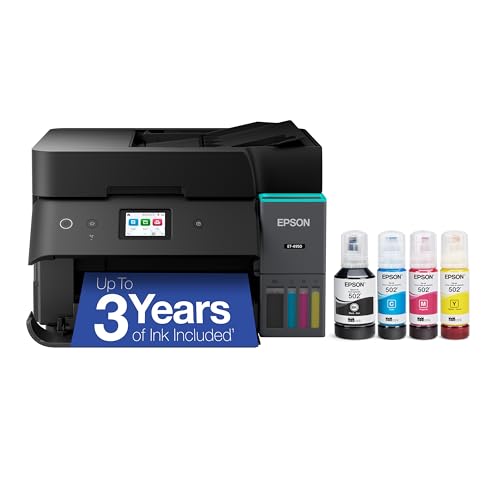
The ET-4950 is the ET-4850’s formula with the pace turned up: the same cartridge-free colour all-in-one completeness — print, scan, copy, fax, ADF, auto two-sided — rated by its listing at up to 18 ppm against its sibling’s 15.5. That gap looks small on a page and large in a corridor at 8:50 in the morning, when the class set is thirty copies deep and the bell is a deadline with a sound. Schools choosing between the two Epsons are really choosing how much the morning rush is worth, and the honest way to decide is to stand in that rush once and count.
Everything said for the tank idea in its sibling’s review applies here with interest: colour unrationed, ink bought by the bottle, the feeder and duplex doing the forgiving. The 4950’s case is that in the busiest posts — the main staffroom machine, the office-classroom hybrid in a small school, the reprographics corner that serves six teachers — the extra pace compounds across thousands of small urgencies into something a school can feel. Speed in a school is not about impatience; it is about the adult being back in the room when the children need them, and minutes saved at the printer are minutes returned to the class.
The pairing strategy deserves a final word, because schools often buy these Epsons in combination: the 4950 where traffic concentrates, 4850s where it disperses, one ink shelf serving all of them. A single ink system across a school’s tank fleet simplifies the shelf, the ordering and the collective knowledge of every adult who refills one. Fleet coherence is an unglamorous virtue that compound interest applies to, and the Epson pair offers it in its cleanest form in this guide.
There is a temptation, with a machine this complete, to make it the school’s only printer, and the temptation should be examined rather than obeyed. As the busiest post’s machine it will thrive; as the whole school’s machine it becomes the besieged single point this guide’s mistakes section warns about, however fast its 18 ppm may be. The ET-4950’s best life is as the strong heart of a small system — a 4850 sibling in the classrooms, perhaps the Brother on the bedrock — where its pace serves the peaks and its tank serves the year. Bought as a system’s heart rather than a system’s entirety, it is the strongest single purchase in this guide.
- Ink system: cartridge-free supertank, as listed
- Functions: print, scan, copy, fax, as listed
- Rated speed: up to 18 ppm, as listed
- Document feeder: ADF, as listed
- Duplex: auto 2-sided printing, as listed
- Finish: black, as listed
Strengths
- Fastest rated speed among the colour picks — built for the morning rush
- Shares the tank platform with its sibling, so a mixed fleet drinks from one ink shelf
- Full function set with feeder and duplex for unattended stack jobs
Trade-offs
- The premium over its sibling buys pace, not new capabilities
- Still an inkjet: holiday idleness is not its favourite season
- Monochrome bedrock volume remains the laser’s cheaper ground
Best for: the busiest shared posts in a school — main staffroom, reprographics corner, small-school hybrid office.
Not suited for: the quiet classroom whose gentle traffic would never feel its extra pace.
Busy posts should do the morning-rush maths against the ET-4950 — check its price on Amazon beside its sibling’s before the fleet order goes in.

Brother MFC-L2820DW — The worksheet laser
Every school prints two literatures: the colour literature of displays, diagrams and celebrations, and the black-and-white bedrock — worksheets, tests, letters, forms — that outweighs it ten to one. The Brother MFC-L2820DW is the bedrock’s machine. Its listing describes a compact wireless monochrome all-in-one laser with copy, scan and fax, duplex printing, that works with Alexa and includes a Refresh subscription trial. Strip the trial away and the proposition is the oldest in school printing: a small, tough laser that produces the bedrock at laser cost, at laser pace, with laser indifference to holidays and humidity.
Compactness is a school feature, not a compromise. Staffroom counters are contested territory — the laminator, the guillotine, the staff pigeonholes — and a machine that takes little of it while offering print, copy and scan earns its square footage three ways. Duplex, again, is the paper budget’s silent guardian. And monochrome itself is a discipline: a machine that cannot print colour cannot be borrowed for the colour jobs, cannot run the expensive pages, and keeps the bedrock’s economics exactly where the budget planned them.
The Refresh trial in its listing deserves a neutral sentence: a subscription ink-and-toner arrangement may suit some schools’ procurement and not others’, and it is a terms-and-conditions question for the business manager rather than a virtue or a vice this review will assign. What stands without qualification is the machine’s fitness for its post. Schools that give the bedrock to this Brother, and the colour to a tank, have built the two-engine system this guide keeps recommending — and each engine spends the year doing what it is cheapest and best at.
Durability deserves its own evidence rather than an adjective. Laser machines carry fewer consumable surprises across a school year — no ink to dry through the summer, no heads to coax back in September — and their failure modes announce themselves gradually, in fading pages and familiar sounds, rather than in mid-landslide silence. For a school whose technical support is a caretaker, a part-time technician and a prayer, that predictability is a safeguarding of its own kind: the machine’s bad days are visible coming, and can be planned around like everything else in a school that plans. The Brother’s post is the bedrock, and bedrock, above all, must not surprise anyone.
- Engine: monochrome laser, as listed
- Functions: all-in-one with copy, scan and fax, as listed
- Duplex: duplex printing, as listed
- Networking: wireless; works with Alexa, as listed
- Included offer: Refresh subscription trial, as listed
- Rated speed: Not stated in the listing title — verify with the maker’s documentation
Strengths
- Laser economics and temperament for the black-and-white bedrock
- Compact body with full copy and scan functions for contested staffroom counters
- Monochrome discipline keeps the bedrock budget exactly as planned
Trade-offs
- No colour, ever — displays and diagrams belong to another machine
- Speed unstated in the title; landslide timing needs the documentation
- The subscription trial’s terms need a business manager’s reading
Best for: staffrooms and offices carrying the worksheet, test and letter volume of a whole school.
Not suited for: any post where colour output is part of the daily job rather than an exception.
Bedrock first is a respectable strategy — see the MFC-L2820DW’s price on Amazon and read the trial’s terms with your business manager’s hat on.

Canon PIXMA TR8620a — The classroom all-rounder
The Canon PIXMA TR8620a closes the guide with the classroom’s own shape of need. Its listing describes a home-office all-in-one with copier, scanner, fax and an auto document feeder, printing photos and documents, with AirPrint, Android support and Alexa compatibility. Translate that into a classroom: the teacher’s paperwork handled by the feeder and the fax-era completeness, the children’s work celebrated by the photo printing, and connections that meet the room’s actual devices — the teacher’s iPad, the school Chromebook’s Android neighbours, whatever the trolley brought this term.
Photo printing is this pick’s distinguishing accent, and in an elementary classroom it is not decoration. The display board is a teaching instrument; the printed photograph of the science experiment, the class trip, the sunflower that actually grew, carries a weight on the wall that no screen matches, because the children can point at it. A classroom machine that prints photos credibly turns documentation into celebration at the press of a button, and the PIXMA line’s photo heritage is the reason this Canon, rather than another office machine, holds the classroom post in this guide.
Its economics are the cartridge-era economics the tanks argue against, and the review should say so plainly: a TR8620a asked to carry whole-school class sets would make its ink the budget’s problem. Its correct scale is the room — one classroom’s immediacy, projects and paperwork — where its completeness and photo accent outweigh per-page arithmetic, and where its presence answers the early-years argument from this guide’s earlier section: the adult who cannot leave the room should not have to. Judged at that scale, it is the warmest machine in the line-up, and warmth, in a classroom, is a working quality.
Picture the room it serves and the specification resolves into a day. Morning: the register’s paperwork and a worksheet top-up, printed from the teacher’s tablet before the children settle. Midday: a stack of trip permission slips through the feeder, scanned for the office while lunch is supervised. Afternoon: the photographs of the morning’s science lesson, printed for the working wall while the children watch their own hands appear in print — the moment, teachers report, when a classroom printer stops being equipment and becomes part of the class. No other pick in this guide is specified for that whole day; the Canon is, and its review should be read as a timetable rather than a comparison.
- Class: all-in-one printer for home office, as listed
- Functions: copier, scanner, fax, as listed
- Document feeder: auto document feeder, as listed
- Output character: photo and document printing, as listed
- Connectivity: AirPrint, Android support, works with Alexa, as listed
- Ink system detail: Not stated in the listing title — verify with the maker’s documentation
Strengths
- Photo printing turns classroom documentation into display-worthy celebration
- Feeder-equipped all-in-one completeness for the teacher’s own paperwork
- Connects to the devices classrooms actually contain — Apple and Android alike
Trade-offs
- Not a tank; whole-school volume would make its ink a budget problem
- Home-office positioning caps its stamina ambitions
- Speed unstated in the listing, so rush-hour performance needs checking
Best for: individual classrooms — especially early years — needing immediacy, paperwork handling and photo displays in one box.
Not suited for: a central reprographics post serving a whole school’s class sets.
Classrooms claiming their own machine should look at the TR8620a’s Amazon page — open the listing and check today’s price — and confirm the ink arrangements in Canon’s documentation.
Comparison Table
| Printer | Engine (as listed) | Stated speed | Feeder (as listed) | Best post |
|---|---|---|---|---|
| HP OfficeJet Pro 9135e | Colour inkjet all-in-one | Not stated in the listing title | Not stated in the listing title | School office flagship |
| HP OfficeJet Pro 8135e | Colour inkjet all-in-one | Not stated in the listing title | Not stated in the listing title | Smaller offices and satellite posts |
| Epson EcoTank ET-4850 | Cartridge-free colour | Up to 15.5 ppm | ADF | Classrooms and staffrooms |
| Epson EcoTank ET-4950 | Cartridge-free colour | Up to 18 ppm | ADF | Busiest shared posts |
| Brother MFC-L2820DW | Monochrome laser | Not stated in the listing title | Not stated in the listing title | Black-and-white bedrock volume |
| Canon PIXMA TR8620a | Colour all-in-one, photo-capable | Not stated in the listing title | Auto document feeder | Individual classrooms |
Common Mistakes
The classic school mistake is the bargain cartridge printer, bought in a sale for less than its first replacement ink set and mourned by October. Its page costs convert the year’s printing into the budget’s largest surprise, and its frailty converts September into a queue at the office machine. The second mistake is the mirror image: one flagship bought to serve an entire school, placed in the office, and besieged — a single point of failure with a line of teachers in front of it at 8:40. Schools are systems; buy for the system, with posts and volumes, not for a single heroic machine.
Third, the setup that never happened. Printers installed mid-term, never properly joined to the network, never introduced to the staff, become the machines everyone walks past. The August rule from this guide’s setup section — install in the calm, teach it once, together — prevents more school printing misery than any specification. Fourth, ignoring the paper mountain’s shape: schools that never separate their colour work from their bedrock end up paying colour prices for worksheets or laser limitations for displays. The two-engine habit — tank for colour, laser for bulk — exists because the mountain has two shapes, and one machine asked to be both usually serves neither cheaply.
Fifth, consumables amnesia: the shelf that empties in week two of term because nobody owned it. Assign the shelf to a named person, stock it by the term, and tape the reorder card to the wall. And sixth, a caution about claims rather than machines: be wary of any school-technology pitch that promises educational outcomes from a printer, or safety properties its listing never states. This guide has credited no machine with virtues its title does not name, and a school’s procurement should hold every seller to the same standard — the children deserve equipment bought on evidence.
Final Recommendation
Build the system by posts. The school office belongs to the HP pair — the 9135e as flagship, the 8135e for the smaller and satellite posts. The classroom colour work belongs to the EcoTanks — the ET-4950 where the rush concentrates, the ET-4850 wherever colour class sets are the daily bread. The bedrock belongs to the Brother laser, and the individual classroom — above all the early-years room — belongs to the Canon all-rounder with its photo accent. A school’s printing succeeds the way its teaching does: not through one heroic performance but through a hundred small reliabilities, compounded daily, in rooms where the adults have better things to think about than the printer — which is exactly why the printer deserves this much thought, once, now.
Do the August work whichever combination you choose: install before term, stock the shelf by the term, teach the machines once as a whole staff, and write the reorder card for the wall. Then let the system disappear into the school year it was built for — worksheets appearing, displays blooming, letters going home — while the adults spend their attention where a school’s attention belongs. That disappearance is the true measure of a school printer, and every pick in this guide was chosen because, in its post, it can achieve it. If the year that follows is remembered for the displays, the certificates and the work on the walls rather than for a single morning lost to an empty tray, the system will have done what this guide promised — quietly, daily, reliably, and entirely in the background of the education it serves so well.
FAQ
Tank or laser for a whole school?
Both, by post, is the answer this guide keeps arriving at: tanks where colour class sets dominate, a laser where the black-and-white bedrock piles up. If the budget truly allows one engine, count last year’s pages by colour; the majority should choose the machine, and the minority workload can be routed, rationed or sent to the office machine.
How much does cost per page really differ?
Enough to dominate the budget. A school year runs to tens of thousands of pages, and at that scale the difference between cartridge ink, tank ink and toner is the difference between printing as a worry and printing as a utility. The listings here state the ink systems plainly — cartridge-free for the Epsons, laser for the Brother — and your own last-year page count will convert those systems into money.
Can teachers print from classroom tablets and laptops?
The listings support it in their own words: both HPs state wireless with mobile compatibility, the Brother and Canon state their wireless and platform support, and the Epsons are wireless all-in-ones. The practical step is the August one — join the machines to the network staff actually use and test from the devices actually carried, before September tests it for you.
Do any of these printers have special child-safety or privacy features?
None of the listings in this guide states any, and this guide will not invent them. Schools with specific safeguarding or data requirements should put those requirements to the makers’ documentation directly and record the answers in the procurement file, rather than relying on any review’s implication — including this one’s.
What breaks first in a school printer?
Usually the routine around it: the empty shelf, the untaught staff, the single machine besieged by a whole building. The machines here are office-class equipment with the stamina for school life; the failures that close classrooms are logistical. Stock by the term, teach the machine once as a staff, and give the bedrock and the colour their own engines where volume justifies it.
Is a fax function really still useful in a school?
In more schools than technologists expect — districts, agencies and some services still run on it — which is why five of these six listings carry it. It costs nothing to ignore if your world has moved on, and it is invaluable on the one day a year your world has not. Completeness, in a school office, is a form of insurance.
Related Guides
School nurses are a real placement setting, and the laptops those students carry into them are judged in our guide to the best laptops for nursing school students.


