What's inside
- Key Takeaways
- Quick Picks: Six Dual-Ear Desk Headsets at a Glance
- What Separated These Six From the Wider Shelf of Dual-Ear Office Headsets?
- How Do the Dual-Ear Six Divide by Desk, Port and Working Pattern?
- Why Does Covering Both Ears Change an Agent’s Whole Working Day?
- How Should a Buyer Match Connectors and Controllers to Real Desks?
- What Does a Sensible Rollout and Care Routine Look Like for a Headset Fleet?
- How Should Supervisors Listen for Headset Problems in Call Recordings?
- What Changes When a Binaural Fleet Works From Home Instead of a Floor?
- Which Buying Mistakes Haunt Dual-Ear Headset Purchases?
- Final Recommendation
- Frequently Asked Questions
- Related Guides
As an Amazon Associate I earn from qualifying purchases. This post may contain affiliate links at no extra cost to you.
gizmoverdict.com is reader-supported. When you buy through links on our site, we may earn an affiliate commission.
Where to buy: each headset below is sold through its Amazon listing, so use the pick links to reach the listing pages, check whether the connector variant in that title matches the ports on your workstation, and read the box contents line closely, because in-line controllers, spare cushions and quick-disconnect cables are not packed identically across this category.
The search for the best call center biaural headsets begins with a simple physical fact: both ears covered. On a loud floor, where forty colleagues are having forty other conversations inside the same air, a binaural headset is not a preference but a piece of concentration equipment, sealing the call into a private channel while the room carries on around it. That is the opposite bargain from the one-ear philosophy examined in best call center mono wired headsets, where hearing the room is the entire point, and the two guides are written as a deliberate pair so a supervisor can decide which bargain each seat in the operation actually needs.
Wired connections dominate this pool completely, and that too is a considered outcome rather than a lack of imagination. A cable never needs charging before a shift, never drops its pairing when a neighbouring desk wakes up, and never asks an IT team to manage a fleet of batteries. The connectors differ in ways that matter, though: straightforward USB for softphone desks, USB-C appearing beside USB-A on the newer editions, one model offering a 3.5mm alternative, and one genuine call-center classic built around a quick-disconnect system that expects the correct bottom cable between headset and phone or computer.
Comfort engineering in this class is unglamorous and decisive. Agents wear these headsets for entire shifts, through call after call, and the differences that decide satisfaction are cushion size, headband pressure distribution, how the microphone boom behaves after the four-hundredth adjustment, and whether the in-line controller puts mute where a thumb expects it during a difficult conversation. None of the six picks chases music lovers; every one of them is a voice tool first, tuned and shaped for speech intelligibility across a working day.
This guide also keeps an eye on the buyer behind the agent. Call centers purchase headsets by the dozen and replace them by the drawerful, so per-seat simplicity, platform behaviour with the common meeting and softphone tools, and the availability of a like-for-like replacement next quarter all carry weight beside the sound itself. A headset that delights one agent but confuses a training class of twenty is a poor fleet decision, and the reviews below keep returning to that tension between the individual ear and the operation around it.
Finally, a note on what binaural cannot do. Covering both ears concentrates the agent, and it also removes the room from the agent’s awareness, which is why floor walkers, trainers and anyone who must catch a raised hand should read the mono guide instead. Supervisors who split their day between listening in and being interruptible sometimes keep one of each at the desk. The six headsets here assume you have already made the focus decision; their argument is about which covered-ear tool serves a given desk best.
Keep one question in front of you while reading: what does the person in this seat need to hear besides the caller? If the honest answer is almost nothing, you are in the right guide and the six below are your shortlist. If the answer involves colleagues, customers at a counter or a room that talks back, the mono guide is your guide, and returning here later for the focus seats will make more sense than forcing one purchase to serve two philosophies.
Key Takeaways
- The Jabra Evolve 20 in its 2025 edition is the straightforward fleet default here: dual-ear, USB-A or USB-C, with an in-line controller doing the everyday work.
- The Evolve 30 II adds a 3.5mm alternative beside USB, which rescues desks and devices the pure-USB models cannot serve.
- The Jabra 2400 II USB Duo CC is the traditional quick-disconnect call-center design, and it only makes sense with the correct bottom cable in the setup.
- TruVoice’s VoicePro 20 courts the home-office and call-center crossover buyer with HD speakers and in-line mute controls.
- Arama’s binaural USB model is the plug-and-play value seat, speaking both USB-C and USB-A without adapters.
- The Logitech H390 remains the familiar budget benchmark: USB-A only, endlessly available, and understood by every IT cupboard.
Quick Picks: Six Dual-Ear Desk Headsets at a Glance
| Pick | Badge | Why it earned its place |
|---|---|---|
| Jabra Evolve 20 (2025 Edition) | Fleet default | Dual-ear Jabra design with USB-A or USB-C connection and an in-line controller, refreshed in a 2025 edition. |
| Jabra Evolve 30 II (2025 Edition) | Flexible connector choice | It offers a 3.5mm jack or USB-A/USB-C connection, the widest doorway into different desks in this pool. |
| Jabra 2400 II USB Duo CC | Quick-disconnect classic | A traditional call-center design optimised for unified communications, built around the disconnect culture of professional floors. |
| TruVoice VoicePro 20 | Platform-friendly crossover | HD speakers and in-line controls with mute, claiming compatibility with all UC voice platforms in its title. |
| Arama Binaural USB Headset | Simplest plug-and-play seat | Binaural stereo sound with in-line controls and both USB-C and USB-A connection, pitched at pure plug-and-play use. |
| Logitech H390 | Budget benchmark | The long-running USB-A headset with a noise cancelling microphone that storerooms everywhere already know. |
What Separated These Six From the Wider Shelf of Dual-Ear Office Headsets?
Eligibility started with the keyword’s own terms: a pick had to be binaural, wired, and honestly aimed at call-center or office calling rather than gaming or music. That screen removed stereo headphones with a microphone added as an afterthought, wireless models whose batteries complicate fleet life, and mono headsets wearing a misleading title. What remained is a pool with a clear internal ladder, from a veteran budget benchmark through two current Jabra editions to a traditional quick-disconnect design that predates the softphone era and still earns its place inside it.
Connection logic was mapped desk by desk, because a call center is a museum of ports: ageing desktops with only USB-A, modern laptops where USB-C is the whole story, and a few roles still anchored to a 3.5mm jack. The wider category context in best call center headsets usb shows how completely USB has taken over this market, and the picks here reflect that takeover while keeping one foot in the older worlds through the Evolve 30 II’s jack option and the 2400 II’s disconnect ecosystem.
Microphone claims were read with the same discipline used across this site: a noise-cancelling microphone describes a design intention for separating voice from room noise, and its real value shows in how a caller experiences a busy floor. Boom stiffness, microphone placement and the discipline of a controller with a findable mute were weighed as heavily as any headline phrase, since agents perform those small actions hundreds of times a week and feel every clumsy one.
The last filter was operational honesty. Each surviving pick had to own a distinct seat: fleet default, flexible-connector option, traditional disconnect classic, crossover value with platform ambitions, simplest plug-and-play, or budget benchmark. Two headsets arguing the identical case at the identical tier could not both stay, however respectable each looked in isolation, because a guide that cannot explain why six products coexist has not finished its job.

Jabra Evolve 20 (2025 Edition) — Fleet default
The Evolve 20 has been the answer to a thousand procurement questions, and the 2025 edition keeps the formula intact while acknowledging modern ports: the title offers USB-A or USB-C connection, which lets one fleet purchase cover the old desktop row and the new laptop intake without adapters multiplying in desk drawers. For an operations manager, that single detail may be worth more than any acoustic refinement, because mixed fleets are where headset rollouts usually descend into labelled bags and quiet chaos.
The wearing experience is deliberately ordinary in the best sense. Dual ear cushions close over both ears, the headband spreads its pressure without drama, and the in-line call control puts the daily gestures, answering, adjusting volume and muting, on a small pendant that agents learn by touch within their first shift. Jabra describes the model as built for office and work-from-home setups, and that dual citizenship shows in a design tidy enough for a spare-room desk yet plainly durable in intent for a floor of fifty seats.
Its microphone is positioned for the softphone world the title names, with the common meeting platforms in mind, and callers hear the benefit as a voice that stays forward even when the floor gets loud around the agent. No headset in this class erases a busy room entirely, and this guide will not pretend otherwise for any pick, but a well-placed boom on a binaural frame gives the agent’s own hearing the same protection the microphone gives the caller: the conversation occupies both ears, and the room is demoted to background.
Choose the Evolve 20 when the brief is standardisation. It is the pick a training team can teach in one slide, the pick a storeroom can stock without variants, and the pick whose behaviour an IT helpdesk will recognise instantly when a ticket arrives. Agents with unusual fit needs or desks anchored to a 3.5mm jack should look at its sibling below, but as the default dual-ear seat for a softphone operation, this is the headset the rest of the pool has to argue against.
There is a training dividend worth naming as well. Because the Evolve line is so widely issued, new agents frequently arrive having worn one before, and a familiar headset shortens the first week to the work itself rather than the equipment. Operations that hire in waves feel that dividend repeatedly across a year, and it never appears on a specification sheet beside the connector types where it arguably belongs.
- Format: wired dual-ear headset with boom microphone
- Connection: USB-A or USB-C per the listing title
- Controls: in-line call control on the cable
- Edition: 2025 refresh of the Evolve 20 line
- Stated settings: office and work-from-home desks
Strengths
- One purchase covers legacy USB-A desks and current USB-C laptops
- In-line controller teaches itself to new agents within a single shift
- Backed by the best-known name in professional headset fleets
Trade-offs
- No 3.5mm option for desks or devices outside the USB world
- Design is functional rather than plush for agents sensitive to pressure
- Stereo music listening is supported but never the design’s priority
Best for: operations standardising a softphone fleet across mixed old and new computers with one headset model.
Not suited for: agents whose workstation offers only a 3.5mm jack, or buyers wanting a quick-disconnect traditional phone setup.
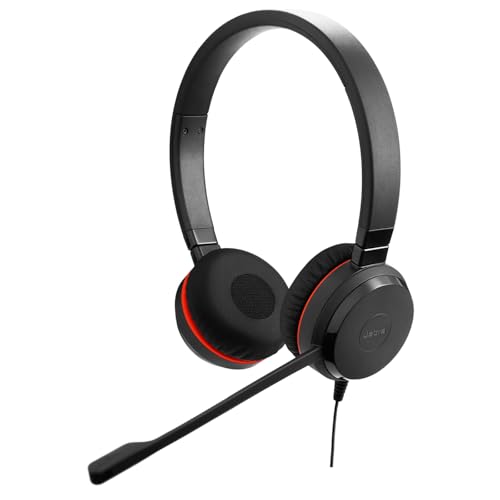
Jabra Evolve 30 II (2025 Edition) — Flexible connector choice
The Evolve 30 II earns its seat by refusing to choose a single doorway. Its title lists a 3.5mm jack alongside USB-A and USB-C connection, and in a real building that flexibility solves genuine problems: the training room desktop with occupied USB ports, the laptop dock that misbehaves, the interim deskphone arrangement, the home worker whose setup changes between kitchen table and spare room. A headset that can enter through whichever door is open spends less of its life in a returns box.
Jabra positions this edition for office calls and the common online meeting platforms, and the noise-cancelling microphone is the headline feature after the connectors. Read that phrase the way this guide reads all such phrases: as the maker’s description of a microphone designed to favour the wearer’s voice over the surrounding room. The dual-ear frame helps the wearer from the other direction, covering both ears so the caller’s voice does not have to compete with a colleague’s negotiation three desks away.
Against its Evolve 20 sibling, the step up buys connection insurance rather than a different philosophy. Both are wired, both carry in-line control thinking, both speak fluent softphone. The decision between them is therefore refreshingly concrete: count the ports in your building, honestly, including the odd corners where a 3.5mm jack is the only reliable citizen, and let that census choose. Fleets that are entirely USB can save the difference; mixed estates will recover it the first time a headset moves desks without an adapter hunt.
Home workers with a company laptop and a personal machine will also feel the benefit, since the jack option lets the headset serve a phone or an older computer during the gaps between official equipment. It is not the cheapest pick here and not the most traditional, but it may be the hardest to strand: whatever desk it lands on next quarter, the Evolve 30 II probably has a way in.
One caution travels with the flexibility: confirm which connection lead a given listing bundles, because a headset capable of three doorways still arrives through one box. Photograph your desk’s ports before ordering if the estate is unfamiliar, and keep the unused lead labelled in the desk drawer rather than the communal cable tub, where unlabelled cables go to become anonymous.
- Format: wired dual-ear headset, 2025 edition
- Connection: 3.5mm jack or USB-A/USB-C per the title
- Microphone: noise-cancelling design stated in the title
- Intended use: office calls and online meeting platforms
- Controls: in-line call management on the cable
Strengths
- Three connection routes cover the widest range of real desks here
- Dual-ear focus with a microphone aimed at busy-room voice pickup
- Natural step-up for mixed estates that outgrew a USB-only standard
Trade-offs
- Costs more than the fleet default while sharing much of its philosophy
- Jack and USB modes ask buyers to confirm which lead their setup needs
- Still a wired tether, with the cable management that always implies
Best for: mixed computer estates and home workers whose headset must move between machines without adapter drama.
Not suited for: buyers running a uniform USB-only fleet who would pay for flexibility they never use.

Jabra 2400 II USB Duo CC — Quick-disconnect classic
The 2400 II comes from an older and more specialised world than the plug-and-play models around it. Professional call centers long standardised on headsets that separate at a quick-disconnect point, letting an agent unclip and walk away while the cable and connection stay with the desk, and letting a replacement headset click into the same station in seconds. This USB Duo version carries that culture into softphone work, and its title’s optimised-for-unified-communication phrasing signals a design tuned for the platforms call centers standardised on.
That heritage carries one obligation the other picks do not impose: the bottom cable matters. A quick-disconnect headset is a system, and the lead between the disconnect point and the phone or computer must be the correct one for the equipment at that desk. Buy the headset alone for an incompatible station and you own an elegant paperweight. Buy the pairing correctly and you gain the fastest headset swaps in the business, a virtue any floor manager who has watched an agent idle during a hardware fumble will price accurately.
The Duo configuration covers both ears, suiting the concentration end of call-center work, and the noise-cancelling microphone belongs to a line designed when call-center acoustics were the entire brief rather than one bullet among many. There is a leanness to the design’s intent that the crossover models, forever also courting home offices and music listeners, do not quite replicate. This is a tool that assumes a supervisor, a queue and a quality-assurance recording exist somewhere behind the agent wearing it.
Recommend it where its ecosystem already lives, or where a floor is being built deliberately around disconnect discipline: shared stations across shifts, hot-desking with personal headsets clipped in and out, strict hygiene policies that assign each agent their own headset half. For a single home worker it is usually more system than the job needs, and the plug-and-play picks below will serve with less ceremony, but inside its native institution the 2400 II remains the connoisseur’s answer.
Floors considering a first move into disconnect discipline should budget the transition honestly: bottom cables for every station type, a small stock of spare headset halves, and ten minutes of training per agent on clipping in and out. The system repays that setup for years, but it repays it to organisations that finish the setup, not to those that buy the headsets and leave the ecosystem half-built in a cupboard.
- Format: wired dual-ear call-center headset, Duo configuration
- System: quick-disconnect design needing the correct bottom cable
- Connection: USB in this variant, for softphone use
- Microphone: noise-cancelling design for call-center floors
- Optimisation: unified communications platforms per the title
Strengths
- Disconnect culture enables instant headset swaps at shared stations
- Purpose-built call-center lineage rather than office crossover design
- Personal headset halves suit hygiene policies on multi-shift floors
Trade-offs
- Useless at a desk without the matching bottom cable in place
- More system to buy and manage than a single home worker needs
- Newer staff may need the disconnect habit explained during training
Best for: established call centers running shared stations and personal headset halves across shifts.
Not suited for: solo buyers wanting one cable, one plug and no ecosystem decisions.

TruVoice VoicePro 20 — Platform-friendly crossover
TruVoice is a name that lives closer to the call-center trade than to the consumer shelf, and the VoicePro 20 pitches itself at the professional home-office and call-center buyer in one title. Its claim of compatibility with all UC voice platforms is the listing’s own broad wording, and the sensible reading is that a standard USB audio device of this kind presents itself to computers as a headset and lets the platform handle the rest, which is how the category generally works rather than a special magic in this cable.
The HD speakers wording deserves the same calm treatment: in a voice tool, speaker quality shows up as consonant clarity across a long day, the difference between asking a caller to repeat an account number once or three times. Paired with a noise-canceling microphone, again the maker’s description of its voice-separation intent, the package aims at the two directions of a call with equal seriousness, which is precisely what distinguishes a professional headset from a music headphone that happens to hear you.
In-line call controls with mute complete the working set, and mute is the control whose placement agents judge most harshly, because it is reached for in the call’s most delicate seconds: a coughing fit, a supervisor’s urgent aside, a doorbell during a home shift. A controller that can be operated by shape and memory keeps those seconds private. The VoicePro’s pitch, taken whole, is that of a specialist underbidder: the trade name, the platform language and the control set of the big brands, offered to buyers who purchase carefully.
It suits the smaller operation particularly well: the twenty-seat firm that wants professional behaviour without a framework contract, the home-based agent investing in their own desk, the team lead equipping a pilot group before a larger rollout. The honest caution is ecosystem depth, since cushions, spare leads and like-for-like replacements matter across years of fleet life, and buyers should confirm those channels before standardising a whole floor on any smaller name, this one included.
Support responsiveness is the test a smaller specialist brand must pass in your own pilot. Ask a real question through the seller’s channel before the fleet decision and time the answer; a firm that answers promptly in the courting phase usually answers in the ownership phase too. That small experiment tells a buyer more about year two with the VoicePro than any additional paragraph of specification comparison could.
- Format: wired USB dual-ear professional headset
- Speakers: HD speakers per the listing title
- Microphone: noise canceling design per the title
- Controls: in-line call controls including mute
- Claimed scope: all UC voice platforms in the title’s wording
Strengths
- Specialist call-center brand with a platform-first pitch
- Mute sits on the in-line controller where agents need it most
- Aimed squarely at professional home offices as well as floors
Trade-offs
- Platform compatibility wording is broad marketing, as with all rivals
- Smaller brand ecosystem than the Jabra and Logitech entries here
- Buyers should verify spare cushion and cable availability before fleet orders
Best for: small operations and professional home agents wanting trade-grade behaviour without a big-framework purchase.
Not suited for: large fleets whose procurement depends on the deepest global support networks.

Arama Binaural USB Headset — Simplest plug-and-play seat
Arama’s binaural model makes the shortest promise in this pool and keeps it cleanly: plug the headset into a computer, through USB-C or USB-A as the title offers, and get on with the calls. There is no disconnect system to specify, no jack variant to choose, no edition history to decode. For the enormous number of desks where the requirement is simply a dependable dual-ear headset for meetings and queues, that absence of decisions is itself the feature, and the in-line controls cover the daily repertoire of volume and muting without software adventures.
The noise-canceling microphone wording follows the category pattern, the maker’s description of a boom intended to keep the wearer’s voice ahead of the room. Binaural stereo sound, in the title’s phrasing, serves the wearer’s side of the bargain: both ears inside the call, the floor’s competing conversations pushed to the edges of attention. Agents moving up from a laptop’s built-in speakers and microphone will experience this pick as a transformation in both directions at once, which is worth remembering when equipping staff who have never had a proper headset.
Value positioning invites the durability question, and the honest answer is that only time in service settles it for any brand at this tier. The practical approach is procurement discipline: buy a small batch, run it through a training class and a month of queues, then scale with evidence. Arama’s straightforward specification makes that trial easy to run, since there is exactly one behaviour to evaluate and no accessory matrix to confuse the results.
Its natural home is the organisation that equips people rather than institutions: schools running call-in support, charities staffing helplines, small firms formalising a work-from-home setup like those surveyed in best work from home headsets with mic. In those rooms the headset that arrives, plugs in and behaves is worth more than a theoretically superior system waiting on the correct bottom cable, and the Arama is content to be exactly that headset.
The Arama also makes a thoughtful spare-drawer purchase even inside fleets standardised on grander names. When a primary headset fails mid-shift, an agent handed a plug-and-play replacement loses minutes rather than a day, and the replacement’s very plainness is what makes it universally deployable. Storerooms think in exactly these terms, and this model earns their respect on arrival.
- Format: wired binaural USB headset with boom microphone
- Connection: USB-C and USB-A per the listing title
- Sound: binaural stereo as described in the title
- Controls: in-line controls on the cable
- Setup style: plug and play for PC and laptop
Strengths
- Both modern USB shapes served without adapters or variants
- Shortest learning curve in the pool for new agents
- Dual-ear focus at a value position for equipping many seats
Trade-offs
- No quick-disconnect system for shared-station floors
- No 3.5mm route for non-USB equipment
- Long-term fleet durability must be proven by a pilot batch
Best for: small teams, helplines and home setups wanting dual-ear focus with zero configuration.
Not suited for: traditional phone-room floors built around disconnect cables and desk phones.

Logitech H390 — Budget benchmark
The H390 is less a product than a piece of office infrastructure at this point: a USB-A wired headset that has been issued, lost, replaced and reissued across so many organisations that its behaviour is a known quantity on three continents. Its title keeps the description plain, a wired headset with a noise cancelling microphone for PC, aimed at video meetings and music as a secondary citizen. In a guide full of editions and systems, that plainness is the pitch: nothing about the H390 will surprise a helpdesk, ever.
Both ears are covered, the boom carries the microphone the title describes, and the connection asks for the oldest USB shape still in universal service. That last point is the one genuine limitation to plan around, because a laptop fleet that has gone entirely USB-C will need adapters, and adapter-dependent headsets quietly migrate to the backs of drawers. On the vast installed base of USB-A desktops and docks, though, the H390 simply works, and its controls and fit are familiar to anyone who has worn one before, which in this industry is nearly everyone.
Comfort sits at the adequate end of the pool rather than the luxurious end, and agents on very long shifts may feel the difference against the plusher Jabra editions. The counterweight is replaceability: when an H390 tires, the organisation knows exactly what to buy, what it costs in effort, and how the new one will behave by lunchtime. Fleet managers consistently rank that predictability above marginal comfort gains, which is why this model survives every attempt to retire it.
Recommend it as the baseline against which the rest of the pool must justify itself, and as the sensible bulk purchase for training rooms, hot-desks and short-contract seats where premium fit would be wasted. An agent working permanent long shifts from a single desk may fairly graduate to the Evolve models, but an operation that skips the H390 comparison entirely has not done its arithmetic.
Notice, too, what the H390’s longevity teaches the whole category: agents forgive modest materials when behaviour is predictable, controls are where memory expects them, and the replacement for a failed unit is identical to the unit that failed. Every newer pick in this guide is, in some respect, an attempt to keep that predictability while repairing one of its known compromises, which is a respectful way to read the entire pool.
- Format: wired dual-ear USB headset with boom microphone
- Connection: USB-A only per the listing title
- Microphone: noise cancelling design stated in the title
- Controls: in-line controls on the cable
- Stated uses: video meetings and everyday computer audio
Strengths
- Universally understood by IT teams and storerooms
- Proven, predictable behaviour across huge fleets
- Lowest-friction bulk purchase in this pool
Trade-offs
- USB-A only, so USB-C-only laptops need an adapter
- Comfort is workmanlike rather than plush on the longest shifts
- Design has no disconnect or jack flexibility for mixed estates
Best for: training rooms, hot-desks and bulk issue where predictability outranks refinement.
Not suited for: USB-C-only laptop fleets or agents wanting the softest all-shift fit available.
How Do the Dual-Ear Six Divide by Desk, Port and Working Pattern?
The table compresses the pool into its working differences: which connector greets the desk, which control philosophy the agent learns, and which kind of seat each model was plainly built to fill. Read it beside the reviews rather than instead of them, because the bottom-cable obligation of the 2400 II and the adapter question hanging over the H390 both live in the prose.
| Pick | Connection | Fit and form | Control style | Strongest suit |
|---|---|---|---|---|
| Jabra Evolve 20 (2025 Edition) | USB-A or USB-C | Dual-ear office frame | In-line call control | Standardised softphone fleets |
| Jabra Evolve 30 II (2025 Edition) | 3.5mm or USB-A/USB-C | Dual-ear office frame | In-line call control | Mixed-port buildings and movers |
| Jabra 2400 II USB Duo CC | USB via disconnect system | Dual-ear call-center frame | Desk system controls | Shared stations across shifts |
| TruVoice VoicePro 20 | USB connection | Dual-ear professional frame | In-line controls with mute | Small operations buying carefully |
| Arama Binaural USB Headset | USB-C and USB-A | Dual-ear plug-and-play frame | In-line controls | Fast equipping of many seats |
| Logitech H390 | USB-A connection | Dual-ear office frame | In-line controls | Bulk issue and training rooms |
Why Does Covering Both Ears Change an Agent’s Whole Working Day?
Attention is the scarce resource on a call floor, and binaural coverage is an attention technology before it is an audio one. With the call present in both ears, the brain stops spending effort on locating the conversation inside a noisy room, and agents report the end of a shift feeling different: less of the particular exhaustion that comes from straining. That is the honest core of the category, and it explains why high-volume operations issue dual-ear headsets even where a mono model would technically complete the calls.
The trade is situational awareness, and good operations manage it deliberately rather than discovering it. Floor walkers use hand signals, trainers stand where they can be seen, and agents covering both ears learn to keep one eye on the room’s visual traffic. Where the work involves frequent spoken coordination between neighbouring agents, the balance tips back toward one open ear, which is why this guide’s mono companion exists and why some desks legitimately keep both styles within reach of the same chair.
There is also a caller-side dividend that quality teams notice in recordings. An agent who hears clearly asks for fewer repetitions, interrupts less from misunderstanding, and sounds calmer to a caller who cannot see the noisy room causing the strain. Suites of guidance such as best call center headsets noise cancelling circle the same truth from the microphone side: clarity is a system property, produced jointly by what the agent hears and what the caller hears, and binaural coverage is the half of that system worn on the ears.
None of this requires the most expensive model in the pool. It requires a fit the agent forgets, a microphone positioned with ten seconds of care each morning, and a controller whose mute can be found during the one call in fifty where privacy suddenly matters. Supervisors evaluating headsets should therefore sit agents in candidates for a full shift, not a demonstration, because the binaural bargain is struck across eight hours, not eight minutes.
How Should a Buyer Match Connectors and Controllers to Real Desks?
Begin with a port census, written down. Count USB-A-only machines, USB-C-only laptops, docks that swallow ports, and any desk where a 3.5mm jack is the last honest connection. The census decides more of this purchase than any acoustic preference: it explains the Evolve 30 II’s existence, predicts the H390’s adapter problem in a modern laptop fleet, and tells a traditional floor whether the 2400 II’s disconnect system can be fed correctly at every station or only at the desks near the cupboard.
Then watch agents use controllers before standardising one. The mute gesture, the volume reach and the answer motion become muscle memory, and a fleet that mixes controller layouts across neighbouring desks manufactures small errors forever. This is an argument for standardising within a team even when the wider organisation tolerates variety, and for choosing the controller style your training team can teach by touch, in the dark, during a difficult call, without a diagram.
Cable behaviour deserves a rehearsal too. A wired headset’s cable crosses the desk, the keyboard and occasionally a coffee, and its length and stiffness shape the working day more than buyers expect. Route the cable the way the agent will actually sit, confirm the controller lands where a hand rests rather than dangling at the desk edge, and check that the boom swings for left or right wearing without a fight, because a meaningful minority of every workforce wears their headset on the other side.
Buyers equipping hybrid staff should also decide the second-desk question in advance: will the headset travel home, live at the office, or duplicate across both? The crossover picks here, and the wider sets in best headsets for teams and zoom, suit travellers; a disconnect classic belongs to a building. Writing that decision into the purchase prevents the familiar outcome where the best headsets migrate home permanently and the floor inherits whatever the drawer still holds.
What Does a Sensible Rollout and Care Routine Look Like for a Headset Fleet?
Pilot before you scale, with the least forgiving team you have. Give a training class and a month of real queues to a small batch of the chosen model, collect the complaints in writing, and pay special attention to fit comments from glasses wearers and to any pattern in cable or cushion failures. A model that survives a pilot with its reputation intact will survive the rollout; a model that generates a folklore of workarounds in week two will generate a replacement programme in month six.
Issue headsets as personal equipment wherever the budget allows, even on shared stations, which is precisely the habit the disconnect design exists to support. Personal issue improves hygiene, reduces adjustment wear as each headset keeps one agent’s settings, and creates accountability that quietly halves loss rates. Where headsets must be shared, schedule cushion replacement and cleaning as operations tasks with owners and dates, not as favours the night shift might perform.
Keep the spares arithmetic honest: a working rule is to hold replacements for the failures you actually observe rather than a percentage copied from another firm. Track why headsets leave service, cable, cushion, boom or connector, and let that log steer the next purchase more than any catalogue. The storeroom that knows its own failure history buys better every cycle, and the log takes one shared document and thirty seconds per incident to maintain.
Finally, retire headsets on condition rather than age. A three-year-old Evolve with a fresh cushion may serve better than a one-year-old value model with a tired boom, and condition-based retirement stretches a fleet budget without asking agents to endure equipment that has quietly stopped deserving their ears. The fleet that manages this well becomes invisible, which is the highest compliment operations equipment can earn.
How Should Supervisors Listen for Headset Problems in Call Recordings?
Quality-assurance recordings quietly contain a headset audit, if supervisors learn to hear it. Repeated requests for callers to repeat themselves point at the agent’s hearing side; caller complaints about echo, room noise or a distant voice point at the microphone side; and a pattern attached to one desk rather than one agent points at the station’s connector or cable. Sorting complaints by desk, agent and headset serial turns anecdote into maintenance evidence within a single review cycle.
Listen also for the sounds of fit failure: the rustle of a headset being repositioned mid-call, the boom swung audibly back and forth, the agent whose voice fades as a microphone drifts. These are comfort problems recorded in the act, and they usually precede the formal complaint by weeks. A supervisor who acts on the rustle, with a cushion swap or a refit, prevents the resignation-letter version of the same problem.
Close the loop by feeding what you hear back into purchasing. If recordings praise one model’s clarity across many voices, standardise toward it; if a value pick generates a steady murmur of repetition requests, its true price includes those seconds on every call. The fleet’s ears are already collecting this data daily. The only decision is whether anyone in the building is listening to the listeners.
What Changes When a Binaural Fleet Works From Home Instead of a Floor?
The home setting relaxes the binaural bargain’s costs and sharpens its benefits. There is no neighbouring agent to coordinate with by voice, so covering both ears loses little, while the household supplies its own interruptions, doorbells, deliveries and family life, against which dual-ear focus is a genuine defence. Several picks here name work-from-home use in their titles because manufacturers have watched the same migration and tuned their pitches toward the spare-room desk.
New problems replace the old ones. The home agent’s controller mute becomes a household-privacy device, the cable crosses a domestic desk shared with everything else in life, and IT support is a phone call rather than a walk across the floor, which raises the value of predictable, widely understood models. A fleet issuing for home use should favour the headsets its helpdesk can troubleshoot blind, and that preference quietly explains several buying patterns in this pool.
Home issue also changes the spares map: a failed headset at a kitchen table cannot borrow from the next desk, so a posted spare or a same-week replacement promise becomes part of the real specification. Organisations that plan that logistics honestly find home fleets as reliable as floor fleets; those that simply ship the floor’s leftovers discover the difference during the first outage of the quarter.
Which Buying Mistakes Haunt Dual-Ear Headset Purchases?
Ordering for the catalogue photograph instead of the port census is the founding error. A fleet of elegant USB-C headsets delivered to a building of USB-A desktops, or a disconnect classic delivered without its bottom cables, fails before the first call is taken. Every specification in this guide is subordinate to the question of what the headset physically meets at the desk, and buyers who answer that question first rarely feature in cautionary tales.
Assuming binaural is automatically the professional choice is the second error. It is the professional choice for focus work, and the wrong choice for coordinators, trainers and anyone whose value to the room depends on hearing the room. The mono companion guide exists because whole teams have been issued dual-ear headsets by buyers who never watched the job for an hour, and the headsets ended the month worn with one cup pushed back, the worst of both designs worn at once.
Neglecting the mute geography causes the most embarrassing failures. An agent who cannot find mute by touch will eventually broadcast a supervisor’s aside, a caller’s hold music will leak a private conversation, or a coughing fit will become part of a quality recording. When evaluating any pick here, perform the mute gesture blind, mid-sentence, with your other hand on a keyboard; if the controller fails that rehearsal, the headset fails the job regardless of its audio virtues.
Buying the cheapest seat for the longest shifts is a false economy with a predictable invoice: discomfort complaints, early replacements and agents quietly using personal earbuds that defeat every compliance goal the purchase was meant to serve. Match spend to hours worn. Training rooms can thrive on the benchmark pick, while a permanent agent on eight-hour queues deserves the fit budget of the editions built for exactly that sentence.
The quietest mistake is forgetting replacement cushions and spare leads in the original order. Headsets rarely die whole; they fade piece by piece, and a fleet without a parts drawer converts small wear into full replacements. Add the consumables to the first purchase while the models and variants are unambiguous, and the fleet’s second year will cost a fraction of its first.
One more error deserves its own paragraph because it hides inside good intentions: issuing identical headsets to every seat as a fairness gesture, when the seats do different work. The trainer who must hear the room, the agent buried in queues, and the supervisor splitting attention three ways are not one job wearing three badges, and a purchase that pretends otherwise manufactures daily friction in the name of equality. Fairness in equipment means fitting the tool to the task for everyone, which sometimes means two models on one floor, deliberately chosen, with the mono and binaural guides used as the pair they were written to be.
Final Recommendation
A useful discipline for the final decision is to name the seat before naming the headset: write down whether the chair belongs to a queue agent, a trainer doubling as backup, or a home worker alone with a laptop, and notice how quickly the six-way choice collapses into a two-way one once the seat is described honestly, because most of this pool’s apparent overlap is really a set of different chairs photographed from the same angle.
For most operations the Evolve 20 in its current edition is the recommendation to beat: one model, both USB shapes, a controller a new agent learns in a morning, and a brand whose fleet behaviour is documented by years of other people’s rollouts. Step to the Evolve 30 II where the port census demands jack insurance, to the 2400 II where disconnect discipline already runs the floor, and let the TruVoice, Arama and H390 divide the careful-budget territory between specialist intent, plug-and-play speed and storeroom familiarity according to your own arithmetic.
Whichever six-way fork you take, pilot it on a real shift before the fleet order, because a binaural headset is a working environment worn on the head, and environments are only ever judged honestly from inside them, across a full day, with the room at its loudest and the queue at its least forgiving.
Frequently Asked Questions
What does binaural actually mean when a headset listing uses the word?
It means the headset carries sound to both ears through two earpieces, as every pick in this guide does. The practical consequence is focus: the call occupies the whole of the wearer’s hearing, and the surrounding floor is pushed into the background. It is the opposite arrangement from a mono headset, which covers one ear and deliberately leaves the other open to the room, the desk phone’s surroundings and spoken coordination with colleagues nearby. Some listings use duo or stereo to say the same thing, so judge by the earpieces in front of you rather than by the vocabulary on the box.
Why are all six picks wired when wireless headsets exist?
Call centers value the wired virtues out of proportion to other buyers: no charging rota, no pairing drift between neighbouring desks, no batteries ageing across a fleet, and a connection that behaves identically on the first call and the five-hundredth. Wireless earns its place for supervisors who roam and for some home setups, but for a fixed seat taking back-to-back calls, a cable remains the professional default for sound operational reasons. There is a middle pattern worth copying: keep wired headsets at fixed seats and reserve any wireless purchases for the specific roles whose movement justifies managing batteries, which keeps the fleet’s daily behaviour simple while still serving the people who genuinely walk the floor.
Does the Jabra 2400 II need anything else to work at my desk?
Yes, and this is the most important practical note in the guide: as a quick-disconnect design it needs the correct bottom cable between the headset and your phone or computer connection. That cable is part of the system, varies with the equipment at the desk, and must be specified when ordering. Floors already running disconnect culture will have this handled; first-time buyers should confirm the pairing with the seller before the boxes arrive.
Will these headsets work with Teams, Zoom and our softphone?
As USB audio devices they present themselves to the computer in the standard way those platforms expect, and several titles here name meeting platforms or unified communications directly. TruVoice’s title claims compatibility with all UC voice platforms, which this guide reads as the usual standard-device behaviour described broadly. For a fleet rollout, the professional habit is unchanged: test your exact platform and call-recording stack on the pilot batch before scaling. Your own pilot remains the only compatibility certificate that covers your building, your network and your callers at once.
How do I choose between the Evolve 20 and the Evolve 30 II?
Let your building decide. If every desk the headset will ever meet offers USB-A or USB-C, the Evolve 20 covers the fleet with the simpler purchase. If some desks, devices or interim setups rely on a 3.5mm jack, the Evolve 30 II’s extra doorway earns its step-up the first time a headset changes rooms. The wearing experience and microphone philosophy are close cousins; the connector census is the honest separator between them. When in doubt, photograph the oldest desk in the building and order for that photograph.
How often should cushions and other wear parts be replaced?
Replace on condition: when a cushion’s surface cracks or its foam stops recovering, when a boom no longer holds its position, or when hygiene policy dictates a change at a seat’s handover. Busy fleets often find cushions living months rather than years, which is why this guide keeps recommending a parts drawer bought alongside the fleet. A fresh cushion on a sound headset restores most of the new-headset feeling at a sliver of the replacement cost. Keep a note of the issue date inside each headset’s storage bag if your fleet is large; condition data tied to a date turns replacement arguments from opinion into arithmetic at budget time.
Related Guides
Buyers still deciding the one-ear question should read best call center mono wired headsets beside this guide before ordering for a whole floor, and drivers crossing into headset research from the road will find a familiar boom-first philosophy in best wireless headsets for truckers, while the wider USB category surveyed in best call center headsets usb shows where these six sit inside the broader desk market.


