What's inside
- Where to buy
- Key Takeaways
- Quick Picks
- How did we choose monitors for a size that barely exists?
- Which 23 inch monitors handle everyday work best?
- How do the six compare side by side?
- What should a general-purpose buyer prioritise at this size?
- How do you set up a 23 inch monitor for mixed work?
- What mistakes are specific to this size?
- Why did the true 23 inch panel fade away?
- How does a 23 inch monitor cope as a room’s second television?
- What separates the business and home versions of this size?
- How well does this size serve photo and video hobbies?
- What does a second 23 inch screen add to the first?
- What should you know about inputs before this size bites you?
- How long do monitors at this size stay satisfying?
- Which desk shapes does this size fit best?
- How do you judge a used or discounted unit in this class?
- What does the first month of ownership usually teach?
- How does this class treat your eyes over years, not days?
- What if the desk also hosts handwriting, hobbies or homework?
- Final Recommendation
- Frequently Asked Questions
- Related Guides
As an Amazon Associate I earn from qualifying purchases. This post may contain affiliate links at no extra cost to you.
gizmoverdict.com is reader-supported. When you buy through links on our site, we may earn an affiliate commission.
Where to buy
Linked names in this guide open their Amazon listings, where the panel size and port list of the exact unit can be confirmed before checkout. The best 23 inch monitors answer a deceptively simple request — a screen around twenty-three inches, for whatever the desk does all day — and the honest complication arrives immediately: the true 23.0-inch panel has become rare, and the size that actually fills this shelf today is the 23.8-inch panel, sold by its makers under 24-inch badges. This guide works with reality rather than nostalgia. Four of its picks are 23.8-inch panels labelled at their true measurement wherever they appear, and two are genuine 23.0-inch designs for buyers whose enclosure, desk or matching screen demands the exact figure.
That framing makes this a different article from a size-class survey. Nothing here is a 21.5-inch panel rounded up, and nothing is a full 24.0-inch rarity rounded down; the field is the two diagonals that a shopper typing “23 inch monitor” will actually be offered, compared openly. Within that field the spread of purposes is wide — an ergonomic HP, an all-purpose BenQ, two Acers at opposite ends of the refresh spectrum, a business Dell and a value ViewSonic — because a general size attracts general work, and a general guide owes each kind of work a serious candidate.
Expect full HD everywhere: at 23 and 23.8 inches, 1920 by 1080 is the resolution the class settled on, and the interesting decisions live elsewhere — in stands, panel behaviour, refresh ceilings, speakers and ports. Those are the axes this guide compares, pick by pick, before the buying and setup sections turn to the questions owners actually ask in the first month.
Key Takeaways
- The modern 23-inch shelf is mostly 23.8-inch glass wearing 24-inch badges; this guide prints the true diagonal beside every such pick.
- Two genuine 23.0-inch designs remain in the list for exact-fit and matched-screen situations.
- Refresh divides the field more than any other figure, from everyday 75Hz-class panels to a 180Hz gaming Acer.
- Height adjustment is rare at this size and price; the picks that offer it earn a lasting comfort advantage.
- All six are full HD IPS-family screens, so the choice turns on ergonomics, speed and extras rather than resolution.
Quick Picks
| Pick | Badge | Why it earns its place |
|---|---|---|
| HP 24mh (23.8-inch panel) | The ergonomic default | Height adjustment, built-in speakers and three input types on a 23.8-inch IPS panel — the fewest compromises in the class. |
| BenQ GW2480 (23.8-inch panel) | The eye-comfort office screen | BenQ’s eye-care GW design with a brightness sensor, slim bezels and a cable-hiding stand at 23.8 inches. |
| Acer Nitro VG240Y (23.8-inch panel) | The casual-play all-rounder | A 23.8-inch IPS Acer with FreeSync and an everyday refresh, equally at home in documents and evening games. |
| Acer Nitro KG241Y (23.8-inch panel) | The fast one | A 180Hz 23.8-inch gaming panel with FreeSync Premium for players who want speed at this exact size. |
| Dell Professional P2319H | The true 23.0 business screen | An exact 23.0-inch IPS panel with a fully adjustable business stand and a rich port selection. |
| ViewSonic VA2349s | The true 23.0 value screen | An exact 23.0-inch IPS design with wide viewing angles and straightforward value for general desks. |
How did we choose monitors for a size that barely exists?
The research began by separating the two diagonals and refusing to blur them. Listings were checked against manufacturers’ own specifications, and any screen whose viewable size could not be confirmed at 23.0 or 23.8 inches was excluded — including several well-known 24-inch models whose panels are in fact larger, and the entire 21.5-inch class that other roundups fold into this keyword. What remained was a short, honest field, and from it the six picks were spread across the jobs a general-purpose screen performs.
Ergonomics carried unusual weight in the selection, because a screen bought for everything will be sat at for everything. Height-adjustable stands appear on two picks, and where a stand only tilts, the guide says so in the pick’s own section rather than in a footnote. Refresh ceilings were printed without inflation, panel types were kept to the IPS family that dominates honest general use, and each pick had to be obtainable through ordinary retail or business channels — a 23.0-inch panel that exists only as a museum listing helps nobody. Prose-only status for the two true-23.0 designs reflects this programme’s verified link pool, not their quality; both are recommended on their merits and labelled clearly.
Which 23 inch monitors handle everyday work best?
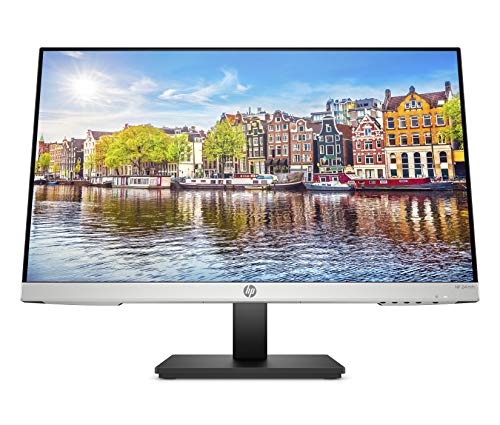
HP 24mh (23.8-inch panel) — The ergonomic default
In the companion guide to the wider 22–23 corridor this HP played the role of size-class anchor; here, among pure 23-class screens, its role sharpens into something simpler: it is the default. The panel measures 23.8 inches — HP files the model among its 24-series, and this article prints the real figure in the heading, the tables and this sentence — and it is an IPS design at full HD with the wide, stable viewing angles that general work quietly depends on. Documents, browsers, photographs and video all look like themselves from wherever the chair happens to be.
The default status is really earned below the glass. A height-adjustable stand at this price is a genuine rarity, and it converts the monitor from an object you adapt to into one that adapts to you; add tilt, slim bezels, and speakers good enough that calls and clips need nothing else on the desk. Three input families — HDMI, DisplayPort and VGA — mean the screen outlives the computer behind it, connecting to this year’s laptop and the older desktop in the corner with equal ease. A general-purpose monitor is a promise that no single job will expose a weakness, and the 24mh is the pick that keeps that promise most completely.
- Inputs: HDMI, DisplayPort and VGA — three generations of desk covered
- Panel: IPS with a 23.8-inch viewable diagonal, matte anti-glare surface
- Resolution: 1920 x 1080 (full HD) at a 75Hz-class refresh
- Stand and extras: height adjustment with tilt, speakers built in, VESA pattern on the back
Strengths
- Height adjustment delivers posture comfort rivals here cannot match.
- Speakers and three input types make it a complete one-box solution.
- IPS stability suits the mixed, shared nature of general work.
Trade-offs
- Everyday refresh ceiling excludes serious competitive gaming.
- Its series name promises 24 inches the panel does not quite deliver.
- Audio is convenience-grade rather than a music system.
Best for: the single main screen of a general home or office desk that does a bit of everything daily. Not suited for: high-refresh gaming, or an enclosure engineered for exactly 23.0 inches.

BenQ GW2480 (23.8-inch panel) — The eye-comfort office screen
BenQ’s GW line has spent years refining one idea: an office monitor should actively look after the person in front of it. The GW2480 expresses that idea at a 23.8-inch viewable panel — again, a model its maker badges in the 24-inch family, labelled here at its true size. Its signature is a brightness intelligence sensor that reads the room and adjusts the panel to match, so the screen that was right under morning sun is also right at dusk without the owner entering a menu twice a day. Around that sit the line’s established comforts: low-blue-light modes, flicker-free backlighting and an anti-glare IPS surface.
The physical design serves the same calm philosophy. Bezels are slim, the stand hides cables inside its column so the desk reads as order rather than wiring, and the input set — HDMI, DisplayPort and VGA — covers the office fleet reality of mixed-age computers. Built-in speakers handle call audio. Nothing about the GW2480 chases excitement; nothing about its pace is quick — the rate is an office rate — and its colours chase trustworthy documents rather than spectacle. For a buyer whose screen hours are long and whose eyes file complaints by Thursday, that restraint is the recommendation.
- Panel: 23.8-inch viewable IPS, anti-glare
- Resolution: 1920 x 1080 (full HD)
- Refresh: everyday 60Hz class
- Inputs: HDMI, DisplayPort and VGA
- Extras: ambient brightness sensor, low-blue-light modes, speakers, cable-concealing stand
Strengths
- Automatic brightness adjustment suits rooms whose light changes all day.
- Eye-care engineering is the genuine article, not a menu label.
- Cable-hiding stand keeps a general desk looking deliberate.
Trade-offs
- Refresh and response are office-grade, not gaming-grade.
- Stand adjusts for tilt rather than height.
- Panel is 23.8 inches despite the 24 in the model name.
Best for: long-hours office and study desks in rooms with changing daylight. Not suited for: players wanting high refresh, or buyers needing height adjustment without an arm.

Acer Nitro VG240Y (23.8-inch panel) — The casual-play all-rounder
Every general-size guide needs the screen for the desk that works by day and plays by night, and Acer’s Nitro VG240Y has filled that role at 23.8 inches for years. Its IPS panel runs at an everyday-plus refresh with FreeSync support, so the same screen that hosts spreadsheets until six will host a console or a PC game at seven without tearing or fuss. The design leans gently gaming — slim bezels, a purposeful stand — without the aggressive styling that makes some gaming monitors unwelcome in a shared room.
Balance is the whole story here. The refresh ceiling is modest beside the KG241Y below, and Acer makes no esports claims for it; what it offers instead is smoothness a step above the 60Hz office norm, colours that behave from wide angles thanks to the IPS panel, and a port mix of two HDMI inputs plus VGA that welcomes a work laptop and a console simultaneously. Owners describing this monitor tend to use the word “fine” as praise: everything is fine, every day, for every task the desk invents. At a general size, for general use, fine is a high achievement.
- Panel: 23.8-inch viewable IPS
- Resolution: 1920 x 1080 (full HD)
- Refresh: 75Hz class with FreeSync
- Inputs: two HDMI and VGA
- Stand: tilt adjustment; VESA mounting
Strengths
- FreeSync smoothness lifts games beyond office-panel standards.
- Two HDMI inputs suit a laptop-plus-console desk without swapping cables.
- IPS angles keep shared viewing and co-op play honest.
Trade-offs
- Serious players will outgrow its refresh ceiling quickly.
- No built-in speakers on the common configuration.
- Height adjustment is absent, as with most of this field.
Best for: mixed work-and-play desks, console owners and casual PC gaming at a general size. Not suited for: competitive players, or a silent-office brief that bans gaming styling entirely.
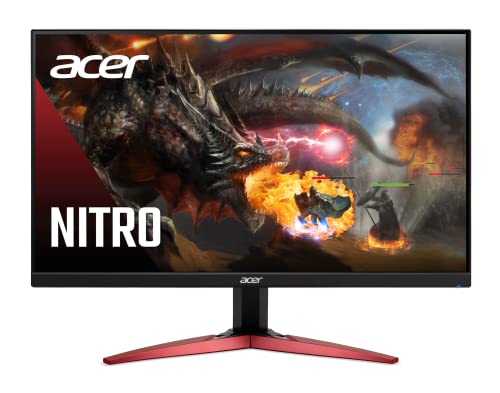
Acer Nitro KG241Y (23.8-inch panel) — The fast one
If the VG240Y is the class’s all-rounder, the KG241Y is its specialist: the same 23.8-inch full HD canvas, but driven at up to 180Hz with FreeSync Premium, which moves it from the office shelf into gaming territory without changing the desk it sits on. That combination — mainstream size, serious speed — is exactly what a player in a small room or a shared space needs, where a 27-inch gaming panel would overwhelm the furniture. Motion at 180Hz is visibly cleaner than at everyday rates: tracking a moving target across the screen stops smearing into guesswork, and the whole desktop, scrolling included, feels more immediate.
The compromises are the honest gaming ones. The panel prioritises speed, so colour and stand take second place: the stand tilts rather than lifts, and while the picture is entirely respectable for films and documents, this is not the screen a photo hobbyist should choose from this list. Ports cover the gaming bases with HDMI and DisplayPort, and VESA mounting lets an arm supply the ergonomics the stand omits. Judge it as what it is — the fast pick at an ordinary size — and it has no rival in this guide; judge it as an office screen and the BenQ and HP above will serve you better.
- Panel: 23.8-inch viewable, fast gaming class
- Resolution: 1920 x 1080 (full HD)
- Refresh: up to 180Hz with FreeSync Premium
- Inputs: HDMI and DisplayPort
- Stand: tilt adjustment; VESA mounting
Strengths
- 180Hz at 23.8 inches brings esports motion to small desks.
- Full HD keeps frame rates reachable for mid-range graphics cards.
- FreeSync Premium smooths the dips below the ceiling.
Trade-offs
- Stand ergonomics are minimal for long work days.
- Colour tuning serves speed before accuracy.
- Office buyers pay for refresh they will never use.
Best for: competitive and fast-paced gaming in compact rooms, and players upgrading from a 60Hz panel. Not suited for: colour-led work, or a buyer whose games are slow and cinematic.
Dell Professional P2319H — The true 23.0 business screen
Here is the genuine article: a panel measuring exactly 23.0 inches, from Dell’s Professional line, built for the offices where monitor fleets are specified to the millimetre. That exactness matters in more places than expected — a dual-screen wall where every panel must match, a kiosk enclosure cut for the size, a replacement for one dead unit in a row of identical screens. The P2319H answers with an IPS full HD panel, the wide angles business screens need, and the kind of stand the rest of this guide keeps apologising for lacking: height, tilt, swivel and pivot, the full ergonomic set, so the screen can even rotate to portrait for document work.
Connectivity is equally fleet-minded, with HDMI, DisplayPort and VGA alongside a USB hub that turns the monitor into a small docking point for keyboard, mouse and accessories. Dell’s ComfortView tuning softens the panel for long days. This model is prose-only in this guide because it sits outside the verified link pool, and it is recommended anyway, plainly, because a guide to 23-inch monitors that omitted the truest 23-inch business screen would be playing games with its title. Buy it through Dell’s business channels or reputable resellers, and confirm the stand is included if buying refurbished — fleet units sometimes travel without one.
- Panel: exactly 23.0-inch viewable IPS, anti-glare
- Resolution: 1920 x 1080 (full HD)
- Refresh: everyday 60Hz class
- Inputs: HDMI, DisplayPort, VGA and a USB hub
- Stand: height, tilt, swivel and pivot adjustment
Strengths
- Exact 23.0-inch panel for enclosures and matched fleets.
- Full ergonomic stand including pivot to portrait.
- USB hub and three input types suit business docking.
Trade-offs
- Business-channel pricing and availability vary by region.
- Everyday refresh excludes gaming ambitions.
- Refurbished units may arrive without the stand.
Best for: offices, matched multi-screen installations and exact-fit replacements. Not suited for: entertainment-led buying, or anyone wanting the fastest panel at the size.
ViewSonic VA2349s — The true 23.0 value screen
The second genuine 23.0-inch design in this guide comes from ViewSonic, whose VA2349s pairs the exact diagonal with an IPS-type panel and a value brief: wide viewing angles, full HD, and none of the fleet pricing of the Dell. It is the screen for the buyer who measured a space, found 23.0 inches written in the plan — a study carrel, a library desk, a second screen matched to an existing 23.0 — and wants the honest article without business-channel ceremony.
In daily use its virtues are steadiness and clarity. The panel’s wide angles keep a shared screen honest, its matte finish handles ordinary rooms, and its input set covers the HDMI-and-legacy mix typical of its era; verify the exact ports on the unit offered, as with any long-running model. The stand is basic, the refresh is everyday, and the design is unadorned — a fair trade sheet for the price class it lives in. Like the Dell, it is prose-only here because the link pool holds no verified listing for it, and like the Dell it earns its recommendation on the oldest ground in this guide: it is actually the size on the label.
- Panel: exactly 23.0-inch viewable IPS type, anti-glare
- Resolution: 1920 x 1080 (full HD)
- Refresh: everyday 60Hz class
- Inputs: HDMI and legacy video inputs; confirm the individual unit
- Stand: tilt adjustment; VESA mounting on common variants
Strengths
- True 23.0-inch diagonal at consumer pricing.
- Wide-angle panel suits shared and family desks.
- Straightforward, durable design with no gaming costume.
Trade-offs
- Stand and feature set are deliberately basic.
- Availability fluctuates as the model ages.
- Port mix varies, so the listing must be read carefully.
Best for: exact-size replacements, study and library desks, value-led general use. Not suited for: buyers wanting height adjustment or high refresh from the same purchase.
How do the six compare side by side?
| Pick | True viewable size | Resolution | Refresh class | Defining trait |
|---|---|---|---|---|
| HP 24mh | 23.8 inches | 1920 x 1080 | 75Hz class | Ergonomics and speakers |
| BenQ GW2480 | 23.8 inches | 1920 x 1080 | 60Hz class | Automatic brightness, eye care |
| Acer Nitro VG240Y | 23.8 inches | 1920 x 1080 | 75Hz class | Work-and-play balance |
| Acer Nitro KG241Y | 23.8 inches | 1920 x 1080 | 180Hz | Speed at a general size |
| Dell P2319H | 23.0 inches | 1920 x 1080 | 60Hz class | Exact size, full ergonomic stand |
| ViewSonic VA2349s | 23.0 inches | 1920 x 1080 | 60Hz class | Exact size at value pricing |
The table exposes the class’s real structure: four modern 23.8-inch all-rounders differentiated by speed and comfort, and two exact 23.0-inch designs differentiated by channel and stand. Nobody shopping this keyword is poorly served by that structure — unless they needed the guide to pretend the structure away. Choose first by diagonal truth, then by the axis your day stresses most: posture, eyes, play or speed.
What should a general-purpose buyer prioritise at this size?
Start with the stand, because it is the specification you will feel in your body. A height-adjustable model — the HP among the 23.8-inch picks, the Dell among the exact 23.0s — removes the commonest cause of monitor dissatisfaction at any size. If budget or availability rules those out, plan an arm or riser from the start and check the VESA pattern before ordering; a tilt-only screen at the wrong height is a slow injury disguised as a bargain.
Next, match refresh to honesty about your evenings. A screen that never games gains nothing from the KG241Y’s 180Hz and loses the BenQ’s eye-care sensor or the HP’s speakers to pay for it. A screen that games every night will feel the office panels’ ceilings within a week. The all-rounder VG240Y exists precisely for desks that genuinely split the difference. Then confirm inputs against every machine the screen must serve — the older desktop in the corner is the one that surprises buyers, and the VGA ports on the HP and BenQ are there because their makers know it.
Finally, weigh speakers and hubs as desk-space decisions rather than audio ones. On a small general desk, the HP’s built-in speakers delete a peripheral, its cables and its power brick; in a business setting the Dell’s USB hub deletes a docking station. These conveniences, unglamorous in a specification table, are what owners praise in year two.
How do you set up a 23 inch monitor for mixed work?
Position it as the main screen it usually is: centred on the chair, top edge near eye level, at a distance where full HD text reads at 100 percent scaling without leaning — for most people somewhere around 60 to 75 centimetres at this size. Portrait-capable stands like the Dell’s invite an experiment worth trying for document-heavy weeks: rotate to portrait for contracts, code or long articles, and discover how much vertical room a general monitor was hiding.
In the menus, set brightness for the room’s average rather than its extremes — or hand the job to the BenQ’s sensor if that is your pick — disable dynamic contrast, and choose the colour temperature you find neutral against a white document in daylight. Gamers on the Acers should confirm the higher refresh is actually selected in the operating system’s advanced display settings, since monitors happily run below their ceiling for years if nobody tells the computer otherwise; FreeSync then needs enabling in both the monitor menu and the graphics driver to do its work.
Finish with the desk itself. Route cables through the stand where the design allows, keep the keyboard centred on the panel rather than on the desk, and if a laptop shares the setup, decide which screen is primary and make the operating system’s layout match the furniture. Mixed work is a choreography; ten minutes of setup is what makes it look effortless.
What mistakes are specific to this size?
The first is assuming the badge: ordering a “24-inch” monitor for a 23-inch plan and receiving 23.8 inches of glass — usually harmless, occasionally fatal to an enclosure or a matched pair — or ordering a true 23.0 for a space measured around a 23.8 and finding the picture smaller than the plan imagined. This guide prints both diagonals relentlessly because the mistake is relentless. The second is buying gaming speed for an office desk or office calm for a gaming desk, the twin errors the pick structure is built to prevent. The third is overlooking the second-hand stand problem on business models: a P2319H without its stand is a panel in search of an arm, priced accordingly or not at all.
Why did the true 23 inch panel fade away?
Panel factories cut mother glass into sizes that minimise waste, and the industry’s economics gradually standardised on the 23.8-inch cut as the volume small-desktop panel. Once that size dominated production, every brand’s “24-inch” line was built on it, and the older 23.0-inch cut survived only where institutional buyers specified it — which is why the two exact-23.0 picks in this guide wear business and value badges rather than gaming ones. The practical consequence for today’s buyer is pleasant: the 23.8 panel is newer, cheaper to make, and supported by a decade of stands, arms and spare parts, while the 23.0 remains a special-order flavour for exact-fit needs.
It also means the second-hand market for this keyword is really two markets. Ex-fleet 23.0-inch business panels circulate from office refreshes, often with superb stands and unknown backlight hours; retail 23.8-inch panels circulate from homes, usually younger and with their boxes kept. Knowing which market a listing belongs to tells you what to inspect: fleet units need stand and port verification, home units need little more than a dark-room check for backlight bleed. Either can be the right buy; confusing one for the other is where disappointments breed.
Looking forward, nothing suggests the 23.0 diagonal will return to volume. Buyers who love the exact size for a matched installation should consider acquiring a spare while business channels still stock it — fleet managers do exactly this, and it is the one piece of their practice home buyers with a fixed enclosure should copy without hesitation.
How does a 23 inch monitor cope as a room’s second television?
In bedrooms, studios and student rooms, a general monitor in this class frequently moonlights as the television, fed by a streaming stick or a console. The arrangement works better than sceptics expect: full HD matches broadcast and streaming resolutions, the IPS picks hold their picture from a bed or sofa at an angle, and the HP’s speakers close the last gap for news, sport and dialogue-led viewing. Film enthusiasts will notice what is missing — the deep blacks of a good television, HDR drama, a remote control — but for the room that watches an hour an evening, the monitor already on the desk is usually television enough.
Two setup habits improve the double life. Keep a second picture mode configured for video — slightly warmer, with the eye-care filters relaxed — so the screen stops dressing films in office clothes, and place the streaming device on the input the monitor wakes to fastest, since a screen that takes ten seconds to find its signal teaches its owner to reach for a phone instead. Console players should enable the game mode where offered, which trims processing lag; on the KG241Y the high refresh is wasted on a 60Hz console feed, but its low-lag behaviour still flatters play.
The boundary of the arrangement is size, and it is physical rather than technical: at three metres, a 23.8-inch picture is small in a way no setting repairs. Rooms where viewing distance exceeds roughly two metres should let a television be a television, and keep the monitor for the desk it was chosen for. That restraint — each screen doing the job its size suits — is the same principle that organised this entire guide.
What separates the business and home versions of this size?
Put the Dell P2319H beside the Acer VG240Y and the two economies of the monitor world stand side by side. The business screen spends its budget on the stand, the hub, the warranty channel and a panel selected for consistency across a thousand units; its refresh is an afterthought because its buyer never asked. The home screen spends on refresh, styling and a headline feature, and its stand is where the savings went. Neither allocation is wrong, but buyers go astray when they import one economy’s expectations into the other — demanding fleet ergonomics at a gaming price, or gaming speed from a fleet panel.
The second-hand market scrambles the two economies usefully. An ex-fleet Dell bought for home use delivers business ergonomics at a home price, which is why it appears in this guide at all; a retired gaming Acer bought for an office delivers speed the office will never use and a stand it will curse daily. Read any used listing through that lens — what did the original buyer pay for, and is it what I need? — and the corridor’s used market becomes the most rational place in tech to shop.
Warranty expectations differ too, and are worth one calm sentence: business lines are serviced through channels that assume a facilities manager is calling, while home lines assume a consumer with a receipt. Both work; neither is the other. Buy the channel you are equipped to use.
How well does this size serve photo and video hobbies?
Honesty requires a ceiling to be stated: every panel in this guide is an sRGB-class full HD screen, and a hobbyist editing photographs for print or grading video for an audience will eventually want wider colour and more pixels than any of them offers. Within that ceiling, though, there is real capability. The IPS picks hold colour consistently across the screen, the BenQ’s brightness discipline keeps edits from drifting with the room’s light, and full HD at 23.8 inches is enough canvas to judge composition, exposure and focus at the level a hobby actually demands week to week.
The sensible path for a growing hobbyist is sequencing rather than compromise: buy the general screen this guide recommends for the desk’s main life, learn the craft on it, and let the eventual specialist purchase — a larger, wider-gamut panel — be informed by a year of knowing exactly which limitations bite. The general screen then retires to satellite duty, where its life continues. Buying a specialist panel first, for a desk that mostly does email, is the expensive version of the same story told backwards.
Video callers occupy the happier middle: at this size a call window can sit at a natural scale, a shared presentation remains legible to the person presenting it, and the HP’s speakers plus any ordinary webcam complete a setup that feels like a meeting rather than a broadcast. The class’s matte finishes forgive the lighting of real rooms, which is more than glossy entertainment screens do.
What does a second 23 inch screen add to the first?
Because this size is the classic main screen, it is also the classic matched pair: two identical 23.8-inch panels span roughly 110 centimetres, fit desks that two 27-inch screens would swamp, and present a uniform horizon of pixels at one density. Writers gain a reference panel, traders gain a chart panel, and anyone who lives in calls gains a permanent home for the call that never occludes the document. The pairing rules from the wider corridor apply unchanged — buy both together, match model and settings, align heights before anything else — and the Dell’s exact-23.0 fleet logic shows its worth again in installations of three or more, where consistency is a specification rather than a preference.
There is one asymmetry worth exploiting deliberately: a pivot-capable second screen in portrait orientation beside a landscape main screen is the document worker’s finest arrangement, turning the pair into a reading desk and a working desk sharing one chair. Among these picks only the business Dell pivots on its own stand, which is a final, quiet argument for its inclusion — and for checking pivot before assuming any monitor can perform the trick on an arm that may or may not be in the budget.
What should you know about inputs before this size bites you?
The port list of a general monitor is a census of the computers it will outlive. DisplayPort and HDMI cover the present; VGA, unfashionable as it is, covers the past that still sits in corners of houses and offices doing useful work — the old desktop running the printer, the previous laptop kept for the children. The HP and BenQ carry all three families, and that breadth is a deliberate part of their general-purpose brief: a screen that connects to everything never becomes the reason a working computer is retired early.
USB-C is the notable absence across this field, and buyers with a single-cable dream should price the workaround honestly: a small hub or dock restores one-plug convenience for a laptop, at a cost that still leaves this class cheaper than the docking monitors above it. What USB-C would not change is the panel, the stand or the speakers — the things the owner touches daily — which is why this guide ranks its absence as an inconvenience rather than a disqualification.
One legacy trap deserves naming: some older computers output HDMI at limited refresh or resolution through early ports and adapters, so a gaming pick like the KG241Y should be fed by DisplayPort where possible to reach its ceiling, and any adapter in the chain should be treated as a suspect when a screen refuses to run at its rated rate. The monitor is rarely the culprit; the chain is.
How long do monitors at this size stay satisfying?
Longer than almost any other technology on the desk, because their job changes slowly. Full HD at 23.8 inches was the mainstream answer a decade ago and remains one today; software interfaces are still designed around it, and the panels’ lack of exotic features means there is little to go obsolete. Owners typically replace these screens for ergonomic or spatial reasons — a bigger desk, a bigger ambition — rather than because the picture gave up, and the replaced screen almost always continues working somewhere else.
Care is correspondingly simple. Dust the panel with a dry microfibre cloth, keep liquids for the desk rather than the screen, avoid pressing the surface when repositioning — lift by the cabinet or stand — and give the backlight a sleep schedule overnight. Business panels like the Dell add one more consideration: their stands detach and reattach for moves, so keep the release mechanism free of the dust that offices generate, and the stand will still be gliding in year eight.
When a screen in this class does finally fade, the failure is usually graceful — a backlight that no longer reaches comfortable brightness in a sunny room — which gives the owner time to choose a successor deliberately rather than in a weekend panic. That grace is the last general-purpose virtue on the list, and in its way the most general of all.
Which desk shapes does this size fit best?
The 23 to 23.8-inch class is the largest screen a genuinely small desk wears comfortably, and the smallest that a large desk does not make look lost, which is why it became the default in the first place. On a 100-centimetre desk your keyboard, notebook and desk lamp still fit without a negotiation. On a corner desk it occupies the corner’s depth honestly, where a 27-inch panel would push the keyboard into the user’s lap. In a dual-desk household — two people, two workstations, one room — a pair of these, one per desk, keeps the room balanced in a way mismatched sizes never do.
Depth is the dimension buyers forget until the screen arrives. A 23.8-inch monitor on a typical stand needs roughly 20 centimetres of desk depth for its feet and cable bend, and the user’s eyes need another 60 beyond that; a desk shallower than 60 centimetres in total will put any screen in this class closer than comfort allows, and the answer there is a wall mount or an arm that parks the panel at the desk’s rear edge. Measure depth before width for once — in this class, depth is the constraint that actually bites.
Standing desks deserve a specific note, because their geometry changes between positions. A height-adjustable monitor like the HP travels with the desk and keeps its relationship to your eyes in both postures; a fixed stand on a riser works for one posture and compromises the other. Sit-stand users in this class should either buy the adjustable pick or budget the arm — the third option, tolerating the compromise twice a day, is the one owners report regretting.
How do you judge a used or discounted unit in this class?
Discounts in this class are frequent because the models run long and retailers rotate stock, so the first skill is distinguishing a genuine reduction on a current unit from an old revision wearing the same name. Check the model suffix against the maker’s current specification page, confirm the viewable diagonal and the input list from that page rather than the retailer’s summary, and treat any listing that cannot state its own refresh rate as a listing to leave. The picks in this guide were chosen partly because their makers publish those facts plainly.
For a used unit, the inspection order matters. View a full white screen for uniformity, a full black screen in a dim room for backlight bleed, and a page of small text for the sharpness that reveals whether the panel is being fed its native resolution. Work every stand adjustment the model claims, because a seized height mechanism on the HP or a worn pivot on the Dell quietly deletes the feature that justified the purchase. Ask after the power supply’s originality; a correct original brick is worth more than a universal substitute that merely fits.
Finally, price the whole station rather than the panel: screen, stand if separate, the cable your computer needs, and an arm if the stand disappoints. A used business panel plus a good arm can equal a new home panel’s total while delivering better ergonomics — or exceed it, which is the moment to buy new instead. Arithmetic, not enthusiasm, should close the deal in a class this mature.
What does the first month of ownership usually teach?
Week one teaches the stand. Owners of the height-adjustable picks set the screen once and forget the question; owners of tilt-only models discover whether their desk and chair happen to agree with the manufacturer’s fixed geometry, and a noticeable minority order the riser or arm they had hoped to skip. There is no shame in that order — it is the class’s most common second purchase — but reading this paragraph before the first one saves the postage.
Week two teaches the picture modes. The default mode a monitor ships in is tuned to survive a showroom, not a study: brightness high, colour vivid, dynamic features awake. Owners who spend ten minutes choosing a calmer configuration — brightness matched to the room, a neutral colour temperature, dynamic contrast asleep — report the screen as if it were a different and better product, because perceptually it is. The BenQ’s sensor automates the largest part of that lesson, which is its deepest argument.
By week four the screen has usually acquired its permanent job description, and it is rarely the one on the receipt. The gaming Acer becomes the household’s film screen because it sits in the room with the sofa; the office BenQ becomes the call screen because its speakers and sensor make it effortless. None of this is failure — it is a general-purpose tool being general — but it argues for buying the balanced pick when the desk’s future is unwritten, and the specialist only when the job is certain. That, more than any single specification, is the wisdom this size class teaches.
How does this class treat your eyes over years, not days?
Eye comfort at this size is a system, not a feature, and its parts are mundane: a matte panel that refuses to mirror the window, a backlight that dims low enough for evening rooms, a stand or arm that keeps the top of the screen near eye level so the neck stops subsidising the eyes, and text large enough — by panel choice or by scaling — that reading never becomes squinting. The picks here each contribute some of those parts; the owner’s arrangement contributes the rest. Flicker-free backlighting, present in the BenQ’s design philosophy and common across modern panels in this field, removes one invisible irritant from the system, and low-blue-light modes handle the evening shift in colour that many readers find restful.
The habit that outperforms every feature is distance discipline. A 23.8-inch screen invites its owner to sit at the distance the desk dictates rather than the distance the eyes prefer, and a deep-enough desk or a wall mount is the honest cure. Pair that with the ordinary rhythm of looking away from the screen regularly — across the room, out of the window, anywhere the focal distance changes — and a general monitor in this class can be sat at for a working lifetime. The technology’s job is to not interfere; arranged well, none of these six interferes.
What if the desk also hosts handwriting, hobbies or homework?
A general desk is rarely only a computer desk, and this size class earns its default status partly by leaving the desk usable for everything else. A 23.8-inch screen pushed to the rear edge leaves a clear working apron in front of the keyboard for paper, a sketchbook or a child’s homework; on an arm it can swing aside entirely, returning the whole surface. Screens larger than this begin to annex the desk permanently. Screens smaller begin to compromise the computing. The class sits at the balance point, and households that share one desk among several lives feel that balance daily.
Lighting follows the same negotiation. A desk lamp placed for paper work will glare on a glossy screen and behave on the matte panels used throughout this guide; position the lamp to the side rather than behind the chair, and both the page and the panel stay readable. It is a small, unglamorous harmony, and it is exactly what a general-purpose size is for. The same balance explains why this class survives every prediction of its death at the hands of larger screens: most desks are shared with the rest of life, and a monitor that respects that sharing — big enough for the work, modest enough for the room — is not a compromise at all, but the correct tool measured against the whole day rather than a single task.
Final Recommendation
For most desks that found this page, the HP 24mh is the answer — say its size honestly at 23.8 inches, set it at eye height, and let its speakers and ports simplify everything else. Take the BenQ when your eyes and your room’s changing light argue loudest, the VG240Y when evenings are for play, the KG241Y when play is serious, and either of the true 23.0-inch designs — Dell for the full business stand, ViewSonic for value — when the exact diagonal is the whole point. Twenty-three inches, in either of its real forms, remains the size at which a monitor stops being an accessory and becomes the desk itself — present for everything, in the way of nothing, and honest about the half inch the badge rounds away on the shop shelf every day.
Frequently Asked Questions
Are 23 inch and 23.8 inch monitors the same thing?
Not exactly, though the market treats them as neighbours. A 23.8-inch panel is slightly larger in each dimension and is the size inside most current monitors badged as 24 inches; the exact 23.0-inch diagonal survives mainly in business catalogues, Dell’s Professional range being the familiar example. For a free-standing desk the difference is invisible in use; for an enclosure, a kiosk or a matched row of screens it is decisive, which is why this guide labels every pick with its true figure.
Is full HD sharp enough at 23.8 inches?
At a normal working distance, yes for the work this class performs: text is clean, interfaces are honestly sized, and video is native. Pixel density is a touch lower than on a 21.5-inch full HD panel, so side by side the smaller screen looks marginally finer — but the 23.8 repays that with room to place two windows without scaling either into crampedness. Readers who want a visible step in sharpness at this desk size should consider QHD panels in the 24 to 25 inch class rather than a different full HD model.
Which of these is best as the only monitor for work and gaming?
The Acer Nitro VG240Y was chosen for exactly that split life: FreeSync and a refresh above the office norm for the evening, IPS angles and two HDMI inputs for the day. If gaming is the senior partner, step up to the KG241Y’s 180Hz; if work is, the HP’s stand and speakers will matter more than either Acer’s speed. The honest answer is that the split is decided by which activity gets your best hours.
Do I need a monitor arm with these?
Only if your pick’s stand cannot put the screen at your eye height, or if your desk is so shallow that the stand’s feet steal the keyboard’s territory — the second reason is the one small-desk owners discover first, and an arm cures it completely by moving the panel’s support from the desk surface to its rear edge or the wall behind it. The HP and the Dell adjust for height themselves; the tilt-only picks may need a riser or an arm depending on your desk and chair. Check for a VESA pattern before ordering an arm, and remember that at this light weight a simple fixed riser often achieves the same posture for less money and no moving parts.
Why are two picks not linked to a shop?
The Dell P2319H and ViewSonic VA2349s are recommended as prose-only picks: they are genuine 23.0-inch designs that sit outside this guide’s verified link pool, so no purchase link is attached rather than an unverified one being invented. Both are widely available through business and electronics channels; apply the usual checks on stand inclusion and exact ports when ordering, and remember that their absence from the link pool is a verification boundary of this programme, not a judgement on two screens this guide is glad to recommend by name.
Related Guides
Readers torn between this size and its neighbours can see the full corridor compared in best 22–23 inch monitors, step up to the mainstream in best 24 inch monitors, or explore the VESA-specific shortlist in best 23 inch monitors with VESA mounts.


