What's inside
- Key Takeaways
- Quick Picks
- How Did We Choose the Best Desktop Computer Speakers With Bluetooth Under 100?
- How Do the Best Desktop Computer Speakers With Bluetooth Under 100 Compare?
- What Should You Look for in Bluetooth Desktop Speakers?
- How Should You Set Up Bluetooth Speakers on a Desk?
- What Mistakes Do Buyers Make at This Budget?
- Does Bluetooth Latency Matter for Video and Games at a Desk?
- How Do These Systems Fit Four Real Desks?
- What Does This Budget Actually Buy — and What Does It Not?
- How Long Will a Good Pair Serve, and How Should You Care for It?
- Final Recommendation
- Frequently Asked Questions
- Related Guides
As an Amazon Associate I earn from qualifying purchases. This post may contain affiliate links at no extra cost to you.
gizmoverdict.com is reader-supported. When you buy through links on our site, we may earn an affiliate commission.
Where to buy: Each system below links to a listing confirmed against this site’s verified product pool, so the connection set and configuration described in its section are the ones the link leads to. This guide prints no prices and no star ratings; the budget in the title is your shopping frame, and output figures are quoted only as each maker states them.
The best desktop computer speakers with bluetooth under 100 answer a thoroughly modern desk problem: the computer is no longer the only thing that makes sound there. Your phone lands beside the keyboard with a podcast half-finished; a tablet leans against the monitor with a video queued; the work laptop and the personal laptop take turns on the same desk. Bluetooth is the thread that ties those sources to one pair of speakers without a cable-swapping ceremony, and at this budget the question is what else the speakers bring besides the wireless link. The six systems below split into two families with genuinely different ideas: powered bookshelf speakers from Edifier, Mackie and PreSonus that happen to include Bluetooth, and compact desktop designs from Creative and Logitech built around the computer first.
That family split is the decision, so this guide will not pretend otherwise. Bookshelf models bring larger cabinets, optical inputs, remote-friendly living-room manners and a upgrade path — one even offers a subwoofer line out for later. The compact models bring USB power or USB audio, tiny footprints and prices of attention measured in seconds of setup. All six stream Bluetooth; they differ in what they are when the Bluetooth is off, and the sections below judge each on its whole character rather than on the wireless checkbox they all share.
Key Takeaways
- At this budget, Bluetooth is universal — the real choice is between powered bookshelf speakers (Edifier, Mackie, PreSonus) with bigger cabinets and more inputs, and compact desktop systems (Creative, Logitech) built for minimal footprints.
- The two Edifier models share a 42W RMS platform and optical input; the R1280DBs adds a subwoofer line out, making it the only pick designed to grow a subwoofer later.
- Creative’s Pebble V3 runs entirely from USB-C with Bluetooth 5.0 as the second source — the smallest installation in the guide.
- Mackie and PreSonus bring studio-monitor heritage to the desk: the CR3.5BT with a tone knob for quick voicing changes, the Eris 3.5BT with 50W of powered-monitor design.
- Logitech’s Z207 is the switcher’s pick, with Easy-Switch pairing between Bluetooth devices and a wired connection in reserve.
- Stated power figures belong to each maker and are not cross-comparable — judge these systems by family, connections and desk fit first.
- Wire the permanent sources and let Bluetooth be the bridge for visiting devices — that arrangement quietly solves latency, pairing fights and most daily friction in one decision.
- Placement is free performance: an equal triangle with tweeters near ear height improves every system in this guide more than any accessory could.
Quick Picks
| Pick | Badge | Why it earns its place |
|---|---|---|
| Edifier R1280DB | The bookshelf standard | Powered bookshelf speakers with Bluetooth, optical input and 42W RMS — the full-size answer at a desktop budget. |
| Edifier R1280DBs | The expandable one | The R1280 formula plus a subwoofer line out, for the desk that plans to grow bass later. |
| Creative Pebble V3 | The one-cable minimalist | USB-C powered desktop speakers with Bluetooth 5.0 and a Clear Dialog mode — a laptop desk upgraded in minutes. |
| Logitech Z207 | The device switcher | Bluetooth with Easy-Switch between paired devices plus a 3.5mm wired path, for desks with several sources. |
| Mackie CR3.5BT | The tone-knob monitor | Studio-style powered monitors with Bluetooth and a front tone control that reshapes the sound for music, voice or work. |
| PreSonus Eris 3.5BT | The producer’s desk pick | 50W powered near-field monitors with Bluetooth, from a company whose day job is studio listening. |
How Did We Choose the Best Desktop Computer Speakers With Bluetooth Under 100?
We began by refusing to rank these six on a single ladder, because the category contains two species. A powered bookshelf speaker is a small hi-fi system: mains powered, remotely controllable in spirit, happy to serve a television or a turntable as well as a computer. A compact desktop speaker is a computer peripheral: bus-powered or USB-fed, designed around the monitor’s footprint, judged by how completely it disappears into the setup. Comparing the species on output alone crowns the bookshelves; comparing them on tidiness crowns the compacts; comparing them on fitness for your desk — the only honest axis — gives you the six addressed recommendations below.
Within each species, connections decided the shortlist. Bluetooth quality of life differs: some systems treat wireless as the headline, others as one input among several beside optical and analogue. We favoured models whose input sets match how desks actually accumulate sources — a phone beside the computer, a console or television within cable reach, a work laptop that arrives and leaves. The Edifiers’ optical input, the Z207’s Easy-Switch, the Pebble V3’s USB-C audio-plus-power and the studio pair’s monitor-style flexibility each answer a different version of that accumulation.
Checking came first for these desktop picks: each one was matched to the site pool before linking, with listing titles checked for the exact variant — important in a category where a single letter separates the R1280DB from the R1280DBs and their different futures. Power figures appear only as each maker states them. Where a listing does not state a feature, the spec boxes say so, and nothing has been borrowed from a sibling model to fill the gap.

Edifier R1280DB — The bookshelf standard
The R1280DB is the speaker that taught a generation of desk buyers that “computer speakers” could mean actual speakers. Edifier builds it as a powered bookshelf pair — 4-inch near-field drivers in wooden-grain cabinets, 42 watts RMS of amplification, Bluetooth for the wireless sources and an optical input for the wired ones. On a desk it behaves like the hi-fi it resembles: a composed, full presentation at arm’s length, with enough cabinet volume to give music a body that compact desktop units cannot imitate. Films gain scale, games gain atmosphere, and the daily soundtrack of calls and videos gains the simple dignity of being reproduced by speakers designed for listening rather than for notification.
The optical input is the feature that quietly extends its life beyond the desk. A small television, a games console, a streaming box — anything with an optical output can move in beside the computer, and the R1280DB becomes the room’s sound system rather than the PC’s accessory. Bluetooth then covers the phone and tablet, which is the correct division of labour: permanent sources wired, visiting sources wireless. Buyers furnishing a bedroom desk, a student room or a small living space get, in this one pair, the system all those spaces were separately shopping for.
There is a reason this model recurs in desk setups year after year, and it is worth naming: balance of regrets. Every speaker purchase trades something away, and the R1280DB trades away the things its owners miss least — ultimate bass, ultimate compactness, ultimate features — while keeping the things missed daily: body, clarity, an input for everything on the desk, and a sound that never makes its owner apologise for the system during a film or a favourite album. Products that minimise regret rather than maximising any single metric are the ones that stay on desks, and the R1280DB’s long presence in the category is that principle made visible.
Its demands are a bookshelf speaker’s demands: desk depth for the cabinets, a mains socket, and a listening position that respects the near-field design. In return it offers the most complete, grown-up sound in this guide — the pick for anyone whose desk is really a listening post that also holds a computer.
- Configuration: powered bookshelf pair, 4-inch near-field drivers
- Stated power: 42W RMS, per the listing title (maker’s figure)
- Connections: Bluetooth and optical input, per the listing title
- Finish: wood grain, per the listing title
- Subwoofer output: not stated in the listing title — the R1280DBs below is the variant with a line out
Strengths
- Real bookshelf cabinets deliver body and scale that compact desktop speakers cannot reach.
- Optical input lets a television or console share the system, outgrowing the desk gracefully.
- A mature, composed voicing suited to music and film as much as to calls and clips.
Trade-offs
- Needs desk depth and a mains socket — not a bus-powered minimalist’s product.
- No stated subwoofer output, so the low-end upgrade path belongs to its sibling.
- Overkill for a desk that only ever plays calls, podcasts and notification sounds.
Best for: a desk that doubles as the room’s listening post, with a television or console likely to join.
Not suited for: a cramped laptop perch with no mains socket to spare, or a hot-desking setup that moves daily.
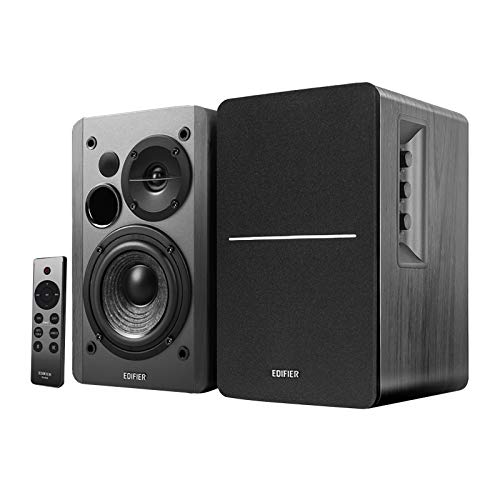
Edifier R1280DBs — The expandable one
Take the R1280DB’s formula — active Bluetooth bookshelf speakers, optical input, 42 watts RMS — and add the single feature that changes its future: a subwoofer line out. The R1280DBs is the pick for the buyer who knows their ears. Today, the pair alone serves the desk with the same composed bookshelf sound as its sibling; next year, when the room grows or the film habit deepens, a powered subwoofer plugs into that line out and the system becomes a 2.1 without replacing a single component bought today. In a budget category full of closed ecosystems, that open door is a deliberate and generous piece of engineering.
The rest of the character matches the family: wooden-finish powered cabinets, Bluetooth for the visiting sources, optical for the permanent ones, and a voicing tuned for near-field listening that flatters the desk’s daily mixture of music, video and voice. The DBs also suits the deliberate upgrader’s psychology — the buyer who prefers to build a system in stages, learning what each addition does, rather than buying a sealed box whose sound is a take-it-or-leave-it proposition. Every stage of that journey is audible, which makes the hobby cheaper to learn.
The staged approach has one more advantage worth stating: it teaches the room. A subwoofer added to a system you already know, in a room you already understand, can be placed and levelled by comparison — you hear exactly what it contributes and where it argues with the furniture. Buyers who start with a sealed 2.1 system never get that education, because the integration arrives pre-decided. Neither route is wrong, but the DBs route produces owners who understand their own sound, and understanding compounds across every future purchase.
Choose between the two Edifiers on that single question of the future. If a subwoofer will never join your desk — because the room is small, the neighbours are close or the taste runs lean — the R1280DB is the same sound with nothing wasted. If there is any real chance the bass itch arrives, the DBs is the pair that will still be at the centre of your system when it does.
- Configuration: active Bluetooth bookshelf pair
- Stated power: 42W RMS, per the listing title (maker’s figure)
- Connections: Bluetooth and optical input, per the listing title
- Signature feature: subwoofer line out, per the listing title
- Finish: black, per the listing title
Strengths
- The subwoofer line out gives this budget pair a genuine upgrade path no other pick here offers.
- Shares the R1280 platform’s composed bookshelf sound and optical flexibility.
- Suits staged system-building: complete today, expandable tomorrow.
Trade-offs
- The future subwoofer is a future purchase — the line out adds nothing until it is used.
- Same bookshelf footprint and mains requirements as its sibling; no tidier on a small desk.
- Buyers who know they will never expand pay attention to a feature with no present value.
Best for: a growing desk setup whose owner expects a subwoofer to join within the system’s life.
Not suited for: a finished, minimal desk that wants its sound decided once and never revisited.

Creative Pebble V3 — The one-cable minimalist
The Pebble V3 reduces desktop audio to its essence: two pebble-shaped speakers, one USB-C cable that carries both power and audio from the computer, and Bluetooth 5.0 for everything else. Creative states 8 watts RMS, adds a USB-A adapter for older machines, and tunes the drivers — angled up at the listener, as the Pebble design insists — for the near field, with a Clear Dialog mode that pushes voices forward for calls, lectures and video. In a guide full of systems, this is the anti-system: the upgrade you install between two sips of coffee, which then quietly transforms a laptop’s apologetic built-in sound into something with presence, separation and a voice you can follow across a room.
Do not overlook what the Pebble formula does for renters and the frequently relocated. A sound system with no mains brick, no speaker wire and no component larger than a coffee mug moves house in a coat pocket and reinstalls in any room with a USB-C port — student halls, short lets, the spare room that becomes an office twice a year. In a category where the grander systems reward settled households, the Pebble is the pick that respects an unsettled one, and its owners tend to keep it through several addresses precisely because it never asks an address to accommodate it.
Its desk is the laptop desk in all its forms — the kitchen table office, the dorm room, the hot desk, the second monitor’s side table. Bluetooth earns its place here differently from the bookshelf models: not as the main event but as the bridge, letting a phone continue its podcast through the same speakers when the laptop closes, or a tablet take over the desk’s sound for an evening’s video. That handover, from USB source to Bluetooth source and back, is the daily choreography of modern desks, and the Pebble V3 performs it without a single extra power brick in the drawer.
The boundaries are physical and should be respected: this is a personal sound field for one listener at one desk, not a room system, and its bass is the polite suggestion of a small driver rather than the substance of a cabinet. But judged on the desk it was designed for, the Pebble V3 may be the highest ratio of improvement to effort in this entire batch of guides.
- Configuration: 2.0 desktop pair, USB-C powered
- Stated power: 8W RMS, per the listing title (maker’s figure)
- Connections: USB-C audio and power, Bluetooth 5.0, USB-A adapter included, per the listing title
- Feature: Clear Dialog mode, per the listing title
- Mains adapter: none — powered from the computer’s USB
Strengths
- One USB-C cable for power and audio is the cleanest installation in desktop audio.
- Bluetooth 5.0 keeps phones and tablets in the system when the computer sleeps.
- Clear Dialog tuning serves the call-and-video reality of working desks directly.
Trade-offs
- Output and bass are personal-scale; it will not fill a room or carry a film night.
- No optical or analogue expansion path — its world is USB and Bluetooth by design.
- Music lovers with space for cabinets will outgrow its small-driver ceiling.
Best for: a laptop desk, dorm room or hot desk that wants a dramatic upgrade with almost no installation.
Not suited for: a media desk expecting room-filling sound, or a console setup needing wired inputs.

Logitech Z207 — The device switcher
The Z207’s defining idea is in its listing’s plainest phrase: Easy-Switch technology. Logitech built this compact stereo pair for the desk where sources multiply — a work laptop and a phone, a desktop and a tablet — and made moving between paired Bluetooth devices a button press rather than a settings-menu expedition, with a 3.5mm wired connection standing by for everything else. Ten watts peak of stated power tells you its scale honestly: this is a near-field desktop pair for the person in the chair, engineered around convenience rather than spectacle.
That convenience compounds in shared and hybrid workspaces, the desks this guide suspects are now the majority. The morning’s calls arrive from the laptop; the afternoon’s focus playlist lives on the phone; a colleague’s tablet appears for a review. A speaker that treats those transitions as its main feature quietly removes a dozen daily frictions, and frictions removed daily are worth more than specifications admired once. Logitech’s long experience with exactly this user — the office desk, the family computer corner — shows in the Z207’s unpretentious design: it is built to be used by everyone who sits down, without a manual.
There is also a household-politics virtue here that deserves daylight. In shared homes, the desk speaker is often the family’s second sound system — the one in the study, the spare room, the teenager’s domain — and a system that anyone can connect to, without the owner’s phone or permission, gets used and loved rather than admired and avoided. The Z207’s switching generosity, like the Pebble’s simplicity, is a social feature disguised as a technical one, and households consistently underrate such features until the first time a grandparent or a guest tries to play something.
Sound expectations should be set at desktop scale: clear, present stereo for one listener, entirely adequate for video, calls and casual music, and not a substitute for the bookshelf pairs when music is the main event. The Z207 is the guide’s recommendation when the desk’s problem is orchestration rather than power — and for a surprising number of desks, orchestration was the problem all along.
- Configuration: 2.0 stereo desktop pair
- Stated power: 10W peak, per the listing title (maker’s figure)
- Connections: Bluetooth with Easy-Switch, and 3.5mm wired, per the listing title
- Signature feature: quick switching between paired Bluetooth devices
- Optical input: not stated in the listing title — verify with the maker’s documentation
Strengths
- Easy-Switch makes multi-device desks effortless — the feature its owners will use most.
- The wired 3.5mm path covers sources Bluetooth forgot, from older desktops to handheld consoles.
- Compact, approachable design suits shared and family desks where simplicity is a feature.
Trade-offs
- Output is firmly desktop-scale; rooms and film nights belong to the bookshelf picks.
- No optical input is stated for television or console sharing.
- Music-first listeners will reach its ceiling quickly and should start with the Edifiers.
Best for: a hybrid work desk juggling a laptop, a phone and a tablet through the day.
Not suited for: a listening-focused desk, or a media corner needing optical input and room-filling output.

Mackie CR3.5BT — The tone-knob monitor
Mackie’s CR series comes from the studio side of the fence, and the CR3.5BT carries that heritage into this budget with one feature that sounds small and behaves large: a tone knob. Where most desktop speakers give you a fixed voicing and a volume control, the CR3.5BT lets you reshape the sound from the front panel — brighter and leaner for voice and video calls, warmer and fuller for music — which suits desks whose content changes by the hour. The listing describes studio monitors as a pair with Bluetooth, and the monitor part matters: these are built to sit at ear level, aimed at a listener, reproducing what is actually in the recording with a directness that entertainment speakers often soften.
For the desk that makes things — the bedroom producer sketching tracks, the video editor cutting dialogue, the podcaster checking a mix — that monitor honesty is the point of the purchase, and Bluetooth is the convenience layered on top: reference the mix from your phone, stream a reference track from a tablet, take the afternoon’s music wirelessly. Mackie’s studio lineage also implies the practical virtues of the breed: a pair sold as a pair, placement flexibility between desktop and stands, and a design that assumes it will be listened to closely rather than glanced at.
One more working detail separates the Mackie in daily use: front-panel immediacy. Desks that host calls live and die by how fast a human can change what the speakers are doing — mute a notification, warm a voice, tame a bright recording — and a knob under the fingers beats an app on a phone that is currently the call’s camera. The CR3.5BT’s controls were placed by people who work at desks, for people who work at desks, and that ergonomic literacy shows up in the small hours of real use more than any specification does.
Its trade is the monitor’s traditional one: honesty is less forgiving than flattery, and poorly produced content sounds like itself through these. Listeners who want their speakers to sweeten everything should look at the Edifiers; listeners who want to hear what they actually made, and to adjust the voicing with one knob when the work changes, have found their pick.
- Configuration: powered studio monitor pair, 3.5-inch class
- Connections: Bluetooth, per the listing title
- Signature control: front tone knob, per the listing title
- Finish: black, per the listing title
- Stated power: not printed in the listing title — verify with the maker’s documentation
Strengths
- The tone knob adapts one pair of speakers to calls, editing and music without menu-diving.
- Studio-monitor directness serves creators who need to hear their work truthfully.
- Bluetooth reference-checking from phones and tablets fits production workflows naturally.
Trade-offs
- Monitor honesty exposes poor recordings rather than flattering them.
- No optical input is stated for television-centred desks.
- Its workmanlike studio styling is plainer than the Edifiers’ furniture finish.
Best for: a creator’s desk — editing, podcasting, music sketching — that also streams for pleasure.
Not suited for: a living-room media desk wanting optical input and a forgiving, cinematic voicing.

PreSonus Eris 3.5BT — The producer’s desk pick
PreSonus makes studio equipment for a living, and the Eris 3.5BT is its powered near-field monitor pair translated for the desk: the listing states 50 watts of power, a woven-composite woofer and silk-dome tweeter per cabinet, and Bluetooth alongside the monitor brief — music production, gaming, movies and hi-fi listening are all named as intended uses. That breadth is credible from a monitor, because a monitor’s flat, honest response is a foundation any content can build on; the Eris simply refuses to have an opinion about your recording, which is either its virtue or its limitation depending on the listener you are.
On a working desk, the Eris pair’s appeal is trust. The voice you edit is the voice that ships; the game mix you check is the mix players hear; the film you watch at night is presented without a salesman’s EQ curve. Silk-dome tweeters keep that honesty from curdling into harshness during long sessions, and the 50-watt stated platform gives the pair enough headroom for near-field work at real levels. Bluetooth then does the same diplomatic work as on the Mackie — phone references, tablet streams, the evening’s listening — without asking the monitors to stop being monitors.
It is worth adding who else quietly benefits from a monitor pair: the learner. A student of mixing, editing or even critical listening who starts on honest speakers develops ears that transfer to every system they will ever use, because the reference in their head was built on truthful reproduction. Entertainment speakers teach preferences; monitors teach judgement. For a young creator’s desk, that educational dividend may be worth more than the sound itself, and it is available at this budget precisely because PreSonus and Mackie chose to bring their studio lines down to it.
Between the two studio picks, the choice is temperament and controls: the Mackie’s tone knob invites adjustment, the PreSonus invites trust. Creators will know which invitation their workflow accepts. Pure entertainment desks, meanwhile, should be honest that the Edifiers’ warmer presentation may serve their evenings better than either monitor’s truthfulness.
- Configuration: powered near-field monitor pair, 3.5-inch class
- Stated power: 50W, per the listing title (maker’s figure)
- Drivers: woven-composite woofer and silk-dome tweeter, per the listing title
- Connections: Bluetooth, per the listing title
- Intended uses named in listing: music production, gaming, movies and hi-fi listening
Strengths
- Studio-monitor honesty makes it the trusted reference for desks that create content.
- The strongest stated power figure among this guide’s compact and monitor picks.
- Silk-dome tweeters keep long sessions comfortable despite the revealing voicing.
Trade-offs
- Flat monitor tuning will not flatter casual listening the way the Edifiers do.
- No optical input is stated for television sharing.
- Its talents are underused on a desk that only ever plays calls and clips.
Best for: a production or editing desk that wants one honest pair for work and everything after it.
Not suited for: a purely entertainment desk that prefers its speakers warm, forgiving and furniture-finished.
How Do the Best Desktop Computer Speakers With Bluetooth Under 100 Compare?
| System | Family | Stated power | Beyond Bluetooth | Signature idea |
|---|---|---|---|---|
| Edifier R1280DB | Bookshelf | 42W RMS | Optical input | The complete small hi-fi |
| Edifier R1280DBs | Bookshelf | 42W RMS | Optical input | Subwoofer line out for later growth |
| Creative Pebble V3 | Compact desktop | 8W RMS | USB-C audio and power | One-cable installation, Clear Dialog |
| Logitech Z207 | Compact desktop | 10W peak | 3.5mm wired | Easy-Switch between devices |
| Mackie CR3.5BT | Studio monitor | Not stated in title | Monitor inputs (see maker docs) | Front tone knob |
| PreSonus Eris 3.5BT | Studio monitor | 50W | Monitor inputs (see maker docs) | Producer-grade honesty |
There is a second lesson in the “beyond Bluetooth” column: every system here except the compacts assumes the desk’s sources will diversify, and even the compacts keep a wired path for the computer itself. Pure-wireless desktop speakers exist, but this guide’s pool — and, we would argue, this budget’s wisdom — consistently favours hybrids. A speaker that can be reached by cable when the wireless world misbehaves is a speaker that never has a fully silent day, and at a working desk, silent days are the only unforgivable specification.
The family column predicts your experience better than the power column ever will. Bookshelf buyers are purchasing a small hi-fi that includes Bluetooth; compact buyers are purchasing a computer peripheral that includes Bluetooth; monitor buyers are purchasing a tool that includes Bluetooth. Name which purchase you are making and the table reads itself.
What Should You Look for in Bluetooth Desktop Speakers?
Start with the input census, because it outlives every other consideration. List the devices that will use these speakers across a normal week — computer, phone, tablet, console, television, a second laptop — and the connection each prefers. Then read this guide’s families against the list. Optical serves the permanent wired sources; USB-C serves the single modern laptop with beautiful economy; Easy-Switch serves the household of paired devices; monitor-style inputs serve the creator’s bench. Bluetooth itself is the common language all six speak, but the wired dialects decide which system still fits your desk in three years, when the device list has inevitably grown.
Next, be honest about listening distance and content. All six picks are near-field instruments, voiced for a listener within a metre or so; none is a room speaker in disguise, and the bookshelf pairs merely stretch the definition furthest. If your desk’s soundtrack is calls, tutorials and focused music, clarity and voice intelligibility — the Pebble’s Clear Dialog, the monitors’ honesty, the Z207’s present stereo — matter more than output. If the desk becomes a cinema at night, cabinet volume and headroom move up the list and the Edifiers step forward. The budget in the title buys genuine quality in any of these directions; it does not buy all of them in one box.
Finally, consider the desk as furniture. Bookshelf cabinets need depth and a stable surface; compact pairs need almost nothing; monitors want ear-level placement and a little air behind them. Measure the space beside your monitor before the speakers arrive, including the unglamorous centimetres where cables will run, and the system you choose will install in minutes rather than negotiate for its territory all week.
How Should You Set Up Bluetooth Speakers on a Desk?
Placement follows the near-field rule that governs this whole category: form a triangle. The speakers sit at the base corners, your head at the apex, with the tweeters as close to seated ear height as stands, shelves or the cabinets’ own angled designs can manage. The Pebble V3 builds its angle in; the bookshelf and monitor pairs reward a small stand or a stack of something solid and inert. Keep the pair symmetric around the monitor, clear of its shadow, and resist the temptation to park one speaker on the PC tower across the desk — stereo geometry is not a suggestion, and the image collapses the moment the triangle does.
Pairing discipline comes next. Pair the speakers with every device they will serve while the desk is calm, name them recognisably in each device’s Bluetooth list, and learn each system’s switching manners before a call teaches you under pressure — the Z207’s Easy-Switch exists precisely to make this a button, while the bookshelf models expect you to select the input like the hi-fi they are. If the desk hosts both a wired computer connection and Bluetooth visitors, decide which source owns the speakers by default and let the household know; most “Bluetooth is broken” desk stories are actually two devices politely fighting over one pair of speakers.
Volume etiquette finishes the setup. Desktop speakers sit close to microphones, housemates and thin walls, so find the level where voices are clear at conversational settings and set your system’s everyday range there. The monitors and bookshelves have headroom in reserve for the evening’s film; the compacts are happiest exactly at the desk scale they were tuned for. A system set up with this restraint is one the whole household stops noticing — which, for equipment used eight hours a day, is the definition of success.
What Mistakes Do Buyers Make at This Budget?
The first mistake is buying the family you admire rather than the family your desk needs. The bookshelf pairs are the glamorous picks of this guide, and they are wasted — physically wasted, crowding the desk and firing over a laptop screen — on a perch that wanted the Pebble’s economy. Conversely, a compact pair asked to serve a television and a film habit will be replaced within the year by the Edifier that should have been bought first. Admiration is not a specification; desk depth, source list and listening habits are.
The second mistake is treating Bluetooth as the whole product. Buyers compare wireless versions and pairing claims while ignoring the inputs, the cabinet and the upgrade path — the parts of the purchase that will matter on the thousand days when Bluetooth simply works. The R1280DBs’ subwoofer line out, the Z207’s switching, the Mackie’s tone knob: these unglamorous lines in a listing are where long-term satisfaction actually lives at this budget.
A fourth, quieter mistake is forgetting the second listener. Desks host tutorials watched together, calls taken aloud, a child showing a parent a video — moments when the sound must serve two chairs, not one. Near-field systems still serve them, but the bookshelf pairs’ wider dispersion and the monitors’ honest spread cope better than the most tightly focused compacts. If your desk regularly gathers a second chair, let that vote count alongside your own listening.
The third mistake is placement by furniture rather than by ear — speakers wherever the desk happens to have a gap, one high and one low, one behind the monitor and one in front of a lamp. Ten minutes with the triangle rule, a couple of stands or books, and a familiar track will outperform any specification upgrade at this price. The systems in this guide are all good enough that setup, not selection, is where most of their performance is won or lost.
Does Bluetooth Latency Matter for Video and Games at a Desk?
It is the question every wireless speaker buyer eventually asks, usually after the first film watched over Bluetooth: the lips and the voices drift a fraction apart, and suddenly the convenience has a price. The honest answer is that latency is real, varies by device combination, and matters in inverse proportion to how interactive your content is. Music and podcasts do not care — there is nothing to synchronise against. Streamed video mostly forgives, because players and operating systems increasingly compensate, and because a desk viewer sits close enough to the screen that small offsets pass unnoticed by most people. Rhythm games, competitive titles and music production are the unforgiving cases: there, a delay between action and sound is not a nuance but a defect, and the correct tool is a wire.
This is one more reason the wired paths in this guide deserve their prominence. The Pebble V3’s USB-C connection is not merely tidy — it is the zero-drama route for the computer’s own audio, with Bluetooth reserved for the phone’s visit. The Edifiers’ optical input does the same for a television or console. The monitors’ wired inputs serve the creator whose editing timeline cannot tolerate drift. Read each system’s connection set as a latency strategy as well as a convenience list, and you will understand why this guide keeps returning to inputs as the category’s real substance.
The practical habit is simple: default each source to its best connection and let Bluetooth be the bridge, not the backbone. Wire the computer, wire the television, and let the wireless link do what it does uniquely well — welcoming the phone, the tablet and the guest laptop without ceremony. Desks arranged that way stop thinking about latency entirely, which is the only permanent cure for it.
How Do These Systems Fit Four Real Desks?
The student desk first: one laptop, one phone, a surface shared with books and a kettle’s ambitions. The Pebble V3 was designed in this room’s image — one cable, no power brick, Bluetooth for the phone’s evening takeover, and a Clear Dialog mode that serves lectures as faithfully as playlists. If the course involves editing or music production, the Eris 3.5BT waits as the same desk’s serious upgrade, but the Pebble is where the student budget achieves the most per unit of money and space.
The hybrid worker’s desk is the Z207’s natural habitat, with the R1280DB as its aspirational form. Two laptops may share the week; the phone owns the music; the employer’s video platform owns the mornings. Easy-Switch turns that source traffic into a button press, while the household that graduates to a permanent desk with a monitor and a television nearby will find the Edifier’s optical input waiting. Both answers respect the desk’s real job, which is orchestration under time pressure.
The creator’s desk — editor, podcaster, bedroom producer — belongs to the monitors, and the choice between Mackie and PreSonus is a choice of working style: the tone knob for the desk that shifts between voice work and music across a day, the Eris’s fixed honesty for the desk that wants one trusted reference and no temptation to fiddle. Bluetooth, for both, is the reference-checking bridge to the phone, where the audience will actually hear the work.
The small living room’s desk, finally, is where the bookshelf pairs stop being computer speakers at all. A work corner in a one-room flat does not get two audio systems; it gets one, and the R1280DB or DBs serves the laptop by day and the television by night with a composure the compacts cannot attempt. That double duty is the strongest value argument in this guide, and it belongs entirely to the bookshelf family’s size and inputs.
What Does This Budget Actually Buy — and What Does It Not?
It helps to be plain about the physics of the price band. At this budget, every maker is allocating the same modest sum across cabinets, drivers, amplification, wireless hardware and finish, and the six picks are six different allocations of it. The Edifiers spend on cabinet volume and inputs; the Pebble spends on integration and elegance of connection; the Z207 spends on switching convenience; the monitors spend on driver quality and honest amplification. None of them spends on everything, and the art of buying well here is matching the allocation to your desk’s actual deficits. A desk drowning in cables needs the Pebble’s allocation; a desk starved of body needs the Edifiers’; a desk juggling sources needs the Logitech’s.
What the budget does not buy, in any allocation, is the low octave at authority. Every system here either suggests bass politely (the compacts), presents it with bookshelf credibility (the Edifiers and monitors) or defers it to a future purchase (the DBs’ line out). Buyers whose listening is bass-led — electronic music at volume, film soundtracks with real effects weight — should read this guide alongside its 2.1 companion and consider starting there instead. The honest guides are the ones that tell you when a neighbouring category is the correct purchase, and for bass-first desks, it is.
What the budget does buy, reliably, is the end of built-in speaker misery. The gap between any of these six systems and the sound of a laptop or a monitor’s internal speakers is not incremental; it is the difference between audio as an apology and audio as a medium. That is why this price band is perennially the most satisfying in desktop sound — the improvement per unit of money is at its maximum, and every pick in this guide delivers it in its own dialect.
How Long Will a Good Pair Serve, and How Should You Care for It?
Powered speakers occupy a happy middle ground in electronics longevity: no batteries to fade, no software platform to be orphaned, and a function — turning a signal into sound at a desk — that does not change with fashion. A pair from this guide, kept dry and dusted, should serve through several computers, which reframes the purchase from a peripheral into a small piece of furniture with a job. The Edifiers’ wooden cabinets and the monitors’ studio build make that framing easiest to believe, but even the little Pebble, with no moving parts beyond its drivers and no power brick to lose, is built for years of unremarkable service.
Care is mostly a matter of environment and honesty. Keep powered speakers out of direct sun and away from radiators; dust the cabinets rather than spraying them; give the volume control occasional full travel if it is an analogue knob, which keeps its track clean. If a system will sit unused through a long holiday, switching it off at the mains is kinder than standby. And when a cable eventually fails — the most common fault in the category, ahead of any driver — replace the cable before condemning the speakers, a diagnostic order that has saved more good systems than any other sentence in this batch of guides.
There is one longevity decision to make at purchase time: connections again. The computer these speakers meet in five years will offer some subset of USB-C, Bluetooth and very little else, which is why the Pebble’s native USB-C and every system’s Bluetooth are quietly future-proof, while analogue-only paths age fastest. The Edifiers hedge with optical, a connection televisions and consoles will carry for years. Buy the inputs with one eye on that future desk, and the speakers’ long mechanical life will not be cut short by a connector’s retirement.
Final Recommendation
For the desk that is really a listening post, the Edifier R1280DB is this guide’s standing recommendation — a complete small hi-fi with Bluetooth and optical manners — and the R1280DBs replaces it the moment a future subwoofer is even a possibility. Laptop and minimalist desks should take the Creative Pebble V3 and enjoy the cleanest installation in desktop audio; multi-device hybrid desks belong to the Logitech Z207; and creators should choose between the Mackie CR3.5BT’s adjustable tone and the PreSonus Eris 3.5BT’s uncompromising honesty according to the work on their screens.
A closing observation from years of desk setups: the speakers people keep are rarely the ones with the longest feature lists — they are the ones whose daily manners are best. The pair that wakes instantly, connects without negotiation, sits where the desk wants it and sounds like itself at every volume becomes invisible infrastructure, and invisible infrastructure is what a working desk actually needs from its audio. Judge these six by their manners as much as by their music, and you will choose the pair your future self thanks you for on an ordinary Tuesday, which is when all equipment is truly judged.
Every pick here streams Bluetooth competently, so let the deciding vote go to the question this guide opened with: what is this system when the wireless is off? Answer that honestly, and the speaker you choose will still be the right one when the next device arrives on the desk.
Frequently Asked Questions
Is Bluetooth sound quality good enough for music at a desk?
At desktop distances with modern implementations, yes for the listening this category serves — the differences that remain are smaller than the differences made by placement, cabinet size and voicing, which is why this guide ranks families and connections above wireless specifications. Listeners doing critical production work should use the wired path their monitors provide and treat Bluetooth as the convenience it is.
Can these speakers connect to a television as well?
The Edifier pair is the natural choice, with optical input stated in both listings — the clean digital path from a television or console. Other models may work through analogue connections where a television offers them, but check the specific model’s documentation. Compact USB designs like the Pebble V3 are computer speakers by intention and should be bought for computers.
What is the advantage of a subwoofer line out if no subwoofer is included?
Time. The R1280DBs works as a complete pair today, and the line out means a powered subwoofer can join later without replacing the speakers — the only growth path in this guide. In the companion guide to 2.1 systems, that growth is built in from the start; here, it is an option you buy cheaply and exercise when the room or the habit demands it.
Do I need speaker stands for bookshelf or monitor pairs?
Not formally, but height is the cheapest performance available: raising any of these pairs so the tweeters approach seated ear height sharpens imaging audibly. Dedicated stands are ideal; a stable shelf, a monitor riser’s ends or a pair of inert blocks serve nearly as well. The angled Pebble V3 is the exception, designed to sit flat on the desk and aim up by shape.
Which pick is best for video calls and online classes?
Voice clarity is the criterion, and several picks serve it directly: the Pebble V3’s Clear Dialog mode is designed for exactly this, the Z207 keeps voices present at desktop scale, and the monitors reproduce call audio with forensic clarity. If calls dominate the desk’s day, weight those qualities above output and choose the compact or monitor family that fits your space.
Can I use two Bluetooth devices at the same time?
Systems differ: the Z207’s Easy-Switch is built to move between paired devices quickly, while most models connect to one Bluetooth source at a time and switch by selection. Two devices cannot usually play simultaneously through one pair. For desks where several people share the speakers, agree the pairing routine in advance — it is a social setting as much as a technical one.
Are powered bookshelf speakers too big for a desk?
They are the largest items in this guide, and the honest check is a tape measure: the Edifier cabinets need depth beside the monitor and a surface that will not crowd your keyboard forward. Desks of ordinary size absorb them easily, and the reward is the category’s fullest sound. Desks that cannot spare the depth are not lesser desks — they are the Pebble V3’s and Z207’s home ground, and choosing the compact family for them is correct buying, not compromise.
Should I worry about Bluetooth versions when choosing?
Only mildly. The Pebble V3 states Bluetooth 5.0 in its listing; other models’ listings emphasise the connection’s presence rather than its version. In daily desk use, pairing reliability, switching behaviour and the wired alternatives matter more than the version number, which is why this guide spends its attention there. If a specific version-dependent feature matters to you, verify it in the maker’s documentation for the exact model.
Related Guides
Continue with best computer speakers with subwoofer under 200 for 2.1 systems with the bass built in, best dj studio speakers for larger powered monitors aimed at production, and best bluetooth speakers to fill a large room when the listening outgrows the desk entirely.


