What's inside
- Key Takeaways
- Quick Picks
- How Did We Choose the Best Computer Speakers With Subwoofer Under 200?
- How Do the Best Computer Speakers With Subwoofer Under 200 Compare?
- Why Does a Subwoofer Matter More at a Desk Than Anywhere Else?
- How Should You Place a Desktop Subwoofer and Satellites?
- What Mistakes Do Buyers Make With Desktop 2.1 Systems?
- How Do You Calibrate a 2.1 Desk System in the Right Order?
- Should You Choose 2.1 Speakers, a 2.0 Set or Headphones?
- What Should You Check Before the System Arrives?
- How Does the Desk Itself Change What You Hear?
- Final Recommendation
- Frequently Asked Questions
- Related Guides
As an Amazon Associate I earn from qualifying purchases. This post may contain affiliate links at no extra cost to you.
gizmoverdict.com is reader-supported. When you buy through links on our site, we may earn an affiliate commission.
Where to buy: All six systems in this guide link to listings confirmed against this site’s verified product pool, so the configuration described in each section — satellite count, subwoofer, connection type — is the configuration the link leads to. No prices and no star ratings appear anywhere in this guide; the budget in the title is the shopping frame you set, and every system here was selected to compete inside it.
The best computer speakers with subwoofer under 200 exist because of a simple acoustic truth: a desk is the worst place in the house to make bass. Tiny satellite drivers perched beside a monitor can handle voices, strings and gunfire transients all day, but the low frequencies that give games weight, films scale and music its floor need air movement that a two-inch driver cannot provide. A separate subwoofer — usually parked under the desk, where its omnidirectional output is a feature rather than a flaw — takes that whole octave off the satellites’ workload. The six 2.1 systems below are the strongest answers at this budget, and they disagree with each other in interesting ways: three chase cinema-grade certification and raw output, two chase desk tidiness through USB power, and one is a gaming flagship that wandered into this price territory carrying lights and a control pod.
Choosing among them starts with honesty about your desk’s other jobs. A system bought for film nights and single-player games wants the THX-certified heavyweights; a system bought for a laptop on a small desk, in a room where the subwoofer must hide and the cables must vanish, wants the USB-powered Creatives; a streamer wants the Razer’s theatre of lights and its pod. The sections below judge each system against the desk it was designed for, because a 2.1 set is a small ecosystem — satellites, sub, controls and cables — and the ecosystem, not any single specification, is what you live with.
Key Takeaways
- A subwoofer changes desktop sound more than any other single component at this budget: it frees the satellites to be clear instead of strained, and it puts the low octave where a desk cannot.
- The list divides by power philosophy — mains-powered THX systems (Klipsch, both Logitechs, Razer) for output and cinema scale, USB-powered Creative systems for tidy, laptop-friendly desks.
- Connection choice is a lifestyle choice: optical input (Logitech Z625) suits televisions and consoles sharing the desk, while USB audio keeps a laptop setup to one cable.
- Control placement matters daily: a wired pod or satellite-mounted dial you can reach beats a knob on the subwoofer under the desk every single time.
- Manufacturer wattage figures are quoted as each maker states them and are not comparable across brands — judge these systems by configuration, certification and intended desk, not by the biggest number.
- Subwoofer placement under the desk is forgiving but not irrelevant: corner loading adds free bass, and a sub firing into a desk panel will rattle what a sub on carpet will not.
- Buy the connection your desk will need next year, not only the one it needs today — a console or television joining the setup is the most common reason desktop systems get replaced early.
- Calibrate with ordinary content at ordinary volume; a system set up for dialogue and everyday music will handle the loud scenes, while the reverse is never true.
Quick Picks
| Pick | Badge | Why it earns its place |
|---|---|---|
| Klipsch ProMedia 2.1 THX | The long-running benchmark | The 2.1 system that defined the category — horn-loaded satellites, a proper subwoofer and THX certification that has kept it on desks for years. |
| Logitech Z623 | The output heavyweight | THX-certified with the strongest stated power figures in this guide — the pick for film-and-game desks that play loud in real rooms. |
| Logitech Z625 | The optical all-rounder | The Z623 formula plus an optical input, so a television or console can share the system without cable swapping. |
| Creative Pebble Plus | The tidy-desk minimalist | USB-powered satellites and a down-firing subwoofer that turn a laptop desk into a 2.1 setup with almost no cable footprint. |
| Creative Pebble X Plus | The modern USB-C set | The Pebble idea grown up: USB-C connection, elevated drivers, RGB lighting and a matching subwoofer for a current laptop desk. |
| Razer Nommo Pro | The gaming flagship | THX certification, Dolby Virtual Surround, a downward-firing subwoofer and an illuminated control pod — the theatrical end of desktop audio. |
How Did We Choose the Best Computer Speakers With Subwoofer Under 200?
We treated the budget as a design constraint rather than a shopping filter. Under this ceiling, a maker must choose where the money lives: in amplifier power, in driver quality, in connections, or in presentation. The six systems here represent the six most defensible allocations of that money, which is why the guide reads as a set of distinct philosophies rather than a ladder with a single winner. A system was only admitted if its subwoofer was a genuine low-frequency partner — a separate enclosure with its own driver doing real work — rather than a passive box bundled to justify a 2.1 label.
Certification played a specific, limited role in our thinking. THX certification on the Klipsch, both Logitechs and the Razer tells you the system met a published performance standard when tested; it does not tell you the system suits your desk. We used it as evidence of engineering seriousness, then judged each system on the things certification cannot capture: how its controls fall to hand, how its cables behave on a real desk, whether its subwoofer integrates at the low volumes of evening listening or only announces itself during explosions.
Before any link was added here, each pick was checked against the site pool, with the listing title checked for the exact configuration — a step that matters in this category, where near-identical model names hide different connection sets. Power figures are quoted exactly as each maker states them, in the maker’s own terms, and flagged as such. Where a listing title does not state a feature, the spec boxes below say so plainly instead of borrowing the feature from a sibling model or a reviewer’s memory.

Klipsch ProMedia 2.1 THX — The long-running benchmark
Longevity is evidence. The ProMedia 2.1 has remained in Klipsch’s catalogue while entire generations of rival desktop systems arrived, glittered and vanished, and the reason is audible within a minute: its satellites use Klipsch’s horn-loaded design, the same acoustic idea behind the company’s loudspeakers, which gives voices and effects an immediacy that conventional small drivers smear. Dialogue in films sits forward and intelligible; game audio separates into layers; music keeps its attack. Paired with a subwoofer that handles the floor of the sound, the system produces the balanced, confident presentation that made “2.1” a category worth naming in the first place.
Its manner is deliberately unadorned. There are no light shows, no app, no surround simulation modes — the ProMedia assumes you want the recording reproduced rather than reinterpreted, and its THX certification underwrites that assumption with a tested standard for output and response. The control arrangement follows the classic pattern of the category, with the system’s adjustments on a satellite within reach of your chair rather than exiled to the subwoofer. For a desk that hosts work by day and films or games by night, that neutrality is a virtue: the system disappears into the content, which is precisely what a benchmark is supposed to do. Buyers who measure value by years of service rather than launch features will understand this system’s following immediately.
It is also the safest recommendation in this guide for a mixed-use desk in a shared home, because its strengths — clarity at moderate volume, a subwoofer that integrates rather than booms when set sensibly, and a voicing that flatters speech — are the strengths that matter at the volumes real households actually use. Set the subwoofer level once, at the point where bass becomes something you feel in the desk rather than hear as a separate event, and the ProMedia simply gets on with being the desk’s sound for the long term.
- Configuration: 2.1 — two satellites plus subwoofer
- Certification: THX Certified, per the listing title
- Satellite design: horn-loaded Klipsch satellites
- Connections: analogue desktop connection; optical input not stated in the listing title — verify with the maker’s documentation
- Lighting / app features: none stated in the listing title
Strengths
- Horn-loaded satellites deliver dialogue clarity and dynamic snap that conventional desktop drivers rarely match at this budget.
- A proven, long-lived design with a voicing that suits films, games and music without mode-switching or processing tricks.
- THX certification gives the performance claims a tested basis rather than a marketing basis.
Trade-offs
- No optical input is stated, so television and console sharing means analogue connections or adapters.
- Buyers wanting RGB presentation or virtual surround processing will find its plainness a deliberate omission.
- Its classic styling and satellite footprint assume a proper desk, not a minimalist laptop perch.
Best for: a primary desk used for work, films and games by someone who values clarity and longevity over features.
Not suited for: a streaming battlestation built around lighting effects, or a media desk that needs optical input for a television.
Logitech Z623 — The output heavyweight
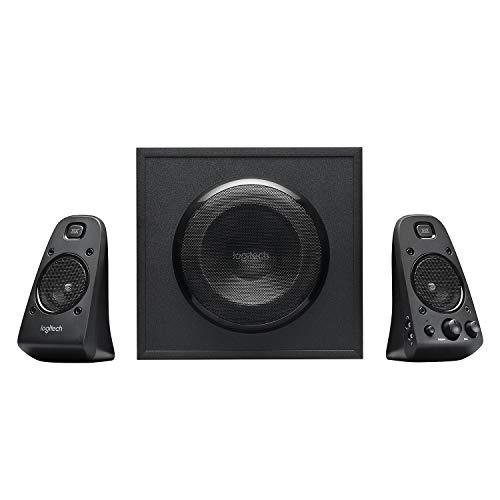
The Z623 is what happens when a desktop system is engineered for rooms rather than for the space between monitor arms. Logitech states 400 watts peak and 200 watts RMS with THX certification, and while cross-brand wattage comparisons are a trap this guide avoids, the system’s intent is unmistakable: this is a 2.1 set that plays film soundtracks and game audio at levels that fill the room behind the desk, not just the chair in front of it. Explosions land with physical weight, orchestral scores keep their scale, and the subwoofer — a substantial enclosure that wants floor space under or beside the desk — supplies the kind of low end that makes a desktop feel like a small cinema.
That power profile suits a particular, common setup: the desk that doubles as the entertainment centre of a bedroom, a studio flat or a games room, where the same screen serves spreadsheets at noon and films at nine. The Z623’s satellites are sized and voiced for that double life, holding together when the volume rises for a movie in a way that laptop-adjacent mini systems cannot. Controls sit on a satellite at hand level, including the bass adjustment you will actually use — because the correct subwoofer level for a quiet strategy game and for an action film are not the same, and a system that makes that adjustment a ten-second reach rather than a crawl under the desk is a system that gets adjusted.
There is a subtler strength here that output figures hide: dynamic ease at ordinary levels. A system with generous headroom does not need to be played loudly to sound complete — it sounds unstrained at the moderate volumes of a Tuesday evening, because its amplifiers and drivers are working well inside their comfort. Owners of powerful desktop systems often report that they bought the volume and stayed for the calm. The Z623, turned down, is a composed desk companion; turned up on film night, it simply reveals what the headroom was for. That dual character is what separates a genuinely capable system from a merely loud one, and it is the quality to listen for if you compare this class in person.
The trade for all this output is footprint and appetite. The subwoofer needs a home, the satellites need desk width, and the system rewards a room where its volume is welcome. In a thin-walled flat at midnight it will spend its life turned down to the level where a Pebble set would have done — which is not a criticism of the Logitech, but a reminder to buy the output your room can actually use.
- Configuration: 2.1 — two satellites plus subwoofer
- Stated power: 400W peak, 200W RMS, per the listing title (maker’s figures)
- Certification: THX Certified, per the listing title
- Controls: satellite-mounted, including bass level
- Optical input: not stated in the listing title — see the Z625 if optical is essential
Strengths
- The strongest stated output in this guide, with the headroom to fill a room from a desk without strain or hardening.
- Subwoofer weight gives films and games genuine physical impact that smaller 2.1 systems only gesture toward.
- Reachable bass control makes the system adaptable between quiet gaming and full film volume in seconds.
Trade-offs
- The subwoofer’s size demands real floor space and a desk layout planned around it.
- No optical input is stated, limiting clean sharing with televisions and consoles.
- Its talents are wasted on a small desk in a quiet household where volume is never welcome.
Best for: an entertainment desk in a bedroom or games room where films and games play at room-filling volume.
Not suited for: a compact laptop desk in a shared flat where the subwoofer has nowhere to live and the volume has nowhere to go.
Logitech Z625 — The optical all-rounder
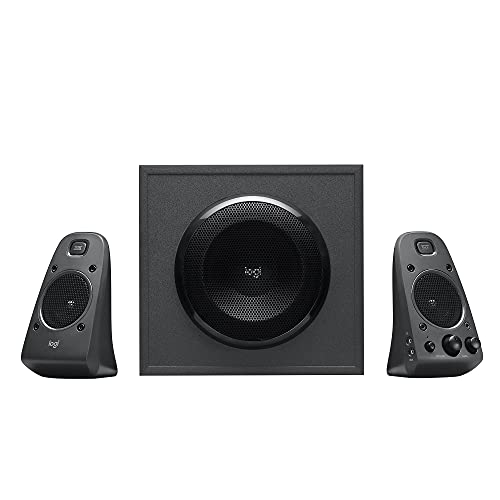
The Z625 answers the question the Z623 leaves open: what if the desk’s screen is also the room’s television? Its listing adds the crucial word — optical input — to the same THX-certified 2.1 formula, and that single connection changes the system’s role in the home. A television, a games console or a streaming box can feed the speakers digitally while the computer stays connected alongside, ending the cable-swapping ritual that quietly kills most shared-desk setups. Systems get used when they are convenient; the Z625 is engineered to remain the room’s sound for everything on the screen, not just for the PC.
Performance expectations should be set by its sibling: this is the powerful end of desktop audio, with a subwoofer that gives films their foundation and satellites that keep dialogue anchored to the screen. For a student room, a bedroom media desk or a small living room where a soundbar was the alternative, the Z625 makes a strong case that a good 2.1 set is the better buy — proper stereo separation at the desk, a real subwoofer rather than a bar’s simulated bass, and controls where your hand already rests. The optical path also future-proofs the purchase against your next computer, since televisions and consoles will offer optical long after analogue outputs have vanished from laptops.
Choose between the two Logitechs on connections alone, because that is the honest difference the listings state. If your screen life is purely a computer, the Z623’s formula stands. The moment a console or television enters the plan — or might within the system’s long life — the Z625’s optical input stops being a feature and becomes the reason.
- Configuration: 2.1 — two satellites plus subwoofer
- Certification: THX Certified, per the listing title
- Signature connection: optical input, per the listing title
- Intended sources: computer plus television or console sharing
- Stated power figures: not printed in the listing title — verify with the maker’s documentation
Strengths
- Optical input lets televisions and consoles share the system digitally, with no unplugging ritual.
- THX-certified output brings cinema weight to a desk that doubles as the room’s entertainment screen.
- A stronger long-term buy than analogue-only rivals as laptop audio outputs continue to disappear.
Trade-offs
- Like its sibling, it needs desk width and subwoofer floor space that small setups may not spare.
- Buyers who will never connect a second source pay for flexibility they will not use.
- Its room-filling character is more than a quiet study or shared office can politely contain.
Best for: a media desk where a television or console shares the screen and the speakers with a computer.
Not suited for: a minimal laptop-only desk where a single USB cable is the whole point of the setup.
Creative Pebble Plus — The tidy-desk minimalist
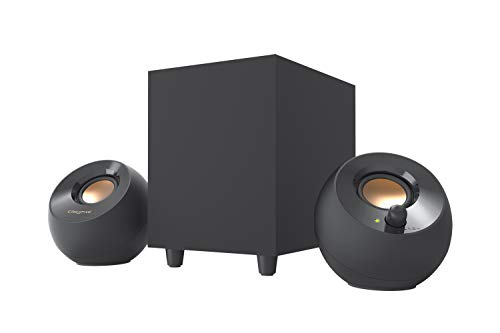
The Pebble Plus starts from a different problem: not “how much sound can a desk make” but “how much sound can a desk make without becoming a cable farm.” Creative’s answer powers the whole 2.1 system from USB — the satellites draw their power from the computer itself — and pairs the brand’s pebble-shaped far-field drivers with a down-firing subwoofer that hides under the desk. The stated total is up to 8 watts RMS, a figure that looks modest beside the Logitechs until you sit in the chair it was designed for: at desktop distance, in the near field, clean and present beats loud and distant, and the Pebble Plus is engineered entirely around that arm’s-length geometry.
Its natural home is the laptop desk — the kitchen table that becomes an office, the small study corner, the student room where the subwoofer must fit beside a rucksack rather than command its own floor territory. Down-firing subwoofers use the floor as part of their design, radiating low frequencies outward from beneath the desk, which keeps the effect present at the seat without a large enclosure announcing itself. Setup is the shortest in this guide: connect, place, play. For video calls, casual music, YouTube and light gaming — the actual soundtrack of most laptop desks — the Pebble Plus lifts the experience so far beyond built-in laptop speakers that the comparison feels unfair, and it does so while leaving the desk looking like a desk.
Consider also who else this system serves: the traveller between desks. Because the Pebble Plus draws power from the computer and packs into a small footprint, it moves — from home desk to a term-time room, from the study to a kitchen table project — in a way no mains-powered THX system ever will. Households with shifting workspaces, students who change rooms yearly, and anyone whose “office” is redefined each season get a 2.1 system that follows them instead of anchoring them. Portability is rarely listed among desktop speaker virtues, because most desktop speakers forfeit it; this one quietly keeps it, and for the right owner that may be its decisive feature.
Set expectations by the physics it cannot repeal. This is not a film-night system for a room of viewers, and it will not pressurise a games room; it is a personal sound field for one listener in one chair, executed with unusual elegance. Buyers whose desks are personal rather than theatrical will find that focus liberating rather than limiting.
- Configuration: 2.1 — two USB-powered satellites plus down-firing subwoofer
- Stated power: up to 8W RMS total, per the listing title (maker’s figure)
- Drivers: far-field drivers angled for desktop listening
- Power source: USB from the computer — no mains adapter for the satellites
- Optical input: not stated in the listing title — verify with the maker’s documentation
Strengths
- USB power removes the mains brick and most of the cabling — the cleanest installation in this guide.
- Near-field tuning delivers clarity and presence at the seat, where laptop listeners actually live.
- The compact subwoofer fits desks and rooms that the THX systems’ enclosures simply cannot enter.
Trade-offs
- Output is personal-scale: it will not fill a room or carry a film night for several viewers.
- USB power ties the system to a computer, limiting use with televisions or standalone sources.
- Bass depth is supportive rather than physical — felt in the desk, not in the chest.
Best for: a laptop desk, student room or home-office corner that wants real 2.1 sound with almost no installation.
Not suited for: a media room expecting cinema volume, or a console setup needing connections a USB system does not offer.

Creative Pebble X Plus — The modern USB-C set
The Pebble X Plus is the Pebble idea revisited for the current desk: USB-C connection, elevated drivers, RGB lighting and a dedicated subwoofer completing the 2.1 layout. Where the original Pebble Plus is minimal to the point of invisibility, the X Plus accepts that a modern desk is also a visual environment — the lighting is part of the product, the angled satellites are designed to be seen as much as heard, and the whole set assumes a laptop or desktop whose single-cable USB-C habits it matches. It is the same near-field philosophy with the presentation turned up.
Functionally, the elevated driver angle deserves more attention than the lighting. Desktop satellites that fire straight ahead fire at your chest; tilting the drivers up toward ear height at sitting distance is what makes near-field systems image properly, placing voices between the speakers rather than smeared across them. Creative builds that angle into the Pebble shape itself, which is why these small systems punch above their stated figures for the seated listener. The subwoofer then does what subwoofers in this guide all do — removes the low octave from the satellites’ job description — in a package sized for the same tidy desks as its sibling.
Choose between the two Creatives by temperament and port. The Pebble Plus is the quiet professional: cheaper in spirit, invisible in presentation. The Pebble X Plus is for the desk that is also a battlestation in miniature — RGB-lit, USB-C native, designed to be looked at. Both serve one listener superbly and a room modestly, and neither pretends otherwise, which is a kind of honesty the louder end of this category could learn from.
- Configuration: 2.1 — two satellites plus subwoofer
- Connection: USB-C, per the listing title
- Drivers: elevated, angled for seated listening
- Presentation: RGB lighting, per the listing title
- Stated power figures: not printed in the listing title — verify with the maker’s documentation
Strengths
- USB-C connection matches current laptops and keeps the installation to a modern minimum.
- Elevated drivers aim the sound at seated ear height, sharpening imaging for the listener in the chair.
- RGB presentation integrates with a styled desk setup instead of hiding from it.
Trade-offs
- Like its sibling, output is tuned for one listener at a desk, not for filling a room.
- Lighting is a matter of taste; desks that prize invisibility should take the Pebble Plus instead.
- USB-centric design keeps televisions and consoles outside its intended world.
Best for: a current laptop or desktop battlestation that wants USB-C simplicity, styled presentation and proper 2.1 sound.
Not suited for: a shared media desk needing optical input, or a traditional office where lit speakers would be unwelcome.
Razer Nommo Pro — The gaming flagship
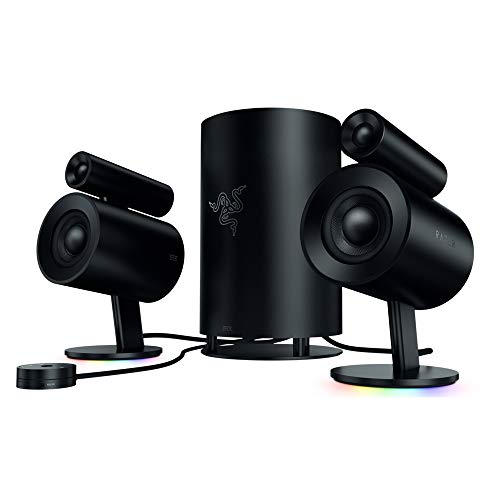
The Nommo Pro is the system in this guide that treats the desk as a stage. Razer’s flagship 2.1 pairs THX certification with Dolby Virtual Surround processing, a downward-firing subwoofer, an LED-illuminated control pod and the brand’s Chroma lighting ecosystem — a specification that reads like a gaming peripheral because that is exactly what it is, built by a company that thinks about the whole battlestation as one designed object. The cylindrical satellites make a visual statement no other pick here attempts, and the control pod — a puck that sits within hand’s reach, glowing softly — turns volume adjustment into part of the desk’s theatre rather than a chore.
Beneath the theatre sits real audio engineering. THX certification sets a floor for performance; the virtual surround processing widens the soundstage for games and films beyond the physical spacing of the satellites, which on a desk are rarely more than a monitor’s width apart; and the subwoofer fires downward to load the floor with the low end that sells scale in game worlds. For the player whose sessions are the desk’s main event — competitive titles where positional breadth matters, cinematic games where atmosphere is half the product — the Nommo Pro is the only pick designed from that chair outward.
Its costs are the mirror of its strengths. The presentation demands a desk that welcomes it; the feature set prices against systems with plainer ambitions; and the gaming-first tuning, with its processed width, will divide listeners who prefer the unprocessed honesty of the Klipsch for music. This is a specialist that knows its specialism, and specialists should be bought by the people they specialise for.
- Configuration: 2.1 — two satellites plus downward-firing subwoofer
- Certification: THX Certified, per the listing title
- Processing: Dolby Virtual Surround Sound, per the listing title
- Controls: LED-illuminated control pod, per the listing title
- Lighting: Chroma-enabled presentation
Strengths
- Virtual surround processing widens game and film soundstages beyond the satellites’ physical spacing.
- The illuminated control pod is the most satisfying volume control in this guide — always visible, always in reach.
- THX certification keeps the gaming theatre anchored to a tested performance standard.
Trade-offs
- The dramatic styling commits the whole desk to a gaming aesthetic that workspaces may not want.
- Processed width will not suit listeners who prefer unprocessed stereo for music above all.
- You pay for the ecosystem presentation as well as the audio — plain-sound buyers get better value elsewhere here.
Best for: a dedicated gaming battlestation where the desk’s sound, light and controls are designed as one environment.
Not suited for: a neutral home office or a music-first desk that wants its speakers visually and sonically invisible.
How Do the Best Computer Speakers With Subwoofer Under 200 Compare?
| System | Power route | Certification / processing | Signature connection or feature | Natural desk |
|---|---|---|---|---|
| Klipsch ProMedia 2.1 THX | Mains | THX Certified | Horn-loaded satellites | Mixed work and entertainment desk |
| Logitech Z623 | Mains | THX Certified | 400W peak / 200W RMS stated | Room-filling media desk |
| Logitech Z625 | Mains | THX Certified | Optical input | Desk shared with TV or console |
| Creative Pebble Plus | USB | Not stated in listing title | Down-firing subwoofer, 8W RMS stated | Tidy laptop desk |
| Creative Pebble X Plus | USB-C | Not stated in listing title | RGB lighting, elevated drivers | Modern styled laptop desk |
| Razer Nommo Pro | Mains | THX Certified, Dolby Virtual Surround | Illuminated control pod, Chroma | Gaming battlestation |
One more pattern hides in the power column: the two USB systems are the only picks that can run entirely from a laptop battery, which sounds like a footnote until the first power cut, the first garden-office afternoon or the first desk rearrangement that leaves the mains sockets on the wrong wall. Small freedoms compound in daily use, and several of these systems’ most loyal owners cite exactly such unglamorous conveniences when asked why they have kept them for years.
The pattern to notice is that connections predict happiness better than power figures do. Every disappointed desktop-audio buyer we have ever heard from bought the right sound with the wrong inputs — an analogue-only set for a television desk, a USB set for a console corner. Read the middle columns of this table as the real decision, and the output claims as supporting evidence.
Why Does a Subwoofer Matter More at a Desk Than Anywhere Else?
A living-room speaker can cheat: it has cabinet volume, floor coupling and distance on its side. A desktop satellite has none of these — it is a small box at arm’s length, and small boxes cannot move the air that low frequencies require. Without a subwoofer, desktop systems face a miserable choice: starve the bass and sound thin, or force the small drivers downward and accept distortion and muddiness in the midrange where voices live. The 2.1 layout resolves the dilemma by division of labour. The subwoofer, whose output is effectively omnidirectional at the frequencies it handles, can live under the desk where space is free; the satellites, relieved of the low octave, stay small, clear and honest.
There is a second, quieter benefit: integration at low volume. Most desk listening happens at levels where human hearing is least sensitive to bass, so a system without a sub can sound balanced at noon and anaemic at midnight. A separate subwoofer with its own level control — reachable on the Logitech and Klipsch designs, set-and-forget on the Creatives — lets you restore that low foundation for evening listening without touching the satellites’ clarity. If you take one setup habit from this guide, take that one: adjust the subwoofer for the volume you actually use, not for the volume of the demonstration track.
How Should You Place a Desktop Subwoofer and Satellites?
Satellites first, because they carry the image. Place them at equal distance from your seat, angled inward slightly, with their drivers as close to seated ear height as your desk allows — on stands, on books, on the monitor’s own footprint if needed. The Pebble designs build this elevation into their angled cabinets; flat-fronted satellites on a low desk will fire at your sternum and sound dull no matter their quality. Keep them clear of the monitor’s shadow and at least a hand’s width from the wall behind, unless the maker voices them for boundary placement.
The subwoofer’s rules are looser but not absent. Under the desk is the classic position, and corners load bass generously — sometimes too generously, producing the one-note boom that gives desktop 2.1 a bad name. If your sub booms, pull it out from the corner in small steps before reaching for the level control; position fixes what level only masks. Keep it off hollow desk panels and lightweight shelves, which it will play like instruments, and on carpet or a solid floor where its energy goes into the air rather than the furniture. Down-firing designs like the Creatives’ and the Razer’s are the most placement-tolerant of all, which is part of their appeal for small desks.
Cables deserve a sentence of respect. A 2.1 system adds satellite leads and a subwoofer run to a desk that already hosts power, display and peripheral wiring; routing them once, loosely bundled and clear of your feet, prevents the slow chaos that makes people abandon good systems. The USB-powered Creatives win this category by subtraction — fewer cables exist to be managed — while the mains systems reward ten minutes with cable ties on installation day.
What Mistakes Do Buyers Make With Desktop 2.1 Systems?
The loudest mistake is setting the subwoofer by enthusiasm. A new owner plays a favourite action scene, keeps raising the bass until the desk shakes, and then lives with a system that turns every dialogue scene into a weather event. The correct setting is the one where you stop hearing the subwoofer as a separate source — where bass seems to come from the satellites and merely has weight. Find it by turning the sub down until it vanishes, then raising it slowly until the sound fills out, and stopping there rather than at the fun level.
The second mistake is buying connections for the computer you have instead of the desk you are building. Desks accumulate sources: a console arrives, a television replaces the monitor, a work laptop replaces the personal one. The Z625’s optical input and the Creatives’ USB simplicity are answers to two different futures, and choosing the wrong one is the most common source of the adapter-and-regret cycle in this category. Think one device ahead.
The third mistake is judging at the wrong distance. Desktop speakers are near-field instruments; evaluating them from across the room — or from a shop’s listening post metres away — punishes exactly the systems, like the Pebbles, that are tuned for the chair. Sit where you will sit, at the volume you will use, with the content you actually consume. Every pick in this guide was assessed on that basis, and it is why the ranking here is a set of desk-specific recommendations rather than a single ladder.
How Do You Calibrate a 2.1 Desk System in the Right Order?
Calibration sounds like a laboratory ritual, but at a desk it is a ten-minute sequence with a definite order, and doing the steps out of order is why so many systems never quite settle. Begin with geometry, before any electronics: satellites equidistant from your seat, angled toward it, drivers near ear height, subwoofer on the floor in its first-guess position. Play a familiar stereo track — something with a centred vocal and a bassline you know by heart — at the volume of an ordinary working day. If the vocal floats between the speakers rather than clinging to one, your geometry is right and everything after this is refinement.
Next, set the subwoofer’s level with the satellites as your reference, not with a test tone. Lower the sub until the bass clearly thins, then raise it in small steps until the sound gains body — and stop at the first step where the low end feels complete rather than impressive. Then check the crossover region with dialogue: a film scene or a podcast, where a sub set too high or crossed too eagerly will thicken male voices into chestiness. If voices sound upholstered, the sub is doing work that belongs to the satellites; back it down. This dialogue test catches more real-world mis-settings than any frequency sweep, because voices are the content desks reproduce most.
Then live with it for three days before touching anything again. Ears adapt, rooms reveal themselves at different hours — the evening’s quiet exposes a hum or an over-warm balance that noon concealed — and a system adjusted in one sitting is usually adjusted for that sitting’s mood. The reachable controls on the Logitech and Klipsch satellites and the Razer’s pod exist for this settling period; the Creatives, with their simpler control sets, ask you to get placement right instead, which is its own discipline. After three days, make one small change at most, and you will find the system has quietly become the desk’s permanent sound.
One calibration trap deserves naming: calibrating with the loudest content you own. An action film’s climax is the worst reference material in the house, because it invites settings that flatter explosions and betray everything else. Calibrate with the median of your listening — conversation, ordinary music, a game’s ambient hours — and the peaks will take care of themselves within any of these systems’ headroom.
Should You Choose 2.1 Speakers, a 2.0 Set or Headphones?
The honest comparison for a desk buyer is three-way. A 2.0 set of good powered speakers — the kind covered in this batch’s Bluetooth desktop guide — offers simplicity and, in the better models, a refinement that suits music-first listeners who sit close and play moderately. What it cannot do is the low octave; physics again. A 2.1 system buys that octave with one more box and one more cable run, and for film, game and electronic-music listeners the exchange is obviously worth it. The question is never whether the subwoofer helps — it is whether your content uses what it adds.
Headphones are the third answer, and for some desks the correct one: shared rooms, night sessions, competitive gaming where a headset’s microphone and isolation are tools rather than compromises. But headphones privatise sound, and a desk that hosts tutorials watched together, music while cooking happens nearby, or calls taken aloud belongs to speakers. Many of the best desk setups in this guide’s experience are quietly both — a 2.1 system for the room’s shared life and a headset hung beside the monitor for the hours that need it — and the budget in this guide’s title buys a genuinely good version of the speaker half of that pairing.
There is also a growth path worth knowing. A 2.1 system is a closed ecosystem: it does its job completely and expands no further. Buyers who suspect they are at the start of a longer audio journey — separate amplifier, passive speakers, eventual surround — should know that none of these six systems is a stepping stone to that world; they are destinations for desks, chosen well. That is not a flaw. Most desks need a destination, not a hobby, and the systems above were picked to be satisfying endings.
What Should You Check Before the System Arrives?
Measure the desk before you measure the speakers. Satellite width is the constraint buyers forget: a dual-monitor desk may have less free horizontal space than a single-screen one, and the larger THX satellites need their share of it, angled and unshadowed. Check the subwoofer’s intended floor position for the unglamorous obstacles — the PC tower already living there, the footrest, the cable channel, the radiator that no enclosure should bake beside. Ten minutes with a tape measure prevents the particular disappointment of a system that sounds wonderful in its product photographs and fits nowhere in your room.
Audit your sources with equal honesty. Count the devices that will want to make sound this year: the computer, certainly; a console; a television; a turntable someone has hinted at for a birthday. Then read the connection columns of the comparison table above as a contract. The Z625’s optical input, the Creatives’ USB routes and the analogue paths of the Klipsch and Z623 are each the right answer for a specific source list, and the wrong answer announces itself only after the boxes are open. If your list is likely to grow, buy the connection you do not yet need — it is the cheapest future-proofing in this entire category.
Finally, plan the power. Mains systems want sockets that may already be committed to monitors, chargers and lamps, and a power strip buried behind the desk is a poor foundation for a system you will use daily. The USB-powered Creatives sidestep the question entirely, which is a larger part of their appeal than their size suggests. Whichever route you take, decide where each cable will run before the system arrives, and the installation becomes the ten calm minutes it should be rather than an afternoon under the desk.
How Does the Desk Itself Change What You Hear?
A desk is an acoustic surface before it is a piece of furniture, and it colours every system in this guide. Sound from the satellites reflects off the desktop and arrives at your ears a fraction after the direct sound, blurring fine detail — the effect engineers call comb filtering, and the reason serious near-field listeners raise their speakers and angle them so the first reflection weakens. You do not need studio treatment to improve matters: elevating the satellites toward ear height, as the Pebble designs do by shape, and keeping the desk’s surface between you and the speakers relatively clear both help audibly. A desk mat under the satellites also damps the small vibrations that a hollow desktop happily amplifies.
The monitor participates too. A large screen between the satellites is a reflective wall in the middle of your stereo image; it is unavoidable in a working setup, but it argues for placing the satellites slightly forward of the screen’s plane rather than tucked behind it, where their output must diffract around the panel to reach you. Ultrawide monitors push satellites wider apart, which widens the image but can hollow its centre if the angle grows extreme — another case where the humble act of sitting in your own chair and listening beats any diagram.
And the room behind you finishes the picture. A desk facing a bare wall returns a slap of reflected sound; a desk in a furnished room with curtains and a rug sounds calmer with the same system at the same settings. None of this requires purchases to exploit — only the awareness that when a 2.1 system sounds different in your room from every description you read, the room is usually the author of the difference, and small moves of speaker, subwoofer or chair are the edits that rewrite it.
Final Recommendation
For most desks, the Klipsch ProMedia 2.1 THX remains the recommendation we would hand a friend: proven, clear, certified and content to serve work and play for years without demanding attention. If your desk is an entertainment centre that plays to the room, take the Logitech Z623 for its output — or the Z625 the moment a television or console joins the setup, because its optical input will quietly save you a hundred small annoyances. Laptop desks should start with the Creative Pebble Plus and step to the Pebble X Plus if USB-C and presentation matter; gaming battlestations end, as they were always going to, at the Razer Nommo Pro.
One closing thought on the budget itself: this price band is where desktop audio stops being a compromise and starts being a choice. Below it, systems cut the subwoofer’s quality or the satellites’ clarity to survive; within it, every pick above is a complete, deliberate design that a maker stands behind with certification, a long production run or a clear philosophy. That is why this guide can recommend six different systems without hedging — the budget, spent on any of these six desks, is a budget well spent.
Whichever system you choose, spend its first evening on the subwoofer setting rather than on volume heroics — the desk that sounds right at conversation level will still be right when the film gets loud, and that balance, once found, is the whole pleasure of a good 2.1 system.
Frequently Asked Questions
Is 2.1 better than a soundbar for a computer desk?
At a desk, usually yes. You sit close and centred, which is exactly where two separated satellites image best, and a dedicated subwoofer produces real low frequencies that a soundbar’s small drivers simulate. Soundbars win for television-first rooms and minimal wiring; 2.1 systems win for the seated listener a desk creates.
Do wattage numbers tell me which system is loudest?
Not reliably across brands. Each maker measures and states power on its own terms — this guide quotes the Z623’s figures as Logitech states them and the Pebble Plus’s as Creative states them, without pretending the numbers are directly comparable. Configuration, driver size and certification are more honest guides to how a system will behave in your room.
Where should the subwoofer go if there is no space under the desk?
Beside the desk on the floor works well, and a corner will add bass weight if the sound runs lean — or boom if it does not, so experiment in small steps. Avoid placing it on the desk itself or on hollow furniture, which will resonate. Down-firing models are the most forgiving when floor positions are limited.
Can I use these speakers with a television?
The Logitech Z625 is the natural choice, with its optical input stated in the listing. Analogue-connected systems can work with televisions that offer a headphone or line output, but levels and remote control become awkward. USB-powered systems like the Creatives are designed for computers and should be bought for computers.
What does THX certification actually guarantee?
It means the system was tested against THX’s published performance standards for output and response and met them. It is evidence of engineering rigour — four of the six systems here carry it — but it does not decide whether a system suits your desk’s size, sources or volume habits, which remain the buyer’s judgement calls.
Will a subwoofer disturb people in the next room?
Low frequencies travel through structures more readily than treble, so a subwoofer is the part of a desktop system neighbours notice. Sensible level setting, keeping the enclosure off shared walls where possible, and lowering the bass control for late sessions keep the peace in most homes — another reason reachable bass controls are a genuine feature.
How long should a desktop 2.1 system last?
Speakers are among the longest-lived electronics in a home because nothing in them becomes obsolete on a software schedule — a well-kept 2.1 system serves for many years, and the ProMedia’s long production life shows how durable the category’s designs can be. Connections age faster than drivers, which is why this guide weighs inputs so heavily: a system whose connections still match your desk in five years will outlast a nominally better one that needs adapters to stay relevant.
Can I add a subwoofer later to a 2.0 desktop set instead?
Only if the 2.0 set provides a subwoofer output — the bookshelf class in this batch’s Bluetooth desktop guide includes a model with a subwoofer line out for exactly that path. Most closed 2.1 systems here are designed as complete ecosystems and are not meant to be disassembled or expanded. Decide which philosophy you prefer before buying: the complete, calibrated ecosystem, or the component path that grows piece by piece.
Related Guides
For neighbouring setups, see best desktop computer speakers with bluetooth under 100 if wireless matters more than a subwoofer, best bluetooth speakers to fill a large room when the desk graduates to a whole space, and best dj studio speakers for near-field monitors aimed at making music rather than playing it.


