What's inside
- Where to buy
- Key Takeaways
- Quick Picks
- How did we judge a size class with a known compromise?
- What does 1080p across 27 inches actually look like?
- Why does this class keep selling if the density is modest?
- How do you set up a 27-inch 1080p desk so the size works for you?
- What mistakes do buyers of this class make?
- How do different game genres judge this class?
- What happens when this screen joins a household, not just a setup?
- How do you decide between this class and 27-inch 1440p with the same money?
- What does the first month of ownership usually teach?
- How should a parent or gift-buyer approach this class?
- Why does this class embarrass its critics in blind comparisons?
- Final Recommendation
- Frequently Asked Questions
- Related Guides
As an Amazon Associate I earn from qualifying purchases. This post may contain affiliate links at no extra cost to you.
gizmoverdict.com is reader-supported. When you buy through links on our site, we may earn an affiliate commission.
Where to buy
Linked names below lead to Amazon listings where size, resolution and refresh can be confirmed in the product titles themselves. The best 27 1080p gaming monitors begin with a confession this guide will repeat until it sticks: at 27 inches, 1920×1080 spreads its pixels noticeably thinner than at 24 inches, and text, fine detail and image edges all soften accordingly. Players buy this size anyway — in large numbers, happily — because gaming is not reading, and because a bigger, faster canvas at an attainable price serves shooters, racers and console sessions in ways a smaller, sharper screen cannot. This article is written for that real buyer: honest about the density, serious about who it suits, and unwilling to pretend the trade-off away.
Three picks carry links from the verified pool: BenQ’s MOBIUZ EX271 at 180Hz, Samsung’s 27-inch Odyssey G3 at 180Hz, and ViewSonic’s VX2726 at 240Hz with G-Sync Compatible status in its listing. Three more screens are discussed in prose — the ASUS TUF 27-inch class, Gigabyte’s 27-inch gaming class and AOC’s 27-inch class — because shoppers will meet them in every search for this category, and because the pool’s verified shelf for this exact size-and-resolution combination holds the three linked models. Each prose entry is labelled, and none borrows a link it has not earned.
Set the expectation precisely before the entries. A 27-inch 1080p panel carries roughly the pixel density of a much smaller, older screen, magnified. In games, especially fast ones viewed from a typical desk distance or a little beyond, the softness largely vanishes beneath motion, scale and immersion. At a close desk with documents open, it never vanishes. The verdicts below therefore split cleanly by lifestyle: the farther you sit and the faster your games, the righter this size is; the closer you sit and the more text your day holds, the more a 24-inch 1080p or a 27-inch 1440p screen will serve you better, and this guide will say so at every relevant turn.
Key Takeaways
- Pixel density is the category’s honest cost: 27 inches at 1080p softens text and fine detail compared with the same resolution at 24 inches.
- Three linked picks cover the pace range: BenQ and Samsung at 180Hz, ViewSonic at 240Hz with G-Sync Compatible status.
- Viewing distance decides satisfaction — these panels reward sitting a little farther back than a 24-inch desk habit.
- Console players are the size’s natural citizens, gaining scale that PC text work cannot use.
- Three further classes from ASUS, Gigabyte and AOC are covered in prose so the whole shelf is mapped, not just the linked part.
Quick Picks
| Pick | Badge | Why it earns its place |
|---|---|---|
| ViewSonic VX2726 240Hz | The pace leader | 240Hz at 27 inches with G-Sync Compatible and FreeSync Premium both in its listing, plus HDMI 2.1 for consoles. |
| BenQ MOBIUZ EX271 | The feature-rich gamer | 180Hz with BenQ’s gaming colour modes, a USB hub and speakers — the most complete desk citizen here. |
| Samsung Odyssey G3 27in (G30D) | The adjustable value | 180Hz with an adjustable stand and Samsung’s gaming toolkit, at the size’s friendliest tier. |
| ASUS TUF Gaming 27-inch 1080p class | Prose only: the durable rival | A widely sold fast-IPS class discussed for its build reputation and shadow-boosting gaming features. |
| Gigabyte 27-inch 1080p gaming class | Prose only: the value engineer | A panel-first, extras-second class that competitive buyers cross-shop against every linked pick. |
| AOC 27-inch 1080p gaming class | Prose only: the warranty contender | A fast class with a strong warranty reputation, covered so its absence from the linked list is explained. |
How did we judge a size class with a known compromise?
The first decision was editorial: this guide would not rank these panels as if the density question were a footnote. Every pick was assessed twice — once as a gaming screen, where the class competes on pace, panel behaviour and features, and once as an object on a real desk, where its softness at reading distance is part of its character. A panel could win the first assessment and still carry a clear not-suited-for line aimed at text workers, because a recommendation that hides its subject’s defining compromise is marketing, not guidance.
Within the gaming assessment, pace led, as it should at 1080p — the resolution’s entire modern purpose is to be rendered quickly. The three linked picks span 180Hz to 240Hz, and the judging weighted how each panel’s ecosystem completes the experience: sync provisions for the cards readers actually own, console-friendliness for the size’s natural audience, speakers and hubs for desks that serve two masters. Response-time claims were treated as class-normal rather than decisive, because at this level every serious panel is fast and the differences live below most players’ perception.
The pool discipline worked as it has throughout this programme: linked status required a verified listing, and this size-and-resolution shelf in the pool holds three. Rather than dilute the list with unverified neighbours wearing links, the guide writes the three famous rival classes in prose, with their identities and characters intact. Readers comparing across the whole market lose nothing but a button on three entries, and gain the assurance that every button present was checked.
Finally, each pick had to answer the distance question in its verdict: at what seating distance does this panel make sense? A recommendation without a distance is incomplete for this class, because the same screen is a delight at a metre and a disappointment at fifty centimetres. The verdicts state their distances in spirit throughout — console chairs and relaxed desks on one side, close competitive rigs steered toward 24 inches on the other.
What does 1080p across 27 inches actually look like?
Numbers first, because they settle arguments. A 27-inch 1920×1080 panel places its pixels at a density in the low eighties per inch; the same resolution at 23.8 inches sits in the low nineties. Neither figure is high by modern standards, but the difference is visible in the specific places eyes are trained to look: the edges of letters, the diagonals in strategy-game interfaces, the fine print in a settings menu, the texture of distant scenery in a slow, beautiful game. Sit at a close desk distance and the pixel grid itself can become faintly perceptible in bright, uniform areas — the screen-door whisper that density critics describe.
Then the counterweight, equally factual. Games are moving images rendered at speed, and motion is a great forgiver: at 180Hz, in a firefight or a racing line, no player alive is auditing pixel structure. Scale also works in the panel’s favour — targets are bigger, minimaps are legible at a glance, and the picture fills more of the visual field, which the brain reads as immersion rather than as softness. Console sessions, viewed from a chair rolled back or a sofa’s edge, complete the case: at those distances the density difference from a 24-inch screen effectively disappears, while the size difference remains in full.
The honest synthesis is a seating chart. Inside roughly sixty centimetres, with text in your day, this class will eventually irritate you. Between seventy centimetres and a metre, in games-first use, it will mostly delight you. Beyond a metre, it is simply a big, fast, affordable screen with no meaningful downside for play. Every verdict in this guide is written from that chart, and readers who locate their chair on it honestly will find the recommendations read as if addressed to them personally — because they were.
Why does this class keep selling if the density is modest?
Because it solves the actual equation most buyers bring to the shop: the largest, fastest screen their graphics card can drive at full pace, at a price that leaves money for the rest of the setup. A mid-range card that would labour at 1440p sings at 1080p, sustaining the 180Hz and 240Hz rates these panels advertise. The alternative purchases each surrender something real — a 24-inch screen surrenders scale, a 1440p screen surrenders frame rate or demands a costlier card — and for players whose evenings are fast games viewed from a relaxed distance, the 27-inch 1080p panel surrenders only a sharpness they were never using.
Consoles complete the explanation. A console outputs what it outputs regardless of the panel’s resolution, so a 27-inch 1080p screen gives console players the size their sessions want with no wasted pixels and, on the ViewSonic pick, an HDMI 2.1 input ready for the consoles’ high-frame modes. Shared rooms follow: the same screen that hosts a PC’s evening hosts a film from the sofa without anyone squinting at a 24-inch picture. The class persists because its compromises are theoretical at the distances its owners actually sit, and its virtues — size, speed, price of admission — are theatrical.
There is also a demographic truth the industry rarely prints: many buyers are upgrading from a television or an elderly 60Hz monitor, and for them a 27-inch 180Hz panel is not a compromise at all but a revelation arriving on two axes at once. Guides written by density purists miss this reader entirely. This one was written for them as much as for the sceptic, with the sceptic’s facts stated in full and the newcomer’s delight taken seriously.
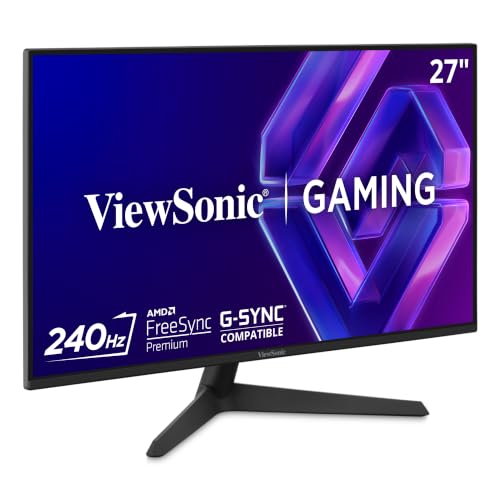
ViewSonic VX2726 240Hz — The pace leader
The VX2726 makes the boldest version of this class’s argument and backs it with the listing to match: a 27-inch 1080p IPS panel at 240Hz, with FreeSync Premium and G-Sync Compatible both named, HDR10, built-in speakers and an HDMI 2.1 input that welcomes current consoles at their best. In a category defined by a compromise, ViewSonic’s answer is to make everything except density spectacular — the fastest pace here, the broadest sync citizenship, and the console connection its rivals in this list cannot equal.
On the desk, the 240Hz rate at this size produces a particular flavour of fluidity: large, sweeping motion that fills peripheral vision and stays coherent, which racing and arena players describe as the size finally justifying itself. The dual sync citizenship means the panel pairs with either card ecosystem without the certification anxieties that haunt this market, and the speakers — modest, present — keep a console session self-contained. For the buyer whose desk is a two-machine entertainment station viewed from a proper distance, this is the most complete single purchase in the article.
The class compromise applies to it undiluted, and one addition: 240Hz at any size asks the PC to feed it, and a modest card will leave the ceiling theoretical while the density remains entirely real. Buyers should therefore perform the honest audit — if your games live at 100 frames, the BenQ below matches your life at a calmer tier. If your hardware and your seating distance both say yes, the VX2726 is the class’s ceiling and its best argument in one panel.
- Panel: 27-inch IPS, 1920×1080, 240Hz
- Sync: FreeSync Premium and G-Sync Compatible named in listing
- Inputs: HDMI 2.1 among its connections; built-in speakers
- Extras: HDR10 support
Strengths
- The fastest panel here, with both sync ecosystems certified in writing.
- HDMI 2.1 makes it the natural console partner of the list.
- Speakers and pace suit a relaxed-distance entertainment desk.
Trade-offs
- Density softness is the class’s, felt fully at close range.
- 240Hz demands strong hardware to be more than a specification.
- Competitive purists at close distance belong on 24-inch panels.
Best for: distance-seated players and console-plus-PC desks wanting maximum pace. Not suited for: close-range text workers or modest graphics cards.

BenQ MOBIUZ EX271 — The feature-rich gamer
BenQ’s EX271 approaches the class as a complete desk citizen rather than a pace entry. Its listing describes a 27-inch Full HD panel at 180Hz with FreeSync, a USB hub, built-in speakers of genuine intent — MOBIUZ panels carry 2.5W speakers where rivals fit afterthoughts — and BenQ’s gaming colour systems, including its game colour database and AI-assisted colour modes. For the player whose 27-inch screen must also be the desk’s hub, its speakers and its evening film display, the EX271 is the pick that arrives with the fewest accessories trailing behind it.
The 180Hz rate is the class’s sweet spot for real hardware, and BenQ’s colour tuning gives this panel a personality the spec sheet undersells: games look authored rather than merely displayed, with shadow detail handled by a brand that has spent years on exactly that problem. The hub deserves its sentence in a trading of blows about density — a laptop docking through the monitor, peripherals following the screen rather than the machine, is a daily convenience that survives every argument about pixels, because it is felt on workdays too.
Its honest debits: the size’s softness applies, the stand and feature set aim at the desk rather than the sofa, and players chasing the absolute pace ceiling should take the ViewSonic. But as the best all-round object in a compromised class — the one that behaves like a complete product instead of a panel with a power supply — the EX271 is the recommendation for buyers who want their 27 inches to do everything, at the distance where everything it does looks good.
- Panel: 27-inch Full HD, 180Hz
- Sync: AMD FreeSync named in listing
- Extras: USB hub, built-in 2.5W speakers, gaming colour modes
- Character: MOBIUZ gaming line, desk-focused features
Strengths
- The most complete feature set here: hub, real speakers, colour systems.
- 180Hz matches the rates mainstream hardware sustains.
- BenQ’s shadow and colour handling flatters dark game scenes.
Trade-offs
- FreeSync positioning; GeForce owners should note the sync chapter.
- Not the pace ceiling of the class.
- Desk-first design; sofa viewers get size without the hub’s benefit.
Best for: one-screen desks that game, dock and watch from the same chair. Not suited for: pace absolutists or buyers who already own hub and speakers.

Samsung Odyssey G3 27in (G30D) — The adjustable value
Samsung’s 27-inch Odyssey G3 is the class’s everyman: a 180Hz Full HD panel with FreeSync, an adjustable stand — the ergonomic inclusion its price tier often omits — and the Odyssey gaming toolkit of Black Equalizer for dark scenes, a virtual aim point and eye-saver provisions. Where the ViewSonic sells ceiling and the BenQ sells completeness, the G3 sells correctness: the right specification, the right stand, the right tier, in the size the buyer came for.
The adjustable stand matters disproportionately at 27 inches, because the correct response to this class’s density is distance and height — the panel floated a little farther and angled truly at the eyes — and a stand that adjusts lets owners find that geometry without buying an arm on day one. Samsung’s gaming features, meanwhile, are mature rather than novel: the black equalisation genuinely helps in dark competitive scenes, and the eye-saver mode acknowledges that this screen’s owners play in long evening blocks.
Its compromises are the tier’s: the panel prioritises gaming contrast character over the colour refinement of the BenQ, speakers are not its story, and its sync citizenship is FreeSync alone. None of that prevents it from being the list’s easiest recommendation for the console-and-PC household that wants 27 inches, real pace and a stand that respects their neck, without paying for a ceiling their hardware will not visit. Correctness, at this size, is a feature.
- Panel: 27-inch Full HD, 180Hz
- Sync: AMD FreeSync named in listing
- Features: Samsung’s dark-scene equaliser, an on-screen aim point and an eye-saver mode
- Stand: adjustable
Strengths
- Height-adjustable stand included at a friendly tier.
- 180Hz with a mature gaming feature set.
- Eye-saver provisions suit long evening sessions.
Trade-offs
- FreeSync only; GeForce variable refresh is unvalidated here.
- No hub or speaker story for desk-citizen duties.
- Colour refinement trails the BenQ’s authored approach.
Best for: value-seeking households wanting size, pace and ergonomics together. Not suited for: colour-critical players or hub-dependent laptop desks.
ASUS TUF Gaming 27-inch 1080p class — Prose only: the durable rival
ASUS’s TUF line occupies the shelf every shopper for this class will stand in front of: fast IPS panels at 27 inches and 1080p, built under a durability-first brand, typically armed with the line’s signature features — shadow enhancement for dark scenes, variable-refresh support, and stands that in many TUF variants adjust more generously than the tier’s norm. The class’s reputation rests on surviving years of daily competitive use without developing the rattles and regrets of flimsier designs, and its owners are loyal in the specific way of people whose equipment never interrupted a season.
It appears in prose because the verified pool for this programme holds no 27-inch 1080p TUF listing we can link with confidence — the TUF ASIN verified in the pool belongs to a 24-inch sibling, and borrowing its link for the 27-inch class would be exactly the substitution this programme refuses. Shoppers drawn to the class should verify the specific variant’s refresh, panel and sync certification on the retailer’s page, since the TUF badge spans several configurations whose details differ more than the family resemblance suggests.
Against the linked picks, the TUF class’s case is build and brand ecosystem; against it stand the linked picks’ verified specifications, available today, in writing. A buyer who values the TUF reputation and finds a variant whose listing confirms the details they need loses nothing by choosing it — they simply shop, for that entry, without this guide’s verification behind the button, which is the only thing prose status ever means here.
- Panel class: 27-inch Full HD fast IPS gaming panels
- Defining traits: durability-led TUF design, shadow-enhancement features
- Caution: configurations vary across the badge; verify per variant
- Status: prose-only; no verified 27-inch 1080p listing in the pool
Strengths
- A build-quality reputation earned across competitive seasons.
- Feature sets aimed squarely at serious play.
- Variants exist across the pace range this class uses.
Trade-offs
- Variant sprawl demands careful listing-checking.
- No verified link from this programme’s pool.
- The class compromise on density applies in full.
Best for: brand-loyal competitors who verify their exact variant. Not suited for: buyers who want this guide’s verification behind the purchase.
Gigabyte 27-inch 1080p gaming class — Prose only: the value engineer
Gigabyte’s gaming line applies an engineer’s allocation to this class: the budget goes to the panel — fast IPS, high refresh, the response behaviour competitive players audit — and the savings come from sculpture, hubs and ceremony. Screens in this class typically add genuinely useful gaming software furniture, such as customisable crosshairs and dashboard overlays, while presenting an exterior that no one will photograph for a design magazine. For the player whose desk faces a wall and whose audience is the game, that allocation is not a compromise but a correct reading of priorities.
The class stands in prose for the by-now familiar reason: the pool’s verified Gigabyte gaming entry at this size is a 24.5-inch model, not the 27-inch 1080p panel this article covers, and near sizes do not inherit links. Buyers cross-shopping the class against the linked Samsung and BenQ should compare the exact variant’s stand adjustment carefully, because value engineering most often visits the stand, and at 27 inches — where distance and angle are the density cure — the stand is not a detail.
Judged purely as panels-for-play, Gigabyte’s class belongs in any shortlist for this category, and its absence from the linked tier says nothing about its merit on a desk. It says that verification is a gate with one key, and the key for this class has not yet been cut. Shop it with the listing open and the variant’s specifications read twice, and it can be the smartest money in the category — spent knowingly, which is the only way this guide ever objects to.
- Panel class: 27-inch Full HD fast IPS gaming panels
- Defining traits: panel-first budgeting, gaming software features
- Caution: stand adjustment varies; verify per variant
- Status: prose-only; pool’s verified Gigabyte is a different size
Strengths
- Pace and panel quality per unit of money is the class’s pitch.
- Useful in-game software furniture included.
- Honest, workmanlike design that ages without embarrassment.
Trade-offs
- Stand and finish reflect the value allocation.
- No verified link from this programme’s pool.
- Hub and speaker provisions are minimal.
Best for: players who spend on panels and audit stands before buying. Not suited for: desk-citizen buyers needing hubs, speakers and polish.
AOC 27-inch 1080p gaming class — Prose only: the warranty contender
AOC’s gaming classes have built their following on a straightforward proposition: fast panels, complete feature sets and warranty terms that treat the buyer as a long-term owner — the pool’s verified AOC entry at 24 inches states a three-year warranty in its very title, and that philosophy runs through the maker’s 27-inch 1080p offerings as well. For a size class bought to serve for years at a relaxed distance, the warranty’s length is not fine print; it is a statement about how long the manufacturer expects the panel to be loved, and by whom.
The 27-inch AOC class typically mirrors the linked picks’ recipe — fast IPS, high refresh, adaptive sync, gaming overlays — with the brand’s own menu character and stand choices. It is covered here in prose because the verified pool holds AOC at 24 inches rather than 27, and this programme does not stretch a verification across sizes. Shoppers should therefore do at the retailer what the pool could not: read the exact model’s listing for refresh, panel type, sync and warranty, in that order.
As with its prose companions, the AOC class’s exclusion from the linked tier is administrative rather than qualitative. A buyer who finds its variant in stock with the specification confirmed is choosing among equals, and may reasonably let the warranty term cast the deciding vote — particularly for a household screen expected to survive console generations and younger siblings alike. Durability, in a class bought for the long relaxed years, is a first-rank feature.
- Panel class: 27-inch Full HD fast IPS gaming panels
- Defining traits: complete feature sets, strong warranty philosophy
- Caution: verify refresh, sync and warranty per exact model
- Status: prose-only; pool’s verified AOC is the 24-inch model
Strengths
- Warranty terms that suit a long-service household screen.
- Feature completeness at value-leaning tiers.
- A recipe that matches the linked picks clause for clause.
Trade-offs
- No verified 27-inch link from this programme’s pool.
- Variant details require the buyer’s own verification.
- Density compromise applies as to every entry here.
Best for: long-horizon buyers who let warranty terms break ties. Not suited for: one-click buyers who prefer the guide’s verification to their own.
How do you set up a 27-inch 1080p desk so the size works for you?
Distance is the whole setup. Begin with the panel a full arm’s length away — measurably farther than your 24-inch habit — and give your eyes three evenings before judging. Most new owners who recoil on day one are sitting at the old screen’s distance with a larger picture, a geometry no panel could survive. Push the desk’s depth to work: if the desk is shallow, a wall mount or arm reclaims the stand’s footprint and buys the crucial centimetres, and at this size those centimetres are worth more than any picture setting in the menu.
Height and tilt follow: the centre of the larger panel at or fractionally below eye level, tilted so its face meets your gaze squarely. A 27-inch screen’s top edge sits higher than a smaller panel’s on the same stand, which is why the adjustable Samsung earns its keep and why fixed-stand picks may want a riser with their name on it. Get the geometry right and the density discussion shrinks to its proper size — a footnote that fast games at a proper distance rarely even raise.
Software completes the accommodation. In games, render at the panel’s native 1080p and let pace do the work; on the desktop, resist enlarging interface scaling to cartoon proportions, which wastes the size you bought — instead, keep text work honest about its place in this screen’s life, and let documents visit rather than reside. Owners who need daily dense text should hear this guide’s recurring counsel plainly: your second screen, someday, is a smaller or sharper one, and this panel will still be the evening’s hero.
What mistakes do buyers of this class make?
Judging the panel in the shop at reading distance leads the list. Showrooms place screens at arm’s length on bright stands, the exact geometry where this class looks its worst, and buyers either reject a screen that would have delighted them at home distance or — worse — accept one under showroom lighting that flatters it and discover the truth at their own desk. Judge by your chair’s real coordinates, or by a retailer whose returns policy lets your chair decide.
The second mistake is the upgrade path error: buying 27-inch 1080p as a stepping stone to 1440p, intending to replace it within the year. Stepping stones in monitors are expensive, because panels depreciate like cars. If 1440p is the destination and the card can nearly drive it, wait and buy the destination; if the card cannot, commit to this class with both feet and enjoy its genuine virtues for its full service life. The unhappy owners of this category are overwhelmingly the half-committed.
Third, feeding the panel badly. A 240Hz screen on a cable or port that caps it at 144, a console on the wrong HDMI input, a laptop dock negotiating a lesser rate — the class’s pace is its purpose, and every link in the chain must honour it. Verify the reported refresh rate in the operating system on the first evening, while the fix is a cable rather than a conclusion about the monitor.
Finally, expecting the size to fix the room. A bigger screen in a glare-struck position is a bigger mirror; in a chair at the wrong height, a larger ache. The class rewards a small amount of environmental honesty — distance, light, seating — more richly than any other in this programme, because its compromise and its cure are both geometric.
How do different game genres judge this class?
Fast shooters and arena titles are the class’s happiest citizens, because their information is motion and their players sit in the geometry the panels reward. Targets scale up, peripheral cues register sooner, and the frame rates that 1080p permits keep the whole picture coherent at speeds where a denser panel on the same card would be stuttering through its own ambition. Players migrating from 24 inches report the same first impression with suspicious consistency: the game did not get prettier, it got bigger — and bigger, in a genre measured in reaction, is a competitive sensation, not merely a cosmetic one.
Racing and flight titles judge nearly as kindly, with one caveat about cockpits. The size fills the windscreen role beautifully from a wheel’s distance, and the pace keeps the scenery’s flow smooth; players who read fine instrument detail at close range, however, meet the density limit in the dials. The community’s answer — move the screen to the distance the genre assumes — works precisely because these rigs already sit farther back than a typist’s desk. Genre, once again, is seating by another name.
Strategy, simulation and role-playing titles file the dissenting report. Their interfaces are text-dense, their maps reward fine detail, and their pace is contemplative — the exact conditions where this class’s compromise is fully visible and its pace is fully wasted. Devotees of those genres who love the size should hear the guide’s clearest steer: the same money in a 27-inch 1440p panel will serve their evenings better, at frame rates their genres never needed to be high. A guide that recommends its own category to everyone recommends it, in the end, to no one.
What happens when this screen joins a household, not just a setup?
It becomes the room’s second television, whether or not that was the plan. Twenty-seven inches is the threshold at which a monitor stops being personal equipment and starts being furniture other people watch: a film for two chairs, a match streamed in the kitchen-diner, a child’s game observed by a parent from the doorway. The linked picks’ speakers and console inputs stop being specifications and start being the household’s evening infrastructure, and the panel’s softness at reading distance — the whole controversy — is simply never raised by an audience sitting two metres away with popcorn.
That social promotion carries one negotiation worth having early: the desk’s owner keeps the geometry. A household screen invites adjustment — tilted for the sofa, brightened for the film, borrowed for a console tournament — and the competitive setup underneath it has opinions about distance and angle that took evenings to tune. Mark the owner’s position, literally if the stand allows memory or figuratively by household treaty, and the screen can serve both lives without either one quietly degrading. Shared technology survives on such small constitutions.
It also changes the replacement calculus in the household’s favour. When the gaming desk eventually upgrades — to 1440p, to an ultrawide, to whatever the next ambition is — a 27-inch 1080p panel does not become e-waste or a cupboard tenant. It retires to the spare room, the kitchen wall, the younger sibling’s first setup, still large, still fast, still entirely adequate for a whole new career. Few classes of monitor retire this gracefully, and buyers who value a long household service record should count it among the class’s real specifications.
How do you decide between this class and 27-inch 1440p with the same money?
Run the experiment your own library offers. List the five games you actually played last month — not the ones you admire — and note, honestly, the frame rates your card sustains in them at settings you refuse to lower. If those rates cluster high and the genres are fast, the 1080p class converts the card’s surplus into size and smoothness today. If the rates already strain at 1080p, or the genres are slow and detailed, the 1440p panel’s clarity will be used every minute while its lower frame rates go unmourned. The library never lies about this; wishlists do, constantly.
Then interrogate the desk’s other life. A screen that hosts documents daily has a second employer, and that employer’s vote counts in proportion to hours. Pure gaming stations can follow the library’s verdict alone; mixed desks should weight the text hours at full value, which usually tips the decision to 1440p or splits it — this class for the gaming station, a sharper panel where the work lives. Households with two desks are spared the compromise entirely, which is why so many 27-inch 1080p panels are bought by people who already own a serious work screen and know exactly which life this one is for.
Finally, price the whole chain, not the panel. The 1440p route may demand the card upgrade that makes it sing; the 1080p route may demand the arm that gives it distance. Either way, the honest total is panel plus its enabling accessory, and comparing totals rather than ticket prices is how this class so often wins on merit instead of on a spreadsheet error. Decide with the totals in view and the library on the table, and the decision tends to stay decided — the surest sign it was made correctly.
What does the first month of ownership usually teach?
Week one is geometry. The panel feels enormous, the mouse pointer seems to commute, and the owner experiments — closer for the shooters, farther for the films — until the chair and the screen reach their treaty. Owners who skip this negotiation and leave the panel at the old screen’s coordinates spend the month vaguely dissatisfied and blame the density, when the true defendant was six centimetres of distance they never granted. The treaty, once reached, is remarkably stable: the same position serves every game, because it was fitted to the room and the eyes rather than to any single title.
Week two is the settings pass that should have been evening one: the refresh rate confirmed at its ceiling in the operating system, the sync mode enabled for the card in use, the picture profile chosen for games rather than inherited from the showroom preset the panel shipped with. A surprising fraction of this class’s owners discover in week two that they had been running at a fraction of the advertised pace — the panel forgiving, the cable or menu less so. This guide’s insistence on first-evening verification exists because week-two discoveries are common enough to be a genre of forum post.
By week four, the density question has usually answered itself in one of two stable verdicts. The distance-seated player has stopped perceiving softness entirely — the brain recalibrates, the games fill the field, and the panel is simply the screen now. The close-seated text worker has not stopped perceiving it, and no further month will argue them out of their own eyes. Both verdicts are data, and the second owner should act on theirs without sunk-cost regret: the panel resells or retires gracefully, and the lesson about their own seating was worth learning before the same mistake was made at 1440p prices.
How should a parent or gift-buyer approach this class?
As the safest large gift in gaming monitors, with one question asked first: where will it sit? A young player’s bedroom desk with a console, a family room’s second screen, a student flat’s everything-display — all are this class’s home turf, and the size delights in a way a technically superior 24-inch panel simply does not when the wrapping comes off. Gifts are allowed to be theatrical; the theatre here is backed by pace and by prices that leave room for the game to go with it.
The question matters because the one wrong home — the close, text-heavy study desk of a discerning adult — is also a plausible gift destination, and there the sharper classes give the longer pleasure. Ask about the desk, not the games: distance and duties decide this class’s fate more than any title list. Gift-buyers who ask that single question join the small company of people whose monitor gifts are still in daily use three years later, un-replaced and un-regretted.
Complete the gift with the enabling details the recipient will not think of: the right cable for their fastest source, and a note — an actual note — telling them to set the refresh rate on the first evening. It reads as a small thing. Across this class’s ownership, it is the difference between the panel as advertised and the panel as half the internet mistakenly believes it to be.
Why does this class embarrass its critics in blind comparisons?
Reviewers who seat volunteers at matched distances, hide the badges and run actual games — rather than test patterns — keep rediscovering the same result: players rate the large 1080p screens by how the evening felt, not by pixel counts they cannot see in motion. The critics are not wrong about the physics; the physics are simply not the experience. A test chart is a static, close, maximal-contrast interrogation that no game performs, while a game is a moving, distant, attention-consuming event in which the visual system happily trades microscopic sharpness for scale and smoothness. Both accounts are true, and the buyer’s task is deciding which account describes their evenings.
The comparison cuts the other way in the desktop test, and honesty requires the symmetry. Seat the same volunteers before documents and code at a working distance and the sharper panels win without suspense — text is a static, close, maximal-contrast interrogation, precisely the test this class fails gracefully. The class’s defenders and critics are therefore both right, about different rooms. This guide has tried to be the map of which room is yours, and its recommendations follow the map rather than either camp’s flag.
That is also why the article ends where it began: with the chair. Specifications can be compared in a spreadsheet in an afternoon, but the verdict on a 27-inch 1080p monitor is delivered by a specific person, in a specific seat, at a specific distance, playing specific games — and every generalisation that skips those specifics is a coin toss dressed as expertise. Measure your specifics, and the class will tell you itself whether it is your bargain or your warning.
What if the desk must serve both close work and distant play?
Then let the panel move. An arm-mounted 27-inch screen can live at work distance for the morning’s documents — where its softness will be noticed but tolerated for short administrative tasks — and swing back to play distance for the evening, where it becomes a different and better product. This dual geometry is the one arrangement in which a mixed desk and this class coexist happily, and it costs an arm rather than a second monitor. Owners who adopt it should set two honest expectations: serious writing still belongs on a sharper screen if one exists in the house, and the arm’s positions should be marked or memorised, because the treaty between distances only works when both parties can find their marks in the dark.
If no arm is possible and the duties are truly equal, the tie-breaker is hours, counted without flattery. The life with more hours wins the panel, and the other life accepts the compromise knowingly — the same rule this programme has applied to shared screens, certified panels and trading desks alike, because it is not really a rule about monitors at all. It is a rule about buying for the life you have, in the chair you own, at the distance you actually sit — which is where this article came in, and where every good monitor decision quietly ends.
One last ownership note belongs to sound. A panel this size in a shared room stops being a private display the moment a film or a final is on, and its speakers — genuinely fitted on the ViewSonic and BenQ picks here — carry rooms better than their wattage suggests, while the Samsung’s silence on the subject means the household’s audio plan lives elsewhere. Decide which life the screen leads before ordering, because retrofitting sound to a wall-mounted panel is a cable-running afternoon, whereas choosing the speaker-equipped pick on day one is a line in a comparison table — the cheapest kind of foresight this entire programme sells, given away free in every article it publishes.
And when the panel finally arrives, give it the evening this guide prescribed: cables verified, refresh confirmed, distance negotiated, one fast game and one slow one played before any verdict is announced to the household. First impressions of this class are famously unstable in both directions, and the owner who judges on the second evening, from the treaty distance, with the settings actually on, is the owner whose opinion a month later still matches the one they formed — a small, repeatable miracle of method over impulse, available to anyone willing to trade one evening of patience for years of a screen that fits the room it was bought for, exactly as its makers — and this guide — intended from the start, before the first frame was ever rendered on it in anger or in joy.
Final Recommendation
Choose by your chair. If it sits at a proper distance and your hardware runs fast, the ViewSonic VX2726 is the class at its most convincing — 240Hz, both sync flags flying, and an HDMI 2.1 welcome for consoles. If the same chair also hosts work, films and a docking laptop, the BenQ EX271 is the complete citizen and this guide’s all-round recommendation. The Samsung G3 is the correct, adjustable, fairly priced answer for households that want the size without the ceremony. The prose classes from ASUS, Gigabyte and AOC stand as verified-by-reputation alternatives for buyers willing to check a listing themselves. And if your chair sits close and your days are made of text, let this article talk you out of its own category with respect: buy the sharper screen, and let 27-inch 1080p belong to the players whose distance makes it not a compromise at all, but the biggest, fastest bargain in gaming.
Frequently Asked Questions
Is 1080p on a 27-inch monitor really that blurry?
Blurry is the wrong word; softer is the honest one. Text edges and fine detail lose the crispness of the same resolution at 24 inches, and at close range the pixel structure can be faintly visible in bright areas. In fast games at a sensible distance, the softness recedes beneath motion and scale — which is why the class thrives despite its reputation. Judge it from your own chair’s distance, not from a forum’s screenshots.
Who should skip this class entirely?
Close-range desk workers whose days are documents, code or spreadsheets; players of slow, detail-rich strategy and simulation titles who study static screens; and anyone planning a 1440p upgrade within the year. Each will be better served by 24-inch 1080p for pace or 27-inch 1440p for clarity. Everyone else — console players, fast-game players at relaxed distances, households upgrading from televisions — is this class’s natural citizen.
Does a 27-inch 1080p monitor suit console gaming?
It is arguably the console’s ideal external screen: consoles render at their own resolutions regardless, so the panel’s pixels are never wasted, the size flatters sofa-edge and chair distances, and models like the ViewSonic here add HDMI 2.1 for the consoles’ high-frame modes. The density debate simply does not apply at console seating distances, which is why so many of these panels live under televisions’ smaller siblings in shared rooms.
What refresh rate should I choose at this size?
Match it to the frame rates your hardware sustains in your games. Players living between 100 and 180 frames are perfectly served by the 180Hz picks; the 240Hz ViewSonic earns its ceiling only for hardware and titles that live above 200. Remember that at this resolution, mid-range cards go further than buyers expect — run your own frame counter for an evening before deciding which tier your life actually occupies.
Why are three well-known classes only in prose here?
Because this programme links only listings it has verified, and its verified pool for 27-inch 1080p gaming holds the BenQ, Samsung and ViewSonic. The ASUS, Gigabyte and AOC classes are real, popular and fully discussed so the comparison is complete; their listings simply have not passed through the programme’s verification yet. Prose status describes our paperwork, not their quality — a distinction this guide maintains everywhere, including where it costs us a tidier list.
Should you wall-mount this size behind a desk?
Wall-mounting is this class’s quiet cheat code, because it manufactures the distance the density asks for out of the room’s own geometry: the panel leaves the desk’s shallow depth behind, the surface below it returns to the keyboard and the notebook, and the screen’s larger face stops crowding the sitter. Check the chosen model’s mounting provision in its listing before assuming — the linked entries’ full specifications carry the detail — and choose a tilting bracket rather than the flattest plate, since a screen this size above a desk wants its few degrees of downward grace. Owners who mount rarely return the panel to a stand, which tells you most of what the experiment would.
Related Guides
Compare the neighbouring choices through our guides to 24-inch G-Sync gaming monitors, 1080p 240Hz monitors for competitive play, and 1440p monitors at 27 inches.


