What's inside
- Where to buy
- Key Takeaways
- Quick Picks
- How did we choose these DJ laptops?
- What should you look for in the best dj laptops under 500?
- Which DJ software habits change the laptop you need?
- The six picks in detail
- How do the six picks compare side by side?
- How do you set up a DJ laptop so a set never stutters?
- What mistakes do DJs make when buying a laptop?
- How does a DJ laptop survive a full night in a working booth?
- What is the honest difference between the two Nitro V models?
- How should a beginner DJ read this ladder?
- What role does the library play in the laptop decision?
- When is a controller the better purchase than a laptop step?
- How long will a DJ laptop at this tier stay gig-worthy?
- Final Recommendation
- Frequently Asked Questions
- Related Guides
As an Amazon Associate I earn from qualifying purchases. This post may contain affiliate links at no extra cost to you.
gizmoverdict.com is reader-supported. When you buy through links on our site, we may earn an affiliate commission.
Where to buy
The best dj laptops under 500 are not the cheapest machines that open DJ software; they are the ones still behaving at the peak of a Saturday night. Every pick below links to the Amazon listing we checked, and the configuration on that listing is the one being judged. That matters more than usual in this guide, because the machines gathered around this keyword’s budget tier are sold in shifting configurations — memory and storage change under a familiar model name — and a DJ laptop bought one configuration down from the one reviewed is a different tool at the gig. Match the spec list under each pick against the listing before you order, particularly the memory figure, which decides more of a DJ set’s safety than anything else on the page.
The hunt for the best dj laptops under 500 needs its axis corrected before its picks make sense, because a DJ laptop is not a small gaming laptop, however often the same machines serve both masters. Serato DJ and Rekordbox, the two platforms that dominate real booths, care about a short and specific list: single-core processor headroom, so the audio engine always has spare capacity; calm latency behaviour, meaning a system whose drivers and background processes do not interrupt the audio stream; enough USB ports for a controller, a library drive and whatever the venue adds; and a screen that stays readable in a dark booth at arm’s length while a crowd is moving. Graphics power, the specification gaming listings shout about, is nearly irrelevant to mixing — it enters this guide only where a pick’s gaming hardware happens to bring processor and cooling benefits with it, and it is never the reason a machine is recommended.
The tier in the keyword is treated honestly, as a ladder rather than a fiction. Some picks sit at the tier’s heart: honest working machines for controllers and club software. Some are the tier’s floor, labelled as such, with their limits stated in daylight. And two are step-ups — machines gathered around this search because DJs cross-shop them constantly — included so that a reader tempted to stretch can see exactly what the stretch buys in set safety and what it does not. Each pick is positioned qualitatively against the tier, as entry rung, working rung or step-up, and no reader will finish a section unsure of which rung they are standing on. DJ controllers and DJ software downloads filled the search results for this keyword; they are equipment and licences, not laptops, and none appears as a pick.
Key Takeaways
- The DJ specification is single-core headroom, calm latency behaviour, USB ports and a booth-readable screen — not graphics power.
- The HP Victus 15 is the working rung’s anchor: the same capable processor as its Acer rival, with double the memory for larger libraries and stems.
- The Acer Nitro V is the tier’s gaming-bred contender, strong in processor and cooling, held back for DJ duty by an eight-gigabyte memory figure that must be understood before purchase.
- The Dell 15.6 Core 3 is the honest floor: fine for two-deck mixing with a modest library, and openly unsuited to heavy stem-separation workloads.
- The NIMO 17.3 buys screen size and expandable memory, a different answer to the booth than raw power.
- The Vivobook S16 OLED and the Nitro V 16S are the step-ups, included so the stretch beyond the tier can be judged in daylight rather than in hope.
Quick Picks
| Pick | Badge | Why it earns its place |
|---|---|---|
| Acer Nitro V RTX 4050 | Best Processor at the Tier | A strong Intel processor and gaming-grade cooling for demanding sets, with a memory caveat stated in full. |
| HP Victus 15 RTX 4050 | Best Working-Rung All-Rounder | Sixteen gigabytes of memory behind the same processor family makes it the safest mainstream choice here. |
| NIMO 17.3-Inch Ryzen 7 | Best Big Screen and Expandability | A seventeen-inch booth canvas and memory that can grow, for DJs who read their sets from across the decks. |
| Dell 15.6 Core 3 | The Honest Floor Pick | A straightforward machine for two-deck mixing and practice, with its stem-work limits declared rather than disguised. |
| ASUS Vivobook S16 OLED | Best Step-Up for Screen and Memory | Thirty-two gigabytes and an OLED panel for the DJ ready to leave the tier behind properly. |
| Acer Nitro V 16S AI RTX 5060 | Best Step-Up for Power | The strongest specification in the guide for DJs whose sets include stems, video or four decks. |
How did we choose these DJ laptops?
We judged every candidate against a Saturday night rather than a spreadsheet. Could it run Serato or Rekordbox with a controller attached, a library drive on another port, effects in use and the analysis of next week’s tracks happening in the background, without the audio ever becoming a topic of conversation? That question decomposes into the guide’s four tests. Single-core headroom, because the audio engine’s real-time thread cannot wait in line. Memory, because libraries, cached analysis and stems all live there during a set. Ports, counted against a real booth’s demands rather than a desk’s. And screen legibility in darkness, glare and motion, because a DJ reads the machine the way a pilot reads instruments — in glances, under pressure, with no time to squint.
Latency behaviour deserved its own discipline, and this guide keeps it in class terms deliberately. The delay a DJ feels between a controller action and its sound is produced by a chain — the software’s buffer setting, the controller’s driver, the operating system’s background manners — and no honest guide assigns a laptop a single latency number from that chain. What can be judged is the machine’s contribution: processor headroom that keeps buffers safely low, a system clean enough not to interrupt the stream, and cooling that does not throttle mid-set. Each pick is assessed on those terms, and the setup section teaches the rest of the chain, because a well-configured modest laptop will outplay a neglected powerful one in every booth on earth.
The tier discipline shaped the final six as much as the tests did. A guide to this keyword that pretends every pick costs the same is lying by layout, so the rungs are named in every heading, every table and every verdict: floor, working rung, step-up. Readers stretching upward deserve to know what the money buys — in the step-ups’ case, memory, screens and processor depth that translate into set safety. Readers at the floor deserve the Dell’s honesty rather than a dressing-up. The ladder is the guide’s honesty made structural.
What should you look for in the best dj laptops under 500?
Processor headroom comes first, read the DJ way. A modern DJ platform’s audio engine lives on real-time threads that prize single-core speed, because the next buffer of audio is due in milliseconds whether the machine is ready or not. Around that engine sit the set’s other appetites: waveforms rendering, a library search across tens of thousands of tracks, effects chains, and — the new heavyweight — real-time stem separation, which splits a playing track into vocals, drums and instruments on the fly and charges the processor and memory handsomely for the magic. A machine with headroom does all of this while feeling bored. A machine without it announces the fact as crackle, and crackle in a booth is not a specification issue; it is a professional event. The Intel Core i5-13420H shared by the two gaming-bred picks is the tier’s known quantity for this work, the Ryzen machines answer in kind, and the Dell’s Core 3 is the floor’s honest limit, fine for mixing and out of its depth in heavy stem work — a sentence this guide will repeat in its section until it cannot be missed.
Memory is the second gate, and at this tier it is the one that separates the picks most sharply. Eight gigabytes, the figure on the Nitro V and the Dell, runs a platform and a library competently and begins to negotiate when stems, analysis and a browser join the set. Sixteen gigabytes, the Victus’s figure, is the working rung’s comfort: the set, the library and the background all resident at once. Thirty-two, on the step-ups, is stem-era abundance. Expandability rewrites the arithmetic where it exists — the NIMO’s expandable DDR5 means its ceiling is a future decision rather than a purchase-day verdict — and buyers should weigh that door heavily at a tier where every other figure is fixed at the till.
Ports are counted in the booth, not the brochure. The controller takes one USB. The library, if it lives externally, takes another. A phone charging, a second controller or a backup drive, the venue’s curveballs — the count reaches three or four on real nights, and a hub in a booth is one more thing to fail, spill on or forget. Every pick here can run a set; they differ in how much company they can host while doing it, and the detailed sections count honestly. Screens close the checklist with the booth’s own criteria: brightness that survives a dark room without blinding, a size that keeps waveforms and library text legible at arm’s length, and a finish that does not mirror the lighting rig. The NIMO’s seventeen inches and the Vivobook’s OLED are the two different summits of that modest mountain.
Storage and build finish the sheet. A DJ library is a life’s work in a folder; 512 gigabytes, the common figure here, holds a large working library, while the step-ups’ terabyte swallows a career without curation. Build matters because booths are hostile in small ways — vibration, heat, cables underfoot, a drink somewhere it should not be — and a machine carried to gigs lives harder than a desk machine. None of these picks is a ruggedized instrument, and the guide’s advice is procedural instead: a real case, a backup of the library, and a second device that can play music while any laptop on earth is being rebooted.
Which DJ software habits change the laptop you need?
Serato DJ Pro and Rekordbox make similar demands in different accents, and the DJ’s features matter more than the platform’s brand. A two-deck mixer working from a prepared library, using effects and loops but no stems, is the lightest professional workload in this guide’s world, and every pick — the Dell included — performs it credibly. Add real-time stems as a core technique and the centre of gravity moves sharply: stems are the single feature that most separates the floor from the working rung and the working rung from the step-ups, and a DJ whose style is built on live vocal extraction should buy memory and processor as if the set depends on them, because it does.
Four-deck mixing, video output to the venue’s screens and live streaming of sets each add their own tax, generally modest and generally payable by the working rung upward. Library size taxes differently: the DJ with a vast, decades-deep collection spends the set in search and analysis, which is memory and storage work, flattering the Victus and the step-ups. The honest exercise is a self-inventory written before the purchase: your platform, your features, your library’s size, your venues’ habits. Laid beside the comparison table further down, that inventory chooses a pick more reliably than any ranking — including this guide’s, whose verdicts are written to be checked against it.
The six picks in detail

Acer Nitro V RTX 4050 — Best Processor at the Tier
Distinguish this Nitro carefully from its sibling later in the guide: this is the fifteen-inch model, built around an Intel Core i5-13420H with an NVIDIA GeForce RTX 4050 laptop GPU, a 15.6-inch FHD IPS display at 165Hz, 512 gigabytes of storage — and eight gigabytes of DDR5 memory. The processor is the recommendation. The 13420H is a genuinely strong chip for DJ work, with the single-core pace the audio engine wants and cores to spare for analysis and effects, and the gaming chassis around it brings the cooling that keeps that pace honest through a four-hour set in a warm booth. The RTX graphics are, for DJ purposes, a passenger — pleasant for the machine’s other life, irrelevant to the mix.
The memory figure is the caveat, and it is printed in this guide without anaesthetic: eight gigabytes is the tier’s tightest working figure, adequate for two-deck and moderate stem work with a tidy system, and the first thing a growing DJ will feel. Buyers should therefore purchase this machine as what it is — the strongest processor at the tier, in a chassis that can be found with memory configurations worth comparing on the listing page itself — and run it with the discipline the setup section teaches: analysed library, lean background, stems used with intention. So run, it is a formidable booth tool. Run carelessly, it will find its ceiling in public, which is the one place a DJ’s ceiling must never be found.
- Chip: Intel Core i5-13420H
- Graphics: NVIDIA GeForce RTX 4050 laptop GPU
- Memory: 8GB DDR5 — read the caveat in this section
- Storage: 512GB SSD
- Display: 15.6-inch FHD IPS, 165Hz
- Role: strongest processor at the tier, gaming-bred cooling
Strengths
- Single-core pace that keeps the audio engine comfortably fed
- Cooling built for sustained loads a booth cannot interrupt
- A strong second life as a gaming machine away from the decks
Trade-offs
- Eight gigabytes of memory is the set’s first ceiling
- Gaming styling and weight travel with it to every venue
- Its graphics power is budget spent outside the DJ brief
Best for: DJs who prize processor headroom and will run a disciplined, tidy system. Not suited for: stem-heavy sets on a sprawling, unmanaged library.

HP Victus 15 RTX 4050 — Best Working-Rung All-Rounder
The Victus is where this guide sends the DJ who asks for one machine, correctly specced, at the working rung. It shares the Acer’s Intel Core i5-13420H and RTX 4050 graphics, in a 15.6-inch FHD chassis running at 144Hz — and then it fixes the Acer’s caveat, doubling memory to sixteen gigabytes of DDR4 with the same 512 gigabytes of storage. That single figure changes the machine’s professional character. Sixteen gigabytes is where a set, a full library, background analysis and the ordinary untidiness of a working night coexist without the system mediating among them, and it is why the Victus, not the Nitro, is the guide’s default recommendation at this tier.
The DDR4 designation deserves a calm sentence: at the loads DJ software generates, the memory’s capacity governs the experience and its generation is a footnote, and no DJ has ever heard the difference between DDR4 and DDR5 through a PA system. The rest of the machine follows the gaming-laptop pattern that serves booths well — real cooling, a full-size keyboard for library searches typed at speed, and a build that expects to be carried. If the guide’s ladder has a rung where the most readers should stand, this is it: the processor the tier trusts, the memory the set needs, and no apologies left to print.
- Chip: Intel Core i5-13420H
- Graphics: NVIDIA GeForce RTX 4050, 6GB
- Memory: 16GB DDR4
- Storage: 512GB SSD
- Display: 15.6-inch FHD, 144Hz
- Role: the working rung’s default recommendation
Strengths
- Sixteen gigabytes ends the memory negotiation for mainstream sets
- The tier’s trusted processor with proper gaming cooling
- The most balanced all-round specification at the working rung
Trade-offs
- Gaming weight and styling come along uninvited
- Storage asks large libraries to curate rather than sprawl
- Its screen is competent rather than booth-special
Best for: working DJs who want the tier’s safest complete answer. Not suited for: buyers chasing the lightest carry or the finest screen.

NIMO 17.3-Inch Ryzen 7 — Best Big Screen and Expandability
The NIMO answers the booth’s questions from a different direction entirely. Its canvas is a 17.3-inch FHD IPS display with a wide viewing angle — the largest screen in this guide, bought for the DJ who reads waveforms, library columns and the next three tracks from across a wide controller setup — and its processor is an AMD Ryzen 7 in a chassis that lists expandable DDR5 memory among its defining features. That expandability is the pick’s second argument and the rarer one at this tier: where every other machine’s memory ceiling is set at purchase, the NIMO’s can be revisited, which converts the guide’s sternest warning into a future option.
The supporting cast is booth-practical: a fingerprint reader for the start of the night, a backlit keyboard for its middle, and fast charging rated at 100W for the emergencies at its edges. Its listing is lighter on some specifics than the big brands’ pages — the exact memory fitted as shipped should be confirmed on the listing itself, since expandable machines are sold at several starting figures — and this guide records that honestly rather than assuming. For the DJ whose sets are read more than they are processed, whose library lives in view, and who likes a machine that can grow, the NIMO is the guide’s most distinctive answer and an entirely rational one.
- Chip: AMD Ryzen 7
- Memory: DDR5, expandable — confirm fitted figure on listing
- Display: 17.3-inch FHD IPS, wide viewing angle
- Extras: fingerprint reader, backlit keyboard
- Charging: 100W fast charging as listed
- Role: the big-screen, grow-later pick
Strengths
- The largest booth canvas here for waveforms and library alike
- Expandable memory defers the tier’s hardest ceiling
- Booth-friendly details fitted as standard
Trade-offs
- Seventeen inches is a serious carry to every venue
- Some specifications need confirming on the listing page
- A younger brand’s support story is a shorter book
Best for: DJs who read big sets from wide setups and value a growth path. Not suited for: minimal-bag travellers or brand-loyal buyers.

Dell 15.6 Core 3 — The Honest Floor Pick
Every ladder needs its floor described truthfully, and the Dell is this guide’s. It is a straightforward 15.6-inch FHD laptop built around an Intel Core 3 100U with eight gigabytes of memory, 512 gigabytes of storage, Intel UHD graphics, Wi-Fi 6 and a 300-nit anti-glare display — a specification that makes no claim it cannot keep. What it can do, it does without fuss: two-deck mixing in Serato or Rekordbox with a prepared library, effects and loops in ordinary use, practice sessions, backup duty and the house-party tier of real DJ work. A beginning DJ could learn the craft on this machine and be limited by their skills for a respectable while before being limited by its processor.
What it cannot do must be said as plainly as the guide promised: large stem-separation workloads are beyond its honest envelope. Real-time stems ask for processor and memory headroom this configuration does not have, and a set built on continuous live stem work will find the ceiling audibly. Nor will it host the sprawling background of analysis, browsers and streaming that the working rung absorbs. None of that makes it a bad machine; it makes it a floor, accurately labelled, at the tier’s entry — and a DJ who buys it knowing exactly that has made a better decision than one who buys a dressed-up machine on a vague promise. Floors exist so that ladders can be climbed deliberately.
- Chip: Intel Core 3 100U
- Graphics: Intel UHD
- Memory: 8GB DDR5
- Storage: 512GB SSD
- Display: 15.6-inch FHD anti-glare, 300 nits
- Role: the entry rung — mixing yes, heavy stems no
Strengths
- Honest two-deck mixing with a prepared library
- Anti-glare screen behaves in lit rooms and practice spaces
- A rational first machine or a dependable backup laptop
Trade-offs
- Heavy stem-separation work is outside its envelope
- Eight gigabytes leaves no room for background sprawl
- Ambitious DJs will outgrow it sooner than any other pick
Best for: beginners, practice rigs and backup duty at the tier’s floor. Not suited for: stem-centred sets or four-deck ambitions.
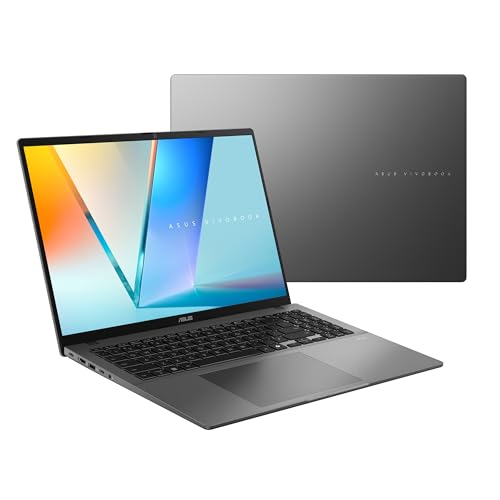
ASUS Vivobook S16 OLED — Best Step-Up for Screen and Memory
The first of the guide’s two step-ups earns the stretch in the two currencies DJs actually spend: memory and screen. The Vivobook S16 pairs an AMD Ryzen AI 7 445 with Radeon graphics, thirty-two gigabytes of memory and a terabyte of storage behind a sixteen-inch WUXGA OLED display. Thirty-two gigabytes is the stem era’s comfort figure — live separation, a vast library, analysis running, nothing negotiated — and the OLED panel is the finest booth screen in this guide, its contrast making waveforms and library text readable in the dark at a glance, at brightness settings that do not light up the DJ’s face like a campfire story.
Its character is the opposite of the gaming picks’: a slim, sober machine that looks at home in a café at noon and a booth at midnight, with a Copilot+ platform whose AI branding this guide weighs at its usual zero for DJ purposes and whose processor substance it respects entirely. The stretch beyond the tier buys no graphics drama and needs none; it buys the absence of ceilings. DJs who have felt the working rung’s limits — in stem density, in library sprawl, in screen fatigue across a long night — will find this the most complete answer to their actual complaints, and the machine in this guide most likely to still feel generous in four years.
- Chip: AMD Ryzen AI 7 445
- Graphics: AMD Radeon integrated
- Memory: 32GB
- Storage: 1TB SSD
- Display: 16-inch WUXGA OLED, 16:10
- Role: step-up for memory, screen and longevity
Strengths
- Thirty-two gigabytes makes stem-heavy sets unremarkable
- The OLED screen is the booth’s best reading instrument here
- A terabyte holds a career’s library without curation
Trade-offs
- A step beyond the tier, bought for headroom rather than necessity
- No discrete graphics for the machine’s gaming second life
- OLED care with static interface elements is a small discipline
Best for: working DJs ready to retire the tier’s ceilings properly. Not suited for: buyers whose sets never taxed the working rung.

Acer Nitro V 16S AI RTX 5060 — Best Step-Up for Power
The second Nitro in this guide is a different machine from the first, and the naming deserves the care the introduction promised: this is the Nitro V 16S AI, a sixteen-inch model with an AMD Ryzen 7 260, an NVIDIA GeForce RTX 5060 laptop GPU, a WUXGA IPS display at 180Hz, and thirty-two gigabytes of memory. Where its fifteen-inch sibling brought the tier’s best processor and its tightest memory, this one brings the guide’s strongest complete specification — processor depth, memory abundance and cooling built for sustained work — and aims it at the DJ whose set has become a production: stems on multiple decks, video in the output, a stream running, and no appetite for compromise anywhere in the chain.
Its graphics card is again partly a passenger for pure mixing and entirely relevant for the video and streaming edges of modern DJ work, which is the honest way to value it. The 180Hz screen is a gaming figure that happens to make waveform motion feel liquid, a small luxury the booth will not refuse. What the stretch buys, in sum, is the end of calculation: buffers chosen for feel rather than safety, stems used as an instrument rather than a risk, and a machine whose second life in gaming or content work is as strong as its first. DJs whose ambitions have genuinely outgrown the tier should step here rather than sideways.
- Chip: AMD Ryzen 7 260
- Graphics: NVIDIA GeForce RTX 5060 laptop GPU
- Memory: 32GB
- Display: 16-inch WUXGA IPS, 180Hz
- Storage: see listing configuration
- Role: step-up ceiling for power users
Strengths
- The strongest complete specification in this guide
- Stems, video and streaming handled without calculation
- Cooling and screen pace inherited from serious gaming hardware
Trade-offs
- The furthest step beyond the tier in this guide
- Gaming bulk travels with its power
- Most two-deck sets will never touch its headroom
Best for: stem, video and streaming DJs whose sets are productions. Not suited for: traditional two-deck minimalists watching the tier.
How do the six picks compare side by side?
| Pick | Rung | Memory | Screen | Defining virtue |
|---|---|---|---|---|
| Acer Nitro V 15 RTX 4050 | Working | 8GB | 15.6-inch FHD 165Hz | Strongest processor at the tier |
| HP Victus 15 RTX 4050 | Working | 16GB | 15.6-inch FHD 144Hz | The balanced default |
| NIMO 17.3 Ryzen 7 | Working | Expandable DDR5 | 17.3-inch FHD | Biggest canvas, growth path |
| Dell 15.6 Core 3 | Floor | 8GB | 15.6-inch FHD anti-glare | Honest entry and backup |
| ASUS Vivobook S16 OLED | Step-up | 32GB | 16-inch WUXGA OLED | Screen and memory summit |
| Acer Nitro V 16S RTX 5060 | Step-up | 32GB | 16-inch WUXGA 180Hz | Complete power ceiling |
The rung column is the table’s conscience. Read it first and the rest of the figures arrange themselves honestly: the floor mixes, the working rung works, the step-ups remove ceilings. Memory is the second sort, because at this tier it predicts a set’s safety more faithfully than any processor name. Everything else — screens, size, second lives in gaming — is the legitimate territory of taste.
How do you set up a DJ laptop so a set never stutters?
The setup is half the product, and it begins with subtraction. A DJ laptop should be a single-purpose instrument on the night: the platform installed and updated well before the gig, the library analysed in advance — every track’s waveform, key and tempo computed at home, never left for the booth — and the operating system’s updates, cloud sync, notifications and background enthusiasms paused or disabled for the session. Most audio dropouts blamed on hardware are authored by a sync service choosing the first dancefloor moment to index a photo library. The cure is a machine whose working night contains nothing that is not the set.
Buffer settings are the one dial every DJ must understand in plain terms. The buffer is the audio engine’s safety margin: smaller means the controller feels more immediate, larger means the stream survives more interruption. Set it at home, at the smallest size that plays your heaviest realistic load — stems running, effects stacked, library searching — without a crackle, then leave it alone at the venue. DJs who chase the lowest number at soundcheck are borrowing against the peak of the night, when the room is hot, the set is dense and the processor is hours into its work. Headroom is not wasted performance; it is the set’s insurance, and every pick in this guide is partly a way of buying it.
Power and connections close the ritual. Play plugged in, always, with the machine’s power plan set for performance rather than battery romance. Connect the controller directly rather than through a hub where the port count allows it, seat every cable as if a dancer’s future depended on it — because a booth’s cables live dangerously — and keep a second device ready to play music through the mixer while any laptop on earth reboots. Then rehearse the disaster once, at home: pull the controller’s cable mid-track, watch what the software does, learn the recovery before an audience teaches it. The DJs whose sets never stutter are not the ones with the strongest laptops. They are the ones whose laptops have the fewest surprises left in them.
What mistakes do DJs make when buying a laptop?
The first mistake is shopping as a gamer: ranking by graphics card for a workload that barely touches it, while the memory figure — the one the set will actually meet — goes unread. The second is its mirror: buying the floor for a stem-built style, because the demo in the shop used two prepared tracks and no features, and discovering the ceiling at a wedding. The third is ignoring the port count until the booth, where the controller, the library drive and the charger’s ambitions meet a two-port reality and a hub becomes load-bearing.
Fourth is buying the screen for the desk at home rather than the booth at midnight — gloss, dimness and small text all forgive themselves in a lit room and confess in a dark one. Fifth is treating the library as an afterthought: no backup, no analysis done in advance, the entire career in one folder on one drive in one bag. Sixth is forgetting that the tier is a ladder. The floor, the working rung and the step-ups in this guide are all honest machines; the mistake is standing on one while believing you bought another, which is why the rungs are printed in the headings and why this guide would rather lose a sale to the truth than win one for a misunderstanding.
How does a DJ laptop survive a full night in a working booth?
A booth is a stress test disguised as a workplace. The room warms as it fills, and a laptop that was comfortable at soundcheck is breathing hotter air by midnight — which is why the gaming-bred picks’ cooling, designed for loads far beyond DJ software, earns its keep in this category even though the graphics beside it does not. Vibration is the second citizen of the booth: bass at working volume is a physical force, and while modern laptops with solid-state storage shrug at what would have killed a spinning drive, the wise DJ still keeps the machine off the subwoofer’s direct line and its cables strain-relieved against the night’s choreography of reaching, leaning and dancing colleagues.
The night’s middle is where memory tells its story. By hour three the set has accumulated its working set — the platform, the analysed library’s hot portion, the stems cache, the requests being searched — and the machine is either inside its comfort or negotiating at its edges. The sixteen and thirty-two-gigabyte picks simply never hold that negotiation in public. The eight-gigabyte machines hold it silently if their owners did the setup work, which is why this guide treats discipline as a specification: on the floor and the Nitro, the DJ is part of the thermal and memory design, and pretending otherwise is how ceilings get discovered in front of a crowd.
The end of the night asks the smallest thing and the most professional: a machine that packs down without drama, a library that syncs or backs up before the bag is zipped, and notes made while the set is still audible in memory. The laptop that serves a career is not the one that survives one spectacular night; it is the one whose hundredth ordinary night is as uneventful as its first. Every pick here can be that machine for the reader its rung describes. The booth does not grade specifications. It grades evenings.
What is the honest difference between the two Nitro V models?
Because the names invite confusion and the listings will sit side by side in search results, the distinction deserves its own plain statement. The Acer Nitro V with the RTX 4050 is a fifteen-inch machine with an Intel Core i5 processor and eight gigabytes of memory: the tier’s strongest processor story, with the tier’s tightest memory figure riding along. The Acer Nitro V 16S AI with the RTX 5060 is a sixteen-inch machine with an AMD Ryzen 7 and thirty-two gigabytes: a step-up in every dimension that matters to a set, at a step-up’s distance from the tier. They share a brand, a design language and almost nothing else that a DJ should care about.
The practical consequence is that no reader should drift between them by accident. A DJ who sets out to buy the fifteen-inch model’s processor and lands on the sixteen-inch model’s page has not made an error — they have found the ceiling pick — but a DJ who buys the fifteen expecting the sixteen’s memory has made the exact mistake this guide’s configuration warnings exist to prevent. Read the badge, read the spec list, read the listing, in that order, and the Nitro name becomes a family you navigate rather than a trap you fall into. The same care applies across this keyword’s listings generally, where a familiar model name is the least reliable sentence on the page.
How should a beginner DJ read this ladder?
Beginners face the ladder’s kindest version of the problem: their technique will be the bottleneck for a long while, and every rung here — the floor included — can host the learning. The beginner’s real risks are not ceilings but habits. A library built without organization, analysis left undone, a system cluttered with everything a new laptop invites: these tax a first machine far sooner than any specification does, and they are all curable by the setup discipline this guide teaches. The beginner who learns that discipline on the Dell or the Victus owns a skill that transfers to every future machine, which is more than can be said for any processor.
The buying advice follows from the habits. If the budget is the budget, the floor is an honest place to start, with the library kept tidy and stems treated as a garnish the machine can occasionally afford. If one step is possible, the working rung’s memory is the step to take, because it forgives the untidiness every beginner’s system honestly contains while the craft is learned. The step-ups are for the beginner who is not really a beginner — the producer crossing over, the mobile DJ professionalizing — and they should be bought for named workloads rather than for reassurance. A ladder climbed one honest rung at a time, with each rung’s limits actually met before the next is bought, is not a slower path to the top. It is the only one that arrives with its skills paid for.
What role does the library play in the laptop decision?
A DJ’s library is the actual instrument; the laptop is its case, its lens and its stage. That relationship should steer the purchase more than it usually does. A compact, curated library — the mobile DJ’s working thousands, ruthlessly maintained — flatters every pick here, including the floor, because search stays instant and storage stays a non-issue. A vast archival library, decades of promos, remixes and just-in-case folders, taxes storage first and memory second, and it argues steadily up the ladder toward the terabyte and the thirty-two gigabytes, not because any single track is heavy but because a career’s accumulation is. DJs should measure their library before they measure any processor: its size today, its growth rate, and the honesty of their curation habits are three numbers that predict satisfaction better than a benchmark.
Analysis is the library’s hidden workload and the booth’s best friend. Every track’s waveform, tempo, key and cue points are computed once and stored, and the DJ who lets that computation happen at home — in bulk, overnight, on a machine with nothing else to do — arrives at the venue with a library that merely plays. The DJ who defers it asks the laptop to analyse and perform simultaneously, a double shift that the working rung tolerates and the floor resents. This is why the setup section reads like housekeeping and behaves like performance: in DJ computing, preparation is not separate from power. It is a form of it, available at every rung, priced in evenings rather than in specifications.
When is a controller the better purchase than a laptop step?
Often enough that this guide would be failing its readers not to say it. The laptop ladder is seductive because it is legible — rungs, figures, verdicts — but a working DJ’s weakest link is frequently elsewhere: a controller whose jog wheels and faders fight the style being played, a sound path that runs through a laptop’s modest headphone output where a controller’s proper interface belongs, headphones that lie about the low end in a room that will not. A DJ standing on the working rung with a controller a generation behind their technique will gain more from the controller than from the step-up, and this guide’s blessing goes with that purchase even though no controller can ever be a pick in a laptop guide.
The ordering principle generalizes beyond controllers. Buy the laptop that makes the set safe — the rungs exist to define exactly that — and then stop, and let the next purchases be musical: the controller, the headphones, the library’s missing years, the backup drive. The step-ups in this guide are for the moment the set itself outgrows safety, a moment that announces itself in specific frustrations rather than in a general feeling that newer must be better. Until that announcement, the most professional sentence in DJ equipment is the one this guide ends its advice with: the working rung, well set up, is not a compromise awaiting rescue. It is where the music is.
How long will a DJ laptop at this tier stay gig-worthy?
Longer than the tier’s reputation suggests, because DJ software evolves with unusual courtesy toward the machines already in booths — the platforms’ publishers know their customers perform in public and cannot be stranded by an update. A working-rung laptop bought today, with its sixteen gigabytes and its strong processor, should serve a professional calendar for years, its limits arriving as feature appetites rather than as failures: stems growing denser, libraries growing wider, video joining more sets. The step-ups postpone those arrivals by a generation. The floor’s clock runs fastest, not because it is weak but because its headroom was spent at purchase, and its second career as a backup machine — the role this guide keeps recommending for it — is a dignified and genuinely useful retirement.
The owner’s habits write most of the timeline. A machine kept single-purpose, its library analysed and backed up, its system lean and its updates scheduled rather than ambient, ages like an instrument. The same machine used as the household’s everything — games, torrents of software trials, a desktop of unfinished downloads — ages like a shared family car. DJs who can keep a laptop dedicated own the cheapest longevity in this guide, available at every rung, and it is why the setup section’s puritanism is not fussiness. It is the maintenance schedule of a professional tool, written by everyone who ever watched a neglected machine choose the first dancefloor of the night to assert itself.
One more venue deserves a sentence before the verdict, because it is where this tier quietly earns its living: the residency. The bar, the small club, the restaurant whose DJ plays four nights a week to a room that knows the set’s shape — residency work is the least glamorous and most honest test of a laptop, a marathon of ordinary nights where reliability compounds and spectacle is worthless. The working rung was practically designed in this room. A residency DJ does not need the step-ups’ ceilings; they need a machine that starts every night like the last one ended, and the discipline of a library and a setup that never improvise. If that is your working life, buy the middle of this ladder, set it up once with unreasonable care, and spend the savings on the records. The room will notice the records. It will never notice the laptop, which is the residency’s definition of a perfect machine.
And when the new machine arrives, give it its first night at home rather than at a venue: a full-length practice set at working volume, stems and effects and searches all exercised, the backup path rehearsed, the buffer set by evidence. A laptop should meet its first crowd already knowing its owner, its library and its limits — a small professionalism that costs one evening and pays out across every night the machine will ever work.
Keep the library’s backup on the same schedule as the gigs themselves — after every night that added tracks, edits or cue points worth keeping. A library is the one irreplaceable object in the booth; laptops, controllers and even the venue can all be substituted by Friday, but a decade of analysed, cued and organized music exists exactly where its owner put it. The picks in this guide were chosen partly for how gracefully they host that asset. Protecting it is the owner’s half of the bargain, and it is the cheapest professionalism in this entire guide.
Finally, trust the ladder over the listing. Configurations drift, model names multiply and a page can change its figures between a recommendation’s writing and its reading; the rungs do not drift, because they describe workloads rather than boxes. Match your set’s honest demands to the rung that covers them, verify the configuration that arrives, and the purchase will survive its own listing’s revisions — which is as close to future-proof as this tier, or any tier, honestly gets.
The booth, in the end, is a place where preparation becomes indistinguishable from talent. Nobody in the crowd can see the analysed library, the rehearsed recovery or the buffer set by evidence — they can only hear a night that never falters. Every section of this guide exists to make that hearing more likely, on whichever rung your work honestly stands.
Final Recommendation
Stand on the working rung unless your set tells you otherwise: the HP Victus 15 is this guide’s answer for most DJs, the trusted processor with the memory a real night consumes, while the Acer Nitro V serves the processor-first buyer who will run a disciplined system and respect its memory caveat. Take the NIMO if your sets are read from a wide setup and a growth path appeals, and take the Dell without a moment’s shame if your mixing is two decks and a prepared library — it is the floor, honestly built, and floors are how careers start. Step up when the set itself demands it: to the Vivobook when stems, library sprawl and screen fatigue are your named complaints, to the Nitro V 16S when the show has become a production with video and streams. Whatever rung you choose, set the machine up like a professional, analyse the library before the night, and keep a second way to play music within arm’s reach — because the crowd will never remember your specifications, only whether the music stopped, and the whole purpose of every laptop in this guide is that it never, ever does.
Frequently Asked Questions
Can a laptop at this tier really run Serato or Rekordbox at a gig?
Yes — the working-rung picks run both platforms professionally, and even the floor pick mixes two decks credibly with a prepared library. The platforms themselves are not heavy; the weight arrives with features, above all real-time stems, and with untidy systems running background services into the audio stream. Choose the rung that matches your feature use, set the machine up as the setup section describes, and the tier is a working tier rather than a compromise.
How much do stems change the laptop I need?
More than any other single feature. Real-time stem separation is a continuous, hungry computation that draws on processor headroom and memory together, and it redraws this guide’s ladder: an occasional stem flourish is within the working rung’s manners, a style built on constant live separation belongs on the thirty-two-gigabyte step-ups, and the floor pick’s section states plainly that heavy stem work is outside its envelope. If stems are your signature, buy for them directly and skip the rung that would have charged you for the lesson.
Is eight gigabytes of memory enough for DJ software?
For the platform, a prepared library and a tidy system, yes — two of this guide’s picks ship with it and both are recommended within their stated limits. It becomes the ceiling when stems multiply, analysis runs during the set, or the machine’s night includes browsers and streaming. The figure is not a verdict; it is a discipline requirement. DJs who keep their systems lean can work at eight. DJs who want the machine to absorb their habits should buy sixteen or more.
Do I need a gaming laptop to DJ?
No — you need the things gaming laptops happen to contain at this tier: a strong processor, real cooling and a full-size keyboard. The graphics card that justifies their existence elsewhere is a passenger in the booth. That is why this guide also recommends a big-screen productivity machine, an OLED step-up with integrated graphics and an honest floor laptop with no gaming lineage at all. Judge the DJ specification — headroom, memory, ports, screen — and let the gaming branding fall where it may.
What should I carry as a backup?
A second way to make music, tested before the night: a phone or tablet with the streaming or local library your licence allows, a small drive with the evening’s essential tracks, or a second laptop — a role the floor pick serves admirably once a step-up becomes the main machine. The backup’s job is not to reproduce the set; it is to keep the room dancing through the ten minutes any failure needs. DJs are remembered for those ten minutes more than for any specification they ever bought.
Related Guides
DJs building out a wider creative setup can move on to best affordable music production laptops, best affordable laptops for currency trading and best laptops for machine learning and coding.


