What's inside
- Where to buy
- Key Takeaways
- Quick Picks
- What Makes a Windows Tablet Genuinely Mid-Range?
- How Much Memory and Storage Does the Middle Tier Really Need?
- How Should a Mid-Range Buyer Choose Between Snapdragon and Intel?
- What Does vPro Actually Mean for a Small Buyer?
- Mid-Range, Side by Side: Which Trade Does Each Machine Make?
- Which Mid-Range Mistakes Cost Buyers the Most?
- How Should You Configure the Rest of the System Around a Mid-Range Tablet?
- What Is It Like to Travel With a Mid-Range Detachable for a Week?
- How Do the Screens Compare for Long Working Days?
- What Happens When a Mid-Range Tablet Becomes the Only Computer?
- How Should You Read the Renewed Listings You Will Inevitably Be Shown?
- Which Accessories Deserve Mid-Range Money?
- A Word on Resale and the Next Upgrade
- Three Buyers, Three Different Right Answers
- What Should You Test in the First Fortnight?
- Does the Pen Deserve a Place in a Mid-Range Budget?
- A Note on Noise, Heat and the Working Environment
- Final Recommendation
- Frequently Asked Questions
- Related Guides
As an Amazon Associate I earn from qualifying purchases. This post may contain affiliate links at no extra cost to you.
gizmoverdict.com is reader-supported. When you buy through links on our site, we may earn an affiliate commission.
Where to buy
The best mid range windows tablets live in the most contested territory in computing: too serious for the budget shelf, too sensible for the flagship tax. This is the tier where professionals who expense nothing and enthusiasts who know exactly what a specification is worth both shop, and it is where the Windows tablet market currently does its most interesting work. The picks below are four linked machines and two deliberately unlinked ones, and the unlinked pair may be the most instructive part of the guide.
Start with the shape of the field. Microsoft’s Surface Pro line dominates the tier in two processor dialects — a vPro-badged Pro 11 configuration for business, a 12-inch Pro for Business model on Snapdragon X Plus, and the Intel Pro 10 with memory to spare — while ASUS contributes the Flow Z13 in its most powerful Ryzen AI MAX+ 395 form, a gaming-creator detachable that happens to share the tier’s price band. Around those linked machines orbit two names that Amazon sells only as renewed stock: Dell’s Latitude 7350 Detachable and the Core i7 configuration of the Surface Pro 9. Both are discussed as prose-only picks, with the renewed fact stated in the open, because a mid-range buyer comparing total costs deserves the whole map.
Mid-range discipline is the theme. Every machine here makes one clear trade and refuses the others: size for power, Intel certainty for ARM efficiency, gaming muscle for office calm. The reviews name each trade in its own terms, and the guide sections that follow the reviews explain how to tell which trade your own working life can afford.
Key Takeaways
- Two prose-only picks — the Latitude 7350 Detachable and the Surface Pro 9 Core i7 — are renewed-only on Amazon; they are described, not linked, and the reasons are spelled out in their sections.
- The Surface Pro 11 vPro configuration is the business-ready face of the current flagship: 16GB of memory, 512GB of storage, Windows 11 Pro.
- The 12-inch Surface Pro for Business is the tier’s portability play, on Snapdragon X Plus efficiency.
- The Intel Surface Pro 10 with 32GB of memory is the mid-range answer for virtualisation, big datasets and total software certainty.
- The Flow Z13 with the Ryzen AI MAX+ 395 is the tier’s wild card — a creator and gaming detachable with 32GB of memory and a terabyte of storage.
Quick Picks
| Pick | Badge | Why it earns its place |
|---|---|---|
| Microsoft Surface Pro 11 vPro 16GB/512GB | Business-ready current flagship | The Pro 11 in its vPro, Windows 11 Pro configuration — the current Surface platform dressed for work. |
| Microsoft Surface Pro for Business 12-inch (2025) | Portable business Surface | The 12-inch body and Snapdragon X Plus efficiency, in the for-Business build with Windows 11 Pro positioning. |
| Microsoft Surface Pro 10 32GB/512GB | Intel memory heavyweight | Thirty-two gigabytes of memory on an Intel vPro platform — the tier’s answer to heavy multitasking and legacy certainty. |
| ASUS ROG Flow Z13 Ryzen AI Max+ 395 | Creator-gaming detachable | A 180Hz Nebula screen and the strongest integrated graphics in the tier, in a tablet that detaches. |
| Dell Latitude 7350 Detachable (prose-only) | Intel business alternative, renewed | The fleet detachable Amazon sells as renewed stock; bought via Dell or a refurbisher, it undercuts the tier. |
| Microsoft Surface Pro 9 Core i7 (prose-only) | Previous generation, renewed caveat | The i7 Pro 9 listings verified are renewed; the clean new i5 is linked in our inexpensive guide instead. |
What Makes a Windows Tablet Genuinely Mid-Range?
Not the price alone — the absence of apology. A mid-range machine should run a full professional day without the owner managing it: enough memory that the tab count is a preference rather than a limit, enough storage that the drive is not a weekly negotiation, a screen that does not tire eyes across eight hours, and a processor that treats video calls, documents and a dozen applications as one job rather than twelve emergencies. Every linked pick here clears that bar with room; the differences between them are about direction, not adequacy.
The tier is also where processor choice becomes a genuine fork rather than a budget accident. Snapdragon machines offer the modern tablet temperament — instant wake, long standby, quiet running, the Copilot+ feature set. Intel machines offer the older and deeper promise that everything you own will run. In the budget class that fork is decided by money; here it is decided by software inventory and working style, which is a more interesting decision and the one the following sections keep returning to.
Verification, as throughout this batch of guides, decided the linked list. New listings with configurations stated plainly earned links; respected models whose Amazon presence is renewed stock earned honest prose. The mid-range buyer is exactly the reader most likely to be offered a renewed bargain by a search algorithm, and exactly the reader best equipped to evaluate one — provided the guide labels it, which this one does.
How Much Memory and Storage Does the Middle Tier Really Need?
Sixteen gigabytes of memory is the tier’s centre of gravity, and the two 32GB machines in this guide exist for identifiable reasons rather than for bragging. The Pro 10’s memory serves virtual machines, large datasets, development environments and the professional habit of never closing anything. The Flow Z13’s serves games and creative applications whose appetites are honest and large. A buyer whose day is documents, calls and research will live happily at 16GB for years; a buyer who can name the application that eats memory should buy the memory it eats.
Storage divides similarly. The 512GB configurations are the tier’s sensible default — local libraries, a serious application set and breathing room for updates. The 12-inch business model’s 256GB is a deliberate cloud-first specification, defensible for a managed professional whose files live on company drives, and a false economy for an independent buyer with local archives. The Flow Z13’s terabyte is the creator’s answer: media projects are measured in hundreds of gigabytes, and external drives on a shoot are a workflow tax. As ever in this category, the storage line is a lifestyle statement; read it as one.

Microsoft Surface Pro 11 vPro 16GB/512GB — Business-ready current flagship
This configuration of the Pro 11 is the one a company buys when it wants the current Surface platform without a deployment conversation. The vPro designation and Windows 11 Pro place it inside the managed world — the world of IT policies, remote management and security baselines — while the hardware underneath is the Copilot+ generation: a 13-inch touchscreen, 16GB of memory and a 512GB SSD in the black finish. For the individual professional, the same badges translate into a simpler promise: this is the Pro 11 specified the way Microsoft’s own business customers specify it.
In daily character it is the modern detachable at full composure. Wake is instant, the fan story is a quiet one, documents and calls and research coexist without negotiation, and the Copilot+ features are present for buyers building them into their workflow. The screen in this configuration is the range’s standard panel rather than the OLED flagship’s, which suits its brief — this is a machine for people whose screens show work. Its ARM platform carries the standing instruction of this entire guide: inventory your oldest essential software first, because the one category Snapdragon cannot charm is a driver written for Intel a decade ago.
Against the guide’s other Surfaces, its identity is balance. The 12-inch model below is smaller; the Pro 10 is more muscular and more traditional; this one is the current platform at the tier’s centre, in the configuration a purchasing department would nod at. Mid-range buyers often ask which Surface is simply the safe, current, professional choice. This listing is that answer wearing a vPro badge.
- Panel: 13-inch touchscreen
- Platform: Surface Pro 11 with vPro technology
- Memory and storage fitted: 16GB, 512GB SSD
- Operating system: Windows 11 Pro
- Colour: Black
Strengths
- The current Copilot+ platform in a business-approved configuration, deployable and personal at once.
- Memory and storage sit at the tier’s sensible centre — no weekly management required.
- Windows 11 Pro and vPro suit professionals whose workplaces have opinions about hardware.
Trade-offs
- The OLED screen lives in a different configuration; this one prioritises the working brief.
- Snapdragon software checking remains the buyer’s homework for legacy tools.
- Keyboard and pen are separate lines in the budget, as Surfaces arrange things.
Best for: a professional or small business standardising on the current Surface platform for real work. Not suited for: a legacy-software hostage, or a buyer whose heart is set on the OLED panel.
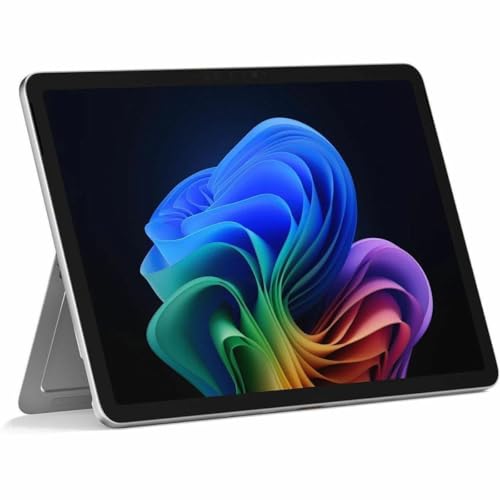
Microsoft Surface Pro for Business 12-inch (2025) — Portable business Surface
The 12-inch Surface Pro for Business takes the newest small Surface body and dresses it for managed work: a Snapdragon X Plus processor, 16GB of memory, 256GB of storage and a Platinum finish, in the for-Business line with Windows 11 Pro positioning. Its proposition is that portability and professionalism are not opposites. The machine that fits the smaller bag, the train table and the site cabin is also the machine the IT department can deploy, image and support like any other fleet Surface.
The X Plus chip deserves a word of calibration, because it sits a step below the Elite silicon in Microsoft’s range and invites an inferiority it has not earned. For the work this machine is bought for — documents, calls, browser platforms, annotation, travel — the Plus is not a compromise that announces itself; it is the efficient centre of the platform, with the same instant temperament and Copilot+ identity. Buyers whose workloads include sustained heavy processing should look at the tier’s bigger machines; buyers whose workloads include airports should look here.
Storage is the configuration’s declared discipline. At 256GB this is a cloud-first professional machine, happiest in OneDrive or company storage, and an independent buyer with local archives should either budget an external drive or step to a 512GB sibling. Named plainly, that discipline is a feature of the brief rather than a trap — fleets issue these precisely because the files live on the network.
- Panel: 12-inch touchscreen
- Chip: Snapdragon X Plus
- RAM / SSD: 16GB / 256GB
- System: Windows 11, Copilot+ PC, for-Business build
- Finish: Platinum
Strengths
- The most portable professional Surface — fleet manners in the smallest current body.
- Efficient Snapdragon platform suits travel days and hot-desking without charger anxiety.
- Business build and Pro positioning keep IT departments and their policies onside.
Trade-offs
- 256GB of storage presumes cloud or network files; local archivists should look elsewhere in this guide.
- The smaller screen tightens side-by-side work compared with the 13-inch models.
- ARM compatibility checking applies, as with every Snapdragon pick here.
Best for: a travelling professional inside a managed environment, or an independent whose files genuinely live in the cloud. Not suited for: a local-archive keeper, or a big-screen multitasker.

Microsoft Surface Pro 10 32GB/512GB — Intel memory heavyweight
If the other Surfaces in this guide are answers, the Pro 10 is an argument: that in the middle tier, memory and certainty can matter more than novelty. This configuration pairs the 13-inch Pro 10’s Intel platform — vPro business technology included — with 32GB of memory and a 512GB SSD under Windows 11 Pro. Thirty-two gigabytes is the figure that changes what a tablet can be asked to do: a virtual machine alongside the office suite, a dataset that would make a lesser machine swap itself breathless, a development environment and a browser’s worth of research coexisting without the daily triage of closing things.
The Intel badge carries the second half of the argument. Every driver, dongle, legacy client and line-of-business application in the Windows world was built for this architecture, and the Pro 10 runs that world natively, without translation and without the small print that follows ARM machines through every guide including this one. For a professional whose tools are old, certified or simply non-negotiable, that is not a nostalgic preference; it is the job description.
The costs are the platform’s known costs — endurance that trails the Snapdragon machines away from a charger, and no Copilot+ headline features. A buyer who works desk-to-desk, dock-to-dock, will rarely meet the first cost and may never miss the second. In exchange they get the mid-range’s most capable traditional computer, in a body that still detaches for the meeting room.
- Panel: 13-inch touchscreen
- Platform: Intel with vPro technology
- RAM / SSD: 32GB / 512GB
- System: Windows 11 Pro
- Finish: Platinum
Strengths
- Memory headroom that turns a tablet into a genuine multitasking and virtualisation tool.
- Total Intel software and peripheral certainty — the end of the compatibility conversation.
- Business platform and Pro system suit managed, professional deployment.
Trade-offs
- Unplugged endurance is the Snapdragon machines’ game, not this one’s.
- The Copilot+ feature set belongs to the other branch of the Surface family.
- Its strengths are wasted on a documents-and-email workload that 16GB handles easily.
Best for: a developer, analyst or professional with heavy multitasking or legacy software that must run natively. Not suited for: a long-haul traveller, or a light user paying for headroom they will never visit.

ASUS ROG Flow Z13 Ryzen AI Max+ 395 — Creator-gaming detachable
The Flow Z13 in this configuration is the mid-range tier’s ceiling disguised as a tablet. The Ryzen AI MAX+ 395 — the strongest of AMD’s current integrated platforms — drives a 13.4-inch ROG Nebula touchscreen at 2.5K and 180Hz, with 32GB of memory and a terabyte of SSD in an off-black convertible body. Those are workstation-adjacent numbers. They arrive in a machine whose keyboard detaches, which makes this the pick for readers whose work and play both involve graphics: video editors who travel, 3D dabblers, photographers with heavy catalogues, and players who want a real gaming screen in a bag-friendly form.
Integrated graphics used to be a confession; this platform makes it a claim. The MAX+ 395’s graphics handle modern games at sensible settings and creative applications’ GPU acceleration with a confidence that reorders what a detachable can be. The 180Hz panel is not a gaming garnish either — motion clarity at that refresh rate changes fast games entirely and lends even desktop scrolling an ease that 60Hz screens cannot imitate. Heat and fan presence under sustained load are the honest costs, as they are for every compact performance machine.
As an office computer it is gloriously overqualified, and buyers should be clear-eyed that they are paying for the graphics ceiling. If the ceiling will be used — weekly, for work or for play — the Z13 is not an indulgence but the only machine in this guide that does its job. If it will not, the Surfaces above spend the same tier’s money on calm, endurance and badges that offices respect.
- Display: 13.4-inch ROG Nebula touch panel, 2.5K resolution, 180Hz refresh, 3ms response
- Chip: AMD Ryzen AI MAX+ 395
- RAM / SSD: 32GB / 1TB
- Format: convertible 2-in-1 gaming notebook, detachable class
- Finish: Off Black
Strengths
- The strongest graphics and joint-largest memory in the tier, in a detachable body.
- A terabyte of storage matches creator libraries without external-drive choreography.
- The high-refresh Nebula screen serves games and creative timelines equally well.
Trade-offs
- Performance under load brings fan noise and warmth that office Surfaces avoid.
- Battery life under gaming or rendering is session-length, not day-length.
- Its talents are expensive for a buyer whose graphics needs end at video calls.
Best for: a creator or player whose work genuinely uses graphics power, in the most portable form that offers it. Not suited for: a quiet-office traditionalist, or a documents-only professional.
Dell Latitude 7350 Detachable (prose-only) — Intel business alternative, renewed
The Latitude 7350 Detachable returns in this guide in a different role from its detachable-guide appearance: here it is the mid-range’s price insurgent. As a new business machine it would sit naturally beside the Pro 10 — Intel platform, fleet manageability, detachable convenience. On Amazon, however, the listings verified for it are renewed stock, the retired fleet circulating through refurbishers. That status is why it carries no link here, and it is also why it matters: a warranted renewed Latitude can deliver the Intel business detachable experience at money the new tier cannot approach.
The buyer’s work is the refurbisher interview this guide has recommended before, applied with mid-range seriousness. Battery health in writing, screen grading in specifics, keyboard included or not, warranty length, returns terms. A Latitude that passes that interview is a rational professional purchase; one sold with a stock photograph and silence on the battery is a gamble wearing a business suit. Dell’s own refurbished channels and established refurbishers are the routes to prefer over anonymous marketplace listings.
Position it honestly against the linked Pro 10 and the choice clarifies. The Surface is new, warranted by its maker and specified exactly; the Latitude is a history-dependent unit whose value depends on its seller. Professionals who can absorb that diligence — especially those equipping a small team on a budget — will find the renewed route the tier’s open secret. Everyone else should let the linked machines carry the decision.
- Class: Intel business detachable
- Amazon status: renewed listings only, on the evidence of the listings checked for this guide
- Route: Dell channels or an established refurbisher
- Homework: battery guarantee, grading, keyboard, warranty
- How it appears here: described in prose, with no buying link attached
Strengths
- Fleet-grade Intel detachable hardware at renewed prices far below the new tier.
- Manageability and serviceability designed for business life.
- A credible route for equipping several seats on a mid-range budget.
Trade-offs
- Every unit has a past; battery and cosmetics vary and must be verified.
- Warranty quality is the refurbisher’s, not Dell’s new-machine promise.
- The diligence required is real work that new listings do not demand.
Best for: a budget-conscious professional or small team willing to interview refurbishers properly. Not suited for: a buyer who needs a sealed box, a known battery and a maker’s warranty.
Microsoft Surface Pro 9 Core i7 (prose-only) — Previous generation, renewed caveat
The Pro 9’s Core i7 configuration tempts mid-range shoppers for an understandable reason: it was the flagship specification of its generation, and its name still carries that authority. The listing reality, stated plainly, is that the i7 listings verified for this guide are renewed stock. The clean new Pro 9 available to link is the Core i5 configuration, which this programme’s inexpensive guide carries and recommends on its own merits. The i7 therefore appears here as prose — acknowledged, explained and unlinked — rather than dressed as ordinary new retail.
As a machine, the i7 Pro 9 remains a handsome Intel detachable: the big screen, the mature accessory ecosystem, the total software certainty of its architecture. A renewed unit from a careful refurbisher can be a sound professional purchase, subject to the same battery-and-grading interview as the Latitude above. What it cannot be is this guide’s linked recommendation, because the link would promise a new-machine purchase that the listing does not deliver.
Readers choosing between the renewed i7 and the new i5 should weigh certainty against specification. The i5’s new warranty and untouched battery are worth real money; the i7’s extra processor headroom is worth real performance only in sustained heavy work. For most mid-range duties, the new machine’s certainty wins the argument — which is why it holds the link, in the guide where its price belongs.
- Format: 13-inch Intel detachable, previous Surface generation
- Status: verified i7 listings are renewed stock
- Linked alternative: new Core i5 configuration, in the inexpensive guide
- Homework: refurbisher battery and grading terms
- Link status: prose-only, deliberately unlinked
Strengths
- Flagship-of-its-generation specification with Intel certainty throughout.
- The mature Pro accessory ecosystem remains fully available to it.
- Renewed pricing can undercut comparable new Intel hardware substantially.
Trade-offs
- Renewed status means battery history and cosmetic grading vary by unit.
- Its generation has been succeeded twice; platform freshness is spent.
- The new i5 alternative offers certainty that may outweigh the i7 badge.
Best for: an experienced renewed buyer who values the i7 specification and will verify the unit’s condition properly. Not suited for: a first Surface purchase, a gift, or anyone who reads “i7” as a promise the listing is not making.
How Should a Mid-Range Buyer Choose Between Snapdragon and Intel?
Make the decision with a list, not a feeling. Write down every application and peripheral your working week touches — including the embarrassing ones, the ten-year-old accounts tool, the label printer, the scanner at the branch office. Check each against ARM Windows support. If the list comes back clean, the Snapdragon machines’ temperament — instant, quiet, frugal — is a genuine daily pleasure and the Copilot+ features come free with it. If even one essential item fails the check, the conversation is over and the Pro 10 or the renewed Intel routes are your guide-within-the-guide. Feelings about the future of computing do not open spreadsheets; drivers do.
There is a middle case worth naming: the buyer whose list is clean today but whose profession keeps elderly software in circulation — the accountant whose clients run old packages, the engineer whose industry certifies slowly. For them the Intel machine is insurance bought once rather than anxiety renewed with every client. Insurance is a legitimate purchase. Equally, a professional whose entire toolkit already lives in current, cloud-delivered applications gains nothing by paying the Intel platform’s endurance cost out of habit. The mid-range rewards the honest inventory more than any other tier, because here both answers are genuinely good.
What Does vPro Actually Mean for a Small Buyer?
vPro is Intel’s business management platform, and on a spec sheet it can look like alphabet soup bought for its own sake. Its real content is manageability: the ability for an IT department — or a technically minded small-business owner — to provision, secure, update and recover machines remotely and consistently. In a fleet of fifty that is the difference between a support team and a support crisis. In a household of one it is mostly inert, a badge whose value arrives only if the machine later joins a managed workplace or is resold into one.
Two of this guide’s Surfaces carry business positioning — the vPro Pro 11 configuration and the Pro 10 — and the practical advice is symmetrical. Do not pay a premium for vPro as a private buyer unless the rest of the configuration is the one you want anyway; do not avoid it either, since it costs the private user nothing in daily experience. For the small business equipping even three or four seats, the calculus flips: uniform, manageable machines repay their discipline the first time a laptop needs recovery at a distance.
Mid-Range, Side by Side: Which Trade Does Each Machine Make?
| Pick | Screen | Platform | RAM / Storage | The trade it makes |
|---|---|---|---|---|
| Surface Pro 11 vPro | 13-inch | Snapdragon generation, vPro build | 16GB / 512GB | Business polish on the current platform |
| Surface Pro for Business 12-inch | 12-inch | Snapdragon X Plus | 16GB / 256GB | Size and storage discipline for portability |
| Surface Pro 10 32GB | 13-inch | Intel vPro | 32GB / 512GB | Novelty traded for memory and certainty |
| ROG Flow Z13 Max+ 395 | 13.4-inch 2.5K 180Hz | Ryzen AI MAX+ 395 | 32GB / 1TB | Calm traded for graphics power |
| Dell Latitude 7350 Detachable (prose-only) | Corporate detachable class | Intel | Depends on the individual unit | Newness traded for renewed value |
| Surface Pro 9 Core i7 (prose-only) | 13-inch | Intel Core i7 | Varies by listing | Certainty traded for a flagship badge, renewed |
Notice that the two prose-only rows are the only ones whose middle columns say “varies”. That single word is the whole ethics of this guide in miniature: a renewed machine’s specification is a range, not a promise, and any table that printed it as a promise would be lying in columns.
Which Mid-Range Mistakes Cost Buyers the Most?
The expensive mistake in this tier is buying the wrong kind of power. Graphics power for an office worker, memory for a documents-only user, vPro for a household — each is a premium paid for a ceiling that will never be touched, while the thing that would have been felt daily — a bigger drive, the keyboard bundle, the OLED screen in another guide’s configuration — went unbought. The second mistake is the reverse thrift: saving a small sum by accepting 256GB as a local-file keeper, then spending the machine’s life managing the consequences.
Third is renewed carelessness at exactly the tier where renewed is most tempting. The renewed Latitude and Pro 9 i7 can be excellent purchases; they can also be tired fleet units with batteries at the end of their story. The difference is entirely in the diligence described in their reviews. Fourth is platform regret — the Snapdragon bought without the software inventory, the Intel bought without considering endurance — and it is the most avoidable mistake in the guide, because the inventory takes twenty minutes and the regret takes four years.
How Should You Configure the Rest of the System Around a Mid-Range Tablet?
Budget the desk as deliberately as the tablet. A dock or hub with power delivery turns any of these machines into a one-cable desktop; a monitor sized for your documents matters more than a second accessory screen; the keyboard is not optional and should be ordered with the machine. For the Flow Z13, add airflow to the list — performance machines repay a desk setup that lets them breathe. For the 12-inch Surface, add the external drive or the cloud plan its storage discipline assumes, at purchase rather than at the first full-drive warning.
Software configuration deserves the same forethought. Set up the backup and sync story on day one, while the drive is empty and the decision is free. Decide which applications live locally and which live in the browser, because mid-range memory rewards the owner who has made that decision consciously. These are unglamorous paragraphs, and they are the difference between a mid-range machine that feels flagship-calm for four years and one that feels cluttered by Christmas.
What Is It Like to Travel With a Mid-Range Detachable for a Week?
Day one in the airport teaches the format’s arithmetic. The tablet and keyboard together weigh less than the gaming laptop they replaced in the bag, the charger is shared with the phone, and the seat-back tray — the detachable’s ancestral enemy — is survived by using the tablet alone for the film and the keyboard for the one email that matters, typed at a slight angle and finished without resentment. The 12-inch Surface makes this day easiest; the Pro 10 and Pro 11 make it nearly as easy; the Flow Z13 makes it heaviest and then redeems itself in the hotel, where it becomes the trip’s entertainment system and, if work intrudes, the most powerful computer in the building.
By day four the subtler virtues surface. Standby that behaves like a phone’s means the machine is simply always ready — the Snapdragon pair excel here — and the detachable’s party trick of shedding its keyboard for a presentation, a site walk or a cramped café table stops feeling like a feature and starts feeling like the point. The week’s verdict, repeated by owners of every machine in this tier, is that the mid-range detachable is the first travel computer that does not require a decision about what to leave behind. That is what the tier’s money buys, more than any benchmark.
How Do the Screens Compare for Long Working Days?
All four linked machines carry screens a professional can live behind, and their differences are of flavour rather than adequacy. The Flow Z13’s Nebula panel is the extrovert — high resolution, very high refresh, built to make motion liquid — and its talents are obvious in timelines, games and fast scrolling, less so in a static document. The Surfaces share a more office-minded tuning, with the 13-inch pair giving documents room to breathe and the 12-inch trading a little of that room for its portability. None of the four is the OLED flagship panel found elsewhere in the Surface range, and for text-centred work that absence is barely a footnote.
What matters more across an eight-hour day is the unglamorous trio: brightness headroom for bright rooms, a matte-leaning finish or good anti-glare behaviour, and a size that lets your most common document sit at a readable scale without zooming. Judge those in your own lighting if you can, because a screen that delights in a showroom’s gloom can tire in a sunlit office. The mid-range’s screens will not be the reason any of these machines is returned; the wrong size, chosen for the wrong desk, occasionally is.
What Happens When a Mid-Range Tablet Becomes the Only Computer?
Many buyers in this tier are quietly performing an experiment: whether a detachable can be the whole computing estate. The answer the machines give is yes, with stage management. A dock and a monitor at the main desk, a hub in the bag, cloud or network storage for the archive, and the tablet becomes the single thread running through desk, sofa, meeting room and airport. The Pro 10’s memory makes it the most forgiving host for that experiment; the Pro 11 vPro makes it the most current; the Z13 makes it the most powerful; the 12-inch makes it the most portable. The experiment fails only when a peripheral or a program was never tested — which returns, as everything in this tier returns, to the inventory.
The psychological shift deserves a sentence. Owners of a single detachable stop thinking in terms of synchronising and start thinking in terms of carrying; the file is where the machine is, and the machine is where they are. For professionals whose work is scattered by nature, that unity is worth more than a second, faster computer anchored to one desk. It is the deepest reason the mid-range detachable tier exists, and the reason its buyers defend it with unusual loyalty.
How Should You Read the Renewed Listings You Will Inevitably Be Shown?
Search for any machine in this guide and the renewed offers will arrive wearing nearly-new photographs and persuasive prices. Read them with the framework this guide applies to its own prose picks. Establish the refurbisher before the specification. Establish the battery promise before the processor. Establish whether the keyboard — the half of the system that makes it a laptop — is in the box or merely in the picture. And compare the total, contingency included, against the new linked machines rather than against the flagship prices the renewed listing wants you to remember.
None of this is an argument against renewed; it is an argument for buying renewed as a discipline rather than as a mood. The mid-range is where the discipline pays best, because the machines are new enough to be capable for years and old enough, in fleet cycles, to be plentiful. A buyer who masters the renewed interview in this tier will save money on this purchase and on every technology purchase afterwards — the questions generalise to laptops, phones and everything else with a battery and a past. Keep the interview written down, too: a refurbisher’s promises are worth considerably more in the message thread than in your memory of the call, and the buyer who can quote the battery commitment back, politely and precisely, is the buyer whose warranty claim is shortest.
Which Accessories Deserve Mid-Range Money?
Proportionality is the rule: accessories should serve the machine’s tier, not recreate the flagship’s price by instalments. The keyboard is infrastructure and should be the best the platform offers. A dock earns its place if the machine docks daily; a traveller’s hub earns its place instead, and buying both is usually buying one twice. A pen is a professional tool for annotators and signers and an ornament for everyone else — this tier’s buyers, who tend to know their own habits, should let the habit decide. A quality sleeve and a charger that lives in the bag complete the honest list.
What does not deserve mid-range money: decorative cases that defeat the kickstand, duplicate chargers for rooms the machine visits monthly, and extended warranties bought without reading whether the battery — the component most likely to matter — is actually covered. Read that clause twice on the renewed route especially, where warranty language is the product.
A Word on Resale and the Next Upgrade
Mid-range machines occupy the resale market’s sweet spot: new enough to be wanted, common enough to be understood. Surfaces with their keyboards sell readily at three years old, business models find second lives in small firms, and the Flow Z13 has an enthusiast audience that knows exactly what it is. Keeping the box, the charger and the keyboard together, and keeping the battery kindly treated, is worth a meaningful slice of the next machine’s price. The renewed picks invert the story — bought cheaply, they are used up rather than resold — which is a perfectly respectable lifecycle, provided it was the plan.
Three Buyers, Three Different Right Answers
The management consultant bills by the day and works from client offices where the Wi-Fi, the projector and the software estate are all somebody else’s choices. Her machine must open anything, connect to everything and survive a week of other people’s desks. If her firm’s tools are current, the Pro 11 vPro is her instrument — managed, modern, calm. If her clients’ tools are archaeological, the Pro 10’s Intel certainty earns its endurance cost every single week. Her wrong purchase is the interesting one: the Z13, whose power she would never use and whose fan her clients’ meeting rooms would learn by heart.
The site engineer splits his week between a desk with drawings and a field with weather. He needs the drawings at full size, the records updated on the spot, and a machine that treats a cabin table as an office. The 12-inch business Surface fits the field half of his life; the Pro 10 fits the desk half, especially when the drawing tools are legacy-certified. His is the hardest brief in the tier, and the honest answer may be the larger machine carried with intent — size chosen by the drawings, not by the bag.
The video editor who teaches online has the tier’s clearest map. Her timelines, her encoding queue and her students’ calls all draw on the same machine, and the Flow Z13’s graphics and memory are not luxuries in her week but the difference between rendering during lunch and rendering during dinner. The Surfaces would serve her classes and stall her edits. Three buyers, three right answers, one tier — which is precisely what a mid-range guide is for.
What Should You Test in the First Fortnight?
Run the machine against your real life while the return window is open. Dock it at your desk and undock it fifty times; hinges and connectors reveal their character early. Hold the long video call with your actual camera, microphone and network. Open the largest file you own — the dataset, the project, the photograph library — and work in it for an hour rather than a minute. On a Snapdragon machine, install the oldest program on your inventory and print from it. On the renewed route, cycle the battery twice and compare its behaviour with the refurbisher’s promise, in writing, while the promise can still be enforced.
None of these tests require expertise, and together they cover nearly every reason these machines are ever returned. A mid-range purchase is too considered to be gambled on a showroom impression; the fortnight exists to be used, and using it is the last piece of diligence this guide asks of its readers.
Does the Pen Deserve a Place in a Mid-Range Budget?
In this tier the pen question answers itself by profession. Annotators of drawings and documents, signers of contracts, markers-up of other people’s drafts and thinkers who sketch systems on blank pages will use a pen daily, and for them it belongs in the first order, not the second. The mid-range’s screens and platforms all support a mature pen experience, and the cost is small against the tier’s total. Buyers whose handwriting ended with their schooldays should perform the honest test: borrow the intention for a month. If no document in that month wanted a pen, the money belongs in storage or in the dock.
There is a middle use that tips many buyers: the signature. Professionals who sign contracts, delivery notes, site records or consent forms from the road find the pen pays for itself in avoided printing alone. If your week contains paper that exists only to be signed and scanned, the pen is not an accessory in your life; it is the point of the tablet, and the rest of the machine is simply the most capable clipboard ever made for carrying it from signature to signature.
A Note on Noise, Heat and the Working Environment
Mid-range buyers work in rooms where other people can hear their computer. The Snapdragon Surfaces are the tier’s quiet citizens, running the ordinary professional day in near-silence and waking without ceremony. The Intel Pro 10 speaks up under sustained load in the manner of its architecture — noticeable in a quiet room, unremarkable in an office. The Flow Z13 under gaming or rendering load is a performance machine and sounds like one; in a library it would be a discourtesy, at a creator’s desk it is simply the sound of the work being done. Match the machine’s voice to the rooms it will work in, because a computer’s noise is a specification you experience with your whole day, not a number you read once. The same is true of heat on the lap and warmth under the palms during a long call — small sensations, repeated daily, that decide whether a machine feels like a tool or like an appliance you tolerate.
Final Recommendation
The vPro Pro 11 is this tier’s centre of gravity — the current platform, professionally dressed, with nothing important trimmed — and most mid-range buyers who simply choose it will be right. Choose the 12-inch business model when travel writes your calendar, the Pro 10 when memory or Intel certainty writes your software list, and the Flow Z13 when graphics write your evenings. Treat the Latitude and the Pro 9 i7 as the tier’s honourable detours: real value for buyers willing to do refurbisher diligence, and a trap only for those who mistake a renewed listing for a new one. The middle of the market rewards the buyer who knows which single trade their life can afford — make that one trade deliberately, refuse the others, and what arrives will feel less like a negotiated settlement than like a specification you wrote yourself. And keep the renewed pair in perspective as you decide: they are not this guide’s embarrassment but its evidence — proof that the tier’s value can be hunted in more than one market, by buyers honest about which market they are shopping in. Whether your mid-range tablet arrives sealed from a maker or warranted from a refurbisher, the test is the same a year from now: a machine you no longer think about, doing work you no longer worry about, in rooms where your life actually happens, on days that have better things to claim your attention than the computer in your bag or the purchasing decision, long settled, that put it there.
Frequently Asked Questions
Is mid-range the best value tier in Windows tablets?
For most professional buyers, yes. The budget tier’s compromises — storage ceilings, low-power processors — are felt weekly, while the flagship tier’s premiums buy luxuries that many working days never touch. The middle tier is where memory, storage and screens reach the point of not being thought about, and a computer that is not thought about is a computer doing its job. Buyers with genuinely light needs can still save happily below it.
Why are two of the six picks not linked?
Because the listings behind them are renewed stock. The Dell Latitude 7350 Detachable and the Core i7 Surface Pro 9 are real, respected machines, but every Amazon listing verified for them is a refurbished unit rather than new retail. This guide links only verified new listings and describes renewed machines in prose, with the buying route and the homework explained — so the value is available without the disguise.
Does the Flow Z13 belong in a business-flavoured guide?
It belongs wherever its specification is the answer. Creators, engineers with visual workloads and professionals who game on the same machine will find it the tier’s most capable detachable; its gaming branding undersells its creative credentials. A buyer whose work is entirely documents and calls will find its power idle and its fan unwelcome — the guide’s Surfaces exist for that reader, and the Z13’s review says so.
How long will a mid-range Windows tablet stay current?
Realistically four to five years of professional life, set more by your software’s evolution than by the hardware’s health. Memory is the longevity specification — the 16GB machines will age gracefully through ordinary work, and the 32GB pair have headroom to spare. Batteries soften with cycles on every machine here; the renewed picks begin that story partway through, which their pricing should reflect.
Should a small business standardise on one of these models?
Uniformity is worth real money at small scale: one keyboard pool, one dock story, one support conversation. The vPro Pro 11 and the Pro 10 are the natural fleet candidates, chosen by the software inventory rule — Snapdragon for current, cloud-shaped estates, Intel where legacy tools rule. The renewed Latitude route can equip a team cheaply, but only with a single trusted refurbisher supplying matched, warranted units.
Is the mid-range due a shake-up from the newest Surface generation?
Each Surface generation redraws this tier’s map a little: the newest platform enters at the top, the previous flagship slides into value positions — as the Pro 9’s story in this guide shows — and business models like the Pro 10 hold their ground on certainty rather than novelty. A buyer today should choose by the trade they need rather than by generation anxiety. The machine that matches your software inventory and your working pattern will still match them in three years, whichever badge the next launch carries.
Can a mid-range detachable handle light photo and video work?
Light work, yes, on all four linked machines — organising libraries, culling, trimming and social edits are well within the tier. Sustained timelines, heavy effects and long exports separate the field: the Flow Z13 was built for them, the Pro 10’s memory helps them, and the Snapdragon pair handle them at a more patient pace. Creators whose editing is occasional can buy any pick here with confidence; creators whose editing is the job already know which review above was written for them.
What is the single most important specification in this tier?
Memory, because it is the one that cannot be added later and the one whose shortage is felt as a thousand small waits rather than one clear failure. Storage can be extended, screens can be supplemented by a monitor, and processors in this tier are all adequate for the mainstream — but a machine bought short of memory stays short of memory for its whole life. When two configurations compete and the budget stretches to only one upgrade, the memory upgrade is the one owners thank themselves for in year three — long after the slightly larger screen or the slightly faster burst speed has faded into the background of ordinary use.
Related Guides
For the format in full, see our detachable Windows tablets guide; for the tier below this one, the inexpensive Windows tablets round-up shows where the savings are honest. Readers comparing Microsoft’s whole range will find our guide to the best Microsoft Windows tablets a useful map of the family.


