What's inside
- Where to buy
- Key Takeaways
- Quick Picks
- How did we rank dongles that mostly promise to just work?
- Why do laptop headphone jacks fail their owners so often?
- Which plug does your headset actually wear?
- Why not just use Bluetooth and skip the wire entirely?
- What does the dongle change about calls, classes and issued laptops?
- Six small answers to a silenced laptop
- How did the headphone jack become an endangered species?
- What about docks, hubs and the laptop’s other rescuers?
- How do the six compare side by side?
- What will you plug into it next year?
- How do you set up a USB sound adapter without the usual swearing?
- What mistakes do laptop sound adapter buyers keep making?
- Final Recommendation
- Frequently Asked Questions
- Related Guides
As an Amazon Associate I earn from qualifying purchases. This post may contain affiliate links at no extra cost to you.
gizmoverdict.com is reader-supported. When you buy through links on our site, we may earn an affiliate commission.
Where to buy
Nobody plans to shop for the best laptop sound cards; the purchase is always announced by a small disaster. A headphone jack that crackles when the cable breathes. An ultrabook so thin it offers one USB-C port and no jack at all. A headset whose single plug meets a laptop that wanted two. All six products below answer one of those announcements, they all connect by USB, and they all carry live Amazon listings linked throughout — but they divide sharply between honest jack-replacement dongles and one genuine step up in sound, and this guide keeps that division bright.
The honest premise of laptop audio is that most built-in outputs are merely adequate and some are actively broken, missing or noisy. A USB adapter moves the conversion out of the laptop’s cramped, interference-rich interior and into a dongle designed for the single job. What it cannot do is turn a laptop into a studio — none of these is a recording interface, and the microphone inputs here serve headsets and calls, not condensers. Within that honest scope, though, the right dongle is the difference between a machine that makes sound properly and one that apologises for it daily.
Connector literacy is the price of admission, and this guide pays it gladly. The difference between TRS and TRRS plugs, between USB-A and USB-C ports, between a headset’s single combined jack and a classic two-plug arrangement — these small alphabets decide whether your purchase works on arrival. The how-to section teaches them properly, because in this category the wrong alphabet costs more returns than any sound-quality question ever will.
Key Takeaways
- Most laptop “sound cards” are USB dongles that replace a dead, missing or noisy headphone jack — buy them as repairs and upgrades, not studio gear.
- Creative’s Sound Blaster Play! 3 is the step-up pick: a 24-bit/96kHz USB DAC with Creative’s processing for listeners who want more than a repair.
- UGREEN fields three different answers — separate TRS jacks, a braided 24/96 DAC cable with TRRS mic support, and a USB-C dongle for modern thin laptops.
- The MOSWAG adapter is the braided, driver-free all-rounder for Windows, Mac and Linux bags.
- Plugable’s adapter is the support-first choice, aimed squarely at laptops that lack audio jacks entirely.
- TRS versus TRRS is the decision that matters most: separate mic and headphone plugs, or one combined headset plug — count yours before ordering.
Quick Picks
| Pick | Badge | Why it earns its place |
|---|---|---|
| Sound Blaster Play! 3 | Best sound upgrade | A plug-and-play USB DAC at 24-bit/96kHz with Creative’s audio processing — the one pick here bought for better sound, not just working sound. |
| UGREEN USB sound adapter (TRS) | Best for two-plug headsets | Separate headphone and microphone 3.5mm sockets on USB, for classic headsets and laptops across Windows, Mac and Linux. |
| UGREEN USB DAC adapter 24/96 | Best braided DAC cable | A 24-bit/96kHz DAC in a nylon-braided cable with TRRS microphone support and a 9.8-inch reach from the port. |
| UGREEN USB-C to 3.5mm DAC adapter | Best for USB-C laptops | A 24-bit/96kHz HiFi DAC dongle on USB-C for the jackless generation of laptops, tablets and phones. |
| MOSWAG USB to 3.5mm adapter | Best driver-free all-rounder | TRRS mic support, no driver required, nylon braiding and a 7.84-inch cable for the universal laptop bag. |
| Plugable USB audio adapter | Best support-first spare | Adds speaker and mic ports to laptops lacking a jack, plug-and-play across Windows, Mac and Linux, from a support-led brand. |
How did we rank dongles that mostly promise to just work?
By taking “just work” seriously as an engineering achievement. Each adapter was judged on the clarity of its listing’s promises — which operating systems, which plug types, which machines — because in this category the listing is the contract and vagueness is a defect. A dongle that names its TRRS support, its cable length and its driver-free nature has told you how to succeed with it; one that gestures at “all devices” has told you how returns begin.
Sound ambition separated the field into its two honest tiers. Five of these products aim at clean, working stereo with a microphone path — judged on reliability, build and compatibility. One, the Play! 3, aims higher, at audibly better conversion and processing than a laptop’s own output, and it was judged against that claim rather than against the dongles’ modesty. Mixing the tiers would flatter nobody.
We also weighed what might be called the honesty of ambition. A dongle that promises working stereo and delivers it flawlessly is a better product than one that promises studio magic and delivers working stereo with excuses. The listings behind this guide were read with that scale in hand, and the reviews reward the products whose claims and deliveries match — which is why plain adapters receive warm words here that a spec-sheet beauty contest would deny them.
Physical design counted more than audiophiles would expect. A laptop dongle lives a violent life: dangled from ports, wound around chargers, sat on in bags. Cable braiding, strain relief and sheer shortness are survival features, and the listings that mention their nylon braiding and cable lengths were credited for understanding the assignment. A dongle is a consumable that should nonetheless be built like it intends to be the last one you buy.
Why do laptop headphone jacks fail their owners so often?
Physics and fashion, working together. The jack is a mechanical socket in a machine that is opened, closed, carried and dropped daily; its solder joints flex, its contacts oxidise, and its most common death — the crackle that arrives when the cable moves — is simply wear announcing itself. Meanwhile the industry’s thinness race has demoted the jack from a birthright to a feature, and some laptops now omit it entirely, betting that every owner lives on Bluetooth. Owners with wired headsets, recording habits or latency-sensitive work discover the bet was made with their money.
Noise is the third failure, and the subtlest. A laptop’s audio output shares a cramped board with processors, radios and charging circuits, and efficient earbuds reveal the neighbourhood as hiss during quiet passages or interference that follows the machine’s workload. Because a USB dongle performs its conversion outside that board, on the end of a cable, it sidesteps much of the gossip — which is why even a modest adapter can sound startlingly cleaner than the jack it replaces, a fact that surprises buyers who expected merely “working” and received “quieter” as a bonus.
There is one more failure mode worth naming, because it sends more laptops to repair shops than the rest combined: the jack that works perfectly and is simply in the wrong place. Machines that put the socket where a wrist rests, where a cable must bend at a savage angle to reach a lap, or where the plug becomes a lever every time the laptop is lifted, manufacture their own breakages over a year of ordinary handling. A cable-style dongle relocates the socket to wherever the cable falls — an ergonomic repair disguised as an electronic one, and for some owners the most valuable kind.
The dongle’s final virtue is diplomatic: it standardises. The same adapter that rescues your laptop serves the desktop with the dead front panel, the borrowed machine with the strange single port, the console the listing names. In a household of heterogeneous machines, one known-good audio path that travels in a pocket is worth more than its specification sheet suggests.
Which plug does your headset actually wear?
Look at the metal. A plug with two black bands divides into three contacts — tip, ring, sleeve — and carries stereo audio in one direction: that is TRS, the classic headphone plug, and it carries no microphone. A plug with three bands has four contacts — TRRS — and smuggles a microphone channel alongside the stereo pair, which is how every modern single-plug headset talks and listens through one hole. The distinction is invisible until it is decisive: a TRRS headset in a headphone-only socket loses its microphone, and a two-plug headset needs two sockets or an adapter that provides them.
Older and gaming headsets often split the difference literally, ending in two TRS plugs — one for ears, one for the microphone. Laptops with a single combined jack cannot hear that microphone without help, which is why several products in this guide exist: the UGREEN TRS adapter and the Plugable provide the separate sockets outright, while the TRRS-supporting dongles serve the single-plug generation. Neither arrangement is better; they are different decades of the same idea, and your drawer already contains the answer to which one you need.
Consoles and phones add footnotes the listings handle honestly — the UGREEN and MOSWAG listings name games machines and computers in their compatibility lines, and buyers should match those lines to their own hardware rather than assume a USB audio device is universally welcome. USB audio is a standard, but hosts differ in their hospitality, and the listing’s named platforms are the cheapest compatibility research available anywhere.
Why not just use Bluetooth and skip the wire entirely?
Because the wire still wins three arguments that matter to laptop owners. The first is latency: a wired connection is instantaneous in a way Bluetooth, even in its modern forms, does not promise — and the delay shows up exactly where laptop audio is most serious, in games, in video calls where lips and words drift apart, and in any attempt to monitor your own voice or instrument. The second is the microphone. Bluetooth headsets famously divide their quality between listening mode and talking mode, and the talking mode is the compromise; a wired headset through a dongle sounds like itself in both directions, which is why call-heavy professionals keep a wired set in the drawer no matter how elegant their wireless pair is.
The third argument is simpler: batteries and pairing. A dongle has no charge to manage, no pairing ritual to repeat on a borrowed machine, no firmware to update, and no tendency to connect to the wrong laptop at the wrong moment. It is audio plumbing from an older, dumber, more reliable school of engineering. None of this makes Bluetooth bad — for music on a train it is liberation itself — but the laptop that must perform on a call, in a game, or in a classroom keeps reaching for the wire, and this guide exists to make sure the wire has somewhere to go.
There is also the matter of the headphones you already love. Wired headphones do not age out of relevance the way wireless ones do when their batteries fade; a ten-year-old wired set through a ten-dollar dongle will out-sing a two-year-old wireless pair with a dying cell. The dongle is how that longevity survives the laptop industry’s port decisions.
What does the dongle change about calls, classes and issued laptops?
For the working laptop, the stakes are vocal. A headset microphone held at mouth distance beats a laptop’s built-in microphone — buried beside a fan, metres from the speaker’s face in acoustic terms — by a margin every meeting attendee can hear. When the laptop’s jack dies or never existed, the dongle is what stands between a professional voice and the underwater echo of the built-in array. Teachers recording lessons, consultants living on calls, support staff whose voice is the product: for these users the adapter is not an accessory but the difference between being understood and being subtitled.
Issued laptops add a bureaucratic wrinkle the driver-free picks solve elegantly. A work machine you cannot install drivers on — locked down by an IT department with opinions — will still accept a standard USB audio device, because that class of hardware needs no installation at all. The MOSWAG, Plugable and UGREEN adapters in this guide all trade on exactly that innocence. The dongle becomes the one upgrade an employee can make unilaterally, legally, and in the middle of a Tuesday.
Classrooms deserve their sentence. A teacher with one laptop, thirty headsets in a drawer and a timetable is the dongle’s most deserving customer, and the separate-socket models — which accept the cheap, durable two-plug headsets schools buy in bulk — are the ones that keep language labs and listening exercises alive. Unfashionable technology, faithfully working, is the backbone of more education than any keynote admits.
Six small answers to a silenced laptop

Sound Blaster Play! 3 — Best sound upgrade
Every dongle guide needs one product that is not merely a repair, and the Play! 3 is this one’s. Creative describes a USB audio adapter with a 24-bit/96kHz DAC, plug-and-play manners and a positioning as a portable audio upgrade for PC and Mac — and that last phrase is the distinction. Where the other five picks promise to restore sound, the Play! 3 promises to improve it, carrying Creative’s processing heritage into a stick that disappears into a laptop bag.
The improvement is real and should be described in its correct size. Against a good laptop output, the Play! 3 offers polish; against the common run of laptop outputs — hiss-prone, weak, occasionally an afterthought soldered beside a fan — it offers a transformation in background silence and drive, plus processing tools for the listener who enjoys shaping sound for games and films. It remains a stereo USB DAC, not a studio device, and its microphone path serves headsets and calls rather than recording ambitions. Sized correctly, it is the best-sounding object in this article by a clear margin.
Its plug-and-play nature matters to its audience. The Play! 3’s buyer is not assembling a hi-fi chain; they are a laptop listener whose music, games and calls all pass through one pair of headphones and who wants that single path upgraded without drivers, docks or desk furniture. Creative’s software can add its processing flavour on top, but the stick’s core gift — clean conversion — arrives the moment it is plugged in.
Buy it when the laptop’s jack still works and you are simply tired of what comes out of it. That is a rarer, more deliberate purchase than the emergency dongle, and the Play! 3 is the only pick here designed to satisfy it.
Students should hear their name called here. A dorm-room laptop is a cinema, a games machine, a lecture hall and a telephone in one battered rectangle, and its headphone jack leads a correspondingly hard life. The Play! 3 is the upgrade that follows that student from the library’s silence to the gaming session after it, improving every hour without demanding a desk to live on.
- Role: USB DAC adapter and portable audio upgrade
- Conversion: 24-bit/96kHz, per the listing
- Setup: plug and play on PC and Mac
- Character: Creative processing available beyond plain stereo
- Form: compact USB stick for laptop bags
Strengths
- The only pick bought for better sound rather than restored sound.
- Clean conversion that silences typical laptop hiss.
- Creative’s ecosystem behind a genuinely pocketable device.
Trade-offs
- Stereo and headset duty only — not a recording interface.
- Its processing charms are optional extras, not the core gift.
- Costs more commitment than a plain jack-replacement dongle.
Best for: laptop listeners upgrading a working-but-dull output. Not suited for: studio recording or surround speaker ambitions.
Upgraders can check the Play! 3’s listing on Amazon and confirm its plug matches the headset they live in.
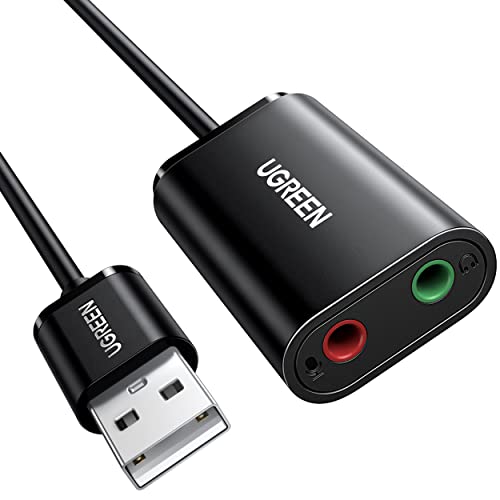
UGREEN USB sound adapter (TRS) — Best for two-plug headsets
This UGREEN adapter exists for a headset design that refuses to die: the two-plug arrangement, separate 3.5mm TRS connections for headphone and microphone, still worn by gaming headsets, aviation-style sets and a generation of perfectly good desk headsets. Its listing promises a USB sound card adapter with TRS headphone and mic sockets, converting USB to aux for Windows, Mac, Linux, desktops, laptops and named consoles. Two sockets, no drama — the entire product, and for its intended owner, the entire point.
The two-plug headset’s owner is usually not shopping for sound quality; they are defending an investment. A good headset with a dead laptop jack, or a new laptop whose single combined port ignores the microphone plug, turns a working peripheral into e-waste unless an adapter restores the second socket. This UGREEN is that restoration in its most direct form, and its breadth of named platforms makes it the household’s universal donor — the dongle that gets borrowed for the desktop, the console, the spare laptop, and returns to the drawer each time.
Expectations should ride at the adapter’s altitude. The conversion is honest, working stereo with a microphone path, not an audiophile instrument, and listeners chasing silence and drive should be reading about the Play! 3. What the UGREEN promises — and what its long presence in this market suggests it delivers — is that two plugs go in, sound and voice come out, and the operating system needs no persuading.
There is a small etiquette of ownership here too: this is the dongle to buy in a moment of calm, before the emergency. Headsets outlive laptops now, and the two-plug generation will keep meeting one-port machines for years. The drawer that already holds this adapter never has the bad evening.
Gaming households will recognise a second use: the headset that migrates between a PC and a console rarely survives the journey with its microphone intact, because each host wants a different socket arrangement. An adapter that provides honest separate jacks, and whose listing names the consoles outright, ends the migration tax — one headset, every machine, voice included.
- Role: USB to 3.5mm sound adapter with separate sockets
- Sockets: TRS headphone and TRS microphone, per the listing
- Platforms: Windows, Mac, Linux, PS5 and Switch 2 named in the listing
- Audience: owners of two-plug headsets
- Form: compact cable adapter
Strengths
- Separate mic socket rescues two-plug headsets completely.
- Named compatibility across computers and consoles alike.
- The universal spare every multi-machine household ends up owning.
Trade-offs
- Working-grade conversion, not a fidelity upgrade.
- Single-plug TRRS headsets may prefer a combined-socket rival.
- No processing, no surround — sockets are the whole story.
Best for: two-plug headset owners and multi-machine households. Not suited for: fidelity chasers or single-plug headset minimalists.
Two-plug households can view UGREEN’s TRS adapter on Amazon and match its sockets against the headset in their drawer.

UGREEN USB DAC adapter 24/96 — Best braided DAC cable
UGREEN’s second entry upgrades the dongle’s ambitions a careful notch: a USB to 3.5mm adapter whose listing specifies a headphone DAC at 24-bit/96kHz, TRRS microphone support, nylon braiding and a 9.8-inch cable, compatible across Windows, Mac, Linux, PS5, PS4 and Switch 2. The DAC figure matters because it separates this from the plainest adapters — conversion specified rather than implied — while the TRRS support courts the modern single-plug headset the TRS model cannot fully serve.
The cable is the design’s argument. Nearly ten inches of braided lead moves the socket away from the laptop’s flank, which sounds trivial until you have lived with a rigid dongle levering against a port every time the headset cable tugs. A cable dongle absorbs the tug, lets the jack rest on the desk rather than dangle from the machine, and survives the bag better than a stiff stick. The braiding is not decoration; it is the acknowledgement that this object will be wound, crushed and yanked for years.
Sound expectations sit between the plain adapters and the Play! 3. A specified 24/96 DAC promises a cleaner, quieter feed than a laptop’s tired jack, and for most listeners that is where the audible story ends — happily. The Play! 3 adds a processing ecosystem and a famous name’s tuning; this UGREEN adds reach, braid and TRRS manners. Different buyers will rank those virtues differently, and both rankings are defensible.
Note the platform list’s honesty once more: computers and named consoles, stated outright. In a category plagued by “universal” claims, an adapter that enumerates its hosts is an adapter whose maker expects to be believed.
Commuters form this cable’s natural flock. A braided lead shrugs off the daily winding around a phone, the crush at the bottom of a work bag, the yank when a headphone cable catches a turnstile — indignities that retire rigid dongles within a season. Durability is rarely listed as an audio specification, but for equipment that lives in transit it is the specification that decides whether the others ever get used.
- Role: USB to 3.5mm DAC adapter cable
- Conversion: 24-bit/96kHz DAC, per the listing
- Microphone: TRRS support for single-plug headsets
- Cable: nylon braided, 9.8 inches
- Platforms: Windows, Mac, Linux and named consoles
Strengths
- Specified DAC conversion above the plain-adapter tier.
- Cable length and braiding suit real laptop-bag life.
- TRRS support keeps modern headset microphones working.
Trade-offs
- Two-plug headsets still need the TRS model’s separate sockets.
- No processing suite behind the conversion.
- The longer cable is one more thing to wind — neatly, if you are wise.
Best for: single-plug headset owners wanting a specified DAC and a survivable cable. Not suited for: two-plug headsets or processing enthusiasts.
Cable-weary listeners can find this UGREEN DAC cable’s listing on Amazon and measure its 9.8 inches against their desk’s geography.

UGREEN USB-C to 3.5mm DAC adapter — Best for USB-C laptops
The third UGREEN answers the newest version of the problem: the laptop — or tablet, or phone — that offers USB-C and no headphone jack whatsoever. Its listing describes a USB-C to 3.5mm audio adapter with a HiFi DAC at 24-bit/96kHz, named for compatibility with current iPhones, iPads, Galaxy and Pixel flagships. The audience has shifted from “my jack broke” to “my machine was born without one”, and the product is shaped accordingly: small, port-native, and built around a specified DAC rather than a passive pass-through.
That DAC detail deserves emphasis, because USB-C audio dongles divide into two species. Some are passive conduits that depend on the host device outputting analog audio through the port — a feature many hosts quietly lack — while active dongles like this one carry their own converter and work wherever USB audio is spoken. A buyer burned by a cheap passive dongle’s silence learns the distinction once; this listing’s stated DAC is the mark of the species that simply works.
For the laptop owner specifically, the USB-C dongle restores the wired life: the good wired earbuds, the headset with the reliable microphone, the zero-latency connection that Bluetooth still cannot promise a gamer or a musician monitoring themselves. It also future-proofs in reverse — the same dongle serves the phone and tablet in the same bag, since the whole ecosystem has converged on the one port.
Its limits are the form’s limits. A single combined socket serves single-plug headsets; two-plug owners need the TRS route. And a dongle this small is a dongle easily lost, which is why experienced USB-C travellers buy the concept in pairs and treat the second as insurance rather than excess.
There is a generational irony to savour: the thinnest, most advanced laptops ever made are the ones most likely to need this small plastic ancestor of a product. Owners of such machines should not resent the dongle — they should resent it accurately, blame the port decision rather than the remedy, and then enjoy the fact that the remedy costs less than the laptop’s carrying case and restores a century-old plug standard to the machine that tried to retire it.
- Role: USB-C to 3.5mm DAC dongle
- Conversion: HiFi DAC at 24-bit/96kHz, per the listing
- Hosts: jackless laptops, tablets and phones with USB-C
- Socket: combined 3.5mm for single-plug headsets
- Form: pocket dongle, the size of the problem it solves
Strengths
- Active DAC design — works where passive dongles stay silent.
- One dongle serves the whole USB-C household of devices.
- Restores wired, zero-latency listening to jackless machines.
Trade-offs
- Combined socket only — two-plug headsets need a different pick.
- Small enough to lose; buy the spare with the first.
- USB-A laptops need an adapter or a different model entirely.
Best for: owners of jackless USB-C laptops, tablets and phones. Not suited for: USB-A-only machines or two-plug headset owners.
Jackless-machine owners can check UGREEN’s USB-C dongle on Amazon against the exact devices in their bag.

MOSWAG USB to 3.5mm adapter — Best driver-free all-rounder
MOSWAG’s entry competes on the virtues of the road: an external stereo sound adapter with TRRS microphone support, no driver required, a nylon-braided cable of 7.84 inches, and a listing that names Windows PCs and laptops, Mac, Linux, speakers and the PS4. It is the adapter as travel infrastructure — the one that lives in the bag permanently, works on whatever machine the day provides, and asks for nothing in return.
The “no driver required” line is doing heavy lifting and deserves respect. Driver-free means the adapter speaks the standard USB audio language every modern operating system already understands, which is why the same dongle can move between a Windows laptop, a Mac and a Linux machine without ceremony. For consultants, teachers, field workers and anyone whose laptop is issued rather than chosen, that universality is the product; sound quality, honestly adequate, is the supporting act.
The TRRS support keeps the modern headset whole — voice and ears through the one plug — while the braided cable and its sensible length repeat the survival logic of the UGREEN DAC cable at a slightly shorter reach. Between those two braided rivals, the choice is emphasis: UGREEN specifies its DAC figure, MOSWAG specifies its driver-free universality and platform breadth. A buyer whose life is one beloved laptop may prefer the former; a buyer whose life is many machines will feel the latter’s pull.
As with every plain adapter, keep the ambition calibrated. This is working stereo and a working microphone for calls, classes and casual listening — not a Play! 3-style upgrade and certainly not a recording chain. Judged as the bag’s permanent resident, it is exactly as good as it needs to be, which in this category is the highest honest praise.
Examination invigilators, conference interpreters and court reporters share a secret the rest of us learn eventually: when the audio absolutely cannot fail, professionals reach for the simplest wired path available. The MOSWAG’s entire design — standard language, no drivers, braided cable — is that philosophy in product form, and it is why adapters of its kind turn up in the kits of people whose work is listening.
- Role: USB to 3.5mm external stereo sound adapter
- Microphone: TRRS support, per the listing
- Setup: no driver required
- Cable: nylon braided, 7.84 inches
- Platforms: Windows, Mac, Linux and PS4 named in the listing
Strengths
- Driver-free universality across the three desktop operating systems.
- Braided build intended for permanent bag duty.
- TRRS keeps single-plug headset microphones alive.
Trade-offs
- Plain working stereo — no DAC figure or processing to boast of.
- Two-plug headsets need separate-socket models instead.
- Its cable is shorter than the UGREEN DAC cable’s reach.
Best for: travellers, teachers and anyone whose machines change weekly. Not suited for: fidelity upgrades or two-plug headset owners.
Road warriors can look at the MOSWAG adapter’s Amazon listing and confirm its platform list covers the machines in their rotation.

Plugable USB audio adapter — Best support-first spare
Plugable built its reputation on a unfashionable promise: when their adapter meets your computer, a human being will help you join them. The listing for this USB audio adapter is correspondingly plain — it adds 3.5mm speaker and microphone ports for laptops lacking an audio jack, it is compact, and it is plug-and-play for Windows, Mac and Linux. No DAC figures, no processing, no adjectives reaching beyond the job. In a category of small promises, this is the smallest and the most carefully kept.
The intended buyer is named in the listing itself: the owner of a laptop lacking audio jacks — the ultrabook generation, the damaged machine, the mini PC pressed into desktop service. For that buyer the adapter is not an accessory but a missing body part restored, and Plugable’s support-first posture matters because the purchase often happens mid-crisis, on behalf of a relative, a classroom or an office whose IT department is one person with a search engine.
Separate speaker and microphone ports keep the classic arrangements working: ordinary headphones or speakers on one socket, a standalone microphone on the other, or a two-plug headset using both. That flexibility, in a dongle with no processing ambitions, makes it the guide’s most purely functional object — the one you hand to someone else with total confidence that the instructions are “plug it in”.
Its ceiling is stated by omission and should be honoured: this is not the dongle for a listener chasing quiet backgrounds and drive, who should be reading the Play! 3’s review, nor for the USB-C-only machine, which needs UGREEN’s dongle. It is the spare that saves other people’s days, and there is a whole philosophy of technology in owning one before it is needed.
Charities and refurbishers deserve a mention in this entry, because they are Plugable’s kind of people. A donated laptop with a dead jack is a compromised gift; the same laptop with a working audio adapter in the box is a complete one. Products that restore function honestly, at spare-part prices, do more cumulative good in the world than flagships do — a truth this guide is happy to state in a buying article.
- Role: USB audio adapter adding speaker and mic ports
- Audience: laptops lacking an audio jack, per the listing
- Setup: plug-and-play for Windows, Mac and Linux
- Sockets: separate 3.5mm speaker and microphone ports
- Character: support-led brand, function-first design
Strengths
- The clearest, most honest job description in the guide.
- Separate ports serve speakers, mics and two-plug headsets alike.
- A support reputation that matters in mid-crisis purchases.
Trade-offs
- No DAC specification or processing — restoration, not upgrade.
- USB-A form leaves jackless USB-C machines to other picks.
- Working-grade sound for working-grade purposes.
Best for: rescuing jackless or jack-dead laptops, especially for other people. Not suited for: audiophile upgrades or USB-C-only machines.
Family IT departments can find Plugable’s adapter on Amazon and keep one between the household and its next audio emergency.
How did the headphone jack become an endangered species?
A short history explains the whole category. The 3.5mm jack is a nineteenth-century switchboard design miniaturised across the twentieth century into the most universal audio connector ever made — one plug that fit every phone, laptop, seat-back screen and mixing desk on earth. Its reign ended not because it failed but because it occupied space: in phones chasing thinness and water resistance, then in laptops chasing the same silhouette, the jack’s few millimetres became negotiable. Manufacturers bet that wireless audio had matured enough to absorb the displaced listeners.
The bet was half right. Wireless absorbed the casual majority beautifully, and left behind a substantial minority for whom the wire was never nostalgia: professionals whose microphones must not drop, gamers whose latency budgets are measured in milliseconds, musicians, teachers, interpreters, the hearing-aid wearers whose equipment speaks 3.5mm, and everyone whose favourite headphones predate the decision and refuse to be obsolete. That minority is this guide’s readership, and the dongle industry is its supply chain.
The adapters have quietly improved under the pressure. Early USB audio dongles were disposable novelties; the current generation — specified DACs, braided cables, platform lists printed honestly — are proper little instruments, because their makers learned that a rescue product bought in a crisis earns a decade of loyalty when it simply works. The jack may be endangered, but its ecosystem is in rude health.
What about docks, hubs and the laptop’s other rescuers?
A fair challenge: many laptop owners already own a USB-C dock or hub with a headphone socket on it, so why buy a dongle at all? At a fixed desk, the dock may indeed be the whole answer — one cable, audio included. The dongle’s case rests on everything outside that desk: travel, the sofa, the borrowed machine, the meeting room, and the day the dock itself is the thing that fails. A dock is furniture; a dongle is a companion, and the two rescue different hours of a laptop’s life.
There is also a quality footnote. A dock’s audio output is one feature among twenty, engineered to a price the dock’s total must absorb, and it shares the dock’s internal neighbourhood with video and power traffic. A dedicated dongle spends its entire budget on the one conversion. The difference is not always audible, but when a dock’s headphone output hisses against a dongle’s silence, owners stop wondering why both products exist.
Buy both if your life has both shapes — the desk and the road are different countries. But if the budget forces a choice, the dongle travels to both countries and the dock stays home, which is why this guide treats the little cable, not the big brick, as the laptop’s essential audio insurance.
How do the six compare side by side?
| Pick | Port | Sockets | Signature strength | Watch out for |
|---|---|---|---|---|
| Sound Blaster Play! 3 | USB | Headset | 24-bit/96kHz DAC plus Creative processing | Not a recorder |
| UGREEN TRS adapter | USB | Separate headphone + mic | Two-plug headset rescue | Plain conversion |
| UGREEN DAC 24/96 | USB | Combined TRRS | Specified DAC, braided 9.8-inch cable | One-plug headsets only |
| UGREEN USB-C dongle | USB-C | Combined 3.5mm | Active DAC for jackless devices | Easily lost — buy two |
| MOSWAG adapter | USB | Combined TRRS | Driver-free, braided, everywhere-compatible | Working-grade sound |
| Plugable adapter | USB | Separate speaker + mic | Support-first jack restoration | No upgrade ambitions |
What will you plug into it next year?
A dongle purchase made only for today’s emergency undersells the object. The adapter you buy for the dead jack becomes, within months, the household’s reference audio path: the thing reached for when a new headset needs testing, when a child’s school laptop rejects a microphone, when a relative’s video call sounds like it is being conducted from inside an aquarium. Buying one tier above desperation — a specified DAC, a braided cable, sockets that match both headset generations in the house — is how a crisis purchase matures into infrastructure.
Think, too, about the machines still to come. Laptops are not regrowing headphone jacks; the adapter bought today for a USB-A machine may need a USB-C sibling tomorrow, and the household that standardises on known-good models — the ones in this guide — skips the compatibility lottery each time. There is a modest but real pleasure in a drawer where every dongle is a known quantity, labelled, and trusted by everyone who opens it.
And keep one eye on the headset roadmap. If a serious wired headphone purchase is planned — the kind our audiophile guide exists for — the humble dongle’s ceiling becomes relevant, and the Play! 3’s stronger conversion is the bridge between the laptop world and that one. Small purchases, made with the next purchase in mind, are how sensible setups accumulate without ever being “built” at all.
How do you set up a USB sound adapter without the usual swearing?
Plug it in before opening any app, then make it the default playback and recording device in the operating system’s sound settings — in that order, because applications launched earlier will cling to the laptop’s old output like it owes them money. Then visit the apps that keep their own device lists: the meeting software, the game, the voice chat. Each maintains a private opinion about where sound lives, and a dongle only “doesn’t work” in the specific app whose settings nobody visited.
Next, identify your headset’s plug honestly, using the band-counting method from earlier in this guide. A TRRS headset in a combined socket should simply work; a two-plug headset needs both sockets of the TRS-style adapters or a splitter into a combined one. If the microphone is silent while the headphones sing, the plug alphabet — not the dongle — is the first suspect, every time.
While the settings panels are open, disable the laptop’s built-in output for anything you will not use, or at least learn its name so you can recognise when an update has helpfully switched back to it. Operating systems treat audio defaults as suggestions they may revisit; the owner who knows the device list by sight recovers from those revisits in seconds, and the one who does not concludes — wrongly, in front of colleagues — that the new dongle has died.
Set levels once, kindly. Microphone input level belongs where normal speech is healthy and laughter does not clip; headphone volume belongs at the level where you will actually listen, not at maximum with the app turned down. Then tape a label on the dongle with its owner’s name. These objects migrate between bags and households at a rate no inventory survives, and the labelled one comes home.
What mistakes do laptop sound adapter buyers keep making?
The champion mistake is buying the wrong socket for the headset in the drawer — a combined TRRS dongle for a two-plug headset, or separate sockets for a single-plug one — because the product photographs all look alike at thumbnail size. Count the bands on your plug before the cart, not after the delivery.
Second is the passive USB-C trap: a cheap no-name dongle that contains no DAC and depends on a host feature your laptop may not have. The listings in this guide state their converters; where a listing is silent about conversion on USB-C, silence is the answer. Third, buyers expect studio behaviour from headset gear — recording a condenser microphone through a dongle’s mic socket, or monitoring themselves without latency through software — and blame the adapter for a job description it never applied for. Recording lives in our studio guide; these are communication and listening tools.
A sixth deserves its own line because it is so easily avoided: plugging the new adapter into the one USB port the laptop reserves for charging, or into a hub already feeding a disk, a dock and a phone, then reviewing the resulting dropouts as the dongle’s character. Give a new adapter a direct port and a fair first week; accessories, like people, deserve to be met before they are judged by the company they were forced to keep.
Fourth, the adapter gets blamed for the laptop’s USB manners: a port that sleeps aggressively, a hub that starves power, a front port wired through a noisy dock. Plug the dongle directly into the machine while diagnosing, always. And fifth, buyers purchase exactly one, lose it in a hotel room in month two, and repurchase in a panic at airport prices. The spare is not pessimism; it is the category’s natural unit of ownership.
Final Recommendation
Diagnose before you shop and this guide becomes a flowchart. Jack dead or absent, headset ordinary, need it working today: the Plugable or the UGREEN TRS adapter, chosen by whether your headset wears one plug or two — with the MOSWAG as the braided, driver-free alternative for lives lived across many machines. Jackless USB-C device: UGREEN’s little DAC dongle, bought in a pair. Working jack but weary ears: the Play! 3, the one purchase here that is an upgrade rather than a repair. And the UGREEN braided DAC cable splits the difference for the single-plug headset owner who wants a specified converter and a cable built for the bag. Whichever you choose, you are buying back something a laptop should never have taken away — the simple right to plug in headphones and be heard — and that right, once restored, tends to stay restored for the life of the machine.
Frequently Asked Questions
Will a USB adapter sound better than my laptop’s jack?
Often, yes — and the reason is geography. The dongle converts outside the laptop’s electrically noisy interior, so hiss and interference that plagued quiet passages frequently vanish. The Play! 3 and the specified-DAC UGREEN models press that advantage furthest. Against an unusually good built-in output the difference shrinks to convenience, but against the common run of laptop jacks, “cleaner” is a realistic expectation.
Can I record music through one of these?
Not in any sense a musician would accept. The microphone inputs here are voiced for headsets and calls — mono, modest, and unaccompanied by the preamps, phantom power or instrument inputs recording requires. A voice memo or a class recording, yes; a vocal you intend to release, no. Our studio recording guide covers the interfaces built for that job.
Why does my headset microphone not work with my new adapter?
Almost always the plug alphabet. A two-plug headset in a combined socket loses its microphone; a TRRS headset in a headphone-only socket does the same. Match the adapter’s sockets to your plug — separate sockets for two-plug headsets, TRRS support for single-plug ones — and then check the app’s own input setting, which keeps a private default long after the system has moved on.
Do these work with Linux and Chromebooks?
The driver-free models speak standard USB audio, which Linux handles natively — the UGREEN, MOSWAG and Plugable listings name Linux explicitly, which is the assurance to look for. Chromebooks generally accept standard USB audio devices as well, though school-issued machines may restrict peripherals; when a listing names your platform, believe the listing, and when it does not, treat compatibility as a question to verify rather than a promise.
USB-A or USB-C — does the port change the sound?
No. The port is a doorway, not a flavour; conversion quality is set by the DAC inside the dongle. Choose the port your machine actually has, or accept one more adapter in the chain — and note that stacking a USB-C dongle behind a USB-A adapter behind a hub is how reliable products acquire unreliable reputations. Keep the chain short.
Can one adapter serve my laptop and my games console?
Often, yes — several listings here name consoles alongside computers, the UGREEN models and MOSWAG among them, because a standard USB audio device is welcome in more places than a laptop bag. The rule remains the guide’s refrain: believe the listing’s named platforms for your exact machine, test the microphone as well as the headphones when it arrives, and keep the receipt until both directions of sound have survived a real session.
How long should a dongle last?
Years, if the cable survives — and the cable is why the braided models exist. The electronics have nothing to wear out; the strain relief and the plug are the mortal parts. Treat the dongle as a cable with a job, coil it loosely, keep it out of the laptop-bag’s crush zone, and it will outlive the laptop it was bought for — then serve the next one.
A last piece of drawer wisdom: store the dongle with the headset it serves, not with the cables it resembles. The morning it is needed is never the morning anyone has time to untangle a cable drawer and test four identical black leads — and the adapter that is found in ten seconds is, functionally, twice the product of the one that is found in ten minutes.
Related Guides
Listeners who want the full desktop treatment should compare Best External Sound Cards, recordists working from a laptop belong in Best Sound Cards for Studio Recording, and tower owners with a free slot can consider Best Desktop Sound Cards.
Related guides
- Best 1440p 165Hz Monitors: One Native 165Hz Pick, Three 180Hz Upgrades, an Overclock Headline and a 160Hz Ultrawide
- Best 13×19 Professional Printers
- Best 3rd Party MacBook Chargers: 96W-Class Alternatives, the 100W Cable Rule, and the Apple Benchmark
- Best Built PC: Six Prebuilt Gaming PCs Judged on Parts, Power and Upgrades



[…] should read Best Desktop Sound Cards, laptop owners with failing jacks will find their fixes in Best Laptop Sound Cards, and listeners chasing the last word in headphone drive can continue to Best Sound Cards […]