What's inside
- Where to buy
- Key Takeaways
- Quick Picks
- What separated these six from the rest of the ASUS catalogue?
- Why does latency, not headline speed, decide gaming routers?
- Should a gamer buy Wi-Fi 6 or Wi-Fi 7 in this generation?
- What do the ROG software tools actually do during a match?
- Where each ASUS earns its desk space
- How do you set up an ASUS gaming router for stable matches?
- Which gaming-router buying errors waste the most money?
- Final Recommendation
- Frequently Asked Questions
- Related Guides
As an Amazon Associate I earn from qualifying purchases. This post may contain affiliate links at no extra cost to you.
gizmoverdict.com is reader-supported. When you buy through links on our site, we may earn an affiliate commission.
Where to buy
Gamers shop for routers with a different anxiety than everyone else. A family streaming films forgives a hiccup; a player forty minutes into a ranked match does not. The best asus gaming routers earn their keep by attacking the small delays and sudden spikes that ruin sessions — prioritising game traffic, holding a steady signal across the room where the rig lives, and offering wired ports fast enough that the serious machines never touch Wi-Fi at all. ASUS builds more shapes of gaming router than any rival, from a dual-band value flagship to a quad-band Wi-Fi 7 monument, and this guide sorts six of them by the kind of player each one actually serves.
Every model below is a linked pick checked against a live listing, so following a name in the table takes you to its listing, where current pricing and stock are yours to verify. Three of the six run Wi-Fi 7 rather than Wi-Fi 6, and the guide flags them honestly as forward-looking purchases: they are superb routers today for wired and Wi-Fi 6 clients, and their newest radios wait for the devices catching up over the next upgrade cycle. Nothing here is dressed up as something it is not.
Read the port sections as carefully as the wireless ones. In gaming routers, the back panel is often the real product: a 10G socket for a fibre ONT or a NAS, dual 2.5G ports that let a PC and a console both ride multi-gig, a dedicated gaming port that prioritises whatever is plugged into it. Wireless speed classes make the headlines, but matches are won on the wired desk where the main machine sits.
Key Takeaways
- Wire the main gaming machine whenever the room allows it; even the finest Wi-Fi adds variance that a cable simply removes.
- The GT-AX6000 is the value centre of this lineup: dual 2.5G ports and full gaming features without flagship pricing theatrics.
- Wi-Fi 7 models here — GT-BE98 Pro, RT-BE86U, TUF BE6500 — reward buyers whose next phone and laptop purchases are already planned.
- ASUS includes its AiProtection security and game-prioritisation tools without a subscription, which changes the long-term cost maths.
- A dedicated gaming port and QoS matter more to felt latency than the gap between AX5400 and AX11000 speed classes.
- Every router here is AiMesh-capable, so a second ASUS box can later extend coverage instead of replacing the first.
Quick Picks
| Pick | Badge | Why it earns its place |
|---|---|---|
| ASUS ROG Rapture GT-AX11000 Pro | Wi-Fi 6 flagship | Tri-band AX11000 with 10G and 2.5G ports and RangeBoost Plus for big, busy gaming houses. |
| ASUS GT-AX6000 | Value flagship | Dual 2.5G ports and the full ROG software suite in a calmer, cheaper dual-band chassis. |
| ASUS ROG Strix GS-AX5400 | Mid-range gaming | Gaming port, Mobile Game Mode and port forwarding tools sized for flats and single setups. |
| ASUS ROG Rapture GT-BE98 Pro | Wi-Fi 7 flagship | Quad-band Wi-Fi 7 with mesh support and coverage rated to 3,500 square feet for no-compromise rigs. |
| ASUS RT-BE86U | Wi-Fi 7 single-router speed | 10G WAN and 6.8 Gbps-class Wi-Fi 7 in a vertical chassis built around one powerful position. |
| ASUS TUF Gaming BE6500 | Wi-Fi 7 budget gaming | Dual-band Wi-Fi 7 with Game Accelerator and Multi-Link Operation at the gentlest price here. |
What separated these six from the rest of the ASUS catalogue?
ASUS sells gaming routers at nearly every price and shape, so the first cut was about roles rather than specs. We wanted one Wi-Fi 6 flagship for the buyer who wants everything now, one value flagship that keeps the important ports, one honest mid-ranger for a single setup in a flat, and then the Wi-Fi 7 generation represented at three heights — flagship, single-router specialist and budget — because readers keep asking whether the new standard is worth entering early, and the answer differs by budget.
Gaming-specific tooling had to be real, not cosmetic. Every pick offers some combination of adaptive QoS that recognises game traffic, a gaming port or device prioritisation, and port-forwarding support that does not require a networking degree. Cosmetic aggression — red plastic, angular shells — counted for nothing in either direction. Several handsome routers missed this list because their gaming features were a badge and a slogan; several plain ones nearly made it on software merit alone.
Ports received a weighting they rarely get in gaming coverage. A router that advertises enormous wireless numbers while offering only gigabit Ethernet creates a strange household: phones enjoy theoretical fireworks while the wired PC — the machine that actually competes — sits behind a gigabit ceiling shared with everything else. The two flagships here carry 10G sockets, the value flagship carries dual 2.5G, and even the budget TUF model was checked for a wired story that respects a desktop player.
We also considered the household around the gamer. These routers serve family traffic all day and game traffic all evening, so AiMesh expandability, guest networks, parental controls and subscription-free security all counted. ASUS’s habit of including AiProtection without a monthly fee is a genuine differentiator in a market drifting toward paywalls, and it is mentioned in the reviews wherever it changes the ownership maths.
Finally, honesty about standards. Wi-Fi 7 is real and materially better — wider channels, Multi-Link Operation, lower effective latency — but its benefits require Wi-Fi 7 clients, which most readers own in ones and twos, if at all. The three Wi-Fi 7 picks are framed as what they are: excellent routers whose headline radio mostly serves the near future. Readers who find that framing disappointing should buy the GT-AX6000 or the AX11000 Pro and enjoy every feature today.
Why does latency, not headline speed, decide gaming routers?
A modern game sends surprisingly little data. What it sends must arrive promptly and evenly. A 300-megabit connection with a steady 12-millisecond ping will feel wonderful; a gigabit connection whose ping lurches to 200 whenever someone upstairs starts a stream will feel broken. Gaming routers therefore earn their money in queue management: recognising game packets, moving them ahead of bulk traffic, and keeping the connection’s buffers from filling with a cloud backup’s enthusiasm. That discipline — QoS, in the menus — is the least photogenic and most important feature on this page.
Jitter matters as much as the average. Your ping is a conversation between your machine and a server, and games interpolate movement based on its rhythm. A connection that alternates 15 and 90 milliseconds forces constant correction, which players experience as opponents teleporting in small, infuriating steps. Steady placement, a clear channel and a router whose processor is not overwhelmed by the household’s evening load all protect that rhythm. This is why the mid-range picks here carry capable hardware rather than flagship radios with bargain processors behind them.
Bufferbloat deserves its sentence in every gaming guide: when any device saturates the upload side of a connection — a phone backing up photos is the usual culprit — an unmanaged router queues everything, and game packets wait behind megabytes of photographs. Good QoS breaks that queue. Test any router on this page during its first evening by starting a large upload on another device and joining a match; the difference between a gaming router and a generic one will announce itself within a round.
Wired connections bypass most of this drama, which is why every review below notes the port layout in detail. A PC or console on Ethernet to a router with QoS enabled is the closest thing to a solved problem home gaming offers. Wi-Fi then serves the rest of life — handhelds, the living-room console, laptops on sofas — where modern ASUS radios and sensible placement keep latency respectable even if it never quite matches the cable.
Should a gamer buy Wi-Fi 6 or Wi-Fi 7 in this generation?
Wi-Fi 6 remains the rational default for most players. The clients are everywhere, the routers are mature and discounted, and the standard’s own latency tools — OFDMA scheduling chief among them — were designed for exactly the many-small-packets traffic games generate. A GT-AX6000 bought today will not embarrass itself for years, and its dual 2.5G ports keep it relevant to faster internet tiers arriving street by street.
Wi-Fi 7’s case rests on three pillars. Multi-Link Operation lets a capable client use two bands at once, smoothing the spikes that single-band links suffer when interference wanders through. Wider 320 MHz channels on 6 GHz move enormous data in short bursts, clearing queues quickly. And puncturing lets a channel work around a noisy slice instead of abandoning the whole width. Each feature attacks variance — the gamer’s true enemy — which is why the standard matters to this category beyond its speed headlines.
The catch is the client roster. A Wi-Fi 7 router serves Wi-Fi 6 and older devices perfectly well, but they gain nothing from MLO or 320 MHz channels. The benefit arrives device by device: a new laptop this year, a phone next year, a handheld after that. Buyers who replace their main machine regularly will feel the standard switch on steadily. Buyers whose rig is settled for three years may rationally take the Wi-Fi 6 flagship and revisit the question when their whole desk speaks the new language.
Budget changes the answer again. The TUF BE6500 puts Wi-Fi 7’s entry ticket near mid-range Wi-Fi 6 money, which flips the calculation for a younger setup in a flat: why buy the older standard when the newer one costs similar and the household’s devices skew recent? Conversely, a large house needing mesh coverage today gets more from the AX11000 Pro’s tri-band maturity than from a single Wi-Fi 7 box shouting from one corner. Standards are a means; coverage and queues are the ends.
What do the ROG software tools actually do during a match?
Strip away the branding and three mechanisms do the real work. The first is classification: the router inspects traffic patterns and tags game flows, voice chat, streaming and bulk transfers as separate species. The second is scheduling: tagged game packets jump the queue at both the WAN door and the wireless radio, so a four-gigabyte patch downloading on a second machine stops translating into lost gunfights on the first. The third is visibility — per-device traffic graphs that show, in plain bars, exactly which gadget saturated the connection at 9 p.m. Many household arguments end at that graph.
Device prioritisation is the blunt instrument in the suite, and sometimes blunt is right. Declaring the main PC or console the network’s favourite means its traffic wins every tie, all evening, regardless of what the classification engine thinks it sees. Streamers who game and broadcast from one machine lean on this hardest: the same box is both the most latency-sensitive and the most bandwidth-hungry device in the house, and only explicit priority keeps its two jobs from sabotaging each other.
VPN tooling hides in these menus too, and gamers use it in two distinct ways. Some route a console through a VPN to reach a different region’s storefront or servers; others run the router as a VPN server so they can reach their home network — and its game library — from a hotel room. ASUS’s firmware handles both directions without third-party firmware adventures, and the processors in this lineup are strong enough that the tunnel stops being the slowest part of the evening.
Finally there is the unglamorous guardian: AiProtection watching for malicious sites and compromised gadgets at the network gate. Gaming households accumulate devices — smart televisions, cheap cameras, a handheld from a marketplace seller — and any one of them can become a noisy or hostile neighbour on the LAN. Network-level filtering will not replace common sense, but it catches a category of trouble that per-device software on a games console simply cannot see.

ASUS ROG Rapture GT-AX11000 Pro — Wi-Fi 6 flagship
The GT-AX11000 Pro is what ASUS builds when the brief contains no apology. Tri-band Wi-Fi 6 at the AX11000 class, a 10G port and a 2.5G port on the back, RangeBoost Plus antenna tuning for reach, and the full ROG software armoury — this is the router for a house where the gaming room, the streaming room and the work-from-home office are three different rooms and all of them are busy by seven in the evening. The third band is its quiet superpower: park the gaming machines’ wireless traffic and the household’s bulk flows on separate radios, and the queues that cause spikes largely stop forming.
That 10G socket deserves attention from fibre customers whose plans have outgrown gigabit hardware. Paired with a multi-gig ONT or a fast NAS, it lets the router act as a genuine high-speed core rather than a decorative bottleneck. The 2.5G port can serve as the gaming machine’s dedicated feed or as a second WAN path, and ASUS’s firmware supports link aggregation and failover games for households that treat connectivity as infrastructure. Few consumer routers offer this much wired headroom without wandering into small-business pricing.
Software depth matches the hardware. Adaptive QoS recognises game traffic, the Game Boost tooling prioritises a chosen device, port forwarding is presented in plain language with common game presets, and AiProtection Pro rides along without a subscription. The interface will still overwhelm a first-time router buyer for an evening — there is simply a lot of it — but everything a competitive household might eventually want is present, documented inside the UI, and free after purchase.
Physically it is a large, antenna-crowned presence that needs a real shelf and honest ventilation, and its price sits at the top of the Wi-Fi 6 world for good reason. Readers in flats should look hard at whether its talents would ever be exercised; a tri-band flagship serving one room is a sports car on a school run. But for the sprawling, device-dense, multi-gamer house, this remains the Wi-Fi 6 answer that ends upgrade conversations for years.
Ownership over time flatters the Pro in one more way: AiMesh. When the household eventually wants a node in a new room, a cheaper ASUS box joins this router’s network instead of orphaning it, and the flagship’s processor and ports remain the core. Expensive routers justify themselves by surviving two network redesigns, and the Pro is built — in radios, sockets and software support — to do exactly that.
Thermal reality deserves a mention for a router this powerful. The Pro’s radios and processor work hard when three bands are busy, and the chassis sheds that heat through generous venting that should not be smothered by stacking a console on top of it. Give it the shelf it demands and it runs silently for months between reboots; bury it in an entertainment unit and you will meet the thermal throttling that forum threads misattribute to firmware. Placement discipline, unglamorous as ever, remains the cheapest performance feature in networking.
- Wireless class: tri-band Wi-Fi 6, AX11000 aggregate
- Headline sockets: one 10G port plus one 2.5G port
- Reach feature: RangeBoost Plus antenna tuning
- Gaming toolkit: adaptive QoS, device boosting, easy forwarding
- Security: AiProtection Pro bundled, no subscription
- Expansion route: AiMesh nodes can join later
Strengths
- Tri-band design keeps game traffic away from household bulk flows.
- 10G and 2.5G ports outlast several internet-plan upgrades.
- Full ROG software suite with security included at no extra cost.
Trade-offs
- Flagship pricing in a Wi-Fi 6 wrapper as Wi-Fi 7 arrives.
- Large chassis demands shelf space and airflow.
- Interface depth can swamp a first-time router owner.
Best for: a multi-gamer house with fast fibre and several rooms competing every evening.
Not suited for: a studio flat where one mid-range router already covers every corner.
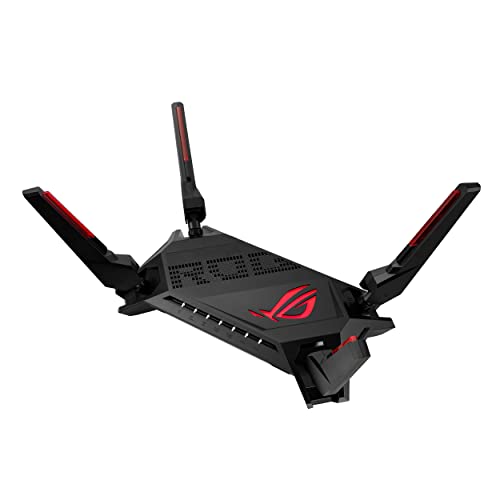
ASUS GT-AX6000 — Value flagship
If this guide had to keep one router and delete the rest, the GT-AX6000 would survive the cull. It takes the flagship formula and removes exactly the parts most households never use: the third radio band and the 10G socket. What remains is a dual-band Wi-Fi 6 router at the AX6000 class with dual 2.5G ports — one for a fast WAN feed, one for the gaming PC or a NAS — enhanced hardware under the shell, and the same ROG software suite its pricier sibling enjoys. The result reads like a flagship that went on a sensible diet.
Dual 2.5G is the specification to underline. Most rivals at this tier offer a single multi-gig port or none, forcing a choice between feeding the router quickly and wiring the main machine quickly. The GT-AX6000 refuses the choice: a 2.5-gigabit internet plan enters at full pace while the desk PC rides its own 2.5G lane, and households on gigabit plans gain a fast local path to a NAS for backups and media. For the wired-first gamer, this port pair matters more than any wireless number printed on the box.
Wireless performance is honest dual-band work. A single 5 GHz band carries the house, so a very large or crowded home will feel the absence of the Pro’s third band sooner — but within a typical flat or modest house, the AX6000 class radios, strong antennas and ROG tuning hold gaming latency steady while the usual evening traffic flows around it. AiMesh support means a second ASUS unit can later take over the far rooms if the household moves somewhere bigger, protecting the purchase.
The ROG software arrives in full: adaptive QoS, game device prioritisation, OpenNAT port forwarding with game profiles, AiProtection without subscription, and a mobile app for the settings most people touch twice a year. The styling is gamer-flavoured without fancy lighting theatrics, and the unit runs as a normal, quiet piece of networking hardware. Readers who want flagship behaviour at a mid-tier bill — and who wire their main machine as any sensible competitor does — will find the argument for spending more genuinely hard to construct.
Longevity completes the case. Firmware support for this model family has been generous, the hardware has headroom for faster plans, and the feature set contains nothing locked behind a trial. In a category addicted to annual reinvention, the GT-AX6000 is the router equivalent of buying the previous season’s top specification on purpose: nearly everything that matters, priced by someone who has stopped trying to impress you.
One more audience should recognise itself here: the player whose home office and gaming desk are the same desk. The GT-AX6000’s prioritisation works for a work laptop during the day exactly as it does for a PC at night — declare the machine the favourite and its calls inherit the same queue-jumping privileges as a ranked match. Households with one excellent desk and two shifts of demand on it get double value from that single setting, which is part of why this model keeps surfacing as the recommendation when readers describe ordinary, complicated lives rather than a dedicated gaming room.
- Wireless class: dual-band Wi-Fi 6, up to 6000 Mbps aggregate
- Port pairing: two 2.5G sockets for WAN and desk duty
- Processor story: enhanced hardware for busy queues
- Software: full ROG suite including OpenNAT forwarding
- Security: AiProtection included without ongoing fees
- Growth: AiMesh-ready when the home outgrows one box
Strengths
- Dual 2.5G ports serve fast plans and wired rigs simultaneously.
- Flagship software and security with no subscription attached.
- Price undercuts tri-band flagships by a wide, honest margin.
Trade-offs
- No third band to isolate traffic in very busy houses.
- Dual-band range asks for central placement in larger homes.
- Design language still announces itself as gaming hardware.
Best for: a wired-first player on a fast plan who wants flagship tools without flagship pricing.
Not suited for: a rambling multi-storey house needing tri-band reach from a single unit.

ASUS ROG Strix GS-AX5400 — Mid-range gaming
The GS-AX5400 is the router for the setup most gamers actually own: one desk, one console near a television, in a flat or a small house where the router lives within a room or two of everything. Its Wi-Fi 6 radios run at the AX5400 class, and its feature list reads like a distilled version of the flagship’s — a dedicated gaming port that prioritises whatever console or PC plugs into it, a Mobile Game Mode that gives a phone’s game traffic first claim on the airwaves, and port-forwarding tools presented in the friendly ROG style.
Mobile Game Mode is this model’s signature and it reflects where gaming hours now happen. A phone on the sofa, mid-match, competes with the television’s stream and a partner’s laptop; one toggle in the ASUS app elevates the phone’s packets and the session steadies. It sounds like a small thing until you have lost a team fight to a buffering smart TV. Console and PC players are not neglected — the gaming LAN port performs the same trick automatically for the wired machine, no menu archaeology required.
Coverage expectations should be set by its class. AX5400 dual-band hardware serves a flat beautifully and a compact house adequately, particularly with the router placed centrally rather than in the entryway cupboard where installation engineers love to leave it. AiMesh compatibility offers the escape hatch: a second ASUS node later converts the setup into a small mesh without discarding this unit, which makes the GS-AX5400 a reasonable first step for renters who expect to move somewhere larger.
What you do not get is multi-gig anything. Ports are gigabit-class, so fibre plans beyond a gigabit will be trimmed at the door, and a NAS will share gigabit lanes with everything else. For its audience — sub-gigabit plans, one serious setup, phones that game — those ceilings rarely touch daily life. The money saved against the GT-AX6000 buys games, a better chair, or the Ethernet cable this router’s gaming port deserves. Spend according to the life you have, and the Strix makes a persuasive case.
Setup deserves a kind word: the ROG interface at this tier keeps the gaming tools visible and the networking arcana tucked away, so a first-time buyer reaches the prioritisation toggles within minutes. AiProtection is included without subscription, parental controls are present for households that game and parent in the same rooms, and firmware updates arrive on the same cadence as the flagships. Mid-range in this family means fewer radios, not second-class citizenship.
Rental life suits the Strix in another way: it asks nothing of the building. No mesh nodes to negotiate shelf space for, no cable runs, no landlord conversations — one box near the television, the console in the gaming port, the phone on Mobile Game Mode, and a flat’s entire competitive life is served. When the lease ends, the router leaves in the same box it arrived in and works identically in the next flat. Hardware that respects temporary homes is rarer than it should be, and the GS-AX5400’s single-box competence is a genuine design achievement rather than a limitation.
- Wireless class: dual-band Wi-Fi 6, AX5400 aggregate
- Signature feature: Mobile Game Mode for phone players
- Wired trick: dedicated gaming port with automatic priority
- Forwarding: ROG port tools with game-friendly presets
- Security bundle: AiProtection without a monthly fee
- Expansion: AiMesh support for a future second node
Strengths
- Gaming prioritisation covers PC, console and phone alike.
- Right-sized radios for flats and compact houses.
- Same subscription-free security as the flagship models.
Trade-offs
- Gigabit ports cap faster fibre plans at the door.
- Dual-band range fades in larger or masonry homes.
- No multi-gig path for a NAS-heavy desk setup.
Best for: a flat-based player whose matches happen on a desk setup and a phone in equal measure.
Not suited for: a multi-gig fibre household wiring several high-speed machines.

ASUS ROG Rapture GT-BE98 Pro — Wi-Fi 7 flagship
The GT-BE98 Pro is the splurge, and it knows it. Quad-band Wi-Fi 7 — 2.4 GHz, two slices of 5 GHz and the wide 6 GHz band — headline figures in the 30 Gbps aggregate class, mesh capability, and coverage the maker rates up to 3,500 square feet: this is ASUS’s statement that the new standard, done properly, is not one radio upgrade but a whole architecture. Multi-Link Operation lets a Wi-Fi 7 client hold two bands at once, so a moment of interference on one path stops being a lost packet and becomes a shrug.
Frame the purchase honestly, as this guide promised. Today, most of your devices will use this router as a superb Wi-Fi 6 and 6E machine, because that is what they are. The Wi-Fi 7 layer serves the newest laptop, the current flagship phone, the handheld that just launched — and then, steadily, everything you buy from now on. Households that refresh their main devices yearly will feel the BE98 Pro grow into itself. Households that keep a PC for six years are paying flagship money for a future they will visit rarely, and the GT-AX6000 exists for them.
Where the Pro earns money immediately is capacity under pile-up. Four bands mean the household’s traffic can be spread like a motorway system: bulk downloads on one lane, streaming on another, gaming clients holding the clean 6 GHz fast lane with MLO smoothing the joins. In a house with several serious players and several serious streamers, that separation is not theoretical. It is the difference between a router that schedules peace and one that apologises nightly.
The costs are the obvious ones — a price at the summit of the consumer market, a large chassis with serious thermal needs, and a settings interface deep enough to reward study. ASUS’s subscription-free security and the full ROG gaming suite are present, as flagship duty requires, and AiMesh lets lesser ASUS nodes extend the empire later. Buy it as a five-year platform for a device-hungry home, and its arithmetic works. Buy it as a trophy for a single desk, and it remains a magnificent, underemployed one.
One more consideration separates this Pro from lesser Wi-Fi 7 launches: maturity of the platform around it. ASUS has layered its gaming QoS, VPN tooling and mesh system onto the new radios rather than shipping a barebones standards demo, so the features a ROG buyer expects are present from the first firmware rather than promised for a later season. Early adoption always carries some risk; buying the flagship of a maker with this much software depth is how careful readers minimise it.
The BE98 Pro also changes what a household can attempt wirelessly. A VR headset streaming from a gaming PC is among the most demanding clients a home network meets — high bandwidth, brutal latency sensitivity, zero tolerance for stutter — and it is precisely the workload the 6 GHz band with MLO was built to carry. Owners planning a wireless VR setup, or a desk that must live where no cable can reach, are among the few readers for whom this flagship is not indulgence but equipment. Everyone else should admire it the way one admires a track car: sincerely, and from the correct side of the purchase decision.
- Wireless layout: quad-band Wi-Fi 7 including 6 GHz
- Aggregate class: headline figures around 30 Gbps summed
- Coverage claim: up to 3,500 square feet as a single unit
- Client feature: Multi-Link Operation across bands
- Platform: AiMesh-ready with full ROG gaming software
- Security: AiProtection included, no subscription
Strengths
- Four bands separate gaming, streaming and bulk traffic cleanly.
- MLO smooths latency for the Wi-Fi 7 devices arriving now.
- Complete ROG software stack, nothing held back for later.
Trade-offs
- Summit pricing for benefits many devices cannot yet use.
- Big, warm-running chassis needs a proper home.
- Wi-Fi 6 households will leave its headline radios idle.
Best for: a device-refreshing, multi-player household buying a network platform for the next five years.
Not suited for: a settled single-desk setup whose machines are all Wi-Fi 6 and staying that way.

ASUS RT-BE86U — Wi-Fi 7 single-router speed
The RT-BE86U answers a narrower question than its quad-band sibling: what if one router, in one good position, is the whole plan? Its Wi-Fi 7 radios run in the 6.8 Gbps aggregate class, its WAN side offers 10G, and its vertical chassis follows the beloved RT-AX86U lineage — a design players have trusted on desks for years. Where the BE98 Pro is a network platform, the BE86U is a precision instrument for the flat, the study-centred house, the single serious setup that wants tomorrow’s standard without a mesh budget.
The 10G WAN port is the specification that will sell it to fibre customers. As multi-gig plans spread, routers with gigabit WAN sockets quietly waste the upgrade; the BE86U swallows a 2-, 5- or 10-gigabit feed whole and still has wired capacity for the desk. Combined with Wi-Fi 7’s MLO for the newest wireless clients, the result is a router whose bottleneck, for once, is your internet plan rather than your hardware — the correct direction for that relationship.
ASUS lists this model as mesh- and VPN-compatible, with subscription-free network security, and that VPN line matters to gamers more than it might appear: network-level VPN support lets a console or handheld inherit a tunnel without per-device apps, and the router’s processor handles the encryption without the speed collapse older hardware suffered. Streamers who route through specific regions, and remote workers whose gaming desk doubles as an office, both read that specification with interest.
Dual-band Wi-Fi 7 is the honest limitation. Without a 6 GHz radio — this model’s class figure is achieved across 2.4 and 5 GHz with the new standard’s wider channels and efficiency — it cannot offer the BE98 Pro’s clean-spectrum fast lane, and its MLO pairs the bands it has. In a flat, where the router is never far away, that compromise is barely visible. In a larger house, AiMesh can add nodes later, but readers certain they need multi-room 6 GHz today should step up rather than sideways.
Choose the BE86U when your geography is simple and your ambitions are wired and current: one strong position, a fast plan, a desk that matters, and a steady trickle of new Wi-Fi 7 devices to feed. It is the thinking player’s Wi-Fi 7 entry — less theatre than the flagship, more future than the Wi-Fi 6 line, and priced like it understands the difference.
The 86U lineage carries a community benefit that spec sheets omit: years of accumulated knowledge. Its predecessor was one of the most documented routers in the hobby, and the BE86U inherits the forums, the troubleshooting threads and the settings folklore that surround the family name. When a strange NAT problem appears at midnight before a tournament, owning the router a thousand other players also own is worth real money. New platforms always carry unknowns; this one’s shape, menus and habits are reassuringly mapped territory.
- Wireless class: dual-band Wi-Fi 7, 6.8 Gbps aggregate
- WAN headline: 10G port for multi-gig fibre plans
- Form: vertical desktop chassis in the 86U tradition
- Networking extras: mesh and VPN compatibility built in
- Security: subscription-free protection included
- Best geography: one strong central position
Strengths
- 10G WAN removes the router as the fibre bottleneck.
- Wi-Fi 7 latency tools in a focused, single-box design.
- VPN handling strong enough for consoles and work machines.
Trade-offs
- No 6 GHz band for the clean-spectrum experience.
- Single-unit coverage fades in larger, divided homes.
- Wi-Fi 7 benefits still depend on owning new clients.
Best for: a centrally placed desk setup on a multi-gig plan that replaces its laptop and phone often.
Not suited for: a wide house needing 6 GHz coverage in several separated rooms from day one.

ASUS TUF Gaming BE6500 — Wi-Fi 7 budget gaming
The TUF line exists to strip gaming hardware down to what survives contact with reality, and the BE6500 applies that philosophy to Wi-Fi 7. Dual-band radios in the 6.5 Gbps aggregate class, a Game Accelerator for prioritisation, and Multi-Link Operation headline a specification that would have been flagship science fiction not long ago — delivered in a tougher, plainer chassis at the friendliest price in this guide. For a younger setup in a flat, it reframes the Wi-Fi 7 question from ‘can I justify it?’ to ‘why would I buy the old standard at all?’
MLO at this price is the detail to savour. A Wi-Fi 7 phone or laptop can straddle the 2.4 and 5 GHz bands, taking the steadier path moment by moment, which trims exactly the latency wobbles that make mobile and handheld gaming feel unreliable in busy buildings. Neighbour interference in apartment blocks is the natural enemy of 5 GHz gaming; a client that can lean on two bands copes with that environment measurably better than one locked to a single lane.
TUF durability is partly aesthetic and partly practical — the line is built and tested to a hardier brief than the decorative end of the catalogue, which suits routers that live in student houses, shared flats and other high-traffic environments. The software keeps the gaming essentials: acceleration for game traffic, the ASUS app for management, AiMesh if a housemate’s ASUS router ever wants to join forces. What is trimmed is the flagship garnish — no forest of extra bands, no 10G sockets, no theatre.
Set expectations by the bands. Dual-band Wi-Fi 7 in a crowded house will still queue behind physics when five people push it at once, and wired ports are mainstream rather than multi-gig. The BE6500 is a sprinter for small, modern households, not a load-bearing wall for a device empire. Within that brief it is arguably the most forward-looking value on this page: the standard of the next decade, the latency tools that matter, and a bill that leaves money for the games themselves.
There is also a timing argument unique to this pick. Wi-Fi 6 routers at similar money are mature and excellent, but they are finished products in a finished standard; the BE6500 will gain relevance with every device its owner buys from now on. For a first serious router purchase by someone whose phone and laptop are already recent, buying the newer standard at the budget tier is not early adoption — it is simply shopping in the present tense.
Parents buying for a teenager’s first gaming setup will find the BE6500 quietly appropriate. The ASUS app’s parental controls schedule access and filter categories without turning the parent into a network administrator, the TUF build survives bedroom-floor placement and enthusiastic cable handling, and the price does not require the router to double as a family heirloom. A young player’s first serious network teaches habits — wired where possible, updates on, passwords changed — and this box teaches all of them at a forgiving tuition.
- Wireless class: dual-band Wi-Fi 7, up to 6.5 Gbps aggregate
- Latency tool: Multi-Link Operation across both bands
- Gaming feature: Game Accelerator prioritisation
- Build brief: TUF durability for high-traffic homes
- Management: ASUS app with AiMesh expansion option
- Positioning: lowest-cost Wi-Fi 7 route in this guide
Strengths
- Wi-Fi 7 and MLO at a genuinely budget-conscious price.
- Hardy build suits shared and student households.
- Gaming prioritisation included without flagship tax.
Trade-offs
- Dual-band design queues up in very crowded houses.
- No multi-gig ports for fast fibre or NAS duty.
- Older devices see it as an ordinary dual-band router.
Best for: a flat or shared house with recent phones and laptops buying its first serious router.
Not suited for: a large family home expecting one box to feed every room at full pace.
Tournament households — two ranked players under one roof, a common modern arrangement — should weight band count above all else in this guide. Two wireless competitors sharing one 5 GHz band will find each other’s spikes; separating them across bands, or wiring one and freeing the air for the other, is the single most effective peace treaty a router purchase can sign.
Where each ASUS earns its desk space
| Model | Standard | Fastest wired port | Bands | Sweet spot |
|---|---|---|---|---|
| GT-AX11000 Pro | Wi-Fi 6 | 10G | Tri-band | Big multi-gamer houses |
| GT-AX6000 | Wi-Fi 6 | 2.5G ×2 | Dual-band | Wired-first value flagship |
| GS-AX5400 | Wi-Fi 6 | Gigabit gaming port | Dual-band | Flats, phone and console play |
| GT-BE98 Pro | Wi-Fi 7 | Multi-gig class | Quad-band | No-compromise future platform |
| RT-BE86U | Wi-Fi 7 | 10G WAN | Dual-band | Single-position speed |
| TUF BE6500 | Wi-Fi 7 | Gigabit class | Dual-band | Budget entry to Wi-Fi 7 |
Notice how the table refuses to crown a single winner: the columns trade against each other. Bands buy calm in crowded houses, ports buy wired certainty, and the newest standard buys time. Your household’s shape — its rooms, its plan speed, its device ages — decides which column deserves your money, and any review that ignores that shape is selling you a router rather than advising you.
How do you set up an ASUS gaming router for stable matches?
Placement first, because no setting rescues a router entombed in a TV stand. Give it open air at desk or shelf height, as central to the gaming room as the modem location allows, with antennas vertical. If the main machine can be wired — and in the gaming room it usually can, with one cable run along a skirting board — wire it before touching a single software toggle. That cable outperforms every optimisation in this section combined.
Next, the QoS page. Enable adaptive QoS and select the gaming profile, then add your main machine or console as a prioritised device. On models with a physical gaming port, plug the primary machine into it and let the hardware handle the rest. Turn on OpenNAT and apply the profile for your main game if port prompts appear; a strict NAT type causes more ‘router problems’ reported by players than any radio fault, and ASUS’s presets exist precisely to defuse it.
Wireless settings reward restraint. Let the router run its smart-connect steering unless a specific device misbehaves, keep firmware on automatic updates, and schedule the household’s heavy devices — cloud backups, game downloads on secondary machines — outside match hours where the apps allow it. If your building is dense with neighbouring networks, an evening channel scan in the ASUS app can move your 5 GHz band off a crowded frequency; do it once, then leave it alone rather than chasing daily perfection.
Finally, test honestly. Run a bufferbloat check from the gaming machine while another device uploads something large, and play one full match at the household’s busiest hour. If the ping graph stays flat, you are done — close the settings and resist the forums’ invitation to tune forever. A gaming router’s job is to disappear, and the afternoon you stop thinking about it is the afternoon it starts paying you back.
One setting players chronically neglect is the router’s own password and firmware hygiene. Change the admin password during setup, let firmware update itself, and glance at the connected-device list monthly. A gaming network is a performance machine, but it is also the front door of the house, and the five minutes of housekeeping are part of owning the fast lane rather than an optional extra for the cautious.
Which gaming-router buying errors waste the most money?
Chasing the largest speed-class number is the most expensive habit in this category. AX11000 and BE30000-style figures sum every band’s theoretical peak; no single device uses them, and no game needs them. The numbers that change matches are port speeds, QoS quality and band count for separation — all less glamorous, all cheaper to buy correctly the first time.
Buying a flagship for a flat is the second error. A tri- or quad-band monument serving one room spends its life idling, while its price difference could have bought the Ethernet run, the better headset or the second node the household actually needed. Match the router to the floor plan before matching it to your aspirations.
Ignoring the internet plan is the third. A 10G WAN port behind a 300-megabit connection is jewellery, and a gigabit router in front of a 2-gigabit plan is a tax on every wired device. Read your plan, then read the port column of the comparison table, and let those two numbers introduce each other.
The last error is forgetting the rest of the house. A router tuned entirely for one desk can leave a partner’s work calls and a family’s streaming to fend for themselves, which produces a household that resents the gaming setup. Every pick here was chosen partly for its manners — guest networks, AiMesh growth, family controls — because the best gaming network is the one nobody else in the home ever has to think about.
Final Recommendation
Start at the GT-AX6000 and make the other five argue their way into your basket. It wires a fast plan and a gaming PC at 2.5G each, runs the full ROG suite with security included, and leaves the budget breathing. The AX11000 Pro wins the argument when three floors of gamers all come home at six; the GS-AX5400 wins it when the home is a flat and the phone games as hard as the console. The BE98 Pro is the five-year platform for households that refresh devices constantly, the RT-BE86U the focused instrument for one powerful position on a multi-gig line, and the TUF BE6500 the present-tense bargain for a young, modern setup.
If a single sentence must carry the decision: buy the GT-AX6000, wire your main machine into its second 2.5G port, switch on the gaming QoS — and spend the money you saved on the games that made you want a better router in the first place.
And if the house’s players disagree about which model deserves the budget, settle it with the evening test: borrow the busiest hour, count the competing screens honestly and without optimism, and let that census — not a launch trailer, a forum thread or a speed-class badge — cast the deciding vote between bands, ports and standards for the household you actually run.
Frequently Asked Questions
Does a gaming router lower ping to the game server?
It cannot shorten the road to the server, which is set by geography and your provider. What it removes is the delay added inside your home — queueing behind other traffic, Wi-Fi contention, bufferbloat — which is frequently the larger and more variable half of a bad ping graph.
Is Wi-Fi 7 worth it if my PC is wired?
Mostly for the rest of the house and your future devices. A wired PC gains from the router’s ports and processor, not its radios. If every serious machine is wired and your wireless devices are undemanding, a Wi-Fi 6 model like the GT-AX6000 is the rational spend today.
What NAT type should I aim for, and how do these routers help?
Open or moderate NAT keeps matchmaking and voice chat trouble-free. ASUS’s OpenNAT applies per-game port profiles in a couple of clicks, which is far safer than the old habit of placing a console in the DMZ and hoping for the best.
Can I add a second ASUS router later for coverage?
Yes — AiMesh is supported across this entire lineup. The second unit joins as a node under the main router’s settings, so your QoS rules, security and network name carry over rather than starting again from a blank page.
Do I need a subscription for the security features?
No. AiProtection is included with these ASUS models without a monthly fee, which is one of the brand’s clearest advantages. The routers still receive firmware updates; keep those on automatic and the protection stays current.
Should I use the 2.4 GHz or 5 GHz band for gaming?
Choose 5 GHz — or 6 GHz where a router and device offer it — whenever the signal is healthy. The 2.4 GHz band travels further through walls but is slower and far more crowded, which shows up as latency wobble. If your only path to the router crosses several walls, a wired run or an AiMesh node beats both bands; distance is the one opponent no radio setting outplays.
How often should a gaming router be replaced?
Judge by clients and connection, not by calendar. A router earns replacement when your internet plan outgrows its ports, when your main devices adopt a newer Wi-Fi standard in numbers, or when firmware support ends. The models in this guide were picked to stretch that interval — multi-gig ports and AiMesh growth are longevity features, not decorations.
Related Guides
A gaming router rarely gets bought alone, so here are the guides that answer the questions it raises next. best mesh routers wifi 6 for whole-home coverage best routers with openvpn for private connections best home small business routers for serious home offices


