What's inside
- Key Takeaways
- Quick Picks
- How We Chose These Picks
- What Is Quick Disconnect, and Why Does It Rule This Category?
- DECT or Corded: Which Telephone Headset Family Fits Your Desk?
- Why Do Desk Phones Still Deserve Their Own Headsets?
- How Does an Amplifier Change a Corded Setup?
- What Should a Reception Desk Headset Survive in a Year?
- How Do the Six Desk-Phone Headsets Differ in Daily Use?
- How Should You Connect a QD Headset to Your Phone?
- What Mistakes Do Buyers Make With Telephone Headsets?
- How Do You Choose Between One Ear and Two at a Desk Phone?
- What Does the Second Handset on the Desk Tell You?
- Why Does Wideband Audio Matter on an Ordinary Phone Call?
- How Should a Small Office Buy Its First Telephone Headsets?
- What Changes When an Office Migrates Its Phones?
- Final Recommendation
- Frequently Asked Questions
- Related Guides
As an Amazon Associate I earn from qualifying purchases. This post may contain affiliate links at no extra cost to you.
gizmoverdict.com is reader-supported. When you buy through links on our site, we may earn an affiliate commission.
Where to buy: Five picks below link to verified listings; the sixth, Plantronics’ CS540, is discussed without a link because the only listing our catalogue check returned was a Renewed one, and this guide will not send you to a refurbished unit dressed as a straightforward purchase. For the Quick Disconnect models, budget attention for the bottom cable named in their sections — the headset alone is only half of a working setup.
The best telephone headsets belong to an older, sturdier world than most modern audio gear, and understanding that world is the price of buying well in it. These are headsets built for desk phones: machines with handset ports and headset ports, offices where a call is answered by lifting something physical, and reception desks where the phone rings forty times before lunch. The category splits into two great families. Wireless DECT models like Jabra’s PRO 920 pair with a base that sits beside the phone and let the wearer walk to the filing cabinet mid-call. Corded Quick Disconnect models — the Plantronics SupraPlus line and its QD descendants — plug into a coiled bottom cable or an amplifier, and win on simplicity, price and a working life measured in decades.
That second family’s fine print matters enough to state before any pick is named: a QD headset is not a complete product. The connector at the end of its short cord is an industrial quick-release, designed so an agent can step away without unplugging anything, and it must meet a matching bottom cable, amplifier or direct-connect cord chosen for your specific phone before a single word passes through it. Listings for QD headsets rarely shout this. Several sections below repeat it in context, because a headset that arrives unable to connect is the category’s classic disappointment, and it is entirely avoidable with one compatibility check.
Why does this older ecosystem persist when softphones exist? Because desk phones persist — in surgeries, law offices, warehouses, hotels and government counters where the phone system is infrastructure, not an app. The headsets below are judged on that reality: voice clarity on narrowband phone audio, durability under shared use, wearing comfort across a reception shift, and the honesty of what else you must buy to make each one work.
Key Takeaways
- QD headsets need a partner: a bottom cable, amplifier or phone-specific direct cord. No partner, no dial tone — plan the pair purchase from the start.
- The Jabra PRO 920 Mono is the simplest wireless route for a single desk phone, with DECT range that covers a small office.
- Its Duo sibling trades one-ear awareness for two-ear focus; choose by how much of the room you need to hear.
- The SupraPlus HW251N’s wideband voice and noise-cancelling mic explain why the design has served call floors for decades.
- The CS540 remains a superb wireless design, but its current listing situation — Renewed only, in our check — makes it a considered purchase, not a click.
- Generic QD headsets bundled with RJ09 cables suit compatible desk phones directly, provided your phone model is on their list.
Quick Picks
| Pick | Badge | Why it is here |
|---|---|---|
| Jabra PRO 920 (Mono) | Best wireless for one desk | DECT freedom for a single phone line, with one ear kept on the office around you. |
| Jabra Pro 920 Duo | Best wireless for focus | The same DECT base idea in stereo, for desks where concentration outranks awareness. |
| Plantronics HW251N SupraPlus Wideband | Best corded classic | Noise-cancelling wideband voice in the QD design call centers standardised on. |
| Telephone Headset QD with RJ09 | Best bundled starter | Ships with RJ09 cables for a named list of desk phones, softening the QD learning curve. |
| Mono QD Headset (4-pin) | Best spare for QD fleets | A straightforward replacement headset for desks already wired with 4-pin QD cables. |
| Plantronics CS540 | Prose-only: Renewed market | The featherweight DECT favourite — currently found as Renewed stock, so buy with eyes open. |
How We Chose These Picks
We verified each listing directly, then sorted the category by connection reality rather than by brand prestige. A pick had to state — or allow us to state plainly — exactly what it plugs into: a DECT base wired to a desk phone, a QD bottom cable matched to a phone or amplifier, or a bundled RJ09 cord for named phone families. Models whose listings left the connection ambiguous were set aside, because in this category an ambiguous listing is not a minor flaw; it is the difference between a headset and a paperweight arriving in the same box.
Within each family we weighted voice performance on real phone audio, which is narrowband and unforgiving, ahead of any music considerations — nobody buys a SupraPlus for albums. Shared-use durability mattered: reception desks and call floors pass headsets between people and shifts, so designs with long service histories and available spares scored ahead of newer, prettier unknowns. Finally, the CS540’s prose-only status was decided by the market, not by us: when the only route to a product is refurbished stock, the honest format is a discussion, not a buy button.
What Is Quick Disconnect, and Why Does It Rule This Category?
Quick Disconnect is a two-part cabling idea from the call-center industry. The headset ends in a short cord with a QD plug; the desk side — a coiled bottom cable, an amplifier like Plantronics’ classic Vista units, or a direct-connect cord — ends in the matching QD socket and the phone-specific plug. Push them together and you are working; pull them apart and the call holds silently while you walk to the printer, which is the entire point: agents disconnect dozens of times a day without wearing out the phone’s port or their own patience.
The system’s strength is also its trap. QD is a family of connectors, not a universal standard — Plantronics-pattern 4-pin QD dominates, but pin counts and wiring vary across brands, and the phone-side plug varies across phone makers. A working purchase therefore has two halves that must each match something: headset-to-cable at the QD joint, cable-to-phone at the plug. Every QD pick below names its half of the bargain. If your desk already runs QD cabling from an earlier fleet, a headset-only purchase is complete and economical; if it does not, add the correct bottom cable to the same order and the category’s famous reliability becomes yours too.
DECT or Corded: Which Telephone Headset Family Fits Your Desk?
DECT wireless buys movement. Its dedicated radio link to a desk base gives range across a small office, call audio free of Bluetooth’s pairing moods, and the ability to answer away from the desk with the right phone and lifter or electronic hook switch setup. The costs are a battery with a finite life, a base occupying desk space and power, and a purchase price several times the corded route. For a receptionist who greets visitors, files paperwork and answers from three rooms, DECT is not a luxury — it is the difference between the headset serving the job and the job orbiting the headset.
Corded QD buys certainty. There is nothing to charge, nothing to pair, and the headset itself can serve for a decade because the wear items — the bottom cable, the cushions — are separate and replaceable. The wearer trades walking range for a coil of cable, which at a fixed desk is a trade many experienced agents make happily. Shared desks tilt the decision further corded-ward: a QD headset can be personal-issue for hygiene while the cable stays with the desk, each agent clicking their own headset in at shift start. The picks below contain both philosophies in mono and stereo forms, so the family decision comes first and the model decision follows from it.

Jabra PRO 920 (Mono) — Best wireless for one desk
The PRO 920 Mono is built around a receptionist’s actual geography. Its DECT base wires to the desk phone, and from there the wearer owns the room: greeting a visitor at the counter, pulling a file, standing at the printer — all inside the call, one ear covered and one ear open to whoever walks in. That open ear is why the mono version outsells its stereo sibling in front-desk roles. Awareness is a feature here, not a compromise, and Jabra’s lightweight single-ear design can be worn for a full shift of intermittent calls without the fatigue that matters more than any specification.
Setup is the friendliest in the wireless telephone world: base to phone, headset charged on the base, a short guided pairing that is effectively done at the factory. Call handling from the headset covers the daily essentials, and with a compatible phone plus an electronic hook switch or lifter — check your phone model — answering away from the desk becomes possible too. Battery life spans a working day of typical reception traffic. It is a single-phone, single-desk solution with no computer ambitions, and judged strictly as that, it is the most complete product in this guide: everything it needs is in its own box.
There is a small daily pleasure built into this design that spec sheets never mention: the base is also a home. The headset returns to the same place every evening, charges in the same cradle, and is therefore findable every morning by a relief receptionist who has never worked the desk before. In offices where staff rotate through the front desk, that findability is a genuine operational feature. The PRO 920’s ecosystem assumes a desk with a geography, and it rewards the office that gives it one with years of unremarkable, dependable service — the highest compliment infrastructure can earn.
- Connection path: DECT base wired to one desk phone
- Ear coupling: mono single-ear, left or right wearing
- Call handling: headset controls; remote answer needs phone compatibility
- Base duties: charging dock and phone interface in one unit
Strengths
- Walking range transforms reception work — calls follow you to the filing cabinet
- One open ear keeps face-to-face visitors inside your attention
- Self-contained kit: no separate amplifier or cable research required
Trade-offs
- Desk phone only — it will not double as a computer headset
- Battery ages over years and eventually needs replacing
- Remote answering depends on your phone supporting the right accessories
Best for: receptionists and office coordinators whose calls must travel with them. Not suited for: a softphone-based worker, who needs USB or Bluetooth gear from our other guides instead.
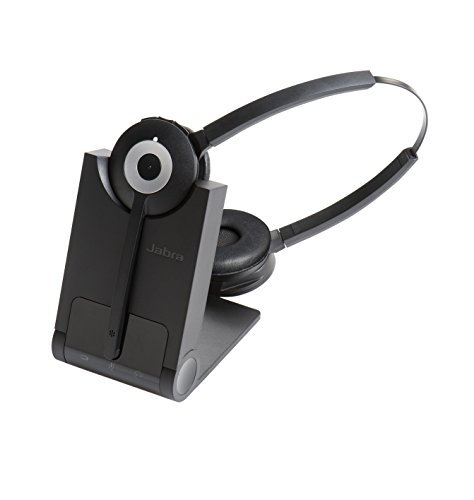
Jabra Pro 920 Duo — Best wireless for focus
Take the PRO 920’s wireless foundation and cover both ears, and the character of the product changes completely. The Duo is for the desk where the phone work is the work — the bookings line, the support desk, the accounts clerk who spends the day in conversation while a busy office churns around them. Two earpieces with proper cushioning shut out a meaningful share of that churn passively, letting call volume stay lower and concentration stay higher, and callers get the same clear DECT voice path as the mono model delivers.
The trade is written into the design: with both ears covered, the office must reach you visually — a wave, a note, a tap on the shoulder — which is why Duo headsets live on focused desks rather than reception counters. Everything else mirrors its sibling: the base handles phone connection and charging, talk time covers a working day, and the build favours serviceability over style. Buyers choosing between the two 920s are really choosing a relationship with their room. If colleagues and visitors interrupt you productively, keep the mono’s open ear; if interruption is the enemy and the phone is the job, the Duo is the honest pick.
Accounts and support desks discover a second benefit of the Duo’s isolation: fewer errors in numbers. Digits heard through one ear against a noisy room get transposed; the same digits heard in stereo quiet arrive intact. Teams that handle card numbers, reference codes and addresses by voice have historically standardised on duo headsets for exactly this unglamorous reason. The Duo also suits the worker who takes calls while a colleague briefs the room around them — the phone conversation stays sealed, the room stays out, and neither audience is short-changed by the other’s presence.
- Connection path: DECT base wired to one desk phone
- Ear coupling: duo stereo, both ears cushioned
- Call handling: headset controls with base-supported phone link
- Role note: designed for call-dense desks, not front counters
Strengths
- Two-ear coverage lowers listening effort in a noisy office
- Same dependable DECT range and base simplicity as the mono model
- Callers hear no difference — the voice path is equally clean
Trade-offs
- Colleagues lose the ability to catch your ear between calls
- Stereo coverage can feel isolating for staff who also serve walk-ups
- Shares the family’s battery-aging reality over long ownership
Best for: phone-heavy roles in loud offices where focus is the scarce resource. Not suited for: front-desk staff who must hear a door, a bell and a visitor’s first sentence.

Plantronics HW251N SupraPlus Wideband — Best corded classic
The SupraPlus design has answered calls in more offices than any headset in this guide will ever see, and the HW251N is its noise-cancelling wideband form. Wideband matters on modern phone systems that carry it: voices gain body and consonants sharpen, so names and numbers survive the line more reliably. The N model’s noise-cancelling microphone works the other direction, trimming the office around you out of what your caller hears. Worn on one ear with a famously adjustable headband and voice tube-era ergonomics refined over generations, it disappears into a shift the way only a mature tool does.
Now the condition this guide promised to state without burying it: the HW251N — and its non-noise-cancelling sibling, the HW251 — is a QD headset only. Its cord ends in a Quick Disconnect plug, and it will not connect to any telephone by itself. You must pair it with a compatible bottom cable for a direct connection, or an amplifier such as a Vista-series unit, chosen for your phone model. Buy the pair together, verify the phone match, and the SupraPlus rewards you with the category’s benchmark reliability. Buy the headset alone and you have purchased half a telephone headset — an avoidable, entirely documented half.
Longevity evidence for the SupraPlus line has a particular character: it is measured in the headsets still clipped to desks after phone systems around them were replaced twice. The QD architecture is why. When the phones changed, the bottom cables changed; the headsets, the part that touches the human, simply clicked onto new partners and carried on. An office investing in HW251Ns is therefore not really buying a headset for this year’s phone system — it is buying the human half of an interface, with the machine half deliberately disposable. Few products in this guide, or any guide, are designed with that clarity about which half ages faster.
- Connection path: QD plug — requires bottom cable or amplifier, sold separately
- Ear coupling: mono over-ear with adjustable headband
- Microphone: noise-cancelling, wideband voice design
- Family note: HW251 is the same headset without the noise-cancelling mic
Strengths
- Wideband voice makes callers measurably easier to understand on supporting systems
- Decades-proven design with spares and cables everywhere
- QD pairing lets each agent use a personal headset on a shared desk cable
Trade-offs
- Useless out of the box without the correct bottom cable or amplifier
- Corded range ends where the coil ends
- Aesthetics are pure industrial — it looks like the call center it came from
Best for: established offices standardising on QD infrastructure. Not suited for: a first-time buyer expecting a complete in-box solution — start with the bundled RJ09 pick below.

Telephone Headset QD with RJ09 — Best bundled starter
This generic QD headset attacks the SupraPlus problem from the opposite direction: instead of asking you to research a bottom cable, it bundles RJ09 cables in the box and names the phone families they fit — the listing calls out Yealink, Grandstream, Polycom, Snom, Fanvil and Mitel handsets. For a small office running one of those phone systems, the purchase becomes refreshingly binary: find your phone on the compatibility list, plug into the handset or headset port as directed, and take calls. The noise-cancelling microphone and mono wearing style follow call-center convention, because that is plainly the work this headset expects to do.
The honest limits are those of any value-tier generic. The compatibility list is a boundary, not a suggestion — a phone outside the named families may need a different cable or may not work at all, and the QD fitting follows the common pattern rather than guaranteeing a match with every installed cable in an existing fleet. Build and finish are workmanlike rather than luxurious. But as a first telephone headset for a named-phone office, or as economical seats for a growing support desk, it removes the category’s biggest friction — the cable puzzle — at the moment of purchase, and that earns its place here.
Small offices feel this model’s value in a specific moment: the second seat. The first headset for a growing support desk is a research project; the second, third and fourth are reorders, because the compatibility question was answered once and the cable is already in the box. That reorder simplicity is worth money to a business without an IT department, where the person ordering headsets is also the person answering the phones they plug into. The bundled approach trades the SupraPlus’s ultimate refinement for a purchasing experience a busy office manager can complete between customers, and for many small firms that trade is the entire ballgame.
- Connection path: QD headset with RJ09 cables included
- Ear coupling: mono, call-center wearing style
- Compatibility: named desk phone families in the listing — verify yours
- Microphone: noise-cancelling for shared-office use
Strengths
- Bundled cables turn a two-part research project into one purchase
- Named compatibility list lets you confirm fit before spending
- Economical enough for multi-seat support desks
Trade-offs
- Phones outside the named families are a gamble, not a given
- Materials and refinement trail the Plantronics classic
- QD pattern matching with pre-existing fleet cables is not guaranteed
Best for: small offices on Yealink, Grandstream, Polycom or similar named phones. Not suited for: an office whose phone model is absent from the listing’s list — treat that absence as the honest answer it is.

Mono QD Headset (4-pin) — Best spare for QD fleets
Some products in this guide are exciting; this one is useful in the way a spare tyre is useful. It is a mono QD headset built for cables with the common 4-pin Quick Disconnect connector — the Plantronics-pattern wiring that a generation of call centers installed — and its natural buyer is the office manager whose desk drawer holds working bottom cables and one headset with a dying earpiece. For that buyer, this is a same-week fix: click the new headset onto the existing cable and the seat is back in service, no amplifier shopping, no phone compatibility project.
The listing’s VT6932QD designation and 4-pin clarity are the details to match against your installed cables before ordering, because QD’s family resemblance hides incompatible variants and a near-fit is still a non-fit. Voice equipment of this tier is tuned for intelligibility rather than beauty, with a microphone suited to shared-floor chatter. It will not upgrade a fleet’s audio ambitions, and it is not a starting point for a new office — without the cable half, it cannot work at all. Judged as what it is, a replacement organ for the world’s most common telephone-headset infrastructure, it is exactly the product its buyers are searching for.
Fleet managers develop an eye for the drawer this headset belongs in. It is the drawer that also holds the spare bottom cables, the cushion packs and the one amplifier that has outlived three phone systems — the drawer of an office that runs its telephones as infrastructure rather than as gadgets. In that drawer, a headset like this is not a compromise purchase; it is the correct unit of stock, bought in twos and threes, because the cost of a dead seat during a busy morning exceeds the price of the spare many times over. Products earn their place in that drawer by being boring in exactly the right ways.
- Connection path: 4-pin QD — requires an installed compatible bottom cable
- Ear coupling: mono for one-ear-on-the-room working
- Model marker: VT6932QD — match this against your fleet’s fittings
- Role note: replacement and spare stock for existing QD desks
Strengths
- Revives a dead seat using cables the office already owns
- 4-pin pattern covers the most common installed QD base
- Keeps shared desks hygienic — personal headsets, shared cables
Trade-offs
- Completely dependent on owning the right cable already
- QD variants look alike; a wrong-pattern order helps nobody
- Plain voice-grade tuning with no wideband ambitions stated
Best for: fleet managers maintaining Plantronics-pattern QD desks. Not suited for: anyone starting from zero — the bundled RJ09 pick or a DECT model gives you a complete system.
Plantronics CS540 — Prose-only: Renewed market
The CS540 earned its fame honestly: for years it was among the lightest wireless telephone headsets money could buy, a feather of an earpiece on a DECT base that receptionists forgot they were wearing, with convertible wearing styles and a voice that punched far above its weight. If this guide were ranking designs alone, it would sit near the top. It appears here without a buy link for a market reason that matters more than its design: when we checked, the only listing the catalogue returned for the CS540 was Renewed stock. That changes the purchase from a product decision into a condition decision, and condition decisions deserve prose, not a button.
Buying Renewed is not automatically wrong — refurbished units from reputable programmes can be excellent value, and for a discontinued favourite it may be the only road left. But the questions change: What exactly was refurbished? What warranty stands behind it? What is the returns path if the battery — the component age hits first in DECT headsets — is tired? A buyer who asks those questions of a specific Renewed listing and likes the answers can still end up delighted with a CS540. A buyer who simply wants a wireless desk-phone headset with full new-product backing should take the Jabra PRO 920 above and sleep better. This section exists so that choice is made deliberately.
The CS540’s afterlife in the Renewed market tells its own story about the design. Products that disappointed their owners do not sustain a refurbishment trade; nobody refurbishes a headset the world was glad to see discontinued. The CS540 circulates because a generation of receptionists formed an attachment to its weight — or rather its absence of weight — and because its DECT bases proved durable enough to anchor second lives. That circulation is the context for the cautious advice in this section: the design is proven, the individual unit is a variable, and the buyer’s diligence is what converts one into the other.
- Connection path: DECT base to desk phone, convertible wearing styles
- Ear coupling: famously light mono earpiece
- Market status at check: only Renewed listings returned — no new-stock link offered
- Buying note: interrogate warranty, battery and returns before choosing refurbished
Strengths
- Among the lightest wireless telephone headsets ever widely sold
- Convertible fit suits ears that reject standard hooks and bands
- DECT voice quality set the standard its rivals still chase
Trade-offs
- Renewed-only availability shifts risk onto the buyer’s homework
- Battery condition in refurbished units varies and defines lifespan
- No straightforward new-unit warranty route at present
Best for: a CS540 loyalist replacing a beloved unit, willing to vet a Renewed listing carefully. Not suited for: a business equipping several desks that needs uniform warranty cover — buy the in-production Jabra line instead.
Why Do Desk Phones Still Deserve Their Own Headsets?
Every few years someone predicts the desk phone’s funeral, and every year the phones in surgeries, depots, hotels and council offices keep ringing. The reasons are structural: a desk phone is a shared appliance with a number that belongs to a role rather than a person, it works during computer outages and network tantrums, and its audio path was engineered for exactly one job. A headset bought for that ecosystem inherits the same virtues. It does not need a software update, it does not care whether the laptop is asleep, and it answers to a handset standard older than most of the staff using it.
That stability explains the category’s conservative designs, which younger buyers sometimes mistake for stagnation. The SupraPlus silhouette persists because the problem it solves has not changed shape: a human head, a telephone call, a working day. Where the category has moved, it has moved in the invisible places — wideband audio as phone systems gained the bandwidth to carry it, DECT bases with better range and battery management, QD cables for phone families that did not exist when the connector was designed. Buying into this ecosystem is buying into maturity, and maturity, for equipment a business depends on hourly, is not a consolation prize.
How Does an Amplifier Change a Corded Setup?
The amplifier — the Vista-class box that sits between a QD headset and certain phones — is the component first-time buyers most often skip and most often end up ordering. Its job is translation and control: it adapts the headset’s microphone and speaker levels to a phone that was not designed with headsets foremost in mind, and it puts volume and mute under the wearer’s hand at the desk. Phones with proper headset ports and compatible direct-connect cables can bypass it; phones without them generally cannot, which is why the compatibility check in this guide keeps returning like a chorus.
An amplifier also future-proofs a corded desk in a way a direct cable cannot. When the phone is replaced, the amplifier’s settings and headset usually survive the transition with a cable change at most, while a direct-connect arrangement may need re-matching from scratch. Offices that standardise on amplifier-based desks pay more per seat on day one and less per seat across every phone refresh afterwards. Neither route is wrong; they are different answers to how often the building changes its telephones, and the honest reseller conversation — the one this guide is trying to simulate — starts with that question rather than with a headset model.
What Should a Reception Desk Headset Survive in a Year?
Picture the front desk’s calendar of abuse. The headset is worn by three people, dropped weekly, disinfected with whatever wipe is nearest, and left dangling by its cord over a weekend at least once a month. Its base is unplugged by cleaners and re-plugged by guesswork. Its wearer eats lunch wearing it. Equipment that survives this biography is not delicate, and the picks in this guide were filtered with the biography in mind: Jabra’s bases are built for institutional desks, the SupraPlus line’s service record is practically defined by surviving it, and even the value QD models were chosen for replaceable, separable parts rather than sealed elegance.
The buyer’s contribution to survival is a five-minute induction: show each wearer how the QD disconnects instead of letting them discover the handset cord’s limits, agree where the headset lives when unworn, and keep one spare cushion set in the desk. Offices that do this get the category’s famous decade-long service. Offices that do not get the category’s other famous outcome — a drawer of tangled, half-working headsets and a standing order for whatever is cheapest this quarter, forever.
How Do the Six Desk-Phone Headsets Differ in Daily Use?
| Headset | Connection | Ears | What else you need |
|---|---|---|---|
| Jabra PRO 920 Mono | DECT base | One | Nothing — complete kit |
| Jabra Pro 920 Duo | DECT base | Two | Nothing — complete kit |
| Plantronics HW251N | QD cord | One | Bottom cable or amplifier for your phone |
| QD Headset with RJ09 | QD + bundled RJ09 | One | A phone from its compatibility list |
| Mono QD Headset 4-pin | QD cord | One | An existing 4-pin QD bottom cable |
| Plantronics CS540 | DECT base | One | Currently: a carefully vetted Renewed listing |
The rightmost column is the one to shop by. The two Jabra DECT models are the only complete systems in their boxes; every corded pick is one half of a partnership, differing only in how much of the other half is bundled or assumed. None of that makes the corded picks worse — QD fleets run for decades precisely because the halves separate — but it does mean the true price and the true setup effort of a corded purchase are only visible once the matching cable is counted. Budget both halves, and this category’s reputation for reliability will make sense from your first week.
How Should You Connect a QD Headset to Your Phone?
Work through the chain in order and test each link. First identify your phone’s headset path: many desk phones offer a dedicated headset port, while others expect the headset to share the handset port — the manual’s headset section, not guesswork, decides which. Second, choose the desk-side half: an amplifier if your phone needs volume and microphone gain adjustment or lacks a headset port, or a direct-connect bottom cable where the phone supports one. Third, confirm the cable’s phone-side plug and the QD pattern both match your hardware, then click the headset in and make a test call before the shift starts.
On that test call, check three things in order: your own voice level as the other side hears it, the caller’s voice level in your ear, and the disconnect behaviour — pulling the QD apart should hold the call quietly, not drop it. Adjust amplifier transmit and receive levels now, not mid-conversation with a customer. Label the cable with the phone model it belongs to; QD cables migrate between desks over the years, and a labelled cable is a future colleague’s good day. Finally, if your phone supports a headset button or hook switch, enable it in the phone’s settings so answering happens at the phone rather than by lifting a handset you are no longer holding.
What Mistakes Do Buyers Make With Telephone Headsets?
Ordering a QD headset alone tops the list by a distance — the headset arrives, the connector matches nothing in the building, and the purchase stalls for a week over a cable that should have shared the original order. The fix costs nothing but attention: whenever a listing says QD, ask “QD to what?” before paying. Second comes assuming all QD is one QD. Pin counts and wiring patterns differ; a connector that almost fits is a connector that does not work, and forcing it helps neither side.
Third, buyers routinely choose mono or stereo by price rather than by room. A reception desk given a stereo headset loses its ears on the room; a call-dense desk given mono loses focus it needed. Fourth, wireless buyers forget the phone side of remote answering — a DECT headset cannot lift a handset the phone will not release electronically, so hook-switch compatibility deserves a check before the purchase, not after. Finally, refurbished favourites like the CS540 deserve neither blind trust nor blanket rejection: vet the specific listing’s warranty and battery story, because in Renewed stock the listing, not the model name, is the product you are actually buying.
How Do You Choose Between One Ear and Two at a Desk Phone?
The mono-versus-duo decision at a desk phone is really a decision about the room’s job. Where the desk serves the room — reception, a trade counter, a nurse’s station — the room must be able to reach the wearer without a pantomime, and mono’s open ear is a working tool, not a compromise. Where the desk serves the phone — bookings, support, accounts — the room is the interruption, and duo coverage is concentration equipment. Headsets get returned when this decision is made by price or by habit instead of by the room, and the returns are always described as comfort problems when they are actually attention problems.
There is a middle pattern worth copying from experienced call operations: default to mono for shared and public-facing desks, default to duo for dedicated phone roles, and keep one of the opposite kind in the drawer for the agent whose ears or duties disagree with the default. That single spare converts a policy into a preference-respecting system, and it costs less than one returned headset. The Jabra pair in this guide makes the pattern easy to implement, since both 920 variants share a base philosophy and a support story; the corded world achieves the same with a duo QD model beside the mono standards stocked here.
What Does the Second Handset on the Desk Tell You?
Offices reveal their telephone maturity in their spares. A desk with a working spare headset — or a QD cable that lets a personal headset click in — is a desk whose calls survive equipment failure, staff sickness cover and the new starter’s first morning. A desk with exactly one headset and no plan is a desk one dropped earpiece away from handset work, with the neck ache and the missed notes that handset work guarantees. The picks in this guide span the prices they do partly so that the spare is affordable at every tier: a second 4-pin QD headset for an equipped desk costs less than the overtime its absence eventually causes.
Plan the spare at purchase time, in the same order, while the compatibility research is fresh. The cable that matches today’s phone, the cushion set that matches today’s headset, the base charger that matches today’s DECT unit — all of these are trivially easy to source in the week of purchase and archaeology two years later. Telephone headsets reward offices that think in systems and punish, gently and repeatedly, offices that think in single items. This guide has tried to think in systems on every page; the comparison table’s final column, listing what else each pick needs, is where that thinking becomes a shopping list.
Why Does Wideband Audio Matter on an Ordinary Phone Call?
Traditional phone audio was engineered for economy, not clarity: a narrow slice of the voice, enough to recognise a speaker and follow a sentence in quiet conditions. Wideband — sometimes marketed as HD voice — roughly doubles that slice, and the difference lands exactly where telephone misunderstandings live. S and F, M and N, the tail of a postcode or the difference between fifteen and fifty: these are carried by the frequencies narrowband discards. A wideband headset like the HW251N can only deliver that advantage when the phone system behind it carries wideband too, which modern IP phone estates increasingly do and elderly analogue lines do not.
The practical advice is to ask one question of whoever runs your phones — does our system carry wideband between handsets? — and let the answer rank the corded picks. On a wideband estate, the SupraPlus’s design brief fully expresses itself and the investment compounds across every call. On a narrowband estate, the same headset remains an excellent, durable mono QD choice, but its signature advantage is dormant, and the value picks close the gap considerably. Equipment guides rarely admit that a flagship feature can be switched off by infrastructure the buyer does not control; this one does, because the admission is the difference between a recommendation and a sales pitch.
How Should a Small Office Buy Its First Telephone Headsets?
Start with an inventory, not a catalogue. Write down every phone’s make and model, which desks take calls all day and which take them occasionally, and whether anyone must move while talking. That single page of facts eliminates most of this guide instantly — and that is its purpose. The DECT models survive the inventory only where movement is real; the QD models survive only where someone will own the cable-matching task; the bundled RJ09 pick survives wherever its compatibility list covers the phones actually on the desks. What remains after the inventory is usually two candidates, and at that point a single trial unit of each, worn for a week by the person who talks most, settles the question with evidence no review can supply.
Buy the winner in a pattern, not in singles: headsets for the desks that need them, one spare, the cables and cushions in the same order, and a note in the office records of exactly what was matched to what. That note is the difference between a five-minute reorder in year three and a fresh research project conducted while a desk sits silent. Small offices cannot afford an IT department, so they must afford documentation — a page of it, kept where the spare headset lives. Do that, and the modest equipment in this guide will deliver the unglamorous, decade-scale reliability that made the category’s reputation in the first place.
What Changes When an Office Migrates Its Phones?
Phone migrations are where headset ecosystems prove their design philosophy. In a QD office, migration day is a cable exercise: the headsets — the personal, fitted, expensive-to-replace half — stay on their owners’ heads while the desk-side halves are swapped to match the new handsets, and Monday’s calls sound exactly like Friday’s. In a DECT office, the bases are re-terminated to the new phones, hook-switch compatibility is re-verified, and the headsets themselves again survive untouched. In an office that bought headsets as indivisible gadgets matched to the old phones, migration day is a bonfire: everything is replaced at once, at the worst possible negotiating moment.
The lesson generalises beyond telephones. Buy the human-facing half of any system for the long term and the machine-facing half as cheaply as honesty allows, because machines refresh on vendors’ schedules and humans do not refresh at all. Every pick in this guide was assessed with a migration in its future, and the ones with separable halves — QD above all — earned their places partly on that day, years away, when the phones change and the headsets simply click onto something new and keep answering.
Final Recommendation
Start with the room, then the wiring. A mobile front-desk role points straight at the PRO 920 Mono; the same wireless system in Duo form serves the phone-bound desk that needs shelter from the office. Offices already living on QD infrastructure should keep feeding it — the HW251N for new seats of the highest standard, the 4-pin mono for spares — while a small office on named IP phones gets the gentlest start from the bundled RJ09 model. And the CS540 stays what it has become: a great design to buy deliberately from the Renewed market, never accidentally. Match the halves, and a telephone headset will repay you the way this category always has — by still working, unremarked, years from now.
One constituency has not been mentioned and deserves the last word before the verdict: the caller. Nobody ringing a surgery, a depot or a council office has ever asked what headset the agent wears — they ask, silently, whether they can hear and be heard without strain, whether the person sounds present, and whether the call feels like it is being taken seriously. Every technical thread in this guide — wideband, DECT, QD discipline, noise-cancelling microphones — terminates in that caller’s experience. Buy the headset that makes your callers’ lives easier and the internal arguments about models tend to settle themselves.
If a trial is possible, run it at the busiest desk during the busiest week, not at the quietest desk in a quiet month. Telephone headsets reveal themselves under load — in the fiftieth call, the shared shift change, the morning the phones melt down — and a model that survives that week with its wearer still recommending it has passed the only examination this category truly respects. Buy a single unit first if the budget allows the patience; the week it spends on trial will pay for itself in avoided fleet mistakes.
Finally, a word about the handset that shares the desk with every headset in this guide. Keep it. The headset is for the hours of conversation; the handset remains the fastest instrument for the thirty-second call, the private word stepped away from a shared desk, and the day the headset is elsewhere. Offices that confiscate handsets in the name of headset adoption discover that they have not modernised the desk but merely removed its fallback. The mature telephone desk — the kind this category has served for decades — runs both, each for what it does best, and the headset picks above were chosen to thrive in exactly that realistic arrangement rather than in a showroom where the handset has been hidden for effect.
Label the finished setup before the first call arrives: a tag on the bottom cable naming its phone, a name on the headset naming its owner, and the pairing note filed where a successor can find it. Five minutes of labelling is the cheapest support contract in this entire guide.
And keep the receipt with that note. Telephone equipment outlives the memory of everyone who bought it, and the office that can prove what it owns, when it bought it and what it connects to is the office whose next headset purchase takes an afternoon instead of a week.
That filing habit, unglamorous as it sounds, is the thread that runs through every recommendation in this guide: the equipment is mature, the connections are knowable, and the offices that thrive with it are the ones that write down what they matched.
Frequently Asked Questions
Can I plug a QD headset straight into my phone?
Not with the headset alone. The QD plug needs its matching bottom cable or an amplifier between headset and phone, and that second piece is phone-specific. Bundled models like the RJ09 pick include their cable; classic models like the HW251N assume you will choose yours.
Will these headsets work with a computer softphone?
Generally no. These are desk-phone devices: DECT bases wire to telephones, and QD cables terminate in phone plugs. Softphone work needs USB or Bluetooth headsets — the subjects of our meeting and call-center guides — unless your desk phone itself bridges to the computer.
What is the difference between the HW251 and HW251N?
The N adds a noise-cancelling microphone to the same SupraPlus mono design. In a quiet office the two sound similar to callers; on a shared floor the N’s suppression of surrounding chatter is worth having. Both are QD headsets requiring the same bottom cable or amplifier.
How far can I walk with a DECT telephone headset?
DECT bases typically cover a small office comfortably — through a few rooms, weakening with distance and dense walls. It is a workplace radius, not a building-wide one. If your duties cross floors, plan the call workflow around the base’s realistic reach.
Is buying a Renewed CS540 a bad idea?
Not inherently — it depends entirely on the specific listing’s warranty, battery condition and returns terms. Vet those three things and a Renewed unit of this famously light design can be a bargain. Skip the vetting and the same purchase is a lottery.
What is an electronic hook switch, and do I need one?
An electronic hook switch — EHS — lets a wireless headset answer and end calls away from the desk by signalling the phone electronically, instead of mechanically lifting the handset. You need one only if remote answering matters and your phone supports it; the headset base alone cannot grant the ability to a phone that lacks the interface.
Can two people share one DECT base across shifts?
Yes — the base belongs to the desk and phone, and headsets can be re-paired or a single headset shared, though personal headsets are the hygienic preference. DECT systems generally allow a headset to be subscribed to the base in a short procedure described in the manual.
Related Guides
Desk-phone users moving part of their work to a computer may want our guide to headsets for Teams and Zoom alongside the wired options in our USB call center headset roundup. For phone calls taken on the move rather than at a desk, see the mono Bluetooth headset picks.


