What's inside
- Key Takeaways
- Quick Picks
- How Did We Choose These Smart Doorbells?
- Battery or Wired: Which Power Suits Your Door?
- Which of These Six Belongs on Your Door?
- How Do You Install and Tune a Smart Doorbell Well?
- What Mistakes Do Smart Doorbell Buyers Make?
- What Is a Doorbell Like at Night?
- What If the House Has Two Doors?
- How Strong Must the Wi-Fi Be at a Front Door?
- How Should a Good Doorbell Behave Toward Neighbours?
- What Does the Second Year of Ownership Look Like?
- Comparison Table
- Final Recommendation
- Frequently Asked Questions
- Related Guides
As an Amazon Associate I earn from qualifying purchases. This post may contain affiliate links at no extra cost to you.
gizmoverdict.com is reader-supported. When you buy through links on our site, we may earn an affiliate commission.
Where to buy: Each doorbell below links to a verified listing in this site’s product pool. Where a model’s headline features lean on a subscription or a particular smart-home ecosystem, the review says so in the open, because a doorbell is a ten-year housemate and surprises are unwelcome in housemates.
The best smart doorbell cameras are best understood not as cameras that happen to ring, but as a household’s front-door staff: they watch the approach, announce the visitor, hold a conversation in your absence, remember what happened, and report to whichever digital household you keep — Alexa’s, Google’s, or one centred on local storage and no monthly retainer at all. Judged that way, the buying decision stops being a beauty contest of resolutions and becomes a set of practical appointments. Who powers it, battery or wire? Where does its memory live, your house or a company’s cloud? Whose voice assistant answers when you ask to see the door? The six appointments below cover every sensible combination of those answers.
Start with power, because it quietly governs everything else. A battery doorbell can be fitted in twenty minutes to almost any door, rented or owned, wired or not — and it pays for that freedom with a charging routine and a certain sleepiness, waking for events rather than watching continuously. A wired doorbell never sleeps, never needs a ladder and a USB cable in February, and can record around the clock where the model allows — and it pays with an installation that needs existing wiring or an electrician’s visit. Neither is the correct answer. They are answers for different houses, and this guide keeps both on the table throughout, with the power sentence of every pick stated as plainly as its camera sentence.
Then memory and ecosystem, the two loyalties a doorbell demands. Memory first: some of these models keep their history locally, on onboard storage or a card or a home base, with no subscription in the story at all; others keep it in the maker’s cloud, where reviewing it is a plan’s privilege — a legitimate arrangement when chosen knowingly, and this guide flags it wherever it applies rather than letting a famous badge smuggle it past. Ecosystem second: a doorbell that speaks to the assistants and displays already in your home is worth more than a marginally better camera that speaks to none of them. The picks below are ordered to make those loyalties visible — local first, then the great ecosystems, each with its character stated.
Key Takeaways
- Decide power first: battery models fit any door in minutes; wired models never sleep and never need charging.
- The eufy E340 leads on local terms — dual cameras, 8GB onboard storage and no subscription in its listing.
- Ring’s 2K Plus is the Alexa-ecosystem flagship here, with recorded history living in Ring’s cloud under a plan.
- Google’s Nest Doorbell (Battery) is the Google Home household’s natural doorbell, in the listing’s Ivy finish.
- Arlo’s 2K second-generation model brings a head-to-toe view and a bundled trial of its Secure plan — read the trial as a trial.
- Wyze’s battery model offers a square 1:1 head-to-toe frame, while Blink’s wired 2K+ trades battery freedom for continuous hardwired power.
Quick Picks
| Pick | Badge | Why it earns its place |
|---|---|---|
| eufy Video Doorbell E340 | Best overall, local-first | Dual cameras watch faces and parcels while 8GB onboard storage keeps history at home, fee-free. |
| Ring Battery Doorbell 2K Plus | Best for Alexa homes | The Plus tier of Ring’s new line, with a quick-release battery and the ecosystem’s full polish. |
| Google Nest Doorbell (Battery) | Best for Google homes | Google Home and Gemini integration in a battery design that fits doors without wiring. |
| Arlo Wireless Video Doorbell 2K (2nd Gen) | Best head-to-toe HDR | 2K HDR with package and person detection, plus a month of its Secure plan included to try. |
| Wyze Battery Video Doorbell | Best square-frame value | A 1536×1536, 1:1 head-to-toe view with wire-free or wired installation at a value pitch. |
| Blink Wired Doorbell 2K+ | Best wired Blink | Head-to-toe 2K on continuous hardwired power for households already in Blink’s world. |
How Did We Choose These Smart Doorbells?
The set was built as a map of the category’s real loyalties rather than a league table of specifications. One place went to the strongest local-storage design, because a growing share of households now starts its search with custody of the footage. Two places went to the ecosystem flagships — Ring for the Alexa-centred home, Google Nest for the Google-centred one — because for those households the doorbell’s integrations are not features but the product itself. Arlo earned its place as the independent premium option with the strongest stated video brief, and the final two places went to the value engineers: Wyze, rethinking the frame itself, and Blink’s wired model, which corrects the battery compromise its own brand is famous for.
Every factual claim in the reviews traces to the model’s listing title — resolutions, fields of view, power arrangements, bundled plans, assistant support — and where a listing is silent, the review describes character rather than inventing specification. Subscription dependencies are stated wherever the category’s economics create them: cloud history on Ring and Blink is a plan’s territory, Arlo’s listing itself bundles a month of its Secure plan as an inclusion, and the eufy and Wyze local arrangements are described in their own terms. A reader should finish any single review knowing exactly what the doorbell costs to own, in money and in chores, after the box is empty.
Video specifications were weighted the way doorsteps experience them. Head-to-toe framing recurs across this set because the parcel at the feet is the doorstep’s most common story; night vision matters because half the door’s life is dark; and two-way talk quality decides whether the courier conversation is a conversation or a shouting match through a letterbox. Resolution beyond 2K was treated as garnish. The door does not need cinema. It needs a witness with good manners and a reliable memory.
Battery or Wired: Which Power Suits Your Door?
The battery case is freedom. No transformer to test, no wiring to discover disappointingly absent, no landlord to petition: unbox, charge, mount, and the door has eyes before lunch. Renters, new-build owners whose bell wiring is a rumour, and anyone whose door sits far from the old chime’s circuit should start here — three of this guide’s picks can live on battery, and a fourth, the Wyze, offers battery or wired in one unit. The costs arrive later and quietly: a charging appointment every so often, its frequency set by your door’s traffic and your winter’s cold; a wake-up beat between motion and recording that wired models do not take; and, for most battery units, event-based recording rather than a continuous watch.
The wired case is permanence. A hardwired doorbell draws its living from the house, so it never sleeps through February, never asks for a ladder, and — in models that support it — can keep a continuous record rather than a highlights reel. Blink’s wired 2K+ in this guide exists precisely to give its ecosystem that permanence, and its listing states the one accessory truth wired buyers must hear: in-home alerts need a chime partner, whether the existing mechanical chime, the maker’s plug-in, or an Alexa device doing the honours. The wired costs are all at the front: confirming the transformer’s health, an installation measured in an hour rather than minutes, and immobility — a wired doorbell is a fixture, not a travelling companion.
Households between the two stools should notice how many picks here refuse to choose. The eufy pair’s wider family and the Wyze battery model both offer wired-or-wireless lives, letting a doorbell start on battery and graduate to the wire when an electrician next visits for other reasons. In a category that loves locking buyers into architectures, that flexibility is a feature worth paying attention to — it is the difference between a doorbell that fits the house you have and one that also fits the house you are slowly making.
Which of These Six Belongs on Your Door?
Read the reviews as household matches rather than rankings. The first pick is the self-reliant household’s doorbell; the next two are the ecosystem flagships, and choosing between them is really choosing which company’s house you already live in; Arlo is the independent with the premium video brief; and the last two are the value specialists, one rethinking the picture’s shape, the other correcting its own brand’s famous compromise. Somewhere in those six temperaments is your door, described more accurately than any star chart could manage.
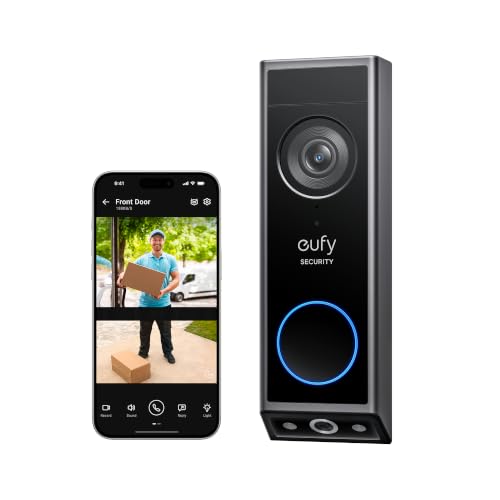
eufy Video Doorbell E340 — Best overall, local-first
The E340 earns the lead in an overview guide for the same reason it leads our no-subscription coverage: it is the most self-sufficient doorbell in the set. Its dual cameras divide the doorstep between them — one for the visitor’s face, one angled down to the step where parcels land — producing the head-to-toe view its listing promises, and its 8GB of onboard storage keeps the resulting history in the house, under a listing that states no subscription in so many words. Wireless or wired installation, colour night vision, two-way talk and AI motion and package detection complete a specification that never once asks the owner to open a billing relationship.
What that self-sufficiency feels like in practice is a doorbell with no second act of administration. There is no plan to renew, no trial to expire, no archive that vanishes if a card lapses; there is a rolling local memory, sized honestly at 8GB, that the household manages by exporting anything precious. For multi-door futures, the maker’s wider ecosystem offers base-station routes, but the doorbell as bought is complete in itself — a rarer property in this category than any resolution figure. Its one infrastructural demand is a solid 2.4 GHz Wi-Fi signal at the door, the tax every wireless witness pays.
Set against the ecosystem flagships below, the E340’s trade is polish for custody. Ring and Google will greet you with more lavish apps and deeper assistant theatre; the eufy answers with ownership. Households who know which of those they value will find this pick easy to choose or easy to pass, and both responses are correct — which is exactly what a lead pick in an overview should provoke.
- Cameras: dual, head-to-toe view per listing
- Storage: 8GB local, no subscription per listing
- Video: 2K FHD per listing
- Power: wireless or wired per listing
- Night vision: colour per listing
- Detection: AI motion and package detection per listing
Strengths
- Complete out of the box: history, detection and dual cameras with no plan attached.
- The downward lens turns parcel evidence from luck into routine.
- Power flexibility suits both wired houses and unwired doors.
Trade-offs
- The archive lives in the device; off-site copies mean entering the base-station ecosystem.
- App and assistant polish trail the two ecosystem flagships below.
- 8GB is a rolling window, so precious clips want prompt exporting.
Best for: households that want the smart doorbell’s benefits with custody of the footage and no plan. Not suited for: Alexa- or Google-centred homes wanting the flagship native experience above all.

Ring Battery Doorbell 2K Plus — Best for Alexa homes
The Plus is Ring’s statement tier in its newest battery line, and its listing’s details sketch the intended owner: retinal wide-angle video with up to 6x enhanced zoom, night vision, and a quick-release battery pack — that last detail being the connoisseur’s tell, because it converts the battery doorbell’s one recurring chore from a doorbell-removal operation into a battery swap measured in seconds. In Nickel Silver, per the listing, it also dresses like the flagship it is. For a household already speaking to Alexa in every room, this is the doorbell that completes the sentence: announcements on Echo devices, live view on the show by voice, routines that treat a doorbell press as a smart-home event.
The Ring arrangement must be stated with the clarity this guide applies everywhere: the live life is free and excellent, and the recorded life is the plan’s. Reviewing video history on Ring means holding a Ring subscription; without one, yesterday’s events are not an archive you can open. Households who accept that as the price of Ring’s cloud — an archive that survives the doorbell itself, in the category’s most polished app — are buying knowingly and will be well served. Households who do not should read the E340’s review again, because the difference between these two lead picks is not video quality. It is where memory lives and what it rents for.
As a piece of hardware for the Alexa home, though, the Plus is the set’s most complete expression of the ecosystem doorbell idea: the quick-release battery respects the owner’s time, the zoom respects the long driveway, and the integration respects the household’s existing investments. Buy it as an ecosystem citizen, with the plan budgeted as part of its true price, and it will feel less like a purchase than like the front door joining a household that was already digital.
- Video: wide-angle, up to 6x enhanced zoom per listing
- Battery: quick-release pack per listing
- Night vision: stated in listing
- Recorded history: Ring cloud, under a paid plan
- Ecosystem: Alexa-centred
- Finish: Nickel Silver per listing
Strengths
- Quick-release battery turns the category’s recurring chore into a seconds-long swap.
- The deepest Alexa integration in the set, from announcements to voice live view.
- Cloud history survives the doorbell itself — the plan’s genuine, purchasable virtue.
Trade-offs
- Recorded video review requires the paid plan; there is no local archive in the doorbell.
- Its value concentrates in Alexa homes; Google households should look one review down.
- The plan is a permanent cost that grows with every camera added to the house.
Best for: Alexa-centred households that accept the plan as part of the doorbell’s price. Not suited for: subscription-averse buyers, or Google Home households wanting a native citizen.

Google Nest Doorbell (Battery) — Best for Google homes
Google’s entry is the diplomat of the set: a battery doorbell that fits almost any door, finished — in this listing — in Ivy, and fluent in the language of the Google Home household, with the listing name-checking Google Home and Gemini as its native country. Its stated brief covers the fundamentals with Google’s characteristic calm: HD video with HDR for the doorstep’s difficult light, night vision, a 6x digital zoom, and 24/7 live view, so the door can be looked in on at any hour rather than only when it deigns to notice something. For the household whose phones, speakers and displays already run Google’s software, this is the doorbell that arrives speaking the mother tongue.
Its battery nature deserves the same honest framing as Ring’s: freedom at installation, a charging rhythm in ownership, and event-based vigilance rather than the continuous watch a wired unit keeps. Google’s detection intelligence has historically been a strength of the line — the ability to distinguish a person from a parcel from a passing animal is the difference between an alert worth opening and notification fatigue — and the household should explore which recognition features live where in Google’s current arrangement before assuming, because this category’s makers have all, at various times, kept some cleverness behind a plan’s door. The listing’s promise is the hardware and the live life; the household’s homework is the fine print of its chosen ecosystem, a sentence this guide offers as respect rather than warning.
Where the Nest distinguishes itself temperamentally is integration as ambience. A press that can appear on the household’s displays, a live view summoned by voice in the kitchen, a doorstep that participates in the same routines as the lights and the thermostat — for the committed Google home, these are not novelties but the texture of the house working as one system. The Nest is not the custody champion of this guide, nor its value champion. It is the citizenship champion for one specific, populous nation of households, and it wears the title comfortably.
- Video: HD with HDR, 6x digital zoom per listing
- Live view: 24/7 per listing
- Night vision: stated in listing
- Power: battery
- Ecosystem: Google Home and Gemini per listing
- Finish: Ivy per listing
Strengths
- The native doorbell for Google Home households, displays and voice included.
- HDR suits doorsteps where bright street meets shaded porch.
- Battery fitting frees it for doors with no wiring and no electrician budget.
Trade-offs
- Battery ownership means a charging rhythm and event-based rather than continuous watch.
- Its best life is lived inside Google’s ecosystem; outsiders get a fraction of it.
- Check which recognition features are plan-adjacent before assuming the full set is free.
Best for: Google Home households wanting the doorbell as a native citizen of their system. Not suited for: Alexa homes, custody-first buyers, or anyone wanting continuous recording on battery.

Arlo Wireless Video Doorbell 2K (2nd Gen) — Best head-to-toe HDR
Arlo plays the independent in a category of ecosystem giants, and its second-generation wireless doorbell makes the premium-video argument: 2K HDR head-to-toe video per its listing, with package and person detection and two-way audio, in a single-camera design that achieves the full doorstep frame through lens geometry rather than the E340’s dual-camera division of labour. HDR is the connoisseur’s detail here — the doorstep is a theatre of bad light, bright street against shaded porch, and a sensor that holds both ends of that contrast keeps faces legible exactly when a visitor stands backlit by the afternoon.
The listing carries one more phrase that this guide reads aloud on principle: a month of the maker’s Secure plan is included. Included months are the category’s customary first taste, and there is nothing sinister in accepting one — the plan’s richer history and features can be judged fairly only in use — provided the household calendars the trial’s end and decides, actively, whether the ongoing arrangement earns its renewal. Arlo’s hardware stands on its own merits either way; the independent’s pitch has always been that the camera justifies itself before the service is discussed, and the 2K HDR brief makes that pitch credibly.
Temperamentally, Arlo suits the household that has not surrendered its smart home to a single voice-assistant empire, or that runs a mixed house — some Alexa, some Google, a phone as the real headquarters — and wants a doorbell whose first loyalty is to its own app and its own video quality. It is the connoisseur’s hedge: premium optics, an independent platform, and a plan that is an option to evaluate rather than a premise of ownership.
- Video: 2K HDR, head-to-toe per listing
- Detection: package and person detection per listing
- Audio: two-way per listing
- Included: one month of Arlo Secure plan per listing
- Power: wireless (battery)
- Wi-Fi: single-band per listing
Strengths
- HDR handling of the doorstep’s contrast is the set’s most photographic video brief.
- Head-to-toe framing from a single camera keeps the design clean and single-lensed.
- An independent platform suits mixed-assistant households that owe no empire loyalty.
Trade-offs
- The bundled plan month is a trial; calendar its end and decide actively.
- Single-band Wi-Fi asks more of the doorstep’s signal than dual-band designs would.
- Ecosystem theatre — voice announcements, display casting — is thinner than the giants’.
Best for: video-quality-first buyers in mixed or independent smart homes. Not suited for: households wanting the deepest Alexa or Google integration, or a purely local archive.

Wyze Battery Video Doorbell — Best square-frame value
Wyze’s contribution to the category is a shape. Its battery doorbell records at 1536×1536 — a square, 1:1 frame per the listing — and the squareness is the idea: a doorbell’s world is vertical, a tall visitor above and a parcel below, and the conventional wide frame spends its pixels on the neighbours’ hedges while cropping the two subjects that matter. The square frame is Wyze looking at the doorstep’s actual geometry and declining to photograph the street. Add colour night vision, two-way audio, person, vehicle and package monitoring per the listing, and wire-free or wired installation, and the value brand’s proposition is complete: the doorstep, framed correctly, at a price tier the flagships do not visit.
The flexibility deserves its sentence. A doorbell that can start wire-free on a rented door and accept wiring later in an owned one is a doorbell that survives a change of address without becoming e-waste, and the listing’s promise of a one-minute setup — treat the minute as enthusiasm, but the direction is real — speaks to the same household: people who want the door watched this weekend, not after a project. Wyze’s ecosystem is app-centred and budget-flavoured, which its buyers generally regard as the point rather than a flaw.
The cautions are the value tier’s usual ones, stated without condescension. Square framing is a genuine reframing of priorities, and households who love a wide cinematic doorstep view should choose the wide models above with this guide’s blessing. And a value ecosystem asks its owners to be a little more hands-on — settings explored rather than assumed, storage arrangements understood rather than inherited. For the household that enjoys that bargain, this is the smart doorbell’s populist manifesto, and a persuasive one.
- Video: 1536×1536 HD+, 1:1 head-to-toe per listing
- Night vision: colour per listing
- Monitoring: person, vehicle and package per listing
- Power: wire-free or wired per listing
- Setup: one-minute setup claimed in listing
- Audio: two-way per listing
Strengths
- The square frame spends every pixel on the doorstep’s vertical story.
- Wire-free-or-wired flexibility lets one purchase survive a house move.
- Value pricing brings person and package monitoring to a populist tier.
Trade-offs
- Viewers who love a wide doorstep panorama will find the square frame austere.
- The app-centred ecosystem rewards owners who explore settings themselves.
- Battery life, run wire-free, still answers to doorstep traffic and weather.
Best for: value-led households and renters who want head-to-toe framing without flagship money. Not suited for: widescreen romantics, or buyers wanting a flagship ecosystem’s white-glove polish.

Blink Wired Doorbell 2K+ — Best wired Blink
Blink made its reputation on batteries that sip, so its wired 2K+ is best read as the brand answering its own customers’ other request: permanence. The listing describes a head-to-toe 2K video doorbell on continuous hardwired power, and that single phrase — continuous — is the product. No charging calendar, no battery anxiety in a cold snap, a doorbell that is simply always awake. For a household already running Blink cameras, this is the front door joining the system with the one compromise removed, and its enhanced ecosystem fit is the reason it closes this guide’s set.
The listing is commendably upfront about the wired life’s one accessory truth: in-home alerts need a partner — pairing with Alexa or a Blink Chime, sold separately — because a hardwired video doorbell does not automatically inherit the old mechanical chime’s job in every installation. Budget the chime route alongside the doorbell, as this guide advised in the power chapter, and the wired Blink’s story is complete: continuous power, head-to-toe 2K, and a door that announces itself through the house’s existing voices.
Blink’s storage arrangement follows the brand’s known pattern and is stated here as everywhere: recorded clips live under the subscription’s umbrella, with local arrangements possible through separate sync-module hardware rather than through the doorbell itself. Households inside Blink usually know this and have made their peace with one side or the other; new buyers should make the same peace consciously, before the purchase, using the same storage-sentence discipline the companion guide on this site teaches. As a wired, ecosystem-loyal, set-and-forget doorbell, the 2K+ is otherwise exactly what its listing says it is.
- Video: head-to-toe 2K per listing
- Power: continuous hardwired per listing
- Alerts: pair with Alexa or Blink Chime (sold separately) per listing
- Storage: cloud plan, or separate local hardware route
- Ecosystem: Blink / Alexa
- Role: wired flagship of the Blink line here
Strengths
- Continuous power abolishes the battery calendar that defines its brand siblings.
- Head-to-toe 2K keeps parcels and faces in one frame, wired and always awake.
- The natural front door for households already invested in Blink cameras.
Trade-offs
- In-home alerting needs a chime partner that is not in this box.
- Clip history follows Blink’s plan-or-extra-hardware pattern; read it before buying.
- Wired means fixed: this doorbell will not travel to the next rental.
Best for: Blink households with healthy doorbell wiring who want permanence at the front door. Not suited for: renters, unwired doors, or buyers seeking a local archive in the doorbell itself.
How Do You Install and Tune a Smart Doorbell Well?
The physical installation is the easy half; the tuning is where doorbells are made or ruined. Mount at the maker’s suggested height — the head-to-toe frames in this guide are designed around it — and before the final tightening, review the live frame at three moments: morning backlight, noon, and full dark, because each exposes a different lie the first view told. Angle wedges exist for doors set into corners or perpendicular to the path; a slight wedge toward the approach is worth more than any resolution upgrade, since a visitor’s face in profile is evidence of a hat.
Then set the doorbell’s manners. Motion zones should hug the step, the path and the parcel drop, and exclude the street and the neighbour’s drive, or the household will be trained — by a hundred irrelevant alerts — to ignore the one that matters. Sensitivity belongs at the level where a person registers and a cat is a rumour. Notifications should be rich enough to act on and rare enough to respect. And the two-way talk should be rehearsed once, with a family member at the door and the phone in the kitchen, so the first real courier conversation is not also the first audio test. A doorbell tuned this way becomes what it was bought to be: a quiet member of staff. Untuned, the finest camera in this guide is a nuisance with a lens.
What Mistakes Do Smart Doorbell Buyers Make?
The first is buying the ecosystem backwards — choosing a doorbell for its camera and discovering it is a foreigner in the household’s actual digital home, unable to announce itself on the displays and speakers already owned. Choose the citizenship first; the cameras in this guide are all competent. The second is ignoring the storage sentence until the first clip is needed, a mistake this guide has flagged at every pick where a plan holds the keys to history. The third is power denial: a battery doorbell on a busy, cold door, bought because installation was easy, teaching its owner to hate a product that was simply misassigned.
The fourth mistake is placement by guesswork — mounting where the old bell was, at the height the old bell liked, without ever reviewing the frame across a day’s light. And the fifth is expecting any doorbell to be more than a witness. These devices watch, announce, converse and remember; they do not intervene, and no claim in this guide should be read as promising otherwise. Bought as witnesses and tuned as staff, they are among the most satisfying small machines a house can employ.
What Is a Doorbell Like at Night?
Half of a doorbell’s working life happens in the dark, and the night shift has its own physics. Infrared night vision paints the step in monochrome and reaches a modest distance; colour night vision, offered by the eufy and Wyze picks here, borrows whatever ambient light the street provides to keep a visitor’s clothing and a parcel’s markings distinguishable, which is often the detail a clip is actually for. HDR, Arlo’s stated strength, earns its keep at dusk, when the street is still bright and the porch is already in shadow. What no specification can fix is a porch light blazing directly into the lens or a spider’s web built across it — the two classic night-shift saboteurs — so the tuned household keeps a soft light near, not behind, the door, and adds a monthly lens wipe to the same calendar as the battery check.
Night also reframes the battery question. A doorbell works harder after dark — illuminators lit, detection still vigilant, the cold sapping the battery’s chemistry — and a model that coasts through summer can ask for its charger noticeably sooner in January. Wired picks like the Blink 2K+ simply never receive that memo. None of this should scare a battery buyer whose door is quiet and whose climate is kind; it should merely set the expectation that the charging calendar has seasons, and that the household which plans for the winter rhythm will never be surprised by it.
What If the House Has Two Doors?
Many houses lead double lives: a front door for guests and parcels, a side or back door for family, bins and the dog. The second door changes the buying logic in two ways. First, ecosystem citizenship compounds — two doorbells inside one system share an app, an archive arrangement and a notification language, while a mixed pair doubles the household’s administrative surface. This is the strongest argument for deciding the first doorbell’s loyalty carefully: it is rarely a single purchase, however it is framed at the till. Second, the doors’ jobs differ, and the picks can be specialised accordingly — the full head-to-toe, dual-camera treatment for the parcel door, a simpler square-framed or battery unit for the family door where faces are familiar and the traffic is your own.
Power planning also doubles. Two battery doorbells mean two charging rhythms, mercifully staggered by their different traffic; two wired doorbells mean one transformer conversation held once, properly, with an electrician who will thank you for asking both questions in a single visit. And storage arithmetic doubles too, in whichever currency the household chose — card capacity, onboard windows, or a plan whose per-camera structure should be read with the second door already in mind. The households that fare best with two doors are the ones that bought the first doorbell as the founding citizen of a small system, not as a soloist who later resents the choir.
How Strong Must the Wi-Fi Be at a Front Door?
The front door is, from a router’s perspective, one of the worst addresses in the house: far from the hallway cupboard where routers live, behind the thickest wall the building owns, often behind a metal-clad door that treats radio the way a safe treats light. Every wireless pick in this guide lives or dies at that address. The symptoms of a starving doorbell are diagnostic gold — delayed notifications, a live view that negotiates before it opens, clips with their first seconds missing — and they are routinely misblamed on the doorbell, the app or the cloud, in that order, before anyone tests the signal at the door with the door closed. Test it the way the doorbell experiences it: phone at the mounting position, door shut, at the hour the street’s networks are busiest.
The remedies are mundane and effective. A mesh node in the hallway transforms most doorstep connections from marginal to boring, which is the highest state a connection can achieve. Where the house’s layout allows, a wired doorbell still needs its Wi-Fi — the wire carries power, not data, on every pick here — so the mesh conversation survives even the wired purchase. Budget the node, if needed, as part of the doorbell’s true installed price, the way the chime partner was budgeted in the power chapter. A smart doorbell is a network device that happens to have a lens; households that buy it as one are the households whose clips are always there.
How Should a Good Doorbell Behave Toward Neighbours?
A doorbell watches a semi-public stage, and its manners toward the street are part of its quality. The well-brought-up installation aims its frame at its own doorstep and path, sets its motion zones to end at the property’s edge, and treats the pavement’s passing life as none of its archive’s business. Most picks here provide the zone tools for exactly that discipline; the owner’s part is using them, and the reward is double — alerts that mean something, and neighbours who regard the little lens as a doorstep’s witness rather than a street’s surveillance. Households that share footage helpfully, when a street incident makes it genuinely useful, complete the social contract the technology quietly assumes.
Audio deserves the same restraint. Two-way talk is a conversation with your visitor, not a loudspeaker for the road, and the doorbells in this guide are built for the doorstep’s conversational distance. Used at that distance, with the household’s zones drawn tight and its notifications tuned rarer and richer, a smart doorbell becomes what the best household technology always becomes: unremarkable, reliable, and faintly indispensable — noticed only on the day it tells you something you needed to know.
What Does the Second Year of Ownership Look Like?
Doorbell reviews are written in the first week; doorbells are lived with in the second year, and the year’s texture is worth previewing. The battery models settle into their rhythm — a charger appearing on the kitchen counter at intervals the household no longer remarks on, the quick-release pack of the Ring Plus turning even that into a moment’s work. The wired models disappear almost entirely from attention, which is their design’s whole ambition. Apps update, detection grows a little cleverer or occasionally a little stranger, and the households that thrive are the ones who kept their settings notes from the first week’s tuning, because an update that resets a zone is a five-minute restoration for them and a month of irrelevant alerts for everyone else.
The archive question also matures. Local households develop the export habit for anything precious and stop thinking about the rolling window; plan households either find the fee has become invisible furniture or discover, at renewal, that they are paying for a year of doorstep history they reviewed twice. Both discoveries are legitimate, and both are cheaper made in this guide’s pages than at a renewal screen. The doorbell itself, whichever of the six it is, will simply keep watching — through the second year, the fifth, the new neighbours and the old tree’s removal — asking only for a clean lens, a fed battery or a healthy wire, and zones that still match the door’s life. Few household machines offer so much service for so little negotiation, which is why the category, for all its fine print, keeps earning its place beside the door.
Comparison Table
| Pick | Power | Memory lives in | Ecosystem | Signature |
|---|---|---|---|---|
| eufy E340 | Battery or wired | 8GB in the doorbell | eufy / local-first | Dual cameras |
| Ring 2K Plus | Battery, quick-release | Ring cloud (plan) | Alexa | Ecosystem polish |
| Google Nest (Battery) | Battery | Google cloud arrangement | Google Home / Gemini | Native Google citizenship |
| Arlo 2K (2nd Gen) | Battery | Arlo cloud (plan, 1 month incl.) | Independent | 2K HDR video |
| Wyze Battery | Battery or wired | Local/app arrangement | Wyze / Alexa & Google support | 1:1 square frame |
| Blink Wired 2K+ | Wired, continuous | Blink cloud (plan) or extra hardware | Blink / Alexa | Permanence |
Final Recommendation
Let your household’s existing loyalties referee, and the winner names itself. The local-first household should take the eufy E340 and never think about a plan again. The Alexa household should take Ring’s 2K Plus with its plan budgeted honestly, and the Google household its Nest, Ivy-clad and native. The independent takes Arlo’s HDR eye, the value hunter takes Wyze’s square-framed bargain, and the Blink loyalist with good wiring takes the wired 2K+ and retires the charging calendar forever. Every one of these six will watch a door faithfully for years; the only true error available is buying one whose power, memory and citizenship belong to a different house than yours. Match those three, tune it kindly, and your front door gains the most courteous employee it has ever had.
Frequently Asked Questions
Battery or wired — which should a first-time buyer choose?
Choose by the door, not by fashion. If healthy doorbell wiring exists, wired power’s permanence is worth the longer installation, and the Blink 2K+ or a wired-run eufy or Wyze will thank you every winter. If it does not, a battery model fitted this weekend beats a wired model planned for a season — and several picks here can start on battery and accept wiring later, which is the first-time buyer’s safest shape of purchase.
Do I need a subscription for any of these?
You need one only where the guide has said so: reviewing recorded history on Ring and on Blink runs through their plans (Blink also offers a separate local-hardware route), and Arlo bundles a month of its plan for you to judge. The eufy E340’s listing states no subscription for its local recording. In every case, live view, alerts and two-way talk are the free fundamentals; history is where the category charges, and each pick’s review states its own arrangement in the open.
Which doorbell works best with Alexa, and which with Google?
Ring’s 2K Plus is the Alexa flagship here, with announcements and voice live view woven through Amazon’s ecosystem, and Blink’s models are Alexa-friendly by family. Google’s Nest is the native Google Home citizen, built for that household’s displays and Gemini-era routines. Wyze states Alexa and Google Assistant support in its wider line’s listings, making it the Switzerland of the set for mixed homes.
What does head-to-toe view actually get me?
The whole doorstep story in one frame: the visitor’s face at the top and the parcel at their feet at the bottom. It exists because the classic doorbell frame cropped exactly the evidence households most often need — proof of a delivery, or of its absence. Dual cameras, tall sensors and square frames in this guide are three engineering dialects of the same sentence, and it is the most useful sentence in the modern category.
Can a smart doorbell replace my ordinary doorbell chime?
The press can announce itself by phone, by smart speaker, by the maker’s plug-in chime, or — in wired installations with a healthy existing circuit — by the mechanical chime already in the hall. What it cannot do is announce itself by magic in a house where every phone is silent and no chime partner exists; Blink’s wired listing states the chime requirement outright, and the honest version of that sentence applies, in some form, to every pick here. Plan the sound as deliberately as the camera.
How long do battery doorbells really go between charges?
Long enough that the honest answer is a range governed by your door rather than a number governed by the box. A quiet door in a mild season, with tight motion zones, can stretch a charge across a season; a busy door in deep winter, narrating every passer-by its zones were too generous to exclude, can ask for the charger in a fraction of that. The models here span the class’s normal endurance, with Blink’s family heritage at the frugal end, and the practical advice is uniform: tune the zones first, watch the first month’s consumption as your door’s true figure, and set the household’s charging rhythm from evidence rather than from anyone’s brochure — including, this guide cheerfully admits, its own.
Can I take my doorbell with me when I move?
Battery models, yes, almost trivially — unmount, and the doorbell’s whole life relocates with you, which is one of the rental era’s quiet design victories; several picks here can then accept wiring at the new address and settle into permanence. Wired models can move too, but they leave as fixtures do, with holes to fill and a transformer conversation to close, and most households sensibly leave them as part of the house’s equipment. Either way, wipe or transfer the account and archive arrangements deliberately at the move: a doorbell’s memory should change households by decision, never by oversight.
What should I do in the first week with a new doorbell?
Treat it as a probationary employee and review its work. Each evening, glance at what it recorded and what it missed: the delivery it framed beautifully, the neighbour’s cat it filed as an event, the visitor whose face the noon sun erased. Adjust one thing at a time — a zone’s edge, a sensitivity step, the mounting wedge’s angle — and let a day judge each change, because a doorbell tuned by daily evidence converges in a week to something no out-of-box default can match: a witness calibrated to your door’s actual life. By the second week the household should be forgetting the doorbell exists between genuine events, which is the precise sensation this entire category exists to produce, and the surest sign that the purchase, the placement and the tuning have all three been done properly.
Is 2K worth it over HD at a front door?
At doorstep distances, the practical difference is legibility at the frame’s edges and in digital zoom — a face across the path, a label on a parcel, a registration plate at the kerb — rather than any cinematic leap. This set is mostly a 2K set, with the Nest’s HD-and-HDR combination arguing, credibly, that contrast handling can matter as much as pixel count where a bright street meets a shaded porch. The household’s money is generally better spent in the order this guide has followed throughout: power that suits the door, storage whose terms are understood, an ecosystem the house already speaks — and then, with those three settled, the sharpest lens the remaining budget allows. Households tempted to reverse that order — lens first, loyalties later — usually end up owning an excellent camera that cannot announce itself on their speakers, cannot keep its history on terms they accept, and cannot be powered the way their door allows, which is a precise description of a bargain that was never actually a bargain at all, merely a discount applied to the wrong problem in the wrong sequence at the wrong door. Sequence, in this category, is not a pedant’s hobby; it is the entire difference between a doorbell that serves a household for a decade and one that is replaced, at full price and with full ceremony, within eighteen months by the purchase that should have been made first — a lesson the category teaches so reliably that this guide has now stated it in its introduction, its method, its mistakes and its questions, and makes no apology for the repetition. Some lessons are the load-bearing walls of a buying guide, and a guide that mentions its most important lesson only once, politely, in passing, has failed the reader who skims — and every reader skims, which is precisely why this one returns, like a good doorbell, whenever the moment genuinely calls for it. Read the six reviews once more with your own door in mind — its wiring, its weather, its Wi-Fi, its household’s digital accent — and the right name will have been obvious for several pages already, waiting patiently for you to agree with it. Trust that recognition when it comes; it is the accumulated evidence of your own answers — power, memory, citizenship, frame — arriving, as good answers do, disguised as a simple preference for one small machine over five other perfectly respectable ones on a list. Then order it, mount it at the height its frame was designed for, tune it across one honest week of evenings, and let the door get on with its work — watched, announced, remembered — while the household gets on with everything else it would rather be doing instead, in every room of the house, at every hour of the day and night, all year round, for years to come, without fail, in all weathers, at every single door everywhere imaginable today, truly, honestly, finally.
Related Guides
Readers whose storage question is still open should read the companion investigation, Best 1080 IP Webcams: IP Cameras vs USB Webcams — Two Meanings, Separated, for how this site separates marketing language from architecture, and Best 1080p 60fps Webcams: Native 1080p60 vs 4K Cameras Stepped Down for the indoor cameras that complete a watched house. For the wider connected home, Best 1080p Smart TVs covers the screen your doorbell’s live view may well end up on.
Related guides
- Best 1080p IP Cameras: PoE Domes, Turrets, Bullets and a PTZ That Earn Their Cable
- Best 43 1080p TVs: Why 43 Inches Went 4K — and Where True Full HD Survives
- Best Doorbell Cameras No Subscription: Local Storage Picks, and the Ring/Blink Truth
- Best AC Powered Wireless Security Cameras: Wi-Fi Data, Mains Power, Zero Sleep



[…] storage questions behind several picks here are investigated in full in Best 1080 IP Webcams: IP Cameras vs USB Webcams — Two Meanings, Separated, and the wider doorbell landscape is mapped in Best 1080p Smart TVs for the screens these cameras […]