What's inside
- Key Takeaways
- Quick Picks
- How Did We Choose These Picks?
- Why Does the Connection Change the Sound at All?
- How Can You Set Up a USB Headset Correctly the First Time?
- What Mistakes Do USB Headset Buyers Make?
- What Is the Difference Between a USB Sound Card, a USB DAC and a Native USB Headset?
- How Do USB Headsets Behave Across PC, Console and Handheld?
- Why Does Microphone Processing Matter More Over USB?
- How Long Will a USB Headset Stay Current?
- Which USB Headset Suits Which Kind of Player?
- A Brief Defence of Boring Reliability
- What Should You Check During Your First Week With a USB Headset?
- Why Sample Rates and Settings Deserve One Careful Minute
- The Work-From-Home Dividend Nobody Advertises
- Final Recommendation
- Frequently Asked Questions
- Related Guides
As an Amazon Associate I earn from qualifying purchases. This post may contain affiliate links at no extra cost to you.
gizmoverdict.com is reader-supported. When you buy through links on our site, we may earn an affiliate commission.
Where to buy: Every pick below connects by USB in real use — not by a marketing mention, but through a USB sound card, a USB DAC or a native USB design — and each link is verified in this site’s product pool. Where a headset also offers a 3.5mm mode, the text separates the two personalities, because they genuinely sound and behave differently.
The best audio USB headsets solve a problem that has nothing to do with drivers: the analogue output of a typical PC is a noisy place. A front-panel headphone jack shares its cabling with power wiring, fans and USB traffic, and the interference it picks up — hiss under quiet scenes, a whine that follows the mouse, a buzz when the graphics card works hard — becomes part of every game you play. A USB headset moves the conversion outside that environment. The signal travels as data to a sound card, DAC or the headset itself, and is turned into sound there, in electrical quiet. For many players, the first USB headset is a revelation not because it is better, but because the noise they had accepted as normal simply stops.
USB brings a second gift: features that analogue cannot carry. Sidetone you can adjust, microphone processing, equalisation stored on the device, virtual surround rendered before the signal reaches your ears — all of it lives on the digital side of the connection. And here the honesty rule of this guide applies with full force: every surround feature in the six picks below is virtual. The Cloud II’s 7.1, the G Pro X’s DTS 7.1, the HS80’s Dolby 7.1 and the G432’s DTS Headphone:X 2.0 are software renderings of a stereo signal, switchable and sometimes enjoyable, never physical channels. The guide judges each headset first on the stereo sound underneath its processing, because that is the part you cannot download later.
One distinction matters more than any other in this category, and it is the one shoppers most often miss: several famous headsets exist in both a USB version and a 3.5mm version that share a name and a shell but not a signal path. The picks below specify which connection earns them their place. The Cloud II is here for its USB sound card; the G Pro X wired for its USB DAC; the HS80 RGB USB is a USB-native design, not its wireless sibling; the ATH-M50xSTS-USB is the USB member of Audio-Technica’s StreamSet family. Buy the connection, not just the name.
Key Takeaways
- USB moves audio conversion away from the PC’s electrically noisy interior — for many players the silence is the upgrade.
- Every surround feature in this guide is virtual: processed stereo, not physical channels, and it should be judged as a switchable extra.
- The HyperX Cloud II earns its place through its USB sound card — its 3.5mm mode is a different, simpler product.
- The Audio-Technica ATH-M50xSTS-USB is the streamer’s instrument, with a condenser mic and a 24-bit/96kHz converter over USB.
- The Corsair HS80 RGB USB is wired USB by design, with a broadcast-quality microphone and Dolby processing you can bypass.
Quick Picks
| Pick | Badge | Why it is here |
|---|---|---|
| HyperX Cloud II | Best USB classic | The USB sound card with virtual 7.1 made this the default PC headset for a generation. |
| Logitech G Pro X Wired | Best for voice and tuning | USB DAC, Blue VO!CE microphone processing and a pro-grade stereo foundation. |
| Corsair HS80 RGB USB | Best USB-native design | Built for the USB connection from the start, with a superb broadcast-quality mic. |
| Audio-Technica ATH-M50xSTS-USB | Best for streamers | A StreamSet headset with a cardioid condenser mic and high-resolution USB conversion. |
| Logitech G432 | Best budget USB | USB and 3.5mm in one affordable package, with DTS Headphone:X 2.0 processing. |
| HyperX Cloud III | Best modern all-rounder | USB-C and USB-A leads plus 3.5mm, with clean tuning and a clear 10mm mic. |
How Did We Choose These Picks?
Eligibility came first, and it was stricter than the marketing: a pick had to deliver its defining experience over USB. Headsets whose USB presence was an adapter afterthought with no processing, no DAC advantage and no reason to exist were excluded, as were wireless models whose USB dongle serves a radio link rather than an audio path. Survivors were judged on the conversion quality — the quietness of the background at low volume is the tell — then on the stereo tuning beneath any processing, then on the microphone as USB processing shapes it, because sidetone, gain and noise handling over USB differ audibly from the same capsule over analogue.
We also checked the failure modes unique to this category: whether the headset remembers its settings or resets them with every reboot, whether its software is a light utility or a landlord, and whether the USB path works on a console or only inside a PC ecosystem. A USB headset is a small computer wearing earcups, and this guide graded the computing as carefully as the acoustics.
Why Does the Connection Change the Sound at All?
Because sound, at the moment it becomes sound, is an electrical signal with opinions about its neighbourhood. Inside a PC case, analogue audio wiring runs beside components switching enormous currents thousands of times a second, and a sensitive headphone output will faithfully amplify the resulting interference along with the game. USB sidesteps the entire problem by keeping the signal digital — immune, in practice, to that class of noise — until it reaches a converter in the sound card, the inline DAC or the headset, positioned away from the worst offenders. The audible result is not more detail in the recording; it is less of everything that is not the recording. Quiet scenes go properly quiet. Fades end in silence instead of static.
The second change is control. A digital path lets the manufacturer place processing exactly where it wants: microphone sidetone mixed at the headset, so you hear your own voice without the delay that makes people shout; equalisation applied before conversion; virtual surround rendered from the game’s stereo or multichannel feed. None of these require USB in principle, but USB is where they live in practice, because the processing needs a processor and the processor needs data. The trade is dependency: a USB headset is partly software, and software has versions, drivers and moods. The picks below were chosen partly for how gracefully they handle that bargain.

HyperX Cloud II — Best USB classic
The Cloud II is the headset that taught a generation of PC players what a USB sound card was for, and its design still explains the category better than most successors. The headset itself is a solid, well-tuned closed-back analogue design; the personality arrives on the cable, in a small USB sound card carrying the controls and the virtual 7.1 processing. Plug through the card and you get the full instrument: sidetone-free but processed sound, surround widening at a button press, and a background silence that a motherboard jack of its era could rarely offer. The surround, to state this guide’s standing rule, is virtual — an algorithmic widening of the signal — and the headset’s honest stereo underneath it is good enough that many owners ran it disabled and never felt short-changed.
Unplug the card, connect the 3.5mm lead directly, and you own the other Cloud II: a competent, simpler headset for a controller or a laptop, with no processing and no pretensions. That dual citizenship is the pick’s enduring charm and its one caveat — buyers must know which of the two products they are using at any moment, because reviews, settings advice and sound impressions differ completely between them. On a modern PC the card’s conversion is no longer exotic, but it remains clean, and the package’s comfort — memory foam, a forgiving clamp, an aluminium frame that shrugs off desk life — explains why this design outlived several generations of rivals.
Treat it as the reference implementation of the USB idea: not the newest, not the most refined, but the one whose virtues and compromises define the shelf it sits on.
- USB sound card with virtual 7.1 surround, switchable at the card
- 53mm drivers in a closed-back, aluminium-framed design
- Detachable microphone with inline sound-card controls
- Also connects by 3.5mm without the card — a simpler headset that way
- Memory foam earpads in the long-running Cloud fit
Strengths
- The USB sound card still delivers a clean, quiet PC signal path
- Two headsets in one: processed USB instrument, simple analogue traveller
- Comfort and build that have outlasted several rival generations
Trade-offs
- Virtual 7.1 is a taste, not a triumph — most players will toggle it by game
- The sound card’s controls and cable add desk clutter
- Its conversion no longer leads a field it helped create
Best for: PC players who want the classic USB sound-card experience, and anyone whose motherboard audio hisses, buzzes or whines.
Not suited for: console-first players, who will mostly meet the simpler 3.5mm version of this headset.
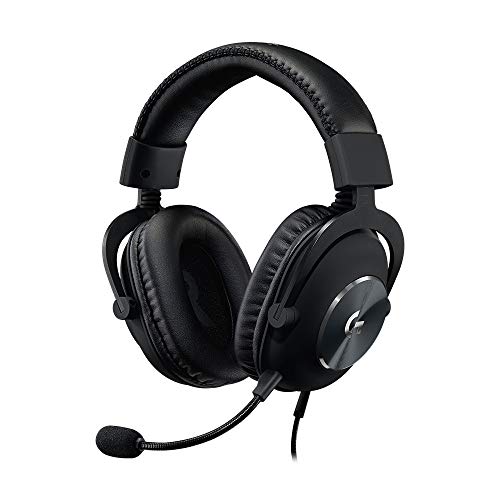
Logitech G Pro X Wired — Best for voice and tuning
The wired G Pro X makes the most articulate case in this guide for what USB processing should be spent on: the microphone. Its Blue VO!CE suite, available over the USB DAC connection, applies broadcast-style processing — compression, de-essing, noise handling — that turns a good boom into a voice your team hears as produced rather than merely captured. In a Discord channel full of analogue headsets, the difference is embarrassing: your callouts arrive with a radio host’s steadiness while everyone else’s levels wander with their posture. For shot-callers, streamers and anyone whose job inside the game is talking, that processing is not a garnish; it is the product.
The ears are not neglected. The 50mm drivers carry the clean, disciplined tuning the Pro line is known for — bass fenced, mids forward enough for cues and voices, treble informative without cruelty — and the DTS 7.1 on offer is, per this guide’s rule, virtual surround: a rendering you may enjoy in a single-player epic and should probably disable in a ranked match, where the headset’s native imaging is the sharper tool. The box respects the owner, too: spare memory foam pads, a detachable boom, a bag for travel. Fed by its USB DAC, the Pro X is the thinking player’s USB headset — the one that treats your voice as seriously as your hearing.
Its analogue mode, by 3.5mm, is the honest fallback: the drivers without the processing, which means the microphone magic stays behind with the DAC. Know which mode you are in, and the headset never disappoints.
- USB DAC included, with 3.5mm connection as the alternative path
- Blue VO!CE microphone processing over the USB connection
- DTS 7.1 virtual surround — software processing, stated plainly
- 50mm drivers with a clean, competitive stereo tune
- Detachable boom, spare memory foam pads and a carry bag in the box
Strengths
- Blue VO!CE processing gives it the most produced voice in this guide
- Clean competitive stereo that needs no processing to convince
- Generous box: spare pads, detachable boom, travel bag
Trade-offs
- The microphone processing lives on the USB path only
- Virtual surround, as ever, flatters single-player more than ranked play
- Software suite is one more ecosystem to keep updated
Best for: talkers — captains, streamers and coordinators — who want USB spent on their voice as much as their ears.
Not suited for: players who will live on the 3.5mm connection and never meet the features that justify this pick.
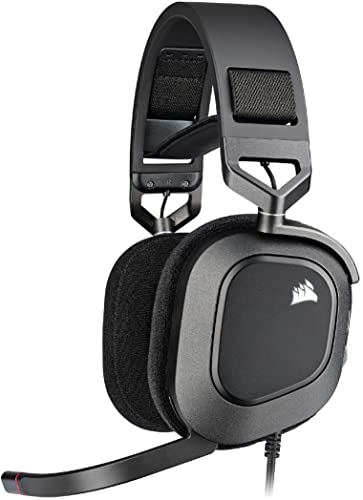
Corsair HS80 RGB USB — Best USB-native design
Most USB headsets are analogue headsets that met a sound card; the HS80 RGB USB was drawn as a USB instrument from the first sketch, and the coherence shows. There is one connection, one signal path and one personality: plug it into the PC and the whole design — conversion, processing, controls — is the product you bought, with no second, lesser headset hiding inside the same shell. Its headline is the microphone, a broadcast-quality capsule that captures a strikingly natural, full voice for a gaming headset, the kind of voice that makes podcast listeners ask what you are using. Paired with clean sidetone over USB, it makes long voice sessions feel less like shouting into a headset and more like talking in a room.
The sound follows the same grown-up philosophy. The tuning is clear and composed, with enough low-end authority for cinematic play and a midrange that keeps dialogue and callouts in front; the Dolby Audio 7.1 is virtual surround, rendered in software, and the headset is at its best when you treat that as an occasional seasoning for single-player scale rather than a default. On-ear controls keep volume and mute at your fingers, the floating headband and memory foam make the long session easy, and the RGB — present, as the name promises — can be dimmed to invisibility by players who prefer their instruments unlit. It is a PC specialist and proud of it: no console versatility, no analogue escape hatch, just the USB brief executed completely.
For the desk-bound player who games, streams and works from the same chair, that specialisation is the point. One cable, one device, no compromises carried over from a multi-platform design brief.
- Wired USB connection by design — no analogue mode to confuse the story
- Broadcast-quality microphone with an unusually natural voice
- Dolby Audio 7.1 virtual surround, switchable in software
- Memory foam earpads and on-ear controls
- Floating headband design built for long PC sessions
Strengths
- A USB-native design with no diluted second personality
- The most natural microphone voice in this guide
- Composed tuning and comfort built for the long PC day
Trade-offs
- PC-only by design — consoles need look elsewhere
- Dolby surround is virtual and best used selectively
- RGB styling will not charm minimalists, even dimmed
Best for: PC players and streamers who want one wired USB instrument that does voice and game sound equally seriously.
Not suited for: multi-platform households and anyone who needs a 3.5mm mode for controllers or travel.

Audio-Technica ATH-M50xSTS-USB — Best for streamers
Audio-Technica built the StreamSet for a specific modern creature: the player who is also a broadcaster, whose voice is content and whose headset is a studio. The ATH-M50xSTS-USB takes the M50x — a studio headphone with decades of session work behind it — and fits it with a cardioid condenser microphone derived from the company’s studio microphone practice, connected over USB through a 24-bit/96kHz converter that comfortably exceeds the resolution of any game’s audio. The result is the most studio-legitimate signal path in this guide: what your audience hears is not a gaming headset’s impression of your voice, but your voice, converted properly.
Sidetone circuitry completes the broadcaster’s toolkit, feeding your own voice back to your ears at a natural level so you stop doing the two things headset streamers do — shouting over their own isolation, or mumbling into a void. The headphone side keeps the M50x character: a close, detailed, slightly energetic presentation that flatters game mixes and lets an editor hear exactly what the audience will. It is a wired, USB-only instrument with a professional’s indifference to console compatibility and wireless fashion, and its price and purpose both say so. Casual players will find it more headset than they need; creators will find it is the first headset that takes their second job seriously.
One honest limit: the M50x fit is a studio fit — firm, close, built for critical listening in sessions rather than marathon lounging — and streamers who broadcast for six hours should audition the clamp before committing their whole channel to it.
- USB StreamSet design built for streaming and content work
- Cardioid condenser microphone modelled on studio practice
- 24-bit/96kHz USB conversion — high-resolution by headset standards
- Sidetone circuitry so you hear your own voice naturally
- Based on the long-running M50x studio headphone platform
Strengths
- A genuine condenser microphone, not a gaming capsule with ambitions
- High-resolution USB conversion that future-proofs the signal path
- Sidetone that keeps your broadcast voice natural and level
Trade-offs
- A specialist’s price for a specialist’s purpose
- Studio-firm fit will not suit every marathon session
- USB and PC-centric; consoles and analogue are outside its brief
Best for: streamers, podcasters and creators whose voice is part of the product they ship.
Not suited for: casual players paying for a studio to play ranked matches, and anyone needing console or wireless flexibility.

Logitech G432 — Best budget USB
The G432 is the budget proof that the USB idea scales down gracefully. Its USB adapter carries the conversion and the DTS Headphone:X 2.0 processing — virtual surround, in this guide’s standing terminology — so a player with a noisy motherboard jack and a small budget gets the category’s core miracle, a quiet background, without buying into the premium tier. The 50mm drivers deliver a fuller, warmer sound than the price prepares you for, with the bass generosity younger players tend to love and a midrange that keeps game dialogue and team chat intelligible inside it. It will not out-resolve the HS80 or out-refine the Pro X, and it does not pretend to; it makes the first serious step up from a bundled headset feel enormous, which at this level is the whole job.
The flip-to-mute microphone is the design’s daily pleasure: swing it up and you are muted, physically, with a certainty no software toggle matches, and the gesture becomes muscle memory within a day. By 3.5mm it moonlights on controllers and laptops as a plain, decent headset, giving the package a second life outside the PC ecosystem. Build is the budget’s honest signature — lighter plastics, a frame that asks to be treated kindly — and the software features are thinner than its Logitech siblings’. Accept those terms and the G432 is the easiest recommendation in this guide to make to a first-time buyer.
Parents and gift-buyers, take note: this is the pick whose virtues — quiet USB sound, a mic that mutes by flipping, console manners by cable — survive contact with a teenager’s desk, which is the harshest testing environment in consumer electronics.
- Connects by USB with its own adapter, or by 3.5mm for other devices
- DTS Headphone:X 2.0 virtual surround over the USB path
- 50mm drivers with a fuller sound than the price suggests
- Flip-to-mute microphone that parks vertically
- Lightweight frame aimed at long, casual sessions
Strengths
- Real USB conversion and processing at a starter price
- Flip-to-mute mic that makes muting a physical certainty
- Warm, full sound that flatters games and chat alike
Trade-offs
- Build materials are honest budget plastic — treat it kindly
- Surround processing is a seasoning, not the reason to buy
- Software depth trails its pricier Logitech relatives
Best for: first-time USB buyers, younger players, and anyone escaping a noisy motherboard jack on a budget.
Not suited for: players who want premium build, a broadcast voice, or the last word in resolution.

HyperX Cloud III — Best modern all-rounder
The Cloud III is what the USB category grew up to be: not a sound card with a headset attached, but a headset whose connections — USB-C, USB-A by adapter, plain 3.5mm — simply cover the modern desk without ceremony. It carries no surround processing of its own and no software suite demanding residence on your PC, and that restraint is its thesis. The conversion path over USB is clean, the background is quiet, and the 53mm drivers do the rest with a tune this guide has praised wherever it appears: bass present but leashed, voices in front, treble that respects the length of your session. It sounds like itself on every machine it meets, which is a rarer virtue in this category than it should be.
The detachable 10mm microphone keeps the same philosophy — clear, natural, with an LED at its tip that answers the muted-or-not question at a glance — and unplugs entirely when the headset travels, converting it into anonymous headphones for a train or a library. Against its ancestor the Cloud II, the III trades the sound card’s theatre for modern manners: lighter, simpler, equally honest underneath. Players who want processing, profiles and production will find richer toys in the G Pro X; players who want a USB headset that behaves like a well-made tool — plug in, play, unplug, repeat for years — will find this the most grown-up pick in the guide.
It is also the safest gift in the category, because its compatibility list reads like the contents page of a modern household: PC by USB-C or A, consoles by controller, handhelds and phones by jack, all without a single extra purchase or a settings expedition.
- USB-C and USB-A leads in the box, plus a 3.5mm connection
- 53mm drivers with a clean, low-fatigue tune
- Detachable 10mm microphone with an LED mute indicator
- Memory foam earcups and a durable, flex-friendly frame
- No battery, no required software, no ecosystem lock-in
Strengths
- Covers the whole modern desk: USB-C, USB-A and 3.5mm
- Clean conversion and a tune that needs no software rescue
- Detachable mic with a glanceable mute LED
Trade-offs
- No surround processing or voice suite — restraint is the design
- No wireless mode at any price in this model
- Soundstage is tidy rather than expansive
Best for: players who want modern USB convenience without software ecosystems, and anyone buying one headset for many machines.
Not suited for: streamers chasing microphone production, and players who want processing features to play with.
How Can You Set Up a USB Headset Correctly the First Time?
Plug it into a rear motherboard port rather than a front-panel one or an unpowered hub, because the rear ports sit closest to the source and draw the cleanest power — a small thing that prevents a surprising share of USB audio gremlins. Then make the headset the default device for both output and input in your system settings, and check that your game and your chat app are actually using it rather than a remembered monitor or webcam microphone; the classic USB headset complaint, a brilliant picture of sound paired with a terrible voice, is almost always a chat app still listening to a camera. Set your microphone level so ordinary speech sits comfortably below the top of the meter, enable the sidetone if your headset offers it, and record one test message to yourself before the first match.
Finally, audition the processing honestly. Play one session with surround and enhancements off, then enable one feature at a time on subsequent sessions, keeping only what you can describe the benefit of in a sentence. Features you cannot describe are weight, not wings — and several picks in this guide are at their best with almost everything switched off, which is a compliment to their tuning, not a complaint about their software.
What Mistakes Do USB Headset Buyers Make?
The costliest is buying the name instead of the connection: ordering a famous headset in its 3.5mm form, then wondering where the surround, the processing and the quiet background went. The second is stacking processing — headset surround inside a platform’s spatial sound inside a game’s own binaural mix — until three algorithms are widening the same signal into soup; choose one layer, usually the game’s own, and switch the rest off. The third is neglecting the microphone path: leaving a chat app pointed at a webcam mic while a condenser sits an inch from your mouth.
Fourth, buyers abandon good headsets over fixable gremlins — a hub that starves the DAC, a sample-rate mismatch between system and game, a firmware update left unapplied. Work the boring checklist before the returns label: rear port, default devices, matched sample rates, updated firmware. And fifth, do not judge a USB headset in its first ten minutes with every feature blazing; judge it the way this guide did, on the quiet background and the honest stereo underneath, because those are what you will still be hearing in year three.
What Is the Difference Between a USB Sound Card, a USB DAC and a Native USB Headset?
The three arrangements in this guide solve the same problem from different directions, and knowing which you own explains most of its behaviour. The Cloud II’s approach is the sound card on a cable: a separate USB device that converts and processes, with the headset itself remaining an ordinary analogue product that can leave the card behind. That modularity is a genuine virtue — the headset survives the card, the card can serve other headphones — and a genuine clutter cost, because your desk gains a control pod and a second length of cable to manage. The G Pro X’s USB DAC is the same idea miniaturised into an inline adapter, trading the pod’s physical controls for software depth, above all the Blue VO!CE microphone processing that justifies its existence.
The native designs — the HS80 RGB USB and the ATH-M50xSTS-USB — move the conversion into the headset itself. Nothing dangles, nothing is left behind, and the manufacturer controls the entire path from USB plug to driver, which is why both picks sound so composed and why both are useless, by design, with anything that lacks the right USB audio support. The Cloud III and G432 split the difference with adapters and multi-mode leads, citizenship in both worlds at the price of a little of each world’s purity. None of these architectures is the correct one. The sound card suits the tinkerer and the upgrader; the DAC suits the voice-led player; the native design suits the specialist who wants one perfect path; the hybrids suit households. Match the architecture to the life, and the daily experience — not the spec sheet — will confirm the choice every time you sit down.
One consequence deserves emphasis because it surprises buyers: in the native and DAC designs, the headset’s sound is partly defined by firmware and software that can change after purchase, usually for the better, occasionally with a setting reset that eats an evening. Keep a note of your preferred settings somewhere outside the app. It takes thirty seconds, and it converts a future software surprise from a small crisis into a small errand.
How Do USB Headsets Behave Across PC, Console and Handheld?
The PC is the natural home of every pick here: full features, full software, no negotiations. PlayStation consoles accept USB audio from many headsets directly, typically delivering game audio and chat through the connection, though the deeper software suites stay behind on the PC — the headset you hear is the same, the control room is smaller. Xbox is the strict doorman of the group: its controllers do not accept USB audio in the PC manner, so the multi-mode picks earn their keep there through the 3.5mm lead, becoming their analogue selves, while the USB-native HS80 and the StreamSet simply do not attend that party at all. The Switch and handheld PCs sit between the stools, accepting some USB audio devices in docked or direct connection and rewarding the same dual-mode flexibility.
The practical lesson is to count your machines before your features. A household with a PC and a PlayStation can live happily inside the USB-native world; a household that adds an Xbox should buy a pick whose analogue mode is a real headset and not a apology — the Cloud II, Cloud III and G432 all pass that test, each having been designed when multi-platform life was the brief. And the traveller’s corollary: a USB headset plus a laptop is a complete, consistent audio environment anywhere on earth, sounding identical in a hotel to how it sounds at home, which is a luxury analogue players fed by unknown jacks cannot promise themselves.
Why Does Microphone Processing Matter More Over USB?
Because USB is where your voice stops being a raw electrical signal and becomes data that can be helped. An analogue boom sends whatever it captures — your voice, your keyboard, your room’s echo, the fan you forgot was on — down the wire unchanged, leaving your chat software to cope. A USB path can intervene before the signal ever leaves the desk: gain can be set sensibly, a gate can hush the silence between sentences, compression can hold your level steady when you lean back, and sidetone can be mixed in with no perceptible delay. The G Pro X’s Blue VO!CE is this guide’s fullest expression of the idea, and the StreamSet’s circuitry its most professional one, but even the modest processing in the budget picks lifts a voice from serviceable to pleasant.
The discipline is to use processing as hygiene, not theatre. Heavy noise suppression can clip the first syllable of excited callouts and give your voice a watery, underwater edge; aggressive gates chop sentences into telegrams. Set the chain in order — position the boom first, level second, processing last and lightest — and record the result in your actual chat app, because that app applies its own processing on top and the stack, not any single layer, is what your team hears. Players who spend one careful evening on this chain are rewarded with the strangest compliment in gaming: nobody ever mentions their microphone again.
How Long Will a USB Headset Stay Current?
Longer than its reputation suggests, with one condition. The audio side of USB is a settled standard; a well-made USB headset from years ago still converts cleanly today, which is why the Cloud II’s design has outlived the consoles it launched beside. The ageing risk lives in the software layer — suites that stop updating, settings stored in clouds that evaporate — and it is precisely the risk the restrained picks here avoid: the Cloud III asks for no software at all, the Cloud II’s card does its work in hardware, and even the feature-rich G Pro X keeps its virtues in a DAC you hold rather than a service you rent. Prefer, as a rule, headsets whose best day does not depend on a company’s continued enthusiasm, and your purchase ages like an instrument instead of like an app.
Physically, the same replaceability logic applies as everywhere in this batch: detachable booms on the HyperX and Logitech picks, replaceable pads, cables that can be renewed. The USB-specific addition is the port itself — treat the connector kindly, avoid yanking the lead sideways, and coil rather than kink. Do those small things and a USB headset is a five-to-ten-year companion, outlasting the PC it first plugged into and sounding, on the day it retires, almost exactly as it did on the day it arrived. Consistency, in the end, is the USB category’s deepest promise, and its best products keep it.
Which USB Headset Suits Which Kind of Player?
Start with the player whose PC fights back — the one with the whining jack, the buzzing front panel, the motherboard from a budget build. For that player, almost any pick here is a transformation, and the G432 or Cloud II delivers it at the friendliest cost: the first quiet loading screen will feel like a new computer. Move up a rung to the player whose games are social infrastructure, the nightly squad member whose voice is a load-bearing part of the evening. That player belongs on the G Pro X or the HS80, where the microphone investment pays out every single session, in every callout that lands exactly as intended. A third player, the creator, has the easiest decision in the guide: the StreamSet was drawn around their desk, and everything else is a compromise they will spend a year routing around.
The fourth player is the household diplomat, gaming across a PC, two consoles and a handheld, often in a shared room. The Cloud III was designed in that player’s image — every connection in the box, no software allegiance, a mic that detaches when the headset leaves the desk. And the fifth player, the traditionalist, wants the sound card on the cable and the buttons under their fingers: the Cloud II remains their reference, a design old enough to be a classic and good enough that classic is not a euphemism. Notice what this taxonomy never asks — which headset has the most processing, the longest feature list, the brightest lights. It asks what your evenings look like. The category rewards that question and punishes every other.
A Brief Defence of Boring Reliability
USB headsets suffer in reviews because their greatest virtue photographs badly. A silent background cannot be screenshot; a connection that simply works every day for five years generates no content. Yet across this guide’s picks, the owners who report the deepest satisfaction are rarely the ones who bought the most processing — they are the ones whose headset vanished into their routine, whose teammates never learned its name, whose only maintenance is a pad change and an occasional dusting. The Cloud III and Cloud II dominate that testimony for a reason: they ask nothing. No suite to update, no profile to reload, no battery to forgive. In a category that sells transformation, there is a mature pleasure in a product that transforms exactly one thing — the noise floor — and then leaves you alone with the game.
That is not an argument against the richer instruments here. The StreamSet’s converter and the Pro X’s voice chain are real capabilities that real players use nightly. It is an argument for buying capability you have already imagined using, in a scene you can describe, on a desk you actually own — and for letting the rest of the feature list go unbought without regret. The headsets in this guide will all be somebody’s perfect purchase. The boring-reliability test — will this still be effortless in year three? — is how you find out whether one of them is yours.
What Should You Check During Your First Week With a USB Headset?
Run the gremlin list while the returns window is open and your patience is high. First, the quiet test: pause a game in a silent scene, raise the volume to your playing level and listen for anything that is not the game — hiss, whine, a buzz that follows the mouse. A good USB path gives you nothing, and nothing is the specification. Second, the voice test: record yourself in your team’s application at your real distance, with the room in its real evening state, and play it back on laptop speakers; if your words survive that chain, they will survive your team’s headsets. Third, the restart test: reboot the machine and confirm the headset returns as the default device with your settings intact, because a headset that needs re-introducing to its own computer every morning will quietly train you to dread it.
Fourth, the long-session test, which is really a comfort audit disguised as a gaming night: two hours minimum, your ordinary posture, your glasses if you wear them. Note where pressure gathers and whether the seal survives your expressions — a headset that sounds superb for twenty minutes and migrates around your head for two hours has failed the only test that compounds. Finally, the household test: hand the headset to whoever shares your space and ask what they hear from it and what they think of your voice through it. Their answers are the ones you will live with longest, and they are free.
Why Sample Rates and Settings Deserve One Careful Minute
USB audio carries one setting that causes a disproportionate share of mysterious problems: the sample rate, the speed at which the system and the device agree to exchange audio. When the operating system, the headset and a game disagree about it, the symptoms wear disguises — crackling that sounds like a failing cable, a voice pitched strangely in recordings, audio that drifts out of step with video. The fix is unfashionable and total: open the device settings once, set the rate your headset’s maker recommends, set the same in your recording defaults, and leave it alone forever after. The StreamSet’s high-resolution converter makes the setting worth understanding rather than fearing — its 24-bit/96kHz path exists for recording headroom and clean conversion, not because games secretly need it — but for every pick here, one matched, unglamorous setting beats a month of forum archaeology. USB rewards the player who configures once and plays forever; it only ever punishes the player who configures nightly.
The Work-From-Home Dividend Nobody Advertises
Every pick in this guide leads a double life that its box never mentions: it is also a meeting headset, and for many owners the daytime performance quietly justifies the purchase more than the gaming does. The same properties that serve a squad at midnight serve a stand-up call at nine — a quiet conversion path that does not broadcast your PC’s electrical weather to your colleagues, a microphone that makes you the clearest voice in the meeting without a word of setup, sidetone that keeps you from booming into a quiet room of remote listeners. The StreamSet and HS80, with their broadcast-leaning microphones, are practically auditioning for the job; the Cloud III’s detachable boom and anonymous unplugged look make it the diplomat of the home office; even the G432’s flip-to-mute is a meeting feature wearing gaming clothes, because the physical certainty of a parked microphone beats a software icon in every all-hands ever held.
There is a small etiquette dividend, too. A player who games and works through one headset owns one mute habit, one volume instinct, one device whose behaviour is known in both worlds — and the cross-training shows. If your desk serves two masters, weight the microphone sections of this guide double and the lights not at all; the headset that makes you sound employable at noon and unbeatable at midnight is not a compromise. It is the category working exactly as designed.
One more scene deserves a place in this guide because it decides real purchases: the late-night session in a thin-walled home. A USB headset’s sealing earcups and sidetone conspire kindly here — you hear your own voice at a natural level, so you stop performing your callouts for the whole building, and the closed designs among these picks keep the game’s explosions inside the friendship of the earpads. The analogue alternative, a headset fed by a controller across the room, offers no sidetone and no such mercy. If your gaming hours begin when the household’s end, treat sidetone and seal as headline features when you choose among these six, whatever the boxes choose to headline instead. Your neighbours, who will never know why the nights grew quieter, send their regards in advance.
And for the player assembling a first battlestation from nothing, a sequencing tip that saves money in the right order: buy the headset before the standalone DAC, the sound card and the audio interface you have been browsing. A good USB headset already contains the conversion those devices sell, voiced for its own drivers, and it will teach you — across a season of play — whether your ears actually want the deeper hobby. Many players discover the headset was the destination. The rest discover it with a year of happy evidence behind them, which is the cheapest tuition the audio hobby offers.
Keep one spare habit from the analogue era, too: coil the cable loosely, never wrap it tight around the headset, and give the USB connector a straight pull rather than a sideways wiggle when you unplug. USB headsets die at their joints far more often than at their drivers, and the joints are entirely within your care. A headset treated that way will greet your next PC, and very possibly the one after that, with the same quiet background it offered the first — which is, in the end, the whole promise of the category kept in miniature.
If you take a single test from this guide into a shop or a returns window, make it the silence test: a paused game, a quiet room, the volume where you actually play. What you hear in that pause — or, on the right headset, gloriously fail to hear — predicts your next five years of evenings more faithfully than any demo track, any feature list and any badge on any box in this category.
Silence, it turns out, is not the absence of a feature. On the right USB headset it is the feature — the one underneath all the others, working in every scene, asking for no updates, and noticeable precisely because you will never have to notice it again.
Choose accordingly, plug in once, and let the category do the thing it was invented to do: disappear completely, leaving only the game, your voice and the people on the other end of both.
That disappearance is the highest compliment any of the six headsets above can earn, and each of them, in its own price class and personality, has genuinely earned it, night after night, from the players who live with it, trust it, game on it daily and recommend it to their friends without hesitation.
Final Recommendation
Take the Cloud II if you want the classic sound-card experience that defined this category, the G Pro X if your voice leads your team and deserves production, and the HS80 RGB USB if you want the USB brief executed natively, mic first. Take the ATH-M50xSTS-USB if you broadcast, the G432 if you are starting out, and the Cloud III if you want the modern, software-free all-rounder. Above all, buy the connection as deliberately as the headset — because the day your games go quiet in the right way, you will realise the hiss you used to play through was never part of the game at all.
Frequently Asked Questions
Does USB really sound better than a 3.5mm jack?
It sounds cleaner, which most players experience as better: the digital path avoids the interference that analogue wiring picks up inside a PC. The drivers still decide the ceiling of quality, which is why this guide judges the stereo tuning underneath the connection — but the floor, the silence between sounds, belongs to USB.
Is the 7.1 surround on these headsets real?
No. On the Cloud II, G Pro X, HS80 and G432 it is virtual surround — software processing of the audio signal, rendered into two earcups. It can widen the perceived stage and some players enjoy it, especially in single-player games, but it is a switchable effect, not seven physical channels, and competitive players often prefer it off.
What is the difference between the USB and 3.5mm versions of the same headset?
Often, most of the product. The Cloud II through its USB card gains processing, controls and a cleaner conversion path; by 3.5mm it is a simpler analogue headset. The G Pro X’s Blue VO!CE microphone processing exists only over its USB DAC. Always check which connection a review, a setting or a feature belongs to.
Do USB headsets work on consoles?
Some do, within limits. PlayStation consoles accept many USB audio devices directly, while Xbox controllers do not take USB audio the same way, which is why dual-mode picks like the Cloud III and G432 — USB for PC, 3.5mm for controllers — are the safe multi-platform buys. The HS80 RGB USB and the Audio-Technica StreamSet are PC instruments by design.
What is sidetone, and should I use it?
Sidetone is your own voice fed back into your ears as you speak. Without it, a sealing headset makes you shout without realising; with a natural amount, you speak at conversational level and your team hears a calmer player. The StreamSet builds it into its circuitry and most USB picks offer it in software — enable it, set it low, and forget it.
Why does my USB headset pick up buzzing or drop out?
Work the boring list first: move it to a rear port, remove unpowered hubs from the chain, match the sample rate between the system and the game, and update the firmware. Most USB audio gremlins are power, routing or settings wearing a disguise — not a dying headset.
Related Guides
Keep going with best 7.1 sound cards for the internal route to processed audio, best 3d sound cards for spatial hardware explored in depth, and best 5.1 sound cards pc when a speaker rig shares the same machine.


