What's inside
- Key Takeaways
- Quick Picks
- How Did We Choose Six Natives From a Crowded Class?
- Why Has 1080p Held the Centre for So Long?
- The Six Picks in Detail
- One Table, Six Temperaments
- How Can You Verify a Camera Is Truly 1080p?
- What Does 1080p30 Versus 1080p60 Actually Change?
- What Can a Native 1080p Camera Do Beyond Meetings?
- How Do Focus Philosophies Divide This Class?
- How Wide Should a 1080p Camera See?
- How Do You Set Up a Native 1080p Camera So the Resolution Survives?
- Why Does Audio Decide More 1080p Purchases Than Owners Admit?
- Which Pick Fits Which Desk? A Short Field Guide
- What Should You Spend on Mounts and Small Things?
- Which Mistakes Do 1080p Buyers Make?
- How Long Will the 1080p Class Stay the Right Answer?
- What About Privacy Inside the Native 1080p Class?
- How Does a House Full of 1080p Cameras Treat a Connection?
- What Does the First Week With a New 1080p Camera Teach You?
- Final Recommendation
- Frequently Asked Questions
- Related Guides
As an Amazon Associate I earn from qualifying purchases. This post may contain affiliate links at no extra cost to you.
gizmoverdict.com is reader-supported. When you buy through links on our site, we may earn an affiliate commission.
Where to buy: each camera below is linked to its Amazon listing in the Quick Picks table and again in its detailed review. In this class, confirm on the listing that the model named is the model in the box — several famous names here have siblings at other resolutions wearing nearly identical clothes.
There is a sweet spot in the webcam world, and the best affordable webcams 1080p shoppers can buy live right in it. Full HD is where a face on an ordinary monitor stops looking like an approximation and starts looking finished, where the calling platforms were designed to live, and — because sensor production matured long ago — where genuinely good cameras now sell for genuinely modest money. This class is therefore not a compromise category at all. It is the centre of the market, bought by people who did the arithmetic and discovered that the arithmetic ends here.
This guide holds a strict line that its sibling coverage of affordable HD deliberately does not: every pick below is a native 1080p camera. No 720p floor model, however honest. No 2K guest, however tempting. Six cameras that output a true Full HD picture, chosen because they differ in the ways that remain once resolution is settled — frame rate, light behaviour, microphones, focus philosophy, and the character of the company standing behind them. If you have already decided 1080p is your class and your budget is a household one, this is the page where the decision gets finished.
Key Takeaways
- 1080p is the calling world’s centre of gravity: sharp on normal monitors, native to the platforms, and priced kindly by a mature sensor market.
- Every pick here is native Full HD — this guide admits no 720p floor and no 2K guests, so the comparison is purely about character.
- The real dividing lines inside the class are frame rate (the StreamCam’s sixty), light sensing (the Kiyo Pro’s speciality) and microphone design.
- The C920 twins — the S with its shutter and stereo sound, the X beside it — remain the class’s reference point for proven behaviour.
- For a single main desk, the EMEET C960 and Logitech Brio 101 divide the value vote: breadth of features versus depth of simplicity.
- Verify “1080p” on any listing by its video specification, never by photo size or an upscaled mode’s marketing name.
Quick Picks
| Pick | Badge | Why it is here |
|---|---|---|
| EMEET C960 (1080p version) | Best all-round value | Native Full HD with dual microphones and a wide view, balanced for the ordinary home desk. |
| Logitech Brio 101 | Best for simplicity | Current Logitech engineering, automatic light balance and a shutter, with nothing left to configure. |
| Logitech C920S HD Pro | Best proven classic | The benchmark 1080p camera of its era, completed by the privacy shutter the line always needed. |
| Logitech C920x HD Pro | Best for platform households | The same classic Full HD formula in the edition long bundled for mainstream meeting use. |
| Logitech StreamCam | Best motion — 1080p60 | Sixty frames a second over USB-C, for callers whose hands and demonstrations move. |
| Razer Kiyo Pro | Best in poor light | An adaptive light sensor and HDR-minded tuning that rescue rooms other 1080p cameras surrender. |
How Did We Choose Six Natives From a Crowded Class?
The first filter was definitional, and it removed more cameras than any other: the sensor and the video pipeline had to be genuinely 1080p. The affordable aisle is salted with cameras whose boxes borrow the number from a still-photo mode or an interpolated upscale, and a guide that repeated those claims would be laundering them. Every pick here is a model whose Full HD video output is its maker’s own headline specification, verifiable in the listing itself. The second filter was affordability with a floor under it — cameras from makers with support histories, whose listings describe the product plainly, in the price territory a household would recognise as modest.
What remained was a field of honest sameness in resolution and real difference in everything else, so the final six were chosen as a spread of philosophies rather than a ranking of near-twins. Two interpretations of value (EMEET’s breadth, the Brio 101’s restraint). Two editions of the class’s defining classic, because households keep meeting both in the wild and deserve to know how they differ. One motion specialist. One light specialist. A reader whose desk matches any of those descriptions can stop reading at their pick with our blessing; a reader still deciding gets a comparison of temperaments, which is the only comparison left worth making at a fixed resolution.
Why Has 1080p Held the Centre for So Long?
Because three curves crossed there and stayed crossed. Displays: the monitors most people work at are themselves 1080p or modestly above, so a Full HD camera maps onto the watching experience almost exactly — more resolution mostly feeds cropping and recording headroom rather than the live call. Platforms: the major services built their bandwidth ladders, layouts and expectations around Full HD as the top everyday tier, which means a 1080p feed is the best-fed guest at every table. And silicon: the sensors and encoders for this class became commodities years ago, so the price of doing 1080p well collapsed while the price of doing it badly collapsed only slightly less — narrowing the gap until “well” became the rational default.
The consequence for buyers is a rare gift: a class where the sensible choice and the popular choice are the same choice. You are not hunting a hidden gem or decoding a naming scheme designed to confuse; you are choosing among mature products whose behaviour is documented by years of other people’s meetings. The risks that remain are the small print risks this guide keeps flagging — a sibling model at another resolution, a listing that flatters, a room whose light defeats any sensor in the class. Handle those, and 1080p money buys 1080p certainty, which is more than most technology categories offer at any price.
The Six Picks in Detail
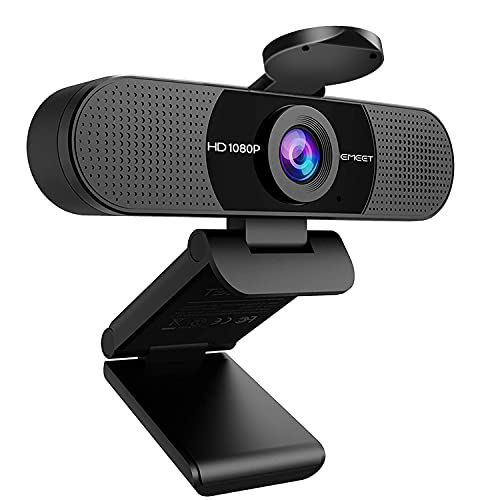
EMEET C960 (1080p version) — Best all-round value
Start the class tour with its balance point. The C960 takes native Full HD as its foundation and spends its design budget where a home desk feels it: a wide field of view that fits a speaker, their chair and a human amount of room behind them, and a dual-microphone array that keeps the voice steady when the speaker glances between screens. In the small, close-walled rooms where affordable cameras overwhelmingly live, those two choices matter more than any laboratory measure of sharpness, and they are why this camera opens the list rather than merely joining it.
Its compromises are the class’s usual ones, honestly worn. The processing favours a bright, lively picture over a faithful one, which meetings forgive and recordings expose. low light is handled by enthusiasm — gain and brightness — rather than by the sensor heroics of the Kiyo Pro at the list’s end. And the camera’s light build asks its clip to do the dignity work. None of this displaces it as the value answer for the standard case: one desk, one speaker, ordinary light, daily meetings, and an owner who wants the purchase finished. If your situation is the median situation, the median camera, done this well, is the correct buy.
- Resolution: native 1080p Full HD at 30 frames per second
- Field of view: wide — built for close desks
- Microphones: dual array for steadier speech
- Connection: USB plug-and-play
- Character: bright processing, featherweight hardware
Strengths
- The class’s balance point: nothing important is missing.
- Wide framing suits the rooms affordable cameras actually serve.
- Dual microphones lift it above single-mic rivals at similar money.
Trade-offs
- Colours lean lively rather than true.
- Dim rooms get brightness at the cost of detail.
- No shutter and no manual controls to grow into.
Best for: the standard home desk wanting native Full HD without a second thought. Not suited for: dark rooms or colour-faithful recording.

Logitech Brio 101 — Best for simplicity
The Brio 101’s argument is that at 1080p, the remaining problems are not resolution problems. They are the Tuesday problems: light that changes between the morning standup and the afternoon review, a lens left uncovered on a desk in a shared flat, a relative on the other end of your setup instructions who will never open a settings panel. Logitech’s answer is a camera with automatic light balance that quietly holds a face together through the day’s changes, a physical shutter that settles privacy with a fingertip, and a feature list short enough to memorise — because there is almost nothing on it, and what is on it works.
That restraint is a deliberate engineering posture, not an absence of one, and it suits this class perfectly. The buyers of affordable 1080p cameras are overwhelmingly buying an appliance: they want the meeting to start, the face to be clear and the device to vanish from their attention for years. The Brio 101 is the purest appliance in this guide, backed by the maker whose support horizon is the longest in the aisle. Choose it when the camera is for someone else, for a team, or for the version of yourself that has better things to configure. Choose almost anything else on this page when you enjoy the configuring — this camera will politely refuse to join you.
- Resolution: native 1080p Full HD at 30 frames per second
- Light handling: automatic balance, steady through the day
- Privacy: integrated sliding shutter
- Microphone: built-in, clear for meetings
- Ownership: no software residence required
Strengths
- The lowest-friction ownership of any native 1080p camera here.
- Light balance that outperforms its price in mixed rooms.
- A shutter, standard, where rivals treat it as an accessory.
Trade-offs
- Thirty frames is the whole motion story.
- Tinkerers will find the cupboard intentionally bare.
- Its plainness undersells it beside louder rivals.
Best for: gifts, teams and any desk that values appliances over instruments. Not suited for: streamers and manual-control enthusiasts.

Logitech C920S HD Pro — Best proven classic
Some products become the unit of measurement for their class, and in 1080p webcams that product is the C920 line. The S edition is the connoisseur’s version of the classic: the same Full HD picture and autofocus behaviour that a decade of remote workers trusted, the same stereo microphones that gave its voice unusual presence for a camera, and — the completion — a privacy shutter in the box, answering the one criticism the original design could never shake. To buy it today is to buy the class’s history with its single flaw repaired.
The case against it is written in its own specification: thirty frames, USB-A, a design language from another computing era. In meetings, none of that registers. In ambitions — smooth motion, a one-cable modern desk, creative controls — all of it does, which is why the StreamCam and Kiyo Pro occupy this list’s far end. The C920S is for the buyer who has weighed novelty before and been billed for it: the professional replacing a dead camera before Monday, the tutor whose setup must simply work in OBS, in Zoom, in the browser, in everything, because it always has. Proven is a feature. In this class it might be the feature.
- Capture: Full HD, thirty frames, no upscaling games
- Focus: the family’s famously calm autofocus
- Sound: two microphones in stereo, unusual at this level
- Privacy: a cover for the lens, packed in by Logitech
- Plug: USB-A, recognised everywhere instantly
Strengths
- A decade of known behaviour across every platform.
- Stereo audio with more presence than the class norm.
- The shutter completes the classic rather than accessorizing it.
Trade-offs
- Yesterday’s connection and frame rate, unapologetically.
- Price sometimes wanders toward newer designs.
- Fixed character — it does its one thing superbly and stops.
Best for: buyers who rank certainty above novelty. Not suited for: 60fps ambitions or strict USB-C minimalism.

Logitech C920x HD Pro — The other twin
Households meet the C920x in the wild almost as often as its S sibling, and the confusion between them has generated a thousand forum threads, so let this entry do one clean job: the X is the same classic Full HD camera family — same resolution, same autofocus lineage, same light correction, same meeting-platform fluency — in the edition long channelled through mainstream bundles. Its listing speaks the language of the platforms it serves, name-checking the services of the working week, and its microphone-equipped, plug-and-play package is aimed at the buyer who wants the famous name without a deliberation.
How should a buyer choose between the twins? By the small print of the specific listing in front of you: the S foregrounds its included privacy shutter and stereo presentation, while the X’s appeal is its straightforward, often bundle-borne availability. Either delivers the family’s defining experience — a 1080p picture that meeting platforms handle beautifully and a decade of accessories, mounts and advice all fits. The honest verdict is that the twins divide on packaging rather than on picture, and a buyer offered either at a fair figure can accept with confidence. What neither twin offers is the future: for motion or for difficult light, this list’s final two picks are the way onward.
- Resolution: native 1080p Full HD at 30 frames per second
- Microphone: equipped for the mainstream meeting platforms
- Light handling: the family’s established correction
- Connection: USB plug-and-play
- Edition note: bundle-channel sibling of the C920S — compare listing small print
Strengths
- The classic family’s picture and platform manners, intact.
- Frequently the most available route to the C920 experience.
- Every mount, tip and tutorial for the line applies to it.
Trade-offs
- Twin confusion is real — read which edition you are buying.
- Shutter inclusion varies by bundle; check the listing.
- Same era limits as its sibling: thirty frames, USB-A.
Best for: buyers who meet the C920 experience through mainstream bundles. Not suited for: buyers who want the shutter guaranteed in the box — the S states it plainly.

Logitech StreamCam — Best motion: 1080p60
At a fixed resolution, frame rate becomes the honest frontier, and the StreamCam owns it in this class. Sixty frames per second at Full HD changes the feel of everything that moves: a hand demonstrating a knot, a bow crossing strings, a product turning under a seller’s fingers, a face laughing without the slight smear thirty frames leaves behind. It is the difference between watching a person and watching a representation of a person, and once a caller’s work involves gesture — teaching, demonstrating, performing, selling — the difference stops being a luxury and becomes the content itself.
The camera around that sensor is designed by the same logic. USB-C connects it to the current laptop generation without adapters. The mount rotates for vertical framing, acknowledging where so much recorded video now lives. Autofocus and exposure are tuned for a subject who leans, reaches and performs rather than sitting for a portrait. Its compromises are physics and price-of-entry: sixty frames ask more of your light, because each frame gets half the time to gather it, and more of your computer and connection when you stream rather than record. Feed it a lit room and a settled desk and it returns the liveliest picture in this guide — the pick for buyers whose affordable camera must also be a creative instrument.
- Resolution: native 1080p at 60 frames per second
- Connection: USB-C
- Mounting: rotates for vertical video
- Focus and exposure: tuned for moving subjects
- Audience: tutors, demonstrators, streamers, sellers
Strengths
- Motion quality no 30fps rival at this resolution can match.
- Modern connection and creator-minded mounting.
- Grows with the owner from calls into content.
Trade-offs
- Sixty frames hunger for light; dim rooms expose it.
- Static meeting users pay for a gift they never open.
- Asks more of older computers than the 30fps picks.
Best for: anyone whose hands work on camera. Not suited for: still-life meeting duty on weak hardware.

Razer Kiyo Pro — Best in poor light
Every class has a specialist, and the 1080p class’s specialist is light. The Kiyo Pro was engineered around an adaptive light sensor whose whole purpose is the room the other cameras apologise for: the evening office, the basement studio, the north-facing spare room in winter. Where ordinary sensors respond to darkness by amplifying noise until faces dissolve, this one was built to keep gathering — with HDR-minded processing and a wide, adjustable field of view that lets you include exactly as much of the dim room as you intend and no more. The result, in the hours after daylight gives up, is a picture with its dignity intact.
Razer’s gaming heritage shows in the tuning priorities — responsiveness and clarity over cosmetic softness — and in the company it keeps: this is a camera streamers adopted because their broadcasts happen at night in rooms lit for mood. Its trade-offs follow the specialism. In a bright, easy room it merely matches the class rather than leading it, so daylight callers are paying for insurance they rarely claim. And like the StreamCam, it rewards an owner who will spend five minutes with its settings, where the Brio 101 asks for none. Buy it for the room you actually have at the hour you actually call, and it closes this list as the class’s answer to darkness.
- Resolution: native 1080p at up to 60 frames per second
- Sensor: adaptive light sensor — the pick’s reason to exist
- Field of view: adjustable width for framing discipline
- Processing: HDR-minded, clarity-first tuning
- Audience: evening callers and night-lit streamers
Strengths
- Low-light pictures that embarrass the class’s ordinary sensors.
- Adjustable framing keeps dim backgrounds under control.
- High frame rate available when the light allows it.
Trade-offs
- Daylight-only callers pay for a specialism they never use.
- Rewards a few minutes of setup more than plug-and-forget rivals.
- Gaming-brand tuning favours clarity over flattery.
Best for: night workers, basement studios and streamers after dark. Not suited for: bright-room minimalists who want zero setup.
One Table, Six Temperaments
| Camera | Frames | Signature strength | Microphone | Choose it when |
|---|---|---|---|---|
| EMEET C960 (1080p) | 30 | Balance and width | Dual array | Your desk is the standard case |
| Logitech Brio 101 | 30 | Simplicity and shutter | Built-in | The camera is for someone else |
| Logitech C920S | 30 | Proven behaviour | Stereo | Certainty outranks novelty |
| Logitech C920x | 30 | The classic, bundle-borne | Built-in | The famous name is the requirement |
| Logitech StreamCam | 60 | Motion | Built-in | Your hands do the talking |
| Razer Kiyo Pro | Up to 60 | Low-light sensing | Built-in | Your room defeats daylight |
With resolution held constant, the table reads like a personality chart — and that is the correct way to buy this class. Match the row to your room, your hours and your temperament, and the camera will feel chosen rather than merely purchased.
How Can You Verify a Camera Is Truly 1080p?
Because this class’s number is borrowed so often by lesser products, spend sixty seconds as a detective before any purchase — including, in fairness, the picks here, whose listings reward the check. Find the video specification, stated as a resolution at a frame rate, in the maker’s own description; still-photo dimensions are a different number and a favourite hiding place. Treat the phrase “up to” as a question — up to 1080p from a 720p sensor is upscaling, a legitimate feature and a different product. Look for the model’s name on the maker’s own site, where the true class is stated for the record, and be wary of listings where the brand in the title and the brand in the description are cousins rather than twins.
After purchase, verify in the machine: open a local recording app, select the camera, and inspect the recorded file’s properties, where the captured resolution is stated plainly. Then look at the picture on the largest screen you own, because true 1080p has a signature — text on a held-up page stays near-legible, hair separates into strands rather than merging into a cap, and the image survives being viewed full-screen without the watercolour smear of an upscale. A camera that passes the file check and the eye check has earned its badge. One that fails either goes back inside its window, with the listing’s wording quoted in the return note.
What Does 1080p30 Versus 1080p60 Actually Change?
For a seated speaker, remarkably little — and guides that pretend otherwise are selling frame rates. A talking head moves slowly; thirty frames describe it fully, platforms transmit it happily, and the viewer across the call cannot tell your camera’s rate from your stillness. The calculus changes with amplitude. Hands are fast, tools are faster, and anything you demonstrate — a chord shape, a brush stroke, a repair — crosses the frame in ways thirty frames sample coarsely and sixty render smoothly. Recordings widen the gap further, because a kept video can be slowed, paused and scrutinised in ways a live call never is.
Sixty frames also tax the chain: more light per frame is needed to keep each exposure clean, more processing to encode, more bandwidth to send. On an elderly laptop or a thin connection, insisting on sixty can produce a worse delivered picture than a serene thirty — the platform will shed frames under pressure, and it will not shed them gracefully. The mature buying rule is therefore symmetrical: choose sixty when motion is your content or your recordings matter; choose thirty, without a whisper of inadequacy, when your camera life is conversation. Both picks exist in this guide precisely because both answers are right, for different desks.
What Can a Native 1080p Camera Do Beyond Meetings?
Plenty, and the affordable class’s second life is a reason it sells so well. Recorded locally, a Full HD feed is a legitimate production format: the online lesson, the product walkthrough, the family history interview, the audition tape and the community announcement all live comfortably at 1080p, because the screens they will be watched on are mostly this size and the platforms that host them treat the format as home. A tutor recording a course on the C920S, a crafter filming overhead demonstrations with the StreamCam’s motion, a musician capturing practice archives — none of them is using a meeting camera as a makeshift. They are using the format the audience’s devices were built around.
The disciplines that separate a good 1080p recording from a great one cost nothing. Record locally rather than through a meeting platform, so the file keeps everything the sensor saw. Lock the camera’s position and your chair’s position relative to it, because consistency across a series reads as professionalism before any word is heard. Give the microphone its due: at recording distance the built-in arrays in this class are honest, but moving the camera — and therefore its microphones — closer beats every processing trick, which is why demonstrators mount the camera near the work rather than across the room. And light for the recording you want to keep, not the call you can excuse; a kept file is revisited in unforgiving moods.
There is a ceiling, and naming it protects the class’s honour: fast action blurs at thirty frames, theatrical colour is beyond these processors, and a dark stage defeats every sensor here except the specialist’s. Within the ceiling — which covers most of what ordinary creators actually publish — native 1080p at affordable money is not the budget option. It is the rational one, and the audience, watching on the phones and laptops the format was designed for, will never once ask what it cost.
How Do Focus Philosophies Divide This Class?
Autofocus is the class’s default religion, and the C920 family’s implementation is its scripture: the lens quietly tracks the small movements of a speaker — the lean-in for emphasis, the settle-back for listening — keeping the face in the sharp zone without the owner knowing a mechanism exists. Done well, as the classics do it, autofocus disappears. Done eagerly, as some budget rivals manage, it hunts visibly at the worst moments, pulsing as it searches. The picks here were chosen partly for focus manners: the Logitechs and the StreamCam behave like adults, and the EMEET’s enthusiasm stays within meeting-tolerable bounds.
The counter-philosophy deserves its hearing even though no pure fixed-focus model made this native-1080p six: a lens fixed at conversational distance can never hunt, never be fooled by a hand crossing the frame, never decide the bookshelf mattered more than the face. Its cost is a defined zone of sharpness that the sitter must inhabit. In practice the affordable class has voted with its sensors — autofocus won — but the wise buyer still tests the behaviour that ships: hold a notebook up to the camera, as you would in a real call, and watch whether focus travels to it and returns to your face without drama. That ten-second test, performed in the returns window, predicts a year of focus happiness better than any specification paragraph, including this one.
How Wide Should a 1080p Camera See?
Field of view is the specification buyers feel daily and read rarely. A wide view — the EMEET’s territory — forgives the close desk and the shared frame: two people at one screen, a speaker who gestures in paragraphs, a room you are quietly proud of. Its price is presence: the face occupies less of the picture, and at 1080p every pixel spent on the bookcase is a pixel not spent on you. A narrower view reverses the trade, giving the face the sensor’s full attention and the background a merciful crop, at the cost of demanding the chair stay where the frame expects it.
Adjustable designs, the Kiyo Pro among them, try to have the argument both ways, and within limits they succeed — narrowing digitally on a sensor with resolution to spare is respectable at this class’s distances. The buying wisdom is to measure your own geometry before choosing: sit in your chair, note what a camera at your screen would see at arm’s length, and decide whether your calls want the room in the story or out of it. Tutors and demonstrators usually want context; interviewees and executives usually want the crop; families gathering at one screen want every millimetre of width they can get. The class offers all three temperaments at the same resolution and similar money, which is exactly why field of view, not resolution, is the working buyer’s real decision here.
How Do You Set Up a Native 1080p Camera So the Resolution Survives?
Owning 1080p and receiving 1080p are different events, separated by a chain of small settings. Begin in the recording or calling app itself: most platforms default to whatever they judge your connection can bear, and several hide the camera’s full resolution behind a quality preference that must be chosen once, deliberately. Select the camera by name in every app — platforms remember the laptop’s built-in camera with sentimental loyalty — and where the app offers an HD toggle, switch it on while you are looking at it, not during the call it was bought for. Then feed the chain what it needs: a direct port rather than a strained hub, a connection with headroom at the hour you call, and a computer not simultaneously transcoding its photo library in the background.
Verify with a local recording, whose file properties state the captured resolution without diplomacy. If the file says less than the camera promises, work the chain in order — app setting, connection, computer load — before suspecting the hardware, because in this mature class the hardware is almost never the liar. Finish with the physical truths no setting can fix: lens wiped, camera at eye level, light in front. A native 1080p camera, set up once with this much care, tends to stay set up for years, delivering its full specification so reliably that its owners forget the specification was ever in question — the highest state a tool in this class can reach.
Why Does Audio Decide More 1080p Purchases Than Owners Admit?
Because meetings are heard more than they are watched. A caller’s picture occupies a tile; their voice occupies the whole meeting, and the brain forgives a soft image in a way it never forgives a voice that fades, echoes or competes with its own room. The six picks divide audibly once you listen for it: the C920S’s stereo pair gives a voice place and presence, the EMEET’s dual array steadies a speaker who moves between screens, and the simpler built-in microphones of the value picks do honest work at desk distance in quiet rooms. None rivals a dedicated microphone, and the guide’s standing advice holds — a voice that earns money deserves one — but within the class, ears should vote.
Test audio the way you will actually suffer it: not in a silent room at noon, but in your real chair at your real hour, with the household’s real noises flowing, recorded locally and played back on headphones. Speak at meeting volume, turn your head as you do when you think, lean back as you do when you listen. The camera whose microphone survives your actual behaviour, rather than your audition behaviour, is the one your callers will thank you for — silently, by never once asking you to repeat yourself. In a class where the pictures have converged, that silence is the sound of the right purchase — and it is a sound no specification sheet has ever been able to print, which is why this guide keeps returning to the caller’s chair rather than the camera’s box, every single time the choice narrows, without apology for the repetition.
Which Pick Fits Which Desk? A Short Field Guide
The deadline desk — a camera needed before Monday, for a job that starts with meetings — should take the C920S or accept the C920x, because proven behaviour is the only feature a deadline can spend. The family desk, where the camera serves parents in the morning and homework in the afternoon, belongs to the Brio 101, whose shutter and simplicity survive multiple owners without a manual. The demonstration desk — the tutor’s, the maker’s, the seller’s — is the StreamCam’s natural habitat, the one place in this class where sixty frames stop being a specification and start being the lesson itself. The night desk, lit by a lamp and a monitor’s glow, is the Kiyo Pro’s argument made physical. And the standard desk, which is most desks — one speaker, ordinary light, daily calls, no drama requested — should take the EMEET C960 and spend its remaining attention on the chair.
Notice the pattern: no desk was assigned by budget, because within this class the budgets barely differ. They were assigned by behaviour — by hour, by light, by audience, by how many hands will touch the settings. That is the luxury a mature class affords: the money question having been settled by the market, the human questions get the whole of your attention. Answer those honestly and any row of the comparison table becomes the right row; answer them by someone else’s priorities and even the best camera in the class will feel, faintly and persistently, like somebody else’s purchase — a feeling no return window quite fixes, because the camera was never wrong, only misassigned.
What Should You Spend on Mounts and Small Things?
Very little, deliberately — but not nothing. The built-in clips on these cameras serve the standard monitor honestly, and most buyers should stop there for the first month. The exceptions announce themselves: a laptop on a riser lifts its screen beyond the clip’s happiest geometry, a very thin display gives some clips little to grip, and a demonstrator’s overhead angle is a tripod’s job by definition. A small desktop tripod is the class’s one universally sensible accessory, costing less than the difference between any two picks and fixing angle problems that owners otherwise blame on lenses. Beyond it, the accessory aisle fills with solutions auditioning for problems — light rings too small to light, software that beautifies by smearing, cases for cameras that never travel.
Spend the remainder of the accessories budget on the unglamorous: a cable long enough to route kindly rather than stretch, a soft cloth that lives near the desk for the lens, and the lamp this family of guides will keep recommending until the heat death of the webcam category. In a class where the cameras themselves have converged, the experience is decided at the margins — and the margins, mercifully, are cheap.
Which Mistakes Do 1080p Buyers Make?
The first is buying the number instead of the camera — grabbing any box that says 1080p, including the upscalers and the no-names, when the class’s whole value lies in its mature, documented models. The second is twin confusion: ordering a C920 edition, or an EMEET variant, other than the one intended, because the families share faces across resolutions and regions. Read the full model name on the listing as if it were a medicine label. Third, buyers test only in the app they know and discover in a job interview that another platform defaults to the laptop’s camera; select the new camera in every app, once, on a quiet day. Fourth, they mount a fine camera at a dreadful angle — low, close, lit from behind — and blame resolution for a composition problem. Fifth, they buy motion or low-light specialism for a bright, still desk, paying for gifts the room never unwraps. The class is forgiving, but it rewards the buyer who matches the pick to the life.
How Long Will the 1080p Class Stay the Right Answer?
Longer than the upgrade industry would prefer. The forces that enthroned 1080p — display sizes, platform design, sensor economics — are all slow-moving, and the class’s installed base reinforces itself: platforms optimise for the cameras people own, and people own these. A native 1080p camera bought today should expect a working life measured across several computers, because its interface is the operating system’s own and its format is the calling world’s lingua franca. What will eventually move the centre is not a single invention but an accumulation: larger standard displays, fatter default connections, and platforms re-baselining their expectations — a tide, not a wave, and tides give years of warning.
That longevity shapes the buying advice in a way worth stating: in a slow class, buy the well-made version. The difference between the documented models here and the aisle’s anonymous tier is not visible in week one; it is the whole story in year three, when the known camera still behaves, still fits the mounts, still appears in the platform’s tested list, and still has a maker answering for it. Affordable was never supposed to mean disposable. At 1080p, with the centre holding this firmly, it does not have to.
What About Privacy Inside the Native 1080p Class?
The class divides neatly by shutter, and the division is worth a buyer’s attention because a lens on a desk is a standing question that deserves a physical answer. The Brio 101 builds the answer in; the C920S includes it in the box; the others rely on the ecosystem’s aftermarket of covers, on unplugging, or on the operating system’s indicator and permissions, which are honest but immaterial. None of the six requires an account or a cloud to function — a privacy property of the companies as much as the cameras, and one this guide counts as a class virtue worth protecting with your custom.
Practical hygiene completes the picture. Grant camera access per app rather than per system-wide habit, review the list when a season changes, and be thoughtful with browsers, through which a single permission can be exercised by many sites. Teach the household the shutter habit if your camera has one; a closed lens is the only privacy setting that has never been patched, breached or deprecated. In a class chosen for maturity, privacy handled by hardware and habit rather than by promise is maturity’s natural expression.
How Does a House Full of 1080p Cameras Treat a Connection?
Full HD is a reasonable citizen of a household network — heavier than the old class, lighter than the 4K generation — but citizenship is collective. Three simultaneous 1080p calls ask a modest connection to work; four ask it to organise. The choreography that keeps a furnished house happy is by now familiar in these guides because it keeps being true: the important call takes the wired socket if one exists, heavy uploads are scheduled outside calling hours, and the router sits where its signal lives rather than where its cables hide. Platforms adapt each call to what remains, and a house of 1080p cameras adapts gracefully precisely because the class sits at the network’s comfortable middle.
When a call does degrade in such a house, diagnose in the order of likelihood: the connection’s busy hour first, the platform’s mood second, the computer’s background load third, and the camera — in this class, with these makers — a distant and usually innocent fourth. Owners return more good 1080p cameras for network sins than for any defect of their own, and a single evening’s test at a quiet hour, compared against the busy one, will usually acquit the hardware and indict the hour. Buy the class confidently; furnish the network to match; and let the cameras take the blame only when the evidence, gathered calmly, actually convicts them.
What Does the First Week With a New 1080p Camera Teach You?
Day one teaches placement. Every owner discovers the same small geography: the camera belongs at eye level, an arm’s length away, with the light in front — and discovers it by first enduring the low angle, the close crop and the window-lit silhouette that the unboxing excitement produces. Day two teaches selection, when some forgotten app opens on the laptop’s built-in camera and the owner learns to check the video settings before the call rather than during it. By day three the novelty of one’s own clarity fades, which is the camera’s first real victory: a tool becoming invisible while it is still new enough to be returned is a tool that was chosen correctly.
The rest of the week teaches trust. The camera survives the evening light change, the busy-hour connection, the child or colleague who borrows the desk and moves nothing back. Its microphone is judged by the absence of requests to repeat. Its clip stays where it was put. Somewhere around day five most owners stop thinking of it as the new camera and start thinking of it as the desk — and that quiet promotion, repeated across millions of desks, is the entire history of this class in miniature. If your first week teaches different lessons — hunting focus, vanishing devices, settings that reset themselves — the returns window exists for exactly that report. Use the week as the examination it is, and the class will rarely fail you. An examination passed quietly, it should be said, is also the moment to stop shopping — the owners who keep reading webcam guides after their desk is solved are no longer buying a camera, and the class is too honest to pretend that pastime is research.
Final Recommendation
For most readers, the decision ends at the value pair: the EMEET C960 if your desk is the standard case and you want breadth for your money, the Logitech Brio 101 if the camera must disappear into someone else’s routine. Buy the C920S when certainty is the brief, accept the C920x happily when the bundle offers it, and step to the specialists without hesitation when your life demands them — the StreamCam for hands that work on camera, the Kiyo Pro for rooms that defeat the sun. Native 1080p at an honest price is the webcam market’s most settled country; settle in it confidently, light your face, and let the calls be about the people again. That, in the end, is the test every pick on this page was bought to pass — not the specification audit, not the unboxing, but the hundredth ordinary call, where the camera has become furniture and the conversation has become the whole event, exactly as it should have been from the first one.
Frequently Asked Questions
Is 1080p noticeably better than 720p on a laptop screen?
In a small gallery tile, barely; in a one-to-one call or any larger window, clearly. The face gains definition, held-up detail survives, and the picture tolerates the bigger monitors that desks increasingly wear. The class jump is real but contextual — which is why this guide restricts itself to native 1080p while its HD sibling keeps a labelled 720p floor.
Why does this guide exclude 2K cameras that cost similar money?
Scope, honestly declared. The affordable-HD guide on this site covers the mixed class including 2K value models; this page exists for buyers who have settled on native 1080p specifically — for platform behaviour, for a known quantity, for the mature centre — and want the choice finished within it.
What is the difference between the C920S and the C920x?
Packaging and emphasis more than picture. Both are the classic family’s native 1080p cameras with the line’s autofocus and light correction; the S foregrounds its included privacy shutter and stereo microphones, while the X is the edition long sold through mainstream bundles. Read the specific listing’s contents before choosing between them.
Do I need 1080p60 for meetings?
No. Meetings are conversation, and thirty frames describe a seated speaker completely. Sixty frames earn their place when your hands demonstrate, teach or perform, or when you record content you intend to keep and study. Buy motion for motion’s sake only if motion is your material.
Which of these works best in a dark room?
The Razer Kiyo Pro, by design — its adaptive light sensor exists for exactly that room. But give any camera here one lamp in front of your face and the gap narrows dramatically; light remains the cheapest specialist you can hire.
Can I use two of these cameras at once for two angles?
Yes — recording software such as OBS accepts multiple cameras, and a common affordable arrangement pairs a face camera with a second unit over the hands or the workbench. Keep the roles fixed, label the sources in the software, and remember that each additional camera asks the computer and the connection for its share; two 1080p feeds are a reasonable demand, three begin to need a machine that enjoys the work.
Will an older laptop run a native 1080p camera well?
Usually, with housekeeping. A Full HD feed asks more of the processor than the old class did, and an elderly machine already juggling a dozen browser tabs and a syncing library may drop frames it would have sailed through at lower resolution. Close what you are not using, give the call the machine’s attention, and the pairing generally behaves — and if a particular old machine still struggles, the honest fallback is the platform’s lower setting for that computer, not a different camera.
Is a second-hand C920 a smart affordable route?
It can be, with the inspection discipline any used optics deserve: lens clean and unscratched, clip firm, cable supple, and a recorded test before money changes hands if the seller allows it. The line’s durability is precisely why a used market exists. Buy the individual unit’s condition rather than the model’s reputation, and prefer sellers whose return terms survive the first evening’s testing.
Will a native 1080p camera improve how I look on every platform?
It gives every platform the best material to work with, and platforms differ in what they transmit onward. Local recordings keep the full benefit always; live calls share it according to layout, plan and network. The camera guarantees the input — no camera can guarantee the platform’s arithmetic.
Related Guides
The mixed-class view, including the labelled 720p floor and the 2K value reach, lives in Best Affordable HD Webcams: The Cheapest Tier That Still Does the Whole Job; the floor class on its own terms is examined in Best 720p Webcams: One True 720p Survivor and Five Honest 1080p Step-Ups; and motion at this resolution is explored in depth in Best 1080p 60fps Webcams: Native 1080p60 vs 4K Cameras Stepped Down.
Related guides
- Best 1440p 165Hz Monitors: One Native 165Hz Pick, Three 180Hz Upgrades, an Overclock Headline and a 160Hz Ultrawide
- Best 13×19 Professional Printers
- Best 3rd Party MacBook Chargers: 96W-Class Alternatives, the 100W Cable Rule, and the Apple Benchmark
- Best Built PC: Six Prebuilt Gaming PCs Judged on Parts, Power and Upgrades


